/app/operate is the front door to the Operate console. It answers one
question — is anything wrong — without you having to open four other pages.
The page opens with one sentence: Everything is running., 2 things need
you. or, when nothing needs a decision but a row has something to read,
Running, with 1 thing to look at. On a new installation, with no backend, no
model and nothing loaded, it says Nothing is running yet. and offers
Install a backend and Browse models.
Under the sentence are four rows. A row with a problem opens by itself and holds
the button that deals with it. A row with nothing to say stays one line. Click a
row to open or close it.
Needs you
Only things that want a decision:
a backend with an update available, with an Update button
an operation that failed, with Retry and Dismiss
a node that is not answering, with a link to the nodes
Update starts the same update as the Backends page. Retry installs the
failed model or backend again, after moving the failure into the Activity
record, and Dismiss moves it there without retrying. When nothing needs you
the row says so in one line. There is no green panel: a status page that shouts
when everything is fine teaches you to stop reading it.
The attention count on the Status tab is the number of items in this row.
Capacity
One line says how full GPU memory is (system memory on a host without a GPU),
and how much room the models disk has left. On a cluster it adds the memory of
the nodes that are answering, and the row lists each node’s memory when opened.
The row opens by itself when memory is 90% full or more, or when the models disk
has less than a tenth free or less than 20 GB. It then lists the models loaded
on this machine, each with an Unload button. Unloading asks first, stops the
backend process of that model and frees its memory. The next request that uses
the model loads it again.
Under the rows, a bar shows the memory in use now. LocalAI keeps no memory
history, so the chart under the bar is drawn from readings the page took
itself, one with each Operate summary poll (every 15 seconds), while Operate is
open. It starts with the second reading, keeps at most 240 readings (about an
hour), and is labelled “Since you opened Operate”. The axis starts at zero, the
capacity is a labelled line, and a data table sits behind the chart. Leaving
Operate empties it. Temperature and power are not shown because the resources
endpoint does not report them.
Running now
Operations in progress, and the models loaded on this machine. On a single-node
install the row lists the heaviest five models: backend, resident memory, CPU
share and uptime, with View logs and Stop model… in the row menu. Open
this machine leads to the full list. With distributed mode on, models run on
workers rather than on the controller, so the row links to the Swarm page
instead.
Recent failures
Requests and failed requests over the last 24 hours, and p95 latency, counted
server-side by GET /api/traces/summary:
hours defaults to 24 and is capped at 168. Only 5xx responses and transport
errors count as failures — a 4xx is the caller getting it wrong, not the
installation being unhealthy. p95_ms is a nearest-rank percentile, not the
slowest request. The endpoint exists so a dashboard wanting three numbers does
not fetch the whole trace list to count it. An installation that has recorded
nothing says so rather than showing zeroes dressed as telemetry. The row opens
when at least one request failed, and links to Traces and Usage.
The page does not report models that failed to load, because LocalAI records no
load failures to read.
This machine
On a single-node install, Operate → This machine (/app/nodes) shows the
host and everything loaded on it:
GPU memory as one bar, with what is free and a note that the next model
must fit in that, or a loaded model has to be stopped first. With several GPUs
each one gets its own line. A host without a GPU says so instead of drawing
an empty bar.
Models in host memory: one bar split by running model, so you can see
which model is holding memory. LocalAI reports the resident memory of each
backend process, not the GPU memory of each model, so the split is of host
RAM and no model is shown with a GPU size.
The machine: VRAM, RAM, CPU and the models disk, each with a bar, a
percentage and what is left. A reading the host does not report is shown as
“No data”, never as zero.
Running models: search, sort by memory, CPU or uptime, open a model’s
logs, or stop it. Stopping asks for confirmation; the model loads again on
its next request.
The page polls GET /system and GET /api/resources every five seconds. The
per-model readings come from the process block of
GET /system; the host CPU and disk
readings come from the cpu and disk fields of GET /api/resources.
Add a machine reveals the command to start LocalAI in distributed mode, and
a link to the steps for adding a worker. Once distributed mode is on, the same
route becomes the Nodes page and the This machine tab gives way to the
Swarm tab.
Models and backends no longer live under a nested Host page. Use Models →
Installed for model runtime and configuration actions, and Operate →
Backends → Installed for installed backend actions. The overview links into
the canonical Operate sections rather than duplicating those inventories.
Old /app/manage bookmarks remain supported. They redirect with replace
semantics to the matching Installed Models or Installed Backends view while
preserving legacy search, filter, selection, variant, and development flags.
The tab bar
Operate has one row of tabs above the page: Status (this overview),
This machine, Swarm (only with distributed mode on), Runtime,
Traffic and Settings. A tab that holds several pages shows a second row
of links under the bar: Runtime holds Backends, Activity, Logs and (on a single
install) Failover; Traffic holds Usage, Traces and Middleware; Settings holds
Settings and Users (with authentication on); Swarm holds Nodes, Placement rules,
Failover and P2P. Adding a node opens from the Nodes page. Every page keeps its
own URL, and a page such as a node detail keeps its tab highlighted. On a phone
the bar scrolls sideways. The API link at the end of the bar opens the
API documentation.
Several tabs carry a live value: pending backend updates and running operations
on Runtime, the healthy node count on Swarm, running models on This machine, the
attention count on Status and the error count on Traffic. Host capacity lives on
the overview instead of appearing as a separate destination.
Those values are orientation, not an alarm. The bar only exists on Operate
routes, so anything urgent also appears in the Needs you row and on the
operations badge attached to the sidebar entry, which is always visible.
Authentication & Authorization
Note
The install script, the macOS app and the latest container image give version 4.12.1. The add-ons, Office, Sandbox, Pages and Team in these docs need a newer build.
LocalAI supports two authentication modes: legacy API key authentication (simple shared keys) and a full user authentication system with roles, sessions, OAuth, and per-user usage tracking.
Legacy API Key Authentication
The simplest way to protect your LocalAI instance is with API keys. Set one or more keys via environment variable or CLI flag:
# Single keyLOCALAI_API_KEY=sk-my-secret-key localai run
# Multiple keys (comma-separated)LOCALAI_API_KEY=key1,key2,key3 localai run
Clients provide the key via any of these methods:
Authorization: Bearer <key> header
x-api-key: <key> header
xi-api-key: <key> header
token cookie
Legacy API keys grant full admin access - there is no role separation. For multi-user deployments with role-based access, use the user authentication system instead.
API keys can also be managed at runtime through the Runtime Settings interface.
Protected and anonymous HTTP routes
When you configure database authentication or legacy API keys, LocalAI makes the HTTP surface private by default. An anonymous request succeeds only for an approved method and path or an explicit deployment override. If you configure neither authentication mode, the authentication middleware does not restrict requests.
Public discovery APIs
The following discovery requests are available anonymously:
GET /.well-known/localai.json
GET /api/instructions
GET /api/instructions/{name}
Swagger GET requests at /swagger and under /swagger/
These discovery APIs describe the server’s API surface. The endpoints that they advertise still require credentials unless this section lists them as public or bootstrap routes.
Anonymous bootstrap routes
LocalAI also permits the requests needed for health checks, credential acquisition, and the login UI. These routes do not make the rest of the API public.
Health checks: GET /healthz and GET /readyz.
Authentication status and token login: GET /api/auth/status and POST /api/auth/token-login.
Local registration and login: POST /api/auth/register and POST /api/auth/login.
GitHub OAuth: GET /api/auth/github/login and GET /api/auth/github/callback.
OIDC: GET /api/auth/oidc/login and GET /api/auth/oidc/callback.
CORS preflight requests: OPTIONS on every path. A cross-origin preflight cannot carry credentials by HTTP spec, so these requests are never gated on auth; the CORS middleware answers them, which grants no API access.
SPA shell routes: GET /, HEAD /, and GET requests at /app, /browse, /login, /invite/*, and /explorer. Subpaths under /app/ and /browse/ are also available through GET.
SPA assets: GET /favicon.svg and GET requests under /assets/, /locales/, and /static/.
Branding reads: GET /api/branding and GET requests under /branding/asset/. Branding mutations still require admin credentials.
Routes that require credentials
Without an explicit deployment override, every other route requires credentials. This includes GET /version, all model and backend API routes, and all inference routes. MCP and moderation aliases are also private:
POST /v1/mcp/chat/completions, POST /mcp/v1/chat/completions, and POST /mcp/chat/completions
POST /v1/moderations and POST /moderations
Generated output URLs also require credentials. This applies to every URL under /generated-audio/, /generated-images/, /generated-videos/, and /generated-3d/.
Explicit deployment overrides
Embedded deployments can add path prefixes to ApplicationConfig.PathWithoutAuth. Each prefix bypasses global authentication for every HTTP method below that prefix. Route-specific authorization still applies when the route registers it. Keep these overrides as narrow as possible; the default list is empty.
Two legacy flags provide a separate GET-only compatibility override when legacy API keys are configured:
LOCALAI_DISABLE_API_KEY_REQUIREMENT_FOR_HTTP_GET=true enables the override.
LOCALAI_HTTP_GET_EXEMPTED_ENDPOINTS sets the regular expressions for the exempt GET routes.
The endpoint expressions have no effect unless you enable LOCALAI_DISABLE_API_KEY_REQUIREMENT_FOR_HTTP_GET. Review custom expressions carefully because they can expose protected reads.
User Authentication System
The user authentication system provides:
User accounts with email, name, and avatar
Role-based access control (admin vs. user)
Session-based authentication with secure cookies
OAuth login (GitHub) and OIDC single sign-on (Keycloak, Google, Okta, Authentik, etc.)
Per-user API keys for programmatic access
Client keys for paired clients: a one-time pairing code gives a client a key that reaches only the routes of its feature list. A key can use the standard inference API for a list of models that the owner chose (client_inference), call the add-ons that the owner chose (client_addons), or both. See Paired clients: inference and add-ons
Admin route gating - management endpoints are restricted to admins
Per-user usage tracking with token consumption metrics
Enabling Authentication
Set LOCALAI_AUTH=true or provide a GitHub OAuth Client ID or OIDC Client ID (which auto-enables auth):
# Enable with SQLite (default, stored at {DataPath}/database.db)LOCALAI_AUTH=true localai run
# Enable with GitHub OAuthGITHUB_CLIENT_ID=your-client-id \
GITHUB_CLIENT_SECRET=your-client-secret \
LOCALAI_BASE_URL=http://localhost:8080 \
localai run
# Enable with OIDC provider (e.g. Keycloak)LOCALAI_OIDC_ISSUER=https://keycloak.example.com/realms/myrealm \
LOCALAI_OIDC_CLIENT_ID=your-client-id \
LOCALAI_OIDC_CLIENT_SECRET=your-client-secret \
LOCALAI_BASE_URL=http://localhost:8080 \
localai run
# Enable with PostgreSQLLOCALAI_AUTH=true\
LOCALAI_AUTH_DATABASE_URL=postgres://user:pass@host/dbname \
localai run
Enabling auth on an existing instance
Enabling user authentication does not assign existing data to an account. With
authentication off, everything the chats made (chats, saved agents, triggers,
connector bindings, MCP connectors, notifications and the files of the workspace)
belongs to one anonymous owner, and that owner is not an account. Authenticated
users, admins included, get separate storage, so the anonymous data stays in the
database or on disk but no account can see it, in the API or the Web UI.
What happens to each part when you switch authentication on:
Chats, saved agents, notifications and files stay under the anonymous
owner. No user sees them. Copy what you need into the new account first (see
the steps below).
Triggers and connector bindings of the anonymous owner stop. The owner no
longer exists as a user, so the trigger runner skips the next run and switches
each trigger off with the reason “its owner no longer exists”, and a connector
bot answers “not available” and is switched off.
Collections made without a user belong to the root storage area. With
authentication on, each user has their own collections (see
Collections).
Old agents, tasks, skills, Telegram connectors and saved chats of the
previous agent pool are converted at start and given to the account that owned
them (see Chats migration). With
authentication on, an old item that belongs to no user is not converted: the
report at /app/chats/conversion lists it as skipped, and you make it again
under the intended account.
Warning
LocalAI does not migrate, delete or pause anything when you enable
authentication. Nothing moves the anonymous data to an account.
Before switching an existing instance:
Switch off the triggers and Telegram bindings you want to keep, while auth is still off.
Export what you want to keep. Export each chat as JSON (GET /api/chats/{id}/export?format=json)
and each saved agent (GET /api/chats/agents/{id}/export). Recreate triggers and bindings by hand.
Stop LocalAI and back up its data path and any separately configured collection storage or databases.
Test the switch on a copy before changing the production instance.
Restrict access during bootstrap and register the intended administrator first.
Import the chats and agents under the intended user (POST /api/chats/import,
POST /api/chats/agents/import). Recreate collections there as needed.
Grant the new accounts the features they need. Saved agents, triggers,
connectors and agent jobs are off by default for a user (see
Chats permissions); an administrator has all of
them.
Open the conversion report and check each item, and verify credentials and required data, before resuming triggers and bots.
The first registered user becomes admin and bypasses approval or invite requirements.
Setting LOCALAI_ADMIN_EMAIL promotes that email address, but does not reserve
the first-admin role for it. Keep registration inaccessible to other users until
bootstrap is complete.
An export holds the transcript and the settings of a chat, and the definition of an
agent. It does not hold files, trigger state, bot tokens or the long-term state of
the model. Keep the backup: LocalAI has no automatic migration of the anonymous
owner’s data.
A trigger or a Telegram bot acts as its owner, with the owner’s rights: the agent
gets only what the owner may use at that moment, under the owner’s quota and model
allowlist. It does not use an API key of its own. An administrator who switches the
chats feature off for a user, or the triggers or connectors feature, also
stops what that user’s triggers and bots do, at their next run or message; the
trigger and the binding stay, and work again when the feature is given back.
Configuration Reference
Environment Variable
Default
Description
LOCALAI_AUTH
false
Enable user authentication and authorization
LOCALAI_AUTH_DATABASE_URL
{DataPath}/database.db
Database URL - postgres://... for PostgreSQL, or a file path for SQLite
GITHUB_CLIENT_ID
GitHub OAuth App Client ID (auto-enables auth when set)
GITHUB_CLIENT_SECRET
GitHub OAuth App Client Secret
LOCALAI_OIDC_ISSUER
OIDC issuer URL for auto-discovery (e.g. https://accounts.google.com)
LOCALAI_OIDC_CLIENT_ID
OIDC Client ID (auto-enables auth when set)
LOCALAI_OIDC_CLIENT_SECRET
OIDC Client Secret
LOCALAI_BASE_URL
Base URL for OAuth callbacks (e.g. http://localhost:8080)
LOCALAI_ADMIN_EMAIL
Email address to auto-promote to admin role on login
LOCALAI_REGISTRATION_MODE
approval
Registration mode: open, approval, or invite
LOCALAI_DISABLE_LOCAL_AUTH
false
Disable local email/password registration and login (for OAuth/OIDC-only deployments)
Note: network-backed storage. File-based SQLite relies on POSIX file locking, which is unreliable over network filesystems (SMB/CIFS/NFS, e.g. Azure Files / Azure Container Apps shared volumes). On such storage the auth DB can fail to migrate with database is locked. Use PostgreSQL (LOCALAI_AUTH_DATABASE_URL=postgres://...) when the data directory lives on shared or network storage, or place database.db on a local volume.
SQLite storage settings
One SQLite file holds the accounts and everything else that LocalAI keeps in the auth database (the chats, their files, the triggers and the notifications). Many parts of the server write to it at the same time, so LocalAI opens it with these settings:
Setting
Value
Why
Journal mode
WAL
A reader never blocks the writer and the writer never blocks readers. In the default rollback journal, a cursor that is still open can make a commit on another connection fail with database is locked.
Synchronous
NORMAL
The usual pair of WAL. After a power loss the last commits can be lost, but the file stays sound.
Busy timeout
10 seconds
A writer waits for the one write lock instead of failing at once.
Foreign keys
on
The foreign keys of the schema are enforced.
Write transactions
BEGIN IMMEDIATE
A transaction that reads and then writes takes the write lock at its start, so it cannot fail halfway because another connection committed.
Connection pool
at most 16 connections (1 for :memory:)
SQLite has one writer, so more connections only wait.
WAL adds two files beside the database, database.db-wal and database.db-shm. Copy or back up all three together, or run PRAGMA wal_checkpoint(TRUNCATE) first.
You can change a setting in the database URL. A value that you give always wins, for example LOCALAI_AUTH_DATABASE_URL="/data/database.db?_pragma=journal_mode(DELETE)&_pragma=busy_timeout(30000)". Use journal_mode(DELETE) on a volume where WAL does not work (see the note above on network storage).
One process only. SQLite coordinates writers through file locks on one host. Run one LocalAI process per database file. Two servers on the same file, or on a file that is on a network share, are not supported: use PostgreSQL when more than one instance must share the accounts. The pool and the timeouts bound the waiting inside one process; they do not make a shared file safe.
A part of the code that holds a cursor open (rows that it reads one by one) and also writes needs a second connection for the write. Keep the cursors short, or read the rows into memory first, so the 16 connections cannot all be taken by cursors.
Disabling Local Authentication
If you want to enforce OAuth/OIDC-only login and prevent users from registering or logging in with email/password, set LOCALAI_DISABLE_LOCAL_AUTH=true (or pass --disable-local-auth):
# OAuth-only setup (no email/password)LOCALAI_DISABLE_LOCAL_AUTH=true\
GITHUB_CLIENT_ID=your-client-id \
GITHUB_CLIENT_SECRET=your-client-secret \
LOCALAI_BASE_URL=http://localhost:8080 \
localai run
When disabled:
The login page will not show email/password forms (the UI checks the providers list from /api/auth/status)
POST /api/auth/register returns 403 Forbidden
POST /api/auth/login returns 403 Forbidden
OAuth/OIDC login continues to work normally
Roles
There are two roles:
Admin: Full access to all endpoints, including model management, backend configuration, system settings, traces, the saved agents, triggers and connectors of every user (read-only, with switch-off and delete), and user management.
User: Access to inference endpoints only - chat completions, embeddings, image/video/audio generation, TTS, MCP chat, and their own usage statistics.
The first user to sign in is automatically assigned the admin role. Additional users can be promoted to admin via the admin user management API or by setting LOCALAI_ADMIN_EMAIL to their email address.
Registration Modes
Mode
Description
open
Anyone can register and is immediately active
approval
New users land in “pending” status until an admin approves them. If a valid invite code is provided during registration, the user is activated immediately (skipping the approval wait). (default)
invite
Registration requires a valid invite link generated by an admin. Without one, registration is rejected.
Invite Links
Admins can generate single-use, time-limited invite links from Settings → Users and keys → Invites in the web UI (choose 1, 7 or 30 days), or via the API:
# Create an invite link (default: expires in 7 days)curl -X POST http://localhost:8080/api/auth/admin/invites \
-H "Authorization: Bearer <admin-key>"\
-H "Content-Type: application/json"\
-d '{"expiresInHours": 168}'# List all invitescurl http://localhost:8080/api/auth/admin/invites \
-H "Authorization: Bearer <admin-key>"# Revoke an unused invitecurl -X DELETE http://localhost:8080/api/auth/admin/invites/<invite-id> \
-H "Authorization: Bearer <admin-key>"
Share the invite URL (/invite/<code>) with the user. The link is shown once, when you create it: the invite list keeps only the first characters of the code, so a link you did not copy can only be revoked and made again. When the user opens it, the registration form is pre-filled with the invite code. LocalAI validates the code only when the user submits registration. Invite codes are single-use - once consumed, they cannot be reused. Expired or used invites are rejected.
For GitHub OAuth, the invite code is passed as a query parameter to the login URL (/api/auth/github/login?invite_code=<code>) and stored in a cookie during the OAuth flow.
Admin-Only Endpoints
When authentication is enabled, the following endpoints require admin role:
Model & Backend Management:
GET /api/models, POST /api/models/install/*, POST /api/models/delete/*
GET /api/backends, POST /api/backends/install/*, POST /api/backends/delete/*
GET /api/operations, POST /api/operations/*/cancel, POST /api/operations/*/pause, POST /api/operations/*/dismiss
GET /api/operations/history, DELETE /api/operations/history
GET /models/available, GET /models/galleries, GET /models/jobs/*
GET /backends, GET /backends/available, GET /backends/galleries
System & Monitoring:
GET /api/traces, GET /api/traces/summary, GET /api/traces/{id}, POST /api/traces/clear
GET /api/backend-traces, GET /api/backend-traces/{id}, POST /api/backend-traces/clear
GET /api/backend-logs/*, POST /api/backend-logs/*/clear
GET /api/resources, GET /api/settings, POST /api/settings
GET /system, GET /backend/monitor, POST /backend/shutdown, POST /backend/load
POST /v1/slots/save, POST /v1/slots/restore (write and read prompt-cache files on the host)
POST /v1/chat/completions, POST /v1/embeddings, POST /v1/completions
POST /v1/images/generations, POST /v1/audio/*, POST /tts, POST /vad, POST /video
GET /v1/models, POST /v1/tokenize, POST /v1/detokenize, POST /v1/detection
POST /v1/mcp/chat/completions, POST /v1/messages, POST /v1/responses
POST /stores/*, GET /api/cors-proxy
GET /version, GET /api/features, GET /metrics
GET /api/auth/usage (own usage data)
Web UI Access Control
When auth is enabled, the React UI sidebar dynamically shows/hides sections based on the user’s role:
All users see: Home, Chat, Images, Video, TTS, Sound, Talk, Usage, API docs link
Admins also see: Models, the Build console (Training, Recognition and the other tools that need an administrator), and the Operate console (Backends, Activity, Nodes, Traffic, Settings, and Users and keys)
Admin-only pages are also protected at the router level - navigating directly to an admin URL redirects non-admin users to the home page.
On Home, the memory line with the list of loaded models is shown to admins only, because it reads the admin endpoints GET /system and GET /api/resources. Other users do not see the line, rather than a “No models loaded” that may not be true.
In Chat, a non-admin user holding the mcp feature can select the MCP servers of a model whose configuration declares them (MCP → Servers, plus that model’s MCP prompts and resources). Users without the mcp feature only see client-side MCP. The model information panel and the automatic context size stay admin-only, because they read the full model configuration.
Sign-in, invite and account pages
The sign-in screen offers only what GET /api/auth/status reports:
A GitHub or SSO button appears only when that provider is configured. With LOCALAI_DISABLE_LOCAL_AUTH=true there is no email form.
Email and password sign-in asks for one field at a time: the email, then the password. Both are sent in one call, so the server still never says whether an email exists.
Registration asks for the email, then the name, password and (when the registration mode allows one) an invite code. A sign-up that waits for approval returns to the sign-in screen with a notice that an admin must approve it.
On a server with no users yet, the first screen is “Create the admin account”.
On a server protected only by legacy API keys, the screen asks for the key and nothing else.
An invite link (/invite/<code>) opens registration with the code filled in and read-only.
The Account page has four tabs: Profile (name and picture address), Security (change a local password; for a GitHub or SSO account it says the password is managed by the provider), API keys, and Usage (your requests, tokens by model, and the limits an admin set on you, for the last 30 days). Settings → Users and keys has the people, the invites and your own API keys.
GitHub OAuth Setup
Create a GitHub OAuth App at Settings → Developer settings → OAuth Apps → New OAuth App
Set the Authorization callback URL to {LOCALAI_BASE_URL}/api/auth/github/callback
Set GITHUB_CLIENT_ID and GITHUB_CLIENT_SECRET environment variables
Set LOCALAI_BASE_URL to your publicly-accessible URL
OIDC Setup
Any OIDC-compliant identity provider can be used for single sign-on. This includes Keycloak, Google, Okta, Authentik, Azure AD, and many others.
Steps:
Create a client/application in your OIDC provider
Set the redirect URL to {LOCALAI_BASE_URL}/api/auth/oidc/callback
Set the three environment variables: LOCALAI_OIDC_ISSUER, LOCALAI_OIDC_CLIENT_ID, LOCALAI_OIDC_CLIENT_SECRET
LocalAI uses OIDC auto-discovery (the /.well-known/openid-configuration endpoint) and requests the standard scopes: openid, profile, email.
For OIDC, invite codes work the same way as GitHub OAuth - the invite code is passed as a query parameter to the login URL (/api/auth/oidc/login?invite_code=<code>) and stored in a cookie during the OAuth flow.
User API Keys
Authenticated users can create personal API keys for programmatic access:
# Create an API key (requires session auth)curl -X POST http://localhost:8080/api/auth/api-keys \
-H "Cookie: session=<session-id>"\
-H "Content-Type: application/json"\
-d '{"name": "My Script Key"}'
User API keys inherit the creating user’s role. Admin keys grant admin access; user keys grant user-level access.
You can pause a key without deleting it, and resume it later. Only the key’s owner can pause it. A paused key is rejected like an invalid key until it is resumed. Pause it until you resume it, or until a time in the future, after which it works again by itself:
# Pause until resumedcurl -X PATCH http://localhost:8080/api/auth/api-keys/<key-id> \
-H "Cookie: session=<session-id>"\
-H "Content-Type: application/json"\
-d '{"disabled": true, "paused_until": null}'# Pause until a given time (RFC 3339, must be in the future)curl -X PATCH http://localhost:8080/api/auth/api-keys/<key-id> \
-H "Cookie: session=<session-id>"\
-H "Content-Type: application/json"\
-d '{"disabled": false, "paused_until": "2030-01-01T00:00:00Z"}'# Resumecurl -X PATCH http://localhost:8080/api/auth/api-keys/<key-id> \
-H "Cookie: session=<session-id>"\
-H "Content-Type: application/json"\
-d '{"disabled": false, "paused_until": null}'
The key list returns disabled and, when set, pausedUntil for each key. The Account page in the web UI has a Pause and Resume button for each key.
A key can be created with a lifetime: send expiresIn (30d, 90d or 1y) or expiresAt (RFC 3339). Without either, the server applies LOCALAI_DEFAULT_API_KEY_EXPIRY when it is set, and the key does not expire otherwise. The full key is returned once, in the response to the create call; the list returns only its prefix, the creation time, lastUsed and expiresAt.
In the web UI, the API keys tab of the Account page and of Settings → Users and keys shows the signed-in person’s own keys: a new key is shown once with a Copy button, and the lifetime list sends expiresIn. Revoking a key waits ten seconds in the browser before it sends the DELETE, and Undo inside that time sends nothing; leaving the page sends a revoke that is still waiting. LocalAI lists a person’s keys only to that person, so an admin cannot list or revoke other users’ keys, in the UI or through the API. The Usage page can group requests by API key for everyone.
Auth API Endpoints
Method
Endpoint
Description
Auth Required
GET
/api/auth/status
Auth state, current user, providers
No
POST
/api/auth/token-login
Exchange a user or legacy API key for a browser session
No
POST
/api/auth/register
Register with email and password
No
POST
/api/auth/login
Log in with email and password
No
GET
/api/auth/github/login
Start GitHub OAuth
No
GET
/api/auth/github/callback
GitHub OAuth callback (internal)
No
GET
/api/auth/oidc/login
Start OIDC login
No
GET
/api/auth/oidc/callback
OIDC callback (internal)
No
POST
/api/auth/logout
End session
Yes
GET
/api/auth/me
Current user info
Yes
POST
/api/auth/api-keys
Create API key
Yes
GET
/api/auth/api-keys
List user’s API keys
Yes
PATCH
/api/auth/api-keys/:id
Pause or resume API key
Yes
DELETE
/api/auth/api-keys/:id
Revoke API key
Yes
GET
/api/auth/usage
User’s own usage stats
Yes
GET
/api/auth/usage/sources
User’s own per-API-key / per-source breakdown
Yes
GET
/api/auth/admin/users
List all users
Admin
PUT
/api/auth/admin/users/:id/role
Change user role
Admin
DELETE
/api/auth/admin/users/:id
Delete user
Admin
GET
/api/auth/admin/usage
All users’ usage stats
Admin
GET
/api/auth/admin/usage/sources
All users’ per-API-key / per-source breakdown
Admin
POST
/api/auth/admin/invites
Create invite link
Admin
GET
/api/auth/admin/invites
List all invites
Admin
DELETE
/api/auth/admin/invites/:id
Revoke unused invite
Admin
Usage Tracking
When authentication is enabled, LocalAI automatically tracks per-user token usage for inference endpoints. Usage data includes:
Prompt tokens, completion tokens, and total tokens per request
Model used and endpoint called
Request duration
Timestamp for time-series aggregation
Viewing Usage
Usage is accessible through the Usage page in the web UI (visible to all authenticated users) or via the API:
# Get your own usage (default: last 30 days)curl http://localhost:8080/api/auth/usage?period=month \
-H "Authorization: Bearer <key>"# Admin: get all users' usagecurl http://localhost:8080/api/auth/admin/usage?period=week \
-H "Authorization: Bearer <admin-key>"# Admin: filter by specific usercurl "http://localhost:8080/api/auth/admin/usage?period=month&user_id=<user-id>"\
-H "Authorization: Bearer <admin-key>"
Period selector - switch between day, week, month, and all-time views
Summary cards - total requests, prompt tokens, completion tokens, total tokens
By Model table - per-model breakdown with visual usage bars
By User table (admin only) - per-user breakdown across all models
Sources tab - per-API-key and per-source breakdown (described below)
Per-API-key Breakdown
The Sources tab on the Usage page surfaces a third dimension of the same data: traffic broken down by API key and by request source. Three source classes are tracked:
API key - request authenticated with a named user API key (Authorization: Bearer lai-..., x-api-key, or token cookie). Each key shows up with its label (snapshotted at write time, so revoked keys still display the original name).
Web UI - request authenticated with a browser session cookie.
Legacy - request authenticated with an env-configured LOCALAI_API_KEY. Visible to admins only.
The Sources tab is visible to every authenticated user. Non-admins see only their own keys plus their own Web UI traffic (legacy is filtered server-side). Admins see every key from every user.
The tab is laid out as:
A source mix ribbon showing the percentage split across the three classes.
A top-N + Other stacked time chart (top 7 sources by total tokens; the rest roll up).
A searchable, sortable table of every key plus the Web UI and Legacy pseudo-rows. Click a row to filter the chart to that source.
Endpoints
Method
Path
Auth
Description
GET
/api/auth/usage/sources
Self
Caller’s per-source breakdown. Excludes legacy.
GET
/api/auth/admin/usage/sources
Admin
All users’ per-source breakdown. Accepts user_id and api_key_id filters. Includes legacy.
Both endpoints accept the same period parameter (day, week, month, all) as /api/auth/usage.
# Your own per-source usage for the last weekcurl "http://localhost:8080/api/auth/usage/sources?period=week"\
-H "Authorization: Bearer <key>"# Admin: filter to a single API key across all userscurl "http://localhost:8080/api/auth/admin/usage/sources?period=month&api_key_id=<key-id>"\
-H "Authorization: Bearer <admin-key>"
The by_key list is server-sorted by tokens descending and capped at 200 entries. When more keys would qualify, the response sets "truncated": true so the UI can show a notice.
Migration of pre-feature data
Usage rows recorded before this feature have no source column. On startup, InitDB backfills them as legacy when the synthetic legacy-api-key user_id was used, and web for everything else. The migration is idempotent; existing aggregations remain correct after the upgrade.
Combining Auth Modes
Legacy API keys and user authentication can be used simultaneously. When both are configured:
User sessions and user API keys are checked first
Legacy API keys are checked as fallback - they grant admin-level access
This allows a gradual migration from shared API keys to per-user accounts
Build Requirements
User authentication needs no build tag and no C compiler. The SQLite database
is opened with a pure-Go driver, so a binary built with CGO_ENABLED=0 and no
tags (the release binaries) can keep accounts in a SQLite file, and the same
driver serves the chats and their files. PostgreSQL is chosen by the
postgres:// form of the database URL, as before.
go build ./cmd/local-ai
The auth build tag is only left on some tests. The pure-Go driver reads and
writes the file format of SQLite, so an existing database.db opens as it is.
Runtime Settings
Note
Needs a build newer than 4.12.1. In the current development builds.
LocalAI provides a web-based interface for managing application settings at runtime. These settings can be configured through the web UI and are automatically persisted to a configuration file, allowing changes to take effect immediately without requiring a restart.
Accessing Runtime Settings
Open Operate → Settings in the web UI (/app/settings). The page lists every setting below under eight groups by intent, and keeps your edits in a pending bar until you apply them.
Groups
The groups reorganise the fields the page used to show under fifteen sections. The mapping:
Group
Settings it holds
Used to be under
Models in memory
Watchdog (idle and busy checks, timeouts, interval), eviction (force when busy, largest first, retries, retry interval), free memory automatically and its threshold, models kept loaded, GPU memory budget
Automatic backend upgrades, development backends, gallery loading on boot, the persistent VRAM cache, the model and backend gallery lists
Backend Management, Galleries
Access and security
CORS and allowed origins, CSRF protection, shared API keys
API & CORS, API Keys
Debugging and traces
Verbose debug logging, API traces and their limits, backend logging
Performance, Tracing
Chats and responses
The collections (knowledge base) service, the helper models of the chats, MCP connector addresses, the LocalAI Assistant (the switch for the admin assistant chat that starts from Home; see LocalAI Assistant), shared pages (shared_pages_enabled: the pages of shared folders; see Pages), the page area of Home (home_page_area_enabled), the response store TTL
Collections, Chats, LocalAI Assistant, Open Responses
Swarm and sharing
P2P token, network ID and federated mode, the disk headroom check
P2P Network, Distributed
Look and feel
Instance name, tagline, the three logos
Branding
Search at the top of the page matches a setting’s name, description and key, the group, and the old section name, so a search for “Watchdog” still finds the watchdog settings and each result says where it used to be.
/app/settings?group=<id> opens a group (memory, speed, backends, access, debug, agents, tools, swarm, look or addons), and a hash after it brings a block of the group into view: #settings-builtin-tools (the built-in chat tools) on the Tools group. The old address of the command network, /app/settings?group=tools#settings-egress, opens the Settings tab of the add-on that holds it now (see below), or the Tools group when no add-on does.
The settings of an add-on are not on this page: each add-on keeps them on the Settings tab of its details on the Add-ons page. When at least one add-on has settings, an Add-ons group at the end of the list names those add-ons, each with a link to its Settings tab. See Host slots. An add-on can also ask LocalAI to draw some of LocalAI’s own settings on that tab, with a host control. The rule: this page keeps the settings of the features that exist without any add-on (the commands on this machine, the built-in web tools), and points to the add-on where an add-on serves them; the settings that exist only for an add-on are on its tab. The Sandbox network below is one: with the Sandbox installed, the Tools group shows a row that links to its Settings tab, and neither the group nor the search lists those settings. A built-in tool row that an add-on with the tool-providers control serves links to that add-on’s tab.
Editing, applying and undoing
Edits are not sent as you type. A bar at the bottom of the page counts them and offers Discard, Show diff and Apply. The diff lists each old and new value, and runs the checks the browser can make: a duration parses the way the server parses it, a GPU memory budget is one the server accepts, a gallery list is valid JSON with a url in each entry, and warnings repeat what the server says (a restart is needed, an empty P2P token stops P2P, evicting while busy can interrupt requests, CSRF protection off). A check that would make the server refuse the value stops Apply.
Apply sends only the settings that changed. After it, Undo (for ten seconds) saves the previous values again. This is a new save, not a rollback: anything that changed in between stays changed.
A setting shows Changed and its built-in default, with a Reset link, only when the default is known (the defaults of the local-ai run flags). Settings without a stated default, such as threads and the context size, never show the marker. An environment variable or flag can change the value the server starts with, so the marker compares with the built-in default, not with the startup value.
A row says Applies now when the save handler applies the setting immediately (the watchdog and the memory reclaimer restart with the new values; so does the P2P stack when its settings change), and Needs restart for most collections settings. A setting without either note is saved, and the code does not say when it takes effect.
History lists the settings you applied from this browser, newest first, up to the last 50. LocalAI keeps no settings log of its own, so changes made elsewhere do not appear, and a secret (the P2P token, shared API keys, the collections database URL) is listed as changed without its value. Revert puts the old value back as an edit.
POST /api/settings accepts a partial body and merges it over the saved settings, so the page sends only the keys it changes. In the request, the csrf field carries the disable flag: the page shows the inverse as “CSRF protection”. The galleries are sent as galleries and backend_galleries, and the shared API keys as api_keys, each as a JSON list.
Available Settings
Watchdog Settings
The watchdog monitors backend activity and can automatically stop idle or overly busy models to free up resources.
Watchdog Enabled: Master switch to enable/disable the watchdog
Watchdog Idle Enabled: Enable stopping backends that are idle longer than the idle timeout
Watchdog Busy Enabled: Enable stopping backends that are busy longer than the busy timeout
Watchdog Idle Timeout: Duration threshold for idle backends (default: 15m)
Watchdog Busy Timeout: Duration threshold for busy backends (default: 5m)
Changes to watchdog settings are applied immediately by restarting the watchdog service.
Backend Configuration
Max Active Backends: Maximum number of active backends (loaded models). When exceeded, the least recently used model is automatically evicted. Set to 0 for unlimited, 1 for single-backend mode
Force Eviction When Busy: Allow evicting models even when they have active API calls (default: disabled for safety). Warning: Enabling this can interrupt active requests
LRU Eviction Max Retries: Maximum number of retries when waiting for busy models to become idle before eviction (default: 30)
LRU Eviction Retry Interval: Interval between retries when waiting for busy models (default: 1s)
Note: The “Single Backend” setting is deprecated. Use “Max Active Backends” set to 1 for single-backend behavior.
LRU Eviction Behavior
By default, LocalAI will skip evicting models that have active API calls to prevent interrupting ongoing requests. When all models are busy and eviction is needed:
The system will wait for models to become idle
It will retry eviction up to the configured maximum number of retries
The retry interval determines how long to wait between attempts
If all retries are exhausted, the system will proceed (which may cause out-of-memory errors if resources are truly exhausted)
You can configure these settings via the web UI or through environment variables. See VRAM Management for more details.
Performance Settings
Threads: Number of threads used for parallel computation (recommended: number of physical cores)
Context Size: Context size for models that set no context_size of their own. A value in a model’s configuration always wins, and so does any value you set here over the automatic size. Unset (the default), a model that can serve chats gets 32768 tokens, capped by what it was trained for and by the memory of the machine, and other models get at most 8192. The chat needs at least 16384: see the context window a chat needs.
Concurrent Backend Operations: How many backend installs, upgrades and deletes run at once. 1 runs them one after the other (default: 1, minimum 1). Operations on the same backend never overlap, whatever the value. Model operations run in their own queue and are not held up by backend operations. In distributed mode the same limit bounds how many nodes receive one operation at the same time. The limit is per frontend. A change applies to operations that start after the change
Artifact Download Concurrency: Maximum number of artifact files downloaded at once. 1 downloads sequentially (default: 1)
F16: Enable GPU acceleration using 16-bit floating point
VRAM Budget: Cap on VRAM used for model allocation (for example 80% or 12GB; empty means no cap). See VRAM Management
Debug and Logging
Debug Mode: Enable debug logging (deprecated, use log-level instead)
API Security
CORS: Enable Cross-Origin Resource Sharing
CORS Allow Origins: Comma-separated list of allowed CORS origins. When CORS is explicitly enabled with a nonempty allowlist, matching origins are also trusted by CSRF protection for cross-site state-changing requests. Explicit wildcard patterns apply to both policies. The default permissive HTTP CORS policy does not bypass CSRF; authentication and permissions still apply.
CSRF: Enable CSRF protection middleware. Outside explicitly trusted CORS origins, cross-site browser requests are exempt only when the server successfully authenticates a credential from Authorization, x-api-key, or xi-api-key. Supplying an arbitrary header when authentication is disabled does not bypass protection; cookie authentication also does not grant this exemption. Requests without Sec-Fetch-Site (such as CLI clients) remain allowed by this middleware.
API Keys: Manage API keys for authentication (one per line or comma-separated)
Offers from the assistant (chats_suggestions, default on, applies at once): the default for users who did not choose. On, the assistant may offer, at most once a day and once a chat, never in the first turns or during a task, to remember a name or bio, make a shortcut, or update a Home widget on a schedule. A user’s own switch (Account, About you and the assistant, Help and suggestions) wins. See Make LocalAI yours.
MCP connectors may reach private networks (mcp_connectors_allow_private, default off, applies at once): lets the MCP servers that users add as connectors use addresses on private networks (this machine, link-local, private ranges, cloud metadata). Off, a connector reaches only public hosts, and the check is made when the connection is opened, on every address and every redirect. Turn it on only if your users are trusted: a connector can then probe the internal network through the server.
Configure peer-to-peer networking for distributed inference:
P2P Token: Authentication token for P2P network
P2P Network ID: Network identifier for P2P connections
Federated Mode: Enable federated mode for P2P network
Changes to P2P settings automatically restart the P2P stack with the new configuration.
Gallery Settings
Manage model and backend galleries:
Model Galleries: a read-only list of the model library sources, with name, id, address, state, whether it is a default, and its mirrors. Change them in the Manage libraries panel of the Models page (see Gallery mirrors)
Backend Galleries: the same read-only list for backend library sources; change them in the Manage libraries panel of the Backends page
Load and pre-warm galleries on boot: Load model galleries and pre-warm their remote size and VRAM estimates when LocalAI starts. Disable this setting to skip both startup operations.
Autoload Backend Galleries: Automatically load backend galleries on startup
Chats and Collections Settings
Configure the collections (the knowledge base) and the models the chats use for media:
Collections: Enable or disable the collections service (the Knowledge page)
Default model for collections: Default LLM model of the collections service
Chat image model (chats_vision_model, default empty, applies at once): the model the chats use to describe an image (describe_image). Empty, or a model that is not installed: the chat’s own model when it can look at images, else the first installed model, by name, that can.
Chat transcription model (chats_transcription_model, default empty, applies at once): the model the chats use to transcribe audio. Empty, or a model that is not installed: the first installed model, by name, that can transcribe.
Embedding Model: Model used for knowledge base embeddings (default: granite-embedding-107m-multilingual)
Max Chunking Size: Maximum chunk size for document ingestion (default: 400)
Chunk Overlap: Overlap between document chunks (default: 0)
Collection DB Path: Custom path for the collections database
Shared pages (shared_pages_enabled, default on): lets users open the pages of the shared folders they have access to. Each user still allows each page before it runs. It applies at once: off, the pages are listed but do not open, and an open shared page stops at its next action. Start with LOCALAI_DISABLE_SHARED_PAGES=true to have it off from the start.
Page area on Home (home_page_area_enabled, default on): lets users show one of their pages below the composer on Home (pageArea in home.json). It applies at once: off, Home ignores pageArea and the area says an administrator turned it off. The files and pages are kept. Start with LOCALAI_DISABLE_PAGE_AREA=true to have it off from the start.
Tools
The Tools tab lists the built-in chat tools, from GET /api/chats/admin/tools: bash, web_search, web_fetch, list_agents and the two LocalAI groups (localai_client, localai_admin). An add-on may replace each of the first three. Each row says who serves the tool now (built-in, or an add-on) and has its switch:
Commands on this machine (chats_host_exec, off, ask or on, applies at once; LOCALAI_CHATS_HOST_EXEC): who gets the chats’ built-in bash when no Sandbox add-on serves bash. It runs commands directly on this machine with no isolation and with its network: they can read what LocalAI can read and reach the internet, your network and the LocalAI API. ask gives it to administrators, and each command waits for their yes in the chat; on gives it to every user with no card. Empty is the default: off with accounts, ask without. Every command is audited. See Commands on this machine.
Web search (chats_web_search, default on, applies at the next turn; its row in the tab) and Read web pages (chats_web_fetch, default on; its row in the tab): offer the built-in web_search and web_fetch tools to chats. See Web search and web pages in chats.
LocalAI client tools (chats_localai_client, default on, applies at the next turn; its row in the tab) and LocalAI admin tools (chats_localai_admin, default on; its row in the tab): offer the chats the LocalAI Assistant’s tool groups. The client group runs inference for every user within their permissions; the admin group manages this server and is for administrators, who switch it on per chat or per saved agent. If the deprecated LOCALAI_DISABLE_ASSISTANT variable or --disable-local-ai-assistant flag is set, the admin group stays off and this setting cannot turn it on until you remove them.
Load LocalAI tools on demand (chats_tool_search, auto, on or off, default auto, applies at the next turn): send the model tool_search, tool_describe and tool_call in place of the two LocalAI tool groups. auto does it when the schemas of the groups reach a tenth of the model’s context window, on always, off never. With on, the tools of the user’s MCP connectors load on demand as well. See Tool search.
Saved agents in chats (chats_saved_agents, default on, applies at the next turn; its row in the tab): let a chat list your saved agents (list_agents) and start one as a sub-agent. Each chat must still switch it on in its Tools menu, and the user needs the agents feature. See Saved agents as sub-agents.
Work folder for helper files (chats_work_folder, default on, applies at the next turn): name each chat’s work folder (Chats/<chat>/work/) at every turn, start every shell in it with its path in $WORK, so the scripts, logs and drafts the model makes go there and not next to your files, and add a one-line nudge when a helper file is saved elsewhere. Off: no steering; the Files pane of a chat still shows working files apart. See Working files and the work folder.
Search inside documents (chats_index_files, default on, applies at once): read the text of PDF, Word, Excel and PowerPoint files when they are uploaded or written, so file search and the chats’ search_files find a document by what it says. Off: nothing new is read, and text read before is still used for files that did not change. See Search inside documents.
Text kept per document (chats_index_max_text_bytes, default 2097152, 65536 to 16777216, applies at once): the most text the index keeps for one document. Text past it is not searched; read_file in a chat still reads the whole document.
Extract: most bytes per archive (chats_extract_max_bytes, default 1073741824, 1048576 to 68719476736, applies at once): the most data one archive may expand to when a user chooses Extract here on the Files page. It is counted on the bytes that are really read. An archive over the limit is refused and nothing is written.
Extract: most entries per archive (chats_extract_max_entries, default 20000, 1 to 1000000, applies at once): the most files and folders one archive may have. An archive over the limit is refused and nothing is written.
Extract: allow 7z and RAR (chats_extract_7z_rar, default off, applies at once): let Extract here open 7z and RAR archives. Their readers run in the server and cannot limit their memory, so a crafted file can stop the server. Turn it on only when you trust the users who can upload files. See Extract an archive.
SearXNG instance (chats_web_searxng_url, default empty): the address of your SearXNG instance. With no provider order set, web_search then uses SearXNG alone. The instance must allow the JSON format.
Search providers (chats_web_search_providers, default empty): the providers of web_search in the order they are tried, comma separated: searxng, duckduckgo, brave_html, bing_html. Leave one out to never use it. Empty: searxng when an instance is set, else duckduckgo,brave_html,bing_html. An unknown name is refused. Test search on the web_search row says what each provider did (ok, challenged by a bot check, blocked, no results). See Search providers.
Web pages may be on private networks (chats_web_allow_private, default off): let web_fetch reach addresses inside your network. The cloud metadata addresses stay refused. Turn it on only if you trust every user of chats.
Ports for web pages (chats_web_ports, default 80,443): the ports web_fetch may use, comma separated. A value that is not a list of ports is refused.
Command network (applies at the next connection of a command; an allow the proxy cached lives at most 30 seconds). The commands a chat runs in isolation reach the network only through the proxy of the add-on that runs them, and these settings bound it. They are on the Settings tab of the add-on that runs the commands (its network-policy host control), not on this page; chats_egress_audit_days is on both, since it also keeps the audit of the commands on this machine. They do not apply to commands on this machine (chats_host_exec), which have the network of the server. See Network access.
chats_egress_ceiling (off, registries or all, default off): the widest preset any chat may use. registries admits the package registries only; all admits every public host. A chat chooses its own preset up to this.
chats_egress_default (off, registries or all, default off): the preset a new chat starts with, capped by the ceiling.
chats_egress_allow_private (default off): let a host that an administrator allowed, by a rule or a card answer, reach addresses inside your network. A preset alone never does, and the cloud metadata addresses and the server’s own addresses stay refused. Turning it on needs chats_egress_private_confirm in the same request, with the phrase I understand that commands can reach my private network; the phrase is not stored. The add-on’s Settings tab asks for it. With add-ons enabled the add-on owner checks the same phrase, so a direct host-settings-update call needs chats_egress_private_confirm in its patch too.
chats_egress_ports (default 80,443): the ports a command may reach, comma separated. Ports 22 and 25 are refused.
chats_egress_extra_registries (default empty): exact host names added to the package registries, comma separated, at most 64; for example an internal mirror (which also needs the private switch, since its address is private). No patterns. They count as registries: a chat reaches them on HTTPS with the Package registries choice, and on any request with All public sites.
chats_egress_allowed_hosts (default empty): exact host names or whole-label wildcard patterns an administrator allows, comma separated, at most 64. Each entry is a host name, or host:port to allow that one port (the ports setting still applies); names are lower-cased and written in punycode, and a partial-label pattern, a scheme, a path or an IP address outside the public internet is refused (an IP literal of a private network is accepted only while chats_egress_allow_private is on, and then still needs a rule or a card answer from an administrator like any private address). A listed host is allowed, on any kind of request, in every chat whose effective preset is Package registries or All public sites, with no card. With the network off, or with the limit (chats_egress_ceiling) off, the list does nothing, and a limit below a chat’s choice caps it as for the presets. Private, loopback, link-local, metadata and server addresses stay refused unless the private switch rules allow them, the TLS server name is still checked (on any port, when the tunnel starts with TLS), and every use is audited with the reason allowed_host. A change applies at the next check (an allow the proxy cached lives at most 30 seconds). The add-on’s Settings tab has a list editor next to the extra registries, and the Network panel of a chat shows the list read only. get_chat_egress of the LocalAI Assistant returns it as allowed_hosts; no assistant tool changes it.
Patterns are *.example.com (descendants at any depth, not the apex) and * (public destinations only), optionally pinned to an exact port. They normalize IDNA, case and trailing dots. Wildcard ports and partial-label globs are refused; extra registries remain exact. Unlike the legacy exact-host exception, wildcard grants cannot exceed the ceiling: registries requires a listed registry over TLS, all permits public sites, and off blocks everything. Private access is never granted by a wildcard, even with the private switch on.
Settings > Tools and POST /api/settings refuse a bad value of chats_egress_ports, chats_egress_extra_registries or chats_egress_allowed_hosts with the reason, and a runtime settings file with one keeps the value in force. A bad value that reaches a frontend another way (a hand edit, a value a newer version reads more strictly) neither empties nor widens the list: the frontend keeps the last valid value it used and logs a warning once. A frontend that never saw a valid value uses the default (no hosts, ports 80,443). The last valid value is kept in the memory of each frontend.
chats_egress_audit_days (1 to 365, default 30): how long the audit of the network requests, and the audit of the commands run on this machine (chats_host_exec), keep a line. A value of 0 means a setting never set, and the page shows 30 days.
Jobs from a paired client (client_jobs_allow_all_tools, default off, applies to jobs that already run; set it with POST /api/settings or in the runtime settings file, because Settings > Tools has no control for it and it has no environment variable): a job that an add-on starts for a paired client reads and reports only. Turn this on to let such jobs use the write and act tools that the agent of their task is set up with, as an ordinary job of that task may. It never gives a grant the agent does not hold. It does not change jobs that people or triggers start.
Steps per chat turn (chats_max_iterations, 1 to 500, default 40, applies at the next turn): how many rounds of tool calls the model may make in one chat turn before it must answer. This covers chats, saved agents, triggers and connector turns. A turn that reaches the limit shows as Paused with a Continue button (see The status line). A model whose configuration sets agent.max_iterations uses its own limit.
Automatic turns per goal (chats_goal_max_turns, 1 to 200, default 20, applies when a turn ends): how many turns a chat with a goal may start by itself before the goal pauses. Resuming the goal starts a new count (see Goals).
Steps per goal (chats_goal_max_steps, 1 to 10000, default 400, applies when a turn ends): how many rounds of tool calls all the turns of one goal may make together before the goal pauses.
chats_loop_min_interval (a duration from 30s to 24h, default 1m): the shortest interval of a loop, and the shortest wait a self-paced loop may ask for.
chats_loop_max_runs (1 to 10000, default 100): the runs after which a loop ends.
chats_loop_max_per_chat (1 to 20, default 3) and chats_loop_max_per_user (1 to 200, default 10): how many loops that are not ended one chat and one user may have.
chats_loop_daily_runs (1 to 100000, default 200): how many loop runs one user may start in a UTC day, over all their loops. After that the loops wait for the next day.
Triggers of the chats (apply at once; see Triggers):
chats_trigger_run_limit (a duration from 1m to 24h, default 15m): the longest one trigger run may take. A longer run is stopped and fails. A trigger can set a shorter time limit of its own (run_limit); this setting is the ceiling, so a trigger that asks for more runs at this one. A change applies to the runs that start after it and to the check of a run that is found running after a restart.
chats_trigger_max_per_user (1 to 1000, default 50): how many triggers a user may have. A user who has more keeps them but cannot add another.
chats_trigger_max_daily_cap (1 to 1000, default 1000): the highest daily limit one trigger may have. A trigger with a higher limit runs at this one.
Add-ons that replace a built-in tool (chats_tool_providers, a map such as {"bash": "sandbox", "xlsx": "office"}, applies at once): when several add-ons replace one tool, the one that serves it. The keys are the replaceable tools (bash, web_search, web_fetch) and the replaceable built-in skills (xlsx, docx, pptx, pdf). A chosen add-on that cannot serve a chat (stopped, off for the chat) leaves the name to the built-in, not to another add-on. With none chosen, the add-on installed first serves (ties go by add-on ID), and the tab marks it as the default and says that you should choose. See Tools that replace a built-in tool.
Note: Most collection settings require a restart to take effect. The settings of the removed agent pool, agent jobs and agent hub (agent_job_retention_days, agent_pool_enable_logs, agent_pool_agent_hub_url and the like) are ignored when found in runtime_settings.json.
Configuration Persistence
All settings are automatically saved to runtime_settings.json in the LOCALAI_CONFIG_DIR directory (default: BASEPATH/configuration). This file is watched for changes, so modifications made directly to the file will also be applied at runtime.
Settings Precedence
Every runtime setting follows a single precedence rule:
Environment variables and CLI flags (highest priority)
The same rule is applied identically in all three places where settings can change:
At boot: values persisted in runtime_settings.json fill in every setting that was not explicitly set via an environment variable or CLI flag.
On POST /api/settings (the web UI Settings page): if a setting is controlled by an environment variable, it cannot be modified through the web interface. The settings page will indicate when a setting is controlled by an environment variable.
On manual file edits: the configuration watcher hot-applies edits to runtime_settings.json with the same env-over-file semantics as boot, so editing the file by hand behaves like restarting with that file. For example, hand-editing vram_budget installs the new VRAM allocation cap live, without a restart.
Known Limitations
An environment variable explicitly set to its default value is indistinguishable from an unset one, so the value from runtime_settings.json wins in that case. In particular, an explicit LOCALAI_THREADS=0 behaves like an unset LOCALAI_THREADS.
A field previously changed via the API (or the web UI) looks environment-set to the file watcher, so a manual file edit of that same field is not hot-applied: it takes effect on the next restart.
Example Configuration
The runtime_settings.json file follows this structure:
API keys can be managed through the runtime settings interface. Keys can be entered one per line or comma-separated.
Important Notes:
API keys from environment variables are always included and cannot be removed via the UI
Runtime API keys are stored in runtime_settings.json
For backward compatibility, API keys can also be managed via api_keys.json
Empty arrays will clear all runtime API keys (but preserve environment variable keys)
Dynamic Configuration
The runtime settings system supports dynamic configuration file watching. When LOCALAI_CONFIG_DIR is set, LocalAI monitors the following files for changes:
runtime_settings.json - Unified runtime settings
api_keys.json - API keys (for backward compatibility)
Changes to these files are automatically detected and applied without requiring a restart, using the same precedence rule described in Settings Precedence.
Best Practices
Use Environment Variables for Production: For production deployments, use environment variables for critical settings to ensure they cannot be accidentally changed via the web UI.
Backup Configuration Files: Before making significant changes, consider backing up your runtime_settings.json file.
Monitor Resource Usage: When enabling watchdog features, monitor your system to ensure the timeout values are appropriate for your workload.
Secure API Keys: API keys are sensitive information. Ensure proper file permissions on configuration files (they should be readable only by the LocalAI process).
Test Changes: Some settings (like watchdog timeouts) may require testing to find optimal values for your specific use case.
Troubleshooting
Settings Not Applying
If settings are not being applied:
Check if the setting is controlled by an environment variable
Verify the LOCALAI_CONFIG_DIR is set correctly
Check file permissions on runtime_settings.json
Review application logs for configuration errors
Watchdog Not Working
If the watchdog is not functioning:
Ensure “Watchdog Enabled” is turned on
Verify at least one of the idle or busy watchdogs is enabled
Check that timeout values are reasonable for your workload
Review logs for watchdog-related messages
P2P Not Starting
If P2P is not starting:
Verify the P2P token is set (non-empty)
Check network connectivity
Ensure the P2P network ID matches across nodes (if using federated mode)
Review logs for P2P-related errors
Traffic
The Traffic tab of the Administration console answers three questions: how much is
the server used, what failed, and how are the machine and the models doing. It
opens on an overview and has a second row of links: Overview, Usage, Models,
GPU and host, Traces, Middleware and Prometheus. One time window (24 hours, 7
days, 30 days or all time) is shared by the Overview, Usage and Models pages.
Every figure comes from a record LocalAI really keeps, and each page says which.
Where LocalAI keeps no record, the page leaves the figure out and does not draw
a zero.
Record
What it holds
Pages that read it
Usage ledger
Requests and tokens, by model, user and API key, in hourly, daily or monthly buckets
Overview, Usage, Models
Trace buffer
The most recent API requests, with status, error and duration. Off until tracing is on
Overview (failed requests, p95), Traces
Backend-operation buffer
Loads and runs of each model, with their errors
Models, a trace
Resources reading
Memory per GPU, system memory, CPU share, models disk
GPU and host
Overview
Five figures in a row: requests, failed requests, latency p95, tokens in and
tokens out. Under them, three charts: requests per bucket, failed requests (the
trace buffer, in twelve columns) and tokens in and out per bucket. Each chart has
a data table behind it, and you can read a value with the arrow keys. A table of
the five busiest models closes the page.
Failed counts a transport error or a 5xx answer. A 4xx answer is the caller
being refused, and LocalAI does not count it as a failure.
p95 is the 95th percentile of request duration in the trace buffer. LocalAI
does not compute a p50 or a p99, so there are none.
With tracing off, the failed and p95 figures say so and link to the setting.
The ledger figures do not depend on tracing.
The trace summary reports at most 7 days. For the 30-day and all-time windows,
failed requests and latency cover the last 7 days, and the page says so.
Usage
The ledger as a table, grouped by model, by user (admins) or by API key (when
authentication is on). Rows sort by any column, can be searched, and can be
filtered by model. A row opens in place on its own chart. A user who is not an
admin sees only their own numbers and their quotas, and the page tells them
whether the current pace stays inside each quota.
Export CSV and Export JSON save the rows the table holds. The export runs
in the browser. The ledger does not record status, endpoint or node, so those are
not groups. Estimated cost is optional: you type a price per million tokens, it
stays in your browser, and LocalAI has no price of its own.
Models
One row per model: requests and tokens from the ledger, failed operations and the
mean operation time from the backend-operation buffer, and the memory the backend
process holds now. That is the resident host memory of the process, when the
server reports it. GPU memory per model is not reported, and neither is a
per-model latency percentile or a memory history.
GPU and host
The current reading, refreshed every 5 seconds: memory per GPU, system memory,
the CPU share and the models disk. LocalAI does not report GPU utilisation or
temperature. Two charts show readings the page took itself, since you opened
this page: the memory pool and the CPU share. They are kept in the browser, at
most 240 readings, and leaving the page empties them. On a cluster the page also
lists every node with its memory and CPU share.
Traces
The recent API requests and backend operations, with the tracing settings above
the list. Filter by failed or slow requests, search, sort, export and clear.
Opening an API request shows its page: the status and the error LocalAI recorded,
a timeline of the request with the backend operations that ran while it was open,
and the request and response bodies. Bodies stay closed until you press
Reveal, because they can hold prompts and personal data. Request headers are
never listed. The two buffers share no request id, so operations are matched on
time and model, and the page says so. A trace leaves the buffer when newer
requests push it out; its page then says it is no longer there.
With tracing off, the page explains what is lost and offers Turn on tracing.
You can also start LocalAI with LOCALAI_ENABLE_TRACING=true.
Middleware
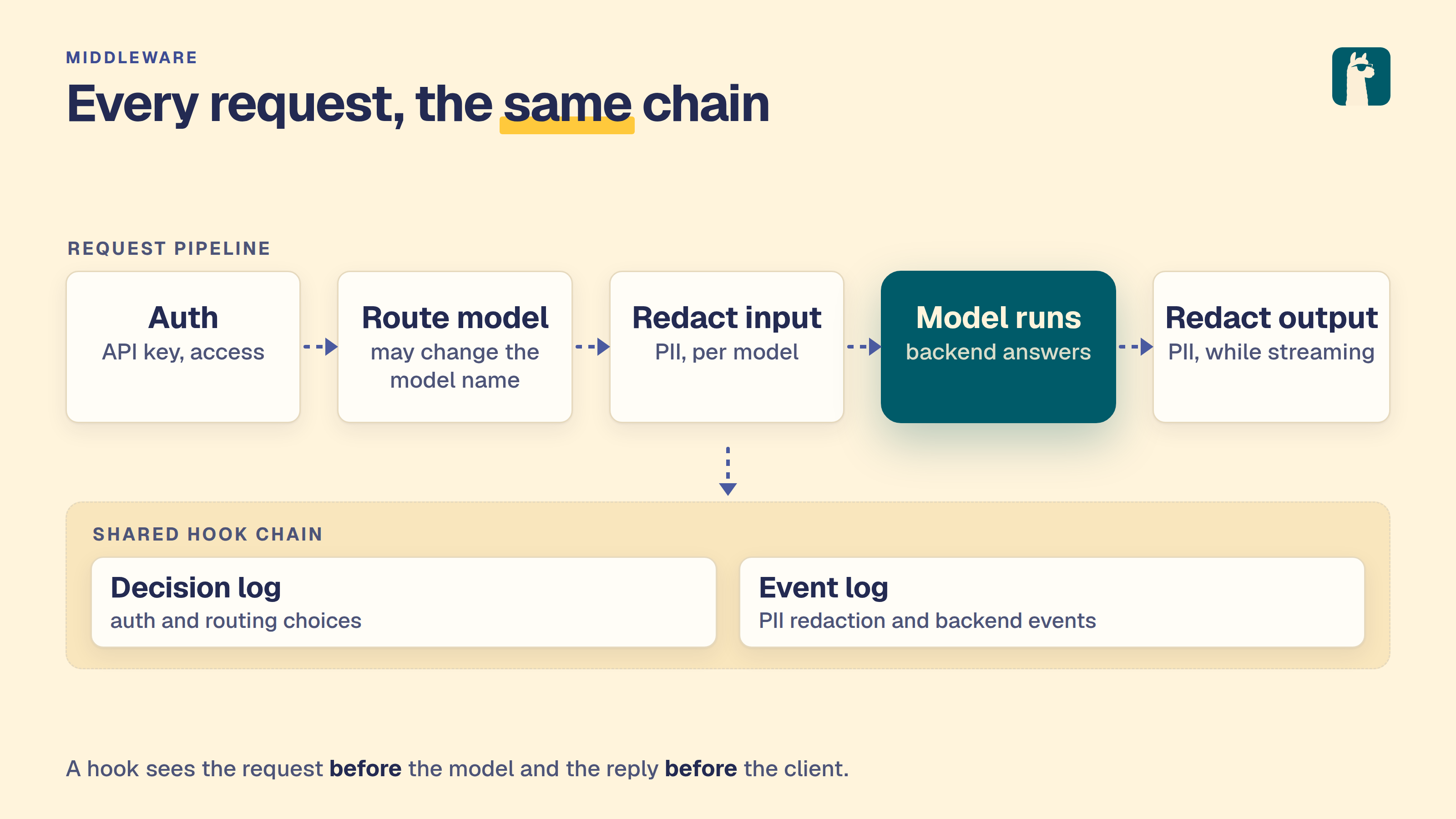
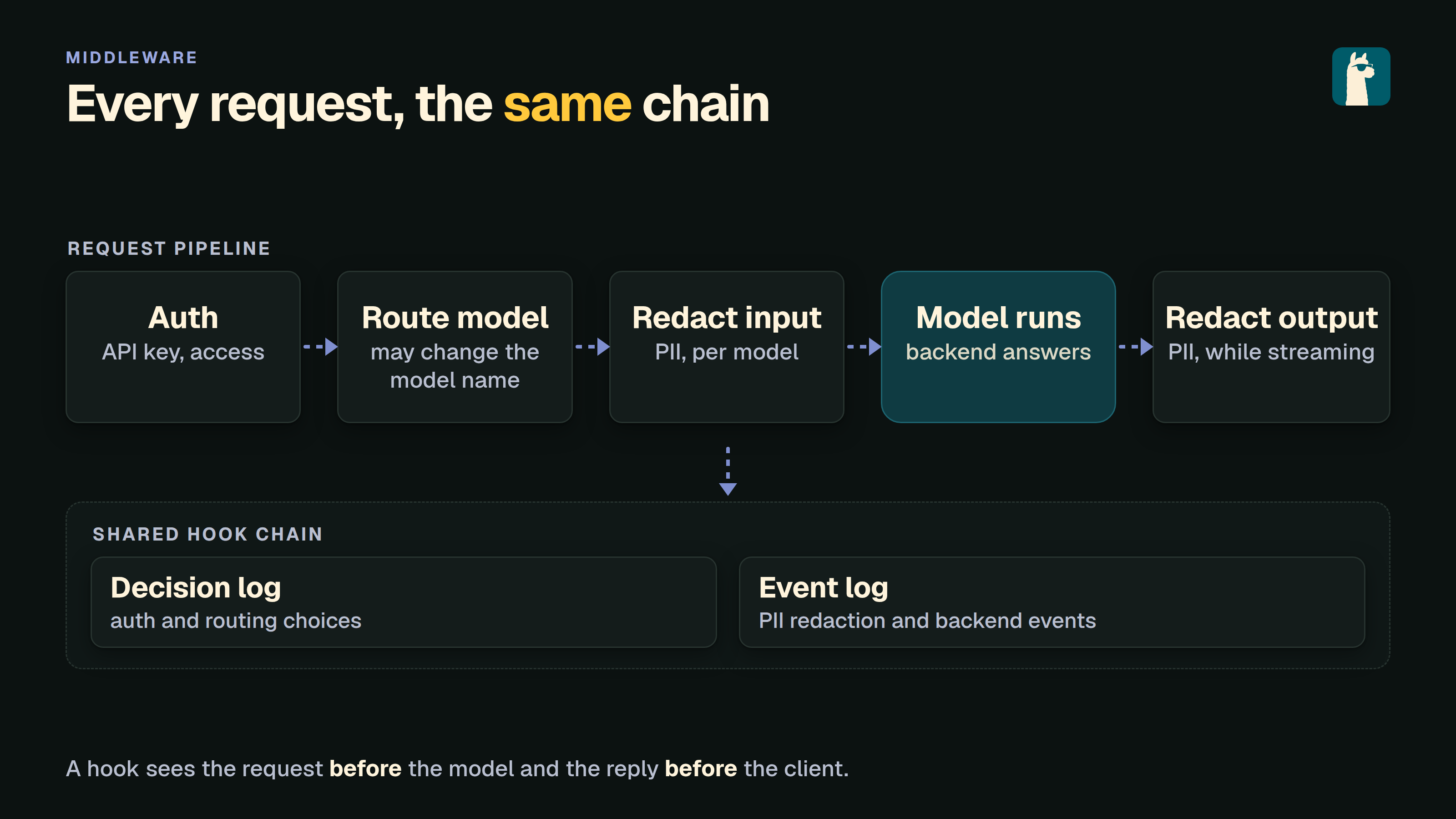
The order a request passes through: Proxy, Admission, Filtering, Routing, Model.
The server fixes that order. Selecting a step shows only its rules. See
Middleware for what each step does.
Prometheus
GET /metrics is admin only and returns the Prometheus text format. The page
shows the URL and a scrape configuration with a copy button, checks the endpoint
against the running server, and lists the metrics LocalAI can export. Only
api_call is always present: a histogram of request duration in seconds by HTTP
method and route. The others appear while the feature behind them runs. Metrics
are off when LocalAI runs with LOCALAI_DISABLE_METRICS_ENDPOINT=true.
Activity
Model installs, backend installs, updates, removals and cluster staging all run
in the background. Two surfaces in the WebUI report them: the Activity tab
of the notification panel, and the Activity page, which holds the full
picture.
Both are admin-only.
To see models currently loaded for inference, open Home (/app) and scroll
to Loaded models. That list includes each model’s backend and a stop control.
A loaded model can be idle; Activity reports management jobs rather than whether
a model is resident or generating output.
The Activity tab
The Notifications entry in the sidebar (the bell in the header on a phone)
opens the notification panel. For an administrator the panel has two tabs,
Notifications and Activity. Everyone else sees the panel without tabs,
as before. When authentication is off, everyone is an administrator.
The panel opens on Activity while something is running, queued or failed,
and on Notifications otherwise. A tab you pick stays picked while the panel
is open. The tab has three sections, each shown only when it has something in
it:
Needs attention: failed operations, kept until you dismiss them. Each row
shows the reason, with Retry and Dismiss.
In progress: one row for each running or queued operation. A row has a
progress ring, the title (Installing qwen3-4b, Updating llama-cpp,
Removing whisper), one detail line, a thin bar with the percentage, and
Cancel. A queued operation says Waiting. The detail line joins what the
operation reports, for example Node 3 of 5 · Downloading · 1.2 GB / 1.9 GB · 48 MB/s: the node a fan-out install has reached, the phase (Resolving files, Downloading, Verifying, Finalizing, Saving configuration),
the bytes and the speed. A part the operation does not report is left out.
Recent: operations that finished successfully in the last day, newest
first, at most five, each with how long ago it finished (Installed qwen3-4b,
Updated llama-cpp, Removed whisper). A fast install shows here, so it does
not vanish before you see it. A cancelled operation, and a failure you
dismissed, are not listed. The Activity page keeps them in its record. Nothing
is written to the notification list for a finished operation.
See all activity at the bottom opens the Activity page. The tab scrolls
inside the panel when it is long.
The sidebar entry shows the operations too. While operations run, the icon sits
in a small ring that fills with the average progress of the running operations,
and it turns while only queued operations wait. If an operation failed, the ring
is red and has a dot. The number badge counts unread notifications only;
operations never change it. With nothing running or failed, the entry looks as
it always did.
Retry and Cancel behave as on the Activity page (see below). The Cancel
wait of 8 seconds applies here too, with the same Undo toast. Closing the
panel sends a cancel that is still waiting, as leaving the page does; changing
tab does not.
Where the chats feature is off there is no notification inbox. An administrator
still gets the entry, named Activity, while an operation runs or failed,
shortly after one finished, and for the rest of the visit once one has been
seen. It opens the Activity tab alone, with no notification list, filters or
browser-notification switch, and it asks the chats for nothing. Anyone else,
and an administrator with nothing to show, sees no entry; use the Activity page.
The Activity page
Operate → Activity (/app/activity). The page has up to three sections,
each shown only when it has something in it.
In progress
One row per running or queued operation, each naming what is being done and to
what. A percentage and progress bar appear only once the operation is running
and has reported progress, so a queued operation and a removal show none.
Artifact-backed gallery models also report the phase, downloaded and total
bytes, and an estimate of the time left once enough of the transfer has been
observed to work one out. Every backend install, and every gallery model that
lists its files directly, reports no phase and no byte counters; those cards
show the installer’s own status line instead, which names the file being
fetched and its size.
An install that involves workers shows a per-node list, with one row per
worker:
a status pill: Queued, Downloading, Worker busy, Done or
Failed;
the file being transferred, with current/total bytes and a percentage;
any error the worker returned.
An install that fans out to more than one worker also carries an N nodes
tag and a toggle over the list. Lists of up to four nodes start expanded, longer
ones start collapsed behind Show N nodes, and the toggle reads Hide
per-node detail while the list is open.
Worker busy means the worker took longer than --backend-install-timeout
to acknowledge but is most likely still working. It clears on its own when the
worker finishes.
Needs attention
Model and backend operations that failed and have not been acknowledged yet,
each row carrying the error returned by the installer, with Retry and
Dismiss. Cluster staging never
appears here: a staging job reports no error to the page, so a staging failure
has to be read from the logs.
Record
What finished, newest first, one row each: the name, what happened
(installed in 1m 12s, removed, cancelled, or failed: with the error),
the time of day it finished, and a link into Models or Backends. A cancelled
install also has Start again, which installs the same target again: a
download that was paused continues where it stopped, and one that was cancelled
starts over. The record does not say which of the two it was, so the button
says what it does in both cases. A cancelled removal has no such button. Model and
backend installs and removals are recorded; cluster staging is not, so a
staging run leaves nothing behind here once it finishes.
Filters
Four chips above the sections filter the whole page: All, Models,
Backends and Cluster. In the live sections, Cluster covers staged model
files and any install that involves workers, whether it targets one node or
fans out across several. In the Record it covers only the node-targeted case: a
finished fan-out install is filed under Models or Backends, not under Cluster.
Cancelling, retrying and dismissing
These are on the operation rows. Pause, Cancel, Retry and
Dismiss are labelled buttons. The Activity tab has Cancel, Retry
and Dismiss; Pause is on the page only. The Backends page also shows the
progress of a backend install in the backend’s own row, with its Cancel.
Pause stops a running download and keeps the bytes already fetched, so
installing the same model or backend again continues from there.
Cancel is offered while an operation is queued, whatever it is, and while
an install is running. It is not offered once a removal has started: a
removal in progress cannot be interrupted, so the window to call one off is
the queue, before a worker picks it up. Cancelling there stops it before
anything is touched. For artifact-backed gallery models, cancelling an active
download leaves its partial files in place so a later install resumes rather
than starting over. A cancelled operation leaves the live sections;
it appears in the record as cancelled.
Cancel waits for 8 seconds before it is sent. The row says “Cancelling
unless you undo” and a toast offers Undo. The server cannot take a cancel
back, so the wait in the browser is the whole undo: while it runs nothing has
been stopped and the download carries on. Closing the toast cancels at once,
asking to cancel a second download ends the first one’s wait, and leaving the
page sends a cancel that is still waiting. A job that finishes during the wait
is left alone.
Retry is offered on a failed install or update. It acknowledges the
failure, which moves it into the record, and starts the same work again: an
install again, or an update again for a failed backend update (on one node,
for a node-scoped one). It is not offered on a failed removal, which is not
restarted by reinstalling, or on a failed staging job.
Dismiss acknowledges the failure without
retrying. The operation moves into the record with a failed outcome; it is
not deleted. This is why the same failure can be found either under Needs
attention or in the Record, depending on whether it has been
acknowledged.
Note
Retrying a model that was installed with an explicit variant reinstalls it
with automatic variant selection, because the variant is not carried on the
operation. If you pinned a build, reinstall it from the Models page or the API
with the variant you want rather than using Retry. See
Model Gallery for variants.
History
The record holds the last 50 finished operations. Where it is kept depends on
how LocalAI is running:
Standalone: in memory, so it is empty again after a restart. For durable
per-model install state, use the model and backend listings rather than this
page.
Distributed mode: in
PostgreSQL, alongside the operations themselves. It is the same record on
every replica, it survives restarts, and a replica added by a scale-out or a
rolling deploy reports it in full rather than starting empty.
Clear history, beside the page title whenever the record has anything in
it, empties it. Running operations and unacknowledged failures are untouched.
In distributed mode it clears the record for every replica, not just the one
serving the page.
The sidebar count
The Operate entry in the sidebar carries a badge whenever something is in
flight, showing how many operations are running or queued. If any failure is
waiting to be acknowledged, the badge turns red and counts the failures
instead, so the number always reports the thing that most wants your attention.
API
Both surfaces are backed by these endpoints. All of them are admin-only when
authentication is enabled.
Method
Path
Description
GET
/api/operations
Running, queued and failed operations, least advanced first. taskType is installation, upgrade, deletion or staging.
POST
/api/operations/{jobID}/cancel
Cancel a queued operation, or a running install. Not a running removal.
POST
/api/operations/{jobID}/pause
Pause a queued operation or running download and preserve partial data.
POST
/api/operations/{jobID}/dismiss
Acknowledge a failed operation and move it into the record.
GET
/api/operations/history
List finished operations, newest first.
DELETE
/api/operations/history
Clear the record. Live operations are untouched.
Pausing preserves the download’s .partial file. Start the same model or
backend installation again to resume from the saved bytes when the origin
supports HTTP Range requests. Cancelling intentionally discards partial data.
Both GET endpoints wrap their list in an operations key rather than
returning a bare array:
# What has finishedcurl http://localhost:8080/api/operations/history \
-H "Authorization: Bearer <admin-key>"
nodeID is present when the operation was scoped to a worker, and error
when the outcome is failed. The outcome is one of completed, failed
or cancelled. The taskType is installation, deletion or, for a backend
update, upgrade.
The DELETE answers 500 with an error if the record could not be cleared,
which in distributed mode means the rows are still there. It never reports
success on a record it did not clear.
Backend Monitor
LocalAI provides endpoints to monitor and manage running backends. The /backend/monitor endpoint reports the status and resource usage of loaded models, /backend/load pre-loads a model into memory, and /backend/shutdown allows stopping a model’s backend processes. In distributed mode, a named shutdown stops both a process local to the controller and every placement registered on workers.
All three are admin-only.
Monitor API
Method:GET
Endpoints:/backend/monitor, /v1/backend/monitor
Request
The model to monitor is passed as a query parameter:
Parameter
Type
Required
Location
Description
model
string
Yes
query
Name of the model to monitor
For backwards compatibility, a JSON body with the same field is still accepted when the model query parameter is not set, but new clients should use the query parameter.
Pre-loads a model into memory ahead of its first request, so that request pays no cold-start load cost. It is the inverse of the Shutdown API and works for any model, not just realtime pipelines.
Method:POST
Endpoints:/backend/load, /v1/backend/load
Request
Parameter
Type
Required
Description
model
string
Yes
Name of the model to load
Behavior
For a regular model, its own backend is loaded.
For a realtime pipeline model (a config with a pipeline: block), every configured sub-model (VAD, transcription, LLM, TTS, sound_detection, voice_recognition) is loaded concurrently instead of the pipeline stub, which has no backend of its own.
The call blocks until loading finishes and reports which model names became resident, so partial failures are visible.
Returns 200 OK with the shutdown confirmation message on success.
Stopping a backend removes its watchdog timers and eviction state. A timeout from a stopped backend does not shut down a replacement at a different address.
Error Responses
Status Code
Description
400
Invalid or missing model name
500
Backend error or model not loaded
Tracing
LocalAI can retain recent API exchanges and backend operations for inspection
on the Traces page in the management interface. Enable tracing in runtime
settings or with the existing tracing configuration.
API requests appear while they are still running. Their elapsed duration
updates when the page refreshes, and the result column marks them as in
progress until the response completes. In-flight requests live only in memory;
the completed exchange is what LocalAI adds to the bounded, persistent history.
API and backend trace histories are persisted in separate directories below
the configured data path. They are restored after a clean service restart,
whether or not authentication is enabled.
Each history remains independently bounded by tracing_max_items. When a
history reaches that limit, LocalAI removes its oldest records from memory and
disk. The existing clear actions on the Traces page remove both the in-memory
history and its persisted records.
Opening an API request on the Traces page shows the request as its own page, at
/app/traces/<id>: the status, the error LocalAI recorded, a timeline with the
backend operations that ran while the request was open, and the request and
response bodies. Bodies stay closed until revealed, and request headers are not
listed. See Traffic.
Profiling and request diagnostics
LocalAI provides two independently opt-in diagnostics: a private Go profiling listener and structured phase timing events.
Both default to disabled. Debug logging alone enables neither feature.
Scope and configuration
These options apply to local-ai run, including a distributed frontend.
They do not enable diagnostics in separately launched workers or provide backend-native llama.cpp profiling.
Diagnostics has no MCP, admin, or public API surface and no UI controls.
State is per-instance, not shared between replicas. Profiles describe the frontend Go process, not the whole cluster.
Parameter
Default
Description
Environment Variable
--pprof
false
Enable the private loopback profiling listener
$LOCALAI_PPROF
--pprof-address
127.0.0.1:6060
Numeric loopback IP with an explicit port
$LOCALAI_PPROF_ADDRESS
--pprof-mutex-profile-fraction
0
Nonnegative mutex sampling fraction; zero disables sampling
$LOCALAI_PPROF_MUTEX_PROFILE_FRACTION
--pprof-block-profile-rate
0
Nonnegative block sampling rate in nanoseconds; zero disables sampling
$LOCALAI_PPROF_BLOCK_PROFILE_RATE
--request-phase-timing
false
Emit sanitized phase events at Info, independently of profiling
$LOCALAI_REQUEST_PHASE_TIMING
The address accepts numeric IPv4 loopback or bracketed IPv6 loopback, such as 127.0.0.1:6060 or [::1]:6060.
Ports must be decimal values from 1–65535.
Validation rejects hostnames, including localhost, wildcard addresses, empty hosts, LAN addresses, public addresses, and Unix sockets.
Validation applies even when profiling is disabled. Negative sampling settings fail validation; nonzero sampling settings require --pprof.
--preload-backend-only validates the options but does not start profiling or sampling.
For mutex sampling, a value of N records approximately one in N contention events; 1 records every event.
Block sampling targets one blocking event per configured number of nanoseconds spent blocked; 1 records every blocking event.
These settings are not percentages or capture durations. Sampling adds process-wide overhead, especially at 1.
One diagnostics server owns process-global runtime sampling in each run process.
It applies both configured rates once after binding successfully and resets both rates to zero on shutdown or fatal serving failure.
It does not restore previous rates; Go provides no getter for the previous block rate.
Do not combine competing sampling owners in the same process.
There is no dynamic toggle, continuous capture, or automatic profile storage. Configuration changes require a separately approved restart or rollout.
The listener binds before normal request serving. Validation or bind errors fail startup; subsequent fatal serving errors propagate through the run lifecycle.
The private listener gets five seconds to drain before profiling connections are force-closed, which can interrupt an active capture.
Its cleanup runs on startup failure, normal return, and through the existing signal handler (which exits without running deferred cleanup).
A fatal profiler serving error cancels the run context and is returned after application cleanup.
Application initialization or shutdown work that ignores cancellation can delay that return; the private-listener budget is not a deadline for the entire application.
With profiling disabled, diagnostics opens no socket, starts no monitoring goroutine, and changes no runtime sampling settings.
Disabled phase timing allocates no diagnostic identities or events and adds no diagnostic filesystem operations.
Access and data sensitivity
Warning
The profiling listener is unauthenticated. Loopback reachability is its authorization boundary, not the public API’s authentication policy.
Other processes in the same network namespace can access it, including containers sharing a pod’s namespace.
Profiles can contain sensitive application data. Heap data and goroutine output can expose secrets.
Protect captures, review them before sharing, and delete them when the investigation ends.
The separate listener uses a private mux, not the public API router or the default Go mux.
It provides the profiling index, CPU, trace, symbol, and named runtime profiles, including heap, goroutine, mutex, and block.
/debug/pprof/cmdline is unavailable, including query and subtree variants, because command-line arguments can contain credentials.
The standard index can still mention that endpoint.
Timing events omit credentials, bearer candidates, model names, prompts, bodies, raw headers, filenames, paths, and raw errors.
This sanitation applies only to diagnostic timing payloads. It does not redact unrelated logs or profiles.
Events use the constant message diagnostic_phase at Info.
Operator-selected warn/error filtering suppresses these events, even when phase timing is enabled.
Bounded Kubernetes investigation
A rollout or build configuration change is a separate, explicit, owner-approved action.
Select one frontend and a defined observation window. Approve profiling, timing, and any nonzero sampling settings before the window.
Do not change replicas, clocks, scheduling, or storage mounts to force a result.
The examples below capture data only; they do not mutate a live deployment.
Your cluster runtime must support port-forwarding to the pod’s loopback listener.
Do not add a Service, ingress, or NodePort for profiling.
Forward directly to the selected frontend pod, not a load-balanced Service.
The local port must be free. Keep kubectl’s default local-only binding; do not add a wildcard --address.
Start the direct pod port-forward in a separate terminal, replacing both placeholders:
CPU profiles show execution, not time blocked on I/O or locks.
Capture naturally slow requests and matched control requests against the same frontend.
Record the observation window and generated diagnostic IDs alongside protected captures.
Profiles are process-wide; they do not automatically attribute samples to a request ID.
Mutex and block profiles require their respective nonzero sampling settings before capture.
The following ten-second delta captures bound collection time, not the duration of process-global sampling.
Sequential commands cover different windows; compare them accordingly.
Mutex profiles locate contention attributed to lock holders; block profiles locate sampled blocking operations.
Neither substitutes for the request-owned lock and filesystem timings below.
A goroutine snapshot can show I/O or lock waits that CPU profiles miss.
It describes one instant, not a measured duration. Its text can be large and sensitive; the client timeout bounds waiting, not file size.
Stop the port-forward after capture. Disable diagnostics and sampling afterward through the separately approved rollout process.
Protect, review, and delete the capture files under your data-handling policy.
If latency does not reproduce, report non-reproduction. Do not infer a predetermined filesystem, lock, or routing root cause.
Event identity and phase boundaries
Each event contains id, kind, phase, state, outcome, elapsed, and count.
The server generates diagnostic UUIDs; it does not trust or reuse client X-Correlation-ID headers as diagnostic identities.
Requests use kind request; config reload operations use kind config_reload with fresh operation IDs.
Request identity survives the instrumented internal context reconstructions. Background callers remain unobserved unless explicitly enabled.
States are start, end, and mark; outcomes are ok, error, canceled, and skipped.
Durations use monotonic elapsed time, not cross-host clock subtraction.
Counts describe aggregate work, not filenames or model labels.
Lock-protected helpers emit buffered aggregates after unlocking, so log order alone does not establish execution order.
Nested timings overlap and are not additive. Repeated extraction segments share one request ID; they are not duplicate whole-request measurements.
Extraction ends before downstream inference. It is not socket arrival or full request latency.
The existing trace start follows global authentication and body reading; it is not socket arrival either.
Phase
Measured boundary
extraction
Each extractor-owned entry/exit segment, including repeated extraction or retries, before downstream inference.
bearer_lookup
Existing bearer-derived model existence lookup, without recording the candidate.
default_listing
Existing default-model candidate listing within extraction.
body_lookup
Existing body-derived model existence lookup, without recording body data.
config_load_defaults
Existing config loading and default application within extraction.
alias_resolution
Existing model alias resolution within extraction.
config_lock_wait
Time waiting to acquire the config loader mutex for filtering.
config_lock_hold
Time holding that mutex for the config listing/filter operation. Includes nested filter work.
config_filter
The in-memory config filter pass under that lock, not filesystem latency.
fs_enumeration
The existing os.ReadDir call for loose model discovery only.
loose_filter
Existing filename and in-memory loose-file filtering passes, not directory enumeration.
existence_fallback
The existing ExistsInModelPath fallback when discovery requires it. No extra diagnostic filesystem calls.
model_init
Entry mark immediately after ModelLoader.Load constructs options, before admission, cache, or load logic. Not backend-native execution.
model_router_callback
Only the existing ModelRouter callback invocation. Not transport publish or worker receive latency.
reload_lock_wait
Time waiting for the mutex of the loader performing the reload.
reload_lock_hold
Time holding that loader’s mutex during reload, including nested enumeration, metadata, and later parsing work.
reload_enumeration
The reload’s existing os.ReadDir call.
reload_metadata
Aggregate existing DirEntry.Info calls, separate from enumeration.
reload_yaml_read
Aggregate YAML file reads, including configured-gallery YAML inspection where applicable.
reload_parse_defaults
Aggregate YAML parsing/default application, including configured-gallery YAML classification where applicable. Excludes the measured file read.
Reload observer boundaries
Reload timing measures ModelConfigLoader.loadModelConfigsFromPath, not the unrelated dynamic JSON watcher.
Distributed resync constructs a temporary authoritative loader with its own mutex.
That loader’s reload events do not prove contention on the shared loader lock or ownership of another request’s wait.
No event establishes cross-host timing or worker execution.
The immutable constructor option WithReloadDiagnostics controls early lock, enumeration, and metadata timing.
Ordinary LoadOptionDiagnostics callbacks run at their original position after enumeration and metadata, under the loader lock.
Their resolved recorder controls later YAML-read and parse/default timing.
An option-only caller cannot observe earlier phases. A late nil recorder disables subsequent instrumented work, not constructor-enabled early measurements.
Unchanged recorder identity preserves the reload operation ID across early and later phases.
A different non-nil late recorder receives a separate reload operation ID; these are separate observations, not one correlated span.
Callbacks retain ordering, composition, and last-write semantics.
They retain every preexisting invocation, including each parsed model’s ModelConfig.SetDefaults; diagnostics does not add a replay or snapshot functional options.
With --request-phase-timing (LOCALAI_REQUEST_PHASE_TIMING=true), requests that reach model extraction receive X-LocalAI-Diagnostic-ID.
The header contains the same server-generated UUID v4 as that request’s phase events.
LocalAI sets it before extraction errors or streaming output can write the response.
Repeated extraction and failover attempts retain one ID for the logical request.
Client-supplied diagnostic or correlation headers do not select this ID.
The ID contains no model name, authentication token, or request content.
It is a correlation value, not an authorization credential or a distributed trace ID.
Requests rejected before extraction, including global authentication failures, do not receive this header.
Disabling request-phase timing emits no diagnostic header and creates no diagnostic identity.
Enabling pprof or debug logging alone does not enable the header.
Go callers can use diagnostics.RequestID(ctx) to read the existing request ID without creating one.
The accessor returns an empty string for nil contexts, unobserved contexts, and background reload observations.
Chat model fallback
OpenAI chat completions bind the request before considering legacy model discovery.
An explicit bound model skips Bearer-as-model lookup and default candidate listing; model existence validation still runs.
If the bound model is empty, extraction retains context, path, query, form, Bearer, and first-available fallback precedence.
The existing candidate filter and ordering still select the default.
Malformed JSON returns a parsing error without fallback discovery.
Each failover attempt binds fresh input from the replayed body.
Other API routes retain their existing extraction order.
LocalAI ships a request-middleware layer that sits between the HTTP API and
the backend dispatcher. Two subsystems share that layer because they share
the same lifecycle hook: PII filtering scans the request body before it
reaches a backend, and the intelligent router rewrites input.Model so
a single client-facing model name fans out across multiple downstream
targets.
Both are inspected and configured from the same admin page
(/app/middleware), which draws the order a request passes through as five
steps (Proxy, Admission, Filtering, Routing, Model) and shows only the rules of
the step you select, backed by the same REST surface (/api/middleware/*,
/api/pii/*, /api/router/*) and the same MCP tools.
The router runs first (it picks the target model so per-model PII has
something to gate on), per-model PII runs next (gated by the resolved
config), and the backend executes. Filtering is request-side only -
the request body is scanned and rewritten before forwarding; the response
is not touched (NER over a streamed response is left as a follow-up). Each
subsystem writes to its own admin-visible log: /api/router/decisions for
routing, /api/pii/events for redaction and block actions.
PII filtering
PII redaction is NER-based and runs request-side (input). It is
off by default, flipping to on for any cloud-proxy backend
because that traffic crosses the network to a third-party provider. Pick a
default detector so those models are actually
scanned. Explicit pii.enabled in a model’s YAML always wins over the
backend default.
Filtering runs on every text-accepting endpoint that has an adapter wired:
/v1/chat/completions and /v1/messages (chat), /v1/completions,
/v1/embeddings, /v1/edits, the Open Responses POST /v1/responses
(instructions, string input, and in input items the message and
reasoning text, function_call arguments and function_call_output output),
and the Ollama /api/chat, /api/generate and /api/embed endpoints, plus
the MITM proxy request body. Image, audio
(TTS/STT), video, rerank, and the realtime WebSocket are not filtered yet
(different prompt-PII semantics; realtime is not HTTP middleware).
The Responses WebSocket mode (GET /v1/responses) is not HTTP middleware
either, so it cannot filter: a response.create for a model with PII
filtering enabled is refused with the error type pii_unsupported_transport
instead of being served unfiltered. Use POST /v1/responses for those models.
Stored history loaded through previous_response_id or item_reference
is resolved after filtering and is not scanned against the current model’s
policy. That history can contain unfiltered text from another model or
model-generated output. Tool output supplied directly in the request is
scanned as text, or as its complete JSON encoding for non-string values,
including arrays.
A request’s messages are scanned as one document (joined in order), so
the NER detector keeps conversational context: whether 4421 is a PIN or
jdoe_42 is a username is usually decided by the question asked in the
previous message, and a bidirectional encoder only sees that context when
the messages share a forward pass. Detected spans are mapped back to the
individual message they fall in, so redaction still rewrites each message
field in place and events carry message-local offsets.
The earlier regex pattern tier (pii.patterns, the built-in pattern
catalogue, --pii-config, the /api/pii/patterns|test|decide endpoints)
and response/streaming-side redaction have been removed. Detection is
now driven entirely by token-classification (NER) models. Legacy keys
no-op with a startup warning.
Detector models
A detector is a token_classify model (e.g. an openai-privacy-filter
GGUF) that carries the detection policy in a top-level pii_detection:
block - defined once, on the model itself:
name:privacy-filter-multilingualbackend:privacy-filterembeddings:true# TOKEN_CLS poolingknown_usecases:- token_classifypii_detection:min_score:0.5# drop detections below this confidencedefault_action:mask # applied to any detected group with no entryentity_actions:# which PII to block vs mask vs allow-logPASSWORD:blockCREDITCARD:blockEMAIL:mask
mask rewrites the matched span to [REDACTED:ner:<GROUP>] in the request
body before forwarding. block returns HTTP 400 (error.type=pii_blocked)
without forwarding. allow detects and logs (a PIIEvent is still recorded)
but leaves the text unchanged. The entity-group names are whatever the model
emits (the privacy-filter family uses uppercase names like EMAIL,
PASSWORD, CREDITCARD).
Extending a detection to the next word
Some identifying values come in pairs where the model reliably tags one half
and misses the other. The typical case is an address line: the postal code is
detected with high confidence, the town right after it is tagged with a low
score or not at all, and masking the code alone leaves the town in the clear
([REDACTED:ner:ZIPCODE] Ludwigshafen). extend_to_next_word lists entity
groups whose accepted detections also cover the word that directly follows
them on the same line, with the same action and group:
A word is a run of letters, digits, combining marks, -, ' and inner dots
(a trailing dot is left out). The extension skips spaces and tabs but never a
line break, and it does nothing when no word follows. Only one word is added,
so a multi-word town (“Frankfurt am Main”) keeps its tail.
The extension is deliberately blunt: the next word can also be a number or a
date (ZIPCODE followed by 12 Mar 2026 takes 12), so it trades some
over-masking for fewer leaks. Use it only for groups whose neighbour is
identifying.
extend_to_previous_word is the mirror for the word before a detection. A
name model often tags the surname with high confidence and scores the first
name in front of it below min_score (Gast Greta [REDACTED:ner:LASTNAME]):
pii_detection:extend_to_previous_word:- LASTNAME # "Gast Greta Waldmeister" -> "Gast [REDACTED:ner:LASTNAME]"
Here the preceding word must consist of letters (plus - and '): a word
with digits - an amount, a date, a room number - is never taken, nor a
protected term. The search skips spaces and tabs but never a line break.
The word before a hit is not always a first name: a title (Herr), a
preposition or any other plain word in front of the surname is taken too
(Gast Greta Waldmeister loses Greta, Herrn Waldmeister loses Herrn).
Like the next-word option it trades over-masking for fewer leaks. Do not
combine both directions on the same name group: each hit then also takes the
word after it, so a name followed by a number swallows that number.
Protected terms
The opposite failure is a value the model tags although it must reach the
upstream model: a business name read as a surname (Hotel Seeblick ->
Hotel [REDACTED:ner:LASTNAME]) turns an invoice into one the model cannot
categorise. protected_terms lists such values; protected_terms_files
adds files inside the models path with one term per line (# starts a
comment), re-read whenever they change, so an external process can keep the
list current without a restart:
pii_detection:protected_terms:- Hotel Seeblickprotected_terms_files:- privacy-filter/known-suppliers.txt
Each whole-word, case-insensitive occurrence (whitespace inside a term
matches any whitespace run) is replaced by a neutral placeholder before the
detector runs and restored afterwards. The detector never sees the value,
so it cannot tag it or let it colour the context around it, and the parts
of a detection that fall on the placeholder are cut out. Event offsets
still address the original text. Terms shorter than three characters are
ignored, and a missing or unreadable file is skipped with a warning (fewer
protected terms means more masking, never less).
A term that is only part of a longer word is not protected: with the term
Anna, Anna-Lena and O'Anna are still passed to the detector. Protected
terms apply to the NER tier only. A pattern detector
(backend: pattern) always scans the original text and may still mask a
match inside a protected term.
A protected term passes everywhere in the text: if the same string is
also a person’s name, that occurrence passes too. Keep the list to values
that are safe to send.
Pattern detector tier
NER is the wrong tool for high-entropy, highly-regular secrets - API keys,
tokens, private-key blocks. A trained NER model has no “API key” class, so it
fragments a key into the nearest categories it does know and can leave the
secret part exposed. Those secrets are exactly what a regex catches cheaply.
A pattern detector is a detector model (backend: pattern) that matches
secrets with a restricted regex subset compiled to Go’s RE2 engine -
linear-time, no backtracking, no ReDoS. It runs entirely in-process: no model
download, no backend, zero VRAM. Install the gallery’s secret-filter for a
ready-made set, or define your own:
name:secret-filterbackend:patternknown_usecases:[token_classify] # so it appears in the detector pickerpii_detection:default_action:block # a leaked credential shouldn't leavebuiltins:# built-in catalogue (enable by name)- anthropic_api_key- openai_api_key- github_token- aws_access_key- private_key_blockpatterns:# operator-defined, restricted subset- name:INTERNAL_TOKENmatch:"tok-[A-Za-z0-9]{32,64}"action:block # optional per-pattern overridemin_len:36# optional length floor
A match is reported under its group (built-in group name, or the pattern
name), so entity_actions / default_action apply exactly as for NER.
The restricted grammar (validated at load - an invalid pattern is rejected,
not silently ignored):
Allowed: literals, character classes […] and \w \d \s, alternation,
anchors ^ $ \b, and quantifiers ? * + {m,n}.
Rejected: . (any-char), capturing groups, and {n,m} bounds over 4096.
Required anchor: every pattern must contain a fixed literal run of at
least 3 characters (e.g. sk-ant-, ghp_, AKIA). This admits real key
shapes but rejects open-ended ones - an email or a bare \w+ has no such
anchor and belongs to the NER tier.
Use both tiers together: reference an NER detector and a pattern detector in a
model’s pii.detectors (or as instance defaults); their hits union, and a
block from either rejects the request.
Consuming models
Any model opts in by enabling PII and referencing one or more detectors -
no per-consumer policy:
name:claude-strictbackend:cloud-proxyproxy:mode:passthroughprovider:anthropicupstream_url:https://api.anthropic.com/v1/messagesapi_key_env:ANTHROPIC_API_KEYpii:enabled:true# default-on for cloud-proxy; explicit for auditdetectors:- privacy-filter-multilingualreversible_redactions:true# restore request PII if the model echoes its wrapped tokenreversible_token_prefix:"[REDACTED:"# optional; this is the defaultreversible_token_suffix:"]"# optional; this is the default
reversible_redactions enables bijective, request-scoped replacement. Each
masked value is sent to the backend as a stable wrapped token such as
[REDACTED:EMAIL_001] instead of a generic redaction marker. If the model includes that token in
its response, LocalAI restores the original value before returning JSON or SSE
to the caller. The substitution map exists only for that request and is never
logged or persisted. Leave the option unset (the default) for irreversible
[REDACTED:...] masking.
The prefix and suffix reduce collisions with ordinary model output and can be
customized with reversible_token_prefix and reversible_token_suffix.
Reversible redactions provide less confidentiality than irreversible masking:
any third party that can observe both the redacted request and restored response
may be able to infer the original values.
block_unscanned_media: true closes the gap the text detectors leave open:
images, audio, video and files in a request are never scanned, so by default
they reach the backend unchecked. With the option set, a request that carries
any such content is rejected with HTTP 400 (error.type=pii_blocked, audit
event pattern __unscanned_media__) before a detector runs. Use it for egress
policies where “cannot be inspected” must mean “not sent”, e.g. on
cloud-proxy models. It applies to the OpenAI chat, Open Responses,
Anthropic messages and Ollama chat routes, and only while PII is enabled for
the model.
Multiple detectors union their detections; overlapping spans resolve to
the strongest action (block > mask > allow). A configured detector
that can’t be loaded fails the request closed (HTTP 503,
error.type=pii_ner_unavailable) rather than silently skipping the check.
The same NER path runs on the MITM proxy
request body for intercepted hosts. Reversible response restoration currently
applies to LocalAI API routes; the MITM proxy keeps its own output-redaction
policy.
Instance-wide default detector
The Detector models table on the Middleware → Filtering page lists every
token_classify detector model (neural NER models and in-process pattern
matchers alike) and exposes a per-row Default toggle. Toggling a detector
on adds it to the instance-wide default detector set - one or more models
applied to any PII-enabled model that names none of its own pii.detectors.
It is persisted through POST /api/settings and read live, so a change takes
effect on the next request without a restart. A default that names a model no
longer loaded still appears (marked not loaded) so it can be toggled off.
The default set can also be supplied out-of-band with the
LOCALAI_PII_DEFAULT_DETECTORS environment variable (comma-separated model
names, e.g. privacy-filter-nemotron,secret-filter). When set it takes
precedence over the value persisted via the UI (env > file), which is the
right behaviour for immutable container deployments that pin filtering policy
at boot rather than via the admin UI.
This is what makes cloud-proxy / MITM redaction work out of the box: those
backends default to PII-enabled but ship no detector list, so without a
default detector the filter runs with nothing to scan. Set one here and
cloud-proxy traffic is scanned with no per-model config.
Resolution precedence (the single decision point is ResolvePIIPolicy,
shared by the chat middleware and the MITM listener so both agree):
An explicit pii.enabled on the model wins - true or false.
Otherwise PII is on if the backend defaults it on (cloud-proxy).
Detectors are the model’s own pii.detectors; if it lists none, the
instance-wide default detector(s) are used.
A model that resolves enabled but ends up with no detector at all (a
cloud-proxy model with no model detectors and no instance default) scans
nothing - set a default detector to close that gap.
Admin page
The /app/middleware page (admin role only) has four tabs - Filtering,
Routing, MITM Proxy (see the MITM doc),
and Events. The Filtering tab has a Detector models table (every
token_classify filter model, with the per-row Default toggle above and an
edit link to each detector’s config, plus an Add detector model button) and
a per-model table listing only the models PII can actually apply to - chat /
completion / embeddings / edit consumers and cloud-proxy models, not
VAD/STT/image models or the detector models themselves. Each row reports the
effectiveenabled state as an inline toggle - flipping it writes an
explicit pii.enabled to that model’s YAML (a server-side deep-merge that
preserves pii.detectors and every other field), so a cloud-proxy model shown
on by backend default can be turned off, and vice-versa - plus the
resolved detector(s) - with a (default) marker when they come from the
instance-wide default rather than the model’s YAML - why it is on (YAML /
backend default), and the recent event count. Detection policy
(entity→action, min score) is still edited on each detector model’s config
(Models → edit → PII), not globally.
Analyze / redact API
The same detection pipeline is also exposed as a standalone service, so a
client can scan or sanitise a string without routing a full chat request
through it (the inline path above). Two endpoints, both requiring a normal API
key (the pii_filter feature - not admin):
POST /api/pii/analyze - detect only. Returns the matched entity spans
(entity_type, sourcener|pattern, start/end, score, action)
and a blocked flag, without modifying the text.
POST /api/pii/redact - apply the configured policy. Returns redacted_text
(with masked spans replaced by [REDACTED:<id>]) and masked; when a block
action fires it returns 400 with type: pii_blocked and the offending
entities - never a redacted body.
Both take the same request: text plus a detector selection - either explicit
detector model names in detectors, or a consuming model whose effective
policy is used: the model’s own pii.detectors, else the
instance-wide default detectors, exactly as
the inline filter resolves them. A model with PII disabled - or enabled but
with no detector anywhere - is a 400: the inline filter would scan nothing
for it, and the API says so rather than implying a clean scan. The detection
policy lives on the detector models exactly as for the inline filter. The raw
matched value is never returned (an admin may pass reveal: true to include
the audit hash_prefix).
text is scanned as a single document. To reproduce the inline filter’s
conversation-context behaviour for multi-message content, join the messages
with blank lines into one text - NER detection quality depends on that
context (a bare 4421 is nothing; after “what are the last four digits of
your card?” it is a PIN).
# Redact with an explicit pattern/NER detectorcurl -sX POST http://localhost:8080/api/pii/redact \
-H 'Authorization: Bearer $API_KEY' -H 'Content-Type: application/json'\
-d '{"text":"reach me at jane@acme.io","detectors":["my-ner-model"]}'# => {"redacted_text":"reach me at [REDACTED:ner:EMAIL]","masked":true,...}# Analyze using a consuming model's configured detectorscurl -sX POST http://localhost:8080/api/pii/analyze \
-H 'Authorization: Bearer $API_KEY' -H 'Content-Type: application/json'\
-d '{"text":"sk-ant-api03-…","model":"gpt-4"}'# => {"entities":[{"entity_type":"ANTHROPIC_KEY","source":"pattern",...,"action":"block"}],"blocked":true}
Calls are audited in the same event log, tagged with an origin of
pii_analyze / pii_redact (the inline filter records middleware, the MITM
proxy records proxy), so GET /api/pii/events?origin=pii_redact shows just
the redact-API rows.
REST surface
Method
Path
Auth
Purpose
POST
/api/pii/analyze
api key (pii_filter)
Detect PII in a string; returns entity spans, no mutation.
POST
/api/pii/redact
api key (pii_filter)
Redact a string per policy; returns redacted_text or 400 pii_blocked.
Aggregated dashboard data: per-model PII state + detectors + router status + MITM status + admission status. One round-trip for the UI.
MCP tools
The same surface is mirrored through the LocalAI Assistant MCP server:
Tool
Read/Write
Purpose
get_pii_events
read
Recent redaction / block events with optional filters.
get_middleware_status
read
Aggregator - the same payload as GET /api/middleware/status.
Detection policy is part of a detector model’s config, so it is managed
through the model-config tools (edit_model_config), not a dedicated PII
tool.
Intelligent routing
A router model is a model whose YAML carries a router: block. When
a client addresses it ("model": "smart-router"), the middleware
classifies the prompt, picks a downstream candidate model, rewrites
input.Model to the candidate, and the standard model-resolution path
runs against that resolved target. ACL checks, disabled-state, and
per-model PII all apply to the resolved model - the router does
model selection only.
Depth-1 invariant
Candidates must not themselves be router models. A
smart-router → claude-strict → cloud-proxy chain is fine
(claude-strict is a regular cloud-proxy model). A
smart-router → other-router → real-model chain is rejected at runtime
by the middleware (the dispatcher returns HTTP 500 with a
depth-1 invariant error). This keeps the dispatch graph acyclic and
predictable.
Fallback
If no candidate’s label set covers the active label set from the classifier,
or the classifier errors out, the router uses cfg.Router.Fallback.
An empty fallback causes the dispatch to fail with HTTP 500 rather
than silently routing somewhere unintended - fail-fast, not
silent-bypass.
Available classifiers
LocalAI ships four classifier implementations. Pick one with classifier:
in the router YAML:
Classifier
When to use
Underlying primitive
score (default)
Small classifier-tuned LM (Arch-Router-style). Best when label vocabulary is well-covered by next-token continuation.
Score gRPC primitive (llama-cpp, vLLM).
colbert
When label descriptions are abstract or short and a next-token classifier produces flat distributions. Robust on long-form policy descriptions.
rerankers backend in ColBERT mode (e.g. bge-m3-colbert from the gallery).
decisions
Independent, overlapping policy decisions from a native decision model.
Internal SystemOne pipeline via Score; numeric noul P(true).
knn
When you have (or can generate) labelled example prompts — including outcome-labelled production traffic. Deterministic, auditable, cheapest per request, and the only classifier with an explicit out-of-distribution fallback.
embeddings backend + local-store KNN over a persisted, curated corpus.
All four share policies, candidates, and fallback. The existing
score, colbert, and knn classifiers also use classifier_cache_size. score and colbert take a
classifier_model (+ activation_threshold, optional
embedding_cache); knn instead takes a knn: block and a corpus
seeded through the API.
Native decision models (decisions)
Use classifier: decisions with an installed native decision model explicitly
configured with known_usecases: [decisions] and a backend supporting the Score
RPC. A chat model with ordinary continuation scoring is not a substitute.
The router calls the internal ModelSystemOne adapter, never a loopback HTTP
endpoint, NER extractor, or text-generation fallback.
Each policy becomes a separate noul question with explicit false and true
criteria. Stable question IDs map answers back to policy declaration order.
The native numeric noul value is P(true); a probabilities map is not
required. label_scores are independent values in [0,1], not a distribution
normalized across policies. Every label with probability >= threshold is
active, and score is the maximum probability. The default threshold is 0.5
(omitted or zero); positive configured thresholds must be finite and <=1.
There is no exclusive-choice mode or top-one rescue. All-below-threshold means
abstention. The first candidate covering all active labels wins; abstention,
malformed answers, native context rejection, and backend errors use the normal
configured fallback. Parent request cancellation returns without selecting a
fallback.
Limits: 1–64 unique nonblank policies, nonblank descriptions, and 64 KiB each
for serialized internal request and raw response. Missing/null/non-numeric,
wrong-type, unknown-ID and out-of-range answers fail classification; numeric
zero is valid. The native engine owns question framing and context enforcement.
The router does not estimate native context from raw JSON token counts or trim
text on that assumption. A request within the byte limit can still exceed the
model’s context and fall back.
The native adapter has a separate process-wide eight-operation ceiling,
covering healthy calls as well as abandoned work, independently of the general
backend admission limit (default 1024). Saturation fails classification and uses
the configured fallback; it does not queue. Model loading has no cancellable
API: cancellation releases the waiting caller, not underlying resources.
Eight stuck loads therefore prevent further native decisions until underlying
work finishes. This bound is a resource-safety measure, not a throughput claim.
The classifier registry invalidates on router configuration, resolved native
model configuration/usecase, or persisted model revision changes. Decisions do
not memoize prompt results or support embedding_cache/composite knn blocks;
these combinations are rejected. classifier_cache_size has no effect on this
classifier. The same central factory serves chat, Anthropic, realtime and the
existing /router/decide oracle. Decision traces contain no prompt text.
The Score classifier
The score classifier works like this:
Build a Qwen/ChatML system prompt that lists every policy label with
its description and primes the model to emit a label as the assistant
turn.
Ask the classifier model to score every policy label as the
first-token(s) continuation. This uses the Score gRPC primitive
(backend.proto::Score), which returns per-candidate log-probabilities
length-normalized so candidates of unequal token length stay
comparable.
Softmax the length-normalized log-probabilities into a probability
distribution over labels.
Threshold the distribution: every label whose probability passes
activation_threshold joins the active label set.
Pick the FIRST candidate whose Labels is a superset of the active
set. Admins order candidates smallest → largest so a single-label
query routes to the smallest capable model, while a query that
activates multiple labels falls to a candidate that covers them all.
This is the Arch-Router approach extended for multi-label. The
distribution carries more signal than the argmax - reading off the
spread lets one prompt activate multiple policies and route to a model
capable of all of them.
Recommended classifier model
Arch-Router-1.5B is
the canonical choice. It’s a Qwen-2.5-1.5B-Instruct base trained
specifically on routing-policy continuation, so the ChatML system-prompt
label-continuation pattern produces well-separated label probabilities
without prompt tuning. The Q4_K_M GGUF runs on CPU, GPU, and Intel SYCL.
The classifier model must support the Score gRPC primitive (today: the
llama-cpp and vLLM backends) and use the ChatML chat template. Any small
ChatML instruct model works under those constraints, but expect flatter
probability distributions which translate to a higher
activation_threshold to keep noise out of the active label set.
On llama-cpp, scoring rides the server’s task queue alongside
generation and embeddings, so the classifier may share a model config
with chat/completion/embeddings - a dedicated scorer model is no
longer required. Repeated calls with the same prompt also reuse the
prompt’s KV cache across candidates.
The Colbert classifier
The colbert classifier reranks each policy description against the
prompt via the rerankers backend and activates the labels whose
relevance scores clear activation_threshold (default 0.5 for
reranker-style scores in [0, 1]).
router:classifier:colbertclassifier_model:bge-m3-colbert # gallery entry; loads BAAI/bge-m3 in ColBERT modeactivation_threshold:0.5policies:- label:code-generationdescription:writing, debugging, reading, or explaining code- label:casual-chatdescription:small talk, greetings, jokescandidates:[...]
The reranker scores the description (natural English) rather than
asking a small LM to score the label as a next-token continuation,
so it tends to be more robust when policy labels are abstract slugs
(compliance-review, tier-2-support). The trade-off is one
reranker round-trip per request - bge-m3 in ColBERT mode is fast
enough on GPU that this is comparable to the Score path for most
workloads. The embedding_cache block applies identically.
The reranker model’s type: (in the model YAML) selects which
underlying scoring head loads - colbert for late-interaction MaxSim,
cross-encoder for cross-attention scoring. The classifier itself is
indifferent; pick the head that fits your latency / quality budget.
The KNN classifier
The knn classifier routes by similarity-weighted vote over a
curated corpus of labelled example prompts. Where score and
colbert ask a model’s opinion per request, knn consults recorded
experience: each corpus entry is an example prompt plus the policy
labels it should activate. It needs no classifier model — just an
embedding model and a seeded corpus.
router:classifier:knnfallback:gpt-4o-proxy # used whenever the prompt is unlike all corpus entriesknn:embedding_model:nomic-embed-text-v1.5# embedding_revision: "2026-07" # bump for remote/in-place weight changes LocalAI cannot identifyk:3# neighbours that vote (default 3)similarity_threshold:0.80# the epistemic gate (default 0.80)vote_threshold:0.5# weighted vote share a label needs (default 0.5)# store_name: router-corpus-smart-router # default "router-corpus-<router>"policies:- label:code-generationdescription:writing or debugging code- label:casual-chatdescription:small talkcandidates:- model:qwen3-0.6blabels:[casual-chat]- model:qwen-coderlabels:[code-generation, casual-chat]
For each request:
Embed the prompt with knn.embedding_model.
Fetch the k nearest corpus entries (cosine similarity).
Epistemic gate: entries below similarity_threshold cannot
vote. If none clears it, the classifier activates no labels and
the router uses fallback — a prompt unlike all labelled
experience is treated as undecidable, not guessed. The decision
log records nearest_similarity so you can see how far away the
closest labelled example was.
Each surviving neighbour votes for its labels, weighted by its
similarity; every label whose vote share clears vote_threshold
joins the active set. Candidate matching then proceeds exactly as
for the other classifiers. With k: 1 this degenerates to
“nearest example’s labels”.
The numeric configuration is bounded so one request cannot allocate an
unbounded neighbour result and the cosine-weighted vote remains meaningful:
Field
Accepted values
k
0 for the default (3), otherwise 1 through 1024
similarity_threshold
0 for the default (0.80), otherwise greater than 0 and at most 1
vote_threshold
0 for the default (0.5), otherwise greater than 0 and at most 1
Negative, non-finite, and above-range values are rejected when the model
configuration is loaded. The k cap bounds the store priority queue and
returned neighbour arrays. Similarity is restricted to non-negative cosine
weights because negative weights would make vote totals and shares invalid;
vote share itself is necessarily between zero and one.
Every knn decision (in the decision log and the /api/router/decide
response) also carries neighbors — the k retrieved corpus entries
by descending similarity, including ones below the gate, each as
{id, similarity, labels}. The id is the entry’s content hash (the
first 8 bytes of the SHA-256 of its text, hex-encoded): stable across
reseeds and re-embeds, and text-free — whoever seeded the corpus can
recompute text→id on their own copy to group decisions by corpus
region (e.g. for external per-region reliability accounting) without
corpus text ever leaving the server.
Seeding and curating the corpus (API-only)
Corpus entries may contain example user content, so they are managed
exclusively through the admin API — the UI never sends or displays
them, and no endpoint returns entry texts (inspection is label counts
only):
# Seed labelled exemplars (embedded server-side; indexed immediately)curl -X POST http://localhost:8080/api/router/smart-router/corpus \
-H "Content-Type: application/json"\
-d '{"entries": [
{"text": "why does this segfault when I free the buffer twice", "labels": ["code-generation"]},
{"text": "hey hows it going", "labels": ["casual-chat"]}
]}'# Inspect — counts only, never textscurl http://localhost:8080/api/router/smart-router/corpus/stats
# Wipe (file + live index); reseed afterwardscurl -X DELETE http://localhost:8080/api/router/smart-router/corpus
Entry labels must be declared in policies (same invariant as
candidate labels). Empty and duplicate labels are rejected, and
duplicate texts are skipped rather than double-weighted. Label your exemplars
with outcomes, not topics,
when routing for difficulty: an entry recording “the small model
handled prompts like this” is exactly as useful as one recording that
it failed — grade a sample of production traffic against your
candidates and seed both.
Persistence
The corpus is persisted as one JSONL file per router under
<data path>/router-corpus/ (text, labels, vector, embedding-model name,
and embedding fingerprint) — the file is the source of truth and
survives restarts; the local-store index is rebuilt from it at classifier
build time without re-embedding. Before each KNN lookup, LocalAI checks a stored
vector against the live index. If the store restarts empty after eviction or
an idle timeout, LocalAI restores the index from the file without re-embedding.
A synchronization error fails the lookup.
The fingerprint follows the effective
embedding-model config and local artifact identity, so changing the model or
replacing its local weights re-embeds the corpus on the next process load.
For remote embedding services whose weights can change invisibly, bump
knn.embedding_revision explicitly.
If an embedding fingerprint changes after that corpus is already present in
the live in-memory index, LocalAI fails the classifier build instead of
querying mixed embedding spaces. Restart LocalAI to rebuild the empty live
index and re-embed the persisted entries.
Tuning notes
similarity_threshold is the safety knob. Too low and the
router confidently extrapolates from unrelated exemplars; too high
and everything falls back. Watch nearest_similarity in the
decision log: fallback rows clustering just under the threshold mean
the corpus needs entries near that traffic (or the gate is too
tight).
k trades robustness for corpus density: k: 3 tolerates one
mislabelled neighbour; raise it only when every label region has
several exemplars. The maximum is 1024.
embedding_cache is ignored for knn (with a warning) — the
classifier is already an embedding KNN lookup; wrapping it in
another would embed twice for no additional information.
YAML reference
name:smart-routerknown_usecases:- chatrouter:# `score` (Arch-Router-style next-token scoring), `colbert` (rerank# policy descriptions), or `knn` (vote over a labelled corpus).# See "Available classifiers" above.classifier:score# A model loaded by LocalAI that supports the Score gRPC primitive# (llama-cpp and vLLM ship implementations). Arch-Router-1.5B is the# canonical choice.classifier_model:arch-router-1.5b# Bounded LRU keyed on (case-folded, whitespace-trimmed) prompt - prompts# repeat in agent loops; the cache amortises the classifier round-trip# across them. 0 here means "use the default" (1024); the cache cannot be# disabled from YAML today.classifier_cache_size:256# Softmax probability floor a label must clear to join the active label set.# 0 = use the package default (0.15). 0.40 is a better empirical# starting point on Arch-Router-1.5B - see the tuning note below.activation_threshold:0.40# Used when no candidate covers the active label set, or the classifier# itself errors. Empty here = fail-fast with HTTP 500.fallback:qwen3-0.6b# The label vocabulary. Descriptions are fed verbatim into the# classifier's system prompt - short, action-oriented sentences work# best ("writing or debugging code", "small talk").policies:- label:code-generationdescription:writing, debugging, reading, or explaining code in any programming language- label:casual-chatdescription:small talk, greetings, jokes, or general conversation with no specific task- label:math-reasoningdescription:arithmetic, equations, percentage calculations, or step-by-step word problems# Routing table - order matters (smallest → largest). See "Score# classifier" above for the matching rule.candidates:- model:qwen3-0.6blabels:[casual-chat]- model:qwen_qwen3.5-2blabels:[code-generation, casual-chat, math-reasoning]
Tuning activation_threshold
The threshold is the single knob you’ll want to tune per
(classifier-model, policy-set) pair. On Arch-Router-1.5B with the
three-policy setup above, sweeping the threshold over a hand-labeled
30-prompt corpus produced:
Threshold
Label-set accuracy
End-to-end routing accuracy
0.15 (package default)
30%
73%
0.30
57%
87%
0.40
60%
90%
0.45
67%
97%
0.50
67%
97%
The classifier’s argmax matches the dominant label 93% of the time on
this corpus - what the threshold controls is how much secondary-label
noise leaks into the active label set. Low thresholds push single-label
queries to multi-label-capable (larger) candidates unnecessarily; 0.40
keeps the dominant label dominant without losing genuine compound
activations.
Re-tune per (classifier-model, policy-set) pair. The /api/score
endpoint (see below) is the convenient probe - it returns the raw
length-normalized log-probabilities so you can sweep thresholds offline
without driving real chat completions.
Embedding cache (L2)
Classification is the most expensive thing the middleware does. The
score classifier already memo-caches verbatim repeats (case- and
whitespace-folded prompt → decision); the embedding cache is the
L2 tier that catches semantically similar prompts - “How do I exit
vim?” and “i need to quit vim” can share a decision instead of running
the classifier twice.
Pairs naturally with a larger / slower classifier model: the steady-state
cost on cache hits collapses to one embedding round-trip plus a KNN
search, both well under 100ms with nomic-embed-text-v1.5 + local-store.
Configuration
Add an embedding_cache: block to a router model:
router:classifier:scoreclassifier_model:arch-router-1.5bpolicies:[...]candidates:[...]embedding_cache:embedding_model:nomic-embed-text-v1.5 # any loaded embedding modelsimilarity_threshold:0.80# cosine sim floor for a hit (default 0.80)confidence_threshold:0.60# min top-label prob to cache a decision (default 0.60)# store_name: router-cache-smart-router # optional override; defaults to "router-cache-<router>"
Omit the block entirely to disable. The cache adds two new failure modes
(embedder unavailable, store unavailable) - both fall through to the
inner classifier so routing keeps working.
How it works
For each request:
Embed the probe prompt via the configured embedding_model.
KNN top-1 against the per-router local-store collection.
If similarity ≥ similarity_threshold, return the cached decision
(Cached=true, CacheSimilarity=<sim> in the decision log).
Miss → run the inner classifier. If decision.score >= confidence_threshold,
insert (embedding, decision) into the store. Low-confidence
decisions are deliberately skipped so they can’t poison future
paraphrases.
The local-store collection is named router-cache-<router-model-name> by
default — each router gets its own collection so two routers can’t
cross-contaminate. The collection is in-memory only: local-store
keeps no on-disk artefact, so the embedding cache starts empty on every
restart and re-learns from live traffic. (The KNN classifier’s corpus
does NOT have this limitation — its corpus file is the source of truth
and re-indexes on startup; see “The KNN classifier” above.)
Tuning notes
Similarity threshold: 0.80 is the package default - re-tune
per (embedding model, corpus). The histogram on the Routing tab
shows where the cosine distribution actually sits; pick a
threshold above the cross-intent cluster and below the paraphrase
cluster.
Confidence threshold: 0.60 corresponds roughly to “the
classifier is committed to a top label.” Don’t lower this - caching
unsure decisions propagates the uncertainty.
Cache flush: invalidates automatically when the router YAML
changes (the classifier cache is fingerprinted by yaml.Marshal),
but the underlying local-store collection still holds the old
payloads. Manual flush via local-store admin or by renaming
store_name if you need a hard reset.
Latency budget: an embedding round-trip (typically 30-80ms for
small embedding models) plus KNN search (~5ms) is added to every
miss on top of the classifier latency. Cache hits skip the
classifier entirely. Break-even is around 7-10% hit rate; agent
loops with repeated phrasing easily exceed this.
Admin page
The /app/middleware page has a Routing tab listing every router
model’s classifier, policies, candidates, and fallback. The Events
tab shows the decision log - one row per classified request with
correlation ID, requested model, served model, classifier name, active
labels, top-label score, and latency.
Routing decisions are stored in an in-process ring buffer (default
capacity 5,000). The decision log is for audit and tuning - the
canonical usage log lives in /api/usage and correlates by request ID.
REST surface
Method
Path
Auth
Purpose
GET
/api/router/status
any
Router configuration: each router model’s classifier, policies, candidates.
GET
/api/router/decisions
admin
Decision log with optional filters (correlation_id, user_id, router_model, limit).
POST
/api/router/{name}/corpus
admin
Seed the KNN corpus with labelled exemplars: {"entries": [{"text": "...", "labels": ["..."]}]}. Embedded server-side, persisted, indexed immediately.
GET
/api/router/{name}/corpus/stats
admin
KNN corpus size and per-label counts. Counts only — entry texts are never returned.
DELETE
/api/router/{name}/corpus
admin
Wipe the KNN corpus (file + live index).
POST
/api/score
admin
Direct access to the Score gRPC primitive — useful for offline threshold tuning. Body: {"model": "<classifier-model>", "prompt": "<chatml-prompt>", "candidates": ["label-a", ...], "length_normalize": true}. The llama-cpp and vLLM backends implement Score; other backends return UNIMPLEMENTED.
MCP tools
Tool
Read/Write
Purpose
get_router_decisions
read
Recent decision log with optional filters.
get_middleware_status
read
Includes the router section listing configured router models.
get_router_corpus_stats
read
KNN corpus size and per-label counts (never texts).
seed_router_corpus
write
Add labelled exemplars to a KNN router’s corpus.
clear_router_corpus
write
Wipe a KNN router’s corpus.
Mutating the rest of the routing config — adding a candidate, changing
the classifier model — goes through the model-config surface
(edit_model_config / PATCH /api/models/config-json/:name); reload
with POST /models/reload to pick up YAML edits without restarting.
Operational notes
Reload after YAML edits. The router configs are loaded at startup
and cached. POST /models/reload re-reads from disk; the next request
rebuilds the classifier from the new config (the classifier cache is
fingerprinted by yaml.Marshal(RouterConfig) so it invalidates
automatically).
Classifier latency on Arch-Router-1.5B Q4_K_M is ~500ms steady
for 3 policies on Intel SYCL. The score primitive re-decodes the full
prompt for every candidate today (the KV cache is cleared between
candidates); the prompt-KV-sharing optimization is on the perf TODO
list in backend/cpp/llama-cpp/grpc-server.cpp::Score. Until then,
classifier_cache_size is the highest-leverage knob for repeat-query
workloads (agent loops).
Decision log size: 5,000-entry ring buffer per process. The
log is in-process and not persisted - pair with the usage log for
long-horizon audit.
Related features
Cloud passthrough proxy - combine
the router with proxy-* backends to send simple prompts to local
models and complex ones to cloud providers.
MITM proxy - apply the same PII
filter to Claude Code, Codex CLI, and any HTTPS client without
LocalAI holding their API keys.
Authentication - admin role is
required for mutating endpoints and the /app/middleware page; in
no-auth single-user mode the synthetic local user has admin role
automatically.
Creating a Decisions router in the UI
In Middleware → Routing → Create routing model, select Decisions (native
probabilities) under Classifier. The Classifier Model picker lists installed,
enabled native decision models explicitly declaring known_usecases: [decisions]
on a backend supporting Score, including llama-cpp and vllm-cpp. NER-only
models and routing dispatchers are not eligible. Selecting a model saves its exact
configured name; it does not install weights.
Decisions needs no ChatML template and returns independent label probabilities,
not an exclusive choice. Start with an activation threshold of 0.5 (zero uses
the Decisions default of 0.5). Changing classifiers clears the dependent model
selection but preserves your threshold, including the template’s initial 0.40;
set it deliberately before saving. Existing saved selections reopen unchanged.
LocalAI can forward chat-completion and Anthropic Messages requests to an
external provider instead of running them through the local gRPC backend
pipeline. Configure a model with backend: cloud-proxy and a proxy.upstream_url,
and LocalAI bypasses templating, MCP injection, and the local model loader
entirely - the upstream sees the body the client sent (with only the top-level
model field optionally rewritten).
The streaming PII filter still runs over the upstream’s SSE stream, so cloud
egress remains subject to the same redaction rules a local model would apply.
When to use this
Mix local and cloud models in the same LocalAI instance - clients hit one
endpoint, LocalAI dispatches per model.
Apply LocalAI’s auth, usage tracking, and PII redaction to cloud traffic
before the body leaves the network.
Use the intelligent router to send small or simple prompts to a local model
and complex ones to Claude or GPT-4o.
To fall back to a local model when the upstream is down, list the proxy model
in a failover chain.
How it works
Request hits LocalAI on /v1/chat/completions (OpenAI-shaped) or
/v1/messages (Anthropic-shaped).
The standard auth and routing middleware runs.
Per-model PII redaction runs request-side as it would for any model.
The handler detects the cloud-proxy backend in passthrough mode and
loads the cloud-proxy gRPC backend, which owns the outbound HTTP.
The backend POSTs the body to proxy.upstream_url with provider-aware
authentication, then streams the SSE response back to core.
The streaming PII filter rewrites per-token text in flight; the upstream’s
event names and metadata pass through unchanged.
Passthrough mode is wire-format-faithful - it does not translate request
shapes between providers. A client posting an OpenAI-shaped body to an
Anthropic upstream will get a confused upstream. Use the matching wire format,
or switch to translate mode (below).
Configuration
The cloud-proxy backend has one knob - the provider it should authenticate
against - and two modes:
proxy.mode
What it does
When to use
passthrough (default)
Forwards the request body verbatim to upstream_url. Client must speak the upstream’s wire format.
Same wire format on both ends.
translate
Backend converts internal proto to the upstream’s wire format. Client can speak OpenAI-shaped requests to an Anthropic upstream, etc.
Cross-format adaptation.
proxy.provider selects the auth scheme and (in translate mode) the wire
format. Supported values: openai, anthropic.
If the upstream requires an API key, configure one of api_key, api_key_env
(an environment variable name), or api_key_file (a file path). If the upstream
requires no API key, omit all three fields.
api_key is a plaintext administrator-managed credential, supported by both
cloud-proxy and localai-proxy:
proxy:api_key:your-upstream-key
The model editor masks this input but preserves its actual value on unrelated
saves. Masking is not encryption or vault storage: model YAML/JSON, admin
configuration responses, exports, and backups can contain the plaintext key,
just as they can contain model env values. Restrict access and protect files
and backups. Use api_key_env or api_key_file for external secret management.
Direct keys require updated core and proxy backend binaries. In distributed
installations, update workers and their proxy backends before frontends; older
binaries can ignore this additive field and send unauthenticated requests.
This does not add distributed model-environment propagation.
OpenAI passthrough
name:gpt-4o-proxybackend:cloud-proxy# When set, replaces the client's "model" field before forwarding.# Useful when the LocalAI alias differs from the upstream's canonical name.proxy:mode:passthroughprovider:openaiupstream_url:https://api.openai.com/v1/chat/completionsapi_key_env:OPENAI_API_KEYupstream_model:gpt-4orequest_timeout_seconds:120# PII filtering defaults to ON for cloud-proxy backends. Override by setting# pii.enabled: false explicitly. Per-pattern action overrides go in# pii.patterns; see the Middleware admin page or the Middleware feature doc.pii:enabled:true
Then start LocalAI with the API key in the environment:
exportOPENAI_API_KEY=sk-...
local-ai run
Clients hit http://localhost:8080/v1/chat/completions with "model": "gpt-4o-proxy"
and the request lands on OpenAI’s API.
Anthropic passthrough
name:claude-sonnet-proxybackend:cloud-proxyproxy:mode:passthroughprovider:anthropicupstream_url:https://api.anthropic.com/v1/messagesapi_key_env:ANTHROPIC_API_KEYupstream_model:claude-3-5-sonnet-20241022request_timeout_seconds:300pii:enabled:true# Block - not just mask - leaked credentials before they reach the upstream.patterns:- id:api_key_prefixaction:block
Anthropic clients hit http://localhost:8080/v1/messages with
"model": "claude-sonnet-proxy".
OrcaRouter passthrough
OrcaRouter is a hosted OpenAI-compatible gateway
that routes to many upstream models under a single key. It speaks the OpenAI
chat-completions wire format, so point a cloud-proxy model at it with
provider: openai:
Then start LocalAI with the key in the environment:
exportORCAROUTER_API_KEY=sk-orca-...
local-ai run
Clients hit http://localhost:8080/v1/chat/completions with "model": "orcarouter-auto" and LocalAI forwards the request to OrcaRouter.
orcarouter/auto lets OrcaRouter pick the best model for each prompt. To pin
a specific model, set upstream_model to its id from the OrcaRouter catalog
(in provider/model-name form). Leave
upstream_model empty to pass the client’s model field through unchanged.
Other OpenAI-compatible providers
Most third-party providers (Together, Groq, DeepInfra, OpenRouter, …) speak
the OpenAI chat-completions wire format. Use provider: openai with the
provider’s URL and, if required, its API key:
LocalAI cannot ask an upstream which inputs its model accepts. A cloud-proxy
model is text only until its configuration says that it can look at images:
In the model editor, the Cloud Proxy section has the switch This model can
look at images, which adds vision to known_usecases or removes it.
Declare it only when the upstream model accepts images: LocalAI does not
check.
With the declaration, /v1/models/capabilities lists the model with the
vision capability and image input, and the chats
send an attached image to the model inside the message, as an image_url
part with a data: URL. Passthrough mode forwards the part as it is. Without
it, the chats give the model the file path and the describe_image tool.
When no other model can look at images, describe_image tries the cloud model
anyway, since the upstream may accept them. If the upstream refuses, the tool
tells the user to turn on the switch above, choose another model, or ask an
administrator to set a Chat image model.
Translate mode sends the upstream the text of the messages only, so a
translate-mode model never takes images, whatever it declares, and the editor
does not show the switch for it.
Upstreams without an API key
For an OpenAI-compatible upstream that accepts requests without authentication,
omit api_key, api_key_env, and api_key_file:
Replace the example URL and model name with your upstream’s values. LocalAI
loads this configuration without resolving a key and adds no upstream
Authorization header. This also applies to OpenAI-compatible upstreams in
translate mode.
Omitting both fields differs from setting api_key_env to an empty or unset
environment variable: the latter causes a backend load error.
LocalAI’s client authentication is separate. Clients must still authenticate
to LocalAI when its authentication is enabled. LocalAI does not forward their
Authorization header to the upstream.
An upstream without API keys can still require another authentication or
payment protocol. Omitting these fields does not implement that protocol.
Translate mode
In translate mode the cloud-proxy backend converts LocalAI’s internal proto
to the provider’s wire format. This lets a client speak one shape (e.g.
OpenAI Chat Completions) against an upstream that expects another (e.g.
Anthropic Messages).
Translate mode currently routes only pure-text completions - tool calls,
image blocks, and per-request usage tokens are dropped through the
internal Predict() signature. Use passthrough mode when your clients need
the upstream’s full feature set.
In translate mode, an Anthropic response with stop_reason: "refusal" is returned to the client as an error instead of an empty successful reply, for both non-streaming and streaming requests. A streamed response may already have delivered partial content when the refusal arrives. Responses that end normally (end_turn) are unaffected, even when their content is empty.
For OpenAI-compatible upstreams, translate mode rewrites nullable type unions in tool schemas ("type": ["null", "array"]) to the plain type ("type": "array") before sending. LocalAI’s built-in tools mark every list and pointer parameter as nullable, and some providers validate tool schemas against a narrower dialect: Mistral, for example, rejects the whole request with Invalid tool schema: None is not of type 'array' (code 3260). Optional parameters stay optional through required. Unions with more than one non-null type keep those types. A required or enum that is null (an empty Go list, as on the built-in list_files tool) is left out for the same reason.
Anthropic prompt caching
proxy.cache_prompt: true makes the translator add Anthropic
prompt-cache
breakpoints (cache_control: {type: ephemeral}) to the stable prefix of every
request: the system block, the last tool, and the final message block (at most
three of Anthropic’s four allowed breakpoints). Anthropic then serves that
repeated prefix at the cache-read rate (~0.1x input) on subsequent calls, which
sharply cuts cost on agentic or multi-turn workloads that re-send a large,
unchanging system-plus-tools prefix each turn.
The flag only applies with mode: translate and provider: anthropic; it has
no effect in passthrough mode, for other providers, or when unset (the system
field is then still emitted as a bare string).
cloud-proxy forwards chat and Messages requests only. To serve a model from
another LocalAI instance for every API it has, use backend: localai-proxy.
The backend receives the request from the local pipeline like any other
backend and sends it to the REST API of the upstream LocalAI. Because it is a
normal backend, a localai-proxy model can be a stage of a realtime pipeline
or a target of a failover chain.
name:remote-llmbackend:localai-proxyknown_usecases:[chat]proxy:# Base URL of the upstream LocalAI. Do not add /v1 or an endpoint path:# the backend adds the path for each API.upstream_url:https://argus.lan:8080# The model name on the upstream. When empty, the name of this config.upstream_model:gemma-3-12b# Optional. The upstream API key, from an environment variable# (or api_key_file). Sent as "Authorization: Bearer <key>".api_key_env:ARGUS_API_KEY# Optional. Time limit for each non-streaming request. Streams have no limit.request_timeout_seconds:120
A model that does live transcription in a realtime pipeline also names a
realtime pipeline on the upstream. The backend opens a transcription session
on the upstream /v1/realtime endpoint with that pipeline:
Set known_usecases on every localai-proxy model. Failover uses it to match
targets, and LocalAI cannot guess the usecases of a remote model. For a chat
model, known_usecases: [chat] has one more effect: LocalAI sends the chat
messages to the upstream /v1/chat/completions endpoint, and the upstream
applies its own chat template, tool parsing and reasoning parsing. Without
chat, or when the config has its own templates, LocalAI renders the prompt
locally and sends it to /v1/completions. proxy.mode and proxy.provider
have no effect on this backend.
Image, video and 3D: image generation, upscaling, video generation, 3D
generation and animation. The backend downloads the files that the upstream
generates.
Vision: object detection, depth, face verification and analysis, voice
verification, analysis and embeddings.
Stores: set, get, delete, find.
Methods that have no REST API on the upstream return the gRPC error
Unimplemented (“localai-proxy: has no upstream counterpart”). The
upstream returning 501 Not Implemented maps to the same code. Both mean a
capability gap, not a broken target: audio encoding and decoding,
audio-to-audio streams, token classification (PII NER), model metadata,
fine-tuning, quantization and model export fall in this bucket. A failover
chain skips a target that returns Unimplemented and tries the next target,
but does not mark the target down. This applies to every API, also to the APIs
that report Unimplemented to the client as HTTP 501 (images, video, 3D,
detection, depth, face and voice).
Errors from the upstream: a 5xx response (other than 501) or a connection
failure becomes Unavailable, and a failover chain marks the target down. A
4xx response becomes InvalidArgument, and LocalAI returns it to the client
without a retry or a trip — except 429 Too Many Requests, which becomes
ResourceExhausted: the request itself is fine, the upstream is just out of
capacity, so a failover chain retries it on the next target and trips the
rate-limited one, moving traffic off it until it recovers.
Known limits:
Voice-profile paths pass through unresolved. When LocalAI resolves a TTS
voice to a local file (for example a voice clone reference), the backend
sends that path to the upstream, where it does not exist. Use voices that
the upstream knows by name.
Depth exports are not supported. The upstream writes them to its own disk,
so a depth request with exports or a destination file returns
Unimplemented. Depth maps and points without exports work.
The REST transcription API has no end-of-utterance (eou) flag, so
transcriptions through the proxy never set it. Live transcription through
realtime_pipeline sets eou at the end of each utterance.
Sound generation from a source audio file is not supported.
Chat and completions do not forward grammars, so JSON mode and other
grammar-constrained output are not enforced by the upstream. Images, audio
and video attached to messages are not forwarded either. The backend logs a
warning for each request that loses one of these fields.
Streamed TTS cannot detect an upstream synthesis failure that ends the
stream cleanly. The client receives the audio produced so far as a complete
response, and a failover chain does not retry it. A stream that is cut off
is reported as an error.
upstream_url is the root of the upstream server. If it has a /v1 path,
the backend removes /v1 and everything after it, and logs a warning.
Limitations
Passthrough does no wire-shape translation. Use mode: translate (with
the constraints documented above) or send requests that match the upstream’s
format.
No output-side PII for non-streaming responses. Streaming responses are
filtered in flight; buffered responses pass through verbatim. Request-side
PII covers both.
No retry or backoff. Transient upstream failures bubble up to the client
as 502 Bad Gateway.
No request shape validation. If the upstream rejects the body, its
error envelope is forwarded to the client unchanged.
No capability detection. LocalAI cannot tell whether the upstream model
accepts images. Declare vision in known_usecases when it does (see
Images).
Operational notes
Cloud-proxy backends load like any other gRPC backend - they consume one
process per loaded model and appear in the backend management view, but
they hold no GPU memory.
Usage stats and the trace log capture cloud-proxy requests like any other
request. Token counts come from the upstream’s usage field when present.
Set request_timeout_seconds defensively - a hung upstream otherwise ties
up an HTTP handler until the client disconnects.
LocalAI can act as a local HTTPS proxy that redacts PII from your Claude
Code, OpenAI Codex CLI, or any HTTPS client without holding their API keys.
The proxy intercepts only the LLM API endpoints you allowlist (default:
api.anthropic.com, api.openai.com); everything else - OAuth, telemetry,
package fetches - passes through as a plain TCP tunnel.
Use this when:
You want to use Claude Code with a Claude Pro/Max subscription but still
apply the same PII redaction LocalAI applies to API-key traffic.
You run Codex CLI on a corporate laptop and need an audit trail of prompts.
You want LocalAI to enforce egress policies for AI traffic without
becoming the API endpoint clients talk to.
The proxy is off by default. Operators opt in by setting --mitm-listen
and distributing the generated CA cert.
How it works
The proxy generates a private CA on first start (persisted to disk).
Clients set HTTPS_PROXY=http://localai:port and add the CA to their
trust store (e.g. NODE_EXTRA_CA_CERTS for Node-based CLIs like Claude
Code and Codex).
The CLI sends CONNECT api.anthropic.com:443 to the proxy.
For allowlisted hosts, the proxy mints a per-host leaf cert signed by
the CA, terminates TLS, parses the HTTP request, applies the global
PII redactor on /v1/messages or /v1/chat/completions, and forwards
to the real upstream over its own TLS connection.
The streaming SSE response runs through the same pii.StreamFilter
the cloud-proxy backend uses.
For non-allowlisted hosts, the proxy is a plain CONNECT tunnel - no
TLS termination, no inspection, no CA trust required.
The CLI authenticates with its own subscription / API key as it normally
would. LocalAI never holds the credential - it just observes and rewrites
the request body.
Quick start
Start LocalAI with the MITM listener:
local-ai run --mitm-listen :8443
The first start generates a CA at <data-path>/mitm-ca/{ca.crt,ca.key}.
Restarting reloads the same CA so clients keep trusting it.
Configure Claude Code to use the proxy and trust the cert:
exportHTTPS_PROXY=http://localhost:8443
exportNODE_EXTRA_CA_CERTS=$(pwd)/proxy-ca.crt
claude
Now any claude chat session that touches api.anthropic.com/v1/messages
gets its prompts and tool inputs scanned by LocalAI’s PII filter, and any
PII the model emits in its streaming response is masked before reaching
your terminal. Events appear in the LocalAI middleware admin page under
Filtering → Recent events.
The same works for Codex CLI - set HTTPS_PROXY and NODE_EXTRA_CA_CERTS
and run codex.
Configuration
The proxy is enabled with two startup settings:
Flag / env
Default
Purpose
--mitm-listen / LOCALAI_MITM_LISTEN
empty (disabled)
Address to bind the proxy listener on
--mitmca-dir / LOCALAI_MITM_CA_DIR
<data-path>/mitm-ca
Where to persist the CA cert + key
There is no global intercept-hosts flag. The hosts whose TLS is terminated
and scanned are declared per model, in the model YAML mitm.hosts:
block. Each model that names one or more hosts owns those hosts; everything
not listed by any model tunnels through untouched. A cloud-proxy model that
should intercept Anthropic traffic looks like:
Hostnames are case-insensitive. Add custom upstreams (e.g. an
OpenAI-compatible third-party provider) by adding their hostname to a
model’s mitm.hosts: list and ensuring their endpoint paths match
/v1/chat/completions or /v1/messages. You can create these models from
the Add Model UI.
What gets redacted
The MITM proxy runs the same PII detection as the regular request
middleware. Detection is NER-based (a token-classification detector
model), not a fixed regex list: the older pattern tier has been removed.
See /docs/administration/middleware/ for how detector models, entity
groups, and the mask / block actions are configured, and for the
instance-wide default detector.
A block action returns HTTP 400 with error.type=pii_blocked to the
client. The CLI sees the rejection and shows it as a request error.
Events are persisted via the same pii.EventStore the rest of LocalAI
uses, so the /api/pii/events endpoint and the middleware admin page
include MITM events alongside direct-API events.
Security notes
The CA private key is the master credential. Anyone with read
access to <data-path>/mitm-ca/ca.key can forge TLS for any host the
proxy could intercept. The file is mode 0600; keep it that way.
The proxy listener accepts plaintext HTTP CONNECT requests - bind it
to localhost (--mitm-listen 127.0.0.1:8443) unless you’ve added auth
in front of the listener. There is no built-in API-key check on this
port.
The MITM CA is separate from any TLS cert LocalAI’s main HTTP API
uses. Installing the MITM CA grants trust only for traffic that flows
through this proxy.
The proxy does not pin upstream certificates; it trusts the system
certificate store. If your machine’s trust store is compromised, the
proxy is too.
TLS termination negotiates HTTP/2 by default (ALPN h2) and falls
back to HTTP/1.1 for clients that don’t speak h2. Modern CLIs (Claude
Code, Codex) and the Anthropic / OpenAI APIs all use h2.
Limitations
Only /v1/messages and /v1/chat/completions get redacted. Other
paths on the same host (OAuth, model listing) are forwarded verbatim.
No request-shape translation. The proxy assumes the request body
matches the host’s wire format; cross-shape forwarding is the cloud
proxy backend’s job, not the MITM’s.
No CA rotation in the MVP. To rotate, delete ca.key and ca.crt
and re-distribute the new cert to every client.
Cert pinning kills MITM. Neither Claude Code nor Codex CLI pins
certificates today, but a future SDK update could. If a CLI starts
refusing the proxied handshake, that’s the signal.
Comparison with the cloud-proxy backend
LocalAI ships two cloud-related proxy modes; pick by who holds the credential:
Cloud-proxy backend (backend: proxy-*)
MITM proxy (--mitm-listen)
Client config
localai:8080 as API endpoint
localai:8443 as HTTPS_PROXY
Holds API key
LocalAI
Client (CLI’s own auth)
Works with subscription auth
No
Yes (CLI uses its own login)
Request rewriting
Yes (handler controls it)
Yes (selective per host+path)
CA cert distribution
Not needed
Required on every client
Routes through LocalAI’s auth/usage tracking
Yes
Yes (per-correlation-id events)
For shared deployments where LocalAI owns the API key and clients are
unsophisticated (curl, simple webapps), use the cloud-proxy backend. For
“give my Claude Code a privacy filter” use cases, use the MITM proxy.
Distributed Mode
Note
The install script, the macOS app and the latest container image give version 4.12.1. The add-ons, Office, Sandbox, Pages and Team in these docs need a newer build.
Distributed mode enables horizontal scaling of LocalAI across multiple machines using PostgreSQL for state and node registry, and NATS for real-time coordination. Unlike the P2P/federation approach, distributed mode is designed for production deployments and Kubernetes environments where you need centralized management, health monitoring, and deterministic routing.
Note
Distributed mode requires authentication enabled with a PostgreSQL database - SQLite is not supported. This is because the node registry, job store, and other distributed state are stored in PostgreSQL tables.
Architecture Overview
Frontends are stateless LocalAI instances that receive API requests and route them to worker nodes via the SmartRouter. All frontends share state through PostgreSQL and coordinate via NATS.
Workers are generic processes that self-register with a frontend. They don’t have a fixed backend type - the SmartRouter dynamically installs the required backend via NATS backend.install events when a model request arrives.
Scheduling Algorithm
The SmartRouter uses idle-first scheduling with preemptive eviction:
If the model is already loaded on a node → use it (per-model gRPC address)
Drop any node without room to store the model on its models filesystem (see Disk headroom)
If no node has the model → prefer nodes with enough free VRAM
Fall back to idle nodes (zero models), then least-loaded nodes
If no node has capacity → evict the least-recently-used model with zero in-flight requests to free a node
If all models are busy → wait (with timeout) for a model to become idle, then evict
Send backend.install NATS event with backend name + model ID → worker starts a new gRPC process on a dynamic port
SmartRouter calls gRPC LoadModel on the model-specific port, records in DB
Each model gets its own gRPC backend process, so a single worker can serve multiple models simultaneously (e.g., a chat model and an embedding model).
Prerequisites
PostgreSQL (with pgvector extension recommended for RAG) - used for node registry, job store, auth, and shared state
NATS server - used for real-time backend lifecycle events and file staging
All services must be on the same network (or reachable via configured URLs)
Quick Start with Docker Compose
The easiest way to try distributed mode locally is with the provided Docker Compose file:
docker compose -f docker-compose.distributed.yaml up
This starts PostgreSQL, NATS, a LocalAI frontend, and one worker node. When you send an inference request, the SmartRouter automatically installs the needed backend on the worker and loads the model. See the file for details on adding GPU support, shared volumes, and additional workers.
Tip
The compose file starts PostgreSQL, NATS, Garage as S3-compatible object storage (with a one-shot step that creates its bucket and access key), a frontend, a model worker, an agent worker and a chat worker. The frontend and the chat worker store the chat files in Garage, and the frontend sends unattended chat turns to the chat worker. Its credentials are examples: change them, and the rpc_secret in examples/distributed/garage.toml, for anything beyond a local test.
Use docker-compose.distributed.yaml for quick local testing. For production, deploy PostgreSQL and NATS as managed services and run frontends/workers on separate hosts.
Frontend Configuration
The frontend is a standard LocalAI instance with distributed mode enabled. These flags are added to the local-ai run command:
Flag
Env Var
Default
Description
--distributed
LOCALAI_DISTRIBUTED
false
Enable distributed mode
--instance-id
LOCALAI_INSTANCE_ID
auto UUID
Unique instance ID for this frontend
--nats-url
LOCALAI_NATS_URL
(required)
NATS server URL (e.g., nats://localhost:4222)
--registration-token
LOCALAI_REGISTRATION_TOKEN
(empty)
Token that workers must provide to register
--registration-require-auth
LOCALAI_REGISTRATION_REQUIRE_AUTH
false
Fail startup when distributed mode is enabled but the registration token is empty (node endpoints and worker file-transfer would otherwise be unauthenticated)
--distributed-require-auth
LOCALAI_DISTRIBUTED_REQUIRE_AUTH
false
Umbrella switch. Implies both --nats-require-auth and --registration-require-auth - one knob to lock down the NATS bus and the registration/file-transfer layer. Set this in production instead of the two granular flags.
--auto-approve-nodes
LOCALAI_AUTO_APPROVE_NODES
false
Auto-approve new worker nodes (skip admin approval)
--distributed-shared-models
LOCALAI_DISTRIBUTED_SHARED_MODELS
false
Assert that every node mounts the same models directory at the same path (a shared volume). When true, the router skips file staging entirely and workers load models directly from the shared path instead of re-downloading them. See Shared models directory.
--distributed-disk-headroom-check
LOCALAI_DISTRIBUTED_DISK_HEADROOM_CHECK
true
Reject worker nodes that lack free space to store the model, at scheduling time rather than partway through staging. When false, node selection ignores free disk; the check still runs and warns when it would have rejected every node. Also toggleable at runtime via the distributed_disk_headroom_check setting. See Disk headroom.
--distributed-chat-workers
LOCALAI_DISTRIBUTED_CHAT_WORKERS
false
Send the turns of triggers, agent jobs and connector messages to chat workers. When no chat worker listens, the turn runs on this frontend.
--chat-worker
LOCALAI_CHAT_WORKER
false
Run this instance as a chat worker instead of a frontend for the unattended chat runs.
--chat-worker-max-turns
LOCALAI_CHAT_WORKER_MAX_TURNS
32
On a chat worker, the most turns it runs at once. 0 means no limit.
--chat-start-timeout
LOCALAI_CHAT_START_TIMEOUT
30s
How long a frontend waits for a chat worker to start a turn, and how long the worker gives the start.
--auth-enabled
LOCALAI_AUTH
false
Must be true for distributed mode
--auth-database-url
LOCALAI_AUTH_DATABASE_URL
(required)
PostgreSQL connection URL
--backend-install-timeout
LOCALAI_NATS_BACKEND_INSTALL_TIMEOUT
15m
How long the frontend waits for a worker to acknowledge a backend install before considering the request stalled. Raise it when workers pull large backend images over slow links. If a worker takes longer than this, the operation shows as “still installing in background” in the admin UI and clears once the worker finishes.
--backend-upgrade-timeout
LOCALAI_NATS_BACKEND_UPGRADE_TIMEOUT
15m
Same as the install timeout, applied to backend upgrades (force-reinstall).
--model-load-timeout
LOCALAI_NATS_MODEL_LOAD_TIMEOUT
(derived from checkpoint size)
Pins the deadline for the LoadModel gRPC call the frontend issues to a worker. Leave it unset: by default the deadline is derived from the checkpoint’s on-disk size (see below), which is what the worker actually spends its load time reading. Set it only to pin a specific budget — the value is then used verbatim, including when it is shorter than the derived one, so an operator who wants fast failure gets it.
(env only)
LOCALAI_MODEL_LOAD_WAIT
60s
How long an inference request waits for a model that is still cold-loading onto a worker before it is answered with 503, a Retry-After header and live staging progress. The request is served the moment the model becomes ready, so a model already most of the way staged needs no client retry. Set to 0 to wait as long as the load takes — only safe when no ingress or load balancer with an idle timeout sits in front. See Requests for a model that is still loading.
--node-heartbeat-checkpoint
LOCALAI_NODE_HEARTBEAT_CHECKPOINT
60s
Minimum gap between durable heartbeat writes for a worker node. A beat that only carries a fresher timestamp is kept in memory until this interval elapses instead of being written to PostgreSQL; every reported field is compared against the value last written rather than merely tested for presence, so a node’s first beat, a changed total VRAM / total disk / GPU vendor, and a free VRAM / RAM / disk reading that has moved more than 256 MiB from the written value all still write immediately, and a node that is not active is never suppressed. Set it below the worker’s --heartbeat-interval to restore a write per beat. See Heartbeat writes and stale-node detection.
--stale-node-threshold
LOCALAI_STALE_NODE_THRESHOLD
5m
How long a node may go without a durable heartbeat before the health monitor marks it offline. Because --node-heartbeat-checkpoint holds back a beat that only carries a fresher timestamp, this has to stay comfortably wider than that interval: raising the checkpoint without raising this marks healthy, beating nodes offline. Neither the per-model gRPC health check nor request-time failure reads last_heartbeat, so neither is affected by this knob. See Heartbeat writes and stale-node detection.
--model-config-resync-interval
LOCALAI_MODEL_CONFIG_RESYNC_INTERVAL
30s
How often each frontend compares its model configs with the shared models directory, to apply a change whose NATS message it missed. A frontend that missed a message serves the old config for at most this long. See Model configs across frontends.
--expose-node-header
LOCALAI_EXPOSE_NODE_HEADER
false
When enabled, inference responses carry an X-LocalAI-Node header with the ID of the worker node that served the request. Coverage spans the OpenAI-compatible endpoints (chat completions, completions, embeddings, audio transcriptions, audio speech / TTS, image generations, image inpainting), the Jina rerank endpoint (/v1/rerank), the VAD endpoints (/v1/vad, /vad), and the Anthropic Messages (/v1/messages) and Ollama (/api/chat, /api/generate, /api/embed) shims. Useful for debugging, observability and load-balancer attribution. Off by default: the node ID reveals internal cluster topology and should not be exposed on a public endpoint. Best-effort: under heavy concurrency for the same model across multiple replicas, the header may reflect a recent routing decision rather than this exact request’s. Acceptable for observability and debugging.
Add-ons
Every local-ai run process is its own add-on owner by default. With several
frontend replicas, run the owner as one separate workload with its own volume, and
start the frontends with --addons-role=frontend, so they forward add-on requests
to it and hold no add-on state. The library sources and the backend library
installs also go through the owner: a frontend follows the owner’s sources and
installs backends on its own node. See
Running the owner as its own workload.
The owner must join distributed mode with the same --nats-url, registration token
and PostgreSQL database as the frontends. Then it takes part in the leader locks and
sends model loads to the workers. An owner without these settings loads models in its
own process (backend not found) and polls the connectors next to the leader
frontend (Slack messages answered twice). See
The owner in distributed mode.
The model load deadline scales with the checkpoint
The LoadModel deadline starts after the backend is installed and the model files are staged, so it covers only the worker backend’s own checkpoint read and pipeline init. That work is proportional to the bytes on disk, which makes any fixed deadline a model-size cliff rather than a timeout: a 70 GB video checkpoint on a Jetson Thor worker failed reproducibly against the old fixed 5m default (rpc error: code = DeadlineExceeded after 953.5s of wall clock, roughly 11m of which was backend install and staging), and simply raising the constant would only move the cliff to the next larger model while making a genuinely wedged small model hang for the whole inflated duration.
So the deadline is derived per model:
budget = 5m + 20s per GiB of checkpoint, capped at 6h
Checkpoint
Derived budget
2 GB
5m40s
70 GB
28m20s
600 GB
3h25m
The per-GiB rate is deliberately pessimistic — it corresponds to reading weights at about 54 MB/s, below what any supported storage sustains — because the two errors are not symmetric: a budget that is too long costs only failure latency on a load that was going to fail anyway, while a budget that is too short causes a guaranteed false failure on a load that was perfectly healthy.
The size is measured from the model files on the frontend’s disk, over the same set of paths that get staged to the worker. If those files are not present locally — a backend handed a bare HuggingFace repo id fetches its own weights on the worker — there is nothing to measure and the budget stays at the plain 5m default. Pin LOCALAI_NATS_MODEL_LOAD_TIMEOUT for those models if their load is slow.
When the budget is exceeded, the error names the budget, the checkpoint size it was derived from, and the knob that overrides it, instead of surfacing a bare context deadline exceeded.
The cold-load lock ceiling
The router also bounds how long a single cold load may hold the per-model advisory lock, so a worker that dies mid-install cannot pin every other replica’s request for that model. That bound is derived, not configured, and it is based on progress rather than on wall-clock time.
The load starts with a base budget of max(backend-install-timeout + model-load-timeout + 5m, 25m) — with the defaults, 15m + 5m + 5m = 25m. That budget covers the steps that report no progress: node selection, backend install, and the remote LoadModel call. Raising either timeout widens it in step, so a longer load deadline is never clipped.
That base is the hold’s starting budget, not its maximum. Because the derived load budget above can exceed it — a 70 GB checkpoint’s 28m20s against a 25m base — the hold is widened again as the router enters the load phase, by the derived budget plus the same 5m of slack. Without that step the ceiling would cancel a load that was still comfortably inside its own deadline.
While model files are staging, however, the deadline extends every time staging does real work, and expires only once staging has been silent for a 5-minute stall window. Real work means uploaded bytes, and also the resumable-upload verify phase: when a shard is already present on the worker from an earlier attempt, the frontend HEADs it and hashes the local copy to confirm it matches, then skips the transfer. That phase uploads nothing at all — on a 70 GB model resuming with 56 GB already staged it ran for six-plus consecutive minutes at ~45s per shard — so hashing counts as progress too. Otherwise a resumed transfer would be mistaken for a wedged one. Staging time is a function of checkpoint size and available bandwidth, not a constant: a 70 GB model at 26 MB/s needs about 45 minutes, and a 600 GB checkpoint needs hours. A fixed ceiling would therefore be a model-size cliff — every increase just moves the cliff to the next larger model. Extending on progress means a large model transfers for as long as it legitimately needs, while a worker that dies mid-transfer still releases the lock within the stall window.
An absolute cap of 24h ends the hold even if progress keeps arriving, so a degenerate peer trickling a few bytes at a time cannot pin the lock forever. No configuration is needed for either value; both are sized well above any legitimate transfer.
Requests for a model that is still loading
A cold load in distributed mode is a long-running background job: install the backend, stage multi-GB model files to the worker, then load the checkpoint. Staging a 35.7 GB GGUF onto a fresh worker takes roughly twenty minutes on a fast LAN — far longer than any HTTP request can be held open.
So the load does not run on the request. The first request for an unloaded model claims a durable model load job — that claim takes milliseconds and is the only part that holds the per-model advisory lock — and the job then runs in the background on the frontend replica that claimed it. Every other request for the same model, on any replica, attaches to that job as a waiter:
It is served the moment the model is ready, with no client-side retry. A model already 90% staged usually needs no second request.
It never starts a duplicate load and never blocks on the database lock. (Before this split, concurrent requests blocked on pg_advisory_lock for the whole load and were killed by the PostgreSQL role’s statement_timeout — SQLSTATE 57014 — so from the operator’s seat the model simply never loaded.)
If the load fails, the waiter gets the real cause (worker out of disk), not an anonymous timeout.
If the client disconnects, the load keeps going. It belongs to the job record, not to the request.
The owner of a job holds a 30 second lease, which it renews on every heartbeat. The database clock decides whether a lease has expired, so a frontend with a wrong clock cannot expire a live lease or keep a dead one. If an owner cannot renew for a whole lease, it stops its own load.
If an owner dies, its job is marked failed once the lease runs out, with or without a new request. A request that arrives then reads the cause. The model is held for a 2.5 minute stop window, because remote work may still run. After that the next request starts a new attempt. No manual cleanup is needed.
A failure that is known to have ended the remote work (an error from the backend, or a failure before a node was chosen) is kept for 15 seconds only, so every waiter reads the same cause and the next request can retry.
Each attempt has its own generation. If a job is replaced, the old owner notices at its next heartbeat and stops its load. Its late writes to the job and to the replica table are rejected.
If the job table cannot be read, a cold load fails instead of running without a job. Models that are already loaded keep serving, because routing to a loaded replica does not read the job table.
When the wait budget (LOCALAI_MODEL_LOAD_WAIT, default 60s) runs out, the request is answered with 503, a Retry-After header, and a body that says exactly where the load is:
{"error":{"message":"model Qwen3.6-27B-MTP-GGUF is staging on node nvidia-thor (41%, ETA ~11m)","type":"model_loading","code":"model_loading"},"loading":{"model":"Qwen3.6-27B-MTP-GGUF","state":"staging","node":"nvidia-thor","progress":41.2,"bytes_sent":14730000000,"total_bytes":35776484480,"file_index":1,"total_files":2,"eta_seconds":660}}
The error envelope keeps OpenAI clients working unchanged; loading is additive, so a client that understands it renders progress instead of an error. eta_seconds is derived from the job’s own observed transfer rate and is omitted rather than guessed until enough bytes have moved for that rate to mean anything — a confidently wrong ETA on a twenty-minute wait is worse than none. state is one of pending (choosing a node), installing, staging (transferring files) or loading (the worker is reading the checkpoint).
The chat UI renders this state inline and retries automatically once the model reports ready. Poll GET /api/models/{id}/load-status for the same loading object at any time.
Note
A frontend replica that dies mid-load does not wedge the model: the job row carries a lease, and a job whose lease ran out is failed and then released. The lease is renewed on a timer, not on byte progress, because a checkpoint load legitimately transfers zero bytes for many minutes.
The worker bounds the work it runs
The frontend owns the job row, but the real work runs in a backend process on a worker. The worker therefore watches each load too. A load is an operation named by the job’s generation:
The install request carries the operation id and the longest the load may run, as a duration, so a worker clock that is wrong changes nothing. The backend starts in its own process group.
The frontend renews the operation every few seconds and completes it when the load finishes. The worker kills the whole process group when no renewal arrives for 90 seconds, or when the deadline passes. A backend that already reports READY is never killed: a lost completion message must not destroy a model that serves.
A stop names the operation, the process key and, when known, the address and process instance. The worker refuses unless they all match its own records. There is no fallback to “any running backend”. A stop for a load that already finished leaves the serving model alone.
A worker that is killed cannot stop its backends. It records each backend’s process group in a small file under its data directory, and the next worker kills every group listed there before it serves (Linux; the start time of the leader guards against a recycled pid). A new incarnation, reported on the next heartbeat, then confirms the failed loads on that node. The worker also skips a gRPC port that something already listens on, and a readiness answer only counts while the worker’s own backend process is alive.
If the worker answers a renewal with “unknown operation” three times in a row, the frontend fails the load at once instead of waiting for the load budget. The worker lost the operation, so the work is gone.
When a load fails after remote work may have started (a timeout, a cancel, a lost lease), the owner stops the operation immediately. An acknowledged stop shortens the hold to the 15 second report window. A silent worker keeps the hold at the stop window (2.5 minutes), and the reconciler retries the stop on every pass until the worker answers or the window ends. Nothing needs manual cleanup.
Setting
Value
Meaning
Lease TTL
30 s
How long a job’s lease lasts after each renewal
Worker kill TTL
90 s
No renewal for this long: the worker kills the operation
Stop window
150 s
How long a failed load holds the model if the worker never confirms
Report window
15 s
How long a failure with confirmed-ended work is kept
A model held by a failed job answers 503 with Retry-After set to the seconds until the hold ends, and the real cause in the body.
Cancelling a load
POST /api/models/{id}/load-cancel (admin only) cancels one load attempt. The body names the exact attempt, as GET /api/models/{id}/load-status reports it:
{"job_id":"0b6e4a3c-5c1d-4d52-8f0a-0f3c9e0b8f11"}
Status
Meaning
200
state: stopped (the worker confirmed) or state: gone (no such load any more)
202
state: stopping. The cancel is recorded and the stop is pending. The model is released after retry_after seconds regardless.
400
The body is not {"job_id": "..."}
404
Unknown model, or the server is not distributed
409
A different attempt is current. The body carries its current_job_id.
The call is idempotent. A repeat retries the stop and never extends the hold. A load that has not been placed on a node yet can be cancelled too. Unloading a model on a node, draining a node, and removing a node all cancel the loads placed there through the same stop path, and an unload still unloads the loaded replicas. The replica rows of a cancelled attempt are removed as soon as the worker confirms the stop. The cancel_model_load tool of the assistant calls the same service.
load-status also reports job_id, lease_expires_in, cancel_requested, last_error, stopping, stop_deadline and retry_after. A database error is a 503, never an empty answer.
Rolling upgrades
Upgrade the frontends first. A worker that predates operations ignores the new request fields and does not report reports_operations. The frontend then treats the node as legacy: it cannot confirm a stop, so a failed load holds the model for the 45 minute load deadline, as it did before leases existed, and never longer. For such a node the stop, including a cancel, is sent by exact process address, never by model name. If the address is not known, no stop is claimed, and the model is held for the 45 minutes. A new worker that gets an install from an older frontend tracks it as an anonymous operation: it kills it at its deadline only, never for missing renewals.
NATS JWT authentication (recommended for production)
By default, NATS connections are anonymous: any client that can reach port 4222 may publish control-plane subjects such as nodes.<id>.backend.install. Enable JWT auth to scope workers to their own node subjects and give the frontend a dedicated service credential.
Flag
Env Var
Description
--nats-account-seed
LOCALAI_NATS_ACCOUNT_SEED
Account signing seed (SU...). The frontend mints a per-node user JWT at registration (nats_jwt in the register response).
--nats-service-jwt
LOCALAI_NATS_SERVICE_JWT
User JWT for the frontend (and optional fallback for agent workers) to publish install/upgrade and related subjects.
--nats-service-seed
LOCALAI_NATS_SERVICE_SEED
User signing seed (SU...) paired with the service JWT.
--nats-worker-jwtttl
LOCALAI_NATS_WORKER_JWT_TTL
Lifetime of minted worker JWTs (default 24h).
--nats-require-auth
LOCALAI_NATS_REQUIRE_AUTH
Fail startup if JWT credentials are missing when distributed mode is enabled.
NATS TLS / mTLS (optional)
Use tls:// in --nats-url / LOCALAI_NATS_URL for encrypted transport. When the server uses a private CA or requires client certificates, set:
Flag
Env Var
Description
--nats-tlsca
LOCALAI_NATS_TLS_CA
PEM file to verify the NATS server (private CA)
--nats-tls-cert
LOCALAI_NATS_TLS_CERT
Client certificate for NATS mTLS
--nats-tls-key
LOCALAI_NATS_TLS_KEY
Client private key (required with --nats-tls-cert)
The same env vars apply to backend workers and local-ai agent-worker. If the server cert is already trusted by the OS, tls:// alone is enough.
Worker register response (when minting is enabled and the node is approved):
Workers connect with that JWT and seed automatically (shown once; store securely). Override with LOCALAI_NATS_JWT / LOCALAI_NATS_USER_SEED if needed. Set LOCALAI_NATS_REQUIRE_AUTH=true on workers when the bus requires credentials.
When LOCALAI_NATS_REQUIRE_AUTH=true and no static credentials are provided, a worker that registers while still pending admin approval keeps re-registering (with backoff) until an admin approves it and the frontend mints its JWT - it does not start unauthenticated. This retry is bounded: if the node is never approved (or no credentials are minted) after a large number of attempts, the worker exits non-zero so the failure is visible (a crash-looping or failed worker) rather than hanging silently. Minted worker JWTs are also refreshed automatically before they expire (the worker re-registers at ~75% of the JWT lifetime), so long-running workers survive past LOCALAI_NATS_WORKER_JWT_TTL; the NATS connection picks up the new JWT on its next reconnect. If refresh fails persistently, the worker exits (to restart and re-acquire) rather than drifting toward an expired, unrenewable JWT. Statically configured (LOCALAI_NATS_JWT) and service (LOCALAI_NATS_SERVICE_JWT) credentials are used as-is and not refreshed.
Generate operator/account material with scripts/nats-auth-setup.sh (requires nsc). The frontend user it creates may publish and subscribe on the subjects the frontends use for the gallery, caches, state, chats and the Open Responses cancel (responses.>). Configure the NATS server with account resolver JWTs before enabling LOCALAI_NATS_REQUIRE_AUTH.
Note
LOCALAI_AUTH (HTTP users/sessions) and NATS JWTs are separate: end-user API keys do not connect to NATS. HTTP registration still uses LOCALAI_REGISTRATION_TOKEN.
Optional: S3 Object Storage
For multi-host deployments where workers don’t share a filesystem, S3-compatible storage enables distributed file transfer (model files, configs):
Flag
Env Var
Default
Description
--storage-url
LOCALAI_STORAGE_URL
(empty)
S3 endpoint URL (e.g., http://garage:3900)
--storage-bucket
LOCALAI_STORAGE_BUCKET
localai
S3 bucket name
--storage-region
LOCALAI_STORAGE_REGION
us-east-1
S3 region
--storage-access-key
LOCALAI_STORAGE_ACCESS_KEY
(empty)
S3 access key
--storage-secret-key
LOCALAI_STORAGE_SECRET_KEY
(empty)
S3 secret key
When S3 is not configured, model files are transferred directly from the frontend to workers via HTTP - no shared filesystem needed. Each worker runs a small HTTP file transfer server alongside the gRPC backend process. This is the default and works out of the box.
For high-throughput or very large model files, S3 can be more efficient since it avoids streaming through the frontend.
Shared models directory
If every node (frontend and workers) mounts the same models directory at the same path - for example a shared volume or network filesystem, as shown in the “Shared Volume Mode” section of docker-compose.distributed.yaml - the model files are already present on each worker at their canonical path. In that case staging is wasted work: it copies files that already exist into a per-model subdirectory the worker then loads from, which shows up as a re-download of a model you already have.
Set LOCALAI_DISTRIBUTED_SHARED_MODELS=true (or --distributed-shared-models) on the frontend to skip staging entirely. The router then leaves the model’s absolute paths untouched and the worker loads them directly from the shared volume.
This flag is a contract you assert: all nodes must mount identical paths. Leave it off (the default) when workers have independent models directories - the frontend stages files to them over HTTP (or S3) as described above.
Which files are staged
The frontend stages the files that the model config names (parameters.model, mmproj, draft model, LoRA adapters and similar fields). It also stages every other file that the model declares:
The files: of the gallery entry or import-page (/app/import-model) import that installed the model. LocalAI records these in ._gallery_<name>.yaml next to the model config.
The download_files: of the model config.
A backend can read files that the config does not name. For example, llama.cpp opens all shards of a split GGUF (<name>-00002-of-00004.gguf and the rest) from the directory of the first shard. The worker cannot see the frontend’s models directory, so it gets only the files that the frontend stages.
If you write a model config by hand and the model has files like these, list them under download_files:. If you do not, the worker gets only the first shard and the load fails with failed to load GGUF split.
The file sizes used for the load deadline and for the disk headroom check include all of these files.
Model artifact staging
For managed Hugging Face artifacts, the controller resolves the repository and
downloads every selected file. Workers receive the committed snapshot through
the existing directory stager. They never receive HF_TOKEN and do not contact
Hugging Face for managed artifacts.
With LOCALAI_DISTRIBUTED_SHARED_MODELS enabled, workers use the shared
absolute snapshot path and skip transfer. Otherwise, the controller stages the
complete snapshot tree to each worker before loading the backend.
Warning
Every controller and worker must have enough disk space for its own snapshot
copy unless shared-models mode is enabled. Account for temporary partial files
during installation as well as the committed snapshot.
Warning
The worker HTTP file transfer server is authenticated by LOCALAI_REGISTRATION_TOKEN. If the token is empty, the server fails open - anyone who can reach the port gets read/write access to the worker’s models/staging/data directories (a remote model-poisoning / exfiltration vector). The worker logs a loud warning at startup in this case. Always set LOCALAI_REGISTRATION_TOKEN in distributed mode, and set LOCALAI_DISTRIBUTED_REQUIRE_AUTH=true (frontend and workers) to make a missing token or missing NATS credentials a hard startup error rather than a silent fail-open. Firewall the file-transfer port (gRPC base − 1) so only the frontend can reach it.
Automatic backend updates
With Update backends automatically on (auto_upgrade_backends), one
frontend installs the newer backends on the workers. Every six hours the
frontends compete for a database lock and the one that holds it checks and
installs. A frontend that does not hold the lock never installs, so two
frontends never start the same update at once.
Every frontend still checks for updates on its own, once after start and again
after each backend operation, to fill its own list of available updates. That
list is kept in the memory of the frontend, so two frontends can show a
different list for a short time. A check you start from the UI, or with
POST /backends/updates/check, refreshes only the frontend that answers it,
on any frontend whether or not it holds the lock, and it installs nothing.
GET /backends/updates answers from that frontend’s own list and shows when it
was checked (see Checking for backend updates). A standalone server has
no lock and installs after any check.
The same frontend writes the update items of the inbox: the digest of the updates that need a person, the result of the pass and the notice of a check that keeps failing (see Updates in the inbox). The mode is single runner, on the same lock, so there is no new lock key. The items are rows of the shared database, and every frontend streams a new one to its clients through the bus; the browser push and the Telegram forward run on the frontend that stores the item, so they happen once in the cluster. Failover is safe: a new leader that finds the same updates changes nothing, because the items are keyed and an unchanged item is not written again. The count of failed passes that delays the failed-check notice is kept in the memory of the leader, so a new leader starts it again from zero. Add-on items are written by the add-on owner (see Add-ons). Limit: the two-frontend rules are tested with the in-process bus and a shared store; the lock itself needs PostgreSQL and is tested elsewhere.
Watching Backend Installs
While a worker downloads a backend, the Activity tab of the notification
panel shows real-time progress: a percentage, and, when the install targets
several workers, a roll-up of how far the fan-out has got, Node 3 of 5.
Per-file byte counts are not on the tab; they are in the per-node detail
below.
The per-node detail is on the Operate → Activity page
(Activity). When an install targets
more than one worker, an N nodes tag appears on the operation card, with
one row per worker showing:
A status pill: Queued (gray), Downloading (blue), Worker busy
(yellow), Done (green), or Failed (red).
The file currently being downloaded with current/total bytes and percentage.
A thin per-node progress bar.
Any error returned by the worker.
The yellow Worker busy pill means the worker took longer than
--backend-install-timeout to acknowledge but is most likely still
working in the background. The admin UI clears it as soon as the worker
finishes; no action is required from the operator.
If a worker is running an older LocalAI release that does not report
progress, its row in the breakdown will still show terminal status
(queued / done / failed / worker busy) but no per-file progress.
The Record on that page - what model and backend installs and removals have
finished - is read from PostgreSQL rather than from the replica’s memory. Every
replica reports the same record, it survives restarts, a replica added by a
scale-out or a rolling deploy reports it in full, and Clear history clears
it for every replica.
Worker Configuration
Workers are started with the worker subcommand. Each worker is generic - it doesn’t need a backend type at startup:
Highest port the worker may assign to a backend gRPC process. Each backend gets its own port, allocated upward from the base port, so the width of [base port, this] caps how many backends this worker can run at once (see Backend gRPC port range)
--advertise-addr
LOCALAI_ADVERTISE_ADDR
(auto)
Address the frontend uses to reach this node (see below)
--http-addr
LOCALAI_HTTP_ADDR
gRPC port - 1
HTTP file transfer server bind address
--advertise-http-addr
LOCALAI_ADVERTISE_HTTP_ADDR
(auto)
HTTP address the frontend uses for file transfer
--ephemeral-staging-byte-limit
LOCALAI_EPHEMERAL_STAGING_BYTE_LIMIT
0 (automatic)
Maximum bytes held by request-input staging across the worker’s HTTP staging directory and S3 cache. Automatic mode uses the smaller of 10 GiB and 10% of filesystem capacity.
--ephemeral-staging-min-free-bytes
LOCALAI_EPHEMERAL_STAGING_MIN_FREE_BYTES
0 (automatic)
Free filesystem space preserved while staging request inputs. Automatic mode uses the larger of 1 GiB and 5% of filesystem capacity.
--register-to
LOCALAI_REGISTER_TO
(required)
Frontend URL for self-registration
--node-name
LOCALAI_NODE_NAME
hostname
Human-readable node name
--registration-token
LOCALAI_REGISTRATION_TOKEN
(empty)
Token to authenticate with the frontend
--registration-require-auth
LOCALAI_REGISTRATION_REQUIRE_AUTH
false
Refuse to start the HTTP file-transfer server when no registration token is set (it would otherwise fail open)
--distributed-require-auth
LOCALAI_DISTRIBUTED_REQUIRE_AUTH
false
Umbrella switch implying both --registration-require-auth and --nats-require-auth
--heartbeat-interval
LOCALAI_HEARTBEAT_INTERVAL
10s
Interval between heartbeat pings
--nats-url
LOCALAI_NATS_URL
(required)
NATS URL for backend installation and file staging
--nats-jwt
LOCALAI_NATS_JWT
(empty)
Optional override for the nats_jwt returned at registration
--nats-user-seed
LOCALAI_NATS_USER_SEED
(empty)
Optional override for nats_user_seed from registration
--nats-require-auth
LOCALAI_NATS_REQUIRE_AUTH
false
Require NATS JWT+seed (from registration or env)
--nats-tlsca
LOCALAI_NATS_TLS_CA
(empty)
PEM file for NATS server CA
--nats-tls-cert
LOCALAI_NATS_TLS_CERT
(empty)
Client certificate for NATS mTLS
--nats-tls-key
LOCALAI_NATS_TLS_KEY
(empty)
Client private key for NATS mTLS
--backends-path
LOCALAI_BACKENDS_PATH
./backends
Path to backend binaries
--models-path
LOCALAI_MODELS_PATH
./models
Path to model files
--vram-budget
LOCALAI_VRAM_BUDGET
(empty)
Cap the VRAM this node advertises for model placement, as a percentage (e.g. 80%) or an absolute amount (e.g. 12GB). Empty uses all detected VRAM. See Per-node VRAM budget.
Tip
Advertise address: The --addr flag is the local bind address for gRPC. The --advertise-addr is the address the frontend stores and uses to reach the worker via gRPC. If not set, the worker auto-derives it by replacing 0.0.0.0 with the OS hostname (which in Docker is the container ID, resolvable via Docker DNS). Set --advertise-addr explicitly when the auto-detected hostname is not routable from the frontend (e.g., in Kubernetes, use the pod’s service DNS name).
HTTP file transfer: Each worker also runs a small HTTP server for file transfer (model files, configs). By default it listens on the gRPC base port - 1 (e.g., if gRPC base is 50051, HTTP is on 50050). gRPC ports grow upward from the base port as additional models are loaded. Set --advertise-http-addr if the auto-detected address is not routable from the frontend.
Disabling backend installation on workers
A worker installs a backend the first time the frontend schedules a model
that needs it. On workers that must run only pre-installed or system-path
backends, set LOCALAI_DISABLE_BACKEND_INSTALL=1 on the worker: it then
refuses frontend install and upgrade requests for backends it does not have,
and a model that needs a missing backend fails to load on that node with a
clear error instead of pulling an image. Set the same variable on the
frontend so its own install and upgrade endpoints refuse as well — each
process enforces the switch for the backends it owns. Model installs on the
frontend are judged against the workers’ backends, so a model whose backend
is installed on any healthy worker, under its own name or an alias, is still
accepted; a worker marked unhealthy does not count until its heartbeat
returns. See
Disabling backend installation.
Ephemeral request-input storage
Workers reserve local capacity before accepting per-request audio, image, and other ephemeral inputs. The limit covers both direct HTTP staging and the worker’s S3 download cache. A request is rejected before inference when accepting its input would exceed the byte limit or the configured free-space headroom. One request-scoped cleanup operation releases all exact input keys and their reservations after inference, while a one-hour recovery sweep removes abandoned files after crashes. The sweep runs at startup and every 15 minutes, preserves active requests, and considers the newest file in each request directory.
Set both capacity variables to positive byte counts when a worker needs fixed limits. Leaving either value at zero selects its filesystem-based default. These settings apply only below the two ephemeral roots; model, data, and configuration files are excluded.
Worker Health Probes
The worker’s HTTP server (base port - 1, default 50050) exposes two unauthenticated probes:
Endpoint
Meaning
/healthz
Liveness. 200 whenever the process is up and serving. Deliberately independent of readiness, so a brief NATS outage does not trigger a restart storm across every worker.
/readyz
Readiness. 200 only when the worker is registered, its NATS connection is live, and every backend process it is currently serving answers a short TCP dial on its gRPC address; 503 otherwise. A worker holding no backends is ready, because idle is a healthy state, and so is one whose backends are still starting up.
/readyz reports something the frontend cannot see on its own. The node registry’s status and last_heartbeat are driven by an HTTP heartbeat to the frontend, which is a different network path from NATS — a worker can keep heartbeating while its NATS link is dead, and so appear healthy in the registry while being unable to receive any work. The local probe closes that gap.
The same applies to the data path. A worker can hold a live NATS link while the backend processes it believes it is running have died, so it reports healthy while every load routed to it fails. /readyz therefore also dials the recorded gRPC address of each backend the worker is serving, and a worker whose backend port refuses connections drops out of rotation instead of absorbing work it cannot serve.
Only backends in the middle of their lifecycle are dialled. A backend that is still starting is skipped until its gRPC server has answered a health check, which can take 10 to 15 seconds on a slow node, and a backend that is stopping is skipped from the moment shutdown begins. Neither a cold start nor an ordinary shutdown makes a worker report 503, so a Kubernetes readinessProbe at the usual 10s period does not pull a worker out of rotation every time it loads a model.
The container image’s HEALTHCHECK detects worker mode and probes this endpoint automatically; no HEALTHCHECK_ENDPOINT override is needed. Set HEALTHCHECK_ENDPOINT only to pin an explicit URL.
Worker Address Configuration
The simplest way to configure a worker’s network address is with a single variable:
Variable
Description
LOCALAI_ADDR
Reachable address of this worker (host:port). The port is used as the base for gRPC backend processes, and port-1 for the HTTP file transfer server.
For advanced networking scenarios (NAT, load balancers, separate gRPC/HTTP ports), the following override variables are available:
Variable
Description
Default
LOCALAI_SERVE_ADDR
gRPC base port bind address
0.0.0.0:50051
LOCALAI_GRPC_MAX_PORT
Highest port assignable to a backend gRPC process
65535
LOCALAI_HTTP_ADDR
HTTP file transfer bind address
0.0.0.0:{gRPC port - 1}
LOCALAI_ADVERTISE_ADDR
Public gRPC address (if different from LOCALAI_ADDR)
Derived from LOCALAI_ADDR
LOCALAI_ADVERTISE_HTTP_ADDR
Public HTTP address (if different from gRPC host)
Derived from advertise host + HTTP port
Backend gRPC port range
Every backend process a worker starts listens on its own gRPC port, allocated
upward from the worker’s base port (LOCALAI_SERVE_ADDR, default 50051).
LOCALAI_GRPC_MAX_PORT sets the top of that range. The width of
[base port, LOCALAI_GRPC_MAX_PORT] is therefore a hard cap on how many
backend processes one worker can run concurrently.
Set it when the worker shares a host with other services and you need to keep
the rest of the ephemeral range clear, or when you want a worker’s backend
count bounded explicitly rather than by whatever the host happens to allow:
# Confine this worker's backends to 50051-50150 (100 concurrent backends).LOCALAI_SERVE_ADDR=0.0.0.0:50051
LOCALAI_GRPC_MAX_PORT=50150
Leave it unset (the default) and the worker may use anything up to 65535.
Budget headroom above your real concurrency. When a backend stops, its port is
held briefly before it can be reused, so a worker with heavy start/stop churn
has more ports tied up than it has running backends at any instant. If the
range does fill, backend starts fail with:
no free gRPC port in range: 50051-50150 is fully consumed by 100 running
backend(s) and 12 port(s) still in quarantine; raise LOCALAI_GRPC_MAX_PORT to
widen the range
Raise LOCALAI_GRPC_MAX_PORT (or reduce how many models you schedule onto that
worker). A value above 65535 is clamped, and a value below the base port is
ignored in favour of the full range, so a typo degrades the setting rather than
wedging every backend start on the node.
NVIDIA GPU support
When running workers in a container, two runtime settings affect how VRAM
usage is reported back to the frontend:
NVIDIA_DRIVER_CAPABILITIES must include utility. Without it, the
NVML library (and therefore nvidia-smi) is not available inside the
container. CUDA compute still works, but the worker cannot query free VRAM
and the Nodes page will show the node as fully used. Set
NVIDIA_DRIVER_CAPABILITIES=compute,utility when using the NVIDIA runtime.
For Docker Compose with driver: nvidia, use
capabilities: [gpu, compute, utility] on the device reservation.
Docker derives driver capabilities from this reservation, so include compute
for CUDA libraries such as libcuda.so.1. The utility capability alone
enables monitoring but does not provide CUDA libraries.
Run the container with init: true (or docker run --init). The
worker process becomes PID 1 in the container and cannot reap zombies on
its own. Without an init, nvidia-smi calls can fail intermittently with
waitid: no child processes, which briefly clears free-VRAM metrics.
Unified memory devices (Jetson, DGX Spark / GB10, Thor): these SoCs
share one physical RAM between CPU and GPU. LocalAI detects them via
/sys/devices/soc0/family and /sys/devices/soc0/soc_id (no nvidia-smi
required) and reports system-RAM figures as VRAM. Free VRAM therefore tracks
MemAvailable in /proc/meminfo. Workers report RAM metrics independently
from VRAM on every registration and heartbeat. On unified-memory nodes, the
available RAM and available VRAM values should therefore track each other
closely; on discrete-GPU nodes they can change independently.
CPU telemetry
Backend workers report host-wide CPU telemetry in GET /api/nodes and
GET /api/nodes/:id:
Field
Meaning
cpu_logical_cores
Logical processor count, sampled at registration
cpu_usage_percent
Utilization across the whole host, clamped to 0..100
cpu_load_1
One-minute system load average
Utilization and load are sampled at registration and again at each worker
heartbeat (every 10 seconds by default). The frontend persists heartbeat
samples on the normal heartbeat checkpoint cadence; CPU movement alone does
not force an extra database write. If a sample fails, the worker omits all CPU
fields and the frontend keeps the last successful reading.
Workers from releases that predate CPU reporting remain compatible. Their
cpu_logical_cores value is zero, which means unknown rather than a zero-core
machine. Fleet capacity excludes those workers from CPU totals and reports
them as unknown. The dashboard derives available CPU as idle logical-core
equivalents:
Workers start as generic processes with no backend installed. When the SmartRouter needs to load a model on a worker, it sends a NATS backend.install event with the backend name and model ID. The worker:
Installs the backend from the gallery (if not already installed)
Starts a new gRPC backend process on a dynamic port (each model gets its own process)
Replies with the allocated gRPC address
The SmartRouter calls LoadModel via direct gRPC to that address
Workers can run multiple models concurrently - each model gets its own gRPC process on a separate port. For example, an embedding model on port 50051 and a chat model on port 50052 can run simultaneously on the same worker.
When the SmartRouter needs to free capacity, it can unload models with zero in-flight requests without affecting other models on the same worker.
Managing nodes in the WebUI
With distributed mode on, Operate → Swarm holds the cluster: Nodes, Placement rules, Failover and P2P. A single-node install shows This machine instead and never draws these pages.
Nodes lists every worker in a sortable table: name, role, state in words, GPU or system memory, loaded models, last heartbeat and version. Switch between comfortable and compact rows, between List, Map and Running models, and filter to Needs attention (waiting for approval, not answering, or low GPU memory, system memory or models disk). The Map draws this instance, the message bus and database, and each worker; a dashed line is a worker that gets no traffic. It is not drawn on a phone. When a backend has a newer version, an Update button on the page asks first, then sends the update to the nodes that differ from the rest of the cluster, or to the nodes you selected.
A worker stops the running processes of a backend before it installs the new version, so every update that touches a node shows a confirmation. It lists each node, the versions, and the models that stop on it. The model list comes from the backend each model was loaded with, as the registry recorded it. It can be empty or name another backend, so an empty list for a node reads “No loaded model recorded”, not “none stop”. A model starts again when a request needs it. The nodes update one after another, and the dialog shows each result when it ends. A node is updated only when its operation ended without an error and a new check shows the node on the new version. A node that fails does not stop the others, and Retry runs only the failed ones. Stop after this node keeps the nodes that have not started from starting.
The same confirmation opens from the Nodes action of a backend on the Updates tab (/app/updates/backend/<name>). That page lists every node that has the backend, with its version, the models that use it and its state. A node that differs from the rest of the cluster is shown as “Differs from the cluster”, not as behind, because it can be newer. The page is for administrators and is only offered when more than one node has the backend.
The Running models view groups replicas by model. Its View logs… action opens logs directly when there is one placement. When a model has several, it opens the row so you can choose the logs of one replica.
Add a node (/app/nodes/add) explains how a machine joins: a registered worker, a peer instance, or a memory shard. It prints the command to run on the new machine with a Copy button, and updates the page when the machine appears. On a single-node install it starts with the command that turns distributed mode on.
Open a node for node-scoped work. The page shows its state, VRAM, RAM, models disk, CPU and in-flight requests, and has tabs for Models (replica logs, unload), Backends (update, delete), Logs, and Capacity and labels (replica capacity, labels). Drain… shows what the drain would change before it does anything; Remove… asks for the node’s name. Update in the Backends tab is offered only for a backend that has a newer version on this node, and asks first like the bulk button. A node that stopped answering says so and shows the last figures it reported.
The “what happens if I drain this node” list is a preview worked out in the browser from the node list, the loaded replicas and the placement rules. The server does not compute it, and the scheduler also weighs free memory and disk when it loads a model, so the preview never claims a model will fit.
Node Management API
The API is split into two prefixes with distinct auth:
/api/node/ - Node self-service
Used by workers themselves (registration, heartbeat, etc.). Authenticated via the registration token, exempt from global auth.
Method
Path
Description
POST
/api/node/register
Register a new worker
POST
/api/node/:id/heartbeat
Update heartbeat timestamp
POST
/api/node/:id/drain
Mark self as draining
GET
/api/node/:id/models
Query own loaded models
DELETE
/api/node/:id
Deregister self
/api/nodes/ - Admin management
Used by the WebUI and admin API consumers. Requires admin authentication.
Method
Path
Description
GET
/api/nodes
List all registered workers
GET
/api/nodes/:id
Get a single worker by ID
GET
/api/nodes/:id/models
List models loaded on a worker
GET
/api/nodes/models
List loaded model replicas on healthy workers
DELETE
/api/nodes/:id
Admin-delete a worker
POST
/api/nodes/:id/drain
Admin-drain a worker
POST
/api/nodes/:id/approve
Approve a pending worker node
POST
/api/nodes/:id/backends/install
Install a backend on a worker
POST
/api/nodes/:id/backends/upgrade
Update (force-reinstall) a backend on a worker. Answers 202 with a job ID; the worker stops the running processes of the backend first
POST
/api/nodes/:id/backends/delete
Delete a backend from a worker
POST
/api/nodes/:id/models/unload
Unload a model from a worker. Cancels a load of that model on the worker first.
POST
/api/models/:id/load-cancel
Cancel one load attempt ({"job_id": "..."})
POST
/api/nodes/:id/models/delete
Delete model files from a worker
PUT
/api/nodes/:id/vram-budget
Set a VRAM budget for a worker ({"value":"80%"})
DELETE
/api/nodes/:id/vram-budget
Clear a worker’s VRAM budget (revert to all detected VRAM)
The Nodes page reads GET /api/nodes every five seconds and renders 50 workers at a time. Bulk drain, resume and remove run with bounded concurrency, so the page stays usable for fleets with thousands of registrations. Selecting the visible page or a group does not discard selections elsewhere; selections are removed only when a later poll confirms the worker no longer exists.
The list never fetches backend inventory, and the Running models and Map views stay lazy: the first use of either makes one controller database request that is kept until the page is left. A node’s backends are read only when its page opens.
Use a model row’s actions menu in Running models to stop that model across the fleet. LocalAI sends one controller shutdown request for the model, which stops all loaded placements; the browser does not contact workers individually. The view refreshes the running-model inventory after both successful and failed shutdown attempts because a failed request can still have stopped some replicas.
Model sizing in the WebUI
The model gallery answers “will this model run here” against the cluster, not
against the frontend. A distributed frontend is usually a GPU-less pod, so
sizing models against its own memory would report that a fleet of GPU workers
can only run the smallest CPU build.
The budget is the largest single healthy backend node, not the sum of the
fleet: a model loads into one node, so four 16GB workers do not add up to a home
for a 40GB model. A node’s operator-set VRAM budget caps its contribution, since
the scheduler would refuse a load above that ceiling anyway, and a GPU node wins
over a CPU node holding more system RAM. The gallery names the node its verdict
belongs to (“Fits on dgx-01”).
GET /api/resources and GET /api/models carry this as an additional cluster
object; their existing aggregate and ram* fields keep reporting the
frontend’s own hardware, which is what the resource monitor shows. The object is
absent in single-node mode, and also whenever the registry cannot be read, in
which case every sizing surface falls back to the local host:
Variant selection (GET /api/models/variants/:id) uses the same reading, and
judges backend compatibility against the union of the capabilities present in
the cluster, so a CUDA-only build is offered when any worker can run it.
Model configs across frontends
Every frontend keeps its own in-memory copy of the model configs in the shared models directory. When a frontend installs, edits, toggles or deletes a model, it writes the change to the directory and publishes a message on NATS. The other frontends reload the directory when they receive it.
A gallery install or delete publishes this message as soon as the new config is in place, before the frontend preloads model files. The preload can take minutes on a large models directory, and other frontends do not wait for it. If the preload fails, the operation reports the error, but the config change stays applied on every frontend.
NATS keeps no history of these messages. A frontend that is disconnected when a message is published never receives it. To recover, each frontend also reloads the models directory:
every --model-config-resync-interval (default 30s), when a config file changed since its last pass, and
after each NATS reconnect.
The pass is the same reconcile that a NATS message triggers, so it is idempotent. Only models whose file changed get a new configuration revision. A pass over an unchanged directory reads the config files and does nothing else.
Distributed-state mode: each frontend derives this state from the shared directory, so there is no leader and nothing to replicate. The only per-frontend memory is a hash of the config files from its last pass, which only saves work. The consequence is a bounded delay: a frontend that missed a message serves the previous config for at most one interval.
Two limits apply:
Models loaded with --config-file exist only on the frontend that loaded them. A reload of the models directory keeps them, and a config-file model wins over a directory file with the same name, as it does at startup.
The reload is strict: if any config file in the directory does not parse, the frontend keeps its current configs and logs the error once. It retries on each pass until the file is fixed. This keeps a half-written file from looking like a deleted model.
GGUF header cache shared by file
Frontends that mount the same data volume share one GGUF header cache file, header-cache.json, in the data path. A header that one frontend has read is used by the others. This is the shared-by-file mode, and it requires that every frontend mounts the same data volume.
A frontend that sets --instance-id keeps its own file, header-cache-<id>.json, and does not share it. Use this when a frontend should start warm after a restart without sharing its entries.
With a ReadWriteOnce volume, all frontends that share the cache must run on one node. Sharing across nodes needs a ReadWriteMany volume or a shared store, and this mode does not support it.
Model configuration revisions
Distributed mode assigns a config_revision to each validated model configuration. It hashes the persisted semantic configuration, including fields such as context_size and parallel settings. YAML formatting, comments, and map order do not change it.
The first request for a model establishes its current revision and replay information. The replica reconciler uses only replay information that matches the current revision. This lets min_replicas recover after an ordinary worker failure without restoring an old configuration.
When you save a valid model edit, LocalAI makes replicas from the old revision ineligible immediately. New requests cannot route to those replicas. This rule applies to raw YAML edits, structured patches, renames, disabled models, and changes from another frontend.
The edit response includes these fields:
config_revision identifies the saved semantic configuration.
pending_cleanup counts old replicas that still need cleanup when the response returns.
LocalAI sends an acknowledged stop request for each exact backend process. If a worker or NATS is unreachable, LocalAI keeps the replica in the unloading state and retries with durable backoff. The saved edit remains successful while cleanup is pending.
Workers must support the exact model-stop protocol. Upgrade all workers before you rely on revision cleanup. An older worker cannot acknowledge the request, so its stale replica remains unloading until cleanup succeeds or the worker re-registers.
Worker re-registration removes stale live-replica rows, but it preserves the current model revision and matching replay information. A temporary worker outage therefore does not make an old revision routable. The reconciler can restore the current revision after the worker becomes healthy.
The responses from GET /api/node/:id/models and GET /api/nodes/:id/models include these replica fields:
Field
Meaning
config_revision
Hash of the persisted semantic model configuration that created the replica. Routable replicas match the current revision.
effective_options_hash
Hash of the final node-specific load options after defaults and file staging have been applied. Different hashes can be valid on heterogeneous workers when config_revision matches.
state
Replica lifecycle state, such as staging, loading, loaded, or unloading. Only eligible loaded replicas receive requests.
cleanup_error
Last exact-stop error. This field appears while cleanup is pending.
cleanup_next_retry_at
Time of the next durable cleanup attempt. This field appears after a failed attempt.
model.unload releases model memory inside a running backend. It does not replace the exact process stop that configuration cleanup requires. The backend.stop operation remains an administrative backend operation.
backend.stop is acknowledged
backend.stop is request-reply. The worker answers with what it terminated, so the controller can tell a stop that worked from one that matched nothing or failed outright.
This matters for POST /api/nodes/:id/models/unload, which stops the backend after unloading the model. The stop used to be fire-and-forget, so the endpoint answered 200 as soon as the message left the frontend — including when the backend was still running and still holding its VRAM. It now returns an error when the worker reports that the stop failed.
Two outcomes are deliberately not errors:
Nothing matched. The worker reports an empty stopped-process list, logged as backend.stop matched no running process. Stopping a backend that is not running leaves the caller in the state it asked for, and eviction and cleanup paths stop already-gone models routinely.
No answer. A worker built before this reply performs the stop and never responds. The controller waits 15 seconds, logs Worker did not acknowledge backend.stop, and assumes delivery, so a fleet mid-upgrade keeps working. A transport failure is reported rather than assumed.
Note
On a mixed fleet, every stop against a worker that predates the reply costs the full 15-second wait before falling back. Upgrading the workers removes the delay.
Per-node VRAM budget
Each worker advertises its detected VRAM, and the SmartRouter uses that number when picking a node with enough free memory. You can cap the VRAM a node offers for placement so it never gets scheduled beyond a chosen limit, leaving headroom for other workloads on that machine.
There are two ways to set the cap:
At the worker: start it with --vram-budget / LOCALAI_VRAM_BUDGET (see Worker Configuration).
From the frontend, live: set it per node in the node capacity editor on the node detail page, or via the admin API:
# Cap node placement at 80% of its detected VRAMcurl -X PUT http://frontend:8080/api/nodes/<node-id>/vram-budget \
-H "Authorization: Bearer <admin-token>"\
-H "Content-Type: application/json"\
-d '{"value":"80%"}'# Or an absolute amountcurl -X PUT http://frontend:8080/api/nodes/<node-id>/vram-budget \
-H "Authorization: Bearer <admin-token>"\
-d '{"value":"12GB"}'# Clear the budget (revert to all detected VRAM)curl -X DELETE http://frontend:8080/api/nodes/<node-id>/vram-budget \
-H "Authorization: Bearer <admin-token>"
The value accepts the same formats as the standalone budget: a percentage (80%) or an absolute amount (12GB, 12GiB, 12000MB, or raw bytes). It is a hard ceiling: the node’s advertised VRAM becomes min(detected, budget), so a budget can only lower the number, never raise it above the hardware. An admin-set node budget is sticky across worker restarts: it is stored in the node registry and reapplied when the worker re-registers, so it wins over whatever the worker reports on reconnect. For the underlying semantics and the standalone equivalent, see VRAM Budget.
Disk headroom
Model weights are staged onto the worker’s disk before the backend loads them, so a node needs free space as well as free VRAM. Each worker reports the capacity of the filesystem backing its models directory (--models-path), not the root filesystem, on registration and on every heartbeat. Those figures appear as total_disk and available_disk in the nodes API and as Models disk free on the node detail page.
Before placing a model, the SmartRouter removes any node whose models filesystem cannot hold it. The requirement is derived from the model’s actual on-disk size plus a small margin (5%, at least 1 GiB), rather than a fixed percentage of the node’s disk — a fixed threshold would take a small-but-usable node out of rotation for models it could comfortably store. When the model’s size cannot be determined locally (a bare HuggingFace repo id that the worker fetches itself), the node only has to clear a 2 GiB floor.
If no node has enough space, the request fails immediately with a capacity error naming the requirement and each node’s free space, for example:
scheduling longcat-video-avatar-1.5: no node has enough free disk for the model:
need 73.5 GB free on the models filesystem, but nvidia-thor has 0 B free of 937.0 GB
This is deliberately a scheduling-time verdict. Without it, a worker with a full disk still reported status: healthy, accepted the staging request, transferred tens of gigabytes and only then failed with no space left on device — minutes after a decision that could never have succeeded.
Workers that predate this feature (or whose disk reading fails) report total_disk as 0. Such nodes are treated as unknown, not full, and stay in rotation, so a rolling upgrade never empties the candidate pool. A full disk is distinguishable because it reports a non-zero total_disk with available_disk at 0.
Low disk does not mark a node unhealthy. Disk is compared per model rather than against a global threshold, so a node that is too small for one model remains a valid target for smaller ones. The check is also skipped entirely in shared-models mode, where nothing is staged to the worker at all.
Turning the check off
The check is on by default. To disable it, start the frontend with --distributed-disk-headroom-check=false / LOCALAI_DISTRIBUTED_DISK_HEADROOM_CHECK=false, or toggle Settings → Distributed → Disk headroom check in the WebUI (distributed_disk_headroom_check via POST /api/settings). The runtime setting takes effect on the next placement, with no restart; the env/CLI flag only sets the value LocalAI boots with, and both write the same underlying value, so the last change wins.
Disabling means warn, do not block. Node selection goes back to ignoring free disk (the pre-check behaviour), but the check still runs, and when it would have rejected every node it logs a warning naming the shortfall:
WARN No node has room to store this model, but the disk-headroom check is DISABLED;
     scheduling anyway — staging will most likely fail with ENOSPC
     model=longcat-video-avatar-1.5 knob=distributed-disk-headroom-check
The alternative — skipping the check outright — was rejected because it reproduces the condition that made the original bug expensive: the cluster was doing something that could not work and said nothing about it. The escape hatch exists for setups where the size estimate is wrong (deduplicating or compressing filesystems, a backend that fetches its own weights rather than using the staged copy), and in exactly those cases the operator needs to see what LocalAI thought was wrong. Disabling is logged once at startup as well.
The LocalAI Assistant can also set a node budget conversationally through the set_node_vram_budget MCP tool.
Node Approval
By default, new worker nodes start in pending status and must be approved by an admin before they can receive traffic. This prevents unknown machines from joining the cluster.
To approve a pending node via the API:
curl -X POST http://frontend:8080/api/nodes/<node-id>/approve \
  -H "Authorization: Bearer <admin-token>"
The Nodes page in the WebUI shows pending nodes with an Approve button, and so does the node’s own page and the Add a node page once the machine has registered.
To skip manual approval and let nodes join immediately, set --auto-approve-nodes (or LOCALAI_AUTO_APPROVE_NODES=true) on the frontend. This is convenient for development and trusted environments.
Node Statuses
Status
Meaning
pending
Node registered but waiting for admin approval (when --auto-approve-nodes is false)
healthy
Node is active and responding to heartbeats
unhealthy
Node has missed heartbeats beyond the threshold (detected by the HealthMonitor)
offline
Node is temporarily offline (graceful shutdown or stale heartbeat). The node row is preserved so re-registration restores the previous approval status without requiring re-approval
draining
Node is shutting down gracefully - no new requests are routed to it, existing in-flight requests are allowed to complete
Heartbeat writes and stale-node detection
Workers beat every --heartbeat-interval (default 10s). Writing each beat straight
to PostgreSQL means roughly 52,000 UPDATEs a day against a table that holds one row
per node. With autovacuum healthy that is merely wasteful. With autovacuum blocked –
by a long-lived idle transaction, for example – the dead tuples accumulate, and a
six-row table has been observed growing to 460 MB, at which point scanning it cost
867 ms and the queries that place models began timing out.
So the frontend checkpoints the write. A beat that carries nothing but a fresher
timestamp is held in memory until --node-heartbeat-checkpoint (default 60s) has
elapsed since that node’s last durable write. These beats still reach the database
without waiting:
the node’s first beat after the frontend starts, or after it was seen offline
any beat from a node that is not active (pending, offline), because such a node
recovers only when the health monitor sees a fresh timestamp
a GPU vendor, total VRAM or total disk that differs from the stored value, since
those are hardware facts and a change to one is a real event
a free VRAM, free RAM or free disk reading that has moved more than 256 MiB, because
the scheduler places against those figures
CPU utilization and load follow the scheduled checkpoint instead of making a
heartbeat material. They are dashboard observations and do not affect model
placement, so persisting every fluctuation would defeat write suppression.
Every figure is compared against the value last written, not against the previous
beat. A worker reports its disk capacity on every single beat, so testing whether a
field is merely present would make every real beat look like a change and suppress
nothing. Measuring from the written value also means a reading that walks away in
sub-256 MiB steps still writes once the total distance crosses the threshold, rather
than drifting arbitrarily far from the figure the scheduler is reading.
The consequence is that last_heartbeat is up to one checkpoint interval behind
reality by design. The stale-node threshold therefore defaults to 5 minutes
(it was 60 seconds before checkpointing existed): the health monitor waits that long
without a fresh timestamp before it marks a node offline. It is configurable with
--stale-node-threshold / LOCALAI_STALE_NODE_THRESHOLD, and an operator who widens
--node-heartbeat-checkpoint must widen this to match, or the beats that checkpointing
suppresses will read as a dead node.
Note
Marking a node offline from a stale heartbeat now takes up to five minutes. This is
the slowest of the three ways a dead worker is noticed, not the only one. The per-model
gRPC health check still probes each loaded model on the health-monitor interval
(default 15s) and removes replicas whose backend has died, and a request routed to a
gone worker still fails and is retried elsewhere at request time. Neither of those
paths reads last_heartbeat, so neither is slowed by this change.
To go back to a durable write per beat – on a database with plenty of write headroom,
or while debugging heartbeat delivery – set LOCALAI_NODE_HEARTBEAT_CHECKPOINT to a
value below the worker’s heartbeat interval, for example 1s.
Operations: do not share a database with the vector store
Give the control plane a PostgreSQL database of its own. Sharing one with the
agent vector store, or with anything else that holds long transactions, is the fastest
way to reproduce the 460 MB node registry described above.
PostgreSQL computes the removable-tuple cutoff per database, not per table. One
transaction left open anywhere in the database – a stalled embedding batch, an idle
BEGIN from a connection pool, an abandoned psql session – pins that cutoff for
every table in it. Autovacuum still runs, finds nothing it is allowed to reclaim,
and moves on. The node registry is six rows rewritten tens of thousands of times a
day, so it is the table that pays: it bloats into hundreds of megabytes, a sequential
scan starts costing the best part of a second, and model placement begins timing out
while the vector store that caused it looks perfectly healthy.
Concretely, these two must point at different databases:
Variable
What it holds
LOCALAI_AUTH_DATABASE_URL
Auth and the distributed control plane - nodes, replicas, load jobs
LOCALAI_COLLECTIONS_DATABASE_URL
Collections and their embeddings
Different databases on the same PostgreSQL server is enough; they do not need separate
servers. Different schemas in one database is not enough, because the cutoff is
per database.
To detect it before placement starts failing, watch the
localai_control_plane_oldest_xmin_age gauge, exported on the frontend’s OpenTelemetry
meter. It reports how many transactions have elapsed
since the oldest snapshot still held open against the control plane’s database. Under
normal load it stays small and flat. A line that climbs without coming back down means
something is holding a transaction open and autovacuum has stopped reclaiming the node
registry; find it with:
Grant pg_read_all_stats to the role LocalAI connects as (GRANT pg_read_all_stats TO localai;), or make it a superuser. PostgreSQL blanks backend_xmin and xact_start in
pg_stat_activity for sessions owned by other roles, so without that grant both the
gauge and the query above see only LocalAI’s own sessions – and the transaction that
wedges the horizon is typically the co-located vector store connecting as a different
role, which is exactly the case they exist to catch.
Agent collections across frontends
Collections (the /api/collections routes) are shared state: every frontend shows the same list. With the postgres vector engine, the database is the source of truth for which collections exist. Each frontend keeps the collections it has opened in memory, but only as a cache:
Listing a collection set reads it from the database.
A request for a collection that this frontend has not opened yet checks the database before it answers 404, and opens the collection if it exists. A collection created through one frontend is therefore usable through any other one at once.
A frontend re-checks a cached collection at most every 5 seconds, so a collection removed through another frontend stops being served within that time.
Creating or resetting a collection publishes an event on the message bus, so the other frontends re-check immediately.
This needs LOCALAI_COLLECTIONS_VECTOR_ENGINE=postgres and LOCALAI_COLLECTIONS_DATABASE_URL. With another vector engine there is no shared registry, and each frontend keeps its own list. Per-user collections (authentication enabled) are not yet coordinated this way.
Agent Workers
An agent worker is a dedicated process that runs the MCP servers of your models, for example stdio servers that need docker. The frontend sends it MCP tool calls and discovery requests over NATS. It needs no database and runs no model.
Handle MCP tool discovery and execution requests from the frontend
Close their MCP sessions when a backend stops
The agent worker does not run chat turns. To run the turns of triggers, connectors and agent jobs away from the frontends, use chat workers. The options LOCALAI_AGENT_SUBJECT, LOCALAI_AGENT_QUEUE, LOCALAI_MCP_CI_JOB_TIMEOUT, LOCALAI_API_URL and LOCALAI_API_TOKEN are still accepted by local-ai agent-worker and ignored. The frontends and the chat workers read LOCALAI_MCP_CI_JOB_TIMEOUT and LOCALAI_AGENT_JOB_RETENTION_DAYS.
In the docker-compose setup, the agent worker mounts the Docker socket so it can run MCP stdio servers (e.g., docker run commands):
A chat worker runs the turns of the chats that no person starts at the keyboard: trigger runs, agent jobs and connector messages. Use one to keep this work off the frontends that serve your users.
A chat worker is a local-ai run instance with the same configuration as a frontend (database, NATS, models, storage and data path), plus --chat-worker. The chat-worker-1 service in docker-compose.distributed.yaml is an example. It needs the same NATS credentials as a frontend. Turn on the routing on the frontends with --distributed-chat-workers:
# frontendsLOCALAI_DISTRIBUTED=trueLOCALAI_DISTRIBUTED_CHAT_WORKERS=true local-ai run ...
# chat workers: the frontend configuration, plusLOCALAI_DISTRIBUTED=trueLOCALAI_CHAT_WORKER=true local-ai run ...
How it works:
The frontends keep the trigger runner, the connectors and the job host, each on the frontend that holds its leader lock. When one of them starts a turn, the frontend sends the start over NATS (chats.start, queue group chat-workers). One chat worker takes it, claims the turn in the database and runs it. It replies whether the turn started or whether the message waits behind a running turn.
The turn’s live events and a stop travel on the same subjects as between two frontends, so a user who watches the chat sees it through any frontend, and a stop or a run limit reaches the worker.
A message that a person sends to the chat while the worker runs it waits in the database, and the worker gives it to the model at its next request.
When no chat worker listens, the frontend runs the turn itself. When a chat worker does not answer in time, or refuses the start, the run fails: the worker may have started the turn, and running it again could send the message twice. The time a start may take is LOCALAI_CHAT_START_TIMEOUT (default 30s). Raise it when a slow database makes starts time out, and set the same value on the frontends and the chat workers.
The frontend that watches a job or a trigger run stops it at its limit (LOCALAI_MCP_CI_JOB_TIMEOUT for a job). If that frontend is gone, the chat worker stops the turn one minute after the same limit, so it cannot run on without a bound. The same bound applies to the next turn that the worker starts from messages that arrived after the last model request. Set LOCALAI_MCP_CI_JOB_TIMEOUT to the same value on the frontends and the chat workers.
A chat worker runs at most LOCALAI_CHAT_WORKER_MAX_TURNS turns at once (default 32). Every turn on it counts, also the sub-agents of its turns. When it is full it refuses a start that would begin a turn, and that trigger run, job or connector message fails with an error that says the worker is full; nothing runs on the frontend. A message for a chat whose turn already runs is still taken, because it only waits. NATS gives each start to one worker of the queue group, so a full worker does not pass the start on to a free one: give the workers enough room for the runs you expect, or add workers.
A chat worker that dies leaves its turn claimed. The frontends’ reaper ends it as interrupted, as for a frontend that dies, and nothing retries it.
A chat worker shows in the node list as an agent node with the label node.role=chat-worker, named chat- and its instance ID (LOCALAI_INSTANCE_ID), or its host name when the ID is generated. It registers itself through the database, is approved at once, sends a heartbeat every 10 seconds and goes offline when it stops. Models are never scheduled on it. Draining it from the node list does not stop it from taking starts: stop the process instead.
A chat worker starts no triggers, connectors or jobs and runs no conversion of old data. It still serves the HTTP API: its turns reach the models through it, and the health probes use it. Do not put it behind the load balancer of your users.
What stays on the frontends:
The chats that a person starts, and their sub-agents.
A start that carries files, such as a connector message with a photo or a job with attachments. The files are saved before the turn starts.
Sub-agents follow their parent: the sub-agents of a turn that runs on a chat worker run on that worker.
MCP in Distributed Mode
MCP servers configured in model configs work in distributed mode. The frontend routes MCP operations through NATS to agent workers:
MCP discovery (GET /v1/mcp/servers/:model): routed to agent workers which create sessions and return server info
MCP tool execution (during /v1/chat/completions): tool calls are routed to agent workers via NATS request-reply
vLLM Multi-Node (Data-Parallel)
A single vLLM model can span multiple GPU nodes via data parallelism: the head node serves the OpenAI API and runs the local DP ranks, follower nodes run vanilla vllm serve --headless and speak ZMQ directly to the head. LocalAI’s role is starting the follower processes and surfacing them in the admin UI; the cross-rank tensor traffic is vLLM’s own.
This mode is operator-launched - the head config and each follower’s invocation must agree on the topology (data_parallel_size, data_parallel_size_local, data_parallel_address, data_parallel_rpc_port). The SmartRouter does not place follower ranks automatically.
Head node configuration
The head runs the existing single-node vLLM gRPC backend. Set engine_args to publish the DP topology vLLM expects:
backend:vllmparameters:model:moonshotai/Kimi-K2.6-Instructengine_args:data_parallel_size:4# total ranks across all nodesdata_parallel_size_local:2# ranks on the head nodedata_parallel_address:10.0.0.1# head's reachable IPdata_parallel_rpc_port:32100# any free port; followers connect hereenable_expert_parallel:true# for MoE models
The head will start its 2 local ranks, listen on 10.0.0.1:32100, and wait for the remaining 2 ranks to handshake.
Follower nodes
Each follower runs local-ai p2p-worker vllm with matching topology, an explicit start rank, and the head’s address:
--register-to is optional but recommended - it makes the follower visible in the admin UI as an agent-type node tagged with node.role=vllm-follower. Without it the worker just runs vLLM and exits silently when vLLM does. The role label discourages SmartRouter from placing other models on the follower; pair it with model selectors like {"!node.role":"vllm-follower"} if you also run regular LocalAI models on the same fleet.
Worked example: 2-node Kimi-K2.6 deployment
Two A100 nodes (10.0.0.1, 10.0.0.2), 8 GPUs total, data_parallel_size=8 with 4 ranks per node:
# /models/kimi.yaml on the head (10.0.0.1)name:kimi-k2-6backend:vllmparameters:model:moonshotai/Kimi-K2.6-Instructengine_args:data_parallel_size:8data_parallel_size_local:4data_parallel_address:10.0.0.1data_parallel_rpc_port:32100enable_expert_parallel:trueall2all_backend:deepep_high_throughput
A curl http://10.0.0.1:8080/v1/chat/completions ... against the head will then dispatch across all 8 ranks.
Intel Arc / XPU notes
vLLM XPU supports DP (vllm/platforms/xpu.py:198 handles world_size_across_dp > 1; ranks bind to xpu:{local_rank} in xpu_worker.py:62, with xccl as the collective backend). Each rank still needs a distinct discrete GPU - the iGPU on a hybrid host is not a viable second device.
Older XE-HPG GPUs (e.g. Arc A770) need to bypass the cutlass attention path:
engine_args:attention_backend:TRITON_ATTN
docker-compose.vllm-multinode.intel.yaml at the repo root is the Intel equivalent of docker-compose.vllm-multinode.yaml - uses /dev/dri passthrough, ZE_AFFINITY_MASK to pin each rank to one device, and latest-gpu-intel images. Run via ./tests/e2e/vllm-multinode/smoke.sh --intel.
Caveats
Tensor parallel within a node only. vLLM v1 does not support TP across nodes; combine tensor_parallel_size (within a node, via engine_args) with data_parallel_size (across nodes).
Followers don’t host LocalAI gRPC. The follower process is vanilla vLLM, so /api/backend-logs/<modelId> does not stream follower output. Use journalctl / kubectl logs / compose logs for the follower’s stderr.
Network reachability. The head’s data_parallel_rpc_port plus a range of ZMQ ports (typically data_parallel_rpc_port..+N) must be reachable from every follower. Open them in your firewall / security group.
Topology must match exactly. A mismatch in --data-parallel-size between head and any follower will hang the handshake. Check the head’s vLLM logs for waiting for N DP ranks if startup stalls.
ds4 Layer-Split Distributed Inference
The ds4 backend (DeepSeek V4 Flash) supports layer-parallel distributed inference: a single model that is too large for one machine is split by transformer layer across several machines. Each machine must have the GGUF present locally, but loads only its own slice of the layers. This lets you run a model whose weights exceed any single host’s memory.
This is not routed through the SmartRouter: it is a model-internal split, configured manually (Phase 1). It is unrelated to the NATS/PostgreSQL distributed mode described above.
Topology
ds4 uses a coordinator/worker split:
The coordinator owns tokenization, sampling, the prompt, and a low layer range (e.g. 0:19). It is LocalAI’s ds4 backend and listens on a host/port. Workers dial into it.
One or more workers own higher layer ranges (e.g. 20:output). Each worker loads only its slice and dials the coordinator to register the range it can serve. The last worker normally owns the output head.
Activations flow through the connected slices and back to the coordinator. The route is “ready” only once the coordinator plus all connected workers cover every layer.
This dial direction is the inverse of the llama.cpp RPC model, where the main server dials out to a list of rpc-server workers. With ds4 the workers dial in to the coordinator.
Coordinator setup
The coordinator is a normal LocalAI ds4 model whose YAML carries distributed options::
Enables distributed coordinator mode. Without ds4_role, the backend behaves as a normal single-node ds4 model.
ds4_layers:0:19
The coordinator’s own layer slice (inclusive).
ds4_listen:0.0.0.0:1234
Address that workers dial into.
ds4_route_timeout:60
Optional. Seconds the coordinator waits for the worker route to form before returning an error on a request. Defaults to 60.
Warning
Worker↔coordinator traffic is plaintext and unauthenticated: there is no TLS or auth on this channel. Bind ds4_listen to an address on a trusted/private network only; using 0.0.0.0 exposes the coordinator on every interface. Run the layer split exclusively over a network you control.
Once the model is loaded, the coordinator serves requests exactly like a single-node ds4 model: generation goes through the ordinary inference path and is transparently routed across the layer slices.
Worker setup
On each worker machine (with the GGUF present locally), start a worker pointed at the coordinator:
local-ai worker ds4-distributed resolves the ds4 backend and execs the packaged ds4-worker binary, passing everything after -- straight through.
Layer-range semantics
Ranges are inclusive: 0:19 is layers 0 through 19.
N:output means layer N through the final layer plus the output head. The last worker normally owns the output head.
The coordinator and all connected workers together must cover every layer. Until they do, the coordinator returns a gRPC UNAVAILABLE error on inference requests (so a worker that starts slightly after the coordinator is tolerated: once it connects and the route is complete, requests succeed). The wait is tunable via ds4_route_timeout.
Note
ds4 layer-split inference is manual setup. You place the coordinator config and start each worker yourself. You must split the layer ranges by hand so that they cover the whole model. The coordinator is not found automatically over P2P.
Scaling
Adding worker capacity: Start additional worker instances pointing to the same frontend. They self-register automatically:
Multiple frontend replicas: Run multiple LocalAI frontends behind a load balancer. Since all state is in PostgreSQL and coordination is via NATS, frontends are fully stateless and interchangeable.
Model Scheduling
Model scheduling controls where models are placed and how many replicas are maintained. In the React WebUI it has its own Placement rules page (Operate → Swarm → Placement rules, at /app/scheduling). Each rule is written as a sentence, shows the nodes the model is loaded on now, and opens in a side sheet that previews which nodes the draft rule could use. The preview is worked out in the browser from the node list and labels; the scheduler also checks free memory and disk when it loads a model. A deleted rule can be taken back for a few seconds. A rule combines two optional features:
Node Selectors
Pin models to nodes with specific labels. Only nodes matching all selector labels are eligible:
# Only schedule on NVIDIA nodes in the us-east zonecurl -X POST http://frontend:8080/api/nodes/scheduling \
-H "Content-Type: application/json"\
-d '{"model_name": "llama3", "node_selector": {"gpu.vendor": "nvidia", "zone": "us-east"}}'
Without a node selector, models can schedule on any healthy node (default behavior).
In the WebUI, the node selector field completes what you type against the labels
your cluster actually reports: start typing a key and the matching label keys
appear inline, then the value field offers only the values that key takes. A key
no node reports yet is still accepted as typed, so you can write a rule before
labelling the nodes for it.
Replica Auto-Scaling
Control the number of model replicas across the cluster:
Field
Description
min_replicas
Minimum replicas to maintain (0 = no minimum, single replica default)
max_replicas
Maximum replicas allowed (0 = unlimited)
Auto-scaling is only active when min_replicas > 0 or max_replicas > 0.
# Scale llama3 between 2 and 4 replicas on NVIDIA nodescurl -X POST http://frontend:8080/api/nodes/scheduling \
-H "Content-Type: application/json"\
-d '{
"model_name": "llama3",
"node_selector": {"gpu.vendor": "nvidia"},
"min_replicas": 2,
"max_replicas": 4
}'
The Replica Reconciler runs as a background process on the frontend:
Scale up: Adds replicas when all existing replicas are busy (have in-flight requests)
Scale down: Removes idle replicas after 5 minutes of inactivity
Maintain minimum: Ensures min_replicas are always loaded (recovers from node failures)
Eviction protection: Models with auto-scaling enabled are never evicted below min_replicas
Restart-safe: Per-model load metadata (backend type + ModelOptions) is persisted in the model_load_infos PostgreSQL table on the first successful dispatch, so a frontend restart or rolling upgrade does not require a fresh inference request to repopulate state before the reconciler can scale up replacement replicas.
All fields are optional and composable:
Node selector only: pin model to matching nodes, single replica
Replicas only: auto-scale across all nodes
Both: auto-scale on matching nodes only
Scheduling a model alias
model_name accepts a model alias as well as a
model. A rule keyed by an alias governs whatever model that alias currently
points at, and keeps governing it after you repoint the alias:
# "production" is an alias for llama3curl -X POST http://frontend:8080/api/nodes/scheduling \
-H "Content-Type: application/json"\
-d '{"model_name": "production", "node_selector": {"tier": "gpu"}, "min_replicas": 2}'# Repoint the alias at a new model: the rule follows, llama4 now runs# two replicas on the GPU tier and llama3 falls back to on-demand placement.
This makes an alias a stable deployment slot: the placement policy belongs to
the slot, and the model filling it can change without rewriting the rule. The
WebUI lists aliases in the model picker on the Placement rules page, tagged with
the model each one resolves to.
Each frontend resolves the alias from its own copy of the model configs, and a
frontend that has not yet reloaded a repointed alias still resolves it the old
way (see Model configs across frontends).
The rule’s stored target therefore follows the alias only through frontends
whose copy of the alias config matches the
configuration revision the cluster accepted.
A frontend that is behind uses the stored target for the replica reconciler and
does not write it, so two frontends cannot overwrite the rule’s target against
each other, and a frontend that is behind cannot reload the model the alias
used to point at.
Two constraints follow from replicas being shared. A single load of llama3
serves both production and any request that names llama3 directly, so only
one rule can decide where it runs: a rule whose target is already governed by
another rule is rejected with 409 Conflict naming the rule that has it. And a
rule keyed by an alias that resolves to nothing (its target was deleted, or it
points at another alias) is rejected, since it would govern nothing loadable.
A rule can still end up inert if the pair is created some other way, for example
by a declarative seed or by repointing an alias onto a model that already has a
rule. The rule that governs is the one keyed by the model’s own name, or failing
that the oldest one; the rest are listed as Shadowed in the WebUI and carry
"shadowed": true in GET /api/nodes/scheduling.
In distributed mode you can declare per-model scheduling at startup, instead of
using the WebUI/API. Config is authoritative: it is re-applied on every boot
and overwrites the listed models (models not listed are left untouched).
Variable
Description
LOCALAI_MODEL_SCHEDULING
Inline JSON list of scheduling entries
LOCALAI_MODEL_SCHEDULING_CONFIG
Path to a YAML file with the same list
Entry fields: model_name (required), node_selector (a label map; omit it to
match every node), and then one of two replica modes (they are mutually
exclusive):
replicas: all - static spread: place exactly one replica on every
matching node, proactively, regardless of load, and keep it in sync as nodes
join and leave. Use this for “run model X everywhere (with this label)”.
min_replicas / max_replicas - elastic auto-scaling: keep at least
min_replicas running, and burst up tomax_replicas only when all
replicas are busy, scaling back down to the minimum when idle. max_replicas: 0
means no upper bound (grow to cluster capacity). To enable this mode you
must set min_replicas >= 1 or max_replicas >= 1 - an entry with only
max_replicas: 0 (and no replicas: all) does nothing.
Net effect at a glance:
Config
Behavior
replicas: all
One replica per matching node, placed immediately, tracks join/leave
min_replicas: 1, max_replicas: 0
Always >=1, bursts to cluster capacity under load, back to 1 when idle
min_replicas: 2, max_replicas: 4
Always >=2, bursts to at most 4 under load
node_selector constrains which nodes a model may use; with no selector the
model may use all healthy nodes. So “spread model X across all nodes” is just
replicas: all with no node_selector. replicas: all targets one replica per
matching node; with the default per-node cap of one replica per model this lands
exactly one on each node (see the note below about LOCALAI_MAX_REPLICAS_PER_MODEL).
YAML example (scheduling.yaml):
# One replica on every GPU-labelled node (static spread, tracks join/leave):- model_name:gpt-ossnode_selector:tier:gpureplicas:all# One replica on EVERY node in the cluster (no selector = all nodes):- model_name:embeddingsreplicas:all# Elastic on CPU nodes: always >=1, burst to capacity under load, 0 = no cap:- model_name:whispernode_selector:tier:cpumin_replicas:1max_replicas:0
LOCALAI_DISTRIBUTED=true\
LOCALAI_MODEL_SCHEDULING_CONFIG=/etc/localai/scheduling.yaml \
local-ai run
Because the config is authoritative, each listed model’s entire scheduling
row is replaced on every boot, including the optional prefix-cache routing
overrides (route_policy, balance_abs_threshold, balance_rel_threshold,
min_prefix_match). For a model you manage via this config, set those fields
here too if you need non-default values; values set only through the API are
reset on the next restart. Models not listed in the config are never touched.
replicas: all places one replica per matching node by relying on the default
per-node cap of one replica per model. If you raise LOCALAI_MAX_REPLICAS_PER_MODEL
on a worker above 1, the target count can be met by stacking replicas on fewer
nodes rather than spreading one to each.
Label Management API
Method
Path
Description
GET
/api/nodes/:id/labels
Get labels for a node
PUT
/api/nodes/:id/labels
Replace all labels (JSON object)
PATCH
/api/nodes/:id/labels
Merge labels (add/update)
DELETE
/api/nodes/:id/labels/:key
Remove a single label
Scheduling API
Method
Path
Description
GET
/api/nodes/scheduling
List all scheduling configs
GET
/api/nodes/scheduling/:model
Get config for a model
POST
/api/nodes/scheduling
Create/update config
DELETE
/api/nodes/scheduling/:model
Remove config
Comparison with P2P
P2P / Federation
Distributed Mode
Discovery
Automatic via libp2p token
Self-registration to frontend URL
State storage
In-memory / ledger
PostgreSQL
Coordination
Gossip protocol
NATS messaging
Node management
Automatic
REST API + WebUI
Health monitoring
Peer heartbeats
Centralized HealthMonitor
Backend management
Manual per node
Dynamic via NATS backend.install
Best for
Ad-hoc clusters, community sharing
Production, Kubernetes, managed infrastructure
Setup complexity
Minimal (share a token)
Requires PostgreSQL + NATS
Troubleshooting
Add-on owner logs backend not found, or Slack messages are answered twice:
The owner is not in distributed mode. Give it the same --distributed, --nats-url, registration token and --auth-database-url as the frontends
Check that only one connection uses each Slack app
Worker not registering:
Verify the frontend URL is reachable from the worker (curl http://frontend:8080/api/node/register)
Check that --registration-token matches on both frontend and worker
Ensure auth is enabled on the frontend (LOCALAI_AUTH=true)
NATS connection errors:
Confirm NATS is running and reachable (nats-server --signal ldm or check port 4222)
Check that --nats-url uses the correct hostname/IP from the worker’s network perspective
PostgreSQL connection errors:
Verify the connection URL format: postgresql://user:password@host:5432/dbname?sslmode=disable
Ensure the database exists and the user has CREATE TABLE permissions (for auto-migration)
Check that pgvector extension is installed if using RAG features
Node shows as unhealthy or offline:
The HealthMonitor marks nodes offline when heartbeats are missed. Check network connectivity between worker and frontend.
Verify --heartbeat-interval is not set too high
Offline nodes automatically restore to healthy when they re-register (no re-approval needed)
InsightFace reports a missing MiniFASNet file after staging:
Gallery models such as insightface-buffalo-m use a virtual primary name and load their files through options. The frontend derives the worker’s model directory from successfully staged companion files or directories, so relative options resolve inside the model’s staging directory.
If logs show matching hashes for the staged files but InsightFace still reports a bare filename such as MiniFASNetV2.onnx as missing, upgrade the frontend to include this path-resolution fix. Re-uploading the same files does not correct the directory passed to the backend.
Backend not installing:
Check the worker logs for backend.install events
Model staging repeatedly fails with HTTP 416 after all bytes have arrived:
An interrupted upload can leave a full-size file marked as unfinished (.sha256.target). On retry, the worker verifies the file’s SHA-256 and finalizes it if it matches, without rewriting the model. Corrupt content fails integrity validation and is removed.
Upgrade the affected worker to get this recovery behavior. Older workers can repeatedly reject retries from byte zero with Content-Range start 0 does not match current file size. File size alone is not proof that an upload is valid.
Requests still report an old context size or another old load option:
Query /api/nodes/:id/models for every worker that hosts the model.
Confirm that every routable replica has state: loaded and the same current config_revision.
Treat a different effective_options_hash as diagnostic information. Node-specific defaults can cause valid differences.
Check cleanup_error and cleanup_next_retry_at on replicas in the unloading state.
Check connectivity to the worker and NATS when cleanup reports a timeout or no responder.
Upgrade the worker when it does not support the exact model-stop request.
Stop and restart the stale backend only as an operational recovery action. LocalAI keeps it non-routable while durable cleanup is pending.
A model cannot be scheduled on a node that looks free (no replica slot ... all models busy, cannot evict):
A replica row in staging or loading holds its slot: slot allocation counts every state except unloading. If a worker drops out mid-transfer, that row never reaches loaded, and eviction only ever considers loaded replicas, so on a node with one replica slot per model the model became unschedulable there.
The reconciler now reclaims a replica row stuck before serving when no load job is still driving it, and the freed slot is immediately reusable.
Each replica row names the load attempt that made it. Liveness is decided by that attempt’s job lease, not by elapsed time. Staging a large checkpoint legitimately runs for a long time without touching the replica row, so a transfer whose owner still renews its lease is never reclaimed however long it takes. A row is reclaimed when its attempt has no job: the job was released after a failure, or another attempt replaced it.
Reconciler: reclaimed a replica slot held by a load nobody is driving names each row reclaimed this way.
A request fails with nats: no responders available for request:
The chosen worker was not subscribed on the bus when the frontend tried to install the backend on it. A node’s status comes from its HTTP heartbeat, which is a separate channel: a worker that stops stays healthy until that heartbeat ages out.
The scheduler now checks that a node still answers on the bus before it commits to it, marks one that does not as unhealthy, and picks another. A request should therefore see this only when no reachable node is left.
Only a no-responders answer counts as absent. A worker that answers slowly stays eligible, because excluding it would cost capacity that is really there.
Check the worker process is running and its NATS connection is up. Scheduled node is not answering on the bus in the frontend log names each node demoted this way.
A worker fills its own disk over time:
A request that carries a file (an image, an audio clip, a video) stages that file below the worker’s HTTP staging or S3 cache ephemeral/ directory. The frontend releases each request-owned input when inference finishes, and the worker reserves capacity before accepting it.
A one-hour recovery sweep runs at startup and every 15 minutes to reclaim inputs left by interrupted requests. It preserves active reservations and uses the newest file timestamp in each request directory.
Releases before request-owned cleanup existed can leave a legacy backlog. Delete the affected ephemeral/ directory once, as the user the worker runs as; capacity admission and recovery cleanup keep new staging bounded.
Staged model files are not touched by this. They live beside the ephemeral directory and are not per-request scratch.
A worker whose volume is genuinely full reports creating backend process state directory under ...: no space left on device when a backend starts.
Requests fail with stale model config revision although nobody edited the model:
A model’s stored revision must describe its persisted configuration. Releases before this fix also hashed the per-request prediction parameters, so the first request after a restart pinned the revision to its own temperature, top_p, stop and similar values. Every later request that sent different values was then rejected.
Upgrade the frontend replicas first. After the upgrade the revision is stamped when the configuration is loaded, so it no longer depends on the request body.
Each frontend now reconciles the stored revisions against the configuration on disk at startup, and republishes any that disagree, so a drifted revision heals on the next restart. Only models that actually drifted are republished, because republishing quarantines the replicas loaded under the old revision.
A model that has never been served has no stored revision and is left alone; its first request establishes one.
On a release without that reconciliation, clear the row once per affected model so the next request establishes the correct revision: DELETE FROM model_config_states WHERE model_name = '<model>'; Saving any edit through the API or the WebUI has the same effect.
Port conflicts on workers:
Each model gets its own gRPC process on an incrementing port (50051, 50052, …)
The HTTP file transfer server runs on the base port - 1 (default: 50050)
Ensure the port range is not blocked by firewalls or used by other services
Verify the backend gallery configuration is correct
The worker needs network access to download backends from the gallery
Routing pipeline
Loaded replicas are selected through a filter, scorer, and picker pipeline.
The initial pipeline applies the load guard as an eligibility filter, scores
eligible replicas using prefix-cache affinity and cold-placement order, then
picks the highest score with a deterministic node/replica tie-break.
Per-model scheduling fields configure the initial pipeline:
route_policy enables prefix_cache scoring or selects the
round_robin floor.
balance_abs_threshold and balance_rel_threshold configure the load
eligibility filter.
min_prefix_match controls when prefix affinity contributes the highest
score.
scorer_weights enables or weights named scorers. The initial scorer is
prefix_cache; set scorer_weights: {prefix_cache: 0} to disable its
contribution while retaining the load filter and deterministic picker.
The pipeline accepts additional independently weighted scorers and alternate
pickers without coupling them to SmartRouter. This is the extension point for
queue depth, precise KV utilization, latency, and fairness signals.
Prefix-cache-aware routing
The scheduling algorithm supports prefix-cache-aware routing: bias each request toward the replica that already holds the relevant KV/prefix cache (multi-turn conversations and shared system prompts), so backends reuse cache instead of recomputing it. A router-side radix tree maps prompt-prefix hashes to nodes, with longest-prefix match, a load guard that preserves round-robin behavior under imbalance, and NATS sync across frontends. It is purely a routing-layer hint (no backend changes) and never routes worse than round-robin.
When the load guard must route away from a warm replica, the frontend emits a forced-disturb event. These events and the reset sent after a successful pressure-triggered scale-up are broadcast over NATS, so the rolling autoscale threshold is cluster-wide rather than per frontend. The Prometheus counter localai_prefix_cache_forced_disturb_total{model="..."} records events at their originating frontend; sum it across frontend replicas to inspect cluster pressure without counting the NATS copies.
Backends can report exact KV-cache residency on the prefixcache.residency
NATS subject. The JSON event contract is:
operation is store, remove, or clear. store adds the announced
shallow-to-deep chain for one model replica, remove removes only that exact
announced chain, and clear removes all reported residency for that model
replica (and may omit chain). Producers must generate the chain with exactly
the same windowing and hashing algorithm as the router; hashes from a different
chain algorithm are not compatible and will never match requests correctly.
Reported events populate the exact-residency provider, but the guessed provider
remains the routing default until a backend producer is available.
Open work on routing, taken from a survey of SGLang, vLLM production-stack, Ray Serve, llm-d, AIBrix, and NVIDIA Dynamo, is tracked in the routing epic (#10063):
Reported/precise KV-event mode (#10064): subscribe to actual backend KV-cache events for exact residency instead of inferring it from routing history.
Load-shaping (#10067): anti-herding (softmax/temperature) and dispatch-time freshness.
Prefill/decode disaggregation routing (#10068): route prefill and decode to separate pools with KV transfer.
Per-user fairness (VTC) (#10069): balance per-user token usage against pod load.
Minor tuning + MCP parity (#10070): per-model TTL override, probabilistic LRU updates, and MCP scheduling-config tool parity.
Per-model worker environment
A model’s env map is sent with each backend installation as a complete
per-process snapshot. The worker applies it only to that model replica’s child
process, on top of the worker’s inherited environment; it never changes the
frontend or worker daemon environment. Models sharing a backend executable can
therefore use different credentials or runtime settings without sharing them.
An empty string is an explicit value, not an instruction to remove a variable.
When a slot is installed again with changed overrides (including removal of the
last override), the worker restarts its child rather than reusing a process with
stale settings. Removing an override restores the worker’s inherited value, if
one exists. Unload/reload a running model after changing its environment; this
is not live environment mutation of an already loaded child.
This requires updated frontends and workers. Legacy install requests omit
the snapshot and retain legacy reuse behavior; older workers ignore the added
field and cannot provide per-model environment isolation. Upgrade workers before
relying on this feature. Environment snapshots may contain secrets and travel
over the control transport: restrict NATS access and enable its authentication
and TLS for untrusted networks. They are not secret-store references.
Install coalescing is per frontend instance and includes a keyed identity of
the snapshot, so concurrent installs with different environments do not share an
install reply. The worker owns process-local snapshots; they are rebuilt from
model configuration on each install, not persisted as a new cluster state store.
Workspace Files without S3
Workspace Files uses configured S3 for every role; otherwise it uses the direct
filesystem adapter at the existing DataPath/chats/blobs. There is no additional
workspace path or boolean setting. This selection does not change global
model/input staging. The add-on owner honors the same S3 settings even without
distributed services, and remains an owner rather than joining the control plane.
Distributed metadata still requires the same shared PostgreSQL database. Without
S3, mount the same existing DataPath/backing storage on every Files consumer:
frontends, the add-on owner and optional chat workers. Ordinary inference workers
need no Files mount. PostgreSQL owns metadata and references; immutable blobs are
shared, while scratch and caches are local and disposable. No DataPath and no S3
means Files is disabled, not backed by authoritative temporary storage.
Use compatible UID/GID, permissions and trusted writers. LocalAI does not
recursively chmod/chown existing trees. Platform path aliases are resolved, but
symlinks inside the canonical blob tree are rejected. Same-node local/RWO storage
requires enforced co-placement, with no cross-node failover claim. Multi-node use
requires coherent shared storage (typically RWX), atomic same-filesystem rename,
cross-client visibility and durable file/directory sync semantics. Equal path
strings do not prove shared mounts. Shared volume and datastore identity are not
verified at startup; no startup probe certifies these deployment guarantees.
PostgreSQL/direct-FS publication and purge coordination is automatic for all
participants, including the separate owner. Blob ingest holds the revision lock,
serializing metadata writers; blocked operations must honor cancellation and
orphan cleanup has a bounded 30-second context. S3 remains an alternative. See
Shared filesystem for Files for the
full storage and durability contract.
No automatic migration occurs: existing filesystem paths stay put and configured
S3 workspaces remain on S3. Switching populated metadata requires a separately
planned copy and verification, with all consumers switching together. Mixed
S3/local/shared backends can yield missing content.
P2P / Federated Inference
Tip
Looking for production-grade horizontal scaling with PostgreSQL and NATS? See Distributed Mode.
Choosing a distributed mode
LocalAI can spread inference across multiple machines in three ways. Pick the one that matches your setup:
Mode
Best for
Guide
P2P / Federated inference
Ad-hoc clusters, community sharing, quick experimentation. Nodes discover each other via a shared libp2p token, with no central server.
This page
Distributed Mode (PostgreSQL + NATS)
Production deployments, Kubernetes, and managed infrastructure. Stateless frontends behind a load balancer, workers self-register, and state lives in PostgreSQL.
For the low-level protocol and endpoints used by P2P workers, see the P2P API reference.
This functionality enables LocalAI to distribute inference requests across multiple worker nodes, improving efficiency and performance. Nodes are automatically discovered and connect via p2p by using a shared token which makes sure the communication is secure and private between the nodes of the network.
LocalAI supports two modes of distributed inferencing via p2p:
Federated Mode: Requests are shared between the cluster and routed to a single worker node in the network based on the load balancer’s decision.
Worker Mode (aka “model sharding” or “splitting weights”): Requests are processed by all the workers which contributes to the final inference result (by sharing the model weights).
A list of global instances shared by the community is available at explorer.localai.io.
A LocalAI server started with local-ai explorer serves the same list at /explorer. Each swarm shows its name, description, the types of its clusters, how many workers are online and a shortened token. How to join shows the whole token and, for a federated cluster, the Docker and command-line commands that start a node on it. List a swarm adds a swarm to the list. Listing publishes its token, so anyone who sees the list can use the swarm’s workers. Only swarms with at least one online worker are listed. On a server that is not in explorer mode, the page says so.
Usage
Starting LocalAI with --p2p generates a shared token for connecting multiple instances: and that’s all you need to create AI clusters, eliminating the need for intricate network setups.
Navigate to Operate → Swarm → P2P in the WebUI, or open Add a node and choose a peer instance or a memory shard, and follow the on-screen instructions.
For fully shared instances, initiate LocalAI with –p2p –federated and adhere to the Swarm section’s guidance. This feature, while still experimental, offers a tech preview quality experience.
Federated mode
Federated mode allows to launch multiple LocalAI instances and connect them together in a federated network. This mode is useful when you want to distribute the load of the inference across multiple nodes, but you want to have a single point of entry for the API. In the Swarm section of the WebUI, you can see the instructions to connect multiple instances together.
To start a LocalAI server in federated mode, run:
local-ai run --p2p --federated
This will generate a token that you can use to connect other LocalAI instances to the network or others can use to join the network. If you already have a token, you can specify it using the TOKEN environment variable.
To start a load balanced server that routes the requests to the network, run with the TOKEN:
local-ai federated
To see all the available options, run local-ai federated --help.
By default, the federated server assigns each incoming TCP connection to the online node with the fewest active connections.
It selects randomly among nodes with equal counts.
It reserves capacity before forwarding and releases it when forwarding ends, including on connection errors.
An HTTP keep-alive connection stays assigned to the same node until it closes.
These counts are per-instance: each federated server tracks only the connections it forwards.
Multiple federated servers make independent routing decisions; their counts do not represent total cluster load or GPU utilization.
Completed connections do not affect routing, so a new node does not need to catch up with lifetime request totals.
The instructions are on the P2P page of the Swarm hub and in Add a node, guiding you through the process of connecting multiple instances.
Workers mode
Note
This feature is available exclusively with llama-cpp compatible models.
(Note: You can also supply the token via command-line arguments)
The server logs should indicate that new workers are being discovered.
Start inference as usual on the server initiated in step 1.
Environment Variables
There are options that can be tweaked or parameters that can be set using environment variables
Environment Variable
Description
LOCALAI_P2P
Set to “true” to enable p2p
LOCALAI_FEDERATED
Set to “true” to enable federated mode
FEDERATED_SERVER
Set to “true” to enable federated server
LOCALAI_P2P_DISABLE_DHT
Set to “true” to disable DHT and enable p2p layer to be local only (mDNS)
LOCALAI_P2P_ENABLE_LIMITS
Set to “true” (or pass --p2p-enable-limits=true to run, a p2p-worker command, or explorer) to enable connection limits and resources management (useful when running with poor connectivity or want to limit resources consumption)
LOCALAI_P2P_LISTEN_MADDRS
Set to comma separated list of multiaddresses to override default libp2p 0.0.0.0 multiaddresses
LOCALAI_P2P_DHT_ANNOUNCE_MADDRS
Set to comma separated list of multiaddresses to override announcing of listen multiaddresses (useful when external address:port is remapped)
LOCALAI_P2P_BOOTSTRAP_PEERS_MADDRS
Set to comma separated list of multiaddresses to specify custom DHT bootstrap nodes
LOCALAI_P2P_TOKEN
Set the token for the p2p network
LOCALAI_P2P_LOGLEVEL
Set the loglevel for the LocalAI p2p stack (default: info)
LOCALAI_P2P_LIB_LOGLEVEL
Set the loglevel for the underlying libp2p stack (default: fatal)
Architecture
LocalAI uses https://github.com/libp2p/go-libp2p under the hood, the same project powering IPFS. Differently from other frameworks, LocalAI uses peer2peer without a single master server, but rather it uses sub/gossip and ledger functionalities to achieve consensus across different peers.
EdgeVPN is used as a library to establish the network and expose the ledger functionality under a shared token to ease out automatic discovery and have separated, private peer2peer networks.
The weights are split proportional to the memory when running into worker mode, when in federation mode each request is split to every node which have to load the model fully.
Debugging
To debug, it’s often useful to run in debug mode, for instance:
LocalAI supports peer-to-peer (P2P) networking for distributed inference. The P2P API endpoints allow you to monitor connected worker and federated nodes, retrieve the P2P network token, and get cluster statistics.
MLX distributed inference allows you to split large language models across multiple Apple Silicon Macs (or other devices) for joint inference. Unlike federation (which distributes whole requests), MLX distributed splits a single model’s layers across machines so they all participate in every forward pass.
How It Works
MLX distributed uses pipeline parallelism via the Ring backend: each node holds a slice of the model’s layers. During inference, activations flow from rank 0 through each subsequent rank in a pipeline. The last rank gathers the final output.
For high-bandwidth setups (e.g., Thunderbolt-connected Macs), JACCL (tensor parallelism via RDMA) is also supported, where each rank holds all layers but with sharded weights.
Prerequisites
Two or more machines with MLX installed (Apple Silicon recommended)
Network connectivity between all nodes (TCP for Ring, RDMA/Thunderbolt for JACCL)
Same model accessible on all nodes (e.g., from Hugging Face cache)
Quick Start with P2P
The simplest way to use MLX distributed is with LocalAI’s P2P auto-discovery.
1. Start LocalAI with P2P
Run LocalAI natively on the Mac. Containers cannot use Metal, so there is no container image for this setup. Install the macOS app or the binary, then run:
local-ai run --p2p
This generates a network token. Copy it for the next step.
2. Start MLX Workers
On each additional Mac, run the worker with the same binary:
TOKEN="<your-token>" local-ai p2p-worker p2p-mlx
Workers auto-register on the P2P network. The LocalAI server discovers them and generates a hostfile for MLX distributed.
3. Use the Model
Load any MLX-compatible model. The mlx-distributed backend will automatically shard it across all available ranks:
The mlx-distributed backend is started automatically by LocalAI like any other backend. You configure distributed inference through the model YAML file using the options field:
The hostfile is a JSON array where entry i is the "ip:port" that rank i listens on for ring communication. All ranks must use the same hostfile so they know how to reach each other.
Example: Two Macs - Mac A (192.168.1.10) and Mac B (192.168.1.11):
["192.168.1.10:5555","192.168.1.11:5555"]
Entry 0 (192.168.1.10:5555) - the address rank 0 (Mac A) listens on for ring communication
Entry 1 (192.168.1.11:5555) - the address rank 1 (Mac B) listens on for ring communication
Port 5555 is arbitrary - use any available port, but it must be open in your firewall.
JACCL requires a coordinator - a TCP service that helps all ranks establish RDMA connections. Rank 0 (the LocalAI machine) is always the coordinator. Workers are told the coordinator address via their --coordinator CLI flag (see Starting Workers below).
Without hostfile (single-node)
If no hostfile option is set and no MLX_DISTRIBUTED_HOSTFILE environment variable exists, the backend runs as a regular single-node MLX backend. This is useful for testing or when you don’t need distributed inference.
Available Options
Option
Description
hostfile
Path to the hostfile JSON. Ring: array of "ip:port". JACCL: device matrix.
distributed_backend
ring (default) or jaccl
trust_remote_code
Allow trust_remote_code for the tokenizer
max_tokens
Override default max generation tokens
temperature / temp
Sampling temperature
top_p
Top-p sampling
These can also be set via environment variables (MLX_DISTRIBUTED_HOSTFILE, MLX_DISTRIBUTED_BACKEND) which are used as fallbacks when the model options don’t specify them.
Starting Workers
LocalAI starts the rank 0 process (gRPC server) automatically when the model is loaded. But you still need to start worker processes (ranks 1, 2, …) on the other machines. These workers participate in every forward pass but don’t serve any API - they wait for commands from rank 0.
Ring Workers
On each worker machine, start a worker with the same hostfile:
The --rank must match the worker’s position in the hostfile. For example, if hosts.json is ["192.168.1.10:5555", "192.168.1.11:5555", "192.168.1.12:5555"], then:
Rank 0: started automatically by LocalAI on 192.168.1.10
The --coordinator address is the IP of the machine running LocalAI (rank 0) with any available port. Rank 0 binds the coordinator service there; workers connect to it to establish RDMA connections.
Worker Startup Order
Start workers before loading the model in LocalAI. When LocalAI sends the LoadModel request, rank 0 initializes mx.distributed which tries to connect to all ranks listed in the hostfile. If workers aren’t running yet, it will time out.
Advanced: Manual Rank 0
For advanced use cases, you can also run rank 0 manually as an external gRPC backend instead of letting LocalAI start it automatically:
# On Mac A: start rank 0 manuallylocal-ai worker mlx-distributed --hostfile hosts.json --rank 0 --addr 192.168.1.10:50051
# On Mac B: start rank 1local-ai worker mlx-distributed --hostfile hosts.json --rank 1# On any machine: start LocalAI pointing at rank 0local-ai run --external-grpc-backends "mlx-distributed:192.168.1.10:50051"
Then use a model config with backend: mlx-distributed (no need for hostfile in options since rank 0 already has it from CLI args).
CLI Reference
worker mlx-distributed
Starts a worker or manual rank 0 process.
Flag
Env
Default
Description
--hostfile
MLX_DISTRIBUTED_HOSTFILE
(required)
Path to hostfile JSON. Ring: array of "ip:port" where entry i is rank i’s listen address. JACCL: device matrix of RDMA device names.
--rank
MLX_RANK
(required)
Rank of this process (0 = gRPC server + ring participant, >0 = worker only)
--backend
MLX_DISTRIBUTED_BACKEND
ring
ring (TCP pipeline parallelism) or jaccl (RDMA tensor parallelism)
--addr
MLX_DISTRIBUTED_ADDR
localhost:50051
gRPC API listen address (rank 0 only, for LocalAI or external access)
--coordinator
MLX_JACCL_COORDINATOR
JACCL coordinator ip:port - rank 0’s address for RDMA setup (all ranks must use the same value)
p2p-worker p2p-mlx
P2P mode - auto-discovers peers and generates hostfile.
Flag
Env
Default
Description
--token
TOKEN
(required)
P2P network token
--mlx-listen-port
MLX_LISTEN_PORT
5555
Port for MLX communication
--mlx-backend
MLX_DISTRIBUTED_BACKEND
ring
Backend type: ring or jaccl
Troubleshooting
All ranks download the model independently. Each node auto-downloads from Hugging Face on first use via mlx_lm.load(). On rank 0 (started by LocalAI), models are downloaded to LocalAI’s model directory (HF_HOME is set automatically). On workers, models go to the default HF cache (~/.cache/huggingface/hub) unless you set HF_HOME yourself.
Timeout errors: If ranks can’t connect, check firewall rules. The Ring backend uses TCP on the ports listed in the hostfile. Start workers before loading the model.
Rank assignment: In P2P mode, rank 0 is always the LocalAI server. Worker ranks are assigned by sorting node IDs.
Performance: Pipeline parallelism adds latency proportional to the number of ranks. For best results, use the fewest ranks needed to fit your model in memory.
Acknowledgements
The MLX distributed auto-parallel sharding implementation is based on exo.
TLS Reverse Proxy Configuration
When running LocalAI behind a TLS termination reverse proxy, the Web UI may fail to load static assets (CSS, JS) correctly because the application doesn’t automatically detect that it’s being served over HTTPS. This guide explains how to properly configure your reverse proxy to work with LocalAI.
How It Works
LocalAI uses the X-Forwarded-Proto HTTP header to determine the protocol used by clients. When this header is set to https, LocalAI will generate HTTPS URLs for static assets in the Web UI. LocalAI believes this header, and the other forwarding headers, only when the request comes from a proxy listed in --trusted-proxies (see below).
Serving TLS from LocalAI itself
A reverse proxy is the usual way to get HTTPS. LocalAI can also serve TLS on its
own port, for a deployment without a proxy, for example a box on a local network
whose paired clients pin the certificate. Start it with --tls-cert and
--tls-key, or with --tls-self-signed to let LocalAI make a certificate and keep
it in the data path. TLS 1.3 is the minimum. The flags are in the CLI
reference, and the pinning of a
self-signed certificate is in Paired clients.
Do not use these flags and a proxy that ends TLS for the same port.
The port speaks TLS only: a plain HTTP request to it gets a 400. What this
changes:
The health check of the container image (scripts/build/healthcheck.sh) probes
https without checking the certificate when LOCALAI_TLS_CERT,
LOCALAI_TLS_SELF_SIGNED or one of the two flags is set. A probe of your own
(a load balancer, an orchestrator) must use https too, and it must accept a
self-signed certificate or pin its fingerprint.
The collections service, when it calls the API over the network with its own
key, uses https and trusts only the certificate that the server presents.
Federated peers reach the API through a tunnel that carries the TCP stream, so
they must speak TLS to it as well.
An operator certificate is read at the start. A renewed certificate needs a
restart, and its fingerprint changes, so a client that pinned the old one pairs
again. In a cluster each frontend has its own self-signed certificate unless
they share the data path, so a pin holds for one frontend only.
Running behind a reverse proxy (HTTPS / subpath)
LocalAI does not terminate TLS itself, so HTTPS is provided by a reverse
proxy in front of it. Self-referential links (generated image and video
URLs, async job status URLs, OAuth callbacks) need the externally visible
scheme, host and port.
LocalAI determines these in this order:
LOCALAI_BASE_URL - if set, it is authoritative for the origin. Set it to
the externally visible base URL, e.g. LOCALAI_BASE_URL=https://localai.example.com
or https://192.168.0.13:34567. Recommended whenever links come back with
the wrong scheme or host.
Otherwise, the X-Forwarded-Proto and X-Forwarded-Host headers (or the
RFC 7239 Forwarded header) sent by the proxy. Ensure your proxy forwards
X-Forwarded-Proto: https. These headers are believed only when the TCP
peer of the request is in --trusted-proxies (LOCALAI_TRUSTED_PROXIES).
The list is empty by default and trusts nobody: then LocalAI uses the
scheme and host of the request itself and ignores the headers.
If you run behind a proxy and do not set LOCALAI_BASE_URL, set
--trusted-proxies to the address of the proxy.
A reverse-proxy subpath mount is supported via X-Forwarded-Prefix; it is
appended to LOCALAI_BASE_URL when both are present. The header is read for
the page base URL, for the path stripping and for the / to /app redirect
only from a trusted proxy, as for the other forwarding headers. A request from
any other peer is served under its own path.
Finding the client address
Behind a proxy, the TCP peer of every request is the proxy. LocalAI needs the
real client address for the access log (--log-client), the login rate
limits and the API traces. X-Forwarded-For can be set by anyone, so LocalAI
reads it only when the TCP peer is a proxy you list:
local-ai run --trusted-proxies 10.0.0.0/8,192.168.1.5
# or: LOCALAI_TRUSTED_PROXIES=10.0.0.0/8,192.168.1.5
The value is a comma-separated list of IP addresses and CIDR ranges (IPv4 or
IPv6). When the peer is in the list, LocalAI walks X-Forwarded-For from the
right, skips every entry that is also in the list, and takes the first other
entry as the client. If there is no X-Forwarded-For, it uses X-Real-Ip.
If an entry is not a valid address, LocalAI stops there and uses the last
trusted hop. When the peer is not in the list, or the list is empty (the
default), the headers are ignored and the client is the peer.
List every proxy that can reach LocalAI directly, and no more: a listed
address can claim any client address. Make your proxy append to
X-Forwarded-For (nginx: proxy_set_header X-Forwarded-For $proxy_add_x_forwarded_for;) and not replace it. Without this setting, all
clients behind the proxy share one rate-limit bucket, because they all appear
to come from the proxy.
Required Headers
Your reverse proxy must forward these headers to LocalAI, and its address must be in --trusted-proxies, or LocalAI ignores them:
Header
Purpose
X-Forwarded-Proto
Set to https when TLS is terminated at the proxy
X-Forwarded-Host
The original host requested by the client
X-Forwarded-Prefix
Any path prefix if LocalAI is served under a sub-path
HAProxy Configuration
frontend https-in
    bind *:443 ssl crt /path/to/cert.pem
    mode http

    # Set the X-Forwarded-Proto header
    http-request set-header X-Forwarded-Proto https

    # Pass the original host
    http-request set-header X-Forwarded-Host %[hdr(host)]

    # If serving under a sub-path, set the prefix
    # http-request set-header X-Forwarded-Prefix /localai

    default_backend localai

backend localai
    mode http
    server localai1 127.0.0.1:8080 check
Apache Configuration
<VirtualHost*:443>ServerName your-domain.com
SSLEngineonSSLCertificateFile/path/to/cert.pemSSLCertificateKeyFile/path/to/key.pem# Enable proxy and headers modulesProxyRequestsOffProxyPreserveHostOn<Proxy*>Requireall granted
</Proxy># Set the X-Forwarded-Proto headerRequestHeader set X-Forwarded-Proto "https"# Set the X-Forwarded-Host header (optional, usually automatic)RequestHeader set X-Forwarded-Host "%{HTTP_HOST}s"# If serving under a sub-path# RequestHeader set X-Forwarded-Prefix "/localai"ProxyPass / http://127.0.0.1:8080/
ProxyPassReverse / http://127.0.0.1:8080/
</VirtualHost>
Nginx Configuration
server{listen443ssl;server_nameyour-domain.com;ssl_certificate/path/to/cert.pem;ssl_certificate_key/path/to/key.pem;# Allow multimodal requests with images or other large inputs.
client_max_body_size50m;location/{proxy_passhttp://127.0.0.1:8080;proxy_http_version1.1;# Set the externally visible scheme and host.
proxy_set_headerX-Forwarded-Proto$scheme;proxy_set_headerX-Forwarded-Host$host;proxy_set_headerHost$host;# If serving under a sub-path
# proxy_set_header X-Forwarded-Prefix /localai;
# Local inference can take much longer than common proxy defaults.
proxy_connect_timeout60s;proxy_send_timeout60m;proxy_read_timeout60m;# Stream responses as LocalAI emits them. Disabling request buffering is
# optional and can help when clients upload large multimodal inputs.
proxy_bufferingoff;proxy_request_bufferingoff;proxy_set_headerUpgrade$http_upgrade;proxy_set_headerConnection"upgrade";proxy_cache_bypass$http_upgrade;}}
Adjust the 60m values for the slowest request you expect to serve. The
important setting for long non-streaming requests is proxy_read_timeout: if
the proxy stops waiting before LocalAI finishes, clients receive a proxy-generated
504 Gateway Time-out even though inference may still be running. OpenResty,
Nginx Proxy Manager, Caddy, Traefik, HAProxy, and ingress controllers have
equivalent upstream response timeout settings.
Apache APISIX Configuration
Apache APISIX is an open source API and AI
gateway. Put it between clients and LocalAI when you want to manage the
OpenAI-compatible API with the same gateway used for other services. In
addition to TLS termination, APISIX can add authentication, rate limiting,
load balancing, observability, and other policies through plugins without
changing LocalAI.
This is useful when LocalAI runs on a private network but its API must be
available to several applications or teams. Clients keep using the standard
OpenAI-compatible API while APISIX provides one public entry point where you
can apply access and traffic policies. The configuration below starts with a
transparent route so it works with LocalAI clients before you add those
policies.
Start LocalAI with the model configuration you want to serve, and confirm that
APISIX can reach http://localai:8080. When both services run in containers,
attach them to the same container network and use the LocalAI service name as
the upstream hostname.
Install APISIX using its
getting started guide,
then create a route that forwards the external scheme and host, allows
long-running inference, and disables response buffering for streaming
completions. This example assumes APISIX can resolve localai and reach it on
port 8080:
Set X-Forwarded-Prefix in the proxy-rewrite header map as well if LocalAI
is exposed under a sub-path. Adjust the timeout values, in seconds, for the
slowest request you expect to serve. Keep the APISIX Admin API private and
replace ${admin_key} with the key configured for your deployment.
Use LocalAI Through APISIX
Clients continue to use LocalAI’s OpenAI-compatible paths; only the base URL
changes. First, check that model discovery reaches LocalAI through the APISIX
data-plane port (port 9080 by default):
curl http://127.0.0.1:9080/v1/models
Then test a streaming chat completion. Replace your-model with an ID returned
by /v1/models:
With TLS configured on APISIX, applications use a base URL such as
https://localai.example.com/v1. Keep LocalAI’s own API key in the usual
Authorization: Bearer ... header if LocalAI authentication is enabled. If
you enable an APISIX authentication plugin as well, configure its consumer
credential separately and send the header required by that plugin.
For policies beyond this transparent route, see the
APISIX AI Gateway overview and its
authentication, traffic management, load balancing, and observability
plugins. A gateway-specific LocalAI guide maintained by the APISIX project can
also be linked here when one is available.
For bulk jobs on a trusted private network, you can also bypass the public
reverse proxy and connect directly to LocalAI, for example
http://localai-host:8080/v1.
Serving Under a Sub-Path
If you serve LocalAI under a sub-path (e.g., https://your-domain.com/localai), you need to:
Configure your reverse proxy to set the X-Forwarded-Prefix header
Example with Nginx:
proxy_set_headerX-Forwarded-Prefix/localai;
Testing Your Configuration
Start LocalAI: localai
Configure your reverse proxy as shown above
Access the Web UI through the proxy
Check the browser’s developer console for any mixed content warnings or failed asset loads
Verify that the HTML source contains https:// URLs for static assets
Troubleshooting
Static Assets Not Loading
Verify the X-Forwarded-Proto header is being forwarded
Check that the header value is exactly https (lowercase)
Inspect the network tab in your browser to see which requests are failing
Mixed Content Warnings
Ensure LocalAI is generating HTTPS URLs (check the BaseURL middleware is working)
Verify the X-Forwarded-Proto header is set before LocalAI processes the request
Redirect Loops
Check that your proxy is not adding duplicate headers
Verify X-Forwarded-Proto is not being set to both http and https
504 Gateway Time-out During Inference
An HTML 504 Gateway Time-out page branded by Nginx or OpenResty means the
reverse proxy stopped waiting for LocalAI. Increase the proxy’s upstream read
and send timeouts beyond the worst-case inference time. Also check its request
body limit when sending images, audio, or other large inputs.
This is separate from LocalAI’s optional busy watchdog. If busy watchdog checks
are enabled, set LOCALAI_WATCHDOG_BUSY_TIMEOUT beyond the longest expected
request or disable the busy check for workloads that legitimately run longer.
The default busy timeout is 5 minutes, but it is only enforced when the busy
watchdog is enabled.
Security Note
When using reverse proxies, ensure your proxy only accepts connections from trusted sources and properly validates SSL certificates. Never expose LocalAI directly to the internet without TLS termination.
Routing logs in embedded applications
Go applications that embed LocalAI can retain the bounded in-memory router
decision log without enabling billing statistics:
The explicit routing-log option retains classifier, selected-model, cache and
score diagnostics. It does not create a billing recorder or record token usage.
Without that opt-in, disabling stats still disables both logs as before.
config.DisableMetricsEndpoint also prevents failover health-gauge registration;
failover routing itself continues to run.
Troubleshooting
This guide covers common issues you may encounter when using LocalAI, organized by category. For each issue, diagnostic steps and solutions are provided.
Quick Diagnostics
Before diving into specific issues, run these commands to gather diagnostic information:
# Check LocalAI is running and responsivecurl http://localhost:8080/readyz
# List loaded modelscurl http://localhost:8080/v1/models
# Check LocalAI versionlocal-ai --version
# Enable debug logging for detailed outputDEBUG=true local-ai run
# orlocal-ai run --log-level=debug
Restarts and long chats
When LocalAI gets SIGTERM or SIGINT (a rolling update, docker stop), it stops in three steps, each with a limit:
Step
What happens
Limit
Drain
It stops accepting new requests, makes /readyz answer 503 and waits for in-flight requests (chat streams included) to finish. A reply that still streams at the end is cut.
--shutdown-timeout (LOCALAI_SHUTDOWN_TIMEOUT), default 20s, plus 1 second for a request that does not stop
Close the chats
The chat turns that still run are stopped and stored. A turn that does not stop in time, for example a tool that ignores the stop, is marked interrupted in the database by the closing process itself, so that it can resume.
15 seconds
Other hooks
The rest of the process closes. The chats close inside this step.
20 seconds in all
The whole stop takes at most --shutdown-timeout plus 21 seconds: 41 seconds with the default. Give the platform a longer termination grace period than that. In Kubernetes the grace period also counts the preStop hook, so with terminationGracePeriodSeconds: 60 and a preStop of 10 seconds, 50 seconds are left after SIGTERM, and the default leaves 9 to spare. With the Kubernetes default of 30 seconds and no preStop, set --shutdown-timeout to 5s or less, or raise the grace period. A process that is killed before it ends leaves its turns running until the stale-turn check (one minute) marks them interrupted. Either way, the chat shows the turn as interrupted and resumes it by itself (see Chats).
For Docker deployments:
# View container logsdocker logs local-ai
# Check container statusdocker ps -a | grep local-ai
# Test GPU access (NVIDIA)docker run --rm --gpus all nvidia/cuda:12.8.0-base-ubuntu24.04 nvidia-smi
Request latency diagnostics
Debug logging alone does not enable profiling or request phase timing.
Use Profiling and request diagnostics for an opt-in, bounded investigation on one frontend.
The guide distinguishes CPU execution, lock waits, discovery filesystem work, and the model router callback.
It includes direct pod port-forward instructions and warnings about unauthenticated, sensitive profiles.
Enable diagnostics only through a separately approved rollout; do not expose profiling through the public API.
Report non-reproduction if matched requests do not reproduce the delay.
Installation Issues
Binary Won’t Execute on Linux
Symptoms: Permission denied or “cannot execute binary file” errors.
Solution:
chmod +x local-ai-*
./local-ai-Linux-x86_64 run
If you see “cannot execute binary file: Exec format error”, you downloaded the wrong architecture. Verify with:
uname -m
# x86_64 → download the x86_64 binary# aarch64 → download the arm64 binary
macOS: the app does not open
Symptoms: macOS shows a warning when you open LocalAI, or the app does not start.
Solution: The release DMG and the local-ai binary are signed with an Apple Developer ID and notarized, so a current release opens without a workaround. Check that you downloaded LocalAI.dmg from the releases page. To check the signature, run the spctl command in the macOS install guide. A copy that was modified or downloaded from another place fails this check.
Model Loading Problems
Model Not Found
Symptoms: API returns 404 or "model not found" error.
Diagnostic steps:
Check the model exists in your models directory:
ls -la /path/to/models/
Verify your models path is correct:
# Check what path LocalAI is usinglocal-ai run --models-path /path/to/models --log-level=debug
Confirm the model name matches your request:
# List available modelscurl http://localhost:8080/v1/models | jq '.data[].id'
Model Fails to Load (Backend Error)
Symptoms: Model is found but fails to load, with backend errors in the logs.
Common causes and fixes:
Wrong backend: Ensure the backend in your model YAML matches the model format. GGUF models use llama-cpp, diffusion models use diffusers, etc. See the compatibility table for details.
Backend not installed: Check installed backends:
local-ai backends list
# Install a missing backend:local-ai backends install llama-cpp
Corrupt model file: Re-download the model. Partial downloads or disk errors can corrupt files.
Wrong model format: LocalAI uses GGUF format for llama.cpp models. Older GGML format is deprecated.
Model Configuration Issues
Symptoms: Model loads but produces unexpected results or errors during inference.
Check your model YAML configuration:
# Example model configname:my-modelbackend:llama-cppparameters:model:my-model.gguf # Relative to models directorycontext_size:2048threads:4# Should match physical CPU cores
Common mistakes:
model path must be relative to the models directory, not an absolute path
threads set higher than physical CPU cores causes contention
context_size too large for available RAM causes OOM errors
GPU and Memory Issues
GPU Not Detected
NVIDIA (CUDA):
# Verify CUDA is availablenvidia-smi
# For Docker, verify GPU passthroughdocker run --rm --gpus all nvidia/cuda:12.8.0-base-ubuntu24.04 nvidia-smi
When working correctly, LocalAI logs should show: ggml_init_cublas: found X CUDA devices.
Ensure you are using a CUDA-enabled container image (tags containing cuda-12 or cuda-13). CPU-only images cannot use NVIDIA GPUs.
If your GPU is not in the default target list, open up an Issue. Supported targets include: gfx908, gfx90a, gfx942, gfx950, gfx1030, gfx1100, gfx1101, gfx1102, gfx1200, gfx1201.
Intel (SYCL):
# Docker requires device passthroughdocker run --device /dev/dri ...
Use container images with gpu-intel in the tag. Known issue: SYCL hangs when mmap: true is set - disable it in your model config:
mmap:false
If the Intel diffusers backend exits while importing PyTorch with
libsycl.so.9: undefined symbol: urDeviceWaitExp, version LIBUR_LOADER_0.12,
the SYCL library has loaded an incompatible Unified Runtime loader. This happens
before the gRPC server starts; later connection-refused errors are a consequence
of that import failure.
Update the separately installed Intel diffusers backend as well as the
gpu-intel container image. Updating the parent image alone does not replace a
backend retained in your backends directory. On Linux, the Python backend launcher
prefers venv/lib when it contains libsycl.so*, ahead of the backend’s packaged
lib directory and inherited LD_LIBRARY_PATH. The venv still needs a compatible
SYCL library, Unified Runtime loader and adapters; changing search order cannot
repair an incomplete runtime installation.
If the failure persists, include the container image digest, installed backend
name and OCI digest, full import traceback, launch command, and any library mounts
in your issue. From inside the affected container, record the inherited
LD_LIBRARY_PATH, the installed backend path, and the libsycl.so*,
libur_loader.so* and libur_adapter_* files in both venv/lib and lib.
Use readelf --dyn-syms --wide and readelf --version-info on the SYCL library and
loaders to compare their symbols and versions. Running the installed backend’s
run.sh with LD_DEBUG=libs,versions captures which loader is actually selected
under its startup environment. An import torch check using the venv Python and
the same library search path can isolate this failure without generating an image.
Overriding backend auto-detection:
If LocalAI picks the wrong GPU backend, override it:
LOCALAI_FORCE_META_BACKEND_CAPABILITY=nvidia local-ai run
# Options: default, nvidia, amd, intel
Out of Memory (OOM)
Symptoms: Model loading fails or the process is killed by the OS.
Solutions:
Use smaller quantizations: Q4_K_S or Q2_K use significantly less memory than Q8_0 or Q6_K
Reduce context size: Lower context_size in your model YAML
Enable low VRAM mode: Add low_vram: true to your model config
Limit active models: Only keep one model loaded at a time:
By default, models remain loaded in memory after first use. This can exhaust VRAM when switching between models.
Configure LRU eviction:
# Keep at most 2 models loaded; evict least recently usedlocal-ai run --max-active-backends=2
Configure watchdog auto-unload:
local-ai run \
  --enable-watchdog-idle --watchdog-idle-timeout=15m \
  --enable-watchdog-busy --watchdog-busy-timeout=5m
These can also be set via environment variables (LOCALAI_WATCHDOG_IDLE=true, LOCALAI_WATCHDOG_IDLE_TIMEOUT=15m) or in the Web UI under Settings → Watchdog Settings.
The paths on the left can be any persistent host directories or named volumes.
The container paths on the right must match exactly. See
Persistent Storage
for Docker, Podman, and UnRAID guidance.
Network and P2P Issues
P2P Workers Not Discovered
Symptoms: Distributed inference setup but workers are not found.
Key requirements:
Use --net host or network_mode: host in Docker
Share the same P2P token across all nodes
Debug P2P connectivity:
LOCALAI_P2P_LOGLEVEL=debug \
LOCALAI_P2P_LIB_LOGLEVEL=debug \
LOCALAI_P2P_ENABLE_LIMITS=true\
LOCALAI_P2P_TOKEN="<TOKEN>"\
local-ai run
If DHT is causing issues, try disabling it to use local mDNS discovery instead:
LOCALAI_P2P_DISABLE_DHT=true local-ai run
P2P Limitations
Only a single model is currently supported for distributed inference
Workers must be detected before inference starts - you cannot add workers mid-inference
Workers mode supports llama-cpp compatible models only