Integrations: projects and tools built on LocalAI.
Task pages that use the API, such as text generation, embeddings and image generation, are in Features. The server also publishes its own interactive API reference at /swagger/index.html.
Subsections of API
OpenAI Functions and Tools
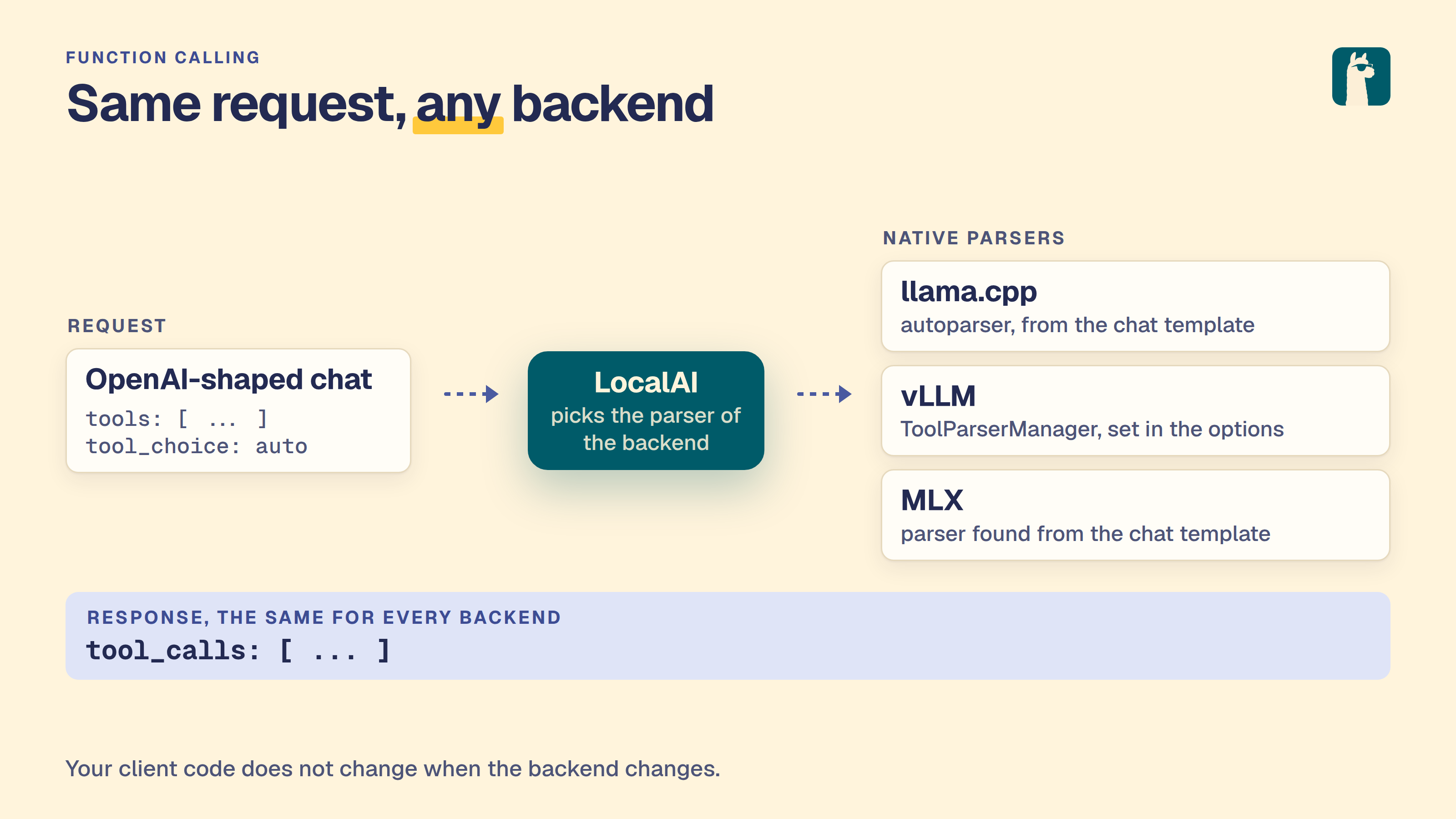
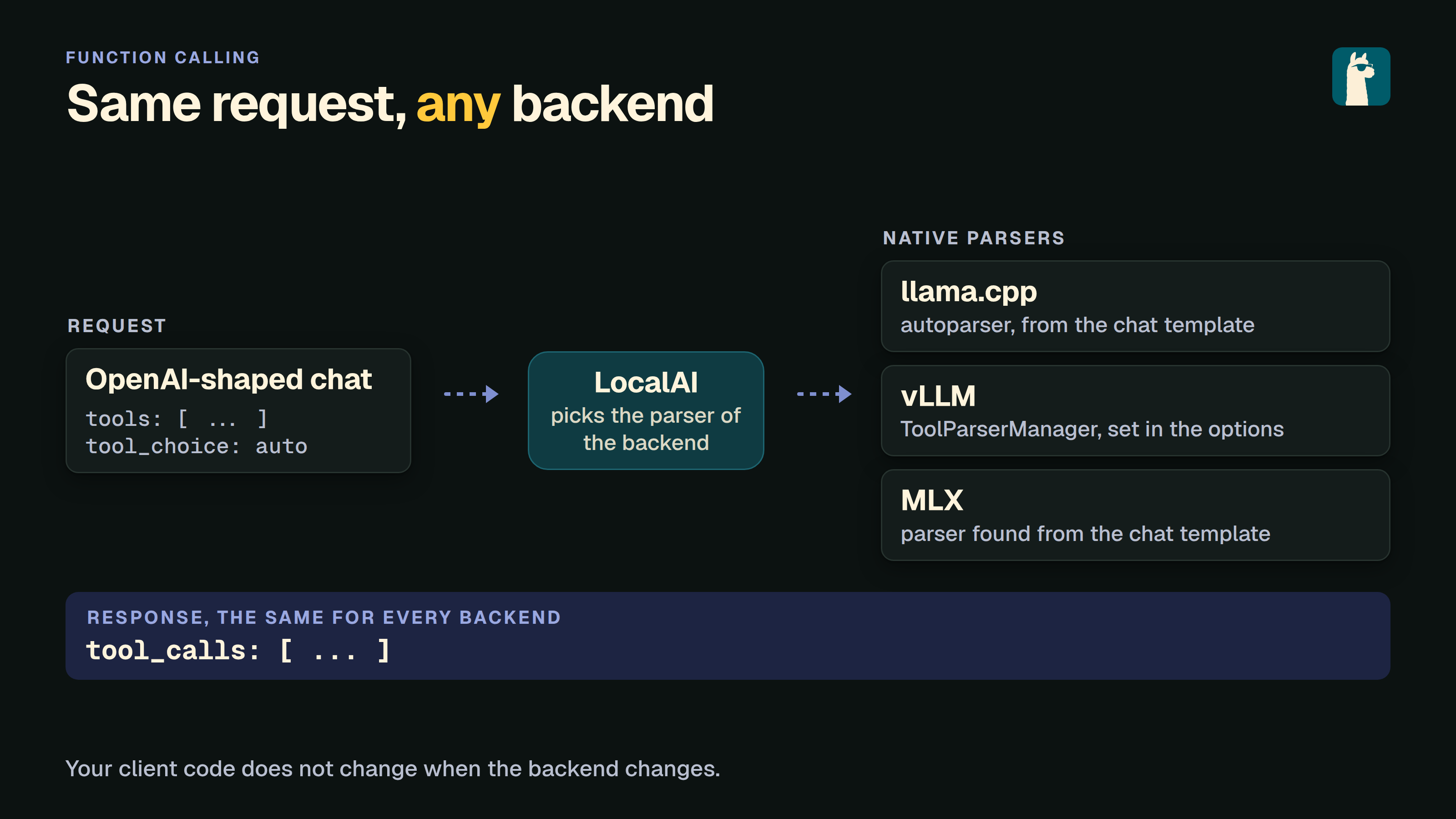
LocalAI supports running the OpenAI functions and tools API across multiple backends. The OpenAI request shape is the same regardless of which backend runs your model - LocalAI is responsible for extracting structured tool calls from the model’s output before returning the response.
LocalAI also supports JSON mode out of the box on llama.cpp-compatible models.
💡 Check out LocalAGI for an example on how to use LocalAI functions.
Supported backends
Backend
How tool calls are extracted
llama.cpp
C++ incremental parser; any ggml/gguf model works out of the box, no configuration needed
vllm
vLLM’s native ToolParserManager - select a parser with tool_parser:<name> in the model options. Auto-set by the gallery importer for known families
vllm-omni
Same as vLLM
mlx
mlx_lm.tool_parsers - auto-detected from the chat template, no configuration needed
mlx-vlm
mlx_vlm.tool_parsers (with fallback to mlx-lm parsers) - auto-detected from the chat template, no configuration needed
Reasoning content (<think>...</think> blocks from DeepSeek R1, Qwen3, Gemma 4, etc.) is returned in the OpenAI reasoning_content field on the same backends. When a model both reasons and calls a tool in the same turn, see Interleaved Thinking with Tool Calls for how the reasoning survives the tool-result round trip.
Setup
llama.cpp
No configuration required - the autoparser detects the tool call format for any ggml/gguf model that was trained with tool support.
Migrating older Ministral 3 configurations
The mistralai_ministral-3-14b-reasoning-2512-multimodal gallery entry uses the model’s embedded template and llama.cpp’s native tool parser.
Older installations inherit the Mistral 0.3 prompt and JSON parser, which can return tool calls such as pick_tool{...} as text.
For an existing installation, replace the model YAML’s template and function sections with:
Remove the inherited stopwords list so llama.cpp controls the model’s end-of-turn markers.
Keep your model path, mmproj, sampling settings, and MCP configuration. Reload the model after saving the YAML.
Gallery changes do not rewrite installed model configurations.
vLLM / vLLM Omni
The parser must be specified explicitly because vLLM itself doesn’t auto-detect one. Pass it via the model options:
When you import a vLLM model through the LocalAI gallery, the importer looks up the model family and pre-fills tool_parser: and reasoning_parser: for you - you only need to override them for non-standard model names.
Available tool parsers include hermes, llama3_json, llama4_pythonic, mistral, qwen3_xml, deepseek_v3, granite4, kimi_k2, glm45, and more. Available reasoning parsers include deepseek_r1, qwen3, mistral, gemma4, granite. See the upstream vLLM documentation for the full list.
With backend: vllm, vLLM 0.30 or later, and a configured reasoning parser,
streamed responses separate delta.reasoning_content, delta.content, and tool
calls as tokens arrive. The final chunk does not repeat the generated text.
If parsing fails during a stream, the backend buffers the remaining output and
sends any matching, unsent suffixes in the final chunk. Older vLLM versions keep
the previous streaming behavior and can include reasoning in delta.content.
MLX / MLX-VLM
MLX backends auto-detect the right tool parser by inspecting the model’s chat template - you don’t need to set anything. Just load an MLX-quantized model that was trained with tool support:
The gallery importer will still append tool_parser: and reasoning_parser: entries to the YAML for visibility and consistency with the other backends, but those are informational - the runtime auto-detection in the MLX backend ignores them and uses the parser matched to the chat template.
You can configure a model manually with a YAML config file in the models directory, for example:
name:gpt-3.5-turboparameters:# Model file namemodel:ggml-openllama.bintop_p:80top_k:0.9temperature:0.1
To use the functions with the OpenAI client in python:
fromopenaiimportOpenAImessages=[{"role":"user","content":"What is the weather like in Beijing now?"}]tools=[{"type":"function","function":{"name":"get_current_weather","description":"Return the temperature of the specified region specified by the user","parameters":{"type":"object","properties":{"location":{"type":"string","description":"User specified region",},"unit":{"type":"string","enum":["celsius","fahrenheit"],"description":"temperature unit"},},"required":["location"],},},}]client=OpenAI(# This is the default and can be omittedapi_key="test",base_url="http://localhost:8080/v1/")response=client.chat.completions.create(messages=messages,tools=tools,tool_choice="auto",model="gpt-4",)#...
For example, with curl:
curl http://localhost:8080/v1/chat/completions -H "Content-Type: application/json" -d '{
  "model": "gpt-4",
  "messages": [{"role": "user", "content": "What is the weather like in Beijing now?"}],
  "tools": [
        {
            "type": "function",
            "function": {
                "name": "get_current_weather",
                "description": "Return the temperature of the specified region specified by the user",
                "parameters": {
                    "type": "object",
                    "properties": {
                        "location": {
                            "type": "string",
                            "description": "User specified region"
                        },
                        "unit": {
                            "type": "string",
                            "enum": ["celsius", "fahrenheit"],
                            "description": "temperature unit"
                        }
                    },
                    "required": ["location"]
                }
            }
        }
    ],
    "tool_choice":"auto"
}'
The functions calls maps automatically to grammars which are currently supported only by llama.cpp, however, it is possible to turn off the use of grammars, and extract tool arguments from the LLM responses, by specifying in the YAML file no_grammar and a regex to map the response from the LLM:
name:model_nameparameters:# Model file namemodel:model/namefunction:# set to true to not use grammarsno_grammar:true# set one or more regexes used to extract the function tool arguments from the LLM responseresponse_regex:- "(?P<function>\w+)\s*\((?P<arguments>.*)\)"
The response regex have to be a regex with named parameters to allow to scan the function name and the arguments. For instance, consider:
(?P<function>\w+)\s*\((?P<arguments>.*)\)
will catch
function_name({ "foo": "bar"})
Parallel tools calls
This feature is experimental and has to be configured in the YAML of the model by enabling function.parallel_calls:
name:gpt-3.5-turboparameters:# Model file namemodel:ggml-openllama.bintop_p:80top_k:0.9temperature:0.1function:# set to true to allow the model to call multiple functions in parallelparallel_calls:true
Use functions with grammar
It is possible to also specify the full function signature (for debugging, or to use with other clients).
The chat endpoint accepts the grammar_json_functions additional parameter which takes a JSON schema object.
Grammars and function tools can be used as well in conjunction with vision APIs:
 curl http://localhost:8080/v1/chat/completions -H "Content-Type: application/json" -d '{
     "model": "llava", "grammar": "root ::= (\"yes\" | \"no\")",
     "messages": [{"role": "user", "content": [{"type":"text", "text": "Is there some grass in the image?"}, {"type": "image_url", "image_url": {"url": "https://upload.wikimedia.org/wikipedia/commons/thumb/d/dd/Gfp-wisconsin-madison-the-nature-boardwalk.jpg/2560px-Gfp-wisconsin-madison-the-nature-boardwalk.jpg" }}], "temperature": 0.9}]}'
💡 Examples
A full e2e example with docker-compose is available here.
Realtime API
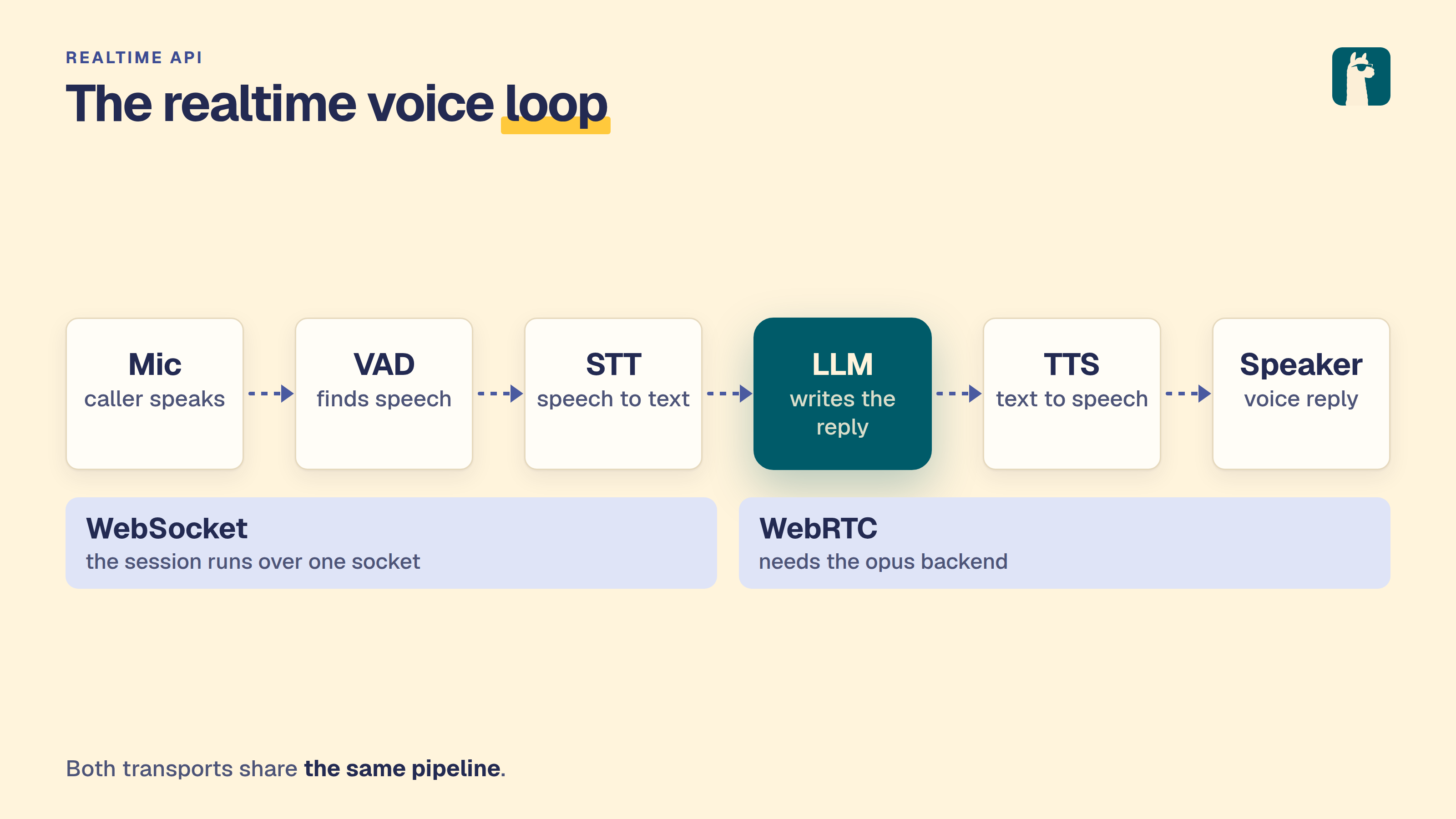
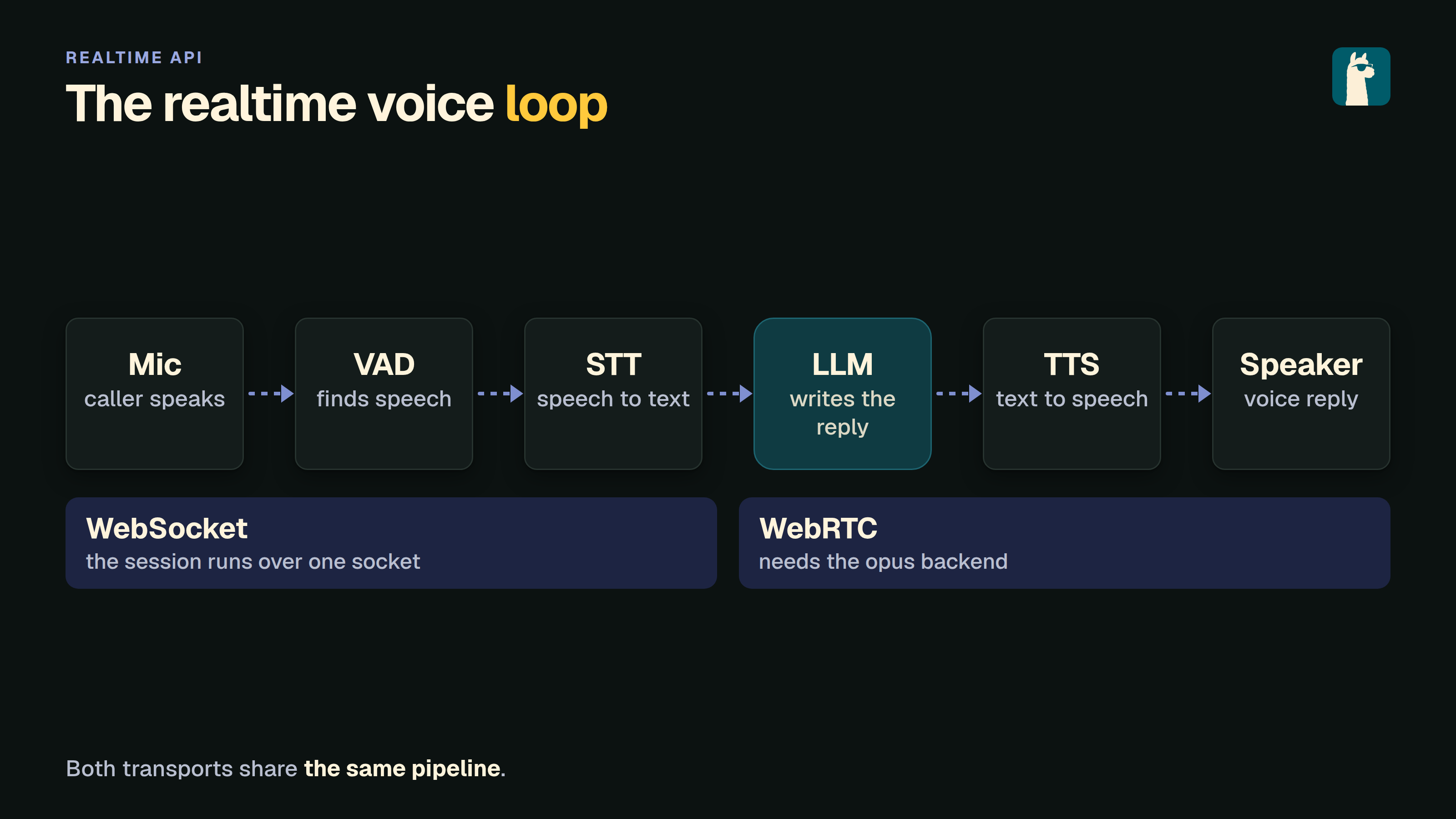
LocalAI supports the OpenAI Realtime API which enables low-latency, multi-modal conversations (voice and text) over WebSocket.
To use the Realtime API, you need to configure a pipeline model that defines the components for Voice Activity Detection (VAD), Transcription (STT), Language Model (LLM), and Text-to-Speech (TTS).
Configuration
Create a model configuration file (e.g., gpt-realtime.yaml) in your models directory. For a complete reference of configuration options, see Model Configuration.
This configuration links the following components:
vad: The Voice Activity Detection model (e.g., silero-vad-ggml) to detect when the user is speaking.
transcription: The Speech-to-Text model (e.g., whisper-large-turbo) to transcribe user audio.
llm: The Large Language Model (e.g., qwen3-4b) to generate responses.
tts: The Text-to-Speech model (e.g., tts-1) to synthesize the audio response.
Make sure all referenced models (silero-vad-ggml, whisper-large-turbo, qwen3-4b, tts-1) are also installed or defined in your LocalAI instance.
A pipeline stage can name a failover chain; the stage then switches targets without closing the session.
Transcription backends can include end-of-utterance language tags, such as <en-US> or <de-DE>.
LocalAI removes these tags from the user transcript sent to the LLM.
The transcription events sent to the client retain the original tags.
This prevents a tag from overriding the intended conversation language in the LLM context.
Install the Qwen streaming assistant preset
The gallery entry qwen3-streaming-assistant configures an English voice
assistant with Silero VAD, Parakeet TDT 0.6B v3, Qwen3 0.6B, and Qwen3-TTS
0.6B CustomVoice using Ryan’s voice. It streams LLM output text into one persistent TTS session while audio
is emitted.
The preset installs only its pipeline configuration. Install all four component
models first, keeping their default names so the pipeline can resolve them:
The TTS command pins the Q8 CustomVoice entry. These are separate installs;
installing the preset does not install missing components. Use a LocalAI build
with incremental Qwen3-TTS input support, then select qwen3-streaming-assistant
on the Talk page or as the Realtime API model. WebRTC also requires the opus
backend, available from the Backends page.
This preset targets English speech. It uses a named voice and does not require
reference audio or ref_text. CPU synthesis can be slower than playback; this
preset does not establish GPU or browser latency or throughput.
Install a clause-buffered assistant preset
Two English presets use the same Silero VAD, Parakeet TDT 0.6B v3, and Qwen3
0.6B components. vits-streaming-assistant uses VITS-LJS through Sherpa;
piper-streaming-assistant uses Piper’s Amy voice.
Install the shared components once, keeping their default names:
These presets install pipeline configurations only. They do not install missing
components. Both enable LLM streaming, TTS streaming, and clause_chunking: true.
Sherpa streams audio within each clause. Piper emits one audio result per clause.
Each clause starts a separate synthesis, which can introduce pauses between clauses.
The single-speaker models need no voice override or reference audio.
Select the installed preset on the Talk page or use its name as the Realtime API
model. WebSocket and WebRTC share the pipeline; WebRTC also needs the opus
backend from the Backends page. Config installation and discovery checks do not
establish speech quality, browser latency, or hardware throughput.
Streaming the pipeline
By default each stage runs to completion before the next begins: the whole utterance is transcribed, the full LLM reply is generated, then it is synthesized. Each stage can instead be streamed incrementally, which lowers the time-to-first-audio of a turn:
name:gpt-realtimepipeline:vad:silero-vad-ggmltranscription:whisper-large-turbollm:qwen3-4btts:tts-1streaming:llm:true# stream LLM tokens as transcript deltastts:true# emit audio deltas per synthesized chunktranscription:true# stream transcript text deltas of the user's speechclause_chunking:true# synthesize each clause as soon as it completes
streaming.tts: emit a response.output_audio.delta per audio chunk the TTS backend produces (requires a backend that supports streaming synthesis), instead of one delta for the whole utterance. Falls back to a single unary delta otherwise.
streaming.transcription: stream conversation.item.input_audio_transcription.delta events as the transcript is produced (requires a transcription backend that supports streaming).
streaming.llm: stream the LLM reply token-by-token as response.output_audio_transcript.delta events. When TTS streaming is disabled, the full reply is synthesized once it is complete unless explicit clause chunking is enabled. Native incremental input or explicitly enabled clause buffering can produce audio before the reply finishes, as described below. Reasoning/thinking is always stripped from the spoken transcript. Tool calls are supported while streaming when the LLM uses its tokenizer template (use_tokenizer_template: true): the backend’s autoparser then delivers content and tool calls separately, so the spoken transcript never leaks tool-call tokens. Grammar-based function calling keeps the buffered path.
Incremental Qwen3-TTS input: with a qwen3-tts-cpp TTS model, enabling both streaming.llm and streaming.tts forwards cleaned LLM text fragments into one persistent synthesis session. Audio can arrive before the LLM finishes. WebSocket and WebRTC use this path. It takes precedence over clause_chunking; other backends can opt into clause buffering as described below. Pending text is bounded and slow audio playback applies backpressure. Cancellation stops the session. A failed live utterance is not replayed through a fallback model. The initial native implementation supports a single batch slot and reference audio without ref_text; transcript-based ICL cloning is unavailable for live input. Incomplete words are buffered until a stable boundary; CJK, Kana and Hangul characters can commit without whitespace.
streaming.clause_chunking: instead of buffering the whole reply before TTS, split it into speakable clauses and synthesize each as soon as it completes, lowering the time-to-first-audio. The splitter is script-aware: it uses Unicode sentence segmentation (so it handles CJK 。!? with no whitespace), CJK clause punctuation (,、;:), and Thai/Lao spaces - it does not rely on whitespace sentence boundaries, so it works for languages such as Chinese, Japanese and Thai where the old per-sentence approach degraded to whole-message buffering. Requires streaming.llm; scripts that genuinely need a dictionary (e.g. Khmer, Burmese) simply stay buffered until a space or end-of-message. Set clause_chunking: true to enable a bounded clause queue. Unset and false retain whole-reply synthesis for backends without native incremental text input. With streaming.tts enabled, Sherpa/VITS can stream audio within each clause; unary engines such as Piper produce one audio result per clause. With streaming.tts disabled, each clause uses unary synthesis. These engines start a separate synthesis for each clause, so they may pause at clause boundaries. Cancellation stops queued work; a streaming failure after audio has been emitted never replays that clause through unary synthesis.
All streaming flags are off by default. Pipelines with streaming disabled remain unaffected.
Model warm-up (cold start)
Without warm-up the pipeline’s models are loaded into memory only on first use within a session: the VAD on the first audio chunk, transcription at the first end-of-speech, the LLM on the first reply, and TTS on the first spoken output. On a cold session this staggers a load delay across those first few interactions - and a model that fails to load (missing weights, wrong backend, out of memory) only fails part-way through the first turn.
To avoid that, LocalAI warms the pipeline by default: it loads the VAD, transcription, LLM and TTS backends into memory before the session is announced, and the session start blocks until they are all ready. The loads run concurrently, so the wait is the slowest single model, not the sum. This means:
The first turn pays no cold-start cost - every backend is already resident.
Model-load errors surface at session start. If any stage fails to load, the session is not started and the client receives a model_load_error instead of session.created, so a broken pipeline fails fast and visibly rather than mid-call.
Set disable_warmup: true to restore the lazy “load on first use” behavior - session start no longer waits on loading and load errors surface on the first turn instead. Useful if you want idle sessions to avoid holding model memory they may never use:
name:gpt-realtimepipeline:vad:silero-vad-ggmltranscription:whisper-large-turbollm:qwen3-4btts:tts-1disable_warmup:true# lazily load each model on first use instead of at session start
Pre-loading a pipeline on demand
Warm-up only fires when a realtime session opens. To load a pipeline into memory ahead of time - e.g. to warm it right after boot, or when running with disable_warmup: true - POST the model name to the admin-only /backend/load endpoint. For a pipeline model it loads every configured sub-model (VAD, transcription, LLM, TTS, sound_detection, voice_recognition) concurrently:
The endpoint is not realtime-specific - it pre-loads any model. See Backend Monitor for the full request/response reference (it is the inverse of /backend/shutdown).
Controlling response interruption
By default, speech detected by either VAD mode interrupts the active response.
Set interrupt_response: false to let the response finish while the user speaks:
This option also applies to semantic_vad. Speech events and transcription
continue. If a response is active when another turn commits, LocalAI retains
that turn in conversation history but skips its automatic response. It does
not queue a response for that turn. A later turn can generate a response once
the active one finishes. To request a response manually, wait for both
response.done and the overlapping turn’s conversation.item.added event, then
send response.create. Transcription can finish after the active response.
Explicit response.cancel and client response creation keep their existing
behavior. When replacing the turn-detection settings, omit interrupt_response
or set it to true to enable interruption again.
Turn detection
For client-controlled turns, set turn_detection to null in session.update.
After sending audio, send input_audio_buffer.commit, followed by response.create.
If transcription is still running, the response waits for the committed user item before starting the LLM.
A standalone response.create with no pending client commit starts without this wait.
If the commit produces no user item (transcription error, empty transcript or a voice gate rejection), the server does not run the LLM. It sends response.done with status failed and an input_not_committed error, after the error event that describes the cause. If you cancel the response while it waits, you get response.done with status cancelled.
Turn detection decides when the user has finished speaking and the pipeline should respond. Two modes are supported, matching the OpenAI session schema:
server_vad (default): silence-based. The VAD model watches the audio and the turn commits after silence_duration_ms (default 500 ms) of silence. Simple and model-agnostic, but a fixed silence window must trade interrupting mid-sentence pauses against sluggish responses.
semantic_vad: model-driven. The transcription model itself signals end-of-utterance and the silence window becomes dynamic: short right after the model emits its end-of-utterance token, much longer when it does not - so pausing to think no longer gets cut off, while finished sentences get a fast response.
semantic_vad requires a transcription model that emits an end-of-utterance token over a cache-aware streaming decode - currently parakeet-cpp-realtime_eou_120m-v1 (the model is trained to distinguish “paused, expecting a reply” from “paused mid-thought”). The realtime pipeline feeds it the microphone audio live while the user speaks. With any other transcription backend the session degrades gracefully to silence-only detection using the eagerness timeout below (a warning is logged once). The model also emits a distinct end-of-backchannel token (<EOB>) for short acknowledgments like “uh-huh”: those are transcribed but never treated as the user yielding the turn.
Sessions can opt in via session.update (turn_detection: {"type": "semantic_vad", "eagerness": "medium"}), or the pipeline can set a server-side default so clients need no changes:
name:gpt-realtimepipeline:vad:silero-vad-ggmltranscription:parakeet-cpp-realtime_eou_120m-v1llm:qwen3-4btts:tts-1turn_detection:type:semantic_vad # default for sessions on this model (server_vad if unset)eagerness:medium # low | medium | high | auto (auto == medium)retranscribe:false# see below# vad_window_sec: 6 # widen the per-tick VAD scan window (see below)
A client session.update still overrides type and eagerness per session.
VAD scan window: each turn-detection tick the VAD rescans only the most recent slice of buffered audio — sized automatically from the commit silence threshold (the server_vad silence window, or the semantic eagerness fallback) plus a warm-up margin, so long turns cost the same per tick as short ones. vad_window_sec widens the window if needed; values below the automatic floor are ignored. Buffered turn audio is retained for at most 90 s — a turn that genuinely never pauses (continuous speech or a noise source the VAD keeps classifying as speech) keeps only its most recent 90 s for the commit-time batch transcription (the semantic live stream is unaffected — it already consumed the audio incrementally).
Eagerness sets the fallback silence window used when no end-of-utterance token was seen (the model missed it, or the user genuinely trails off): low waits 8 s, medium/auto 4 s, high 2 s - the same max-timeout semantics OpenAI documents. After the token is seen, the turn commits on the next VAD tick (~300 ms).
Live captions: while the user speaks, semantic_vad streams conversation.item.input_audio_transcription.delta events under the item id the commit will later reuse, so clients can render the words as they are recognized. The completed event at commit carries the authoritative transcript and replaces the partial text (with retranscribe: true it may differ from the captions); a turn discarded before commit emits conversation.item.input_audio_transcription.failed so clients can retract its captions.
retranscribe (server-side only, semantic_vad only) cross-checks the streaming decode against a batch decode at commit time:
false (default): the transcript accumulated from the live stream is used as-is - the model runs once per utterance and the LLM starts immediately at commit.
true: the committed audio is re-transcribed offline. If the batch decode also ends with the end-of-utterance token the turn proceeds (using the batch transcript); if it does not, the commit is cancelled and the session keeps listening - treating the streaming token as a false positive. Both transcripts are compared and logged, which makes this mode a useful diagnostic for how well the streaming and batch decodes align, at the cost of one extra decode per turn.
Live speaker and sound events (parakeet-cpp)
When the semantic_vad transcription model is a parakeet-cpp model loaded with a diarization_model and/or sound_model companion (see Audio to Text), the realtime session also streams speaker and sound events while a turn is live, alongside the transcript deltas. Nothing needs to change on the client: unrecognized event types are ignored by standard OpenAI Realtime clients.
Each closed speaker segment emits a conversation.item.input_audio_transcription.segment event under the turn’s item id, with an empty text (the event exists to carry the speaker boundary, not a transcript - the transcript still comes from the ordinary delta/completed events):
speaker_name is the name of a voice registered through /v1/voice/register, and is present only when the model has a speaker_model: (or, for a parakeet-cpp bundle file, a speaker_component:) and the speaker was identified. A segment that closes before its speaker is identified has none, and later segments of the same speaker do. See Voice Recognition. The segments of the offline path below carry no speaker_name.
Each sound event emits a conversation.item.sound_detection event with one tag and the detection window’s start/end:
The start/end on both event types are seconds measured from the start of the current turn’s own audio, not the session or the WebSocket connection - the same base the streamed transcript words use.
The companion stream is opened fresh for each speech turn, alongside that turn’s ASR live session, and closed when the turn commits: whatever it had not yet emitted is drained and sent at that point. Because the diarization model runs a brand new session every turn, its speaker indices are scoped to the turn too - "speaker": "0" in one turn and "speaker": "0" in the next are not guaranteed to be the same person, even within the same conversation.
score is the peak score seen for that tag while the sound was live, not an average.
Limitation: under semantic_vad, live transcription (and so this companion stream) only runs during speech turns - it does not see audio between turns. A sound that happens while nobody is speaking is not detected this way. If you need sound events independent of speech turns, use the pipeline’s sound_detection model instead (see Sound Classification), which classifies each VAD-committed utterance on its own. Use one or the other, not both, on the same session - they overlap in purpose and would emit sound detections twice.
Speaker and sound events with an offline model (Parakeet TDT v3)
The live events above need a cache-aware streaming transcription model. An offline model such as Parakeet TDT 0.6B v3 (25 languages) runs under server_vad instead: each VAD-committed turn is transcribed as a whole. The gallery model parakeet-cpp-realtime-scene-tdt bundles it with Nemotron-3-Diarization and CED-Tiny, so one parakeet-cpp backend handles transcription, speakers and sounds. Point both transcription and sound_detection at it and turn on diarization:
pipeline.diarization asks the transcription model for speaker labels on each committed turn and emits every labelled segment as a conversation.item.input_audio_transcription.segment event before the turn’s completed event. Unlike the live path, these segments carry their text:
{"type":"conversation.item.input_audio_transcription.segment","item_id":"item_abc","content_index":0,"id":"seg_1","speaker":"1","start":6.85,"end":10.82,"text":"Well, I don't wish to see it any more, observed Phoebe, turning away her eyes."}
sound_detection classifies the same committed audio and emits one conversation.item.sound_detection event per turn (see Sound Classification). As on the live path, times are relative to the turn’s audio and speaker labels are only consistent within a turn. pipeline.diarization is off by default: it needs a transcription model that diarizes (parakeet-cpp with a diarization_model companion), and some other backends fail a diarization request they cannot serve.
Choosing the sound model
Both scene models ship with CED-Tiny, the cheapest to run all the time. parakeet-cpp-realtime-scene-base and parakeet-cpp-realtime-scene-tdt-base are the same pipelines with CED-Base (86M, the largest CED), which tags sounds more confidently. parakeet-cpp-multilingual-diarization-speakers-sounds loads the same TDT, Nemotron-3-Diarization and CED-Tiny trio plus the WeSpeaker encoder, and is meant for offline /v1/audio/diarization calls with include_sounds=true (see Speaker Diarization). Any CED GGUF from mudler/ced-gguf (tiny, mini, small, base) works as sound_model. Measured on CPU (Ryzen 9 9950X3D) over a 37 s clip with two speakers and a rooster, as a fraction of real time:
CED-Tiny
CED-Base
Live scene stream (diarization low + sound), EOU path
0.103
0.125
Sound detection per committed turn, TDT path
0.005
0.031
The EOU model’s own ASR stream adds 0.016. Diarization dominates the live cost, so CED-Base keeps the live path about 7x faster than real time.
Disabling thinking
For reasoning models, you can force the pipeline LLM’s thinking off without editing the LLM model config:
pipeline:llm:qwen3-4bdisable_thinking:true# maps to enable_thinking=false for the realtime LLM
This is applied only to the realtime session’s copy of the LLM config, so it does not affect other users of the same model. Leave it unset to use the LLM model config’s own reasoning settings.
Conversation compaction (long sessions on CPU)
By default a realtime session feeds only the last max_history_items turns to the LLM; older turns are dropped and forgotten. On CPU, long calls also grow expensive as the prompt fills with verbatim history. Enable compaction to instead fold older turns into a rolling summary, so long calls stay cheap without losing earlier context.
Compaction works with two numbers:
max_history_items is the live window - the recent turns kept verbatim in the prompt.
compaction.trigger_items is the high-water mark - let the buffer grow to here, then summarize the overflow (everything above max_history_items) into a rolling memory and evict it. It must be greater than max_history_items; if it is not, it is clamped up.
The gap between the two controls how often summarization runs: a summary call fires roughly every (trigger_items - max_history_items) turns (here, about every 6 turns).
pipeline:max_history_items:6# live window - recent turns kept verbatimcompaction:enabled:truetrigger_items:12# summarize overflow back down to max_history_itemssummary_model:""# optional: a small model for the summary (CPU); default = pipeline LLMmax_summary_tokens:512
Tip
On CPU, set summary_model to a small, fast model so compaction never competes with the conversation LLM for compute. Left empty, the pipeline’s own LLM produces the summary.
Clients can also manage history directly via the now-supported conversation.item.delete, conversation.item.truncate, and input_audio_buffer.clear realtime events.
Classifier mode (LocalAI extension)
On hardware that can afford prompt processing but not token generation — a Raspberry Pi running a small LLM, for example — a realtime session can replace autoregressive generation with prefill-only classification: you register a fixed list of options, each user turn is scored against them with the Score primitive (a single forward pass, no decode), and the winning option’s canned reply is spoken and/or its canned tool call is emitted. On llama-cpp, scoring runs through the same server slot the LLM uses, so the conversation prefix stays KV-cached across turns, and all options are scored together in one batched decode: the shared prefix (prompt plus the options’ common token prefix) is processed once, then each option’s unique tail rides a forked sequence in a single forward pass. A warm turn costs roughly one pass over the new words plus one small batch over the option tails, independent of the option count.
Enable it in the pipeline config:
name:drone-pipipeline:vad:silero-vad-sherpatranscription:parakeet-cpp-realtime_eou_120m-v1llm:lfm2.5-1.2b-instruct # scores AND (if asked) generatestts:vits-piper-en_US-amy-sherpaclassifier:enabled:truethreshold:0.85# softmax floor the winner must clear (see note below)fallback:mode:reply # none | reply | generatereply:"Say again?"options:- id:updescription:the user asks the drone to move or fly up/higherreply:Going up.tool:name:movearguments:{direction:up}- id:greetingdescription:the user greets the assistantreply:Hello, ready to fly.
Or per session / per response from the client (the field is additive — OpenAI clients simply never send it):
Like tools, the option list is replaced wholesale on each update. A response.create may carry its own localai_classifier to override the session for one response — {"enabled": false} runs normal generation once.
How a classified response behaves:
The winner’s reply is emitted through the ordinary response events (spoken via TTS, or response.output_text.* in text-only mode), and its tool (if any) is emitted as a standard function_call item with exactly the configured arguments — the client executes it and reports back with conversation.item.create as usual. In classifier mode you typically should not send a follow-up response.create after the tool output: the canned reply already acknowledged the command, and the follow-up would classify a tool-output turn.
Every classified response also emits a localai.classifier.result event carrying the full softmax distribution, the chosen option id (empty when the fallback applied), the threshold, and the scoring latency — useful for visualizing confidence in a client UI.
A committed turn whose transcript is empty (the VAD fired on noise and the ASR heard no words) is never scored — an empty prompt produces a confidently arbitrary winner. The fallback applies directly: the result event carries an empty scores list, and generate mode falls through to generation.
Wake-word gating: set address: {names: ["drone"], mode: ignore} and the assistant only acts on turns that mention one of the names (“Drone go up”, not just “go up”). The check is a deterministic case-insensitive whole-word match on the latest transcript — deliberately not model-based: scoring cannot detect a missing name (a 1.2B scorer rates “go up” as addressed with p≈1.0 even with a dedicated addressing stage), while a literal match is exact and free. Unaddressed turns skip scoring entirely (ambient conversation costs nothing) and emit a result event with empty scores and fallback: "not_addressed"; mode: ignore completes the response silently, mode: reply speaks reply.
When no option clears threshold, fallback.mode decides: none completes the response with no output, reply speaks the canned fallback reply, and generate falls through to normal autoregressive generation (slow on weak hardware, but always available since the same model config serves both paths). Set the threshold high: with the default raw normalization a confident in-list pick lands near 1.0, while an out-of-list request spreads its probability across the options — measured on a 1.2B scorer, in-list utterances scored ≥0.97 and out-of-list ones peaked around 0.8, so a floor of ~0.85 separates them. A low threshold (say 0.35) practically never falls back. Also keep each option’s description narrowly scoped: a catch-all clause like “…or asks for help” turns that option into a magnet for every request the model cannot map, defeating the fallback.
Agentic follow-up turns (after a server-side assistant tool executes) always use generation — the option list describes user intents, not tool outputs.
Knobs that matter for latency and accuracy: keep option descriptions short (they all go into the scoring system prompt) and the option count small. By default only the latest user message is scored — earlier turns echo option names (the canned replies especially) and empirically make small scoring models re-choose the previous option regardless of the new command. history_items: N opts the trailing N conversation messages back in (role-labeled); only do that with a scorer large enough to weigh the context. normalization: mean divides each option’s joint log-prob by its token count — useful when option ids have very different lengths. The scoring model needs a Go-side chat template (template.chat / template.chat_message); without one the scoring prompt falls back to a generic ChatML envelope, which may be off-distribution for the model. Use classifier.model to score on a different config than the pipeline LLM (rarely needed).
Argument slots (hybrid classify-then-complete)
A canned tool call can leave holes for the model to fill: declare slots on the option’s tool and reference them as "{{name}}" in the arguments template. When the option wins, LocalAI runs a short grammar-constrained completion that continues the exact scoring prompt (so the llama.cpp prompt cache is already warm) with the chosen route JSON re-opened at the first slot — only the value tokens are free; everything else is pinned by the grammar. Number slots substitute unquoted, enum/string slots inside their quotes.
tool:name:move_dronearguments:direction:forwarddistance:"{{distance}}"units:"{{units}}"slots:- name:distancetype:number # number | enum | string- name:unitstype:enumvalues:[m, meters, ft, feet]default:m # used if inference fails outrighthint:assume m when the user gives no units
The option’s spoken reply can reference the same placeholders — reply: "Going forward {{distance}} {{units}}." — and the filled values are spliced in as plain text before the reply is emitted, so what the assistant says confirms what it inferred. Reply placeholders are optional (one that names no slot stays literal).
Slot declarations (and hints) are appended to the option’s description in the shared system prompt, so they also inform scoring and cost no extra per-turn tokens. The localai.classifier.result event carries the final arguments and a fill_latency_ms. On an inference failure the slots’ defaults apply (and template the reply); if any slot lacks a default the response fails (or falls through to generation with fallback.mode: generate). Slot filling requires completion in the scoring model’s known_usecases alongside score.
Registering an option list (pipeline seed or session.update) prewarms the scoring prompt in the background: one throwaway score prefills the option-list prompt and plants a state checkpoint exactly at the per-turn probe boundary. Every scoring call also declares that boundary (the probe-invariant prompt prefix) to the backend, which checkpoints there on each prefill — on hybrid/recurrent models (which cannot rewind their state arbitrarily, only restore checkpoints) this is what keeps every turn at probe-size cost instead of a full option-list re-prefill. A client that swaps option lists at runtime (e.g. voice-switched command modes) pays nothing on the first turn after a swap: the rewarm hides behind the acknowledgement reply, and it runs on every registration deliberately — if the list’s slot was evicted, the rewarm is exactly the re-prefill the next turn would otherwise pay in the foreground. Swapping between several lists? Give the scoring model a slot per list and make the prefix routing selective: options: [parallel:3, sps:0.5] (the default slot-similarity threshold of 0.1 funnels different lists onto one slot — they share enough prompt structure to clear it).
The concrete scoring model must declare score in known_usecases. A single llama.cpp model can serve ordinary inference and classification concurrently by declaring multiple use cases, for example known_usecases: [chat, completion, score]; LocalAI reserves the scoring slots only when score is present. Scoring also requires the unified KV cache, which is enabled by default, so a score-enabled model cannot set kv_unified:false.
Speech-to-speech models (experimental)
A speech-to-speech (S2S) model takes audio in and answers with audio, text or both, in one model. Instead of chaining VAD, transcription, an LLM and TTS, the session sends audio to the model and gets the reply back from it. The llama-cpp backend serves these models.
Warning
Speech-to-speech over the Realtime API is experimental. It needs a llama.cpp build with LFM3-Audio and realtime support, which the LocalAI llama.cpp pin must include. It has not been measured on real hardware, and its behaviour may change.
Configuration
The gallery has LiquidAI LFM3-Audio-2B in two quantizations (Q4_K_M or Q8_0 weights, both with the Q8_0 audio projector) and four shapes each. Every entry is independent: installing lfm3-audio-2b always gets the Q4_K_M build, never Q8_0.
Entry (Q4_K_M)
Entry (Q8_0)
Shape
VAD
lfm3-audio-2b
lfm3-audio-2b-q8
One speech-to-speech model
none, the client commits turns
lfm3-audio-2b-vad
lfm3-audio-2b-q8-vad
One speech-to-speech model
silero-vad-ggml
lfm3-audio-2b-pipeline
lfm3-audio-2b-q8-pipeline
Chained pipeline on the same model
none, the client commits turns
lfm3-audio-2b-pipeline-vad
lfm3-audio-2b-q8-pipeline-vad
Chained pipeline on the same model
silero-vad-ggml
The gallery cannot install one model as a dependency of another. The -vad entries name silero-vad-ggml in pipeline.vad, so install it first with local-ai models install silero-vad-ggml. Without it, the session fails to start with a model-not-found error.
Install one with local-ai models install lfm3-audio-2b. Its model configuration looks like this:
pipeline.any_to_any: true runs the model as one speech-to-speech model. Without it, a realtime_audio model keeps the chained path (VAD, transcription, LLM, TTS).
parallel:2 gives the model two slots. One is held by the session. The other serves transcription, TTS or chat calls at the same time.
Chained pipeline on LFM3
The -pipeline entries do not use the speech-to-speech stream. They run the classic realtime pipeline (VAD, transcription, LLM, TTS), with the transcription, chat and speech stages all served by the one llama.cpp model: speech recognition through the transcription path, the reply through the chat path (with its templates, tools and streaming), and speech synthesis through the TTS path with the named voice female (or male). Choose it when you want the regular chat path or the text of each stage; choose the speech-to-speech entries for the lowest latency. The model configuration names itself in each slot and is not a realtime_audio model:
Keep the installed model name, because the slots refer to it. The -pipeline entries have no vad line. A chained pipeline without a VAD starts with turn detection off, refuses turn_detection of type server_vad in session.update, and expects input_audio_buffer.commit followed by response.create.
Migrating from the liquid-audio backend
The Python liquid-audio backend is removed, together with its importer and its gallery entries. It served LFM2-Audio models. Use the llama-cpp backend with lfm3-audio-2b or lfm3-audio-2b-q8 instead, and set pipeline.any_to_any: true as shown above. A model with backend: llama-cpp and realtime_audio but without pipeline.any_to_any is refused with invalid_pipeline, because llama.cpp has no VAD, transcription or TTS of its own.
LFM2.5-Audio is not covered: llama.cpp does not run it, so there is no replacement for it. Remove the old model configurations that name backend: liquid-audio.
Voice activity detection
Speech-to-speech models do not have a VAD of their own. Turn detection depends on the pipeline:
With a VAD model (pipeline.vad, for example silero-vad-ggml, installed separately), the server detects the start and end of each turn. Use turn_detection with server_vad as in the rest of this page. Audio is forwarded from 300 ms before speech starts, so silence before the user speaks is not added to the model context.
Without a VAD model (the plain lfm3-audio-2b entries), server VAD is off. The client ends each turn with input_audio_buffer.commit and then sends response.create. Set turn_detection to null in session.update to make this explicit.
Tools
Define tools in session.update as usual. When the model calls one, the session sends response.output_item.added with a function_call item, then response.function_call_arguments.delta and response.function_call_arguments.done, and then response.done. To return the result, send a conversation.item.create with type: function_call_output, the same call_id and the output string, and then response.create. The model answers with the result in the next reply. A reply that is only a tool call has no audio.
How a call is read depends on the model:
The backend reads the text of the reply with the parser and grammar of the model’s chat template, as the llama.cpp server does for /v1/realtime. The call is cut out of the transcript. The audio is sent as the model produces it, also after a call started. tool_choice (auto, none or required) works in session.update and in response.create, and the response value wins. A named function cannot be forced: session.update and response.create refuse it with an error. The backend knows only the tools of the session, so a tools list on response.create does not change what it reads. With tool_choice set to none, a call the model writes anyway stays text.
If the backend found no call and the request had tools, LocalAI parses the raw text of the reply with the function settings of the model, the way the chained pipeline does. Set function.xml_format_preset (the LFM3-Audio gallery entries set it to lfm3) or the other function options for a format the backend parser does not know. In this case the call text can already be in the streamed transcript, and the transcript is replaced only if function.capture_llm_results captures the content.
Transcripts
Reply transcript.response.output_audio_transcript.delta and response.output_audio_transcript.done carry the text of the spoken reply. In a text-only response, response.output_text.delta is used instead.
User transcript. The stream answers from the audio, so an any-to-any model does not transcribe the input unless pipeline.transcription is set. When it names another model (a sherpa-onnx ASR, for example), conversation.item.input_audio_transcription.completed is sent for the user item, in parallel with the reply. When it names the model itself, the transcript is made on a second slot before the reply starts, so it arrives before the first output of that reply (for a manual commit and for a VAD turn), and it delays the reply by its own run time. Both share one llama.cpp context, and while they run together llama.cpp rebuilds its buffers on every step, which slows the reply to a few tokens per second; this is why the default is no transcript. The transcript of the reply always comes from the stream. If transcription fails, conversation.item.input_audio_transcription.failed is sent and the reply continues.
Barge-in
Interruption works as described in Controlling response interruption. When the user starts speaking during a reply, the server stops the reply, sends response.done with status: cancelled, and handles the new speech as the next turn. The part of the reply that was already decoded stays in the model context, as in llama.cpp.
Limits
Audio format. The model listens to 16 kHz mono audio. LocalAI resamples the session input to 16 kHz. Output audio is 24 kHz mono PCM.
Voice. The voice setting is not applied to speech-to-speech output. llama.cpp’s realtime slot has no voice selection. The voice setting still applies to the text-to-speech endpoint.
Context. A session holds one slot for its whole life, and all its audio stays in the context. A long session reaches context_size. The session then sends an error and closes. There is no compaction for speech-to-speech sessions.
Session updates after the first turn. Once the first audio or message has been added, instructions, tools and voice cannot change. A session.update that tries to change them gets an error. output_modalities and max_output_tokens can still change.
Not supported.conversation.item.truncate and conversation.item.delete return an error, because the context cannot be cut by audio time. input_audio_buffer.clear drops audio that has not been committed. Without a VAD model, the server keeps appended audio in its buffer and sends it to the model only at input_audio_buffer.commit (or at a response.create that finds uncommitted audio), so a clear discards it for good. With server VAD, audio is streamed to the model during a turn, and what was already sent stays in the context.
Pipeline features. The pipeline features that need a separate LLM call are rejected with invalid_pipeline: classifier mode, conversation compaction with a summary, streaming.llm, and voice recognition gating.
Distributed mode. The conversation state lives in one backend slot, so a session stays on the instance that opened it until it ends. See distributed mode for how instances are chosen.
Transports
The Realtime API supports two transports: WebSocket and WebRTC.
Audio is sent and received as raw PCM in the WebSocket messages, following the OpenAI Realtime API protocol.
In the chained pipeline, committed user audio reaches the transcription backend as 16 kHz mono WAV, whichever way the turn was committed: server-side VAD and client input_audio_buffer.commit both resample from the session input sample rate (for example 24 kHz) first.
WebRTC
The WebRTC transport enables browser-based voice conversations with lower latency. OpenAI-compatible clients can send a raw SDP offer and select the model with the query parameter:
POST http://localhost:8080/v1/realtime/calls?model=gpt-realtime
Content-Type: application/sdp

<SDP offer body>
The response has the application/sdp content type and contains the bare SDP answer.
The unified OpenAI interface is also supported. Send multipart/form-data with an sdp field that contains the offer and a JSON session field. LocalAI reads the model from the session object:
LocalAI also accepts its original JSON request format for compatibility. A JSON request contains top-level sdp and model fields and receives a JSON response with sdp and session_id fields.
Opus backend requirement
WebRTC uses the Opus audio codec for encoding and decoding audio on RTP tracks. The opus backend must be installed for WebRTC to work. Install it from the Backends page in the web UI, or from the backend gallery with the API:
The opus backend is loaded automatically when a WebRTC session starts. It does not require any model configuration file - just the backend binary.
WebRTC behind Docker host networking or NAT
By default pion gathers a host ICE candidate for every local interface. Under
Docker host networking that includes bridge addresses (docker0/veth,
172.x) that a remote browser cannot route to: the call typically connects on a
good candidate and then drops a few seconds later when ICE consent checks fail on
the unreachable ones. Two settings let you advertise only the reachable address:
# Advertise these IPs as the host ICE candidates (e.g. the host's LAN IP)LOCALAI_WEBRTC_NAT_1TO1_IPS=192.168.1.10
# ...or restrict ICE gathering to specific interfacesLOCALAI_WEBRTC_ICE_INTERFACES=eth0
Tip
For a browser on another LAN machine talking to LocalAI in a host-networked
container, set LOCALAI_WEBRTC_NAT_1TO1_IPS to the host’s LAN IP. This is the
most reliable fix for WebRTC connections that establish and then drop.
LocalAI never offers deprecated IPv6 addresses as candidates. After an
IPv6 prefix change (many routers rotate the prefix, often daily) the old
addresses stay on the interface as deprecated until their lifetime runs out;
ICE checks over them time out and the call never connects. On Linux the
kernel’s address flags (/proc/net/if_inet6) are read on every gathering, so
this needs no setting.
Fixed WebRTC UDP port
By default, each WebRTC peer connection uses an ephemeral UDP port. To route
all realtime WebRTC ICE traffic through one shared port, start LocalAI with
--web-rtc-udp-port 3478 or set LOCALAI_WEBRTC_UDP_PORT=3478.
When running in a container, publish the same port with the UDP protocol:
docker run -p 8080:8080 -p 3478:3478/udp \
  -e LOCALAI_WEBRTC_UDP_PORT=3478 localai/localai:latest
Allow the selected UDP port through the host and network firewalls. If LocalAI
cannot bind it, WebRTC signaling requests return an HTTP 500 error describing
the bind failure.
Protocol
The API follows the OpenAI Realtime API protocol for handling sessions, audio buffers, and conversation items.
Response modalities (text-only sessions)
By default a realtime session responds with audio plus a transcript. To make the model respond with text only, set the output modalities on either the session or an individual response:
output_modalities is the GA field name. For compatibility, LocalAI also accepts the legacy Realtime beta field name modalities as an alias (a lot of community sample code still sends modalities: ["text"]):
The GA output_modalities wins when both are present. A response-level value overrides the session-level one, and when neither is set the session falls back to ["audio"].
Out-of-band responses and metadata
A response can be created outside the default conversation by setting conversation to none. The reply is not added to the conversation history, which is what makes it usable for a side channel — answering a chat message or a webhook while a spoken conversation is in progress.
Because such a response arrives on the same socket as everything else, attach metadata to correlate it. LocalAI echoes the map back verbatim on both response.created and response.done:
{"type":"response.create","response":{"conversation":"none","output_modalities":["text"],"metadata":{"client_run":"abc123"},"input":[{"type":"message","role":"user","content":[{"type":"input_text","text":"Is the oven still on?"}]}]}}
Keys are strings up to 64 characters, values up to 512. A response created without metadata omits the field rather than sending an empty object.
Gating a realtime pipeline with voice recognition
A pipeline realtime model can require speaker verification before it responds. Add a voice_recognition block under pipeline. When present, each committed utterance is verified against authorized speakers; unauthorized utterances are dropped before the LLM runs (no LLM call, no tool execution, no TTS). The session stays open.
The same block also drives two optional, independent behaviors: an authorization gate (enforce) and speaker surfacing/personalization (identity). Set enforce: false to keep recognizing the speaker without ever rejecting a turn.
name:my-realtimepipeline:vad:silero-vadtranscription:whisperllm:qwentts:kokorovoice_recognition:model:speaker-recognition # the speaker-recognition backend modelmode:identify # "identify" (registry) or "verify" (references)threshold:0.25# cosine distance; <= passesenforce:true# authorization gate (default true)when:every # "every" (default) or "first"on_reject:drop_event # "drop_event" (default) or "drop_silent"anti_spoofing:false# optional liveness check (verify mode)# identify mode: authorized registry identities (multiple persons)allow:names:["alice","bob"]# match registered speaker nameslabels:["family"]# OR any identity carrying this label# empty allow = any registered speaker within threshold passes# verify mode: reference speakers (multiple persons)references:- name:aliceaudio:/models/voices/alice.wav- name:bobaudio:/models/voices/bob.wav
One bundle for every stage
A parakeet-cpp bundle can fill the speaker stage as well as the others, so one model serves
vad, transcription, sound_detection and voice_recognition. The bundle config must
list speaker_recognition in known_usecases (the gallery entries do), and the libparakeet.so
must export parakeet_capi_speaker_embed_pcm:
name:my-realtimepipeline:vad:parakeet-cpp-bundle-smalltranscription:parakeet-cpp-bundle-smallsound_detection:parakeet-cpp-bundle-smallllm:qwentts:kokorovoice_recognition:model:parakeet-cpp-bundle-smallmode:identifythreshold:0.5# WeSpeaker distance; see Voice Recognition
The bundle’s encoder has the same weights as voice-detect-wespeaker-resnet34, so voices
registered with that model are matched. Embedding an utterance uses the same engine lock as
transcription, so it adds to the turn latency. Voices from a 192-dimension model (ECAPA-TDNN,
for example) cannot be matched by a bundle; see
Voice Recognition.
Identifying speakers without gating
To recognize who is speaking and surface it to the client and the LLM without ever rejecting a turn, set enforce: false and add an identity block. The identity block works with or without the gate; when it is set, the speaker is resolved on every turn even if when: first.
name:my-realtimepipeline:vad:silero-vadtranscription:whisperllm:qwentts:kokorovoice_recognition:model:speaker-recognitionmode:identifythreshold:0.25# Authorization gate. Defaults to enforcing (rejects unauthorized speakers).# Set enforce:false to identify the speaker WITHOUT rejecting anyone.enforce:falsewhen:every# Surface the recognized speaker to the client and the LLM. Works with or# without enforce; when set, identity is resolved on every turn even if# when:first.identity:announce:true# emit the conversation.item.speaker eventannounce_unknown:false# also emit it when there is no confident matchpersonalize:true# tell the LLM who is speakinginject_name:true# set the per-message OpenAI name fieldinject_system_note:true# append a "current speaker" line to the system messagenote_unknown:false# append a "speaker is unknown" note when unidentified
Field
Meaning
model
Speaker-recognition backend model name.
mode
identify matches against speakers registered via /v1/voice/register; verify matches against the references audios.
threshold
Maximum cosine distance that still counts as a match (default ~0.25).
enforce
Authorization gate. true (or omitted) rejects unauthorized speakers (the gating behavior above). false resolves and surfaces the speaker without ever dropping a turn.
when
every verifies each utterance; first verifies once then trusts the session. When an identity block is set, the speaker is still resolved on every turn even with first.
on_reject
drop_event drops and emits a speaker_not_authorized error event; drop_silent drops quietly.
anti_spoofing
Verify mode only: runs the backend liveness check (slower).
allow.names / allow.labels
identify mode: which registry identities are authorized. Empty = any registered speaker.
references
verify mode: authorized reference speakers; the utterance passes if it matches any.
identity.announce
Emit the conversation.item.speaker event to the client (see below).
identity.announce_unknown
Also emit that event when there is no confident match. By default the event is emitted only on a match.
identity.personalize
Inform the LLM who is speaking.
identity.inject_name
Set the per-message OpenAI name field on each user turn.
identity.inject_system_note
Append a The current speaker is <Name>. line to the system message.
identity.note_unknown
When unidentified, append The current speaker is unknown. (lets the model ask who it is talking to).
identify mode requires the voice registry (speakers registered through /v1/voice/register). verify mode needs no registry: reference audios are embedded once at model load.
The conversation.item.speaker event
When identity.announce is enabled, the server emits a conversation.item.speaker event after the user conversation item, naming the recognized speaker. In a transcription-only session there is no conversation item, so the server emits the event before the conversation.item.input_audio_transcription.completed event of the turn, with the same item_id:
confidence is a 0-100 score, distance is the cosine distance, and matched is true when a confident match was found. labels carries any labels attached to the registered speaker (identify mode); it is omitted when the speaker has none. The name and id fields are omitted when empty. By default the event is emitted only on a match; set identity.announce_unknown: true to also emit it (with matched: false) when no speaker is identified.
This event is a LocalAI extension to the OpenAI Realtime API and is server-emitted only. Standard OpenAI Realtime clients ignore event types they do not recognize, so enabling it is non-breaking.
Examples
Realtime voice assistant demo (Go): a minimal Go client for the Realtime (WebSocket) API with a full talk-back voice loop and an example tool call. Ships a docker compose setup that brings up a realtime-capable LocalAI for you.
Realtime voice assistant example (Python): thin-client architecture (Silero VAD on the client, heavy lifting on LocalAI), suited to running the client on a Raspberry Pi.
Talk in the web UI
The Talk page of the web UI is a client for this API over WebRTC. Pick a pipeline model with the chip at the top, then press Start session. The microphone streams while the session runs. The server detects when you stop talking and answers on its own, and you can speak over a reply to interrupt it. The page has no push-to-talk or hands-free switch. A speech-to-speech model with no VAD model set has no turn detection: the page shows Done speaking, which ends the turn and asks for the reply.
The heading under the orb says what is happening: connecting, listening, thinking (also while a tool runs), speaking, or interrupted after you cut a reply off. The orb follows the real microphone level while it listens and the reply’s audio while it speaks. These states have their own screen:
Microphone blocked. The browser did not give the page the microphone. Allow it in the address bar and press Try again.
Connection lost. The WebRTC link failed during a session. The transcript stays and Reconnect starts a new session.
Something went wrong. The server reported an error or the call could not be set up. The reason is shown, with a link to the traces.
Talk needs a pipeline model. No pipeline model exists yet. The page links to the model editor with the pipeline template and to the gallery.
The transcript shows what you said, the replies and, in Manage mode, the tool calls and results. Copy puts it on the clipboard. It is not saved.
The sliders button opens the session settings: the instructions, the voice, the transcription language, client-side MCP tools, Manage mode (admin, fixed once a session is open) and the parts of the selected pipeline. The gauge button, shown during a session, adds audio diagnostics (waveform, spectrum and WebRTC statistics).
The install script, the macOS app and the latest container image give version 4.12.1. The add-ons, Office, Sandbox, Pages and Team in these docs need a newer build.
LocalAI exposes a set of discovery endpoints that let external agents, coding assistants, and automation tools programmatically learn what the instance can do and how to control it - without reading documentation ahead of time.
Quick start
# 1. Discover what's availablecurl http://localhost:8080/.well-known/localai.json
# 2. Browse instruction areascurl http://localhost:8080/api/instructions
# 3. Get an API guide for a specific instructioncurl http://localhost:8080/api/instructions/config-management
Authentication and discovery
You can read these discovery surfaces without authentication. This remains true when LocalAI uses database authentication or legacy API keys:
GET /.well-known/localai.json
GET /api/instructions
GET /api/instructions/{name}
Swagger GET requests at /swagger and under /swagger/
Discovery does not grant access to the endpoints it advertises. Those endpoints require credentials unless the authentication guide lists them as a public discovery or bootstrap route. For example, GET /version requires credentials even though the well-known response includes the instance version.
Well-Known Discovery Endpoint
GET /.well-known/localai.json
Returns the instance version, all available endpoint URLs (flat and categorized), and runtime capabilities.
The capabilities object reflects the current runtime configuration - for example, mcp is only true if MCP is enabled, chats and agent_jobs are false with --disable-chats, collections is false with --disable-collections, and backend_install is false when the server runs with --disable-backend-install (backend install and upgrade endpoints then answer 403).
Instructions API
Instructions are curated groups of related API endpoints. Each instruction maps to one or more Swagger tags and provides a focused, LLM-readable guide.
List all instructions
GET /api/instructions
curl http://localhost:8080/api/instructions
Returns a compact list of instruction areas:
{"instructions":[{"name":"chat-inference","description":"OpenAI-compatible chat completions, text completions, and embeddings","tags":["inference","embeddings"],"url":"/api/instructions/chat-inference"},{"name":"config-management","description":"Discover, read, and modify model configuration fields with VRAM estimation","tags":["config"],"url":"/api/instructions/config-management"}],"hint":"Fetch GET {url} for a markdown API guide. Add ?format=json for a raw OpenAPI fragment."}
Available instructions:
Instruction
Description
motion
Live human pose capture with Protobuf over WebSocket
agent-jobs
Agent tasks and jobs: saved prompt templates run in the background, with webhooks
collections
Collections: the knowledge base of documents the chats can search
chats
Chats the server keeps: steering, sub-agents and live events
addons
Owner-routed addon lifecycle and response relays
library-sources
Library sources of add-ons, backends and models
addon-navigation
The built-in tiles and the per-user pins of the Add-ons drawer
fine-tuning-quantization
Export status of the fine-tuning and quantization add-ons
chat-inference
OpenAI-compatible chat completions, text completions, and embeddings
moderation
OpenAI-compatible text moderation using a local completion model
An additive, LocalAI-specific superset of /v1/models. It returns the same set of models but enriches each entry with the capabilities the model supports and the input/output modalities it accepts and produces. Use it to decide, before sending a request, whether a given model can take an image, audio, or video attachment directly - or whether the input needs converting/transcribing first.
The reported context_size uses a positive model-level value first.
If the model does not set context_size, it uses Settings → Performance → Default Context Size when positive.
Otherwise, it uses the backend fallback of 4096 tokens.
For llama.cpp with separate KV caches, the reported value accounts for the number of parallel slots.
An entry has a description when the model configuration sets one. With authentication on, a user whose account has a model allow-list sees only the models on it.
Because it is purely additive, clients that only understand /v1/models keep working unchanged; they simply never call this route.
curl http://localhost:8080/v1/models/capabilities
{"object":"list","data":[{"id":"qwen2.5-omni","object":"model","capabilities":["chat","vision","tools"],"description":"A model that reads images and audio.","input_modalities":["text","image","audio"],"output_modalities":["text"]},{"id":"parakeet","object":"model","capabilities":["transcript"],"input_modalities":["audio"],"output_modalities":["text"]}]}
capabilities - canonical usecase strings (e.g. chat, vision, transcript, tts, embeddings, image, video) plus the modifiers tools and thinking.
input_modalities / output_modalities - the subsets of {text, image, audio, video} the model accepts and produces. LocalAI combines usecase-based inference, backend settings such as vLLM limit_mm_per_prompt, and explicit model-level known_input_modalities / known_output_modalities. The explicit fields cover distinctions a usecase cannot express, such as a video model that also accepts speech.
The same query parameters as /v1/models are honored (filter, excludeConfigured), and the same per-user model allowlist is applied when authentication is enabled.
Configuration Management APIs
These endpoints let agents discover model configuration fields, read current settings, modify them, and estimate VRAM usage.
Config metadata
GET /api/models/config-metadata
Returns structured metadata for all model configuration fields, organized by section. Each field includes its YAML path, Go type, UI type, label, description, default value, validation constraints, and available options.
# All fieldscurl http://localhost:8080/api/models/config-metadata
# Filter by sectioncurl http://localhost:8080/api/models/config-metadata?section=parameters
Autocomplete values
GET /api/models/config-metadata/autocomplete/:provider
Returns runtime values for dynamic fields. Providers include backends, models, models:chat, models:tts, models:transcript, models:vad.
# List available backendscurl http://localhost:8080/api/models/config-metadata/autocomplete/backends
# List chat-capable modelscurl http://localhost:8080/api/models/config-metadata/autocomplete/models:chat
The endpoint validates the merged config and writes it to disk as YAML.
Warning
Config management endpoints require admin authentication when authentication is configured. The well-known endpoint, instructions API, and Swagger GET routes remain available without authentication.
Model storage report
GET /api/models/storage (admin)
Reports the on-disk footprint of the installed model configurations:
per-model sizes with the portion shared with other models split out,
every referenced file with the models referencing it, and references
whose files are missing from disk.
curl http://localhost:8080/api/models/storage
VRAM estimation
POST /api/models/vram-estimate
Estimates VRAM usage for an installed model based on its weight files, context size, and GPU layer offloading:
{"sizeBytes":4368438272,"sizeDisplay":"4.4 GB","vramBytes":6123456789,"vramDisplay":"6.1 GB","context_note":"Estimate used default context_size=8192. The model's trained maximum context is 131072; VRAM usage will be higher at larger context sizes.","model_max_context":131072}
Optional parameters: gpu_layers (number of layers to offload, 0 = all), kv_quant_bits (KV cache quantization, 0 = fp16).
Integration guide
A recommended workflow for agent/tool builders:
Discover: Fetch /.well-known/localai.json to learn available endpoints and capabilities.
Browse instructions: Fetch /api/instructions for an overview of instruction areas.
Deep dive: Fetch /api/instructions/{name} for a markdown API guide on a specific area.
Authenticate: Obtain credentials before you call an advertised protected endpoint.
Explore config: Use admin credentials with /api/models/config-metadata to understand configuration fields.
Interact: Use credentials with inference endpoints and configuration APIs.
Swagger UI
The full interactive API documentation is available without authentication at /swagger/index.html. Requests sent to protected endpoints from Swagger still require credentials.
Decisions API
The Decisions API is a fast, typed decision layer. You send a piece of text (the
state) and a set of named questions. A decision model answers each question
with a value and a confidence, in one pass. The model does not generate text, so
there is nothing to parse and no free-form output to validate.
LocalAI serves it on the /v1/systemone routes. The request and response shapes
follow the kev project, and the field names
and question types are the same ones Ollama serves on its /v1/systemone
endpoint (Ollama 0.35 and later). The wire contract is called SystemOne; the
capability a model declares is called decisions. See
Compatibility with Ollama for what differs.
LocalAI also serves the OpenAI-compatible /v1/decisions contract with input
and an ordered questions array. Both APIs share SystemOne execution, model
selection, validation, admission limits, and backend support. They differ in
request and response shape, not in the underlying model.
OpenAI-compatible decisions
Use an installed local decision model, such as julia-1-llama-cpp:
curl http://localhost:8080/v1/decisions \
-H 'Content-Type: application/json'\
-d '{
"model": "julia-1-llama-cpp",
"input": "My order arrived broken and I want my money back. This is the second time.",
"questions": [
{
"type": "predicate",
"name": "refund_requested",
"instructions": "The customer explicitly asks for a refund"
},
{
"type": "choice",
"name": "team",
"instructions": "Which team should handle this ticket?",
"choices": [
{"value": "billing", "description": "Payments, invoices, and refunds"},
{"value": "shipping", "description": "Delivery and damaged goods"},
{"value": "product", "description": "Questions about how the product works"}
]
},
{
"type": "score",
"name": "urgency",
"instructions": "How urgent is this ticket?",
"levels": [
{"label": "not urgent"},
{"label": "somewhat urgent"},
{"label": "urgent"},
{"label": "critical"}
]
}
]
}'
The response contains model, an ordered answers array, and usage.
Answers preserve question order and optional names. Named questions must have
unique names. Each question requires instructions.
Question type
Input
Answer
predicate
A statement in instructions
probability from 0 to 1; maps to SystemOne noul
choice
choices with unique string or boolean value fields and optional descriptions
Typed choice, confidence, and a probabilities array
score
Ordered levels with required label fields and optional descriptions
score, confidence, and a probabilities array with zero-based numeric values and labels
Choice values retain their JSON types: true and "true" are different choices.
Numbers, objects, arrays, and null are not supported choice values.
Scores are probability-weighted sums of zero-based level indices, not necessarily integers.
Backend refusals appear as answers with type: "refusal".
usage contains input_tokens, output_tokens, their sum as total_tokens,
input_tokens_details, and output_tokens_details. Counts reflect available
backend accounting, including explicit zero output tokens. The NER path reports
zero token counts. Detail objects contain only backend-supplied counts and are
empty objects when unavailable. LocalAI does not invent cached, reasoning, text,
or image token breakdowns.
Input and compatibility limits
input accepts a text string or an array of user messages. Each message has
role: "user", optional type: "message", and content. Content accepts a
string or an array of input_text and input_image parts:
{"input":[{"role":"user","content":[{"type":"input_text","text":"Does this package look damaged?"},{"type":"input_image","image_url":"data:image/png;base64,...","detail":"auto"}]}]}
This fragment requires a complete PNG or JPEG data URL and an image-capable
model, such as OpenJev with its projector. Image-only input is supported.
Only omitted or default ("auto") image detail is supported; other values
return an error. LocalAI never fetches external image URLs or file paths.
The adapter joins text parts with newlines and collects images in encounter order.
It flattens message boundaries and text/image interleaving into SystemOne text
and an image list. It does not preserve a conversation layout for inference.
Requests support at most 64 questions. Text-only bodies have a 64 KiB limit;
image-bearing bodies have a 16 MiB limit. The shared image limits are 8 images,
12 MiB aggregate encoded data-URL bytes, 8 MiB aggregate decoded bytes,
4096 pixels per dimension, and 16 million aggregate pixels.
See Bounded image input for validation and admission behavior.
Text-only models and the NER path reject images instead of dropping them.
Backend-specific question limits still apply, including llama.cpp’s 2–10 score levels.
safety_identifier is accepted as compatibility metadata. It does not establish
an authentication identity or enable a safety service. Normal LocalAI
authentication and the decisions permission still apply.
Probabilities and confidence come from the local model and its pipeline.
OpenAI-compatible fields do not guarantee OpenAI calibration, model quality,
or safety behavior. Evaluate the installed model for your task.
Endpoints
Endpoint
Method
Description
/v1/decisions
POST
Answer ordered predicate, choice, and score questions using the OpenAI-compatible contract
/v1/systemone
POST
Answer all questions in one pass
/v1/systemone/permute
POST
Re-run one choice question under n_perm option orders
/v1/systemone/separate
POST
Answer each question in its own pass
Which route a model can serve depends on its kind:
Model kind
/v1/systemone
/permute and /separate
Decision model (decisions), such as Laya or GLiNER2.5-Decide
Yes
No, returns 400
Zero-shot NER model (token_classify), such as GLiNER2.5
Yes, through the NER path
Yes
Question types
Type
Answer
Fields in the answer
choice
One option out of a named set
choice, probabilities, confidence
noul
Yes, no or unknown for a statement
noul (0 to 1), entities
score
One level on a scale
score, legend, probabilities, confidence
Example
curl http://localhost:8080/v1/systemone -H "Content-Type: application/json" -d '{
  "model": "laya-vllm-cpp",
  "state": "My order arrived broken and I want my money back. This is the second time.",
  "questions": {
    "team": {
      "type": "choice",
      "instructions": "Which team should handle this ticket?",
      "criteria": {
        "billing": "Payments, invoices and refunds",
        "shipping": "Delivery and damaged goods",
        "product": "Questions about how the product works"
      }
    },
    "refund_requested": {
      "type": "noul",
      "instructions": "The customer explicitly asks for a refund"
    },
    "urgency": {
      "type": "score",
      "instructions": "How urgent is this ticket?",
      "criteria": ["not urgent", "somewhat urgent", "urgent", "critical"]
    }
  }
}'
Answers from a decision model carry a confidence value, and the response
reports token usage and latency_ms. The NER path does not report token usage.
Choosing a model
A model can serve the Decisions API only if it is a decision model. Declare the usecase
in the model config:
decisions is never guessed, and a model that declares it is not listed as a
chat, completion or embeddings model. A model that declares usecases without
decisions or token_classify gets a 400 from these endpoints that names the
missing usecase. A model that declares token_classify and not decisions is
served by the zero-shot NER path. A vllm-cpp config that declares no usecases is
treated as a decision model, so setups that predate the flag keep working, but a
config that declares only chat (as an older laya gallery entry did) now gets
the 400 and needs known_usecases: [decisions].
Install one from the gallery and filter on the decisions tag:
Gallery entry
Model
Notes
laya-vllm-cpp
Laya
ModernBERT-large, non-autoregressive, about 800 MB
gliner25-decide-vllm-cpp
GLiNER2.5-Decide
DeBERTa-v3-large with a classification head, about 2 GB
tev1-4b-vllm-cpp
Tev1 4B
Autoregressive Qwen3.5-4B fine-tune that answers with an option letter, about 9.3 GB
tev1-0.8b-vllm-cpp
Tev1 0.8B
Autoregressive Qwen3.5-0.8B fine-tune that answers with an option letter, about 1.8 GB
kev-0.8b-vllm-cpp
kev 0.8B
Qwen3.5-0.8B-Base with a merged LoRA and a PointerHead readout, converted for vllm.cpp only, about 1.53 GB
nimble-9b-vllm-cpp
Bespoke Nimble 9B
Qwen3.5-9B with the Nimble LoRA merged, reads the answer-letter logits, converted for vllm.cpp only, about 19.3 GB
clm-v0.1-8b-vllm-cpp
CLM v0.1 8B
Bi-encoder: Qwen3-8B backbone with state and action heads, answers by cosine similarity, converted for vllm.cpp only, about 16.5 GB
The engine, vllm.cpp, also supports the
xor decision model. That checkpoint needs a conversion step, so it is not a
gallery entry yet. The kev, Nimble and CLM entries install checkpoints that
were already converted with the vllm.cpp convert-kev.py, convert-nimble.py
and convert-clm.py scripts.
Nimble refuses a question with more than 26 choices (the upstream release
allows 255). On CPU it needs about 20 GB of free RAM. For CLM, put the
question in instructions: the state head reads the state followed by the
instructions. On CPU it needs about 19 GB of free RAM.
Tev1 is an autoregressive decision model. The engine answers each question by
scoring the option letters, so its confidence is the entropy measure Ollama
uses. A Tev1 choice or score question accepts at most 24 options (Ollama
allows 26), because the model is trained on the letters A to X, and every
option needs a nonempty description. The published checkpoints name another
architecture in config.json, so the Tev1 gallery entries set
engine_args.hf_overrides to load them as Tev1Model (see
Overriding config.json keys).
The same model also answers /v1/chat/completions requests.
Request limits
A request is refused with 400 (or 413 for the body size) when:
a text-only body is larger than 64 KiB (image-bearing bodies have the bounded budget below),
state is missing or blank,
there are no questions, or more than 64,
a question id is blank,
a choice question has fewer than 2 options or a blank option key,
a score question has fewer than 2 levels,
a noul question has criteria with keys other than "false" and "true".
A noul question may carry criteria with a description for each outcome, for
example {"false": "No refund is requested", "true": "The customer requests a refund"}.
Some models cap the number of options for a choice or score question. Models
that answer with a letter accept at most 26, and Tev1 accepts at most 24. The engine refuses more options than
the model supports and the error names the limit.
Compatibility with Ollama
The field names, question types and answer fields are the same as Ollama’s
/v1/systemone, so a client written for one works against the other for the
common case. These behaviors differ:
Ollama
LocalAI
confidence
1 - H(p) / ln(N), an entropy measure
Computed by the model’s pipeline. For kev and Laya it is a normalized margin, so the same probabilities give a different value
Accepted and ignored. Model lifetime follows the LocalAI idle and watchdog settings
state given as an object
Serialized as JSON text
Rendered as labeled lines, the way kev does it
noul answer on the NER path
{type, noul}
Also carries entities
Token usage
Full prompt lengths across all questions
Whatever the backend reports; the NER path reports 0
Access control
When authentication is on, all four routes need the decisions feature. It is
on by default for every user, like the other API features, and an administrator
can turn it off per user.
Native llama.cpp decisions
The stock llama-cpp backend supports text-only decision GGUFs carrying upstream
SystemOne metadata. Declare known_usecases: [decisions]; ordinary score need
not be enabled. Requests use the existing internal Score RPC, not a backend HTTP
server. Choice, score, and noul questions may be combined in one request. Structured
state and questions are forwarded without NER rendering. llama.cpp score questions
accept 2–10 levels; this backend-specific limit does not constrain vllm-cpp.
Older forks without native decision support return 501. Missing decision metadata
also returns 501, while backend invalid requests return 400.
A llama-cpp backend image built before native decisions cannot answer these
requests, even when the gallery reports it as up to date. LocalAI detects this
from the failed request: it returns 501 with a message that the backend is older
than the server, and GET /backends/upgrades lists the backend with a reason
field. Upgrade the backend, or install a current build such as the
-development variant. Adding score to known_usecases does not help. The
flag clears when the backend is reinstalled; if the reinstalled image is still
old, the next decision request flags it again.
Bounded image input
The public routes and internal decision validator share an image contract. Supply
PNG or JPEG base64 data URLs in images, OpenAI image_url message content, or
Anthropic image content with a base64 source and media_type. Remote URLs and
file paths are never fetched. MIME must match the decoded image header; malformed
base64, unsupported formats and invalid headers return 400.
Limits per request are 8 images, 12 MiB aggregate encoded data-URL bytes,
8 MiB aggregate decoded bytes, 4096 pixels per dimension, and
16 million aggregate pixels. Exceeding these limits returns 413. Headers are
checked before full pixel decoding, which rejects truncated or corrupt images; native decoders must independently
protect direct RPC inputs.
Image-bearing request bodies may use up to 16 MiB. Text-only requests retain
the 64 KiB raw-wire limit, including whitespace; JSON escaping during internal
serialization does not impose a second HTTP limit. Absent, null, or empty
images do not enable the larger budget. Native decision responses retain a
separate 64 KiB limit, independent of the request budget. These limits do not
raise any global HTTP limit.
A shared 8-request admission ceiling covers public decision handlers and
internal decision runners before body buffering, image decoding or serialization.
Saturation fails promptly (HTTP 503); cancellation before admission does not take
a slot. A slot remains held through inference/response handling, and an internal
cancelled call retains its slot until its underlying worker actually ends. This
bounds concurrent decision-owned allocation and retained request bodies, not total
process memory: caller-owned inputs, upstream middleware buffers and model/backend
memory are outside this budget. Full decoding is sequential per admitted request,
with each pixel buffer limited by the checked dimensions and aggregate pixel
budget (up to 16 million pixels; decoded byte storage depends on pixel format).
Garbage collection timing is not an RSS guarantee. The separate 8-operation backend ceiling still
bounds abandoned native operations. Validation helpers do not acquire nested slots.
For image-only input, provide explicit structured state such as "state": {}
alongside images, or a message containing image content. Missing, null or blank
string state remains invalid. Arbitrary domain JSON is preserved, not interpreted
as image content outside message content parts. Images are never replaced by
invented text.
Admission is not a promise of model image capability: the NER path and text-only
native decision models reject images with 501 rather than silently dropping them.
OpenJev requires its vision projector (see below). Failed requests are not billed.
Router image probes preserve the canonical request; full public API image
validation across installed models is separate from native RPC validation.
Native responses report backend input/output usage, including zero generated
tokens. LocalAI records supplied usage once; explicit zero counts are distinct
from missing usage. Missing counts are not estimated, and invalid negative counts
are rejected rather than billed.
Julia-1 CPU example
Install the separate stock llama.cpp entry (existing vllm-cpp entries are unchanged):
local-ai models install julia-1-llama-cpp
Julia-1 is a 144.3M-parameter multilingual text decision model. The gallery pins
ggml-org/Julia-1-GGUF revision 16fee17949206fbf58da9347daea44d792a81211,
file Julia-1-Q8_0.gguf (168,166,496 bytes, about 160.4 MiB), SHA-256
1ea6a7e87156eeeda88cb7a36a61265b37ba7b993897b7289b99aea5b5e47069.
The source model and GGUF publisher declare Apache-2.0. Source provenance:
SupersonicLabs/Julia-1 revision a85b127321d580d65176c89ced8273f305745d85,
based on jhu-clsp/mmBERT-small. This is a real model, not the upstream tiny test
fixture; assess its accuracy for your own tasks.
curl http://localhost:8080/v1/systemone \
-H 'Content-Type: application/json'\
-d '{"model":"julia-1-llama-cpp","state":"I was charged twice and need a refund.","questions":{"route":{"type":"choice","instructions":"Which team should handle this?","criteria":{"billing":"payments and refunds","shipping":"delivery problems","technical":"software issues"}},"refund":{"type":"noul","instructions":"Does the customer request a refund?"}}}'
The pinned artifact was installed through the gallery installer, checksum-verified,
and tested on CPU with the native Score RPC using choice, score, and noul in one
request. That smoke returned 97 input tokens and zero output tokens; token counts
vary with the request. This does not establish broad model accuracy or image
support.
Native family defaults
Each family has a separately named default; these do not replace vllm-cpp entries.
All entries except OpenJev are text-only and omit projectors. OpenJev includes
its Q8 projector. Download size is not a RAM estimate.
Gallery entry
Quantization
Artifact bytes
License
Validation status
julia-1-llama-cpp
Q8_0
168,166,496
Apache-2.0
Gallery install and CPU request verified
laya-llama-cpp
Q8_0
449,397,600
Apache-2.0
Gallery install and CPU choice/score/noul verified
kev-4b-llama-cpp
Q4_K_M
3,033,489,824
Apache-2.0
Gallery install and CPU choice/score/noul verified
lev-llama-cpp
Q4_K_M
3,011,777,440
Apache-2.0
Gallery install and CPU choice/score/noul verified
openjev-llama-cpp
Q4_K_M + Q8 projector
19,603,119,520
CC-BY-NC-4.0
Gallery install and CPU choice/score/noul verified
nimble-9b-v3-llama-cpp
Q4_K_M
6,324,185,632
CC-BY-NC-4.0
Gallery install and CPU choice/score/noul verified
OpenJev and Nimble are noncommercial models. OpenJev’s upstream multimodal
capability does not imply LocalAI decision-image support. Nimble requires the
native Nimble integration included in this source tree’s llama.cpp pin
bed0a856606ee4a24a164066f73d2379447033f5; older installed backends must be
updated before serving it. This source prerequisite is integrated, but the
OpenJev and Nimble installation/runtime checks remain pending as listed above.
The published entries pin revisions and SHA-256 checksums, but metadata verification
alone is not a runtime test. No model-quality guarantee follows from these smoke
tests. Laya, Kev-4B, and lev were also retested against the newer native backend
with 1- and 11-level score requests correctly rejected.
OpenJev and Nimble validation used the native backend at llama.cpp revision
bed0a856606ee4a24a164066f73d2379447033f5, CPU-only with two threads, a 2048-token
context, and batch size 512. Each artifact was installed through the gallery,
SHA-256 verified, and checked for its decision metadata and SystemOne template.
Each request included choice, score, and noul questions together, including the
full question set required by Nimble. Response-shape, probability-normalization,
and noul-bound assertions passed; 1- and 11-level score requests were rejected.
The test requests reported 224 input tokens for OpenJev and 933 for Nimble, with
explicit zero output tokens for both. No projector was installed or tested.
These are bounded text contract smoke tests, not accuracy benchmarks or
performance guarantees. Floating-point probabilities can vary with hardware and
build settings; tests do not require exact answer probabilities or token counts.
Neither image support nor interruption during active evaluation is established
by these tests. CC-BY-NC-4.0’s noncommercial restriction still applies.
Multimodal router probes
The decisions router classifier preserves ordered OpenAI message content and
Anthropic base64 image sources as structured state, including image-only turns.
It uses the internal decision runner, not a loopback HTTP request. The shared
image limits above are validated before model loading; no URL is fetched by the
classifier. Original message content is not rewritten when selecting a candidate
or the configured fallback.
Score, rerank and KNN classifiers are text-only: image input produces an explicit
classifier error and follows the existing configured fallback policy, rather
than classifying an image-stripped prompt. Without a fallback, routing fails.
Parent cancellation remains terminal and does not select a fallback. Image probes
bypass text embedding caches and are not trimmed to text-only turns. Native
context overflow is reported by the backend rather than silently dropping images.
These transport guarantees do not establish installed projector capability or
real-model image accuracy; those require separate native and end-to-end validation.
OpenAI chat routing classifies the original structured message before preparing
media for the selected model. Remote image URLs are not downloaded as decision
inputs. After selection (including a configured fallback), the served model’s
normal media preparation runs without replacing the original content blocks.
Invalid classifier configuration fails closed even with a configured fallback.
Runtime classification and input errors follow the configured fallback policy.
Cancellation never selects a fallback.
Router probe extraction checks the shared 16 MiB state budget before copying
text or serializing messages, including JSON escaping expansion. This applies
to typed and untyped internal requests as well as parsed API requests; it does
not add a limit to non-router inference. Direct internal probes containing
custom structs, JSON/text marshalers, or excessively nested values fail
extraction rather than executing their serialization. Supported internal values
are the chat schema message/content/tool types and plain JSON values (including
json.RawMessage, conservatively budgeted for escaping). Direct prompt-only
probes also check serialized escaping before allocation. The separate 64 KiB text-only Decisions
request limit is unchanged. Anthropic conversion preserves typed content blocks
through both native selection and fallback, including ordered text and images.
OpenJev image decisions
The openjev-llama-cpp gallery entry installs OpenJev Q4_K_M and its pinned
Q8 vision projector (mmproj-OpenJev-Q8_0.gguf). Both artifacts come from
ggml-org/OpenJev-GGUF revision 10840f375658dea7afc5ff4711127bca8218b560.
The weights occupy 18,973,872,288 bytes and the projector 629,247,232 bytes:
19,603,119,520 bytes total (about 19.61 GB decimal), excluding runtime memory,
KV cache and backend files. The model is CC-BY-NC-4.0, noncommercial only;
LocalAI’s software license does not override the model license.
For a manually installed model, set mmproj: mmproj-OpenJev-Q8_0.gguf alongside
parameters.model, not inside parameters. LocalAI resolves that filename
relative to the model directory and forwards it to llama.cpp’s projector loader.
The gallery uses an 8192-token context to leave room for image tokens and
question framing. This is not a guarantee that all eight maximum-sized images
fit; context overflow remains an error. Size the context for the actual workload.
Native image decisions require both a decision format that accepts images and a
loaded projector that supports vision input. A missing projector, an
audio-only projector, or a text-only decision model does not silently fall back
to a text decision. Other decision gallery entries remain text-only.
Direct native RPC callers receive the same image count, encoded/decoded byte,
dimension and aggregate pixel bounds as public callers. Validation precedes
llama.cpp’s permissive media parsing and full pixel decode; PNG decompression
is independently bounded before stb decodes pixels. This validation applies
only to native decision tasks, not ordinary chat or legacy scoring.
Native decision image validation rejects PNG streams with invalid checksums and
incomplete JPEG scans, including truncated scans with an appended end marker.
Source builds with native decision support require zlib and libjpeg development
packages (zlib1g-dev libjpeg-dev on Ubuntu; zlib jpeg-turbo on Homebrew).
Packaged backends include the required runtime libraries.
Stores
Stores are an experimental feature to help with querying data using similarity search. It is
a low level API that consists of only get, set, delete and find.
Tip
Face recognition uses this store. The 1:N face identification flow
(/v1/face/register, /v1/face/identify, /v1/face/forget) is built
on top of the generic store - see
Face Recognition for the face-oriented
API.
For example if you have an embedding of some text and want to find text with similar embeddings.
You can create embeddings for chunks of all your text then compare them against the embedding of the text you
are searching on.
An embedding here meaning a vector of numbers that represent some information about the text. The
embeddings are created from an A.I. model such as BERT or a more traditional method such as word
frequency.
Previously you would have to integrate with an external vector database or library directly.
With the stores feature you can now do it through the LocalAI API.
Note however that doing a similarity search on embeddings is just one way to do retrieval. A higher level
API can take this into account, so this may not be the best place to start.
API overview
There is an internal gRPC API and an external facing HTTP JSON API. We’ll just discuss the external HTTP API,
however the HTTP API mirrors the gRPC API. Consult pkg/store/client for internal usage.
Everything is in columnar format meaning that instead of getting an array of objects with a key and a value each.
You instead get two separate arrays of keys and values.
Keys are arrays of floating point numbers with a maximum width of 32bits. Values are strings (in gRPC they are bytes).
The key vectors must all be the same length and it’s best for search performance if they are normalized. When
addings keys it will be detected if they are not normalized and what length they are.
All endpoints accept a store field which specifies which store to operate on. Stores are created
on the fly. By default the in-memory local-store backend is used and no configuration is required,
but you can select a different store backend per request (see Backends below).
Backends
Each /stores/* request accepts an optional backend field selecting the store implementation.
Three backends ship with LocalAI:
Backend
backend value
Persistence
Notes
Local (default)
local-store (alias embedded-store)
In-memory, lost on restart
Exact cosine similarity, zero configuration.
Valkey Search
valkey-store (alias valkey)
Durable (Valkey RDB/AOF)
Backed by a Valkey Search (FT.*) server; survives restarts and supports opt-in HNSW.
Qdrant
qdrant-store (alias qdrant)
Durable (Qdrant storage)
Backed by a Qdrant server or cluster, or Qdrant Cloud; HNSW-indexed; on a single node a find right after a set sees the new vectors.
Internal features that use stores (face and voice recognition, the router’s KNN classifier and
embedding cache) don’t send a backend field. To move the router’s stores (router-cache-<router>
and router-corpus-<router>) to a durable backend, create a model config named after the store with
the backend: and options: shown below. Keep the default cosine distance_metric for them: they
compare similarities against cosine thresholds. Keep face and voice recognition on local-store
for now: their registries remember enrolled IDs only in memory, so after a restart entries in a
durable store could no longer be forgotten. With tracing enabled, the router’s vector-store calls
appear in /api/backend-traces under the backend each store resolved to.
A backend field that names a different backend than the store’s own (its model config’s
backend:, or local-store when there is none) is served by a separate backend instance, so it
never lands on the store’s usual backend. It gets the model config’s options: only if the config
has no backend:; otherwise those options belong to the configured backend, and it gets its own
defaults.
Valkey store backend
The valkey-store backend persists vectors in a Valkey Search server, so
the data survives a LocalAI restart — unlike the in-memory default. It requires a reachable server
that ships the Valkey Search module (for example the valkey/valkey-bundle image).
Select it by passing "backend": "valkey-store" (or the "valkey" alias) on any /stores/* request:
The connection and index are configured through a model config named after the store (the
store field on the request, which is the store’s model ID). Create a YAML in your models
directory whose name matches the store, set backend: valkey-store, and put the connection /
index settings in the options: list as key:value strings. Because each store resolves its own
config, different stores can point at different Valkey servers or use different index settings
within one LocalAI process:
The username_env / password_env options name an environment variable that holds the actual
credential rather than putting the secret directly in the YAML. This mirrors cloud-proxy’s
api_key_env pattern and lets distinct store configs each reference their own credentials.
The direct username / password options still work for backward compatibility, and take
precedence when both are set.
When no config exists for a store, the backend connects to localhost:6379 with the defaults
below (so the zero-config experience still works).
Option
Default
Description
addr
localhost:6379
Valkey server address (host:port).
username
(empty)
Optional ACL username (plaintext in config).
password
(empty)
Optional password / ACL secret (plaintext in config).
username_env
(empty)
Name of an env var that holds the username. Preferred over username for secrets — keeps credentials out of the model YAML.
password_env
(empty)
Name of an env var that holds the password. Preferred over password for secrets.
tls
false
Enable TLS (required by many managed deployments).
tls_ca_cert
(empty)
Path to a PEM CA bundle used to verify the server certificate (self-signed / private CA).
tls_skip_verify
false
Skip TLS certificate verification. Insecure — for testing only.
client_name
localai-valkey-store
Connection name reported by CLIENT LIST. Always set.
db
0
Logical Valkey DB index (SELECT n). Namespace prefixing already isolates keyspaces on a shared DB.
index_algo
FLAT
FLAT (exact, default) or HNSW (approximate ANN for large corpora).
hnsw_m
16
HNSW graph degree (only when index_algo:HNSW).
hnsw_ef_construction
200
HNSW build-time candidate list (HNSW only).
hnsw_ef_runtime
10
HNSW query-time candidate list (HNSW only).
distance_metric
COSINE
COSINE (default), L2 or IP.
request_timeout_ms
5000
Per-command timeout in milliseconds.
For COSINE the returned similarities follow the same convention as the local store
(1.0 = identical, -1.0 = opposite); internally Valkey returns a cosine distance which the
backend converts with similarity = 1 - distance. For L2 and IP the raw Valkey score is
returned in similarities (for L2, smaller means closer — the opposite ordering of COSINE);
nearest-first ordering of the results is preserved in all cases.
Note
Valkey Search updates its vector index asynchronously after a write. A find issued
immediately after set may not yet see the new vectors — poll find briefly (or retry) until the
expected results appear. get and delete are synchronous and unaffected.
Note
This backend targets a standalone Valkey Search server (one server per namespace/model). Valkey
Cluster is not a supported target yet — index coordination across shards is out of scope for this
backend.
Warning
tls defaults to false (plaintext). Set tls:true whenever the Valkey server is
not on localhost or a password/username is configured, otherwise the credentials
and the stored vectors travel the network unencrypted. The TLS ServerName (SNI) is derived from
the host portion of addr, so certificate verification works for both hostname and
IP-addressed endpoints. For a self-signed / private CA, point tls_ca_cert at the PEM
bundle; tls_skip_verify:true disables verification entirely and should only be used for
local testing.
Qdrant store backend
The qdrant-store backend keeps vectors in a Qdrant collection, so the
data survives a LocalAI restart. It works with a single Qdrant node, a Qdrant cluster and Qdrant
Cloud. It talks to Qdrant’s gRPC port (6334 by default), not the 6333 REST port.
Select it by passing "backend": "qdrant-store" (or the "qdrant" alias) on any /stores/* request:
As with Valkey, the connection and collection are configured through a model config named
after the store, with the settings in options: as key:value strings:
When no config exists for a store, the backend connects to localhost:6334 with the defaults
below.
Each store gets its own collection, named localai_<store>-<hash> (for example
localai_my-vectors-1a2b3c4d) unless you set collection. It is created on the first set with
the dimension of the first key, and Qdrant rejects keys and queries of any other dimension, even
after every key is deleted. To change the dimension (for example after switching embedding
models), delete the collection in Qdrant or set a new collection. The backend never deletes
collections itself, since with several writers that could lose another writer’s data.
Keys are matched exactly, and a repeated key keeps the last value. A set is a single Qdrant
request, so a rejected set writes nothing. NaN and Inf components are rejected.
Option
Default
Description
addr
localhost:6334
Qdrant gRPC address (host:port; the port defaults to 6334). Not a URL — use tls:true for HTTPS endpoints.
api_key
(empty)
Qdrant API key (plaintext in config).
api_key_env
(empty)
Name of an env var that holds the API key. Preferred over api_key — keeps the secret out of the model YAML.
tls
false
Enable TLS (required by Qdrant Cloud).
tls_ca_cert
(empty)
Path to a PEM CA bundle used to verify the server certificate (self-signed / private CA). Turns on tls.
tls_skip_verify
false
Skip TLS certificate verification. Insecure — for testing only. Turns on tls.
collection
(derived)
Use this exact collection name instead of the derived one.
distance_metric
COSINE
COSINE, EUCLID, DOT or MANHATTAN (case-insensitive).
request_timeout_ms
5000
Per-request timeout in milliseconds.
For COSINE the returned similarities follow the local store’s convention (1.0 = identical,
-1.0 = opposite). For DOT they are dot products (larger is closer). For EUCLID and MANHATTAN
they are distances, so smaller is closer, which is the opposite ordering to COSINE. In every case
results come back nearest-first. If a collection already exists with a different distance than
distance_metric, loading the store (or, if the collection appeared later, the first find) fails
rather than returning scores with the wrong meaning.
Warning
Only COSINE returns similarity-like scores. With DOT, EUCLID or MANHATTAN the backend
returns Qdrant’s raw dot products or distances, which are not bounded to [-1, 1] and, for
EUCLID and MANHATTAN, run in the opposite direction. Router stores, face recognition and voice
recognition compare scores against cosine thresholds, so keep them on COSINE. The backend logs a
warning at load time when a store is configured with another metric.
Note
The backend creates collections with Qdrant’s default settings. For custom settings (sharding and
replication on a cluster, HNSW parameters, on-disk vectors, quantization), create the collection
in Qdrant yourself and point collection at it: an existing collection is used as long as it has a
single unnamed vector with the configured distance_metric.
Note
Small collections are searched exactly. Once Qdrant builds the HNSW index (when a segment passes
its indexing threshold, 10 MB of vectors per segment by default, so typically tens of thousands of
embeddings), find is approximate, with recall set by the collection’s HNSW settings.
Warning
tls defaults to false (plaintext). Set tls:true whenever Qdrant is not on localhost or an
API key is configured, otherwise the key and the stored vectors travel the network unencrypted.
topk limits the number of results returned. The result value is the same as get,
except that it also includes an array of similarities. Where 1.0 is the maximum similarity.
They are returned in the order of most similar to least.
API Error Reference
This page documents the error responses returned by the LocalAI API. LocalAI supports multiple API formats (OpenAI, Anthropic, Open Responses), each with its own error structure.
Note
For backend and runtime failure messages (a model that will not load, could not load model, grpc service not ready, SIGILL, VRAM out of memory, the model-load cooldown 503), rather than API-envelope errors, see /docs/reference/runtime-errors/.
Error Response Formats
OpenAI-Compatible Format
Most endpoints return errors using the OpenAI-compatible format:
{"error":{"code":400,"message":"A human-readable description of the error","type":"invalid_request_error","param":null}}
Field
Type
Description
code
integer|string
HTTP status code or error code string
message
string
Human-readable error description
type
string
Error category (e.g., invalid_request_error)
param
string|null
The parameter that caused the error, if applicable
This format is used by: /v1/chat/completions, /v1/completions, /v1/embeddings, /v1/images/generations, /v1/audio/transcriptions, /models, and other OpenAI-compatible endpoints.
Anthropic Format
The /v1/messages endpoint returns errors in Anthropic’s format:
{"type":"error","error":{"type":"invalid_request_error","message":"A human-readable description of the error"}}
Field
Type
Description
type
string
Always "error" for error responses
error.type
string
invalid_request_error or api_error
error.message
string
Human-readable error description
Open Responses Format
The /v1/responses endpoint returns errors with this structure:
{"error":{"type":"invalid_request","message":"A human-readable description of the error","code":"","param":"parameter_name"}}
Field
Type
Description
type
string
One of: invalid_request, not_found, server_error, model_error, invalid_request_error
message
string
Human-readable error description
code
string
Optional error code
param
string
The parameter that caused the error, if applicable
All backends are saturated (per-model max_concurrent or process-wide --max-concurrent-backend-requests ceiling reached). Includes a Retry-After header and type: "rate_limit_error" so OpenAI-compatible clients and harnesses back off automatically
500
Internal Server Error
Backend inference failure, unexpected server errors
503
Service Unavailable
No healthy node available to serve the model (cluster is full, eviction cannot free a slot, or a node_selector excludes all candidates). Also used during model-load cooldown and while a model is still cold-loading. Retryable
Global Error Handling
Authentication Errors (401)
When authentication is enabled - either via API keys (LOCALAI_API_KEY) or the user auth system (LOCALAI_AUTH=true) - API requests must include valid credentials. Credentials can be provided through:
Authorization: Bearer <key> header (API key, user API key, or session ID)
x-api-key: <key> header
xi-api-key: <key> header
session cookie (user auth sessions)
token cookie (legacy API keys)
Authorization Errors (403)
When user authentication is enabled, admin-only endpoints (model management, system settings, traces, agents, etc.) return 403 if accessed by a non-admin user. See Authentication & Authorization for the full list of admin-only endpoints.
{"error":{"code":404,"message":"Resource not found"}}
Opaque Errors Mode
When LOCALAI_OPAQUE_ERRORS=true is set, all error responses return an empty body with only the HTTP status code. This is a security hardening option that prevents information leaks.
LocalAGI - Local smart assistant with autonomous agents
Nika - Intent-as-code AI workflow engine in a single Rust binary, with LocalAI as a built-in local provider
Coding Agents
Point Codex CLI, Claude Code, opencode, Hermes Agent, nib, pi, Aider, Continue, Cline or Goose at your own LocalAI server. See Connect coding agents for the exact settings of each one.
baseURL: Replace http://127.0.0.1:8080/v1 with your LocalAI server’s address and port.
name: Change “LocalAI (local)” to a descriptive name for your setup.
models: Replace the model names with the actual model names available in your LocalAI instance. You can find available models by checking your LocalAI models directory or using the LocalAI API.
limit: Adjust the context and output token limits based on your model’s capabilities and available resources.
Verify your models
Ensure that the model names in the configuration match exactly with the model names configured in your LocalAI instance. You can verify available models by checking your LocalAI configuration or using the /v1/models endpoint.
Restart OpenCode
After saving the configuration file, restart OpenCode for the changes to take effect.
Claude Code
Claude Code is Anthropic’s official CLI tool for coding with Claude. LocalAI implements the Anthropic Messages API (/v1/messages), so Claude Code can be pointed directly at a LocalAI instance.
Prerequisites
LocalAI must be running and accessible (either locally or on a network)
You need to know your LocalAI server’s IP address/hostname and port (default is 8080)
An API key configured in your LocalAI instance
Running Claude Code with LocalAI
Set the ANTHROPIC_BASE_URL and ANTHROPIC_API_KEY environment variables to point Claude Code at your LocalAI server:
ANTHROPIC_BASE_URL=http://127.0.0.1:8080 \
ANTHROPIC_API_KEY=your-localai-api-key \
claude --model your-model-name
For example, if you have a Gemma model loaded:
ANTHROPIC_BASE_URL=http://127.0.0.1:8080 \
ANTHROPIC_API_KEY=your-localai-api-key \
claude --model gemma-4-12B-it-GGUF
You can also run a single prompt non-interactively:
ANTHROPIC_BASE_URL=http://127.0.0.1:8080 \
ANTHROPIC_API_KEY=your-localai-api-key \
claude -p "list the files in /tmp" --model your-model-name
Configuration
To avoid setting environment variables every time, you can add them to your shell profile (e.g., ~/.bashrc or ~/.zshrc):
Check which models are available in your LocalAI instance:
curl http://127.0.0.1:8080/v1/models
Use one of the listed model IDs as the --model argument.
Notes
Models with tool calling support (e.g., Gemma 4, Qwen 3) work best, as Claude Code relies heavily on tool use for file operations and code editing.
Larger models generally produce better results for complex coding tasks.
The Anthropic Messages API endpoint supports both streaming and non-streaming modes.
Charm Crush
You can ask Charm Crush to generate your config by giving it this documentation’s URL and your LocalAI instance URL. The configuration will look something like the following and goes in ~/.config/crush/crush.json:
A list of models can be fetched with https://<server_address>/v1/models by crush itself and appropriate models added to the provider list. Crush does not appear to be optimized for smaller models.
GitHub Actions
You can use LocalAI in GitHub Actions workflows to perform AI-powered tasks like code review, diff summarization, or automated analysis. The LocalAI GitHub Action makes it easy to spin up a LocalAI instance in your CI/CD pipeline.
Prerequisites
A GitHub repository with Actions enabled
A model name from models.localai.io or a Hugging Face model reference
Example Workflow
This example workflow demonstrates how to use LocalAI to summarize pull request diffs and send notifications:
Create a workflow file
Create a new file in your repository at .github/workflows/localai.yml:
name:Use LocalAI in GHAon:pull_request:types:- closedjobs:notify-discord:if:${{ (github.event.pull_request.merged == true) && (contains(github.event.pull_request.labels.*.name, 'area/ai-model')) }}env:MODEL_NAME:qwen_qwen3-4b-instruct-2507runs-on:ubuntu-lateststeps:- uses:actions/checkout@v4with:fetch-depth:0# needed to checkout all branches for this Action to work# Starts the LocalAI container- id:foouses:mudler/localai-github-action@v1.1with:model:'qwen_qwen3-4b-instruct-2507'# Any from models.localai.io, or from huggingface.com with: "huggingface://<repository>/file"# Check the PR diff using the current branch and the base branch of the PR- uses:GrantBirki/git-diff-action@v2.7.0id:git-diff-actionwith:json_diff_file_output:diff.jsonraw_diff_file_output:diff.txtfile_output_only:"true"# Ask to explain the diff to LocalAI- name:Summarizeenv:DIFF:${{ steps.git-diff-action.outputs.raw-diff-path }}id:summarizerun:| input="$(cat $DIFF)"
# Define the LocalAI API endpoint
API_URL="http://localhost:8080/chat/completions"
# Create a JSON payload using jq to handle special characters
json_payload=$(jq -n --arg input "$input" '{
model: "'$MODEL_NAME'",
messages: [
{
role: "system",
content: "Write a message summarizing the change diffs"
},
{
role: "user",
content: $input
}
]
}')
# Send the request to LocalAI
response=$(curl -s -X POST $API_URL \
-H "Content-Type: application/json" \
-d "$json_payload")
# Extract the summary from the response
summary="$(echo $response | jq -r '.choices[0].message.content')"
# Print the summary
echo "Summary:"
echo "$summary"
echo "payload sent"
echo "$json_payload"
{
echo 'message<<EOF'
echo "$summary"
echo EOF
} >> "$GITHUB_OUTPUT"# Send the summary somewhere (e.g. Discord)- name:Discord notificationenv:DISCORD_WEBHOOK:${{ secrets.DISCORD_WEBHOOK_URL }}DISCORD_USERNAME:"discord-bot"DISCORD_AVATAR:""uses:Ilshidur/action-discord@masterwith:args:${{ steps.summarize.outputs.message }}
Configuration Options
Model selection: Replace qwen_qwen3-4b-instruct-2507 with any model from models.localai.io. You can also use Hugging Face models by using the full huggingface model url`.
Trigger conditions: Customize the if condition to control when the workflow runs. The example only runs when a PR is merged and has a specific label.
API endpoint: The LocalAI container runs on http://localhost:8080 by default. The action exposes the service on the standard port.
Custom prompts: Modify the system message in the JSON payload to change what LocalAI is asked to do with the diff.
Use Cases
Code review automation: Automatically review code changes and provide feedback
Diff summarization: Generate human-readable summaries of code changes
Documentation generation: Create documentation from code changes
Security scanning: Analyze code for potential security issues
Test generation: Generate test cases based on code changes
LocalAI supports realtime voice interactions , enabling voice assistant applications with real-time speech-to-speech communication. A complete example implementation is available in the LocalAI-examples repository. For a minimal native client, see the Go realtime voice assistant demo: a tiny Go client for the Realtime (WebSocket) API with a full talk-back loop and an example tool call, plus a docker compose setup that brings up a realtime-capable LocalAI for you.
Overview
The realtime voice assistant example demonstrates how to build a voice assistant that:
Captures audio input from the user in real-time
Transcribes speech to text using LocalAI’s transcription capabilities
Processes the text with a language model
Generates audio responses using text-to-speech
Streams audio back to the user in real-time
Prerequisites
A transcription model (e.g., Whisper) configured in LocalAI
A text-to-speech model configured in LocalAI
A language model for generating responses
Getting Started
Clone the example repository
git clone https://github.com/mudler/LocalAI-examples.git
cd LocalAI-examples/realtime
Start LocalAI with Docker Compose
docker compose up -d
The first time you start docker compose, it will take a while to download the available models. You can follow the model downloads in real-time:
docker logs -f realtime-localai-1
Install host dependencies
Install the required host dependencies (sudo is required):
sudo bash setup.sh
Run the voice assistant
Start the voice assistant application:
bash run.sh
Configuration Notes
CPU vs GPU: The example is optimized for CPU usage. However, you can run LocalAI with a GPU for better performance and to use bigger/better models.
Python client: The Python part downloads PyTorch for CPU, but this is fine as computation is offloaded to LocalAI. The Python client only runs Silero VAD (Voice Activity Detection), which is fast, and handles audio recording.
Thin client architecture: The Python client is designed to run on thin clients such as Raspberry PIs, while LocalAI handles the heavier computational workload on a more powerful machine.
Key Features
Real-time processing: Low-latency audio streaming for natural conversations
Voice Activity Detection (VAD): Automatic detection of when the user is speaking
Turn-taking: Handles conversation flow with proper turn detection
OpenAI-compatible API: Uses LocalAI’s OpenAI-compatible realtime API endpoints
Use Cases
Voice assistants: Build custom voice assistants for home automation or productivity
Accessibility tools: Create voice interfaces for accessibility applications
Interactive applications: Add voice interaction to games, educational software, or entertainment apps
Customer service: Implement voice-based customer support systems