Audio Transform
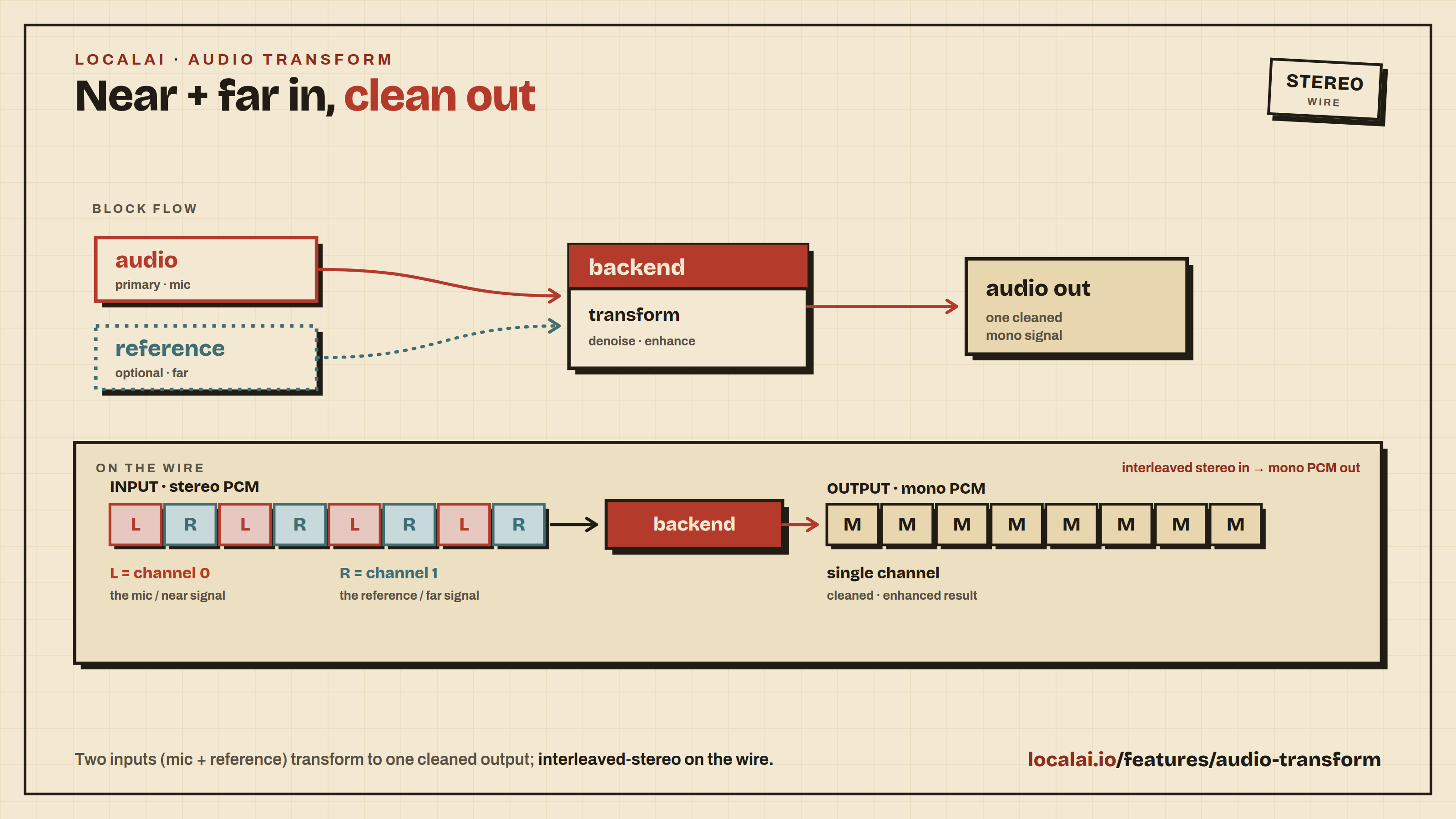
The audio-transform endpoints take audio in and emit audio out, optionally conditioned on a second reference audio signal. The category is generic by design - concrete operations include joint acoustic echo cancellation + noise suppression + dereverberation (LocalVQE), voice conversion (reference = target speaker), pitch shifting, audio super-resolution, and so on.
The first shipping backend is LocalVQE, a 1.3 M-parameter GGML-based model that performs joint AEC + noise suppression
- dereverberation on 16 kHz mono speech, ~9.6× realtime on a desktop CPU. It is a derivative of the Microsoft DeepVQE paper.
Source separation and voice conversion are served by the
audio.cpp backend: its htdemucs and
mel_band_roformer families produce the named stems described below, and
seed_vc, vevo2 and miocodec do voice conversion against a reference
speaker.
The mental model
Every audio-transform request carries:
audio- the primary input file (required).reference- an auxiliary signal whose meaning is backend-specific (optional).- For echo cancellation: the loopback / far-end signal played through the speakers.
- For voice conversion: the target speaker’s reference clip.
- For pitch / style transfer: a tonal or style reference.
- When omitted, the backend treats it as silence and degrades gracefully (LocalVQE, for example, does denoise + dereverb only when ref is empty).
params- a generickey=valuemap forwarded to the backend.- LocalVQE keys:
noise_gate=true|false,noise_gate_threshold_dbfs=<float>.
- LocalVQE keys:
This shape mirrors WebRTC’s ProcessStream(near) / ProcessReverseStream(far)
APM API, NVIDIA Maxine’s NvAFX_Run paired-stream signature, and the ICASSP
AEC challenge 2-channel WAV convention.
Batch endpoint
POST /audio/transformations (alias POST /audio/transform) - multipart
form-data, returns audio bytes.
| Field | Type | Required | Notes |
|---|---|---|---|
model | string | yes | Audio-transform model id (e.g. localvqe-v1.3-4.8m) |
audio | file | yes | Primary input audio |
reference | file | no | Optional auxiliary signal |
response_format | string | no | wav (default), mp3, ogg, flac |
sample_rate | int | no | Desired output sample rate in Hz. Omit it for the backend’s own rate; otherwise it must be between 8000 and 192000, and a value outside that range is refused with a 400 |
params[<key>] | string | no | Repeated; forwarded to backend |
params[stem] | string | no | Multi-output transforms only; picks which named output the body carries (see stems) |
params[text] | string | no | Text-conditioned transforms only; the line being resynthesised (see text-conditioned transforms) |
First install an audio-transform model from the gallery (the examples below use localvqe-v1.3-4.8m):
Example (LocalVQE: cancel echo, suppress noise, gate residual):
When reference is omitted, LocalVQE zero-fills the reference channel and
the operation reduces to noise suppression + dereverberation.
What LocalAI does to your upload before the backend sees it
By default, nothing: the file reaches the backend at its own sample rate and its own channel count. A WAV already carrying plain 16-bit PCM is passed through byte for byte; any other container or encoding is transcoded to 16-bit PCM WAV with the rate and the channel layout kept.
The exception is a backend that declares it needs a fixed input shape.
LocalVQE does: its echo cancellation is trained on 16 kHz mono and needs the
primary input and the reference in the same shape, so uploads for it are folded
to 16 kHz mono s16 with ffmpeg. The declaration is
BackendCapability.AudioTransformInputMono16k in core/config, and localvqe
is currently the only backend that sets it.
This matters for anything that is not speech enhancement. Source separation models refuse any sample rate but their checkpoint’s own (44.1 kHz for every published htdemucs and mel_band_roformer checkpoint) and rely on the stereo image to tell a centred vocal from a wide mix, so a 16 kHz mono downmix would remove both the format they accept and the cue they work from.
Multi-output transforms (source separation stems)
Some transforms produce several named outputs from one run: htdemucs yields
drums, bass, other and vocals in a single pass. The response body can
carry only one file, so:
- The backend runs once and writes every stem beside the main output.
params[stem]=<name>chooses which one the body carries. Without it the default isvocalswhen the model has one, and the model’s first output otherwise. An unknown stem name is refused with an error listing the real ones, never silently substituted.- Every stem, including the one in the body, is named in the
X-Audio-Stemsresponse header, a compact JSON array:
X-Audio-Stems: [{"name":"drums","url":"/generated-audio/transform.drums.wav"},
                {"name":"bass","url":"/generated-audio/transform.bass.wav"},
                {"name":"other","url":"/generated-audio/transform.other.wav"},
                {"name":"vocals","url":"/generated-audio/transform.vocals.wav"}]
Fetch any of those URLs to get the other stems without paying for a second
separation. sample_rate and response_format are applied to the stems as well
as to the body, so the whole set stays in the shape you asked for. The header is
listed in Access-Control-Expose-Headers, so browser clients can read it.
Single-output transforms (echo cancellation, voice conversion) do not set the
header at all, and params[stem] against such a model is refused rather than
ignored.
The stems live in the generated-content directory beside the main output and are
served from /generated-audio/. Like every other generated artifact, they are
not swept automatically.
Text-conditioned transforms (speech to speech)
Most transforms are audio in, audio out. A few are not: a speech-to-speech
model resynthesises a line in another voice and needs to know what the line
says. /audio/transform has no text field, so the text travels as
params[text].
For these models the text is required, not a hint: the run is refused without
it. params[target_text] is accepted as the same field, and
params[language] sets the language when the line is not English. A model that
does not take text ignores all three, so an ordinary separation or
noise-suppression request is unaffected.
Streaming endpoint
GET /audio/transformations/stream - bidirectional WebSocket. The first
client message is a JSON envelope; subsequent client messages are binary
PCM frames; server emits binary PCM frames at the same cadence.
This endpoint accepts models with the audio_transform use case. It does not
accept any-to-any models with the realtime_audio use case. For example,
liquid-audio uses the OpenAI Realtime API
instead.
Wire format
Client → server (text frame, first):
sample_format is S16_LE (16-bit signed little-endian) or F32_LE (32-bit
float little-endian, [-1, 1]). frame_samples defaults to the backend’s
preferred hop length (256 = 16 ms for LocalVQE).
Client → server (binary frames, subsequent): interleaved stereo PCM,
channel 0 = audio (mic), channel 1 = reference. Frame size:
frame_samples × 2 channels × sample_size. For S16_LE at 256 samples that
is 1024 bytes per frame; for F32_LE it is 2048 bytes. If the reference is
silent (no auxiliary signal), send zeros on channel 1.
Server → client (binary frames): mono PCM in the same format,
frame_samples × sample_size bytes (512 bytes for S16_LE, 1024 for F32_LE).
Mid-stream control (text frame): another session.update resets the
streaming state when its reset field is true; a session.close text frame
ends the session cleanly.
Latency
LocalVQE has 16 ms algorithmic latency (one hop). At runtime the per-frame CPU cost depends on the model: ~1.6 ms for the compact 1.3 M models (v1.1/v1.2, ~9.7× realtime) and ~3.3 ms for the wider v1.3 4.8 M model (~4.7× realtime) on a 4-thread modern desktop, leaving the rest of the budget for network and downstream playback.
Backend-specific tuning (LocalVQE)
params[<key>] | Type | Default | Effect |
|---|---|---|---|
noise_gate | bool | false | Enable post-OLA RMS-based residual-echo gate |
noise_gate_threshold_dbfs | float | -45.0 | Gate threshold in dBFS; frames below are zeroed |
The gate is most useful in far-end-only / silent-near-end stretches where the
model’s residual would otherwise sound like buffering or amplified noise floor.
A reasonable starting point is -50 dBFS.
Configuring a model
LocalVQE ships several weight releases in the gallery: localvqe-v1.3-4.8m
(current default - best quality), localvqe-v1.2-1.3m and localvqe-v1.1-1.3m
(compact, ~¼ the per-hop cost - good for low-core or power-constrained hosts).
All share the same backend and request API; only the model filename differs.