Face Recognition
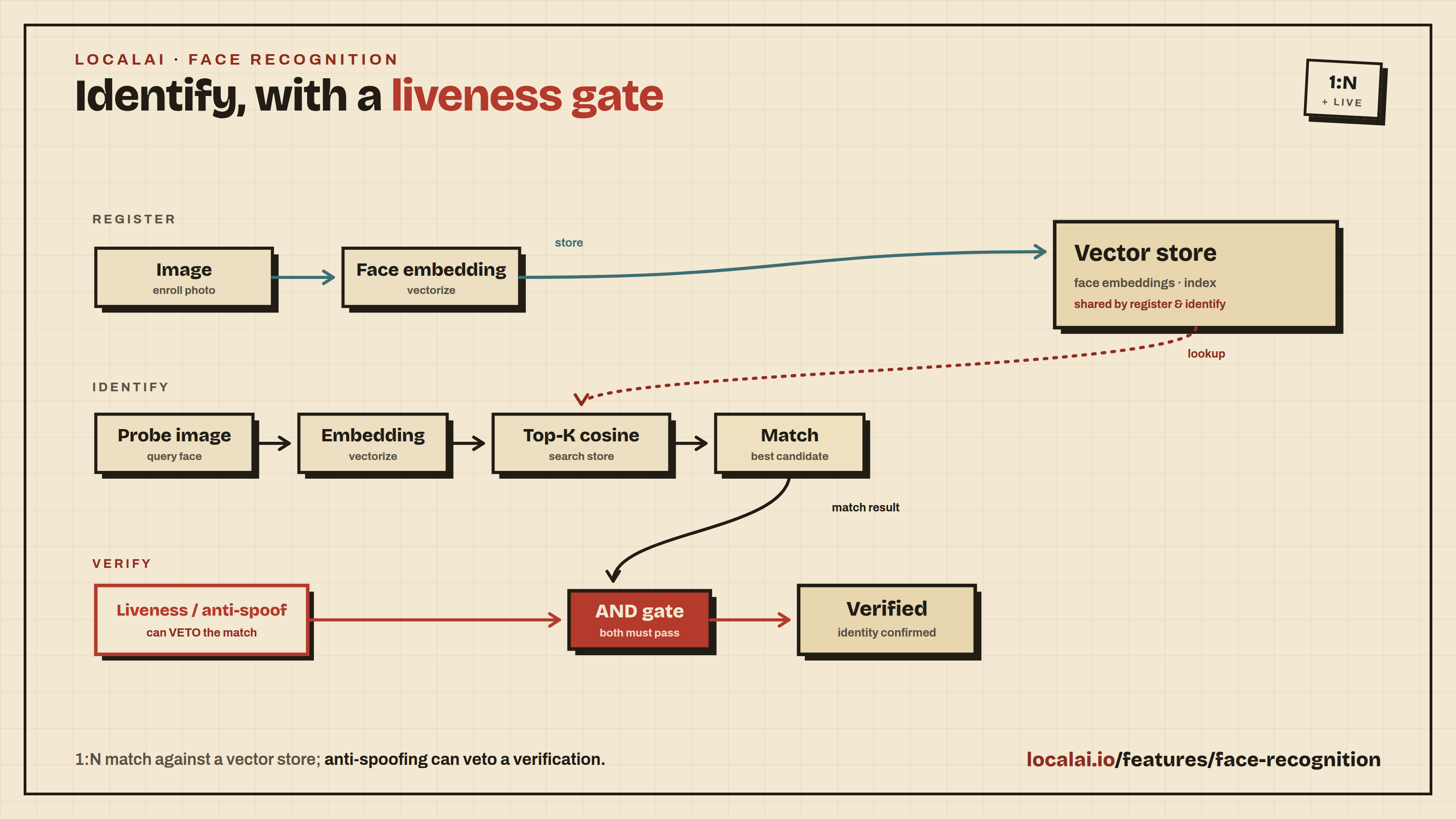
LocalAI supports face recognition: face verification (1:1), face identification (1:N) against a built-in vector store, face embedding, face detection, demographic analysis (age / gender), and antispoofing / liveness detection.
The same /v1/face/* HTTP API is served by two backends:
face-detect(recommended, default). A standalone C++/ggml engine (face-detect.cpp): no Python, no onnxruntime, no torch runtime. Each gallery entry is a single self-describing GGUF. This is the recommended option for new deployments.insightface(Python). The original ONNX Runtime backend. Still supported; see the Python backend below.
Both backends expose the identical wire format, so the API examples in
this page work with either - only the gallery entry name (the model
field) changes.
face-detect (ggml) backend
The face-detect backend reads the detector and recognizer architecture
(facedetect.arch) directly from the GGUF metadata, so installing a
gallery entry is all that is needed to select an engine. It drives the
Embeddings / Detect / FaceVerify / FaceAnalyze gRPC rpcs behind the
/v1/face/{embed,verify,analyze,detect,register,identify,forget}
endpoints.
Licensing - read this first
| Gallery entry | Detector + recognizer | Embedding dim | License |
|---|---|---|---|
face-detect-buffalo-l | SCRFD-10GF + ArcFace R50 + GenderAge | 512 | Non-commercial research only (upstream insightface weights) |
face-detect-buffalo-m | SCRFD-2.5GF + ArcFace R50 + GenderAge | 512 | Non-commercial research only |
face-detect-buffalo-s | SCRFD-500MF + MBF + GenderAge | 512 | Non-commercial research only |
face-detect-yunet-sface | YuNet + SFace (OpenCV Zoo) | 128 | Apache 2.0 - commercial-safe |
The insightface buffalo packs (buffalo_l / buffalo_m / buffalo_s) are
released by the upstream maintainers for non-commercial research use
only. Pick the face-detect-yunet-sface entry for production /
commercial deployments.
Quickstart
Install the commercial-safe entry (recommended for copy-paste):
Verify that two images depict the same person:
Detect faces and analyze demographics (buffalo entries populate age / gender; YuNet + SFace returns regions only):
The 1:N register / identify / forget workflow and the rest of the API
are identical to the API reference below - just pass a
face-detect-* model name. The per-engine verify thresholds are ~0.35
for the buffalo ArcFace/MBF recognizers and ~0.363 for SFace.
insightface (Python) backend
The insightface backend ships two interchangeable engines under
one image, each paired with a distinct gallery entry so users can pick
by license and accuracy needs.
Licensing - read this first
| Gallery entry | Detector + recognizer | Size | License |
|---|---|---|---|
insightface-buffalo-l | SCRFD-10GF + ArcFace R50 + GenderAge | ~326 MB | Non-commercial research only (upstream insightface weights) |
insightface-buffalo-s | SCRFD-500MF + MBF + GenderAge | ~159 MB | Non-commercial research only |
insightface-opencv | YuNet + SFace | ~40 MB | Apache 2.0 - commercial-safe |
The insightface Python library itself is MIT, but the pretrained model
packs (buffalo_l, buffalo_s, antelopev2) are released by the upstream
maintainers for non-commercial research use only. Pick the
insightface-opencv entry for production / commercial deployments.
Quickstart
Pull the commercial-safe backend (recommended for copy-paste):
Verify that two images depict the same person:
Response:
Restore enrollments after a restart
The default identity store is in memory. Clients can keep an enrollment record
and replay it with POST /v1/face/register after a restart. Extract the embedding
once with /v1/face/embed, then save the exact returned vector, model, name,
labels, and enrollment timestamp. Submit embedding instead of img:
The vector above is abbreviated; send the complete embedding from the same
recognizer model. Provide exactly one of img or embedding. Vectors must be
finite and nonzero. registered_at is optional and defaults to the current time;
replay the original timestamp to preserve it.
The store upserts by exact vector. Registration now derives a stable ID from that vector and the store namespace, so retries and replay after a restart return the same ID without adding duplicate entries. Replaying updates the name and labels. Images can produce slightly different embeddings across runs; keep the original vector instead of embedding the photo again on each retry.
This does not make the server store persistent. Clients must retain and restore the records themselves. With independent stores behind a load balancer, replay into each store or use a shared store. Do not mix different recognizer models in one store. IDs from older versions change on their first registration replay.
1:N identification workflow (register → identify → forget)
This is the primary “face recognition” flow. Under the hood it uses LocalAI’s built-in in-memory vector store - no external database to stand up.
Register known faces:
Identify an unknown probe:
Remove a person by ID:
Storage caveat. The default vector store is in-memory. All registered faces are lost when LocalAI restarts. Persistent storage (pgvector) is a tracked future enhancement - the face-recognition HTTP API is designed to swap the backing store without changing the wire format.
API reference
POST /v1/face/verify (1:1)
| field | type | description |
|---|---|---|
model | string | gallery entry name (e.g. insightface-buffalo-l) |
img1, img2 | string | URL, base64, or data-URI |
threshold | float, optional | cosine-distance cutoff; default depends on engine |
anti_spoofing | bool, optional | also run MiniFASNet liveness on each image - see Antispoofing |
Returns verified, distance, threshold, confidence, model,
img1_area, img2_area, and processing_time_ms. When
anti_spoofing is set, the response also carries per-image liveness
fields: img1_is_real, img1_antispoof_score, img2_is_real,
img2_antispoof_score. A failed liveness check on either image forces
verified=false regardless of similarity.
POST /v1/face/analyze
Returns demographic attributes for every detected face:
| field | type | description |
|---|---|---|
model | string | gallery entry |
img | string | URL / base64 / data-URI |
actions | string[] | subset of ["age","gender","emotion","race"]; empty = all supported |
Only insightface-buffalo-l / insightface-buffalo-s populate age and
gender (genderage head). insightface-opencv returns face regions with
empty attributes - SFace has no demographic classifier. Emotion and
race are always empty in the current release.
POST /v1/face/register (1:N enrollment)
| field | type | description |
|---|---|---|
model | string | face recognition model |
img | string | face to enroll |
name | string | human-readable label |
labels | map[string]string, optional | arbitrary metadata |
store | string, optional | vector store model; defaults to local-store |
Returns {id, name, registered_at}. The id is an opaque UUID used by
/v1/face/identify and /v1/face/forget.
POST /v1/face/identify (1:N recognition)
| field | type | description |
|---|---|---|
model | string | face recognition model |
img | string | probe image |
top_k | int, optional | max matches to return; default 5 |
threshold | float, optional | cosine-distance cutoff; default 0.35 (ArcFace) |
store | string, optional | vector store model; defaults to local-store |
Returns a list of matches sorted by ascending distance, each with id,
name, labels, distance, confidence, and match
(distance ≤ threshold).
POST /v1/face/forget
| field | type | description |
|---|---|---|
id | string | ID returned by /v1/face/register |
Returns 204 No Content on success, 404 Not Found if the ID is
unknown.
POST /v1/face/embed
Returns the L2-normalized face embedding vector for the detected face.
| field | type | description |
|---|---|---|
model | string | face model |
img | string | URL / base64 / data-URI |
Returns {embedding: float[], dim: int, model: string}. Dimension is
512 for the insightface ArcFace/MBF recognizers and 128 for OpenCV’s
SFace.
Note: the OpenAI-compatible
/v1/embeddingsendpoint is intentionally text-only by contract (inputis a string or list of strings of TEXT to embed) - passing an image data-URI there does nothing useful. Use/v1/face/embedfor image inputs.
Reused endpoint
POST /v1/detection- returns face bounding boxes withclass_name: "face"; works for both engines.
Antispoofing (liveness detection)
All gallery entries ship the Silent-Face-Anti-Spoofing
MiniFASNetV2 + MiniFASNetV1SE ensemble (Apache 2.0, ~4 MB total, CPU-only)
alongside the face recognition weights. Set anti_spoofing: true on
/v1/face/verify or /v1/face/analyze to run liveness on each detected
face. The two models look at different crop scales and their softmax
outputs are averaged before argmax - the upstream-recommended setup.
/v1/face/verify with liveness gating:
Response (fields added when anti_spoofing is enabled):
If either image fails liveness (is_real=false), verified is forced
to false - similarity alone is not enough.
/v1/face/analyze reports per-face is_real and antispoof_score
when the flag is set.
Fail-loud semantics. If anti_spoofing: true is sent against a
model installed without the MiniFASNet files (e.g. a custom entry that
only listed the face recognition weights), the request returns a gRPC
FAILED_PRECONDITION error - the endpoint will never silently return
is_real=false. Re-install the gallery entry or point the backend at a
model that bundles the MiniFASNet ONNX files.
The MiniFASNet score is best at catching printed photos and screen replays. Deepfake videos and high-quality prosthetics are out of scope - liveness here is a low-cost first line of defence, not a guarantee. For higher assurance, combine with challenge-response (e.g. ask the user to turn their head).
Choosing an engine
| Need | Entry |
|---|---|
| Commercial product | insightface-opencv |
| Highest accuracy (research / demos) | insightface-buffalo-l |
| Edge / low-memory / research | insightface-buffalo-s |
The recommended default threshold for /v1/face/verify and
/v1/face/identify depends on the recognizer:
| Recognizer | Cosine-distance threshold |
|---|---|
ArcFace R50 (buffalo_l) | ~0.35 |
MBF (buffalo_s) | ~0.40 |
SFace (opencv) | ~0.50 |
Pass threshold explicitly when switching engines - the per-engine
default only fires when the field is omitted.
The WebUI page
Build → Faces follows the same layout as the Voices page. Who is this looks up a photo against the people you enrolled (POST /v1/face/identify, cut-off 0.35 by default, adjustable on the scale). Same person? compares two photos (POST /v1/face/verify), optionally with the liveness check, and draws the face the model found in each photo. Enrol a person takes a photo, a name, optional labels and a permission tick; a copy of the photo stays in the browser only if you tick it.
The people list is kept in the browser because the server has no list call. After a search, a saved person the server did not return is marked “not on the server”, and a server restart empties the server’s index. Removing a person waits ten seconds behind an Undo toast before POST /v1/face/forget is sent. The server matches one face per photo. Detecting faces, attribute guesses (off by default, often wrong) and the raw embedding are under More tools. With no face model installed the page says what is missing and offers gallery models to install.
Related features
- Object Detection - generic bounding-box
detection;
/v1/detectionworks with the insightface backend too. - Embeddings - raw vector extraction; face embeddings live in the same endpoint under the hood.
- Stores - the generic vector store powering the 1:N recognition pipeline.