Model Quantization
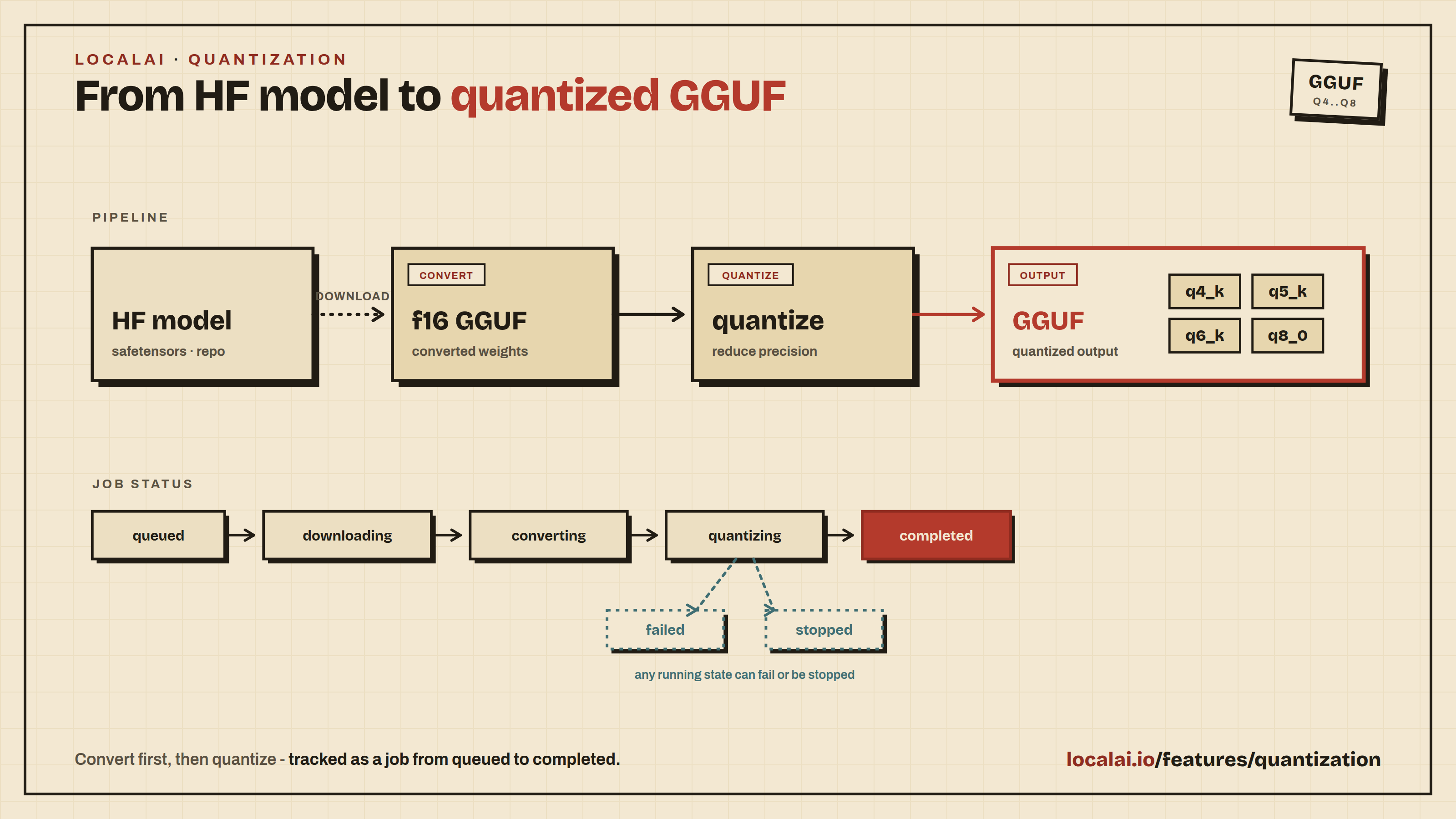
LocalAI supports model quantization directly through the API and Web UI. Quantization converts HuggingFace models to GGUF format and compresses them to smaller sizes for efficient inference with llama.cpp.
This feature is experimental and may change in future releases.
Supported Backends
| Backend | Description | Quantization Types | Platforms |
|---|---|---|---|
| llama-cpp-quantization | Downloads HF models, converts to GGUF, and quantizes using llama.cpp | q2_k, q3_k_s, q3_k_m, q3_k_l, q4_0, q4_k_s, q4_k_m, q5_0, q5_k_s, q5_k_m, q6_k, q8_0, f16 | CPU (Linux, macOS) |
Quick Start
1. Start a quantization job
2. Monitor progress (SSE stream)
3. Download the quantized model
4. Or import it directly into LocalAI
API Reference
Endpoints
| Method | Path | Description |
|---|---|---|
POST | /api/quantization/jobs | Start a quantization job |
GET | /api/quantization/jobs | List all jobs |
GET | /api/quantization/jobs/:id | Get job details |
POST | /api/quantization/jobs/:id/stop | Stop a running job |
DELETE | /api/quantization/jobs/:id | Delete a job and its data |
GET | /api/quantization/jobs/:id/progress | SSE progress stream |
POST | /api/quantization/jobs/:id/import | Import quantized model into LocalAI |
GET | /api/quantization/jobs/:id/download | Download quantized GGUF file |
GET | /api/quantization/backends | List available quantization backends |
GET | /api/quantization/status | Whether model imports are allowed on this instance |
GET /api/fine-tuning/status and GET /api/quantization/status return {"model_exports": true|false}. The value is false only when this instance does not see the models path of the add-on owner; it is the same value as the model_exports key of GET /api/features. The Web UI disables the import controls while it is false. Both routes need an authenticated user and answer 503 when add-ons are off.
Job Request Fields
| Field | Type | Description |
|---|---|---|
model | string | HuggingFace model ID or local path (required) |
backend | string | Backend name (default: llama-cpp-quantization) |
quantization_type | string | Quantization format (default: q4_k_m) |
extra_options | map | Backend-specific options (see below) |
Extra Options
| Key | Description |
|---|---|
hf_token | HuggingFace token for gated models |
In a split deployment (--addons-role=owner and --addons-role=frontend), the export writes into the models path. That path must be the shared models storage. See The models path.
Import Request Fields
| Field | Type | Description |
|---|---|---|
name | string | Model name for LocalAI (auto-generated if empty) |
Job Status Values
| Status | Description |
|---|---|
queued | Job created, waiting to start |
downloading | Downloading model from HuggingFace |
converting | Converting model to f16 GGUF |
quantizing | Running quantization |
completed | Quantization finished successfully |
failed | Job failed (check message for details) |
stopped | Job stopped by user |
Progress Stream
The GET /api/quantization/jobs/:id/progress endpoint returns Server-Sent Events (SSE) with JSON payloads:
When the job completes, output_file contains the path to the quantized GGUF file and extra_metrics includes file_size_mb.
Quantization Types
| Type | Size | Quality | Description |
|---|---|---|---|
q2_k | Smallest | Lowest | 2-bit quantization |
q3_k_s | Very small | Low | 3-bit small |
q3_k_m | Very small | Low | 3-bit medium |
q3_k_l | Small | Low-medium | 3-bit large |
q4_0 | Small | Medium | 4-bit legacy |
q4_k_s | Small | Medium | 4-bit small |
q4_k_m | Small | Good | 4-bit medium (recommended) |
q5_0 | Medium | Good | 5-bit legacy |
q5_k_s | Medium | Good | 5-bit small |
q5_k_m | Medium | Very good | 5-bit medium |
q6_k | Large | Excellent | 6-bit |
q8_0 | Large | Near-lossless | 8-bit |
f16 | Largest | Lossless | 16-bit (no quantization, GGUF conversion only) |
The UI also supports entering a custom quantization type string for any format supported by llama-quantize.
Web UI
The Quantize page uses the same page pattern as fine-tuning: set up, check, run, result.
- Set up - Choose the model and the quantization type (a preset, or a custom type). The backend and the Hugging Face token are under More options.
- Check before you start - Whether a model and type are set, whether a quantization backend is installed, the free RAM and the free space on the models disk. The server reports no model size before the job starts, so the page does not estimate one.
- Run - Percent, the stage (downloading, converting, quantizing), and a log of what the job reported since the page opened. Stop ends the job.
- Result - A failed job shows the server’s message. A finished job shows the output file, downloads it, or imports it into LocalAI under a name you choose, then links to a chat with it and to Models.
Earlier jobs are listed below the form, with Reuse and Delete (after a confirmation).
A user needs the quantization permission. Without it, the page says the account cannot quantize.
Quantization is an add-on
The Quantize page is the quantization add-on. It does not ship with LocalAI. An administrator installs it from Find add-ons with Install and turn on. Once it is on, it opens from My add-ons at /app/addons/quantization/jobs and can be shown in the sidebar.
Open the canonical add-on page from My add-ons. Historical standalone links are not registered.
The API does not change. The page calls /api/quantization/* with the signed-in user’s own session, and the server checks the quantization permission on every call.
With --addons-enabled=false this feature is off, like every add-on. The UI shows no entry for it, /app/addons/quantization/jobs leads back to /app, and every path under /api/quantization answers 503. See The addons feature gate.
The add-on also offers tools to the chat: list jobs, propose a job, read the status of a job, stop a job and import the result as a model. A tool can only control a job that a tool started. A job started in the page is listed, but a tool cannot stop or import it. In the chats, an agent and a trigger, a tool call that starts a job runs at once, because you turned the add-on on for that chat; the result says what an undo does (see below). On the OpenAI-compatible API and other surfaces, a tool only proposes the action and a person confirms it in an approval card. A model given as a local path is refused. The tools call the engine through the host operations (see Host operations), which the host setting LOCALAI_ADDON_HOST_OPS grants to this add-on by the quantize. prefix, and they run with the permissions of the person in the chat.
Undo is the safety net for a job a chat started. Starting a job keeps a change set in the add-on, and the chat shows an Undo button on it. An undo stops the job while it still runs. If the job already finished, was stopped, or was imported, the answer is cannot_undo: a finished job cannot be un-run, and the engine offers no operation that removes its files, so nothing is deleted. A change set can be undone for 7 days and only once. Stopping a job and importing the result cannot be undone, and their results say so with the reason. The undo is the person’s own action from a browser tab; no model, agent or API key can call it. The change set lives in the add-on’s own data, with the rest of its journal, so it travels with the add-on’s backups and goes with its data when that is purged. In a cluster the undo goes through the add-on’s owner like every other call.
Architecture
Quantization uses the same gRPC backend architecture as fine-tuning:
- Proto layer:
QuantizationRequest,QuantizationProgress(streaming),StopQuantization - Python backend: Downloads model, runs
convert_hf_to_gguf.pyandllama-quantize - Go service: Manages job lifecycle, state persistence, async import
- REST API: HTTP endpoints with SSE progress streaming
- React UI: Configuration form, real-time progress monitor, download/import panel