Speech to text, text to speech, sound classification, speakers and voice activity. The Voice add-on is a page for voice recognition and the voice library, and the Talk add-on is a page for a spoken conversation.
API Compatibility The LocalAI TTS API is compatible with the OpenAI TTS API and the Elevenlabs API.
LocalAI API The /tts endpoint can also be used to generate speech from text.
Usage Input: input, model
Sound-event classification (audio tagging) answers the question “what am I hearing?” - given an audio clip, it returns a list of scored AudioSet labels (e.g. Baby cry, infant cry, Glass breaking, Dog bark, Alarm).
LocalAI exposes this through the /v1/audio/classification endpoint, modelled after /v1/audio/transcriptions. The reference backend is ced.cpp (CED, a 527-class AudioSet tagger), a small ViT over a log-mel spectrogram ported to ggml with full PyTorch parity. Apache-2.0 weights are redistributable as GGUF.
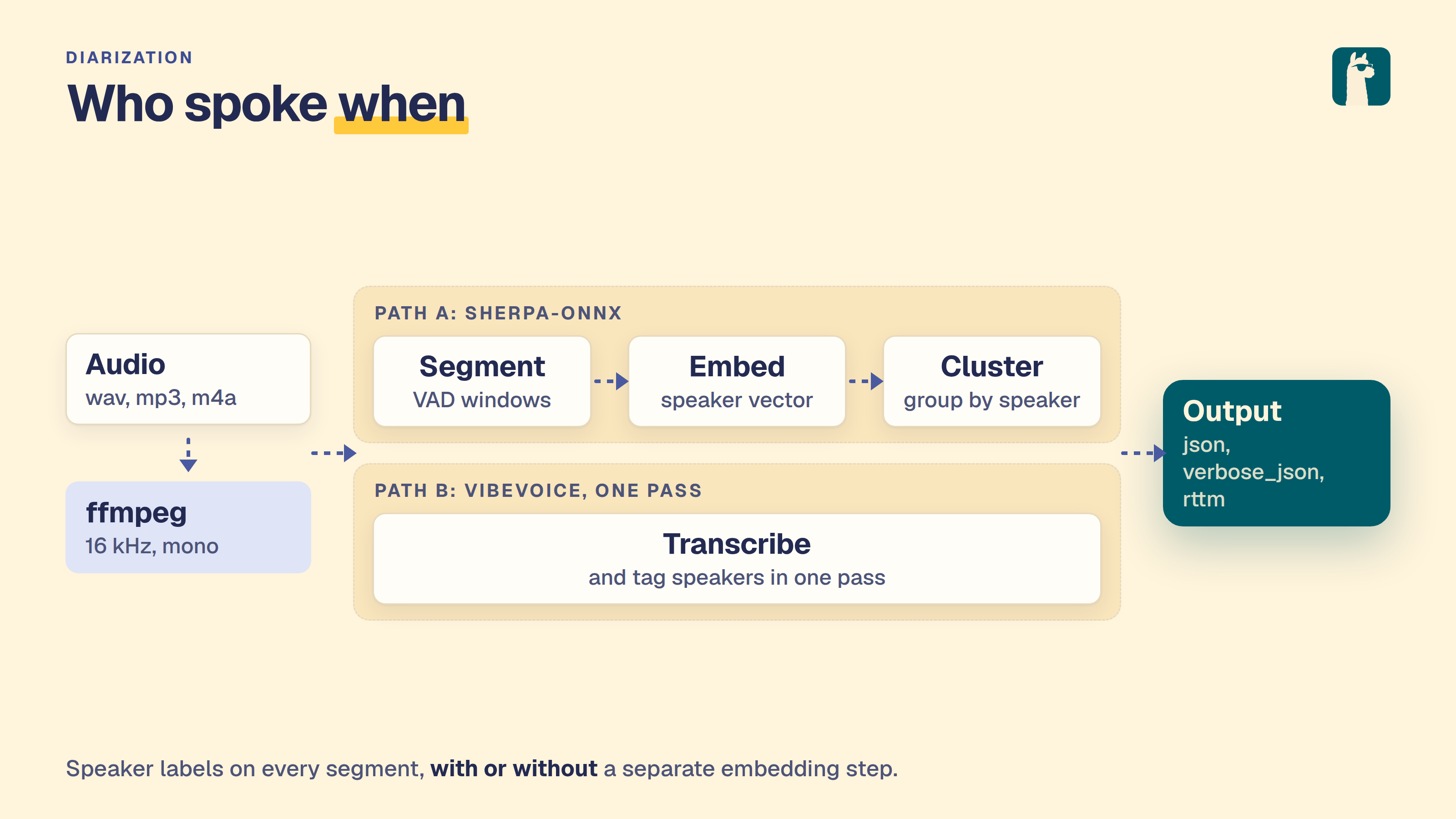
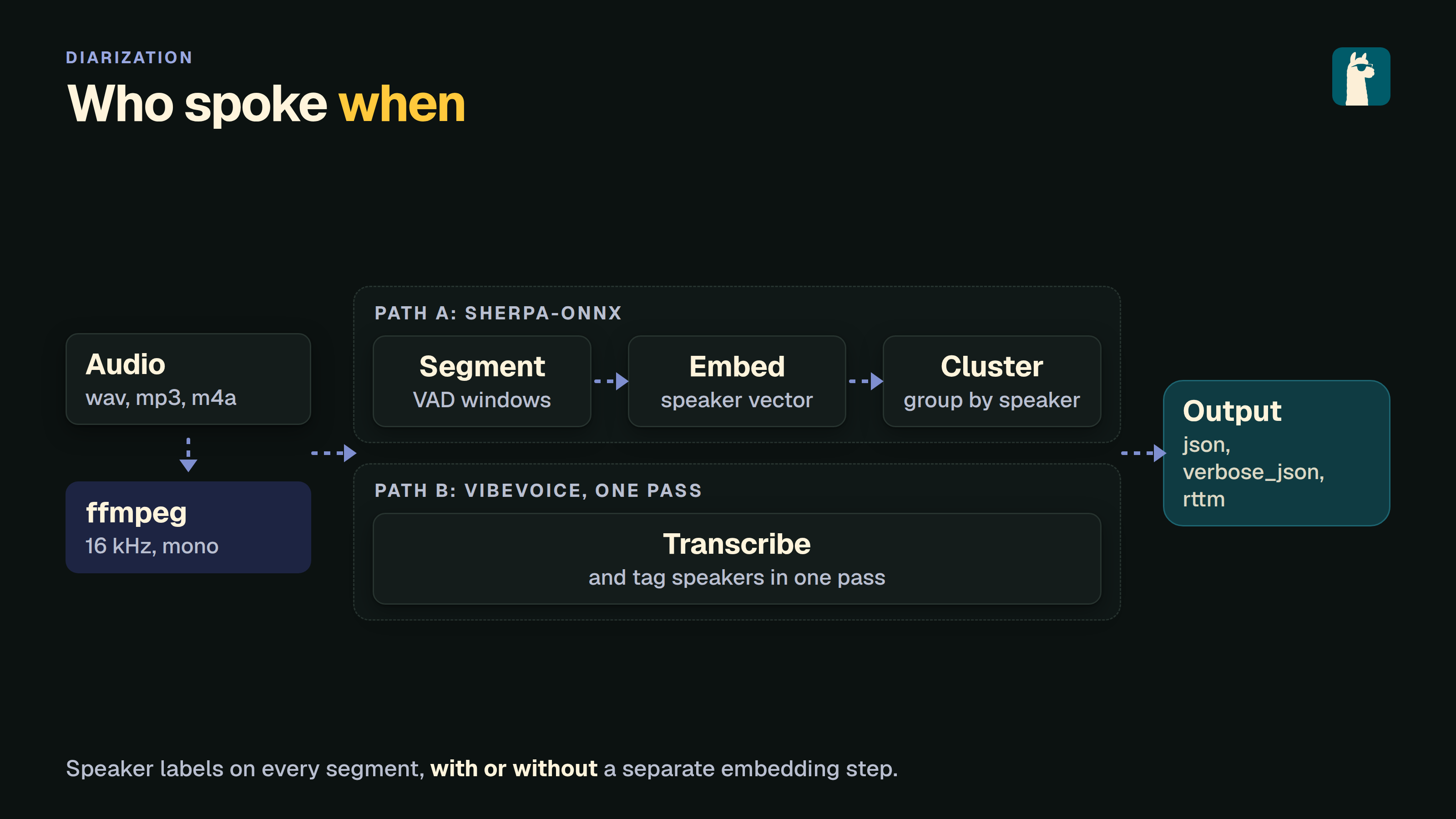
Speaker diarization answers the question “who spoke when?” - given an audio clip with multiple speakers, it returns time-stamped segments labelled with a stable speaker ID (SPEAKER_00, SPEAKER_01, …).
LocalAI exposes this through the /v1/audio/diarization endpoint, modelled after /v1/audio/transcriptions. Five backends are supported today:
sherpa-onnx - pyannote-3.0 segmentation + a speaker-embedding extractor (3D-Speaker, NeMo, WeSpeaker) + fast clustering. Pure diarization - no transcription cost. Recommended when you only need speaker turns. vibevoice.cpp - produces speaker-labelled segments as a by-product of its long-form ASR pass, so you can optionally get a transcript per segment for free. NeMo-Speech.cpp - NVIDIA Sortformer, served standalone by the NeMo-Speech.cpp backend. It is end to end, so the speaker capacity is fixed by the checkpoint and the count hints are ignored. The same backend can instead put speaker tags on a transcript, by attaching a Sortformer model to an ASR one. audio.cpp - the sortformer_diar family, served by the multi-modality audio.cpp backend. parakeet.cpp - NVIDIA Nemotron-3-Diarization (Sortformer, up to 8 speakers), served standalone or paired with a Parakeet ASR model for per-segment text. See the Audio to Text page for the parakeet-cpp option reference. Because diarization is exposed as a regular OpenAI-compatible endpoint, any HTTP client works. There is no Python dependency on pyannote or NeMo on the consumer side.
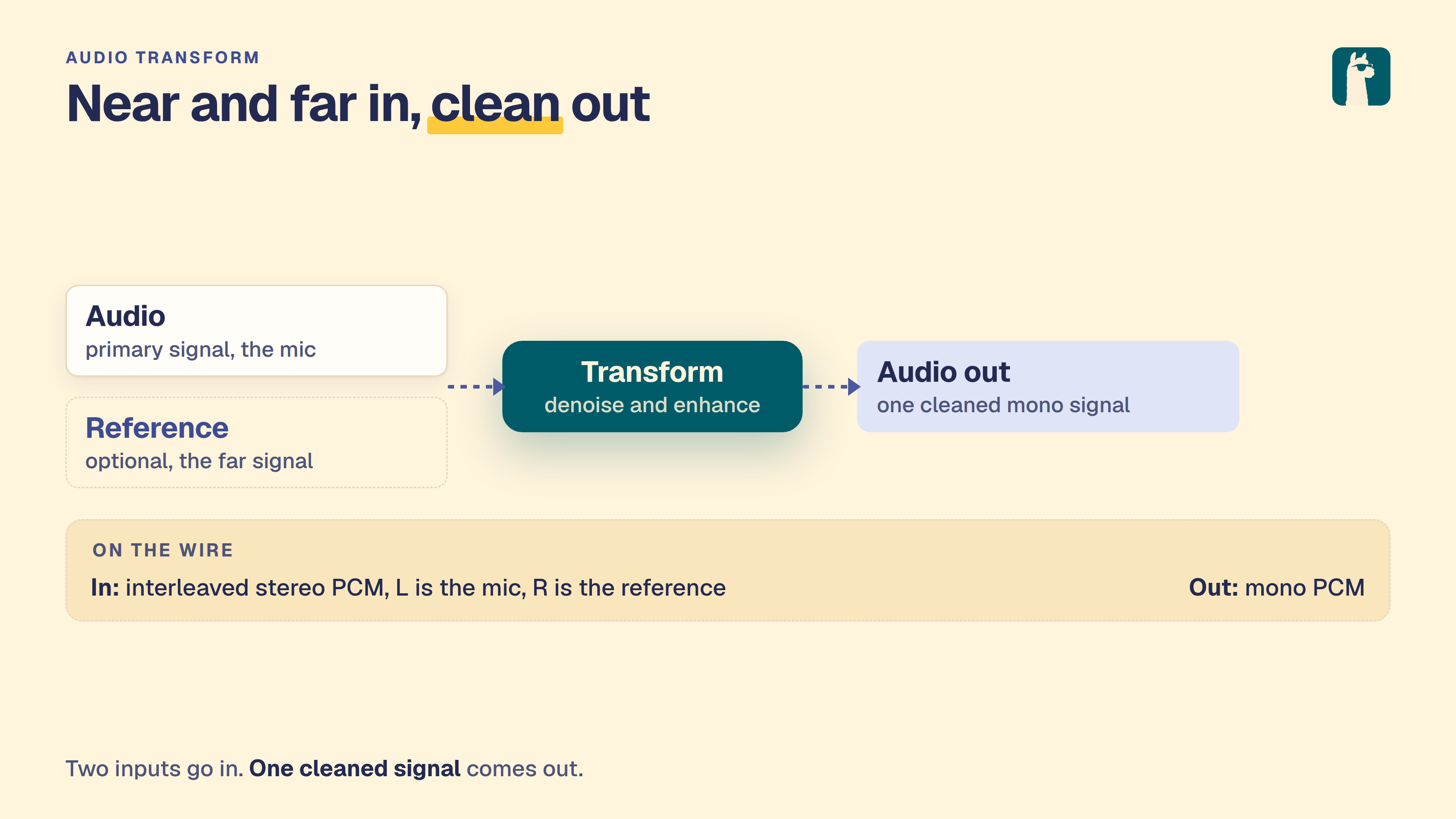
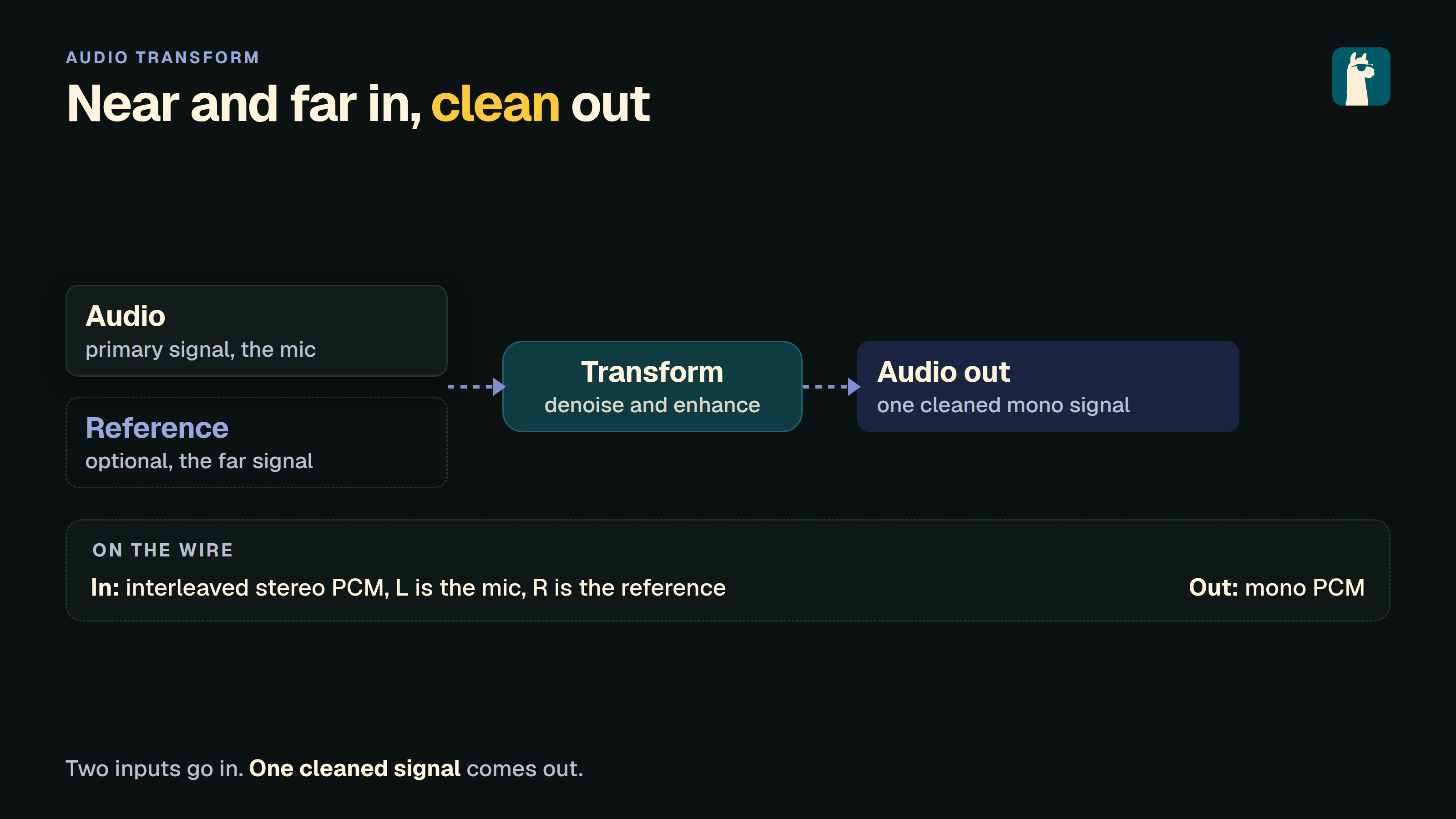
The audio-transform endpoints take audio in and emit audio out, optionally conditioned on a second reference audio signal. The category is generic by design - concrete operations include joint acoustic echo cancellation + noise suppression + dereverberation (LocalVQE), voice conversion (reference = target speaker), pitch shifting, audio super-resolution, and so on.
Voice Activity Detection (VAD) identifies segments of speech in audio data. LocalAI provides a /v1/vad endpoint powered by the Silero VAD backend.
The audio.cpp backend also serves this endpoint, and ships the silero_vad and marblenet_vad assets inside its own package, so VAD works there with nothing to download (model: bundled:silero_vad plus the family:silero_vad option).
API Method: POST Endpoints: /v1/vad, /vad Request The request body is JSON with the following fields:
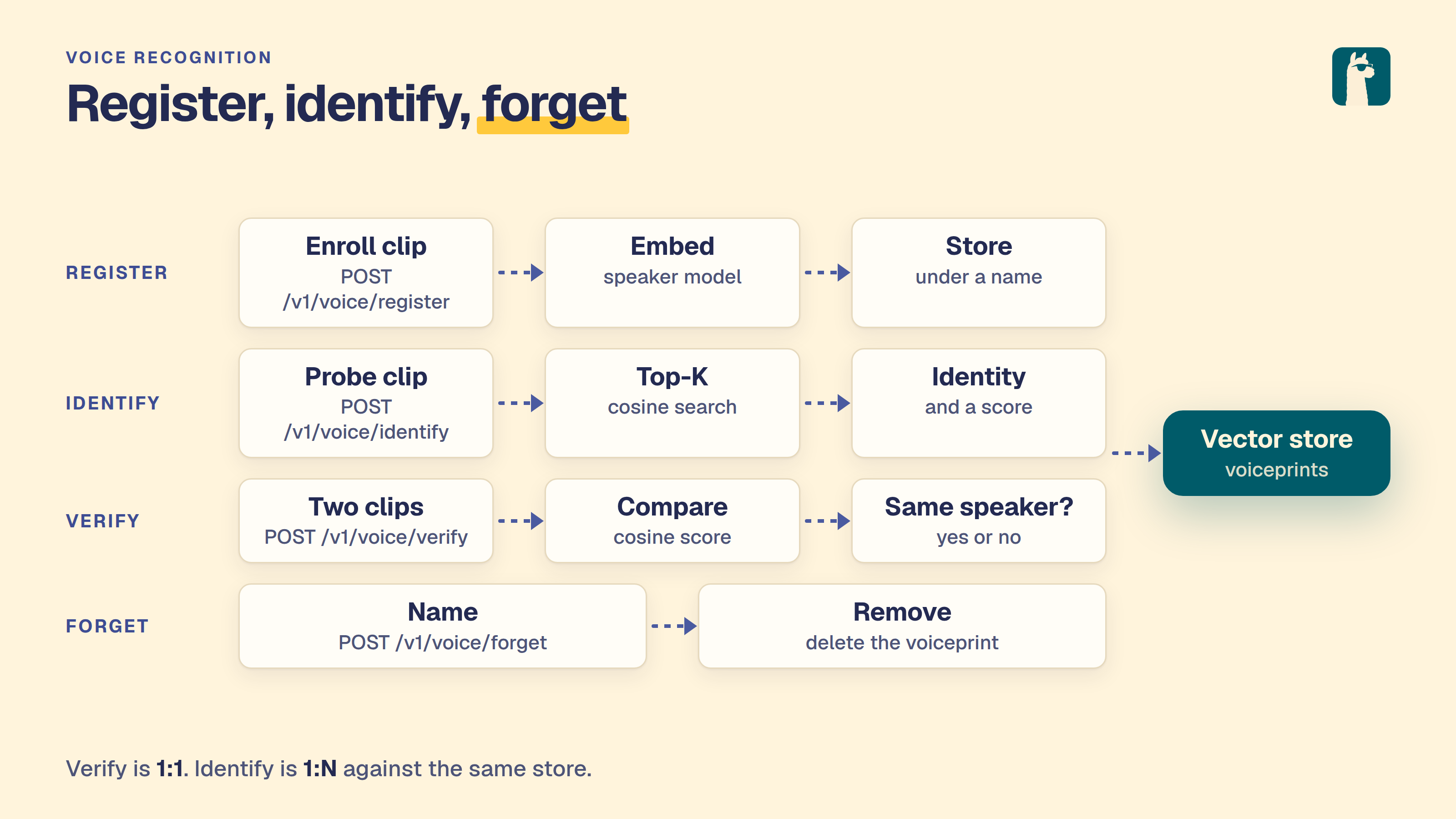
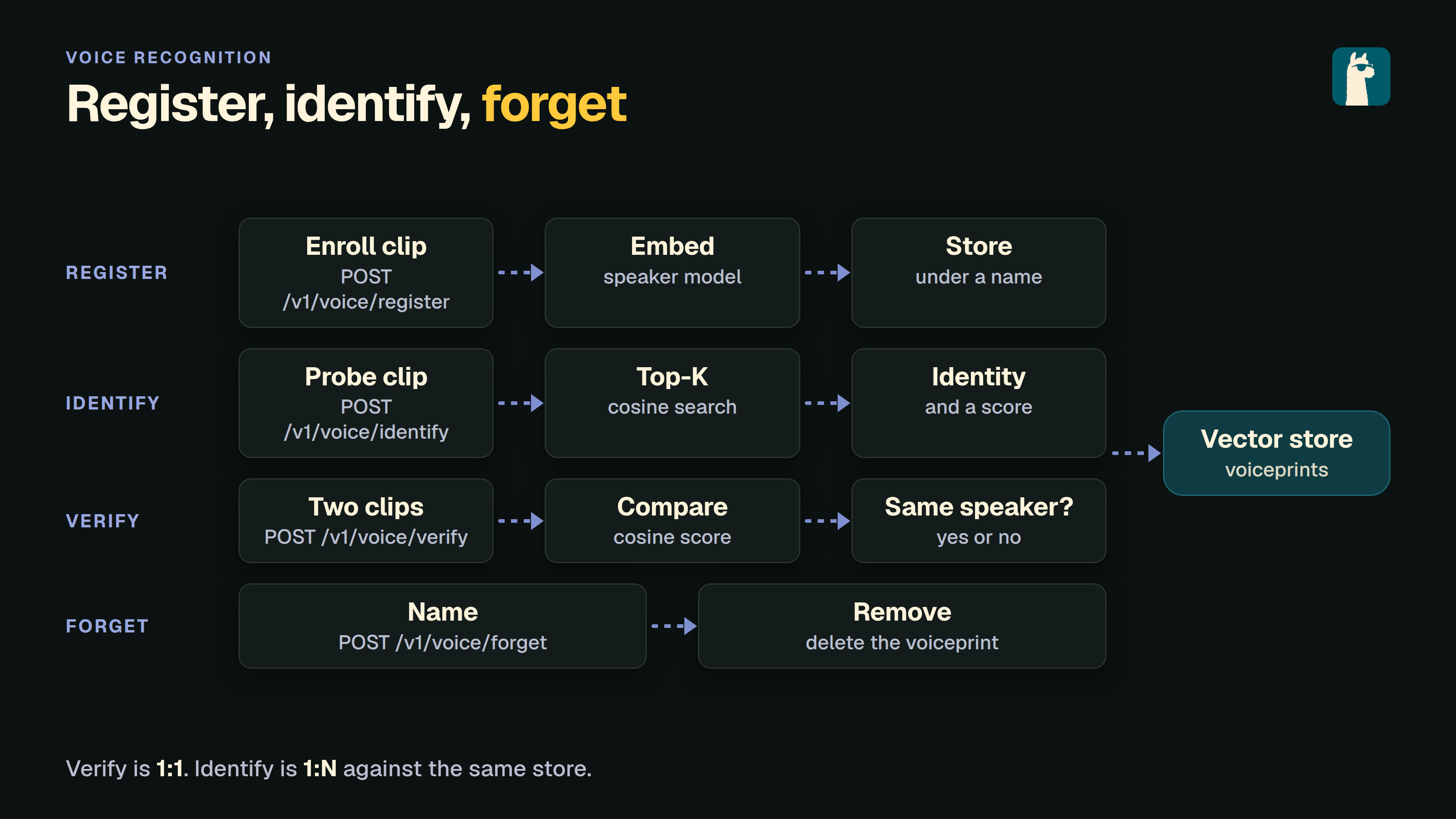
LocalAI supports voice (speaker) recognition: speaker verification (1:1), speaker identification (1:N) against a built-in vector store, speaker embedding, and demographic analysis (age / gender / emotion from voice).
The audio analog to Face Recognition, served over the same /v1/voice/* HTTP API by two backends:
Subsections of Audio and speech
Audio to Text
Audio to text models are models that can generate text from an audio file.
The transcription endpoint allows to convert audio files to text. The endpoint supports multiple backends:
whisper.cpp: A C++ library for audio transcription (default)
moonshine: Ultra-fast transcription engine optimized for low-end devices
faster-whisper: Fast Whisper implementation with CTranslate2
WhisperX: Whisper transcription with word alignment and optional speaker diarization. Set HF_TOKEN and pass diarize=true to load WhisperX’s gated pyannote diarization pipeline.
parakeet-cpp: A C++/ggml port of NVIDIA NeMo Parakeet (FastConformer TDT/CTC/RNNT/hybrid). Runs quantized GGUFs on CPU or GPU, emits word-level timestamps, and supports cache-aware streaming (the realtime_eou model surfaces end-of-utterance events). The same backend also loads Nemotron-3-Diarization (/v1/audio/diarization) and CED sound models (/v1/audio/classification), and can attach either as a companion to a transcription model.
llama-cpp: Route transcription to any multimodal-audio GGUF model served by the llama-cpp backend (e.g. Qwen3-ASR, Voxtral, Qwen2-Audio). Under the hood the request is converted into a chat completion with the audio attached via the model’s audio encoder - the same path the upstream llama.cpp server uses. Set backend: llama-cpp in the model YAML and point mmproj at the matching audio encoder.
voxtral: Voxtral-family models served by a dedicated backend
NeMo-Speech.cpp: NVIDIA’s C++/ggml runtime for the Nemotron Speech models. Serves offline, streaming and live transcription, with VAD, punctuation, inverse text normalization and Sortformer speaker tags attached through model options, and covers diarization, speech synthesis and translation from the same backend. See the NeMo-Speech.cpp backend page for the model options.
audio.cpp: Multi-family GGML audio engine. Serves transcription and forced alignment from families such as nemotron_asr, qwen3_asr, citrinet_asr, higgs_audio_stt and voxtral_realtime, and covers diarization, VAD, TTS and source separation from the same backend. See the audio.cpp backend page for the model options.
The endpoint input supports all the audio formats supported by ffmpeg.
Looking for “who spoke when” instead of a flat transcript? See Speaker Diarization - /v1/audio/diarization returns time-stamped speaker segments and supports the rttm format used by pyannote.metrics.
Usage
Once LocalAI is started and whisper models are installed, you can use the /v1/audio/transcriptions API endpoint.
When usage statistics are enabled, successful requests to /v1/audio/transcriptions
and /audio/transcriptions contribute request counts and elapsed time for the
requested model name, including an alias. This includes streaming responses. Token counts remain zero
because transcription results do not provide canonical token usage. Failed
transcriptions, including errors reported within a stream, do not count as
successful usage.
When API tracing is enabled, multipart transcription requests appear in Traces
with the model name, response, status, and elapsed time. The captured request
body contains metadata marked multipart upload omitted; API traces do not
store the uploaded audio. Response capture follows the configured trace size
limit. Backend traces have their own payload capture behavior.
Example
Download one of the models from here in the models folder,
and create a YAML file for your model:
The transcriptions endpoint then can be tested like so:
## Get an example audio filewget --quiet --show-progress -O gb1.ogg https://upload.wikimedia.org/wikipedia/commons/1/1f/George_W_Bush_Columbia_FINAL.ogg
## Send the example audio file to the transcriptions endpointcurl http://localhost:8080/v1/audio/transcriptions -H "Content-Type: multipart/form-data" -F file="@$PWD/gb1.ogg" -F model="whisper-1"
Result:
{"segments":[{"id":0,"start":0,"end":9640000000,"text":" My fellow Americans, this day has brought terrible news and great sadness to our country.","tokens":[50364,1222,7177,6280,11,341,786,575,3038,6237,2583,293,869,22462,281,527,1941,13,50846]},{"id":1,"start":9640000000,"end":15960000000,"text":" At 9 o'clock this morning, Mission Control and Houston lost contact with our Space Shuttle","tokens":[1711,1722,277,6,9023,341,2446,11,20170,12912,293,18717,2731,3385,365,527,8705,13870,10972,51162]},{"id":2,"start":15960000000,"end":16960000000,"text":" Columbia.","tokens":[17339,13,51212]},{"id":3,"start":16960000000,"end":24640000000,"text":" A short time later, debris was seen falling from the skies above Texas.","tokens":[316,2099,565,1780,11,21942,390,1612,7440,490,264,25861,3673,7885,13,51596]},{"id":4,"start":24640000000,"end":27200000000,"text":" The Columbia's lost.","tokens":[440,17339,311,2731,13,51724]},{"id":5,"start":27200000000,"end":29920000000,"text":" There are no survivors.","tokens":[821,366,572,18369,13,51860]},{"id":6,"start":29920000000,"end":32920000000,"text":" And board was a crew of seven.","tokens":[50364,400,3150,390,257,7260,295,3407,13,50514]},{"id":7,"start":32920000000,"end":39780000000,"text":" Colonel Rick Husband, Lieutenant Colonel Michael Anderson, Commander Laurel Clark, Captain","tokens":[28478,11224,21282,4235,11,28412,28478,5116,18768,11,20857,27270,75,18572,11,10873,50857]},{"id":8,"start":39780000000,"end":50020000000,"text":" David Brown, Commander William McCool, Dr. Cooltna Chavla, and Elon Ramon, a Colonel","tokens":[4389,8030,11,20857,6740,4050,34,1092,11,2491,13,8561,83,629,761,706,875,11,293,28498,9078,266,11,257,28478,51369]},{"id":9,"start":50020000000,"end":52800000000,"text":" in the Israeli Air Force.","tokens":[294,264,19974,5774,10580,13,51508]},{"id":10,"start":52800000000,"end":58480000000,"text":" These men and women assumed great risk in the service to all humanity.","tokens":[1981,1706,293,2266,15895,869,3148,294,264,2643,281,439,10243,13,51792]},{"id":11,"start":58480000000,"end":63120000000,"text":" And an age when Space Flight has come to seem almost routine.","tokens":[50364,400,364,3205,562,8705,28954,575,808,281,1643,1920,9927,13,50596]},{"id":12,"start":63120000000,"end":68800000000,"text":" It is easy to overlook the dangers of travel by rocket and the difficulties of navigating","tokens":[467,307,1858,281,37826,264,27701,295,3147,538,13012,293,264,14399,295,32054,50880]},{"id":13,"start":68800000000,"end":72640000000,"text":" the fierce outer atmosphere of the Earth.","tokens":[264,25341,10847,8018,295,264,4755,13,51072]},{"id":14,"start":72640000000,"end":78040000000,"text":" These astronauts knew the dangers and they faced them willingly.","tokens":[1981,28273,2586,264,27701,293,436,11446,552,44675,13,51342]},{"id":15,"start":78040000000,"end":83040000000,"text":" Knowing they had a high and noble purpose in life.","tokens":[25499,436,632,257,1090,293,20171,4334,294,993,13,51592]},{"id":16,"start":83040000000,"end":90800000000,"text":" Because of their courage and daring and idealism, we will miss them all the more.","tokens":[50364,1436,295,641,9892,293,43128,293,7157,1434,11,321,486,1713,552,439,264,544,13,50752]},{"id":17,"start":90800000000,"end":96560000000,"text":" All Americans today are thinking as well of the families of these men and women who have","tokens":[1057,6280,965,366,1953,382,731,295,264,4466,295,613,1706,293,2266,567,362,51040]},{"id":18,"start":96560000000,"end":100440000000,"text":" been given this sudden shock in grief.","tokens":[668,2212,341,3990,5588,294,18998,13,51234]},{"id":19,"start":100440000000,"end":102400000000,"text":" You're not alone.","tokens":[509,434,406,3312,13,51332]},{"id":20,"start":102400000000,"end":105440000000,"text":" Our entire nation agrees with you.","tokens":[2621,2302,4790,26383,365,291,13,51484]},{"id":21,"start":105440000000,"end":112360000000,"text":" And those you loved will always have the respect and gratitude of this country.","tokens":[400,729,291,4333,486,1009,362,264,3104,293,16935,295,341,1941,13,51830]},{"id":22,"start":112360000000,"end":116600000000,"text":" The cause in which they died will continue.","tokens":[50364,440,3082,294,597,436,4539,486,2354,13,50576]},{"id":23,"start":116600000000,"end":124240000000,"text":" Man kind is led into the darkness beyond our world by the inspiration of discovery and the","tokens":[2458,733,307,4684,666,264,11262,4399,527,1002,538,264,10249,295,12114,293,264,50958]},{"id":24,"start":124240000000,"end":127000000000,"text":" longing to understand.","tokens":[35050,281,1223,13,51096]},{"id":25,"start":127000000000,"end":131160000000,"text":" Our journey into space will go on.","tokens":[2621,4671,666,1901,486,352,322,13,51304]},{"id":26,"start":131160000000,"end":136480000000,"text":" In the skies today, we saw destruction and tragedy.","tokens":[682,264,25861,965,11,321,1866,13563,293,18563,13,51570]},{"id":27,"start":136480000000,"end":142080000000,"text":" As farther than we can see, there is comfort and hope.","tokens":[1018,20344,813,321,393,536,11,456,307,3400,293,1454,13,51850]},{"id":28,"start":142080000000,"end":149800000000,"text":" In the words of the prophet Isaiah, lift your eyes and look to the heavens who created","tokens":[50364,682,264,2283,295,264,18566,27263,11,5533,428,2575,293,574,281,264,26011,567,2942,50750]},{"id":29,"start":149800000000,"end":151640000000,"text":" all these.","tokens":[439,613,13,50842]},{"id":30,"start":151640000000,"end":159960000000,"text":" He who brings out the story hosts one by one and calls them each by name because of his great","tokens":[634,567,5607,484,264,1657,21573,472,538,472,293,5498,552,1184,538,1315,570,295,702,869,51258]},{"id":31,"start":159960000000,"end":163400000000,"text":" power and mighty strength.","tokens":[1347,293,21556,3800,13,51430]},{"id":32,"start":163400000000,"end":166400000000,"text":" Not one of them is missing.","tokens":[1726,472,295,552,307,5361,13,51580]},{"id":33,"start":166400000000,"end":173600000000,"text":" The same creator who names the stars also knows the names of the seven souls we mourn","tokens":[50364,440,912,14181,567,5288,264,6105,611,3255,264,5288,295,264,3407,16588,321,22235,77,50724]},{"id":34,"start":173600000000,"end":175600000000,"text":" today.","tokens":[965,13,50824]},{"id":35,"start":175600000000,"end":183160000000,"text":" The crew of the shuttle Columbia did not return safely to earth yet we can pray that all","tokens":[440,7260,295,264,26728,17339,630,406,2736,11750,281,4120,1939,321,393,3690,300,439,51202]},{"id":36,"start":183160000000,"end":185840000000,"text":" are safely home.","tokens":[366,11750,1280,13,51336]},{"id":37,"start":185840000000,"end":192600000000,"text":" May God bless the grieving families and may God continue to bless America.","tokens":[1891,1265,5227,264,48454,4466,293,815,1265,2354,281,5227,3374,13,51674]},{"id":38,"start":196400000000,"end":206400000000,"text":" [BLANK_AUDIO]","tokens":[50364,542,37592,62,29937,60,50864]}],"text":"My fellow Americans, this day has brought terrible news and great sadness to our country. At 9 o'clock this morning, Mission Control and Houston lost contact with our Space Shuttle Columbia. A short time later, debris was seen falling from the skies above Texas. The Columbia's lost. There are no survivors. And board was a crew of seven. Colonel Rick Husband, Lieutenant Colonel Michael Anderson, Commander Laurel Clark, Captain David Brown, Commander William McCool, Dr. Cooltna Chavla, and Elon Ramon, a Colonel in the Israeli Air Force. These men and women assumed great risk in the service to all humanity. And an age when Space Flight has come to seem almost routine. It is easy to overlook the dangers of travel by rocket and the difficulties of navigating the fierce outer atmosphere of the Earth. These astronauts knew the dangers and they faced them willingly. Knowing they had a high and noble purpose in life. Because of their courage and daring and idealism, we will miss them all the more. All Americans today are thinking as well of the families of these men and women who have been given this sudden shock in grief. You're not alone. Our entire nation agrees with you. And those you loved will always have the respect and gratitude of this country. The cause in which they died will continue. Man kind is led into the darkness beyond our world by the inspiration of discovery and the longing to understand. Our journey into space will go on. In the skies today, we saw destruction and tragedy. As farther than we can see, there is comfort and hope. In the words of the prophet Isaiah, lift your eyes and look to the heavens who created all these. He who brings out the story hosts one by one and calls them each by name because of his great power and mighty strength. Not one of them is missing. The same creator who names the stars also knows the names of the seven souls we mourn today. The crew of the shuttle Columbia did not return safely to earth yet we can pray that all are safely home. May God bless the grieving families and may God continue to bless America. [BLANK_AUDIO]"}
You can also specify the response_format parameter to be one of lrc, srt, vtt, text, json or verbose_json (default):
## Send the example audio file to the transcriptions endpointcurl http://localhost:8080/v1/audio/transcriptions -H "Content-Type: multipart/form-data" -F file="@$PWD/gb1.ogg" -F model="whisper-1" -F response_format="srt"
Result (first few lines):
1
00:00:00,000 --> 00:00:09,640
My fellow Americans, this day has brought terrible news and great sadness to our country.

2
00:00:09,640 --> 00:00:15,960
At 9 o'clock this morning, Mission Control and Houston lost contact with our Space Shuttle

3
00:00:15,960 --> 00:00:16,960
Columbia.

4
00:00:16,960 --> 00:00:24,640
A short time later, debris was seen falling from the skies above Texas.

5
00:00:24,640 --> 00:00:27,200
The Columbia's lost.

6
00:00:27,200 --> 00:00:29,920
There are no survivors.
Supported request parameters
In addition to file and model, the endpoint accepts the following multipart form fields, matching the OpenAI audio transcription API:
Field
Description
language
ISO-639-1 language hint (e.g. en). Passed through to the backend.
prompt
Optional context hint to bias the decoder.
temperature
Sampling temperature (float). Honored by backends that support it.
timestamp_granularities[]
Multi-value form field: word and/or segment. Honored when the backend produces the requested granularity.
response_format
One of json (default for backwards-compat), verbose_json, text, srt, vtt, lrc.
stream
When true, the endpoint emits an SSE stream of transcript.text.delta events followed by a final transcript.text.done event.
diarize
LocalAI extension - speaker diarization. WhisperX requires HF_TOKEN; requests fail with FailedPrecondition when it is missing.
If speaker diarization fails after transcription succeeded, the WhisperX backend logs the error and returns the transcript without speaker labels. Other transcription failures return an error instead of an empty transcript. Diarization still requires HF_TOKEN.
The response body for verbose_json includes text, language, duration, and segments[] (with speaker populated when diarization is enabled).
Streaming transcriptions
Set -F stream=true to receive token-by-token SSE events as the backend produces them. The event shape matches the OpenAI streaming transcription format:
data: {"type":"transcript.text.delta","delta":"And so, my"}

data: {"type":"transcript.text.delta","delta":" fellow Americans..."}

data: {"type":"transcript.text.done","text":"And so, my fellow Americans..."}

data: [DONE]
Backends that do not natively stream tokens fall back to emitting one delta plus a done event with the full text - the SSE contract is identical either way.
Using the llama-cpp backend with an audio-capable model
Any GGUF model whose mmproj contains an audio encoder can be used for transcription via the llama-cpp backend. This reuses the model’s own audio front-end rather than shelling out to whisper.cpp, which is useful when you want a single backend serving both chat-with-audio and transcription.
The gallery entries lfm3-audio-2b and lfm3-audio-2b-q8 also transcribe through the llama-cpp backend, using the same model as speech-to-speech and TTS. When a language is given, the request asks for transcription in that language with the system prompt Perform ASR in <Language>.. Without one, the model is asked to infer the language. Transcription uses the second slot (parallel:2), so it can run next to a realtime session. A realtime session does not use it for the input transcript by default; see Realtime. This needs a llama.cpp build with LFM3-Audio support.
Using the parakeet-cpp backend
parakeet.cpp is a C++/ggml port of NVIDIA NeMo Parakeet that matches the upstream PyTorch models on CPU. GGUF weights for every model and quant are published in a single repo, mudler/parakeet-cpp-gguf. F16 is the recommended default, and Q4_K stays near-lossless on the small models. The easiest path is to import directly (the GGUFs auto-detect to this backend):
For real-time use, load a cache-aware streaming model (e.g. realtime_eou_120m-v1-*.gguf) and pass -F stream=true. Deltas are emitted as the audio is decoded, with end-of-utterance events closing each segment.
Diarization and sound classification
The same backend also serves the /v1/audio/diarization and /v1/audio/classification endpoints, and can attach a diarization or sound model to a live transcription session. options: accepts paths relative to the models directory, or absolute:
Option
Allowed on
Used for
asr_model:<path>
a diarization model
include_text on /v1/audio/diarization
diarization_model:<path>
an ASR model
a speaker on transcript segments (and words), and speaker segments during realtime live transcription
sound_model:<path>
an ASR or diarization model
sound events during realtime live transcription, sounds on /v1/audio/diarization with include_sounds=true, and /v1/audio/classification on the loaded model
extra encoder tag for registered voices that carry only a file-name tag (see Voice Recognition)
speaker_threshold:<float>
a model with speaker_model
distance (1 minus cosine similarity) under which a speaker is named, in (0, 2); default 0.5
speaker_margin:<float>
a model with speaker_model
how much the best match must beat the runner-up, in [0, 1); default 0.05
speaker_strict:<bool>
a model with speaker_model
do not use registered voices that have no encoder fingerprint (see Voice Recognition); default false
With a diarization_model companion, /v1/audio/transcriptions labels each segment with its speaker ("0", "1", … in order of first appearance) and splits segments where the speaker changes; with timestamp_granularities[]=word each word carries its speaker too. With stream=true the closing transcript.text.done event lists the segments with their speakers. Pass -F diarize=false to skip diarization for one request. The diarization GGUF can also be imported directly: local-ai models import https://huggingface.co/mudler/parakeet-cpp-gguf/resolve/main/nemotron-3-diarization-f16.gguf.
speaker_model: needs libparakeet with C-API v10. A wrong setup fails at load time with one of these errors: parakeet-cpp: speaker_model needs libparakeet.so ABI 10 (parakeet_capi_speaker_registry_add_embedding); the loaded library is older, parakeet-cpp: speaker_model needs a diarization model (the primary or diarization_model:), parakeet-cpp: a speaker model cannot be the primary model; use it as speaker_model: next to a diarization model, parakeet-cpp: speaker_model "<path>" is a <kind> model, expected a speaker model (the file is not a speaker encoder GGUF), or parakeet-cpp: speaker_threshold "<value>" must be a distance in (0, 2) (1 minus cosine similarity) / parakeet-cpp: speaker_margin "<value>" must be a number in [0, 1) for a bad number.
The loader rejects a companion whose role duplicates the primary’s own (for example asr_model: on an already-ASR primary, or sound_model: on a CED primary), and rejects a companion GGUF that does not match the role its option names (for example sound_model: pointing at an ASR GGUF fails to load, naming the kind it expected). See Speaker Diarization for the Diarize RPC and Sound Classification for SoundDetection, and Realtime API for the live speaker/sound events emitted during a realtime session.
Segment timestamps
Transcriptions are split into segments the same way NVIDIA NeMo does: a new segment starts after sentence-ending punctuation (., ?, !), and each segment carries start/end times. This is the default (NeMo’s punctuation-only segmentation) and needs no configuration. While streaming, each end-of-utterance closes a segment, now with timestamps.
You can additionally split on silence by setting segment_gap_threshold (NeMo’s segment_gap_threshold, in encoder frames; off by default). When set, a gap between two words wider than the threshold also starts a new segment. The value is in frames to match NeMo exactly; the backend converts it to seconds using the model’s frame stride (frame_sec, reported by the engine):
The backend can coalesce concurrent transcription requests into a single batched engine call, which improves throughput on GPU when many requests arrive at once. Batching is off by default (batch_max_size:1, one request at a time); raise it to opt in. Two options: knobs control it:
name:parakeet-110mbackend:parakeet-cppparameters:model:tdt_ctc-110m-f16.ggufoptions:- batch_max_size:8 # max requests coalesced into one batch (default 1 = off)- batch_max_wait_ms:15 # how long to wait to fill a batch, in ms (default 15)
By default each request runs on its own. Raise batch_max_size (for example 4 to 16) to enable batching; it pays off on GPU under concurrent load, where coalescing the per-step decode GEMMs across requests is a large throughput win. Leave it at 1 on CPU and for low-concurrency setups, where batching only adds latency. Batching only affects concurrent unary requests; streaming sessions always run on their own.
Moondream Ultra and Redux
Moondream publishes two derivatives of NVIDIA parakeet-tdt-0.6b-v3, Ultra and Redux. Both have a voice-activity-detection (VAD) head. The gallery has five entries, built from the GGUFs in mudler/parakeet-cpp-gguf:
Gallery entry
File
Runs on
parakeet-cpp-moondream-ultra-f16
ultra-f16.gguf
CPU and GPU
parakeet-cpp-moondream-ultra-q8_0
ultra-q8_0.gguf
CPU and GPU
parakeet-cpp-moondream-redux-packed
redux-packed.gguf
CPU only, offline only
parakeet-cpp-moondream-redux-f16
redux-f16.gguf
any backend, can stream
parakeet-cpp-moondream-redux-q8_0
redux-q8_0.gguf
any backend
The packed Redux file stores the encoder as ternary weights (213 MB). It cannot load on a GPU backend and cannot stream. If a GPU build fails to load it, check the backend log for the library message and use the redux-f16 or redux-q8_0 entry instead. The weights are CC-BY-4.0: credit Moondream and NVIDIA.
VAD-only slices
If you only need the VAD head, for the VAD endpoint or to cut audio before transcription, the same repository has two small files with the head cut out of the full model. The weights are not retrained, and the files cannot transcribe:
Gallery entry
File
Size
Cut from
parakeet-cpp-vad-moondream-redux
redux-vad.gguf
9.9 MB
Redux (213 MB packed to 1.4 GB)
parakeet-cpp-vad-moondream-ultra
ultra-vad-q8_0.gguf
6.0 MB
Ultra Q8_0
Measured by the parakeet.cpp author against loading a whole Redux or Ultra model: the files are 6 to 10 MB instead of 213 MB to 1.4 GB, load in a few milliseconds instead of 0.1 to 0.7 s, and use about 245 MiB peak memory for a 33 s clip instead of 0.6 to 1.6 GiB. The output is byte-identical to the full parent model, and the speed is the same as the parent’s head. A transcription request on a slice fails with an error. The slices load only with a parakeet.cpp build that includes VAD-only GGUF support, so an older backend build fails to load them. The weights are CC-BY-4.0: credit Moondream and NVIDIA.
With vad:true, long audio is cut at pauses found by the model’s VAD head into pieces of at most 30 seconds, and each piece is transcribed in turn. Word timestamps stay relative to the whole file. Audio of 30 seconds or less gives the same result as without the option. The gallery entries set it. Add it to your own model YAML like this:
name:moondream-ultrabackend:parakeet-cppparameters:model:ultra-q8_0.ggufoptions:- vad:true # cut long audio at pauses (default false); needs a model with a VAD head
vad:true applies to offline transcription only and bypasses dynamic batching, because the batched entry point has no VAD variant. Streaming is not affected. A model without a VAD head fails each request with model has no VAD head, and a libparakeet.so that is too old to export the VAD entry point fails the load. Remove the option for models that have no VAD head.
Cutting long audio with Silero (vad_model)
A model without a VAD head, such as parakeet-cpp-tdt-0.6b-v3 or a Nemotron model, can cut long audio with Silero VAD instead. Name a Silero GGUF in the vad_model option. The path is resolved against the models directory, like the other companion files. vad_model implies vad:
name:parakeet-v3-silerobackend:parakeet-cppparameters:model:parakeet-cpp/tdt-0.6b-v3-f16.ggufoptions:- vad_model:parakeet-cpp/silero-vad-f16.gguf # Silero GGUF that cuts long audio at pauses- vad_min_pause:0.3 # optional, seconds
The gallery entry parakeet-cpp-tdt-0.6b-v3-silero-vad installs both files with this configuration. Audio of 30 seconds or less is transcribed whole and the VAD does not run. vad:true alone keeps meaning “use the model’s own head”. With vad_model set, the Silero model is used even if the ASR model has a head.
The segmenter options below apply to both vad:true and vad_model. Each is optional; an unset value keeps the default of the detector in use, and a bad value fails the load:
Option
Unit
Meaning
vad_threshold
0 to 1
A frame is speech when its probability is at least this
vad_min_pause
seconds
A silence this long separates two pieces
vad_min_speech
seconds
Shorter speech runs are dropped
vad_max_segment
seconds
Cap on the length of a piece (default 30)
vad_trim
seconds
Each piece shrinks to its first and last speech frame plus this much. Default 0.3; 0 keeps the whole cuts, as before this option existed
vad_speech_pad (seconds) pads each region and only affects the VAD endpoint. vad_model needs a libparakeet.so that exports parakeet_capi_transcribe_path_json_vad_with; an older library fails the load with a message that names it.
Dropping noise words (guard_*)
A decode of noise or silence can contain words that no one said. An opt-in filter removes the words that stand alone or sit among low-confidence words, and the words that are only punctuation. It runs on the finished decode. It is off unless one of these options is set, and a bad value fails the load:
Option
Unit
Meaning
guard_min_local_conf
0 to 1
A word is dropped when the mean confidence of the words that start within guard_local_radius seconds of it, itself included, is below this. 0 is off. 0.5 is a good start; higher values also drop real words on some models
guard_local_radius
seconds, above 0
The window of that mean. Default 5
guard_drop_punct_only
true or false
Drop words that are only punctuation. A CTC model can emit a lone . on noise. Default false
The filter applies to offline transcription, and with vad:true or vad_model to each piece on its own. It bypasses dynamic batching, like vad:true. Streaming is not affected. Speech with confident words comes out the same as without the filter. The number of dropped words is written to the backend log at debug level; the transcription response has no field for it. The options need a libparakeet.so that exports parakeet_capi_transcribe_path_json_with; an older library fails the load with a message that names it.
Bundle GGUF files (several models in one file)
A bundle is one GGUF file that holds several models, called components. Each component keeps its own licence. The backend opens the components it needs from the one file, so a single model YAML can serve transcription, VAD, diarization, speaker naming and sound events. A bundle needs a libparakeet.so from parakeet.cpp with bundle support (pin 781a973 or newer); the format is described in the parakeet.cpp bundle documentation. Single-model files and every existing option work as before.
Parakeet TDT 0.6B v3 (Q8_0), plus the same four components
the same, with the multilingual 0.6B model
parakeet-cpp-bundle-moondream-redux
215 MB
Moondream Redux (packed ternary), Silero VAD (F16)
transcription and VAD; CPU only and offline only
The component that each role uses, and the option that picks another one:
Role
Component used
Option
Transcription
the only asr component
bundle_asr:<name> picks one when the bundle has several
VAD (/v1/vad, and vad:true for long audio)
the vad (Silero) component, loaded with no option; without one the VAD head of the ASR model
vad_component:<name> picks one, and implies vad:true
Diarization
the diar component, only when asked for
diar_component:<name>
Sound events
the ced component, only when asked for
sound_component:<name>
Speaker naming
the voice component, only when asked for
speaker_component:<name> (needs a diarization component)
Voice embedding and verification (/v1/voice/*, the realtime voice_recognition stage)
the voice component, only when asked for
speaker_component:<name>; declare speaker_recognition in known_usecases. Needs a libparakeet.so with parakeet_capi_speaker_embed_pcm. See Voice Recognition
speaker_component: also names registered speakers: LocalAI sends the voices from /v1/voice/register to the bundle’s speaker component, as it does for speaker_model:. This works in /v1/audio/diarization and in realtime live transcription, and it needs no speaker_model:. speaker_threshold, speaker_margin and speaker_strict apply too. Only voices that carry an encoder fingerprint (voices enrolled from speaker_profiles) and voices with no tag at all are used by default. A voice registered with a tag only matches through speaker_tag:. See Voice Recognition.
A *_component option without the matching companion option takes the component from the model file itself. The companion options (diarization_model:, sound_model:, speaker_model:, vad_model:, asr_model:) can also name a bundle file, even the same file as the model: the only component of the wanted kind is used, and the *_component option picks one when there are several. This YAML loads the same file for four roles:
name:parakeet-bundlebackend:parakeet-cppparameters:model:parakeet-cpp/parakeet-bundle-small.ggufoptions:- vad:true # cut long audio at pauses, with the Silero component- diar_component:diar # same as diarization_model:parakeet-cpp/parakeet-bundle-small.gguf- sound_component:ced- speaker_component:voice
A role that the bundle cannot fill fails with a message that lists the components, for example parakeet-cpp: diarization_model needs a "diar" component, but the bundle "<path>" has none (components: asr (asr), vad (vad)). A request for a role the loaded model does not have (diarization from a bundle without a diar component) returns parakeet-cpp: model is not a diarization model (the model file is a bundle without a "diar" component; ...). A *_component option on a file that is not a bundle, or on a library without bundle support, fails the load.
Licences: a bundle has no single licence, so the gallery entries use license: other. The licence, source and credit of every component are in the file header, and the NOTICE file next to each bundle in the repository (NOTICE-<bundle>.txt) has the credits and the full licence texts. Keep it with any copy of the file you pass on.
Component
Licence
Credit
Parakeet TDT+CTC 110M, Parakeet TDT 0.6B v3
CC-BY-4.0
NVIDIA
Moondream Redux
CC-BY-4.0
Moondream, derived from Parakeet TDT 0.6B v3 by NVIDIA
Nemotron-3-Diarization
OpenMDW-1.1
NVIDIA
CED-Small
Apache-2.0, as stated on the model card
Heinrich Dinkel et al., Xiaomi (mispeech)
WeSpeaker ResNet34-LM
CC-BY-4.0
the WeSpeaker project
Silero VAD
MIT
Silero Team
The licence of the CED weights is not consistent upstream: the model card says Apache-2.0, the upstream code repository is GPL-3.0 and the original checkpoint records say CC-BY-4.0. The file here is converted, not trained, and follows the model card. The weights of all components were converted to GGUF, and quantised where the table shows it; nothing was retrained.
See also
Audio Transform - clean up the audio (echo cancellation, noise suppression, dereverberation) before passing it to a transcription model.
LocalAI returns 404 when the requested model is not installed. Models without
voice metadata do not appear in the unfiltered response.
The Instructions field in the Text to Speech studio maps to the optional
instructions property on /v1/audio/speech. Use it to describe delivery,
such as tone or pace:
Backend support for speech instructions varies. Backends that do not support
this control may ignore it.
Voice Library
Every user who may use speech can keep reusable voice-cloning references of their own, and administrators manage all of them. Use the Library tab of the Voice add-on (Add-ons → Voice) in the LocalAI WebUI. (Recognition, the first tab of that page, is a separate feature: voiceprints for recognising who is speaking. See Voice recognition.) The library replaces per-model filesystem and YAML setup for supported cloning backends:
Select Add a speech voice and upload or record a clear reference clip. A speech voice can also be made while enrolling a speaker, from the enrol sheet.
Enter the exact words spoken in the clip. Add more audio/transcript pairs when the personality needs more examples.
Confirm that you have permission to clone the voice, then save the profile.
Open Text to Speech, choose a model marked Cloning ready, and select the saved voice.
The browser converts uploads and recordings to mono, 24 kHz, 16-bit PCM WAV so the same profile works across compatible backends. A profile can contain up to ten ordered references. Each clip must be between 1 and 120 seconds and no larger than 50 MiB; 6-30 seconds of clean audio is recommended. Profile audio is private biometric source material: LocalAI stores it below its configured data path, serves previews only to authenticated TTS users who may see that profile, and never returns its filesystem path.
Voice profile API
The WebUI uses the following endpoints. Every route needs access to the audio speech feature (audio_speech).
Method
Endpoint
Purpose
GET
/api/voice-profiles
List the profiles you may use: your own and the instance-wide ones. An administrator sees all.
POST
/api/voice-profiles
Create a profile from multipart form data or JSON with base64 audio. The profile belongs to you.
GET
/api/voice-profiles/{id}/audio
Stream the authenticated WAV preview, including range requests.
DELETE
/api/voice-profiles/{id}
Permanently delete a profile of yours.
Who owns a profile
A profile has an owner: the user who created it. These rules apply to the endpoints above, to voice in /v1/audio/speech and /tts, and to the voice of a realtime session:
You see, preview and speak with your own profiles and with the instance-wide ones.
An instance-wide profile has no owner. Profiles an administrator creates are instance-wide, and so are profiles stored before ownership existed. Every user can use them; only an administrator can delete them (other users get 403).
You can delete your own profiles. An administrator can list, use and delete all profiles.
The profile of another user answers 404, never 403, in every endpoint and in speech requests, so nobody can learn that it exists.
A user who is not an administrator may own at most 20 profiles. A request over the limit answers 409. The limit is a constant, not a setting. Each clip is limited to 50 MiB, as before. The reference audio of one such user is also limited to 100 MiB in total; a request over it answers 409. Administrators have neither limit. A profile that an administrator creates is visible to all users.
A user who is not an administrator cannot set voice to a file path (a value with /, \ or ..): the request answers 400. They use a voice of the model or a localai://voice-profiles/<id> voice. Administrators, and servers without accounts, may still give a path.
A server without accounts (authentication off) has no owners: every profile is instance-wide, as before.
The profiles are files below the data path of the instance (voice-profiles/, one folder per profile; owner_id in its profile.json). They follow the data path: frontends that share a data path share the profiles, and frontends with separate data paths each have their own library, as before. The profile limit is counted on the files under a lock of one process, so two frontends that create profiles for the same user at the same moment can exceed it by a few.
For example, you can create a profile without the WebUI:
curl http://localhost:8080/api/voice-profiles \
-F 'name=Documentary narrator'\
-F 'language=en-US'\
-F 'transcript=The exact words spoken in this reference.'\
-F 'consent_confirmed=true'\
-F 'audio=@reference.wav;type=audio/wav'
Repeat transcript and audio in matching order to create a multi-reference personality:
The response includes an opaque voice reference such as localai://voice-profiles/550e8400-e29b-41d4-a716-446655440000. Pass that value as voice to either TTS-compatible endpoint:
curl http://localhost:8080/v1/audio/speech \
-H 'Content-Type: application/json'\
-d '{
"model": "qwen3-tts-base",
"input": "This sentence will use the saved voice.",
"voice": "localai://voice-profiles/550e8400-e29b-41d4-a716-446655440000"
}' --output speech.wav
LocalAI resolves the opaque reference only for models that advertise voice-cloning support. Existing named speakers, backend-specific voice IDs, and explicit model YAML voice configuration remain available for models and advanced workflows that do not use the library.
The Voice Library uses the same server-side capability resolver for installed models and gallery recommendations. Administrators can inspect the currently configured galleries without maintaining a separate backend list:
Each returned model includes a non-null voice_cloning contract. Variant checks are applied before the model is returned, so TTS-only CustomVoice, VoiceDesign, or preset-prompt variants are not offered as reference-audio models. When the WebUI detects that no compatible model is installed, it uses this response to offer direct installation.
Model configuration
Voice Library support is automatic for known backends and model variants. A custom model can override that detection with tts.voice_cloning:
name:private-qwen-basebackend:qwen3-tts-cppparameters:model:private/qwen-talker-checkpoint.ggufknown_usecases:- ttstts:# Optional: omit this for automatic backend and variant detection.voice_cloning:true# Optional model-wide fallback when a request does not select a saved profile.audio_path:voices/default-reference.wavoptions:- tokenizer:private/qwen-tokenizer.gguf
tts.voice_cloning has three states:
Value
Behavior
omitted
Detect support from the backend plus name, parameters.model, and compatibility options. This is recommended for gallery models.
true
Advertise Voice Library support for a custom-named variant of a backend that LocalAI already knows can clone voices. This cannot add cloning to an unsupported backend.
false
Hide the model from Voice Library compatibility results and reject localai://voice-profiles/... references for it. Backend-specific named voices and manual reference paths remain available.
The older options: ["voice_cloning:true"] and options: ["voice_cloning:false"] spellings remain accepted for compatibility. Prefer tts.voice_cloning; generic options may be forwarded to a backend, whereas the typed field is consumed only by LocalAI.
Reference selection follows this order:
A request voice, including a saved localai://voice-profiles/... URI.
The model’s tts.voice default.
The model’s tts.audio_path reference-audio fallback.
A backend-specific default voice or option.
When a saved profile is selected, LocalAI supplies its ordered private WAV and transcript pairs to Fish Speech and audio.cpp. Other cloning backends receive the first pair, which preserves their existing single-reference behavior. LocalAI does not rewrite the model YAML or copy recordings into the model directory.
Realtime pipeline default
Set tts.voice on a realtime pipeline model to use a saved Voice Library profile as the session default:
If the same update changes model, the explicit audio.output.voice value takes precedence over the new model’s tts.voice default. The selected model must support Voice Library cloning.
Reference-audio cloning models served by these dedicated backends.
qwen-tts, qwen3-tts-cpp, vllm-omni
Base or VoiceClone variants. CustomVoice and VoiceDesign variants are not raw reference-audio models.
llama-cpp
Models that declare known_usecases: [tts], which the Qwen3-TTS gallery entries (qwen3-tts-llamacpp, qwen3-tts-llamacpp-q4) do. A reference clip is required, since the Base checkpoints have no built-in speaker. Ordinary GGUF chat and vision models served by this backend are excluded.
vibevoice-cpp
1.5B reference-WAV variants. The realtime 0.5B preset-prompt model is excluded.
coqui
XTTS and YourTTS variants.
crispasr
F5-TTS variants. ASR, Piper, Orpheus, and other CrispASR model families are excluded.
This table describes the built-in resolver, not a frontend allowlist. Gallery entries and installed configs are evaluated by the server, and tts.voice_cloning can make a verified custom filename explicit.
Streaming TTS
LocalAI supports streaming TTS generation, allowing audio to be played as it’s generated. This is useful for real-time applications and reduces latency.
To enable streaming, add "stream": true to your request:
curl http://localhost:8080/tts -H "Content-Type: application/json" -d '{
"input": "Hello world, this is a streaming test",
"model": "voxcpm",
"stream": true
}'| aplay
The audio will be streamed chunk-by-chunk as it’s generated, allowing playback to start before generation completes. This is particularly useful for long texts or when you want to minimize perceived latency.
You can also pipe the streamed audio directly to audio players like aplay (Linux) or save it to a file:
# Stream to aplay (Linux)curl http://localhost:8080/tts -H "Content-Type: application/json" -d '{
"input": "This is a longer text that will be streamed as it is generated",
"model": "voxcpm",
"stream": true
}'| aplay
# Stream to a filecurl http://localhost:8080/tts -H "Content-Type: application/json" -d '{
"input": "Streaming audio to file",
"model": "voxcpm",
"stream": true
}' > output.wav
Note: Streaming TTS is implemented by the audio-cpp, crispasr, llama-cpp, magpie-tts-cpp, moss-tts-cpp, omnivoice-cpp, qwen3-tts-cpp, sherpa-onnx, supertonic, vibevoice-cpp and voxcpm backends. Other backends will fall back to non-streaming mode if streaming is not supported.
Backends
🐸 Coqui
Required: Don’t use LocalAI images ending with the -core tag,. Python dependencies are required in order to use this backend.
Coqui works without any configuration, to test it, you can run the following curl command:
    curl http://localhost:8080/tts -H "Content-Type: application/json" -d '{
        "backend": "coqui",
        "model": "tts_models/en/ljspeech/glow-tts",
        "input":"Hello, this is a test!"
        }'
You can use the env variable COQUI_LANGUAGE to set the language used by the coqui backend.
You can also use config files to configure tts models (see section below on how to use config files).
Fish Speech
Fish Speech models accept the compile backend option. Enabling it can improve
inference performance on CUDA hardware, but the first request after loading the
model includes the torch.compile warmup cost:
backend:fish-speechoptions:- compile:true
When compilation is enabled, the backend uses the CUDA toolkit’s executable
ptxas from $CUDA_HOME/bin (defaulting to /usr/local/cuda/bin) instead of
the copy bundled with Triton. This allows newer GPU architectures supported by
the installed CUDA toolkit to compile kernels. Set TRITON_PTXAS_PATH on the
backend explicitly to select a different assembler.
aplay is a Linux command. You can use other tools to play the audio file.
The model name is the filename with the extension.
The model name is case sensitive.
LocalAI must be compiled with the GO_TAGS=tts flag.
Transformers-musicgen
LocalAI also has experimental support for transformers-musicgen for the generation of short musical compositions. Currently, this is implemented via the same requests used for text to speech:
Future versions of LocalAI will expose additional control over audio generation beyond the text prompt.
ACE-Step
ACE-Step 1.5 is a music generation model that can create music from text descriptions, lyrics, or audio samples. It supports both simple text-to-music and advanced music generation with metadata like BPM, key scale, and time signature.
Setup
Install the ace-step-turbo model from the Model gallery or run local-ai models install ace-step-turbo.
Usage
ACE-Step supports two modes: Simple mode (text description + vocal language) and Advanced mode (caption, lyrics, BPM, key, and more).
Simple mode:
curl http://localhost:8080/v1/audio/speech -H "Content-Type: application/json" -d '{
  "model": "ace-step-turbo",
  "input": "A soft Bengali love song for a quiet evening",
  "vocal_language": "bn"
}' --output music.flac
Advanced mode (using the /v1/sound-generation endpoint):
curl http://localhost:8080/v1/sound-generation -H "Content-Type: application/json" -d '{
  "model": "ace-step-turbo",
  "caption": "A funky Japanese disco track",
  "lyrics": "[Verse 1]\n...",
  "bpm": 120,
  "keyscale": "Ab major",
  "language": "ja",
  "duration_seconds": 225
}' --output music.flac
Music and sound generation API (/v1/sound-generation)
The /v1/sound-generation endpoint is compatible with the ElevenLabs sound generation API and can produce music, sound effects, and other audio content. It responds with a binary audio file and the appropriate Content-Type header (for example audio/wav, audio/mpeg, audio/flac, or audio/ogg). The request body is JSON and supports two usage modes.
Each generated sound has a unique filename. The filename remains unique when
LocalAI changes its extension to match the audio format, so later generations
do not overwrite earlier recordings in the WebUI history.
Simple mode:
Parameter
Type
Required
Description
model_id
string
Yes
Model identifier (for example ace-step-turbo)
text
string
Yes
Audio description or prompt
instrumental
bool
No
Generate instrumental audio (no vocals)
vocal_language
string
No
Language code for vocals (for example bn, ja)
Advanced mode:
Parameter
Type
Required
Description
model_id
string
Yes
Model identifier (for example ace-step-turbo)
text
string
Yes
Text prompt or description
duration_seconds
float
No
Target duration in seconds
prompt_influence
float
No
Temperature / prompt influence parameter
do_sample
bool
No
Enable sampling
think
bool
No
Enable extended thinking for generation
caption
string
No
Caption describing the audio
lyrics
string
No
Lyrics for the generated audio
bpm
int
No
Beats per minute
keyscale
string
No
Musical key/scale (for example Ab major)
language
string
No
Language code
vocal_language
string
No
Vocal language (fallback if language is empty)
timesignature
string
No
Time signature (for example 4)
instrumental
bool
No
Generate instrumental audio (no vocals)
params
object
No
Backend-specific options with string keys and string values
Use params to pass backend-specific string options that do not have fixed request
fields. Every value in params must be a string. Existing fixed fields remain
authoritative when a fixed field and params contain the same option.
The audio-cpp backend uses a nonempty caption as the default style option.
An explicit params.style takes precedence, including an empty string. In
Studio → Sound, select Advanced mode and enter the musical style in Caption
and the song text in Lyrics to use YuE2.
Install the YuE2 gallery model and generate a song:
Error responses: 400 for a missing or invalid model or request parameters, and 500 for a backend error during sound generation.
AudioLDM 2
AudioLDM 2 generates sound effects,
music, and speech from a text description. Install the gallery model:
local-ai models install audioldm2
Generate a WAV file through the sound-generation endpoint:
curl http://localhost:8080/v1/sound-generation \
-H "Content-Type: application/json"\
-d '{
"model_id": "audioldm2",
"text": "Waves breaking on a rocky beach during a distant thunderstorm",
"duration_seconds": 10
}' --output storm.wav
AudioLDM 2 uses the AudioLDM2Pipeline from the diffusers backend. The
duration_seconds field maps to the pipeline’s audio_length_in_s option, and
prompt_influence maps to guidance_scale.
Configuration
You can configure ACE-Step models with various options:
name:ace-step-turbobackend:ace-stepparameters:model:acestep-v15-turboknown_usecases:- sound_generation- ttsoptions:- "device:auto"- "use_flash_attention:true"- "init_lm:true"# Enable LLM for enhanced generation- "lm_model_path:acestep-5Hz-lm-0.6B"# or acestep-5Hz-lm-4B- "lm_backend:pt"# or vllm- "temperature:0.85"- "top_p:0.9"- "inference_steps:8"- "guidance_scale:7.0"
VibeVoice
VibeVoice-Realtime is a real-time text-to-speech model that generates natural-sounding speech from precomputed voice presets.
Setup
Install the vibevoice model in the Model gallery or run local-ai models install vibevoice.
Usage
Use the tts endpoint by specifying the vibevoice backend:
The Python vibevoice realtime 0.5B model uses .pt voice preset files. You can configure a model with a specific preset:
name:vibevoicebackend:vibevoiceparameters:model:microsoft/VibeVoice-Realtime-0.5Btts:voice:"Frank"# or use audio_path to specify a .pt file path# Available English voices: Carter, Davis, Emma, Frank, Grace, Mike
Note
The realtime 0.5B preset model is not advertised to the Voice Library because it does not accept a raw reference WAV per request. For Voice Library profiles, use a vibevoice-cpp 1.5B reference-WAV model; LocalAI detects the 1.5B variant automatically, or a custom name can set tts.voice_cloning: true.
OmniVoice (omnivoice-cpp backend) is a native C++ / GGML text-to-speech engine. It supports voice cloning (from reference audio plus its transcript), voice design (steering the voice with attribute keywords such as gender, age, pitch, style, volume, and emotion), and streaming synthesis. Output is 24kHz mono audio and it covers 646 languages.
Setup
Install the omnivoice-cpp model in the Model gallery or run local-ai models install omnivoice-cpp. A higher-quality BF16 variant is available as omnivoice-cpp-hq (the default omnivoice-cpp ships Q8_0 GGUFs).
Usage
Use the speech endpoint by specifying the omnivoice-cpp backend:
curl http://localhost:8080/v1/audio/speech -H "Content-Type: application/json" -d '{
"model": "omnivoice-cpp",
"input": "Hello world, this is a test."
}'| aplay
Voice cloning
Pass a reference audio file via the voice parameter and its transcript via the ref_text generation parameter:
curl http://localhost:8080/v1/audio/speech -H "Content-Type: application/json" -d '{
"model": "omnivoice-cpp",
"input": "Hello world, this is a test.",
"voice": "path/to/reference_audio.wav",
"params": { "ref_text": "This is the transcript of the reference audio." }
}'| aplay
You can also pin a default cloned voice in the model config so callers do not have to pass it on every request. Both tts.voice and tts.audio_path are honored as the reference audio (a per-request voice overrides them); paths are resolved relative to the model directory:
name:omnivoice-cppbackend:omnivoice-cppparameters:model:omnivoice-cpp/omnivoice-base-Q8_0.gguftts:voice_cloning:true# optional explicit declaration; gallery models are auto-detectedaudio_path:"voices/my_reference.wav"# default cloning reference (or use tts.voice)options:- "tokenizer:omnivoice-cpp/omnivoice-tokenizer-Q8_0.gguf"
Voice design
Steer the synthesized voice with attribute keywords (gender, age, pitch, style, volume, emotion) by passing an instructions string per request:
curl http://localhost:8080/v1/audio/speech -H "Content-Type: application/json" -d '{
"model": "omnivoice-cpp",
"input": "Hello world, this is a test.",
"instructions": "female young high soft emotion:happy"
}'| aplay
Configuration
The backend loads the base GGUF from parameters.model and its tokenizer from the tokenizer: option. A few optional generation knobs are available as options:
name:omnivoice-cppbackend:omnivoice-cppparameters:model:omnivoice-cpp/omnivoice-base-Q8_0.ggufoptions:- "tokenizer:omnivoice-cpp/omnivoice-tokenizer-Q8_0.gguf"- "use_fa:true"# enable flash attention- "clamp_fp16:true"# clamp activations for fp16 stability- "seed:42"# deterministic generation- "denoise:true"# denoise the generated audio
A per-request seed can also be supplied through the params map alongside ref_text.
Duration and postprocessing
For omnivoice-cpp, set these request-local controls in params, not as top-level fields:
duration accepts a finite numeric string of seconds greater than zero and at most 30, inclusive. Whitespace, empty strings, and nonfinite values are invalid.
The backend uses max(1, floor(seconds * 25)) generation frames. Each frame represents 40 milliseconds at the bundled codec rate. Thus, 2.5 selects 62 frames; tiny positive values select one frame.
postprocess accepts only the exact strings "true" and "false". Buffered synthesis accepts either value, with or without duration.
A supplied duration forces single-shot generation and bypasses chunking. The 30-second cap is a conservative wrapper resource policy, aligned with the engine’s default chunk threshold. It is not an engine positional limit or a guarantee of available memory or successful synthesis.
Duration controls generation frames, not playback speed or guaranteed final WAV duration. Buffered postprocessing can trim or pad audio. With postprocess="false", buffered output preserves the raw decoded frame length; reference loudness matching remains active. Quantization does not guarantee perceptual accuracy.
Streaming accepts duration and explicit postprocess="true". It rejects postprocess="false" before reference reads, native synthesis, or audio output because the streaming engine always postprocesses audio.
Pocket TTS
Pocket TTS is a lightweight text-to-speech model designed to run efficiently on CPUs. It supports voice cloning through HuggingFace voice URLs or local audio files.
Setup
Install the pocket-tts model in the Model gallery or run local-ai models install pocket-tts.
Usage
Use the tts endpoint by specifying the pocket-tts backend:
curl http://localhost:8080/tts -H "Content-Type: application/json" -d '{
     "model": "pocket-tts",
     "input":"Hello world, this is a test."
   }' | aplay
Voice cloning
Pocket TTS supports voice cloning through built-in voice names, HuggingFace URLs, or local audio files. You can configure a model with a specific voice:
name:pocket-ttsbackend:pocket-ttstts:voice:"azelma"# Built-in voice name# Or use HuggingFace URL: "hf://kyutai/tts-voices/alba-mackenna/casual.wav"# Or use local file path: "path/to/voice.wav"# Available built-in voices: alba, marius, javert, jean, fantine, cosette, eponine, azelma
To make a reference recording the model-wide fallback, use tts.audio_path. The gallery model is detected automatically; tts.voice_cloning is only needed when you want an explicit declaration:
Supported values depend on the installed pocket-tts version; current releases accept english, french, german, italian, spanish, portuguese and dutch, plus variants such as french_24l and english_2026-04. The built-in voice names are resolved against the selected language model.
Qwen3-TTS
Qwen3-TTS is a high-quality text-to-speech model that supports three modes: custom voice (predefined speakers), voice design (natural language instructions), and voice cloning (from reference audio).
Setup
Install the qwen-tts model in the Model gallery or run local-ai models install qwen-tts.
C++ / GGML gallery variants
For a native backend, install one of the Base variants qwen3-tts-cpp, qwen3-tts-cpp-0.6b-base-q4, qwen3-tts-cpp-1.7b-base, or qwen3-tts-cpp-1.7b-base-q4. These variants accept saved Voice Library profiles and are advertised automatically. Gallery entries containing customvoice or voicedesign provide their respective Qwen modes but are intentionally excluded from raw reference-audio cloning.
A private Qwen C++ Base conversion with an opaque filename can declare the capability explicitly. The tokenizer GGUF can sit beside the talker GGUF for automatic discovery:
By default qwen3-tts-cpp synthesizes one request at a time. Set max_batch to let qwentts.cpp batch up to N concurrent /v1/audio/speech requests (streaming or not) into shared decode steps; further requests queue inside the engine:
options:- max_batch:4
The contributor measured four concurrent streaming requests through LocalAI on an RTX 5060 Ti (1.7B Base Q4_K_M): the first audio arrived after 0.31–0.33 seconds for all four with max_batch:4, compared with 0.30, 0.94, 1.48 and 2.02 seconds with max_batch:1. VRAM grows with max_batch (roughly 2.6 GB at 1, 6 GB at 4, 10.5 GB at 8 for that talker).
At load the backend attempts concurrent warmup to reduce graph initialization delays; this does not guarantee that every batch width is warmed. CustomVoice and VoiceDesign models reject these generic warmup requests because they require a speaker or instruction, so the backend logs a warning and continues loading. max_batch_warmup:false skips warmup.
Incremental synthesis (TTSLive, used by a realtime pipeline with streaming.tts: true) requires max_batch:1. On ROCm before 10.1 with RDNA4 (gfx1201), batched requests can hang the GPU in hipBLASLt (fixed in ROCm 10.1 by ROCm/rocm-libraries#8909); on those stacks add env: {ROCBLAS_USE_HIPBLASLT: "0"} to the model configuration.
llama.cpp gallery variants
llama.cpp gained native Qwen3-TTS support in ggml-org/llama.cpp#26254, so the llama-cpp backend can serve it on the same accelerator matrix it already uses for text generation: CUDA, ROCm, SYCL, Vulkan and Metal.
Install qwen3-tts-llamacpp (Q8_0 backbone) or qwen3-tts-llamacpp-q4 (Q4_K_M backbone) from the Model gallery, or run local-ai models install qwen3-tts-llamacpp-q4.
These models load two files: the backbone GGUF and a multimodal projector holding the speaker encoder and code predictor. A hand-written configuration must point at both:
known_usecases: [tts] is not optional here. It is how LocalAI tells a Qwen3-TTS checkpoint apart from the text and vision GGUFs the same backend serves: without it the model is treated as a chat model, its projector is read as a vision tower, and Voice Library profiles are refused.
Importing such a repo through the Models page or local-ai models import writes that declaration for you. The importer reads the projector’s header and recognises the speech-synthesis pipeline, so ggml-org/Qwen3-TTS-12Hz-1.7B-Base-GGUF imports as a TTS model rather than as a chat model with a vision projector.
The upstream checkpoints are Base variants with no built-in speaker, so voice is required on every request. Pass either a path to a reference clip or a saved Voice Library profile. A request without one is rejected rather than served in an arbitrary voice:
curl http://localhost:8080/tts -H "Content-Type: application/json" -d '{
  "model": "qwen3-tts-llamacpp",
  "input": "Hello world, this is a test.",
  "voice": "voices/my-reference.wav"
}' > output.wav
Output is always 24 kHz mono 16-bit WAV. Streaming works on this backend, so "stream": true returns audio chunk by chunk as it is generated.
Set language to an ISO 639-1 code to pin the output language. The supported codes are zh, en, de, it, pt, es, ja, ko, fr and ru.
Three optional knobs travel in params: top_k and top_p adjust sampling, and max_frames caps how much audio a single request may generate. The model runs at 12.5 frames per second, so one frame is 0.08 seconds and the maximum duration in seconds is max_frames / 12.5. Leave it unset for the engine default of 512 frames, which is 40.96 seconds.
max_frames exists because generation occasionally fails to stop on its own. The model normally ends an utterance by emitting its end-of-speech token, but once in a while it does not, and the request then runs to the cap and returns far more audio than the text called for. It is uncommon, and it happens more on short inputs than on long ones. If you are synthesising predictable text and want a hard bound, allow roughly 8 frames per word: about 100 frames (8 seconds) for a short sentence, about 300 frames (24 seconds) for a paragraph.
curl http://localhost:8080/tts -H "Content-Type: application/json" -d '{
  "model": "qwen3-tts-llamacpp",
  "input": "Hello world, this is a test.",
  "voice": "voices/my-reference.wav",
  "params": {"max_frames": "100"}
}' > output.wav
This backend accepts but ignores instructions, speed and sample_rate. The Base checkpoints have no expressive-style or rate control, and the output rate is fixed at 24 kHz.
Note that qwen3-tts-cpp (qwentts.cpp) remains available and is unaffected. It is a separate, independently maintained path to the same family of weights, not something this replaces.
Usage
Use the tts endpoint by specifying the qwen-tts backend:
curl http://localhost:8080/tts -H "Content-Type: application/json" -d '{
     "model": "qwen-tts",
     "input":"Hello world, this is a test."
   }' | aplay
Language
You can hint the synthesis language with the language request field:
Supported languages: en (English), zh (Chinese), ru (Russian), ja (Japanese), ko (Korean), de (German), fr (French), es (Spanish), it (Italian), pt (Portuguese).
The value is matched case-insensitively and accepts a few forms for convenience:
the two-letter code (fr, FR)
a locale/region form, whose region is ignored (fr-FR, pt_BR, zh-Hans → fr/pt/zh)
the English full name (french, Portuguese)
If the field is omitted or the value isn’t one of the supported languages, the backend defaults to English.
Custom Voice Mode
Qwen3-TTS supports predefined speakers. You can specify a speaker using the voice parameter:
curl http://localhost:8080/tts -H "Content-Type: application/json" -d '{
     "model": "qwen-tts-design",
     "input":"Hello world, this is a test."
   }' | aplay
Per-request instructions
Instead of (or in addition to) the static YAML instruct option, you can pass an
instructions string per request. It maps to the OpenAI
instructions field
and takes precedence over the YAML option when set, falling back to it when empty. This lets
a single model config serve a different emotion (CustomVoice) or a different designed voice
(VoiceDesign) on every request - useful for roleplay/narration clients that need many voices:
curl http://localhost:8080/v1/audio/speech -H "Content-Type: application/json" -d '{
     "model": "qwen-tts-design",
     "input": "Hello world, this is a test.",
     "instructions": "A calm, low-pitched elderly storyteller with a warm tone."
   }' | aplay
Backends that do not support style/voice instructions simply ignore the field.
You can also pass backend-specific generation parameters per request via the LocalAI
params extension (a string-to-string map; values are coerced to the backend’s expected
types). For example, with the Chatterbox backend:
curl http://localhost:8080/v1/audio/speech -H "Content-Type: application/json" -d '{
     "model": "chatterbox",
     "input": "Hello world, this is a test.",
     "params": { "exaggeration": "0.7", "cfg_weight": "0.3", "temperature": "0.8" }
   }' | aplay
Voice Clone Mode
Voice Clone allows you to clone a voice from reference audio. Configure the model with an AudioPath and optional ref_text:
name:qwen-tts-clonebackend:qwen-ttsparameters:model:Qwen/Qwen3-TTS-12Hz-1.7B-Basetts:voice_cloning:true# optional for this Base model; useful when a private checkpoint has an opaque nameaudio_path:"path/to/reference_audio.wav"# Reference audio fileoptions:- "ref_text:This is the transcript of the reference audio."- "x_vector_only_mode:false"# Set to true to use only speaker embedding (ref_text not required)
You can also use URLs or base64 strings for the reference audio. The backend automatically detects the mode based on available parameters (AudioPath → VoiceClone, instruct option → VoiceDesign, voice parameter → CustomVoice).
Then use the model:
curl http://localhost:8080/tts -H "Content-Type: application/json" -d '{
     "model": "qwen-tts-clone",
     "input":"Hello world, this is a test."
   }' | aplay
Multi-Voice Clone Mode
Qwen3-TTS also supports loading multiple voices for voice cloning, allowing you to select different voices at request time. Configure multiple voices using the voices option:
The voices option accepts a JSON array where each voice entry must have:
name: The voice identifier (used in API requests)
audio: Path to the reference audio file (relative to model directory or absolute)
ref_text: Path to the reference text file for the audio it is paired with
Then use the model with voice selection:
curl http://localhost:8080/tts -H "Content-Type: application/json" -d '{
"model": "qwen-tts-multi-voice",
"input":"Hello world, this is Jane speaking.",
"voice": "jane"
}'| aplay
# Switch to a different voicecurl http://localhost:8080/tts -H "Content-Type: application/json" -d '{
"model": "qwen-tts-multi-voice",
"input":"Hello world, this is John speaking.",
"voice": "john"
}'| aplay
Voice Selection Priority:
voice parameter in the API request (highest priority)
voice option in the model configuration
Error if voice is not found among configured voices
Error Handling:
If you request a voice that doesn’t exist in the voices list, the API will return an error with a list of available voices:
{"error":"Voice 'unknown' not found. Available voices: jane, john"}
Backward Compatibility:
The multi-voice mode is backward compatible with existing single-voice configurations. Models using audio_path in the tts section will continue to work as before.
You can also use a config-file to specify TTS models and their parameters.
In the following example, a custom config loads xtts_v2 with a default cloning reference and language.
For XTTS/YourTTS, tts.audio_path is the default cloning reference and a saved Voice Library profile overrides it per request. Other Coqui model families are not advertised as Voice Library-compatible unless they match the supported variant rules or are explicitly verified with tts.voice_cloning: true.
With this config, you can now use the following curl command to generate a text-to-speech audio file:
curl -L http://localhost:8080/tts \
-H "Content-Type: application/json"\
-d '{
"model": "xtts_v2",
"input": "Bonjour, je suis Ana Florence. Comment puis-je vous aider?"
}'| aplay
audio.cpp
audio.cpp is a multi-family GGML audio engine, so
one installed backend covers TTS (supertonic, vibevoice, voxcpm2, fish_audio,
pocket_tts, omnivoice, higgs_audio_tts), voice cloning (chatterbox, index_tts2,
irodori_tts, moss_tts_local, moss_tts_nano) and voice design (qwen3_tts, irodori_tts), alongside ASR, VAD,
diarization and separation.
Higgs Audio v3 is available directly from the model gallery as
audio-cpp-higgs-audio-v3. It uses the Q8_0 GGUF validated by audio.cpp and supports
expressive multilingual TTS and zero-shot voice cloning. For cloning, pass the path to a
server-local WAV file in the OpenAI voice field. Use only reference audio for which you
have the necessary rights and consent, and review the model’s research and non-commercial
license before deployment.
The family is read from the GGUF’s own metadata, so family: is only needed for a
safetensors file or a package directory. Sending a speaker reference clip routes the
request to the family’s voice-cloning task automatically, and supplying instructions routes
it to voice design, where the family supports them. Cloning-only families such as
chatterbox advertise no plain TTS task, so every request to them must carry a reference
clip. See the
audio.cpp backend page for the full option list,
including the load. and session. namespaces and the supertonic packaging caveat.
NeMo-Speech.cpp (MagpieTTS)
NeMo-Speech.cpp is NVIDIA’s C++/ggml runtime
for the Nemotron Speech models. Its magpietts family synthesizes speech through a
NanoCodec decoder, and the same installed backend also covers transcription, diarization
and translation.
The codec and the tokenizer directory are both required. Both are discovered from the
model’s own directory when left unset: a sibling file whose name contains nanocodec and
a sibling directory named extracted. MagpieTTS conditions on a speaker rather than on a
prose style, so voice selects a speaker index or a voice name and instructions has no
equivalent. See the NeMo-Speech.cpp backend
page for the full option list and the conversion steps.
LFM3-Audio (llama.cpp, experimental)
LFM3-Audio-2B synthesises speech through the llama-cpp backend. Install the gallery entry lfm3-audio-2b (or lfm3-audio-2b-q8). Its voices are female (the default) and male. The language field takes a language code, and the default is en. The model uses the sampling defaults stored in its GGUF files. This needs a llama.cpp build with LFM3-Audio support.
Response format
To provide some compatibility with OpenAI API regarding response_format, ffmpeg must be installed (or a docker image including ffmpeg used) to leverage converting the generated wav file before the api provide its response.
Warning regarding a change in behaviour. Before this addition, the parameter was ignored and a wav file was always returned, with potential codec errors later in the integration (like trying to decode a mp3 file from a wav, which is the default format used by OpenAI)
Supported format thanks to ffmpeg are wav, mp3, aac, flac, opus, defaulting to wav if an unknown or no format is provided.
If a response_format is added in the query (other than wav) and ffmpeg is not available, the call will fail.
Sound prompt expansion
POST /v1/sound-generation accepts optional expansion_model to expand a sound
description with an installed chat model before audio generation:
curl http://localhost:8080/v1/sound-generation \
-H 'Content-Type: application/json'\
-d '{
"model_id": "music",
"text": "A gentle piano instrumental with warm strings",
"expansion_model": "chat",
"instrumental": true
}' --output music.wav
Replace music and chat with your installed audio and chat model names.
The server requires non-empty text when you select expansion_model.
Select an installed llama-cpp chat model with use_tokenizer_template: true
and a tokenizer template that supports native tool calls. Expansion sends one
strict, schema-backed expand_sound function tool with tool_choice: required.
Other backends and configurations without tokenizer templates are rejected before
inference. An explicit grammar is cleared for this request only; the installed
model configuration is unchanged. The configuration flag alone does not guarantee
that the selected model and template support native tools.
The server validates the arguments and stops before audio generation if invalid.
If your account has a model allowlist, it must allow both the resolved audio
model and the selected expansion model. Sound permission covers this internal
expansion; separate Chat permission is not required.
Omit expansion_model to preserve the backend’s existing prompt behavior.
Python ACE-Step then keeps its native Simple-mode expansion.
Advanced requests can continue to send caption, lyrics, and metadata directly.
The chat model must return exactly one expand_sound tool call with required
caption and lyrics strings in its arguments. Assistant prose and reasoning
are never used as fallback arguments.
The server caps output at 2,048 tokens and accepts only these fields:
Field
Accepted value
caption
1–500 characters
lyrics
0–4000 characters
bpm
Integer from 1 through 400
keyscale
One of 504 musical key spellings, such as C, F# minor, or bb dorian (see below)
timesignature
N/D, with each integer from 1 through 32
language
String of at most 32 characters
duration_seconds
Number from 1 through 600
The keyscale tool schema enumerates the accepted spellings instead of using a
regular expression. Use a root from A–G or a–g, optionally followed by
# or b. The root can stand alone or have one space followed by major,
minor, maj, min, dorian, phrygian, lydian, mixolydian, locrian,
ionian, or aeolian. Mode names are lowercase; extra whitespace and other
spellings are not accepted. This preserves the server’s existing vocabulary.
Omit optional fields when unspecified; do not use an empty string or null
for an unknown key. Empty lyrics remains valid for instrumental sound.
Invalid-key errors quote and escape the rejected key, showing at most 64
characters and the total character count if truncated. They do not include
other generated arguments.
Explicit instrumental: true clears generated lyrics. Your selected language
(or vocal_language) takes precedence over generated language.
An explicit duration takes precedence over generated duration.
Conflicting caption, style, lyrics, and music metadata in params cannot replace
expanded fields. The audio backend receives structured fields and an expansion
marker, with the original text cleared. Backend support for expanded requests varies.
An unavailable model, a model without native tool support, a missing or wrong
tool call, multiple calls, or invalid arguments returns a request error. Expansion failures stop the request before audio generation.
Cancellation propagates to model loading, text inference, and audio generation.
In Studio → Sound → Simple, choose a Prompt expansion model before
submitting. Sound uses the same model picker as Home, with search for longer
model lists and keyboard navigation. The list contains installed, enabled chat
models. You must explicitly choose a model or Backend default; opening or
dismissing the picker does not select a model. Backend default
omits expansion_model and uses the audio backend’s existing prompt behavior.
Sound remembers either choice in this browser, separately from your chat model.
If a remembered model disappears or loses chat support, choose again.
Sound refreshes the list when you return to the browser tab.
Without an installed chat model, choose Backend default to continue.
Re-run with edits restores the expansion choice from that result.
Older results without a saved expansion choice use Backend default.
Advanced keeps its caption, lyrics, metadata, and thinking controls;
it never sends expansion_model.
Expanded requests support these audio families:
Backend family
Expanded input
audio-cpp YuE2
Caption as style, generated lyrics
audio-cpp HeartMuLa
Caption as tags, generated lyrics; instrumental requests are rejected because lyrics are required
audio-cpp ACE-Step
Caption as prompt, generated lyrics and supported metadata
audio-cpp Stable Audio
Caption as prompt
Python ACE-Step
Structured caption and lyrics, bypassing its native Simple expansion
Other audio-cpp families reject expanded requests before audio inference.
The chat expansion may already have run when the backend reports this error.
Choose Backend default to use that backend’s existing behavior.
The UI does not detect backend families or silently retry without expansion.
Sound Classification
Sound-event classification (audio tagging) answers the question “what am I hearing?” - given an audio clip, it returns a list of scored AudioSet labels (e.g. Baby cry, infant cry, Glass breaking, Dog bark, Alarm).
LocalAI exposes this through the /v1/audio/classification endpoint, modelled after /v1/audio/transcriptions. The reference backend is ced.cpp (CED, a 527-class AudioSet tagger), a small ViT over a log-mel spectrogram ported to ggml with full PyTorch parity. Apache-2.0 weights are redistributable as GGUF.
parakeet.cpp can also load a CED model (through third_party/ced.cpp) and serve /v1/audio/classification from the same backend used for ASR and diarization. It scores the clip in 10 s windows and averages each class’s score across the windows before sorting and applying top_k/threshold - CED’s own method for clips longer than one window. Install parakeet-cpp-ced-tiny or parakeet-cpp-ced-base from the gallery, or point parameters.model at a CED GGUF under backend: parakeet-cpp. A parakeet-cpp ASR model can also point sound_model at a CED GGUF to add live sound events during realtime transcription - see Realtime API - and to add timed sound events to an offline diarization call with include_sounds=true - see Speaker Diarization. Such a model also answers /v1/audio/classification itself when it declares the sound_classification usecase, as the gallery entry parakeet-cpp-multilingual-diarization-speakers-sounds does.
Because classification is exposed as a regular OpenAI-style endpoint, any HTTP client works - there is no Python dependency on the consumer side.
In distributed mode, LocalAI stages uploaded audio and realtime sound-detection
windows on the selected worker before classification. The API server and worker
do not need a shared temporary directory.
Endpoint
POST /v1/audio/classification
Content-Type: multipart/form-data
Field
Type
Description
file
file (required)
audio file in any format ffmpeg accepts
model
string (required)
name of the sound-classification-capable model (e.g. ced-base-f16)
top_k
int
number of top tags to return (0 = backend default)
The bundle entries parakeet-cpp-bundle-small and parakeet-cpp-bundle-standard also serve this endpoint: they hold CED-Small next to the transcription, VAD and diarization models (sound_component:ced). See Bundle GGUF files.
Speaker diarization answers the question “who spoke when?” - given an audio clip with multiple speakers, it returns time-stamped segments labelled with a stable speaker ID (SPEAKER_00, SPEAKER_01, …).
LocalAI exposes this through the /v1/audio/diarization endpoint, modelled after /v1/audio/transcriptions. Five backends are supported today:
sherpa-onnx - pyannote-3.0 segmentation + a speaker-embedding extractor (3D-Speaker, NeMo, WeSpeaker) + fast clustering. Pure diarization - no transcription cost. Recommended when you only need speaker turns.
vibevoice.cpp - produces speaker-labelled segments as a by-product of its long-form ASR pass, so you can optionally get a transcript per segment for free.
NeMo-Speech.cpp - NVIDIA Sortformer, served standalone by the NeMo-Speech.cpp backend. It is end to end, so the speaker capacity is fixed by the checkpoint and the count hints are ignored. The same backend can instead put speaker tags on a transcript, by attaching a Sortformer model to an ASR one.
parakeet.cpp - NVIDIA Nemotron-3-Diarization (Sortformer, up to 8 speakers), served standalone or paired with a Parakeet ASR model for per-segment text. See the Audio to Text page for the parakeet-cpp option reference.
Because diarization is exposed as a regular OpenAI-compatible endpoint, any HTTP client works. There is no Python dependency on pyannote or NeMo on the consumer side.
In distributed mode, LocalAI stages uploaded audio on the remote worker before
running dedicated diarization and releases the staged input after the request.
The worker does not need access to the frontend’s temporary upload directory.
Endpoint
POST /v1/audio/diarization
Content-Type: multipart/form-data
Field
Type
Description
file
file (required)
audio file in any format ffmpeg accepts
model
string (required)
name of the diarization-capable model
num_speakers
int
exact speaker count when known (>0 forces; 0 = auto)
min_speakers
int
hint when auto-detecting
max_speakers
int
hint when auto-detecting
clustering_threshold
float
cosine distance threshold used when num_speakers is unknown
min_duration_on
float
discard segments shorter than this many seconds
min_duration_off
float
merge gaps shorter than this many seconds
language
string
only meaningful for backends that bundle ASR (e.g. vibevoice)
include_text
bool
when the backend can emit per-segment transcript for free, populate it
include_sounds
bool
add the closed sound events of the clip as sounds. Needs a model with a sound companion; see Sound events. Default false
response_format
string
json (default), verbose_json, or rttm
Response - json (default)
Compact payload, no transcription, no per-speaker summary:
speaker is the normalized, zero-padded label clients should display. label preserves the raw backend-emitted ID for clients that maintain their own speaker dictionary.
Response - verbose_json
Adds per-speaker totals and (when the backend supports it and include_text=true) the per-segment transcript:
{"task":"diarize","duration":12.34,"language":"en","num_speakers":2,"segments":[{"id":0,"speaker":"SPEAKER_00","label":"0","start":0.00,"end":2.34,"text":"Hello, world."},{"id":1,"speaker":"SPEAKER_01","label":"1","start":2.34,"end":4.10,"text":"How are you?"}],"speakers":[{"id":"SPEAKER_00","label":"0","total_speech_duration":5.6,"segment_count":3},{"id":"SPEAKER_01","label":"1","total_speech_duration":1.76,"segment_count":1}]}
Speaker names
With a parakeet-cpp model that has a speaker_model: (or a speaker_component:, for a bundle file such as parakeet-cpp-bundle-standard) and voices registered through /v1/voice/register, segments whose speaker matches a registered voice gain name and name_score (the cosine similarity of the match), and the matching speakers entry gains name. Both fields are omitted for a speaker that was not identified, so an unnamed response looks exactly as before. speaker stays SPEAKER_NN, and RTTM output still uses SPEAKER_NN. See Voice Recognition for the setup and the limits.
{"task":"diarize","duration":12.34,"num_speakers":2,"segments":[{"id":0,"speaker":"SPEAKER_00","label":"0","start":0.00,"end":2.34,"text":"Hello, world.","name":"Alice","name_score":0.82},{"id":1,"speaker":"SPEAKER_01","label":"1","start":2.34,"end":4.10,"text":"How are you?"}],"speakers":[{"id":"SPEAKER_00","label":"0","name":"Alice","total_speech_duration":5.6,"segment_count":3},{"id":"SPEAKER_01","label":"1","total_speech_duration":1.76,"segment_count":1}]}
Sound events
With include_sounds=true the response gains a sounds array: the sound events (AudioSet labels such as Dog, Applause, Cough) found anywhere in the clip, in the same call that returns the speakers, the text and the voice prints. Each item is {start, end, label, confidence}: start and end are in seconds from the start of the audio, and confidence is the peak score the tagger reached while the event lasted (0 to 1). Items are sorted by start. Both json and verbose_json carry the array; rttm has no place for it and returns 400.
An empty sounds array means the sound model ran and found no event. The field is absent when include_sounds is not set. The events come from the same sound stream, with the same on and off thresholds, that a realtime session runs, so a clip gives the same events offline and live. The thresholds are not request fields.
The model needs a sound companion, a sound_model: option pointing at a CED GGUF (the gallery entry parakeet-cpp-multilingual-diarization-speakers-sounds has one). Without it the request fails with HTTP 501 and a message that starts with the stable code include_sounds_unsupported; the same happens for a backend that cannot report sound events. LocalAI never answers with an empty list in place of that error. The speaker segments, text and voice prints are independent of the sound model and cost nothing extra when include_sounds is off.
Response - rttm
NIST RTTM, the standard interchange format used by pyannote.metrics / dscore:
Returned as Content-Type: text/plain; charset=utf-8.
Quick start
First install a diarization-capable model from the gallery. The example below uses vibevoice-cpp-asr, which serves the vibevoice.cpp backend and returns speaker-labelled segments (and, optionally, a transcript):
The sections below show how to configure the two supported backends by hand when you want full control over the segmentation and embedding models.
Backend setup - sherpa-onnx (pure diarization)
Sherpa-onnx needs two ONNX models: pyannote segmentation and a speaker-embedding extractor. Place them under your LocalAI models directory and reference them from the YAML:
The complete -asr-speakers entry downloads Nemotron-3-Diarization, Parakeet TDT+CTC 110M ASR, and the WeSpeaker ResNet34 speaker encoder.
It configures both asr_model and speaker_model; no custom gallery configuration is needed.
See Remember speakers in the Web UI for installation and enrollment.
The parakeet-cpp-multilingual-diarization-speakers-sounds entry downloads Parakeet TDT 0.6B v3 (25 European languages), Nemotron-3-Diarization, the WeSpeaker ResNet34 speaker encoder and CED-Tiny, and sets diarization_model, speaker_model and sound_model. It answers the whole request above from one model name. See Sound events.
The entries parakeet-cpp-bundle-small and parakeet-cpp-bundle-standard hold Nemotron-3-Diarization, an ASR model and the WeSpeaker speaker encoder in one file (diar_component:diar and speaker_component:voice), so one install serves the transcript and the identification options above. See Bundle GGUF files.
For manual configuration, this example pairs Sortformer with ASR:
Getting text on each segment needs both: an asr_model companion loaded on the model, and include_text=true on the request. With only one of the two, segments carry no text and no error is raised. Sortformer has a fixed speaker capacity and no clustering stage, so num_speakers, min_speakers, max_speakers and clustering_threshold are ignored (logged at debug); min_duration_on and min_duration_off are honored. Speaker labels are the decimal index the model assigned ("0", "1", …), or "unknown" when a segment has no diarized speaker.
Sortformer clusters on voice-like characteristics, not on “is this a human”. A loud non-speech sound with voice-like pitch and rhythm (a rooster crow, in one test clip) can come back as its own speaker segment alongside the real speakers. This is model behavior, not a bug in the LocalAI integration: treat an unexpected extra speaker as a hint the clip may contain a non-speech sound, and use Sound Classification to confirm what it is.
Notes
Speaker identity across files: speaker IDs (SPEAKER_00, SPEAKER_01, …) are local to each request. To track the same person across multiple recordings, combine /v1/audio/diarization with /v1/voice/embed (speaker embedding) and maintain your own embedding store.
Hints vs. forces: num_speakers overrides clustering when set; min_speakers / max_speakers are advisory and only honored by backends that expose a range hint. vibevoice.cpp and parakeet-cpp (Sortformer) ignore them - the model picks the count itself.
Sample rate: input is automatically converted to 16 kHz mono via ffmpeg before the backend sees it; sherpa-onnx pyannote-3.0 requires 16 kHz.
See also
Sound Classification - tag non-speech sound events (alarms, glass breaking, baby cry) in a clip.
Backend profile transport
The parakeet backend supports opt-in speaker profile export through the internal
DiarizeRequest.include_speaker_profiles field. This native transport underpins
HTTP profile export and explicit enrollment through POST /v1/voice/register,
as described in Portable speaker enrollment below.
It requires a configured speaker_model and a library
with parakeet_capi_diarize_profiles_pcm_json; an empty recognition registry
is supported. Export does not register anyone. With include_text and a loaded
ASR companion, one profile-capable diarization supplies all speaker slots,
profiles, names, and intervals. Timestamped ASR words are assigned to those
same slots; the backend does not run a second diarization. Either inference
failure fails the request. If no ASR companion is loaded, the existing fallback
applies: the response includes profiles and diarization segments without text.
A loaded ASR companion without the timestamped PCM API returns an explicit error.
DiarizeResponse.speaker_profiles_json carries the native version-1
speaker_profiles object, including original clean preview intervals and one
embedding per usable speaker. Normal requests retain their existing output.
Profile speaker values are raw native slot IDs. Match their decimal string to
segment label or speaker-summary label, not to normalized SPEAKER_NN,
array position, or display name. Slots can be sparse, and profile order can
differ from transcript order. Profiles retain their original clean intervals
even when transcript segments use word boundaries or duration filters.
These vectors are sensitive biometric data: callers must authorize export and
explicit enrollment separately.
The internal backend Status response supplies speaker_encoder, derived from
the loaded encoder’s SHA-256 identity and dimension. Enrollment code must use
backend.ModelSpeakerEncoder with server-selected model configuration and
validate profiles against that result, never against caller-provided metadata.
Unavailable metadata or unsupported export fails closed. Renaming a GGUF does
not change its identity; modifying or quantizing its bytes does.
Recognition replay carries registration IDs separately from display names.
Distinct IDs with the same display name remain independent native entries,
and both offline and realtime matches are translated back to display names.
Legacy transport clients without IDs retain name-keyed behavior. The native
registry’s aggregation defaults are unchanged. LocalAI’s recognition registry
remains global and in-memory; this adds neither persistence nor automatic
registration and is unrelated to persistent TTS voice cloning.
Portable speaker enrollment
Profile-capable parakeet models can export one biometric embedding per discovered
speaker, including when the recognition registry is empty. Export is opt-in:
The /audio/diarization alias has the same protection. With user authentication,
export additionally requires the voice-recognition permission. Existing model
access controls still apply. Without opt-in, speaker_profiles is omitted.
Both json and verbose_json support profiles; rttm with profiles returns 400.
include_text=true retains supported transcripts in either JSON format.
Unsupported profile backends return 501 rather than silently omitting profiles.
The speaker_profiles response object contains version: 1,
encoder: {"identity": "sha256:<64 lowercase hex digits>", "dimension": N},
and speakers. Each speaker contains:
speaker: the raw numeric speaker slot;
clean_duration: retained clean speech in seconds;
intervals: {start, end} ranges in seconds in the original recording;
unavailable_reason: null for usable profiles, otherwise a reason string;
embedding: one vector for a usable speaker, omitted when unavailable.
UI association: convert each profile’s numeric speaker to a decimal string
and match segment/summary label. Do not use SPEAKER_NN, array position, or
human name. Slots may be sparse and out of order; display names may repeat.
Preview intervals against the original audio, not separated audio. Disable
saving unavailable profiles. Enrollment is explicit, never automatic; only
relabel after a successful registration response. See
portable voice registration.
Profiles are sensitive, unsigned biometric data, not proof of identity or consent.
Do not log their vectors. Obtain the speaker’s consent before enrollment.
API tracing excludes the entire exchange for /v1/audio/diarization, its
/audio/diarization alias, and /v1/voice/register before capturing bodies.
This also protects JSON base64 audio when profile export is off. These routes
produce no in-memory or persisted API trace; other routes keep their existing
tracing behavior. External proxies and client logs must apply the same privacy
policy. Existing trace files from older versions are not retroactively scrubbed.
Remember speakers in the Web UI
Use a LocalAI build with portable enrollment support and a profile-capable parakeet-cpp backend.
The backend needs the profile APIs from merged upstream commit
bee7c14 or a compatible later build.
Installing the model weights alone does not update an older backend.
Open Models → Explore and search for parakeet-cpp-nemotron-3-diarization-asr-speakers.
Select Install and wait for installation to complete. Check Operate → Activity for progress or errors.
Open Studio → Diarization (or /app/diarization). Select that model and upload your recording.
Obtain the speaker’s consent before enrollment. To remember a speaker from that recording:
Select Prepare speakers to remember, then select Diarize. This
requests profiles, transcript text, and speaker summaries. Use a
profile-capable parakeet-cpp model configured with a speaker encoder.
In Speakers, select Preview 1, Preview 2, or another available
interval to listen to clean speech from the original recording. Playback
stops at the end of that interval. Stop preview stops it earlier.
Your browser must support the recording’s audio format.
For an unknown speaker, select Name and remember. Enter a name and
select Remember. No second recording or audio upload is needed.
After the server confirms registration, the name appears on all turns for
that speaker. A failed save keeps the entered name so you can retry.
Upload another recording and select Diarize to match remembered voices.
You can turn off Prepare speakers to remember; recognition does not require another profile export.
Matches show their names; unmatched speakers keep their speaker labels.
With preparation off, the UI requests speaker turns without transcript text.
Use the API example below to request text without exporting profiles.
Speakers without a usable profile cannot be
remembered; try longer speech without overlapping speakers. Duplicate names
are allowed: each save creates a separate registration, not a merged voice.
Changing the model or recording clears the current results and save dialog.
A save already sent to the server can still complete, but cannot rename turns
in a different recording.
The page requires the Audio Diarization permission and access to the selected model. Preparing profiles and
remembering speakers additionally require Voice Recognition. Users without
that permission can still run normal diarization. If the backend does not
support profiles, the page reports an error: choose a compatible model or
turn off Prepare speakers to remember. It does not silently retry without
profiles.
Warning
Remembered voices are shared globally on this server and are lost when it
restarts. Nothing is enrolled automatically. The browser stores only the new
registration’s ID, name, and registration time for the existing voice
management list, not its embedding or recording. That list is local to the
browser and is not a durable server registry.
Use Manage remembered voices, then the Enrollment tab, to see or
remove registrations saved in this browser. Clean-clip voice enrollment stays
available there and does not require diarization.
API example: install, export, and remember
This example uses the same complete gallery entry and requires curl and jq.
The commands assume a local server without authentication.
If authentication is enabled, add -H "Authorization: Bearer <key>" to every request using your authorized key.
Keep keys out of shared scripts, logs, and shell history; see Authentication.
Installation requires model-management access; inference and enrollment require the permissions described above.
Installation is asynchronous. Wait for successful completion in Operate → Activity before continuing.
API clients can query the returned job status URL; see the model gallery API.
Warning
Exported profiles contain biometric vectors. Obtain consent before enrollment.
Keep the recording, response, and registration files private. Do not log or share their contents.
Use a new private directory so existing files cannot retain broader permissions. Delete these files when no longer needed.
Export profiles and transcript text from your recording, keeping the complete JSON response:
Choose a usable raw speaker slot whose decimal string matches the intended segment label.
Listen to its intervals in the original recording before assigning a name.
Do not select by array position, normalized SPEAKER_NN, or display name.
If unavailable_reason indicates insufficient speech, try a longer recording without overlapping speakers.
Replace 0 below with your chosen raw slot. Zero is valid, but does not mean “the first array element.”
Keep the complete speaker_profiles object unchanged:
Matching speakers can now carry name, even though this request omits include_speaker_profiles.
Keep include_text=true and verbose_json when you want transcript text.
Recognition is not proof of identity. Registrations remain global and disappear on server restart.
See portable profile registration for encoder compatibility and validation rules.
Audio Transform
The audio-transform endpoints take audio in and emit audio out, optionally
conditioned on a second reference audio signal. The category is generic by
design - concrete operations include joint acoustic echo cancellation +
noise suppression + dereverberation (LocalVQE), voice conversion (reference
= target speaker), pitch shifting, audio super-resolution, and so on.
The first shipping backend is LocalVQE,
a 1.3 M-parameter GGML-based model that performs joint AEC + noise suppression
dereverberation on 16 kHz mono speech, ~9.6× realtime on a desktop CPU. It
is a derivative of the Microsoft DeepVQE paper.
Source separation and voice conversion are served by the
audio.cpp backend: its htdemucs and
mel_band_roformer families produce the named stems described below, and
seed_vc, vevo2 and miocodec do voice conversion against a reference
speaker.
The mental model
Every audio-transform request carries:
audio - the primary input file (required).
reference - an auxiliary signal whose meaning is backend-specific (optional).
For echo cancellation: the loopback / far-end signal played through the speakers.
For voice conversion: the target speaker’s reference clip.
For pitch / style transfer: a tonal or style reference.
When omitted, the backend treats it as silence and degrades gracefully (LocalVQE,
for example, does denoise + dereverb only when ref is empty).
params - a generic key=value map forwarded to the backend.
This shape mirrors WebRTC’s ProcessStream(near) / ProcessReverseStream(far)
APM API, NVIDIA Maxine’s NvAFX_Run paired-stream signature, and the ICASSP
AEC challenge 2-channel WAV convention.
Batch endpoint
POST /audio/transformations (alias POST /audio/transform) - multipart
form-data, returns audio bytes.
Field
Type
Required
Notes
model
string
yes
Audio-transform model id (e.g. localvqe-v1.3-4.8m)
audio
file
yes
Primary input audio
reference
file
no
Optional auxiliary signal
response_format
string
no
wav (default), mp3, ogg, flac
sample_rate
int
no
Desired output sample rate in Hz. Omit it for the backend’s own rate; otherwise it must be between 8000 and 192000, and a value outside that range is refused with a 400
params[<key>]
string
no
Repeated; forwarded to backend
params[stem]
string
no
Multi-output transforms only; picks which named output the body carries (see stems)
When reference is omitted, LocalVQE zero-fills the reference channel and
the operation reduces to noise suppression + dereverberation.
What LocalAI does to your upload before the backend sees it
By default, nothing: the file reaches the backend at its own sample rate and
its own channel count. A WAV already carrying plain 16-bit PCM is passed through
byte for byte; any other container or encoding is transcoded to 16-bit PCM WAV
with the rate and the channel layout kept.
The exception is a backend that declares it needs a fixed input shape.
LocalVQE does: its echo cancellation is trained on 16 kHz mono and needs the
primary input and the reference in the same shape, so uploads for it are folded
to 16 kHz mono s16 with ffmpeg. The declaration is
BackendCapability.AudioTransformInputMono16k in core/config, and localvqe
is currently the only backend that sets it.
This matters for anything that is not speech enhancement. Source separation
models refuse any sample rate but their checkpoint’s own (44.1 kHz for every
published htdemucs and mel_band_roformer checkpoint) and rely on the stereo
image to tell a centred vocal from a wide mix, so a 16 kHz mono downmix would
remove both the format they accept and the cue they work from.
Multi-output transforms (source separation stems)
Some transforms produce several named outputs from one run: htdemucs yields
drums, bass, other and vocals in a single pass. The response body can
carry only one file, so:
The backend runs once and writes every stem beside the main output.
params[stem]=<name> chooses which one the body carries. Without it the
default is vocals when the model has one, and the model’s first output
otherwise. An unknown stem name is refused with an error listing the real
ones, never silently substituted.
Every stem, including the one in the body, is named in the X-Audio-Stems
response header, a compact JSON array:
Fetch any of those URLs to get the other stems without paying for a second
separation. sample_rate and response_format are applied to the stems as well
as to the body, so the whole set stays in the shape you asked for. The header is
listed in Access-Control-Expose-Headers, so browser clients can read it.
Single-output transforms (echo cancellation, voice conversion) do not set the
header at all, and params[stem] against such a model is refused rather than
ignored.
# isolate the vocals (the default), then see where the other stems wentcurl -sS -D headers.txt -X POST http://localhost:8080/audio/transformations \
-F model=htdemucs -F audio=@song.wav -o vocals.wav
grep -i '^x-audio-stems' headers.txt
# or ask for a specific stem in the bodycurl -sS -X POST http://localhost:8080/audio/transformations \
-F model=htdemucs -F audio=@song.wav -F 'params[stem]=drums' -o drums.wav
The stems live in the generated-content directory beside the main output and are
served from /generated-audio/. Like every other generated artifact, they are
not swept automatically.
Text-conditioned transforms (speech to speech)
Most transforms are audio in, audio out. A few are not: a speech-to-speech
model resynthesises a line in another voice and needs to know what the line
says. /audio/transform has no text field, so the text travels as
params[text].
curl -sS -X POST http://localhost:8080/audio/transformations \
-F model=audio-cpp-vevo2-speech-to-speech \
-F audio=@source.wav \
-F reference=@target-speaker.wav \
-F 'params[text]=The quick brown fox jumps over the lazy dog.'\
-o converted.wav
For these models the text is required, not a hint: the run is refused without
it. params[target_text] is accepted as the same field, and
params[language] sets the language when the line is not English. A model that
does not take text ignores all three, so an ordinary separation or
noise-suppression request is unaffected.
Streaming endpoint
GET /audio/transformations/stream - bidirectional WebSocket. The first
client message is a JSON envelope; subsequent client messages are binary
PCM frames; server emits binary PCM frames at the same cadence.
This endpoint accepts models with the audio_transform use case. It does not
accept any-to-any models with the realtime_audio use case. For example,
a realtime any-to-any model uses the OpenAI Realtime API
instead.
sample_format is S16_LE (16-bit signed little-endian) or F32_LE (32-bit
float little-endian, [-1, 1]). frame_samples defaults to the backend’s
preferred hop length (256 = 16 ms for LocalVQE).
Client → server (binary frames, subsequent): interleaved stereo PCM,
channel 0 = audio (mic), channel 1 = reference. Frame size:
frame_samples × 2 channels × sample_size. For S16_LE at 256 samples that
is 1024 bytes per frame; for F32_LE it is 2048 bytes. If the reference is
silent (no auxiliary signal), send zeros on channel 1.
Server → client (binary frames): mono PCM in the same format,
frame_samples × sample_size bytes (512 bytes for S16_LE, 1024 for F32_LE).
Mid-stream control (text frame): another session.update resets the
streaming state when its reset field is true; a session.close text frame
ends the session cleanly.
Latency
LocalVQE has 16 ms algorithmic latency (one hop). At runtime the per-frame CPU
cost depends on the model: ~1.6 ms for the compact 1.3 M models (v1.1/v1.2,
~9.7× realtime) and ~3.3 ms for the wider v1.3 4.8 M model (~4.7× realtime) on
a 4-thread modern desktop, leaving the rest of the budget for network and
downstream playback.
Backend-specific tuning (LocalVQE)
params[<key>]
Type
Default
Effect
noise_gate
bool
false
Enable post-OLA RMS-based residual-echo gate
noise_gate_threshold_dbfs
float
-45.0
Gate threshold in dBFS; frames below are zeroed
The gate is most useful in far-end-only / silent-near-end stretches where the
model’s residual would otherwise sound like buffering or amplified noise floor.
A reasonable starting point is -50 dBFS.
Configuring a model
LocalVQE ships several weight releases in the gallery: localvqe-v1.3-4.8m
(current default - best quality), localvqe-v1.2-1.3m and localvqe-v1.1-1.3m
(compact, ~¼ the per-hop cost - good for low-core or power-constrained hosts).
All share the same backend and request API; only the model filename differs.
name:localvqebackend:localvqeparameters:model:localvqe-v1.3-4.8M-f32.gguf# Backend-specific defaults can be set in Options[]; per-request# params[*] form fields override.## `backend` and `device` route through the upstream localvqe options# builder so you can force a non-default GGML backend (e.g. `Vulkan`) or# pin to a specific GPU index. Leave both unset to keep the CPU default.options:- noise_gate=true- noise_gate_threshold_dbfs=-50# - backend=Vulkan# - device=0
Voice Activity Detection (VAD) identifies segments of speech in audio data. LocalAI provides a /v1/vad endpoint powered by the Silero VAD backend.
The audio.cpp backend also serves this endpoint, and ships the silero_vad and marblenet_vad assets inside its own package, so VAD works there with nothing to download (model: bundled:silero_vad plus the family:silero_vad option).
API
Method:POST
Endpoints:/v1/vad, /vad
Request
The request body is JSON with the following fields:
Parameter
Type
Required
Description
model
string
Yes
Model name (e.g. silero-vad)
audio
float32[]
Yes
Array of audio samples (16kHz PCM float)
Response
Returns a JSON object with detected speech segments:
Field
Type
Description
segments
array
List of detected speech segments
segments[].start
float
Start time in seconds
segments[].end
float
End time in seconds
Usage
Example request
The /v1/vad endpoint expects the audio field to be an array of raw
16kHz mono PCM samples as float32 values, so the request body is usually
built from a real audio file rather than typed by hand.
First convert any audio file to 16kHz mono with ffmpeg:
Then load the samples and POST them (this snippet needs
pip install soundfile numpy requests):
importsoundfileassfimportnumpyasnpimportrequestsaudio,sample_rate=sf.read("speech.wav")ifaudio.ndim>1:audio=audio.mean(axis=1)# downmix to monosamples=audio.astype(np.float32).tolist()response=requests.post("http://localhost:8080/v1/vad",json={"model":"silero-vad","audio":samples},)print(response.json())
Thresholds must be greater than 0 and less than 1. Durations must be nonnegative integers.
Malformed values, negative durations, and NaN thresholds are ignored; the default or last valid value remains in use.
Reload the model (or restart LocalAI) after changing these options.
parakeet-cpp backend
The parakeet-cpp backend serves the same endpoint. It runs one of two detectors:
Silero VAD from a GGUF file (gallery entry parakeet-cpp-silero-vad-f16, 1.3 MB). One probability per 32 ms.
The VAD head of a full Moondream Ultra or Redux model (gallery entries parakeet-cpp-vad-moondream-ultra-q8_0 and parakeet-cpp-vad-moondream-redux-packed). One probability per 80 ms. The packed Redux file runs on CPU only.
A VAD-only slice of that head (gallery entries parakeet-cpp-vad-moondream-redux, 9.9 MB, and parakeet-cpp-vad-moondream-ultra, 6.0 MB). The slice is cut out of the full model without retraining, so the segments are byte-identical to the full model’s head, and the speed is the same. Compared with loading the whole model (213 MB to 1.4 GB), the file is 6 to 10 MB, loads in a few milliseconds instead of 0.1 to 0.7 s, and needs about 245 MiB of peak memory for a 33 s clip instead of 0.6 to 1.6 GiB. A slice cannot transcribe, and it needs a parakeet.cpp build with VAD-only GGUF support (pin e53a253 or newer).
A bundle GGUF (gallery entries parakeet-cpp-bundle-small, parakeet-cpp-bundle-standard and parakeet-cpp-bundle-moondream-redux). The bundle holds a Silero component next to the ASR model, and the backend uses it for this endpoint with no option. See Bundle GGUF files.
The entry parakeet-cpp-vad installs Silero. The detectors differ and are not variants of one model, so install the entry of the VAD head by name if you want it (parakeet-cpp-vad-moondream-redux or parakeet-cpp-vad-moondream-ultra for the small files). The request is the same as above: audio is 16 kHz mono float32 PCM, and the response lists segments with start and end in seconds. An ASR model that has no VAD head fails the request with model has no VAD head.
All options are optional. An unset value keeps the default of the detector in use (the library defaults differ between Silero and the head):
Option
Unit
Silero default
Head default
Description
vad_threshold
0 to 1
0.5
0.5
Speech probability threshold
vad_min_pause
seconds
0.1
0.2
A silence this long separates two segments; shorter gaps merge
vad_min_speech
seconds
0.25
0.1
Shorter speech runs are dropped
vad_speech_pad
seconds
0.03
0
Padding added around each segment
vad_trim
seconds
0.3
0.3
Only for transcription with vad:true or vad_model: each piece shrinks to its speech plus this much. 0 keeps the whole cuts. The endpoint ignores it
Option names differ from the Silero backend above (min_silence_duration_ms and speech_pad_ms are in milliseconds there). The same options tune transcription with vad:true or vad_model; see audio to text. Requests on one loaded model run one at a time.
Detection Parameters
The Silero VAD backend uses the following internal defaults (overridable via options above):
Sample rate: 16kHz
Threshold: 0.5
Min silence duration: 100ms
Speech pad duration: 30ms
Error Responses
Status Code
Description
400
Missing or invalid model or audio field
500
Backend error during VAD processing
Voice Recognition
LocalAI supports voice (speaker) recognition: speaker verification
(1:1), speaker identification (1:N) against a built-in vector store,
speaker embedding, and demographic analysis (age / gender / emotion
from voice).
The audio analog to Face Recognition,
served over the same /v1/voice/* HTTP API by two backends:
voice-detect (recommended, default). A standalone C++/ggml
engine (voice-detect.cpp):
no Python, no onnxruntime, no torch runtime. Each gallery entry is a
single self-describing GGUF. This is the recommended option for new
deployments.
speaker-recognition (Python). The original SpeechBrain / ONNX
backend. Still supported; see the Python backend
below.
Both backends expose the identical wire format, so the API examples on
this page work with either - only the gallery entry name (the model
field) changes.
voice-detect (ggml) backend
The voice-detect backend reads the embedding (or analysis)
architecture (voicedetect.arch) directly from the GGUF metadata, so
installing a gallery entry is all that is needed to select an engine. It
drives the VoiceEmbed / VoiceVerify / VoiceAnalyze gRPC rpcs behind the
/v1/voice/{embed,verify,analyze,register,identify,forget} endpoints.
Gallery entries
Gallery entry
Model
Embedding dim
License
voice-detect-ecapa-tdnn
SpeechBrain ECAPA-TDNN (VoxCeleb)
192
Apache 2.0 - commercial-safe
voice-detect-wespeaker-resnet34
WeSpeaker ResNet34 (VoxCeleb)
256
CC-BY-4.0
voice-detect-eres2net
3D-Speaker ERes2Net (VoxCeleb)
192
Apache 2.0 - commercial-safe
voice-detect-campplus
3D-Speaker CAM++ (VoxCeleb)
192
Apache 2.0 - commercial-safe
voice-detect-emotion-wav2vec2
audEERING wav2vec2 (age / gender / emotion)
analyze head
CC-BY-NC-SA-4.0 - non-commercial
The four speaker-recognition entries drive verify / embed / identify.
voice-detect-emotion-wav2vec2 is the analysis head behind
/v1/voice/analyze (continuous age estimate plus gender and emotion
class scores) and is non-commercial / research use only.
Quickstart
Install the default entry (recommended for copy-paste):
local-ai models install voice-detect-ecapa-tdnn
Verify that two audio clips were spoken by the same person:
The 1:N register / identify / forget workflow and the rest of the API
are identical to the API reference below - just pass a
voice-detect-* model name. The default verify threshold is ~0.25 for
the ECAPA-TDNN / ERes2Net / CAM++ recognizers and ~0.30 for WeSpeaker
ResNet34.
speaker-recognition (Python) backend
The speaker-recognition backend follows the same two-engine pattern
under one image.
Engines
Gallery entry
Model
Size
License
speechbrain-ecapa-tdnn
ECAPA-TDNN on VoxCeleb (SpeechBrain)
~17 MB
Apache 2.0 - commercial-safe
wespeaker-resnet34
WeSpeaker ResNet34 ONNX
~26 MB
Apache 2.0 - commercial-safe
Both entries are commercial-safe Apache-2.0. SpeechBrain is the
default - it’s a lightweight pure-PyTorch checkpoint that auto-
downloads on first use. The wespeaker-resnet34 entry wires the
direct-ONNX path for CPU-only deployments that don’t want the torch
runtime.
Quickstart
Install the default backend and model:
local-ai models install speechbrain-ecapa-tdnn
Verify that two audio clips were spoken by the same person:
curl -sX POST http://localhost:8080/v1/voice/forget \
-d '{"id": "b2f..."}'# → 204 No Content
Warning
Storage caveat. The default vector store is in-memory. All
registered speakers are lost when LocalAI restarts. Persistent storage
(pgvector) is a tracked future enhancement shared with face
recognition - the voice-recognition HTTP API is designed to swap the
backing store without changing the wire format.
Voices from different encoders
Voices from encoders with different embedding sizes can be registered on the
same instance, for example 192-value ECAPA-TDNN voices next to 256-value
WeSpeaker ResNet34 voices. LocalAI keeps one in-memory vector store per
embedding size, so registering a voice of a new size no longer fails.
Identification compares the probe only with voices of the same size. Voices
from an encoder of another size are never candidates.
If no voice of the probe size is registered, /v1/voice/identify returns an
empty matches list and the realtime voice gate reports an unknown speaker.
Neither returns an error.
Two encoders can still give the same size (ECAPA and CAM++ both give 192
values). Those voices share a store and the encoder tag or identity checks
described below apply.
A name is not unique. One name can hold one voice per encoder, and each
registration has its own ID. /v1/voice/forget removes the voice with that
ID only, so forget each ID to remove a person from every encoder.
Naming in diarization and live transcription reads the registry as a whole
and uses the voices that match the loaded encoder.
A parakeet-cpp bundle as the embedding model
A parakeet-cpp model that has a speaker encoder can serve /v1/voice/embed,
/v1/voice/verify, /v1/voice/register and /v1/voice/identify, and the
voice_recognition stage of a realtime pipeline. That is every
bundle with a voice component
(parakeet-cpp-bundle-small and parakeet-cpp-bundle-standard), and any
parakeet-cpp config with a speaker_model: or speaker_component: option, such as
parakeet-cpp-realtime-scene-speakers. Declare speaker_recognition in the
known_usecases of the config; the gallery entries above already do. Then use the model
name as model:
The voice component holds the same weights as voice-detect-wespeaker-resnet34
(256 dimensions), so a voice registered with one model also matches embeddings from the
other. Use a distance threshold near 0.5 for this encoder, as for speaker_model:
naming below. The response model field is the sha256: identity of the encoder
weights.
/v1/voice/verify uses a distance threshold of 0.5 when the request has none. Set the
model option voice_verify_threshold:<distance> (a distance in (0, 2)) to change it.
Only embedding, identification and plain verification are available. There is no
anti-spoofing head, so a verify request with anti_spoofing: true is refused, and
/v1/voice/analyze is not served by parakeet-cpp. The backend needs a libparakeet.so
that exports parakeet_capi_speaker_embed_pcm. With an older library these calls fail
with an Unimplemented error that names the missing symbol, and a model without a
speaker encoder fails with a FailedPrecondition error.
Naming speakers in diarization and live transcription
The parakeet-cpp backend can put the names of registered voices on
diarization results and on live transcription speaker segments. Without
this, speakers only carry labels such as SPEAKER_00.
Register each voice with the WeSpeaker encoder. Install the model with
local-ai models install voice-detect-wespeaker-resnet34, then call
/v1/voice/register with "model": "voice-detect-wespeaker-resnet34"
(see the 1:N workflow).
Install one of the gallery models that loads the same encoder:
parakeet-cpp-nemotron-3-diarization-speakers (diarization),
parakeet-cpp-nemotron-3-diarization-asr-speakers (diarization with
include_text), parakeet-cpp-multilingual-diarization-speakers-sounds
(multilingual diarization with include_text, voice prints and sound events)
or parakeet-cpp-realtime-scene-speakers (live
transcription). Each one adds
speaker_model:voice-detect-wespeaker-resnet34.gguf to a
parakeet-cpp model config.
Call /v1/audio/diarization with that model. Matched segments gain a
name and a name_score, and the matching entry in speakers gains a
name. speaker stays SPEAKER_NN, and RTTM output is unchanged. See
Speaker Diarization for the
response.
Naming speakers from a bundle
A parakeet-cpp bundle file holds the speaker encoder as a component, so its
config has speaker_component:voice and no speaker_model: (the
parakeet-cpp-bundle-small and parakeet-cpp-bundle-standard gallery
entries are set up like this). LocalAI treats speaker_component: as the
speaker encoder of the model when speaker_model: is not set. A
speaker_model: entry always wins, including one that points at the bundle
file itself.
A bundle has no encoder file name, so LocalAI cannot compare file-name tags,
and it never guesses a tag from the bundle file name. For a bundle component
LocalAI sends the backend:
voices with an encoder fingerprint, whatever their
tag: the backend checks the fingerprint against the loaded component.
Voices enrolled from speaker_profiles are in this group. The WeSpeaker
component of the published bundles has the same weights as
voice-detect-wespeaker-resnet34, so a voice enrolled with one works with
the other;
voices with no tag (registered before tags existed);
voices whose tag equals the speaker_tag: option, if set.
Other voices are ignored. To use a voice that carries only a file-name tag,
set the same tag on the model config. For voices registered through the
voice-detect-wespeaker-resnet34 gallery model:
Use speaker_tag: only for voices made by the same weights as the bundle
component. The check by size alone cannot tell two encoders apart.
Which voices are used
LocalAI sends the backend only the registered voices made by the same
encoder as the model’s speaker_model: file. Each registered voice is
tagged with the name of the voice-detect model that made it, which by
default is the GGUF file name (voice-detect-wespeaker-resnet34.gguf for the
gallery entry). The tag must equal the base name of the speaker_model:
file. Voices made with another encoder are ignored, and LocalAI logs a
warning when that leaves no usable voice. Voices registered before the tag
existed have no tag: they are used when their embedding size matches the
tagged ones (or all of them, when no voice carries a matching tag). The
backend skips a voice whose embedding size does not match the speaker model’s,
with a warning in the LocalAI log. Naming then falls back to the remaining
voices, or to no names.
Encoder fingerprint
Two encoders can give embeddings of the same size (ECAPA and CAM++ both give
192 values), so a size match does not prove the voices and the speaker_model:
file share an embedding space. A voice enrolled from speaker_profiles (see
Speaker Diarization) is stored with the
encoder that made it: its weights (sha256: of the encoder file, kept in
the voice’s model field as before) and its family
(voicedetect:<arch>:<name>:<dim>, read from the encoder GGUF metadata and
stored as encoder_family). The parakeet-cpp backend builds the registry with
that fingerprint, and libparakeet checks it against the loaded speaker_model:
before it names anyone:
Registered voices
Result
Same family, same weights
names are assigned
Same family, other weights (for example another quantization)
names are assigned, the library logs a warning
Another family, and no other usable voice
the request fails, and the error names both families
Another family, with usable voices of the right family
the other voices are left out, with a warning
No fingerprint
used as before, with a warning that the encoder is unverified
A voice with only a weights identity takes the family of the loaded encoder
when the weights are the same file. A voice with a different weights hash and
no family is dropped, as before.
A voice registered from audio through the voice-detect backend (POST /v1/voice/register with audio) is fingerprinted too, when the libvoicedetect
in the backend can report its encoder (voice-detect.cpp from the pin that adds
voicedetect_capi_encoder_family). The backend reads the family from the
loaded GGUF, and hashes the model file once at load to get the weights. LocalAI
stores the family as encoder_family and the weights as encoder_weights; the
model field keeps the encoder name as before. If the voice-detect model is
not a plain file the backend cannot hash it and the weights stay empty, so the
family alone fingerprints the voice. When the family is known, LocalAI sends
the voice to the backend whatever its file name, so the family decides.
A voice-detect backend built against an older libvoicedetect cannot report
the family, but it still records the weights. Such a voice is treated as made
by the loaded speaker_model: when the weights are the same file, and stays
unfingerprinted when they differ.
Voices registered before this change have no fingerprint, and so do voices
from a backend that reports neither (the Python speaker-recognition backend).
They are used as described above, by file-name
tag. Such voices and fingerprinted voices cannot share one registry in the
library. When a request has any unfingerprinted voice, all of its voices are
used without the fingerprint check. Register those voices again to get
the check. With speaker_strict:true the backend ignores unfingerprinted
voices, and a request that has only those fails with the library’s message.
The family is also reported in the internal backend status next to the
identity. /v1/voice/identify compares the family of a stored voice with the
family of the probe when both have one, and falls back to the file-name tag
when either has none.
The family is built from the encoder GGUF metadata. For CAM++, WeSpeaker and
ERes2Net the GGUF general.name is the path the model was converted from, so
the same encoder converted again under another name has another family, and
voices registered with the first file are refused with the second. Two
fine-tunes that share an architecture, name and embedding size have the same
family; only the weights hash tells them apart, and a hash mismatch alone only
logs a warning.
Note
With a fingerprint, the model_name: option on the voice-detect model config
no longer breaks naming: the family decides, not the name. Voices registered
without a fingerprint still need the default name to match the
speaker_model: file.
Options
These go in the options: list of the parakeet-cpp model config (see
Audio to Text for the other parakeet-cpp
options).
Option
Default
Meaning
speaker_model:<path>
none
speaker encoder GGUF; needs a diarization model (the primary one, or diarization_model:)
speaker_component:<name>
none
speaker encoder component of a bundle file; used as the speaker encoder for naming when speaker_model: is not set (see Naming speakers from a bundle)
speaker_tag:<tag>
none
encoder tag that also counts as the loaded encoder, for voices that carry only a file-name tag; mainly for a bundle component
speaker_threshold:<float>
0.5
largest distance (1 minus cosine similarity, the unit /v1/voice/identify reports) at which a speaker is named; must be in (0, 2)
speaker_margin:<float>
0.05
the best match must beat the runner-up by this much, otherwise the speaker stays unnamed; must be in [0, 1)
speaker_strict:<bool>
false
ignore registered voices that carry no encoder fingerprint; needs a libparakeet that exports parakeet_capi_speaker_registry_set_strict
parakeet.cpp’s measured starting values for speaker_threshold are 0.5 for
WeSpeaker ResNet34 and CAM++, and 0.3 for ECAPA. A lower value names fewer
speakers and makes fewer mistakes.
Limits
The voice registry is in memory and global. Registered names disappear when
LocalAI restarts, and every user of the instance shares them.
Anyone who is allowed to call a model with speaker_model: or speaker_component: can learn which
registered names match their audio, and their audio is matched against voices
registered by any user, because the voice registry is global. Restrict such
models with the per-user model allowlist.
With include_text=true the names use the default threshold and margin:
speaker_threshold and speaker_margin only apply to diarization without
text.
In live transcription, a speaker segment that closes before its speaker
is identified has no name. Later segments of that speaker do.
Overlapping speech is not resolved.
Accuracy was measured on one fixture (two read-speech voices). Check the
threshold on your own audio.
The backend needs a libparakeet with C-API v10. With an older library a
model config that sets speaker_model: or speaker_component: fails to load.
A bundle does not serve /v1/voice/register, /v1/voice/identify or
/v1/voice/verify itself. Register voices with a voice-detect model (or
from speaker_profiles), then name them through the bundle.
API reference
POST /v1/voice/verify (1:1)
field
type
description
model
string
gallery entry name (e.g. speechbrain-ecapa-tdnn)
audio1, audio2
string
URL, base64, or data-URI of an audio file
threshold
float, optional
cosine-distance cutoff; default 0.25 for ECAPA-TDNN
anti_spoofing
bool, optional
reserved - unused in the current release
Returns verified, distance, threshold, confidence, model,
and processing_time_ms.
POST /v1/voice/analyze
Returns demographic attributes (age, gender, emotion) inferred from
speech:
field
type
description
model
string
gallery entry
audio
string
URL / base64 / data-URI
actions
string[]
subset of ["age","gender","emotion"]; empty = all supported
Emotion is inferred from the SUPERB emotion-recognition checkpoint
(superb/wav2vec2-base-superb-er, Apache 2.0) - 4-way categorical
neutral / happy / angry / sad. The model auto-downloads on the first
analyze call.
Age and gender are opt-in: no standard-transformers checkpoint
with a clean classifier head is shipped as the default. The
high-accuracy Audeering age/gender model uses a custom multi-task
head that AutoModelForAudioClassification doesn’t load safely
(the age weights are silently dropped and the classifier is
re-initialised with random values). To enable age/gender, set
age_gender_model:<repo> in the model YAML’s options: pointing at
a checkpoint with a vanilla Wav2Vec2ForSequenceClassification
head. Override the emotion default similarly via emotion_model:.
Set either to an empty string to disable that head.
If a head fails to load (offline, disk full, transformers
missing), the engine degrades gracefully: it still returns the
attributes it could compute. When nothing can be computed the backend
returns 501 Unimplemented.
Analyze is supported by both speechbrain-ecapa-tdnn and
wespeaker-resnet34 - the speaker recognizer and the analysis head
are independent.
POST /v1/voice/register (1:N enrollment)
field
type
description
model
string
voice recognition model
audio
string
speaker audio to enroll
name
string
human-readable label
labels
map[string]string, optional
arbitrary metadata
store
string, optional
vector store model; defaults to local-store
Returns {id, name, registered_at}. The id is an opaque UUID used
by /v1/voice/identify and /v1/voice/forget. The stored voice records the
encoder fingerprint when the backend reports it.
POST /v1/voice/identify (1:N recognition)
field
type
description
model
string
voice recognition model
audio
string
probe audio
top_k
int, optional
max matches to return; default 5
threshold
float, optional
cosine-distance cutoff; default 0.25
store
string, optional
vector store model
Returns a list of matches sorted by ascending distance, each with
id, name, labels, distance, confidence, and match
(distance ≤ threshold).
POST /v1/voice/forget
field
type
description
id
string
ID returned by /v1/voice/register
Returns 204 No Content on success, 404 Not Found if the ID is
unknown.
POST /v1/voice/embed
Returns the L2-normalized speaker embedding vector.
field
type
description
model
string
voice model
audio
string
URL / base64 / data-URI
Returns {embedding: float[], dim: int, model: string}. Dimension
depends on the recognizer: 192 for ECAPA-TDNN, 256 for WeSpeaker
ResNet34.
Note: the OpenAI-compatible /v1/embeddings endpoint is
intentionally text-only - it does nothing useful with audio input.
Use /v1/voice/embed for audio.
Audio input
Audio is materialised by the HTTP layer to a temporary WAV file
before the gRPC call. All audio fields accept:
The backend itself always receives a filesystem path - the same
convention the Whisper / Voxtral transcription backends use.
Threshold reference
Recognizer
Cosine-distance threshold
ECAPA-TDNN (SpeechBrain, VoxCeleb)
~0.25
WeSpeaker ResNet34
~0.30
3D-Speaker ERes2Net
~0.28
Pass threshold explicitly when switching recognizers - the per-model
default only applies when omitted.
The WebUI page
The page is the Recognition tab of the Voice add-on (Add-ons → Voice, /app/addons/voice/voice/recognition). Install the add-on from Browse add-ons and start it. Canonical links show the add-on shell when the installation is unavailable. The page calls the /v1/voice/* routes described on this page with your own session. The Voice page has four tabs. Recognition is this feature. Library is the Voice Library for text-to-speech, a different store with its own recordings and transcripts. Text to speech speaks text with a voice model. From a recording links to the diarization workspace, where a speaker can be named and remembered.
On the Recognition tab:
Who is this matches a clip against the people you enrolled (POST /v1/voice/identify). The answer is a sentence with the real distance and the cut-off, a word for how far inside the cut-off it sits (strong, likely, close call), and a scale with the cut-off drawn on it. The cut-off slider re-reads the answer in the browser; it does not call the server again. The page sends the cut-off in the request, 0.25 by default.
Same person? compares two clips (POST /v1/voice/verify) and uses the threshold the model returns. The word is not a probability, and the page says so.
Enrol a speaker opens a sheet: a recording, a name, optional labels, and a permission tick. An administrator can also keep the recording as a speech voice in the same step. Keeping a copy of the recording in the browser is off unless you tick it.
Known speakers is a list kept in the browser. The server has no list call, so the page cannot check it by itself. After a search it marks a saved person the server did not return as “not on the server” (only when the search asked for more people than it got back, so a short answer is never read as proof), and lists anyone the server returned that this browser has no record of. A server restart empties the server’s index; enrol again, or use Re-enrol from saved copy if you kept one.
Removing a person waits ten seconds behind an Undo toast. Nothing is sent to the server until the time ends; Undo cancels it.
If no speaker-recognition model is installed, the tool is replaced by a note that says so, with models from the gallery to install. Users without the Voice recognition permission see a page that says it is off for their account.
The clip you test with is sent to the model on the server and is not kept. Analyze (age, gender and emotion guesses, all off by default) and the raw embedding are under More tools.
Related features
Face Recognition - the image analog;
the two share a registry design.
Audio to Text - transcription (Whisper,
Voxtral, faster-whisper). Runs in addition to, not instead of,
voice recognition.
Stores - the generic vector store powering
both the face and voice 1:N recognition pipelines.
Embeddings - text-only OpenAI-compatible
embedding endpoint; for audio embeddings use /v1/voice/embed.
Portable profile registration
POST /v1/voice/register also accepts a JSON alternative to audio:
// result is the parsed diarization response; slot is a selected raw speaker slot.
constrequest={model:"parakeet-diarization",name:"Ada",labels:{team:"research"},speaker_slot:slot,speaker_profiles:result.speaker_profiles};// POST JSON.stringify(request) with Content-Type: application/json.
Copy the complete speaker_profiles object returned by diarization unchanged.
Select speaker_slot explicitly, including for slot zero. It is the raw numeric
slot whose decimal string matches the diarization label, not a normalized
SPEAKER_NN, array index, or display name. audio and speaker_profiles are
mutually exclusive. speaker_slot without profiles is also invalid. Audio-only
registration keeps its existing JSON shape and behavior.
The server loads the requested, authorized model and obtains encoder identity and
dimension from backend metadata. It validates the complete profile export and
selects the requested usable slot. Missing slots, unavailable speech, unsupported
versions, non-finite/zero/wrong-size vectors and encoder mismatch return 400.
A backend without trusted encoder metadata returns 501. Success returns the
existing {id, name, registered_at} response.
Portable registrations store the server-derived SHA-256 identity, not a
caller-provided filename tag. Offline/live recognition admits these registrations
only when the loaded encoder has the same identity and dimension. Legacy audio
registrations retain their filename-tag compatibility rules. /v1/voice/identify
filters incompatible matches; a backend unable to report trusted identity cannot
match portable registrations, even when vector dimensions agree. Filtering can
return fewer than top_k results. The parakeet diarization model need not support
the separate audio-only VoiceEmbed RPC used by /v1/voice/identify.
Each successful enrollment inserts a new registration with its own ID and vector.
Duplicate display names do not merge embeddings or update an earlier enrollment.
There is no automatic enrollment or sample aggregation.
The recognition registry is global, in-memory and per LocalAI instance;
registrations are lost on restart and are not synchronized across frontends.
This is not durable “remembering” and not a per-user private address book. The
persistent /api/voice-profiles TTS-cloning feature is unrelated. Export and
registration use the existing voice-recognition permission, with existing model
access restrictions; permission does not establish biometric consent.
API tracing excludes the entire exchange for /v1/audio/diarization, its
/audio/diarization alias, and /v1/voice/register before capturing bodies.
This also protects JSON base64 audio when profile export is off. These routes
produce no in-memory or persisted API trace; other routes keep their existing
tracing behavior. External proxies and client logs must apply the same privacy
policy. Existing trace files from older versions are not retroactively scrubbed.
For offline and live diarization replay, registry tags never determine the
encoder dimension. LocalAI orders candidates by registration ID (tagged first),
then uses loaded encoder metadata to filter dimensions. Portable registrations
require an exact SHA-256 identity match as well. Older backends without trusted
metadata reject portable candidates and retain their native legacy dimension
checks. Identification filters compatibility after the store’s top_k query;
incompatible results can crowd out compatible candidates within that window.