Overview The chat endpoint supports the grammar parameter, which allows users to specify a grammar in Backus-Naur Form (BNF). This feature enables the Large Language Model (LLM) to generate outputs adhering to a user-defined schema, such as JSON, YAML, or any other format that can be defined using BNF. For more details about BNF, see Backus-Naur Form on Wikipedia.
Reasoning models can “think” before they answer. When such a model also calls a tool, the useful behaviour is for the thinking and the tool call to travel together, and for that thinking to survive the tool-result round trip. LocalAI calls this interleaved thinking: a single assistant turn carries both reasoning and tool_calls, and the client hands the reasoning back on the next turn so the model’s chain of thought is not lost when the tool result is appended.
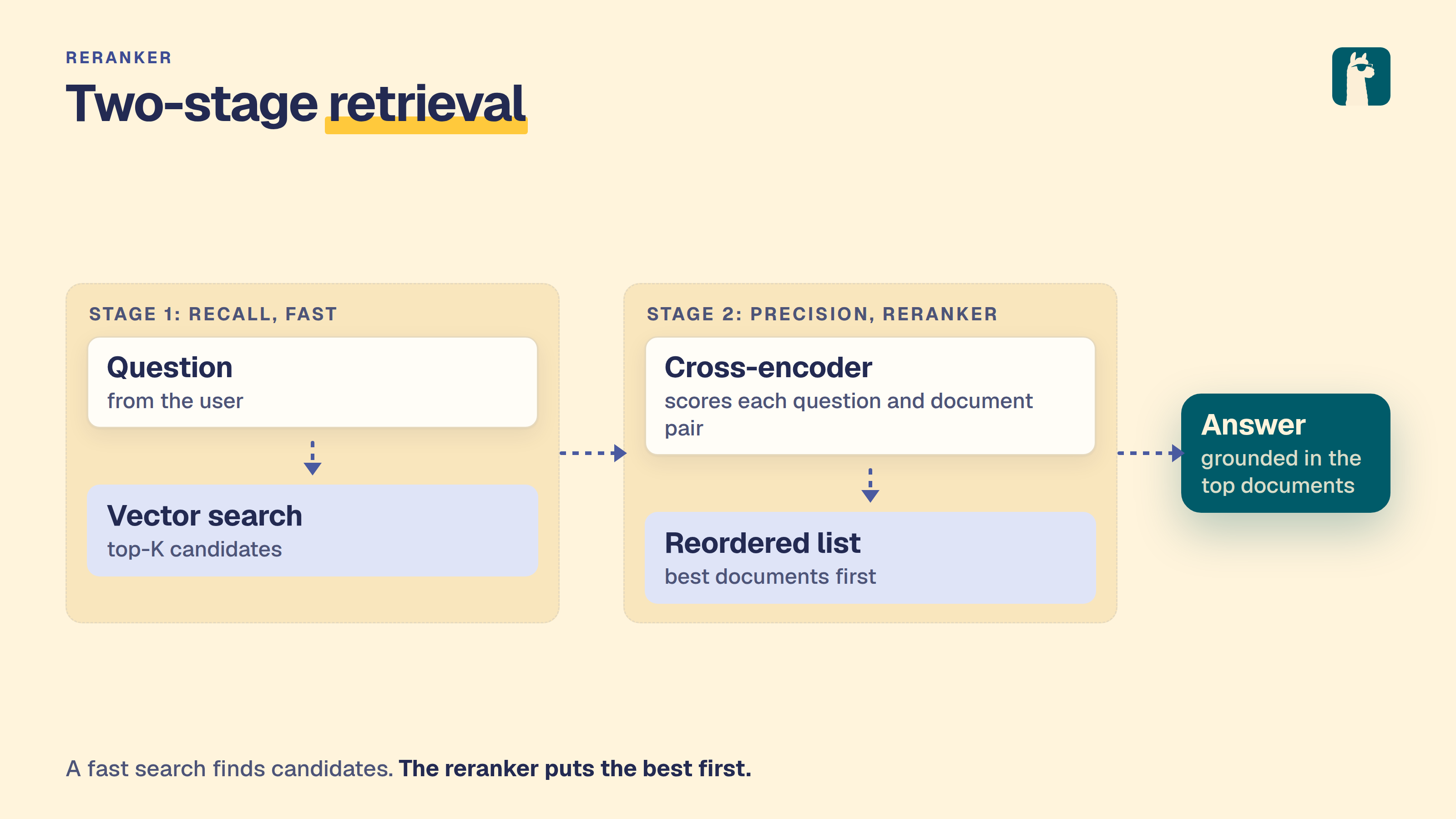
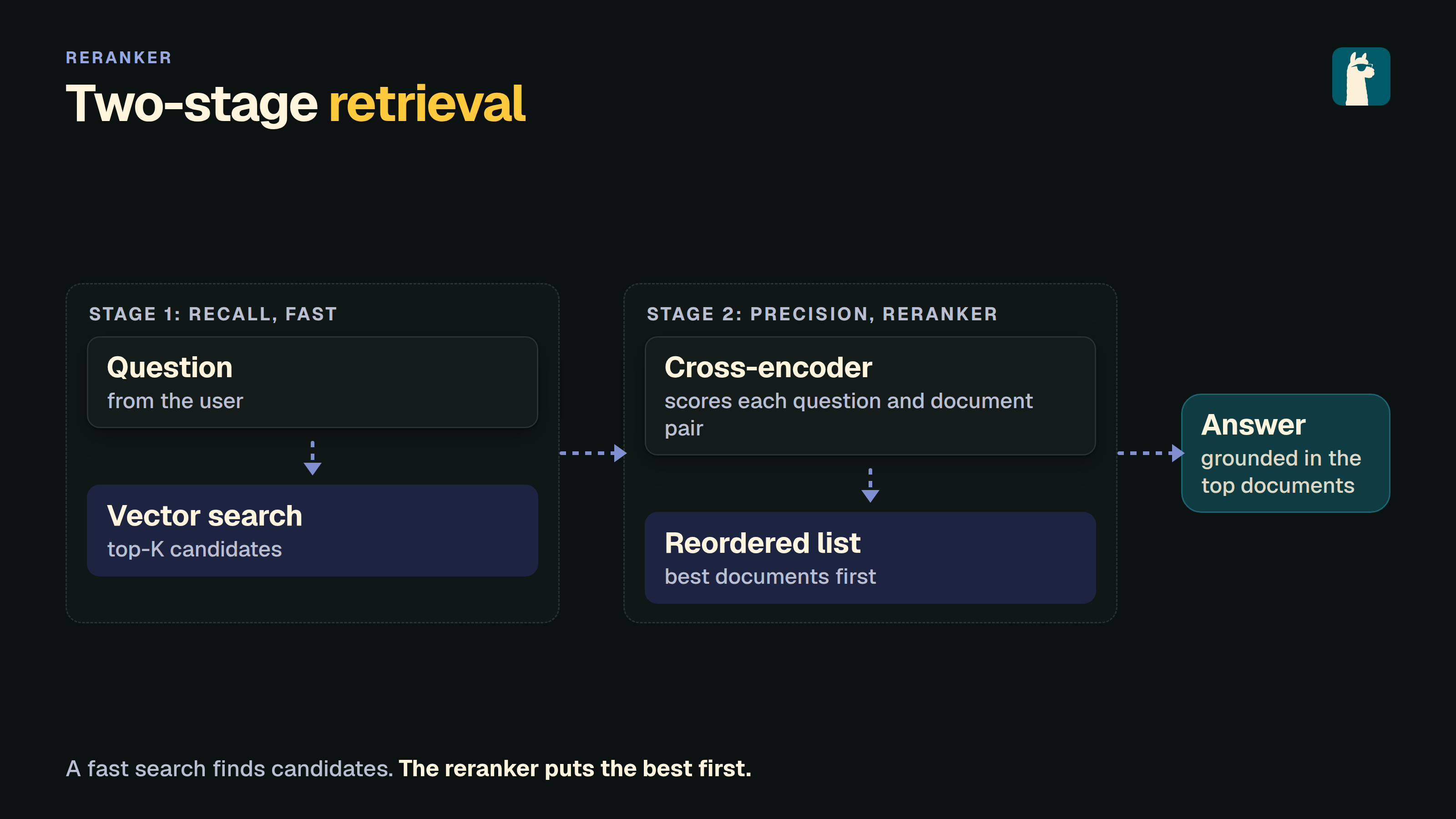
A reranking model, often referred to as a cross-encoder, is a core component in the two-stage retrieval systems used in information retrieval and natural language processing tasks. Given a query and a set of documents, it will output similarity scores.
We can use then the score to reorder the documents by relevance in our RAG system to increase its overall accuracy and filter out non-relevant results.
LocalAI exposes an OpenAI-compatible text moderation endpoint at POST /v1/moderations. It uses a local text-generation model with a constrained JSON grammar, so no separate moderation service or cloud API is required.
curl http://localhost:8080/v1/moderations \ -H "Content-Type: application/json" \ -d '{ "model": "your-instruct-model", "input": "Text to classify" }' input may be one string or an array of strings. The response contains one result per input with flagged, categories, category_scores, and category_applied_input_types fields. The category names match the OpenAI moderation API, including harassment, hate, illicit activity, self-harm, sexual content, and violence categories.
LocalAI forecasts numeric time series with timestral.cpp, a C++/ggml port of Mistral’s Timestral models. You send one or more series, with optional covariates, to POST /v1/forecast and get quantile trajectories for the next steps.
A forecast model is not a chat model. It has its own usecase, forecast, and does not appear in the chat model picker. It shows in the gallery filter and in the /v1/models capability list.
Licence. The Timestral weights use Mistral’s Modified MIT licence. You may not use them if the global consolidated monthly revenue of your company (or your employer) exceeded USD 20 million in the preceding month, unless you get a commercial licence from Mistral AI. The restriction covers derivatives, so it also applies to the GGUF conversions in the gallery. Each gallery entry installs the licence text next to the weights. The timestral.cpp code is MIT.
Use local-ai benchmark to compare text inference through a running LocalAI server. Install and configure the models first. The command sends sequential, non-streaming requests to /v1/chat/completions and reports full request latency and end-to-end completion tokens per second.
Pass one or more configured model names. To compare backends, configure separate model aliases with the desired backend, then pass those aliases. Backend names alone are not model names. The command does not install, discover, or unload models; the server’s normal loading and eviction settings still apply.
Subsections of Text and retrieval
Text generation
LocalAI generates text with the llama-cpp backend and with other backends, such as vllm and transformers. See also the Model compatibility for an up-to-date list of the supported model families.
Note:
You can also specify the model name as part of the OpenAI token.
If only one model is available, the API will use it for all the requests.
For example, to generate a chat completion, you can send a POST request to the /v1/chat/completions endpoint with the instruction as the request body:
curl http://localhost:8080/v1/chat/completions -H "Content-Type: application/json" -d '{
  "model": "ggml-koala-7b-model-q4_0-r2.bin",
  "messages": [{"role": "user", "content": "Say this is a test!"}],
  "temperature": 0.7
}'
Available additional parameters: top_p, top_k, max_tokens
When a request omits max_tokens, the vLLM and SGLang backends do not cap generation at 200 tokens. Generation is bounded only by the context window of the model.
Reasoning models return their thinking in the reasoning field. When a model reasons and calls a tool in the same turn, see Interleaved Thinking with Tool Calls.
When stream: true is set and the llama.cpp backend fails before the first chunk, for example because the prompt exceeds the context size, the request fails with an HTTP error. The error message is not streamed as assistant content. An error after streaming has started is reported inside the stream.
To generate a completion, you can send a POST request to the /v1/completions endpoint with the instruction as per the request body:
curl http://localhost:8080/v1/completions -H "Content-Type: application/json" -d '{
  "model": "ggml-koala-7b-model-q4_0-r2.bin",
  "prompt": "A long time ago in a galaxy far, far away",
  "temperature": 0.7
}'
Available additional parameters: top_p, top_k, max_tokens
List models
You can list all the models available with:
curl http://localhost:8080/v1/models
Anthropic Messages API
LocalAI supports the Anthropic Messages API, which is compatible with Claude clients. This endpoint provides a structured way to send messages and receive responses, with support for tools, streaming, and multimodal content.
curl http://localhost:8080/v1/messages \
-H "Content-Type: application/json"\
-H "anthropic-version: 2023-06-01"\
-d '{
"model": "ggml-koala-7b-model-q4_0-r2.bin",
"max_tokens": 1024,
"messages": [
{"role": "user", "content": "Say this is a test!"}
]
}'
Request Parameters
Parameter
Type
Required
Description
model
string
Yes
The model identifier
messages
array
Yes
Array of message objects with role and content
max_tokens
integer
Yes
Maximum number of tokens to generate (must be > 0)
system
string
No
System message to set the assistant’s behavior
temperature
float
No
Sampling temperature (0.0 to 1.0)
top_p
float
No
Nucleus sampling parameter
top_k
integer
No
Top-k sampling parameter
stop_sequences
array
No
Array of strings that will stop generation
stream
boolean
No
Enable streaming responses
tools
array
No
Array of tool definitions for function calling
tool_choice
object
No
Tool choice strategy: {"type": "auto"}, {"type": "any"}, {"type": "none"}, or {"type": "tool", "name": "..."}. The bare strings “auto”, “any” and “none” are accepted too
metadata
object
No
Per-request metadata passed to the backend (e.g., {"enable_thinking": "true"})
Message Format
Messages can contain text or structured content blocks:
Streaming responses use Server-Sent Events (SSE) format with event types: message_start, content_block_start, content_block_delta, content_block_stop, message_delta, and message_stop.
Response Format
{"id":"msg_abc123","type":"message","role":"assistant","content":[{"type":"text","text":"This is a test!"}],"model":"ggml-koala-7b-model-q4_0-r2.bin","stop_reason":"end_turn","usage":{"input_tokens":10,"output_tokens":5}}
stop_reason is end_turn, tool_use, or max_tokens when the reply used up max_tokens.
Open Responses API
LocalAI supports the Open Responses API specification, which provides a standardized interface for AI model interactions with support for background processing, streaming, tool calling, and advanced features like reasoning.
curl http://localhost:8080/v1/responses \
-H "Content-Type: application/json"\
-d '{
"model": "ggml-koala-7b-model-q4_0-r2.bin",
"input": "Say this is a test!",
"max_output_tokens": 1024
}'
Reuse assistant messages
When you manage conversation history in your client, append assistant messages from a response’s output array to the next request’s input.
Keep their content type as output_text. Use input_text for new user messages.
Include earlier conversation items that the model still needs.
For example, submit this body to POST /v1/responses:
{"model":"ggml-koala-7b-model-q4_0-r2.bin","input":[{"type":"message","role":"user","content":[{"type":"input_text","text":"What is the capital of France?"}]},{"type":"message","role":"assistant","content":[{"type":"output_text","text":"Paris is the capital of France."}]},{"type":"message","role":"user","content":[{"type":"input_text","text":"Which river flows through it?"}]}]}
WebSocket Responses
Connect to ws://localhost:8080/v1/responses (or wss:// when TLS is
enabled) and send response.create messages over the WebSocket. Only one
response may be in progress on a connection. Wait for response.completed or
response.failed for the active response before sending the next
response.create. An error that rejects an invalid or additional
response.create applies only to that rejected message; it does not terminate
a response that is already in progress.
Set the WebSocket-only generate field to false to prepare a request without
running inference:
{"type":"response.create","model":"ggml-koala-7b-model-q4_0-r2.bin","generate":false,"store":false,"input":"Say this is a test!"}
LocalAI emits response.created followed by response.completed with no
generated output. The completed response still has an ID that can continue the
prepared request:
Response IDs created with store: false are available only on the WebSocket
connection that created them and are removed when that connection closes. A
previous_response_id chain can contain multiple responses; LocalAI replays the
complete conversation from the oldest response through the referenced response
before appending the new input. The replay includes server-side MCP tool calls
and their results, which are stored as function_call and
function_call_output output items. Keep store: false for every descendant of a
connection-local response. LocalAI rejects a store: true response that depends
on connection-local history because the resulting stored chain would be broken
after the WebSocket closes.
After delivery, LocalAI discards buffered stream events for store: false
responses but retains their request and final response for continuation. A
connection admits at most 128 local responses and accepts a new local request
only while its current serialized history plus that request is at most 64 MiB.
When either admission threshold is reached, LocalAI returns
connection_store_limit_reached; reconnect to start a new local history. With
authentication enabled, globally stored response IDs can be continued only by
the identity that created them.
Request Parameters
Parameter
Type
Required
Description
model
string
Yes
The model identifier
input
string/array
Yes
Input text or array of input items
max_output_tokens
integer
No
Maximum number of tokens to generate
temperature
float
No
Sampling temperature
top_p
float
No
Nucleus sampling parameter
instructions
string
No
System instructions
tools
array
No
Array of tool definitions
tool_choice
string/object
No
Tool choice: “auto”, “required”, “none”, or specific tool
stream
boolean
No
Enable streaming responses
background
boolean
No
Run request in background (returns immediately)
store
boolean
No
Whether to store the response
reasoning
object
No
Reasoning configuration with effort and summary
parallel_tool_calls
boolean
No
Allow parallel tool calls
max_tool_calls
integer
No
Maximum number of tool calls
presence_penalty
float
No
Presence penalty (-2.0 to 2.0)
frequency_penalty
float
No
Frequency penalty (-2.0 to 2.0)
top_logprobs
integer
No
Number of top logprobs to return
truncation
string
No
Truncation mode: “auto” or “disabled”
text_format
object
No
Text format configuration
metadata
object
No
Custom metadata
Input Format
Input can be a simple string or an array of structured items:
Set "stream": true to receive Server-Sent Events. Each response.output_item.added event assigns an output_index to an item.
Use that index and the item ID to associate later deltas and completion events with the same item.
If a request without explicit tools produces reasoning, the stream uses separate items for reasoning and answer text.
Each item keeps its original index throughout the stream.
The response.completed event includes both items in the same index order, followed by any automatically parsed tool calls.
Background Processing
Run requests in the background for long-running tasks:
curl http://localhost:8080/v1/responses \
-H "Content-Type: application/json"\
-d '{
"model": "ggml-koala-7b-model-q4_0-r2.bin",
"input": "Generate a long story",
"max_output_tokens": 4096,
"background": true
}'
The response will include a response ID that can be used to poll for completion:
Use the GET endpoint to retrieve background responses:
# Get response by IDcurl http://localhost:8080/v1/responses/resp_abc123
# Resume streaming with query parameterscurl "http://localhost:8080/v1/responses/resp_abc123?stream=true&starting_after=10"
Canceling Background Responses
Cancel a background response that’s still in progress:
curl -X POST http://localhost:8080/v1/responses/resp_abc123/cancel
Multiple Replicas (Distributed Mode)
In distributed mode LocalAI replicates response metadata across frontend
replicas, so retrieval, previous_response_id chaining and cancellation work
regardless of which replica the load balancer picks:
GET /v1/responses/{id} returns the response from any replica.
POST /v1/responses/{id}/cancel is delegated over NATS to the replica that is
actually generating, so generation really stops. If that replica is gone, the
response is reported as cancelled without blocking.
Streaming resume (?stream=true&starting_after=N) works on any replica,
because the event buffer is read from the database (see Durable Storage
below). Without a database (it always exists in distributed mode, so this only
concerns a build that cannot reach it) the buffer is in the memory of the
replica that generates, and a resume that reaches another replica returns
HTTP 409 naming the owning replica.
State mode (see the distributed-state rules): the response metadata is
shared state, a SyncedMap with a database Store. The table is the source
of truth, a replica that starts later loads the newest rows (up to 10000), and
changes reach the other replicas as deltas over NATS. The events are not sent
over NATS: every replica reads them from the table. The generation itself, and
its cancel function, live on one replica, the owner of the response; a cancel
reaches it over NATS and through the cancel_requested flag.
Durable Storage
When LocalAI has a database (authentication enabled, or distributed mode),
stored responses and the events of a background run are kept in two tables,
open_responses and open_response_events. Without a database the store stays
in memory, as before, and ends with the process.
With the tables:
A response and its event buffer outlive a restart. GET /v1/responses/{id},
previous_response_id chaining and ?stream=true&starting_after=N read the
tables, so any replica serves them and they work after a restart.
The owner writes events in batches: at once for any event that is not a
.delta event, and for deltas every 250 ms or 64 events. If the process dies,
the deltas of the last 250 ms are lost.
The buffer keeps the same caps as the memory store (8192 events and 64 MiB per
response, oldest first). A resume below the oldest kept event returns HTTP 409
(ErrOffsetLost).
Every read still checks the owner of the response: a caller who did not create
it gets 404. An item_reference finds only an item of a response the caller
created; the item of another user’s response is “not found”.
Rows expire after OPEN_RESPONSES_STORE_TTL. With the TTL at 0 a database
store applies a default of 7 days, because a table does not end with the
process.
A running background response holds a lease in its row, which its owner renews
every 15 seconds (the lease lasts 45 seconds). When the owner dies, for example
because the pod is replaced, the lease runs out and the response is ended as
failed with the error code server_restarted. A final response.failed event
is added, so a client that resumes the stream gets every kept event and then
the end. LocalAI does not run the request again: a generation cannot continue
from a cut point, and tools may have had effects. Send the request again, with
previous_response_id to keep the context. A standalone server ends the runs a
previous process left when it starts. In distributed mode one frontend at a time
runs the sweep.
POST /v1/responses/{id}/cancel sets a cancel_requested flag in the row. The
owner checks it on every lease renewal, so a cancel works even if the bus message
is lost. If the owner died before it could stop, the response ends as cancelled.
Tool Calling
Open Responses API supports function calling with tools:
curl http://localhost:8080/v1/responses \
-H "Content-Type: application/json"\
-d '{
"model": "ggml-koala-7b-model-q4_0-r2.bin",
"input": "What is the weather in San Francisco?",
"tools": [
{
"type": "function",
"name": "get_weather",
"description": "Get the current weather",
"parameters": {
"type": "object",
"properties": {
"location": {
"type": "string",
"description": "The city and state"
}
},
"required": ["location"]
}
}
],
"tool_choice": "auto",
"max_output_tokens": 1024
}'
For streaming requests with JSON tool output, LocalAI waits for the complete JSON
object before emitting a completed function_call item. Arguments can span
multiple tokens. Read the arguments from the response.output_item.done event
before executing the tool.
Reasoning Configuration
Configure reasoning effort and summary style:
curl http://localhost:8080/v1/responses \
-H "Content-Type: application/json"\
-d '{
"model": "ggml-koala-7b-model-q4_0-r2.bin",
"input": "Solve this complex problem step by step",
"reasoning": {
"effort": "high",
"summary": "detailed"
},
"max_output_tokens": 2048
}'
Response Format
{"id":"resp_abc123","object":"response","created_at":1234567890,"completed_at":1234567895,"status":"completed","model":"ggml-koala-7b-model-q4_0-r2.bin","output":[{"type":"message","id":"msg_001","role":"assistant","content":[{"type":"output_text","text":"This is a test!","annotations":[],"logprobs":[]}],"status":"completed"}],"error":null,"incomplete_details":null,"temperature":0.7,"top_p":1.0,"presence_penalty":0.0,"frequency_penalty":0.0,"usage":{"input_tokens":10,"output_tokens":5,"total_tokens":15,"input_tokens_details":{"cached_tokens":0},"output_tokens_details":{"reasoning_tokens":0}}}
Backends
RWKV
RWKV support is available through llama.cpp (see below)
llama.cpp
llama.cpp is a popular port of Facebook’s LLaMA model in C/C++.
Note
The ggml file format has been deprecated. If you are using ggml models and you are configuring your model with a YAML file, specify, use a LocalAI version older than v2.25.0. For gguf models, use the llama backend. The go backend is deprecated as well but still available as go-llama.
Features
The llama.cpp model supports the following features:
Prompt templates are useful for models that are fine-tuned towards a specific prompt.
With the llama.cpp backend, streaming and non-streaming chat requests preserve
the template’s grammar, stop strings, and message boundaries.
Automatic setup
LocalAI supports model galleries which are indexes of models. For instance, the huggingface gallery contains a large curated index of models from the huggingface model hub for ggml or gguf models.
For instance, if you have the galleries enabled and LocalAI already running, you can just start chatting with models in huggingface by running:
curl http://localhost:8080/v1/chat/completions -H "Content-Type: application/json" -d '{
     "model": "TheBloke/WizardLM-13B-V1.2-GGML/wizardlm-13b-v1.2.ggmlv3.q2_K.bin",
     "messages": [{"role": "user", "content": "Say this is a test!"}],
     "temperature": 0.1
   }'
LocalAI will automatically download and configure the model in the model directory.
Models can be also preloaded or downloaded on demand. To learn about model galleries, check out the model gallery documentation.
YAML configuration
To use the llama.cpp backend, specify llama-cpp as the backend in the YAML file:
name:llamabackend:llama-cppparameters:# Relative to the models pathmodel:file.gguf
Backend Options
The llama.cpp backend supports additional configuration options that can be specified in the options field of your model YAML configuration. These options allow fine-tuning of the backend behavior:
Option
Type
Description
Example
use_jinja or jinja
boolean
Enable Jinja2 template processing for chat templates. When enabled, the backend uses Jinja2-based chat templates from the model for formatting messages.
use_jinja:true
context_shift
boolean
Enable context shifting, which allows the model to dynamically adjust context window usage.
context_shift:true
cache_ram
integer
Size budget in MiB for the server-side prompt cache (a host-RAM store of idle slot KV states that’s reloaded on a prompt-prefix hit, see upstream PR #16391). Default: 8192 MiB (llama.cpp default). -1 removes the limit. 0 disables the prompt cache entirely. Together with kv_unified and cache_idle_slots this is what makes a repeated system prompt skip prefill on subsequent calls.
cache_ram:4096
slot_save_path
string
Directory where the slot save and restore API writes and reads prompt-cache files. Save and restore are off unless this is set. LocalAI creates the directory with mode 0700 if it is missing. See Saving and restoring a prompt cache.
slot_save_path:/var/lib/localai/slots
parallel or n_parallel
integer
Enable parallel request processing. When set to a value greater than 1, enables continuous batching for handling multiple requests concurrently.
parallel:4
grpc_servers or rpc_servers
string
Comma-separated list of gRPC server addresses for distributed inference. Allows distributing workload across multiple llama.cpp workers.
grpc_servers:localhost:50051,localhost:50052
fit_params or fit
boolean
Enable auto-adjustment of model/context parameters to fit available device memory. Default: true.
fit_params:true
fit_params_target or fit_target
integer
Target margin per device in MiB when using fit_params. Default: 1024 (1GB).
fit_target:2048
fit_params_min_ctx or fit_ctx
integer
Minimum context size that can be set by fit_params. Default: 4096.
fit_ctx:2048
n_cpu_ffn
integer
Keep the dense FFN weights of the first N layers on the CPU (upstream --n-cpu-ffn), the counterpart of n_cpu_moe for dense models. Default: 0.
n_cpu_ffn:12
yarn_orig_ctx
integer
Original context size of the model for YaRN scaling (upstream --yarn-orig-ctx). 0 uses the model’s training context size.
yarn_orig_ctx:32768
moe_cache_mib
integer
Size in MiB of a GPU cache for MoE expert weights that stay in host memory (upstream --moe-cache-mib). Off by default (0). It helps only when experts are in host memory, with cpu_moe, n_cpu_moe or a fit_params spill. The cache uses GPU memory, so lower gpu_layers or the fit result may change. Experimental upstream. A cache that is too small can thrash, because every token evicts its own experts. A rough starting point is about 10% of the total expert size.
moe_cache_mib:4096
moe_cache_cpu_share
float
Share of the MoE cache misses that the CPU computes from the host experts instead of uploading them to the GPU once the cache is full, from 0 to 1 (upstream --moe-cache-cpu-share). Default 0: every miss is uploaded. It applies only when the cache is on (moe_cache_mib > 0). Values outside 0 to 1 are ignored with a warning. The best value depends on the hardware. In the upstream tests a small cache did best with a high share and a large cache with a low one. Upstream ships scripts/moe-cache-tune.py, which wraps a plain llama-server command, to find both values.
moe_cache_cpu_share:0.5
n_cache_reuse or cache_reuse
integer
Minimum chunk size to attempt reusing from the cache via KV shifting. Default: 0 (disabled).
cache_reuse:256
slot_prompt_similarity or sps
float
How much the prompt of a request must match the prompt of a slot to use that slot. Default: 0.1. Set to 0 to disable.
sps:0.5
swa_full
boolean
Use full-size SWA (Sliding Window Attention) cache. Default: false.
swa_full:true
cont_batching or continuous_batching
boolean
Enable continuous batching for handling multiple sequences. Default: true.
cont_batching:true
check_tensors
boolean
Validate tensor data for invalid values during model loading. Default: false.
check_tensors:true
warmup
boolean
Enable warmup run after model loading. Default: true.
warmup:false
no_op_offload
boolean
Disable offloading host tensor operations to device. Default: false.
no_op_offload:true
device or devices
string
Select the llama.cpp backend devices to use. Repeat the option or pass a comma-separated list; unlisted devices are excluded. Use the names reported by llama-server --list-devices / --list-devices.
devices:CUDA1,CUDA2,CUDA3
kv_unified or unified_kv
boolean
Use a single unified KV buffer shared across all sequences. Default: true (LocalAI override; upstream defaults to false but auto-enables it when slot count is auto). Required for cache_idle_slots and scoring: without it the server force-disables idle-slot saving at init, and score-enabled models are rejected at load time.
kv_unified:false
kv_unified_per_slot
integer
Context limit per parallel slot (upstream --kv-unified-per-slot). When context_size is not set, the shared KV cache is sized to parallel times this value. Default: unset.
kv_unified_per_slot:8192
cache_idle_slots or idle_slots_cache
boolean
On a new task, save the previous slot’s KV state into the prompt cache (and clear the slot) so a later request with the same prefix can warm-load it. Default: true. Auto-disabled by the server if kv_unified=false or cache_ram=0.
cache_idle_slots:false
n_ctx_checkpoints or ctx_checkpoints
integer
Maximum number of context checkpoints per slot (used for partial-prefix recovery, e.g. SWA). Default: 32.
ctx_checkpoints:16
checkpoint_min_step or checkpoint_min_spacing (aliases: checkpoint_every_nt, checkpoint_every_n_tokens)
integer
Minimum spacing in tokens between context checkpoints. 0 disables the minimum-spacing gate. Default: 256. (Renamed upstream from checkpoint_every_nt; semantics shifted from a fixed cadence to a minimum spacing.)
checkpoint_min_step:1024
split_mode or sm
string
How to split the model across multiple GPUs: none (single GPU only), layer (default - split layers and KV across GPUs), row (split rows across GPUs), tensor (experimental tensor parallelism, requires flash_attention: true, manually set context_size, and a llama.cpp build that includes #19378; it historically also required KV-cache quantization to be disabled, but #23792 lifts that restriction so cache_type_k/cache_type_v quantization can be combined with tensor parallelism on builds that include it).
Note: The parallel option can also be set via the LLAMACPP_PARALLEL environment variable, and grpc_servers can be set via the LLAMACPP_GRPC_SERVERS environment variable. Options specified in the YAML file take precedence over environment variables.
An explicit parallel: 1 (or n_parallel: 1) in the model options takes precedence over LLAMACPP_PARALLEL, like any other value. The environment variable is only used when neither option is set; if it is missing or not a number, the backend uses one slot.
Hardware auto-tuning (and how to override it)
On a detected GPU, LocalAI fills a few performance-relevant defaults the model config leaves unset - a larger physical batch on NVIDIA Blackwell, and a VRAM-scaled parallel slot count for concurrent serving. Both are gated on per-device VRAM at the model’s context: when a large context already fills a single card (e.g. a 27B model with a 200k context across 2×16 GiB), the batch boost and the extra parallel slots are suppressed so they can’t tip the tighter GPU into CUDA out-of-memory.
Anything you set explicitly in the model YAML always wins, so to pin a value just set it (e.g. batch: 512 or options: ["parallel:1"]). The effective values are logged at INFO when a model loads (effective runtime tuning …). To turn the hardware auto-tuning off entirely and run llama.cpp’s stock behavior, set:
LOCALAI_DISABLE_HARDWARE_DEFAULTS=true
Server-side prompt cache (repeated system prompts)
Agents, coding assistants, and Anthropic/OpenAI-compatible CLIs typically resend the same large system prompt on every turn. The llama.cpp server can short-circuit prefill for the matching prefix by stashing idle slot KV states in host RAM and reloading them on a hit. Three settings interact:
Setting
Default
Role
cache_ram:N
8192 (llama.cpp default)
Allocates the host-side prompt cache. 0 disables it.
kv_unified:true
true
Single unified KV buffer (prerequisite for idle-slot saving).
cache_idle_slots:true
true
Persists the idle slot’s KV into the prompt cache on task switch.
All three are on by default since LocalAI v4.3, so the prompt cache works out of the box for the common single-slot setup. If you’re on an older release, or you’ve explicitly disabled one of them, add the following to recover the behaviour:
options:- cache_ram:4096 # or -1 for no limit- kv_unified:true- cache_idle_slots:true
Set cache_ram:0 to opt out of the prompt cache entirely (saves host RAM at the cost of re-prefilling repeated prompts).
cache_ram:-1 removes the limit. With idle-slot saving on, every distinct prompt then leaves its slot state in host RAM, so a workload with many different prompts (classification, ingestion) grows the backend by roughly the KV size of each prompt until the host runs out of memory.
Saving and restoring a prompt cache
The server-side prompt cache lives in RAM and is lost when the model unloads. To keep the prompt state of one slot on disk, set slot_save_path and use the slot API. A typical use is a voice assistant with a long system prompt: save the state once, then restore it when the wake word fires, so the first request does not wait for prefill.
options:- slot_save_path:/var/lib/localai/slots
Both calls need an admin API key when authentication is on. Without slot_save_path they return 400.
The server chooses the name of every saved file. A save returns an id, and a restore takes that id. A client cannot pick a file name or a path.
# Save slot 0 of the model. The reply contains the id.curl http://localhost:8080/v1/slots/save \
-H "Content-Type: application/json"\
-d '{"model": "my-model", "slot": 0}'# Load that state back into slot 0curl http://localhost:8080/v1/slots/restore \
-H "Content-Type: application/json"\
-d '{"model": "my-model", "slot": 0, "id": "0123456789abcdef0123456789abcdef"}'
Field
Description
model
Name of a llama-cpp model.
slot
Slot id. Default 0. With parallel:N the ids are 0 to N-1.
id
Restore only. The id that a save returned for this model: 32 lowercase hex characters. Do not send it on save.
The save reply gives the id, the slot, the number of tokens and bytes, and the time taken in duration_ms. The message field lists the IDs of any older saves that were deleted to make room. The restore reply has the same fields. Neither reply contains a path on the host.
Keep these points in mind:
A client cannot choose names. The backend creates a directory for each model under slot_save_path (mode 0700) and writes a manifest.json in it. A restore works only for an id in the manifest of that model. Any other id returns 404 with no saved state with this id for this model.
The backend keeps at most 32 saves for each model. When a save would go over that, it deletes the oldest one and lists its id in message. A save larger than 8 GiB is deleted and fails.
A restore also checks that the file is a plain file and has the size that was recorded at save time. A file that was replaced or cut short is refused.
Keep slot_save_path private to the user that runs LocalAI. LocalAI creates it with mode 0700 when it is missing, and writes a warning to the log when an existing directory is open to other users. The checks above cannot stop a local user who can write to the directory.
A saved state is only as fresh as its save. To change the cached prompt, save again and use the new id.
A saved state holds the prompt state for the model and quantisation it came from. Do not restore it into a different model, quantisation or context size. The restore call fails if the state does not fit, but a state from another model is not always detected.
A slot that is busy with a request is served after that request ends.
The API is for llama-cpp only. Other backends return 501.
ik_llama.cpp is a hard fork of llama.cpp by Iwan Kawrakow that focuses on superior CPU and hybrid GPU/CPU performance. It ships additional quantization types (IQK quants), custom quantization mixes, Multi-head Latent Attention (MLA) for DeepSeek models, and fine-grained tensor offload controls - particularly useful for running very large models on commodity CPU hardware.
Note
The ik-llama-cpp backend requires a CPU with AVX2 support. The IQK kernels are not compatible with older CPUs.
Features
The ik-llama-cpp backend supports the following features:
IQK quantization types for better CPU inference performance
Multimodal models (via clip/llava)
Setup
The backend is distributed as a separate container image and can be installed from the LocalAI backend gallery, or specified directly in a model configuration. GGUF models loaded with this backend benefit from ik_llama.cpp’s optimized CPU kernels - especially useful for MoE models and large quantized models that would otherwise be GPU-bound.
YAML configuration
To use the ik-llama-cpp backend, specify it as the backend in the YAML file:
name:my-modelbackend:ik-llama-cppparameters:# Relative to the models pathmodel:file.gguf
The aliases ik-llama and ik_llama are also accepted.
turboquant (llama.cpp fork with TurboQuant KV-cache)
llama-cpp-turboquant is a llama.cpp fork that adds the TurboQuant KV-cache quantization scheme. It reuses the upstream llama.cpp codebase and ships as a drop-in alternative backend inside LocalAI, sharing the same gRPC server sources as the stock llama-cpp backend - so any GGUF model that runs on llama-cpp also runs on turboquant.
You would pick turboquant when you want smaller KV-cache memory pressure (longer contexts on the same VRAM) or to experiment with the fork’s quantized KV representations on top of the standard cache_type_k / cache_type_v knobs already supported by upstream llama.cpp.
Features
Drop-in GGUF compatibility with upstream llama.cpp.
TurboQuant KV-cache quantization (see fork README for the current set of accepted cache_type_k / cache_type_v values).
Same feature surface as the llama-cpp backend: text generation, embeddings, tool calls, multimodal via mmproj.
Available on CPU (AVX/AVX2/AVX512/fallback), NVIDIA CUDA 12/13, AMD ROCm/HIP, Intel SYCL f32/f16, Vulkan, and NVIDIA L4T.
Setup
turboquant ships as a separate container image in the LocalAI backend gallery. Install it like any other backend:
local-ai backends install turboquant
Or pick a specific flavor for your hardware (example tags: cpu-turboquant, cuda12-turboquant, cuda13-turboquant, rocm-turboquant, intel-sycl-f16-turboquant, vulkan-turboquant).
YAML configuration
To run a model with turboquant, set the backend in your model YAML and optionally pick quantized KV-cache types:
name:my-modelbackend:turboquantparameters:# Relative to the models pathmodel:file.gguf# Use TurboQuant's own KV-cache quantization schemes. The fork accepts# the standard llama.cpp types (f16, f32, q8_0, q4_0, q4_1, q5_0, q5_1)# and adds three TurboQuant-specific ones: turbo2, turbo3, turbo4.# turbo3 / turbo4 auto-enable flash_attention (required for turbo K/V)# and offer progressively more aggressive compression.cache_type_k:turbo3cache_type_v:turbo3context_size:8192
The cache_type_k / cache_type_v fields map to llama.cpp’s -ctk / -ctv flags. The stock llama-cpp backend only accepts the standard llama.cpp types - to use turbo2 / turbo3 / turbo4 you need this turboquant backend, which is where the fork’s TurboQuant code paths actually take effect. Pick q8_0 here and you’re just running stock llama.cpp KV quantization; pick turbo* and you’re running TurboQuant.
The backend will automatically download the required files in order to run the model.
Usage
Use the completions endpoint by specifying the vllm backend:
curl http://localhost:8080/v1/completions -H "Content-Type: application/json" -d '{
   "model": "vllm",
   "prompt": "Hello, my name is",
   "temperature": 0.1, "top_p": 0.1
 }'
Passing arbitrary vLLM options with engine_args
A subset of AsyncEngineArgs is exposed as typed YAML fields
(tensor_parallel_size, gpu_memory_utilization, quantization,
max_model_len, dtype, trust_remote_code, enforce_eager, …).
Anything else can be passed through the generic engine_args: map.
Keys are forwarded verbatim to vLLM’s engine; unknown keys fail at load
time with the closest valid name as a hint. Nested maps materialise
into vLLM’s nested config dataclasses (SpeculativeConfig,
KVTransferConfig, CompilationConfig, …).
Speculative decoding (DFlash, ngram, eagle, deepseek_mtp, …) is
configured this way:
method picks the algorithm, the remaining keys are method-specific.
Drafters from z-lab are paired with
specific target models; pick the one that matches your target. The
drafter loads in its native precision regardless of the target’s
quantization: setting.
Another example - picking a non-default attention backend (e.g. on
hardware where the default cutlass kernels aren’t supported):
engine_args:attention_backend:TRITON_ATTN
CLI-style engine flags in options
Engine arguments can also be written in options: with vLLM’s own CLI
spelling, which is handy when copying a command line out of vLLM’s
documentation:
Only -- prefixed entries are treated as engine flags; everything
else in options: (tool_parser:, reasoning_parser:, …) keeps its
existing meaning. Both --flag:value and --flag=value are accepted.
Dashes become underscores (--enable-prefix-caching →
enable_prefix_caching) and the value is coerced to the target
field’s type. A bare --flag sets a boolean field to true.
Unknown or uncoercible flags are logged on the backend’s stderr and
skipped rather than failing the load. engine_args: stays strict and
is applied last, so it wins on conflict.
engine_args: remains the form to use for anything structured (nested
configs, maps); options: is a convenience for flat flags.
Multi-node data parallelism
engine_args.data_parallel_size > 1 combined with the
local-ai p2p-worker vllm follower lets a single model span multiple
GPU nodes. See vLLM Multi-Node (Data-Parallel)
for the head/follower configuration and a worked Kimi-K2.6 example.
SGLang
SGLang is a fast serving
framework for LLMs and VLMs with a focus on prefix caching, speculative
decoding, and multi-modal generation. LocalAI ships a gRPC backend that
wraps SGLang’s async Engine, including its native function-call and
reasoning parsers.
The backend will pull the model from HuggingFace on first load.
Passing arbitrary SGLang options with engine_args
The same engine_args: map that the vLLM backend accepts is also
honoured by the SGLang backend. Keys are validated against
ServerArgs
SGLang’s central configuration dataclass - and forwarded verbatim to
Engine(**kwargs). Unknown keys fail at load time with the closest
valid name as a hint. Unlike vLLM, ServerArgs is flat: speculative
decoding fields are top-level (speculative_algorithm,
speculative_draft_model_path, etc.) rather than nested under a
speculative_config: dict.
The typed YAML fields shared with vLLM are mapped to their SGLang
equivalents (gpu_memory_utilization → mem_fraction_static,
enforce_eager → disable_cuda_graph, tensor_parallel_size →
tp_size, max_model_len → context_length). Anything else,
including all speculative-decoding flags, goes under engine_args:.
Speculative decoding: Gemma 4 with Multi-Token Prediction
Google publishes paired “assistant” drafters for every Gemma 4 size.
The drafters use Multi-Token Prediction (MTP) to propose several
candidate tokens per target step, which SGLang then verifies in
parallel. Flags below are transcribed verbatim from the
SGLang Gemma 4 cookbook.
For consumer GPUs in the 16-24 GB range, use E4B (8 B total /
4 B effective parameters):
For smaller cards (8-12 GB), drop to E2B (5 B total / 2 B effective)
by swapping the model paths to google/gemma-4-E2B-it and
google/gemma-4-E2B-it-assistant; the rest of the flags stay the same.
NEXTN is normalised to EAGLE inside ServerArgs.__post_init__, so
either value works - the cookbook uses NEXTN. mem_fraction_static
is the share of GPU memory SGLang reserves for the model + KV pool;
0.85 is the cookbook’s default and adapts to whatever single GPU the
backend is running on.
The 31 B dense and 26 B-A4B MoE Gemma 4 variants exist in the same
cookbook but require --tp-size 2, so they’re not in the gallery as
single-GPU recipes.
SGLang version requirement. Gemma 4 support landed in SGLang via
PR #21952. The
LocalAI sglang backend pins a release that includes it; if you’ve
overridden the pin to an older version, this recipe will fail with a
“model architecture not recognised” error at load time.
Other speculative algorithms
speculative_algorithm: also accepts EAGLE/EAGLE3 (paired with an
EAGLE-style draft head), DFLASH (block-diffusion drafters from
z-lab for the Qwen3 family), STANDALONE
(a smaller draft LLM verifying a larger target), and NGRAM (no draft
model - pure prefix-history speculation). See SGLang’s
speculative-decoding docs
for the full algorithm matrix.
Tool calling and reasoning parsers
SGLang’s native parsers stream tool_calls and reasoning_content
inside ChatDelta - the LocalAI Python backend wires them up
per-request rather than via engine_args:. Pick a parser by name:
thinking_budget sets a positive integer token budget for reasoning on each request.
Invalid, zero, and negative values produce a warning and leave the budget unset.
SGLang requires engine_args.enable_strict_thinking: true to enforce the budget.
LocalAI warns if you configure a budget without that engine option.
Keep the budget well below the max_tokens of your requests: if max_tokens is reached first,
the budget never triggers and the whole reply can be spent on reasoning, leaving the answer empty.
effort_budgets maps the request’s reasoning_effort to its own budget, so the levels differ in how long the model may think:
options:- thinking_budget:256 # fallback: no effort, or a level not listed below- effort_budgets:low=256;medium=1024;high=4096;xhigh=16384;max=16384
Entries are separated by ; and use the same parsing rules as thinking_budget (invalid entries are skipped with a warning).
A request whose effort is not listed falls back to thinking_budget; without either, no budget is sent.
A level listed here also turns reasoning on for that request, even when reasoning_default:off is set; an explicit enable_thinking: "false" in the request metadata (also sent when the model sets reasoning.disable: true) still wins.
The budget is an upper bound, not a target: the model may stop thinking earlier.
reasoning_default:on or reasoning_default:off sets the default for LocalAI’s tokenizer chat template.
Request metadata enable_thinking set to "true" or "false" overrides this default.
An explicit prompt bypasses tokenizer template rendering.
When no default or request override is set, the template keeps its own behavior.
LocalAI signals required reasoning when the rendered prompt ends with the configured parser’s opening reasoning token.
An explicit output grammar disables this detection.
Configure a reasoning parser that matches your model.
The backend reads these options when it loads the model.
POST /models/reload rereads model configuration files but does not update options in an already loaded backend.
Restarting only the backend does not reread configuration files.
Restart LocalAI after changing these options to reload both the configuration and the backend.
vllm.cpp
vllm.cpp is the LocalAI team’s C++ port of
vLLM: the same continuous-batching scheduler, paged KV cache and prefix caching,
with no Python at inference time. It consumes either a HuggingFace safetensors
model directory or a .gguf file, and applies the model’s chat template,
tool-call parsing and reasoning split engine-side.
This section is the configuration reference. For installing the backend and the
ready-made models the gallery ships for it, see the
vllm.cpp backend page.
The same engine_args: map the vLLM and SGLang backends accept is honoured
here, with keys spelled exactly as vLLM’s own CLI flags - so a speculative_config
or kv_transfer_config block written for vLLM works verbatim. Unknown keys are
ignored rather than fatal; the engine validates the documents it is handed and
reports a precise error at load.
name:qwen35-a3bbackend:vllm-cppparameters:model:"Qwen/Qwen3.5-A3B"context_size:16384template:use_tokenizer_template:trueengine_args:# KV cache sizing: num_blocks * block_size tokens of cache.block_size:32num_blocks:1024# Concurrency and the per-step chunked-prefill token budget.max_num_seqs:32max_num_batched_tokens:8192# Automatic prefix caching. Omit to keep the model's own default# (on for dense models, off for hybrid / attention-free ones).enable_prefix_caching:true# Scheduler admission order: fcfs (default), priority, or lpm# (cache-aware longest-prefix-match; needs prefix caching to have any effect).scheduling_policy:lpm
Key
Meaning
Default
block_size
KV-cache block size, in tokens per block
32
num_blocks
KV-cache blocks to allocate
256
max_model_len
Max sequence length; also settable as context_size / max_model_len
model config
max_num_seqs
Max concurrent sequences the scheduler admits
8
max_num_batched_tokens
Per-step chunked-prefill token budget
per-arch (2048 dense, 4096/8192 MoE)
enable_prefix_caching
Automatic prefix caching; enable_radix_attention is an accepted alias
model default
enable_jump_forward
Jump-forward decoding, which emits grammar-forced tokens without a model step. Only affects constrained requests (grammar, JSON schema)
off
scheduling_policy
fcfs, priority, or lpm
fcfs
tool_parser / reasoning_parser
Force a parser instead of chat-template auto-detection
auto
tokenizer_config
Override the tokenizer_config.json the chat template is read from
<model_dir>/tokenizer_config.json
speculative_config
Speculative decoding (see below)
disabled
kv_transfer_config
External KV connector / LMCache (see below)
none
hf_overrides
JSON object of config.json keys merged over the model directory’s own, as vLLM’s --hf-overrides (see the vllm.cpp backend page)
none
Raising max_num_batched_tokens lets more prefill land in a single step, at the
cost of decode latency for requests queued behind it. The default deliberately
does not scale with max_num_seqs, which is what keeps a large concurrent
prefill from blowing up the per-step activation on the hybrid architectures.
enable_prefix_caching and enable_jump_forward are tri-state at the engine
boundary: omitting the key defers to a default (the model’s own capability for
prefix caching, an environment variable for jump forward), while an explicit
false forces the feature off. Those are genuinely different - prefix caching
defaults on for dense models - so write the key only when you mean to override.
Speculative decoding
speculative_config: takes the same JSON object as vLLM’s
--speculative-config. Three methods are supported.
Architecture limit. At the current engine pin, mtp and dflash are
Qwen3.5 / Qwen3.6 only. The engine builds a widened speculative KV cache
directly for those families rather than through the model registry, so a
speculative config on any other architecture (Llama, GLM, Gemma, Mistral, …)
will not work regardless of checkpoint format. ngram needs no draft weights
and is not subject to this limit.
Format support.mtp and dflash now work from a .gguf target as well
as safetensors. An MTP head is read from the GGUF’s nextn.* tensors when the
file declares <arch>.nextn_predict_layers; a GGUF exported WITHOUT the head
(converted with --no-mtp, or predating llama.cpp’s Qwen3.5 MTP support) is
refused at load naming that as the reason. A DFlash draft may itself be a
dflash-arch GGUF, and the target may be a GGUF too. ngram needs no draft
weights and works on any format.
MTP (Multi-Token Prediction) uses a draft head shipped inside the target
checkpoint’s own mtp.* tensors, so there is no second model to download. It
requires a safetensors checkpoint - the mtp.* tensors do not survive GGUF
conversion, and an MTP config over a .gguf model is rejected at load.
engine_args:speculative_config:method:mtp# Optional; defaults to the checkpoint's own head depth, which is# usually the right value. Must be a multiple of that depth.num_speculative_tokens:1
DFlash uses a separate block-diffusion drafter that proposes a whole block
of tokens in one non-autoregressive forward pass. Unlike MTP, the draft is its
own checkpoint, so model: is required:
The draft shares the target’sembed_tokens and lm_head, so both must come
from the same model family and the target must be safetensors.
The engine does not download the draft.model: is resolved, in order,
as a path as given, then as the last path segment under LocalAI’s models
directory (z-lab/Qwen3.6-27B-DFlash → <models>/Qwen3.6-27B-DFlash, which is
what LocalAI’s own downloader produces), then as the whole reference under the
models directory. Install the draft into LocalAI first, or give an absolute path
to a directory containing config.json. If none of those resolve, the load
fails immediately naming every location that was tried, rather than reporting a
missing checkpoint from inside the engine.
N-gram needs no draft model at all - it proposes from the prompt’s own
suffix history. num_speculative_tokens is required:
Auto-configuration on import. When you import a safetensors repository
with backend: vllm-cpp, LocalAI reads the checkpoint’s config.json and, if
it declares an MTP head (mtp_num_hidden_layers), writes
speculative_config: {method: mtp} into the generated engine_args for you.
An explicit speculative_config in your own config is never overwritten.
Importing a DFlash draft repository is refused with a warning: a drafter
cannot serve on its own, so import the target model and point
speculative_config.model at the draft.
External KV cache with LMCache
kv_transfer_config: takes vLLM’s --kv-transfer-config JSON and selects an
external KV-cache connector. The lm:// LMCache client lets prefill KV be
stored to and reloaded from a shared lmcache.v1.server, so a prefix computed
by one replica does not have to be recomputed by the next:
engine_args:kv_transfer_config:kv_connector:LMCacheConnectorkv_role:kv_both # required whenever kv_connector is setkv_connector_extra_config:host:127.0.0.1port:65432
kv_role is one of kv_producer (store only), kv_consumer (load only), or
kv_both. An unregistered connector name, a missing role, or a malformed
document fails the load with an explicit error rather than silently running
without the cache.
Legacy options: list
Earlier versions configured this backend through the flat options: list, and
those configs keep working. Every key in the table above is still read from
there in key:value form, and engine_args wins on any key set in both:
New configs should prefer engine_args:, which is the only place the nested
speculative_config / kv_transfer_config documents can be written naturally
rather than as a single-line JSON string.
Transformers
Transformers is a State-of-the-art Machine Learning library for PyTorch, TensorFlow, and JAX.
LocalAI has a built-in integration with Transformers, and it can be used to run models.
This is an extra backend - in the container images (the extra images already contains python dependencies for Transformers) is already available and there is nothing to do for the setup.
Setup
Create a YAML file for the model you want to use with transformers.
To setup a model, you need to just specify the model name in the YAML config file:
name:transformersbackend:transformersparameters:model:"facebook/opt-125m"type:AutoModelForCausalLMquantization:bnb_4bit# One of: bnb_8bit, bnb_4bit, xpu_4bit, xpu_8bit (optional)
The backend will automatically download the required files in order to run the model.
Parameters
Type
Type
Description
AutoModelForCausalLM
AutoModelForCausalLM is a model that can be used to generate sequences. Use it for NVIDIA CUDA and Intel GPU with Intel Extensions for Pytorch acceleration
OVModelForCausalLM
for Intel CPU/GPU/NPU OpenVINO Text Generation models
OVModelForFeatureExtraction
for Intel CPU/GPU/NPU OpenVINO Embedding acceleration
N/A
Defaults to AutoModel
OVModelForCausalLM requires OpenVINO IR Text Generation models from Hugging face
OVModelForFeatureExtraction works with any Safetensors Transformer Feature Extraction model from Huggingface (Embedding Model)
Please note that streaming is currently not implemented in AutoModelForCausalLM for Intel GPU.
AMD GPU support is not implemented.
Although AMD CPU is not officially supported by OpenVINO there are reports that it works: YMMV.
Embeddings
Use embeddings: true if the model is an embedding model
Inference device selection
Transformer backend tries to automatically select the best device for inference, anyway you can override the decision manually overriding with the main_gpu parameter.
Inference Engine
Applicable Values
CUDA
cuda, cuda.X where X is the GPU device like in nvidia-smi -L output
OpenVINO
Any applicable value from Inference Modes like AUTO,CPU,GPU,NPU,MULTI,HETERO
Example for CUDA:
main_gpu: cuda.0
Example for OpenVINO:
main_gpu: AUTO:-CPU
This parameter applies to both Text Generation and Feature Extraction (i.e. Embeddings) models.
Inference Precision
Transformer backend automatically select the fastest applicable inference precision according to the device support.
CUDA backend can manually enable bfloat16 if your hardware support it with the following parameter:
f16: true
Quantization
Quantization
Description
bnb_8bit
8-bit quantization
bnb_4bit
4-bit quantization
xpu_8bit
8-bit quantization for Intel XPUs
xpu_4bit
4-bit quantization for Intel XPUs
Trust Remote Code
Some models like Microsoft Phi-3 requires external code than what is provided by the transformer library.
By default it is disabled for security.
It can be manually enabled with:
trust_remote_code: true
Maximum Context Size
Maximum context size in bytes can be specified with the parameter: context_size. Do not use values higher than what your model support.
Usage example:
context_size: 8192
Auto Prompt Template
Usually chat template is defined by the model author in the tokenizer_config.json file.
To enable it use the use_tokenizer_template: true parameter in the template section.
Usage example:
template:
  use_tokenizer_template: true
Custom Stop Words
Stopwords are usually defined in tokenizer_config.json file.
They can be overridden with the stopwords parameter in case of need like in llama3-Instruct model.
Usage example:
stopwords:
- "<|eot_id|>"
- "<|end_of_text|>"
Usage
Use the completions endpoint by specifying the transformers model:
curl http://localhost:8080/v1/completions -H "Content-Type: application/json" -d '{
   "model": "transformers",
   "prompt": "Hello, my name is",
   "temperature": 0.1, "top_p": 0.1
 }'
Examples
OpenVINO
A model configuration file for openvion and starling model:
The chat endpoint supports the grammar parameter, which allows users to specify a grammar in Backus-Naur Form (BNF). This feature enables the Large Language Model (LLM) to generate outputs adhering to a user-defined schema, such as JSON, YAML, or any other format that can be defined using BNF. For more details about BNF, see Backus-Naur Form on Wikipedia.
Note
Compatibility Notice: This feature is only supported by models that use the llama.cpp backend. For a complete list of compatible models, refer to the Model Compatibility page. For technical details, see the related pull requests: PR #1773 and PR #1887.
Setup
To use this feature, follow the installation and setup instructions on the LocalAI Functions page. Ensure that your local setup meets all the prerequisites specified for the llama.cpp backend.
💡 Usage Example
The following example demonstrates how to use the grammar parameter to constrain the model’s output to either “yes” or “no”. This can be particularly useful in scenarios where the response format needs to be strictly controlled.
In this example, the grammar parameter is set to a simple choice between “yes” and “no”, ensuring that the model’s response adheres strictly to one of these options regardless of the context.
Example: JSON Output Constraint
You can also use grammars to enforce JSON output format:
curl http://localhost:8080/v1/chat/completions -H "Content-Type: application/json" -d '{
  "model": "gpt-4",
  "messages": [{"role": "user", "content": "Generate a person object with name and age"}],
  "grammar": "root ::= \"{\" \"\\\"name\\\":\" string \",\\\"age\\\":\" number \"}\"\nstring ::= \"\\\"\" [a-z]+ \"\\\"\"\nnumber ::= [0-9]+"
}'
Moderation - OpenAI-compatible safety classification whose response is constrained to the moderation schema
Interleaved Thinking with Tool Calls
Reasoning models can “think” before they answer. When such a model also calls a tool, the useful behaviour is for the thinking and the tool call to travel together, and for that thinking to survive the tool-result round trip. LocalAI calls this interleaved thinking: a single assistant turn carries both reasoning and tool_calls, and the client hands the reasoning back on the next turn so the model’s chain of thought is not lost when the tool result is appended.
This matters because a tool-calling loop is multi-turn. The model reasons, asks for a tool, your client runs the tool, and then you call the model again with the tool result. Without interleaved thinking the reasoning produced in the first turn is discarded, and the model has to reconstruct its plan from scratch. With it, the reasoning is echoed back and the model continues where it left off.
An assistant turn that both reasons and calls a tool returns the two fields side by side:
reasoning holds the model’s thinking.
tool_calls holds the structured calls.
finish_reason is tool_calls.
Your client runs the tool, then sends the conversation back with:
the original assistant message (including its reasoning and tool_calls), and
a tool role message carrying the tool result.
LocalAI reads the returned reasoning back into the model’s context so the chain is continuous.
Field naming
OpenAI chat completions (/v1/chat/completions): the response carries reasoning alongside tool_calls. On inbound assistant messages LocalAI now also accepts reasoning_content as an alias for reasoning. This alias exists because several clients (vLLM, DeepSeek, and cogito) emit the field under the name reasoning_content; either name is accepted and mapped to the same internal field.
Anthropic Messages (/v1/messages): reasoning is carried as thinking content blocks. On the local path LocalAI emits a thinking block before the tool_use block, and reads inbound thinking blocks back into reasoning. Because local models produce no cryptographic signature, LocalAI attaches a synthetic opaque signature to the emitted block, and does not validate the signature on inbound blocks. The thinking block is only emitted when the request opts in with the thinking parameter:
{"model":"your-reasoning-model","max_tokens":1024,"thinking":{"type":"enabled"},"messages":[{"role":"user","content":"What is the weather in Rome?"}]}
Enabling reasoning per backend
Interleaved thinking requires the backend to separate the model’s thinking from its final answer. How you turn that on depends on the backend.
llama.cpp
Set the reasoning_format model option. Accepted values: none, auto, deepseek, deepseek-legacy. auto lets the backend pick based on the model’s chat template; deepseek and deepseek-legacy force the DeepSeek-style <think>...</think> extraction.
Set the reasoning_parser model option to vLLM’s native reasoning parser for the model family. LocalAI also ships an auto-configuration hook (core/config/hooks_vllm.go) that sets the reasoning parser and the tool-call parser together for known families, so for gallery-imported vLLM models this is often configured for you.
Request a chat completion with a tool defined and a prompt that requires the model to reason before acting:
curl http://localhost:8080/v1/chat/completions -H "Content-Type: application/json" -d '{
  "model": "your-reasoning-model",
  "messages": [
    { "role": "user", "content": "What is the weather in Rome?" }
  ],
  "tools": [
    {
      "type": "function",
      "function": {
        "name": "get_weather",
        "description": "Get the current weather for a city",
        "parameters": {
          "type": "object",
          "properties": {
            "city": { "type": "string" }
          },
          "required": ["city"]
        }
      }
    }
  ]
}'
The response message carries both the reasoning and the tool call, and finish_reason is tool_calls:
{"choices":[{"finish_reason":"tool_calls","message":{"role":"assistant","content":"","reasoning":"Okay, the user is asking about the weather in Rome... I need to call get_weather with city Rome.","tool_calls":[{"id":"call_abc123","type":"function","function":{"name":"get_weather","arguments":"{\"city\":\"Rome\"}"}}]}}]}
To continue, run get_weather, then send the conversation back with the assistant message (keeping its reasoning and tool_calls) followed by a tool message holding the result. LocalAI feeds the returned reasoning back into context so the model resumes its chain of thought.
Known limitations
Streaming Anthropic thinking blocks. In streaming mode, a thinking block is currently emitted only on the tool-call path that goes through the llama.cpp C++ autoparser. A plain streaming text-only turn, or a tool turn resolved through the inline token path, does not stream a thinking block. The equivalent non-streaming request does return one. Non-streaming emits thinking on all branches; only the streaming path has this gap.
Upstream llama.cpp leak on newest hybrid models. On the newest hybrid reasoning models (Qwen3.5 / Qwen3.6) there is an upstream llama.cpp bug where tool calls can leak into reasoning_content instead of being parsed into tool_calls. This is tracked upstream at ggml-org/llama.cpp discussion #23351.
Reasoning budget vs the tool call. If a reasoning model’s thinking exhausts the output budget (max_tokens) before it emits the tool call, no tool call is produced. Give the model enough max_tokens to cover both the reasoning and the call. In this case LocalAI reports finish_reason: "length".
Embeddings
LocalAI supports generating embeddings for text or list of tokens.
For face embeddings specifically, see the
Face Recognition feature - it produces
512-d L2-normalized vectors tuned for face similarity.
The embedding endpoint is compatible with llama.cpp models, bert.cpp models and sentence-transformers models available in huggingface.
Choosing the model
Send the model name in the request body. If the body has no model, LocalAI uses the configured embeddings model whose name comes first alphabetically. If no embeddings model is configured, the request returns 400 Bad Request. A model name is never taken from the bearer token unless it matches a configured model name exactly.
Using Gallery Models
LocalAI provides a model gallery with pre-configured embedding models. To use a gallery model:
Ensure the model is available in the gallery (check Model Gallery)
Use the model name directly in your API calls
Example gallery models:
qwen3-embedding-4b - Qwen3 Embedding 4B model
qwen3-embedding-8b - Qwen3 Embedding 8B model
qwen3-embedding-0.6b - Qwen3 Embedding 0.6B model
Example: Using Qwen3-Embedding-4B from Gallery
curl http://localhost:8080/embeddings -X POST -H "Content-Type: application/json" -d '{
  "input": "My text to embed",
  "model": "qwen3-embedding-4b",
  "dimensions": 2560
}'
Manual Setup
Create a YAML config file in the models directory. Specify the backend and the model file.
name:text-embedding-ada-002# The model name used in the APIparameters:model:<model_file>backend:"<backend>"embeddings:true
Hugging Face embeddings
To use sentence-transformers models from Hugging Face, set backend: transformers and type: SentenceTransformer.
curl http://localhost:8080/embeddings -X POST -H "Content-Type: application/json" -d '{
"input": "My text",
"model": "my-awesome-model"
}'| jq "."
Embedding chat conversations and Go-side pooling
/v1/embeddings also accepts a chat conversation via messages (a LocalAI
extension), plus a per-request pooling scheme that LocalAI applies itself to
the backend’s raw per-token vectors:
curl http://localhost:8080/v1/embeddings -X POST -H "Content-Type: application/json" -d '{
  "model": "my-awesome-model",
  "messages": [
    {"role": "system", "content": "You are a support agent."},
    {"role": "user", "content": "My invoice is wrong."}
  ],
  "pooling": "decayed_mean",
  "pooling_half_life_tokens": 256
}'
One conversation per request; the response is the standard OpenAI embeddings
shape with a single data[0].embedding item.
input and messages are mutually exclusive (400 otherwise); an unknown
pooling value is also a 400.
If the model config carries both template.chat and template.chat_message,
the conversation renders exactly like a chat prompt, so the embedding matches
what a chat model would actually see. Otherwise a frozen role-prefixed
fallback is used (<role>: <content> lines joined by newlines, empty-content
messages skipped). Non-text content parts (images, audio, video) are ignored.
pooling selects how the per-token vectors are reduced to one embedding:
Value
Meaning
(empty) / backend
The backend pools by itself — the default, today’s exact behavior.
mean
Average of all token vectors.
last
The last token’s vector.
decayed_mean
Recency-weighted mean: token i of T weighs 2^(-(T-1-i)/H) with half-life H = pooling_half_life_tokens (default 256) — recent turns dominate without erasing earlier context.
Go-side schemes need raw per-token vectors from the backend. Each backend
declares whether an embedding result is final or per-token; LocalAI rejects a
Go-side scheme for a final vector and rejects backend pass-through for a
per-token matrix instead of guessing from its shape. Older backends that do
not declare a layout remain compatible with backend pooling only.
llama.cpp chooses this layout when the model is loaded. LocalAI automatically
adds the pooling:none backend option when a llama.cpp model sets a Go-side
parameters.pooling scheme. That raw-loaded instance can switch between
mean, last, and decayed_mean per request, but it cannot switch back to
backend pooling without reloading. Conversely, a backend-pooled llama.cpp
instance rejects per-request Go pooling. Other backends may support Go-side
pooling when they explicitly return per-token vectors.
After Go-side pooling, the vector is normalized with llama.cpp’s
embd_normalize rule (default L2; configurable through
options: ["embd_normalize:<n>"]).
Go-side pooling requires an up-to-date backend that reports its embedding
layout. A legacy backend fails closed for Go-side schemes with an error asking
you to rebuild or update it.
💡 Examples
Example that uses LLamaIndex and LocalAI as embedding: here.
⚠️ Common Issues and Troubleshooting
Issue: Embedding model not returning correct results
Symptoms:
Model returns empty or incorrect embeddings
API returns errors when calling embedding endpoint
Common Causes:
Incorrect model filename: Ensure you’re using the correct filename from the gallery or your model file location.
Gallery models use specific filenames (e.g., Qwen3-Embedding-4B-Q4_K_M.gguf)
Returned embedding dimensions don’t match expected dimensions
Solution:
Use the dimensions parameter in your API request to specify the output dimension
Qwen3-Embedding models support dimensions from 32 to 2560 (4B) or 4096 (8B)
curl http://localhost:8080/embeddings -X POST -H "Content-Type: application/json" -d '{
  "input": "My text",
  "model": "qwen3-embedding-4b",
  "dimensions": 1024
}'
Issue: Model not found
Symptoms:
API returns 404 or “model not found” error
Solution:
Ensure the model is properly configured in the models directory
Check that the model name in your API request matches the name field in the configuration
For gallery models, ensure the gallery is properly loaded
Qwen3 Embedding Models Specifics
The Qwen3 Embedding series models have these characteristics:
Model
Parameters
Max Context
Max Dimensions
Supported Languages
qwen3-embedding-0.6b
0.6B
32k
1024
100+
qwen3-embedding-4b
4B
32k
2560
100+
qwen3-embedding-8b
8B
32k
4096
100+
All models support:
User-defined output dimensions (32 to max dimensions)
Multilingual text embedding (100+ languages)
Instruction-tuned embedding with custom instructions
Reranker
A reranking model, often referred to as a cross-encoder, is a core component in the two-stage retrieval systems used in information retrieval and natural language processing tasks.
Given a query and a set of documents, it will output similarity scores.
We can use then the score to reorder the documents by relevance in our RAG system to increase its overall accuracy and filter out non-relevant results.
LocalAI supports reranker models, and you can use them by using the rerankers backend, which uses rerankers.
Usage
You can test rerankers by using container images with python (this does NOT work with core images) and a model config file like this, or by installing cross-encoder from the gallery in the UI:
curl http://localhost:8080/v1/rerank \
-H "Content-Type: application/json"\
-d '{
"model": "jina-reranker-v1-base-en",
"query": "Organic skincare products for sensitive skin",
"documents": [
"Eco-friendly kitchenware for modern homes",
"Biodegradable cleaning supplies for eco-conscious consumers",
"Organic cotton baby clothes for sensitive skin",
"Natural organic skincare range for sensitive skin",
"Tech gadgets for smart homes: 2024 edition",
"Sustainable gardening tools and compost solutions",
"Sensitive skin-friendly facial cleansers and toners",
"Organic food wraps and storage solutions",
"All-natural pet food for dogs with allergies",
"Yoga mats made from recycled materials"
],
"top_n": 3
}'
Moderation
LocalAI exposes an OpenAI-compatible text moderation endpoint at
POST /v1/moderations. It uses a local text-generation model with a constrained
JSON grammar, so no separate moderation service or cloud API is required.
input may be one string or an array of strings. The response contains one
result per input with flagged, categories, category_scores, and
category_applied_input_types fields. The category names match the OpenAI
moderation API, including harassment, hate, illicit activity, self-harm,
sexual content, and violence categories.
The selected model must support text completion. For consistent results, use
an instruction-tuned model that follows safety-classification prompts well.
LocalAI constrains the output shape, but the model determines the classification
quality and confidence scores.
Note
This first implementation supports text only. OpenAI-style multimodal input
objects containing images return a validation error.
Time-Series Forecasting
LocalAI forecasts numeric time series with timestral.cpp, a C++/ggml port of Mistral’s Timestral models. You send one or more series, with optional covariates, to POST /v1/forecast and get quantile trajectories for the next steps.
A forecast model is not a chat model. It has its own usecase, forecast, and does not appear in the chat model picker. It shows in the gallery filter and in the /v1/models capability list.
Licence. The Timestral weights use Mistral’s Modified MIT licence. You may not use them if the global consolidated monthly revenue of your company (or your employer) exceeded USD 20 million in the preceding month, unless you get a commercial licence from Mistral AI. The restriction covers derivatives, so it also applies to the GGUF conversions in the gallery. Each gallery entry installs the licence text next to the weights. The timestral.cpp code is MIT.
Models
Gallery entry
Parameters
Builds
timestral-5m
5 million
F32 (default), F16
timestral-28m
28 million
F32 (default), F16
timestral-123m
123 million
F32 (default), F16
timestral-209m
209 million
F32 (default), F16
local-ai models install timestral-28m
The default build is F32. Install the F16 entry, for example timestral-28m-f16, for a build of about half the size. Quantized builds below F16 are not offered yet.
The engine runs on the CPU only. It is slower than the PyTorch reference at long context lengths, so keep the context short where you can and allow a long request timeout.
How much memory each build needs has not been measured yet, so the gallery sets no size.
Levels to return. Each must be a level the model was trained on. Default: 0.1, 0.5, 0.9.
max_context
integer
Most history steps the model uses. 0 or absent keeps the model default.
symmetric_averaging, clip_nonnegative
boolean or null
null or absent keeps the model default.
series
list
The series to forecast.
Each entry of series has these fields:
Field
Shape
Meaning
id
string
Optional. Returned with the result.
target
[variates][steps], or [steps] for one variate
History, oldest step first. null marks a missing value.
past_covariates
[covariates][steps]
Numeric covariates known only for the history.
known_covariates
[covariates][steps + prediction_length]
Numeric covariates that are also known for the future.
past_categorical
[covariates][steps]
Integer category codes for the history. null marks a missing code.
known_categorical
[covariates][steps + prediction_length]
Integer category codes that are also known for the future.
Series in one request can have different lengths and different numbers of variates or covariates. LocalAI groups them by shape, runs one forecast for each group, and returns the results in the order you sent the series.
values[q][h] is the value of level quantile_levels[q] at step h. Step 0 is the first step after the last step of the history. The numbers above are an example of the shape, not real output.
Errors
The endpoint returns 400 when:
prediction_length is less than 1, or series is empty.
A row has the wrong number of steps, for example a known covariate that stops at the end of the history.
A value is not a finite number, or a categorical code is not an integer. NaN and infinity are not valid JSON; use null for a missing value.
A requested quantile is not a level of the model. The error lists the valid levels.
The request is larger than the model limits.
Model options
Set these under options: in the model configuration:
History cap used when a request sets none. 0 keeps the model default.
max_series
256
Most series in one request.
max_total_points
2000000
Most input values in one request.
threads sets the number of CPU threads for each forecast.
The library is not reentrant, so LocalAI runs one forecast at a time for each loaded model.
Platforms
The backend image is built for Linux on amd64 and arm64. A build for Apple silicon is wired into the build matrix, but it has not been built or tested yet.
Benchmark text models
Use local-ai benchmark to compare text inference through a running LocalAI
server. Install and configure the models first. The command sends sequential,
non-streaming requests to /v1/chat/completions and reports full request latency
and end-to-end completion tokens per second.
Pass one or more configured model names. To compare backends, configure separate
model aliases with the desired backend, then pass those aliases. Backend names
alone are not model names. The command does not install, discover, or unload
models; the server’s normal loading and eviction settings still apply.
For example, with models named text-llama-cpp and text-vllm configured:
local-ai benchmark text-llama-cpp text-vllm --runs 5 --warmup 1\
--prompt 'Explain how a rainbow forms.' --max-tokens 128
To save settings, per-model summaries, and every measured sample:
For an authenticated server, set LOCALAI_API_KEY or API_KEY in the environment.
The API key is excluded from the JSON report. Use --endpoint for a remote server
or reverse proxy:
The endpoint accepts a server root, an optional /v1 suffix, and trailing
slashes. A reverse proxy path prefix is preserved. Redirects are refused.
Credentials in the URL, query strings, and fragments are rejected.
Arguments and flags
Argument or flag
Default
Description
MODEL ...
Required
One or more configured text model names.
--endpoint
http://127.0.0.1:8080
Server URL, optionally ending in /v1.
--api-key
Unset
API key; also reads LOCALAI_API_KEY, then API_KEY.
--prompt
Explain why the sky is blue.
Nonblank user message repeated for every request.
--max-tokens
128
Positive maximum number of completion tokens per request.
--runs
3
Positive number of measured requests per model.
--warmup
1
Unmeasured requests before each model; zero disables warmups.
--timeout
5m
Positive timeout per request, including reading its response.
--json
false
Write JSON instead of a table.
-h, --help
Show command help.
Every request sets temperature to 0 and streaming to false. Interrupting the
command cancels the active request. A failed request stops the benchmark with a
model and run error; results are written only after every model succeeds.
Reading the results
Each model has minimum, mean, and maximum latency across measured requests.
Latency runs from sending the request through parsing the complete response.
It includes transport, queueing, prompt processing, generation, and response
parsing. This command does not measure time to first token.
End-to-end completion tokens per second is the sum of server-reported completion
tokens divided by the sum of full request durations. It is not decode-only speed
or a substitute for llama-bench kernel measurements. If any measured response
omits completion token usage, throughput is null in JSON and N/A in the table.
Reported zero tokens remain zero. Missing prompt or completion counts remain
null in each JSON sample; the command never estimates tokens from text length.
Warmups run separately for each model and do not appear in measurements. They can
absorb model loading time, but repeated prompts can also benefit from prompt
caching. With --warmup 0, measured requests can include model loading. Other
clients and server queueing can affect results; compare under similar load.
Keep hardware, quantization, context size, backend settings, and prompt consistent
when comparing engines. Different model tokenizers can report different token
counts for the same text, and models can stop before --max-tokens. Temperature
zero does not guarantee identical output across models or engines. The JSON
settings describe the benchmark requests, not the server’s full model
configuration; record that configuration alongside the report.