Image understanding, detection, faces, image and video generation, 3D and motion. The Studio add-on makes and keeps images, video and 3D in one page, and the Face add-on is a page for face recognition.
LocalAI supports understanding images by using LLaVA, and implements the GPT Vision API from OpenAI.
Usage OpenAI docs: https://platform.openai.com/docs/guides/vision
First install a vision-capable model from the gallery (the examples below use moondream2-20250414, a small vision model):
local-ai run moondream2-20250414 To let LocalAI understand and reply with what sees in the image, use the /v1/chat/completions endpoint, for example with curl:
LocalAI supports object detection and image segmentation through various backends. This feature allows you to identify and locate objects within images with high accuracy and real-time performance. Available backends include RF-DETR (Python) and rf-detr.cpp (native C++/ggml) for object detection and segmentation, and sam3.cpp for image segmentation (SAM 3/2/EdgeTAM).
For detecting faces specifically, see the dedicated Face Recognition feature - its /v1/detection support is tuned for face bounding boxes and ships with commercially-safe model options.
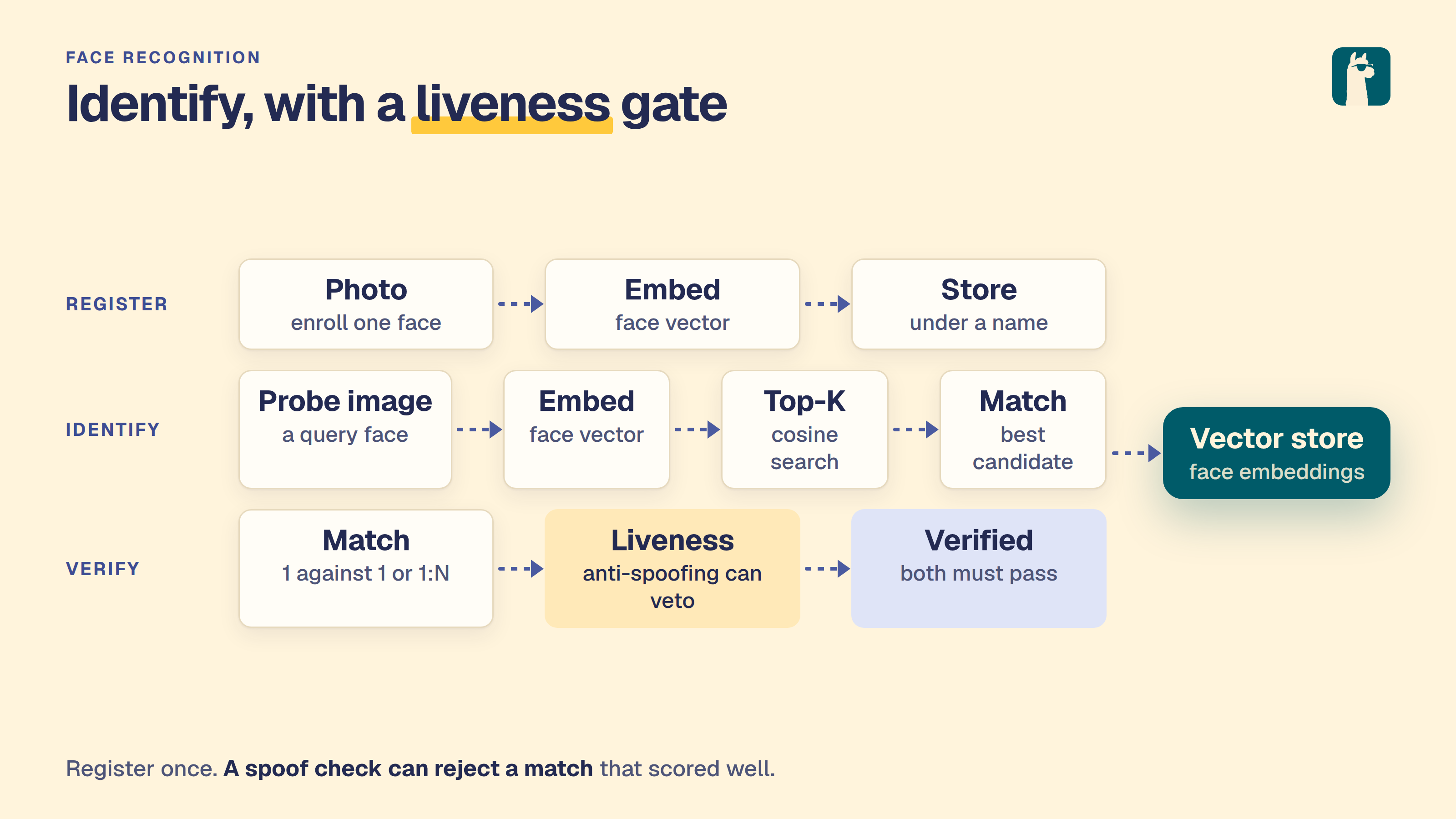
LocalAI supports face recognition: face verification (1:1), face identification (1:N) against a built-in vector store, face embedding, face detection, demographic analysis (age / gender), and antispoofing / liveness detection.
The same /v1/face/* HTTP API is served by two backends:
LocalAI can generate videos from text prompts and optional image or audio conditioning via the /video endpoint. Supported backends include diffusers, stablediffusion (including MiniMax-H3, which generates video and audio together), vllm-omni, mlx-video on Apple Silicon, and the dedicated longcat-video backend.
MLX-Video on Apple Silicon Install the native Metal backend, then configure an LTX-2 repository:
LocalAI can generate textured 3D meshes from a single conditioning image via the /3d/generations endpoint, powered by the trellis2cpp backend — a C++/GGML port of Microsoft TRELLIS.2 (trellis2.cpp). The output is a binary glTF (.glb) asset with PBR materials.
Generation is image-conditioned only — there is no text-prompt path. Provide a photo or rendering of a single object (ideally on a plain background) and TRELLIS.2 reconstructs a full 3D mesh from it.
LocalAI supports text-to-motion with kimodo.cpp on CPU and Vulkan. In Studio → 3D, selecting an animation model replaces the image input with a motion prompt and the selected model’s animation controls.
The Studio preview plays at real-time speed using the GLB’s timestamps. Slow or delayed display frames skip ahead rather than slowing the animation. Pause and the timeline let you inspect individual poses; playback resumes from that point.
Kimodo exports an animated skeleton GLB: joint rotations and root movement, without a mesh or skin. SOMA models produce the compact 30-joint skeleton; G1 models produce 34 joints. These outputs are animation assets, not textured characters, and cannot use TRELLIS print remeshing.
LocalAI’s gemxcpp backend converts timestamped RGB frames into human poses using gem-x.cpp. It runs resident GEM-X, ViTPose and YOLOX models on CPU or Vulkan. Live inference does not need SAM3D Body. This initial integration is API-only: no Motion UI, offline clip export, body mesh or SONIC controller is included.
Install and configure Import https://huggingface.co/LocalAI-io/GEM-X-GGUF through the model importer. It selects gemxcpp and downloads three checksummed, revision-pinned assets. These are custom F32 GGUF architectures, not language models. Weight licenses are described in the source model card. Allow memory for all three models and execution buffers, beyond their roughly 4 GB combined download size.
Subsections of Images, video and 3D
Image understanding
LocalAI supports understanding images by using LLaVA, and implements the GPT Vision API from OpenAI.
First install a vision-capable model from the gallery (the examples below use moondream2-20250414, a small vision model):
local-ai run moondream2-20250414
To let LocalAI understand and reply with what sees in the image, use the /v1/chat/completions endpoint, for example with curl:
curl http://localhost:8080/v1/chat/completions -H "Content-Type: application/json" -d '{
     "model": "moondream2-20250414",
     "messages": [{"role": "user", "content": [{"type":"text", "text": "What is in the image?"}, {"type": "image_url", "image_url": {"url": "https://upload.wikimedia.org/wikipedia/commons/thumb/d/dd/Gfp-wisconsin-madison-the-nature-boardwalk.jpg/2560px-Gfp-wisconsin-madison-the-nature-boardwalk.jpg" }}], "temperature": 0.9}]}'
Grammars and function tools can be used as well in conjunction with vision APIs:
 curl http://localhost:8080/v1/chat/completions -H "Content-Type: application/json" -d '{
     "model": "moondream2-20250414", "grammar": "root ::= (\"yes\" | \"no\")",
     "messages": [{"role": "user", "content": [{"type":"text", "text": "Is there some grass in the image?"}, {"type": "image_url", "image_url": {"url": "https://upload.wikimedia.org/wikipedia/commons/thumb/d/dd/Gfp-wisconsin-madison-the-nature-boardwalk.jpg/2560px-Gfp-wisconsin-madison-the-nature-boardwalk.jpg" }}], "temperature": 0.9}]}'
Setup
Install a vision-capable model from the gallery, either from the Models page in the web UI or from the CLI:
local-ai run moondream2-20250414
Other vision models are available in the gallery (for example smolvlm-instruct and smolvlm2-2.2b-instruct). Browse them on the Models page or see the /docs/models/.
Object Detection
LocalAI supports object detection and image segmentation through various backends. This feature allows you to identify and locate objects within images with high accuracy and real-time performance. Available backends include RF-DETR (Python) and rf-detr.cpp (native C++/ggml) for object detection and segmentation, and sam3.cpp for image segmentation (SAM 3/2/EdgeTAM).
For detecting faces specifically, see the dedicated
Face Recognition feature - its
/v1/detection support is tuned for face bounding boxes and ships
with commercially-safe model options.
Overview
Object detection in LocalAI is implemented through dedicated backends that can identify and locate objects within images. Each backend provides different capabilities and model architectures.
Key Features:
Real-time object detection
High accuracy detection with bounding boxes
Image segmentation with binary masks (SAM backends)
Text-prompted, point-prompted, and box-prompted segmentation
Support for multiple hardware accelerators (CPU, NVIDIA GPU, Intel GPU, AMD GPU)
Structured detection results with confidence scores
Easy integration through the /v1/detection endpoint
Usage
Detection Endpoint
LocalAI provides a dedicated /v1/detection endpoint for object detection tasks. This endpoint is specifically designed for object detection and returns structured detection results with bounding boxes and confidence scores.
API Reference
To perform object detection, send a POST request to the /v1/detection endpoint:
The RF-DETR backend is implemented as a Python-based gRPC service that integrates seamlessly with LocalAI. It provides object detection capabilities using the RF-DETR model architecture and supports multiple hardware configurations:
CPU: Optimized for CPU inference
NVIDIA GPU: CUDA acceleration for NVIDIA GPUs
Intel GPU: Intel oneAPI optimization
AMD GPU: ROCm acceleration for AMD GPUs
NVIDIA Jetson: Optimized for ARM64 NVIDIA Jetson devices
Setup
Using the Model Gallery (Recommended)
The easiest way to get started is using the model gallery. The rfdetr-base model is available in the official LocalAI gallery:
# Install and run the rfdetr-base modellocal-ai run rfdetr-base
You can also install it through the web interface by navigating to the Models section and searching for “rfdetr-base”.
Manual Configuration
Create a model configuration file in your models directory:
Currently, the following model is available in the Model Gallery:
rfdetr-base: Base model with balanced performance and accuracy
You can browse and install this model through the LocalAI web interface or using the command line.
RF-DETR Native Backend (rfdetr-cpp)
The rfdetr-cpp backend is a native C++/ggml implementation of RF-DETR
inference based on rf-detr.cpp. It
runs as a Go gRPC service that dlopens a per-CPU-variant shared library, so
there is no Python runtime on the inference path - startup is fast and the
binary is self-contained.
Compared to the Python rfdetr backend, the native backend:
Has no Python or PyTorch dependency at inference time
Supports both detection and segmentation variants of RF-DETR
Returns segmentation masks as PNG bytes in Detection.mask
Setup
Install the backend
local-ai backends install rfdetr-cpp
Using the Model Gallery (Recommended)
The gallery ships ready-to-run entries for every published variant:
# Detection variantslocal-ai run rfdetr-cpp-nano
local-ai run rfdetr-cpp-small
local-ai run rfdetr-cpp-base
local-ai run rfdetr-cpp-medium
local-ai run rfdetr-cpp-large
# Segmentation variants (return per-instance PNG masks)local-ai run rfdetr-cpp-seg-nano
local-ai run rfdetr-cpp-seg-small
local-ai run rfdetr-cpp-seg-medium
local-ai run rfdetr-cpp-seg-large
local-ai run rfdetr-cpp-seg-xlarge
local-ai run rfdetr-cpp-seg-2xlarge
Pre-quantized GGUFs are published under
mudler/rfdetr-cpp-*
on Hugging Face. Each repo carries the F32/F16/Q8_0/Q4_K quants - F16 is
the recommended default (matches F32 accuracy, ~1.86x smaller).
Segmentation Output
When running a segmentation model (any rfdetr-cpp-seg-* variant), each
Detection in the response carries a mask field with a base64-encoded
PNG of the per-instance binary mask. The mask is sized to the original
image resolution and aligns with the corresponding bounding box.
SAM3 Backend (sam3-cpp)
The sam3-cpp backend provides image segmentation using sam3.cpp, a portable C++ implementation of Meta’s Segment Anything Model. It supports multiple model architectures:
SAM 3: Full model with text encoder for text-prompted detection and segmentation
SAM 2 / SAM 2.1: Hiera backbone models in multiple sizes
SAM 3 Visual-Only: Point/box segmentation without text encoder
EdgeTAM: Ultra-efficient mobile variant (~15MB quantized)
Setup
Manual Configuration
Create a model configuration file in your models directory:
Verify model compatibility with your backend version
Low Detection Accuracy
Ensure good image quality and lighting
Check if objects are clearly visible
Consider using a larger model for better accuracy
Slow Performance
Enable GPU acceleration if available
Use a smaller model for faster inference
Optimize image resolution
Debug Mode
Enable debug logging for troubleshooting:
local-ai run --debug rfdetr-base
Object Detection Category
LocalAI includes a dedicated object-detection category for models and backends that specialize in identifying and locating objects within images. This category currently includes:
LocalAI supports face recognition: face verification (1:1), face
identification (1:N) against a built-in vector store, face embedding,
face detection, demographic analysis (age / gender), and antispoofing /
liveness detection.
The same /v1/face/* HTTP API is served by two backends:
face-detect (recommended, default). A standalone C++/ggml
engine (face-detect.cpp):
no Python, no onnxruntime, no torch runtime. Each gallery entry is a
single self-describing GGUF. This is the recommended option for new
deployments.
insightface (Python). The original ONNX Runtime backend. Still
supported; see the Python backend below.
Both backends expose the identical wire format, so the API examples in
this page work with either - only the gallery entry name (the model
field) changes.
face-detect (ggml) backend
The face-detect backend reads the detector and recognizer architecture
(facedetect.arch) directly from the GGUF metadata, so installing a
gallery entry is all that is needed to select an engine. It drives the
Embeddings / Detect / FaceVerify / FaceAnalyze gRPC rpcs behind the
/v1/face/{embed,verify,analyze,detect,register,identify,forget}
endpoints.
Licensing - read this first
Gallery entry
Detector + recognizer
Embedding dim
License
face-detect-buffalo-l
SCRFD-10GF + ArcFace R50 + GenderAge
512
Non-commercial research only (upstream insightface weights)
face-detect-buffalo-m
SCRFD-2.5GF + ArcFace R50 + GenderAge
512
Non-commercial research only
face-detect-buffalo-s
SCRFD-500MF + MBF + GenderAge
512
Non-commercial research only
face-detect-yunet-sface
YuNet + SFace (OpenCV Zoo)
128
Apache 2.0 - commercial-safe
The insightface buffalo packs (buffalo_l / buffalo_m / buffalo_s) are
released by the upstream maintainers for non-commercial research use
only. Pick the face-detect-yunet-sface entry for production /
commercial deployments.
Quickstart
Install the commercial-safe entry (recommended for copy-paste):
The 1:N register / identify / forget workflow and the rest of the API
are identical to the API reference below - just pass a
face-detect-* model name. The per-engine verify thresholds are ~0.35
for the buffalo ArcFace/MBF recognizers and ~0.363 for SFace.
insightface (Python) backend
The insightface backend ships two interchangeable engines under
one image, each paired with a distinct gallery entry so users can pick
by license and accuracy needs.
Licensing - read this first
Gallery entry
Detector + recognizer
Size
License
insightface-buffalo-l
SCRFD-10GF + ArcFace R50 + GenderAge
~326 MB
Non-commercial research only (upstream insightface weights)
insightface-buffalo-s
SCRFD-500MF + MBF + GenderAge
~159 MB
Non-commercial research only
insightface-opencv
YuNet + SFace
~40 MB
Apache 2.0 - commercial-safe
The insightface Python library itself is MIT, but the pretrained model
packs (buffalo_l, buffalo_s, antelopev2) are released by the upstream
maintainers for non-commercial research use only. Pick the
insightface-opencv entry for production / commercial deployments.
Quickstart
Pull the commercial-safe backend (recommended for copy-paste):
The default identity store is in memory. Clients can keep an enrollment record
and replay it with POST /v1/face/register after a restart. Extract the embedding
once with /v1/face/embed, then save the exact returned vector, model, name,
labels, and enrollment timestamp. Submit embedding instead of img:
The vector above is abbreviated; send the complete embedding from the same
recognizer model. Provide exactly one of img or embedding. Vectors must be
finite and nonzero. registered_at is optional and defaults to the current time;
replay the original timestamp to preserve it.
The store upserts by exact vector. Registration now derives a stable ID from
that vector and the store namespace, so retries and replay after a restart
return the same ID without adding duplicate entries. Replaying updates the name
and labels. Images can produce slightly different embeddings across runs; keep
the original vector instead of embedding the photo again on each retry.
This does not make the server store persistent. Clients must retain and restore
the records themselves. With independent stores behind a load balancer, replay
into each store or use a shared store. Do not mix different recognizer models in
one store. IDs from older versions change on their first registration replay.
1:N identification workflow (register → identify → forget)
This is the primary “face recognition” flow. Under the hood it uses
LocalAI’s built-in in-memory vector store - no external database to
stand up.
curl -sX POST http://localhost:8080/v1/face/forget \
-d '{"id": "8b7..."}'# → 204 No Content
Warning
Storage caveat. The default vector store is in-memory. All
registered faces are lost when LocalAI restarts. Persistent storage
(pgvector) is a tracked future enhancement - the face-recognition HTTP
API is designed to swap the backing store without changing the wire
format.
API reference
POST /v1/face/verify (1:1)
field
type
description
model
string
gallery entry name (e.g. insightface-buffalo-l)
img1, img2
string
URL, base64, or data-URI
threshold
float, optional
cosine-distance cutoff; default depends on engine
anti_spoofing
bool, optional
also run MiniFASNet liveness on each image - see Antispoofing
Returns verified, distance, threshold, confidence, model,
img1_area, img2_area, and processing_time_ms. When
anti_spoofing is set, the response also carries per-image liveness
fields: img1_is_real, img1_antispoof_score, img2_is_real,
img2_antispoof_score. A failed liveness check on either image forces
verified=false regardless of similarity.
POST /v1/face/analyze
Returns demographic attributes for every detected face:
field
type
description
model
string
gallery entry
img
string
URL / base64 / data-URI
actions
string[]
subset of ["age","gender","emotion","race"]; empty = all supported
Only insightface-buffalo-l / insightface-buffalo-s populate age and
gender (genderage head). insightface-opencv returns face regions with
empty attributes - SFace has no demographic classifier. Emotion and
race are always empty in the current release.
POST /v1/face/register (1:N enrollment)
field
type
description
model
string
face recognition model
img
string
face to enroll
name
string
human-readable label
labels
map[string]string, optional
arbitrary metadata
store
string, optional
vector store model; defaults to local-store
Returns {id, name, registered_at}. The id is an opaque UUID used by
/v1/face/identify and /v1/face/forget.
POST /v1/face/identify (1:N recognition)
field
type
description
model
string
face recognition model
img
string
probe image
top_k
int, optional
max matches to return; default 5
threshold
float, optional
cosine-distance cutoff; default 0.35 (ArcFace)
store
string, optional
vector store model; defaults to local-store
Returns a list of matches sorted by ascending distance, each with id,
name, labels, distance, confidence, and match
(distance ≤ threshold).
POST /v1/face/forget
field
type
description
id
string
ID returned by /v1/face/register
Returns 204 No Content on success, 404 Not Found if the ID is
unknown.
POST /v1/face/embed
Returns the L2-normalized face embedding vector for the detected face.
field
type
description
model
string
face model
img
string
URL / base64 / data-URI
Returns {embedding: float[], dim: int, model: string}. Dimension is
512 for the insightface ArcFace/MBF recognizers and 128 for OpenCV’s
SFace.
Note: the OpenAI-compatible /v1/embeddings endpoint is
intentionally text-only by contract (input is a string or list of
strings of TEXT to embed) - passing an image data-URI there does
nothing useful. Use /v1/face/embed for image inputs.
Reused endpoint
POST /v1/detection - returns face bounding boxes with
class_name: "face"; works for both engines.
Antispoofing (liveness detection)
All gallery entries ship the Silent-Face-Anti-Spoofing
MiniFASNetV2 + MiniFASNetV1SE ensemble (Apache 2.0, ~4 MB total, CPU-only)
alongside the face recognition weights. Set anti_spoofing: true on
/v1/face/verify or /v1/face/analyze to run liveness on each detected
face. The two models look at different crop scales and their softmax
outputs are averaged before argmax - the upstream-recommended setup.
If either image fails liveness (is_real=false), verified is forced
to false - similarity alone is not enough.
/v1/face/analyze reports per-face is_real and antispoof_score
when the flag is set.
Fail-loud semantics. If anti_spoofing: true is sent against a
model installed without the MiniFASNet files (e.g. a custom entry that
only listed the face recognition weights), the request returns a gRPC
FAILED_PRECONDITION error - the endpoint will never silently return
is_real=false. Re-install the gallery entry or point the backend at a
model that bundles the MiniFASNet ONNX files.
Info
The MiniFASNet score is best at catching printed photos and screen
replays. Deepfake videos and high-quality prosthetics are out of
scope - liveness here is a low-cost first line of defence, not a
guarantee. For higher assurance, combine with challenge-response (e.g.
ask the user to turn their head).
Choosing an engine
Need
Entry
Commercial product
insightface-opencv
Highest accuracy (research / demos)
insightface-buffalo-l
Edge / low-memory / research
insightface-buffalo-s
The recommended default threshold for /v1/face/verify and
/v1/face/identify depends on the recognizer:
Recognizer
Cosine-distance threshold
ArcFace R50 (buffalo_l)
~0.35
MBF (buffalo_s)
~0.40
SFace (opencv)
~0.50
Pass threshold explicitly when switching engines - the per-engine
default only fires when the field is omitted.
The WebUI page
The page is the Recognition page of the Face add-on (Add-ons → Face, /app/addons/face/recognition). Install the add-on from Browse add-ons and start it. Canonical links show the add-on shell when the installation is unavailable. The page calls the /v1/face/* routes described on this page with your own session. It follows the same layout as the Voice add-on’s Recognition page. Who is this looks up a photo against the people you enrolled (POST /v1/face/identify, cut-off 0.35 by default, adjustable on the scale). Same person? compares two photos (POST /v1/face/verify), optionally with the liveness check, and draws the face the model found in each photo. Enrol a person takes a photo, a name, optional labels and a permission tick; a copy of the photo stays in the browser only if you tick it.
The people list is kept in the browser because the server has no list call. After a search, a saved person the server did not return is marked “not on the server”, and a server restart empties the server’s index. Removing a person waits ten seconds behind an Undo toast before POST /v1/face/forget is sent. The server matches one face per photo. Detecting faces, attribute guesses (off by default, often wrong) and the raw embedding are under More tools. With no face model installed the page says what is missing and offers gallery models to install.
Related features
Object Detection - generic bounding-box
detection; /v1/detection works with the insightface backend too.
Embeddings - raw vector extraction; face
embeddings live in the same endpoint under the hood.
Stores - the generic vector store powering the
1:N recognition pipeline.
Image Generation
LocalAI supports generating images with Stable diffusion, running on CPU using C++ and Python implementations.
Available additional parameters: mode, step, negative_prompt.
To set a negative prompt you can either pass a separate negative_prompt field or split the prompt with |, e.g. a cute baby sea otter|malformed. When both are present they are joined with a comma (negative_prompt first, then the |-suffixed tags), so a global negative prompt can live in negative_prompt while per-image negatives are appended after |.
curl http://localhost:8080/v1/images/generations -H "Content-Type: application/json" -d '{
  "prompt": "floating hair, portrait, ((loli)), ((one girl)), cute face, hidden hands, asymmetrical bangs, beautiful detailed eyes, eye shadow, hair ornament, ribbons, bowties, buttons, pleated skirt, (((masterpiece))), ((best quality)), colorful|((part of the head)), ((((mutated hands and fingers)))), deformed, blurry, bad anatomy, disfigured, poorly drawn face, mutation, mutated, extra limb, ugly, poorly drawn hands, missing limb, blurry, floating limbs, disconnected limbs, malformed hands, blur, out of focus, long neck, long body, Octane renderer, lowres, bad anatomy, bad hands, text",
  "size": "256x256"
}'
Backends
stablediffusion-ggml
This backend is based on stable-diffusion.cpp. Every model supported by that backend is supported indeed with LocalAI.
Setup
There are already several models in the gallery that are available to install and get up and running with this backend, you can for example run flux by searching it in the Model gallery (flux.1-dev-ggml) or start LocalAI with run:
local-ai run flux.1-dev-ggml
To use a custom model, you can follow these steps:
Create a model file stablediffusion.yaml in the models folder:
Download the required assets to the models repository
Start LocalAI
Memory and device placement options
When a model does not fit entirely in VRAM, the following options: control where weights and computation are placed. They map directly to the upstream stable-diffusion.cpp options.
Option
Example
Description
backend
backend:clip=cpu,vae=cuda0,diffusion=vulkan0
Runtime (compute) backend assignment per component. Use cpu to place a component’s compute on the CPU. Component keys include te (text encoder / CLIP), vae, diffusion, controlnet.
params_backend
params_backend:diffusion=disk,clip=cpu
Where parameters (weights) are stored. Supports cpu, disk (mmap weights from disk to save RAM/VRAM), or per-component specs.
max_vram
max_vram:8 or max_vram:-1
Optional per-device VRAM budget (in GiB) for managed weights and automatic graph-cut execution. 0 uses live free VRAM without an explicit cap; a negative value reserves that many GiB of free VRAM. Also accepts per-backend budgets.
stream_layers
stream_layers:true
Deprecated compatibility option. Segmented weight streaming is now selected automatically, so this value is ignored.
rpc_servers
rpc_servers:localhost:50052,192.168.1.3:50052
Comma-separated list of host:port RPC servers to offload compute to.
pulid_weights_path
pulid_weights_path:pulid.safetensors
Path to PuLID-Flux weights for identity injection.
The following convenience booleans are still accepted and are translated into the backend / params_backend specs above:
Option
Equivalent spec
offload_params_to_cpu:true
params_backend += *=cpu
keep_clip_on_cpu:true
backend += te=cpu
keep_vae_on_cpu:true
backend += vae=cpu
keep_control_net_on_cpu:true
backend += controlnet=cpu
For example, to mmap the diffusion weights from disk while keeping the text encoder on the CPU:
vae_decode_only is still accepted for backwards compatibility but is now a no-op: upstream removed the flag and the model decides automatically.
VAE tiling
Sampling runs in a small latent space, but the final VAE decode expands it to full resolution and needs one large compute buffer. At 1024x1024 that buffer can exceed 8 GB, which is enough to fail on a GPU that has plenty of memory overall:
ggml_vulkan: Requested buffer size exceeds device buffer size limit: ErrorOutOfDeviceMemory
[ERROR] vae: failed to allocate the compute buffer
[ERROR] stable-diffusion.cpp - decode_first_stage failed for latent 1
Tiling decodes the latent in overlapping tiles, so peak memory scales with the tile instead of the image. It costs a little time and can leave faint seams, so it is off unless you ask for it.
Option
Example
Description
vae_tiling
vae_tiling:true
Enable tiled VAE decoding. The bare form vae_tiling also works.
vae_tile_size
vae_tile_size:512 or vae_tile_size:512x384
Tile dimensions in pixels. One number means a square tile. Omit to use the upstream default.
vae_tile_overlap
vae_tile_overlap:0.25
Overlap between neighbouring tiles. More overlap hides seams better and costs more time. Omit to use the upstream default.
Reach for this when the decode fails but sampling completed, which the backend log shows as sampling completed followed by a VAE allocation error. Two cases hit it: cards without the VRAM for a full-frame decode, and drivers that cap a single allocation regardless of free memory (Mesa RADV reports a 4 GiB maxMemoryAllocationSize, so a large decode fails there even with tens of GB free). Lowering the output resolution avoids it too, at the cost of the resolution.
ESRGAN image upscaling
The stablediffusion-ggml backend supports standalone ESRGAN upscaling through
POST /v1/images/upscale. This is a separate, upscale-only model, not a diffusion
pipeline. Image generation does not automatically upscale its results.
For manual installation, download that checkpoint into your models directory and
save the following as realesrgan-x4plus-anime-6b.yaml alongside it (the gallery
installer configures these settings for you):
upscale_scale and upscale_tile_size are backend options, expressed as
key:value strings in options, not root-level configuration fields.
upscale_scale must be a positive integer. Keep known_usecases explicitly
set to [upscale]: do not add image or diffusion_model options to this
configuration. Options are forwarded unchanged; the backend rejects invalid
or duplicate recognized settings.
The multipart fields model, image, and scale are required. The HTTP
endpoint accepts only integer scales from 1 through 16, rejecting missing,
malformed, zero, negative, or larger values with HTTP 400. This range is not a
promise that each model supports every scale: for ESRGAN, the configured
upscale_scale, the loaded model’s detected native scale, and the request’s
scale must all match exactly. Mismatches fail rather than silently resizing or
running multiple passes. For this model, always request scale=4.
The response follows the image-generation response format, with the output URL
in data[0].url under /generated-images. A successful 4x upscale multiplies
both width and height by four.
upscale_tile_size controls ESRGAN tiling in pixels: omit it or set it to
0 for stable-diffusion.cpp full-frame processing; set a positive value (such
as the gallery entry’s 128) to enable tiling. Smaller tiles reduce working
memory at the cost of more tile work. Full-frame processing can use much more
memory. upscale_direct is a separate convolution-algorithm flag, not a tile
control. Tile settings apply to ESRGAN, not the diffusion model’s separate VAE
tiling settings.
In Studio, open an existing image, choose Upscale, select an installed
upscaler, and submit. The scale is read-only and comes from the selected model’s
configured scale. A successful result becomes an Upscale child node of the
source image, leaving the original intact. Open that child to continue the
workflow with the available image actions, including another upscale or image
editing; each upscale is an explicit operation, not a post-generation default.
Unlike the Diffusers upscaling described below, this path uses ESRGAN inference
and does not fall back to Lanczos resizing.
Distributed inference (RPC workers)
The stablediffusion-ggml backend can offload computation to remote ggml RPC workers, sharding a model that does not fit on a single machine. It reuses the same backend-agnostic rpc-server workers as the llama.cpp backend, so one worker pool can serve both.
Manual: point the model at running workers with the rpc_servers option:
Automatic (peer-to-peer): when LocalAI runs in p2p worker mode, discovered workers are published in the LLAMACPP_GRPC_SERVERS environment variable. The image-generation backend reads that variable automatically (when rpc_servers is not set), so the same local-ai worker p2p-llama-cpp-rpc workers used for text generation also accelerate image generation - no per-model configuration needed.
By default the RPC devices join the pool and participate in placement; combine with the backend / params_backend options above to pin specific components to them (e.g. backend:diffusion=rpc0).
Diffusers
Diffusers is the go-to library for state-of-the-art pretrained diffusion models for generating images, audio, and even 3D structures of molecules. LocalAI has a diffusers backend which allows image generation using the diffusers library.
Image upscaling
The Diffusers backend can upscale an uploaded image through
POST /v1/images/upscale. The multipart scale field is required and must be an
integer from 1 through 16 at the HTTP boundary; actual scaling behavior depends
on the selected pipeline. Install the included Stable Diffusion x4 upscaler
gallery model first:
The response uses the same format as image generation and returns the generated
image under /generated-images. The diffusers backend uses a loaded
StableDiffusionUpscalePipeline or StableDiffusionLatentUpscalePipeline when
configured. Other diffusers pipelines fall back to Lanczos resizing. Upscale
routes select models with known_usecases: [upscale], not ordinary image
generation models. If you installed the x4 upscaler before it declared this
usecase, update its model YAML to known_usecases: [upscale] or reinstall the
gallery entry. Custom Diffusers configurations intended for upscaling should
also explicitly declare the upscale usecase.
Model setup
The models will be downloaded the first time you use the backend from huggingface automatically.
Create a model configuration file in the models directory, for instance to use Linaqruf/animagine-xl with CPU:
name:animagine-xlparameters:model:Linaqruf/animagine-xlbackend:diffusersf16:falsediffusers:cuda:false# Enable for GPU usage (CUDA)scheduler_type:euler_a
Dependencies
This is an extra backend - in the container is already available and there is nothing to do for the setup. Do not use core images (ending with -core). If you are building manually, see the build instructions.
Model setup
The models will be downloaded the first time you use the backend from huggingface automatically.
Create a model configuration file in the models directory, for instance to use Linaqruf/animagine-xl with CPU:
The following parameters are available in the configuration file:
Parameter
Description
Default
f16
Force the usage of float16 instead of float32
false
step
Number of steps to run the model for
30
cuda
Enable CUDA acceleration
false
enable_parameters
Parameters to enable for the model
negative_prompt,num_inference_steps,clip_skip
scheduler_type
Scheduler type
k_dpp_sde
cfg_scale
Configuration scale
8
clip_skip
Clip skip
None
pipeline_type
Pipeline type
AutoPipelineForText2Image
lora_adapters
A list of lora adapters (file names relative to model directory) to apply
None
lora_scales
A list of lora scales (floats) to apply
None
There are available several types of schedulers:
Scheduler
Description
ddim
DDIM
pndm
PNDM
heun
Heun
unipc
UniPC
euler
Euler
euler_a
Euler a
lms
LMS
k_lms
LMS Karras
dpm_2
DPM2
k_dpm_2
DPM2 Karras
dpm_2_a
DPM2 a
k_dpm_2_a
DPM2 a Karras
dpmpp_2m
DPM++ 2M
k_dpmpp_2m
DPM++ 2M Karras
dpmpp_sde
DPM++ SDE
k_dpmpp_sde
DPM++ SDE Karras
dpmpp_2m_sde
DPM++ 2M SDE
k_dpmpp_2m_sde
DPM++ 2M SDE Karras
Pipelines types available:
Pipeline type
Description
StableDiffusionPipeline
Stable diffusion pipeline
StableDiffusionImg2ImgPipeline
Stable diffusion image to image pipeline
StableDiffusionDepth2ImgPipeline
Stable diffusion depth to image pipeline
DiffusionPipeline
Diffusion pipeline
StableDiffusionXLPipeline
Stable diffusion XL pipeline
StableVideoDiffusionPipeline
Stable video diffusion pipeline
AutoPipelineForText2Image
Automatic detection pipeline for text to image
VideoDiffusionPipeline
Video diffusion pipeline
StableDiffusion3Pipeline
Stable diffusion 3 pipeline
FluxPipeline
Flux pipeline
FluxTransformer2DModel
Flux transformer 2D model
SanaPipeline
Sana pipeline
Advanced: Additional parameters
Additional arbitrary parameters can be specified in the option field in key/value separated by ::
name:animagine-xloptions:- "cfg_scale:6"
Note: There is no complete parameter list. Any parameter can be passed arbitrarily and is passed to the model directly as argument to the pipeline. Different pipelines/implementations support different parameters.
The example above, will result in the following python code when generating images:
pipe(prompt="A cute baby sea otter",# Options passed via APIsize="256x256",# Options passed via APIcfg_scale=6# Additional parameter passed via configuration file)
Usage
Text to Image
Use the image generation endpoint with the model name from the configuration file:
LocalAI can generate videos from text prompts and optional image or audio conditioning via the /video endpoint. Supported backends include diffusers, stablediffusion (including MiniMax-H3, which generates video and audio together), vllm-omni, mlx-video on Apple Silicon, and the dedicated longcat-video backend.
MLX-Video on Apple Silicon
Install the native Metal backend, then configure an LTX-2 repository:
The backend accepts text-to-video and start-image conditioning through /video.
LTX-2 also accepts an end_image. Converted Wan2.1/Wan2.2 checkpoints must be
configured as a local model directory and do not support end_image. Useful
backend-specific params include pipeline and tiling for LTX-2, and
scheduler, shift, and tiling for Wan.
API
Method:POST
Endpoint:/video
Request
The request body is JSON with the following fields:
Parameter
Type
Required
Default
Description
model
string
Yes
Model name to use
prompt
string
Yes
Text description of the video to generate
negative_prompt
string
No
What to exclude from the generated video
start_image
string
No
Starting image as base64 string or URL
end_image
string
No
Ending image for guided generation
audio
string
No
Audio conditioning as base64, a data URI, or URL
ref_images
string[]
No
Reference images as base64, data URIs or URLs. Cannot be combined with start_image or end_image
ref_videos
object[]
No
Reference videos: {"frames": [...], "fps": 24, "audio": "..."}. frames is an ordered list of images, fps and audio are optional
ref_audios
string[]
No
Reference audio clips. The stablediffusion backend reads WAV only
width
int
No
backend
Video width in pixels; omit it to get the model’s own default canvas
height
int
No
backend
Video height in pixels; omit it to get the model’s own default canvas
num_frames
int
No
Number of frames
fps
int
No
Frames per second
seconds
string
No
Duration in seconds
size
string
No
Size specification (alternative to width/height)
input_reference
string
No
Input reference for the generation
seed
int
No
Random seed for reproducibility
cfg_scale
float
No
Classifier-free guidance scale
step
int
No
Number of inference steps
response_format
string
No
url
url to return a file URL, b64_json for base64 output
params
object
No
Backend-specific string parameters
Response
Returns an OpenAI-compatible JSON response:
Field
Type
Description
created
int
Unix timestamp of generation
id
string
Unique identifier (UUID)
data
array
Array of generated video items
data[].url
string
URL path to video file (if response_format is url)
data[].b64_json
string
Base64-encoded video (if response_format is b64_json)
Usage
First install a video-generation model from the gallery (the examples below use longcat-video):
local-ai run longcat-video
Generate a video from a text prompt
curl http://localhost:8080/video \
-H "Content-Type: application/json"\
-d '{
"model": "longcat-video",
"prompt": "A cat playing in a garden on a sunny day",
"width": 512,
"height": 512,
"num_frames": 16,
"fps": 8
}'
curl http://localhost:8080/video \
-H "Content-Type: application/json"\
-d '{
"model": "longcat-video",
"prompt": "Ocean waves on a beach",
"response_format": "b64_json"
}'
LongCat-Video and Avatar 1.5
LocalAI’s longcat-video backend serves Meituan’s official LongCat video-generation models through the /video API and the Studio Video page.
Gallery model
Upstream checkpoint
Inputs
Output
longcat-video
meituan-longcat/LongCat-Video
text, optional start image
video
longcat-video-avatar-1.5
meituan-longcat/LongCat-Video-Avatar-1.5
text, audio, optional portrait
video with the source audio
The base checkpoint supports text-to-video and image-to-video. Avatar 1.5 adds audio-driven character animation, optional portrait conditioning, and continuation segments for longer speech.
Warning
LongCat is a large, CUDA-only model family. LocalAI publishes this backend for Linux with NVIDIA CUDA 12 or CUDA 13 on x86_64 and CUDA 13 on ARM64. CPU, ROCm, and macOS images are not available. Avatar 1.5 also loads components from the base checkpoint, so reserve substantial disk and GPU or unified memory.
Install from the Model Gallery
Install one or both recipes from Models in the web UI, or use the CLI:
You can also import either official Hugging Face URL. The importer recognizes the two repositories and writes a longcat-video model config with the appropriate use case and input/output modalities.
The required OCI backend is installed automatically when LocalAI first loads the model. The hardware detector selects the CUDA 12, CUDA 13, or CUDA 13 ARM64 variant.
DGX Spark and NVIDIA ARM64
Use a LocalAI CUDA 13 ARM64 image as described in GPU acceleration. The backend defaults to PyTorch SDPA, avoiding the FlashAttention dependency that is commonly unavailable on Blackwell ARM64 systems.
For unified-memory systems, start with BF16 (use_int8:false, the default). INT8 lowers steady-state DiT memory but can have a higher load-time peak because the full model is materialized before the quantized weights are applied.
Generate in Studio
Open Studio, then choose Video.
Select longcat-video or longcat-video-avatar-1.5.
Enter a prompt and choose 832x480 or 1280x720.
Expand Reference media to upload a start image. For Avatar 1.5, upload or record the speech under Avatar audio.
Select Generate.
The base model can run without a reference image for text-to-video. Avatar 1.5 requires audio; the portrait is optional.
LongCat API examples
Text-to-video
curl http://localhost:8080/video \
-H "Content-Type: application/json"\
-d '{
"model": "longcat-video",
"prompt": "A cinematic tracking shot through a misty redwood forest",
"width": 832,
"height": 480,
"num_frames": 93,
"fps": 15
}'
Image-to-video
start_image accepts raw base64, a browser-style data URI, or a public HTTP(S) URL:
curl http://localhost:8080/video \
-H "Content-Type: application/json"\
-d "{
\"model\": \"longcat-video\",
\"prompt\": \"The subject turns toward the camera as leaves move in the breeze\",
\"start_image\": \"$(base64 --wrap=0 portrait.png)\",
\"params\": {
\"resolution\": \"480p\"
}
}"
Avatar from speech and a portrait
audio accepts raw base64, a data URI, or a public HTTP(S) URL. Each staged image or audio input is limited to 128 MiB.
Avatar output is generated at 25 FPS and is muxed with the submitted audio. When neither num_frames nor params.num_segments is provided, LocalAI derives the continuation count from the audio duration, up to the model’s max_segments setting.
LongCat model configuration
The gallery and importer make each model self-describing. A manual Avatar 1.5 config looks like this:
The explicit modality declarations are used by GET /v1/models/capabilities and attachment-aware clients. They avoid inferring model behavior from backend or checkpoint names.
Load options
Model load options use key:value entries in options:
Option
Default
Description
attention_backend
sdpa
sdpa, auto, flash2, flash3, or xformers; packaged images guarantee sdpa
use_distill
Avatar: true; base: false
Use the checkpoint’s accelerated distillation path
use_int8
false
Use Avatar 1.5’s INT8 DiT; unsupported by the base model
base_model
meituan-longcat/LongCat-Video
Base tokenizer, text encoder, and VAE used by Avatar 1.5
max_segments
8
Maximum continuation segments accepted for one request
resolution
480p
Default image-conditioned resolution: 480p or 720p
The initial backend supports one GPU per process. Tensor or context parallel sizes above one are rejected.
Per-request parameters
The /video request’s params object accepts string values:
Parameter
Description
num_segments
Explicit number of Avatar continuation segments
audio_guidance_scale
Audio classifier-free guidance when distillation is disabled
offload_kv_cache
Offload continuation KV cache (true or false)
ref_img_index
Reference-frame index used during continuation
mask_frame_range
Number of frames blended around continuation boundaries
resolution
Per-request image-conditioned resolution (480p or 720p)
With distillation enabled, Avatar uses eight inference steps and fixed text/audio guidance of 1.0. Disable use_distill in the model config before tuning step, cfg_scale, or audio_guidance_scale.
LongCat troubleshooting
HTTP 400, audio is required: Avatar 1.5 was selected without audio.
HTTP 400, request needs too many segments: trim the audio or raise max_segments in the model options.
HTTP 412: the installed LocalAI runtime cannot select a compatible NVIDIA backend image.
Out of memory while loading: use BF16 on unified-memory hardware, close other GPU workloads, or reduce model concurrency. INT8 is not guaranteed to reduce peak load memory.
Slow first request: the backend and checkpoints are downloaded and loaded on demand; subsequent requests reuse the loaded pipeline.
MiniMax-H3
MiniMax-H3 generates video and audio jointly. The clip comes back as an MP4 with a real AAC track rather than a silent render. It runs on the stablediffusion-ggml backend (stable-diffusion.cpp), through the -ggml gallery entries:
The vllm-cpp backend has no MiniMax-H3 gallery entries. Its H3 path did not finish a clip in a practical time, so use the -ggml entries above.
This is a large model. The weight files total tens of gigabytes, so use a CUDA host and plan for a long-running HTTP call.
Ask for the sound
The model generates picture and sound from the same prompt, so a prompt that only describes what is seen produces room tone and ambience. To get speech, say that the character talks and put the words in the prompt:
It is TALKING to the camera: its mouth moves clearly in sync with its speech,
in a dry, deadpan tone.

It says, clearly and audibly: "Michael scheduled another all-hands.
It is about the printer. Again."

Audio: a single clear voice, close-miked, with quiet room tone underneath.
Geometry and clip length
MiniMax-H3 renders at 24 fps. The width and height are rounded up to a multiple of 32, and the frame count is rounded up to the 17n+5 grid (…, 90, 107, 124, 141, …). The trained clip range is roughly 124 to 362 frames (about 5 to 15 seconds).
Text-to-video with sound
curl http://localhost:8080/video \
-H "Content-Type: application/json"\
-d '{
"model": "minimax-h3-fl2va-pruned-q4-ggml",
"prompt": "A cyan llama mascot in a grey office chair, talking to the camera. It says, clearly and audibly: \"the printer is down again\". Audio: one clear close-miked voice.",
"num_frames": 124,
"seed": 42
}'
First-frame conditioning
start_image pins the supplied image as frame 0 (H3’s fl2va task); end_image pins the last frame.
curl http://localhost:8080/video \
-H "Content-Type: application/json"\
-d "{
\"model\": \"minimax-h3-fl2va-pruned-q4-ggml\",
\"prompt\": \"the subject turns toward the camera and starts speaking\",
\"start_image\": \"$(base64 --wrap=0 portrait.png)\"
}"
Partitions: what each checkpoint will and will not do
MiniMax-H3 ships as two DiT partitions. The FL2VA entries serve t2va (text only) and fl2va (first/last frame). Reference conditioning (a whole reference image, a reference clip, or reference audio) belongs to the Ref2VA entry. The FL2VA entries refuse reference inputs up front, naming the partition. The partition is declared in the model config (video_partition) rather than detected.
ffmpeg is required on the host
Muxing the finished frames and audio into an MP4 needs ffmpeg on the host.
negative_prompt, cfg_scale and fps have no MiniMax-H3 equivalent: H3 has no negative prompt or CFG scale, and it renders at a fixed frame rate that the audio track is synchronised to.
Reference inputs
A MiniMax-H3 Ref2VA checkpoint (minimax-h3-ref2va-pruned-q4-ggml) takes several reference images, reference videos (each with an fps and an optional paired audio clip) and reference audio clips through ref_images, ref_videos and ref_audios. The single audio field counts as one more reference audio. Reference inputs need the Ref2VA checkpoint and cannot be mixed with start_image or end_image. A request accepts at most 16 entries of each kind and at most 512 frames per reference video. Reference audio must be WAV.
MiniMax-H3 troubleshooting
ffmpeg not found: install ffmpeg on the host. The frames and audio are already rendered; only the mux failed.
A reference image, clip or audio is refused by an FL2VA entry: use start_image for first-frame conditioning, or install the Ref2VA entry.
Text inside the frame comes out malformed: this is the model’s weakest area. Composite logos and signage in afterwards.
Error Responses
Status Code
Description
400
Missing or invalid model or request parameters
412
The selected backend cannot run on the available hardware
500
Backend error during video generation
3D Generation
LocalAI can generate textured 3D meshes from a single conditioning image via the /3d/generations endpoint, powered by the trellis2cpp backend — a C++/GGML port of Microsoft TRELLIS.2 (trellis2.cpp). The output is a binary glTF (.glb) asset with PBR materials.
Generation is image-conditioned only — there is no text-prompt path. Provide a photo or rendering of a single object (ideally on a plain background) and TRELLIS.2 reconstructs a full 3D mesh from it.
For text-conditioned animated skeletons, see 3D Animation. Both workflows appear under 3D in Studio; selecting a model changes the inputs and generation options.
Setup
Install a model from the gallery:
local-ai run trellis2-4b # full pipeline: 1024³ cascade + PBR textures (~18 GB)# orlocal-ai run trellis2-4b-geometry # 512³ untextured geometry only (~7 GB)
The backend detects which component GGUFs are present and degrades gracefully: without the texture models it produces untextured geometry, and without the fine-flow models it falls back to a coarse marching-cubes preview.
API
Method:POST
Endpoint:/3d/generations
Request
The request body is JSON with the following fields:
Parameter
Type
Required
Default
Description
model
string
Yes
Model name to use
image
string
Yes
Conditioning image as base64, a data URI, or a public URL
quality
string
No
auto
Mesh pipeline: auto, coarse, 512, or 1024
background
string
No
auto
Background handling: auto, keep, black, or white
step
int
No
12
Flow sampling steps for the shape
texture_steps
int
No
12
Flow sampling steps for the PBR material
cfg_scale
float
No
7.5
Classifier-free guidance scale
seed
int
No
random
Random seed for reproducibility
response_format
string
No
url
url to return a file URL, b64_json for base64 output
quality selects the mesh resolution: coarse is a fast marching-cubes preview, 512 the fine dual-grid mesh, 1024 the high-resolution cascade (slow — several minutes, roughly 10 GB VRAM), and auto picks the best pipeline the installed model set supports.
background controls solid-background removal on the conditioning image before generation: auto detects border-connected near-black/near-white, keep preserves the image alpha exactly, and black/white force removal of that colour.
Backend-specific params: texture_size (UV-atlas resolution hint when atlas baking is enabled) and components (tiny removes small islands, largest keeps only the biggest connected component, all — the default — keeps everything).
Response
Returns a JSON response using LocalAI’s OpenAI-style generation envelope:
Field
Type
Description
created
int
Unix timestamp of generation
id
string
Unique identifier (UUID)
data
array
Array with the generated asset
data[].url
string
URL path to the .glb under /generated-3d (if url)
data[].b64_json
string
Base64-encoded GLB (if response_format is b64_json)
Watertight print remeshing
POST /3d/remesh applies the same post-generation CGAL Alpha Wrap workflow as the trellis2.cpp demo. It accepts multipart/form-data and returns the remeshed GLB directly as model/gltf-binary:
Field
Type
Required
Default
Description
model
string
Yes
Installed TRELLIS.2 model name
mesh
file
Yes
Source GLB produced by TRELLIS.2
detail
float
No
0.5
Smallest preserved detail as a percentage of the source bounding-box diagonal (0.35–2.5)
There is intentionally no independent offset control. The enclosing offset follows the trellis2.cpp demo and is derived as detail / 30; independent tuning tends to produce puffy or degenerate wraps. Lower detail percentages retain finer features but take longer and generally produce more triangles. The output is watertight, oriented, intersection-free, and 2-manifold. For textured sources, LocalAI unwraps the replacement mesh and reprojects its PBR material onto a new UV atlas.
Source GLBs may be up to 512 MiB. This route uses its own upload limit because fine TRELLIS.2 meshes commonly exceed LocalAI’s default --upload-limit.
The response contains a URL such as /generated-3d/b64123456789.glb; fetch it from the same server. The GLB is standard glTF 2.0 and opens in Blender, three.js, <model-viewer>, and most engines.
The React UI includes a 3D tab in the Studio (and a /3d page) with an interactive PBR viewer: upload or paste an image from the clipboard, pick the quality, and preview the generated mesh with orbit/pan/zoom and a wireframe toggle. Past generations are kept in the browser (IndexedDB). After generation, a single Detail slider and Apply remeshing button replace the preview with the exact watertight model that the GLB download exports; Show original switches back without regenerating.
Notes
The 512³ pipeline takes roughly two minutes on a modern GPU; the 1024³ cascade takes around five minutes and needs about 10 GB VRAM plus a temporary host-RAM spike.
TRELLIS2_DEVICE=cpu forces CPU inference (slow; mainly for debugging).
The generated mesh has unoriented winding (faithful to TRELLIS.2) and is exported Y-up with vertex-PBR materials; a UV-atlas texture bake can be enabled in the backend via the T2GLB_XATLAS environment variable.
3D Animation
LocalAI supports text-to-motion with kimodo.cpp on CPU and Vulkan. In
Studio → 3D, selecting an animation model replaces the image input with a
motion prompt and the selected model’s animation controls.
The Studio preview plays at real-time speed using the GLB’s timestamps. Slow or
delayed display frames skip ahead rather than slowing the animation. Pause and
the timeline let you inspect individual poses; playback resumes from that point.
Kimodo exports an animated skeleton GLB: joint rotations and root movement,
without a mesh or skin. SOMA models produce the compact 30-joint skeleton;
G1 models produce 34 joints. These outputs are animation assets, not textured
characters, and cannot use TRELLIS print remeshing.
Setup and runtime options
Install kimodo-soma-rp, kimodo-soma-seed, kimodo-g1-rp, or
kimodo-g1-seed from the model gallery. For example:
local-ai run kimodo-soma-rp
Importing the corresponding LocalAI-io/Kimodo-*-GGML Hugging Face repository
also installs the motion weights and the shared Llama-3-Kimodo text bundle.
Each installation needs three files: the motion GGUF, a monolithic text-encoder
GGUF, and tokenizer.gguf. Text weights and the tokenizer are shared under
kimodo/text; SOMA and G1 do not download separate copies of the same encoder.
SMPL-X weights are not included
in the gallery because their redistribution terms differ.
The default entries use Q8_0, matching upstream’s performance default.
Other text-encoder quantizations are available through the -q6_k, -q5_k,
-q4_k_m, -q4_k, and -bf16 gallery entries, for example
kimodo-g1-rp-q4_k_m. Quantization affects the text encoder, not the F32 motion
weights. Lower-bit encoders reduce memory use but can change the generated motion.
These are explicit choices, not automatically ranked alternatives to Q8_0.
The model importer also accepts a text_quantization preference with q8_0
(default), q6_k, q5_k, q4_k_m, q4_k, or bf16. To change an existing
installation manually, download the selected encoder beside tokenizer.gguf
and update text_bundle to its GGUF path.
Linux has CPU and Vulkan builds on amd64 and arm64. Apple Silicon uses the
CPU build; this upstream engine does not implement Metal. Linux x86 CPU
packages select AVX2/FMA/F16C/BMI2 where supported, with a portable fallback.
Containers must expose the host GPU’s Vulkan ICD and driver libraries, not just
CUDA compute devices. On NVIDIA, enable graphics driver capabilities alongside
compute; on NixOS CDI installations, check that the NVIDIA Vulkan manifest is
also mounted inside the container.
An installed model can override the defaults in its YAML configuration:
device accepts auto, cpu, or vulkan; explicitly requesting unavailable
Vulkan fails rather than silently using CPU. threads applies to both the text
encoder and motion model. text_layer_chunk accepts 1–32 and defaults to 32:
all text-encoder layers stay resident across requests for maximum throughput.
Set it to 8 (or another smaller value) to load fewer layers at a time when
memory is limited. Full residency still executes bounded eight-layer graphs;
resident weight count and execution graph size are separate concerns.
The backend keeps one native session loaded and serializes generation. It
reuses text and motion weights, packed attention/LoRA paths, and upstream’s
cached motion execution graphs instead of reloading and rebuilding per request.
The graph cache is bounded to the most recent batch/frame shape. Cold loading
therefore takes longer than subsequent generations.
Allow memory for motion weights and execution buffers as well as the encoder.
BF16 text weights alone are about 14.1 GiB and should use a smaller
text_layer_chunk on a 16 GiB GPU. Each loaded motion model has its own native
session and resident memory, even when model files are shared on disk.
Upstream’s optional KIMODO_TEXT_RESIDENT_LIMIT_MIB environment variable can
also impose a residency ceiling; above it, a request for 32 layers uses streaming.
Existing text_bundle directory paths remain supported for legacy layer-file
installations. They also adopt the new 32-layer default unless explicitly
configured otherwise. Switching to monolithic weights does not delete the old
files; remove them only after confirming no model configuration still uses them.
API
POST /3d/animate accepts named, typed conditioning inputs and model-specific
parameters. Query /v1/models/capabilities and inspect three_d_operations
for the selected model’s supported inputs, controls, and defaults. Animation
does not universally require text: other backends may declare video or a
combination of mesh and text inputs.
{"model":"kimodo-soma-rp","inputs":{"prompt":{"type":"text","data":"A person walks forward and waves."}},"params":{"frames":"150","steps":"100","text_guidance":"2","seed":"42"},"response_format":"url"}
The response contains data[0].url for the generated .glb, or
data[0].b64_json when response_format is b64_json. The endpoint uses the
existing 3D Generation permission and the selected model’s access controls.
/3d/generations and /3d/remesh retain their existing mesh workflows.
Kimodo accepts one prompt with 60–150 frames at 30 FPS. The reference defaults
are 150 frames, 100 sampling steps, and text guidance 2. Parameters are strings;
unsupported inputs and parameters are rejected. Multi-prompt transitions and
mesh retargeting are not currently exposed by this adapter.
Request traces
With tracing enabled, POST /3d/animate appears on the
Traces page in both API and backend history. API traces include the JSON
request, response, HTTP status, duration, and any returned error. Sensitive
headers are redacted and body capture follows the configured size limit.
The backend trace includes the model and backend, text prompt, requested
parameters, model-loading time (load_ms), slot-waiting time (queue_ms),
inference time (inference_ms), output file size (output_bytes), and returned
metadata, including the usage breakdown. Parameters describe request overrides;
metadata.usage.details reports the effective frames and sampling steps.
Non-text inputs record their type and presence, without copying asset contents.
Trace strings follow the existing backend trace size limit.
A running backend entry appears before model loading begins. Completed entries
contain the details above; failures include the error and the stage that failed.
Total backend duration includes loading, waiting, and inference. Requests rejected
by endpoint validation have an API trace but no animation backend trace.
Usage accounting
Kimodo reports one set of usage measurements through generic backend metadata.
The gRPC Result has a metadata bytes field containing a JSON object; there is
no separate gRPC usage field or model-specific usage message.
Backend metadata
The JSON stored in Result.metadata looks like this:
usage is an application convention inside the generic metadata object.
Other metadata keys and model-specific details can be added without changing
the gRPC definitions or database schema.
For kimodo, input units are the tokens produced by its text encoder’s tokenizer,
including the beginning-of-sequence (BOS) token. Output units are actual generated
frames multiplied by effective sampling steps, after applying model defaults and
request overrides. In the example, 150 frames × 100 steps = 15,000 output units.
HTTP response and recorded usage
For POST /3d/animate, LocalAI returns the backend object under metadata.
Usage appears only at metadata.usage; there is no top-level usage summary.
The following is an excerpt from either a url or b64_json response:
Internal accounting reads metadata.usage directly and records each successful
request once. The existing token-named database columns store the unit counts:
Response metadata
Usage record column
metadata.usage.input_units
PromptTokens
metadata.usage.output_units
CompletionTokens
Sum of input and output units
TotalTokens
The record’s single Metadata column retains the complete backend JSON,
including the rule and frame/step breakdown. With statistics disabled, response
metadata is still returned but no usage record is created.
Both unit counts must be present, nonnegative integers whose sum fits a Go int.
Explicit zero counts are valid. If metadata is absent, the response omits
metadata. Metadata without a usage member is returned, but creates no usage
record. Malformed metadata or invalid usage counts cause metadata to be omitted
and a warning to be logged; the generated asset is still returned. Failed
generations produce no usage record. Counts are never estimated for backends
that do not report them.
Pricing units
Kimodo’s output units are frame-steps, not text tokens. They approximate
computational work rather than runtime or hardware cost. A price per million
output tokens therefore means dollars per million frame-steps for this model:
This describes how to interpret the existing token-based pricing dimensions;
it does not set a price or charge money automatically.
Motion Capture
LocalAI’s gemxcpp backend converts timestamped RGB frames into human poses
using gem-x.cpp. It runs resident
GEM-X, ViTPose and YOLOX models on CPU or Vulkan. Live inference does not need
SAM3D Body. This initial integration is API-only: no Motion UI, offline clip
export, body mesh or SONIC controller is included.
Install and configure
Import https://huggingface.co/LocalAI-io/GEM-X-GGUF through the model importer.
It selects gemxcpp and downloads three checksummed, revision-pinned assets.
These are custom F32 GGUF architectures, not language models. Weight licenses
are described in the source model card. Allow memory for all three models and
execution buffers, beyond their roughly 4 GB combined download size.
Equivalent configuration with existing local files:
Additional options: device:cpu or device:vulkan, and device_index:0.
Without device, the package selects CPU or Vulkan according to its build.
Darwin uses CPU; Metal inference is not supported. Explicit unavailable devices
fail rather than silently falling back. Threads are capped at eight.
window accepts 2–120 observations; detector_interval accepts 1–30 processed
frames. Larger detector intervals reuse the previous crop and may miss movement
or person loss until the next detection. selection:continuity conservatively
associates one unique box; loss/ambiguity clears history. selection:parity
uses upstream’s largest detection/full-image fallback and makes no identity
continuity guarantee. Neither mode is person re-identification.
precision:strict is the default. The launcher fixes GGML Vulkan precision
flags before initialization. precision:backend_default opts out of strict
validation, without promising a faster path. The same F32 model files are used.
Sessions
All endpoints use standard LocalAI authentication, the Motion Capture feature
permission and model access controls. Sessions belong to their creating user.
When authentication is disabled, sessions share the unauthenticated principal.
Legacy admin keys have the existing shared legacy-admin identity.
The response is HTTP 201 with id, model, profile, time_origin and counters.
profile defaults to soma77; time_origin is required (1–128 characters).
A session owns its model’s native temporal state. Only one session per model
is admitted, with up to 16 sessions per frontend and one duplex connection per
session. Additional model configurations consume independent model memory.
Endpoint
Purpose
POST /api/motion/sessions
Create and load a session
GET /api/motion/sessions/{id}
Read frame/pose/drop counters
DELETE /api/motion/sessions/{id}
Cancel and release a session
GET /api/motion/sessions/{id}/poses
Exchange frames and poses over a duplex WebSocket
POST /api/motion/sessions/{id}/tickets
Issue a single-use browser WebSocket ticket
Sessions expire after two minutes without frame activity. Inference also
has a two-minute timeout; initial model loading has a five-minute stream wait
limit, subject to the loader’s own cancellation behavior. Native inference is
synchronous and cannot be interrupted mid-call. Closing stops new work and
discards late results; native cleanup completes after the current call returns.
Session state lives in one frontend process. Use sticky routing for all session
requests in multi-frontend deployments. Backend streaming uses the existing
model loader and keeps its selected gRPC connection for the session. There is
no session migration or recovery after frontend/backend restart.
Duplex frame transport (v2)
The browser negotiates localai.motion.v2 on the existing ticket-authenticated
/poses socket. It sends uncompressed binary protobuf Input.frame and receives
binary Output messages. HTTP remains for discovery, session creation, tickets
and deletion. There is no HTTP frame fallback. The protobuf package remains v1;
the v2 name versions the duplex transport and flow protocol.
Definition precedes a JSON flow hello. Each flow message has type: "flow",
version: 2, a consecutive integer id, release containing decimal sequence
strings, window_frames, max_pending_bytes, max_frame_bytes,
processing_ewma_ms, recommended_fps, queued_frames, queued_bytes,
oldest_age_ms, pressure and cumulative dropped_frames. A completed frame
also has completed_sequence and completed_kind (pose or event). Its binary
output is written before its release; discarded inputs have release only.
While connected, every completed or dropped capture is retired once, and pose identity retains source time.
The initial window is two frames, with zero recommended FPS meaning camera-paced
subject to credits. After a service sample the window is eight. Service EWMA uses
alpha 0.2 and a 1ms floor; normal offered rate is 1.05/service, pressure rate is
0.9/service. Clients should gate capture before canvas/RGB allocation on credits,
outstanding bytes, pacing and prospective WebSocket upload backlog. A recommended
upload backlog limit is two frame sizes or 2MiB, whichever is smaller. Prefer fresh
camera callbacks over a fixed capture timer or a local RGB FIFO. Camera/upload
speed can limit the achieved rate. These are recommendations for external clients;
LocalAI does not include a browser capture client or enforce client-side pacing.
LocalAI uses one reader, one inference worker and one writer. Pending input is
bounded to eight frames/8MiB with a 2MiB encoded frame limit. At six frames or
6MiB, thinning retains half the pending frames nearest evenly spaced source-time
targets across oldest/newest (earlier ties; one survivor means newest). Active
inference is never thinned. Inputs older than 250ms since server admission expire
before enqueue/dispatch. Pressure clears once pending depth is at most two.
The 8MiB pending limit is not a total process-memory claim: encoded/decoded
active and reader payloads add up to approximately another 6MiB, excluding runtime,
protobuf and transport overhead. The writer queue holds at most eight messages;
writes time out at five seconds. External clients should also detect stalled
feedback; a five-second timeout is recommended.
A connection exclusively owns ingress: a second connection receives HTTP 409.
Only localai.motion.v2 is accepted; missing or read-only subprotocols receive HTTP 400. The socket accepts
frames only; reset/camera/model changes require a new session. Disconnect cancels
transport, discards pending input and joins workers before releasing ownership;
this does not preempt an executing native GPU kernel. Only processed frames enter
existing motion_frames_v1 accounting; dropped frames are not billed. Session
summaries expose upload accepted/dropped counts; ingress metrics distinguish
accepted, thinned and expired outcomes. Upload drop counts exclude pending/active
inputs disposed by disconnect; disconnect clears all browser credits. No per-frame content or credentials are logged.
Frame schema and authentication
The authoritative schema is pkg/motion/proto/motion.proto in the LocalAI
repository, package localai.motion.v1. Generate client bindings from that file;
clients do not need LocalAI’s internal backend protocol. Numeric arrays are
packed float32, joint-major then component. JavaScript clients must retain
64-bit sequence/timestamp fields as BigInt or their Protobuf library’s integer
representation, not lossy JavaScript numbers for arbitrarily large values.
Create the session through HTTP JSON.
Connect to /api/motion/sessions/{id}/poses over ws:// or wss://,
requesting subprotocol localai.motion.v2. Native clients can use Bearer
authentication; browsers use their authenticated same-origin session cookie.
Successfully validated Authorization, x-api-key or xi-api-key header
credentials bypass the WebSocket origin check. Invalid or unvalidated headers
do not; cookie-only authentication still follows the origin policy. Standard
browser WebSocket APIs cannot set these headers, so browser clients using
cookies need an explicit CORS policy: set LOCALAI_CORS=true
and LOCALAI_CORS_ALLOW_ORIGINS=https://consumer.example,http://localhost:3000.
This explicit origin policy also permits cross-site session creation, tickets
and deletion through CSRF protection. Authentication and permissions
still apply. Allowed origins use the HTTP CORS matching rules, including explicitly
configured wildcards. Without an explicit policy or validated header credentials,
sockets remain same-origin even though HTTP uses a permissive default. Native clients without an Origin
header are supported. Origin approval does not bypass authentication or session
ownership; browser cookie availability still depends on cookie and browser
policies. Credentials are not URL parameters.
Read the first binary message as Output.definition. It declares joint order,
parents, rest transforms, coordinate conventions, profile and available channels.
The definition is sent once per session connection. A disconnect ends the session;
create a new session before reconnecting.
Send serialized Input.frame messages as binary WebSocket messages, following
the flow credits described above. A frame contains tightly packed RGB8
bytes, width/height, sequence, source microseconds and optional subject box/ID.
Subject boxes use inclusive source pixel XYXY coordinates, bounded by
[0, width-1] and [0, height-1]. Frames must be at least 8 pixels per side, at most 32766 per side and at most
16 million pixels. RGB byte length must equal width × height × 3. The stricter
2MiB encoded-message limit also applies to every upload.
Read Output.pose or Output.event, followed by the JSON completion release.
The first usable observation produces warmup; at least two are needed for a pose.
Invalid frames, replayed sequences and non-increasing timestamps close the
connection without submitting that input to the backend. Source timestamps are
nonnegative microseconds relative to the declared origin and must strictly
increase, as must sequence numbers. Gaps in sequence numbers are allowed.
Create a new session before seeking backward, explicitly resetting or changing
cameras. Long source gaps, changed dimensions or a changed caller-selected
subject reset native context; poses/events carry the new epoch and reset flag.
Intrinsics follow upstream’s image-centre/max-dimension approximation;
calibrated cameras are not supported by this ABI.
The model uses accepted-frame indices, not time-aware irregular sampling. Source
timestamps are preserved, not replaced by receive times or an invented FPS.
Consumers own resampling and clock alignment. Local processing durations do not
measure capture-to-consumer latency.
Pose and lifecycle outputs are delivered in order through the bounded writer
queue. A stalled reader eventually causes a write timeout and session closure;
outputs are not replaced by newer poses. WebSocket uses TCP, so already-buffered
bytes cannot be retracted. Reconnecting requires a new session; there is no
history replay.
Browser WebSocket tickets
Browsers cannot set Authorization on a native WebSocket constructor. After
creating a motion session, exchange your normal credentials for a ticket:
Cookie-authenticated clients can use credentials: "include" instead of the
Authorization header, subject to browser cookie policy. The ticket endpoint uses
normal authentication, Motion feature permission, model access and session
ownership checks. Its JSON response is HTTP 201 with ticket and expires_at,
and Cache-Control: no-store. When auth is disabled, tickets retain the existing
anonymous access policy; they do not create a user or grant additional access.
Tickets expire after 30 seconds, are single use, and are bound to the
exact browser origin and session’s pose WebSocket path. If the HTTP request has
an Origin header, it must match the requested origin. A reconnect requires a new
session and ticket. Redemption consumes the ticket before authentication/upgrade; even a
failed matching upgrade requires a fresh ticket. The original credentials are
revalidated, so revoked keys or sessions cannot redeem outstanding tickets.
Feature, model and ownership permissions are checked again. Successfully redeemed
tickets authorize the bound origin without requiring browser cookie delivery.
The server selects only localai.motion.v2; it never echoes the ticket protocol.
Tickets belong in the protocol list, not in the URL or query string. LocalAI
strips them before upgrade and redacts the protocol header from API traces.
Configure external proxies and request loggers to redact Sec-WebSocket-Protocol
as well. Ticket responses must not be cached or logged.
There are at most 32 outstanding tickets per user (shared for anonymous/legacy
identities) and 4096 per frontend; issuance returns 429 at capacity. Closing a
session revokes its outstanding tickets. The in-memory store is shared by ticket
issuance and upgrade on one frontend; both requests need sticky routing. Restart
invalidates all outstanding tickets. Ticket expiry limits the handshake window,
not the lifetime of an established connection. Ticket requests do not add frame
usage. This first integration supports motion; other WebSocket endpoints do not
yet issue tickets.
Output profiles
soma77: 77 joints, metres, right-handed native SOMA Y-up. Positions have pelvis
translation removed only; root rotation is retained. Local rotations are XYZW;
local translations vary with the emitted frame’s identity/scale. Root axis-angle
is in radians. Root translation is zero: this is not a continuous world trajectory.
smpl24: upstream-validated SOMA-to-SMPL mapping; 24 joint positions with pelvis
translation and anchor rotation removed. The separate anchor is a unit WXYZ
quaternion in the upstream Z-up/base-rotation convention. It reconstructs the
mapped, gravity-aligned points from root-local positions. No SMPL joint rotations,
mesh parameters, physical-base alignment or robot wrist commands are fabricated.
Definitions distinguish neutral reference transforms from per-frame shape.
Quaternions use upstream’s canonical nonnegative-w policy, not temporal sign
smoothing; consumers interpolating rotations should handle equivalent signs.
Events include warmup, lost, ambiguous and reset. Frame flags identify
reset (1), reused crop (2), full-image fallback (4), detector execution (8) and
caller box (16). Track epochs mark acquisitions; automatic parity mode uses
track epoch zero without asserting identity continuity. No 3D confidence is
advertised. Consumers must detect stale streams and choose their own hold,
interpolation or stop behavior.
An external SONIC consumer can request SMPL-24, buffer timed poses and construct
its policy-specific reference windows. LocalAI does not execute that policy,
align references to physical robot state, or run physics.
Observability
With metrics enabled, the existing /metrics exporter includes:
localai_motion_sessions: active sessions.
localai_motion_frames: processed frame outcomes.
localai_motion_uploads: accepted, thinned and expired input frames.
localai_motion_resets: explicit or native context resets.
localai_motion_stage_duration_seconds: detector, ViTPose, GEM and skeleton
construction stage durations from the native pipeline.
Prometheus may append standard counter/unit suffixes. Labels use model/backend,
finite outcome names and fixed stage names, never session IDs or person IDs.
Frame/pose/drop totals are also available through session status.
Frame submissions also use the shared usage accounting pipeline, like animation
requests. Each successfully processed frame records input_units: 1; a pose
records output_units: 1, while warmup, lost and ambiguous outcomes record zero
output units. Records retain accounting_rule: "motion_frames_v1" in their usage
metadata. The existing usage dashboard, storage and billing metrics expose these
units through their legacy prompt/completion/total token fields; they represent
frames, not text tokens. Configure any model pricing in those units.
Accounting happens once per successfully processed WebSocket frame, before
socket delivery. Rejected or dropped inputs and failed inference do not record
usage. Session creation/status/deletion, tickets and WebSocket upgrades do not
record usage either. Shared statistics can be disabled through the existing
statistics configuration.
With backend tracing enabled, a motion trace spans the session and records its
profile, duration, termination reason and counts. Model-load failures use the
existing model-load traces. Logs record lifecycle changes. Images, pose arrays,
credentials and private model paths are not included in motion session traces.
Webcam pose overlays
GEM-X pose messages optionally include image_positions (Protobuf field 13):
packed source-image pixel XY pairs in Definition.joint_names order (48 values for
SMPL24, 154 for SOMA77). The definition advertises the channel and convention
source-pixel xy, joint_names order, top-left origin, unmirrored. Coordinates
reference the exact submitted RGB Frame identified by the pose sequence/timestamp;
use that frame’s width/height, then scale/letterbox with the displayed image. They
are neither normalized crop coordinates nor confidence scores. No image mirroring
is applied. Pixels can fall outside the source image; clients should clip drawing.
The backend projects GEM-X’s emitted camera-space skeleton plus its camera
translation using the native live API’s actual intrinsics: focal length
max(width,height) and image-centre principal point. SMPL uses the mapping from
that native definition, not a hard-coded substitute skeleton. If a joint has
nonpositive depth or projection is nonfinite the optional channel is empty; root
local control data remains separate. Older servers may omit the channel. Do not
invent an image-aligned overlay from root-local positions, anchor or bounding box.
Optional live root displacement
The GEM-X SMPL stream advertises root_displacement only when its native library
supports channel 14. It contains three metres-per-interval components in the
end pose’s anchor-local basis, not velocity or absolute world position. Rotate
by the end pose’s WXYZ anchor for gravity-aligned Z-up displacement. The closed
interval is [displacement_start_time_us, source_time_us], between consecutive
frames actually processed by GEM-X (including its warmup observation).
This uses the last two decoded world translations inside one rolling window;
it does not subtract absolute translations from separate windows. The current
frame’s unobserved next-interval prediction is not emitted. root_translation
remains zero for compatibility. Older native libraries omit the new channel.
Consumers must establish a baseline after an epoch/track change, reset, missing
interval or reconnect; they must not add a delta across those boundaries. A
dropped input changes the model’s accepted-frame spacing: these estimates are
not time-normalized or contact-refined, and integration can drift. Robot/world
placement is a separate consumer-owned transform and need not reset on tracking
loss. Model-backed checks cover interval boundaries and coordinate-basis
consistency; they do not establish trajectory accuracy against ground truth.