

Engine runtime settings
An inference engine has its own runtime settings: the context size, the GPU
offload, the KV cache type, and many more. LocalAI keeps them in the model’s
YAML file, as YAML keys or as entries of the options list. The model editor
has a Runtime tuning section that shows the settings of the model’s engine
as fields, so you do not have to know which key or option holds each one.
This page explains how the settings are described, how an engine registers, and how to add an engine. Then it lists the settings of llama.cpp, the first engine.
How it works
Each engine is one description in Go, in the package pkg/enginesettings. The
description is the only place that knows the settings of the engine. The model
editor, the API and the LocalAI Assistant read it, so they always agree.
An engine description has these parts:
| Part | What it is |
|---|---|
| ID and name | A stable id, for example llama-cpp, used in the API routes, and a display name, for example llama.cpp. |
| Backends | The model backend names the engine serves: exact names, families (a name and its hardware builds, such as cuda12-llama-cpp), names to exclude, and whether a model with no backend uses this engine. |
| Flag table | One row per setting: a key, where the value goes (a YAML key or an options entry), the option name and its aliases, the command-line spellings, the type, the allowed values, the limits, the default, a doc line and the editor group. |
| Groups | The editor sections, in the order the editor draws them. |
| Combined controls | Optional. One control that writes several settings, such as a load mode that writes mmap, mmlock and direct_io. |
| Presets | Optional. Whole-setup starting points. A preset marked as a profile is one of a set of exclusive setups over the same keys; the editor shows the profiles of each Set as one choice and reads the current one back from the file. A profile can give other values per memory kind (Memory: unified, discrete, system), with a floor on the memory size and Tight values for when the estimate does not fit. A null value in a preset unsets the key. |
| Memory | Optional. What each memory kind means, the kind to assume when the host is unknown, the share of memory an estimate may take, and advice for a control per kind (for example the load mode on unified memory). |
| Estimate | Optional. Maps the fields of POST /api/models/vram-estimate (context_size, gpu_layers, cache_type_k, cache_type_v, batch, ubatch) to flag keys, so the editor can show what a setup costs in memory. |
| Capabilities | Optional features. command-line: the engine reads a pasted command and writes the command of a config. tensor-placement: the engine builds and reads an options entry that keeps MoE expert tensors on the CPU. drafting: the engine describes its speculative decoding as a few modes, each with the drafting kinds it reads back, the fields it shows and the values it writes. |
The editor draws the fields, groups, combined controls and presets from the
schema of the engine. It shows the command preview and the paste box only for
an engine with command-line, the placement control only for an engine
with tensor-placement, and the Drafting section only for an engine with
drafting. The editor has no code for a specific engine.
The editor finds the engine of a model from its backend key, with
GET /api/engines?backend=<name>. A model whose backend no engine serves has
no Runtime tuning section. You can still set every option in the YAML tab.
Add an engine
To add the runtime settings of another engine:
- Create a package under
pkg/enginesettings/, for examplepkg/enginesettings/myengine, with a functionEngine()that returns an*enginesettings.Engine. - Set the id, the display name and the
Backendsmatch. Use the backend names of the gallery. - Write the flag table. Each row needs a unique key, a target (
configwith a YAML path, oroptionwith an option name), a type, a doc line and a group from theGroupslist. Add the command-line spellings if the engine has a command line. - Optional: add combined controls, presets and
ReservedOptions(option names that another part of LocalAI writes). - Optional: set
Commandfor thecommand-linecapability. Give the binary name, the flags that LocalAI sets itself (Ignored), and handlers for flags that do not map to one key (Special). - Optional: set
Placementfor thetensor-placementcapability. - Register the engine in
pkg/enginesettings/builtin. The registry validates the description at start-up, so a broken table fails early. - Write Ginkgo tests for the table: parse and build round trips, the backend match, and the presets.
- Add translations for new group, field, preset and profile labels under
engineSettingsin themodelEditornamespace of the React UI (profiles go underengineSettings.profiles, with an optionalnote,bestFor,shortfor the label of the choice, andmemory.<kind>for the note of a memory kind; memory kinds and advice go underengineSettings.memory). Without a translation, the editor shows the name or the English text of the schema. - Document the settings in a section of this page.
Other engines, such as vLLM, can be added this way. Today only llama.cpp is registered.
llama.cpp
The engine id is llama-cpp. It serves the llama-cpp backend, every
hardware build of it, and models with no backend. It has the command-line
and tensor-placement capabilities. A model that uses it runs llama-server
settings that you write in its YAML file.
Where each flag goes
llama-server flag | Model YAML |
|---|---|
-m, --model | parameters.model |
-c, --ctx-size | context_size |
-ngl, --gpu-layers | gpu_layers |
-t, --threads | threads |
-b, --batch-size | parameters.batch |
-fa, --flash-attn on|off|auto | flash_attention |
-ctk, --cache-type-k | cache_type_k |
-ctv, --cache-type-v | cache_type_v |
--mmap, --no-mmap, --mlock | mmap, mmlock |
--temp, --top-p, --top-k, --min-p | parameters.temperature, parameters.top_p, parameters.top_k, parameters.min_p |
--jinja, --no-jinja | options: [use_jinja:true] |
-np, --parallel | options: [parallel:N] |
-ub, --ubatch-size | options: [ubatch:N] |
-tb, --threads-batch | options: [threads_batch:N] |
-fit on|off | options: [fit:off] |
--no-op-offload | options: [no_op_offload] |
-dio, --direct-io | options: [direct_io:true] |
-ot, --override-tensor | options: ['-ot:<pattern>=<buffer>'] |
Some settings are read by the llama.cpp backend of LocalAI and have no
llama-server flag. The flag table marks them as LocalAI only: they have a
field, but no command-line spelling, and the command preview leaves them out
with a warning.
| Setting | Model YAML |
|---|---|
| Paged serving | options: [paged_kv:true] (also read as paged_serving) |
| Pause on a full cache | options: [paged_preempt:false] |
| Prefill budget | options: [prefill_budget:N] or prefill_budget:auto (also read as max_prefill_tokens) |
| KV pool tokens | options: [kv_pool_tokens:N] |
| Output reserve | options: [kv_output_reserve:N] (default 256) |
| GPU sampling | options: [backend_sampling:auto] or options: [backend_sampling:on] |
| GPU sampling minimum slots | options: [backend_sampling_min_slots:N] (default 16) |
| Grammar engine | options: [grammar_engine:auto], gbnf or llguidance (default auto; llguidance also covers the tool-call grammars of the chat template) |
| Recurrent state snapshots | options: [n_rs_seq:N] (also read as rs_seq) |
A backend build without these features ignores the options.
GPU sampling is one choice in the Speed group:
| Choice | Model YAML | What it does |
|---|---|---|
| Off (default) | no entry | Tokens are sampled on the CPU. |
| Auto | backend_sampling:auto | Use GPU sampling when the model runs on a GPU with several parallel requests and the request does not need grammar or logprobs. |
| On | backend_sampling:on | Sample tokens on the GPU. Faster with many parallel requests. Turned off automatically for requests that use a grammar, a reasoning budget or logprobs. |
Any other flag works too. Write it in options with a leading dash and put a
colon between the flag and its value, for example --rope-freq-base:10000.
LocalAI passes the entry to the llama-server parser as it is.
Sampling values go in parameters, not in raw flags. A request that sets its
own temperature, top_p, top_k or min_p replaces the value of a raw flag.
Load mode
--load-mode is a combination of three settings. LocalAI derives it:
--load-mode | Model YAML |
|---|---|
none | mmap: false (with no mmlock and no direct_io) |
mmap | mmap: true |
mlock | mmap: false and mmlock: true |
mmap_mlock | mmap: true and mmlock: true |
direct_io | options: [direct_io:true] |
--load-mode auto has no LocalAI equivalent. The paste flow leaves the keys
unset and shows a warning.
Example
This command:
is this model file:
The Runtime tuning section
Open a model in the model editor (Models, then Edit on the model). When
the model’s backend is llama-cpp (or a build of it, or no backend at all),
the Interactive tab has a Runtime tuning section with the badge
llama.cpp.
Quick setup. Two choices at the top of the section: the Batch (Balanced, Long prompts or Custom) and the Concurrency (Default, 8, 16 or 32+ streams). The chosen setup has one line that says what it is for. Each other setup shows how much more (+) or less (−) memory it needs than the current values; a setup with about the same memory shows no figure. The figure is an estimate of the KV cache and the compute buffers, beside the weights, from the model file. Memory now shows the current KV cache and compute buffer sizes. Compare setups opens a table with what each setup changes and who it suits. Nothing changes until you pick a setup.
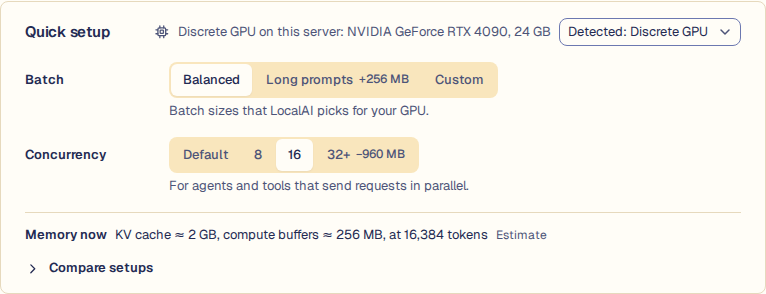
Memory type. The values of a setup depend on how the GPU reaches its memory. LocalAI detects it and says so in one line next to the Quick setup title, and you can pick another type in the list next to it (the browser keeps your choice):
- Unified memory: the GPU shares the system memory. DGX Spark (GB10), Jetson and Thor, Apple silicon, AMD APUs such as Strix Halo, and Intel integrated GPUs. More slots fit. The prompt cache and the context checkpoints use the same memory as the model, so they are kept small.
- Discrete GPU: the GPU has its own memory. The slots are capped by the VRAM estimate, 32 streams use an 8-bit KV cache, and the prompt cache stays in system memory at its default size.
- No GPU: the model runs on the CPU. The caches are kept small, and 32 streams are not offered.
LocalAI reads the type from the GPU it detects: the name (GB10, Thor, Orin, Radeon 8060S, an Intel iGPU and so on), the driver (an AMD APU whose GTT pool is much larger than its memory carve-out), or an L4T install. A discrete GPU wins over an integrated one. In distributed mode the type is the one of the server you are connected to, not of the worker nodes, so pick the type of the nodes in the list. When nothing is detected, the discrete rules apply.
Setup Unified memory Discrete GPU No GPU Balanced Removes parameters.batchandubatch.Same. Same. Long prompts parameters.batch: 2048,ubatch:2048.parameters.batch: 2048,ubatch:1024(the compute buffer must fit one card).parameters.batch: 2048,ubatch:512.Default Removes parallel,paged_kv,paged_preempt, and what a stream setup wrote.Same. Same. 8 streams parallel:8,paged_kv:true,paged_preempt:true,cache_ram:4096. From 16 GB.parallel:8,paged_kv:true,paged_preempt:true. From 8 GB.As unified memory. From 16 GB. 16 streams 8 streams with parallel:16,backend_sampling:on,spec_type:noneand no draft model. From 16 GB.Same, without the cache bounds. From 8 GB. As unified memory, without GPU sampling. From 16 GB. 32+ streams parallel:32,backend_sampling:on, drafting off, the cache bounds, f16 KV cache;cache_type_k/cache_type_v: q8_0and flash attention only when the f16 cache does not fit. From 16 GB.parallel:32,backend_sampling:on, drafting off,q8_0K and V cache, flash attention on. From 8 GB.Not offered. A stream setup is also refused when its estimate needs more than 90% of the memory and more than the current values. The slots share one KV cache, so more streams need about the same memory; each stream gets a smaller part of the context, and each row says how many tokens. The slot floors and the cache bounds are conservative placeholders until the measurements of paged serving on more hardware are in.
On unified memory, a load mode that maps the model (
mmap,mmap + mlock) shows a warning with a button to use Default (auto): llama.cpp then skips mmap on CUDA, ROCm and Vulkan integrated GPUs, where a mapped model is held twice while it is copied to the GPU.Batch and concurrency setups touch different settings, so one does not undo the other. Within one choice, a switch removes only what the previous setup wrote: a flash attention value that you set stays. The choice shows the setup the file holds. A file with any other value of these settings shows Custom. Custom changes nothing: set the fields yourself. The section lists the settings a setup changed, with Undo.
Fields. Every option the llama.cpp backend of LocalAI reads has a field, in the groups Memory, Speed, Concurrent serving, Sampling defaults and Chat template, and in the Drafting section below. Rarely used or risky options are in a group that starts closed, Advanced llama.cpp options (for example
context_shift,cont_batchingandkv_unified, which turn paged serving off). A file that uses another name of an option (an alias such asunified_kvormax_prefill_tokens) shows in the field of that option; an edit writes the main name in its place. A test reads the option names thatbackend/cpp/llama-cpp/grpc-server.cppparses and fails when one has no field, so a new option is not missed. The full list with defaults is in Model configuration. Each field shows the first sentence of the server’s description; More shows the rest. Turn on Show llama.cpp flags in the section head to see thellama-serverflag of each field; the browser keeps the choice. An empty field, or Default, keeps the setting out of the file. A value that does not fit the type or the range is marked, and Save stays off until you correct it.Drafting (speculative decoding). See Drafting.
Load mode. One choice for
mmap,mmlockanddirect_io, as in the load mode table.Tensor placement. Off by default. See Tensor placement.
Start from a setup. Three presets fill several fields at once: Big MoE on a small GPU (all layers on the GPU, experts on the CPU, 8-bit KV cache), Max context (128K context, flash attention, 8-bit KV cache) and Low VRAM (4K context, 4-bit KV cache, a small micro-batch). The section lists each setting it changed, with Undo. A setting you edit after the preset keeps your value when you undo.
Command preview. The
llama-servercommand that matches the form, with a Copy button. It follows your edits.Advanced options. The other entries of
options, one per row. An entry that a field above sets is refused here, so no setting is written twice.
The section edits the same file as the YAML tab. Nothing is written until you press Save, and a YAML save shows in the section.
Drafting
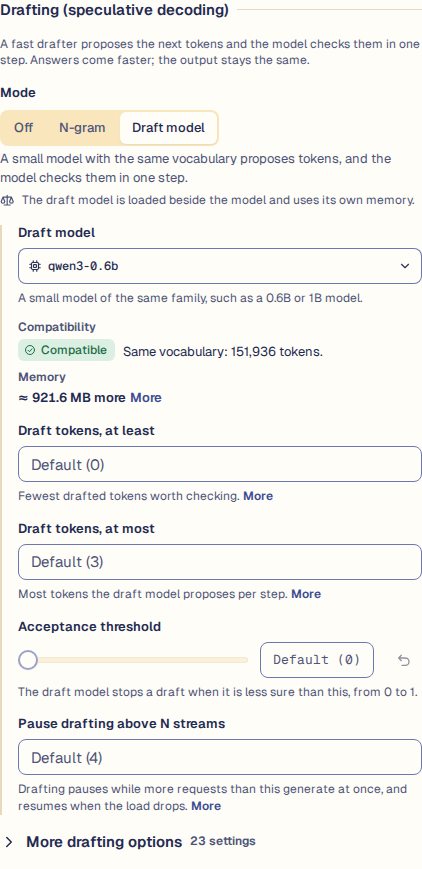
Drafting lets a fast guesser propose the next tokens, and the model checks them all in one step. When the guesses are right, answers come faster. The output is the same as without drafting. The Drafting section of Runtime tuning sets it up with one choice, so you do not need the llama.cpp flags.
| Mode | What it writes | When to use it |
|---|---|---|
| Off (default) | Removes spec_type, draft_model and the drafting fields. For a model with an MTP head, it writes spec_type:none. | Normal chat. |
| N-gram | options: [spec_type:ngram-mod] | Output that repeats its input, such as code edits or long quotes. It needs no extra model and no extra memory. On normal chat it gains little and can cost a few percent. |
| Draft model | draft_model: <file of the model you pick>. llama.cpp reads the kind from the draft file. | A small model of the same family, for example a 0.6B or 1B model for a large model of the same series. It loads beside the model and uses its own memory. |
| MTP | options: [spec_type:draft-mtp, spec_n_max:6, spec_p_min:0.75] | Only for a model whose file has a multi-token prediction head. LocalAI turns MTP on for such a model when the file sets no spec_type, and the section shows it as on by default. |
Each mode shows only the fields that matter for it: the fewest and most draft
tokens (spec_ngram_mod_n_min and spec_ngram_mod_n_max for N-gram,
spec_n_min and spec_n_max for a draft model), the acceptance threshold
(spec_p_min) and Pause drafting above N streams (spec_max_streams, 0
never pauses). The other drafting options are under More drafting options.
For Draft model, pick one of the installed models that llama.cpp runs. Models of the same family as this one come first. The section then shows:
- Compatibility. The vocabulary sizes of both models. llama.cpp refuses a draft whose vocabulary differs by more than 128 tokens, so the model would not load.
- Memory. The memory the draft model adds, from the VRAM estimate of the draft model at the context size of this model: its weights and its KV cache.
A file with a spec_type that no mode covers (for example two kinds) is kept
as it is, with a note, until you pick a mode. The old option names
(draft_max, draft_min, draft_p_min, speculative_type) show in the same
fields.
spec_max_streams is read by builds with paged serving. Other builds ignore
it.
Paste a command
In the Runtime tuning section, paste the command in Paste a llama-server command and press Fill the form. LocalAI reads the text and writes what it found into the fields. The section lists the settings that changed, with Undo.
- The text is only split into words, with the quoting rules of a POSIX shell.
Nothing is run, and
$(...), backticks and;are plain text. - Flags with a first-class key go to that key.
- Flags without one stay in
optionsas raw entries. They are also listed as unmapped, so you see what was not turned into a field. Remove drops one. - Flags that LocalAI sets itself (
--host,--port,--api-key,-hfand similar) are listed as ignored, with the reason, and are not kept. - A value that does not fit (for example
-c abc) is listed as unmapped with the reason and is not kept. Keep as raw option adds it tooptionsas written. - A model path in
-mmaps toparameters.model. LocalAI expects a file name inside the models directory, so the editor warns about a path. The editor keeps the model’s own file and shows the one of the command with Use this file.
The editor also shows a live preview of the command that matches the form. The preview is text for you to read. It is never run.
Tensor placement
Placement is opt-in. LocalAI never adds an -ot entry for you, and a model
without one loads as before.
On a model with mixture-of-experts layers (ffn_*_exps tensors), you can keep
the large expert tensors in system memory and the rest on the GPU. The
Tensor placement group of the editor offers three presets, a Custom
regex box for any other pattern, and shows the value it writes:
| Preset | Result |
|---|---|
| Experts on the CPU, all layers | -ot:\.ffn_.*_exps.*=CPU |
Experts on the CPU for some layers, for example 0-6,18-23 | -ot:blk\.([0-6]|1[89]|2[0-3])\.ffn_.*_exps.*=CPU |
| First N layers fully on the GPU, experts of the rest on the CPU | the pattern matches layer N and higher |
Ranges are sorted and merged, and layers run from 0 to 999. If you give the
number of layers, the last preset writes a range, such as 8-23. The generated
patterns contain no comma, because llama-server splits the value on commas.
When you open a model, the editor shows the picker for a pattern that LocalAI generated. Any other pattern is shown as raw text.
API
These routes need an administrator. The LocalAI Assistant has the same
operations as the parse_engine_command and preview_engine_command tools.
| Route | Purpose |
|---|---|
GET /api/engines | The registered engines: id, name, binary, the backend names each serves, and the capabilities. With ?backend=<name>, only the engine that serves that backend. An empty name is a model with no backend. |
GET /api/engines/{engine}/settings-schema | The schema of one engine: the flag table (key, target, YAML path, option name and aliases, CLI spellings, type, allowed values, limits, default, doc line, group, and localai_only for an option with no command-line flag), the groups, the combined controls, the presets (with profile: true for a quick setup, set: concurrency and streams for a concurrency setup, and memory for the values per memory kind), memory (the memory kinds, the fallback kind, the fit fraction and the advice per control), the reserved options, the estimate map, the capabilities, and drafting for an engine with that capability (the kind and model keys, the off kind, the streams option and the modes). |
POST /api/engines/{engine}/parse-command | Needs command-line. Body {"command": "..."}. Returns fields, options, unmapped and warnings, plus placements for an engine with tensor-placement. |
POST /api/engines/{engine}/command-preview | Needs command-line. Body {"config": {...}} with model YAML keys. Returns {"command": "...", "warnings": []}. |
POST /api/engines/{engine}/placement | Needs tensor-placement. Body {"placement": {...}, "layers": "0-6,18-23"} returns the options entry. Body {"option": "-ot:..."} returns its structured form, or raw: true. |
An unknown engine returns status 404. An operation of a capability that the engine does not have returns status 400.
A command longer than 16 KiB is refused with status 413. A command with an unclosed quote is refused with status 400.