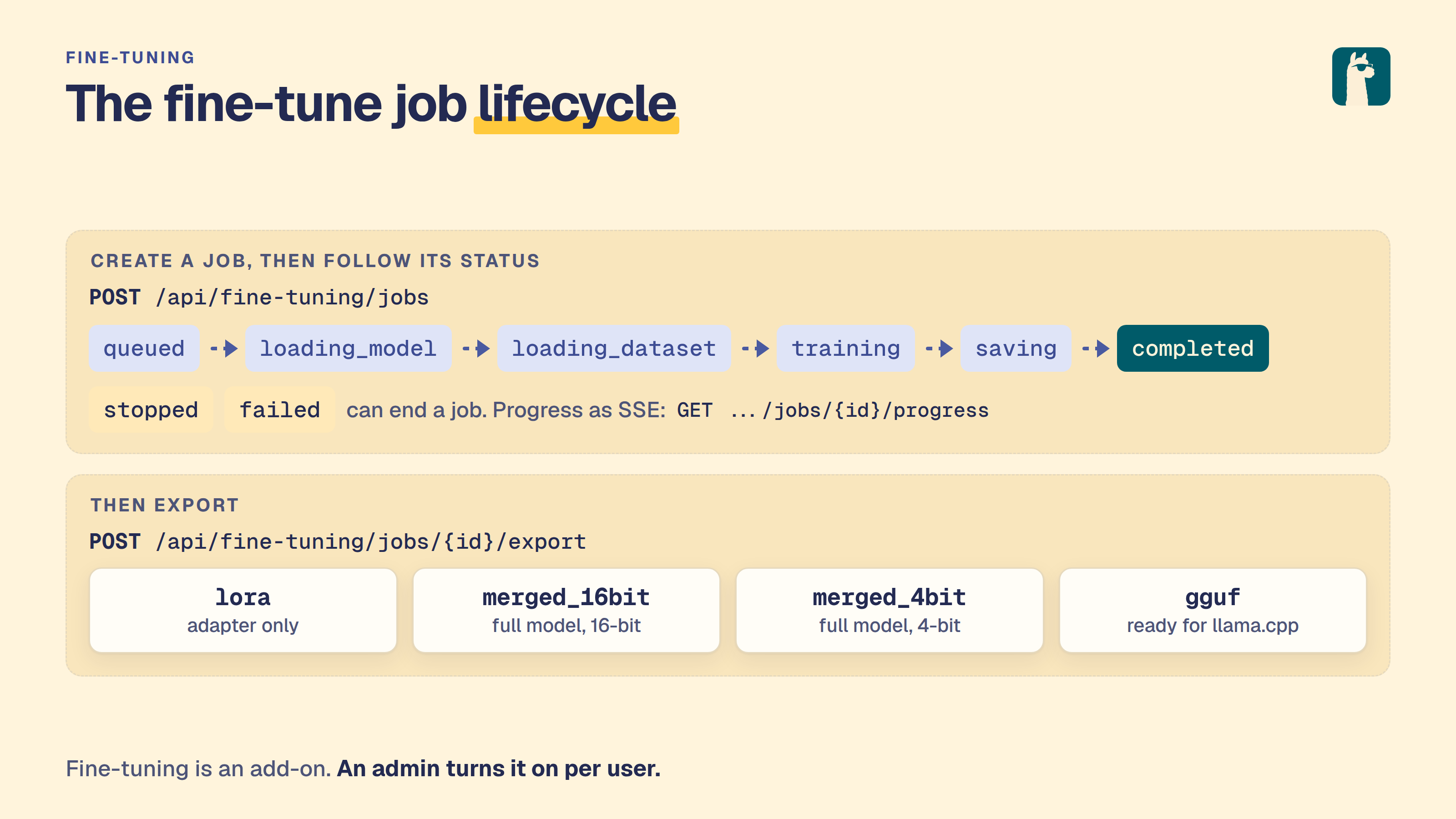
LocalAI supports fine-tuning LLMs directly through the API and Web UI. Fine-tuning is powered by pluggable backends that implement a generic gRPC interface, allowing support for different training frameworks and model types.
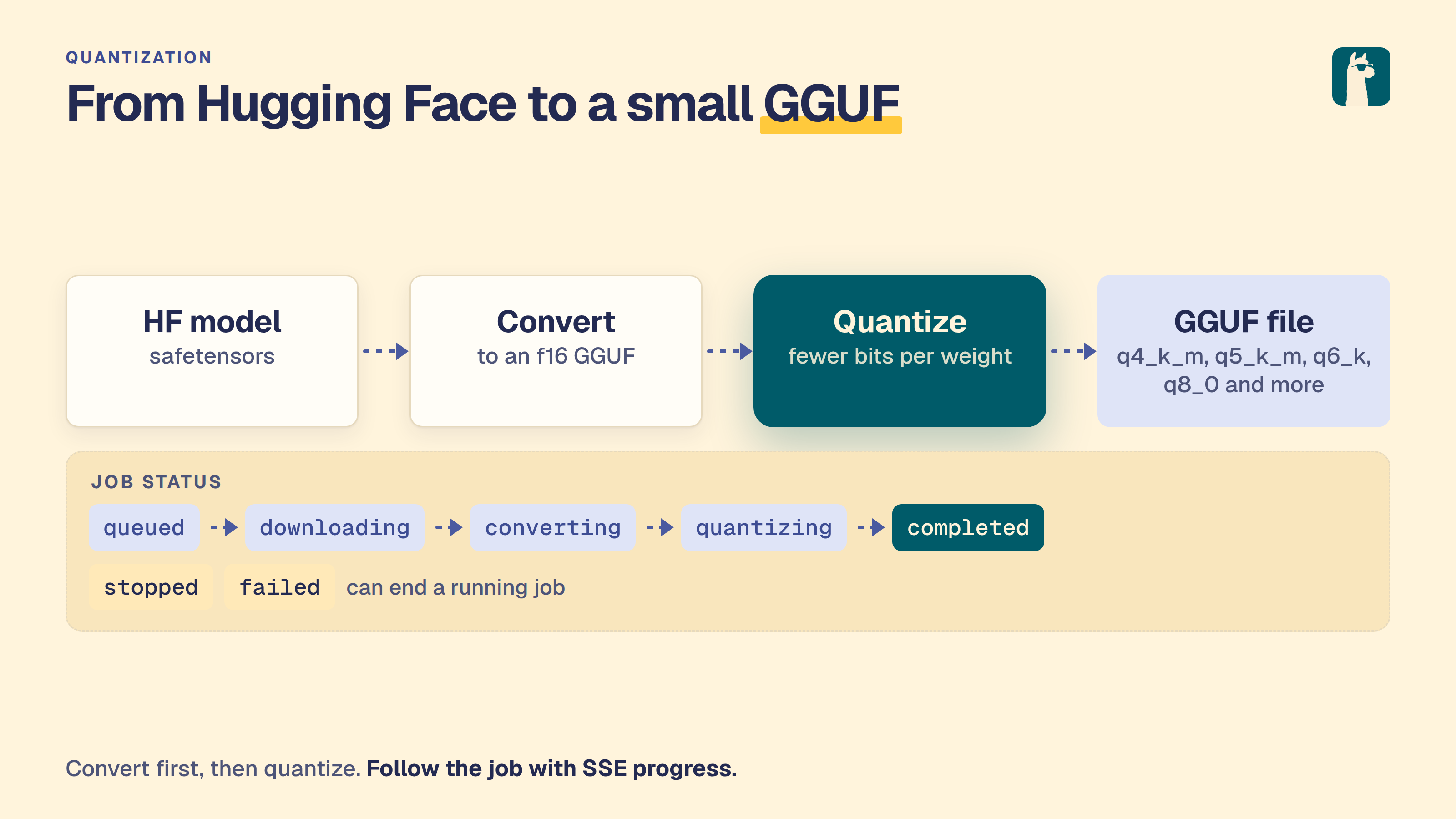
LocalAI supports model quantization directly through the API and Web UI. Quantization converts HuggingFace models to GGUF format and compresses them to smaller sizes for efficient inference with llama.cpp.
Note This feature is experimental and may change in future releases.
Subsections of Train and quantize
Fine-tune a model
Note
Add-ons need a development build or a release newer than 4.12.1.
LocalAI supports fine-tuning LLMs directly through the API and Web UI. Fine-tuning is powered by pluggable backends that implement a generic gRPC interface, allowing support for different training frameworks and model types.
Supported Backends
Backend
Domain
GPU Required
Training Methods
Adapter Types
trl
LLM fine-tuning
No (CPU or GPU)
SFT, DPO, GRPO, RLOO, Reward, KTO, ORPO
LoRA, Full
Availability
The fine-tuning API and the training backends are part of LocalAI. The Fine-Tune page and the chat tools are in the fine-tuning add-on (see Fine-tuning is an add-on). With --addons-enabled=false every path under /api/fine-tuning answers 503. When authentication is enabled, fine-tuning is a per-user feature (default OFF). Admins can enable it for specific users via the user management API.
Note
This feature is experimental and may change in future releases.
Whether model exports are allowed on this instance ({"model_exports": bool})
POST
/api/fine-tuning/jobs
Start a fine-tuning job
GET
/api/fine-tuning/jobs
List all jobs
GET
/api/fine-tuning/jobs/:id
Get job details
DELETE
/api/fine-tuning/jobs/:id
Stop a running job
GET
/api/fine-tuning/jobs/:id/progress
SSE progress stream
GET
/api/fine-tuning/jobs/:id/checkpoints
List checkpoints
POST
/api/fine-tuning/jobs/:id/export
Export model
POST
/api/fine-tuning/datasets
Upload dataset file
GET /api/fine-tuning/status and GET /api/quantization/status return {"model_exports": true|false}. The value is false only when this instance does not see the models path of the add-on owner; it is the same value as the model_exports key of GET /api/features. The Web UI disables the export controls while it is false. Both routes need an authenticated user and answer 503 when add-ons are off.
Job Request Fields
Field
Type
Description
model
string
HuggingFace model ID or local path (required)
backend
string
Backend name (default: trl)
training_method
string
sft, dpo, grpo, rloo, reward, kto, orpo
training_type
string
lora or full
dataset_source
string
HuggingFace dataset ID or local file path (required)
adapter_rank
int
LoRA rank (default: 16)
adapter_alpha
int
LoRA alpha (default: 16)
num_epochs
int
Number of training epochs (default: 3)
batch_size
int
Per-device batch size (default: 2)
learning_rate
float
Learning rate (default: 2e-4)
gradient_accumulation_steps
int
Gradient accumulation (default: 4)
warmup_steps
int
Warmup steps (default: 5)
optimizer
string
adamw_torch, adamw_8bit, sgd, adafactor, prodigy
extra_options
map
Backend-specific options (see below)
Backend-Specific Options (extra_options)
TRL
Key
Description
Default
max_seq_length
Maximum sequence length
512
packing
Enable sequence packing
false
trust_remote_code
Trust remote code in model
false
load_in_4bit
Enable 4-bit quantization (GPU only)
false
DPO-specific (training_method=dpo)
Key
Description
Default
beta
KL penalty coefficient
0.1
loss_type
Loss type: sigmoid, hinge, ipo
sigmoid
max_length
Maximum sequence length
512
GRPO-specific (training_method=grpo)
Key
Description
Default
num_generations
Number of generations per prompt
4
max_completion_length
Max completion token length
256
GRPO Reward Functions
GRPO training requires reward functions to evaluate model completions. Specify them via the reward_functions field (a typed array) or via extra_options["reward_funcs"] (a JSON string).
Built-in Reward Functions
Name
Description
Parameters
format_reward
Checks <think>...</think> then answer format (1.0/0.0)
-
reasoning_accuracy_reward
Extracts <answer> content, compares to dataset’s answer column
-
length_reward
Score based on proximity to target length [0, 1]
target_length (default: 200)
xml_tag_reward
Scores properly opened/closed <think> and <answer> tags
You can provide custom reward function code as a Python function body. The function receives completions (list of strings) and **kwargs, and must return list[float].
Warning
Inline reward code executes arbitrary Python and is disabled by default.
Inline code is compiled and run in the backend process. The restricted-builtins allowlist is not a security sandbox — trivial expressions can escape it to reach the host (arbitrary code execution). Because the fine-tuning endpoint is unauthenticated by default, inline reward functions are refused unless the operator explicitly opts in by setting LOCALAI_TRL_ALLOW_INLINE_REWARD=true on the backend.
Only enable it on a trusted, access-controlled instance where every caller of the fine-tuning API is authorized to run code on the host. Otherwise use the builtin reward functions above.
The function is given the reduced builtin set (len, int, float, str, list, dict, range, enumerate, zip, map, filter, sorted, min, max, sum, abs, round, any, all, isinstance, print) plus the re, math, json, and string modules, and is compiled and validated at job start (fail-fast on syntax errors). Treat these as ergonomics, not as an isolation boundary.
Example API Request
curl -X POST http://localhost:8080/api/fine-tuning/jobs \
-H "Content-Type: application/json"\
-d '{
"model": "Qwen/Qwen2.5-1.5B-Instruct",
"backend": "trl",
"training_method": "grpo",
"training_type": "lora",
"dataset_source": "my-reasoning-dataset",
"num_epochs": 1,
"batch_size": 2,
"learning_rate": 5e-6,
"reward_functions": [
{"type": "builtin", "name": "reasoning_accuracy_reward"},
{"type": "builtin", "name": "format_reward"},
{"type": "builtin", "name": "length_reward", "params": {"target_length": "200"}},
{"type": "inline", "name": "think_presence", "code": "return [1.0 if \"<think>\" in c else 0.0 for c in completions]"}
],
"extra_options": {
"num_generations": "4",
"max_completion_length": "256"
}
}'
Note
In a split deployment (--addons-role=owner and --addons-role=frontend), the export writes into the models path. That path must be the shared models storage. See The models path.
Export Formats
Format
Description
Notes
lora
LoRA adapter files
Smallest, requires base model
merged_16bit
Full model in 16-bit
Large but standalone
merged_4bit
Full model in 4-bit
Smaller, standalone
gguf
GGUF format
For llama.cpp, requires quantization_method
GGUF Quantization Methods
q4_k_m, q5_k_m, q8_0, f16, q4_0, q5_0
Web UI
The Fine-Tune page is one page that follows the job from set-up to result. A line at the top shows where you are: set up, check, run, result.
Set up - Choose the base model, the dataset (a Hugging Face id or an uploaded file), the kind of training (an adapter, or the full model) and the epochs, batch size and learning rate. Method, backend, adapter settings, optimizer, evaluation, reward functions (GRPO) and extra options are under More options.
Check before you start - A list of what is known before the job starts, redrawn as you change the form: whether the model and dataset are set, whether a fine-tuning backend is installed, how much GPU memory (or RAM, when there is no GPU) is free, how much space is free on the models disk, and whether a token is set. LocalAI does not estimate how much memory a job needs or how long it takes, because the server cannot know that before the job starts, so the page says so. A missing model or dataset blocks the start. A warning, such as a missing backend or no GPU, does not.
Run - Percent, step, epoch, the server’s time estimate and tokens per second, the stages the job passes through, a chart of loss (with the evaluation loss as hollow dots), learning rate and gradient norm, and a log of what the job reported since the page opened. Stop asks whether to keep a checkpoint.
Result - A failed job shows the server’s message. When the message says memory ran out, the page offers two changes (a batch size of 1 and gradient checkpointing) that are applied to a copy of the setup and start nothing until you press Start. A finished job lists its checkpoints and exports the result as a model, then links to a chat with it and to Models.
Earlier jobs are listed below the form. Reuse puts a job’s setup back in the form.
A user needs the fine-tuning permission. Without it, the page says the account cannot fine-tune and who can change that.
Fine-tuning is an add-on
The Fine-Tune page is the fine-tuning add-on. It does not ship with LocalAI. An administrator installs it from Find add-ons with Install and turn on. Once it is on, it opens from My add-ons at /app/addons/fine-tuning/jobs and can be shown in the sidebar.
Open the canonical add-on page from My add-ons. Historical standalone links are not registered.
The API does not change. The page calls /api/fine-tuning/* with the signed-in user’s own session, and the server checks the fine-tuning permission on every call, so the add-on never widens what a user may do.
With --addons-enabled=false this feature is off, like every add-on. The UI shows no entry for it, /app/addons/fine-tuning/jobs leads back to /app, and every path under /api/fine-tuning answers 503. See The addons feature gate.
The add-on also offers tools to the chat: list jobs, propose a job, store a small dataset, read the status and the checkpoints of a job, stop a job and export a checkpoint as a model. A tool can only control a job that a tool started. A job started in the page is listed, but a tool cannot stop or export it. In the chats, and in an agent or a trigger whose agent names the add-on, a tool call that starts a job runs at once, because you turned the add-on on; a trigger with no agent gets no such tool; the result says what an undo does (see below). On the OpenAI-compatible API and other surfaces, a tool only proposes the action and a person confirms it in an approval card. A model or a dataset given as a local path is refused. The tools call the engine through the host operations (see Host operations), which the host setting LOCALAI_ADDON_HOST_OPS grants to this add-on by the finetune. prefix, and they run with the permissions of the person in the chat.
Undo is the safety net for a job a chat started. Starting a job keeps a change set in the add-on, and the chat shows an Undo button on it. An undo stops the job while it still runs; it does not save a checkpoint. If the job already finished, was stopped, or was exported, the answer is cannot_undo: a finished job cannot be un-run, and the engine offers no operation that removes its output, so nothing is deleted. A change set can be undone for 7 days and only once. Stopping a job, exporting a checkpoint and storing a dataset cannot be undone, and their results say so with the reason. The undo is the person’s own action from a browser tab; no model, agent or API key can call it. The change set lives in the add-on’s own data, with the rest of its journal, so it travels with the add-on’s backups and goes with its data when that is purged. In a cluster the undo goes through the add-on’s owner like every other call.
Dataset Formats
Datasets should follow standard HuggingFace formats:
SFT: Alpaca format (instruction, input, output fields) or ChatML/ShareGPT
Fine-tuning uses the same gRPC backend architecture as inference:
Proto layer: FineTuneRequest, FineTuneProgress (streaming), StopFineTune, ListCheckpoints, ExportModel
Python backends: Each backend implements the gRPC interface with its specific training framework
Go service: Manages job lifecycle, routes API requests to backends
REST API: HTTP endpoints with SSE progress streaming
React UI: Configuration form, real-time training monitor, export panel
Quantize a model
Note
Add-ons need a development build or a release newer than 4.12.1.
LocalAI supports model quantization directly through the API and Web UI. Quantization converts HuggingFace models to GGUF format and compresses them to smaller sizes for efficient inference with llama.cpp.
Note
This feature is experimental and may change in future releases.
Supported Backends
Backend
Description
Quantization Types
Platforms
llama-cpp-quantization
Downloads HF models, converts to GGUF, and quantizes using llama.cpp
Whether model imports are allowed on this instance
GET /api/fine-tuning/status and GET /api/quantization/status return {"model_exports": true|false}. The value is false only when this instance does not see the models path of the add-on owner; it is the same value as the model_exports key of GET /api/features. The Web UI disables the import controls while it is false. Both routes need an authenticated user and answer 503 when add-ons are off.
Job Request Fields
Field
Type
Description
model
string
HuggingFace model ID or local path (required)
backend
string
Backend name (default: llama-cpp-quantization)
quantization_type
string
Quantization format (default: q4_k_m)
extra_options
map
Backend-specific options (see below)
Extra Options
Key
Description
hf_token
HuggingFace token for gated models
Note
In a split deployment (--addons-role=owner and --addons-role=frontend), the export writes into the models path. That path must be the shared models storage. See The models path.
Import Request Fields
Field
Type
Description
name
string
Model name for LocalAI (auto-generated if empty)
Job Status Values
Status
Description
queued
Job created, waiting to start
downloading
Downloading model from HuggingFace
converting
Converting model to f16 GGUF
quantizing
Running quantization
completed
Quantization finished successfully
failed
Job failed (check message for details)
stopped
Job stopped by user
Progress Stream
The GET /api/quantization/jobs/:id/progress endpoint returns Server-Sent Events (SSE) with JSON payloads:
When the job completes, output_file contains the path to the quantized GGUF file and extra_metrics includes file_size_mb.
Quantization Types
Type
Size
Quality
Description
q2_k
Smallest
Lowest
2-bit quantization
q3_k_s
Very small
Low
3-bit small
q3_k_m
Very small
Low
3-bit medium
q3_k_l
Small
Low-medium
3-bit large
q4_0
Small
Medium
4-bit legacy
q4_k_s
Small
Medium
4-bit small
q4_k_m
Small
Good
4-bit medium (recommended)
q5_0
Medium
Good
5-bit legacy
q5_k_s
Medium
Good
5-bit small
q5_k_m
Medium
Very good
5-bit medium
q6_k
Large
Excellent
6-bit
q8_0
Large
Near-lossless
8-bit
f16
Largest
Lossless
16-bit (no quantization, GGUF conversion only)
The UI also supports entering a custom quantization type string for any format supported by llama-quantize.
Web UI
The Quantize page uses the same page pattern as fine-tuning: set up, check, run, result.
Set up - Choose the model and the quantization type (a preset, or a custom type). The backend and the Hugging Face token are under More options.
Check before you start - Whether a model and type are set, whether a quantization backend is installed, the free RAM and the free space on the models disk. The server reports no model size before the job starts, so the page does not estimate one.
Run - Percent, the stage (downloading, converting, quantizing), and a log of what the job reported since the page opened. Stop ends the job.
Result - A failed job shows the server’s message. A finished job shows the output file, downloads it, or imports it into LocalAI under a name you choose, then links to a chat with it and to Models.
Earlier jobs are listed below the form, with Reuse and Delete (after a confirmation).
A user needs the quantization permission. Without it, the page says the account cannot quantize.
Quantization is an add-on
The Quantize page is the quantization add-on. It does not ship with LocalAI. An administrator installs it from Find add-ons with Install and turn on. Once it is on, it opens from My add-ons at /app/addons/quantization/jobs and can be shown in the sidebar.
Open the canonical add-on page from My add-ons. Historical standalone links are not registered.
The API does not change. The page calls /api/quantization/* with the signed-in user’s own session, and the server checks the quantization permission on every call.
With --addons-enabled=false this feature is off, like every add-on. The UI shows no entry for it, /app/addons/quantization/jobs leads back to /app, and every path under /api/quantization answers 503. See The addons feature gate.
The add-on also offers tools to the chat: list jobs, propose a job, read the status of a job, stop a job and import the result as a model. A tool can only control a job that a tool started. A job started in the page is listed, but a tool cannot stop or import it. In the chats, an agent and a trigger, a tool call that starts a job runs at once, because you turned the add-on on for that chat; the result says what an undo does (see below). On the OpenAI-compatible API and other surfaces, a tool only proposes the action and a person confirms it in an approval card. A model given as a local path is refused. The tools call the engine through the host operations (see Host operations), which the host setting LOCALAI_ADDON_HOST_OPS grants to this add-on by the quantize. prefix, and they run with the permissions of the person in the chat.
Undo is the safety net for a job a chat started. Starting a job keeps a change set in the add-on, and the chat shows an Undo button on it. An undo stops the job while it still runs. If the job already finished, was stopped, or was imported, the answer is cannot_undo: a finished job cannot be un-run, and the engine offers no operation that removes its files, so nothing is deleted. A change set can be undone for 7 days and only once. Stopping a job and importing the result cannot be undone, and their results say so with the reason. The undo is the person’s own action from a browser tab; no model, agent or API key can call it. The change set lives in the add-on’s own data, with the rest of its journal, so it travels with the add-on’s backups and goes with its data when that is purged. In a cluster the undo goes through the add-on’s owner like every other call.
Architecture
Quantization uses the same gRPC backend architecture as fine-tuning:
Proto layer: QuantizationRequest, QuantizationProgress (streaming), StopQuantization
Python backend: Downloads model, runs convert_hf_to_gguf.py and llama-quantize
Go service: Manages job lifecycle, state persistence, async import
REST API: HTTP endpoints with SSE progress streaming