This section collects the operator-facing concerns for running LocalAI in production: request middleware, cloud and MITM proxies, and backend monitoring. These pages are about running and governing a LocalAI instance rather than about a specific inference feature.
Pages
Traffic - usage, failed requests, models, GPU and host, traces and Prometheus in one tab.
Backend Monitor - monitor, pre-load, and shut down running model backends.
Activity - watch, cancel, and retry model and backend installs from the WebUI.
Subsections of Operations
Operate overview
/app/operate is the front door to the Operate console. It answers one
question — is anything wrong — without you having to open four other pages.
The page opens with one sentence: Everything is running., 2 things need
you. or, when nothing needs a decision but a row has something to read,
Running, with 1 thing to look at. On a new installation, with no backend, no
model and nothing loaded, it says Nothing is running yet. and offers
Install a backend and Browse models.
Under the sentence are four rows. A row with a problem opens by itself and holds
the button that deals with it. A row with nothing to say stays one line. Click a
row to open or close it.
Needs you
Only things that want a decision:
a backend with an update available, with an Update button
an operation that failed, with Retry and Dismiss
a node that is not answering, with a link to the nodes
Update starts the same update as the Backends page. Retry installs the
failed model or backend again, after moving the failure into the Activity
record, and Dismiss moves it there without retrying. When nothing needs you
the row says so in one line. There is no green panel: a status page that shouts
when everything is fine teaches you to stop reading it.
The attention count on the Status tab is the number of items in this row.
Capacity
One line says how full GPU memory is (system memory on a host without a GPU),
and how much room the models disk has left. On a cluster it adds the memory of
the nodes that are answering, and the row lists each node’s memory when opened.
The row opens by itself when memory is 90% full or more, or when the models disk
has less than a tenth free or less than 20 GB. It then lists the models loaded
on this machine, each with an Unload button. Unloading asks first, stops the
backend process of that model and frees its memory. The next request that uses
the model loads it again.
Under the rows, a bar shows the memory in use now. LocalAI keeps no memory
history, so the chart under the bar is drawn from readings the page took
itself, one with each Operate summary poll (every 15 seconds), while Operate is
open. It starts with the second reading, keeps at most 240 readings (about an
hour), and is labelled “Since you opened Operate”. The axis starts at zero, the
capacity is a labelled line, and a data table sits behind the chart. Leaving
Operate empties it. Temperature and power are not shown because the resources
endpoint does not report them.
Running now
Operations in progress, and the models loaded on this machine. On a single-node
install the row lists the heaviest five models: backend, resident memory, CPU
share and uptime, with View logs and Stop model… in the row menu. Open
this machine leads to the full list. With distributed mode on, models run on
workers rather than on the controller, so the row links to the Swarm page
instead.
Recent failures
Requests and failed requests over the last 24 hours, and p95 latency, counted
server-side by GET /api/traces/summary:
hours defaults to 24 and is capped at 168. Only 5xx responses and transport
errors count as failures — a 4xx is the caller getting it wrong, not the
installation being unhealthy. p95_ms is a nearest-rank percentile, not the
slowest request. The endpoint exists so a dashboard wanting three numbers does
not fetch the whole trace list to count it. An installation that has recorded
nothing says so rather than showing zeroes dressed as telemetry. The row opens
when at least one request failed, and links to Traces and Usage.
The page does not report models that failed to load, because LocalAI records no
load failures to read.
This machine
On a single-node install, Operate → This machine (/app/nodes) shows the
host and everything loaded on it:
GPU memory as one bar, with what is free and a note that the next model
must fit in that, or a loaded model has to be stopped first. With several GPUs
each one gets its own line. A host without a GPU says so instead of drawing
an empty bar.
Models in host memory: one bar split by running model, so you can see
which model is holding memory. LocalAI reports the resident memory of each
backend process, not the GPU memory of each model, so the split is of host
RAM and no model is shown with a GPU size.
The machine: VRAM, RAM, CPU and the models disk, each with a bar, a
percentage and what is left. A reading the host does not report is shown as
“No data”, never as zero.
Running models: search, sort by memory, CPU or uptime, open a model’s
logs, or stop it. Stopping asks for confirmation; the model loads again on
its next request.
The page polls GET /system and GET /api/resources every five seconds. The
per-model readings come from the process block of
GET /system; the host CPU and disk
readings come from the cpu and disk fields of GET /api/resources.
Add a machine reveals the command to start LocalAI in distributed mode, and
a link to the steps for adding a worker. Once distributed mode is on, the same
route becomes the Nodes page and the This machine tab gives way to the
Swarm tab.
Models and backends no longer live under a nested Host page. Use Models →
Installed for model runtime and configuration actions, and Operate →
Backends → Installed for installed backend actions. The overview links into
the canonical Operate sections rather than duplicating those inventories.
Old /app/manage bookmarks remain supported. They redirect with replace
semantics to the matching Installed Models or Installed Backends view while
preserving legacy search, filter, selection, variant, and development flags.
The tab bar
Operate has one row of tabs above the page: Status (this overview),
This machine, Swarm (only with distributed mode on), Runtime,
Traffic and Settings. A tab that holds several pages shows a second row
of links under the bar: Runtime holds Backends, Activity, Logs and (on a single
install) Failover; Traffic holds Usage, Traces and Middleware; Settings holds
Settings and Users (with authentication on); Swarm holds Nodes, Placement rules,
Failover and P2P. Adding a node opens from the Nodes page. Every page keeps its
own URL, and a page such as a node detail keeps its tab highlighted. On a phone
the bar scrolls sideways. The API link at the end of the bar opens the
API documentation.
Several tabs carry a live value: pending backend updates and running operations
on Runtime, the healthy node count on Swarm, running models on This machine, the
attention count on Status and the error count on Traffic. Host capacity lives on
the overview instead of appearing as a separate destination.
Those values are orientation, not an alarm. The bar only exists on Operate
routes, so anything urgent also appears in the Needs you row and on the
operations badge attached to the sidebar entry, which is always visible.
Traffic
The Traffic tab of the Operate console answers three questions: how much is
the server used, what failed, and how are the machine and the models doing. It
opens on an overview and has a second row of links: Overview, Usage, Models,
GPU and host, Traces, Middleware and Prometheus. One time window (24 hours, 7
days, 30 days or all time) is shared by the Overview, Usage and Models pages.
Every figure comes from a record LocalAI really keeps, and each page says which.
Where LocalAI keeps no record, the page leaves the figure out and does not draw
a zero.
Record
What it holds
Pages that read it
Usage ledger
Requests and tokens, by model, user and API key, in hourly, daily or monthly buckets
Overview, Usage, Models
Trace buffer
The most recent API requests, with status, error and duration. Off until tracing is on
Overview (failed requests, p95), Traces
Backend-operation buffer
Loads and runs of each model, with their errors
Models, a trace
Resources reading
Memory per GPU, system memory, CPU share, models disk
GPU and host
Overview
Five figures in a row: requests, failed requests, latency p95, tokens in and
tokens out. Under them, three charts: requests per bucket, failed requests (the
trace buffer, in twelve columns) and tokens in and out per bucket. Each chart has
a data table behind it, and you can read a value with the arrow keys. A table of
the five busiest models closes the page.
Failed counts a transport error or a 5xx answer. A 4xx answer is the caller
being refused, and LocalAI does not count it as a failure.
p95 is the 95th percentile of request duration in the trace buffer. LocalAI
does not compute a p50 or a p99, so there are none.
With tracing off, the failed and p95 figures say so and link to the setting.
The ledger figures do not depend on tracing.
The trace summary reports at most 7 days. For the 30-day and all-time windows,
failed requests and latency cover the last 7 days, and the page says so.
Usage
The ledger as a table, grouped by model, by user (admins) or by API key (when
authentication is on). Rows sort by any column, can be searched, and can be
filtered by model. A row opens in place on its own chart. A user who is not an
admin sees only their own numbers and their quotas, and the page tells them
whether the current pace stays inside each quota.
Export CSV and Export JSON save the rows the table holds. The export runs
in the browser. The ledger does not record status, endpoint or node, so those are
not groups. Estimated cost is optional: you type a price per million tokens, it
stays in your browser, and LocalAI has no price of its own.
Models
One row per model: requests and tokens from the ledger, failed operations and the
mean operation time from the backend-operation buffer, and the memory the backend
process holds now. That is the resident host memory of the process, when the
server reports it. GPU memory per model is not reported, and neither is a
per-model latency percentile or a memory history.
GPU and host
The current reading, refreshed every 5 seconds: memory per GPU, system memory,
the CPU share and the models disk. LocalAI does not report GPU utilisation or
temperature. Two charts show readings the page took itself, since you opened
this page: the memory pool and the CPU share. They are kept in the browser, at
most 240 readings, and leaving the page empties them. On a cluster the page also
lists every node with its memory and CPU share.
Traces
The recent API requests and backend operations, with the tracing settings above
the list. Filter by failed or slow requests, search, sort, export and clear.
Opening an API request shows its page: the status and the error LocalAI recorded,
a timeline of the request with the backend operations that ran while it was open,
and the request and response bodies. Bodies stay closed until you press
Reveal, because they can hold prompts and personal data. Request headers are
never listed. The two buffers share no request id, so operations are matched on
time and model, and the page says so. A trace leaves the buffer when newer
requests push it out; its page then says it is no longer there.
With tracing off, the page explains what is lost and offers Turn on tracing.
You can also start LocalAI with LOCALAI_ENABLE_TRACING=true.
Middleware
The order a request passes through: Proxy, Admission, Filtering, Routing, Model.
The server fixes that order. Selecting a step shows only its rules. See
Middleware for what each step does.
Prometheus
GET /metrics is admin only and returns the Prometheus text format. The page
shows the URL and a scrape configuration with a copy button, checks the endpoint
against the running server, and lists the metrics LocalAI can export. Only
api_call is always present: a histogram of request duration in seconds by HTTP
method and route. The others appear while the feature behind them runs. Metrics
are off when LocalAI runs with LOCALAI_DISABLE_METRICS_ENDPOINT=true.
Backend Monitor
LocalAI provides endpoints to monitor and manage running backends. The /backend/monitor endpoint reports the status and resource usage of loaded models, /backend/load pre-loads a model into memory, and /backend/shutdown allows stopping a model’s backend processes. In distributed mode, a named shutdown stops both a process local to the controller and every placement registered on workers.
All three are admin-only.
Monitor API
Method:GET
Endpoints:/backend/monitor, /v1/backend/monitor
Request
The model to monitor is passed as a query parameter:
Parameter
Type
Required
Location
Description
model
string
Yes
query
Name of the model to monitor
For backwards compatibility, a JSON body with the same field is still accepted when the model query parameter is not set, but new clients should use the query parameter.
Pre-loads a model into memory ahead of its first request, so that request pays no cold-start load cost. It is the inverse of the Shutdown API and works for any model, not just realtime pipelines.
Method:POST
Endpoints:/backend/load, /v1/backend/load
Request
Parameter
Type
Required
Description
model
string
Yes
Name of the model to load
Behavior
For a regular model, its own backend is loaded.
For a realtime pipeline model (a config with a pipeline: block), every configured sub-model (VAD, transcription, LLM, TTS, sound_detection, voice_recognition) is loaded concurrently instead of the pipeline stub, which has no backend of its own.
The call blocks until loading finishes and reports which model names became resident, so partial failures are visible.
Returns 200 OK with the shutdown confirmation message on success.
Stopping a backend removes its watchdog timers and eviction state. A timeout from a stopped backend does not shut down a replacement at a different address.
Error Responses
Status Code
Description
400
Invalid or missing model name
500
Backend error or model not loaded
Activity
Model installs, backend installs, removals and cluster staging all run in the
background. Two surfaces in the WebUI report them: a one-line strip at the top
of the app, and the Activity page, which holds the full picture.
Both are admin-only.
To see models currently loaded for inference, open Home (/app) and scroll
to Loaded models. That list includes each model’s backend and a stop control.
A loaded model can be idle; Activity reports management jobs rather than whether
a model is resident or generating output.
The operations strip
While there is anything to report, a single line appears at the top of the app.
It shows one operation at a time:
a failure, if there is one, because an error waiting for a decision outranks
any progress;
otherwise the least advanced running operation, which is the one everything
else is waiting behind.
Every operation shows what is being done and to what, for example
Installing model qwen3-4b. Everything else depends on what the operation can
report. A percentage and its bar appear only once the operation is running and
has reported progress, so a queued operation, a failed one and a removal show
none. Artifact-backed gallery models report two things more: the phase
(Resolving files, Downloading, Verifying, Finalizing, Saving configuration) and downloaded/total bytes. A backend installing on several
workers is rolled up into one phrase, 2 of 5 nodes done; the per-node
breakdown lives on the Activity page.
When more than one operation is in flight, a N more counter on the right
links to the Activity page.
When the last operation finishes, it stays on the strip for about four seconds
and then goes, so a fast install is not a flicker. While others are still
running, the strip moves straight on to the next one. An operation you cancel
is not held: it goes as soon as it stops.
The X on the right hides the strip. It does not cancel anything: the work
carries on, the sidebar still counts it, and the Activity page still lists it.
Hiding applies to that one operation, so a later failure brings the strip back.
On a failure the same button acknowledges the error and moves it into the
record instead.
The Activity page
Operate → Activity (/app/activity). The page has up to three sections,
each shown only when it has something in it.
In progress
One row per running or queued operation, each naming what is being done and to
what. A percentage and progress bar appear only once the operation is running
and has reported progress, so a queued operation and a removal show none.
Artifact-backed gallery models also report the phase, downloaded and total
bytes, and an estimate of the time left once enough of the transfer has been
observed to work one out. Every backend install, and every gallery model that
lists its files directly, reports no phase and no byte counters; those cards
show the installer’s own status line instead, which names the file being
fetched and its size.
An install that involves workers shows a per-node list, with one row per
worker:
a status pill: Queued, Downloading, Worker busy, Done or
Failed;
the file being transferred, with current/total bytes and a percentage;
any error the worker returned.
An install that fans out to more than one worker also carries an N nodes
tag and a toggle over the list. Lists of up to four nodes start expanded, longer
ones start collapsed behind Show N nodes, and the toggle reads Hide
per-node detail while the list is open.
Worker busy means the worker took longer than --backend-install-timeout
to acknowledge but is most likely still working. It clears on its own when the
worker finishes.
Needs attention
Model and backend operations that failed and have not been acknowledged yet,
each row carrying the error returned by the installer, with Retry and
Dismiss. Cluster staging never
appears here: a staging job reports no error to the page, so a staging failure
has to be read from the logs.
Record
What finished, newest first, one row each: the name, what happened
(installed in 1m 12s, removed, cancelled, or failed: with the error),
the time of day it finished, and a link into Models or Backends. A cancelled
install also has Start again, which installs the same target again: a
download that was paused continues where it stopped, and one that was cancelled
starts over. The record does not say which of the two it was, so the button
says what it does in both cases. A cancelled removal has no such button. Model and
backend installs and removals are recorded; cluster staging is not, so a
staging run leaves nothing behind here once it finishes.
Filters
Four chips above the sections filter the whole page: All, Models,
Backends and Cluster. In the live sections, Cluster covers staged model
files and any install that involves workers, whether it targets one node or
fans out across several. In the Record it covers only the node-targeted case: a
finished fan-out install is filed under Models or Backends, not under Cluster.
Cancelling, retrying and dismissing
These are on the operation rows. Pause, Cancel, Retry and
Dismiss are labelled buttons. The strip has no cancel button; the page is
the only place work is stopped or restarted. The Backends page also shows the
progress of a backend install in the backend’s own row, with its Cancel.
Pause stops a running download and keeps the bytes already fetched, so
installing the same model or backend again continues from there.
Cancel is offered while an operation is queued, whatever it is, and while
an install is running. It is not offered once a removal has started: a
removal in progress cannot be interrupted, so the window to call one off is
the queue, before a worker picks it up. Cancelling there stops it before
anything is touched. For artifact-backed gallery models, cancelling an active
download leaves its partial files in place so a later install resumes rather
than starting over. A cancelled operation leaves the live sections
and is not held on the strip the way a completed one is; it appears in the
record as cancelled.
Cancel waits for 8 seconds before it is sent. The row says “Cancelling
unless you undo” and a toast offers Undo. The server cannot take a cancel
back, so the wait in the browser is the whole undo: while it runs nothing has
been stopped and the download carries on. Closing the toast cancels at once,
asking to cancel a second download ends the first one’s wait, and leaving the
page sends a cancel that is still waiting. A job that finishes during the wait
is left alone.
Retry is offered on a failed model or backend install. It acknowledges
the failure, which moves it into the record, and installs the same target
again. It is not offered on a failed removal, which is not restarted by
reinstalling.
Dismiss acknowledges the failure without
retrying. The operation moves into the record with a failed outcome; it is
not deleted. This is why the same failure can be found either under Needs
attention or in the Record, depending on whether it has been
acknowledged.
Note
Retrying a model that was installed with an explicit variant reinstalls it
with automatic variant selection, because the variant is not carried on the
operation. If you pinned a build, reinstall it from the Models page or the API
with the variant you want rather than using Retry. See
Model Gallery for variants.
History
The record holds the last 50 finished operations. Where it is kept depends on
how LocalAI is running:
Standalone: in memory, so it is empty again after a restart. For durable
per-model install state, use the model and backend listings rather than this
page.
Distributed mode: in
PostgreSQL, alongside the operations themselves. It is the same record on
every replica, it survives restarts, and a replica added by a scale-out or a
rolling deploy reports it in full rather than starting empty.
Clear history, beside the page title whenever the record has anything in
it, empties it. Running operations and unacknowledged failures are untouched.
In distributed mode it clears the record for every replica, not just the one
serving the page.
The sidebar count
The Operate entry in the sidebar carries a badge whenever something is in
flight, showing how many operations are running or queued. If any failure is
waiting to be acknowledged, the badge turns red and counts the failures
instead, so the number always reports the thing that most wants your attention.
API
Both surfaces are backed by these endpoints. All of them are admin-only when
authentication is enabled.
Method
Path
Description
GET
/api/operations
Running, queued and failed operations, least advanced first.
POST
/api/operations/{jobID}/cancel
Cancel a queued operation, or a running install. Not a running removal.
POST
/api/operations/{jobID}/pause
Pause a queued operation or running download and preserve partial data.
POST
/api/operations/{jobID}/dismiss
Acknowledge a failed operation and move it into the record.
GET
/api/operations/history
List finished operations, newest first.
DELETE
/api/operations/history
Clear the record. Live operations are untouched.
Pausing preserves the download’s .partial file. Start the same model or
backend installation again to resume from the saved bytes when the origin
supports HTTP Range requests. Cancelling intentionally discards partial data.
Both GET endpoints wrap their list in an operations key rather than
returning a bare array:
# What has finishedcurl http://localhost:8080/api/operations/history \
-H "Authorization: Bearer <admin-key>"
nodeID is present when the operation was scoped to a worker, and error
when the outcome is failed. The outcome is one of completed, failed
or cancelled.
The DELETE answers 500 with an error if the record could not be cleared,
which in distributed mode means the rows are still there. It never reports
success on a record it did not clear.
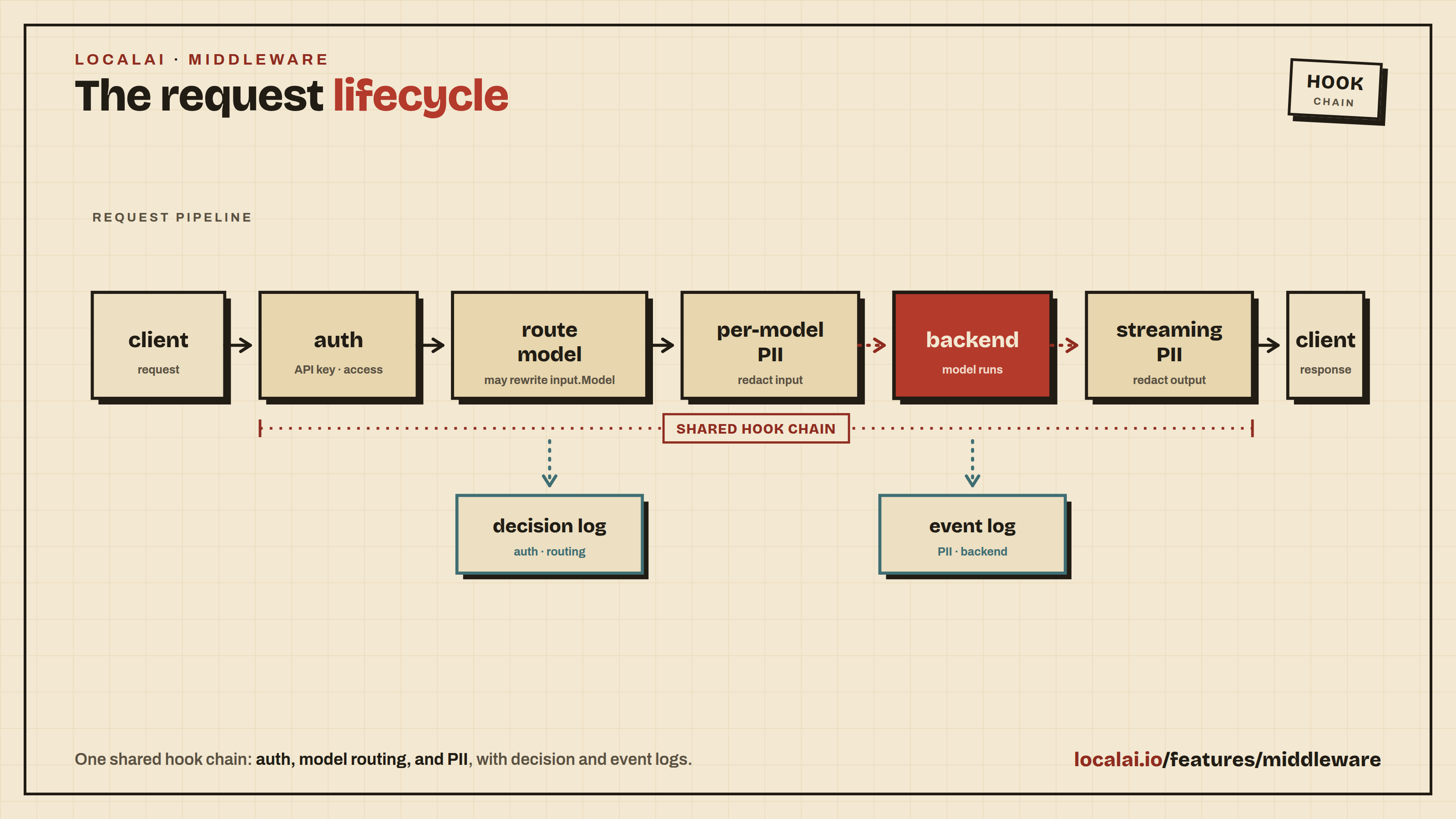
LocalAI ships a request-middleware layer that sits between the HTTP API and
the backend dispatcher. Two subsystems share that layer because they share
the same lifecycle hook: PII filtering scans the request body before it
reaches a backend, and the intelligent router rewrites input.Model so
a single client-facing model name fans out across multiple downstream
targets.
Both are inspected and configured from the same admin page
(/app/middleware), which draws the order a request passes through as five
steps (Proxy, Admission, Filtering, Routing, Model) and shows only the rules of
the step you select, backed by the same REST surface (/api/middleware/*,
/api/pii/*, /api/router/*) and the same MCP tools.
The router runs first (it picks the target model so per-model PII has
something to gate on), per-model PII runs next (gated by the resolved
config), and the backend executes. Filtering is request-side only -
the request body is scanned and rewritten before forwarding; the response
is not touched (NER over a streamed response is left as a follow-up). Each
subsystem writes to its own admin-visible log: /api/router/decisions for
routing, /api/pii/events for redaction and block actions.
PII filtering
PII redaction is NER-based and runs request-side (input). It is
off by default, flipping to on for any cloud-proxy backend
because that traffic crosses the network to a third-party provider. Pick a
default detector so those models are actually
scanned. Explicit pii.enabled in a model’s YAML always wins over the
backend default.
Filtering runs on every text-accepting endpoint that has an adapter wired:
/v1/chat/completions and /v1/messages (chat), /v1/completions,
/v1/embeddings, /v1/edits, the Open Responses POST /v1/responses
(instructions, string input, and in input items the message and
reasoning text, function_call arguments and function_call_output output),
and the Ollama /api/chat, /api/generate and /api/embed endpoints, plus
the MITM proxy request body. Image, audio
(TTS/STT), video, rerank, and the realtime WebSocket are not filtered yet
(different prompt-PII semantics; realtime is not HTTP middleware).
The Responses WebSocket mode (GET /v1/responses) is not HTTP middleware
either, so it cannot filter: a response.create for a model with PII
filtering enabled is refused with the error type pii_unsupported_transport
instead of being served unfiltered. Use POST /v1/responses for those models.
Requests whose model names an agent are handed to the agent pool before
model resolution and are not filtered by the per-model policy.
Stored history loaded through previous_response_id or item_reference
is resolved after filtering and is not scanned against the current model’s
policy. That history can contain unfiltered text from another model or
model-generated output. Tool output supplied directly in the request is
scanned as text, or as its complete JSON encoding for non-string values,
including arrays.
A request’s messages are scanned as one document (joined in order), so
the NER detector keeps conversational context: whether 4421 is a PIN or
jdoe_42 is a username is usually decided by the question asked in the
previous message, and a bidirectional encoder only sees that context when
the messages share a forward pass. Detected spans are mapped back to the
individual message they fall in, so redaction still rewrites each message
field in place and events carry message-local offsets.
The earlier regex pattern tier (pii.patterns, the built-in pattern
catalogue, --pii-config, the /api/pii/patterns|test|decide endpoints)
and response/streaming-side redaction have been removed. Detection is
now driven entirely by token-classification (NER) models. Legacy keys
no-op with a startup warning.
Detector models
A detector is a token_classify model (e.g. an openai-privacy-filter
GGUF) that carries the detection policy in a top-level pii_detection:
block - defined once, on the model itself:
name: privacy-filter-multilingualbackend: privacy-filterembeddings: true# TOKEN_CLS poolingknown_usecases:
- token_classifypii_detection:
min_score: 0.5# drop detections below this confidencedefault_action: mask # applied to any detected group with no entryentity_actions: # which PII to block vs mask vs allow-logPASSWORD: blockCREDITCARD: blockEMAIL: mask
mask rewrites the matched span to [REDACTED:ner:<GROUP>] in the request
body before forwarding. block returns HTTP 400 (error.type=pii_blocked)
without forwarding. allow detects and logs (a PIIEvent is still recorded)
but leaves the text unchanged. The entity-group names are whatever the model
emits (the privacy-filter family uses uppercase names like EMAIL,
PASSWORD, CREDITCARD).
Extending a detection to the next word
Some identifying values come in pairs where the model reliably tags one half
and misses the other. The typical case is an address line: the postal code is
detected with high confidence, the town right after it is tagged with a low
score or not at all, and masking the code alone leaves the town in the clear
([REDACTED:ner:ZIPCODE] Ludwigshafen). extend_to_next_word lists entity
groups whose accepted detections also cover the word that directly follows
them on the same line, with the same action and group:
A word is a run of letters, digits, combining marks, -, ' and inner dots
(a trailing dot is left out). The extension skips spaces and tabs but never a
line break, and it does nothing when no word follows. Only one word is added,
so a multi-word town (“Frankfurt am Main”) keeps its tail.
The extension is deliberately blunt: the next word can also be a number or a
date (ZIPCODE followed by 12 Mar 2026 takes 12), so it trades some
over-masking for fewer leaks. Use it only for groups whose neighbour is
identifying.
extend_to_previous_word is the mirror for the word before a detection. A
name model often tags the surname with high confidence and scores the first
name in front of it below min_score (Gast Greta [REDACTED:ner:LASTNAME]):
Here the preceding word must consist of letters (plus - and '): a word
with digits - an amount, a date, a room number - is never taken, nor a
protected term. The search skips spaces and tabs but never a line break.
The word before a hit is not always a first name: a title (Herr), a
preposition or any other plain word in front of the surname is taken too
(Gast Greta Waldmeister loses Greta, Herrn Waldmeister loses Herrn).
Like the next-word option it trades over-masking for fewer leaks. Do not
combine both directions on the same name group: each hit then also takes the
word after it, so a name followed by a number swallows that number.
Protected terms
The opposite failure is a value the model tags although it must reach the
upstream model: a business name read as a surname (Hotel Seeblick ->
Hotel [REDACTED:ner:LASTNAME]) turns an invoice into one the model cannot
categorise. protected_terms lists such values; protected_terms_files
adds files inside the models path with one term per line (# starts a
comment), re-read whenever they change, so an external process can keep the
list current without a restart:
pii_detection:
protected_terms:
- Hotel Seeblickprotected_terms_files:
- privacy-filter/known-suppliers.txt
Each whole-word, case-insensitive occurrence (whitespace inside a term
matches any whitespace run) is replaced by a neutral placeholder before the
detector runs and restored afterwards. The detector never sees the value,
so it cannot tag it or let it colour the context around it, and the parts
of a detection that fall on the placeholder are cut out. Event offsets
still address the original text. Terms shorter than three characters are
ignored, and a missing or unreadable file is skipped with a warning (fewer
protected terms means more masking, never less).
A term that is only part of a longer word is not protected: with the term
Anna, Anna-Lena and O'Anna are still passed to the detector. Protected
terms apply to the NER tier only. A pattern detector
(backend: pattern) always scans the original text and may still mask a
match inside a protected term.
A protected term passes everywhere in the text: if the same string is
also a person’s name, that occurrence passes too. Keep the list to values
that are safe to send.
Pattern detector tier
NER is the wrong tool for high-entropy, highly-regular secrets - API keys,
tokens, private-key blocks. A trained NER model has no “API key” class, so it
fragments a key into the nearest categories it does know and can leave the
secret part exposed. Those secrets are exactly what a regex catches cheaply.
A pattern detector is a detector model (backend: pattern) that matches
secrets with a restricted regex subset compiled to Go’s RE2 engine -
linear-time, no backtracking, no ReDoS. It runs entirely in-process: no model
download, no backend, zero VRAM. Install the gallery’s secret-filter for a
ready-made set, or define your own:
name: secret-filterbackend: patternknown_usecases: [token_classify] # so it appears in the detector pickerpii_detection:
default_action: block # a leaked credential shouldn't leavebuiltins: # built-in catalogue (enable by name) - anthropic_api_key - openai_api_key - github_token - aws_access_key - private_key_blockpatterns: # operator-defined, restricted subset - name: INTERNAL_TOKENmatch: "tok-[A-Za-z0-9]{32,64}"action: block # optional per-pattern overridemin_len: 36# optional length floor
A match is reported under its group (built-in group name, or the pattern
name), so entity_actions / default_action apply exactly as for NER.
The restricted grammar (validated at load - an invalid pattern is rejected,
not silently ignored):
Allowed: literals, character classes […] and \w \d \s, alternation,
anchors ^ $ \b, and quantifiers ? * + {m,n}.
Rejected: . (any-char), capturing groups, and {n,m} bounds over 4096.
Required anchor: every pattern must contain a fixed literal run of at
least 3 characters (e.g. sk-ant-, ghp_, AKIA). This admits real key
shapes but rejects open-ended ones - an email or a bare \w+ has no such
anchor and belongs to the NER tier.
Use both tiers together: reference an NER detector and a pattern detector in a
model’s pii.detectors (or as instance defaults); their hits union, and a
block from either rejects the request.
Consuming models
Any model opts in by enabling PII and referencing one or more detectors -
no per-consumer policy:
name: claude-strictbackend: cloud-proxyproxy:
mode: passthroughprovider: anthropicupstream_url: https://api.anthropic.com/v1/messagesapi_key_env: ANTHROPIC_API_KEYpii:
enabled: true# default-on for cloud-proxy; explicit for auditdetectors:
- privacy-filter-multilingualreversible_redactions: true# restore request PII if the model echoes its wrapped tokenreversible_token_prefix: "[REDACTED:"# optional; this is the defaultreversible_token_suffix: "]"# optional; this is the default
reversible_redactions enables bijective, request-scoped replacement. Each
masked value is sent to the backend as a stable wrapped token such as
[REDACTED:EMAIL_001] instead of a generic redaction marker. If the model includes that token in
its response, LocalAI restores the original value before returning JSON or SSE
to the caller. The substitution map exists only for that request and is never
logged or persisted. Leave the option unset (the default) for irreversible
[REDACTED:...] masking.
The prefix and suffix reduce collisions with ordinary model output and can be
customized with reversible_token_prefix and reversible_token_suffix.
Reversible redactions provide less confidentiality than irreversible masking:
any third party that can observe both the redacted request and restored response
may be able to infer the original values.
block_unscanned_media: true closes the gap the text detectors leave open:
images, audio, video and files in a request are never scanned, so by default
they reach the backend unchecked. With the option set, a request that carries
any such content is rejected with HTTP 400 (error.type=pii_blocked, audit
event pattern __unscanned_media__) before a detector runs. Use it for egress
policies where “cannot be inspected” must mean “not sent”, e.g. on
cloud-proxy models. It applies to the OpenAI chat, Open Responses,
Anthropic messages and Ollama chat routes, and only while PII is enabled for
the model.
Multiple detectors union their detections; overlapping spans resolve to
the strongest action (block > mask > allow). A configured detector
that can’t be loaded fails the request closed (HTTP 503,
error.type=pii_ner_unavailable) rather than silently skipping the check.
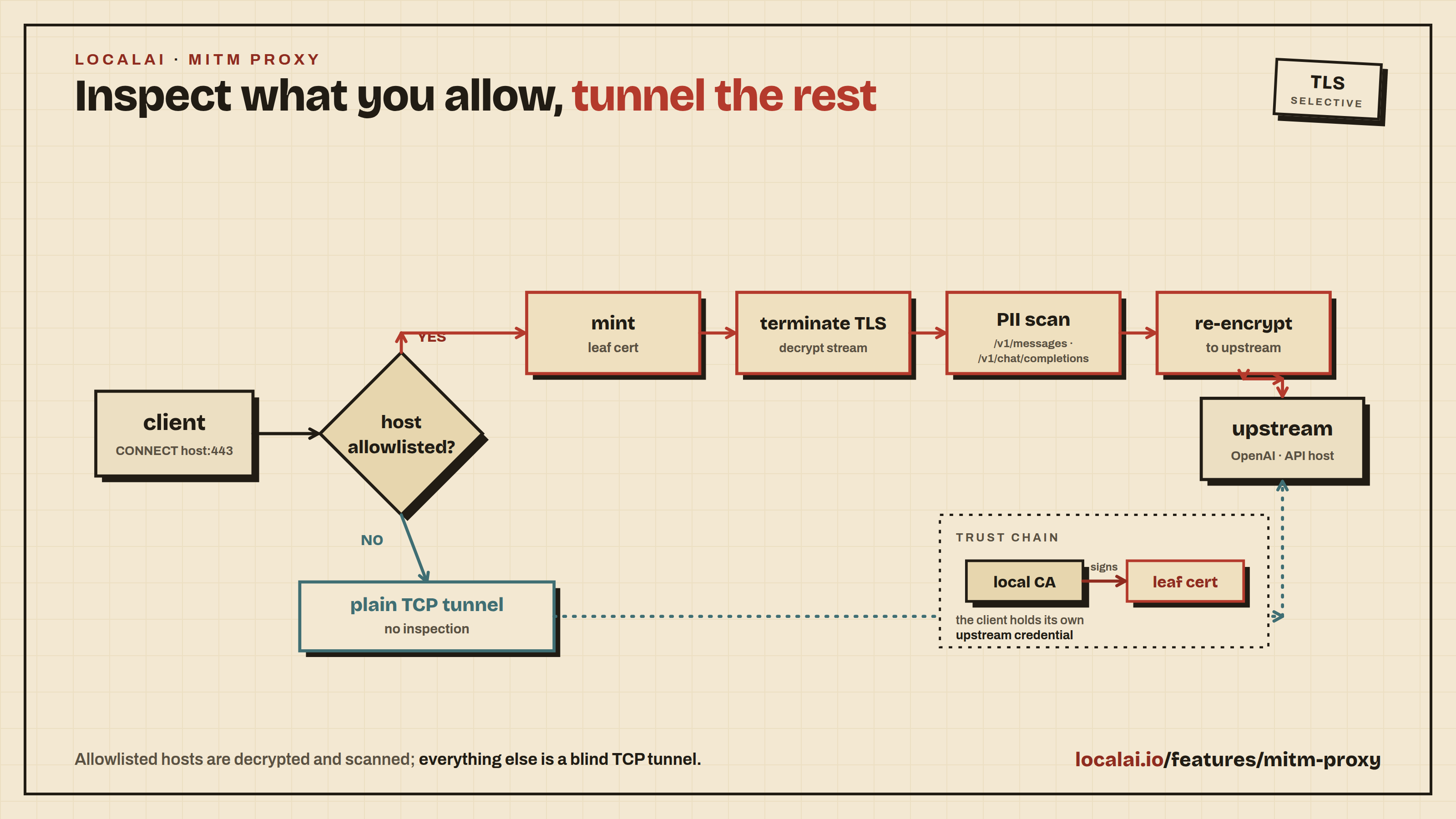
The same NER path runs on the MITM proxy
request body for intercepted hosts. Reversible response restoration currently
applies to LocalAI API routes; the MITM proxy keeps its own output-redaction
policy.
Instance-wide default detector
The Detector models table on the Middleware → Filtering page lists every
token_classify detector model (neural NER models and in-process pattern
matchers alike) and exposes a per-row Default toggle. Toggling a detector
on adds it to the instance-wide default detector set - one or more models
applied to any PII-enabled model that names none of its own pii.detectors.
It is persisted through POST /api/settings and read live, so a change takes
effect on the next request without a restart. A default that names a model no
longer loaded still appears (marked not loaded) so it can be toggled off.
The default set can also be supplied out-of-band with the
LOCALAI_PII_DEFAULT_DETECTORS environment variable (comma-separated model
names, e.g. privacy-filter-nemotron,secret-filter). When set it takes
precedence over the value persisted via the UI (env > file), which is the
right behaviour for immutable container deployments that pin filtering policy
at boot rather than via the admin UI.
This is what makes cloud-proxy / MITM redaction work out of the box: those
backends default to PII-enabled but ship no detector list, so without a
default detector the filter runs with nothing to scan. Set one here and
cloud-proxy traffic is scanned with no per-model config.
Resolution precedence (the single decision point is ResolvePIIPolicy,
shared by the chat middleware and the MITM listener so both agree):
An explicit pii.enabled on the model wins - true or false.
Otherwise PII is on if the backend defaults it on (cloud-proxy).
Detectors are the model’s own pii.detectors; if it lists none, the
instance-wide default detector(s) are used.
A model that resolves enabled but ends up with no detector at all (a
cloud-proxy model with no model detectors and no instance default) scans
nothing - set a default detector to close that gap.
Admin page
The /app/middleware page (admin role only) has four tabs - Filtering,
Routing, MITM Proxy (see the MITM doc),
and Events. The Filtering tab has a Detector models table (every
token_classify filter model, with the per-row Default toggle above and an
edit link to each detector’s config, plus an Add detector model button) and
a per-model table listing only the models PII can actually apply to - chat /
completion / embeddings / edit consumers and cloud-proxy models, not
VAD/STT/image models or the detector models themselves. Each row reports the
effectiveenabled state as an inline toggle - flipping it writes an
explicit pii.enabled to that model’s YAML (a server-side deep-merge that
preserves pii.detectors and every other field), so a cloud-proxy model shown
on by backend default can be turned off, and vice-versa - plus the
resolved detector(s) - with a (default) marker when they come from the
instance-wide default rather than the model’s YAML - why it is on (YAML /
backend default), and the recent event count. Detection policy
(entity→action, min score) is still edited on each detector model’s config
(Models → edit → PII), not globally.
Analyze / redact API
The same detection pipeline is also exposed as a standalone service, so a
client can scan or sanitise a string without routing a full chat request
through it (the inline path above). Two endpoints, both requiring a normal API
key (the pii_filter feature - not admin):
POST /api/pii/analyze - detect only. Returns the matched entity spans
(entity_type, sourcener|pattern, start/end, score, action)
and a blocked flag, without modifying the text.
POST /api/pii/redact - apply the configured policy. Returns redacted_text
(with masked spans replaced by [REDACTED:<id>]) and masked; when a block
action fires it returns 400 with type: pii_blocked and the offending
entities - never a redacted body.
Both take the same request: text plus a detector selection - either explicit
detector model names in detectors, or a consuming model whose effective
policy is used: the model’s own pii.detectors, else the
instance-wide default detectors, exactly as
the inline filter resolves them. A model with PII disabled - or enabled but
with no detector anywhere - is a 400: the inline filter would scan nothing
for it, and the API says so rather than implying a clean scan. The detection
policy lives on the detector models exactly as for the inline filter. The raw
matched value is never returned (an admin may pass reveal: true to include
the audit hash_prefix).
text is scanned as a single document. To reproduce the inline filter’s
conversation-context behaviour for multi-message content, join the messages
with blank lines into one text - NER detection quality depends on that
context (a bare 4421 is nothing; after “what are the last four digits of
your card?” it is a PIN).
# Redact with an explicit pattern/NER detectorcurl -sX POST http://localhost:8080/api/pii/redact \
-H 'Authorization: Bearer $API_KEY' -H 'Content-Type: application/json'\
-d '{"text":"reach me at jane@acme.io","detectors":["my-ner-model"]}'# => {"redacted_text":"reach me at [REDACTED:ner:EMAIL]","masked":true,...}# Analyze using a consuming model's configured detectorscurl -sX POST http://localhost:8080/api/pii/analyze \
-H 'Authorization: Bearer $API_KEY' -H 'Content-Type: application/json'\
-d '{"text":"sk-ant-api03-…","model":"gpt-4"}'# => {"entities":[{"entity_type":"ANTHROPIC_KEY","source":"pattern",...,"action":"block"}],"blocked":true}
Calls are audited in the same event log, tagged with an origin of
pii_analyze / pii_redact (the inline filter records middleware, the MITM
proxy records proxy), so GET /api/pii/events?origin=pii_redact shows just
the redact-API rows.
REST surface
Method
Path
Auth
Purpose
POST
/api/pii/analyze
api key (pii_filter)
Detect PII in a string; returns entity spans, no mutation.
POST
/api/pii/redact
api key (pii_filter)
Redact a string per policy; returns redacted_text or 400 pii_blocked.
Aggregated dashboard data: per-model PII state + detectors + router status + MITM status + admission status. One round-trip for the UI.
MCP tools
The same surface is mirrored through the LocalAI Assistant MCP server:
Tool
Read/Write
Purpose
get_pii_events
read
Recent redaction / block events with optional filters.
get_middleware_status
read
Aggregator - the same payload as GET /api/middleware/status.
Detection policy is part of a detector model’s config, so it is managed
through the model-config tools (edit_model_config), not a dedicated PII
tool.
Intelligent routing
A router model is a model whose YAML carries a router: block. When
a client addresses it ("model": "smart-router"), the middleware
classifies the prompt, picks a downstream candidate model, rewrites
input.Model to the candidate, and the standard model-resolution path
runs against that resolved target. ACL checks, disabled-state, and
per-model PII all apply to the resolved model - the router does
model selection only.
Depth-1 invariant
Candidates must not themselves be router models. A
smart-router → claude-strict → cloud-proxy chain is fine
(claude-strict is a regular cloud-proxy model). A
smart-router → other-router → real-model chain is rejected at runtime
by the middleware (the dispatcher returns HTTP 500 with a
depth-1 invariant error). This keeps the dispatch graph acyclic and
predictable.
Fallback
If no candidate’s label set covers the active label set from the classifier,
or the classifier errors out, the router uses cfg.Router.Fallback.
An empty fallback causes the dispatch to fail with HTTP 500 rather
than silently routing somewhere unintended - fail-fast, not
silent-bypass.
Available classifiers
LocalAI ships four classifier implementations. Pick one with classifier:
in the router YAML:
Classifier
When to use
Underlying primitive
score (default)
Small classifier-tuned LM (Arch-Router-style). Best when label vocabulary is well-covered by next-token continuation.
Score gRPC primitive (llama-cpp, vLLM).
colbert
When label descriptions are abstract or short and a next-token classifier produces flat distributions. Robust on long-form policy descriptions.
rerankers backend in ColBERT mode (e.g. bge-m3-colbert from the gallery).
decisions
Independent, overlapping policy decisions from a native decision model.
Internal SystemOne pipeline via Score; numeric noul P(true).
knn
When you have (or can generate) labelled example prompts — including outcome-labelled production traffic. Deterministic, auditable, cheapest per request, and the only classifier with an explicit out-of-distribution fallback.
embeddings backend + local-store KNN over a persisted, curated corpus.
All four share policies, candidates, and fallback. The existing
score, colbert, and knn classifiers also use classifier_cache_size. score and colbert take a
classifier_model (+ activation_threshold, optional
embedding_cache); knn instead takes a knn: block and a corpus
seeded through the API.
Native decision models (decisions)
Use classifier: decisions with an installed native decision model explicitly
configured with known_usecases: [decisions] and a backend supporting the Score
RPC. A chat model with ordinary continuation scoring is not a substitute.
The router calls the internal ModelSystemOne adapter, never a loopback HTTP
endpoint, NER extractor, or text-generation fallback.
Each policy becomes a separate noul question with explicit false and true
criteria. Stable question IDs map answers back to policy declaration order.
The native numeric noul value is P(true); a probabilities map is not
required. label_scores are independent values in [0,1], not a distribution
normalized across policies. Every label with probability >= threshold is
active, and score is the maximum probability. The default threshold is 0.5
(omitted or zero); positive configured thresholds must be finite and <=1.
There is no exclusive-choice mode or top-one rescue. All-below-threshold means
abstention. The first candidate covering all active labels wins; abstention,
malformed answers, native context rejection, and backend errors use the normal
configured fallback. Parent request cancellation returns without selecting a
fallback.
Limits: 1–64 unique nonblank policies, nonblank descriptions, and 64 KiB each
for serialized internal request and raw response. Missing/null/non-numeric,
wrong-type, unknown-ID and out-of-range answers fail classification; numeric
zero is valid. The native engine owns question framing and context enforcement.
The router does not estimate native context from raw JSON token counts or trim
text on that assumption. A request within the byte limit can still exceed the
model’s context and fall back.
The native adapter has a separate process-wide eight-operation ceiling,
covering healthy calls as well as abandoned work, independently of the general
backend admission limit (default 1024). Saturation fails classification and uses
the configured fallback; it does not queue. Model loading has no cancellable
API: cancellation releases the waiting caller, not underlying resources.
Eight stuck loads therefore prevent further native decisions until underlying
work finishes. This bound is a resource-safety measure, not a throughput claim.
The classifier registry invalidates on router configuration, resolved native
model configuration/usecase, or persisted model revision changes. Decisions do
not memoize prompt results or support embedding_cache/composite knn blocks;
these combinations are rejected. classifier_cache_size has no effect on this
classifier. The same central factory serves chat, Anthropic, realtime and the
existing /router/decide oracle. Decision traces contain no prompt text.
The Score classifier
The score classifier works like this:
Build a Qwen/ChatML system prompt that lists every policy label with
its description and primes the model to emit a label as the assistant
turn.
Ask the classifier model to score every policy label as the
first-token(s) continuation. This uses the Score gRPC primitive
(backend.proto::Score), which returns per-candidate log-probabilities
length-normalized so candidates of unequal token length stay
comparable.
Softmax the length-normalized log-probabilities into a probability
distribution over labels.
Threshold the distribution: every label whose probability passes
activation_threshold joins the active label set.
Pick the FIRST candidate whose Labels is a superset of the active
set. Admins order candidates smallest → largest so a single-label
query routes to the smallest capable model, while a query that
activates multiple labels falls to a candidate that covers them all.
This is the Arch-Router approach extended for multi-label. The
distribution carries more signal than the argmax - reading off the
spread lets one prompt activate multiple policies and route to a model
capable of all of them.
Recommended classifier model
Arch-Router-1.5B is
the canonical choice. It’s a Qwen-2.5-1.5B-Instruct base trained
specifically on routing-policy continuation, so the ChatML system-prompt
label-continuation pattern produces well-separated label probabilities
without prompt tuning. The Q4_K_M GGUF runs on CPU, GPU, and Intel SYCL.
The classifier model must support the Score gRPC primitive (today: the
llama-cpp and vLLM backends) and use the ChatML chat template. Any small
ChatML instruct model works under those constraints, but expect flatter
probability distributions which translate to a higher
activation_threshold to keep noise out of the active label set.
On llama-cpp, scoring rides the server’s task queue alongside
generation and embeddings, so the classifier may share a model config
with chat/completion/embeddings - a dedicated scorer model is no
longer required. Repeated calls with the same prompt also reuse the
prompt’s KV cache across candidates.
The Colbert classifier
The colbert classifier reranks each policy description against the
prompt via the rerankers backend and activates the labels whose
relevance scores clear activation_threshold (default 0.5 for
reranker-style scores in [0, 1]).
router:
classifier: colbertclassifier_model: bge-m3-colbert # gallery entry; loads BAAI/bge-m3 in ColBERT modeactivation_threshold: 0.5policies:
- label: code-generationdescription: writing, debugging, reading, or explaining code - label: casual-chatdescription: small talk, greetings, jokescandidates: [...]
The reranker scores the description (natural English) rather than
asking a small LM to score the label as a next-token continuation,
so it tends to be more robust when policy labels are abstract slugs
(compliance-review, tier-2-support). The trade-off is one
reranker round-trip per request - bge-m3 in ColBERT mode is fast
enough on GPU that this is comparable to the Score path for most
workloads. The embedding_cache block applies identically.
The reranker model’s type: (in the model YAML) selects which
underlying scoring head loads - colbert for late-interaction MaxSim,
cross-encoder for cross-attention scoring. The classifier itself is
indifferent; pick the head that fits your latency / quality budget.
The KNN classifier
The knn classifier routes by similarity-weighted vote over a
curated corpus of labelled example prompts. Where score and
colbert ask a model’s opinion per request, knn consults recorded
experience: each corpus entry is an example prompt plus the policy
labels it should activate. It needs no classifier model — just an
embedding model and a seeded corpus.
router:
classifier: knnfallback: gpt-4o-proxy # used whenever the prompt is unlike all corpus entriesknn:
embedding_model: nomic-embed-text-v1.5# embedding_revision: "2026-07" # bump for remote/in-place weight changes LocalAI cannot identifyk: 3# neighbours that vote (default 3)similarity_threshold: 0.80# the epistemic gate (default 0.80)vote_threshold: 0.5# weighted vote share a label needs (default 0.5)# store_name: router-corpus-smart-router # default "router-corpus-<router>"policies:
- label: code-generationdescription: writing or debugging code - label: casual-chatdescription: small talkcandidates:
- model: qwen3-0.6blabels: [casual-chat] - model: qwen-coderlabels: [code-generation, casual-chat]
For each request:
Embed the prompt with knn.embedding_model.
Fetch the k nearest corpus entries (cosine similarity).
Epistemic gate: entries below similarity_threshold cannot
vote. If none clears it, the classifier activates no labels and
the router uses fallback — a prompt unlike all labelled
experience is treated as undecidable, not guessed. The decision
log records nearest_similarity so you can see how far away the
closest labelled example was.
Each surviving neighbour votes for its labels, weighted by its
similarity; every label whose vote share clears vote_threshold
joins the active set. Candidate matching then proceeds exactly as
for the other classifiers. With k: 1 this degenerates to
“nearest example’s labels”.
The numeric configuration is bounded so one request cannot allocate an
unbounded neighbour result and the cosine-weighted vote remains meaningful:
Field
Accepted values
k
0 for the default (3), otherwise 1 through 1024
similarity_threshold
0 for the default (0.80), otherwise greater than 0 and at most 1
vote_threshold
0 for the default (0.5), otherwise greater than 0 and at most 1
Negative, non-finite, and above-range values are rejected when the model
configuration is loaded. The k cap bounds the store priority queue and
returned neighbour arrays. Similarity is restricted to non-negative cosine
weights because negative weights would make vote totals and shares invalid;
vote share itself is necessarily between zero and one.
Every knn decision (in the decision log and the /api/router/decide
response) also carries neighbors — the k retrieved corpus entries
by descending similarity, including ones below the gate, each as
{id, similarity, labels}. The id is the entry’s content hash (the
first 8 bytes of the SHA-256 of its text, hex-encoded): stable across
reseeds and re-embeds, and text-free — whoever seeded the corpus can
recompute text→id on their own copy to group decisions by corpus
region (e.g. for external per-region reliability accounting) without
corpus text ever leaving the server.
Seeding and curating the corpus (API-only)
Corpus entries may contain example user content, so they are managed
exclusively through the admin API — the UI never sends or displays
them, and no endpoint returns entry texts (inspection is label counts
only):
# Seed labelled exemplars (embedded server-side; indexed immediately)curl -X POST http://localhost:8080/api/router/smart-router/corpus \
-H "Content-Type: application/json"\
-d '{"entries": [
{"text": "why does this segfault when I free the buffer twice", "labels": ["code-generation"]},
{"text": "hey hows it going", "labels": ["casual-chat"]}
]}'# Inspect — counts only, never textscurl http://localhost:8080/api/router/smart-router/corpus/stats
# Wipe (file + live index); reseed afterwardscurl -X DELETE http://localhost:8080/api/router/smart-router/corpus
Entry labels must be declared in policies (same invariant as
candidate labels). Empty and duplicate labels are rejected, and
duplicate texts are skipped rather than double-weighted. Label your exemplars
with outcomes, not topics,
when routing for difficulty: an entry recording “the small model
handled prompts like this” is exactly as useful as one recording that
it failed — grade a sample of production traffic against your
candidates and seed both.
Persistence
The corpus is persisted as one JSONL file per router under
<data path>/router-corpus/ (text, labels, vector, embedding-model name,
and embedding fingerprint) — the file is the source of truth and
survives restarts; the local-store index is rebuilt from it at classifier
build time without re-embedding. Before each KNN lookup, LocalAI checks a stored
vector against the live index. If the store restarts empty after eviction or
an idle timeout, LocalAI restores the index from the file without re-embedding.
A synchronization error fails the lookup.
The fingerprint follows the effective
embedding-model config and local artifact identity, so changing the model or
replacing its local weights re-embeds the corpus on the next process load.
For remote embedding services whose weights can change invisibly, bump
knn.embedding_revision explicitly.
If an embedding fingerprint changes after that corpus is already present in
the live in-memory index, LocalAI fails the classifier build instead of
querying mixed embedding spaces. Restart LocalAI to rebuild the empty live
index and re-embed the persisted entries.
Tuning notes
similarity_threshold is the safety knob. Too low and the
router confidently extrapolates from unrelated exemplars; too high
and everything falls back. Watch nearest_similarity in the
decision log: fallback rows clustering just under the threshold mean
the corpus needs entries near that traffic (or the gate is too
tight).
k trades robustness for corpus density: k: 3 tolerates one
mislabelled neighbour; raise it only when every label region has
several exemplars. The maximum is 1024.
embedding_cache is ignored for knn (with a warning) — the
classifier is already an embedding KNN lookup; wrapping it in
another would embed twice for no additional information.
YAML reference
name: smart-routerknown_usecases:
- chatrouter:
# `score` (Arch-Router-style next-token scoring), `colbert` (rerank# policy descriptions), or `knn` (vote over a labelled corpus).# See "Available classifiers" above.classifier: score# A model loaded by LocalAI that supports the Score gRPC primitive# (llama-cpp and vLLM ship implementations). Arch-Router-1.5B is the# canonical choice.classifier_model: arch-router-1.5b# Bounded LRU keyed on (case-folded, whitespace-trimmed) prompt - prompts# repeat in agent loops; the cache amortises the classifier round-trip# across them. 0 here means "use the default" (1024); the cache cannot be# disabled from YAML today.classifier_cache_size: 256# Softmax probability floor a label must clear to join the active label set.# 0 = use the package default (0.15). 0.40 is a better empirical# starting point on Arch-Router-1.5B - see the tuning note below.activation_threshold: 0.40# Used when no candidate covers the active label set, or the classifier# itself errors. Empty here = fail-fast with HTTP 500.fallback: qwen3-0.6b# The label vocabulary. Descriptions are fed verbatim into the# classifier's system prompt - short, action-oriented sentences work# best ("writing or debugging code", "small talk").policies:
- label: code-generationdescription: writing, debugging, reading, or explaining code in any programming language - label: casual-chatdescription: small talk, greetings, jokes, or general conversation with no specific task - label: math-reasoningdescription: arithmetic, equations, percentage calculations, or step-by-step word problems# Routing table - order matters (smallest → largest). See "Score# classifier" above for the matching rule.candidates:
- model: qwen3-0.6blabels: [casual-chat] - model: qwen_qwen3.5-2blabels: [code-generation, casual-chat, math-reasoning]
Tuning activation_threshold
The threshold is the single knob you’ll want to tune per
(classifier-model, policy-set) pair. On Arch-Router-1.5B with the
three-policy setup above, sweeping the threshold over a hand-labeled
30-prompt corpus produced:
Threshold
Label-set accuracy
End-to-end routing accuracy
0.15 (package default)
30%
73%
0.30
57%
87%
0.40
60%
90%
0.45
67%
97%
0.50
67%
97%
The classifier’s argmax matches the dominant label 93% of the time on
this corpus - what the threshold controls is how much secondary-label
noise leaks into the active label set. Low thresholds push single-label
queries to multi-label-capable (larger) candidates unnecessarily; 0.40
keeps the dominant label dominant without losing genuine compound
activations.
Re-tune per (classifier-model, policy-set) pair. The /api/score
endpoint (see below) is the convenient probe - it returns the raw
length-normalized log-probabilities so you can sweep thresholds offline
without driving real chat completions.
Embedding cache (L2)
Classification is the most expensive thing the middleware does. The
score classifier already memo-caches verbatim repeats (case- and
whitespace-folded prompt → decision); the embedding cache is the
L2 tier that catches semantically similar prompts - “How do I exit
vim?” and “i need to quit vim” can share a decision instead of running
the classifier twice.
Pairs naturally with a larger / slower classifier model: the steady-state
cost on cache hits collapses to one embedding round-trip plus a KNN
search, both well under 100ms with nomic-embed-text-v1.5 + local-store.
Configuration
Add an embedding_cache: block to a router model:
router:
classifier: scoreclassifier_model: arch-router-1.5bpolicies: [...]candidates: [...]embedding_cache:
embedding_model: nomic-embed-text-v1.5 # any loaded embedding modelsimilarity_threshold: 0.80# cosine sim floor for a hit (default 0.80)confidence_threshold: 0.60# min top-label prob to cache a decision (default 0.60)# store_name: router-cache-smart-router # optional override; defaults to "router-cache-<router>"
Omit the block entirely to disable. The cache adds two new failure modes
(embedder unavailable, store unavailable) - both fall through to the
inner classifier so routing keeps working.
How it works
For each request:
Embed the probe prompt via the configured embedding_model.
KNN top-1 against the per-router local-store collection.
If similarity ≥ similarity_threshold, return the cached decision
(Cached=true, CacheSimilarity=<sim> in the decision log).
Miss → run the inner classifier. If decision.score >= confidence_threshold,
insert (embedding, decision) into the store. Low-confidence
decisions are deliberately skipped so they can’t poison future
paraphrases.
The local-store collection is named router-cache-<router-model-name> by
default — each router gets its own collection so two routers can’t
cross-contaminate. The collection is in-memory only: local-store
keeps no on-disk artefact, so the embedding cache starts empty on every
restart and re-learns from live traffic. (The KNN classifier’s corpus
does NOT have this limitation — its corpus file is the source of truth
and re-indexes on startup; see “The KNN classifier” above.)
Tuning notes
Similarity threshold: 0.80 is the package default - re-tune
per (embedding model, corpus). The histogram on the Routing tab
shows where the cosine distribution actually sits; pick a
threshold above the cross-intent cluster and below the paraphrase
cluster.
Confidence threshold: 0.60 corresponds roughly to “the
classifier is committed to a top label.” Don’t lower this - caching
unsure decisions propagates the uncertainty.
Cache flush: invalidates automatically when the router YAML
changes (the classifier cache is fingerprinted by yaml.Marshal),
but the underlying local-store collection still holds the old
payloads. Manual flush via local-store admin or by renaming
store_name if you need a hard reset.
Latency budget: an embedding round-trip (typically 30-80ms for
small embedding models) plus KNN search (~5ms) is added to every
miss on top of the classifier latency. Cache hits skip the
classifier entirely. Break-even is around 7-10% hit rate; agent
loops with repeated phrasing easily exceed this.
Admin page
The /app/middleware page has a Routing tab listing every router
model’s classifier, policies, candidates, and fallback. The Events
tab shows the decision log - one row per classified request with
correlation ID, requested model, served model, classifier name, active
labels, top-label score, and latency.
Routing decisions are stored in an in-process ring buffer (default
capacity 5,000). The decision log is for audit and tuning - the
canonical usage log lives in /api/usage and correlates by request ID.
REST surface
Method
Path
Auth
Purpose
GET
/api/router/status
any
Router configuration: each router model’s classifier, policies, candidates.
GET
/api/router/decisions
admin
Decision log with optional filters (correlation_id, user_id, router_model, limit).
POST
/api/router/{name}/corpus
admin
Seed the KNN corpus with labelled exemplars: {"entries": [{"text": "...", "labels": ["..."]}]}. Embedded server-side, persisted, indexed immediately.
GET
/api/router/{name}/corpus/stats
admin
KNN corpus size and per-label counts. Counts only — entry texts are never returned.
DELETE
/api/router/{name}/corpus
admin
Wipe the KNN corpus (file + live index).
POST
/api/score
admin
Direct access to the Score gRPC primitive — useful for offline threshold tuning. Body: {"model": "<classifier-model>", "prompt": "<chatml-prompt>", "candidates": ["label-a", ...], "length_normalize": true}. The llama-cpp and vLLM backends implement Score; other backends return UNIMPLEMENTED.
MCP tools
Tool
Read/Write
Purpose
get_router_decisions
read
Recent decision log with optional filters.
get_middleware_status
read
Includes the router section listing configured router models.
get_router_corpus_stats
read
KNN corpus size and per-label counts (never texts).
seed_router_corpus
write
Add labelled exemplars to a KNN router’s corpus.
clear_router_corpus
write
Wipe a KNN router’s corpus.
Mutating the rest of the routing config — adding a candidate, changing
the classifier model — goes through the model-config surface
(edit_model_config / PATCH /api/models/config-json/:name); reload
with POST /models/reload to pick up YAML edits without restarting.
Operational notes
Reload after YAML edits. The router configs are loaded at startup
and cached. POST /models/reload re-reads from disk; the next request
rebuilds the classifier from the new config (the classifier cache is
fingerprinted by yaml.Marshal(RouterConfig) so it invalidates
automatically).
Classifier latency on Arch-Router-1.5B Q4_K_M is ~500ms steady
for 3 policies on Intel SYCL. The score primitive re-decodes the full
prompt for every candidate today (the KV cache is cleared between
candidates); the prompt-KV-sharing optimization is on the perf TODO
list in backend/cpp/llama-cpp/grpc-server.cpp::Score. Until then,
classifier_cache_size is the highest-leverage knob for repeat-query
workloads (agent loops).
Decision log size: 5,000-entry ring buffer per process. The
log is in-process and not persisted - pair with the usage log for
long-horizon audit.
Related features
Cloud passthrough proxy - combine
the router with proxy-* backends to send simple prompts to local
models and complex ones to cloud providers.
MITM proxy - apply the same PII
filter to Claude Code, Codex CLI, and any HTTPS client without
LocalAI holding their API keys.
Authentication - admin role is
required for mutating endpoints and the /app/middleware page; in
no-auth single-user mode the synthetic local user has admin role
automatically.
Creating a Decisions router in the UI
In Middleware → Routing → Create routing model, select Decisions (native
probabilities) under Classifier. The Classifier Model picker lists installed,
enabled native decision models explicitly declaring known_usecases: [decisions]
on a backend supporting Score, including llama-cpp and vllm-cpp. NER-only
models and routing dispatchers are not eligible. Selecting a model saves its exact
configured name; it does not install weights.
Decisions needs no ChatML template and returns independent label probabilities,
not an exclusive choice. Start with an activation threshold of 0.5 (zero uses
the Decisions default of 0.5). Changing classifiers clears the dependent model
selection but preserves your threshold, including the template’s initial 0.40;
set it deliberately before saving. Existing saved selections reopen unchanged.
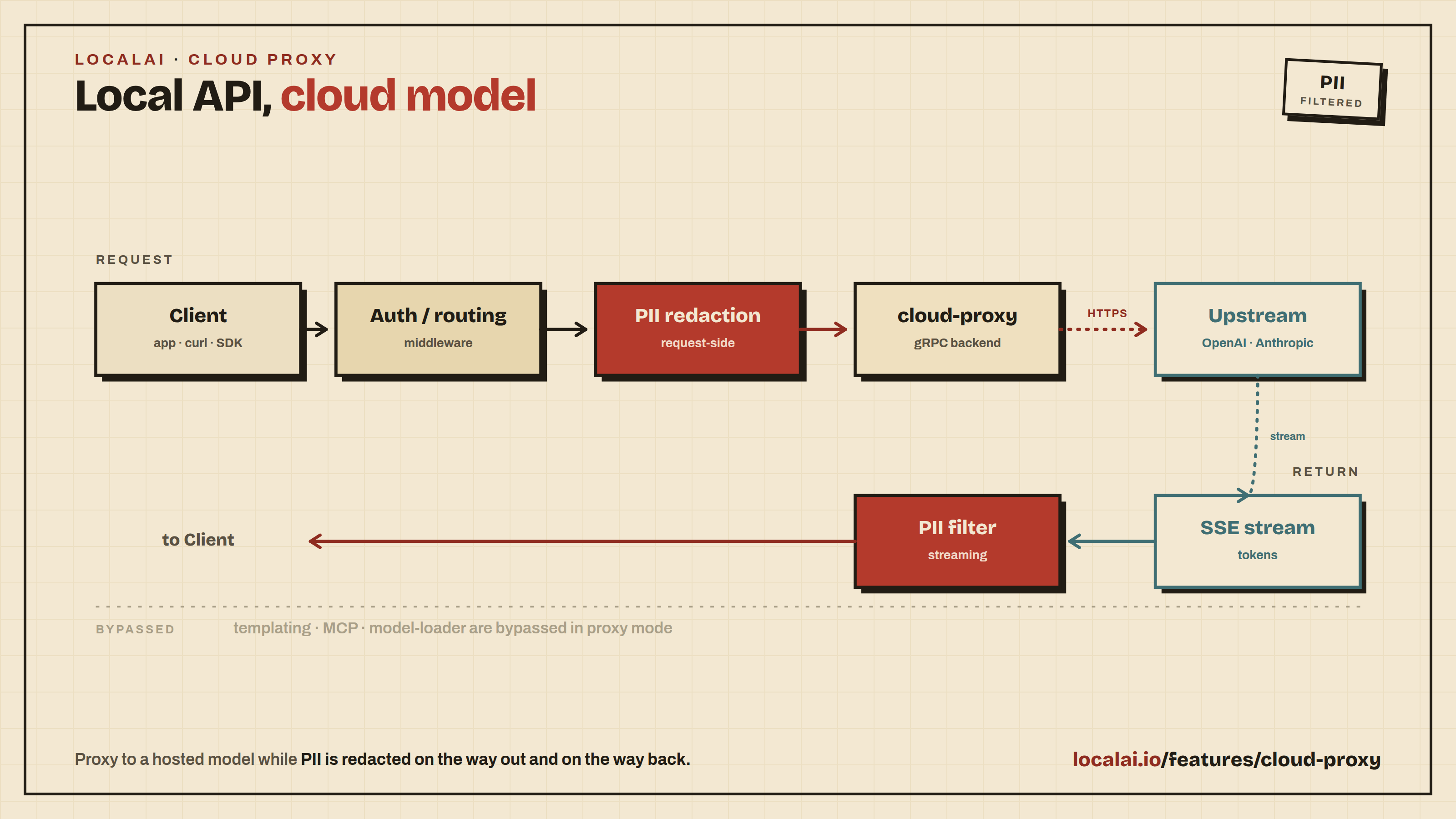
LocalAI can forward chat-completion and Anthropic Messages requests to an
external provider instead of running them through the local gRPC backend
pipeline. Configure a model with backend: cloud-proxy and a proxy.upstream_url,
and LocalAI bypasses templating, MCP injection, and the local model loader
entirely - the upstream sees the body the client sent (with only the top-level
model field optionally rewritten).
The streaming PII filter still runs over the upstream’s SSE stream, so cloud
egress remains subject to the same redaction rules a local model would apply.
When to use this
Mix local and cloud models in the same LocalAI instance - clients hit one
endpoint, LocalAI dispatches per model.
Apply LocalAI’s auth, usage tracking, and PII redaction to cloud traffic
before the body leaves the network.
Use the intelligent router to send small or simple prompts to a local model
and complex ones to Claude or GPT-4o.
To fall back to a local model when the upstream is down, list the proxy model
in a failover chain.
How it works
Request hits LocalAI on /v1/chat/completions (OpenAI-shaped) or
/v1/messages (Anthropic-shaped).
The standard auth and routing middleware runs.
Per-model PII redaction runs request-side as it would for any model.
The handler detects the cloud-proxy backend in passthrough mode and
loads the cloud-proxy gRPC backend, which owns the outbound HTTP.
The backend POSTs the body to proxy.upstream_url with provider-aware
authentication, then streams the SSE response back to core.
The streaming PII filter rewrites per-token text in flight; the upstream’s
event names and metadata pass through unchanged.
Passthrough mode is wire-format-faithful - it does not translate request
shapes between providers. A client posting an OpenAI-shaped body to an
Anthropic upstream will get a confused upstream. Use the matching wire format,
or switch to translate mode (below).
Configuration
The cloud-proxy backend has one knob - the provider it should authenticate
against - and two modes:
proxy.mode
What it does
When to use
passthrough (default)
Forwards the request body verbatim to upstream_url. Client must speak the upstream’s wire format.
Same wire format on both ends.
translate
Backend converts internal proto to the upstream’s wire format. Client can speak OpenAI-shaped requests to an Anthropic upstream, etc.
Cross-format adaptation.
proxy.provider selects the auth scheme and (in translate mode) the wire
format. Supported values: openai, anthropic.
If the upstream requires an API key, configure either an environment variable
(api_key_env) or a file (api_key_file). The key never appears in the config
file or the admin UI. If the upstream requires no API key, omit both fields.
OpenAI passthrough
name: gpt-4o-proxybackend: cloud-proxy# When set, replaces the client's "model" field before forwarding.# Useful when the LocalAI alias differs from the upstream's canonical name.proxy:
mode: passthroughprovider: openaiupstream_url: https://api.openai.com/v1/chat/completionsapi_key_env: OPENAI_API_KEYupstream_model: gpt-4orequest_timeout_seconds: 120# PII filtering defaults to ON for cloud-proxy backends. Override by setting# pii.enabled: false explicitly. Per-pattern action overrides go in# pii.patterns; see the Middleware admin page or the Middleware feature doc.pii:
enabled: true
Then start LocalAI with the API key in the environment:
export OPENAI_API_KEY=sk-...
local-ai run
Clients hit http://localhost:8080/v1/chat/completions with "model": "gpt-4o-proxy"
and the request lands on OpenAI’s API.
Anthropic passthrough
name: claude-sonnet-proxybackend: cloud-proxyproxy:
mode: passthroughprovider: anthropicupstream_url: https://api.anthropic.com/v1/messagesapi_key_env: ANTHROPIC_API_KEYupstream_model: claude-3-5-sonnet-20241022request_timeout_seconds: 300pii:
enabled: true# Block - not just mask - leaked credentials before they reach the upstream.patterns:
- id: api_key_prefixaction: block
Anthropic clients hit http://localhost:8080/v1/messages with
"model": "claude-sonnet-proxy".
Other OpenAI-compatible providers
Most third-party providers (Together, Groq, DeepInfra, OpenRouter, …) speak
the OpenAI chat-completions wire format. Use provider: openai with the
provider’s URL and, if required, its API key:
Replace the example URL and model name with your upstream’s values. LocalAI
loads this configuration without resolving a key and adds no upstream
Authorization header. This also applies to OpenAI-compatible upstreams in
translate mode.
Omitting both fields differs from setting api_key_env to an empty or unset
environment variable: the latter causes a backend load error.
LocalAI’s client authentication is separate. Clients must still authenticate
to LocalAI when its authentication is enabled. LocalAI does not forward their
Authorization header to the upstream.
An upstream without API keys can still require another authentication or
payment protocol. Omitting these fields does not implement that protocol.
Translate mode
In translate mode the cloud-proxy backend converts LocalAI’s internal proto
to the provider’s wire format. This lets a client speak one shape (e.g.
OpenAI Chat Completions) against an upstream that expects another (e.g.
Anthropic Messages).
Translate mode currently routes only pure-text completions - tool calls,
image blocks, and per-request usage tokens are dropped through the
internal Predict() signature. Use passthrough mode when your clients need
the upstream’s full feature set.
In translate mode, an Anthropic response with stop_reason: "refusal" is returned to the client as an error instead of an empty successful reply, for both non-streaming and streaming requests. A streamed response may already have delivered partial content when the refusal arrives. Responses that end normally (end_turn) are unaffected, even when their content is empty.
Anthropic prompt caching
proxy.cache_prompt: true makes the translator add Anthropic
prompt-cache
breakpoints (cache_control: {type: ephemeral}) to the stable prefix of every
request: the system block, the last tool, and the final message block (at most
three of Anthropic’s four allowed breakpoints). Anthropic then serves that
repeated prefix at the cache-read rate (~0.1x input) on subsequent calls, which
sharply cuts cost on agentic or multi-turn workloads that re-send a large,
unchanging system-plus-tools prefix each turn.
The flag only applies with mode: translate and provider: anthropic; it has
no effect in passthrough mode, for other providers, or when unset (the system
field is then still emitted as a bare string).
cloud-proxy forwards chat and Messages requests only. To serve a model from
another LocalAI instance for every API it has, use backend: localai-proxy.
The backend receives the request from the local pipeline like any other
backend and sends it to the REST API of the upstream LocalAI. Because it is a
normal backend, a localai-proxy model can be a stage of a realtime pipeline
or a target of a failover chain.
name: remote-llmbackend: localai-proxyknown_usecases: [chat]proxy:
# Base URL of the upstream LocalAI. Do not add /v1 or an endpoint path:# the backend adds the path for each API.upstream_url: https://argus.lan:8080# The model name on the upstream. When empty, the name of this config.upstream_model: gemma-3-12b# Optional. The upstream API key, from an environment variable# (or api_key_file). Sent as "Authorization: Bearer <key>".api_key_env: ARGUS_API_KEY# Optional. Time limit for each non-streaming request. Streams have no limit.request_timeout_seconds: 120
A model that does live transcription in a realtime pipeline also names a
realtime pipeline on the upstream. The backend opens a transcription session
on the upstream /v1/realtime endpoint with that pipeline:
Set known_usecases on every localai-proxy model. Failover uses it to match
targets, and LocalAI cannot guess the usecases of a remote model. For a chat
model, known_usecases: [chat] has one more effect: LocalAI sends the chat
messages to the upstream /v1/chat/completions endpoint, and the upstream
applies its own chat template, tool parsing and reasoning parsing. Without
chat, or when the config has its own templates, LocalAI renders the prompt
locally and sends it to /v1/completions. proxy.mode and proxy.provider
have no effect on this backend.
Image, video and 3D: image generation, upscaling, video generation, 3D
generation and animation. The backend downloads the files that the upstream
generates.
Vision: object detection, depth, face verification and analysis, voice
verification, analysis and embeddings.
Stores: set, get, delete, find.
Methods that have no REST API on the upstream return the gRPC error
Unimplemented (“localai-proxy: has no upstream counterpart”). The
upstream returning 501 Not Implemented maps to the same code. Both mean a
capability gap, not a broken target: audio encoding and decoding,
audio-to-audio streams, token classification (PII NER), model metadata,
fine-tuning, quantization and model export fall in this bucket. A failover
chain skips a target that returns Unimplemented and tries the next target,
but does not mark the target down. This applies to every API, also to the APIs
that report Unimplemented to the client as HTTP 501 (images, video, 3D,
detection, depth, face and voice).
Errors from the upstream: a 5xx response (other than 501) or a connection
failure becomes Unavailable, and a failover chain marks the target down. A
4xx response becomes InvalidArgument, and LocalAI returns it to the client
without a retry or a trip — except 429 Too Many Requests, which becomes
ResourceExhausted: the request itself is fine, the upstream is just out of
capacity, so a failover chain retries it on the next target and trips the
rate-limited one, moving traffic off it until it recovers.
Known limits:
Voice-profile paths pass through unresolved. When LocalAI resolves a TTS
voice to a local file (for example a voice clone reference), the backend
sends that path to the upstream, where it does not exist. Use voices that
the upstream knows by name.
Depth exports are not supported. The upstream writes them to its own disk,
so a depth request with exports or a destination file returns
Unimplemented. Depth maps and points without exports work.
The REST transcription API has no end-of-utterance (eou) flag, so
transcriptions through the proxy never set it. Live transcription through
realtime_pipeline sets eou at the end of each utterance.
Sound generation from a source audio file is not supported.
Chat and completions do not forward grammars, so JSON mode and other
grammar-constrained output are not enforced by the upstream. Images, audio
and video attached to messages are not forwarded either. The backend logs a
warning for each request that loses one of these fields.
Streamed TTS cannot detect an upstream synthesis failure that ends the
stream cleanly. The client receives the audio produced so far as a complete
response, and a failover chain does not retry it. A stream that is cut off
is reported as an error.
upstream_url is the root of the upstream server. If it has a /v1 path,
the backend removes /v1 and everything after it, and logs a warning.
Limitations
Passthrough does no wire-shape translation. Use mode: translate (with
the constraints documented above) or send requests that match the upstream’s
format.
No output-side PII for non-streaming responses. Streaming responses are
filtered in flight; buffered responses pass through verbatim. Request-side
PII covers both.
No retry or backoff. Transient upstream failures bubble up to the client
as 502 Bad Gateway.
No request shape validation. If the upstream rejects the body, its
error envelope is forwarded to the client unchanged.
Operational notes
Cloud-proxy backends load like any other gRPC backend - they consume one
process per loaded model and appear in the backend management view, but
they hold no GPU memory.
Usage stats and the trace log capture cloud-proxy requests like any other
request. Token counts come from the upstream’s usage field when present.
Set request_timeout_seconds defensively - a hung upstream otherwise ties
up an HTTP handler until the client disconnects.
LocalAI can act as a local HTTPS proxy that redacts PII from your Claude
Code, OpenAI Codex CLI, or any HTTPS client without holding their API keys.
The proxy intercepts only the LLM API endpoints you allowlist (default:
api.anthropic.com, api.openai.com); everything else - OAuth, telemetry,
package fetches - passes through as a plain TCP tunnel.
Use this when:
You want to use Claude Code with a Claude Pro/Max subscription but still
apply the same PII redaction LocalAI applies to API-key traffic.
You run Codex CLI on a corporate laptop and need an audit trail of prompts.
You want LocalAI to enforce egress policies for AI traffic without
becoming the API endpoint clients talk to.
The proxy is off by default. Operators opt in by setting --mitm-listen
and distributing the generated CA cert.
How it works
The proxy generates a private CA on first start (persisted to disk).
Clients set HTTPS_PROXY=http://localai:port and add the CA to their
trust store (e.g. NODE_EXTRA_CA_CERTS for Node-based CLIs like Claude
Code and Codex).
The CLI sends CONNECT api.anthropic.com:443 to the proxy.
For allowlisted hosts, the proxy mints a per-host leaf cert signed by
the CA, terminates TLS, parses the HTTP request, applies the global
PII redactor on /v1/messages or /v1/chat/completions, and forwards
to the real upstream over its own TLS connection.
The streaming SSE response runs through the same pii.StreamFilter
the cloud-proxy backend uses.
For non-allowlisted hosts, the proxy is a plain CONNECT tunnel - no
TLS termination, no inspection, no CA trust required.
The CLI authenticates with its own subscription / API key as it normally
would. LocalAI never holds the credential - it just observes and rewrites
the request body.
Quick start
Start LocalAI with the MITM listener:
local-ai run --mitm-listen :8443
The first start generates a CA at <data-path>/mitm-ca/{ca.crt,ca.key}.
Restarting reloads the same CA so clients keep trusting it.
Configure Claude Code to use the proxy and trust the cert:
export HTTPS_PROXY=http://localhost:8443
export NODE_EXTRA_CA_CERTS=$(pwd)/proxy-ca.crt
claude
Now any claude chat session that touches api.anthropic.com/v1/messages
gets its prompts and tool inputs scanned by LocalAI’s PII filter, and any
PII the model emits in its streaming response is masked before reaching
your terminal. Events appear in the LocalAI middleware admin page under
Filtering → Recent events.
The same works for Codex CLI - set HTTPS_PROXY and NODE_EXTRA_CA_CERTS
and run codex.
Configuration
The proxy is enabled with two startup settings:
Flag / env
Default
Purpose
--mitm-listen / LOCALAI_MITM_LISTEN
empty (disabled)
Address to bind the proxy listener on
--mitm-ca-dir / LOCALAI_MITM_CA_DIR
<data-path>/mitm-ca
Where to persist the CA cert + key
There is no global intercept-hosts flag. The hosts whose TLS is terminated
and scanned are declared per model, in the model YAML mitm.hosts:
block. Each model that names one or more hosts owns those hosts; everything
not listed by any model tunnels through untouched. A cloud-proxy model that
should intercept Anthropic traffic looks like:
Hostnames are case-insensitive. Add custom upstreams (e.g. an
OpenAI-compatible third-party provider) by adding their hostname to a
model’s mitm.hosts: list and ensuring their endpoint paths match
/v1/chat/completions or /v1/messages. You can create these models from
the Add Model UI.
What gets redacted
The MITM proxy runs the same PII detection as the regular request
middleware. Detection is NER-based (a token-classification detector
model), not a fixed regex list: the older pattern tier has been removed.
See /docs/features/middleware/ for how detector models, entity
groups, and the mask / block actions are configured, and for the
instance-wide default detector.
A block action returns HTTP 400 with error.type=pii_blocked to the
client. The CLI sees the rejection and shows it as a request error.
Events are persisted via the same pii.EventStore the rest of LocalAI
uses, so the /api/pii/events endpoint and the middleware admin page
include MITM events alongside direct-API events.
Security notes
The CA private key is the master credential. Anyone with read
access to <data-path>/mitm-ca/ca.key can forge TLS for any host the
proxy could intercept. The file is mode 0600; keep it that way.
The proxy listener accepts plaintext HTTP CONNECT requests - bind it
to localhost (--mitm-listen 127.0.0.1:8443) unless you’ve added auth
in front of the listener. There is no built-in API-key check on this
port.
The MITM CA is separate from any TLS cert LocalAI’s main HTTP API
uses. Installing the MITM CA grants trust only for traffic that flows
through this proxy.
The proxy does not pin upstream certificates; it trusts the system
certificate store. If your machine’s trust store is compromised, the
proxy is too.
TLS termination negotiates HTTP/2 by default (ALPN h2) and falls
back to HTTP/1.1 for clients that don’t speak h2. Modern CLIs (Claude
Code, Codex) and the Anthropic / OpenAI APIs all use h2.
Limitations
Only /v1/messages and /v1/chat/completions get redacted. Other
paths on the same host (OAuth, model listing) are forwarded verbatim.
No request-shape translation. The proxy assumes the request body
matches the host’s wire format; cross-shape forwarding is the cloud
proxy backend’s job, not the MITM’s.
No CA rotation in the MVP. To rotate, delete ca.key and ca.crt
and re-distribute the new cert to every client.
Cert pinning kills MITM. Neither Claude Code nor Codex CLI pins
certificates today, but a future SDK update could. If a CLI starts
refusing the proxied handshake, that’s the signal.
Comparison with the cloud-proxy backend
LocalAI ships two cloud-related proxy modes; pick by who holds the credential:
Cloud-proxy backend (backend: proxy-*)
MITM proxy (--mitm-listen)
Client config
localai:8080 as API endpoint
localai:8443 as HTTPS_PROXY
Holds API key
LocalAI
Client (CLI’s own auth)
Works with subscription auth
No
Yes (CLI uses its own login)
Request rewriting
Yes (handler controls it)
Yes (selective per host+path)
CA cert distribution
Not needed
Required on every client
Routes through LocalAI’s auth/usage tracking
Yes
Yes (per-correlation-id events)
For shared deployments where LocalAI owns the API key and clients are
unsophisticated (curl, simple webapps), use the cloud-proxy backend. For
“give my Claude Code a privacy filter” use cases, use the MITM proxy.