The References section provides comprehensive technical documentation for developers and system administrators working with LocalAI. This includes API specifications, command-line reference, architecture details, and compatibility information.
Who Should Read This Section
API Developers integrating LocalAI into applications
System Administrators configuring and maintaining installations
DevOps Engineers understanding architecture and deployment
LocalAI provides shell completion support for bash, zsh, and fish shells. Once installed, tab completion works for all CLI commands, subcommands, and flags.
Generating Completion Scripts
Use the completion subcommand to generate a completion script for your shell:
local-ai completion bash
local-ai completion zsh
local-ai completion fish
If shell completions are not already enabled in your zsh environment, add the following to the beginning of your ~/.zshrc:
autoload -Uz compinit
compinit
Fish
local-ai completion fish | source
Or install it permanently:
local-ai completion fish > ~/.config/fish/completions/local-ai.fish
Usage
After installation, restart your shell or source your shell configuration file. Then type local-ai followed by a tab to see available commands:
$ local-ai <TAB>
run              backends         completion       explorer         models
federated        sound-generation transcript       tts              util
Tab completion also works for subcommands and flags:
$ local-ai models <TAB>
install  list

$ local-ai run --<TAB>
--address          --backends-path    --context-size     --debug            ...
P2P API reference
LocalAI supports peer-to-peer (P2P) networking for distributed inference. The P2P API endpoints allow you to monitor connected worker and federated nodes, retrieve the P2P network token, and get cluster statistics.
LocalAI provides endpoints to inspect the running instance, including available backends, loaded models, and version information.
System Information
Method:GET
Endpoint:/system
Returns available backends and currently loaded models.
Response
Field
Type
Description
backends
array
List of available backend names (strings)
loaded_models
array
List of currently loaded models
loaded_models[].id
string
Model identifier
loaded_models[].backend
string
Backend serving the model, from its config. Omitted when the model was loaded without one
loaded_models[].process
object
The backend process serving the model on this host. Omitted when there is no local process (a distributed worker holds the model) or it could not be read
loaded_models[].process.pid
integer
Process ID
loaded_models[].process.rss_bytes
integer
Resident host memory, in bytes. Weights offloaded to a GPU are not included
loaded_models[].process.memory_percent
number
rss_bytes as a percentage of host RAM
loaded_models[].process.cpu_percent
number
Share of the whole host’s CPU used since the previous call, 0-100. Omitted on the first call that sees the process, because there is no earlier reading to compare against
loaded_models[].process.started_at
string
When the process started (RFC 3339)
loaded_models[].size_vram
integer
Optional DRM-accounted resident device memory, in bytes
Per-model VRAM
On Linux, size_vram reports resident device memory for the local backend
process and its child processes. LocalAI reads drm-resident-local* and
drm-resident-vram* from /proc and counts each DRM client once per GPU.
Host-memory regions are excluded. The reading includes buffers attributed
to the backend, without separating weights, KV cache, and other allocations.
See the kernel DRM accounting specification
for these counters.
Kernels without CONFIG_PROC_CHILDREN are supported. When /proc does not
provide per-thread children files, LocalAI finds child processes through
the parent PIDs in /proc/<pid>/stat.
The field is omitted when accounting is unavailable or incomplete. This
includes external and distributed backends, macOS, proprietary NVIDIA
drivers, primary DRM nodes (/dev/dri/card*), missing resident counters,
and unreadable process information.
A present value of 0 means the supported counters report zero bytes.
Treat an absent field as unknown.
This is a snapshot of driver accounting, not a memory reservation. Shared
buffers can appear in different clients’ counters, and allocations can change
during collection. Do not treat the sum across models as exclusive physical
GPU usage. These readings do not replace capacity checks when scheduling work.
cpu_percent covers the time since the previous call to this endpoint, so a
dashboard polling every few seconds gets a current reading. The WebUI’s
Operate → This machine page polls it every five seconds.
Version
Method:GET
Endpoint:/version
Returns the LocalAI version and build commit.
Response
Field
Type
Description
version
string
Version string in the format version (commit)
Usage
curl http://localhost:8080/version
Example response
{
"version": "2.26.0 (a1b2c3d4)"}
Error Responses
Status Code
Description
500
Internal server error
Model compatibility table
Besides llama based models, LocalAI is compatible also with other architectures. The table below lists all the backends, compatible models families and the associated repository.
Note
LocalAI will attempt to automatically load models which are not explicitly configured for a specific backend. You can specify the backend to use by configuring a model with a YAML file. See the advanced section for more details.
All backends listed here can be installed on demand from the Backend Gallery. The exact set of acceleration variants published for each backend is defined in the backend library, gallery/backends/index.yaml. backend/index.yaml is generated from it.
From-scratch C++20 port of vLLM by the LocalAI team: paged KV cache, continuous batching, prefix caching, safetensors + GGUF, engine-enforced structured output, no Python at inference
GPT, Functions
no
yes
CPU, CUDA 13 (Ampere through Blackwell), Vulkan, Metal, Jetson L4T (Orin, Thor, GB10)
NVIDIA C++/GGML runtime for Nemotron Speech: offline, streaming and live transcription, Sortformer diarization, MagpieTTS synthesis and Riva-Translate translation from one backend. See NeMo-Speech.cpp backend
Any-to-any audio models (for example LFM3-Audio, experimental) served through the Realtime API, with tool calls and transcripts. See Speech-to-speech models
CPU, CUDA 12/13, ROCm, Intel SYCL, Vulkan, Metal, Jetson L4T
Multi-family GGML audio engine: voice activity detection (bundled silero_vad and marblenet_vad, no download), source separation into named stems, and voice conversion. See audio.cpp backend
HuggingFace → GGUF model conversion and quantization
CPU, Metal
Acceleration Support Summary
GPU Acceleration
NVIDIA CUDA: CUDA 12.0, CUDA 13.0 support across most backends
AMD ROCm: HIP-based acceleration for AMD GPUs
Intel oneAPI: SYCL-based acceleration for Intel GPUs (F16/F32 precision)
Vulkan: Cross-platform GPU acceleration
Metal: Apple Silicon GPU acceleration (M1/M2/M3+)
Specialized Hardware
NVIDIA Jetson (L4T CUDA 12): ARM64 support for embedded AI (AGX Orin, Jetson Nano, Jetson Xavier NX, Jetson AGX Xavier)
NVIDIA Jetson (L4T CUDA 13): ARM64 support for embedded AI (DGX Spark)
Apple Silicon: Native Metal acceleration for Mac M1/M2/M3+
Darwin x86: Intel Mac support
CPU Optimization
AVX/AVX2/AVX512: Advanced vector extensions for x86
Quantization: 4-bit, 5-bit, 8-bit integer quantization support
Mixed Precision: F16/F32 mixed precision support
Note: any backend name listed above can be used in the backend field of the model configuration file (See the advanced section).
* Only for CUDA and OpenVINO CPU/XPU acceleration.
Architecture
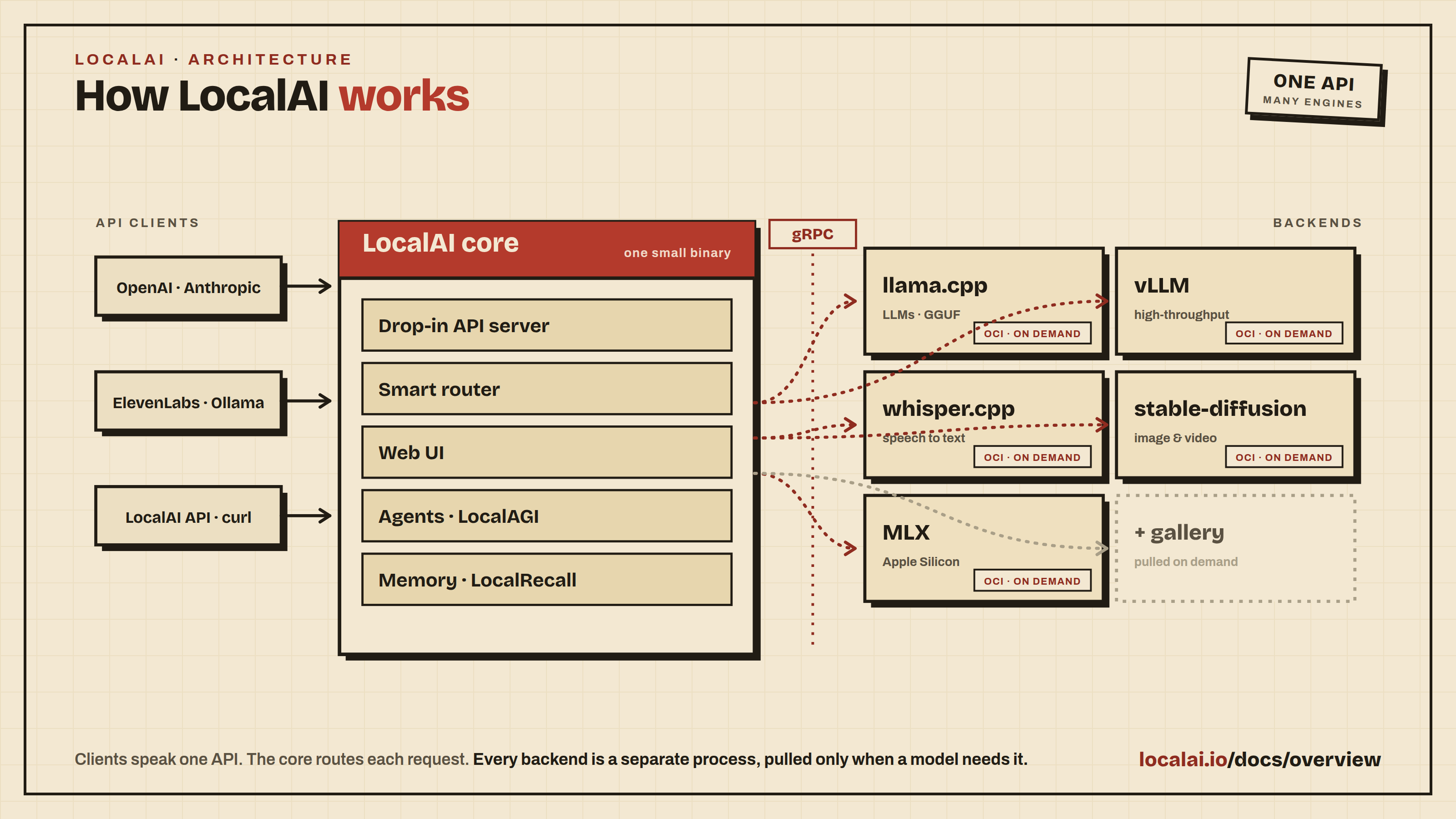
LocalAI is an API written in Go that serves as an OpenAI shim, enabling software already developed with OpenAI SDKs to seamlessly integrate with LocalAI. It can be effortlessly implemented as a substitute, even on consumer-grade hardware. This capability is achieved by employing various C++ backends, including ggml, to perform inference on LLMs using both CPU and, if desired, GPU. Internally LocalAI backends are just gRPC server, indeed you can specify and build your own gRPC server and extend LocalAI in runtime as well. It is possible to specify external gRPC server and/or binaries that LocalAI will manage internally.
LocalAI uses a mixture of backends written in various languages (C++, Golang, Python, …). You can check the model compatibility table to learn about all the components of LocalAI.
Backstory
As much as typical open source projects starts, I, mudler, was fiddling around with llama.cpp over my long nights and wanted to have a way to call it from go, as I am a Golang developer and use it extensively. So I’ve created LocalAI (or what was initially known as llama-cli) and added an API to it.
But guess what? The more I dived into this rabbit hole, the more I realized that I had stumbled upon something big. With all the fantastic C++ projects floating around the community, it dawned on me that I could piece them together to create a full-fledged OpenAI replacement. So, ta-da! LocalAI was born, and it quickly overshadowed its humble origins.
Now, why did I choose to go with C++ bindings, you ask? Well, I wanted to keep LocalAI snappy and lightweight, allowing it to run like a champ on any system and avoid any Golang penalties of the GC, and, most importantly built on shoulders of giants like llama.cpp. Go is good at backends and API and is easy to maintain. And hey, don’t forget that I’m all about sharing the love. That’s why I made LocalAI MIT licensed, so everyone can hop on board and benefit from it.
As if that wasn’t exciting enough, as the project gained traction, mkellerman and Aisuko jumped in to lend a hand. mkellerman helped set up some killer examples, while Aisuko is becoming our community maestro. The community now is growing even more with new contributors and users, and I couldn’t be happier about it!
Oh, and let’s not forget the real MVP here-llama.cpp. Without this extraordinary piece of software, LocalAI wouldn’t even exist. So, a big shoutout to the community for making this magic happen!
CLI Reference
Complete reference for all LocalAI command-line interface (CLI) parameters and environment variables.
These options configure the LocalAI server process. To configure an individual
model, see Model Configuration.
Note: All CLI flags can also be set via environment variables. Environment variables take precedence over CLI flags. See .env files for configuration file support.
Global Flags
Parameter
Default
Description
Environment Variable
-h, --help
Show context-sensitive help
--log-level
info
Set the level of logs to output [error,warn,info,debug,trace]
$LOCALAI_LOG_LEVEL
--log-client
false
local-ai run only. Add duration, remote (the TCP peer address, or the real client when the peer is a trusted proxy), user_agent (control characters replaced, cut to 80 characters), and request_id (when the request has one) to the HTTP request log line, so you can tell who sent a request that was refused. Forwarding headers are read only from a peer listed in --trusted-proxies, so behind a reverse proxy the address is the proxy address until you set it. Authorization headers, cookies, query strings and bodies are never logged.
$LOCALAI_LOG_CLIENT
--trusted-proxies
Comma-separated IP addresses and CIDR ranges of the reverse proxies in front of LocalAI. When the TCP peer is in the list, the client address is the right-most X-Forwarded-For entry that is not itself in the list (X-Real-Ip is used when there is no X-Forwarded-For). Otherwise it is the peer. Empty (the default) trusts nobody. The address is used by the access log, the login and registration rate limits and the API traces. The X-Forwarded-Proto, X-Forwarded-Host, X-Forwarded-Prefix and Forwarded headers, which set the base URL of the page, are also believed only from a trusted peer. See Running behind a proxy. An invalid value stops startup.
These options apply only to local-ai run, including distributed frontends.
Diagnostics state is per-instance, not shared between replicas. Debug logging enables neither feature.
The profiling listener is separate from the public API and accepts only numeric loopback addresses with explicit ports.
--preload-backend-only validates these options but does not start profiling or sampling.
Parameter
Default
Description
Environment Variable
--pprof
false
Enable the private loopback profiling listener
$LOCALAI_PPROF
--pprof-address
127.0.0.1:6060
Numeric loopback IP and port (1–65535), including bracketed IPv6; validated even when disabled
Nonnegative block sampling rate in nanoseconds; nonzero requires pprof
$LOCALAI_PPROF_BLOCK_PROFILE_RATE
--request-phase-timing
false
Emit sanitized phase timing at Info, independently of pprof; warn/error filtering suppresses events
$LOCALAI_REQUEST_PHASE_TIMING
Sampling adds overhead. The process applies configured rates once and resets them to zero on shutdown.
There is no runtime toggle, continuous capture, or public API route for diagnostics.
The private listener has no authentication: other processes in the same network namespace can access profiles.
Profiles can contain secrets; protect captured files. The /debug/pprof/cmdline endpoint is unavailable.
Shutdown allows five seconds for cleanup, then force-closes profiling connections.
Existing application initialization operations may not promptly observe cancellation.
The signal callback still returns after its cleanup budget expires.
If initialization fails without returning an application handle, this lifecycle cannot shut down resources created inside that failed initialization.
Application shutdown has no context parameter; work that ignores cancellation can outlive the cleanup budget.
Storage Flags
Parameter
Default
Description
Environment Variable
--models-path
BASEPATH/models
Path containing models used for inferencing
$LOCALAI_MODELS_PATH, $MODELS_PATH
--download-staging-path
BASEPATH/downloading
Path where in-flight downloads are staged before extraction
Path for persistent data (the files of the chats, their conversion marks, the old files that the start-up converts, the JSON stores of the chats, saved agents, triggers and connectors when there is no database, collections and agent jobs). Separates mutable data from configuration. --data-path=- keeps nothing on disk: the chats then live in memory and files are off (an empty value means the default)
$LOCALAI_DATA_PATH
--generated-content-path
TMPDIR/localai-UID/generated/content
Location for assets generated by backends (e.g. stablediffusion, images, audio, videos). Defaults under the OS temp dir ($TMPDIR, falling back to /tmp), scoped to the current user’s UID so accounts sharing a host never collide.
Path to store uploads from files API. Defaults under the OS temp dir ($TMPDIR, falling back to /tmp), scoped to the current user’s UID.
$LOCALAI_UPLOAD_PATH, $UPLOAD_PATH
--localai-config-dir
BASEPATH/configuration
Directory for dynamic loading of certain configuration files (currently runtime_settings.json, api_keys.json, and external_backends.json). See Runtime Settings for web-based configuration.
$LOCALAI_CONFIG_DIR
--localai-config-dir-poll-interval
Time duration to poll the LocalAI Config Dir if your system has broken fsnotify events (example: 1m)
$LOCALAI_CONFIG_DIR_POLL_INTERVAL
| --models-config-file | | YAML file containing a list of model backend configs (alias: --config-file) | $LOCALAI_MODELS_CONFIG_FILE, $CONFIG_FILE |
| --addon-host-ops | fine-tuning=finetune.,quantization=quantize.,sandbox=workspace.,sandbox=egress.,office=workspace.,web=workspace.,telegram=connector. | Add-ons that may call host operations, as a comma list of addon-id=operation-prefix. An add-on that is not listed gets no host operation channel; an empty value lists none. See Host operations | $LOCALAI_ADDON_HOST_OPS |
| --addons-role | combined | How this process takes part in the add-on owner: combined (the node is its own owner), owner or frontend. See Turning the owner on or off | $LOCALAI_ADDONS_ROLE |
| --addons-owner-address | | https://host:port of the add-on owner carrier, with no path. Required for the owner and frontend roles | $LOCALAI_ADDONS_OWNER_ADDRESS |
| --addons-owner-listen | | owner role only: the address the carrier listens on. Empty listens on all interfaces, on the port of --addons-owner-address | $LOCALAI_ADDONS_OWNER_LISTEN |
| --addons-carrier-dir | | Directory with the carrier key set from local-ai util addons-carrier-keys. Required for the owner and frontend roles | $LOCALAI_ADDONS_CARRIER_DIR |
| --addons-enabled | true | Run the add-on owner. --addons-enabled=false turns add-ons off completely. See The addons feature gate | $LOCALAI_ADDONS_ENABLED |
| --addons-ownership-mode | local-owner without authentication, named-user with it | named-user gives each account its own access to add-ons; local-owner makes every caller share one owner | $LOCALAI_ADDONS_OWNERSHIP_MODE |
| --auto-upgrade-addons | false | Upgrade installed add-ons on their own when a newer version appears in their library | $LOCALAI_AUTO_UPGRADE_ADDONS |
| --addons-official-library | true | Register the official add-on library on the first start | $LOCALAI_ADDONS_OFFICIAL_LIBRARY |
| --addons-backend-library | true | Register the backend library on the first start | $LOCALAI_ADDONS_BACKEND_LIBRARY |
| --addons-backend-max-bytes | 8589934592 | Largest compressed size, in bytes, of a backend image installed from a library | $LOCALAI_ADDONS_BACKEND_MAX_BYTES |
| --max-concurrent-backend-operations | 1 | How many backend install, upgrade and delete operations run at once. 1 runs them one after the other. Operations on the same backend always run one at a time. In distributed mode it also bounds how many nodes one operation is sent to at the same time | $LOCALAI_MAX_CONCURRENT_BACKEND_OPERATIONS |
| --artifact-download-concurrency | 1 | How many files of a model artifact to download at once. 1 downloads sequentially. Raising it helps artifacts split into many files on a fast link, at the cost of more concurrent load on the models volume. Whole files only — a single file is never split, so resume and per-file checksum verification are unaffected | $LOCALAI_ARTIFACT_DOWNLOAD_CONCURRENCY |
Backend processes receive a private scratch directory through TMPDIR, TMP,
and TEMP. LocalAI removes that directory when the backend exits and removes
abandoned directories left by a LocalAI crash before starting another backend.
Set $LOCALAI_BACKEND_TEMP_DIR to choose their base volume. LocalAI always
appends localai-UID/backend-runtime; the default base is TMPDIR.
Backend Flags
Parameter
Default
Description
Environment Variable
--backends-path
BASEPATH/backends
Path containing backends used for inferencing
$LOCALAI_BACKENDS_PATH, $BACKENDS_PATH
--backends-system-path
/var/lib/local-ai/backends
Path containing system backends used for inferencing
Maximum number of active backends (loaded models). When exceeded, the least recently used model is evicted. Set to 0 for unlimited, 1 for single-backend mode
After a model load fails, refuse new load attempts for that model for this long (HTTP 503 + Retry-After) so a client polling a broken model doesn’t respawn a crashing backend every request. Doubles per consecutive failure up to 5m; reset on success. 0 disables
Note: You can also pass model configuration URLs as positional arguments: local-ai run MODEL_URL1 MODEL_URL2 ...
Performance Flags
Parameter
Default
Description
Environment Variable
--f16
false
Enable GPU acceleration
$LOCALAI_F16, $F16
-t, --threads
Automatic
Number of threads used for parallel computation. See the default thread count below
$LOCALAI_THREADS, $THREADS
--context-size
Default context size for models (-1 = each model’s full trained context from GGUF metadata)
$LOCALAI_CONTEXT_SIZE, $CONTEXT_SIZE
Default thread count
When the server thread setting is unset or zero, LocalAI selects the smaller
of the physical core count and Go’s current GOMAXPROCS value at startup.
The result is at least one thread.
By default, Go accounts for CPU affinity and Linux container CPU quotas.
For example, docker run --cpus=2 limits the automatic default to two threads.
Go normally applies a minimum of two for CPU quotas, so --cpus=1 can still
produce two threads. Set --threads=1 if you need one inference thread.
An explicit GOMAXPROCS value overrides Go’s automatic CPU detection.
A nonzero server thread setting from the CLI, environment, or saved runtime
settings bypasses this automatic default.
API Flags
Parameter
Default
Description
Environment Variable
--address
:8080
Bind address for the API server
$LOCALAI_ADDRESS, $ADDRESS
--shutdown-timeout
20s
On SIGTERM or SIGINT, stop accepting requests, make /readyz answer 503 and wait this long for in-flight requests (chat streams included) to finish. Then the process closes the remaining connections, closes the chats and exits. The whole stop takes up to this value plus 21 seconds; keep that below the termination grace period of your platform. See Restarts and long chats for the steps and their limits. 0 exits without waiting. A second signal exits at once
$LOCALAI_SHUTDOWN_TIMEOUT
--max-concurrent-backend-requests
1024
Process-wide ceiling for concurrent backend inference operations. Excess inference receives HTTP 429 with Retry-After; UI and administrative endpoints remain available
Disable gzip compression of HTTP responses. Compression is enabled by default; streaming endpoints (streaming chat completions, SSE bridges, WebSocket upgrades) and already-compressed formats are never compressed
$LOCALAI_DISABLE_HTTP_COMPRESSION
--http-compression-min-length
1024
Minimum response size in bytes before gzip compression is applied. Smaller responses are sent as-is because the gzip envelope would outweigh the saving
$LOCALAI_HTTP_COMPRESSION_MIN_LENGTH
--upload-limit
0
Upload limit in MB for request bodies; 0 means not set, and then 15 MB applies, except to uploads of the Files page, which are limited only by the 256 MiB workspace file size, and to chat messages with attachments, which are limited to 1 GiB. When set, it applies to both too, lower or higher (a file is never above 256 MiB and a message never above 1 GiB)
$LOCALAI_UPLOAD_LIMIT, $UPLOAD_LIMIT
--api-keys
List of API Keys to enable API authentication. When this is set, all requests must be authenticated with one of these API keys
$LOCALAI_API_KEY, $API_KEY
--disable-webui
false
Disables the web user interface. When set to true, the server will only expose API endpoints without serving the web interface
$LOCALAI_DISABLE_WEBUI, $DISABLE_WEBUI
--disable-runtime-settings
false
Disables the runtime settings feature. When set to true, the server will not load runtime settings from the runtime_settings.json file and the settings web interface will be disabled
If not empty, add that string to Machine-Tag header in each response. Useful to track response from different machines using multiple P2P federated nodes
$LOCALAI_MACHINE_TAG, $MACHINE_TAG
Collections and Assistant Flags
The collections service is the knowledge base that the chats search. The old
LOCALAI_AGENT_POOL_* names still work and warn once; see
Moving from the old chat and agents.
Parameter
Default
Description
Environment Variable
--disable-collections
false
Turn the collections service off (the API under /api/collections)
$LOCALAI_DISABLE_COLLECTIONS
--collections-api-url
self
API URL the collections use for embeddings
$LOCALAI_COLLECTIONS_API_URL
--collections-api-key
first API key
API key the collections use for embeddings
$LOCALAI_COLLECTIONS_API_KEY
--collections-default-model
Default model of the collections
$LOCALAI_COLLECTIONS_DEFAULT_MODEL
--collections-state-dir
State directory of the collections
$LOCALAI_COLLECTIONS_STATE_DIR
--collections-vector-engine
chromem
chromem or postgres
$LOCALAI_COLLECTIONS_VECTOR_ENGINE
--collections-embedding-model
granite-embedding-107m-multilingual
Embedding model of the collections
$LOCALAI_COLLECTIONS_EMBEDDING_MODEL
--collections-database-url
Database URL for the postgres vector engine
$LOCALAI_COLLECTIONS_DATABASE_URL
--collections-max-chunking-size
400
Maximum chunking size for documents
$LOCALAI_COLLECTIONS_MAX_CHUNKING_SIZE
--collections-chunk-overlap
0
Chunk overlap for documents
$LOCALAI_COLLECTIONS_CHUNK_OVERLAP
--collections-db-path
Where the vector engine keeps its data
$LOCALAI_COLLECTIONS_DB_PATH
LOCALAI_DISABLE_AGENTS is now a name for LOCALAI_DISABLE_COLLECTIONS; nothing
switches the chats themselves off except the chats permission of each user.
Hardening Flags
Parameter
Default
Description
Environment Variable
--disable-predownload-scan
false
If true, disables the best-effort security scanner before downloading any files
$LOCALAI_DISABLE_PREDOWNLOAD_SCAN
--disable-backend-install
false
If true, refuse to install or upgrade backends from galleries, OCI images, URLs or paths, including automatic installs, so the running backend set stays exactly what was deployed and tested; only backends already present or provided via --backends-system-path are used
If true, all error responses are replaced with blank 500 errors. This is intended only for hardening against information leaks and is normally not recommended
$LOCALAI_OPAQUE_ERRORS
--use-subtle-key-comparison
false
If true, API Key validation comparisons will be performed using constant-time comparisons rather than simple equality. This trades off performance on each request for resilience against timing attacks
$LOCALAI_SUBTLE_KEY_COMPARISON
--disable-api-key-requirement-for-http-get
false
If true, a valid API key is not required to issue GET requests to portions of the web UI. This should only be enabled in secure testing environments
If --disable-api-key-requirement-for-http-get is overridden to true, this is the list of endpoints to exempt. Only adjust this in case of a security incident or as a result of a personal security posture review
$LOCALAI_HTTP_GET_EXEMPTED_ENDPOINTS
Authentication Flags
Parameter
Default
Description
Environment Variable
--auth-enabled
false
Enable user authentication and authorization
$LOCALAI_AUTH
--auth-database-url
{DataPath}/database.db
Database URL for auth - postgres://... for PostgreSQL, or a file path for SQLite
$LOCALAI_AUTH_DATABASE_URL, $DATABASE_URL
--github-client-id
GitHub OAuth App Client ID (auto-enables auth when set)
$GITHUB_CLIENT_ID
--github-client-secret
GitHub OAuth App Client Secret
$GITHUB_CLIENT_SECRET
--oidc-issuer
OIDC issuer URL for auto-discovery
$LOCALAI_OIDC_ISSUER
--oidc-client-id
OIDC Client ID (auto-enables auth when set)
$LOCALAI_OIDC_CLIENT_ID
--oidc-client-secret
OIDC Client Secret
$LOCALAI_OIDC_CLIENT_SECRET
--auth-base-url
Base URL for OAuth callbacks (e.g. http://localhost:8080)
$LOCALAI_BASE_URL
--auth-admin-email
Email address to auto-promote to admin role on login
$LOCALAI_ADMIN_EMAIL
--auth-registration-mode
open
Registration mode: open, approval, or invite
$LOCALAI_REGISTRATION_MODE
--disable-local-auth
false
Disable local email/password registration and login (for OAuth/OIDC-only setups)
Turn off the chats: the /api/chats API, saved agents, triggers, connectors and the agent tasks and jobs. Nothing of them starts
$LOCALAI_DISABLE_CHATS
--chats-auto-resume
false
Go on by itself with a chat turn that a restart interrupted: up to 3 tries, after 15 seconds, 1 minute and 5 minutes, within 30 minutes of the interruption. Off: a person, or the page, resumes it. See If a frontend dies
$LOCALAI_CHATS_AUTO_RESUME
--disable-triggers
false
Turn off the trigger runner and the triggers API; the rest of the chats stays on
$LOCALAI_DISABLE_TRIGGERS
--disable-connectors
false
Turn off the connector bots (Telegram, Slack) and the connectors API; the rest of the chats stays on
$LOCALAI_DISABLE_CONNECTORS
--disable-connector-talkback
false
Turn off the tool with which an agent writes to a chat of its connection, and the reports of triggers to a channel (the rest of the connectors stays on)
$LOCALAI_DISABLE_CONNECTOR_TALKBACK
--skip-binding-caps-migration
false
Do not give the usual permissions, once, to connector bindings saved before permissions were enforced (they stay with none until the owner chooses); also skip the one-time add of loops.wait to existing bindings
Finished runs kept for each trigger, beyond the runs of the last two days. -1 keeps all
$LOCALAI_TRIGGER_RUN_KEEP
--trigger-run-retention-days
30
Days to keep finished trigger runs. -1 keeps them forever
$LOCALAI_TRIGGER_RUN_RETENTION_DAYS
--mcp-ci-job-timeout
10m
Longest an agent job may run
$LOCALAI_MCP_CI_JOB_TIMEOUT
--disable-agents
false
Deprecated. Sets --disable-chats and --disable-collections, as the old agent pool switch did
$LOCALAI_DISABLE_AGENTS
--disable-local-ai-assistant
false
Deprecated. A true value is mapped to chats_localai_admin=false (the admin tools off), with one warning at start. The flag wins over a stored chats_localai_admin=true, also after a settings change. Use chats_localai_admin in Settings > Tools
$LOCALAI_DISABLE_ASSISTANT
--distributed-chat-workers
false
Distributed mode: send the turns of triggers, agent jobs and connector messages to chat workers. With no chat worker listening, the turn runs on the frontend
$LOCALAI_DISTRIBUTED_CHAT_WORKERS
--chat-worker
false
Distributed mode: run this instance as a chat worker, which runs the turns that frontends send it and starts no triggers, connectors or jobs
$LOCALAI_CHAT_WORKER
--chat-worker-max-turns
32
Distributed mode: on a chat worker, the most turns it runs at once. A start beyond it is refused and its run fails. 0 means no limit
$LOCALAI_CHAT_WORKER_MAX_TURNS
--chat-start-timeout
30s
Distributed mode: how long a frontend waits for a chat worker to start a turn, and how long the worker gives the start. Set the same value on the frontends and the chat workers
Disable the collections service (the knowledge base API under /api/collections)
$LOCALAI_DISABLE_COLLECTIONS
--collections-api-url
the local server
API URL the collections use for embeddings
$LOCALAI_COLLECTIONS_API_URL
--collections-api-key
the first API key
API key the collections use for embeddings
$LOCALAI_COLLECTIONS_API_KEY
--collections-default-model
Default model of the collections
$LOCALAI_COLLECTIONS_DEFAULT_MODEL
--collections-state-dir
the data path
State directory of the collections
$LOCALAI_COLLECTIONS_STATE_DIR
--collections-vector-engine
chromem
Vector engine: chromem or postgres
$LOCALAI_COLLECTIONS_VECTOR_ENGINE
--collections-embedding-model
granite-embedding-107m-multilingual
Embedding model of the collections
$LOCALAI_COLLECTIONS_EMBEDDING_MODEL
--collections-database-url
Database URL, for the postgres vector engine
$LOCALAI_COLLECTIONS_DATABASE_URL
--collections-max-chunking-size
400
Maximum chunking size for collection documents
$LOCALAI_COLLECTIONS_MAX_CHUNKING_SIZE
--collections-chunk-overlap
0
Chunk overlap size for collection documents
$LOCALAI_COLLECTIONS_CHUNK_OVERLAP
--collections-db-path
Where the vector engine keeps its data
$LOCALAI_COLLECTIONS_DB_PATH
See Collections. The old --agent-pool-* names still work and log a deprecation warning.
Chat Flags
Use local-ai chat to run the built-in terminal agent against a LocalAI server.
The agent can run shell commands, delegate to sub-agents, and use MCP tools. Read-only
calls run on their own; everything else goes through an approval prompt you answer.
See Terminal agent for the full feature page.
Parameter
Default
Description
Environment Variable
--endpoint
http://127.0.0.1:8080
LocalAI server endpoint. The /v1 path is added automatically when omitted.
$LOCALAI_CHAT_ENDPOINT
--model
Model to use. Defaults to the only model the server offers, or asks when there are several.
--api-key
API key to use when the LocalAI server requires authentication.
$LOCALAI_API_KEY, $API_KEY
--config-dir
~/.config/localai/chat
Directory holding the agent’s config, plugins, and skills.
$LOCALAI_CHAT_CONFIG_DIR
--trace-dir
Write a session LLM trace (NDJSON) to this directory.
$LOCALAI_CHAT_TRACE_DIR
--cli
false
Plain CLI mode instead of the full-screen interface. Pipe stdin for one-shot use.
--tui
false
Force the full-screen interface.
--height
Run as an inline drop-down of this height, e.g. 40%.
--tmux / --no-tmux
Control the tmux split.
--init
Print the shell integration script for Ctrl+Space (zsh, bash, or fish).
--yolo
false
Auto-approve every tool call. Use with care.
$LOCALAI_CHAT_YOLO
The agent’s own subcommands are reached by passing them through. LocalAI’s flags
must come first, because everything after the first positional argument is
forwarded verbatim:
local-ai chat plugin install https://github.com/user/plugin
local-ai chat skill list
local-ai chat mcp add my-server -- npx -y @modelcontextprotocol/server-filesystem /tmp
local-ai chat --config-dir /srv/agent plugin list   # flags first
Warning
In a script, pass --yes to those subcommands. Without it, a non-interactive
plugin install installs the plugin, leaves it disabled, and still exits 0.
Summon the agent from any shell prompt with Ctrl+Space:
If no server is reachable, the agent offers to start one for the session
(interactive terminals only) and otherwise points you at local-ai run.
Piped use needs --cli, and exits 0 when it answers:
echo "what is 2+2" | local-ai chat --cli
Read-only tools still run in a piped session. A tool call that is not read-only has
nobody to approve it, so it is denied and the session exits 3, a code chosen to be
distinct from the 1 a failure reports.
P2P Flags
Parameter
Default
Description
Environment Variable
--p2p
false
Enable P2P mode
$LOCALAI_P2P, $P2P
--p2p-dht-interval
360
Interval for DHT refresh (used during token generation)
$LOCALAI_P2P_DHT_INTERVAL, $P2P_DHT_INTERVAL
--p2p-otp-interval
9000
Interval for OTP refresh (used during token generation)
$LOCALAI_P2P_OTP_INTERVAL, $P2P_OTP_INTERVAL
--p2ptoken
Token for P2P mode (optional)
$LOCALAI_P2P_TOKEN, $P2P_TOKEN, $TOKEN
--p2p-network-id
Network ID for P2P mode, can be set arbitrarily by the user for grouping a set of instances
$LOCALAI_P2P_NETWORK_ID, $P2P_NETWORK_ID
--federated
false
Enable federated instance
$LOCALAI_FEDERATED, $FEDERATED
Library sources
local-ai library manages the sources LocalAI reads add-ons, backends and models from. The sources are stored under the data path (addons/sources.json), the file the server reads, so the commands work with the server stopped.
Command
What it does
local-ai library list
List every source with its kind, id, URL, and whether it is enabled, a shipped default, or removed
Remove a source. A removed default leaves a tombstone, so it does not come back at the next start
local-ai library enable <id>
Turn a source on. This also brings back a removed default
local-ai library disable <id>
Turn a source off without removing it
All local-ai library commands accept --official-libraries (LOCALAI_OFFICIAL_LIBRARIES, default true). With --official-libraries=false the list shows the shipped default sources as off. The same switch is the runtime setting official_libraries and the toggle “Use official libraries” in Settings. See Library sources.
When two enabled sources list the same entry (same kind and id), your own source wins over a shipped default. If two of your own sources list it, the entry is refused and the message names both sources: disable or remove one of them. The --galleries and --backend-galleries flags keep working: each gallery they name is added as a source of your own (kind model or backend, format gallery) at startup, unless it is already a source.
Other Commands
LocalAI supports several subcommands beyond run:
local-ai models - Manage LocalAI models and definitions
local-ai backends - Manage LocalAI backends and definitions
local-ai chat - Run the built-in terminal agent against a LocalAI server
local-ai tts - Convert text to speech
local-ai sound-generation - Generate audio files from text or audio
local-ai transcript - Convert audio to text
local-ai mcp-server - Run the LocalAI admin and client tool surface as a stdio MCP server (controls a remote LocalAI instance over HTTP). --files-dir (LOCALAI_MCP_FILES_DIR) is the folder where the client tools read and write files; it has no default, and without it the client tools that read or write files are not registered. --read-only also leaves out the client tools that write files or make content (generate_*, speak, embed, voice_profile create and delete)
local-ai worker - Start a worker for distributed mode (generic, backend-agnostic)
local-ai p2p-worker - Run workers to distribute workload via p2p (llama.cpp-only)
local-ai agent-worker - Start a worker for distributed mode (serves MCP tool calls via NATS)
local-ai util - Utility commands
local-ai explorer - Run P2P explorer
local-ai federated - Run LocalAI in federated mode
local-ai completion - Generate shell completion scripts for bash, zsh, or fish
Use local-ai <command> --help for more information on each command.
Add-on carrier keys
local-ai util addons-carrier-keys makes the key set that a separate add-on owner and its frontends share. See Running the owner as its own workload for how the set is used.
Flag
Description
--out
Directory to write the key set to. Required. The command fails if the directory already holds any of the files, and it never overwrites a file.
--owner-host
DNS name or IP address of the add-on owner, as the frontends dial it. Required. Repeat the flag for more than one.
The command prints which files go to the owner and which go to the frontends. It writes the files with mode 0600 in a directory with mode 0700, and it does not keep the CA key.
Examples
Basic Usage
./local-ai run

./local-ai run --models-path /path/to/models --address :9090

./local-ai run --f16
Environment Variables
export LOCALAI_MODELS_PATH=/path/to/models
export LOCALAI_ADDRESS=:9090
export LOCALAI_F16=true
./local-ai run
This page documents the error responses returned by the LocalAI API. LocalAI supports multiple API formats (OpenAI, Anthropic, Open Responses), each with its own error structure.
Note
For backend and runtime failure messages (a model that will not load, could not load model, grpc service not ready, SIGILL, VRAM out of memory, the model-load cooldown 503), rather than API-envelope errors, see /docs/reference/runtime-errors/.
Error Response Formats
OpenAI-Compatible Format
Most endpoints return errors using the OpenAI-compatible format:
{
  "error": {
    "code": 400,
    "message": "A human-readable description of the error",
    "type": "invalid_request_error",
    "param": null
  }
}
Field
Type
Description
code
integer|string
HTTP status code or error code string
message
string
Human-readable error description
type
string
Error category (e.g., invalid_request_error)
param
string|null
The parameter that caused the error, if applicable
This format is used by: /v1/chat/completions, /v1/completions, /v1/embeddings, /v1/images/generations, /v1/audio/transcriptions, /models, and other OpenAI-compatible endpoints.
Anthropic Format
The /v1/messages endpoint returns errors in Anthropic’s format:
{
  "type": "error",
  "error": {
    "type": "invalid_request_error",
    "message": "A human-readable description of the error"
  }
}
Field
Type
Description
type
string
Always "error" for error responses
error.type
string
invalid_request_error or api_error
error.message
string
Human-readable error description
Open Responses Format
The /v1/responses endpoint returns errors with this structure:
{
  "error": {
    "type": "invalid_request",
    "message": "A human-readable description of the error",
    "code": "",
    "param": "parameter_name"
  }
}
Field
Type
Description
type
string
One of: invalid_request, not_found, server_error, model_error, invalid_request_error
message
string
Human-readable error description
code
string
Optional error code
param
string
The parameter that caused the error, if applicable
All backends are saturated (per-model max_concurrent or process-wide --max-concurrent-backend-requests ceiling reached). Includes a Retry-After header and type: "rate_limit_error" so OpenAI-compatible clients and harnesses back off automatically
500
Internal Server Error
Backend inference failure, unexpected server errors
503
Service Unavailable
No healthy node available to serve the model (cluster is full, eviction cannot free a slot, or a node_selector excludes all candidates). Also used during model-load cooldown and while a model is still cold-loading. Retryable
Global Error Handling
Authentication Errors (401)
When authentication is enabled - either via API keys (LOCALAI_API_KEY) or the user auth system (LOCALAI_AUTH=true) - API requests must include valid credentials. Credentials can be provided through:
Authorization: Bearer <key> header (API key, user API key, or session ID)
x-api-key: <key> header
xi-api-key: <key> header
session cookie (user auth sessions)
token cookie (legacy API keys)
Authorization Errors (403)
When user authentication is enabled, admin-only endpoints (model management, system settings, traces, agents, etc.) return 403 if accessed by a non-admin user. See Authentication & Authorization for the full list of admin-only endpoints.
When LOCALAI_OPAQUE_ERRORS=true is set, all error responses return an empty body with only the HTTP status code. This is a security hardening option that prevents information leaks.
Set to true to hide error details (returns empty body with status code only)
LOCALAI_SUBTLE_KEY_COMPARISON
Use constant-time key comparison for timing-attack resistance
LocalAI binaries
LocalAI binaries are available for both Linux and MacOS platforms and can be executed directly from your command line. These binaries are continuously updated and hosted on our GitHub Releases page. This method also supports Windows users via the Windows Subsystem for Linux (WSL).
macOS Download
You can download the DMG and install the application:
Binaries do have limited support compared to container images:
Python-based backends are not shipped with binaries (e.g. diffusers or transformers)
MacOS binaries and Linux-arm64 do not ship TTS nor stablediffusion-cpp backends
Linux binaries do not ship stablediffusion-cpp backend
Runtime errors and troubleshooting
This page maps the runtime and backend error messages you actually see in the logs (or in an API response) to their likely cause and fix. It covers failures that happen while a model is loading or running, as opposed to API-envelope validation errors (bad request shape, unknown field, wrong content type), which are documented in /docs/reference/api-errors/.
If you only have an HTTP 500 and no message, read How to read the real error first: the useful text is almost always in the server log, not in the HTTP body.
Symptom, cause, fix
The left column is the literal string as it appears in the LocalAI server log (or, for the cooldown case, in the HTTP response). Match on the string, then read across.
Error string / symptom
Likely cause
Fix
could not load model: ...
The selected backend started but rejected the model (bad path, corrupt or truncated GGUF, wrong architecture, unsupported quantization). The ... is the backend’s own message.
Read the wrapped backend message. Re-download the model if it is truncated. Confirm the backend matches the model (for example a GGUF needs llama-cpp). Run with DEBUG=true to see the full backend output.
could not load model (no success): ...
The backend replied to the load request but reported failure without a fatal error.
Same as above. The trailing message is the backend’s status text; check it for the concrete reason (out of memory, unsupported option, missing file).
could not load model - all backends returned error: ...
LocalAI tried every candidate backend for the model and each one failed. Usually the backend for this model type is not installed, or the model file is unusable.
Install the correct backend with local-ai backends install <backend> (or from the Backends page). Confirm the model config backend: field names an installed backend. Inspect the concatenated per-backend messages for the real cause.
grpc service not ready
The backend process was spawned but its gRPC server did not become healthy in time (slow start, crash on startup, or the process died while loading). When a local backend has already exited, the error includes its exit code and last stderr line.
Use the included stderr diagnostic when present; otherwise check the log lines just above. A crash here often means out of memory, a missing shared library, or an incompatible CPU (see SIGILL). Increase available RAM/VRAM or pick a smaller quantization.
failed to load model: ...
Returned by the load endpoints and several feature paths (voice, realtime, audio transform) when the model config could not be resolved or the backend load failed.
Confirm the model name exists (local-ai models list) and its YAML is valid. The trailing text carries the specific reason.
HTTP 503 with a Retry-After header, after a load failed
Model-load failure cooldown. After a model fails to load, LocalAI refuses new load attempts for that model for a short window so a client that keeps polling a broken model does not respawn a crashing backend on every request. The window starts at --model-load-failure-cooldown (default 10s) and doubles per consecutive failure up to 5m; it resets on the first success.
Fix the underlying load failure (see the rows above), then wait out the Retry-After seconds before retrying, or restart LocalAI to clear the cooldown. Set --model-load-failure-cooldown 0 (or LOCALAI_MODEL_LOAD_FAILURE_COOLDOWN=0) to disable the cooldown entirely. See /docs/reference/cli-reference/.
HTTP 503 with no available nodes or no healthy nodes match selector
The scheduler could not find any healthy node to serve the model. All nodes are full and eviction cannot free a slot, or a node_selector in the model’s scheduling config excludes every candidate.
Retry after a node becomes available or an in-flight request completes and frees a slot. In a cluster, add nodes or replicas. If a selector is set, confirm at least one healthy node matches it.
HTTP 429 with a Retry-After header, under load
Per-model concurrency limit reached. When a model config sets a MaxConcurrent limit, extra requests are rejected with 429 and a Retry-After (whole seconds, floor 1) instead of queueing.
Retry after the advised delay, raise the model’s concurrency limit, or run more replicas.
HTTP 429 when backend inference is saturated
The process-wide --max-concurrent-backend-requests backend-execution ceiling is full. This protects inference and in-flight backend-trace memory without blocking UI or administrative endpoints.
Retry after the advised delay, reduce inference concurrency, raise the limit if the host has capacity, or add replicas.
invalid pitch (with CUDA)
The prompt exceeded the model’s context size.
Reduce the prompt length, or raise the model’s context size (context_size: in the model YAML).
SIGILL (illegal instruction) on startup
The prebuilt backend binary uses CPU instructions your CPU does not have (for example AVX512, AVX2, F16C, FMA).
Rebuild the backend for your CPU. In a container, set REBUILD=true and disable the unsupported instructions, for example CMAKE_ARGS="-DGGML_F16C=OFF -DGGML_AVX512=OFF -DGGML_AVX2=OFF -DGGML_FMA=OFF" make build.
CUDA / VRAM out of memory (backend log shows out of memory, CUDA error: out of memory, or the process is killed loading)
The model plus its KV cache does not fit in GPU memory.
Use a smaller quantization, reduce context_size:, offload fewer layers to the GPU (lower gpu_layers:), or free VRAM held by other processes. On multi-GPU hosts, confirm the model is not trying to load entirely onto one device.
Backend was terminated by the watchdog
The idle or busy watchdog stopped a backend that ran longer than its threshold. This is expected behavior when the watchdog is enabled, not a crash.
If the backend was killed prematurely, raise --watchdog-idle-timeout / --watchdog-busy-timeout, or disable the relevant watchdog (LOCALAI_WATCHDOG_IDLE=false, LOCALAI_WATCHDOG_BUSY=false). The next request reloads the model.
Context size exceeded / truncated output
The combined prompt and generation exceeded the model’s context window.
Shorten the prompt or raise context_size: in the model YAML (bounded by what the model and your memory allow).
Note
The exact wording of a backend’s own error (the ... part above) is produced by the backend engine (llama.cpp, vLLM, whisper.cpp, and so on), not by LocalAI, and can change between backend versions. Match on the LocalAI-side prefix (could not load model, grpc service not ready) and treat the trailing text as the backend’s diagnosis.
How to read the real error
Most user-facing failures surface as an HTTP 500 whose body is a short, generic message. The real cause is in the LocalAI server log, where the backend gRPC error is logged in full:
Look at the server log, not just the HTTP response. A 500 from a chat or completion request usually wraps a backend gRPC error. The log line that matters is the one printed by LocalAI when the backend replied (or failed to start).
Turn on debug output. Run with DEBUG=true in the environment, or pass --log-level=debug (equivalently --debug) on the command line. This prints the backend’s stdout/stderr, the load parameters, and per-token timing.
DEBUG=true local-ai run
# orlocal-ai run --log-level=debug
Read the backend’s own output. Backend engines write their diagnostics to stderr, which LocalAI captures into its log at debug level. A load failure (could not load model, grpc service not ready) almost always has the concrete reason (out of memory, missing library, unsupported quantization, illegal instruction) in the backend lines immediately above the LocalAI error.
Performance: everything is slow
Slow inference is usually a configuration or hardware issue rather than an error:
Do not store models on an HDD. Prefer an SSD. If you are stuck with an HDD, disable mmap in the model config so the model loads fully into memory.
Do not overbook the CPU. Ideally --threads matches the number of physical cores. For a 4-core CPU, allocate <= 4 threads per model.
Run with DEBUG=true to see token-inference stats and confirm where time is going.
Confirm you are getting output at all: send a simple request with "stream": true and watch how fast tokens arrive.
Check GPU offload. If you expect GPU acceleration, confirm the model actually loaded onto the GPU (the backend log reports offloaded layers). See /docs/features/gpu-acceleration/.
See also
/docs/reference/api-errors/ for API-envelope error formats and status codes.
/docs/getting-started/first-agent/ for the “if your agent will not run” checklist (agent-specific failures).
/docs/reference/cli-reference/ for the full flag list, including the model-load failure cooldown and watchdog options.
Running on Nvidia ARM64
LocalAI can be run on Nvidia ARM64 devices, such as the Jetson Nano, Jetson Xavier NX, Jetson AGX Orin, and Nvidia DGX Spark. The following instructions will guide you through building and using the LocalAI container for Nvidia ARM64 devices.
Platform Compatibility
CUDA 12 L4T images: Compatible with Nvidia AGX Orin and similar platforms (Jetson Nano, Jetson Xavier NX, Jetson AGX Xavier)
CUDA 13 L4T images: Compatible with Nvidia DGX Spark
Run the LocalAI container on Nvidia ARM64 devices using the following commands, where /data/models is the directory containing the models:
CUDA 12 (for AGX Orin and similar platforms)
docker run -e DEBUG=true -p 8080:8080 -v /data/models:/models -ti --restart=always --name local-ai --runtime nvidia --gpus all quay.io/go-skynet/local-ai:latest-nvidia-l4t-arm64
CUDA 13 (for DGX Spark)
docker run -e DEBUG=true -p 8080:8080 -v /data/models:/models -ti --restart=always --name local-ai --runtime nvidia --gpus all quay.io/go-skynet/local-ai:latest-nvidia-l4t-arm64-cuda-13
Note: /data/models is the directory containing the models. You can replace it with the directory containing your models.
GPU reporting in distributed mode
If you run a worker on a Jetson, DGX Spark (GB10), or Thor and the Nodes
page in the frontend shows the node as fully used, check two things:
NVIDIA_DRIVER_CAPABILITIES must include utility so nvidia-smi /
NVML work inside the container. With --gpus all alone (or
--runtime nvidia without extra flags) only compute is wired in on
some driver versions. Add -e NVIDIA_DRIVER_CAPABILITIES=compute,utility
to your docker run. For Docker Compose with driver: nvidia, use
capabilities: [gpu, compute, utility] on the device reservation.
Include compute for CUDA libraries such as libcuda.so.1; utility
alone only provides monitoring libraries and tools.
Pass --init to docker run (or init: true in compose) so the
container has a proper PID 1 reaper - otherwise short-lived child
processes like nvidia-smi can intermittently fail with
waitid: no child processes.
On unified-memory devices LocalAI auto-detects the SoC via
/sys/devices/soc0/{family,soc_id} and reports system RAM as VRAM, so
nvidia-smi is not strictly required for VRAM metrics. See
Distributed Mode → NVIDIA GPU support
for full context.
AI Coding Assistants
This document provides guidance for AI tools and developers using AI assistance when contributing to LocalAI.
LocalAI follows the same guidelines as the Linux kernel project for AI-assisted contributions. See the upstream policy here: https://docs.kernel.org/process/coding-assistants.html. The rules below mirror that policy, adapted to LocalAI’s license and project layout.
AI tools helping with LocalAI development should follow the standard project development process:
CONTRIBUTING.md - development workflow, commit conventions, and PR guidelines
AGENTS.md - the agent entry point with links to all detailed topic guides
All contributions must comply with LocalAI’s licensing requirements:
LocalAI is licensed under the MIT License
New source files should use the SPDX license identifier MIT where applicable to the file type
Contributions must be compatible with the MIT License and must not introduce code under incompatible licenses (e.g., GPL) without an explicit discussion with maintainers
Signed-off-by and Developer Certificate of Origin
AI agents MUST NOT add Signed-off-by tags. Only humans can legally certify the Developer Certificate of Origin (DCO). The human submitter is responsible for:
Reviewing all AI-generated code
Ensuring compliance with licensing requirements
Adding their own Signed-off-by tag (when the project requires DCO) to certify the contribution
Taking full responsibility for the contribution
AI agents MUST NOT add Co-Authored-By trailers for themselves either. A human reviewer owns the contribution; the AI’s involvement is recorded via Assisted-by (see below).
Exception: automation operated by a maintainer
The rule above addresses the common case, an AI assistant helping a human contributor who then signs off. It does not fit automation that a maintainer runs themselves, which opens pull requests with no human submitter to sign. Applied literally there, nothing ever signs and the DCO check blocks the pull request permanently.
A maintainer-operated bot MUST therefore add a Signed-off-by trailer naming the maintainer who operates it, not the bot and not the model:
Assisted-by: Codex:gpt-5
Signed-off-by: Ettore Di Giacinto <mudler@localai.io>
This is not the AI certifying the DCO. The maintainer is, exactly as they do for a commit they typed by hand: they configured the automation, they own its output, and they take responsibility for it when they merge it. The Assisted-by trailer still records that a model produced the code, so the provenance trail is unchanged.
The exception is narrow and does not widen the rule for anyone else:
It applies only to automation a LocalAI maintainer operates and whose output that maintainer reviews before merge.
The sign-off names a real person who accepts DCO responsibility.
An AI assistant helping an outside contributor still MUST NOT sign off. That contributor adds their own trailer.
A bot MUST NOT sign off on behalf of anyone other than its operator, and MUST NOT add a trailer for a contributor whose branch it pushes to. If automation contributes to someone else’s branch, it leaves the sign-off to that contributor.
Attribution
When AI tools contribute to LocalAI development, proper attribution helps track the evolving role of AI in the development process. Contributions should include an Assisted-by tag in the commit message trailer in the following format:
AGENT_NAME - name of the AI tool or framework (e.g., Claude, Copilot, Cursor)
MODEL_VERSION - specific model version used (e.g., claude-opus-4-7, gpt-5)
[TOOL1] [TOOL2] - optional specialized analysis tools invoked by the agent (e.g., golangci-lint, staticcheck, go vet)
Basic development tools (git, go, make, editors) should not be listed.
Example
fix(llama-cpp): handle empty tool call arguments

Previously the parser panicked when the model returned a tool call with
an empty arguments object. Fall back to an empty JSON object in that
case so downstream consumers receive a valid payload.

Assisted-by: Claude:claude-opus-4-7 golangci-lint
Signed-off-by: Jane Developer <jane@example.com>
Scope and Responsibility
Using an AI assistant does not reduce the contributor’s responsibility. The human submitter must:
Understand every line that lands in the PR
Verify that generated code compiles, passes tests, and follows the project style
Confirm that any referenced APIs, flags, or file paths actually exist in the current tree (AI models may hallucinate identifiers)
Not submit AI output verbatim without review
Reviewers may ask for clarification on any change regardless of how it was produced. “An AI wrote it” is not an acceptable answer to a design question.
Note
This policy is a living document. If you’re unsure how to apply it to a specific contribution, open an issue or ask in the Discord channel before submitting.