Speaker Diarization
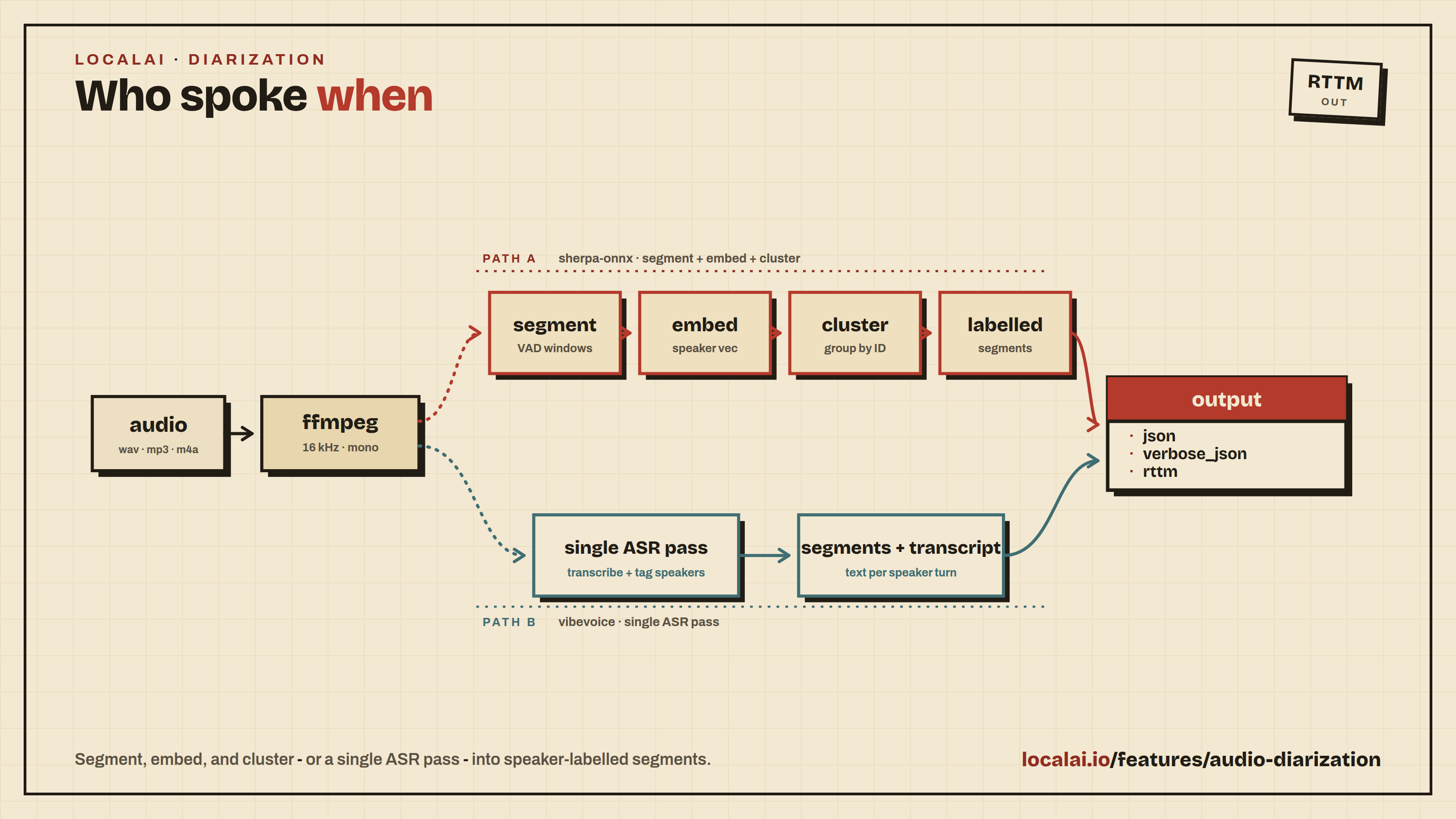
Speaker diarization answers the question “who spoke when?” - given an audio clip with multiple speakers, it returns time-stamped segments labelled with a stable speaker ID (SPEAKER_00, SPEAKER_01, …).
LocalAI exposes this through the /v1/audio/diarization endpoint, modelled after /v1/audio/transcriptions. Two backends are supported today:
- sherpa-onnx - pyannote-3.0 segmentation + a speaker-embedding extractor (3D-Speaker, NeMo, WeSpeaker) + fast clustering. Pure diarization - no transcription cost. Recommended when you only need speaker turns.
- vibevoice.cpp - produces speaker-labelled segments as a by-product of its long-form ASR pass, so you can optionally get a transcript per segment for free.
Because diarization is exposed as a regular OpenAI-compatible endpoint, any HTTP client works. There is no Python dependency on pyannote or NeMo on the consumer side.
Endpoint
| Field | Type | Description |
|---|---|---|
file | file (required) | audio file in any format ffmpeg accepts |
model | string (required) | name of the diarization-capable model |
num_speakers | int | exact speaker count when known (>0 forces; 0 = auto) |
min_speakers | int | hint when auto-detecting |
max_speakers | int | hint when auto-detecting |
clustering_threshold | float | cosine distance threshold used when num_speakers is unknown |
min_duration_on | float | discard segments shorter than this many seconds |
min_duration_off | float | merge gaps shorter than this many seconds |
language | string | only meaningful for backends that bundle ASR (e.g. vibevoice) |
include_text | bool | when the backend can emit per-segment transcript for free, populate it |
response_format | string | json (default), verbose_json, or rttm |
Response - json (default)
Compact payload, no transcription, no per-speaker summary:
speaker is the normalized, zero-padded label clients should display. label preserves the raw backend-emitted ID for clients that maintain their own speaker dictionary.
Response - verbose_json
Adds per-speaker totals and (when the backend supports it and include_text=true) the per-segment transcript:
Response - rttm
NIST RTTM, the standard interchange format used by pyannote.metrics / dscore:
Returned as Content-Type: text/plain; charset=utf-8.
Quick start
First install a diarization-capable model from the gallery. The example below uses vibevoice-cpp-asr, which serves the vibevoice.cpp backend and returns speaker-labelled segments (and, optionally, a transcript):
The sections below show how to configure the two supported backends by hand when you want full control over the segmentation and embedding models.
Backend setup - sherpa-onnx (pure diarization)
Sherpa-onnx needs two ONNX models: pyannote segmentation and a speaker-embedding extractor. Place them under your LocalAI models directory and reference them from the YAML:
Both model: and diarize.embedding_model= are resolved relative to the LocalAI models directory.
Backend setup - vibevoice.cpp (diarization + ASR)
vibevoice.cpp’s ASR mode emits [{Start, End, Speaker, Content}] natively, so a single pass gives both diarization and transcription:
Pass include_text=true on the request to populate the text field on each diarization segment.
Notes
- Speaker identity across files: speaker IDs (
SPEAKER_00,SPEAKER_01, …) are local to each request. To track the same person across multiple recordings, combine/v1/audio/diarizationwith/v1/voice/embed(speaker embedding) and maintain your own embedding store. - Hints vs. forces:
num_speakersoverrides clustering when set;min_speakers/max_speakersare advisory and only honored by backends that expose a range hint. vibevoice.cpp ignores them - its model picks the count itself. - Sample rate: input is automatically converted to 16 kHz mono via ffmpeg before the backend sees it; sherpa-onnx pyannote-3.0 requires 16 kHz.
See also
- Sound Classification - tag non-speech sound events (alarms, glass breaking, baby cry) in a clip.