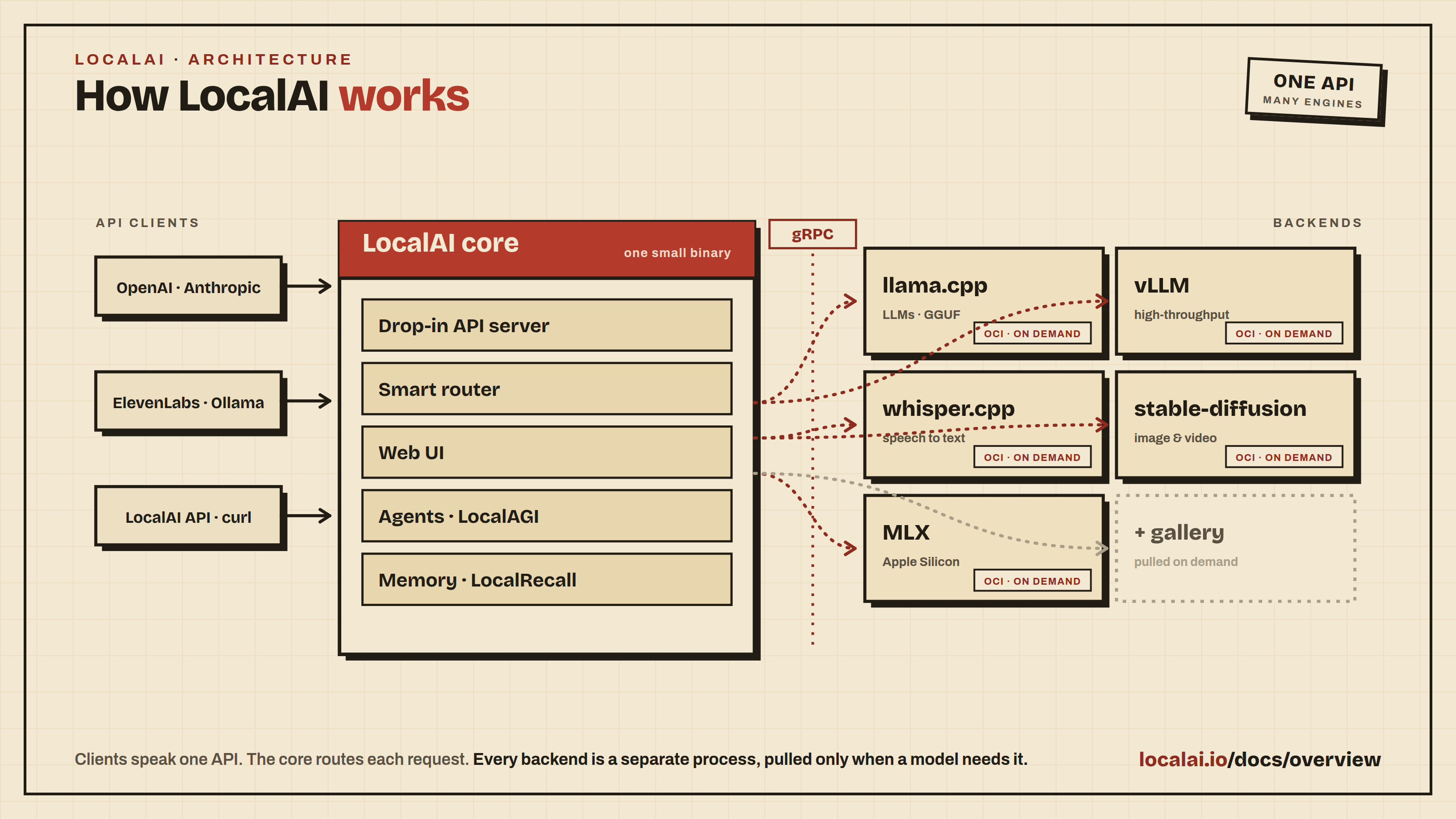
LocalAI is the open source AI runtime: a small core that speaks the OpenAI and
Anthropic APIs, with each inference backend added only when a model needs it.
It runs text, vision, speech, sound, images, video, embeddings, reranking, and
autonomous agents on hardware you control, from a CPU laptop to a distributed
GPU cluster.
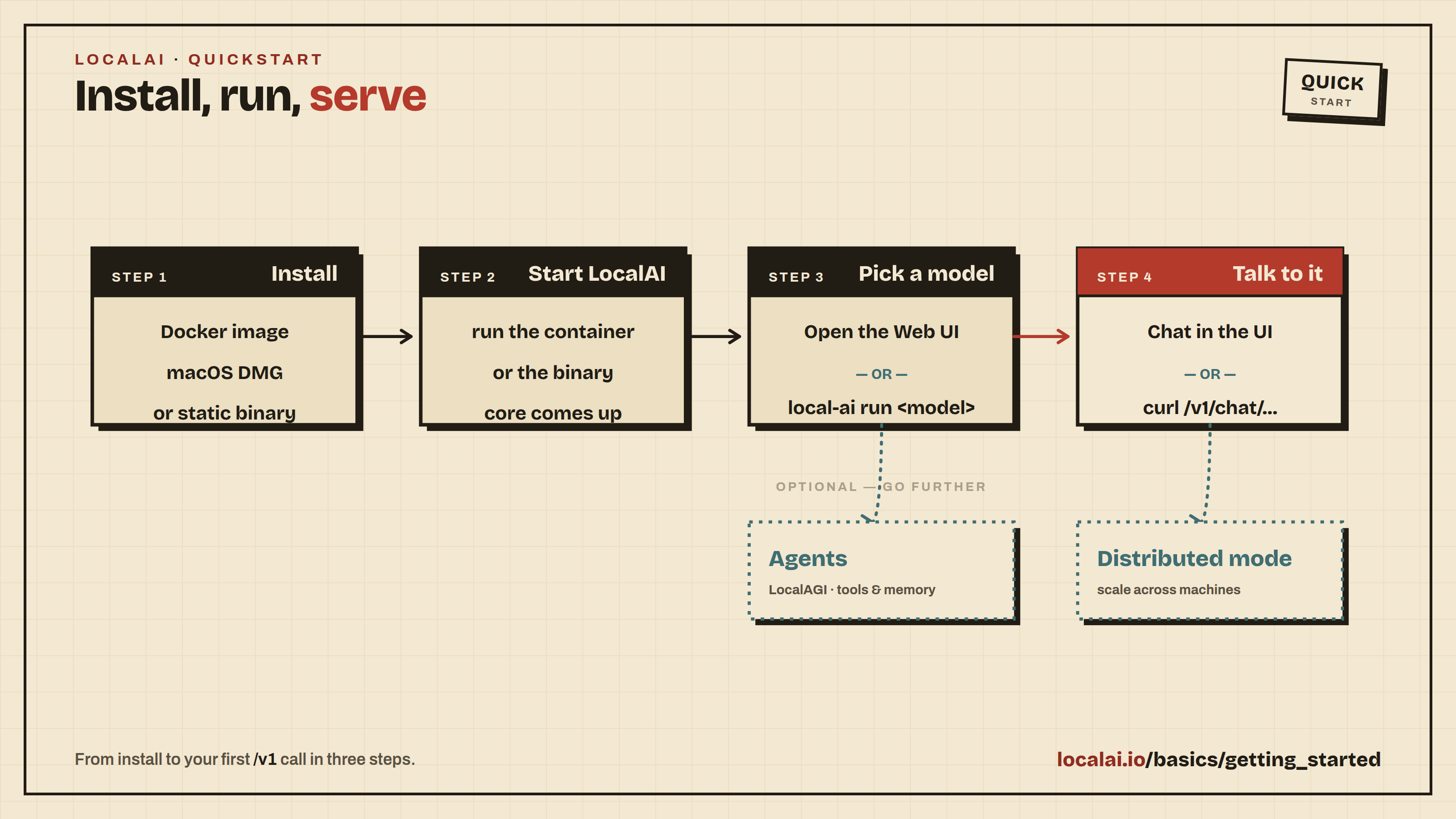
New here? Read the Overview for what LocalAI is
and how the pieces fit together, then follow the
Quickstart.
docker run -ti --name local-ai -p 8080:8080 localai/localai:latest
Sections
Getting started - install LocalAI,
run your first model, call the API, and fix the common startup problems.
Features - every capability, grouped by
modality: text, agents, audio, vision, image and video, retrieval,
distributed inference, and model management.
Advanced - model configuration, VRAM
management, reverse proxies and TLS, and the rest of the fine-grained
control surface.
Operations - running and governing an
instance: middleware, cloud and MITM proxies, backend monitoring.
Reference - architecture, CLI flags, the
compatibility table, API and runtime errors, system info, and binaries.
FAQ - short answers to the questions that come up
most often.
Also useful
Integrations - projects and tools built
on top of LocalAI.
LocalAI is a composable AI stack for running models locally: a small core that speaks the OpenAI and Anthropic APIs, with each model backend added only when you need it. It’s simple, efficient, and private by default, and a drop-in replacement that keeps your data on your own hardware.
Why LocalAI?
In today’s AI landscape, privacy, control, and flexibility are paramount. LocalAI addresses these needs by:
Privacy First: Your data never leaves your machine
Complete Control: Run models on your terms, with your hardware
Open Source: MIT licensed and community-driven
Flexible Deployment: From laptops to servers, with or without GPUs
Composable by design: A small core, not a bundle. Backends are separate and installed on demand, so you only run what you use
What’s Included
The LocalAI core is a single small binary (or container). It gives you everything you need to serve models, and pulls each model backend on demand, so you install only what you use:
OpenAI-compatible API - Drop-in replacement for OpenAI, Anthropic, and Open Responses APIs
Built-in Web Interface - Chat, model management, agent creation, image generation, and system monitoring
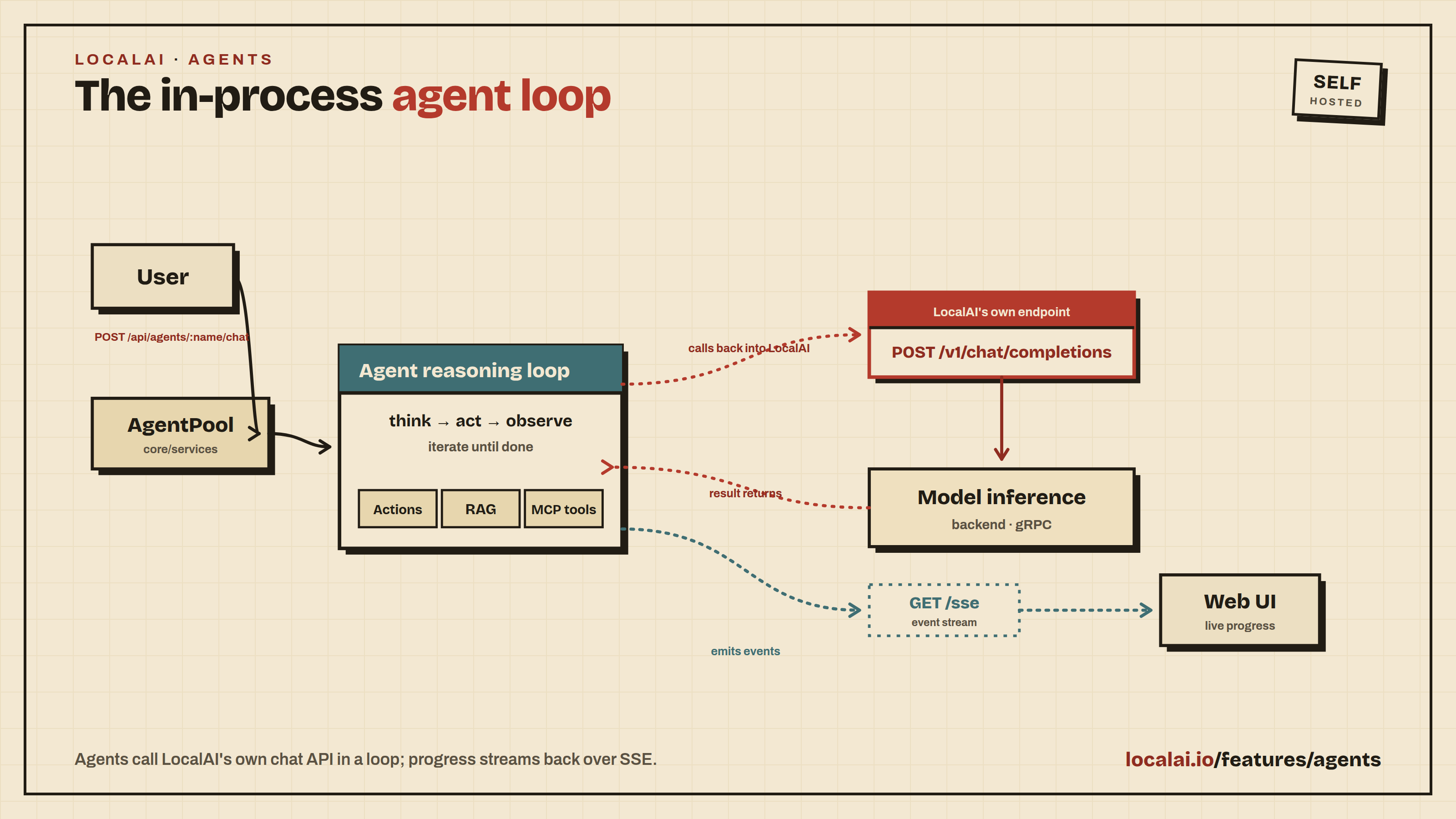
AI Agents - Create autonomous agents with MCP (Model Context Protocol) tool support, directly from the UI
Any Model, Any Modality: LLMs, image and video, text-to-speech, speech-to-text, vision, and embeddings, each on its own backend, pulled automatically when you load a model
GPU Acceleration - Automatic detection and support for NVIDIA, AMD, Intel, and Vulkan GPUs
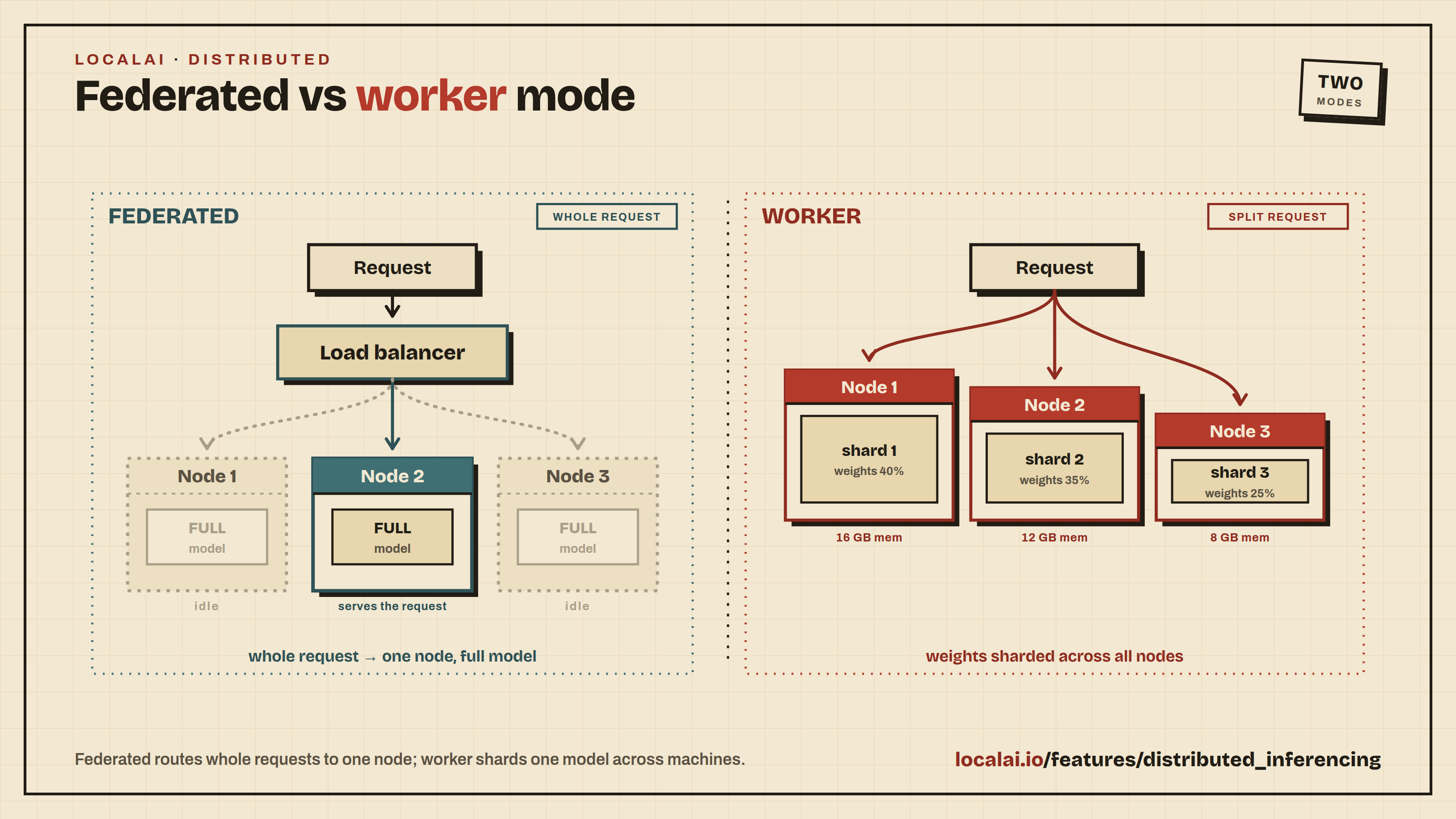
Distributed Mode - Scale horizontally with worker nodes, P2P federation, and model sharding
No GPU Required - Runs on CPU with consumer-grade hardware
LocalAI integrates LocalAGI (agent platform) and LocalRecall (semantic memory) as built-in libraries - no separate installation needed.
Each backend is a dedicated gRPC service that LocalAI builds around a best-in-class engine (llama.cpp, vLLM, whisper.cpp, stable-diffusion, MLX, and more), exposing it through the unified API. Backends ship as standard OCI images and run as isolated processes, so each one can be installed, upgraded, or removed without touching the core, can even run on a separate machine, and a fault in one never brings down the rest.
Because the backend contract is a simple gRPC interface, the system is open: bring your own model, or write a custom backend in any language and plug it in, exactly how the built-in backends work. This is what keeps the core small and gives you the flexibility to run precisely the stack you want, instead of compiling every engine into one binary.
Getting Started
LocalAI can be installed in several ways. Docker is the recommended installation method for most users as it provides the easiest setup and works across all platforms.
Recommended: Docker Installation
The quickest way to get started with LocalAI is using Docker:
docker run -p 8080:8080 --name local-ai -ti localai/localai:latest
Then open http://localhost:8080 to access the web interface, install models, and start chatting.
LocalAI is helped by the wider community of contributors. See the full contributors list.
License
LocalAI is MIT licensed.
Chapter 2
Getting started
Welcome to LocalAI! This section takes you from a fresh install to a working chat, a working API call, and your first customized model. Follow the pages in order the first time through; each one builds on the previous.
Tip
Haven’t installed LocalAI yet?
See the Installation guide first. Docker is the recommended installation method for most users.
LocalAI is a free, open-source alternative to OpenAI (Anthropic, etc.), functioning as a drop-in replacement REST API for local inferencing. It allows you to run LLMs, generate images, and produce audio, all locally or on-premises with consumer-grade hardware, supporting multiple model families and architectures.
LocalAI comes with a built-in web interface for chatting with models, managing installations, configuring AI agents, and more, with no extra tools needed.
Tip
Security considerations
If you are exposing LocalAI remotely, make sure you protect the API endpoints adequately. You have two options:
Simple API keys: Run with LOCALAI_API_KEY=your-key to gate access. API keys grant full admin access with no role separation.
User authentication: Run with LOCALAI_AUTH=true for multi-user support with admin/user roles, OAuth login, per-user API keys, and usage tracking. See Authentication & Authorization for details.
Once installed, start LocalAI. For Docker installations:
docker run -p 8080:8080 --name local-ai -ti localai/localai:latest
For GPU acceleration, choose the image that matches your hardware:
Hardware
Docker image
CPU only
localai/localai:latest
NVIDIA CUDA
localai/localai:latest-gpu-nvidia-cuda-12
AMD (ROCm)
localai/localai:latest-gpu-hipblas
Intel GPU
localai/localai:latest-gpu-intel
Vulkan
localai/localai:latest-gpu-vulkan
For NVIDIA GPUs, add --gpus all. For AMD/Intel/Vulkan, add the appropriate --device flags. See Container images for the full reference.
Using the Web Interface
Open http://localhost:8080 in your browser. The web interface lets you:
Chat with any installed model
Explore, install, and manage models from the Models page
Generate images, audio, and more
Create and manage AI agents with MCP tool support
Monitor system resources and loaded models
Configure settings including GPU acceleration
To get your first chat working:
Open Models → Explore and search for qwen3-4b. Click Install on the qwen3-4b entry and wait for the download to finish. (qwen3-4b is a small, CPU-friendly Qwen3 model that also supports tool calling, so you can reuse it later in the Build your first agent walkthrough.)
Open the Chat page, select qwen3-4b from the model dropdown, type a message, and send it. You should get a reply within a few seconds.
To correct an earlier prompt or response without running the model again, hover
over the saved message and select Edit. Save updates that conversation’s
local history; Cancel discards the draft.
Downloading models from the CLI
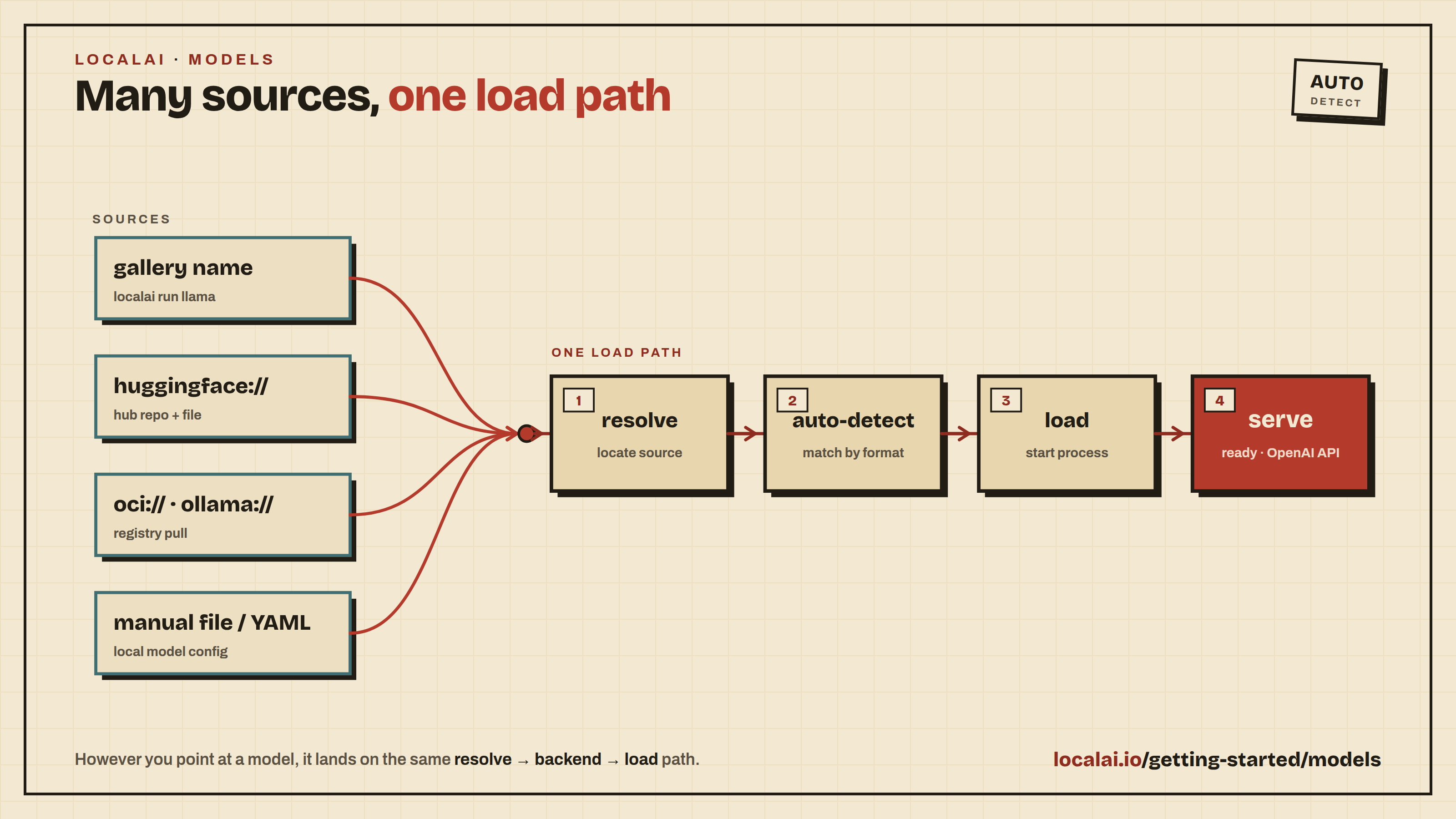
When starting LocalAI (either via Docker or via CLI) you can specify as argument a list of models to install automatically before starting the API, for example:
local-ai run qwen3-4b
local-ai run huggingface://TheBloke/phi-2-GGUF/phi-2.Q8_0.gguf
local-ai run ollama://gemma:2b
local-ai run https://gist.githubusercontent.com/.../phi-2.yaml
local-ai run oci://localai/phi-2:latest
You can also manage models with the CLI:
local-ai models list # List available models in the gallerylocal-ai models install <name> # Install a model
Tip
Automatic Backend Detection: When you install models from the gallery or YAML files, LocalAI automatically detects your system’s GPU capabilities (NVIDIA, AMD, Intel) and downloads the appropriate backend. For advanced configuration options, see GPU Acceleration.
LocalAI also supports the Anthropic Messages API, the Open Responses API, and more. See Try it out for examples of all supported endpoints.
Built-in AI Agents
LocalAI includes a built-in AI agent platform with support for the Model Context Protocol (MCP). You can create agents that use tools, browse the web, execute code, and interact with external services, all from the web interface.
To get started with agents:
Install a model that supports tool calling (most modern LLMs do)
Navigate to the Agents page in the web interface
Create a new agent, configure its tools and system prompt
Start chatting; the agent will use tools autonomously
No separate installation required: agents are part of LocalAI. For a full step-by-step walkthrough, see Build your first agent.
Scaling with Distributed Mode
For production deployments or when you need more compute, LocalAI supports distributed mode with horizontal scaling:
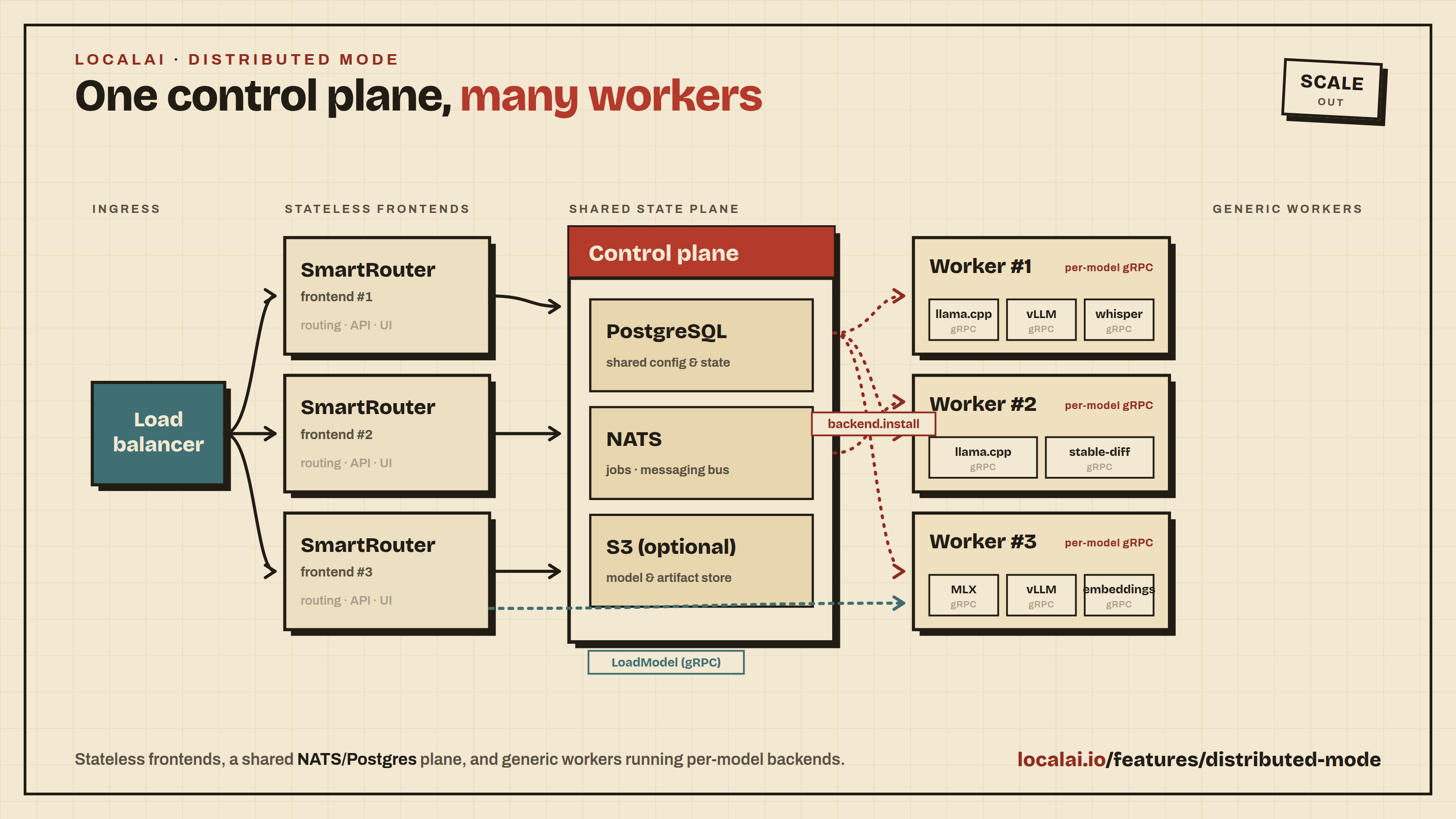
Distributed nodes: Add GPU worker nodes that self-register with a frontend coordinator
P2P federation: Connect multiple LocalAI instances for load-balanced inference
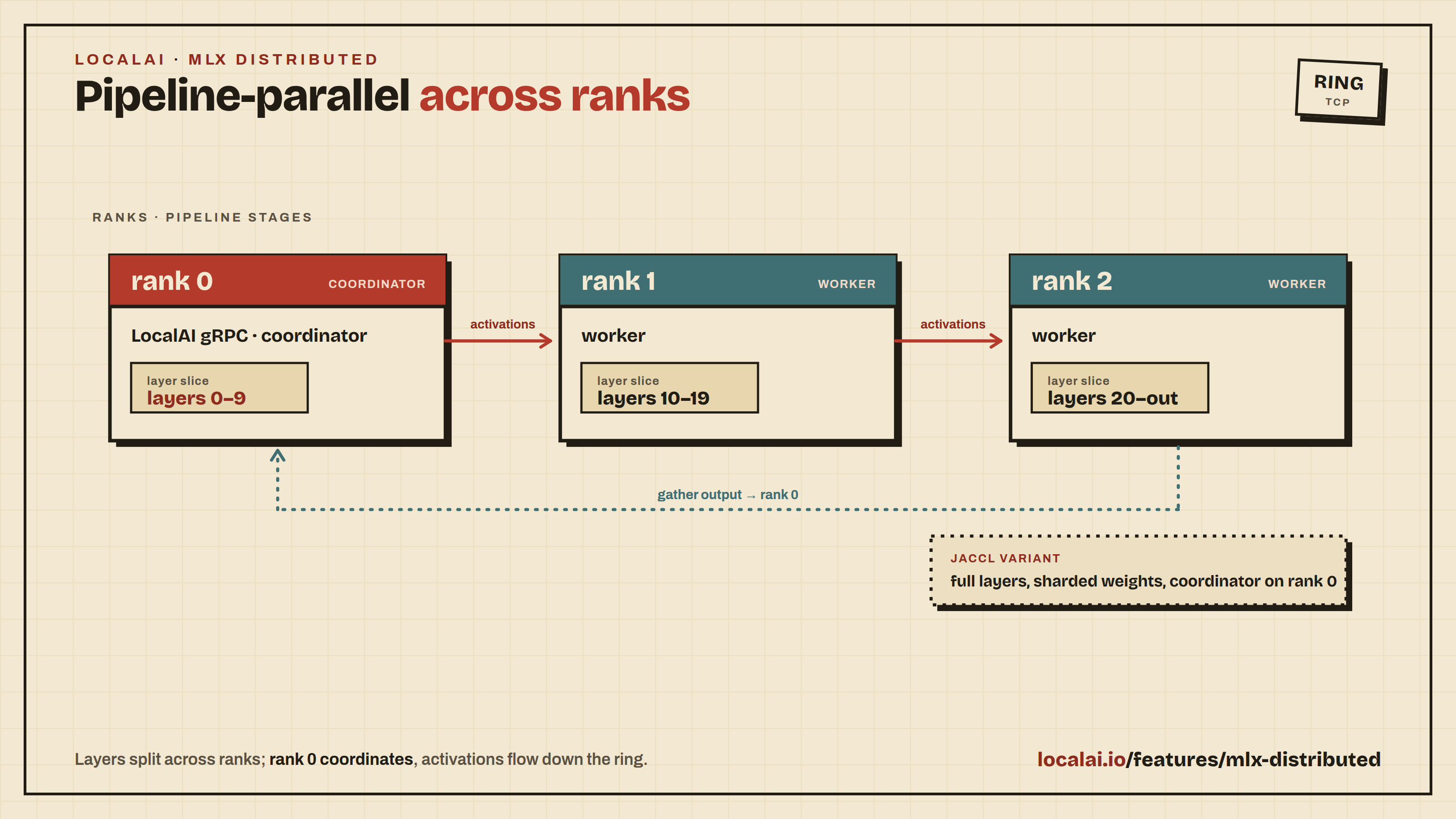
Model sharding: Split large models across multiple machines
This section covers everything you need to know about installing and configuring models in LocalAI. You’ll learn multiple methods to get models running.
Prerequisites
LocalAI installed and running (see Quickstart if you haven’t set it up yet)
Basic understanding of command line usage
Method 1: Using the Model Gallery (Easiest)
The Model Gallery is the simplest way to install models. It provides pre-configured models ready to use.
GPU recommendations require a memory estimate within 95% of the detected model memory budget at a 4096-token context. If none of the sampled candidates fit, the recommendation section is hidden. You can still browse the gallery and check individual models at your intended context size. On the Models page the recommendations appear as a “Best for this machine” list in the pane beside the table while no model is selected. Once you have installed a model, the list shows only the best fit and offers the others behind “more that fit”. The Home page also omits static GPU suggestions when no fitting recommendation is available.
Via WebUI
Open the LocalAI WebUI at http://localhost:8080
Navigate to Models → Explore
Browse or search the available models
Click “Install” on any model you want
Wait for installation to complete. Progress appears in the strip at the top
of the app, and Operate → Activity shows every install in flight, plus
what failed and what finished (see Activity)
The same Models page owns the complete lifecycle. Switch to Installed to
search local configurations, filter them by running, idle, disabled, pinned,
or distributed state, and open a model’s runtime controls. Load and stop are on
each row; edit, pin, disable, backend logs, and remove are in the row menu and in
the details of the selected model. The current view, search, filter, and
selection are stored in the URL so links and browser history preserve your place.
The disk strip in the page header shows the free space on the models disk and
opens a review of what can be removed to free more (see
Model gallery).
Via CLI
# List available modelslocal-ai models list
# Install a specific modellocal-ai models install llama-3.2-1b-instruct:q4_k_m
# Start LocalAI with a model from the gallerylocal-ai run llama-3.2-1b-instruct:q4_k_m
To run models available in the LocalAI gallery, you can use the model name as the URI. For example, to run LocalAI with the Hermes model, execute:
local-ai run hermes-2-theta-llama-3-8b
To install only the model, use:
local-ai models install hermes-2-theta-llama-3-8b
Note: The galleries available in LocalAI can be customized to point to a different URL or a local directory. For more information on how to setup your own gallery, see the Gallery Documentation.
Browse Online
Visit models.localai.io to browse all available models in your browser.
On a phone, the model page wraps build descriptions in the Variants table
to keep the fit status and install buttons visible.
Method 1.5: Import Models via WebUI
The WebUI import page (Build → Import) takes either a source to resolve or a
configuration to write. Both live on the same page, behind the two tabs in its
header. From a source, it is a short guided flow: source, review, import, done.
From a source
Open the LocalAI WebUI at http://localhost:8080
Open Build, then Import
Paste the source into the Source field (e.g. https://huggingface.co/Qwen/Qwen3-VL-8B-Instruct-GGUF), or start from one of the examples
Review what the page says, then press Enter or click Import
While you type, the page reads the spelling of the source (Hugging Face
repository, direct URL, configuration file, OCI image, Ollama model, or a path
on the host) and shows the request the form will send. It also runs the checks
that can be made before the import starts: whether the name is already in use,
whether the chosen backend is installed, and how much disk and memory are free.
The server returns no preview of the model configuration, the size or the memory
a model needs before the import starts, so the page does not show them. They
appear once the import starts, next to the free memory and disk.
The What you can paste panel beside the field lists every accepted scheme:
huggingface://, hf://, a full Hugging Face URL, any direct https:// URL,
file:// and absolute paths on the host, oci://, ocifile://, and
ollama://.
Expand Advanced options directly below the request preview to override settings before importing.
The controls include backend, name, description, quantizations, MMProj quantizations,
model type, embeddings support, the diffusers-specific fields, and arbitrary
custom key-value preferences. The backend list can be narrowed by modality
first. Fields that the selected backend cannot use are hidden, and anything you
typed into them is kept in case you switch back.
The source format check does not contact the source or validate it as a model.
An HTTPS URL can point to a web page rather than model weights.
Leaving the backend on auto-detect lets LocalAI choose from the source.
Selecting a backend sends an explicit backend preference in the previewed request. If more
than one installed backend can serve the detected modality, the page says so
and offers the candidates inline — picking one resubmits the import.
Repositories under mlx-community are imported with the native MLX backend.
LocalAI uses Hugging Face’s pipeline metadata to select mlx-vlm for
vision-language models and mlx-audio for text-to-speech models; other MLX
repositories use mlx. An explicit backend selection in the import form always
overrides this automatic routing.
Once the import starts, the page reports the download size and the memory the
model needs against what is free, then the current phase, the bytes transferred
and a progress bar. When the model is ready, the page names it and links to a
chat with it and to Models.
Writing YAML
For full control over model configuration, switch to the Write YAML tab and
edit the configuration directly, then click Create. The editor provides
syntax highlighting and a copy button, and accepts the same configuration keys
documented under Advanced.
This is especially useful for:
Custom model configurations
Fine-tuning model parameters
Setting up complex model setups
Editing existing model configurations
When the configuration references remote assets, Create does not
download them inside the request: the import is queued like a gallery
installation, and the page reports the job’s progress until the model is
ready. These configurations are queued:
a URL in parameters.model or mmproj, or download_files entries;
an hf:// reference or a bare owner/repo in parameters.model, on a
backend that consumes a model directory;
an explicit artifacts: block. The configuration file is written once every download
has finished, so a failed download never leaves a config pointing at
files that do not exist. A configuration that only references files
already on disk is written immediately, as before.
A queued import runs through the same installer as a gallery
installation, so it differs from an immediate write in two ways:
Recommended sampling parameters for the model family (for example
temperature and top_p) are added under parameters: when the
configuration does not set them. The immediate write stores your
configuration exactly as posted.
When automatic backend installation is enabled, the backend named in the
configuration is installed as part of the job.
Set the parameters you care about explicitly if you need the same stored
file in both cases.
The same split applies to the API behind the page: POST /models/import
answers a queued import with a job id and a status URL to poll
(/models/jobs/{id} — the same shape gallery installs use), and a
download-free import with a plain success response.
If you cancel a queued import, the import page and model editor report the
cancellation and stay on the current page. They report success only after the
job succeeds.
Method 2: Installing from Hugging Face
LocalAI can directly install models from Hugging Face:
# Install and run a model from Hugging Facelocal-ai run huggingface://TheBloke/phi-2-GGUF
The format is: huggingface://<repository>/<model-file> ( is optional)
Examples
local-ai run huggingface://TheBloke/phi-2-GGUF/phi-2.Q8_0.gguf
Method 3: Installing from OCI Registries
Ollama Registry
local-ai run ollama://gemma:2b
Standard OCI Registry
local-ai run oci://localai/phi-2:latest
Note
On every model download — Ollama and OCI registries, the model gallery, and plain HTTP(S) file URLs alike — LocalAI identifies itself with a LocalAI/<version> (<os>; <arch>)User-Agent header (for example LocalAI/v3.2.1 (linux; amd64)) so registry and gallery operators can attribute usage to LocalAI. Builds from source that carry no stamped version send LocalAI (<os>; <arch>) instead.
Run Models via URI
To run models via URI, specify a URI to a model file or a configuration file when starting LocalAI. Valid syntax includes:
file://path/to/model (absolute path to a file within your models directory)
From OCIs: oci://container_image:tag, ollama://model_id:tag
From configuration files: https://gist.githubusercontent.com/.../phi-2.yaml
Note
When using file:// URLs, the path must point to a file within your models directory (specified by MODELS_PATH). Files outside this directory are rejected for security reasons.
Configuration files can be used to customize the model defaults and settings. For advanced configurations, refer to the Customize Models section.
Examples
local-ai run huggingface://TheBloke/phi-2-GGUF/phi-2.Q8_0.gguf
local-ai run ollama://gemma:2b
local-ai run https://gist.githubusercontent.com/.../phi-2.yaml
local-ai run oci://localai/phi-2:latest
Method 4: Manual Installation
For full control, you can manually download and configure models.
If running on Apple Silicon (ARM), it is not recommended to run on Docker due to emulation. Follow the build instructions to use Metal acceleration for full GPU support.
If you are running on Apple x86_64, you can use Docker without additional gain from building it from source.
git clone https://github.com/go-skynet/LocalAI

cd LocalAI

cp your-model.gguf models/

docker compose up -d --pull always

curl http://localhost:8080/v1/models

curl http://localhost:8080/v1/completions -H "Content-Type: application/json" -d '{
     "model": "your-model.gguf",
     "prompt": "A long time ago in a galaxy far, far away",
     "temperature": 0.7
   }'
Tip
Other Docker Images:
For other Docker images, please refer to the table in Getting Started.
Note: If you are on Windows, ensure the project is on the Linux filesystem to avoid slow model loading. For more information, see the Microsoft Docs.
Ollama clients can list configured models with GET /api/tags and loaded models with GET /api/ps. Each entry includes size in bytes when LocalAI can resolve a non-empty primary weights file on disk. This is the size of that file, not the total size of a multi-file model or its memory use. Unknown sizes are omitted; /api/ps also omits size_vram because per-model VRAM use is not available.
# Via APIcurl http://localhost:8080/v1/models
# Via CLIlocal-ai models list
Disk Usage
In the WebUI, the Installed tab of Models shows how much disk each
installed configuration uses. The Size column holds the size on disk, and
for a model that shares files with others it adds the shared part (“1.2 GB
shared”). A file referenced by more than one configuration is counted once in
the total under the table, which also gives the shared total. The inspector
beside the table names the models a model shares files with, and a model page
lists its files under Usage and history, with each file’s size, the other
models that use it, and whether it is missing. Removing a model frees only its
exclusive files; the files it shares stay while another configuration uses
them. A reference whose file is not on disk (a download that never finished, or
a file removed by hand) is marked on the model and in the cleanup review.
Only an admin can read the report. For anyone else, or if the read fails, the
Size column shows the size of the files the gallery lists, and “size unknown”
for a model the gallery does not list.
The report behind these views is available directly (admin only):
curl http://localhost:8080/api/models/storage
It returns per-model sizes with the shared portion split out, the
file-to-models relation, and missing references. Files in the models directory
that no configuration references are not included.
Remove Models
Simply delete the model file and configuration from your models directory:
rm models/model-name.gguf
rm models/model-name.yaml  # if exists
Troubleshooting
Model Not Loading
Check backend: Ensure the required backend is installed
local-ai backends list
local-ai backends install llama-cpp  # if needed
Check logs: Enable debug mode
DEBUG=true local-ai
Verify file: Ensure the model file is not corrupted
Out of Memory
Use a smaller quantization (Q4_K_S or Q2_K)
Reduce context_size in configuration
Close other applications to free RAM
Wrong Backend
Check the Compatibility Table to ensure you’re using the correct backend for your model.
Best Practices
Start small: Begin with smaller models to test your setup
Use quantized models: Q4_K_M is a good balance for most use cases
Organize models: Keep your models directory organized
Backup configurations: Save your YAML configurations
Monitor resources: Watch RAM and disk usage
Try it out
Once LocalAI is installed, you can start it (either by using docker, or the cli, or the systemd service).
By default the LocalAI WebUI should be accessible from http://localhost:8080. You can also use 3rd party projects to interact with LocalAI as you would use OpenAI (see also Integrations ).
After installation, install new models by navigating the model gallery, or by using the local-ai CLI.
Tip
To install models with the WebUI, see the Models section.
With the CLI you can list the models with local-ai models list and install them with local-ai models install <model-name>.
You can also run models manually by copying files into the models directory.
You can test chat models from the CLI without keeping a separate curl command around:
# Terminal 1local-ai run
# Terminal 2local-ai chat --model qwen3-4b
local-ai chat connects to a running LocalAI server and opens the built-in terminal agent. It is more than a chat prompt: it can read your files and run commands on your machine, so the first time it wants to do something that changes state it stops and asks you to approve the call. Reads and searches run without asking. Press Esc or Ctrl+C to end the session. Esc is a key of the full-screen interface: in the plain --cli mode, leave with Ctrl+C, Ctrl+D, or by typing exit.
Use /models to list installed models, /model <name> to switch models while keeping the conversation, and /compact to summarize the history so far when the context fills up. The full picture is on the Terminal agent page.
If the server exposes exactly one model, LocalAI uses that model automatically:
# Terminal 1local-ai run qwen3-4b
# Terminal 2local-ai chat
When more than one model is configured, the agent asks you to pick one and remembers your answer, or you can pass --model with the installed model name. Use --endpoint to connect to a non-default server, for example local-ai chat --endpoint http://127.0.0.1:8081 --model qwen3-4b.
You can also test out the API endpoints using curl. A few examples are listed below.
Note
Each example assumes you have already installed the model it names. The chat and function-calling examples below use qwen3-4b (install it from the Models page or with local-ai run qwen3-4b). The other examples name a model for the task they show (gpt-4-vision-preview for vision, tts-1 for text to speech, whisper-1 for transcription, text-embedding-ada-002 for embeddings); replace each with the name of a model you have installed for that task.
LocalAI supports the Open Responses API specification with support for background processing, streaming, and advanced features. Open Responses documentation.
curl http://localhost:8080/v1/responses \
-H "Content-Type: application/json"\
-d '{
"model": "gpt-4",
"input": "Say this is a test!",
"max_output_tokens": 1024,
"temperature": 0.7
}'
For background processing:
curl http://localhost:8080/v1/responses \
-H "Content-Type: application/json"\
-d '{
"model": "gpt-4",
"input": "Generate a long story",
"max_output_tokens": 4096,
"background": true
}'
curl http://localhost:8080/v1/audio/speech \
-H "Content-Type: application/json"\
-d '{
"model": "tts-1",
"input": "The quick brown fox jumped over the lazy dog.",
"voice": "alloy"
}'\
--output speech.mp3
Get a vector representation of a given input that can be easily consumed by machine learning models and algorithms. OpenAI Embeddings.
curl http://localhost:8080/embeddings \
-X POST -H "Content-Type: application/json"\
-d '{
"input": "Your text string goes here",
"model": "text-embedding-ada-002"
}'
Tip
Don’t use the model file as model in the request unless you want to handle the prompt template for yourself.
Use the installed model’s own name as the model value, the same way you would pass a model name to OpenAI. For instance qwen3-4b for chat, or gpt-4-vision-preview for a vision model you have installed under that name.
Customizing the Model
To customize the prompt template or the default settings of the model, a configuration file is utilized. This file must adhere to the LocalAI YAML configuration standards. For comprehensive syntax details, refer to the advanced documentation. The configuration file can be located either remotely (such as in a Github Gist) or within the local filesystem or a remote URL.
LocalAI can be initiated using either its container image or binary, with a command that includes URLs of model config files or utilizes a shorthand format (like huggingface:// or github://), which is then expanded into complete URLs.
The configuration can also be set via an environment variable. For instance:
name: phi-2context_size: 2048f16: truethreads: 11gpu_layers: 90mmap: trueparameters:
# Reference any HF model or a local file heremodel: huggingface://TheBloke/phi-2-GGUF/phi-2.Q8_0.gguftemperature: 0.2top_k: 40top_p: 0.95template:
chat: &template | Instruct: {{.Input}}
Output:# Modify the prompt template here ^^^ as per your requirementscompletion: *template
Then, launch LocalAI using your gist’s URL:
## Important! Substitute with your gist's URL!docker run -p 8080:8080 localai/localai:v4.11.0 https://gist.githubusercontent.com/xxxx/phi-2.yaml
Next Steps
Visit the advanced section for more insights on prompt templates and configuration files.
This guide covers common issues you may encounter when using LocalAI, organized by category. For each issue, diagnostic steps and solutions are provided.
Quick Diagnostics
Before diving into specific issues, run these commands to gather diagnostic information:
# Check LocalAI is running and responsivecurl http://localhost:8080/readyz
# List loaded modelscurl http://localhost:8080/v1/models
# Check LocalAI versionlocal-ai --version
# Enable debug logging for detailed outputDEBUG=true local-ai run
# orlocal-ai run --log-level=debug
For Docker deployments:
# View container logsdocker logs local-ai
# Check container statusdocker ps -a | grep local-ai
# Test GPU access (NVIDIA)docker run --rm --gpus all nvidia/cuda:12.8.0-base-ubuntu24.04 nvidia-smi
Request latency diagnostics
Debug logging alone does not enable profiling or request phase timing.
Use Profiling and request diagnostics for an opt-in, bounded investigation on one frontend.
The guide distinguishes CPU execution, lock waits, discovery filesystem work, and the model router callback.
It includes direct pod port-forward instructions and warnings about unauthenticated, sensitive profiles.
Enable diagnostics only through a separately approved rollout; do not expose profiling through the public API.
Report non-reproduction if matched requests do not reproduce the delay.
Installation Issues
Binary Won’t Execute on Linux
Symptoms: Permission denied or “cannot execute binary file” errors.
Solution:
chmod +x local-ai-*
./local-ai-Linux-x86_64 run
If you see “cannot execute binary file: Exec format error”, you downloaded the wrong architecture. Verify with:
uname -m
# x86_64 → download the x86_64 binary# aarch64 → download the arm64 binary
macOS: Application Is Quarantined
Symptoms: macOS blocks LocalAI from running because the DMG is not signed by Apple.
Symptoms: API returns 404 or "model not found" error.
Diagnostic steps:
Check the model exists in your models directory:
ls -la /path/to/models/
Verify your models path is correct:
# Check what path LocalAI is usinglocal-ai run --models-path /path/to/models --log-level=debug
Confirm the model name matches your request:
# List available modelscurl http://localhost:8080/v1/models | jq '.data[].id'
Model Fails to Load (Backend Error)
Symptoms: Model is found but fails to load, with backend errors in the logs.
Common causes and fixes:
Wrong backend: Ensure the backend in your model YAML matches the model format. GGUF models use llama-cpp, diffusion models use diffusers, etc. See the compatibility table for details.
Backend not installed: Check installed backends:
local-ai backends list
# Install a missing backend:local-ai backends install llama-cpp
Corrupt model file: Re-download the model. Partial downloads or disk errors can corrupt files.
Wrong model format: LocalAI uses GGUF format for llama.cpp models. Older GGML format is deprecated.
Model Configuration Issues
Symptoms: Model loads but produces unexpected results or errors during inference.
Check your model YAML configuration:
# Example model configname: my-modelbackend: llama-cppparameters:
model: my-model.gguf # Relative to models directorycontext_size: 2048threads: 4# Should match physical CPU cores
Common mistakes:
model path must be relative to the models directory, not an absolute path
threads set higher than physical CPU cores causes contention
context_size too large for available RAM causes OOM errors
GPU and Memory Issues
GPU Not Detected
NVIDIA (CUDA):
# Verify CUDA is availablenvidia-smi
# For Docker, verify GPU passthroughdocker run --rm --gpus all nvidia/cuda:12.8.0-base-ubuntu24.04 nvidia-smi
When working correctly, LocalAI logs should show: ggml_init_cublas: found X CUDA devices.
Ensure you are using a CUDA-enabled container image (tags containing cuda11, cuda12, or cuda13). CPU-only images cannot use NVIDIA GPUs.
If your GPU is not in the default target list, open up an Issue. Supported targets include: gfx908, gfx90a, gfx942, gfx950, gfx1030, gfx1100, gfx1101, gfx1102, gfx1200, gfx1201.
Intel (SYCL):
# Docker requires device passthroughdocker run --device /dev/dri ...
Use container images with gpu-intel in the tag. Known issue: SYCL hangs when mmap: true is set - disable it in your model config:
mmap: false
If the Intel diffusers backend exits while importing PyTorch with
libsycl.so.9: undefined symbol: urDeviceWaitExp, version LIBUR_LOADER_0.12,
the SYCL library has loaded an incompatible Unified Runtime loader. This happens
before the gRPC server starts; later connection-refused errors are a consequence
of that import failure.
Update the separately installed Intel diffusers backend as well as the
gpu-intel container image. Updating the parent image alone does not replace a
backend retained in your backends directory. On Linux, the Python backend launcher
prefers venv/lib when it contains libsycl.so*, ahead of the backend’s packaged
lib directory and inherited LD_LIBRARY_PATH. The venv still needs a compatible
SYCL library, Unified Runtime loader and adapters; changing search order cannot
repair an incomplete runtime installation.
If the failure persists, include the container image digest, installed backend
name and OCI digest, full import traceback, launch command, and any library mounts
in your issue. From inside the affected container, record the inherited
LD_LIBRARY_PATH, the installed backend path, and the libsycl.so*,
libur_loader.so* and libur_adapter_* files in both venv/lib and lib.
Use readelf --dyn-syms --wide and readelf --version-info on the SYCL library and
loaders to compare their symbols and versions. Running the installed backend’s
run.sh with LD_DEBUG=libs,versions captures which loader is actually selected
under its startup environment. An import torch check using the venv Python and
the same library search path can isolate this failure without generating an image.
Overriding backend auto-detection:
If LocalAI picks the wrong GPU backend, override it:
LOCALAI_FORCE_META_BACKEND_CAPABILITY=nvidia local-ai run
# Options: default, nvidia, amd, intel
Out of Memory (OOM)
Symptoms: Model loading fails or the process is killed by the OS.
Solutions:
Use smaller quantizations: Q4_K_S or Q2_K use significantly less memory than Q8_0 or Q6_K
Reduce context size: Lower context_size in your model YAML
Enable low VRAM mode: Add low_vram: true to your model config
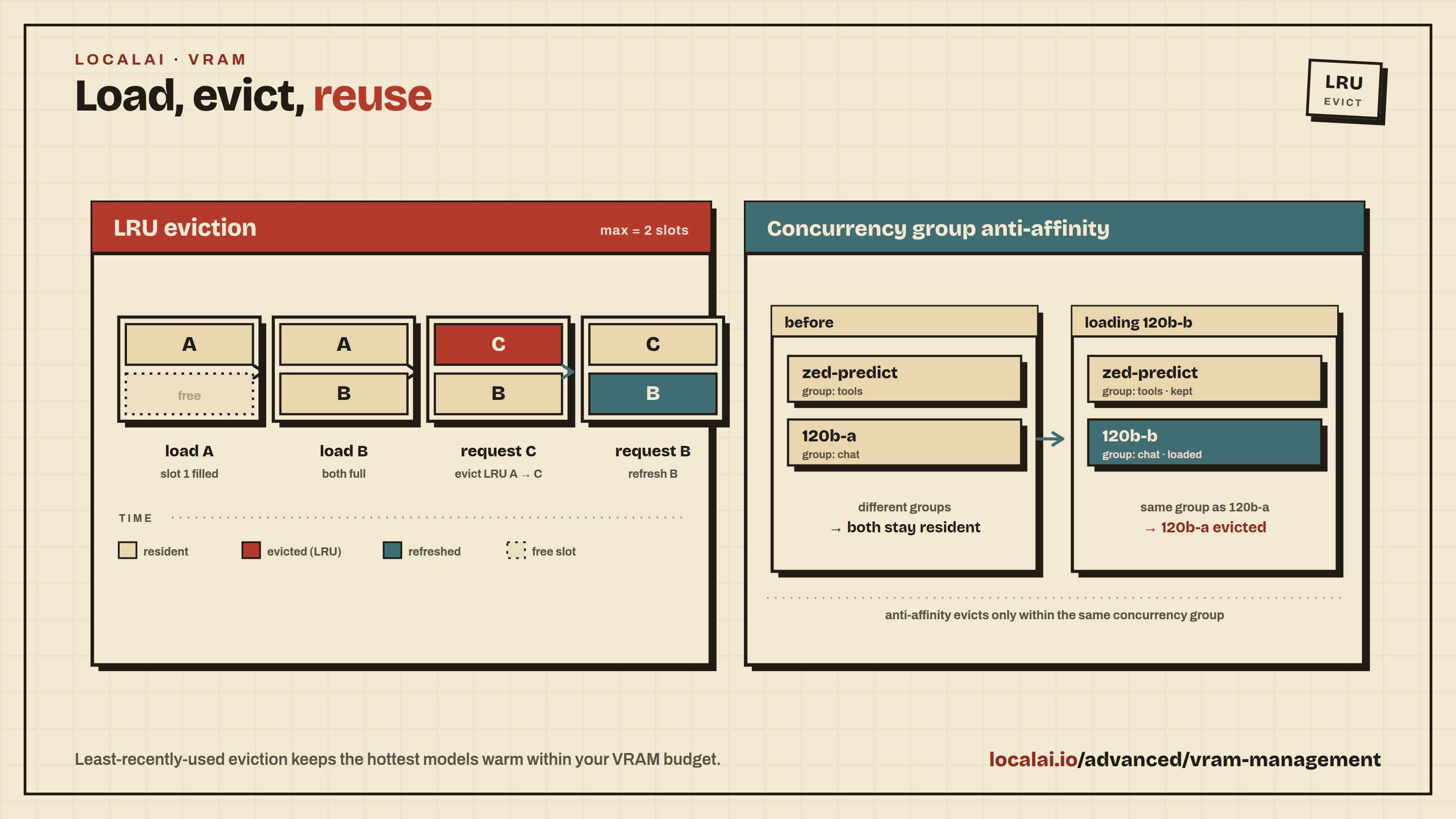
Limit active models: Only keep one model loaded at a time:
By default, models remain loaded in memory after first use. This can exhaust VRAM when switching between models.
Configure LRU eviction:
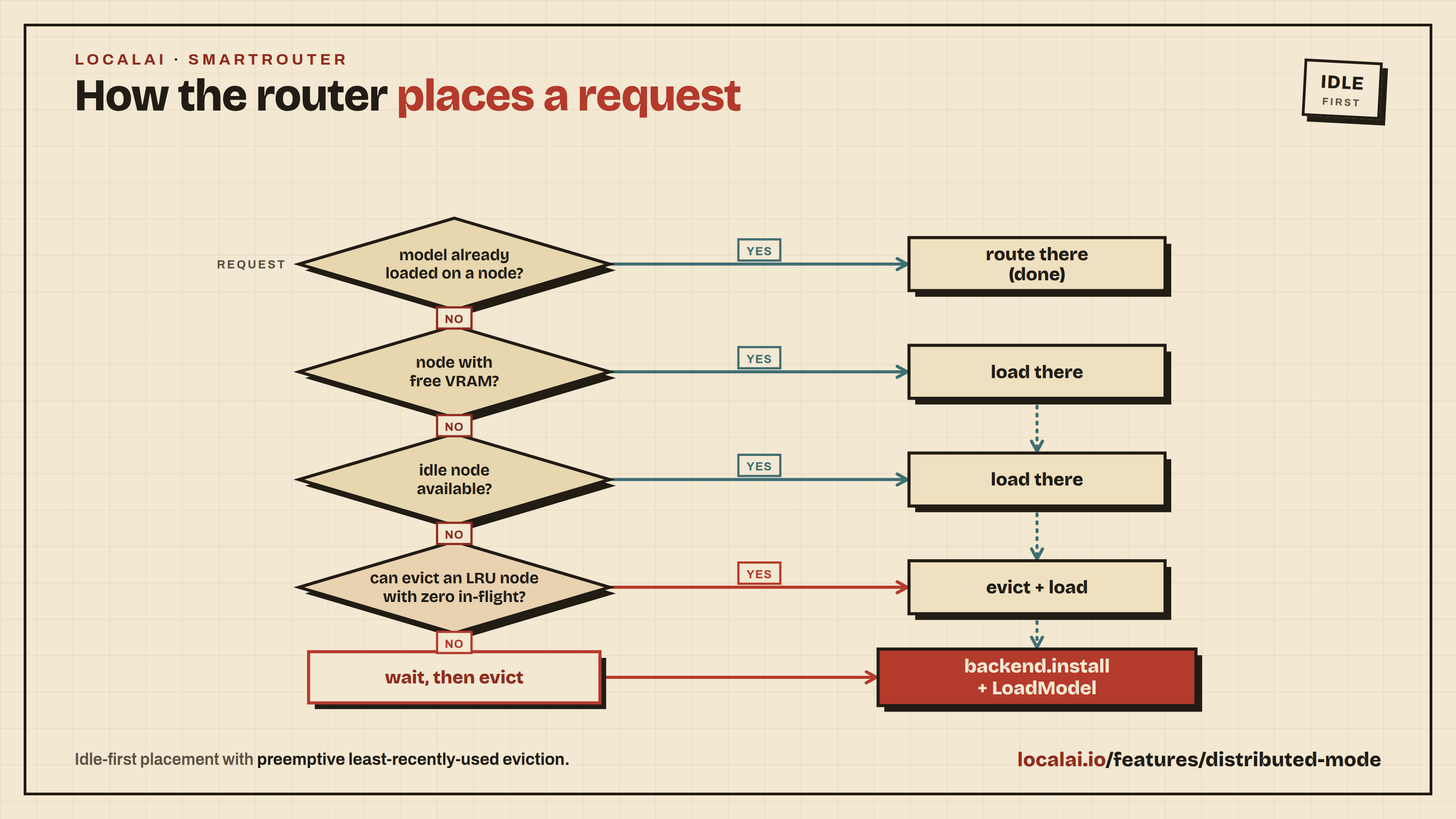
# Keep at most 2 models loaded; evict least recently usedlocal-ai run --max-active-backends=2
Configure watchdog auto-unload:
local-ai run \
  --enable-watchdog-idle --watchdog-idle-timeout=15m \
  --enable-watchdog-busy --watchdog-busy-timeout=5m
These can also be set via environment variables (LOCALAI_WATCHDOG_IDLE=true, LOCALAI_WATCHDOG_IDLE_TIMEOUT=15m) or in the Web UI under Settings → Watchdog Settings.
The paths on the left can be any persistent host directories or named volumes.
The container paths on the right must match exactly. See
Persistent Storage
for Docker, Podman, and UnRAID guidance.
Network and P2P Issues
P2P Workers Not Discovered
Symptoms: Distributed inference setup but workers are not found.
Key requirements:
Use --net host or network_mode: host in Docker
Share the same P2P token across all nodes
Debug P2P connectivity:
LOCALAI_P2P_LOGLEVEL=debug \
LOCALAI_P2P_LIB_LOGLEVEL=debug \
LOCALAI_P2P_ENABLE_LIMITS=true \
LOCALAI_P2P_TOKEN="<TOKEN>"\
local-ai run
If DHT is causing issues, try disabling it to use local mDNS discovery instead:
LOCALAI_P2P_DISABLE_DHT=true local-ai run
P2P Limitations
Only a single model is currently supported for distributed inference
Workers must be detected before inference starts - you cannot add workers mid-inference
Workers mode supports llama-cpp compatible models only
Search existing issues: Check the GitHub Issues for similar problems
Enable debug logging: Run with DEBUG=true or --log-level=debug and include the logs when reporting
Open a new issue: Include your OS, hardware (CPU/GPU), LocalAI version, model being used, full error logs, and steps to reproduce
Community help: Join the LocalAI Discord for community support
Build your first agent
LocalAGI is embedded in LocalAI. There is nothing separate to install or run.
The agent platform ships inside the LocalAI binary and container image, and it is enabled by default. If you already have LocalAI running and a model installed, you have everything you need to build an agent. This page walks you from an empty Agents page to an agent that answers a message and uses one tool.
Before you start: install a tool-calling model
An agent is a loop around a chat model, so it needs a model that supports tool (function) calling. This guide uses qwen3-4b, a small CPU-friendly Qwen3 model that supports tool calling. It is the same model used in the Quickstart, so if you followed that page you already have it.
Install it either from the web interface or from the CLI:
Web interface: open the Models page at http://localhost:8080, search for qwen3-4b, and click Install.
CLI:
local-ai run qwen3-4b
For other ways to install models (Hugging Face, OCI, local files), see the model gallery.
Give the agent a model
An agent with no model set cannot answer. The agent has nothing to send your message to, so it will fail to respond until you assign it a model. You can set the model in two ways:
Per agent: choose qwen3-4b in the agent’s Model field when you create or edit it (covered below). This is the usual choice.
As a default for every new agent: start LocalAI with an environment variable so new agents are created with that model already selected:
LOCALAI_AGENT_POOL_DEFAULT_MODEL=qwen3-4b
Setting a per-agent model always overrides the default.
Create the agent
Open the Agents page in the web interface.
Click Create Agent.
Fill in the form:
Name: for example helper.
Model: select qwen3-4b.
System prompt: a short instruction that sets the agent’s behavior, for example You are a concise, helpful assistant.
Action: add one simple action so the agent has a tool to call. A search action is a good first choice. Some actions need credentials (for example an API key); pick one whose requirements you can satisfy, or start with an action that needs none.
Save the agent.
Send a message
Open the new agent from the Agents page, type a task in its task box, for example Hello, what can you do?, and press Start run. The run page shows the agent working and then its answer, within a few seconds. When the agent decides to use the action you configured, the step count and the tool in use show live, and the report lists what the tool returned.
That is a complete agent: a model, a system prompt, and one tool, all running inside your LocalAI process.
If your imported agent will not run
If you imported an agent from the Agent Hub or a JSON file and it does not respond, work through this checklist. Each symptom maps to a fix:
The agent does not answer at all: the model it references is not installed. Open the Models page and install the model named in the agent’s configuration (or change the agent’s model to one you have, such as qwen3-4b).
An action always fails: the action is missing its API keys or other credentials. Open the agent’s action configuration and supply the required keys.
A tool times out or is unavailable: the MCP server that provides it is unreachable. Confirm the MCP server is running and that the agent points at the correct address.
A skill the agent expects is not available: skills are disabled by default. Start LocalAI with LOCALAI_AGENT_POOL_ENABLE_SKILLS=true to turn the skills service on (the default is LOCALAI_AGENT_POOL_ENABLE_SKILLS=false).
Next steps
Model gallery - install more models, including larger tool-calling models for more capable agents.
Agent actions catalog - the full list of built-in actions an agent can use and how to configure them.
Agent-scoped MCP - connect an agent to external Model Context Protocol servers to give it more tools.
Containers
LocalAI supports Docker, Podman, and other OCI-compatible container engines. This guide covers the common aspects of running LocalAI in containers.
Prerequisites
Before you begin, ensure you have a container engine installed:
Podman might not resolve short image names such as localai/localai:latest.
The Podman and Compose examples use the docker.io/ prefix to identify the
container registry explicitly.
Quick Start
The fastest way to get started is with the CPU image:
docker run -p 8080:8080 --name local-ai -ti localai/localai:latest
# Or with Podman:podman run -p 8080:8080 --name local-ai -ti docker.io/localai/localai:latest
This will:
Start LocalAI (you’ll need to install models separately)
Make the API available at http://localhost:8080
Image Types
LocalAI provides several image types to suit different needs. These images work with both Docker and Podman.
Standard Images
Standard images don’t include pre-configured models. Use these if you want to configure models manually.
CPU Image
docker run -ti --name local-ai -p 8080:8080 localai/localai:latest
# Or with Podman:podman run -ti --name local-ai -p 8080:8080 docker.io/localai/localai:latest
GPU Images
Choose the image that matches your hardware and installed drivers:
NVIDIA CUDA 12 is the compatibility choice for systems with CUDA 12 drivers. Use CUDA 13 when your NVIDIA driver and toolkit support CUDA 13.
AMD ROCm is for supported AMD GPUs, while Intel is for Intel GPUs with the required device runtime.
Jetson uses the L4T ARM64 image. Choose its CUDA 12 image for Jetson AGX Orin-class devices or CUDA 13 for DGX Spark.
Vulkan works across vendors and is the fallback when no matching CUDA, ROCm, or Intel image is available.
NVIDIA CUDA 13:
docker run -ti --name local-ai -p 8080:8080 --gpus all localai/localai:latest-gpu-nvidia-cuda-13
# Or with Podman:podman run -ti --name local-ai -p 8080:8080 --device nvidia.com/gpu=all docker.io/localai/localai:latest-gpu-nvidia-cuda-13
NVIDIA CUDA 12:
docker run -ti --name local-ai -p 8080:8080 --gpus all localai/localai:latest-gpu-nvidia-cuda-12
# Or with Podman:podman run -ti --name local-ai -p 8080:8080 --device nvidia.com/gpu=all docker.io/localai/localai:latest-gpu-nvidia-cuda-12
AMD GPU (ROCm):
docker run -ti --name local-ai -p 8080:8080 --device=/dev/kfd --device=/dev/dri --group-add=video localai/localai:latest-gpu-hipblas
# Or with Podman:podman run -ti --name local-ai -p 8080:8080 --device rocm.com/gpu=all docker.io/localai/localai:latest-gpu-hipblas
Intel GPU:
docker run -ti --name local-ai -p 8080:8080 localai/localai:latest-gpu-intel
# Or with Podman:podman run -ti --name local-ai -p 8080:8080 --device gpu.intel.com/all docker.io/localai/localai:latest-gpu-intel
Vulkan:
docker run -ti --name local-ai -p 8080:8080 localai/localai:latest-gpu-vulkan
# Or with Podman:podman run -ti --name local-ai -p 8080:8080 docker.io/localai/localai:latest-gpu-vulkan
NVIDIA Jetson (L4T ARM64):
CUDA 12 (for Nvidia AGX Orin and similar platforms):
docker run -ti --name local-ai -p 8080:8080 --runtime nvidia --gpus all localai/localai:latest-nvidia-l4t-arm64
CUDA 13 (for Nvidia DGX Spark):
docker run -ti --name local-ai -p 8080:8080 --runtime nvidia --gpus all localai/localai:latest-nvidia-l4t-arm64-cuda-13
Using Compose
The repository’s docker-compose.yaml installs phi-2-chat from the model gallery by default. Change its command list to select a different gallery model.
For a more manageable setup, especially with persistent volumes, use Docker Compose or Podman Compose:
Using CDI (Container Device Interface) - Recommended for NVIDIA Container Toolkit 1.14+
The CDI approach is recommended for newer versions of the NVIDIA Container Toolkit (1.14 and later). It provides better compatibility and is the future-proof method:
version: "3.9"services:
api:
image: docker.io/localai/localai:latest-gpu-nvidia-cuda-12# For CUDA 13, use: docker.io/localai/localai:latest-gpu-nvidia-cuda-13healthcheck:
test: ["CMD", "curl", "-f", "http://localhost:8080/readyz"]
# start_period, not timeout, is the knob for a slow first boot: startup# preload can download tens of GB before the API binds, and failures# inside the start period leave the container `starting` rather than# marking it unhealthy. timeout is a per-probe deadline.start_period: 60minterval: 1mtimeout: 10sretries: 3ports:
- 8080:8080environment:
- DEBUG=falsevolumes:
- ./models:/models:cached# CDI driver configuration (recommended for NVIDIA Container Toolkit 1.14+)# This uses the nvidia.com/gpu resource APIdeploy:
resources:
reservations:
devices:
- driver: nvidia.com/gpucount: allcapabilities: [gpu]
Save this as compose.yaml and run:
docker compose up -d
# Or with Podman:podman-compose up -d
Using Legacy NVIDIA Driver - For Older NVIDIA Container Toolkit
If you are using an older version of the NVIDIA Container Toolkit (before 1.14), or need backward compatibility, use the legacy approach:
version: "3.9"services:
api:
image: docker.io/localai/localai:latest-gpu-nvidia-cuda-12# For CUDA 13, use: docker.io/localai/localai:latest-gpu-nvidia-cuda-13healthcheck:
test: ["CMD", "curl", "-f", "http://localhost:8080/readyz"]
# start_period, not timeout, is the knob for a slow first boot: startup# preload can download tens of GB before the API binds, and failures# inside the start period leave the container `starting` rather than# marking it unhealthy. timeout is a per-probe deadline.start_period: 60minterval: 1mtimeout: 10sretries: 3ports:
- 8080:8080environment:
- DEBUG=falsevolumes:
- ./models:/models:cached# Legacy NVIDIA driver configuration (for older NVIDIA Container Toolkit)deploy:
resources:
reservations:
devices:
- driver: nvidiacount: 1capabilities: [gpu]
Persistent data (collections, agent state, tasks, jobs)
--data-path
$LOCALAI_DATA_PATH
Warning
Container files that are not stored in a volume are lost when the container is
recreated during an image upgrade. Mount all four paths if you want to preserve
installed models, backends, settings, and application data.
The host paths can be anywhere on persistent storage, but the container paths
must be exactly /models, /backends, /configuration, and /data. In
UnRAID and other container-template UIs, create one path mapping for each row
in the table above.
Backend OCI images contain symbolic links. When /backends is stored on a
filesystem that cannot create links, such as some CIFS/SMB mounts, LocalAI
materializes each link as a regular file so installation can complete. This can
use more disk space than a local filesystem. Prefer a Docker or Podman named
volume for /backends when possible.
For AMD: Ensure devices are accessible: ls -la /dev/kfd /dev/dri
NVIDIA Container fails to start with “Auto-detected mode as ’legacy’” error
If you encounter this error:
Error response from daemon: failed to create task for container: failed to create shim task: OCI runtime create failed: runc create failed: unable to start container process: error during container init: error running prestart hook #0: exit status 1, stdout: , stderr: Auto-detected mode as 'legacy'
nvidia-container-cli: requirement error: invalid expression
This indicates a Docker/NVIDIA Container Toolkit configuration issue. The container runtime’s prestart hook fails before LocalAI starts. This is not a LocalAI code bug.
Solutions:
Use CDI mode (recommended): Update your docker-compose.yaml to use the CDI driver configuration:
Upgrade NVIDIA Container Toolkit: Ensure you have version 1.14 or later, which has better CDI support.
Check NVIDIA Container Toolkit configuration: Run nvidia-container-cli --query-gpu to verify your installation is working correctly outside of containers.
Verify Docker GPU access: Test with docker run --rm --gpus all nvidia/cuda:12.0.0-base-ubuntu22.04 nvidia-smi
Models not downloading
Check internet connection
Verify disk space: df -h
Check container logs for errors: docker logs local-ai or podman logs local-ai
The quick-start examples above use the Docker Hub image names. Every image is published to both Docker Hub and Quay. The tables below map the Docker Hub tag to its Quay equivalent for each variant. Replace v4.11.0 with a released version to pin a specific build.
These images are compatible with Nvidia ARM64 devices with CUDA 12, such as the Jetson Nano, Jetson Xavier NX, and Jetson AGX Orin. For more information, see the Nvidia L4T guide.
You can also double-click the executable image in a file manager. Normal
AppImage mounting requires FUSE support (on Ubuntu 22.04, libfuse2). If FUSE
is unavailable, extract it into a writable directory and run the launcher:
This is the existing desktop/tray launcher, not the server bundled into an
image. First use needs internet access to download LocalAI. Models and backends
are downloaded separately. The launcher stores configuration in
~/.localai/launcher.json, runtime downloads in ~/.localai/bin, and default
models/backends under ~/.localai/. Fyne preferences use the user configuration
directory. These remain writable outside the read-only image. Keep your home
writable; replacing or deleting the AppImage does not delete your data.
The supported release target is x86_64 Ubuntu 22.04 or newer, with glibc
2.35+, OpenGL and X11 desktop libraries (XWayland on Wayland). A tray-enabled
desktop is recommended. This is not a static executable: other distributions
must provide compatible graphics libraries. ARM64 AppImages are not currently
published; use the server binaries below instead. Server/backend requirements
are separate from launcher requirements. Replace the AppImage manually to
update the launcher; there is no AppImage self-updater.
Download the binary for your architecture (amd64, arm64, etc.)
Make it executable:
chmod +x local-ai-*
Run LocalAI:
./local-ai-*
Run your first model
Starting the binary on its own gives you an empty server. To get a working chat right away, run LocalAI with a model name and it will download and serve it from the gallery:
./local-ai-* run qwen3-4b
Once it is ready, open the WebUI at http://localhost:8080 or send a request to the API:
For performance benchmarks with different backends like llama.cpp, visit this link.
Configuration
After installation, you can:
Access the WebUI at http://localhost:8080
Configure models in the models directory
Customize settings via environment variables or config files
Start LocalAI on demand with systemd
LocalAI accepts a single TCP listener passed through the systemd socket
activation protocol. This lets systemd listen on the public port and start
LocalAI only when the first client connects.
Create /etc/systemd/system/local-ai.socket:
[Unit]Description=LocalAI API socket[Socket]ListenStream=8080NoDelay=true[Install]WantedBy=sockets.target
Create the matching /etc/systemd/system/local-ai.service:
The first connection to port 8080 starts local-ai.service; systemd holds that
connection until LocalAI is ready to accept it. LOCALAI_ADDRESS and
--address are ignored while an inherited listener is present. LocalAI
rejects activation with multiple stream listeners so it cannot silently choose
the wrong endpoint.
For a Podman-managed container, configure Podman to preserve and pass the
systemd socket file descriptor into the container. The LocalAI process inside
the container consumes the same activation protocol.
Activation needs both LISTEN_PID and LISTEN_FDS. If only one of them is set,
LocalAI ignores them and binds --address as usual. A container engine started
from a socket-activated system unit can leak a bare LISTEN_PID into every
container it spawns, and that is not an activation attempt.
The easiest way to install LocalAI on macOS is using the DMG application.
Download
Download the latest DMG from GitHub releases:
Installation Steps
Download the LocalAI.dmg file from the link above
Open the downloaded DMG file
Drag the LocalAI application to your Applications folder
Launch LocalAI from your Applications folder
First Launch
The app you installed is a small launcher that manages the LocalAI server for
you. On the first launch it offers to download and install the latest server
release; once that finishes, the server starts automatically and on every
following launch of the app.
The launcher lives in the menu bar (look for the LocalAI icon in the top
right of your screen) and does not open a window of its own. From the menu bar
icon you can start and stop the server, open the WebUI, check for updates, and
change settings, including turning off the automatic server start
(“Start LocalAI when the launcher opens” under Settings).
Once the server is running, the WebUI is available at
http://localhost:8080.
Verification
The LocalAI.dmg (and the app inside it) and the local-ai server binary are
signed with an Apple Developer ID and notarized by Apple, so they launch with no
quarantine prompt or workaround. To inspect the signature yourself:
LocalAI can be built as a container image or as a single, portable binary. Note that some model architectures might require Python libraries, which are not included in the binary.
LocalAI’s extensible architecture allows you to add your own backends, which can be written in any language, and as such the container images contains also the Python dependencies to run all the available backends (for example, in order to run backends like Diffusers that allows to generate images and videos from text).
This section contains instructions on how to build LocalAI from source.
Build LocalAI locally
Requirements
In order to build LocalAI locally, you need the following requirements:
Golang >= 1.21
GCC
GRPC
To install the dependencies follow the instructions below:
To build pure-Go backend hosts that load Metal libraries, use Go 1.27 or later on macOS 13 or later.
Go 1.27 records macOS SDK 26.2 in internally linked executables, which enables modern Metal APIs in these hosts.
Rebuild the affected backend after upgrading Go. Rebuilding only local-ai does not update installed backend executables.
Install xcode from the App Store
brew install go protobuf protoc-gen-go protoc-gen-go-grpc wget
apt install golang make protobuf-compiler-grpc
After you have golang installed and working, you can install the required binaries for compiling the golang protobuf components via the following commands
go install google.golang.org/protobuf/cmd/protoc-gen-go@v1.34.2
go install google.golang.org/grpc/cmd/protoc-gen-go-grpc@1958fcbe2ca8bd93af633f11e97d44e567e945af
make build
Build
To build LocalAI with make:
git clone https://github.com/go-skynet/LocalAI
cd LocalAI
make build
This should produce the binary local-ai
Container image
Requirements:
Docker or podman, or a container engine
In order to build the LocalAI container image locally you can use docker, for example:
docker build -t localai .
docker run localai
Example: Build on mac
Building on Mac (M1, M2 or M3) works, but you may need to install some prerequisites using brew.
The below has been tested by one mac user and found to work. Note that this doesn’t use Docker to run the server:
Install xcode from the Apps Store (needed for metalkit)
If you encounter errors regarding a missing utility metal, install Xcode from the App Store.
After the installation of Xcode, if you receive a xcrun error 'xcrun: error: unable to find utility "metal", not a developer tool or in PATH'. You might have installed the Xcode command line tools before installing Xcode, the former one is pointing to an incomplete SDK.
If completions are slow, ensure that gpu-layers in your model yaml matches the number of layers from the model in use (or simply use a high number such as 256).
If you get a compile error: error: only virtual member functions can be marked 'final', reinstall all the necessary brew packages, clean the build, and try again.
brew reinstall go grpc protobuf wget

make clean

make build
Build backends
LocalAI have several backends available for installation in the backend gallery. The backends can be also built by source. As backends might vary from language and dependencies that they require, the documentation will provide generic guidance for few of the backends, which can be applied with some slight modifications also to the others.
Manually
Typically each backend include a Makefile which allow to package the backend.
In the LocalAI repository, for instance you can build a backend by doing:
git clone https://github.com/go-skynet/LocalAI.git

make -C LocalAI/backend/python/vllm
With Docker
Building with docker is simpler as abstracts away all the requirement, and focuses on building the final OCI images that are available in the gallery. This allows for instance also to build locally a backend and install it with LocalAI. You can refer to Backends for general guidance on how to install and develop backends.
In the LocalAI repository, you can build a backend by doing:
git clone https://github.com/go-skynet/LocalAI.git

make docker-build-<backend-name>
Note that make is only by convenience, in reality it just runs a simple docker command as:
BUILD_TYPE can be either: cublas, hipblas, sycl_f16, sycl_f32, metal.
BASE_IMAGE is tested on ubuntu:24.04 (and defaults to it) and quay.io/go-skynet/intel-oneapi-base:latest for intel/sycl
Docker Installation
See Containers for the complete guide to running LocalAI with Docker and Podman.
Chapter 4
Features
LocalAI provides a comprehensive set of features for running AI models locally. The pages in this section are grouped by capability, and the left navigation is ordered to match these groups.
Text
Text Generation - Generate text with GPT-compatible models using various backends.
For operator-facing runtime, proxy, and monitoring concerns (middleware, cloud and MITM proxies, backend monitor), see the Operations section.
Getting Started
To start using these features, make sure you have LocalAI installed and have downloaded some models. Then explore the feature pages above to learn how to use each capability.
Subsections of Features
Text Generation (GPT)
LocalAI supports generating text with GPT with llama.cpp and other backends (such as rwkv.cpp as ) see also the Model compatibility for an up-to-date list of the supported model families.
Note:
You can also specify the model name as part of the OpenAI token.
If only one model is available, the API will use it for all the requests.
For example, to generate a chat completion, you can send a POST request to the /v1/chat/completions endpoint with the instruction as the request body:
curl http://localhost:8080/v1/chat/completions -H "Content-Type: application/json" -d '{
  "model": "ggml-koala-7b-model-q4_0-r2.bin",
  "messages": [{"role": "user", "content": "Say this is a test!"}],
  "temperature": 0.7
}'
Available additional parameters: top_p, top_k, max_tokens
Reasoning models return their thinking in the reasoning field. When a model reasons and calls a tool in the same turn, see Interleaved Thinking with Tool Calls.
When stream: true is set and the llama.cpp backend fails before the first chunk, for example because the prompt exceeds the context size, the request fails with an HTTP error. The error message is not streamed as assistant content. An error after streaming has started is reported inside the stream.
To generate a completion, you can send a POST request to the /v1/completions endpoint with the instruction as per the request body:
curl http://localhost:8080/v1/completions -H "Content-Type: application/json" -d '{
  "model": "ggml-koala-7b-model-q4_0-r2.bin",
  "prompt": "A long time ago in a galaxy far, far away",
  "temperature": 0.7
}'
Available additional parameters: top_p, top_k, max_tokens
List models
You can list all the models available with:
curl http://localhost:8080/v1/models
Anthropic Messages API
LocalAI supports the Anthropic Messages API, which is compatible with Claude clients. This endpoint provides a structured way to send messages and receive responses, with support for tools, streaming, and multimodal content.
Streaming responses use Server-Sent Events (SSE) format with event types: message_start, content_block_start, content_block_delta, content_block_stop, message_delta, and message_stop.
LocalAI supports the Open Responses API specification, which provides a standardized interface for AI model interactions with support for background processing, streaming, tool calling, and advanced features like reasoning.
curl http://localhost:8080/v1/responses \
-H "Content-Type: application/json"\
-d '{
"model": "ggml-koala-7b-model-q4_0-r2.bin",
"input": "Say this is a test!",
"max_output_tokens": 1024
}'
WebSocket Responses
Connect to ws://localhost:8080/v1/responses (or wss:// when TLS is
enabled) and send response.create messages over the WebSocket. Only one
response may be in progress on a connection. Wait for response.completed or
response.failed for the active response before sending the next
response.create. An error that rejects an invalid or additional
response.create applies only to that rejected message; it does not terminate
a response that is already in progress.
Set the WebSocket-only generate field to false to prepare a request without
running inference:
{
"type": "response.create",
"model": "ggml-koala-7b-model-q4_0-r2.bin",
"generate": false,
"store": false,
"input": "Say this is a test!"}
LocalAI emits response.created followed by response.completed with no
generated output. The completed response still has an ID that can continue the
prepared request:
Response IDs created with store: false are available only on the WebSocket
connection that created them and are removed when that connection closes. A
previous_response_id chain can contain multiple responses; LocalAI replays the
complete conversation from the oldest response through the referenced response
before appending the new input. The replay includes server-side MCP tool calls
and their results, which are stored as function_call and
function_call_output output items. Keep store: false for every descendant of a
connection-local response. LocalAI rejects a store: true response that depends
on connection-local history because the resulting stored chain would be broken
after the WebSocket closes.
After delivery, LocalAI discards buffered stream events for store: false
responses but retains their request and final response for continuation. A
connection admits at most 128 local responses and accepts a new local request
only while its current serialized history plus that request is at most 64 MiB.
When either admission threshold is reached, LocalAI returns
connection_store_limit_reached; reconnect to start a new local history. With
authentication enabled, globally stored response IDs can be continued only by
the identity that created them.
Request Parameters
Parameter
Type
Required
Description
model
string
Yes
The model identifier
input
string/array
Yes
Input text or array of input items
max_output_tokens
integer
No
Maximum number of tokens to generate
temperature
float
No
Sampling temperature
top_p
float
No
Nucleus sampling parameter
instructions
string
No
System instructions
tools
array
No
Array of tool definitions
tool_choice
string/object
No
Tool choice: “auto”, “required”, “none”, or specific tool
stream
boolean
No
Enable streaming responses
background
boolean
No
Run request in background (returns immediately)
store
boolean
No
Whether to store the response
reasoning
object
No
Reasoning configuration with effort and summary
parallel_tool_calls
boolean
No
Allow parallel tool calls
max_tool_calls
integer
No
Maximum number of tool calls
presence_penalty
float
No
Presence penalty (-2.0 to 2.0)
frequency_penalty
float
No
Frequency penalty (-2.0 to 2.0)
top_logprobs
integer
No
Number of top logprobs to return
truncation
string
No
Truncation mode: “auto” or “disabled”
text_format
object
No
Text format configuration
metadata
object
No
Custom metadata
Input Format
Input can be a simple string or an array of structured items:
Set "stream": true to receive Server-Sent Events. Each response.output_item.added event assigns an output_index to an item.
Use that index and the item ID to associate later deltas and completion events with the same item.
If a request without explicit tools produces reasoning, the stream uses separate items for reasoning and answer text.
Each item keeps its original index throughout the stream.
The response.completed event includes both items in the same index order, followed by any automatically parsed tool calls.
Background Processing
Run requests in the background for long-running tasks:
curl http://localhost:8080/v1/responses \
-H "Content-Type: application/json"\
-d '{
"model": "ggml-koala-7b-model-q4_0-r2.bin",
"input": "Generate a long story",
"max_output_tokens": 4096,
"background": true
}'
The response will include a response ID that can be used to poll for completion:
Use the GET endpoint to retrieve background responses:
# Get response by IDcurl http://localhost:8080/v1/responses/resp_abc123
# Resume streaming with query parameterscurl "http://localhost:8080/v1/responses/resp_abc123?stream=true&starting_after=10"
Canceling Background Responses
Cancel a background response that’s still in progress:
curl -X POST http://localhost:8080/v1/responses/resp_abc123/cancel
Multiple Replicas (Distributed Mode)
In distributed mode LocalAI replicates response metadata across frontend
replicas, so retrieval, previous_response_id chaining and cancellation work
regardless of which replica the load balancer picks:
GET /v1/responses/{id} returns the response from any replica.
POST /v1/responses/{id}/cancel is delegated over NATS to the replica that is
actually generating, so generation really stops. If that replica is gone, the
response is reported as cancelled without blocking.
Streaming resume (?stream=true) is served only by the replica that created
the response. The event buffer lives in that process’s memory and is not
replicated. A resume request that reaches another replica returns HTTP 409
naming the owning replica instead of silently returning a truncated stream.
Poll the response instead, or route resume requests with session affinity.
Tool Calling
Open Responses API supports function calling with tools:
curl http://localhost:8080/v1/responses \
-H "Content-Type: application/json"\
-d '{
"model": "ggml-koala-7b-model-q4_0-r2.bin",
"input": "What is the weather in San Francisco?",
"tools": [
{
"type": "function",
"name": "get_weather",
"description": "Get the current weather",
"parameters": {
"type": "object",
"properties": {
"location": {
"type": "string",
"description": "The city and state"
}
},
"required": ["location"]
}
}
],
"tool_choice": "auto",
"max_output_tokens": 1024
}'
For streaming requests with JSON tool output, LocalAI waits for the complete JSON
object before emitting a completed function_call item. Arguments can span
multiple tokens. Read the arguments from the response.output_item.done event
before executing the tool.
Reasoning Configuration
Configure reasoning effort and summary style:
curl http://localhost:8080/v1/responses \
-H "Content-Type: application/json"\
-d '{
"model": "ggml-koala-7b-model-q4_0-r2.bin",
"input": "Solve this complex problem step by step",
"reasoning": {
"effort": "high",
"summary": "detailed"
},
"max_output_tokens": 2048
}'
RWKV support is available through llama.cpp (see below)
llama.cpp
llama.cpp is a popular port of Facebook’s LLaMA model in C/C++.
Note
The ggml file format has been deprecated. If you are using ggml models and you are configuring your model with a YAML file, specify, use a LocalAI version older than v2.25.0. For gguf models, use the llama backend. The go backend is deprecated as well but still available as go-llama.
Features
The llama.cpp model supports the following features:
Prompt templates are useful for models that are fine-tuned towards a specific prompt.
With the llama.cpp backend, streaming and non-streaming chat requests preserve
the template’s grammar, stop strings, and message boundaries.
Automatic setup
LocalAI supports model galleries which are indexes of models. For instance, the huggingface gallery contains a large curated index of models from the huggingface model hub for ggml or gguf models.
For instance, if you have the galleries enabled and LocalAI already running, you can just start chatting with models in huggingface by running:
curl http://localhost:8080/v1/chat/completions -H "Content-Type: application/json" -d '{
     "model": "TheBloke/WizardLM-13B-V1.2-GGML/wizardlm-13b-v1.2.ggmlv3.q2_K.bin",
     "messages": [{"role": "user", "content": "Say this is a test!"}],
     "temperature": 0.1
   }'
LocalAI will automatically download and configure the model in the model directory.
Models can be also preloaded or downloaded on demand. To learn about model galleries, check out the model gallery documentation.
YAML configuration
To use the llama.cpp backend, specify llama-cpp as the backend in the YAML file:
name: llamabackend: llama-cppparameters:
# Relative to the models pathmodel: file.gguf
Backend Options
The llama.cpp backend supports additional configuration options that can be specified in the options field of your model YAML configuration. These options allow fine-tuning of the backend behavior:
Option
Type
Description
Example
use_jinja or jinja
boolean
Enable Jinja2 template processing for chat templates. When enabled, the backend uses Jinja2-based chat templates from the model for formatting messages.
use_jinja:true
context_shift
boolean
Enable context shifting, which allows the model to dynamically adjust context window usage.
context_shift:true
cache_ram
integer
Size budget in MiB for the server-side prompt cache (a host-RAM store of idle slot KV states that’s reloaded on a prompt-prefix hit, see upstream PR #16391). Default: 8192 MiB (llama.cpp default). -1 removes the limit. 0 disables the prompt cache entirely. Together with kv_unified and cache_idle_slots this is what makes a repeated system prompt skip prefill on subsequent calls.
cache_ram:4096
slot_save_path
string
Directory where the slot save and restore API writes and reads prompt-cache files. Save and restore are off unless this is set. LocalAI creates the directory with mode 0700 if it is missing. See Saving and restoring a prompt cache.
slot_save_path:/var/lib/localai/slots
parallel or n_parallel
integer
Enable parallel request processing. When set to a value greater than 1, enables continuous batching for handling multiple requests concurrently.
parallel:4
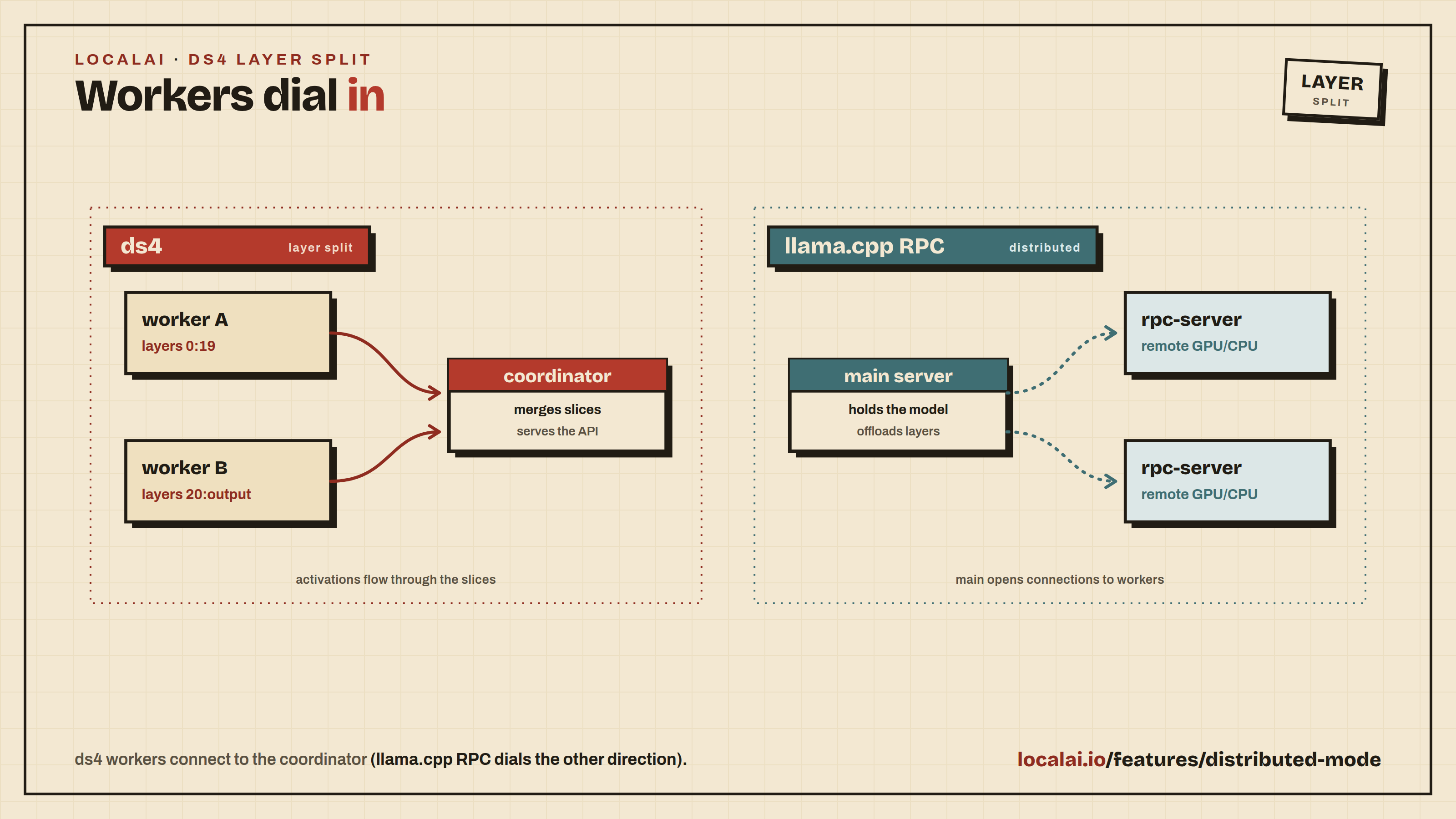
grpc_servers or rpc_servers
string
Comma-separated list of gRPC server addresses for distributed inference. Allows distributing workload across multiple llama.cpp workers.
grpc_servers:localhost:50051,localhost:50052
fit_params or fit
boolean
Enable auto-adjustment of model/context parameters to fit available device memory. Default: true.
fit_params:true
fit_params_target or fit_target
integer
Target margin per device in MiB when using fit_params. Default: 1024 (1GB).
fit_target:2048
fit_params_min_ctx or fit_ctx
integer
Minimum context size that can be set by fit_params. Default: 4096.
fit_ctx:2048
moe_cache_mib
integer
Size in MiB of a GPU cache for MoE expert weights that stay in host memory (upstream --moe-cache-mib). Off by default (0). It helps only when experts are in host memory, with cpu_moe, n_cpu_moe or a fit_params spill. The cache uses GPU memory, so lower gpu_layers or the fit result may change. Experimental upstream. A cache that is too small can thrash, because every token evicts its own experts. A rough starting point is about 10% of the total expert size.
moe_cache_mib:4096
n_cache_reuse or cache_reuse
integer
Minimum chunk size to attempt reusing from the cache via KV shifting. Default: 0 (disabled).
cache_reuse:256
slot_prompt_similarity or sps
float
How much the prompt of a request must match the prompt of a slot to use that slot. Default: 0.1. Set to 0 to disable.
sps:0.5
swa_full
boolean
Use full-size SWA (Sliding Window Attention) cache. Default: false.
swa_full:true
cont_batching or continuous_batching
boolean
Enable continuous batching for handling multiple sequences. Default: true.
cont_batching:true
check_tensors
boolean
Validate tensor data for invalid values during model loading. Default: false.
check_tensors:true
warmup
boolean
Enable warmup run after model loading. Default: true.
warmup:false
no_op_offload
boolean
Disable offloading host tensor operations to device. Default: false.
no_op_offload:true
device or devices
string
Select the llama.cpp backend devices to use. Repeat the option or pass a comma-separated list; unlisted devices are excluded. Use the names reported by llama-server --list-devices / --list-devices.
devices:CUDA1,CUDA2,CUDA3
kv_unified or unified_kv
boolean
Use a single unified KV buffer shared across all sequences. Default: true (LocalAI override; upstream defaults to false but auto-enables it when slot count is auto). Required for cache_idle_slots and scoring: without it the server force-disables idle-slot saving at init, and score-enabled models are rejected at load time.
kv_unified:false
cache_idle_slots or idle_slots_cache
boolean
On a new task, save the previous slot’s KV state into the prompt cache (and clear the slot) so a later request with the same prefix can warm-load it. Default: true. Auto-disabled by the server if kv_unified=false or cache_ram=0.
cache_idle_slots:false
n_ctx_checkpoints or ctx_checkpoints
integer
Maximum number of context checkpoints per slot (used for partial-prefix recovery, e.g. SWA). Default: 32.
ctx_checkpoints:16
checkpoint_min_step or checkpoint_min_spacing (aliases: checkpoint_every_nt, checkpoint_every_n_tokens)
integer
Minimum spacing in tokens between context checkpoints. 0 disables the minimum-spacing gate. Default: 256. (Renamed upstream from checkpoint_every_nt; semantics shifted from a fixed cadence to a minimum spacing.)
checkpoint_min_step:1024
split_mode or sm
string
How to split the model across multiple GPUs: none (single GPU only), layer (default - split layers and KV across GPUs), row (split rows across GPUs), tensor (experimental tensor parallelism, requires flash_attention: true, manually set context_size, and a llama.cpp build that includes #19378; it historically also required KV-cache quantization to be disabled, but #23792 lifts that restriction so cache_type_k/cache_type_v quantization can be combined with tensor parallelism on builds that include it).
Note: The parallel option can also be set via the LLAMACPP_PARALLEL environment variable, and grpc_servers can be set via the LLAMACPP_GRPC_SERVERS environment variable. Options specified in the YAML file take precedence over environment variables.
An explicit parallel: 1 (or n_parallel: 1) in the model options takes precedence over LLAMACPP_PARALLEL, like any other value. The environment variable is only used when neither option is set; if it is missing or not a number, the backend uses one slot.
Hardware auto-tuning (and how to override it)
On a detected GPU, LocalAI fills a few performance-relevant defaults the model config leaves unset - a larger physical batch on NVIDIA Blackwell, and a VRAM-scaled parallel slot count for concurrent serving. Both are gated on per-device VRAM at the model’s context: when a large context already fills a single card (e.g. a 27B model with a 200k context across 2×16 GiB), the batch boost and the extra parallel slots are suppressed so they can’t tip the tighter GPU into CUDA out-of-memory.
Anything you set explicitly in the model YAML always wins, so to pin a value just set it (e.g. batch: 512 or options: ["parallel:1"]). The effective values are logged at INFO when a model loads (effective runtime tuning …). To turn the hardware auto-tuning off entirely and run llama.cpp’s stock behavior, set:
LOCALAI_DISABLE_HARDWARE_DEFAULTS=true
Server-side prompt cache (repeated system prompts)
Agents, coding assistants, and Anthropic/OpenAI-compatible CLIs typically resend the same large system prompt on every turn. The llama.cpp server can short-circuit prefill for the matching prefix by stashing idle slot KV states in host RAM and reloading them on a hit. Three settings interact:
Setting
Default
Role
cache_ram:N
8192 (llama.cpp default)
Allocates the host-side prompt cache. 0 disables it.
kv_unified:true
true
Single unified KV buffer (prerequisite for idle-slot saving).
cache_idle_slots:true
true
Persists the idle slot’s KV into the prompt cache on task switch.
All three are on by default since LocalAI v4.3, so the prompt cache works out of the box for the common single-slot setup. If you’re on an older release, or you’ve explicitly disabled one of them, add the following to recover the behaviour:
options:
  - cache_ram:4096       # or -1 for no limit
  - kv_unified:true
  - cache_idle_slots:true
Set cache_ram:0 to opt out of the prompt cache entirely (saves host RAM at the cost of re-prefilling repeated prompts).
cache_ram:-1 removes the limit. With idle-slot saving on, every distinct prompt then leaves its slot state in host RAM, so a workload with many different prompts (classification, ingestion) grows the backend by roughly the KV size of each prompt until the host runs out of memory.
Saving and restoring a prompt cache
The server-side prompt cache lives in RAM and is lost when the model unloads. To keep the prompt state of one slot on disk, set slot_save_path and use the slot API. A typical use is a voice assistant with a long system prompt: save the state once, then restore it when the wake word fires, so the first request does not wait for prefill.
options:
  - slot_save_path:/var/lib/localai/slots
Both calls need an admin API key when authentication is on. Without slot_save_path they return 400.
The server chooses the name of every saved file. A save returns an id, and a restore takes that id. A client cannot pick a file name or a path.
# Save slot 0 of the model. The reply contains the id.curl http://localhost:8080/v1/slots/save \
-H "Content-Type: application/json"\
-d '{"model": "my-model", "slot": 0}'# Load that state back into slot 0curl http://localhost:8080/v1/slots/restore \
-H "Content-Type: application/json"\
-d '{"model": "my-model", "slot": 0, "id": "0123456789abcdef0123456789abcdef"}'
Field
Description
model
Name of a llama-cpp model.
slot
Slot id. Default 0. With parallel:N the ids are 0 to N-1.
id
Restore only. The id that a save returned for this model: 32 lowercase hex characters. Do not send it on save.
The save reply gives the id, the slot, the number of tokens and bytes, and the time taken in duration_ms. The message field lists the IDs of any older saves that were deleted to make room. The restore reply has the same fields. Neither reply contains a path on the host.
Keep these points in mind:
A client cannot choose names. The backend creates a directory for each model under slot_save_path (mode 0700) and writes a manifest.json in it. A restore works only for an id in the manifest of that model. Any other id returns 404 with no saved state with this id for this model.
The backend keeps at most 32 saves for each model. When a save would go over that, it deletes the oldest one and lists its id in message. A save larger than 8 GiB is deleted and fails.
A restore also checks that the file is a plain file and has the size that was recorded at save time. A file that was replaced or cut short is refused.
Keep slot_save_path private to the user that runs LocalAI. LocalAI creates it with mode 0700 when it is missing, and writes a warning to the log when an existing directory is open to other users. The checks above cannot stop a local user who can write to the directory.
A saved state is only as fresh as its save. To change the cached prompt, save again and use the new id.
A saved state holds the prompt state for the model and quantisation it came from. Do not restore it into a different model, quantisation or context size. The restore call fails if the state does not fit, but a state from another model is not always detected.
A slot that is busy with a request is served after that request ends.
The API is for llama-cpp only. Other backends return 501.
ik_llama.cpp is a hard fork of llama.cpp by Iwan Kawrakow that focuses on superior CPU and hybrid GPU/CPU performance. It ships additional quantization types (IQK quants), custom quantization mixes, Multi-head Latent Attention (MLA) for DeepSeek models, and fine-grained tensor offload controls - particularly useful for running very large models on commodity CPU hardware.
Note
The ik-llama-cpp backend requires a CPU with AVX2 support. The IQK kernels are not compatible with older CPUs.
Features
The ik-llama-cpp backend supports the following features:
IQK quantization types for better CPU inference performance
Multimodal models (via clip/llava)
Setup
The backend is distributed as a separate container image and can be installed from the LocalAI backend gallery, or specified directly in a model configuration. GGUF models loaded with this backend benefit from ik_llama.cpp’s optimized CPU kernels - especially useful for MoE models and large quantized models that would otherwise be GPU-bound.
YAML configuration
To use the ik-llama-cpp backend, specify it as the backend in the YAML file:
name: my-modelbackend: ik-llama-cppparameters:
# Relative to the models pathmodel: file.gguf
The aliases ik-llama and ik_llama are also accepted.
turboquant (llama.cpp fork with TurboQuant KV-cache)
llama-cpp-turboquant is a llama.cpp fork that adds the TurboQuant KV-cache quantization scheme. It reuses the upstream llama.cpp codebase and ships as a drop-in alternative backend inside LocalAI, sharing the same gRPC server sources as the stock llama-cpp backend - so any GGUF model that runs on llama-cpp also runs on turboquant.
You would pick turboquant when you want smaller KV-cache memory pressure (longer contexts on the same VRAM) or to experiment with the fork’s quantized KV representations on top of the standard cache_type_k / cache_type_v knobs already supported by upstream llama.cpp.
Features
Drop-in GGUF compatibility with upstream llama.cpp.
TurboQuant KV-cache quantization (see fork README for the current set of accepted cache_type_k / cache_type_v values).
Same feature surface as the llama-cpp backend: text generation, embeddings, tool calls, multimodal via mmproj.
Available on CPU (AVX/AVX2/AVX512/fallback), NVIDIA CUDA 12/13, AMD ROCm/HIP, Intel SYCL f32/f16, Vulkan, and NVIDIA L4T.
Setup
turboquant ships as a separate container image in the LocalAI backend gallery. Install it like any other backend:
local-ai backends install turboquant
Or pick a specific flavor for your hardware (example tags: cpu-turboquant, cuda12-turboquant, cuda13-turboquant, rocm-turboquant, intel-sycl-f16-turboquant, vulkan-turboquant).
YAML configuration
To run a model with turboquant, set the backend in your model YAML and optionally pick quantized KV-cache types:
name: my-modelbackend: turboquantparameters:
# Relative to the models pathmodel: file.gguf# Use TurboQuant's own KV-cache quantization schemes. The fork accepts# the standard llama.cpp types (f16, f32, q8_0, q4_0, q4_1, q5_0, q5_1)# and adds three TurboQuant-specific ones: turbo2, turbo3, turbo4.# turbo3 / turbo4 auto-enable flash_attention (required for turbo K/V)# and offer progressively more aggressive compression.cache_type_k: turbo3cache_type_v: turbo3context_size: 8192
The cache_type_k / cache_type_v fields map to llama.cpp’s -ctk / -ctv flags. The stock llama-cpp backend only accepts the standard llama.cpp types - to use turbo2 / turbo3 / turbo4 you need this turboquant backend, which is where the fork’s TurboQuant code paths actually take effect. Pick q8_0 here and you’re just running stock llama.cpp KV quantization; pick turbo* and you’re running TurboQuant.
The backend will automatically download the required files in order to run the model.
Usage
Use the completions endpoint by specifying the vllm backend:
curl http://localhost:8080/v1/completions -H "Content-Type: application/json" -d '{
   "model": "vllm",
   "prompt": "Hello, my name is",
   "temperature": 0.1, "top_p": 0.1
 }'
Passing arbitrary vLLM options with engine_args
A subset of AsyncEngineArgs is exposed as typed YAML fields
(tensor_parallel_size, gpu_memory_utilization, quantization,
max_model_len, dtype, trust_remote_code, enforce_eager, …).
Anything else can be passed through the generic engine_args: map.
Keys are forwarded verbatim to vLLM’s engine; unknown keys fail at load
time with the closest valid name as a hint. Nested maps materialise
into vLLM’s nested config dataclasses (SpeculativeConfig,
KVTransferConfig, CompilationConfig, …).
Speculative decoding (DFlash, ngram, eagle, deepseek_mtp, …) is
configured this way:
method picks the algorithm, the remaining keys are method-specific.
Drafters from z-lab are paired with
specific target models; pick the one that matches your target. The
drafter loads in its native precision regardless of the target’s
quantization: setting.
Another example - picking a non-default attention backend (e.g. on
hardware where the default cutlass kernels aren’t supported):
engine_args:
  attention_backend: TRITON_ATTN
CLI-style engine flags in options
Engine arguments can also be written in options: with vLLM’s own CLI
spelling, which is handy when copying a command line out of vLLM’s
documentation:
Only -- prefixed entries are treated as engine flags; everything
else in options: (tool_parser:, reasoning_parser:, …) keeps its
existing meaning. Both --flag:value and --flag=value are accepted.
Dashes become underscores (--enable-prefix-caching →
enable_prefix_caching) and the value is coerced to the target
field’s type. A bare --flag sets a boolean field to true.
Unknown or uncoercible flags are logged on the backend’s stderr and
skipped rather than failing the load. engine_args: stays strict and
is applied last, so it wins on conflict.
engine_args: remains the form to use for anything structured (nested
configs, maps); options: is a convenience for flat flags.
Multi-node data parallelism
engine_args.data_parallel_size > 1 combined with the
local-ai p2p-worker vllm follower lets a single model span multiple
GPU nodes. See vLLM Multi-Node (Data-Parallel)
for the head/follower configuration and a worked Kimi-K2.6 example.
SGLang
SGLang is a fast serving
framework for LLMs and VLMs with a focus on prefix caching, speculative
decoding, and multi-modal generation. LocalAI ships a gRPC backend that
wraps SGLang’s async Engine, including its native function-call and
reasoning parsers.
The backend will pull the model from HuggingFace on first load.
Passing arbitrary SGLang options with engine_args
The same engine_args: map that the vLLM backend accepts is also
honoured by the SGLang backend. Keys are validated against
ServerArgs
SGLang’s central configuration dataclass - and forwarded verbatim to
Engine(**kwargs). Unknown keys fail at load time with the closest
valid name as a hint. Unlike vLLM, ServerArgs is flat: speculative
decoding fields are top-level (speculative_algorithm,
speculative_draft_model_path, etc.) rather than nested under a
speculative_config: dict.
The typed YAML fields shared with vLLM are mapped to their SGLang
equivalents (gpu_memory_utilization → mem_fraction_static,
enforce_eager → disable_cuda_graph, tensor_parallel_size →
tp_size, max_model_len → context_length). Anything else,
including all speculative-decoding flags, goes under engine_args:.
Speculative decoding: Gemma 4 with Multi-Token Prediction
Google publishes paired “assistant” drafters for every Gemma 4 size.
The drafters use Multi-Token Prediction (MTP) to propose several
candidate tokens per target step, which SGLang then verifies in
parallel. Flags below are transcribed verbatim from the
SGLang Gemma 4 cookbook.
For consumer GPUs in the 16-24 GB range, use E4B (8 B total /
4 B effective parameters):
For smaller cards (8-12 GB), drop to E2B (5 B total / 2 B effective)
by swapping the model paths to google/gemma-4-E2B-it and
google/gemma-4-E2B-it-assistant; the rest of the flags stay the same.
NEXTN is normalised to EAGLE inside ServerArgs.__post_init__, so
either value works - the cookbook uses NEXTN. mem_fraction_static
is the share of GPU memory SGLang reserves for the model + KV pool;
0.85 is the cookbook’s default and adapts to whatever single GPU the
backend is running on.
The 31 B dense and 26 B-A4B MoE Gemma 4 variants exist in the same
cookbook but require --tp-size 2, so they’re not in the gallery as
single-GPU recipes.
SGLang version requirement. Gemma 4 support landed in SGLang via
PR #21952. The
LocalAI sglang backend pins a release that includes it; if you’ve
overridden the pin to an older version, this recipe will fail with a
“model architecture not recognised” error at load time.
Other speculative algorithms
speculative_algorithm: also accepts EAGLE/EAGLE3 (paired with an
EAGLE-style draft head), DFLASH (block-diffusion drafters from
z-lab for the Qwen3 family), STANDALONE
(a smaller draft LLM verifying a larger target), and NGRAM (no draft
model - pure prefix-history speculation). See SGLang’s
speculative-decoding docs
for the full algorithm matrix.
Tool calling and reasoning parsers
SGLang’s native parsers stream tool_calls and reasoning_content
inside ChatDelta - the LocalAI Python backend wires them up
per-request rather than via engine_args:. Pick a parser by name:
thinking_budget sets a positive integer token budget for reasoning on each request.
Invalid, zero, and negative values produce a warning and leave the budget unset.
SGLang requires engine_args.enable_strict_thinking: true to enforce the budget.
LocalAI warns if you configure a budget without that engine option.
Keep the budget well below the max_tokens of your requests: if max_tokens is reached first,
the budget never triggers and the whole reply can be spent on reasoning, leaving the answer empty.
reasoning_default:on or reasoning_default:off sets the default for LocalAI’s tokenizer chat template.
Request metadata enable_thinking set to "true" or "false" overrides this default.
An explicit prompt bypasses tokenizer template rendering.
When no default or request override is set, the template keeps its own behavior.
LocalAI signals required reasoning when the rendered prompt ends with the configured parser’s opening reasoning token.
An explicit output grammar disables this detection.
Configure a reasoning parser that matches your model.
The backend reads these options when it loads the model.
POST /models/reload rereads model configuration files but does not update options in an already loaded backend.
Restarting only the backend does not reread configuration files.
Restart LocalAI after changing these options to reload both the configuration and the backend.
vllm.cpp
vllm.cpp is the LocalAI team’s C++ port of
vLLM: the same continuous-batching scheduler, paged KV cache and prefix caching,
with no Python at inference time. It consumes either a HuggingFace safetensors
model directory or a .gguf file, and applies the model’s chat template,
tool-call parsing and reasoning split engine-side.
This section is the configuration reference. For installing the backend and the
ready-made models the gallery ships for it, see the
vllm.cpp backend page.
The same engine_args: map the vLLM and SGLang backends accept is honoured
here, with keys spelled exactly as vLLM’s own CLI flags - so a speculative_config
or kv_transfer_config block written for vLLM works verbatim. Unknown keys are
ignored rather than fatal; the engine validates the documents it is handed and
reports a precise error at load.
name: qwen35-a3bbackend: vllm-cppparameters:
model: "Qwen/Qwen3.5-A3B"context_size: 16384template:
use_tokenizer_template: trueengine_args:
# KV cache sizing: num_blocks * block_size tokens of cache.block_size: 32num_blocks: 1024# Concurrency and the per-step chunked-prefill token budget.max_num_seqs: 32max_num_batched_tokens: 8192# Automatic prefix caching. Omit to keep the model's own default# (on for dense models, off for hybrid / attention-free ones).enable_prefix_caching: true# Scheduler admission order: fcfs (default), priority, or lpm# (cache-aware longest-prefix-match; needs prefix caching to have any effect).scheduling_policy: lpm
Key
Meaning
Default
block_size
KV-cache block size, in tokens per block
32
num_blocks
KV-cache blocks to allocate
256
max_model_len
Max sequence length; also settable as context_size / max_model_len
model config
max_num_seqs
Max concurrent sequences the scheduler admits
8
max_num_batched_tokens
Per-step chunked-prefill token budget
per-arch (2048 dense, 4096/8192 MoE)
enable_prefix_caching
Automatic prefix caching; enable_radix_attention is an accepted alias
model default
enable_jump_forward
Jump-forward decoding, which emits grammar-forced tokens without a model step. Only affects constrained requests (grammar, JSON schema)
off
scheduling_policy
fcfs, priority, or lpm
fcfs
tool_parser / reasoning_parser
Force a parser instead of chat-template auto-detection
auto
tokenizer_config
Override the tokenizer_config.json the chat template is read from
<model_dir>/tokenizer_config.json
speculative_config
Speculative decoding (see below)
disabled
kv_transfer_config
External KV connector / LMCache (see below)
none
hf_overrides
JSON object of config.json keys merged over the model directory’s own, as vLLM’s --hf-overrides (see the vllm.cpp backend page)
none
Raising max_num_batched_tokens lets more prefill land in a single step, at the
cost of decode latency for requests queued behind it. The default deliberately
does not scale with max_num_seqs, which is what keeps a large concurrent
prefill from blowing up the per-step activation on the hybrid architectures.
enable_prefix_caching and enable_jump_forward are tri-state at the engine
boundary: omitting the key defers to a default (the model’s own capability for
prefix caching, an environment variable for jump forward), while an explicit
false forces the feature off. Those are genuinely different - prefix caching
defaults on for dense models - so write the key only when you mean to override.
Speculative decoding
speculative_config: takes the same JSON object as vLLM’s
--speculative-config. Three methods are supported.
Architecture limit. At the current engine pin, mtp and dflash are
Qwen3.5 / Qwen3.6 only. The engine builds a widened speculative KV cache
directly for those families rather than through the model registry, so a
speculative config on any other architecture (Llama, GLM, Gemma, Mistral, …)
will not work regardless of checkpoint format. ngram needs no draft weights
and is not subject to this limit.
Format support.mtp and dflash now work from a .gguf target as well
as safetensors. An MTP head is read from the GGUF’s nextn.* tensors when the
file declares <arch>.nextn_predict_layers; a GGUF exported WITHOUT the head
(converted with --no-mtp, or predating llama.cpp’s Qwen3.5 MTP support) is
refused at load naming that as the reason. A DFlash draft may itself be a
dflash-arch GGUF, and the target may be a GGUF too. ngram needs no draft
weights and works on any format.
MTP (Multi-Token Prediction) uses a draft head shipped inside the target
checkpoint’s own mtp.* tensors, so there is no second model to download. It
requires a safetensors checkpoint - the mtp.* tensors do not survive GGUF
conversion, and an MTP config over a .gguf model is rejected at load.
engine_args:
speculative_config:
method: mtp# Optional; defaults to the checkpoint's own head depth, which is# usually the right value. Must be a multiple of that depth.num_speculative_tokens: 1
DFlash uses a separate block-diffusion drafter that proposes a whole block
of tokens in one non-autoregressive forward pass. Unlike MTP, the draft is its
own checkpoint, so model: is required:
The draft shares the target’sembed_tokens and lm_head, so both must come
from the same model family and the target must be safetensors.
The engine does not download the draft.model: is resolved, in order,
as a path as given, then as the last path segment under LocalAI’s models
directory (z-lab/Qwen3.6-27B-DFlash → <models>/Qwen3.6-27B-DFlash, which is
what LocalAI’s own downloader produces), then as the whole reference under the
models directory. Install the draft into LocalAI first, or give an absolute path
to a directory containing config.json. If none of those resolve, the load
fails immediately naming every location that was tried, rather than reporting a
missing checkpoint from inside the engine.
N-gram needs no draft model at all - it proposes from the prompt’s own
suffix history. num_speculative_tokens is required:
Auto-configuration on import. When you import a safetensors repository
with backend: vllm-cpp, LocalAI reads the checkpoint’s config.json and, if
it declares an MTP head (mtp_num_hidden_layers), writes
speculative_config: {method: mtp} into the generated engine_args for you.
An explicit speculative_config in your own config is never overwritten.
Importing a DFlash draft repository is refused with a warning: a drafter
cannot serve on its own, so import the target model and point
speculative_config.model at the draft.
External KV cache with LMCache
kv_transfer_config: takes vLLM’s --kv-transfer-config JSON and selects an
external KV-cache connector. The lm:// LMCache client lets prefill KV be
stored to and reloaded from a shared lmcache.v1.server, so a prefix computed
by one replica does not have to be recomputed by the next:
kv_role is one of kv_producer (store only), kv_consumer (load only), or
kv_both. An unregistered connector name, a missing role, or a malformed
document fails the load with an explicit error rather than silently running
without the cache.
Legacy options: list
Earlier versions configured this backend through the flat options: list, and
those configs keep working. Every key in the table above is still read from
there in key:value form, and engine_args wins on any key set in both:
New configs should prefer engine_args:, which is the only place the nested
speculative_config / kv_transfer_config documents can be written naturally
rather than as a single-line JSON string.
Transformers
Transformers is a State-of-the-art Machine Learning library for PyTorch, TensorFlow, and JAX.
LocalAI has a built-in integration with Transformers, and it can be used to run models.
This is an extra backend - in the container images (the extra images already contains python dependencies for Transformers) is already available and there is nothing to do for the setup.
Setup
Create a YAML file for the model you want to use with transformers.
To setup a model, you need to just specify the model name in the YAML config file:
The backend will automatically download the required files in order to run the model.
Parameters
Type
Type
Description
AutoModelForCausalLM
AutoModelForCausalLM is a model that can be used to generate sequences. Use it for NVIDIA CUDA and Intel GPU with Intel Extensions for Pytorch acceleration
OVModelForCausalLM
for Intel CPU/GPU/NPU OpenVINO Text Generation models
OVModelForFeatureExtraction
for Intel CPU/GPU/NPU OpenVINO Embedding acceleration
N/A
Defaults to AutoModel
OVModelForCausalLM requires OpenVINO IR Text Generation models from Hugging face
OVModelForFeatureExtraction works with any Safetensors Transformer Feature Extraction model from Huggingface (Embedding Model)
Please note that streaming is currently not implemented in AutoModelForCausalLM for Intel GPU.
AMD GPU support is not implemented.
Although AMD CPU is not officially supported by OpenVINO there are reports that it works: YMMV.
Embeddings
Use embeddings: true if the model is an embedding model
Inference device selection
Transformer backend tries to automatically select the best device for inference, anyway you can override the decision manually overriding with the main_gpu parameter.
Inference Engine
Applicable Values
CUDA
cuda, cuda.X where X is the GPU device like in nvidia-smi -L output
OpenVINO
Any applicable value from Inference Modes like AUTO,CPU,GPU,NPU,MULTI,HETERO
Example for CUDA:
main_gpu: cuda.0
Example for OpenVINO:
main_gpu: AUTO:-CPU
This parameter applies to both Text Generation and Feature Extraction (i.e. Embeddings) models.
Inference Precision
Transformer backend automatically select the fastest applicable inference precision according to the device support.
CUDA backend can manually enable bfloat16 if your hardware support it with the following parameter:
f16: true
Quantization
Quantization
Description
bnb_8bit
8-bit quantization
bnb_4bit
4-bit quantization
xpu_8bit
8-bit quantization for Intel XPUs
xpu_4bit
4-bit quantization for Intel XPUs
Trust Remote Code
Some models like Microsoft Phi-3 requires external code than what is provided by the transformer library.
By default it is disabled for security.
It can be manually enabled with:
trust_remote_code: true
Maximum Context Size
Maximum context size in bytes can be specified with the parameter: context_size. Do not use values higher than what your model support.
Usage example:
context_size: 8192
Auto Prompt Template
Usually chat template is defined by the model author in the tokenizer_config.json file.
To enable it use the use_tokenizer_template: true parameter in the template section.
Usage example:
template:
  use_tokenizer_template: true
Custom Stop Words
Stopwords are usually defined in tokenizer_config.json file.
They can be overridden with the stopwords parameter in case of need like in llama3-Instruct model.
Usage example:
stopwords:
- "<|eot_id|>"
- "<|end_of_text|>"
Usage
Use the completions endpoint by specifying the transformers model:
curl http://localhost:8080/v1/completions -H "Content-Type: application/json" -d '{
   "model": "transformers",
   "prompt": "Hello, my name is",
   "temperature": 0.1, "top_p": 0.1
 }'
Examples
OpenVINO
A model configuration file for openvion and starling model:
LocalAI supports running the OpenAI functions and tools API across multiple backends. The OpenAI request shape is the same regardless of which backend runs your model - LocalAI is responsible for extracting structured tool calls from the model’s output before returning the response.
LocalAI also supports JSON mode out of the box on llama.cpp-compatible models.
💡 Check out LocalAGI for an example on how to use LocalAI functions.
Supported backends
Backend
How tool calls are extracted
llama.cpp
C++ incremental parser; any ggml/gguf model works out of the box, no configuration needed
vllm
vLLM’s native ToolParserManager - select a parser with tool_parser:<name> in the model options. Auto-set by the gallery importer for known families
vllm-omni
Same as vLLM
mlx
mlx_lm.tool_parsers - auto-detected from the chat template, no configuration needed
mlx-vlm
mlx_vlm.tool_parsers (with fallback to mlx-lm parsers) - auto-detected from the chat template, no configuration needed
Reasoning content (<think>...</think> blocks from DeepSeek R1, Qwen3, Gemma 4, etc.) is returned in the OpenAI reasoning_content field on the same backends. When a model both reasons and calls a tool in the same turn, see Interleaved Thinking with Tool Calls for how the reasoning survives the tool-result round trip.
Setup
llama.cpp
No configuration required - the autoparser detects the tool call format for any ggml/gguf model that was trained with tool support.
Migrating older Ministral 3 configurations
The mistralai_ministral-3-14b-reasoning-2512-multimodal gallery entry uses the model’s embedded template and llama.cpp’s native tool parser.
Older installations inherit the Mistral 0.3 prompt and JSON parser, which can return tool calls such as pick_tool{...} as text.
For an existing installation, replace the model YAML’s template and function sections with:
Remove the inherited stopwords list so llama.cpp controls the model’s end-of-turn markers.
Keep your model path, mmproj, sampling settings, and MCP configuration. Reload the model after saving the YAML.
Gallery changes do not rewrite installed model configurations.
vLLM / vLLM Omni
The parser must be specified explicitly because vLLM itself doesn’t auto-detect one. Pass it via the model options:
When you import a vLLM model through the LocalAI gallery, the importer looks up the model family and pre-fills tool_parser: and reasoning_parser: for you - you only need to override them for non-standard model names.
Available tool parsers include hermes, llama3_json, llama4_pythonic, mistral, qwen3_xml, deepseek_v3, granite4, kimi_k2, glm45, and more. Available reasoning parsers include deepseek_r1, qwen3, mistral, gemma4, granite. See the upstream vLLM documentation for the full list.
MLX / MLX-VLM
MLX backends auto-detect the right tool parser by inspecting the model’s chat template - you don’t need to set anything. Just load an MLX-quantized model that was trained with tool support:
The gallery importer will still append tool_parser: and reasoning_parser: entries to the YAML for visibility and consistency with the other backends, but those are informational - the runtime auto-detection in the MLX backend ignores them and uses the parser matched to the chat template.
The functions calls maps automatically to grammars which are currently supported only by llama.cpp, however, it is possible to turn off the use of grammars, and extract tool arguments from the LLM responses, by specifying in the YAML file no_grammar and a regex to map the response from the LLM:
name: model_nameparameters:
# Model file namemodel: model/namefunction:
# set to true to not use grammarsno_grammar: true# set one or more regexes used to extract the function tool arguments from the LLM responseresponse_regex:
- "(?P<function>\w+)\s*\((?P<arguments>.*)\)"
The response regex have to be a regex with named parameters to allow to scan the function name and the arguments. For instance, consider:
(?P<function>\w+)\s*\((?P<arguments>.*)\)
will catch
function_name({ "foo": "bar"})
Parallel tools calls
This feature is experimental and has to be configured in the YAML of the model by enabling function.parallel_calls:
name: gpt-3.5-turboparameters:
# Model file namemodel: ggml-openllama.bintop_p: 80top_k: 0.9temperature: 0.1function:
# set to true to allow the model to call multiple functions in parallelparallel_calls: true
Use functions with grammar
It is possible to also specify the full function signature (for debugging, or to use with other clients).
The chat endpoint accepts the grammar_json_functions additional parameter which takes a JSON schema object.
Grammars and function tools can be used as well in conjunction with vision APIs:
 curl http://localhost:8080/v1/chat/completions -H "Content-Type: application/json" -d '{
     "model": "llava", "grammar": "root ::= (\"yes\" | \"no\")",
     "messages": [{"role": "user", "content": [{"type":"text", "text": "Is there some grass in the image?"}, {"type": "image_url", "image_url": {"url": "https://upload.wikimedia.org/wikipedia/commons/thumb/d/dd/Gfp-wisconsin-madison-the-nature-boardwalk.jpg/2560px-Gfp-wisconsin-madison-the-nature-boardwalk.jpg" }}], "temperature": 0.9}]}'
💡 Examples
A full e2e example with docker-compose is available here.
Constrained Grammars
Overview
The chat endpoint supports the grammar parameter, which allows users to specify a grammar in Backus-Naur Form (BNF). This feature enables the Large Language Model (LLM) to generate outputs adhering to a user-defined schema, such as JSON, YAML, or any other format that can be defined using BNF. For more details about BNF, see Backus-Naur Form on Wikipedia.
Note
Compatibility Notice: This feature is only supported by models that use the llama.cpp backend. For a complete list of compatible models, refer to the Model Compatibility page. For technical details, see the related pull requests: PR #1773 and PR #1887.
Setup
To use this feature, follow the installation and setup instructions on the LocalAI Functions page. Ensure that your local setup meets all the prerequisites specified for the llama.cpp backend.
💡 Usage Example
The following example demonstrates how to use the grammar parameter to constrain the model’s output to either “yes” or “no”. This can be particularly useful in scenarios where the response format needs to be strictly controlled.
In this example, the grammar parameter is set to a simple choice between “yes” and “no”, ensuring that the model’s response adheres strictly to one of these options regardless of the context.
Example: JSON Output Constraint
You can also use grammars to enforce JSON output format:
curl http://localhost:8080/v1/chat/completions -H "Content-Type: application/json" -d '{
  "model": "gpt-4",
  "messages": [{"role": "user", "content": "Generate a person object with name and age"}],
  "grammar": "root ::= \"{\" \"\\\"name\\\":\" string \",\\\"age\\\":\" number \"}\"\nstring ::= \"\\\"\" [a-z]+ \"\\\"\"\nnumber ::= [0-9]+"
}'
Moderation - OpenAI-compatible safety classification whose response is constrained to the moderation schema
Interleaved Thinking with Tool Calls
Reasoning models can “think” before they answer. When such a model also calls a tool, the useful behaviour is for the thinking and the tool call to travel together, and for that thinking to survive the tool-result round trip. LocalAI calls this interleaved thinking: a single assistant turn carries both reasoning and tool_calls, and the client hands the reasoning back on the next turn so the model’s chain of thought is not lost when the tool result is appended.
This matters because a tool-calling loop is multi-turn. The model reasons, asks for a tool, your client runs the tool, and then you call the model again with the tool result. Without interleaved thinking the reasoning produced in the first turn is discarded, and the model has to reconstruct its plan from scratch. With it, the reasoning is echoed back and the model continues where it left off.
An assistant turn that both reasons and calls a tool returns the two fields side by side:
reasoning holds the model’s thinking.
tool_calls holds the structured calls.
finish_reason is tool_calls.
Your client runs the tool, then sends the conversation back with:
the original assistant message (including its reasoning and tool_calls), and
a tool role message carrying the tool result.
LocalAI reads the returned reasoning back into the model’s context so the chain is continuous.
Field naming
OpenAI chat completions (/v1/chat/completions): the response carries reasoning alongside tool_calls. On inbound assistant messages LocalAI now also accepts reasoning_content as an alias for reasoning. This alias exists because several clients (vLLM, DeepSeek, and cogito) emit the field under the name reasoning_content; either name is accepted and mapped to the same internal field.
Anthropic Messages (/v1/messages): reasoning is carried as thinking content blocks. On the local path LocalAI emits a thinking block before the tool_use block, and reads inbound thinking blocks back into reasoning. Because local models produce no cryptographic signature, LocalAI attaches a synthetic opaque signature to the emitted block, and does not validate the signature on inbound blocks. The thinking block is only emitted when the request opts in with the thinking parameter:
{
  "model": "your-reasoning-model",
  "max_tokens": 1024,
  "thinking": { "type": "enabled" },
  "messages": [
    { "role": "user", "content": "What is the weather in Rome?" }
  ]
}
Enabling reasoning per backend
Interleaved thinking requires the backend to separate the model’s thinking from its final answer. How you turn that on depends on the backend.
llama.cpp
Set the reasoning_format model option. Accepted values: none, auto, deepseek, deepseek-legacy. auto lets the backend pick based on the model’s chat template; deepseek and deepseek-legacy force the DeepSeek-style <think>...</think> extraction.
Set the reasoning_parser model option to vLLM’s native reasoning parser for the model family. LocalAI also ships an auto-configuration hook (core/config/hooks_vllm.go) that sets the reasoning parser and the tool-call parser together for known families, so for gallery-imported vLLM models this is often configured for you.
Request a chat completion with a tool defined and a prompt that requires the model to reason before acting:
curl http://localhost:8080/v1/chat/completions -H "Content-Type: application/json" -d '{
  "model": "your-reasoning-model",
  "messages": [
    { "role": "user", "content": "What is the weather in Rome?" }
  ],
  "tools": [
    {
      "type": "function",
      "function": {
        "name": "get_weather",
        "description": "Get the current weather for a city",
        "parameters": {
          "type": "object",
          "properties": {
            "city": { "type": "string" }
          },
          "required": ["city"]
        }
      }
    }
  ]
}'
The response message carries both the reasoning and the tool call, and finish_reason is tool_calls:
{
  "choices": [
    {
      "finish_reason": "tool_calls",
      "message": {
        "role": "assistant",
        "content": "",
        "reasoning": "Okay, the user is asking about the weather in Rome... I need to call get_weather with city Rome.",
        "tool_calls": [
          {
            "id": "call_abc123",
            "type": "function",
            "function": {
              "name": "get_weather",
              "arguments": "{\"city\":\"Rome\"}"
            }
          }
        ]
      }
    }
  ]
}
To continue, run get_weather, then send the conversation back with the assistant message (keeping its reasoning and tool_calls) followed by a tool message holding the result. LocalAI feeds the returned reasoning back into context so the model resumes its chain of thought.
Known limitations
Streaming Anthropic thinking blocks. In streaming mode, a thinking block is currently emitted only on the tool-call path that goes through the llama.cpp C++ autoparser. A plain streaming text-only turn, or a tool turn resolved through the inline token path, does not stream a thinking block. The equivalent non-streaming request does return one. Non-streaming emits thinking on all branches; only the streaming path has this gap.
Upstream llama.cpp leak on newest hybrid models. On the newest hybrid reasoning models (Qwen3.5 / Qwen3.6) there is an upstream llama.cpp bug where tool calls can leak into reasoning_content instead of being parsed into tool_calls. This is tracked upstream at ggml-org/llama.cpp discussion #23351.
Reasoning budget vs the tool call. If a reasoning model’s thinking exhausts the output budget (max_tokens) before it emits the tool call, no tool call is produced. Give the model enough max_tokens to cover both the reasoning and the call. In this case LocalAI reports finish_reason: "length".
Model Aliases
A model alias is a model name that redirects all traffic to another
configured model. Declare gpt-4 as an alias of my-llama-3 and every client
calling gpt-4 is served by my-llama-3 with no client reconfiguration: the
clients keep their existing model name while you control what answers them on
the server side.
Declaring an alias
Create a minimal config file in your models directory:
name: gpt-4alias: my-llama-3
That is the whole config: a name (the alias clients call) and an alias key
(the target that actually serves the request). An alias may add an
optional profile block.
Rules and behavior
The target (my-llama-3) must be an existing, non-alias, enabled model. You
cannot point an alias at a missing model, a disabled model, or another alias
(no chains).
Aliases are 1:1. One alias maps to exactly one target.
The target can be swapped live by editing the config file, calling the API,
using the UI, or asking the assistant. No restart is required.
Both gpt-4 and my-llama-3 appear in GET /v1/models.
Responses echo the requested alias: a call to gpt-4 returns gpt-4 in the
response model field, not the target name.
Usage accounting records both sides: requested gpt-4, served my-llama-3.
Aliases work for every modality (chat, embeddings, audio, images, and so on).
To serve a name from several models with automatic fallback, use a failover
chain.
Profile aliases
An alias can also act as a profile of its target: a different assistant on
the same loaded model. Add an optional profile block; its fields are applied on
top of the target’s config for requests to the alias:
Field
Effect
profile.system_prompt
Replaces the target’s system prompt. A system message sent by the client still takes precedence, as for any model.
profile.mcp (remote, stdio)
Replaces the target’s MCP servers.
profile.mcp.auto
Enables the MCP servers on /v1/chat/completions without metadata.mcp_servers, when MCP is enabled and the caller has the mcp permission. See MCP.
profile.client_tools: drop
Discards tools and tool_choice sent by the client.
profile.evidence_check.numbers
Marks answers that contain numbers without evidence in the request. See Evidence check.
profile.evidence_check.note
Text appended by the evidence check. Defaults to an English note.
name: researcheralias: my-llama-3profile:
system_prompt: You are a careful research assistant. Cite your sources.client_tools: dropmcp:
auto: trueremote: | {"mcpServers": {"search": {"url": "http://search.internal/mcp"}}}
Requests to researcher run on the same backend process as my-llama-3:
the model is not loaded a second time, however many profiles point at it. A
separate model config with its own backend and model file would load the
weights again. Fields the profile does not set are taken from the target.
The block is opt-in. Only fields inside profile are applied: top-level fields
on an alias (system_prompt, mcp, sampling parameters, templates, …) are
still ignored, so an alias without a profile block behaves exactly as before.
A profile block on a model that is not an alias is rejected.
MCP sessions of a profile with its own servers are kept apart from the target’s,
so profiles with different tool sets do not interfere with each other.
GET /v1/mcp/servers/<alias> (and the prompts and resources endpoints) report
the servers a chat request for the alias would use, so a profile’s tool set can
be checked without calling the model.
Evidence check
A profile with server-side MCP tools returns only the final answer to the
client; the tool calls and their results stay on the server. When the client
sends the conversation back on the next turn, that tool trail is missing, and a
model may answer a follow-up question with a number it never looked up instead
of calling the tool again. The evidence check marks such answers at the output,
independently of the prompt:
name: bookkeeperalias: my-llama-3profile:
mcp:
auto: trueremote: | {"mcpServers": {"ledger": {"url": "http://ledger.internal/mcp"}}}evidence_check:
numbers: true# optional, defaults to the note belownote: "_Note: this answer contains numbers that no tool returned in this turn — not verified._"
The rule is deterministic and applies to each request on its own:
If an MCP tool call succeeded on the server during this request, the answer
is left unchanged. A call that failed (the tool could not be called or
returned an error to LocalAI) delivers no evidence and does not count.
Otherwise every number in the final answer (a digit sequence, optionally with
one . or , decimal part) is looked up among the numbers of the request as
received: the profile’s system prompt and the content of every system, user,
assistant and tool message. 3,5 and 3.5 count as the same number.
If at least one number of the answer is not found, the note is appended after
a blank line. In a streamed response it arrives as one additional content
chunk before the final chunk.
Answers that hand tool calls to the client are not checked. The check is off
unless numbers: true is set, and note without numbers: true is rejected.
It flags, it does not prove: a number the client happened to mention is
accepted even if the answer uses it wrongly.
Managing aliases
You can create, swap, and remove aliases from any of the management surfaces.
Web UI
Open Add Model and pick the Alias / Routing template, then set a name
and a target. To re-point an existing alias, edit it and change the target.
REST API
Create: POST /models/import
Swap the target: PATCH /api/models/config-json/:name
List all aliases: GET /api/aliases
Delete: POST /models/delete/:name
Assistant and MCP
The LocalAI Assistant (and the MCP server) expose the same operations as tools:
set_alias, list_aliases, and delete_model.
Note
You cannot turn an existing real model into an alias. If you run set_alias
(or PATCH /api/models/config-json/:name) against a name that is already a real,
non-alias model, the request is rejected. An alias is a pure redirect, so it
must not carry a backend or parameters.model; a real model does, and merging
an alias onto it produces an invalid config that validation refuses with
alias config ... must not set backend or parameters.model. This is intentional:
it stops a stray set_alias call from clobbering a model that is serving.
To add an alias, point a new name at the target instead of reusing an
existing model’s name. Re-pointing an existing alias at a different target
is fully supported and is the live-swap path: the alias config has no backend of
its own, so swapping its target stays a valid pure redirect.
Aliases as deployment slots (distributed mode)
In distributed mode an alias can
carry a scheduling rule. POST /api/nodes/scheduling accepts an alias for
model_name, and the rule then governs whatever model the alias points at:
Re-point production and the placement policy follows it, so the alias behaves
as a stable slot whose contents you can swap. Because a replica is shared by
every name that resolves to it, only one rule may govern a given model at a
time. See Scheduling a model alias.
Limits
Aliases are a static 1:1 redirect; a profile block changes only the fields listed
above, not the model or its loading options. For classifier-based or load-balanced
selection across several downstream models, use the intelligent router in the
Middleware feature instead.
LocalAI exposes a set of discovery endpoints that let external agents, coding assistants, and automation tools programmatically learn what the instance can do and how to control it - without reading documentation ahead of time.
Quick start
# 1. Discover what's availablecurl http://localhost:8080/.well-known/localai.json
# 2. Browse instruction areascurl http://localhost:8080/api/instructions
# 3. Get an API guide for a specific instructioncurl http://localhost:8080/api/instructions/config-management
Authentication and discovery
You can read these discovery surfaces without authentication. This remains true when LocalAI uses database authentication or legacy API keys:
GET /.well-known/localai.json
GET /api/instructions
GET /api/instructions/{name}
Swagger GET requests at /swagger and under /swagger/
Discovery does not grant access to the endpoints it advertises. Those endpoints require credentials unless the authentication guide lists them as a public discovery or bootstrap route. For example, GET /version requires credentials even though the well-known response includes the instance version.
Well-Known Discovery Endpoint
GET /.well-known/localai.json
Returns the instance version, all available endpoint URLs (flat and categorized), and runtime capabilities.
The capabilities object reflects the current runtime configuration - for example, mcp is only true if MCP is enabled, and agents is true only if the agent pool is running.
Instructions API
Instructions are curated groups of related API endpoints. Each instruction maps to one or more Swagger tags and provides a focused, LLM-readable guide.
List all instructions
GET /api/instructions
curl http://localhost:8080/api/instructions
Returns a compact list of instruction areas:
{
"instructions": [
{
"name": "chat-inference",
"description": "OpenAI-compatible chat completions, text completions, and embeddings",
"tags": ["inference", "embeddings"],
"url": "/api/instructions/chat-inference" },
{
"name": "config-management",
"description": "Discover, read, and modify model configuration fields with VRAM estimation",
"tags": ["config"],
"url": "/api/instructions/config-management" }
],
"hint": "Fetch GET {url} for a markdown API guide. Add ?format=json for a raw OpenAPI fragment."}
Available instructions:
Instruction
Description
chat-inference
Chat completions, text completions, embeddings (OpenAI-compatible)
An additive, LocalAI-specific superset of /v1/models. It returns the same set of models but enriches each entry with the capabilities the model supports and the input/output modalities it accepts and produces. Use it to decide, before sending a request, whether a given model can take an image, audio, or video attachment directly - or whether the input needs converting/transcribing first.
The reported context_size uses a positive model-level value first.
If the model does not set context_size, it uses Settings → Performance → Default Context Size when positive.
Otherwise, it uses the backend fallback of 4096 tokens.
For llama.cpp with separate KV caches, the reported value accounts for the number of parallel slots.
Because it is purely additive, clients that only understand /v1/models keep working unchanged; they simply never call this route.
capabilities - canonical usecase strings (e.g. chat, vision, transcript, tts, embeddings, image, video) plus the modifiers tools and thinking.
input_modalities / output_modalities - the subsets of {text, image, audio, video} the model accepts and produces. LocalAI combines usecase-based inference, backend settings such as vLLM limit_mm_per_prompt, and explicit model-level known_input_modalities / known_output_modalities. The explicit fields cover distinctions a usecase cannot express, such as a video model that also accepts speech.
The same query parameters as /v1/models are honored (filter, excludeConfigured), and the same per-user model allowlist is applied when authentication is enabled.
Configuration Management APIs
These endpoints let agents discover model configuration fields, read current settings, modify them, and estimate VRAM usage.
Config metadata
GET /api/models/config-metadata
Returns structured metadata for all model configuration fields, organized by section. Each field includes its YAML path, Go type, UI type, label, description, default value, validation constraints, and available options.
# All fieldscurl http://localhost:8080/api/models/config-metadata
# Filter by sectioncurl http://localhost:8080/api/models/config-metadata?section=parameters
Autocomplete values
GET /api/models/config-metadata/autocomplete/:provider
Returns runtime values for dynamic fields. Providers include backends, models, models:chat, models:tts, models:transcript, models:vad.
# List available backendscurl http://localhost:8080/api/models/config-metadata/autocomplete/backends
# List chat-capable modelscurl http://localhost:8080/api/models/config-metadata/autocomplete/models:chat
The endpoint validates the merged config and writes it to disk as YAML.
Details
Config management endpoints require admin authentication when authentication is configured. The well-known endpoint, instructions API, and Swagger GET routes remain available without authentication.
Model storage report
GET /api/models/storage (admin)
Reports the on-disk footprint of the installed model configurations:
per-model sizes with the portion shared with other models split out,
every referenced file with the models referencing it, and references
whose files are missing from disk.
curl http://localhost:8080/api/models/storage
VRAM estimation
POST /api/models/vram-estimate
Estimates VRAM usage for an installed model based on its weight files, context size, and GPU layer offloading:
{
"sizeBytes": 4368438272,
"sizeDisplay": "4.4 GB",
"vramBytes": 6123456789,
"vramDisplay": "6.1 GB",
"context_note": "Estimate used default context_size=8192. The model's trained maximum context is 131072; VRAM usage will be higher at larger context sizes.",
"model_max_context": 131072}
Optional parameters: gpu_layers (number of layers to offload, 0 = all), kv_quant_bits (KV cache quantization, 0 = fp16).
Integration guide
A recommended workflow for agent/tool builders:
Discover: Fetch /.well-known/localai.json to learn available endpoints and capabilities.
Browse instructions: Fetch /api/instructions for an overview of instruction areas.
Deep dive: Fetch /api/instructions/{name} for a markdown API guide on a specific area.
Authenticate: Obtain credentials before you call an advertised protected endpoint.
Explore config: Use admin credentials with /api/models/config-metadata to understand configuration fields.
Interact: Use credentials with inference endpoints and configuration APIs.
Swagger UI
The full interactive API documentation is available without authentication at /swagger/index.html. Requests sent to protected endpoints from Swagger still require credentials.
Model Failover
A failover chain is a model name that is served by an ordered list of
other models. LocalAI sends each request to the first healthy target. When a
target fails, the request moves to the next target, and later requests stay
there until the first target has recovered.
Use it to serve a model from a remote LocalAI or another OpenAI-compatible
provider, and to fall back to a local model when the remote one is down.
Declaring a chain
name: assistant-llmfailover:
targets:
- model: argus-llm # for example a localai-proxy or cloud-proxy model - model: gemma-localwarm: true# keep it loaded
Clients call assistant-llm. Each target is a normal model config. A chain
has no backend and no parameters.model.
Optional settings, with their defaults:
failover:
probe:
interval: 15s # how often an idle target is checkedtimeout: 5strip:
errors: 1# failures within the window that mark a target downwindow: 30srecovery:
probes: 3# test requests a target must pass before it is used againmin_dwell: 60s # minimum time on a lower target before moving back
Rules:
A chain needs at least 2 targets. A target can be an alias, but not another
chain.
A chain cannot also set alias or backend.
Responses name the chain as the model. The X-LocalAI-Served-Model header
names the target that served the request.
A remote (localai-proxy or cloud-proxy) target receives its own model
name, never the chain name: proxy.upstream_model, or the target name when
upstream_model is empty. The health check looks for the same name.
How the target is chosen
The active target is the first healthy target in the list.
When a target fails, LocalAI marks it down and moves to the next target at
once.
LocalAI moves back to a higher target only when that target has passed
recovery.probes test requests and the current target has been active
for at least recovery.min_dwell. This stops an unstable upstream from
moving traffic back and forth.
When all targets are down, the chain is degraded. Each request still tries
every target in order.
Retry inside a request
When a target fails before the response starts, LocalAI sends the same
request to the next target. The client does not see the failure.
LocalAI does not retry after the first byte of a response is sent (for
example after the first streamed token). The request fails, the target is
marked down, and the next request uses the next target.
A target that is at its concurrency limit (an admission rejection) or that
is disabled is skipped for that request without being marked down.
LocalAI does not retry client errors (4xx), such as a prompt that is too
long, because the next target would reject it too. A 4xx counts neither as
a success nor as a failure for the target.
Request bodies larger than 32 MiB are not retried.
When the primary did not serve the request, the response has the header
X-LocalAI-Failover: fallback, or X-LocalAI-Failover: degraded when all
targets were down.
Health checks
Target
Regular check
Check before moving back
Remote (localai-proxy, cloud-proxy)
GET /v1/models on the upstream lists the model
one small real request, for example a 1-token completion
Local, warm: true
the backend answers a health check. A check never loads the model: while it is not loaded, the check passes and real requests judge it
one small real request. While the model is not loaded, the target is used again after min_dwell
Local, not warm
none: judged only by real requests; it is never loaded only to check it
none: the target is used again after min_dwell
A request that succeeds counts as a check, so a busy target is almost never
probed.
When a target is in more than one chain, its check settings come from the
first of those chains in name order.
Warm targets
warm: true loads a local target at startup and protects it from idle and
LRU eviction, so a switch does not wait for the model to load. Warm targets
count toward the active backend limit (--max-active-backends) like any
pinned model: LocalAI never evicts them to make room, and if they fill the
limit, a new model still loads rather than being blocked.
warm applies only to local targets. On a remote (localai-proxy or
cloud-proxy) target it has no effect, and LocalAI logs a warning when it
loads the chain.
LocalAI resolves the chain for every call of the stage, in full pipelines and
in transcription-only and sound-detection-only sessions. When a chain switches,
the session stays open and keeps its conversation. The next turn uses the new
target.
The session receives a localai.model.failover event for each chain stage when
it starts (reason: initial) and each time a chain switches:
This pipeline runs its transcription, LLM and TTS stages on a remote LocalAI
(argus) through localai-proxy
models, and uses local models when the remote instance is down. Each stage has
its own chain, so one stage can fail over while the others stay remote.
# Remote targets: each one names the model on the upstream LocalAI.name: argus-sttbackend: localai-proxyknown_usecases: [transcript]options:
- realtime_pipeline:asr-pipeline # upstream pipeline for live transcriptionproxy:
upstream_url: http://argus.lan:8080upstream_model: parakeet---
name: argus-llmbackend: localai-proxyknown_usecases: [chat]proxy:
upstream_url: http://argus.lan:8080upstream_model: gemma-3-12b---
name: argus-ttsbackend: localai-proxyknown_usecases: [tts]proxy:
upstream_url: http://argus.lan:8080upstream_model: kokoro---
# One chain per stage, remote first, local second.name: stt-chainfailover:
targets: [{model: argus-stt}, {model: whisper-local, warm: true}]---
name: llm-chainfailover:
targets: [{model: argus-llm}, {model: gemma-local, warm: true}]---
name: tts-chainfailover:
targets: [{model: argus-tts}, {model: piper-local}]---
name: assistantpipeline:
vad: silero-vadtranscription: stt-chainllm: llm-chaintts: tts-chain
The example shows the configs as one YAML stream; put each config in its own
file in the models directory. When argus stops
answering, the next call of each stage fails over to the local model and the
session receives a localai.model.failover event for that stage. A remote
target that does not support a call (it returns Unimplemented) is skipped for
that call and is not marked down.
Limits:
After a session.update that changes the pipeline, localai.model.failover
events keep describing the chains from session start.
A chain used as a router candidate, or as the classifier-mode scoring model,
is not resolved per call.
Watching failover
GET /api/failover lists every chain, its active target and the state of
each target.
GET /api/failover/{chain} returns one chain.
GET /api/failover/events is a server-sent event stream. The first event is
snapshot with the full state. Then chain.switched and target.state
events follow.
Metrics: localai_failover_switches_total{chain,from,to,reason} and
localai_failover_target_up{target}.
With tracing on, each skipped target appears in the Traces view with the
error that made LocalAI skip it.
Pinning a target
An admin can force a chain to one target, for example during maintenance:
While a chain is pinned, only the pinned target serves it. Health checks
continue. On a single LocalAI instance, a restart removes the pin. In
distributed mode, pins persist.
In the UI
The model editor’s template picker has a Failover Chain template that
starts a new model with two empty targets. Any model can also add a
failover.targets field directly: each row picks a target model and a
warm toggle, with move up/down and remove controls. The toggle is
available on every row; warm has no effect on a remote (localai-proxy or
cloud-proxy) target, and LocalAI logs a warning when it loads a chain with
one set. The field flags fewer than two targets, a duplicate target, and the
chain naming itself as one of its own targets.
Opening an existing chain in the model editor shows a health strip: the
chain’s status pill, its active target and how long it has been active,
and a table of every target with its kind, warm flag, status, last probe
time and last error. An admin sees a Pin button on each target and an
Unpin action for the chain, both behind a confirmation dialog.
The Failover page (/app/failover, admin only) lists every chain with
its status pill, active target, a small pill per target, and time since the
last switch. It links each chain name to its model editor page and shows an
empty state linking to the failover template when no chains exist yet. It
sits under Operate → Runtime on a single install and under Operate →
Swarm when distributed mode is on. On a cluster it also describes what the
router and the health monitor do when a worker stops answering, and shows a
preview of what would stop if a chosen node went away, worked out in the
browser from the loaded replicas and the placement rules. The server does not
compute that preview.
The Installed Models list badges a model that belongs to a chain with
chain → <active target>, next to the alias badge.
All of the above update live from the same event stream as
GET /api/failover/events — the strip, the overview page and the badge do
not need a page refresh to reflect a chain.switched or target.state
event.
Assistant and MCP
The LocalAI Assistant and local-ai mcp-server offer list_failover_chains,
pin_failover_target and unpin_failover_target. Create and edit chains with
the model config tools, like any other model.
Pins apply to the whole cluster. LocalAI stores them in the database, so
they persist across restarts. A pin set on one frontend applies on all.
Target health and the active target of each chain are shared over NATS, so
all frontends converge on the same target for a chain.
One frontend, the probe leader, runs the health checks, decides fail-over
and fail-back, and loads warm targets. The leader holds a PostgreSQL
advisory lock and keeps it until it stops or its database connection fails.
Then another frontend takes the lock and becomes the leader: immediately
when the leader shuts down or its process exits, and within about 30 seconds
when the leader’s host or network fails.
Warm targets stay loaded on the workers. The router and the replica
reconciler treat them like pinned models and do not evict them.
A frontend that starts late gets the current state within 10 seconds,
because the leader sends its full state again every 10 seconds.
If PostgreSQL is not available, no frontend holds the lock. Health checks
and fail-back stop until the database is back. Requests still fail over to
the next target when a target fails during the request.
If a frontend cannot start the shared state, it logs an error and manages
failover alone, as a single LocalAI instance does.
Leadership follows the database lock, not NATS. A leader that loses its NATS
connection but keeps its database connection stays the leader. Until NATS
recovers, the other frontends keep the last decisions they received from it,
and its new decisions do not reach them.
Each frontend reads the pins from the database again every 30 seconds and
after a NATS reconnect, and applies any change within 10 seconds. A frontend
that missed a pin or an unpin catches up in this way. If a pin cannot be written to the database, LocalAI returns an
error and restores the previous pin.
vllm.cpp is the LocalAI team’s C++20 port of
vLLM: the same continuous-batching scheduler, paged KV cache and automatic prefix
caching, with no Python at inference time. LocalAI serves it through the native
vllm-cpp backend, which loads either a HuggingFace safetensors directory or a
.gguf file and applies the chat template, tool-call parsing and reasoning split
inside the engine.
This page covers installing the backend and the models LocalAI ships ready to run
on it. For the full engine_args reference (KV sizing, scheduling policy,
speculative decoding, LMCache), see the
vllm.cpp section of the text generation guide.
Installing
local-ai backends install vllm-cpp
Or install it from the Backends page in the web UI. Images are published for
CPU, CUDA 13, Vulkan, Metal and Jetson L4T.
Which GPUs the CUDA images cover
The CUDA images are currently built for Blackwell-family architectures only:
sm_120a (RTX 50 series, RTX PRO 6000 Blackwell) and sm_121a (GB10 / DGX
Spark) on x86-64, and sm_121a alone on arm64. CUDA 13 is required, so there is
no CUDA 12 variant.
That is narrower than vllm.cpp itself, which builds ten architectures. On an
Ampere, Ada, Hopper, Jetson Orin or Jetson Thor GPU the CUDA backend installs
successfully and then fails at the first request with no kernel image is available for execution on the device. Until the build widens, use the Vulkan
or CPU image on those cards: vulkan-vllm-cpp builds with CUDA off entirely and
gives them a GPU path, without the NVFP4 and Marlin kernels.
Ready-made models
The model gallery carries a curated set of vllm.cpp configurations. Each one
arrives with the engine settings already applied, so tool calling, the reasoning
split and speculative decoding work without hand-editing YAML.
Gallery entry
Model
Size
Needs
qwen3.6-27b-nvfp4-vllm-cpp
Qwen3.6-27B, NVFP4
25 GB
Blackwell GPU
qwen3.6-27b-nvfp4-mtp-vllm-cpp
the same, with MTP speculative decoding
25 GB
Blackwell GPU
qwen3.6-27b-nvfp4-dflash-vllm-cpp
the same, with DFlash speculative decoding
28 GB
Blackwell GPU
qwen3.6-35b-a3b-nvfp4-vllm-cpp
Qwen3.6-35B-A3B MoE, NVFP4
23 GB
Blackwell GPU
qwen3.6-35b-a3b-nvfp4-mtp-vllm-cpp
the same, with MTP speculative decoding
23 GB
Blackwell GPU
qwen3-coder-30b-a3b-vllm-cpp
Qwen3-Coder-30B-A3B, bf16
57 GB
Blackwell GPU, or CPU
qwen3-4b-vllm-cpp
Qwen3-4B, bf16
8 GB
CPU, Metal, Vulkan, Blackwell GPU
qwen3-0.6b-vllm-cpp
Qwen3-0.6B, bf16
1.4 GB
CPU, Metal, Vulkan, Blackwell GPU
local-ai models install qwen3-0.6b-vllm-cpp
The two small bf16 entries are the ones that run anywhere the backend does,
including CPU. The NVFP4 entries need a Blackwell-class NVIDIA GPU on two counts:
NVFP4 has no kernel on older architectures, and the CUDA images are built only
for Blackwell in any case.
Sizing note: every entry sets num_blocks to give roughly one to four full
contexts of KV cache, which is a starting point rather than a tuned value. KV is
not free; the 4B entry, for instance, spends 144 KiB per token, so its 1024
blocks are about 4.5 GB on top of the weights. Raise num_blocks for more
concurrency, lower it on a small box.
Why the 27B entries pin a revision
The Qwen3.6-27B entries pin their weights to a specific HuggingFace commit rather
than tracking the repository’s default branch. This is deliberate and worth
understanding before you copy one of these configs.
The upstream repository was later re-quantized in place, under the same name, from
NVFP4 to FP8 W8A8. A config that names the repository without a revision therefore
resolves to entirely different weights, with different numerics and different
performance, and nothing about the load reports that anything changed. Pinning is
what makes the entry reproducible:
The same reasoning applies to any quantized community repository you depend on.
Choosing between the speculative variants
Speculative decoding trades memory for decode throughput. All three Qwen3.6-27B
entries serve the same weights and produce the same quality; they differ only in
how tokens are proposed.
Entry
Method
Extra weights
Extra memory
qwen3.6-27b-nvfp4-vllm-cpp
none
none
none
qwen3.6-27b-nvfp4-mtp-vllm-cpp
MTP, depth 1
none, the draft head ships inside the checkpoint
about 3.6 GB
qwen3.6-27b-nvfp4-dflash-vllm-cpp
DFlash, 16-token blocks
a separate 3.5 GB drafter
drafter plus draft cache
MTP drafts one token per step from a head that already lives in the target
checkpoint’s own mtp.* tensors, so it costs no extra download. DFlash drafts a
whole 16-token block in one non-autoregressive pass from a separate drafter, which
is the larger win at the cost of a second checkpoint on disk.
Start with the plain entry if you are short on memory, and with the DFlash entry
if you are not.
Tool calling
Every entry above sets use_tokenizer_template: true and disables LocalAI’s
Go-side grammar path, so tool calls are detected and parsed by the engine’s own
streaming parsers and arrive as real tool_calls on the OpenAI response.
The parser is normally auto-detected from the chat template, but one case cannot
be: Qwen3-Coder’s tool dialect is byte-identical on the wire to another family’s,
so template sniffing would pick the wrong parser. The
qwen3-coder-30b-a3b-vllm-cpp entry therefore names it explicitly, and any
Qwen3-Coder config you write yourself should do the same:
engine_args:
  tool_parser: qwen3_coder
Overriding config.json keys (hf_overrides)
engine_args.hf_overrides is a JSON object of top-level config.json keys that
the backend merges over the model directory’s own config.json before the
engine loads it, like vLLM’s --hf-overrides. The main use is to opt a published
checkpoint into an engine adapter that its config does not name. For example,
the Tev1 repositories declare Qwen3_5ForConditionalGeneration, and vllm.cpp
serves them as decision models only when the architecture is Tev1Model:
The downloaded model files do not change. At load the backend creates a private
temporary directory. It writes the merged config.json there and adds a
symlink for each other entry of the model directory (weights, tokenizer files,
a tokenizer/ subdirectory). Then it gives that directory to the engine. When
the model unloads, the backend removes the directory.
Rules:
The merge is top-level only. An override key replaces the whole value of that
key, including a nested object such as text_config.
The model must be a directory that contains a config.json. A .gguf file
or a directory without config.json fails the load.
A value that is not a JSON object (an array, a scalar, or JSON that does not
parse) fails the load. The backend does not ignore it, because loading the
unchanged config would serve a different architecture than the one you
configured.
An empty object ({}) does nothing.
Named entity recognition (GLiNER2.5)
The vllm-cpp backend serves GLiNER2.5,
a zero-shot NER and structured-extraction model. Point the backend at the
safetensors directory and the backend exposes the TokenClassify gRPC method,
which LocalAI maps to its standard NER API surface.
Labels are supplied at inference time, not baked into the model config. Set
them in engine_args:
ner_labels is a comma-separated list. When omitted, the backend falls back to
a built-in default set (person, organization, location, date, time,
money, quantity). ner_threshold is the sigmoid cutoff (default 0.5);
ner_max_width is the maximum span length in tokens (default 12).
The model runs the DeBERTa v2 encoder with disentangled attention on the host
forward, which is the required contract for pooling models in vllm.cpp. A
device-resident forward is tracked as a performance optimization, not a
correctness gap.
Decisions API
The vllm-cpp backend serves the kev-compatible SystemOne endpoints (the Decisions API): typed
choice, noul and score questions over a state text, answered by a
non-generative decision model in one pass. A decision model declares
known_usecases: [decisions]. See Decisions API
for the request shape, the models you can install and the access rules.
Endpoint
Method
Description
/v1/systemone
POST
Answer all questions in one pass
/v1/systemone/permute
POST
Re-run one choice question under n_perm option orders
/v1/systemone/separate
POST
Answer each question in its own pass (N passes)
The GLiNER2.5 zero-shot NER model (token_classify) also serves
/v1/systemone, through the NER path, and it is the model to use for
/v1/systemone/permute and /v1/systemone/separate, which decision models
refuse with a 400. It derives its NER labels from the question definitions, so
no ner_labels configuration is needed.
Beyond text generation
The vllm-cpp backend also serves MiniMax-H3, which generates video and audio
jointly. See Video generation.
3D Generation
LocalAI can generate textured 3D meshes from a single conditioning image via the /3d/generations endpoint, powered by the trellis2cpp backend — a C++/GGML port of Microsoft TRELLIS.2 (trellis2.cpp). The output is a binary glTF (.glb) asset with PBR materials.
Generation is image-conditioned only — there is no text-prompt path. Provide a photo or rendering of a single object (ideally on a plain background) and TRELLIS.2 reconstructs a full 3D mesh from it.
For text-conditioned animated skeletons, see 3D Animation. Both workflows appear under 3D in Studio; selecting a model changes the inputs and generation options.
Setup
Install a model from the gallery:
local-ai run trellis2-4b # full pipeline: 1024³ cascade + PBR textures (~18 GB)# orlocal-ai run trellis2-4b-geometry # 512³ untextured geometry only (~7 GB)
The backend detects which component GGUFs are present and degrades gracefully: without the texture models it produces untextured geometry, and without the fine-flow models it falls back to a coarse marching-cubes preview.
API
Method:POST
Endpoint:/3d/generations
Request
The request body is JSON with the following fields:
Parameter
Type
Required
Default
Description
model
string
Yes
Model name to use
image
string
Yes
Conditioning image as base64, a data URI, or a public URL
quality
string
No
auto
Mesh pipeline: auto, coarse, 512, or 1024
background
string
No
auto
Background handling: auto, keep, black, or white
step
int
No
12
Flow sampling steps for the shape
texture_steps
int
No
12
Flow sampling steps for the PBR material
cfg_scale
float
No
7.5
Classifier-free guidance scale
seed
int
No
random
Random seed for reproducibility
response_format
string
No
url
url to return a file URL, b64_json for base64 output
quality selects the mesh resolution: coarse is a fast marching-cubes preview, 512 the fine dual-grid mesh, 1024 the high-resolution cascade (slow — several minutes, roughly 10 GB VRAM), and auto picks the best pipeline the installed model set supports.
background controls solid-background removal on the conditioning image before generation: auto detects border-connected near-black/near-white, keep preserves the image alpha exactly, and black/white force removal of that colour.
Backend-specific params: texture_size (UV-atlas resolution hint when atlas baking is enabled) and components (tiny removes small islands, largest keeps only the biggest connected component, all — the default — keeps everything).
Response
Returns a JSON response using LocalAI’s OpenAI-style generation envelope:
Field
Type
Description
created
int
Unix timestamp of generation
id
string
Unique identifier (UUID)
data
array
Array with the generated asset
data[].url
string
URL path to the .glb under /generated-3d (if url)
data[].b64_json
string
Base64-encoded GLB (if response_format is b64_json)
Watertight print remeshing
POST /3d/remesh applies the same post-generation CGAL Alpha Wrap workflow as the trellis2.cpp demo. It accepts multipart/form-data and returns the remeshed GLB directly as model/gltf-binary:
Field
Type
Required
Default
Description
model
string
Yes
Installed TRELLIS.2 model name
mesh
file
Yes
Source GLB produced by TRELLIS.2
detail
float
No
0.5
Smallest preserved detail as a percentage of the source bounding-box diagonal (0.35–2.5)
There is intentionally no independent offset control. The enclosing offset follows the trellis2.cpp demo and is derived as detail / 30; independent tuning tends to produce puffy or degenerate wraps. Lower detail percentages retain finer features but take longer and generally produce more triangles. The output is watertight, oriented, intersection-free, and 2-manifold. For textured sources, LocalAI unwraps the replacement mesh and reprojects its PBR material onto a new UV atlas.
Source GLBs may be up to 512 MiB. This route uses its own upload limit because fine TRELLIS.2 meshes commonly exceed LocalAI’s default --upload-limit.
The response contains a URL such as /generated-3d/b64123456789.glb; fetch it from the same server. The GLB is standard glTF 2.0 and opens in Blender, three.js, <model-viewer>, and most engines.
The React UI includes a 3D tab in the Studio (and a /3d page) with an interactive PBR viewer: upload or paste an image from the clipboard, pick the quality, and preview the generated mesh with orbit/pan/zoom and a wireframe toggle. Past generations are kept in the browser (IndexedDB). After generation, a single Detail slider and Apply remeshing button replace the preview with the exact watertight model that the GLB download exports; Show original switches back without regenerating.
Notes
The 512³ pipeline takes roughly two minutes on a modern GPU; the 1024³ cascade takes around five minutes and needs about 10 GB VRAM plus a temporary host-RAM spike.
TRELLIS2_DEVICE=cpu forces CPU inference (slow; mainly for debugging).
The generated mesh has unoriented winding (faithful to TRELLIS.2) and is exported Y-up with vertex-PBR materials; a UV-atlas texture bake can be enabled in the backend via the T2GLB_XATLAS environment variable.
3D Animation
LocalAI supports text-to-motion with kimodo.cpp on CPU and Vulkan. In
Studio → 3D, selecting an animation model replaces the image input with a
motion prompt and the selected model’s animation controls.
The Studio preview plays at real-time speed using the GLB’s timestamps. Slow or
delayed display frames skip ahead rather than slowing the animation. Pause and
the timeline let you inspect individual poses; playback resumes from that point.
Kimodo exports an animated skeleton GLB: joint rotations and root movement,
without a mesh or skin. SOMA models produce the compact 30-joint skeleton;
G1 models produce 34 joints. These outputs are animation assets, not textured
characters, and cannot use TRELLIS print remeshing.
Setup and runtime options
Install kimodo-soma-rp, kimodo-soma-seed, kimodo-g1-rp, or
kimodo-g1-seed from the model gallery. For example:
local-ai run kimodo-soma-rp
Importing the corresponding LocalAI-io/Kimodo-*-GGML Hugging Face repository
also installs the motion weights and the shared Llama-3-Kimodo text bundle.
Each installation needs three files: the motion GGUF, a monolithic text-encoder
GGUF, and tokenizer.gguf. Text weights and the tokenizer are shared under
kimodo/text; SOMA and G1 do not download separate copies of the same encoder.
SMPL-X weights are not included
in the gallery because their redistribution terms differ.
The default entries use Q8_0, matching upstream’s performance default.
Other text-encoder quantizations are available through the -q6_k, -q5_k,
-q4_k_m, -q4_k, and -bf16 gallery entries, for example
kimodo-g1-rp-q4_k_m. Quantization affects the text encoder, not the F32 motion
weights. Lower-bit encoders reduce memory use but can change the generated motion.
These are explicit choices, not automatically ranked alternatives to Q8_0.
The model importer also accepts a text_quantization preference with q8_0
(default), q6_k, q5_k, q4_k_m, q4_k, or bf16. To change an existing
installation manually, download the selected encoder beside tokenizer.gguf
and update text_bundle to its GGUF path.
Linux has CPU and Vulkan builds on amd64 and arm64. Apple Silicon uses the
CPU build; this upstream engine does not implement Metal. Linux x86 CPU
packages select AVX2/FMA/F16C/BMI2 where supported, with a portable fallback.
Containers must expose the host GPU’s Vulkan ICD and driver libraries, not just
CUDA compute devices. On NVIDIA, enable graphics driver capabilities alongside
compute; on NixOS CDI installations, check that the NVIDIA Vulkan manifest is
also mounted inside the container.
An installed model can override the defaults in its YAML configuration:
device accepts auto, cpu, or vulkan; explicitly requesting unavailable
Vulkan fails rather than silently using CPU. threads applies to both the text
encoder and motion model. text_layer_chunk accepts 1–32 and defaults to 32:
all text-encoder layers stay resident across requests for maximum throughput.
Set it to 8 (or another smaller value) to load fewer layers at a time when
memory is limited. Full residency still executes bounded eight-layer graphs;
resident weight count and execution graph size are separate concerns.
The backend keeps one native session loaded and serializes generation. It
reuses text and motion weights, packed attention/LoRA paths, and upstream’s
cached motion execution graphs instead of reloading and rebuilding per request.
The graph cache is bounded to the most recent batch/frame shape. Cold loading
therefore takes longer than subsequent generations.
Allow memory for motion weights and execution buffers as well as the encoder.
BF16 text weights alone are about 14.1 GiB and should use a smaller
text_layer_chunk on a 16 GiB GPU. Each loaded motion model has its own native
session and resident memory, even when model files are shared on disk.
Upstream’s optional KIMODO_TEXT_RESIDENT_LIMIT_MIB environment variable can
also impose a residency ceiling; above it, a request for 32 layers uses streaming.
Existing text_bundle directory paths remain supported for legacy layer-file
installations. They also adopt the new 32-layer default unless explicitly
configured otherwise. Switching to monolithic weights does not delete the old
files; remove them only after confirming no model configuration still uses them.
API
POST /3d/animate accepts named, typed conditioning inputs and model-specific
parameters. Query /v1/models/capabilities and inspect three_d_operations
for the selected model’s supported inputs, controls, and defaults. Animation
does not universally require text: other backends may declare video or a
combination of mesh and text inputs.
{
"model": "kimodo-soma-rp",
"inputs": {
"prompt": {"type": "text", "data": "A person walks forward and waves."}
},
"params": {"frames": "150", "steps": "100", "text_guidance": "2", "seed": "42"},
"response_format": "url"}
The response contains data[0].url for the generated .glb, or
data[0].b64_json when response_format is b64_json. The endpoint uses the
existing 3D Generation permission and the selected model’s access controls.
/3d/generations and /3d/remesh retain their existing mesh workflows.
Kimodo accepts one prompt with 60–150 frames at 30 FPS. The reference defaults
are 150 frames, 100 sampling steps, and text guidance 2. Parameters are strings;
unsupported inputs and parameters are rejected. Multi-prompt transitions and
mesh retargeting are not currently exposed by this adapter.
Request traces
With tracing enabled, POST /3d/animate appears on the
Traces page in both API and backend history. API traces include the JSON
request, response, HTTP status, duration, and any returned error. Sensitive
headers are redacted and body capture follows the configured size limit.
The backend trace includes the model and backend, text prompt, requested
parameters, model-loading time (load_ms), slot-waiting time (queue_ms),
inference time (inference_ms), output file size (output_bytes), and returned
metadata, including the usage breakdown. Parameters describe request overrides;
metadata.usage.details reports the effective frames and sampling steps.
Non-text inputs record their type and presence, without copying asset contents.
Trace strings follow the existing backend trace size limit.
A running backend entry appears before model loading begins. Completed entries
contain the details above; failures include the error and the stage that failed.
Total backend duration includes loading, waiting, and inference. Requests rejected
by endpoint validation have an API trace but no animation backend trace.
Usage accounting
Kimodo reports one set of usage measurements through generic backend metadata.
The gRPC Result has a metadata bytes field containing a JSON object; there is
no separate gRPC usage field or model-specific usage message.
Backend metadata
The JSON stored in Result.metadata looks like this:
usage is an application convention inside the generic metadata object.
Other metadata keys and model-specific details can be added without changing
the gRPC definitions or database schema.
For kimodo, input units are the tokens produced by its text encoder’s tokenizer,
including the beginning-of-sequence (BOS) token. Output units are actual generated
frames multiplied by effective sampling steps, after applying model defaults and
request overrides. In the example, 150 frames × 100 steps = 15,000 output units.
HTTP response and recorded usage
For POST /3d/animate, LocalAI returns the backend object under metadata.
Usage appears only at metadata.usage; there is no top-level usage summary.
The following is an excerpt from either a url or b64_json response:
Internal accounting reads metadata.usage directly and records each successful
request once. The existing token-named database columns store the unit counts:
Response metadata
Usage record column
metadata.usage.input_units
PromptTokens
metadata.usage.output_units
CompletionTokens
Sum of input and output units
TotalTokens
The record’s single Metadata column retains the complete backend JSON,
including the rule and frame/step breakdown. With statistics disabled, response
metadata is still returned but no usage record is created.
Both unit counts must be present, nonnegative integers whose sum fits a Go int.
Explicit zero counts are valid. If metadata is absent, the response omits
metadata. Metadata without a usage member is returned, but creates no usage
record. Malformed metadata or invalid usage counts cause metadata to be omitted
and a warning to be logged; the generated asset is still returned. Failed
generations produce no usage record. Counts are never estimated for backends
that do not report them.
Pricing units
Kimodo’s output units are frame-steps, not text tokens. They approximate
computational work rather than runtime or hardware cost. A price per million
output tokens therefore means dollars per million frame-steps for this model:
This describes how to interpret the existing token-based pricing dimensions;
it does not set a price or charge money automatically.
Agents
LocalAI includes a built-in agent platform powered by LocalAGI. Agents are autonomous AI entities that can reason, use tools, maintain memory, and interact with external services, all running locally as part of the LocalAI process.
LocalAGI is embedded in LocalAI. There is nothing separate to install or run.
Info
Looking for something else? LocalAI has four agentic surfaces that are easy to confuse:
Agents (this page): autonomous agents you build and run inside LocalAI, that reason, use tools, and act on their own.
Terminal agent: an agent in your own shell. local-ai chat reads your files and runs commands on your machine, behind an approval gate you control.
LocalAI Assistant: an admin chat modality for administering LocalAI itself: install models, manage backends and edit configs by chatting.
MCP: the Model Context Protocol itself, the way a model is handed external tools. It sits underneath the other three rather than beside them.
Tip
New to agents? The Build your first agent walkthrough takes you from an empty Agents page to an agent that answers a message and uses one tool.
Overview
The agent system provides:
Autonomous agents with configurable goals, personalities, and capabilities
Tool/Action support - agents can execute actions (web search, code execution, API calls, etc.)
Knowledge base (RAG) - per-agent collections with document upload, chunking, and semantic search
Skills system - reusable skill definitions that agents can leverage, with git-based skill repositories
SSE streaming - real-time chat with agents via Server-Sent Events
Import/Export - share agent configurations as JSON files
Web UI - full management interface for creating, editing, chatting with, and monitoring agents
Getting Started
Agents are enabled by default. To disable them, set:
LOCALAI_DISABLE_AGENTS=true
Creating an Agent
Navigate to the Agents page in the web UI
Click Create Agent or import one from the Agent Hub
Configure the agent’s name, model, system prompt, and actions
Open Preview to read the configuration that will be saved and, when editing, what differs from the saved agent. Secret values are hidden in the preview.
Save, then give the agent a task from its page
The form folds into sections. Each section shows a mark when it is ready and one line that says what it holds. Start from offers a few starting points. Draft asks the model you chose to write a name, a description and instructions from one sentence; it is optional, nothing is saved until you save, and the draft may be wrong.
Running a task
Open an agent from the Agents page to see its model, tools, memory, skills and instructions, and a box to give it a task. A task starts a run with its own address, /app/agents/<name>/runs/<id>. While the agent works the page shows the thread: the steps folded into one line (“Worked 26 s, 5 steps”), the tool in use and the answer as it arrives. About a second and a half after the agent answers, the page settles into a report: the task, the outcome, the evidence (what each tool returned) and the steps. Follow-ups sit under the outcome and carry the earlier turns. Wide tables and code open wider on demand.
The server keeps no run history. Runs are recorded in the browser that watched them, up to 50 per agent, and the record holds task text, step text and answers. A run link opens only in the browser that recorded it, Clear run record on the agent page removes the record, and the last 14 runs of each agent appear as a strip on the Agents page. A run still marked as working five minutes after its last event reads as stopped. Durations are measured by the browser between sending the task and receiving the answer. The page does not show tokens or per-step timings from the server, and it has no Stop or approval control, because the agent API has neither; Pause on the agent stops it taking new work.
Jobs and scheduled tasks
The Jobs tab lists tasks: a prompt a model runs for you, on a schedule or whenever you start it. The page opens with one sentence about the last 7 days, built from the jobs the server returned (how many ran, how many finished, failed, were cancelled or are still going, and which task failed last time). Each task shows its model, its schedule in plain words with the cron expression under it, its last 14 jobs and an enabled switch; Run now asks for the values the prompt uses ({{.name}} gaps) and any media to attach, and the menu holds Edit and Delete. Delete waits 30 seconds with an Undo button, and nothing is deleted on the server until that time ends.
The run history is grouped by day, with one sentence for each job (the first line of its result, or its error). A row opens to show the error or the start of the result and one next action, Run again for a finished job or Cancel for one that is still going. Run again starts a new job with the same parameters and media, because the API has no retry call. A job opens as a document: the task as that run sent it, the outcome, whether the webhook was delivered, and the steps the server recorded.
The task form takes a schedule as presets (hourly, daily, weekdays) with a time, or as a custom cron expression of five fields (minute, hour, day, month, weekday) or an @hourly style shortcut. The form checks the expression and says what it means in words. Times follow the clock of the machine that runs LocalAI, which the browser cannot read, so the page shows no next run. The page also shows no tokens, because the jobs API returns none, and durations come from the job’s own start and end times.
Importing an Agent
You can import agent configurations from JSON files:
Download an agent configuration from the Agent Hub or export one from another LocalAI instance
On the Agents page, click Import
Select the JSON file - you’ll be taken to the edit form to review and adjust the configuration before saving
Click Create Agent to finalize the import
Configuration
Environment Variables
All agent-related settings can be configured via environment variables:
Variable
Default
Description
LOCALAI_DISABLE_AGENTS
false
Disable the agent pool feature entirely
LOCALAI_AGENT_POOL_API_URL
(self-referencing)
Default API URL for agents. By default, agents call back into LocalAI’s own API (http://127.0.0.1:<port>). Set this to point agents to an external LLM provider.
LOCALAI_AGENT_POOL_API_KEY
(LocalAI key)
Default API key for agents. Defaults to the first LocalAI API key. Set this when using an external provider.
LOCALAI_AGENT_POOL_DEFAULT_MODEL
(empty)
Default LLM model for new agents
LOCALAI_AGENT_POOL_MULTIMODAL_MODEL
(empty)
Default multimodal (vision) model for agents
LOCALAI_AGENT_POOL_TRANSCRIPTION_MODEL
(empty)
Default transcription (speech-to-text) model for agents
LOCALAI_AGENT_POOL_TRANSCRIPTION_LANGUAGE
(empty)
Default transcription language for agents
LOCALAI_AGENT_POOL_TTS_MODEL
(empty)
Default TTS (text-to-speech) model for agents
LOCALAI_AGENT_POOL_STATE_DIR
(data path)
Directory for persisting agent state. Defaults to LOCALAI_DATA_PATH if set, otherwise falls back to LOCALAI_CONFIG_DIR
LOCALAI_AGENT_POOL_TIMEOUT
5m
Default timeout for agent operations
LOCALAI_AGENT_POOL_ENABLE_SKILLS
false
Enable the skills service
LOCALAI_AGENT_POOL_VECTOR_ENGINE
chromem
Vector engine for knowledge base (chromem or postgres)
LOCALAI_AGENT_POOL_EMBEDDING_MODEL
granite-embedding-107m-multilingual
Embedding model for knowledge base
LOCALAI_AGENT_POOL_CUSTOM_ACTIONS_DIR
(empty)
Directory for custom action plugins
LOCALAI_AGENT_POOL_DATABASE_URL
(empty)
PostgreSQL connection string for collections (required when vector engine is postgres)
LOCALAI_AGENT_POOL_MAX_CHUNKING_SIZE
400
Maximum chunk size for document ingestion
LOCALAI_AGENT_POOL_CHUNK_OVERLAP
0
Overlap between document chunks
LOCALAI_AGENT_POOL_ENABLE_LOGS
false
Enable detailed agent logging
LOCALAI_AGENT_POOL_COLLECTION_DB_PATH
(empty)
Custom path for the collections database
LOCALAI_AGENT_HUB_URL
https://agenthub.localai.io
URL for the Agent Hub (shown in the UI)
Knowledge Base Storage
By default, the knowledge base uses chromem - an in-process vector store that requires no external dependencies. For production deployments with larger knowledge bases, you can switch to PostgreSQL with pgvector support:
The PostgreSQL image quay.io/mudler/localrecall:v0.5.2-postgresql is pre-configured with pgvector and ready to use.
Connection safety timeouts (PostgreSQL only)
The embedded vector store sets per-connection timeouts so a single stuck or corrupt index can never hold a lock indefinitely and stall every other collection operation. Safe defaults are applied automatically - you only need to set these to override them:
Variable
Default
Description
POSTGRES_LOCK_TIMEOUT
30s
Bounds how long a statement waits to acquire a lock, so queued statements fail fast instead of piling up. Set 0/off to disable.
POSTGRES_IDLE_IN_TRANSACTION_TIMEOUT
300s
Reaps abandoned transactions that would otherwise pin locks. Set 0/off to disable.
POSTGRES_STATEMENT_TIMEOUT
(unset)
Bounds total statement runtime, auto-aborting a wedged query. Off by default since a large vector index build can exceed any fixed limit; index builds are exempted, so it is safe to enable.
These are read directly from the LocalAI process environment by the embedded store (the same as DATABASE_URL and HYBRID_SEARCH_*).
Connection pool size (PostgreSQL only)
Every collection opens its own connection pool, so the total number of connections can reach the pool size times the number of collections. Keep this total below the max_connections setting of the PostgreSQL server.
Variable
Default
Description
POSTGRES_POOL_MAX_CONNS
4
Maximum number of connections in the pool of each collection. A pool_max_conns parameter in the database URL has priority.
Each agent has its own configuration that controls its behavior. Key settings include:
Name - unique identifier for the agent
Model - the LLM model the agent uses for reasoning
System Prompt - defines the agent’s personality and instructions
Actions - tools the agent can use (web search, code execution, etc.). See the /docs/features/agent-actions/ for the full catalog of built-in actions and how to configure each one.
MCP Servers - Model Context Protocol servers for additional tool access
Allowed / Excluded Tools (allowed_tools, excluded_tools) - limit the tools the agent can see, including MCP tools. The agent always keeps its control actions (send_message, stop, update_state). If a tool is in both lists, it is excluded.
Required Tool Before Finish (required_tool_before_finish) - a tool the agent must call successfully before it can give its final answer, for example a validation or policy check. required_tool_before_finish_prompt changes the reminder the model gets when it tries to finish early. required_tool_before_finish_attempts sets how many reminders it gets before the answer goes through anyway (default 3).
The pool-level defaults (API URL, API key, models) can be set via environment variables. Individual agents can further override these in their configuration, allowing them to use different LLM providers (OpenAI, other LocalAI instances, etc.) on a per-agent basis.
Skills
Skills are reusable instruction sets (a name, a description, and the skill’s content, optionally with attached resource files) that an agent can draw on while it works. They can be authored directly or imported from git-based skill repositories, so a set of skills can be shared across agents and machines.
Warning
Skills are disabled by default. The skills service only runs when you start LocalAI with LOCALAI_AGENT_POOL_ENABLE_SKILLS=true. With the default LOCALAI_AGENT_POOL_ENABLE_SKILLS=false, the Skills UI and the /api/agents/skills endpoints are inactive, and an imported agent that expects a skill will not find it.
Enable skills
Start LocalAI with the skills service turned on:
LOCALAI_AGENT_POOL_ENABLE_SKILLS=true local-ai run
In Docker, add the same variable to the container environment.
Create a skill
With skills enabled, open the Agents section in the web interface and go to the Skills area. Create a skill by giving it:
a name (used to reference the skill),
a description (what the skill is for),
the skill content (the instructions the agent follows when the skill applies),
optionally, resource files the skill needs.
The same operation is available over REST:
curl http://localhost:8080/api/agents/skills \
-H "Content-Type: application/json"\
-d '{
"name": "changelog-writer",
"description": "Write a release changelog from a list of merged PRs",
"content": "When asked for a changelog, group the PRs by type (feature, fix, docs) and write one concise bullet per PR."
}'
You can also import a skill archive with POST /api/agents/skills/import, or add a git skill repository so its skills are pulled in.
Use a skill
Once a skill exists and the skills service is enabled, agents can use it as part of their reasoning. List the skills currently available with:
curl http://localhost:8080/api/agents/skills
If a skill you expect is missing, confirm LocalAI was started with LOCALAI_AGENT_POOL_ENABLE_SKILLS=true.
The Skills and Memory libraries
The Skills and Memory pages work as libraries. A skill or a collection exists on its own and needs no agent. Each row says who uses it, read from the saved configuration of your agents: “Used by research-assistant +2”, or a quiet “Not used yet”. An agent uses a skill when enable_skills is on and the skill is in selected_skills (an empty selection means every skill). An agent reads the one collection that carries its own name, when enable_kb is on. Chat does not read skills or collections, so it is never listed as a user.
Add to… on a skill opens a menu of agents. Each row shows an estimate of what the skill adds to every message: the characters of its content divided by four. With skills_mode set to tools the content is read only when the model asks, so nothing is added up front. Removing the last selected skill from an agent switches skills off for it, because an empty selection would mean every skill. Removing a skill or a collection from an agent can be undone for a few seconds.
Add to… on a collection offers only the agent with the same name, and turns its knowledge base on.
On a collection, Try a question searches that collection alone and shows the passages that come back with their scores (POST /api/agents/collections/{name}/search, with max_results). Add source uploads a file or adds a URL with a refresh interval in minutes. A failed upload shows the message the server returned, and can be retried.
Simulate a message shows what a context would load. Pick a collection on its own, or one of your agents: you see the skills the agent has on, an estimate of the tokens it adds around the message, and the passages that its own collection returns for that message. Nothing is sent to a model, so no answer is shown. A skill or collection that is not added anywhere can be tried in the sheet for that test only, and is never saved.
API Endpoints
All agent endpoints are grouped under /api/agents/:
Agent Management
Method
Path
Description
GET
/api/agents
List all agents with status
POST
/api/agents
Create a new agent
GET
/api/agents/:name
Get agent info
PUT
/api/agents/:name
Update agent configuration
DELETE
/api/agents/:name
Delete an agent
GET
/api/agents/:name/config
Get agent configuration
PUT
/api/agents/:name/pause
Pause an agent
PUT
/api/agents/:name/resume
Resume a paused agent
GET
/api/agents/:name/status
Get agent status and observables
POST
/api/agents/:name/chat
Send a message to an agent
GET
/api/agents/:name/sse
SSE stream for real-time agent events
GET
/api/agents/:name/export
Export agent configuration as JSON
POST
/api/agents/import
Import an agent from JSON
GET
/api/agents/:name/files?path=...
Serve a generated file from the outputs directory
GET
/api/agents/config/metadata
Get dynamic config form metadata (includes outputsDir)
Skills
Method
Path
Description
GET
/api/agents/skills
List all skills
POST
/api/agents/skills
Create a new skill
GET
/api/agents/skills/:name
Get a skill
PUT
/api/agents/skills/:name
Update a skill
DELETE
/api/agents/skills/:name
Delete a skill
GET
/api/agents/skills/search
Search skills
GET
/api/agents/skills/export/*
Export a skill
POST
/api/agents/skills/import
Import a skill
Collections (Knowledge Base)
Method
Path
Description
GET
/api/agents/collections
List collections
POST
/api/agents/collections
Create a collection
POST
/api/agents/collections/:name/upload
Upload a document
GET
/api/agents/collections/:name/entries
List entries
POST
/api/agents/collections/:name/search
Search a collection
GET
/api/agents/collections/:name/sources
List external sources
POST
/api/agents/collections/:name/sources
Add an external source (update_interval is an integer number of minutes; defaults to 60)
DELETE
/api/agents/collections/:name/sources
Remove an external source
POST
/api/agents/collections/:name/reset
Reset a collection
Actions
Method
Path
Description
GET
/api/agents/actions
List available actions
POST
/api/agents/actions/:name/definition
Get action definition
POST
/api/agents/actions/:name/run
Execute an action
Using Agents via the Responses API
Agents can be used programmatically via the standard /v1/responses endpoint (OpenAI Responses API). Simply use the agent name as the model field:
curl -X POST http://localhost:8080/v1/responses \
-H "Content-Type: application/json"\
-d '{
"model": "my-agent",
"input": "What is the weather today?"
}'
You can also send structured message arrays as input:
curl -X POST http://localhost:8080/v1/responses \
-H "Content-Type: application/json"\
-d '{
"model": "my-agent",
"input": [
{"role": "user", "content": "Summarize the latest news about AI"}
]
}'
When the model name matches an agent, the request is routed to the agent pool. If no agent matches, it falls through to the normal model-based inference pipeline.
Chat with SSE Streaming
For real-time streaming responses, use the chat endpoint with SSE:
Send a message to an agent:
curl -X POST http://localhost:8080/api/agents/my-agent/chat \
-H "Content-Type: application/json"\
-d '{"message": "What is the weather today?"}'
Each message runs as a new job. To continue a conversation, send its earlier turns as history; only user and assistant turns with text are used, and only the most recent 40 turns up to 64,000 characters:
curl -X POST http://localhost:8080/api/agents/my-agent/chat \
-H "Content-Type: application/json"\
-d '{
"message": "Add two days to item 3",
"history": [
{"role": "user", "content": "Draft an offer for the rollout"},
{"role": "assistant", "content": "Offer AG-1: ... item 3: 15 days ..."}
]
}'
The web UI does this for you: a run sends only its own turns as history, so a follow-up sees the task and the answers before it, and a new run starts without history. A request without history is answered without earlier context; the server keeps no web chat history of its own. In distributed mode (NATS) the history is not forwarded yet.
json_message_status - processing status updates (processing / completed)
status - system messages (reasoning steps, action results)
json_error - error notifications
Generated Files and Outputs
Some agent actions (image generation, PDF creation, audio synthesis) produce files. These files are automatically managed by LocalAI through a confined outputs directory.
How It Works
Actions generate files to their configured outputDir (which can be any path on the filesystem)
After each agent response, LocalAI automatically copies generated files into {stateDir}/outputs/
The file-serving endpoint (/api/agents/:name/files?path=...) only serves files from this outputs directory
File paths in agent response metadata are rewritten to point to the copied files
This design ensures that:
Actions can write files to any directory they need
The file-serving endpoint is confined to a single trusted directory - no arbitrary filesystem access
Symlink traversal is blocked via filepath.EvalSymlinks validation
Accessing Generated Files
Use the file-serving endpoint to retrieve files produced by agent actions:
The path parameter must point to a file inside the outputs directory. Requests for files outside this directory are rejected with 403 Forbidden.
Metadata in SSE Messages
When an agent action produces files, the SSE json_message event includes a metadata field with the generated resources:
{
"id": "msg-123-agent",
"sender": "agent",
"content": "Here is the image you requested.",
"metadata": {
"images_url": ["http://localhost:8080/api/agents/my-agent/files?path=..."],
"pdf_paths": ["/path/to/outputs/document.pdf"],
"songs_paths": ["/path/to/outputs/song.mp3"]
},
"timestamp": "2025-01-01T00:00:00Z"}
The web UI uses this metadata to display inline resource cards (images, PDFs, audio players) and to open files in the canvas panel.
Configuration
The outputs directory is created at {stateDir}/outputs/ where stateDir defaults to LOCALAI_AGENT_POOL_STATE_DIR (or LOCALAI_DATA_PATH / LOCALAI_CONFIG_DIR as fallbacks). You can query the current outputs directory path via:
This returns a JSON object including the outputsDir field.
Architecture
Agents run in-process within LocalAI. By default, each agent calls back into LocalAI’s own API (http://127.0.0.1:<port>/v1/chat/completions) for LLM inference. This means:
No external dependencies - everything runs in a single binary
Agents use the same models loaded in LocalAI
Per-agent overrides allow pointing individual agents to external providers
Agent state is persisted to disk and restored on restart
User → POST /api/agents/:name/chat → LocalAI
  → AgentPool → Agent reasoning loop
    → POST /v1/chat/completions (self-referencing)
      → LocalAI model inference → response
        → SSE events → GET /api/agents/:name/sse → UI
Agent actions
Actions are the tools an agent can call while it reasons: search the web, open a browser, read or write a GitHub repository, generate an image, remember a fact, and so on. This page lists the actions that ship with LocalAI (through the embedded LocalAGI library) and explains how to enable one on an agent.
For an end-to-end first run, see /docs/getting-started/first-agent/. For the agent platform overview, see /docs/features/agents/.
Enabling an action on an agent
Actions are attached per agent, not globally.
In the web UI: open the Agents page, edit an agent, and add actions in its configuration. Each action exposes its own configuration fields (for example an API token or a target repository) that you fill in when you add it.
In an agent config (JSON): an agent’s exported configuration lists its enabled actions and their settings, so an imported agent carries its actions with it.
Some actions need credentials or external configuration to work (a GitHub token, SMTP server details, a Telegram bot token). An action that is enabled but missing its required configuration will fail at call time, not when you add it. If an imported agent will not run, a missing action credential is one of the things to check (see the checklist in /docs/getting-started/first-agent/).
Discovering the current catalog at runtime
The set of built-in actions is served by the API, so it always reflects the version you are running:
curl http://localhost:8080/api/agents/actions
This returns the list of available action names. Two related endpoints describe and run a single action:
POST /api/agents/actions/{name}/definition returns the action’s parameter/configuration schema (send a JSON body with an optional config object).
POST /api/agents/actions/{name}/run executes the action directly (JSON body with config and params), which is useful for testing an action’s configuration outside an agent conversation.
Custom actions
You can add your own actions without rebuilding LocalAI by pointing it at a directory of custom action definitions:
LOCALAI_AGENT_POOL_CUSTOM_ACTIONS_DIR=/path/to/custom-actions local-ai run
Actions found in that directory become available to agents alongside the built-in ones.
Built-in actions
The actions below ship with LocalAI. The exact catalog can change between releases, so treat GET /api/agents/actions (and the Agents UI action picker) as the source of truth for the version you are running.
Web and knowledge
Action
What it does
Typically requires
search
Web search.
Search provider configuration.
browse
Browse a web page (fetch and read its content).
None.
scraper
Scrape structured content from a page.
None.
wikipedia
Look up an article on Wikipedia.
None.
Content generation
Action
What it does
Typically requires
generate_image
Generate an image (through LocalAI’s own image endpoint).
An installed image-generation model.
generate_song
Generate audio/music.
An installed audio-generation model.
generate_pdf
Produce a PDF document.
None.
Memory
Action
What it does
Typically requires
add_to_memory
Store a fact in the agent’s memory.
Agent memory/knowledge base enabled.
list_memory
List stored memories.
Agent memory enabled.
search_memory
Search stored memories.
Agent memory enabled.
remove_from_memory
Remove a stored memory.
Agent memory enabled.
Reminders
Action
What it does
Typically requires
set_reminder
Set a reminder.
None.
list_reminders
List reminders.
None.
remove_reminder
Remove a reminder.
None.
Messaging and notifications
Action
What it does
Typically requires
send-mail
Send an email.
SMTP server and credentials.
send-telegram-message
Send a Telegram message.
A Telegram bot token.
twitter-post
Post to X/Twitter.
X/Twitter API credentials.
webhook
Call an outbound webhook.
The target webhook URL.
GitHub
All GitHub actions authenticate with a GitHub token and (for most) a target owner/repository.
/docs/features/agents/ for the agent platform overview.
/docs/getting-started/first-agent/ for a full walkthrough, including the “will not run” checklist.
/docs/features/mcp/ for attaching external MCP tool servers to an agent (an alternative to built-in actions).
Motion Capture
LocalAI’s gemxcpp backend converts timestamped RGB frames into human poses
using gem-x.cpp. It runs resident
GEM-X, ViTPose and YOLOX models on CPU or Vulkan. Live inference does not need
SAM3D Body. This initial integration is API-only: no Motion UI, offline clip
export, body mesh or SONIC controller is included.
Install and configure
Import https://huggingface.co/LocalAI-io/GEM-X-GGUF through the model importer.
It selects gemxcpp and downloads three checksummed, revision-pinned assets.
These are custom F32 GGUF architectures, not language models. Weight licenses
are described in the source model card. Allow memory for all three models and
execution buffers, beyond their roughly 4 GB combined download size.
Equivalent configuration with existing local files:
Additional options: device:cpu or device:vulkan, and device_index:0.
Without device, the package selects CPU or Vulkan according to its build.
Darwin uses CPU; Metal inference is not supported. Explicit unavailable devices
fail rather than silently falling back. Threads are capped at eight.
window accepts 2–120 observations; detector_interval accepts 1–30 processed
frames. Larger detector intervals reuse the previous crop and may miss movement
or person loss until the next detection. selection:continuity conservatively
associates one unique box; loss/ambiguity clears history. selection:parity
uses upstream’s largest detection/full-image fallback and makes no identity
continuity guarantee. Neither mode is person re-identification.
precision:strict is the default. The launcher fixes GGML Vulkan precision
flags before initialization. precision:backend_default opts out of strict
validation, without promising a faster path. The same F32 model files are used.
Sessions
All endpoints use standard LocalAI authentication, the Motion Capture feature
permission and model access controls. Sessions belong to their creating user.
When authentication is disabled, sessions share the unauthenticated principal.
Legacy admin keys have the existing shared legacy-admin identity.
The response is HTTP 201 with id, model, profile, time_origin and counters.
profile defaults to soma77; time_origin is required (1–128 characters).
A session owns its model’s native temporal state. Only one session per model
is admitted, with up to 16 sessions per frontend and one duplex connection per
session. Additional model configurations consume independent model memory.
Endpoint
Purpose
POST /api/motion/sessions
Create and load a session
GET /api/motion/sessions/{id}
Read frame/pose/drop counters
DELETE /api/motion/sessions/{id}
Cancel and release a session
GET /api/motion/sessions/{id}/poses
Exchange frames and poses over a duplex WebSocket
POST /api/motion/sessions/{id}/tickets
Issue a single-use browser WebSocket ticket
Sessions expire after two minutes without frame activity. Inference also
has a two-minute timeout; initial model loading has a five-minute stream wait
limit, subject to the loader’s own cancellation behavior. Native inference is
synchronous and cannot be interrupted mid-call. Closing stops new work and
discards late results; native cleanup completes after the current call returns.
Session state lives in one frontend process. Use sticky routing for all session
requests in multi-frontend deployments. Backend streaming uses the existing
model loader and keeps its selected gRPC connection for the session. There is
no session migration or recovery after frontend/backend restart.
Duplex frame transport (v2)
The browser negotiates localai.motion.v2 on the existing ticket-authenticated
/poses socket. It sends uncompressed binary protobuf Input.frame and receives
binary Output messages. HTTP remains for discovery, session creation, tickets
and deletion. There is no HTTP frame fallback. The protobuf package remains v1;
the v2 name versions the duplex transport and flow protocol.
Definition precedes a JSON flow hello. Each flow message has type: "flow",
version: 2, a consecutive integer id, release containing decimal sequence
strings, window_frames, max_pending_bytes, max_frame_bytes,
processing_ewma_ms, recommended_fps, queued_frames, queued_bytes,
oldest_age_ms, pressure and cumulative dropped_frames. A completed frame
also has completed_sequence and completed_kind (pose or event). Its binary
output is written before its release; discarded inputs have release only.
While connected, every completed or dropped capture is retired once, and pose identity retains source time.
The initial window is two frames, with zero recommended FPS meaning camera-paced
subject to credits. After a service sample the window is eight. Service EWMA uses
alpha 0.2 and a 1ms floor; normal offered rate is 1.05/service, pressure rate is
0.9/service. Clients should gate capture before canvas/RGB allocation on credits,
outstanding bytes, pacing and prospective WebSocket upload backlog. A recommended
upload backlog limit is two frame sizes or 2MiB, whichever is smaller. Prefer fresh
camera callbacks over a fixed capture timer or a local RGB FIFO. Camera/upload
speed can limit the achieved rate. These are recommendations for external clients;
LocalAI does not include a browser capture client or enforce client-side pacing.
LocalAI uses one reader, one inference worker and one writer. Pending input is
bounded to eight frames/8MiB with a 2MiB encoded frame limit. At six frames or
6MiB, thinning retains half the pending frames nearest evenly spaced source-time
targets across oldest/newest (earlier ties; one survivor means newest). Active
inference is never thinned. Inputs older than 250ms since server admission expire
before enqueue/dispatch. Pressure clears once pending depth is at most two.
The 8MiB pending limit is not a total process-memory claim: encoded/decoded
active and reader payloads add up to approximately another 6MiB, excluding runtime,
protobuf and transport overhead. The writer queue holds at most eight messages;
writes time out at five seconds. External clients should also detect stalled
feedback; a five-second timeout is recommended.
A connection exclusively owns ingress: a second connection receives HTTP 409.
Only localai.motion.v2 is accepted; missing or read-only subprotocols receive HTTP 400. The socket accepts
frames only; reset/camera/model changes require a new session. Disconnect cancels
transport, discards pending input and joins workers before releasing ownership;
this does not preempt an executing native GPU kernel. Only processed frames enter
existing motion_frames_v1 accounting; dropped frames are not billed. Session
summaries expose upload accepted/dropped counts; ingress metrics distinguish
accepted, thinned and expired outcomes. Upload drop counts exclude pending/active
inputs disposed by disconnect; disconnect clears all browser credits. No per-frame content or credentials are logged.
Frame schema and authentication
The authoritative schema is pkg/motion/proto/motion.proto in the LocalAI
repository, package localai.motion.v1. Generate client bindings from that file;
clients do not need LocalAI’s internal backend protocol. Numeric arrays are
packed float32, joint-major then component. JavaScript clients must retain
64-bit sequence/timestamp fields as BigInt or their Protobuf library’s integer
representation, not lossy JavaScript numbers for arbitrarily large values.
Create the session through HTTP JSON.
Connect to /api/motion/sessions/{id}/poses over ws:// or wss://,
requesting subprotocol localai.motion.v2. Native clients can use Bearer
authentication; browsers use their authenticated same-origin session cookie.
Successfully validated Authorization, x-api-key or xi-api-key header
credentials bypass the WebSocket origin check. Invalid or unvalidated headers
do not; cookie-only authentication still follows the origin policy. Standard
browser WebSocket APIs cannot set these headers, so browser clients using
cookies need an explicit CORS policy: set LOCALAI_CORS=true
and LOCALAI_CORS_ALLOW_ORIGINS=https://consumer.example,http://localhost:3000.
This explicit origin policy also permits cross-site session creation, tickets
and deletion through CSRF protection. Authentication and permissions
still apply. Allowed origins use the HTTP CORS matching rules, including explicitly
configured wildcards. Without an explicit policy or validated header credentials,
sockets remain same-origin even though HTTP uses a permissive default. Native clients without an Origin
header are supported. Origin approval does not bypass authentication or session
ownership; browser cookie availability still depends on cookie and browser
policies. Credentials are not URL parameters.
Read the first binary message as Output.definition. It declares joint order,
parents, rest transforms, coordinate conventions, profile and available channels.
The definition is sent once per session connection. A disconnect ends the session;
create a new session before reconnecting.
Send serialized Input.frame messages as binary WebSocket messages, following
the flow credits described above. A frame contains tightly packed RGB8
bytes, width/height, sequence, source microseconds and optional subject box/ID.
Subject boxes use inclusive source pixel XYXY coordinates, bounded by
[0, width-1] and [0, height-1]. Frames must be at least 8 pixels per side, at most 32766 per side and at most
16 million pixels. RGB byte length must equal width × height × 3. The stricter
2MiB encoded-message limit also applies to every upload.
Read Output.pose or Output.event, followed by the JSON completion release.
The first usable observation produces warmup; at least two are needed for a pose.
Invalid frames, replayed sequences and non-increasing timestamps close the
connection without submitting that input to the backend. Source timestamps are
nonnegative microseconds relative to the declared origin and must strictly
increase, as must sequence numbers. Gaps in sequence numbers are allowed.
Create a new session before seeking backward, explicitly resetting or changing
cameras. Long source gaps, changed dimensions or a changed caller-selected
subject reset native context; poses/events carry the new epoch and reset flag.
Intrinsics follow upstream’s image-centre/max-dimension approximation;
calibrated cameras are not supported by this ABI.
The model uses accepted-frame indices, not time-aware irregular sampling. Source
timestamps are preserved, not replaced by receive times or an invented FPS.
Consumers own resampling and clock alignment. Local processing durations do not
measure capture-to-consumer latency.
Pose and lifecycle outputs are delivered in order through the bounded writer
queue. A stalled reader eventually causes a write timeout and session closure;
outputs are not replaced by newer poses. WebSocket uses TCP, so already-buffered
bytes cannot be retracted. Reconnecting requires a new session; there is no
history replay.
Browser WebSocket tickets
Browsers cannot set Authorization on a native WebSocket constructor. After
creating a motion session, exchange your normal credentials for a ticket:
Cookie-authenticated clients can use credentials: "include" instead of the
Authorization header, subject to browser cookie policy. The ticket endpoint uses
normal authentication, Motion feature permission, model access and session
ownership checks. Its JSON response is HTTP 201 with ticket and expires_at,
and Cache-Control: no-store. When auth is disabled, tickets retain the existing
anonymous access policy; they do not create a user or grant additional access.
Tickets expire after 30 seconds, are single use, and are bound to the
exact browser origin and session’s pose WebSocket path. If the HTTP request has
an Origin header, it must match the requested origin. A reconnect requires a new
session and ticket. Redemption consumes the ticket before authentication/upgrade; even a
failed matching upgrade requires a fresh ticket. The original credentials are
revalidated, so revoked keys or sessions cannot redeem outstanding tickets.
Feature, model and ownership permissions are checked again. Successfully redeemed
tickets authorize the bound origin without requiring browser cookie delivery.
The server selects only localai.motion.v2; it never echoes the ticket protocol.
Tickets belong in the protocol list, not in the URL or query string. LocalAI
strips them before upgrade and redacts the protocol header from API traces.
Configure external proxies and request loggers to redact Sec-WebSocket-Protocol
as well. Ticket responses must not be cached or logged.
There are at most 32 outstanding tickets per user (shared for anonymous/legacy
identities) and 4096 per frontend; issuance returns 429 at capacity. Closing a
session revokes its outstanding tickets. The in-memory store is shared by ticket
issuance and upgrade on one frontend; both requests need sticky routing. Restart
invalidates all outstanding tickets. Ticket expiry limits the handshake window,
not the lifetime of an established connection. Ticket requests do not add frame
usage. This first integration supports motion; other WebSocket endpoints do not
yet issue tickets.
Output profiles
soma77: 77 joints, metres, right-handed native SOMA Y-up. Positions have pelvis
translation removed only; root rotation is retained. Local rotations are XYZW;
local translations vary with the emitted frame’s identity/scale. Root axis-angle
is in radians. Root translation is zero: this is not a continuous world trajectory.
smpl24: upstream-validated SOMA-to-SMPL mapping; 24 joint positions with pelvis
translation and anchor rotation removed. The separate anchor is a unit WXYZ
quaternion in the upstream Z-up/base-rotation convention. It reconstructs the
mapped, gravity-aligned points from root-local positions. No SMPL joint rotations,
mesh parameters, physical-base alignment or robot wrist commands are fabricated.
Definitions distinguish neutral reference transforms from per-frame shape.
Quaternions use upstream’s canonical nonnegative-w policy, not temporal sign
smoothing; consumers interpolating rotations should handle equivalent signs.
Events include warmup, lost, ambiguous and reset. Frame flags identify
reset (1), reused crop (2), full-image fallback (4), detector execution (8) and
caller box (16). Track epochs mark acquisitions; automatic parity mode uses
track epoch zero without asserting identity continuity. No 3D confidence is
advertised. Consumers must detect stale streams and choose their own hold,
interpolation or stop behavior.
An external SONIC consumer can request SMPL-24, buffer timed poses and construct
its policy-specific reference windows. LocalAI does not execute that policy,
align references to physical robot state, or run physics.
Observability
With metrics enabled, the existing /metrics exporter includes:
localai_motion_sessions: active sessions.
localai_motion_frames: processed frame outcomes.
localai_motion_uploads: accepted, thinned and expired input frames.
localai_motion_resets: explicit or native context resets.
localai_motion_stage_duration_seconds: detector, ViTPose, GEM and skeleton
construction stage durations from the native pipeline.
Prometheus may append standard counter/unit suffixes. Labels use model/backend,
finite outcome names and fixed stage names, never session IDs or person IDs.
Frame/pose/drop totals are also available through session status.
Frame submissions also use the shared usage accounting pipeline, like animation
requests. Each successfully processed frame records input_units: 1; a pose
records output_units: 1, while warmup, lost and ambiguous outcomes record zero
output units. Records retain accounting_rule: "motion_frames_v1" in their usage
metadata. The existing usage dashboard, storage and billing metrics expose these
units through their legacy prompt/completion/total token fields; they represent
frames, not text tokens. Configure any model pricing in those units.
Accounting happens once per successfully processed WebSocket frame, before
socket delivery. Rejected or dropped inputs and failed inference do not record
usage. Session creation/status/deletion, tickets and WebSocket upgrades do not
record usage either. Shared statistics can be disabled through the existing
statistics configuration.
With backend tracing enabled, a motion trace spans the session and records its
profile, duration, termination reason and counts. Model-load failures use the
existing model-load traces. Logs record lifecycle changes. Images, pose arrays,
credentials and private model paths are not included in motion session traces.
Webcam pose overlays
GEM-X pose messages optionally include image_positions (Protobuf field 13):
packed source-image pixel XY pairs in Definition.joint_names order (48 values for
SMPL24, 154 for SOMA77). The definition advertises the channel and convention
source-pixel xy, joint_names order, top-left origin, unmirrored. Coordinates
reference the exact submitted RGB Frame identified by the pose sequence/timestamp;
use that frame’s width/height, then scale/letterbox with the displayed image. They
are neither normalized crop coordinates nor confidence scores. No image mirroring
is applied. Pixels can fall outside the source image; clients should clip drawing.
The backend projects GEM-X’s emitted camera-space skeleton plus its camera
translation using the native live API’s actual intrinsics: focal length
max(width,height) and image-centre principal point. SMPL uses the mapping from
that native definition, not a hard-coded substitute skeleton. If a joint has
nonpositive depth or projection is nonfinite the optional channel is empty; root
local control data remains separate. Older servers may omit the channel. Do not
invent an image-aligned overlay from root-local positions, anchor or bounding box.
Optional live root displacement
The GEM-X SMPL stream advertises root_displacement only when its native library
supports channel 14. It contains three metres-per-interval components in the
end pose’s anchor-local basis, not velocity or absolute world position. Rotate
by the end pose’s WXYZ anchor for gravity-aligned Z-up displacement. The closed
interval is [displacement_start_time_us, source_time_us], between consecutive
frames actually processed by GEM-X (including its warmup observation).
This uses the last two decoded world translations inside one rolling window;
it does not subtract absolute translations from separate windows. The current
frame’s unobserved next-interval prediction is not emitted. root_translation
remains zero for compatibility. Older native libraries omit the new channel.
Consumers must establish a baseline after an epoch/track change, reset, missing
interval or reconnect; they must not add a delta across those boundaries. A
dropped input changes the model’s accepted-frame spacing: these estimates are
not time-normalized or contact-refined, and integration can drift. Robot/world
placement is a separate consumer-owned transform and need not reset on tracking
loss. Model-backed checks cover interval boundaries and coordinate-basis
consistency; they do not establish trajectory accuracy against ground truth.
LocalAI now supports the Model Context Protocol (MCP), enabling powerful agentic capabilities by connecting AI models to external tools and services. This feature allows your LocalAI models to interact with various MCP servers, providing access to real-time data, APIs, and specialized tools.
Info
Looking for something else? LocalAI has four agentic surfaces that are easy to confuse:
MCP (this page): the Model Context Protocol itself, the way a model is handed external tools. It sits underneath the other three rather than beside them.
Terminal agent: an agent in your own shell. local-ai chat reads your files and runs commands on your machine, behind an approval gate you control.
Agents: autonomous agents you build and run inside LocalAI, that reason, use tools, and act on their own.
LocalAI Assistant: an admin chat modality for administering LocalAI itself: install models, manage backends and edit configs by chatting.
What is MCP?
The Model Context Protocol is a standard for connecting AI models to external tools and data sources. It enables AI agents to:
Access real-time information from external APIs
Execute commands and interact with external systems
Use specialized tools for specific tasks
Maintain context across multiple tool interactions
Key Features
Real-time Tool Access: Connect to external MCP servers for live data
Multiple Server Support: Configure both remote HTTP and local stdio servers
Cached Connections: Efficient tool caching for better performance
Secure Authentication: Static bearer tokens or OAuth2 client_credentials with automatic token refresh
Multi-endpoint Support: Works with OpenAI Chat, Anthropic Messages, and Open Responses APIs
Selective Server Activation: Use metadata.mcp_servers to enable only specific servers per request
Server-side Tool Execution: Tools are executed on the server and results fed back to the model automatically
Agent Configuration: Customizable execution limits and retry behavior
MCP Prompts: Discover and expand reusable prompt templates from MCP servers
MCP Resources: Browse and inject resource content (files, data) from MCP servers into conversations
Configuration
MCP support is configured in your model’s YAML configuration file using the mcp section:
In the interactive model editor, Remote MCP Servers and MCP STDIO Servers are YAML editors. Enter only the embedded mcpServers document shown inside the remote: | or stdio: | block above; the editor supplies the outer model configuration keys.
Remote Servers (remote)
Configure HTTP-based MCP servers:
url: The MCP server endpoint URL
token: Static bearer token for authentication (optional)
oauth2: OAuth2 client_credentials settings (optional, mutually exclusive with token); see OAuth2 client credentials
LocalAI automatically selects the transport for remote model MCP servers. It tries Streamable HTTP first, including servers that do not assign session IDs. If the initial POST returns HTTP 400, 404, or 405, LocalAI retries with legacy SSE. Both attempts share the discovery timeout and use the configured bearer token. Authentication failures and redirects do not trigger fallback.
Use the endpoint URL published by your server: usually /mcp for Streamable HTTP or /sse for legacy SSE. Legacy SSE servers must advertise a message endpoint on the same origin (scheme, host, and port). No transport setting is required.
Remote model MCP connections originate from the LocalAI process. If LocalAI runs in Docker, the URL must therefore resolve and be reachable from the LocalAI container, not only from the host browser. For another service in the same Compose project, use its Compose service name and container port. Host-only DNS names, VPN DNS, and private routes must also be made available inside the container.
OAuth2 client credentials for remote servers
When an MCP server sits behind an OpenID Connect / OAuth2 provider (for example authentik, Keycloak, Entra ID or Auth0), LocalAI can obtain short-lived access tokens with the client_credentials grant instead of using a long-lived static token:
Token endpoint of the identity provider (required). Must use https; plain http is accepted only for localhost, 127.0.0.1 and ::1
client_id / client_id_env
Client ID, literally or as the name of an environment variable (exactly one is required)
client_secret / client_secret_env
Client secret, literally or as the name of an environment variable (exactly one is required). Use client_secret_env instead of a literal client_secret so the secret is not stored in the model YAML or the server configuration
scopes
Scopes to request (optional)
endpoint_params
Extra form parameters for the token request, e.g. audience or resource (RFC 8707) (optional)
Behaviour:
The token is fetched on the first request to the server, cached, and sent as Authorization: Bearer <token> on every request, for both streamable HTTP and SSE transports.
It is refreshed proactively once half of its lifetime (expires_in) has elapsed. If the provider omits expires_in, a lifetime of 5 minutes is assumed.
If a refresh fails, the current token keeps being used until 30 seconds before it expires (retries wait at least 5 seconds after a failed fetch, including the first fetch). After that, requests to the MCP server fail with an error; LocalAI never falls back to an unauthenticated request.
Configuring both token and oauth2 for the same server is rejected when the model configuration is loaded, as are missing or duplicated client_id/client_secret sources. An environment variable named in *_env that is unset or empty makes the connection to that server fail, and the server is reported with an error in the server listing.
Debug logs of remote server entries redact static tokens and OAuth2 client secrets in both text and JSON formats.
Token caches and retry timers are local to each connection-owning process. Workers obtain and refresh their own tokens; this cache is not shared across the cluster.
The environment variables are read by the process that connects to the MCP server. In distributed mode that is the agent worker, so set them there.
Sessions and cached tokens are keyed by the server configuration, not by the value of an environment variable. After you rotate a secret that is referenced by client_secret_env (or client_id_env), restart the process that connects to the MCP server so it picks up the new value.
Servers configured with a static token behave exactly as before.
STDIO Servers (stdio)
Configure local command-based MCP servers:
command: The executable command to run
args: Array of command-line arguments
env: Environment variables (optional)
Automatic activation (auto)
/v1/chat/completions only runs a model’s MCP servers when the request selects
them through metadata.mcp_servers. Plain OpenAI clients cannot send that field.
Set auto: true in the mcp: block to enable every configured server when the
request names none:
A request that does send metadata.mcp_servers still gets exactly the servers it
names. /v1/responses already enables all servers when the request sends no
tools, and /mcp/v1/chat/completions always does; auto does not change them.
auto only applies when MCP is enabled on the instance (not disabled with
LOCALAI_DISABLE_MCP) and, with authentication on, the caller has the mcp
permission. Otherwise the request is answered as a plain chat: no server is
contacted and no tools are added. It is not rejected, because the client did not
ask for MCP.
Client tools (client_tools)
client_tools: drop (a top-level model config key) discards the tools,
functions and tool_choice a client sends, so the model is offered only its own
MCP tools. Use it when a front end attaches tools of its own that should not
reach this model. Empty (the default) keeps client tools.
On a model alias these
keys go inside the alias’s profile block, which lets several assistants with
different tools share one loaded model.
Agent Configuration (agent)
max_iterations: Maximum number of MCP tool execution loop iterations (default: 10). Each iteration allows the model to call tools and receive results before generating the next response.
Agent-scoped MCP servers
The mcp: block above attaches MCP servers to a model: every request that uses that model config can reach those tools. LocalAI’s agents can also attach MCP servers to a single agent, independent of the model it runs on. This is the mechanism the Agents feature advertises as “MCP Servers”.
Use model-scoped MCP (the mcp: block in a model YAML) when the tools belong to the model itself and every caller of that model should get them. Use agent-scoped MCP when only one agent should have a given tool, or when different agents sharing the same model need different tools.
Agent-scoped MCP servers are configured per agent, not in a model YAML:
In the web UI: open the Agents page, edit an agent, and fill in its MCP Servers (remote HTTP servers) and MCP STDIO Servers (local command servers) fields. The JSON shape is the same mcpServers map used above.
In an agent config (JSON): the agent stores remote servers under mcp_servers and local command servers under mcp_stdio_servers, so an exported/imported agent carries its MCP servers with it.
An agent-scoped MCP server that is unreachable is a common reason an imported agent’s tool “times out or is unavailable”; see the checklist in /docs/getting-started/first-agent/.
Usage
Selecting MCP Servers via metadata
All API endpoints support MCP server selection through the standard metadata field. Pass a comma-separated list of server names in metadata.mcp_servers:
When present: Only the named MCP servers are activated for this request. Server names must match the keys in the model’s MCP config YAML (e.g., "weather-api", "search-engine").
When absent: Behavior depends on the endpoint:
OpenAI Chat Completions and Anthropic Messages: No MCP tools are injected (standard behavior).
Open Responses: If the model has MCP config and no user-provided tools, all MCP servers are auto-activated (backward compatible).
The mcp_servers metadata key is consumed by the MCP engine and stripped before reaching the backend. Clients that support the standard metadata field can use this without custom schema extensions.
API Endpoints
MCP tools work across all three API endpoints:
OpenAI Chat Completions (/v1/chat/completions)
curl http://localhost:8080/v1/chat/completions \
-H "Content-Type: application/json"\
-d '{
"model": "my-mcp-model",
"messages": [{"role": "user", "content": "What is the weather in New York?"}],
"metadata": {"mcp_servers": "weather-api"},
"stream": true
}'
Anthropic Messages (/v1/messages)
curl http://localhost:8080/v1/messages \
-H "Content-Type: application/json"\
-d '{
"model": "my-mcp-model",
"max_tokens": 1024,
"messages": [{"role": "user", "content": "What is the weather in New York?"}],
"metadata": {"mcp_servers": "weather-api"}
}'
Open Responses (/v1/responses)
curl http://localhost:8080/v1/responses \
-H "Content-Type: application/json"\
-d '{
"model": "my-mcp-model",
"input": "What is the weather in New York?",
"metadata": {"mcp_servers": "weather-api"}
}'
The tools LocalAI runs server-side are part of the response: output lists a
function_call item and its function_call_output item for every MCP tool call,
in the order they ran, before the final message. Replayed tool results retain
the call_id association with their calls. If the streaming iteration limit is
reached, each executed tool round appears once in the final output. This holds for streaming
(response.completed) and non-streaming requests and for the stored response.
A follow-up request with previous_response_id therefore replays the earlier
tool calls and results to the model, and a client that keeps the output items
and sends them back as input does the same. Without this trail, models tend to
answer follow-up questions from the earlier text instead of calling the tool
again. Chat completions (/v1/chat/completions) return only the final answer,
so a client cannot carry the tool trail over to the next turn there.
Server Listing Endpoint
You can list available MCP servers and their tools for a given model:
The Chat MCP → Servers tab uses this endpoint. A configured server remains listed when it is unavailable, shows the discovery error, and cannot be selected until a later discovery attempt succeeds. Reopening the dropdown or returning to the Servers tab retries discovery.
When authentication is enabled, the Servers tab is offered to admins and to every user holding the mcp feature (on by default for new users). Chat learns that a model has MCP servers from the mcp flag of GET /api/models/capabilities, so non-admin users do not need access to the model configuration. With LOCALAI_DISABLE_MCP=true the flag is never set.
MCP Prompts
MCP servers can provide reusable prompt templates. LocalAI supports discovering and expanding prompts from MCP servers.
Resource contents are appended to the last user message as text blocks (following the same approach as llama.cpp’s WebUI).
Legacy Endpoint
The /mcp/v1/chat/completions endpoint is still supported for backward compatibility. It automatically enables all configured MCP servers (equivalent to not specifying mcp_servers).
curl http://localhost:8080/mcp/v1/chat/completions \
-H "Content-Type: application/json"\
-d '{
"model": "my-mcp-model",
"messages": [
{"role": "user", "content": "What is the current weather in New York?"}
]
}'
Example Response
{
"id": "chatcmpl-123",
"created": 1699123456,
"model": "my-mcp-model",
"choices": [
{
"text": "The current weather in New York is 72°F (22°C) with partly cloudy skies." }
],
"object": "text_completion"}
Tool Discovery: LocalAI connects to configured MCP servers and discovers available tools
Tool Injection: Discovered tools are injected into the model’s tool/function list alongside any user-provided tools
Inference Loop: The model generates a response. If it calls MCP tools, LocalAI executes them server-side, appends results to the conversation, and re-runs inference
Response Generation: When the model produces a final response (no more MCP tool calls), it is returned to the client
The execution loop is bounded by agent.max_iterations (default 10) to prevent infinite loops.
Session Lifecycle
MCP sessions are automatically managed by LocalAI:
Lazy initialization: Sessions are created the first time a model’s MCP tools are used
Cached per model: Sessions are reused across requests for the same model
Cleanup on model unload: When a model is unloaded (idle watchdog eviction, manual stop, or shutdown), all associated MCP sessions are closed and resources freed
Graceful shutdown: All MCP sessions are closed when LocalAI shuts down
This means you don’t need to manually manage MCP connections - they follow the model’s lifecycle automatically.
Supported MCP Servers
LocalAI is compatible with any MCP-compliant server.
Best Practices
Security
Use environment variables for sensitive tokens
Validate MCP server endpoints before deployment
Implement proper authentication for remote servers
Performance
Cache frequently used tools
Use appropriate timeout values for external APIs
Monitor resource usage for stdio servers
Error Handling
Implement fallback mechanisms for tool failures
Log tool execution for debugging
Handle network timeouts gracefully
With External Applications
Use MCP-enabled models in your applications:
import openai
client = openai.OpenAI(
base_url="http://localhost:8080/v1",
api_key="your-api-key")
response = client.chat.completions.create(
model="my-mcp-model",
messages=[
{"role": "user", "content": "Analyze the latest research papers on AI"}
],
extra_body={"metadata": {"mcp_servers": "search-engine"}}
)
MCP and adding packages
It might be handy to install packages before starting the container to setup the environment. This is an example on how you can do that with docker-compose (installing and configuring docker)
In addition to server-side MCP (where the backend connects to MCP servers), LocalAI supports client-side MCP where the browser connects directly to MCP servers. This is inspired by llama.cpp’s WebUI and works alongside server-side MCP.
How It Works
Add servers in the UI: Click the MCP chip above the message box, open the Client tab, and add MCP server URLs
Browser connects directly: The browser uses the MCP TypeScript SDK (StreamableHTTPClientTransport or SSEClientTransport) to connect to MCP servers
Tool discovery: Connected servers’ tools are sent as tools in the chat request body
Browser-side execution: When the LLM calls a client-side tool, the browser executes it against the MCP server and sends the result back in a follow-up request
Agentic loop: This continues (up to 10 turns) until the LLM produces a final response
CORS Proxy
Since browsers enforce CORS restrictions, LocalAI provides a built-in proxy at /api/cors-proxy. When “Use CORS proxy” is enabled (default), requests to external MCP servers are routed through:
The proxy forwards the request method, headers, and body to the target URL and streams the response back with appropriate CORS headers.
MCP Apps (Interactive Tool UIs)
LocalAI supports the MCP Apps extension, which allows MCP tools to declare interactive HTML UIs. When a tool has _meta.ui.resourceUri in its definition, calling that tool renders the app’s HTML inline in the chat as a sandboxed iframe.
How it works:
When the LLM calls a tool with _meta.ui.resourceUri, the browser fetches the HTML resource from the MCP server and renders it in an iframe
The iframe is sandboxed (allow-scripts allow-forms, no allow-same-origin) for security
The app can call server tools, send messages, and update context via the AppBridge protocol (JSON-RPC over postMessage)
Tools marked as app-only (_meta.ui.visibility: "app-only") are hidden from the LLM and only callable by the app iframe
On page reload, apps render statically until the MCP connection is re-established
Requirements:
Only works with client-side MCP connections (the browser must be connected to the MCP server)
The MCP server must implement the Apps extension (_meta.ui.resourceUri on tools, resource serving)
Coexistence with Server-Side MCP
Both modes work simultaneously in the same chat:
Server-side MCP tools are configured in model YAML files and executed by the backend. The backend handles these in its own agentic loop.
Client-side MCP tools are configured per-user in the browser and sent as tools in the request. When the LLM calls them, the browser executes them.
If both sides have a tool with the same name, the server-side tool takes priority.
Security Considerations
The CORS proxy can forward requests to any HTTP/HTTPS URL. It is only available when MCP is enabled (LOCALAI_DISABLE_MCP is not set).
Client-side MCP server configurations are stored in the browser’s localStorage and are not shared with the server.
Custom headers (e.g., API keys) for MCP servers are stored in localStorage. Use with caution on shared machines.
Disabling MCP Support
You can completely disable MCP functionality in LocalAI by setting the LOCALAI_DISABLE_MCP environment variable to true, 1, or yes:
export LOCALAI_DISABLE_MCP=true
When this environment variable is set, all MCP-related features will be disabled, including:
MCP server connections (both remote and stdio)
Agent tool execution
The /mcp/v1/chat/completions endpoint
This is useful when you want to:
Run LocalAI without MCP capabilities for security reasons
Reduce the attack surface by disabling unnecessary features
Troubleshoot MCP-related issues
Example
# Disable MCP completelyLOCALAI_DISABLE_MCP=true localai run
# Or in Dockerdocker run -e LOCALAI_DISABLE_MCP=true localai/localai:latest
When MCP is disabled, any model configuration with mcp sections will be ignored, and attempts to use the MCP endpoint will return an error indicating that MCP support is disabled.
LocalAI Assistant
Info
Looking for something else? LocalAI has four agentic surfaces that are easy to confuse:
LocalAI Assistant (this page): an admin chat modality for administering LocalAI itself: install models, manage backends and edit configs by chatting.
Terminal agent: an agent in your own shell. local-ai chat reads your files and runs commands on your machine, behind an approval gate you control.
Agents: autonomous agents you build and run inside LocalAI, that reason, use tools, and act on their own.
MCP: the Model Context Protocol itself, the way a model is handed external tools. It sits underneath the other three rather than beside them.
LocalAI Assistant is an admin-only chat modality. When enabled on a chat session, the conversation is wired to an in-process MCP server that exposes LocalAI’s own admin/management surface as tools. You can install models, manage backends, edit model configs and check system status by chatting, with no REST calls or YAML edits.
The same MCP server is published as a Go package and can also be served over stdio to control a remote LocalAI instance from outside (e.g. from a desktop MCP host, Cursor, or mcphost).
Enabling the assistant in chat
Open the chat UI as an admin user and pick a chat-capable model with the model chip above the message box. Open Chat settings (the sliders button in the header) and turn on Manage mode, or type /assistant in the message box. A shield icon appears next to the chat title while the mode is on. In a new chat in Manage mode, starter chips (“What is installed?”, “Install a chat model”, “Show system status”, “Update a backend”) help you get going.
The home page shows a one-line Manage LocalAI by chatting prompt that opens a fresh chat already in Manage mode. You can dismiss it. The same action stays available as /assistant in the command bar and in the Library row.
Once on, try:
Install Qwen 3 chat
The assistant searches the gallery, lists candidates, asks you to pick, summarises the install, and waits for your confirmation before calling install_model. While the install runs, it polls progress and reports the outcome.
Disabling the feature
Either toggle it off in Settings → LocalAI Assistant (takes effect without restart), or hard-disable at startup:
LOCALAI_DISABLE_ASSISTANT=true local-ai run
When disabled, the chat handler refuses requests with metadata.localai_assistant=true and returns 503. The Manage toggle is hidden in the UI.
Security model
The chat toggle is hidden for non-admin users.
The chat handler re-checks admin role at request time even when auth is configured to skip the assistant feature gate (defense in depth).
The MCP server itself is in-process - there is no localhost loopback, no synthetic API key, and no extra TCP socket.
Mutating tools (install_model, delete_model, edit_model_config, upgrade_backend, …) are guarded by a system-prompt rule that requires the LLM to confirm the action with the user before calling them. There is no separate code-side preview/apply step.
Standalone stdio MCP server
You can run the same admin tool surface as a stdio MCP server pointed at any LocalAI HTTP API:
local-ai mcp-server --target http://remote.localai:8080 --api-key <admin-key>
# read-only mode - skips registration of every mutating toollocal-ai mcp-server --target http://remote.localai:8080 --read-only
Useful for hooking LocalAI admin into Claude Desktop, Cursor, or any MCP host. The tool catalog is identical to the in-process variant.
Mutating (require user confirmation per the assistant’s safety prompt): install_model, import_model_uri, delete_model, install_backend, upgrade_backend, edit_model_config, reload_models, toggle_model_state, toggle_model_pinned.
Adding new tools or skills
The MCP server lives at pkg/mcp/localaitools/. Tools are registered in tools_*.go; skill prompts (the markdown the LLM sees) are embedded from prompts/. To add a new admin tool, add a method to the LocalAIClient interface plus implementations in inproc/ and httpapi/, then register the tool and add or update a skill prompt. See .agents/localai-assistant-mcp.md for the full contributor checklist.
Terminal agent
Info
Looking for something else? LocalAI has four agentic surfaces that are easy to confuse:
Terminal agent (this page): an agent in your own shell. local-ai chat reads your files and runs commands on your machine, behind an approval gate you control.
Agents: autonomous agents you build and run inside LocalAI, that reason, use tools, and act on their own.
LocalAI Assistant: an admin chat modality for administering LocalAI itself: install models, manage backends and edit configs by chatting.
MCP: the Model Context Protocol itself, the way a model is handed external tools. It sits underneath the other three rather than beside them.
local-ai chat opens a terminal agent that runs against your LocalAI server. It is not a
separate tool: the agent is compiled into the local-ai binary, so if you have LocalAI you
already have it.
It works in the shell you already have open. It reads your files, runs commands on your
machine, delegates to sub-agents, and loads MCP servers, plugins and skills. Read-only work
happens on its own; anything that can change something asks you first.
The agent is nib embedded in LocalAI, which is why its
plugin, skill and MCP ecosystem works here unchanged.
Warning
Breaking change.local-ai chat used to be a plain chat prompt. It is now an agent that
executes shell commands on the machine it runs on, behind an approval gate you answer. The
old /clear command is gone, and /compact is the nearest equivalent.
Start a session
# Terminal 1local-ai run
# Terminal 2local-ai chat
That opens the full-screen interface. Pass --cli for a plain, pipe-friendly session
instead.
If nothing is listening, an interactive session offers to start a server for you and stops it
again when you exit. Anywhere else, for instance in a script, it fails and points you at
local-ai run.
How the model is chosen
The agent picks the model in this order, and stops at the first one that answers:
--model, if you passed it.
The model saved in the agent’s config.
The only model the server offers, when there is exactly one.
An interactive picker, when there are several and you are at a terminal. Your choice is
saved, so the question is asked once.
Otherwise it fails, listing the models the server does offer.
Summon it with Ctrl+Space
local-ai chat --init prints a shell widget that binds Ctrl+Space to the agent, so you can
call it from a half-typed command line without losing what you were doing:
/models lists the models the server offers, marking the one you are using.
/model <name> switches model and keeps the conversation you are in.
/compact summarises the history so far to free up context.
Tool approval
Read-only tools run without asking. That covers reads and searches, and read-only shell
commands such as ls and cat, so the agent can look around and answer you without
interrupting. Everything else prompts for approval, and you can approve, deny, or trust the
tool for the rest of the session.
--yolo, or LOCALAI_CHAT_YOLO=1, approves every tool call without asking. It is the right
setting for a sandbox and the wrong one for your laptop.
Piping and scripting
--cli makes the agent answer a piped question and exit:
echo "what is 2+2" | local-ai chat --cli
That exits 0. Read-only tools still run, so a piped question can inspect a repository or a
log file to answer you.
A tool call that is not read-only is a different matter: there is nobody at the keyboard to
approve it, so the call is denied and the session exits 3. The code is deliberately not 1,
so a script can tell “I refused to act” apart from “I crashed”.
Pipe a question in without --cli and the agent refuses, with a message naming --cli. It
will not render a full-screen interface into a pipe that cannot show it.
Redirecting the output is not the same thing and is not refused: local-ai chat > out.txt
from a terminal draws the interface on /dev/tty and writes only the command you pick with
Ctrl+Y to the file. That is the same capture the Ctrl+Space widget is built on, so both
work. It is the stdin that has to be a terminal.
Where the agent keeps its state
Config, plugins and skills live in ~/.config/localai/chat/, or under $XDG_CONFIG_HOME
when you have set it. Override it with --config-dir, or with
LOCALAI_CHAT_CONFIG_DIR. The directory is user-scoped rather than server-scoped, because
the agent is a client and may be pointed at a remote LocalAI.
Plugins, skills and MCP servers
The agent’s own management commands are reached by passing them through:
Everything after the first positional argument is forwarded verbatim, so LocalAI’s own flags
have to come first:
local-ai chat --config-dir /srv/agent plugin list
Claude Code plugins install as they are, so a plugin written for that format needs no
conversion.
Warning
Pass --yes in scripts. The management commands do not read the streams LocalAI hands
them, so plugin install without --yes in a non-interactive context installs the plugin
and leaves it disabled. It prints that it did, on the line
Plugin "name" installed but left disabled, but it exits 0 either way, so a script that
only checks the exit code cannot tell the two outcomes apart. Always pass --yes when you
are not at a terminal.
Flags
Every flag, with its environment variable, is in
Chat flags.
Audio to Text
Audio to text models are models that can generate text from an audio file.
The transcription endpoint allows to convert audio files to text. The endpoint supports multiple backends:
whisper.cpp: A C++ library for audio transcription (default)
moonshine: Ultra-fast transcription engine optimized for low-end devices
faster-whisper: Fast Whisper implementation with CTranslate2
WhisperX: Whisper transcription with word alignment and optional speaker diarization. Set HF_TOKEN and pass diarize=true to load WhisperX’s gated pyannote diarization pipeline.
parakeet-cpp: A C++/ggml port of NVIDIA NeMo Parakeet (FastConformer TDT/CTC/RNNT/hybrid). Runs quantized GGUFs on CPU or GPU, emits word-level timestamps, and supports cache-aware streaming (the realtime_eou model surfaces end-of-utterance events). The same backend also loads Nemotron-3-Diarization (/v1/audio/diarization) and CED sound models (/v1/audio/classification), and can attach either as a companion to a transcription model.
llama-cpp: Route transcription to any multimodal-audio GGUF model served by the llama-cpp backend (e.g. Qwen3-ASR, Voxtral, Qwen2-Audio). Under the hood the request is converted into a chat completion with the audio attached via the model’s audio encoder - the same path the upstream llama.cpp server uses. Set backend: llama-cpp in the model YAML and point mmproj at the matching audio encoder.
voxtral: Voxtral-family models served by a dedicated backend
NeMo-Speech.cpp: NVIDIA’s C++/ggml runtime for the Nemotron Speech models. Serves offline, streaming and live transcription, with VAD, punctuation, inverse text normalization and Sortformer speaker tags attached through model options, and covers diarization, speech synthesis and translation from the same backend. See the NeMo-Speech.cpp backend page for the model options.
audio.cpp: Multi-family GGML audio engine. Serves transcription and forced alignment from families such as nemotron_asr, qwen3_asr, citrinet_asr, higgs_audio_stt and voxtral_realtime, and covers diarization, VAD, TTS and source separation from the same backend. See the audio.cpp backend page for the model options.
The endpoint input supports all the audio formats supported by ffmpeg.
Looking for “who spoke when” instead of a flat transcript? See Speaker Diarization - /v1/audio/diarization returns time-stamped speaker segments and supports the rttm format used by pyannote.metrics.
Usage
Once LocalAI is started and whisper models are installed, you can use the /v1/audio/transcriptions API endpoint.
When usage statistics are enabled, successful requests to /v1/audio/transcriptions
and /audio/transcriptions contribute request counts and elapsed time for the
requested model name, including an alias. This includes streaming responses. Token counts remain zero
because transcription results do not provide canonical token usage. Failed
transcriptions, including errors reported within a stream, do not count as
successful usage.
When API tracing is enabled, multipart transcription requests appear in Traces
with the model name, response, status, and elapsed time. The captured request
body contains metadata marked multipart upload omitted; API traces do not
store the uploaded audio. Response capture follows the configured trace size
limit. Backend traces have their own payload capture behavior.
Example
Download one of the models from here in the models folder,
and create a YAML file for your model:
The transcriptions endpoint then can be tested like so:
## Get an example audio filewget --quiet --show-progress -O gb1.ogg https://upload.wikimedia.org/wikipedia/commons/1/1f/George_W_Bush_Columbia_FINAL.ogg
## Send the example audio file to the transcriptions endpointcurl http://localhost:8080/v1/audio/transcriptions -H "Content-Type: multipart/form-data" -F file="@$PWD/gb1.ogg" -F model="whisper-1"
Result:
{
"segments":[{"id":0,"start":0,"end":9640000000,"text":" My fellow Americans, this day has brought terrible news and great sadness to our country.","tokens":[50364,1222,7177,6280,11,341,786,575,3038,6237,2583,293,869,22462,281,527,1941,13,50846]},{"id":1,"start":9640000000,"end":15960000000,"text":" At 9 o'clock this morning, Mission Control and Houston lost contact with our Space Shuttle","tokens":[1711,1722,277,6,9023,341,2446,11,20170,12912,293,18717,2731,3385,365,527,8705,13870,10972,51162]},{"id":2,"start":15960000000,"end":16960000000,"text":" Columbia.","tokens":[17339,13,51212]},{"id":3,"start":16960000000,"end":24640000000,"text":" A short time later, debris was seen falling from the skies above Texas.","tokens":[316,2099,565,1780,11,21942,390,1612,7440,490,264,25861,3673,7885,13,51596]},{"id":4,"start":24640000000,"end":27200000000,"text":" The Columbia's lost.","tokens":[440,17339,311,2731,13,51724]},{"id":5,"start":27200000000,"end":29920000000,"text":" There are no survivors.","tokens":[821,366,572,18369,13,51860]},{"id":6,"start":29920000000,"end":32920000000,"text":" And board was a crew of seven.","tokens":[50364,400,3150,390,257,7260,295,3407,13,50514]},{"id":7,"start":32920000000,"end":39780000000,"text":" Colonel Rick Husband, Lieutenant Colonel Michael Anderson, Commander Laurel Clark, Captain","tokens":[28478,11224,21282,4235,11,28412,28478,5116,18768,11,20857,27270,75,18572,11,10873,50857]},{"id":8,"start":39780000000,"end":50020000000,"text":" David Brown, Commander William McCool, Dr. Cooltna Chavla, and Elon Ramon, a Colonel","tokens":[4389,8030,11,20857,6740,4050,34,1092,11,2491,13,8561,83,629,761,706,875,11,293,28498,9078,266,11,257,28478,51369]},{"id":9,"start":50020000000,"end":52800000000,"text":" in the Israeli Air Force.","tokens":[294,264,19974,5774,10580,13,51508]},{"id":10,"start":52800000000,"end":58480000000,"text":" These men and women assumed great risk in the service to all humanity.","tokens":[1981,1706,293,2266,15895,869,3148,294,264,2643,281,439,10243,13,51792]},{"id":11,"start":58480000000,"end":63120000000,"text":" And an age when Space Flight has come to seem almost routine.","tokens":[50364,400,364,3205,562,8705,28954,575,808,281,1643,1920,9927,13,50596]},{"id":12,"start":63120000000,"end":68800000000,"text":" It is easy to overlook the dangers of travel by rocket and the difficulties of navigating","tokens":[467,307,1858,281,37826,264,27701,295,3147,538,13012,293,264,14399,295,32054,50880]},{"id":13,"start":68800000000,"end":72640000000,"text":" the fierce outer atmosphere of the Earth.","tokens":[264,25341,10847,8018,295,264,4755,13,51072]},{"id":14,"start":72640000000,"end":78040000000,"text":" These astronauts knew the dangers and they faced them willingly.","tokens":[1981,28273,2586,264,27701,293,436,11446,552,44675,13,51342]},{"id":15,"start":78040000000,"end":83040000000,"text":" Knowing they had a high and noble purpose in life.","tokens":[25499,436,632,257,1090,293,20171,4334,294,993,13,51592]},{"id":16,"start":83040000000,"end":90800000000,"text":" Because of their courage and daring and idealism, we will miss them all the more.","tokens":[50364,1436,295,641,9892,293,43128,293,7157,1434,11,321,486,1713,552,439,264,544,13,50752]},{"id":17,"start":90800000000,"end":96560000000,"text":" All Americans today are thinking as well of the families of these men and women who have","tokens":[1057,6280,965,366,1953,382,731,295,264,4466,295,613,1706,293,2266,567,362,51040]},{"id":18,"start":96560000000,"end":100440000000,"text":" been given this sudden shock in grief.","tokens":[668,2212,341,3990,5588,294,18998,13,51234]},{"id":19,"start":100440000000,"end":102400000000,"text":" You're not alone.","tokens":[509,434,406,3312,13,51332]},{"id":20,"start":102400000000,"end":105440000000,"text":" Our entire nation agrees with you.","tokens":[2621,2302,4790,26383,365,291,13,51484]},{"id":21,"start":105440000000,"end":112360000000,"text":" And those you loved will always have the respect and gratitude of this country.","tokens":[400,729,291,4333,486,1009,362,264,3104,293,16935,295,341,1941,13,51830]},{"id":22,"start":112360000000,"end":116600000000,"text":" The cause in which they died will continue.","tokens":[50364,440,3082,294,597,436,4539,486,2354,13,50576]},{"id":23,"start":116600000000,"end":124240000000,"text":" Man kind is led into the darkness beyond our world by the inspiration of discovery and the","tokens":[2458,733,307,4684,666,264,11262,4399,527,1002,538,264,10249,295,12114,293,264,50958]},{"id":24,"start":124240000000,"end":127000000000,"text":" longing to understand.","tokens":[35050,281,1223,13,51096]},{"id":25,"start":127000000000,"end":131160000000,"text":" Our journey into space will go on.","tokens":[2621,4671,666,1901,486,352,322,13,51304]},{"id":26,"start":131160000000,"end":136480000000,"text":" In the skies today, we saw destruction and tragedy.","tokens":[682,264,25861,965,11,321,1866,13563,293,18563,13,51570]},{"id":27,"start":136480000000,"end":142080000000,"text":" As farther than we can see, there is comfort and hope.","tokens":[1018,20344,813,321,393,536,11,456,307,3400,293,1454,13,51850]},{"id":28,"start":142080000000,"end":149800000000,"text":" In the words of the prophet Isaiah, lift your eyes and look to the heavens who created","tokens":[50364,682,264,2283,295,264,18566,27263,11,5533,428,2575,293,574,281,264,26011,567,2942,50750]},{"id":29,"start":149800000000,"end":151640000000,"text":" all these.","tokens":[439,613,13,50842]},{"id":30,"start":151640000000,"end":159960000000,"text":" He who brings out the story hosts one by one and calls them each by name because of his great","tokens":[634,567,5607,484,264,1657,21573,472,538,472,293,5498,552,1184,538,1315,570,295,702,869,51258]},{"id":31,"start":159960000000,"end":163400000000,"text":" power and mighty strength.","tokens":[1347,293,21556,3800,13,51430]},{"id":32,"start":163400000000,"end":166400000000,"text":" Not one of them is missing.","tokens":[1726,472,295,552,307,5361,13,51580]},{"id":33,"start":166400000000,"end":173600000000,"text":" The same creator who names the stars also knows the names of the seven souls we mourn","tokens":[50364,440,912,14181,567,5288,264,6105,611,3255,264,5288,295,264,3407,16588,321,22235,77,50724]},{"id":34,"start":173600000000,"end":175600000000,"text":" today.","tokens":[965,13,50824]},{"id":35,"start":175600000000,"end":183160000000,"text":" The crew of the shuttle Columbia did not return safely to earth yet we can pray that all","tokens":[440,7260,295,264,26728,17339,630,406,2736,11750,281,4120,1939,321,393,3690,300,439,51202]},{"id":36,"start":183160000000,"end":185840000000,"text":" are safely home.","tokens":[366,11750,1280,13,51336]},{"id":37,"start":185840000000,"end":192600000000,"text":" May God bless the grieving families and may God continue to bless America.","tokens":[1891,1265,5227,264,48454,4466,293,815,1265,2354,281,5227,3374,13,51674]},{"id":38,"start":196400000000,"end":206400000000,"text":" [BLANK_AUDIO]","tokens":[50364,542,37592,62,29937,60,50864]}],
"text":"My fellow Americans, this day has brought terrible news and great sadness to our country. At 9 o'clock this morning, Mission Control and Houston lost contact with our Space Shuttle Columbia. A short time later, debris was seen falling from the skies above Texas. The Columbia's lost. There are no survivors. And board was a crew of seven. Colonel Rick Husband, Lieutenant Colonel Michael Anderson, Commander Laurel Clark, Captain David Brown, Commander William McCool, Dr. Cooltna Chavla, and Elon Ramon, a Colonel in the Israeli Air Force. These men and women assumed great risk in the service to all humanity. And an age when Space Flight has come to seem almost routine. It is easy to overlook the dangers of travel by rocket and the difficulties of navigating the fierce outer atmosphere of the Earth. These astronauts knew the dangers and they faced them willingly. Knowing they had a high and noble purpose in life. Because of their courage and daring and idealism, we will miss them all the more. All Americans today are thinking as well of the families of these men and women who have been given this sudden shock in grief. You're not alone. Our entire nation agrees with you. And those you loved will always have the respect and gratitude of this country. The cause in which they died will continue. Man kind is led into the darkness beyond our world by the inspiration of discovery and the longing to understand. Our journey into space will go on. In the skies today, we saw destruction and tragedy. As farther than we can see, there is comfort and hope. In the words of the prophet Isaiah, lift your eyes and look to the heavens who created all these. He who brings out the story hosts one by one and calls them each by name because of his great power and mighty strength. Not one of them is missing. The same creator who names the stars also knows the names of the seven souls we mourn today. The crew of the shuttle Columbia did not return safely to earth yet we can pray that all are safely home. May God bless the grieving families and may God continue to bless America. [BLANK_AUDIO]"}
You can also specify the response_format parameter to be one of lrc, srt, vtt, text, json or verbose_json (default):
## Send the example audio file to the transcriptions endpointcurl http://localhost:8080/v1/audio/transcriptions -H "Content-Type: multipart/form-data" -F file="@$PWD/gb1.ogg" -F model="whisper-1" -F response_format="srt"
Result (first few lines):
1
00:00:00,000 --> 00:00:09,640
My fellow Americans, this day has brought terrible news and great sadness to our country.
2
00:00:09,640 --> 00:00:15,960
At 9 o'clock this morning, Mission Control and Houston lost contact with our Space Shuttle
3
00:00:15,960 --> 00:00:16,960
Columbia.
4
00:00:16,960 --> 00:00:24,640
A short time later, debris was seen falling from the skies above Texas.
5
00:00:24,640 --> 00:00:27,200
The Columbia's lost.
6
00:00:27,200 --> 00:00:29,920
There are no survivors.
Supported request parameters
In addition to file and model, the endpoint accepts the following multipart form fields, matching the OpenAI audio transcription API:
Field
Description
language
ISO-639-1 language hint (e.g. en). Passed through to the backend.
prompt
Optional context hint to bias the decoder.
temperature
Sampling temperature (float). Honored by backends that support it.
timestamp_granularities[]
Multi-value form field: word and/or segment. Honored when the backend produces the requested granularity.
response_format
One of json (default for backwards-compat), verbose_json, text, srt, vtt, lrc.
stream
When true, the endpoint emits an SSE stream of transcript.text.delta events followed by a final transcript.text.done event.
diarize
LocalAI extension - speaker diarization. WhisperX requires HF_TOKEN; requests fail with FailedPrecondition when it is missing.
If speaker diarization fails after transcription succeeded, the WhisperX backend logs the error and returns the transcript without speaker labels. Other transcription failures return an error instead of an empty transcript. Diarization still requires HF_TOKEN.
The response body for verbose_json includes text, language, duration, and segments[] (with speaker populated when diarization is enabled).
Streaming transcriptions
Set -F stream=true to receive token-by-token SSE events as the backend produces them. The event shape matches the OpenAI streaming transcription format:
data: {"type":"transcript.text.delta","delta":"And so, my"}
data: {"type":"transcript.text.delta","delta":" fellow Americans..."}
data: {"type":"transcript.text.done","text":"And so, my fellow Americans..."}
data: [DONE]
Backends that do not natively stream tokens fall back to emitting one delta plus a done event with the full text - the SSE contract is identical either way.
Using the llama-cpp backend with an audio-capable model
Any GGUF model whose mmproj contains an audio encoder can be used for transcription via the llama-cpp backend. This reuses the model’s own audio front-end rather than shelling out to whisper.cpp, which is useful when you want a single backend serving both chat-with-audio and transcription.
parakeet.cpp is a C++/ggml port of NVIDIA NeMo Parakeet that matches the upstream PyTorch models on CPU. GGUF weights for every model and quant are published in a single repo, mudler/parakeet-cpp-gguf. F16 is the recommended default, and Q4_K stays near-lossless on the small models. The easiest path is to import directly (the GGUFs auto-detect to this backend):
For real-time use, load a cache-aware streaming model (e.g. realtime_eou_120m-v1-*.gguf) and pass -F stream=true. Deltas are emitted as the audio is decoded, with end-of-utterance events closing each segment.
Diarization and sound classification
The same backend also serves the /v1/audio/diarization and /v1/audio/classification endpoints, and can attach a diarization or sound model to a live transcription session. options: accepts paths relative to the models directory, or absolute:
Option
Allowed on
Used for
asr_model:<path>
a diarization model
include_text on /v1/audio/diarization
diarization_model:<path>
an ASR model
a speaker on transcript segments (and words), and speaker segments during realtime live transcription
sound_model:<path>
an ASR or diarization model
sound events during realtime live transcription, sounds on /v1/audio/diarization with include_sounds=true, and /v1/audio/classification on the loaded model
extra encoder tag for registered voices that carry only a file-name tag (see Voice Recognition)
speaker_threshold:<float>
a model with speaker_model
distance (1 minus cosine similarity) under which a speaker is named, in (0, 2); default 0.5
speaker_margin:<float>
a model with speaker_model
how much the best match must beat the runner-up, in [0, 1); default 0.05
speaker_strict:<bool>
a model with speaker_model
do not use registered voices that have no encoder fingerprint (see Voice Recognition); default false
With a diarization_model companion, /v1/audio/transcriptions labels each segment with its speaker ("0", "1", … in order of first appearance) and splits segments where the speaker changes; with timestamp_granularities[]=word each word carries its speaker too. With stream=true the closing transcript.text.done event lists the segments with their speakers. Pass -F diarize=false to skip diarization for one request. The diarization GGUF can also be imported directly: local-ai models import https://huggingface.co/mudler/parakeet-cpp-gguf/resolve/main/nemotron-3-diarization-f16.gguf.
speaker_model: needs libparakeet with C-API v10. A wrong setup fails at load time with one of these errors: parakeet-cpp: speaker_model needs libparakeet.so ABI 10 (parakeet_capi_speaker_registry_add_embedding); the loaded library is older, parakeet-cpp: speaker_model needs a diarization model (the primary or diarization_model:), parakeet-cpp: a speaker model cannot be the primary model; use it as speaker_model: next to a diarization model, parakeet-cpp: speaker_model "<path>" is a <kind> model, expected a speaker model (the file is not a speaker encoder GGUF), or parakeet-cpp: speaker_threshold "<value>" must be a distance in (0, 2) (1 minus cosine similarity) / parakeet-cpp: speaker_margin "<value>" must be a number in [0, 1) for a bad number.
The loader rejects a companion whose role duplicates the primary’s own (for example asr_model: on an already-ASR primary, or sound_model: on a CED primary), and rejects a companion GGUF that does not match the role its option names (for example sound_model: pointing at an ASR GGUF fails to load, naming the kind it expected). See Speaker Diarization for the Diarize RPC and Sound Classification for SoundDetection, and Realtime API for the live speaker/sound events emitted during a realtime session.
Segment timestamps
Transcriptions are split into segments the same way NVIDIA NeMo does: a new segment starts after sentence-ending punctuation (., ?, !), and each segment carries start/end times. This is the default (NeMo’s punctuation-only segmentation) and needs no configuration. While streaming, each end-of-utterance closes a segment, now with timestamps.
You can additionally split on silence by setting segment_gap_threshold (NeMo’s segment_gap_threshold, in encoder frames; off by default). When set, a gap between two words wider than the threshold also starts a new segment. The value is in frames to match NeMo exactly; the backend converts it to seconds using the model’s frame stride (frame_sec, reported by the engine):
The backend can coalesce concurrent transcription requests into a single batched engine call, which improves throughput on GPU when many requests arrive at once. Batching is off by default (batch_max_size:1, one request at a time); raise it to opt in. Two options: knobs control it:
name: parakeet-110mbackend: parakeet-cppparameters:
model: tdt_ctc-110m-f16.ggufoptions:
- batch_max_size:8 # max requests coalesced into one batch (default 1 = off)- batch_max_wait_ms:15 # how long to wait to fill a batch, in ms (default 15)
By default each request runs on its own. Raise batch_max_size (for example 4 to 16) to enable batching; it pays off on GPU under concurrent load, where coalescing the per-step decode GEMMs across requests is a large throughput win. Leave it at 1 on CPU and for low-concurrency setups, where batching only adds latency. Batching only affects concurrent unary requests; streaming sessions always run on their own.
Moondream Ultra and Redux
Moondream publishes two derivatives of NVIDIA parakeet-tdt-0.6b-v3, Ultra and Redux. Both have a voice-activity-detection (VAD) head. The gallery has five entries, built from the GGUFs in mudler/parakeet-cpp-gguf:
Gallery entry
File
Runs on
parakeet-cpp-moondream-ultra-f16
ultra-f16.gguf
CPU and GPU
parakeet-cpp-moondream-ultra-q8_0
ultra-q8_0.gguf
CPU and GPU
parakeet-cpp-moondream-redux-packed
redux-packed.gguf
CPU only, offline only
parakeet-cpp-moondream-redux-f16
redux-f16.gguf
any backend, can stream
parakeet-cpp-moondream-redux-q8_0
redux-q8_0.gguf
any backend
The packed Redux file stores the encoder as ternary weights (213 MB). It cannot load on a GPU backend and cannot stream. If a GPU build fails to load it, check the backend log for the library message and use the redux-f16 or redux-q8_0 entry instead. The weights are CC-BY-4.0: credit Moondream and NVIDIA.
VAD-only slices
If you only need the VAD head, for the VAD endpoint or to cut audio before transcription, the same repository has two small files with the head cut out of the full model. The weights are not retrained, and the files cannot transcribe:
Gallery entry
File
Size
Cut from
parakeet-cpp-vad-moondream-redux
redux-vad.gguf
9.9 MB
Redux (213 MB packed to 1.4 GB)
parakeet-cpp-vad-moondream-ultra
ultra-vad-q8_0.gguf
6.0 MB
Ultra Q8_0
Measured by the parakeet.cpp author against loading a whole Redux or Ultra model: the files are 6 to 10 MB instead of 213 MB to 1.4 GB, load in a few milliseconds instead of 0.1 to 0.7 s, and use about 245 MiB peak memory for a 33 s clip instead of 0.6 to 1.6 GiB. The output is byte-identical to the full parent model, and the speed is the same as the parent’s head. A transcription request on a slice fails with an error. The slices load only with a parakeet.cpp build that includes VAD-only GGUF support, so an older backend build fails to load them. The weights are CC-BY-4.0: credit Moondream and NVIDIA.
With vad:true, long audio is cut at pauses found by the model’s VAD head into pieces of at most 30 seconds, and each piece is transcribed in turn. Word timestamps stay relative to the whole file. Audio of 30 seconds or less gives the same result as without the option. The gallery entries set it. Add it to your own model YAML like this:
name: moondream-ultrabackend: parakeet-cppparameters:
model: ultra-q8_0.ggufoptions:
- vad:true # cut long audio at pauses (default false); needs a model with a VAD head
vad:true applies to offline transcription only and bypasses dynamic batching, because the batched entry point has no VAD variant. Streaming is not affected. A model without a VAD head fails each request with model has no VAD head, and a libparakeet.so that is too old to export the VAD entry point fails the load. Remove the option for models that have no VAD head.
Cutting long audio with Silero (vad_model)
A model without a VAD head, such as parakeet-cpp-tdt-0.6b-v3 or a Nemotron model, can cut long audio with Silero VAD instead. Name a Silero GGUF in the vad_model option. The path is resolved against the models directory, like the other companion files. vad_model implies vad:
name: parakeet-v3-silerobackend: parakeet-cppparameters:
model: parakeet-cpp/tdt-0.6b-v3-f16.ggufoptions:
- vad_model:parakeet-cpp/silero-vad-f16.gguf # Silero GGUF that cuts long audio at pauses- vad_min_pause:0.3 # optional, seconds
The gallery entry parakeet-cpp-tdt-0.6b-v3-silero-vad installs both files with this configuration. Audio of 30 seconds or less is transcribed whole and the VAD does not run. vad:true alone keeps meaning “use the model’s own head”. With vad_model set, the Silero model is used even if the ASR model has a head.
The segmenter options below apply to both vad:true and vad_model. Each is optional; an unset value keeps the default of the detector in use, and a bad value fails the load:
Option
Unit
Meaning
vad_threshold
0 to 1
A frame is speech when its probability is at least this
vad_min_pause
seconds
A silence this long separates two pieces
vad_min_speech
seconds
Shorter speech runs are dropped
vad_max_segment
seconds
Cap on the length of a piece (default 30)
vad_trim
seconds
Each piece shrinks to its first and last speech frame plus this much. Default 0.3; 0 keeps the whole cuts, as before this option existed
vad_speech_pad (seconds) pads each region and only affects the VAD endpoint. vad_model needs a libparakeet.so that exports parakeet_capi_transcribe_path_json_vad_with; an older library fails the load with a message that names it.
Dropping noise words (guard_*)
A decode of noise or silence can contain words that no one said. An opt-in filter removes the words that stand alone or sit among low-confidence words, and the words that are only punctuation. It runs on the finished decode. It is off unless one of these options is set, and a bad value fails the load:
Option
Unit
Meaning
guard_min_local_conf
0 to 1
A word is dropped when the mean confidence of the words that start within guard_local_radius seconds of it, itself included, is below this. 0 is off. 0.5 is a good start; higher values also drop real words on some models
guard_local_radius
seconds, above 0
The window of that mean. Default 5
guard_drop_punct_only
true or false
Drop words that are only punctuation. A CTC model can emit a lone . on noise. Default false
The filter applies to offline transcription, and with vad:true or vad_model to each piece on its own. It bypasses dynamic batching, like vad:true. Streaming is not affected. Speech with confident words comes out the same as without the filter. The number of dropped words is written to the backend log at debug level; the transcription response has no field for it. The options need a libparakeet.so that exports parakeet_capi_transcribe_path_json_with; an older library fails the load with a message that names it.
Bundle GGUF files (several models in one file)
A bundle is one GGUF file that holds several models, called components. Each component keeps its own licence. The backend opens the components it needs from the one file, so a single model YAML can serve transcription, VAD, diarization, speaker naming and sound events. A bundle needs a libparakeet.so from parakeet.cpp with bundle support (pin 781a973 or newer); the format is described in the parakeet.cpp bundle documentation. Single-model files and every existing option work as before.
Parakeet TDT 0.6B v3 (Q8_0), plus the same four components
the same, with the multilingual 0.6B model
parakeet-cpp-bundle-moondream-redux
215 MB
Moondream Redux (packed ternary), Silero VAD (F16)
transcription and VAD; CPU only and offline only
The component that each role uses, and the option that picks another one:
Role
Component used
Option
Transcription
the only asr component
bundle_asr:<name> picks one when the bundle has several
VAD (/v1/vad, and vad:true for long audio)
the vad (Silero) component, loaded with no option; without one the VAD head of the ASR model
vad_component:<name> picks one, and implies vad:true
Diarization
the diar component, only when asked for
diar_component:<name>
Sound events
the ced component, only when asked for
sound_component:<name>
Speaker naming
the voice component, only when asked for
speaker_component:<name> (needs a diarization component)
Voice embedding and verification (/v1/voice/*, the realtime voice_recognition stage)
the voice component, only when asked for
speaker_component:<name>; declare speaker_recognition in known_usecases. Needs a libparakeet.so with parakeet_capi_speaker_embed_pcm. See Voice Recognition
speaker_component: also names registered speakers: LocalAI sends the voices from /v1/voice/register to the bundle’s speaker component, as it does for speaker_model:. This works in /v1/audio/diarization and in realtime live transcription, and it needs no speaker_model:. speaker_threshold, speaker_margin and speaker_strict apply too. Only voices that carry an encoder fingerprint (voices enrolled from speaker_profiles) and voices with no tag at all are used by default. A voice registered with a tag only matches through speaker_tag:. See Voice Recognition.
A *_component option without the matching companion option takes the component from the model file itself. The companion options (diarization_model:, sound_model:, speaker_model:, vad_model:, asr_model:) can also name a bundle file, even the same file as the model: the only component of the wanted kind is used, and the *_component option picks one when there are several. This YAML loads the same file for four roles:
name: parakeet-bundlebackend: parakeet-cppparameters:
model: parakeet-cpp/parakeet-bundle-small.ggufoptions:
- vad:true # cut long audio at pauses, with the Silero component- diar_component:diar # same as diarization_model:parakeet-cpp/parakeet-bundle-small.gguf- sound_component:ced- speaker_component:voice
A role that the bundle cannot fill fails with a message that lists the components, for example parakeet-cpp: diarization_model needs a "diar" component, but the bundle "<path>" has none (components: asr (asr), vad (vad)). A request for a role the loaded model does not have (diarization from a bundle without a diar component) returns parakeet-cpp: model is not a diarization model (the model file is a bundle without a "diar" component; ...). A *_component option on a file that is not a bundle, or on a library without bundle support, fails the load.
Licences: a bundle has no single licence, so the gallery entries use license: other. The licence, source and credit of every component are in the file header, and the NOTICE file next to each bundle in the repository (NOTICE-<bundle>.txt) has the credits and the full licence texts. Keep it with any copy of the file you pass on.
Component
Licence
Credit
Parakeet TDT+CTC 110M, Parakeet TDT 0.6B v3
CC-BY-4.0
NVIDIA
Moondream Redux
CC-BY-4.0
Moondream, derived from Parakeet TDT 0.6B v3 by NVIDIA
Nemotron-3-Diarization
OpenMDW-1.1
NVIDIA
CED-Small
Apache-2.0, as stated on the model card
Heinrich Dinkel et al., Xiaomi (mispeech)
WeSpeaker ResNet34-LM
CC-BY-4.0
the WeSpeaker project
Silero VAD
MIT
Silero Team
The licence of the CED weights is not consistent upstream: the model card says Apache-2.0, the upstream code repository is GPL-3.0 and the original checkpoint records say CC-BY-4.0. The file here is converted, not trained, and follows the model card. The weights of all components were converted to GGUF, and quantised where the table shows it; nothing was retrained.
See also
Audio Transform - clean up the audio (echo cancellation, noise suppression, dereverberation) before passing it to a transcription model.
Profiling and request diagnostics
LocalAI provides two independently opt-in diagnostics: a private Go profiling listener and structured phase timing events.
Both default to disabled. Debug logging alone enables neither feature.
Scope and configuration
These options apply to local-ai run, including a distributed frontend.
They do not enable diagnostics in separately launched workers or provide backend-native llama.cpp profiling.
Diagnostics has no MCP, admin, or public API surface and no UI controls.
State is per-instance, not shared between replicas. Profiles describe the frontend Go process, not the whole cluster.
Parameter
Default
Description
Environment Variable
--pprof
false
Enable the private loopback profiling listener
$LOCALAI_PPROF
--pprof-address
127.0.0.1:6060
Numeric loopback IP with an explicit port
$LOCALAI_PPROF_ADDRESS
--pprof-mutex-profile-fraction
0
Nonnegative mutex sampling fraction; zero disables sampling
$LOCALAI_PPROF_MUTEX_PROFILE_FRACTION
--pprof-block-profile-rate
0
Nonnegative block sampling rate in nanoseconds; zero disables sampling
$LOCALAI_PPROF_BLOCK_PROFILE_RATE
--request-phase-timing
false
Emit sanitized phase events at Info, independently of profiling
$LOCALAI_REQUEST_PHASE_TIMING
The address accepts numeric IPv4 loopback or bracketed IPv6 loopback, such as 127.0.0.1:6060 or [::1]:6060.
Ports must be decimal values from 1–65535.
Validation rejects hostnames, including localhost, wildcard addresses, empty hosts, LAN addresses, public addresses, and Unix sockets.
Validation applies even when profiling is disabled. Negative sampling settings fail validation; nonzero sampling settings require --pprof.
--preload-backend-only validates the options but does not start profiling or sampling.
For mutex sampling, a value of N records approximately one in N contention events; 1 records every event.
Block sampling targets one blocking event per configured number of nanoseconds spent blocked; 1 records every blocking event.
These settings are not percentages or capture durations. Sampling adds process-wide overhead, especially at 1.
One diagnostics server owns process-global runtime sampling in each run process.
It applies both configured rates once after binding successfully and resets both rates to zero on shutdown or fatal serving failure.
It does not restore previous rates; Go provides no getter for the previous block rate.
Do not combine competing sampling owners in the same process.
There is no dynamic toggle, continuous capture, or automatic profile storage. Configuration changes require a separately approved restart or rollout.
The listener binds before normal request serving. Validation or bind errors fail startup; subsequent fatal serving errors propagate through the run lifecycle.
The private listener gets five seconds to drain before profiling connections are force-closed, which can interrupt an active capture.
Its cleanup runs on startup failure, normal return, and through the existing signal handler (which exits without running deferred cleanup).
A fatal profiler serving error cancels the run context and is returned after application cleanup.
Application initialization or shutdown work that ignores cancellation can delay that return; the private-listener budget is not a deadline for the entire application.
With profiling disabled, diagnostics opens no socket, starts no monitoring goroutine, and changes no runtime sampling settings.
Disabled phase timing allocates no diagnostic identities or events and adds no diagnostic filesystem operations.
Access and data sensitivity
Warning
The profiling listener is unauthenticated. Loopback reachability is its authorization boundary, not the public API’s authentication policy.
Other processes in the same network namespace can access it, including containers sharing a pod’s namespace.
Profiles can contain sensitive application data. Heap data and goroutine output can expose secrets.
Protect captures, review them before sharing, and delete them when the investigation ends.
The separate listener uses a private mux, not the public API router or the default Go mux.
It provides the profiling index, CPU, trace, symbol, and named runtime profiles, including heap, goroutine, mutex, and block.
/debug/pprof/cmdline is unavailable, including query and subtree variants, because command-line arguments can contain credentials.
The standard index can still mention that endpoint.
Timing events omit credentials, bearer candidates, model names, prompts, bodies, raw headers, filenames, paths, and raw errors.
This sanitation applies only to diagnostic timing payloads. It does not redact unrelated logs or profiles.
Events use the constant message diagnostic_phase at Info.
Operator-selected warn/error filtering suppresses these events, even when phase timing is enabled.
Bounded Kubernetes investigation
A rollout or build configuration change is a separate, explicit, owner-approved action.
Select one frontend and a defined observation window. Approve profiling, timing, and any nonzero sampling settings before the window.
Do not change replicas, clocks, scheduling, or storage mounts to force a result.
The examples below capture data only; they do not mutate a live deployment.
Your cluster runtime must support port-forwarding to the pod’s loopback listener.
Do not add a Service, ingress, or NodePort for profiling.
Forward directly to the selected frontend pod, not a load-balanced Service.
The local port must be free. Keep kubectl’s default local-only binding; do not add a wildcard --address.
Start the direct pod port-forward in a separate terminal, replacing both placeholders:
CPU profiles show execution, not time blocked on I/O or locks.
Capture naturally slow requests and matched control requests against the same frontend.
Record the observation window and generated diagnostic IDs alongside protected captures.
Profiles are process-wide; they do not automatically attribute samples to a request ID.
Mutex and block profiles require their respective nonzero sampling settings before capture.
The following ten-second delta captures bound collection time, not the duration of process-global sampling.
Sequential commands cover different windows; compare them accordingly.
Mutex profiles locate contention attributed to lock holders; block profiles locate sampled blocking operations.
Neither substitutes for the request-owned lock and filesystem timings below.
A goroutine snapshot can show I/O or lock waits that CPU profiles miss.
It describes one instant, not a measured duration. Its text can be large and sensitive; the client timeout bounds waiting, not file size.
Stop the port-forward after capture. Disable diagnostics and sampling afterward through the separately approved rollout process.
Protect, review, and delete the capture files under your data-handling policy.
If latency does not reproduce, report non-reproduction. Do not infer a predetermined filesystem, lock, or routing root cause.
Event identity and phase boundaries
Each event contains id, kind, phase, state, outcome, elapsed, and count.
The server generates diagnostic UUIDs; it does not trust or reuse client X-Correlation-ID headers as diagnostic identities.
Requests use kind request; config reload operations use kind config_reload with fresh operation IDs.
Request identity survives the instrumented internal context reconstructions. Background callers remain unobserved unless explicitly enabled.
States are start, end, and mark; outcomes are ok, error, canceled, and skipped.
Durations use monotonic elapsed time, not cross-host clock subtraction.
Counts describe aggregate work, not filenames or model labels.
Lock-protected helpers emit buffered aggregates after unlocking, so log order alone does not establish execution order.
Nested timings overlap and are not additive. Repeated extraction segments share one request ID; they are not duplicate whole-request measurements.
Extraction ends before downstream inference. It is not socket arrival or full request latency.
The existing trace start follows global authentication and body reading; it is not socket arrival either.
Phase
Measured boundary
extraction
Each extractor-owned entry/exit segment, including repeated extraction or retries, before downstream inference.
bearer_lookup
Existing bearer-derived model existence lookup, without recording the candidate.
default_listing
Existing default-model candidate listing within extraction.
body_lookup
Existing body-derived model existence lookup, without recording body data.
config_load_defaults
Existing config loading and default application within extraction.
alias_resolution
Existing model alias resolution within extraction.
config_lock_wait
Time waiting to acquire the config loader mutex for filtering.
config_lock_hold
Time holding that mutex for the config listing/filter operation. Includes nested filter work.
config_filter
The in-memory config filter pass under that lock, not filesystem latency.
fs_enumeration
The existing os.ReadDir call for loose model discovery only.
loose_filter
Existing filename and in-memory loose-file filtering passes, not directory enumeration.
existence_fallback
The existing ExistsInModelPath fallback when discovery requires it. No extra diagnostic filesystem calls.
model_init
Entry mark immediately after ModelLoader.Load constructs options, before admission, cache, or load logic. Not backend-native execution.
model_router_callback
Only the existing ModelRouter callback invocation. Not transport publish or worker receive latency.
reload_lock_wait
Time waiting for the mutex of the loader performing the reload.
reload_lock_hold
Time holding that loader’s mutex during reload, including nested enumeration, metadata, and later parsing work.
reload_enumeration
The reload’s existing os.ReadDir call.
reload_metadata
Aggregate existing DirEntry.Info calls, separate from enumeration.
reload_yaml_read
Aggregate YAML file reads, including configured-gallery YAML inspection where applicable.
reload_parse_defaults
Aggregate YAML parsing/default application, including configured-gallery YAML classification where applicable. Excludes the measured file read.
Reload observer boundaries
Reload timing measures ModelConfigLoader.loadModelConfigsFromPath, not the unrelated dynamic JSON watcher.
Distributed resync constructs a temporary authoritative loader with its own mutex.
That loader’s reload events do not prove contention on the shared loader lock or ownership of another request’s wait.
No event establishes cross-host timing or worker execution.
The immutable constructor option WithReloadDiagnostics controls early lock, enumeration, and metadata timing.
Ordinary LoadOptionDiagnostics callbacks run at their original position after enumeration and metadata, under the loader lock.
Their resolved recorder controls later YAML-read and parse/default timing.
An option-only caller cannot observe earlier phases. A late nil recorder disables subsequent instrumented work, not constructor-enabled early measurements.
Unchanged recorder identity preserves the reload operation ID across early and later phases.
A different non-nil late recorder receives a separate reload operation ID; these are separate observations, not one correlated span.
Callbacks retain ordering, composition, and last-write semantics.
They retain every preexisting invocation, including each parsed model’s ModelConfig.SetDefaults; diagnostics does not add a replay or snapshot functional options.
With --request-phase-timing (LOCALAI_REQUEST_PHASE_TIMING=true), requests that reach model extraction receive X-LocalAI-Diagnostic-ID.
The header contains the same server-generated UUID v4 as that request’s phase events.
LocalAI sets it before extraction errors or streaming output can write the response.
Repeated extraction and failover attempts retain one ID for the logical request.
Client-supplied diagnostic or correlation headers do not select this ID.
The ID contains no model name, authentication token, or request content.
It is a correlation value, not an authorization credential or a distributed trace ID.
Requests rejected before extraction, including global authentication failures, do not receive this header.
Disabling request-phase timing emits no diagnostic header and creates no diagnostic identity.
Enabling pprof or debug logging alone does not enable the header.
Go callers can use diagnostics.RequestID(ctx) to read the existing request ID without creating one.
The accessor returns an empty string for nil contexts, unobserved contexts, and background reload observations.
Chat model fallback
OpenAI chat completions bind the request before considering legacy model discovery.
An explicit bound model skips Bearer-as-model lookup and default candidate listing; model existence validation still runs.
If the bound model is empty, extraction retains context, path, query, form, Bearer, and first-available fallback precedence.
The existing candidate filter and ordering still select the default.
Malformed JSON returns a parsing error without fallback discovery.
Each failover attempt binds fresh input from the replayed body.
Other API routes retain their existing extraction order.
LocalAI returns 404 when the requested model is not installed. Models without
voice metadata do not appear in the unfiltered response.
The Instructions field in the Text to Speech studio maps to the optional
instructions property on /v1/audio/speech. Use it to describe delivery,
such as tone or pace:
Backend support for speech instructions varies. Backends that do not support
this control may ignore it.
Voice Library
Administrators can manage reusable voice-cloning references from Build → Voices → Speech voices in the LocalAI WebUI. (Speakers, the first tab of the same page, is a separate feature: voiceprints for recognising who is speaking. See Voice recognition.) The library replaces per-model filesystem and YAML setup for supported cloning backends:
Select Add a speech voice and upload or record a clear reference clip. A speech voice can also be made while enrolling a speaker, from the enrol sheet.
Enter the exact words spoken in the clip. Add more audio/transcript pairs when the personality needs more examples.
Confirm that you have permission to clone the voice, then save the profile.
Open Text to Speech, choose a model marked Cloning ready, and select the saved voice.
The browser converts uploads and recordings to mono, 24 kHz, 16-bit PCM WAV so the same profile works across compatible backends. A profile can contain up to ten ordered references. Each clip must be between 1 and 120 seconds and no larger than 50 MiB; 6-30 seconds of clean audio is recommended. Profile audio is private biometric source material: LocalAI stores it below its configured data path, serves previews only to authenticated TTS users, and never returns its filesystem path.
Voice profile API
The WebUI uses the following endpoints. Creating and deleting profiles requires administrator access; listing profiles and playing previews requires access to the TTS feature.
Method
Endpoint
Purpose
GET
/api/voice-profiles
List saved profiles and their public metadata.
POST
/api/voice-profiles
Create a profile from multipart form data or JSON with base64 audio.
GET
/api/voice-profiles/{id}/audio
Stream the authenticated WAV preview, including range requests.
DELETE
/api/voice-profiles/{id}
Permanently delete a profile.
For example, an administrator can create a profile without the WebUI:
curl http://localhost:8080/api/voice-profiles \
-F 'name=Documentary narrator'\
-F 'language=en-US'\
-F 'transcript=The exact words spoken in this reference.'\
-F 'consent_confirmed=true'\
-F 'audio=@reference.wav;type=audio/wav'
Repeat transcript and audio in matching order to create a multi-reference personality:
The response includes an opaque voice reference such as localai://voice-profiles/550e8400-e29b-41d4-a716-446655440000. Pass that value as voice to either TTS-compatible endpoint:
curl http://localhost:8080/v1/audio/speech \
-H 'Content-Type: application/json'\
-d '{
"model": "qwen3-tts-base",
"input": "This sentence will use the saved voice.",
"voice": "localai://voice-profiles/550e8400-e29b-41d4-a716-446655440000"
}' --output speech.wav
LocalAI resolves the opaque reference only for models that advertise voice-cloning support. Existing named speakers, backend-specific voice IDs, and explicit model YAML voice configuration remain available for models and advanced workflows that do not use the library.
The Voice Library uses the same server-side capability resolver for installed models and gallery recommendations. Administrators can inspect the currently configured galleries without maintaining a separate backend list:
Each returned model includes a non-null voice_cloning contract. Variant checks are applied before the model is returned, so TTS-only CustomVoice, VoiceDesign, or preset-prompt variants are not offered as reference-audio models. When the WebUI detects that no compatible model is installed, it uses this response to offer direct installation.
Model configuration
Voice Library support is automatic for known backends and model variants. A custom model can override that detection with tts.voice_cloning:
name: private-qwen-basebackend: qwen3-tts-cppparameters:
model: private/qwen-talker-checkpoint.ggufknown_usecases:
- ttstts:
# Optional: omit this for automatic backend and variant detection.voice_cloning: true# Optional model-wide fallback when a request does not select a saved profile.audio_path: voices/default-reference.wavoptions:
- tokenizer:private/qwen-tokenizer.gguf
tts.voice_cloning has three states:
Value
Behavior
omitted
Detect support from the backend plus name, parameters.model, and compatibility options. This is recommended for gallery models.
true
Advertise Voice Library support for a custom-named variant of a backend that LocalAI already knows can clone voices. This cannot add cloning to an unsupported backend.
false
Hide the model from Voice Library compatibility results and reject localai://voice-profiles/... references for it. Backend-specific named voices and manual reference paths remain available.
The older options: ["voice_cloning:true"] and options: ["voice_cloning:false"] spellings remain accepted for compatibility. Prefer tts.voice_cloning; generic options may be forwarded to a backend, whereas the typed field is consumed only by LocalAI.
Reference selection follows this order:
A request voice, including a saved localai://voice-profiles/... URI.
The model’s tts.voice default.
The model’s tts.audio_path reference-audio fallback.
A backend-specific default voice or option.
When a saved profile is selected, LocalAI supplies its ordered private WAV and transcript pairs to Fish Speech and audio.cpp. Other cloning backends receive the first pair, which preserves their existing single-reference behavior. LocalAI does not rewrite the model YAML or copy recordings into the model directory.
Realtime pipeline default
Set tts.voice on a realtime pipeline model to use a saved Voice Library profile as the session default:
If the same update changes model, the explicit audio.output.voice value takes precedence over the new model’s tts.voice default. The selected model must support Voice Library cloning.
Reference-audio cloning models served by these dedicated backends.
qwen-tts, qwen3-tts-cpp, vllm-omni
Base or VoiceClone variants. CustomVoice and VoiceDesign variants are not raw reference-audio models.
llama-cpp
Models that declare known_usecases: [tts], which the Qwen3-TTS gallery entries (qwen3-tts-llamacpp, qwen3-tts-llamacpp-q4) do. A reference clip is required, since the Base checkpoints have no built-in speaker. Ordinary GGUF chat and vision models served by this backend are excluded.
vibevoice-cpp
1.5B reference-WAV variants. The realtime 0.5B preset-prompt model is excluded.
coqui
XTTS and YourTTS variants.
crispasr
F5-TTS variants. ASR, Piper, Orpheus, and other CrispASR model families are excluded.
This table describes the built-in resolver, not a frontend allowlist. Gallery entries and installed configs are evaluated by the server, and tts.voice_cloning can make a verified custom filename explicit.
Streaming TTS
LocalAI supports streaming TTS generation, allowing audio to be played as it’s generated. This is useful for real-time applications and reduces latency.
To enable streaming, add "stream": true to your request:
curl http://localhost:8080/tts -H "Content-Type: application/json" -d '{
"input": "Hello world, this is a streaming test",
"model": "voxcpm",
"stream": true
}' | aplay
The audio will be streamed chunk-by-chunk as it’s generated, allowing playback to start before generation completes. This is particularly useful for long texts or when you want to minimize perceived latency.
You can also pipe the streamed audio directly to audio players like aplay (Linux) or save it to a file:
# Stream to aplay (Linux)curl http://localhost:8080/tts -H "Content-Type: application/json" -d '{
"input": "This is a longer text that will be streamed as it is generated",
"model": "voxcpm",
"stream": true
}' | aplay
# Stream to a filecurl http://localhost:8080/tts -H "Content-Type: application/json" -d '{
"input": "Streaming audio to file",
"model": "voxcpm",
"stream": true
}' > output.wav
Note: Streaming TTS is implemented by the audio-cpp, crispasr, llama-cpp, magpie-tts-cpp, moss-tts-cpp, omnivoice-cpp, qwen3-tts-cpp, sherpa-onnx, supertonic, vibevoice-cpp and voxcpm backends. Other backends will fall back to non-streaming mode if streaming is not supported.
Backends
🐸 Coqui
Required: Don’t use LocalAI images ending with the -core tag,. Python dependencies are required in order to use this backend.
Coqui works without any configuration, to test it, you can run the following curl command:
curl http://localhost:8080/tts -H "Content-Type: application/json" -d '{
"backend": "coqui",
"model": "tts_models/en/ljspeech/glow-tts",
"input":"Hello, this is a test!"
}'
You can use the env variable COQUI_LANGUAGE to set the language used by the coqui backend.
You can also use config files to configure tts models (see section below on how to use config files).
Fish Speech
Fish Speech models accept the compile backend option. Enabling it can improve
inference performance on CUDA hardware, but the first request after loading the
model includes the torch.compile warmup cost:
backend: fish-speechoptions:
- compile:true
When compilation is enabled, the backend uses the CUDA toolkit’s executable
ptxas from $CUDA_HOME/bin (defaulting to /usr/local/cuda/bin) instead of
the copy bundled with Triton. This allows newer GPU architectures supported by
the installed CUDA toolkit to compile kernels. Set TRITON_PTXAS_PATH on the
backend explicitly to select a different assembler.
aplay is a Linux command. You can use other tools to play the audio file.
The model name is the filename with the extension.
The model name is case sensitive.
LocalAI must be compiled with the GO_TAGS=tts flag.
Transformers-musicgen
LocalAI also has experimental support for transformers-musicgen for the generation of short musical compositions. Currently, this is implemented via the same requests used for text to speech:
Future versions of LocalAI will expose additional control over audio generation beyond the text prompt.
ACE-Step
ACE-Step 1.5 is a music generation model that can create music from text descriptions, lyrics, or audio samples. It supports both simple text-to-music and advanced music generation with metadata like BPM, key scale, and time signature.
Setup
Install the ace-step-turbo model from the Model gallery or run local-ai models install ace-step-turbo.
Usage
ACE-Step supports two modes: Simple mode (text description + vocal language) and Advanced mode (caption, lyrics, BPM, key, and more).
Simple mode:
curl http://localhost:8080/v1/audio/speech -H "Content-Type: application/json" -d '{
"model": "ace-step-turbo",
"input": "A soft Bengali love song for a quiet evening",
"vocal_language": "bn"
}' --output music.flac
Advanced mode (using the /v1/sound-generation endpoint):
curl http://localhost:8080/v1/sound-generation -H "Content-Type: application/json" -d '{
"model": "ace-step-turbo",
"caption": "A funky Japanese disco track",
"lyrics": "[Verse 1]\n...",
"bpm": 120,
"keyscale": "Ab major",
"language": "ja",
"duration_seconds": 225
}' --output music.flac
Music and sound generation API (/v1/sound-generation)
The /v1/sound-generation endpoint is compatible with the ElevenLabs sound generation API and can produce music, sound effects, and other audio content. It responds with a binary audio file and the appropriate Content-Type header (for example audio/wav, audio/mpeg, audio/flac, or audio/ogg). The request body is JSON and supports two usage modes.
Each generated sound has a unique filename. The filename remains unique when
LocalAI changes its extension to match the audio format, so later generations
do not overwrite earlier recordings in the WebUI history.
Simple mode:
Parameter
Type
Required
Description
model_id
string
Yes
Model identifier (for example ace-step-turbo)
text
string
Yes
Audio description or prompt
instrumental
bool
No
Generate instrumental audio (no vocals)
vocal_language
string
No
Language code for vocals (for example bn, ja)
Advanced mode:
Parameter
Type
Required
Description
model_id
string
Yes
Model identifier (for example ace-step-turbo)
text
string
Yes
Text prompt or description
duration_seconds
float
No
Target duration in seconds
prompt_influence
float
No
Temperature / prompt influence parameter
do_sample
bool
No
Enable sampling
think
bool
No
Enable extended thinking for generation
caption
string
No
Caption describing the audio
lyrics
string
No
Lyrics for the generated audio
bpm
int
No
Beats per minute
keyscale
string
No
Musical key/scale (for example Ab major)
language
string
No
Language code
vocal_language
string
No
Vocal language (fallback if language is empty)
timesignature
string
No
Time signature (for example 4)
instrumental
bool
No
Generate instrumental audio (no vocals)
params
object
No
Backend-specific options with string keys and string values
Use params to pass backend-specific string options that do not have fixed request
fields. Every value in params must be a string. Existing fixed fields remain
authoritative when a fixed field and params contain the same option.
The audio-cpp backend uses a nonempty caption as the default style option.
An explicit params.style takes precedence, including an empty string. In
Studio → Sound, select Advanced mode and enter the musical style in Caption
and the song text in Lyrics to use YuE2.
Install the YuE2 gallery model and generate a song:
Error responses: 400 for a missing or invalid model or request parameters, and 500 for a backend error during sound generation.
AudioLDM 2
AudioLDM 2 generates sound effects,
music, and speech from a text description. Install the gallery model:
local-ai models install audioldm2
Generate a WAV file through the sound-generation endpoint:
curl http://localhost:8080/v1/sound-generation \
-H "Content-Type: application/json"\
-d '{
"model_id": "audioldm2",
"text": "Waves breaking on a rocky beach during a distant thunderstorm",
"duration_seconds": 10
}' --output storm.wav
AudioLDM 2 uses the AudioLDM2Pipeline from the diffusers backend. The
duration_seconds field maps to the pipeline’s audio_length_in_s option, and
prompt_influence maps to guidance_scale.
Configuration
You can configure ACE-Step models with various options:
The Python vibevoice realtime 0.5B model uses .pt voice preset files. You can configure a model with a specific preset:
name: vibevoicebackend: vibevoiceparameters:
model: microsoft/VibeVoice-Realtime-0.5Btts:
voice: "Frank"# or use audio_path to specify a .pt file path# Available English voices: Carter, Davis, Emma, Frank, Grace, Mike
Note
The realtime 0.5B preset model is not advertised to the Voice Library because it does not accept a raw reference WAV per request. For Voice Library profiles, use a vibevoice-cpp 1.5B reference-WAV model; LocalAI detects the 1.5B variant automatically, or a custom name can set tts.voice_cloning: true.
OmniVoice (omnivoice-cpp backend) is a native C++ / GGML text-to-speech engine. It supports voice cloning (from reference audio plus its transcript), voice design (steering the voice with attribute keywords such as gender, age, pitch, style, volume, and emotion), and streaming synthesis. Output is 24kHz mono audio and it covers 646 languages.
Setup
Install the omnivoice-cpp model in the Model gallery or run local-ai models install omnivoice-cpp. A higher-quality BF16 variant is available as omnivoice-cpp-hq (the default omnivoice-cpp ships Q8_0 GGUFs).
Usage
Use the speech endpoint by specifying the omnivoice-cpp backend:
curl http://localhost:8080/v1/audio/speech -H "Content-Type: application/json" -d '{
"model": "omnivoice-cpp",
"input": "Hello world, this is a test."
}' | aplay
Voice cloning
Pass a reference audio file via the voice parameter and its transcript via the ref_text generation parameter:
curl http://localhost:8080/v1/audio/speech -H "Content-Type: application/json" -d '{
"model": "omnivoice-cpp",
"input": "Hello world, this is a test.",
"voice": "path/to/reference_audio.wav",
"params": { "ref_text": "This is the transcript of the reference audio." }
}' | aplay
You can also pin a default cloned voice in the model config so callers do not have to pass it on every request. Both tts.voice and tts.audio_path are honored as the reference audio (a per-request voice overrides them); paths are resolved relative to the model directory:
Steer the synthesized voice with attribute keywords (gender, age, pitch, style, volume, emotion) by passing an instructions string per request:
curl http://localhost:8080/v1/audio/speech -H "Content-Type: application/json" -d '{
"model": "omnivoice-cpp",
"input": "Hello world, this is a test.",
"instructions": "female young high soft emotion:happy"
}' | aplay
Configuration
The backend loads the base GGUF from parameters.model and its tokenizer from the tokenizer: option. A few optional generation knobs are available as options:
duration accepts a finite numeric string of seconds greater than zero and at most 30, inclusive. Whitespace, empty strings, and nonfinite values are invalid.
The backend uses max(1, floor(seconds * 25)) generation frames. Each frame represents 40 milliseconds at the bundled codec rate. Thus, 2.5 selects 62 frames; tiny positive values select one frame.
postprocess accepts only the exact strings "true" and "false". Buffered synthesis accepts either value, with or without duration.
A supplied duration forces single-shot generation and bypasses chunking. The 30-second cap is a conservative wrapper resource policy, aligned with the engine’s default chunk threshold. It is not an engine positional limit or a guarantee of available memory or successful synthesis.
Duration controls generation frames, not playback speed or guaranteed final WAV duration. Buffered postprocessing can trim or pad audio. With postprocess="false", buffered output preserves the raw decoded frame length; reference loudness matching remains active. Quantization does not guarantee perceptual accuracy.
Streaming accepts duration and explicit postprocess="true". It rejects postprocess="false" before reference reads, native synthesis, or audio output because the streaming engine always postprocesses audio.
Pocket TTS
Pocket TTS is a lightweight text-to-speech model designed to run efficiently on CPUs. It supports voice cloning through HuggingFace voice URLs or local audio files.
Setup
Install the pocket-tts model in the Model gallery or run local-ai models install pocket-tts.
Usage
Use the tts endpoint by specifying the pocket-tts backend:
curl http://localhost:8080/tts -H "Content-Type: application/json" -d '{
"model": "pocket-tts",
"input":"Hello world, this is a test."
}' | aplay
Voice cloning
Pocket TTS supports voice cloning through built-in voice names, HuggingFace URLs, or local audio files. You can configure a model with a specific voice:
name: pocket-ttsbackend: pocket-ttstts:
voice: "azelma"# Built-in voice name# Or use HuggingFace URL: "hf://kyutai/tts-voices/alba-mackenna/casual.wav"# Or use local file path: "path/to/voice.wav"# Available built-in voices: alba, marius, javert, jean, fantine, cosette, eponine, azelma
To make a reference recording the model-wide fallback, use tts.audio_path. The gallery model is detected automatically; tts.voice_cloning is only needed when you want an explicit declaration:
Supported values depend on the installed pocket-tts version; current releases accept english, french, german, italian, spanish, portuguese and dutch, plus variants such as french_24l and english_2026-04. The built-in voice names are resolved against the selected language model.
Qwen3-TTS
Qwen3-TTS is a high-quality text-to-speech model that supports three modes: custom voice (predefined speakers), voice design (natural language instructions), and voice cloning (from reference audio).
Setup
Install the qwen-tts model in the Model gallery or run local-ai models install qwen-tts.
C++ / GGML gallery variants
For a native backend, install one of the Base variants qwen3-tts-cpp, qwen3-tts-cpp-0.6b-base-q4, qwen3-tts-cpp-1.7b-base, or qwen3-tts-cpp-1.7b-base-q4. These variants accept saved Voice Library profiles and are advertised automatically. Gallery entries containing customvoice or voicedesign provide their respective Qwen modes but are intentionally excluded from raw reference-audio cloning.
A private Qwen C++ Base conversion with an opaque filename can declare the capability explicitly. The tokenizer GGUF can sit beside the talker GGUF for automatic discovery:
llama.cpp gained native Qwen3-TTS support in ggml-org/llama.cpp#26254, so the llama-cpp backend can serve it on the same accelerator matrix it already uses for text generation: CUDA, ROCm, SYCL, Vulkan and Metal.
Install qwen3-tts-llamacpp (Q8_0 backbone) or qwen3-tts-llamacpp-q4 (Q4_K_M backbone) from the Model gallery, or run local-ai models install qwen3-tts-llamacpp-q4.
These models load two files: the backbone GGUF and a multimodal projector holding the speaker encoder and code predictor. A hand-written configuration must point at both:
known_usecases: [tts] is not optional here. It is how LocalAI tells a Qwen3-TTS checkpoint apart from the text and vision GGUFs the same backend serves: without it the model is treated as a chat model, its projector is read as a vision tower, and Voice Library profiles are refused.
Importing such a repo through the Models page or local-ai models import writes that declaration for you. The importer reads the projector’s header and recognises the speech-synthesis pipeline, so ggml-org/Qwen3-TTS-12Hz-1.7B-Base-GGUF imports as a TTS model rather than as a chat model with a vision projector.
The upstream checkpoints are Base variants with no built-in speaker, so voice is required on every request. Pass either a path to a reference clip or a saved Voice Library profile. A request without one is rejected rather than served in an arbitrary voice:
curl http://localhost:8080/tts -H "Content-Type: application/json" -d '{
"model": "qwen3-tts-llamacpp",
"input": "Hello world, this is a test.",
"voice": "voices/my-reference.wav"
}' > output.wav
Output is always 24 kHz mono 16-bit WAV. Streaming works on this backend, so "stream": true returns audio chunk by chunk as it is generated.
Set language to an ISO 639-1 code to pin the output language. The supported codes are zh, en, de, it, pt, es, ja, ko, fr and ru.
Three optional knobs travel in params: top_k and top_p adjust sampling, and max_frames caps how much audio a single request may generate. The model runs at 12.5 frames per second, so one frame is 0.08 seconds and the maximum duration in seconds is max_frames / 12.5. Leave it unset for the engine default of 512 frames, which is 40.96 seconds.
max_frames exists because generation occasionally fails to stop on its own. The model normally ends an utterance by emitting its end-of-speech token, but once in a while it does not, and the request then runs to the cap and returns far more audio than the text called for. It is uncommon, and it happens more on short inputs than on long ones. If you are synthesising predictable text and want a hard bound, allow roughly 8 frames per word: about 100 frames (8 seconds) for a short sentence, about 300 frames (24 seconds) for a paragraph.
curl http://localhost:8080/tts -H "Content-Type: application/json" -d '{
"model": "qwen3-tts-llamacpp",
"input": "Hello world, this is a test.",
"voice": "voices/my-reference.wav",
"params": {"max_frames": "100"}
}' > output.wav
This backend accepts but ignores instructions, speed and sample_rate. The Base checkpoints have no expressive-style or rate control, and the output rate is fixed at 24 kHz.
Note that qwen3-tts-cpp (qwentts.cpp) remains available and is unaffected. It is a separate, independently maintained path to the same family of weights, not something this replaces.
Usage
Use the tts endpoint by specifying the qwen-tts backend:
curl http://localhost:8080/tts -H "Content-Type: application/json" -d '{
"model": "qwen-tts",
"input":"Hello world, this is a test."
}' | aplay
Language
You can hint the synthesis language with the language request field:
Supported languages: en (English), zh (Chinese), ru (Russian), ja (Japanese), ko (Korean), de (German), fr (French), es (Spanish), it (Italian), pt (Portuguese).
The value is matched case-insensitively and accepts a few forms for convenience:
the two-letter code (fr, FR)
a locale/region form, whose region is ignored (fr-FR, pt_BR, zh-Hans → fr/pt/zh)
the English full name (french, Portuguese)
If the field is omitted or the value isn’t one of the supported languages, the backend defaults to English.
Custom Voice Mode
Qwen3-TTS supports predefined speakers. You can specify a speaker using the voice parameter:
curl http://localhost:8080/tts -H "Content-Type: application/json" -d '{
"model": "qwen-tts-design",
"input":"Hello world, this is a test."
}' | aplay
Per-request instructions
Instead of (or in addition to) the static YAML instruct option, you can pass an
instructions string per request. It maps to the OpenAI
instructions field
and takes precedence over the YAML option when set, falling back to it when empty. This lets
a single model config serve a different emotion (CustomVoice) or a different designed voice
(VoiceDesign) on every request - useful for roleplay/narration clients that need many voices:
curl http://localhost:8080/v1/audio/speech -H "Content-Type: application/json" -d '{
"model": "qwen-tts-design",
"input": "Hello world, this is a test.",
"instructions": "A calm, low-pitched elderly storyteller with a warm tone."
}' | aplay
Backends that do not support style/voice instructions simply ignore the field.
You can also pass backend-specific generation parameters per request via the LocalAI
params extension (a string-to-string map; values are coerced to the backend’s expected
types). For example, with the Chatterbox backend:
curl http://localhost:8080/v1/audio/speech -H "Content-Type: application/json" -d '{
"model": "chatterbox",
"input": "Hello world, this is a test.",
"params": { "exaggeration": "0.7", "cfg_weight": "0.3", "temperature": "0.8" }
}' | aplay
Voice Clone Mode
Voice Clone allows you to clone a voice from reference audio. Configure the model with an AudioPath and optional ref_text:
name: qwen-tts-clonebackend: qwen-ttsparameters:
model: Qwen/Qwen3-TTS-12Hz-1.7B-Basetts:
voice_cloning: true# optional for this Base model; useful when a private checkpoint has an opaque nameaudio_path: "path/to/reference_audio.wav"# Reference audio fileoptions:
- "ref_text:This is the transcript of the reference audio." - "x_vector_only_mode:false"# Set to true to use only speaker embedding (ref_text not required)
You can also use URLs or base64 strings for the reference audio. The backend automatically detects the mode based on available parameters (AudioPath → VoiceClone, instruct option → VoiceDesign, voice parameter → CustomVoice).
Then use the model:
curl http://localhost:8080/tts -H "Content-Type: application/json" -d '{
"model": "qwen-tts-clone",
"input":"Hello world, this is a test."
}' | aplay
Multi-Voice Clone Mode
Qwen3-TTS also supports loading multiple voices for voice cloning, allowing you to select different voices at request time. Configure multiple voices using the voices option:
The voices option accepts a JSON array where each voice entry must have:
name: The voice identifier (used in API requests)
audio: Path to the reference audio file (relative to model directory or absolute)
ref_text: Path to the reference text file for the audio it is paired with
Then use the model with voice selection:
curl http://localhost:8080/tts -H "Content-Type: application/json" -d '{
"model": "qwen-tts-multi-voice",
"input":"Hello world, this is Jane speaking.",
"voice": "jane"
}' | aplay
# Switch to a different voicecurl http://localhost:8080/tts -H "Content-Type: application/json" -d '{
"model": "qwen-tts-multi-voice",
"input":"Hello world, this is John speaking.",
"voice": "john"
}' | aplay
Voice Selection Priority:
voice parameter in the API request (highest priority)
voice option in the model configuration
Error if voice is not found among configured voices
Error Handling:
If you request a voice that doesn’t exist in the voices list, the API will return an error with a list of available voices:
{"error": "Voice 'unknown' not found. Available voices: jane, john"}
Backward Compatibility:
The multi-voice mode is backward compatible with existing single-voice configurations. Models using audio_path in the tts section will continue to work as before.
You can also use a config-file to specify TTS models and their parameters.
In the following example, a custom config loads xtts_v2 with a default cloning reference and language.
For XTTS/YourTTS, tts.audio_path is the default cloning reference and a saved Voice Library profile overrides it per request. Other Coqui model families are not advertised as Voice Library-compatible unless they match the supported variant rules or are explicitly verified with tts.voice_cloning: true.
With this config, you can now use the following curl command to generate a text-to-speech audio file:
curl -L http://localhost:8080/tts \
-H "Content-Type: application/json"\
-d '{
"model": "xtts_v2",
"input": "Bonjour, je suis Ana Florence. Comment puis-je vous aider?"
}' | aplay
audio.cpp
audio.cpp is a multi-family GGML audio engine, so
one installed backend covers TTS (supertonic, vibevoice, voxcpm2, fish_audio,
pocket_tts, omnivoice, higgs_audio_tts), voice cloning (chatterbox, index_tts2,
irodori_tts, moss_tts_local, moss_tts_nano) and voice design (qwen3_tts, irodori_tts), alongside ASR, VAD,
diarization and separation.
Higgs Audio v3 is available directly from the model gallery as
audio-cpp-higgs-audio-v3. It uses the Q8_0 GGUF validated by audio.cpp and supports
expressive multilingual TTS and zero-shot voice cloning. For cloning, pass the path to a
server-local WAV file in the OpenAI voice field. Use only reference audio for which you
have the necessary rights and consent, and review the model’s research and non-commercial
license before deployment.
The family is read from the GGUF’s own metadata, so family: is only needed for a
safetensors file or a package directory. Sending a speaker reference clip routes the
request to the family’s voice-cloning task automatically, and supplying instructions routes
it to voice design, where the family supports them. Cloning-only families such as
chatterbox advertise no plain TTS task, so every request to them must carry a reference
clip. See the
audio.cpp backend page for the full option list,
including the load. and session. namespaces and the supertonic packaging caveat.
NeMo-Speech.cpp (MagpieTTS)
NeMo-Speech.cpp is NVIDIA’s C++/ggml runtime
for the Nemotron Speech models. Its magpietts family synthesizes speech through a
NanoCodec decoder, and the same installed backend also covers transcription, diarization
and translation.
The codec and the tokenizer directory are both required. Both are discovered from the
model’s own directory when left unset: a sibling file whose name contains nanocodec and
a sibling directory named extracted. MagpieTTS conditions on a speaker rather than on a
prose style, so voice selects a speaker index or a voice name and instructions has no
equivalent. See the NeMo-Speech.cpp backend
page for the full option list and the conversion steps.
Response format
To provide some compatibility with OpenAI API regarding response_format, ffmpeg must be installed (or a docker image including ffmpeg used) to leverage converting the generated wav file before the api provide its response.
Warning regarding a change in behaviour. Before this addition, the parameter was ignored and a wav file was always returned, with potential codec errors later in the integration (like trying to decode a mp3 file from a wav, which is the default format used by OpenAI)
Supported format thanks to ffmpeg are wav, mp3, aac, flac, opus, defaulting to wav if an unknown or no format is provided.
If a response_format is added in the query (other than wav) and ffmpeg is not available, the call will fail.
Sound prompt expansion
POST /v1/sound-generation accepts optional expansion_model to expand a sound
description with an installed chat model before audio generation:
curl http://localhost:8080/v1/sound-generation \
-H 'Content-Type: application/json'\
-d '{
"model_id": "music",
"text": "A gentle piano instrumental with warm strings",
"expansion_model": "chat",
"instrumental": true
}' --output music.wav
Replace music and chat with your installed audio and chat model names.
The server requires non-empty text when you select expansion_model.
Select an installed llama-cpp chat model with use_tokenizer_template: true
and a tokenizer template that supports native tool calls. Expansion sends one
strict, schema-backed expand_sound function tool with tool_choice: required.
Other backends and configurations without tokenizer templates are rejected before
inference. An explicit grammar is cleared for this request only; the installed
model configuration is unchanged. The configuration flag alone does not guarantee
that the selected model and template support native tools.
The server validates the arguments and stops before audio generation if invalid.
If your account has a model allowlist, it must allow both the resolved audio
model and the selected expansion model. Sound permission covers this internal
expansion; separate Chat permission is not required.
Omit expansion_model to preserve the backend’s existing prompt behavior.
Python ACE-Step then keeps its native Simple-mode expansion.
Advanced requests can continue to send caption, lyrics, and metadata directly.
The chat model must return exactly one expand_sound tool call with required
caption and lyrics strings in its arguments. Assistant prose and reasoning
are never used as fallback arguments.
The server caps output at 2,048 tokens and accepts only these fields:
Field
Accepted value
caption
1–500 characters
lyrics
0–4000 characters
bpm
Integer from 1 through 400
keyscale
One of 504 musical key spellings, such as C, F# minor, or bb dorian (see below)
timesignature
N/D, with each integer from 1 through 32
language
String of at most 32 characters
duration_seconds
Number from 1 through 600
The keyscale tool schema enumerates the accepted spellings instead of using a
regular expression. Use a root from A–G or a–g, optionally followed by
# or b. The root can stand alone or have one space followed by major,
minor, maj, min, dorian, phrygian, lydian, mixolydian, locrian,
ionian, or aeolian. Mode names are lowercase; extra whitespace and other
spellings are not accepted. This preserves the server’s existing vocabulary.
Omit optional fields when unspecified; do not use an empty string or null
for an unknown key. Empty lyrics remains valid for instrumental sound.
Invalid-key errors quote and escape the rejected key, showing at most 64
characters and the total character count if truncated. They do not include
other generated arguments.
Explicit instrumental: true clears generated lyrics. Your selected language
(or vocal_language) takes precedence over generated language.
An explicit duration takes precedence over generated duration.
Conflicting caption, style, lyrics, and music metadata in params cannot replace
expanded fields. The audio backend receives structured fields and an expansion
marker, with the original text cleared. Backend support for expanded requests varies.
An unavailable model, a model without native tool support, a missing or wrong
tool call, multiple calls, or invalid arguments returns a request error. Expansion failures stop the request before audio generation.
Cancellation propagates to model loading, text inference, and audio generation.
In Studio → Sound → Simple, choose a Prompt expansion model before
submitting. Sound uses the same model picker as Home, with search for longer
model lists and keyboard navigation. The list contains installed, enabled chat
models. You must explicitly choose a model or Backend default; opening or
dismissing the picker does not select a model. Backend default
omits expansion_model and uses the audio backend’s existing prompt behavior.
Sound remembers either choice in this browser, separately from your chat model.
If a remembered model disappears or loses chat support, choose again.
Sound refreshes the list when you return to the browser tab.
Without an installed chat model, choose Backend default to continue.
Re-run with edits restores the expansion choice from that result.
Older results without a saved expansion choice use Backend default.
Advanced keeps its caption, lyrics, metadata, and thinking controls;
it never sends expansion_model.
Expanded requests support these audio families:
Backend family
Expanded input
audio-cpp YuE2
Caption as style, generated lyrics
audio-cpp HeartMuLa
Caption as tags, generated lyrics; instrumental requests are rejected because lyrics are required
audio-cpp ACE-Step
Caption as prompt, generated lyrics and supported metadata
audio-cpp Stable Audio
Caption as prompt
Python ACE-Step
Structured caption and lyrics, bypassing its native Simple expansion
Other audio-cpp families reject expanded requests before audio inference.
The chat expansion may already have run when the backend reports this error.
Choose Backend default to use that backend’s existing behavior.
The UI does not detect backend families or silently retry without expansion.
Sound Classification
Sound-event classification (audio tagging) answers the question “what am I hearing?” - given an audio clip, it returns a list of scored AudioSet labels (e.g. Baby cry, infant cry, Glass breaking, Dog bark, Alarm).
LocalAI exposes this through the /v1/audio/classification endpoint, modelled after /v1/audio/transcriptions. The reference backend is ced.cpp (CED, a 527-class AudioSet tagger), a small ViT over a log-mel spectrogram ported to ggml with full PyTorch parity. Apache-2.0 weights are redistributable as GGUF.
parakeet.cpp can also load a CED model (through third_party/ced.cpp) and serve /v1/audio/classification from the same backend used for ASR and diarization. It scores the clip in 10 s windows and averages each class’s score across the windows before sorting and applying top_k/threshold - CED’s own method for clips longer than one window. Install parakeet-cpp-ced-tiny or parakeet-cpp-ced-base from the gallery, or point parameters.model at a CED GGUF under backend: parakeet-cpp. A parakeet-cpp ASR model can also point sound_model at a CED GGUF to add live sound events during realtime transcription - see Realtime API - and to add timed sound events to an offline diarization call with include_sounds=true - see Speaker Diarization. Such a model also answers /v1/audio/classification itself when it declares the sound_classification usecase, as the gallery entry parakeet-cpp-multilingual-diarization-speakers-sounds does.
Because classification is exposed as a regular OpenAI-style endpoint, any HTTP client works - there is no Python dependency on the consumer side.
In distributed mode, LocalAI stages uploaded audio and realtime sound-detection
windows on the selected worker before classification. The API server and worker
do not need a shared temporary directory.
Endpoint
POST /v1/audio/classification
Content-Type: multipart/form-data
Field
Type
Description
file
file (required)
audio file in any format ffmpeg accepts
model
string (required)
name of the sound-classification-capable model (e.g. ced-base-f16)
top_k
int
number of top tags to return (0 = backend default)
The bundle entries parakeet-cpp-bundle-small and parakeet-cpp-bundle-standard also serve this endpoint: they hold CED-Small next to the transcription, VAD and diarization models (sound_component:ced). See Bundle GGUF files.
Speaker diarization answers the question “who spoke when?” - given an audio clip with multiple speakers, it returns time-stamped segments labelled with a stable speaker ID (SPEAKER_00, SPEAKER_01, …).
LocalAI exposes this through the /v1/audio/diarization endpoint, modelled after /v1/audio/transcriptions. Five backends are supported today:
sherpa-onnx - pyannote-3.0 segmentation + a speaker-embedding extractor (3D-Speaker, NeMo, WeSpeaker) + fast clustering. Pure diarization - no transcription cost. Recommended when you only need speaker turns.
vibevoice.cpp - produces speaker-labelled segments as a by-product of its long-form ASR pass, so you can optionally get a transcript per segment for free.
NeMo-Speech.cpp - NVIDIA Sortformer, served standalone by the NeMo-Speech.cpp backend. It is end to end, so the speaker capacity is fixed by the checkpoint and the count hints are ignored. The same backend can instead put speaker tags on a transcript, by attaching a Sortformer model to an ASR one.
parakeet.cpp - NVIDIA Nemotron-3-Diarization (Sortformer, up to 8 speakers), served standalone or paired with a Parakeet ASR model for per-segment text. See the Audio to Text page for the parakeet-cpp option reference.
Because diarization is exposed as a regular OpenAI-compatible endpoint, any HTTP client works. There is no Python dependency on pyannote or NeMo on the consumer side.
In distributed mode, LocalAI stages uploaded audio on the remote worker before
running dedicated diarization and releases the staged input after the request.
The worker does not need access to the frontend’s temporary upload directory.
Endpoint
POST /v1/audio/diarization
Content-Type: multipart/form-data
Field
Type
Description
file
file (required)
audio file in any format ffmpeg accepts
model
string (required)
name of the diarization-capable model
num_speakers
int
exact speaker count when known (>0 forces; 0 = auto)
min_speakers
int
hint when auto-detecting
max_speakers
int
hint when auto-detecting
clustering_threshold
float
cosine distance threshold used when num_speakers is unknown
min_duration_on
float
discard segments shorter than this many seconds
min_duration_off
float
merge gaps shorter than this many seconds
language
string
only meaningful for backends that bundle ASR (e.g. vibevoice)
include_text
bool
when the backend can emit per-segment transcript for free, populate it
include_sounds
bool
add the closed sound events of the clip as sounds. Needs a model with a sound companion; see Sound events. Default false
response_format
string
json (default), verbose_json, or rttm
Response - json (default)
Compact payload, no transcription, no per-speaker summary:
speaker is the normalized, zero-padded label clients should display. label preserves the raw backend-emitted ID for clients that maintain their own speaker dictionary.
Response - verbose_json
Adds per-speaker totals and (when the backend supports it and include_text=true) the per-segment transcript:
With a parakeet-cpp model that has a speaker_model: (or a speaker_component:, for a bundle file such as parakeet-cpp-bundle-standard) and voices registered through /v1/voice/register, segments whose speaker matches a registered voice gain name and name_score (the cosine similarity of the match), and the matching speakers entry gains name. Both fields are omitted for a speaker that was not identified, so an unnamed response looks exactly as before. speaker stays SPEAKER_NN, and RTTM output still uses SPEAKER_NN. See Voice Recognition for the setup and the limits.
With include_sounds=true the response gains a sounds array: the sound events (AudioSet labels such as Dog, Applause, Cough) found anywhere in the clip, in the same call that returns the speakers, the text and the voice prints. Each item is {start, end, label, confidence}: start and end are in seconds from the start of the audio, and confidence is the peak score the tagger reached while the event lasted (0 to 1). Items are sorted by start. Both json and verbose_json carry the array; rttm has no place for it and returns 400.
An empty sounds array means the sound model ran and found no event. The field is absent when include_sounds is not set. The events come from the same sound stream, with the same on and off thresholds, that a realtime session runs, so a clip gives the same events offline and live. The thresholds are not request fields.
The model needs a sound companion, a sound_model: option pointing at a CED GGUF (the gallery entry parakeet-cpp-multilingual-diarization-speakers-sounds has one). Without it the request fails with HTTP 501 and a message that starts with the stable code include_sounds_unsupported; the same happens for a backend that cannot report sound events. LocalAI never answers with an empty list in place of that error. The speaker segments, text and voice prints are independent of the sound model and cost nothing extra when include_sounds is off.
Response - rttm
NIST RTTM, the standard interchange format used by pyannote.metrics / dscore:
Returned as Content-Type: text/plain; charset=utf-8.
Quick start
First install a diarization-capable model from the gallery. The example below uses vibevoice-cpp-asr, which serves the vibevoice.cpp backend and returns speaker-labelled segments (and, optionally, a transcript):
The sections below show how to configure the two supported backends by hand when you want full control over the segmentation and embedding models.
Backend setup - sherpa-onnx (pure diarization)
Sherpa-onnx needs two ONNX models: pyannote segmentation and a speaker-embedding extractor. Place them under your LocalAI models directory and reference them from the YAML:
The complete -asr-speakers entry downloads Nemotron-3-Diarization, Parakeet TDT+CTC 110M ASR, and the WeSpeaker ResNet34 speaker encoder.
It configures both asr_model and speaker_model; no custom gallery configuration is needed.
See Remember speakers in the Web UI for installation and enrollment.
The parakeet-cpp-multilingual-diarization-speakers-sounds entry downloads Parakeet TDT 0.6B v3 (25 European languages), Nemotron-3-Diarization, the WeSpeaker ResNet34 speaker encoder and CED-Tiny, and sets diarization_model, speaker_model and sound_model. It answers the whole request above from one model name. See Sound events.
The entries parakeet-cpp-bundle-small and parakeet-cpp-bundle-standard hold Nemotron-3-Diarization, an ASR model and the WeSpeaker speaker encoder in one file (diar_component:diar and speaker_component:voice), so one install serves the transcript and the identification options above. See Bundle GGUF files.
For manual configuration, this example pairs Sortformer with ASR:
Getting text on each segment needs both: an asr_model companion loaded on the model, and include_text=true on the request. With only one of the two, segments carry no text and no error is raised. Sortformer has a fixed speaker capacity and no clustering stage, so num_speakers, min_speakers, max_speakers and clustering_threshold are ignored (logged at debug); min_duration_on and min_duration_off are honored. Speaker labels are the decimal index the model assigned ("0", "1", …), or "unknown" when a segment has no diarized speaker.
Sortformer clusters on voice-like characteristics, not on “is this a human”. A loud non-speech sound with voice-like pitch and rhythm (a rooster crow, in one test clip) can come back as its own speaker segment alongside the real speakers. This is model behavior, not a bug in the LocalAI integration: treat an unexpected extra speaker as a hint the clip may contain a non-speech sound, and use Sound Classification to confirm what it is.
Notes
Speaker identity across files: speaker IDs (SPEAKER_00, SPEAKER_01, …) are local to each request. To track the same person across multiple recordings, combine /v1/audio/diarization with /v1/voice/embed (speaker embedding) and maintain your own embedding store.
Hints vs. forces: num_speakers overrides clustering when set; min_speakers / max_speakers are advisory and only honored by backends that expose a range hint. vibevoice.cpp and parakeet-cpp (Sortformer) ignore them - the model picks the count itself.
Sample rate: input is automatically converted to 16 kHz mono via ffmpeg before the backend sees it; sherpa-onnx pyannote-3.0 requires 16 kHz.
See also
Sound Classification - tag non-speech sound events (alarms, glass breaking, baby cry) in a clip.
Backend profile transport
The parakeet backend supports opt-in speaker profile export through the internal
DiarizeRequest.include_speaker_profiles field. This native transport underpins
HTTP profile export and explicit enrollment through POST /v1/voice/register,
as described in Portable speaker enrollment below.
It requires a configured speaker_model and a library
with parakeet_capi_diarize_profiles_pcm_json; an empty recognition registry
is supported. Export does not register anyone. With include_text and a loaded
ASR companion, one profile-capable diarization supplies all speaker slots,
profiles, names, and intervals. Timestamped ASR words are assigned to those
same slots; the backend does not run a second diarization. Either inference
failure fails the request. If no ASR companion is loaded, the existing fallback
applies: the response includes profiles and diarization segments without text.
A loaded ASR companion without the timestamped PCM API returns an explicit error.
DiarizeResponse.speaker_profiles_json carries the native version-1
speaker_profiles object, including original clean preview intervals and one
embedding per usable speaker. Normal requests retain their existing output.
Profile speaker values are raw native slot IDs. Match their decimal string to
segment label or speaker-summary label, not to normalized SPEAKER_NN,
array position, or display name. Slots can be sparse, and profile order can
differ from transcript order. Profiles retain their original clean intervals
even when transcript segments use word boundaries or duration filters.
These vectors are sensitive biometric data: callers must authorize export and
explicit enrollment separately.
The internal backend Status response supplies speaker_encoder, derived from
the loaded encoder’s SHA-256 identity and dimension. Enrollment code must use
backend.ModelSpeakerEncoder with server-selected model configuration and
validate profiles against that result, never against caller-provided metadata.
Unavailable metadata or unsupported export fails closed. Renaming a GGUF does
not change its identity; modifying or quantizing its bytes does.
Recognition replay carries registration IDs separately from display names.
Distinct IDs with the same display name remain independent native entries,
and both offline and realtime matches are translated back to display names.
Legacy transport clients without IDs retain name-keyed behavior. The native
registry’s aggregation defaults are unchanged. LocalAI’s recognition registry
remains global and in-memory; this adds neither persistence nor automatic
registration and is unrelated to persistent TTS voice cloning.
Portable speaker enrollment
Profile-capable parakeet models can export one biometric embedding per discovered
speaker, including when the recognition registry is empty. Export is opt-in:
The /audio/diarization alias has the same protection. With user authentication,
export additionally requires the voice-recognition permission. Existing model
access controls still apply. Without opt-in, speaker_profiles is omitted.
Both json and verbose_json support profiles; rttm with profiles returns 400.
include_text=true retains supported transcripts in either JSON format.
Unsupported profile backends return 501 rather than silently omitting profiles.
The speaker_profiles response object contains version: 1,
encoder: {"identity": "sha256:<64 lowercase hex digits>", "dimension": N},
and speakers. Each speaker contains:
speaker: the raw numeric speaker slot;
clean_duration: retained clean speech in seconds;
intervals: {start, end} ranges in seconds in the original recording;
unavailable_reason: null for usable profiles, otherwise a reason string;
embedding: one vector for a usable speaker, omitted when unavailable.
UI association: convert each profile’s numeric speaker to a decimal string
and match segment/summary label. Do not use SPEAKER_NN, array position, or
human name. Slots may be sparse and out of order; display names may repeat.
Preview intervals against the original audio, not separated audio. Disable
saving unavailable profiles. Enrollment is explicit, never automatic; only
relabel after a successful registration response. See
portable voice registration.
Profiles are sensitive, unsigned biometric data, not proof of identity or consent.
Do not log their vectors. Obtain the speaker’s consent before enrollment.
API tracing excludes the entire exchange for /v1/audio/diarization, its
/audio/diarization alias, and /v1/voice/register before capturing bodies.
This also protects JSON base64 audio when profile export is off. These routes
produce no in-memory or persisted API trace; other routes keep their existing
tracing behavior. External proxies and client logs must apply the same privacy
policy. Existing trace files from older versions are not retroactively scrubbed.
Remember speakers in the Web UI
Use a LocalAI build with portable enrollment support and a profile-capable parakeet-cpp backend.
The backend needs the profile APIs from merged upstream commit
bee7c14 or a compatible later build.
Installing the model weights alone does not update an older backend.
Open Models → Explore and search for parakeet-cpp-nemotron-3-diarization-asr-speakers.
Select Install and wait for installation to complete. Check Operate → Activity for progress or errors.
Open Studio → Diarization (or /app/diarization). Select that model and upload your recording.
Obtain the speaker’s consent before enrollment. To remember a speaker from that recording:
Select Prepare speakers to remember, then select Diarize. This
requests profiles, transcript text, and speaker summaries. Use a
profile-capable parakeet-cpp model configured with a speaker encoder.
In Speakers, select Preview 1, Preview 2, or another available
interval to listen to clean speech from the original recording. Playback
stops at the end of that interval. Stop preview stops it earlier.
Your browser must support the recording’s audio format.
For an unknown speaker, select Name and remember. Enter a name and
select Remember. No second recording or audio upload is needed.
After the server confirms registration, the name appears on all turns for
that speaker. A failed save keeps the entered name so you can retry.
Upload another recording and select Diarize to match remembered voices.
You can turn off Prepare speakers to remember; recognition does not require another profile export.
Matches show their names; unmatched speakers keep their speaker labels.
With preparation off, the UI requests speaker turns without transcript text.
Use the API example below to request text without exporting profiles.
Speakers without a usable profile cannot be
remembered; try longer speech without overlapping speakers. Duplicate names
are allowed: each save creates a separate registration, not a merged voice.
Changing the model or recording clears the current results and save dialog.
A save already sent to the server can still complete, but cannot rename turns
in a different recording.
The page requires the Audio Diarization permission and access to the selected model. Preparing profiles and
remembering speakers additionally require Voice Recognition. Users without
that permission can still run normal diarization. If the backend does not
support profiles, the page reports an error: choose a compatible model or
turn off Prepare speakers to remember. It does not silently retry without
profiles.
Warning
Remembered voices are shared globally on this server and are lost when it
restarts. Nothing is enrolled automatically. The browser stores only the new
registration’s ID, name, and registration time for the existing voice
management list, not its embedding or recording. That list is local to the
browser and is not a durable server registry.
Use Manage remembered voices, then the Enrollment tab, to see or
remove registrations saved in this browser. Clean-clip voice enrollment stays
available there and does not require diarization.
API example: install, export, and remember
This example uses the same complete gallery entry and requires curl and jq.
The commands assume a local server without authentication.
If authentication is enabled, add -H "Authorization: Bearer <key>" to every request using your authorized key.
Keep keys out of shared scripts, logs, and shell history; see Authentication.
Installation requires model-management access; inference and enrollment require the permissions described above.
Installation is asynchronous. Wait for successful completion in Operate → Activity before continuing.
API clients can query the returned job status URL; see the model gallery API.
Warning
Exported profiles contain biometric vectors. Obtain consent before enrollment.
Keep the recording, response, and registration files private. Do not log or share their contents.
Use a new private directory so existing files cannot retain broader permissions. Delete these files when no longer needed.
Export profiles and transcript text from your recording, keeping the complete JSON response:
Choose a usable raw speaker slot whose decimal string matches the intended segment label.
Listen to its intervals in the original recording before assigning a name.
Do not select by array position, normalized SPEAKER_NN, or display name.
If unavailable_reason indicates insufficient speech, try a longer recording without overlapping speakers.
Replace 0 below with your chosen raw slot. Zero is valid, but does not mean “the first array element.”
Keep the complete speaker_profiles object unchanged:
Matching speakers can now carry name, even though this request omits include_speaker_profiles.
Keep include_text=true and verbose_json when you want transcript text.
Recognition is not proof of identity. Registrations remain global and disappear on server restart.
See portable profile registration for encoder compatibility and validation rules.
Audio Transform
The audio-transform endpoints take audio in and emit audio out, optionally
conditioned on a second reference audio signal. The category is generic by
design - concrete operations include joint acoustic echo cancellation +
noise suppression + dereverberation (LocalVQE), voice conversion (reference
= target speaker), pitch shifting, audio super-resolution, and so on.
The first shipping backend is LocalVQE,
a 1.3 M-parameter GGML-based model that performs joint AEC + noise suppression
dereverberation on 16 kHz mono speech, ~9.6× realtime on a desktop CPU. It
is a derivative of the Microsoft DeepVQE paper.
Source separation and voice conversion are served by the
audio.cpp backend: its htdemucs and
mel_band_roformer families produce the named stems described below, and
seed_vc, vevo2 and miocodec do voice conversion against a reference
speaker.
The mental model
Every audio-transform request carries:
audio - the primary input file (required).
reference - an auxiliary signal whose meaning is backend-specific (optional).
For echo cancellation: the loopback / far-end signal played through the speakers.
For voice conversion: the target speaker’s reference clip.
For pitch / style transfer: a tonal or style reference.
When omitted, the backend treats it as silence and degrades gracefully (LocalVQE,
for example, does denoise + dereverb only when ref is empty).
params - a generic key=value map forwarded to the backend.
This shape mirrors WebRTC’s ProcessStream(near) / ProcessReverseStream(far)
APM API, NVIDIA Maxine’s NvAFX_Run paired-stream signature, and the ICASSP
AEC challenge 2-channel WAV convention.
Batch endpoint
POST /audio/transformations (alias POST /audio/transform) - multipart
form-data, returns audio bytes.
Field
Type
Required
Notes
model
string
yes
Audio-transform model id (e.g. localvqe-v1.3-4.8m)
audio
file
yes
Primary input audio
reference
file
no
Optional auxiliary signal
response_format
string
no
wav (default), mp3, ogg, flac
sample_rate
int
no
Desired output sample rate in Hz. Omit it for the backend’s own rate; otherwise it must be between 8000 and 192000, and a value outside that range is refused with a 400
params[<key>]
string
no
Repeated; forwarded to backend
params[stem]
string
no
Multi-output transforms only; picks which named output the body carries (see stems)
When reference is omitted, LocalVQE zero-fills the reference channel and
the operation reduces to noise suppression + dereverberation.
What LocalAI does to your upload before the backend sees it
By default, nothing: the file reaches the backend at its own sample rate and
its own channel count. A WAV already carrying plain 16-bit PCM is passed through
byte for byte; any other container or encoding is transcoded to 16-bit PCM WAV
with the rate and the channel layout kept.
The exception is a backend that declares it needs a fixed input shape.
LocalVQE does: its echo cancellation is trained on 16 kHz mono and needs the
primary input and the reference in the same shape, so uploads for it are folded
to 16 kHz mono s16 with ffmpeg. The declaration is
BackendCapability.AudioTransformInputMono16k in core/config, and localvqe
is currently the only backend that sets it.
This matters for anything that is not speech enhancement. Source separation
models refuse any sample rate but their checkpoint’s own (44.1 kHz for every
published htdemucs and mel_band_roformer checkpoint) and rely on the stereo
image to tell a centred vocal from a wide mix, so a 16 kHz mono downmix would
remove both the format they accept and the cue they work from.
Multi-output transforms (source separation stems)
Some transforms produce several named outputs from one run: htdemucs yields
drums, bass, other and vocals in a single pass. The response body can
carry only one file, so:
The backend runs once and writes every stem beside the main output.
params[stem]=<name> chooses which one the body carries. Without it the
default is vocals when the model has one, and the model’s first output
otherwise. An unknown stem name is refused with an error listing the real
ones, never silently substituted.
Every stem, including the one in the body, is named in the X-Audio-Stems
response header, a compact JSON array:
Fetch any of those URLs to get the other stems without paying for a second
separation. sample_rate and response_format are applied to the stems as well
as to the body, so the whole set stays in the shape you asked for. The header is
listed in Access-Control-Expose-Headers, so browser clients can read it.
Single-output transforms (echo cancellation, voice conversion) do not set the
header at all, and params[stem] against such a model is refused rather than
ignored.
# isolate the vocals (the default), then see where the other stems wentcurl -sS -D headers.txt -X POST http://localhost:8080/audio/transformations \
-F model=htdemucs -F audio=@song.wav -o vocals.wav
grep -i '^x-audio-stems' headers.txt
# or ask for a specific stem in the bodycurl -sS -X POST http://localhost:8080/audio/transformations \
-F model=htdemucs -F audio=@song.wav -F 'params[stem]=drums' -o drums.wav
The stems live in the generated-content directory beside the main output and are
served from /generated-audio/. Like every other generated artifact, they are
not swept automatically.
Text-conditioned transforms (speech to speech)
Most transforms are audio in, audio out. A few are not: a speech-to-speech
model resynthesises a line in another voice and needs to know what the line
says. /audio/transform has no text field, so the text travels as
params[text].
curl -sS -X POST http://localhost:8080/audio/transformations \
-F model=audio-cpp-vevo2-speech-to-speech \
-F audio=@source.wav \
-F reference=@target-speaker.wav \
-F 'params[text]=The quick brown fox jumps over the lazy dog.'\
-o converted.wav
For these models the text is required, not a hint: the run is refused without
it. params[target_text] is accepted as the same field, and
params[language] sets the language when the line is not English. A model that
does not take text ignores all three, so an ordinary separation or
noise-suppression request is unaffected.
Streaming endpoint
GET /audio/transformations/stream - bidirectional WebSocket. The first
client message is a JSON envelope; subsequent client messages are binary
PCM frames; server emits binary PCM frames at the same cadence.
This endpoint accepts models with the audio_transform use case. It does not
accept any-to-any models with the realtime_audio use case. For example,
liquid-audio uses the OpenAI Realtime API
instead.
sample_format is S16_LE (16-bit signed little-endian) or F32_LE (32-bit
float little-endian, [-1, 1]). frame_samples defaults to the backend’s
preferred hop length (256 = 16 ms for LocalVQE).
Client → server (binary frames, subsequent): interleaved stereo PCM,
channel 0 = audio (mic), channel 1 = reference. Frame size:
frame_samples × 2 channels × sample_size. For S16_LE at 256 samples that
is 1024 bytes per frame; for F32_LE it is 2048 bytes. If the reference is
silent (no auxiliary signal), send zeros on channel 1.
Server → client (binary frames): mono PCM in the same format,
frame_samples × sample_size bytes (512 bytes for S16_LE, 1024 for F32_LE).
Mid-stream control (text frame): another session.update resets the
streaming state when its reset field is true; a session.close text frame
ends the session cleanly.
Latency
LocalVQE has 16 ms algorithmic latency (one hop). At runtime the per-frame CPU
cost depends on the model: ~1.6 ms for the compact 1.3 M models (v1.1/v1.2,
~9.7× realtime) and ~3.3 ms for the wider v1.3 4.8 M model (~4.7× realtime) on
a 4-thread modern desktop, leaving the rest of the budget for network and
downstream playback.
Backend-specific tuning (LocalVQE)
params[<key>]
Type
Default
Effect
noise_gate
bool
false
Enable post-OLA RMS-based residual-echo gate
noise_gate_threshold_dbfs
float
-45.0
Gate threshold in dBFS; frames below are zeroed
The gate is most useful in far-end-only / silent-near-end stretches where the
model’s residual would otherwise sound like buffering or amplified noise floor.
A reasonable starting point is -50 dBFS.
Configuring a model
LocalVQE ships several weight releases in the gallery: localvqe-v1.3-4.8m
(current default - best quality), localvqe-v1.2-1.3m and localvqe-v1.1-1.3m
(compact, ~¼ the per-hop cost - good for low-core or power-constrained hosts).
All share the same backend and request API; only the model filename differs.
name: localvqebackend: localvqeparameters:
model: localvqe-v1.3-4.8M-f32.gguf# Backend-specific defaults can be set in Options[]; per-request# params[*] form fields override.## `backend` and `device` route through the upstream localvqe options# builder so you can force a non-default GGML backend (e.g. `Vulkan`) or# pin to a specific GPU index. Leave both unset to keep the CPU default.options:
- noise_gate=true- noise_gate_threshold_dbfs=-50# - backend=Vulkan# - device=0
Use local-ai benchmark to compare text inference through a running LocalAI
server. Install and configure the models first. The command sends sequential,
non-streaming requests to /v1/chat/completions and reports full request latency
and end-to-end completion tokens per second.
Pass one or more configured model names. To compare backends, configure separate
model aliases with the desired backend, then pass those aliases. Backend names
alone are not model names. The command does not install, discover, or unload
models; the server’s normal loading and eviction settings still apply.
For example, with models named text-llama-cpp and text-vllm configured:
local-ai benchmark text-llama-cpp text-vllm --runs 5 --warmup 1\
--prompt 'Explain how a rainbow forms.' --max-tokens 128
To save settings, per-model summaries, and every measured sample:
For an authenticated server, set LOCALAI_API_KEY or API_KEY in the environment.
The API key is excluded from the JSON report. Use --endpoint for a remote server
or reverse proxy:
The endpoint accepts a server root, an optional /v1 suffix, and trailing
slashes. A reverse proxy path prefix is preserved. Redirects are refused.
Credentials in the URL, query strings, and fragments are rejected.
Arguments and flags
Argument or flag
Default
Description
MODEL ...
Required
One or more configured text model names.
--endpoint
http://127.0.0.1:8080
Server URL, optionally ending in /v1.
--api-key
Unset
API key; also reads LOCALAI_API_KEY, then API_KEY.
--prompt
Explain why the sky is blue.
Nonblank user message repeated for every request.
--max-tokens
128
Positive maximum number of completion tokens per request.
--runs
3
Positive number of measured requests per model.
--warmup
1
Unmeasured requests before each model; zero disables warmups.
--timeout
5m
Positive timeout per request, including reading its response.
--json
false
Write JSON instead of a table.
-h, --help
Show command help.
Every request sets temperature to 0 and streaming to false. Interrupting the
command cancels the active request. A failed request stops the benchmark with a
model and run error; results are written only after every model succeeds.
Reading the results
Each model has minimum, mean, and maximum latency across measured requests.
Latency runs from sending the request through parsing the complete response.
It includes transport, queueing, prompt processing, generation, and response
parsing. This command does not measure time to first token.
End-to-end completion tokens per second is the sum of server-reported completion
tokens divided by the sum of full request durations. It is not decode-only speed
or a substitute for llama-bench kernel measurements. If any measured response
omits completion token usage, throughput is null in JSON and N/A in the table.
Reported zero tokens remain zero. Missing prompt or completion counts remain
null in each JSON sample; the command never estimates tokens from text length.
Warmups run separately for each model and do not appear in measurements. They can
absorb model loading time, but repeated prompts can also benefit from prompt
caching. With --warmup 0, measured requests can include model loading. Other
clients and server queueing can affect results; compare under similar load.
Keep hardware, quantization, context size, backend settings, and prompt consistent
when comparing engines. Different model tokenizers can report different token
counts for the same text, and models can stop before --max-tokens. Temperature
zero does not guarantee identical output across models or engines. The JSON
settings describe the benchmark requests, not the server’s full model
configuration; record that configuration alongside the report.
Voice Activity Detection (VAD)
Voice Activity Detection (VAD) identifies segments of speech in audio data. LocalAI provides a /v1/vad endpoint powered by the Silero VAD backend.
The audio.cpp backend also serves this endpoint, and ships the silero_vad and marblenet_vad assets inside its own package, so VAD works there with nothing to download (model: bundled:silero_vad plus the family:silero_vad option).
API
Method:POST
Endpoints:/v1/vad, /vad
Request
The request body is JSON with the following fields:
Parameter
Type
Required
Description
model
string
Yes
Model name (e.g. silero-vad)
audio
float32[]
Yes
Array of audio samples (16kHz PCM float)
Response
Returns a JSON object with detected speech segments:
Field
Type
Description
segments
array
List of detected speech segments
segments[].start
float
Start time in seconds
segments[].end
float
End time in seconds
Usage
Example request
The /v1/vad endpoint expects the audio field to be an array of raw
16kHz mono PCM samples as float32 values, so the request body is usually
built from a real audio file rather than typed by hand.
First convert any audio file to 16kHz mono with ffmpeg:
Thresholds must be greater than 0 and less than 1. Durations must be nonnegative integers.
Malformed values, negative durations, and NaN thresholds are ignored; the default or last valid value remains in use.
Reload the model (or restart LocalAI) after changing these options.
parakeet-cpp backend
The parakeet-cpp backend serves the same endpoint. It runs one of two detectors:
Silero VAD from a GGUF file (gallery entry parakeet-cpp-silero-vad-f16, 1.3 MB). One probability per 32 ms.
The VAD head of a full Moondream Ultra or Redux model (gallery entries parakeet-cpp-vad-moondream-ultra-q8_0 and parakeet-cpp-vad-moondream-redux-packed). One probability per 80 ms. The packed Redux file runs on CPU only.
A VAD-only slice of that head (gallery entries parakeet-cpp-vad-moondream-redux, 9.9 MB, and parakeet-cpp-vad-moondream-ultra, 6.0 MB). The slice is cut out of the full model without retraining, so the segments are byte-identical to the full model’s head, and the speed is the same. Compared with loading the whole model (213 MB to 1.4 GB), the file is 6 to 10 MB, loads in a few milliseconds instead of 0.1 to 0.7 s, and needs about 245 MiB of peak memory for a 33 s clip instead of 0.6 to 1.6 GiB. A slice cannot transcribe, and it needs a parakeet.cpp build with VAD-only GGUF support (pin e53a253 or newer).
A bundle GGUF (gallery entries parakeet-cpp-bundle-small, parakeet-cpp-bundle-standard and parakeet-cpp-bundle-moondream-redux). The bundle holds a Silero component next to the ASR model, and the backend uses it for this endpoint with no option. See Bundle GGUF files.
The entry parakeet-cpp-vad installs Silero. The detectors differ and are not variants of one model, so install the entry of the VAD head by name if you want it (parakeet-cpp-vad-moondream-redux or parakeet-cpp-vad-moondream-ultra for the small files). The request is the same as above: audio is 16 kHz mono float32 PCM, and the response lists segments with start and end in seconds. An ASR model that has no VAD head fails the request with model has no VAD head.
All options are optional. An unset value keeps the default of the detector in use (the library defaults differ between Silero and the head):
Option
Unit
Silero default
Head default
Description
vad_threshold
0 to 1
0.5
0.5
Speech probability threshold
vad_min_pause
seconds
0.1
0.2
A silence this long separates two segments; shorter gaps merge
vad_min_speech
seconds
0.25
0.1
Shorter speech runs are dropped
vad_speech_pad
seconds
0.03
0
Padding added around each segment
vad_trim
seconds
0.3
0.3
Only for transcription with vad:true or vad_model: each piece shrinks to its speech plus this much. 0 keeps the whole cuts. The endpoint ignores it
Option names differ from the Silero backend above (min_silence_duration_ms and speech_pad_ms are in milliseconds there). The same options tune transcription with vad:true or vad_model; see audio to text. Requests on one loaded model run one at a time.
Detection Parameters
The Silero VAD backend uses the following internal defaults (overridable via options above):
Sample rate: 16kHz
Threshold: 0.5
Min silence duration: 100ms
Speech pad duration: 30ms
Error Responses
Status Code
Description
400
Missing or invalid model or audio field
500
Backend error during VAD processing
Voice Recognition
LocalAI supports voice (speaker) recognition: speaker verification
(1:1), speaker identification (1:N) against a built-in vector store,
speaker embedding, and demographic analysis (age / gender / emotion
from voice).
The audio analog to Face Recognition,
served over the same /v1/voice/* HTTP API by two backends:
voice-detect (recommended, default). A standalone C++/ggml
engine (voice-detect.cpp):
no Python, no onnxruntime, no torch runtime. Each gallery entry is a
single self-describing GGUF. This is the recommended option for new
deployments.
speaker-recognition (Python). The original SpeechBrain / ONNX
backend. Still supported; see the Python backend
below.
Both backends expose the identical wire format, so the API examples on
this page work with either - only the gallery entry name (the model
field) changes.
voice-detect (ggml) backend
The voice-detect backend reads the embedding (or analysis)
architecture (voicedetect.arch) directly from the GGUF metadata, so
installing a gallery entry is all that is needed to select an engine. It
drives the VoiceEmbed / VoiceVerify / VoiceAnalyze gRPC rpcs behind the
/v1/voice/{embed,verify,analyze,register,identify,forget} endpoints.
Gallery entries
Gallery entry
Model
Embedding dim
License
voice-detect-ecapa-tdnn
SpeechBrain ECAPA-TDNN (VoxCeleb)
192
Apache 2.0 - commercial-safe
voice-detect-wespeaker-resnet34
WeSpeaker ResNet34 (VoxCeleb)
256
CC-BY-4.0
voice-detect-eres2net
3D-Speaker ERes2Net (VoxCeleb)
192
Apache 2.0 - commercial-safe
voice-detect-campplus
3D-Speaker CAM++ (VoxCeleb)
192
Apache 2.0 - commercial-safe
voice-detect-emotion-wav2vec2
audEERING wav2vec2 (age / gender / emotion)
analyze head
CC-BY-NC-SA-4.0 - non-commercial
The four speaker-recognition entries drive verify / embed / identify.
voice-detect-emotion-wav2vec2 is the analysis head behind
/v1/voice/analyze (continuous age estimate plus gender and emotion
class scores) and is non-commercial / research use only.
Quickstart
Install the default entry (recommended for copy-paste):
local-ai models install voice-detect-ecapa-tdnn
Verify that two audio clips were spoken by the same person:
The 1:N register / identify / forget workflow and the rest of the API
are identical to the API reference below - just pass a
voice-detect-* model name. The default verify threshold is ~0.25 for
the ECAPA-TDNN / ERes2Net / CAM++ recognizers and ~0.30 for WeSpeaker
ResNet34.
speaker-recognition (Python) backend
The speaker-recognition backend follows the same two-engine pattern
under one image.
Engines
Gallery entry
Model
Size
License
speechbrain-ecapa-tdnn
ECAPA-TDNN on VoxCeleb (SpeechBrain)
~17 MB
Apache 2.0 - commercial-safe
wespeaker-resnet34
WeSpeaker ResNet34 ONNX
~26 MB
Apache 2.0 - commercial-safe
Both entries are commercial-safe Apache-2.0. SpeechBrain is the
default - it’s a lightweight pure-PyTorch checkpoint that auto-
downloads on first use. The wespeaker-resnet34 entry wires the
direct-ONNX path for CPU-only deployments that don’t want the torch
runtime.
Quickstart
Install the default backend and model:
local-ai models install speechbrain-ecapa-tdnn
Verify that two audio clips were spoken by the same person:
curl -sX POST http://localhost:8080/v1/voice/forget \
-d '{"id": "b2f..."}'# → 204 No Content
Warning
Storage caveat. The default vector store is in-memory. All
registered speakers are lost when LocalAI restarts. Persistent storage
(pgvector) is a tracked future enhancement shared with face
recognition - the voice-recognition HTTP API is designed to swap the
backing store without changing the wire format.
Voices from different encoders
Voices from encoders with different embedding sizes can be registered on the
same instance, for example 192-value ECAPA-TDNN voices next to 256-value
WeSpeaker ResNet34 voices. LocalAI keeps one in-memory vector store per
embedding size, so registering a voice of a new size no longer fails.
Identification compares the probe only with voices of the same size. Voices
from an encoder of another size are never candidates.
If no voice of the probe size is registered, /v1/voice/identify returns an
empty matches list and the realtime voice gate reports an unknown speaker.
Neither returns an error.
Two encoders can still give the same size (ECAPA and CAM++ both give 192
values). Those voices share a store and the encoder tag or identity checks
described below apply.
A name is not unique. One name can hold one voice per encoder, and each
registration has its own ID. /v1/voice/forget removes the voice with that
ID only, so forget each ID to remove a person from every encoder.
Naming in diarization and live transcription reads the registry as a whole
and uses the voices that match the loaded encoder.
A parakeet-cpp bundle as the embedding model
A parakeet-cpp model that has a speaker encoder can serve /v1/voice/embed,
/v1/voice/verify, /v1/voice/register and /v1/voice/identify, and the
voice_recognition stage of a realtime pipeline. That is every
bundle with a voice component
(parakeet-cpp-bundle-small and parakeet-cpp-bundle-standard), and any
parakeet-cpp config with a speaker_model: or speaker_component: option, such as
parakeet-cpp-realtime-scene-speakers. Declare speaker_recognition in the
known_usecases of the config; the gallery entries above already do. Then use the model
name as model:
The voice component holds the same weights as voice-detect-wespeaker-resnet34
(256 dimensions), so a voice registered with one model also matches embeddings from the
other. Use a distance threshold near 0.5 for this encoder, as for speaker_model:
naming below. The response model field is the sha256: identity of the encoder
weights.
/v1/voice/verify uses a distance threshold of 0.5 when the request has none. Set the
model option voice_verify_threshold:<distance> (a distance in (0, 2)) to change it.
Only embedding, identification and plain verification are available. There is no
anti-spoofing head, so a verify request with anti_spoofing: true is refused, and
/v1/voice/analyze is not served by parakeet-cpp. The backend needs a libparakeet.so
that exports parakeet_capi_speaker_embed_pcm. With an older library these calls fail
with an Unimplemented error that names the missing symbol, and a model without a
speaker encoder fails with a FailedPrecondition error.
Naming speakers in diarization and live transcription
The parakeet-cpp backend can put the names of registered voices on
diarization results and on live transcription speaker segments. Without
this, speakers only carry labels such as SPEAKER_00.
Register each voice with the WeSpeaker encoder. Install the model with
local-ai models install voice-detect-wespeaker-resnet34, then call
/v1/voice/register with "model": "voice-detect-wespeaker-resnet34"
(see the 1:N workflow).
Install one of the gallery models that loads the same encoder:
parakeet-cpp-nemotron-3-diarization-speakers (diarization),
parakeet-cpp-nemotron-3-diarization-asr-speakers (diarization with
include_text), parakeet-cpp-multilingual-diarization-speakers-sounds
(multilingual diarization with include_text, voice prints and sound events)
or parakeet-cpp-realtime-scene-speakers (live
transcription). Each one adds
speaker_model:voice-detect-wespeaker-resnet34.gguf to a
parakeet-cpp model config.
Call /v1/audio/diarization with that model. Matched segments gain a
name and a name_score, and the matching entry in speakers gains a
name. speaker stays SPEAKER_NN, and RTTM output is unchanged. See
Speaker Diarization for the
response.
Naming speakers from a bundle
A parakeet-cpp bundle file holds the speaker encoder as a component, so its
config has speaker_component:voice and no speaker_model: (the
parakeet-cpp-bundle-small and parakeet-cpp-bundle-standard gallery
entries are set up like this). LocalAI treats speaker_component: as the
speaker encoder of the model when speaker_model: is not set. A
speaker_model: entry always wins, including one that points at the bundle
file itself.
A bundle has no encoder file name, so LocalAI cannot compare file-name tags,
and it never guesses a tag from the bundle file name. For a bundle component
LocalAI sends the backend:
voices with an encoder fingerprint, whatever their
tag: the backend checks the fingerprint against the loaded component.
Voices enrolled from speaker_profiles are in this group. The WeSpeaker
component of the published bundles has the same weights as
voice-detect-wespeaker-resnet34, so a voice enrolled with one works with
the other;
voices with no tag (registered before tags existed);
voices whose tag equals the speaker_tag: option, if set.
Other voices are ignored. To use a voice that carries only a file-name tag,
set the same tag on the model config. For voices registered through the
voice-detect-wespeaker-resnet34 gallery model:
Use speaker_tag: only for voices made by the same weights as the bundle
component. The check by size alone cannot tell two encoders apart.
Which voices are used
LocalAI sends the backend only the registered voices made by the same
encoder as the model’s speaker_model: file. Each registered voice is
tagged with the name of the voice-detect model that made it, which by
default is the GGUF file name (voice-detect-wespeaker-resnet34.gguf for the
gallery entry). The tag must equal the base name of the speaker_model:
file. Voices made with another encoder are ignored, and LocalAI logs a
warning when that leaves no usable voice. Voices registered before the tag
existed have no tag: they are used when their embedding size matches the
tagged ones (or all of them, when no voice carries a matching tag). The
backend skips a voice whose embedding size does not match the speaker model’s,
with a warning in the LocalAI log. Naming then falls back to the remaining
voices, or to no names.
Encoder fingerprint
Two encoders can give embeddings of the same size (ECAPA and CAM++ both give
192 values), so a size match does not prove the voices and the speaker_model:
file share an embedding space. A voice enrolled from speaker_profiles (see
Speaker Diarization) is stored with the
encoder that made it: its weights (sha256: of the encoder file, kept in
the voice’s model field as before) and its family
(voicedetect:<arch>:<name>:<dim>, read from the encoder GGUF metadata and
stored as encoder_family). The parakeet-cpp backend builds the registry with
that fingerprint, and libparakeet checks it against the loaded speaker_model:
before it names anyone:
Registered voices
Result
Same family, same weights
names are assigned
Same family, other weights (for example another quantization)
names are assigned, the library logs a warning
Another family, and no other usable voice
the request fails, and the error names both families
Another family, with usable voices of the right family
the other voices are left out, with a warning
No fingerprint
used as before, with a warning that the encoder is unverified
A voice with only a weights identity takes the family of the loaded encoder
when the weights are the same file. A voice with a different weights hash and
no family is dropped, as before.
A voice registered from audio through the voice-detect backend (POST /v1/voice/register with audio) is fingerprinted too, when the libvoicedetect
in the backend can report its encoder (voice-detect.cpp from the pin that adds
voicedetect_capi_encoder_family). The backend reads the family from the
loaded GGUF, and hashes the model file once at load to get the weights. LocalAI
stores the family as encoder_family and the weights as encoder_weights; the
model field keeps the encoder name as before. If the voice-detect model is
not a plain file the backend cannot hash it and the weights stay empty, so the
family alone fingerprints the voice. When the family is known, LocalAI sends
the voice to the backend whatever its file name, so the family decides.
A voice-detect backend built against an older libvoicedetect cannot report
the family, but it still records the weights. Such a voice is treated as made
by the loaded speaker_model: when the weights are the same file, and stays
unfingerprinted when they differ.
Voices registered before this change have no fingerprint, and so do voices
from a backend that reports neither (the Python speaker-recognition backend).
They are used as described above, by file-name
tag. Such voices and fingerprinted voices cannot share one registry in the
library. When a request has any unfingerprinted voice, all of its voices are
used without the fingerprint check. Register those voices again to get
the check. With speaker_strict:true the backend ignores unfingerprinted
voices, and a request that has only those fails with the library’s message.
The family is also reported in the internal backend status next to the
identity. /v1/voice/identify compares the family of a stored voice with the
family of the probe when both have one, and falls back to the file-name tag
when either has none.
The family is built from the encoder GGUF metadata. For CAM++, WeSpeaker and
ERes2Net the GGUF general.name is the path the model was converted from, so
the same encoder converted again under another name has another family, and
voices registered with the first file are refused with the second. Two
fine-tunes that share an architecture, name and embedding size have the same
family; only the weights hash tells them apart, and a hash mismatch alone only
logs a warning.
Note
With a fingerprint, the model_name: option on the voice-detect model config
no longer breaks naming: the family decides, not the name. Voices registered
without a fingerprint still need the default name to match the
speaker_model: file.
Options
These go in the options: list of the parakeet-cpp model config (see
Audio to Text for the other parakeet-cpp
options).
Option
Default
Meaning
speaker_model:<path>
none
speaker encoder GGUF; needs a diarization model (the primary one, or diarization_model:)
speaker_component:<name>
none
speaker encoder component of a bundle file; used as the speaker encoder for naming when speaker_model: is not set (see Naming speakers from a bundle)
speaker_tag:<tag>
none
encoder tag that also counts as the loaded encoder, for voices that carry only a file-name tag; mainly for a bundle component
speaker_threshold:<float>
0.5
largest distance (1 minus cosine similarity, the unit /v1/voice/identify reports) at which a speaker is named; must be in (0, 2)
speaker_margin:<float>
0.05
the best match must beat the runner-up by this much, otherwise the speaker stays unnamed; must be in [0, 1)
speaker_strict:<bool>
false
ignore registered voices that carry no encoder fingerprint; needs a libparakeet that exports parakeet_capi_speaker_registry_set_strict
parakeet.cpp’s measured starting values for speaker_threshold are 0.5 for
WeSpeaker ResNet34 and CAM++, and 0.3 for ECAPA. A lower value names fewer
speakers and makes fewer mistakes.
Limits
The voice registry is in memory and global. Registered names disappear when
LocalAI restarts, and every user of the instance shares them.
Anyone who is allowed to call a model with speaker_model: or speaker_component: can learn which
registered names match their audio, and their audio is matched against voices
registered by any user, because the voice registry is global. Restrict such
models with the per-user model allowlist.
With include_text=true the names use the default threshold and margin:
speaker_threshold and speaker_margin only apply to diarization without
text.
In live transcription, a speaker segment that closes before its speaker
is identified has no name. Later segments of that speaker do.
Overlapping speech is not resolved.
Accuracy was measured on one fixture (two read-speech voices). Check the
threshold on your own audio.
The backend needs a libparakeet with C-API v10. With an older library a
model config that sets speaker_model: or speaker_component: fails to load.
A bundle does not serve /v1/voice/register, /v1/voice/identify or
/v1/voice/verify itself. Register voices with a voice-detect model (or
from speaker_profiles), then name them through the bundle.
API reference
POST /v1/voice/verify (1:1)
field
type
description
model
string
gallery entry name (e.g. speechbrain-ecapa-tdnn)
audio1, audio2
string
URL, base64, or data-URI of an audio file
threshold
float, optional
cosine-distance cutoff; default 0.25 for ECAPA-TDNN
anti_spoofing
bool, optional
reserved - unused in the current release
Returns verified, distance, threshold, confidence, model,
and processing_time_ms.
POST /v1/voice/analyze
Returns demographic attributes (age, gender, emotion) inferred from
speech:
field
type
description
model
string
gallery entry
audio
string
URL / base64 / data-URI
actions
string[]
subset of ["age","gender","emotion"]; empty = all supported
Emotion is inferred from the SUPERB emotion-recognition checkpoint
(superb/wav2vec2-base-superb-er, Apache 2.0) - 4-way categorical
neutral / happy / angry / sad. The model auto-downloads on the first
analyze call.
Age and gender are opt-in: no standard-transformers checkpoint
with a clean classifier head is shipped as the default. The
high-accuracy Audeering age/gender model uses a custom multi-task
head that AutoModelForAudioClassification doesn’t load safely
(the age weights are silently dropped and the classifier is
re-initialised with random values). To enable age/gender, set
age_gender_model:<repo> in the model YAML’s options: pointing at
a checkpoint with a vanilla Wav2Vec2ForSequenceClassification
head. Override the emotion default similarly via emotion_model:.
Set either to an empty string to disable that head.
If a head fails to load (offline, disk full, transformers
missing), the engine degrades gracefully: it still returns the
attributes it could compute. When nothing can be computed the backend
returns 501 Unimplemented.
Analyze is supported by both speechbrain-ecapa-tdnn and
wespeaker-resnet34 - the speaker recognizer and the analysis head
are independent.
POST /v1/voice/register (1:N enrollment)
field
type
description
model
string
voice recognition model
audio
string
speaker audio to enroll
name
string
human-readable label
labels
map[string]string, optional
arbitrary metadata
store
string, optional
vector store model; defaults to local-store
Returns {id, name, registered_at}. The id is an opaque UUID used
by /v1/voice/identify and /v1/voice/forget. The stored voice records the
encoder fingerprint when the backend reports it.
POST /v1/voice/identify (1:N recognition)
field
type
description
model
string
voice recognition model
audio
string
probe audio
top_k
int, optional
max matches to return; default 5
threshold
float, optional
cosine-distance cutoff; default 0.25
store
string, optional
vector store model
Returns a list of matches sorted by ascending distance, each with
id, name, labels, distance, confidence, and match
(distance ≤ threshold).
POST /v1/voice/forget
field
type
description
id
string
ID returned by /v1/voice/register
Returns 204 No Content on success, 404 Not Found if the ID is
unknown.
POST /v1/voice/embed
Returns the L2-normalized speaker embedding vector.
field
type
description
model
string
voice model
audio
string
URL / base64 / data-URI
Returns {embedding: float[], dim: int, model: string}. Dimension
depends on the recognizer: 192 for ECAPA-TDNN, 256 for WeSpeaker
ResNet34.
Note: the OpenAI-compatible /v1/embeddings endpoint is
intentionally text-only - it does nothing useful with audio input.
Use /v1/voice/embed for audio.
Audio input
Audio is materialised by the HTTP layer to a temporary WAV file
before the gRPC call. All audio fields accept:
The backend itself always receives a filesystem path - the same
convention the Whisper / Voxtral transcription backends use.
Threshold reference
Recognizer
Cosine-distance threshold
ECAPA-TDNN (SpeechBrain, VoxCeleb)
~0.25
WeSpeaker ResNet34
~0.30
3D-Speaker ERes2Net
~0.28
Pass threshold explicitly when switching recognizers - the per-model
default only applies when omitted.
The WebUI page
Build → Voices has three tabs. Speakers is this feature. Speech voices is the Voice Library for text-to-speech, a different store with its own recordings and transcripts. From a recording links to the diarization workspace, where a speaker can be named and remembered.
On Speakers:
Who is this matches a clip against the people you enrolled (POST /v1/voice/identify). The answer is a sentence with the real distance and the cut-off, a word for how far inside the cut-off it sits (strong, likely, close call), and a scale with the cut-off drawn on it. The cut-off slider re-reads the answer in the browser; it does not call the server again. The page sends the cut-off in the request, 0.25 by default.
Same person? compares two clips (POST /v1/voice/verify) and uses the threshold the model returns. The word is not a probability, and the page says so.
Enrol a speaker opens a sheet: a recording, a name, optional labels, and a permission tick. An administrator can also keep the recording as a speech voice in the same step. Keeping a copy of the recording in the browser is off unless you tick it.
Known speakers is a list kept in the browser. The server has no list call, so the page cannot check it by itself. After a search it marks a saved person the server did not return as “not on the server” (only when the search asked for more people than it got back, so a short answer is never read as proof), and lists anyone the server returned that this browser has no record of. A server restart empties the server’s index; enrol again, or use Re-enrol from saved copy if you kept one.
Removing a person waits ten seconds behind an Undo toast. Nothing is sent to the server until the time ends; Undo cancels it.
If no speaker-recognition model is installed, the tool is replaced by a note that says so, with models from the gallery to install. Users without the Voice recognition permission see a page that says it is off for their account.
The clip you test with is sent to the model on the server and is not kept. Analyze (age, gender and emotion guesses, all off by default) and the raw embedding are under More tools.
Related features
Face Recognition - the image analog;
the two share a registry design.
Audio to Text - transcription (Whisper,
Voxtral, faster-whisper). Runs in addition to, not instead of,
voice recognition.
Stores - the generic vector store powering
both the face and voice 1:N recognition pipelines.
Embeddings - text-only OpenAI-compatible
embedding endpoint; for audio embeddings use /v1/voice/embed.
Portable profile registration
POST /v1/voice/register also accepts a JSON alternative to audio:
// result is the parsed diarization response; slot is a selected raw speaker slot.
constrequest= {
model:"parakeet-diarization",
name:"Ada",
labels: {team:"research"},
speaker_slot:slot,
speaker_profiles:result.speaker_profiles};
// POST JSON.stringify(request) with Content-Type: application/json.
Copy the complete speaker_profiles object returned by diarization unchanged.
Select speaker_slot explicitly, including for slot zero. It is the raw numeric
slot whose decimal string matches the diarization label, not a normalized
SPEAKER_NN, array index, or display name. audio and speaker_profiles are
mutually exclusive. speaker_slot without profiles is also invalid. Audio-only
registration keeps its existing JSON shape and behavior.
The server loads the requested, authorized model and obtains encoder identity and
dimension from backend metadata. It validates the complete profile export and
selects the requested usable slot. Missing slots, unavailable speech, unsupported
versions, non-finite/zero/wrong-size vectors and encoder mismatch return 400.
A backend without trusted encoder metadata returns 501. Success returns the
existing {id, name, registered_at} response.
Portable registrations store the server-derived SHA-256 identity, not a
caller-provided filename tag. Offline/live recognition admits these registrations
only when the loaded encoder has the same identity and dimension. Legacy audio
registrations retain their filename-tag compatibility rules. /v1/voice/identify
filters incompatible matches; a backend unable to report trusted identity cannot
match portable registrations, even when vector dimensions agree. Filtering can
return fewer than top_k results. The parakeet diarization model need not support
the separate audio-only VoiceEmbed RPC used by /v1/voice/identify.
Each successful enrollment inserts a new registration with its own ID and vector.
Duplicate display names do not merge embeddings or update an earlier enrollment.
There is no automatic enrollment or sample aggregation.
The recognition registry is global, in-memory and per LocalAI instance;
registrations are lost on restart and are not synchronized across frontends.
This is not durable “remembering” and not a per-user private address book. The
persistent /api/voice-profiles TTS-cloning feature is unrelated. Export and
registration use the existing voice-recognition permission, with existing model
access restrictions; permission does not establish biometric consent.
API tracing excludes the entire exchange for /v1/audio/diarization, its
/audio/diarization alias, and /v1/voice/register before capturing bodies.
This also protects JSON base64 audio when profile export is off. These routes
produce no in-memory or persisted API trace; other routes keep their existing
tracing behavior. External proxies and client logs must apply the same privacy
policy. Existing trace files from older versions are not retroactively scrubbed.
For offline and live diarization replay, registry tags never determine the
encoder dimension. LocalAI orders candidates by registration ID (tagged first),
then uses loaded encoder metadata to filter dimensions. Portable registrations
require an exact SHA-256 identity match as well. Older backends without trusted
metadata reject portable candidates and retain their native legacy dimension
checks. Identification filters compatibility after the store’s top_k query;
incompatible results can crowd out compatible candidates within that window.
Realtime API
LocalAI supports the OpenAI Realtime API which enables low-latency, multi-modal conversations (voice and text) over WebSocket.
To use the Realtime API, you need to configure a pipeline model that defines the components for Voice Activity Detection (VAD), Transcription (STT), Language Model (LLM), and Text-to-Speech (TTS).
Configuration
Create a model configuration file (e.g., gpt-realtime.yaml) in your models directory. For a complete reference of configuration options, see Model Configuration.
This configuration links the following components:
vad: The Voice Activity Detection model (e.g., silero-vad-ggml) to detect when the user is speaking.
transcription: The Speech-to-Text model (e.g., whisper-large-turbo) to transcribe user audio.
llm: The Large Language Model (e.g., qwen3-4b) to generate responses.
tts: The Text-to-Speech model (e.g., tts-1) to synthesize the audio response.
Make sure all referenced models (silero-vad-ggml, whisper-large-turbo, qwen3-4b, tts-1) are also installed or defined in your LocalAI instance.
A pipeline stage can name a failover chain; the stage then switches targets without closing the session.
Install the Qwen streaming assistant preset
The gallery entry qwen3-streaming-assistant configures an English voice
assistant with Silero VAD, Parakeet TDT 0.6B v3, Qwen3 0.6B, and Qwen3-TTS
0.6B CustomVoice using Ryan’s voice. It streams LLM output text into one persistent TTS session while audio
is emitted.
The preset installs only its pipeline configuration. Install all four component
models first, keeping their default names so the pipeline can resolve them:
The TTS command pins the Q8 CustomVoice entry. These are separate installs;
installing the preset does not install missing components. Use a LocalAI build
with incremental Qwen3-TTS input support, then select qwen3-streaming-assistant
on the Talk page or as the Realtime API model. WebRTC also requires the opus
backend, available from the Backends page.
This preset targets English speech. It uses a named voice and does not require
reference audio or ref_text. CPU synthesis can be slower than playback; this
preset does not establish GPU or browser latency or throughput.
Install a clause-buffered assistant preset
Two English presets use the same Silero VAD, Parakeet TDT 0.6B v3, and Qwen3
0.6B components. vits-streaming-assistant uses VITS-LJS through Sherpa;
piper-streaming-assistant uses Piper’s Amy voice.
Install the shared components once, keeping their default names:
These presets install pipeline configurations only. They do not install missing
components. Both enable LLM streaming, TTS streaming, and clause_chunking: true.
Sherpa streams audio within each clause. Piper emits one audio result per clause.
Each clause starts a separate synthesis, which can introduce pauses between clauses.
The single-speaker models need no voice override or reference audio.
Select the installed preset on the Talk page or use its name as the Realtime API
model. WebSocket and WebRTC share the pipeline; WebRTC also needs the opus
backend from the Backends page. Config installation and discovery checks do not
establish speech quality, browser latency, or hardware throughput.
Streaming the pipeline
By default each stage runs to completion before the next begins: the whole utterance is transcribed, the full LLM reply is generated, then it is synthesized. Each stage can instead be streamed incrementally, which lowers the time-to-first-audio of a turn:
name: gpt-realtimepipeline:
vad: silero-vad-ggmltranscription: whisper-large-turbollm: qwen3-4btts: tts-1streaming:
llm: true# stream LLM tokens as transcript deltastts: true# emit audio deltas per synthesized chunktranscription: true# stream transcript text deltas of the user's speechclause_chunking: true# synthesize each clause as soon as it completes
streaming.tts: emit a response.output_audio.delta per audio chunk the TTS backend produces (requires a backend that supports streaming synthesis), instead of one delta for the whole utterance. Falls back to a single unary delta otherwise.
streaming.transcription: stream conversation.item.input_audio_transcription.delta events as the transcript is produced (requires a transcription backend that supports streaming).
streaming.llm: stream the LLM reply token-by-token as response.output_audio_transcript.delta events. When TTS streaming is disabled, the full reply is synthesized once it is complete unless explicit clause chunking is enabled. Native incremental input or explicitly enabled clause buffering can produce audio before the reply finishes, as described below. Reasoning/thinking is always stripped from the spoken transcript. Tool calls are supported while streaming when the LLM uses its tokenizer template (use_tokenizer_template: true): the backend’s autoparser then delivers content and tool calls separately, so the spoken transcript never leaks tool-call tokens. Grammar-based function calling keeps the buffered path.
Incremental Qwen3-TTS input: with a qwen3-tts-cpp TTS model, enabling both streaming.llm and streaming.tts forwards cleaned LLM text fragments into one persistent synthesis session. Audio can arrive before the LLM finishes. WebSocket and WebRTC use this path. It takes precedence over clause_chunking; other backends can opt into clause buffering as described below. Pending text is bounded and slow audio playback applies backpressure. Cancellation stops the session. A failed live utterance is not replayed through a fallback model. The initial native implementation supports a single batch slot and reference audio without ref_text; transcript-based ICL cloning is unavailable for live input. Incomplete words are buffered until a stable boundary; CJK, Kana and Hangul characters can commit without whitespace.
streaming.clause_chunking: instead of buffering the whole reply before TTS, split it into speakable clauses and synthesize each as soon as it completes, lowering the time-to-first-audio. The splitter is script-aware: it uses Unicode sentence segmentation (so it handles CJK 。!? with no whitespace), CJK clause punctuation (,、;:), and Thai/Lao spaces - it does not rely on whitespace sentence boundaries, so it works for languages such as Chinese, Japanese and Thai where the old per-sentence approach degraded to whole-message buffering. Requires streaming.llm; scripts that genuinely need a dictionary (e.g. Khmer, Burmese) simply stay buffered until a space or end-of-message. Set clause_chunking: true to enable a bounded clause queue. Unset and false retain whole-reply synthesis for backends without native incremental text input. With streaming.tts enabled, Sherpa/VITS can stream audio within each clause; unary engines such as Piper produce one audio result per clause. With streaming.tts disabled, each clause uses unary synthesis. These engines start a separate synthesis for each clause, so they may pause at clause boundaries. Cancellation stops queued work; a streaming failure after audio has been emitted never replays that clause through unary synthesis.
All streaming flags are off by default. Pipelines with streaming disabled remain unaffected.
Model warm-up (cold start)
Without warm-up the pipeline’s models are loaded into memory only on first use within a session: the VAD on the first audio chunk, transcription at the first end-of-speech, the LLM on the first reply, and TTS on the first spoken output. On a cold session this staggers a load delay across those first few interactions - and a model that fails to load (missing weights, wrong backend, out of memory) only fails part-way through the first turn.
To avoid that, LocalAI warms the pipeline by default: it loads the VAD, transcription, LLM and TTS backends into memory before the session is announced, and the session start blocks until they are all ready. The loads run concurrently, so the wait is the slowest single model, not the sum. This means:
The first turn pays no cold-start cost - every backend is already resident.
Model-load errors surface at session start. If any stage fails to load, the session is not started and the client receives a model_load_error instead of session.created, so a broken pipeline fails fast and visibly rather than mid-call.
Set disable_warmup: true to restore the lazy “load on first use” behavior - session start no longer waits on loading and load errors surface on the first turn instead. Useful if you want idle sessions to avoid holding model memory they may never use:
name: gpt-realtimepipeline:
vad: silero-vad-ggmltranscription: whisper-large-turbollm: qwen3-4btts: tts-1disable_warmup: true# lazily load each model on first use instead of at session start
Pre-loading a pipeline on demand
Warm-up only fires when a realtime session opens. To load a pipeline into memory ahead of time - e.g. to warm it right after boot, or when running with disable_warmup: true - POST the model name to the admin-only /backend/load endpoint. For a pipeline model it loads every configured sub-model (VAD, transcription, LLM, TTS, sound_detection, voice_recognition) concurrently:
The endpoint is not realtime-specific - it pre-loads any model. See Backend Monitor for the full request/response reference (it is the inverse of /backend/shutdown).
Controlling response interruption
By default, speech detected by either VAD mode interrupts the active response.
Set interrupt_response: false to let the response finish while the user speaks:
This option also applies to semantic_vad. Speech events and transcription
continue. If a response is active when another turn commits, LocalAI retains
that turn in conversation history but skips its automatic response. It does
not queue a response for that turn. A later turn can generate a response once
the active one finishes. To request a response manually, wait for both
response.done and the overlapping turn’s conversation.item.added event, then
send response.create. Transcription can finish after the active response.
Explicit response.cancel and client response creation keep their existing
behavior. When replacing the turn-detection settings, omit interrupt_response
or set it to true to enable interruption again.
Turn detection
For client-controlled turns, set turn_detection to null in session.update.
After sending audio, send input_audio_buffer.commit, followed by response.create.
If transcription is still running, the response waits for the committed user item before starting the LLM.
A standalone response.create with no pending client commit starts without this wait.
If the commit produces no user item (transcription error, empty transcript or a voice gate rejection), the server does not run the LLM. It sends response.done with status failed and an input_not_committed error, after the error event that describes the cause. If you cancel the response while it waits, you get response.done with status cancelled.
Turn detection decides when the user has finished speaking and the pipeline should respond. Two modes are supported, matching the OpenAI session schema:
server_vad (default): silence-based. The VAD model watches the audio and the turn commits after silence_duration_ms (default 500 ms) of silence. Simple and model-agnostic, but a fixed silence window must trade interrupting mid-sentence pauses against sluggish responses.
semantic_vad: model-driven. The transcription model itself signals end-of-utterance and the silence window becomes dynamic: short right after the model emits its end-of-utterance token, much longer when it does not - so pausing to think no longer gets cut off, while finished sentences get a fast response.
semantic_vad requires a transcription model that emits an end-of-utterance token over a cache-aware streaming decode - currently parakeet-cpp-realtime_eou_120m-v1 (the model is trained to distinguish “paused, expecting a reply” from “paused mid-thought”). The realtime pipeline feeds it the microphone audio live while the user speaks. With any other transcription backend the session degrades gracefully to silence-only detection using the eagerness timeout below (a warning is logged once). The model also emits a distinct end-of-backchannel token (<EOB>) for short acknowledgments like “uh-huh”: those are transcribed but never treated as the user yielding the turn.
Sessions can opt in via session.update (turn_detection: {"type": "semantic_vad", "eagerness": "medium"}), or the pipeline can set a server-side default so clients need no changes:
name: gpt-realtimepipeline:
vad: silero-vad-ggmltranscription: parakeet-cpp-realtime_eou_120m-v1llm: qwen3-4btts: tts-1turn_detection:
type: semantic_vad # default for sessions on this model (server_vad if unset)eagerness: medium # low | medium | high | auto (auto == medium)retranscribe: false# see below# vad_window_sec: 6 # widen the per-tick VAD scan window (see below)
A client session.update still overrides type and eagerness per session.
VAD scan window: each turn-detection tick the VAD rescans only the most recent slice of buffered audio — sized automatically from the commit silence threshold (the server_vad silence window, or the semantic eagerness fallback) plus a warm-up margin, so long turns cost the same per tick as short ones. vad_window_sec widens the window if needed; values below the automatic floor are ignored. Buffered turn audio is retained for at most 90 s — a turn that genuinely never pauses (continuous speech or a noise source the VAD keeps classifying as speech) keeps only its most recent 90 s for the commit-time batch transcription (the semantic live stream is unaffected — it already consumed the audio incrementally).
Eagerness sets the fallback silence window used when no end-of-utterance token was seen (the model missed it, or the user genuinely trails off): low waits 8 s, medium/auto 4 s, high 2 s - the same max-timeout semantics OpenAI documents. After the token is seen, the turn commits on the next VAD tick (~300 ms).
Live captions: while the user speaks, semantic_vad streams conversation.item.input_audio_transcription.delta events under the item id the commit will later reuse, so clients can render the words as they are recognized. The completed event at commit carries the authoritative transcript and replaces the partial text (with retranscribe: true it may differ from the captions); a turn discarded before commit emits conversation.item.input_audio_transcription.failed so clients can retract its captions.
retranscribe (server-side only, semantic_vad only) cross-checks the streaming decode against a batch decode at commit time:
false (default): the transcript accumulated from the live stream is used as-is - the model runs once per utterance and the LLM starts immediately at commit.
true: the committed audio is re-transcribed offline. If the batch decode also ends with the end-of-utterance token the turn proceeds (using the batch transcript); if it does not, the commit is cancelled and the session keeps listening - treating the streaming token as a false positive. Both transcripts are compared and logged, which makes this mode a useful diagnostic for how well the streaming and batch decodes align, at the cost of one extra decode per turn.
Live speaker and sound events (parakeet-cpp)
When the semantic_vad transcription model is a parakeet-cpp model loaded with a diarization_model and/or sound_model companion (see Audio to Text), the realtime session also streams speaker and sound events while a turn is live, alongside the transcript deltas. Nothing needs to change on the client: unrecognized event types are ignored by standard OpenAI Realtime clients.
Each closed speaker segment emits a conversation.item.input_audio_transcription.segment event under the turn’s item id, with an empty text (the event exists to carry the speaker boundary, not a transcript - the transcript still comes from the ordinary delta/completed events):
speaker_name is the name of a voice registered through /v1/voice/register, and is present only when the model has a speaker_model: (or, for a parakeet-cpp bundle file, a speaker_component:) and the speaker was identified. A segment that closes before its speaker is identified has none, and later segments of the same speaker do. See Voice Recognition. The segments of the offline path below carry no speaker_name.
Each sound event emits a conversation.item.sound_detection event with one tag and the detection window’s start/end:
The start/end on both event types are seconds measured from the start of the current turn’s own audio, not the session or the WebSocket connection - the same base the streamed transcript words use.
The companion stream is opened fresh for each speech turn, alongside that turn’s ASR live session, and closed when the turn commits: whatever it had not yet emitted is drained and sent at that point. Because the diarization model runs a brand new session every turn, its speaker indices are scoped to the turn too - "speaker": "0" in one turn and "speaker": "0" in the next are not guaranteed to be the same person, even within the same conversation.
score is the peak score seen for that tag while the sound was live, not an average.
Limitation: under semantic_vad, live transcription (and so this companion stream) only runs during speech turns - it does not see audio between turns. A sound that happens while nobody is speaking is not detected this way. If you need sound events independent of speech turns, use the pipeline’s sound_detection model instead (see Sound Classification), which classifies each VAD-committed utterance on its own. Use one or the other, not both, on the same session - they overlap in purpose and would emit sound detections twice.
Speaker and sound events with an offline model (Parakeet TDT v3)
The live events above need a cache-aware streaming transcription model. An offline model such as Parakeet TDT 0.6B v3 (25 languages) runs under server_vad instead: each VAD-committed turn is transcribed as a whole. The gallery model parakeet-cpp-realtime-scene-tdt bundles it with Nemotron-3-Diarization and CED-Tiny, so one parakeet-cpp backend handles transcription, speakers and sounds. Point both transcription and sound_detection at it and turn on diarization:
pipeline.diarization asks the transcription model for speaker labels on each committed turn and emits every labelled segment as a conversation.item.input_audio_transcription.segment event before the turn’s completed event. Unlike the live path, these segments carry their text:
{
"type": "conversation.item.input_audio_transcription.segment",
"item_id": "item_abc",
"content_index": 0,
"id": "seg_1",
"speaker": "1",
"start": 6.85,
"end": 10.82,
"text": "Well, I don't wish to see it any more, observed Phoebe, turning away her eyes."}
sound_detection classifies the same committed audio and emits one conversation.item.sound_detection event per turn (see Sound Classification). As on the live path, times are relative to the turn’s audio and speaker labels are only consistent within a turn. pipeline.diarization is off by default: it needs a transcription model that diarizes (parakeet-cpp with a diarization_model companion), and some other backends fail a diarization request they cannot serve.
Choosing the sound model
Both scene models ship with CED-Tiny, the cheapest to run all the time. parakeet-cpp-realtime-scene-base and parakeet-cpp-realtime-scene-tdt-base are the same pipelines with CED-Base (86M, the largest CED), which tags sounds more confidently. parakeet-cpp-multilingual-diarization-speakers-sounds loads the same TDT, Nemotron-3-Diarization and CED-Tiny trio plus the WeSpeaker encoder, and is meant for offline /v1/audio/diarization calls with include_sounds=true (see Speaker Diarization). Any CED GGUF from mudler/ced-gguf (tiny, mini, small, base) works as sound_model. Measured on CPU (Ryzen 9 9950X3D) over a 37 s clip with two speakers and a rooster, as a fraction of real time:
CED-Tiny
CED-Base
Live scene stream (diarization low + sound), EOU path
0.103
0.125
Sound detection per committed turn, TDT path
0.005
0.031
The EOU model’s own ASR stream adds 0.016. Diarization dominates the live cost, so CED-Base keeps the live path about 7x faster than real time.
Disabling thinking
For reasoning models, you can force the pipeline LLM’s thinking off without editing the LLM model config:
pipeline:
llm: qwen3-4bdisable_thinking: true# maps to enable_thinking=false for the realtime LLM
This is applied only to the realtime session’s copy of the LLM config, so it does not affect other users of the same model. Leave it unset to use the LLM model config’s own reasoning settings.
Conversation compaction (long sessions on CPU)
By default a realtime session feeds only the last max_history_items turns to the LLM; older turns are dropped and forgotten. On CPU, long calls also grow expensive as the prompt fills with verbatim history. Enable compaction to instead fold older turns into a rolling summary, so long calls stay cheap without losing earlier context.
Compaction works with two numbers:
max_history_items is the live window - the recent turns kept verbatim in the prompt.
compaction.trigger_items is the high-water mark - let the buffer grow to here, then summarize the overflow (everything above max_history_items) into a rolling memory and evict it. It must be greater than max_history_items; if it is not, it is clamped up.
The gap between the two controls how often summarization runs: a summary call fires roughly every (trigger_items - max_history_items) turns (here, about every 6 turns).
pipeline:
max_history_items: 6# live window - recent turns kept verbatimcompaction:
enabled: truetrigger_items: 12# summarize overflow back down to max_history_itemssummary_model: ""# optional: a small model for the summary (CPU); default = pipeline LLMmax_summary_tokens: 512
Tip
On CPU, set summary_model to a small, fast model so compaction never competes with the conversation LLM for compute. Left empty, the pipeline’s own LLM produces the summary.
Clients can also manage history directly via the now-supported conversation.item.delete, conversation.item.truncate, and input_audio_buffer.clear realtime events.
Classifier mode (LocalAI extension)
On hardware that can afford prompt processing but not token generation — a Raspberry Pi running a small LLM, for example — a realtime session can replace autoregressive generation with prefill-only classification: you register a fixed list of options, each user turn is scored against them with the Score primitive (a single forward pass, no decode), and the winning option’s canned reply is spoken and/or its canned tool call is emitted. On llama-cpp, scoring runs through the same server slot the LLM uses, so the conversation prefix stays KV-cached across turns, and all options are scored together in one batched decode: the shared prefix (prompt plus the options’ common token prefix) is processed once, then each option’s unique tail rides a forked sequence in a single forward pass. A warm turn costs roughly one pass over the new words plus one small batch over the option tails, independent of the option count.
Enable it in the pipeline config:
name: drone-pipipeline:
vad: silero-vad-sherpatranscription: parakeet-cpp-realtime_eou_120m-v1llm: lfm2.5-1.2b-instruct # scores AND (if asked) generatestts: vits-piper-en_US-amy-sherpaclassifier:
enabled: truethreshold: 0.85# softmax floor the winner must clear (see note below)fallback:
mode: reply # none | reply | generatereply: "Say again?"options:
- id: updescription: the user asks the drone to move or fly up/higherreply: Going up.tool:
name: movearguments: {direction: up} - id: greetingdescription: the user greets the assistantreply: Hello, ready to fly.
Or per session / per response from the client (the field is additive — OpenAI clients simply never send it):
Like tools, the option list is replaced wholesale on each update. A response.create may carry its own localai_classifier to override the session for one response — {"enabled": false} runs normal generation once.
How a classified response behaves:
The winner’s reply is emitted through the ordinary response events (spoken via TTS, or response.output_text.* in text-only mode), and its tool (if any) is emitted as a standard function_call item with exactly the configured arguments — the client executes it and reports back with conversation.item.create as usual. In classifier mode you typically should not send a follow-up response.create after the tool output: the canned reply already acknowledged the command, and the follow-up would classify a tool-output turn.
Every classified response also emits a localai.classifier.result event carrying the full softmax distribution, the chosen option id (empty when the fallback applied), the threshold, and the scoring latency — useful for visualizing confidence in a client UI.
A committed turn whose transcript is empty (the VAD fired on noise and the ASR heard no words) is never scored — an empty prompt produces a confidently arbitrary winner. The fallback applies directly: the result event carries an empty scores list, and generate mode falls through to generation.
Wake-word gating: set address: {names: ["drone"], mode: ignore} and the assistant only acts on turns that mention one of the names (“Drone go up”, not just “go up”). The check is a deterministic case-insensitive whole-word match on the latest transcript — deliberately not model-based: scoring cannot detect a missing name (a 1.2B scorer rates “go up” as addressed with p≈1.0 even with a dedicated addressing stage), while a literal match is exact and free. Unaddressed turns skip scoring entirely (ambient conversation costs nothing) and emit a result event with empty scores and fallback: "not_addressed"; mode: ignore completes the response silently, mode: reply speaks reply.
When no option clears threshold, fallback.mode decides: none completes the response with no output, reply speaks the canned fallback reply, and generate falls through to normal autoregressive generation (slow on weak hardware, but always available since the same model config serves both paths). Set the threshold high: with the default raw normalization a confident in-list pick lands near 1.0, while an out-of-list request spreads its probability across the options — measured on a 1.2B scorer, in-list utterances scored ≥0.97 and out-of-list ones peaked around 0.8, so a floor of ~0.85 separates them. A low threshold (say 0.35) practically never falls back. Also keep each option’s description narrowly scoped: a catch-all clause like “…or asks for help” turns that option into a magnet for every request the model cannot map, defeating the fallback.
Agentic follow-up turns (after a server-side assistant tool executes) always use generation — the option list describes user intents, not tool outputs.
Knobs that matter for latency and accuracy: keep option descriptions short (they all go into the scoring system prompt) and the option count small. By default only the latest user message is scored — earlier turns echo option names (the canned replies especially) and empirically make small scoring models re-choose the previous option regardless of the new command. history_items: N opts the trailing N conversation messages back in (role-labeled); only do that with a scorer large enough to weigh the context. normalization: mean divides each option’s joint log-prob by its token count — useful when option ids have very different lengths. The scoring model needs a Go-side chat template (template.chat / template.chat_message); without one the scoring prompt falls back to a generic ChatML envelope, which may be off-distribution for the model. Use classifier.model to score on a different config than the pipeline LLM (rarely needed).
Argument slots (hybrid classify-then-complete)
A canned tool call can leave holes for the model to fill: declare slots on the option’s tool and reference them as "{{name}}" in the arguments template. When the option wins, LocalAI runs a short grammar-constrained completion that continues the exact scoring prompt (so the llama.cpp prompt cache is already warm) with the chosen route JSON re-opened at the first slot — only the value tokens are free; everything else is pinned by the grammar. Number slots substitute unquoted, enum/string slots inside their quotes.
tool:
name: move_dronearguments:
direction: forwarddistance: "{{distance}}"units: "{{units}}"slots:
- name: distancetype: number # number | enum | string - name: unitstype: enumvalues: [m, meters, ft, feet]default: m # used if inference fails outrighthint: assume m when the user gives no units
The option’s spoken reply can reference the same placeholders — reply: "Going forward {{distance}} {{units}}." — and the filled values are spliced in as plain text before the reply is emitted, so what the assistant says confirms what it inferred. Reply placeholders are optional (one that names no slot stays literal).
Slot declarations (and hints) are appended to the option’s description in the shared system prompt, so they also inform scoring and cost no extra per-turn tokens. The localai.classifier.result event carries the final arguments and a fill_latency_ms. On an inference failure the slots’ defaults apply (and template the reply); if any slot lacks a default the response fails (or falls through to generation with fallback.mode: generate). Slot filling requires completion in the scoring model’s known_usecases alongside score.
Registering an option list (pipeline seed or session.update) prewarms the scoring prompt in the background: one throwaway score prefills the option-list prompt and plants a state checkpoint exactly at the per-turn probe boundary. Every scoring call also declares that boundary (the probe-invariant prompt prefix) to the backend, which checkpoints there on each prefill — on hybrid/recurrent models (which cannot rewind their state arbitrarily, only restore checkpoints) this is what keeps every turn at probe-size cost instead of a full option-list re-prefill. A client that swaps option lists at runtime (e.g. voice-switched command modes) pays nothing on the first turn after a swap: the rewarm hides behind the acknowledgement reply, and it runs on every registration deliberately — if the list’s slot was evicted, the rewarm is exactly the re-prefill the next turn would otherwise pay in the foreground. Swapping between several lists? Give the scoring model a slot per list and make the prefix routing selective: options: [parallel:3, sps:0.5] (the default slot-similarity threshold of 0.1 funnels different lists onto one slot — they share enough prompt structure to clear it).
The concrete scoring model must declare score in known_usecases. A single llama.cpp model can serve ordinary inference and classification concurrently by declaring multiple use cases, for example known_usecases: [chat, completion, score]; LocalAI reserves the scoring slots only when score is present. Scoring also requires the unified KV cache, which is enabled by default, so a score-enabled model cannot set kv_unified:false.
Transports
The Realtime API supports two transports: WebSocket and WebRTC.
Audio is sent and received as raw PCM in the WebSocket messages, following the OpenAI Realtime API protocol.
WebRTC
The WebRTC transport enables browser-based voice conversations with lower latency. OpenAI-compatible clients can send a raw SDP offer and select the model with the query parameter:
POST http://localhost:8080/v1/realtime/calls?model=gpt-realtime
Content-Type: application/sdp
<SDP offer body>
The response has the application/sdp content type and contains the bare SDP answer.
The unified OpenAI interface is also supported. Send multipart/form-data with an sdp field that contains the offer and a JSON session field. LocalAI reads the model from the session object:
LocalAI also accepts its original JSON request format for compatibility. A JSON request contains top-level sdp and model fields and receives a JSON response with sdp and session_id fields.
Opus backend requirement
WebRTC uses the Opus audio codec for encoding and decoding audio on RTP tracks. The opus backend must be installed for WebRTC to work. Install it from the Backends page in the web UI, or from the backend gallery with the API:
The opus backend is loaded automatically when a WebRTC session starts. It does not require any model configuration file - just the backend binary.
WebRTC behind Docker host networking or NAT
By default pion gathers a host ICE candidate for every local interface. Under
Docker host networking that includes bridge addresses (docker0/veth,
172.x) that a remote browser cannot route to: the call typically connects on a
good candidate and then drops a few seconds later when ICE consent checks fail on
the unreachable ones. Two settings let you advertise only the reachable address:
# Advertise these IPs as the host ICE candidates (e.g. the host's LAN IP)LOCALAI_WEBRTC_NAT_1TO1_IPS=192.168.1.10
# ...or restrict ICE gathering to specific interfacesLOCALAI_WEBRTC_ICE_INTERFACES=eth0
Tip
For a browser on another LAN machine talking to LocalAI in a host-networked
container, set LOCALAI_WEBRTC_NAT_1TO1_IPS to the host’s LAN IP. This is the
most reliable fix for WebRTC connections that establish and then drop.
Fixed WebRTC UDP port
By default, each WebRTC peer connection uses an ephemeral UDP port. To route
all realtime WebRTC ICE traffic through one shared port, start LocalAI with
--web-rtc-udp-port 3478 or set LOCALAI_WEBRTC_UDP_PORT=3478.
When running in a container, publish the same port with the UDP protocol:
docker run -p 8080:8080 -p 3478:3478/udp \
-e LOCALAI_WEBRTC_UDP_PORT=3478 localai/localai:latest
Allow the selected UDP port through the host and network firewalls. If LocalAI
cannot bind it, WebRTC signaling requests return an HTTP 500 error describing
the bind failure.
Protocol
The API follows the OpenAI Realtime API protocol for handling sessions, audio buffers, and conversation items.
Response modalities (text-only sessions)
By default a realtime session responds with audio plus a transcript. To make the model respond with text only, set the output modalities on either the session or an individual response:
output_modalities is the GA field name. For compatibility, LocalAI also accepts the legacy Realtime beta field name modalities as an alias (a lot of community sample code still sends modalities: ["text"]):
The GA output_modalities wins when both are present. A response-level value overrides the session-level one, and when neither is set the session falls back to ["audio"].
Out-of-band responses and metadata
A response can be created outside the default conversation by setting conversation to none. The reply is not added to the conversation history, which is what makes it usable for a side channel — answering a chat message or a webhook while a spoken conversation is in progress.
Because such a response arrives on the same socket as everything else, attach metadata to correlate it. LocalAI echoes the map back verbatim on both response.created and response.done:
Keys are strings up to 64 characters, values up to 512. A response created without metadata omits the field rather than sending an empty object.
Gating a realtime pipeline with voice recognition
A pipeline realtime model can require speaker verification before it responds. Add a voice_recognition block under pipeline. When present, each committed utterance is verified against authorized speakers; unauthorized utterances are dropped before the LLM runs (no LLM call, no tool execution, no TTS). The session stays open.
The same block also drives two optional, independent behaviors: an authorization gate (enforce) and speaker surfacing/personalization (identity). Set enforce: false to keep recognizing the speaker without ever rejecting a turn.
name: my-realtimepipeline:
vad: silero-vadtranscription: whisperllm: qwentts: kokorovoice_recognition:
model: speaker-recognition # the speaker-recognition backend modelmode: identify # "identify" (registry) or "verify" (references)threshold: 0.25# cosine distance; <= passesenforce: true# authorization gate (default true)when: every # "every" (default) or "first"on_reject: drop_event # "drop_event" (default) or "drop_silent"anti_spoofing: false# optional liveness check (verify mode)# identify mode: authorized registry identities (multiple persons)allow:
names: ["alice", "bob"] # match registered speaker nameslabels: ["family"] # OR any identity carrying this label# empty allow = any registered speaker within threshold passes# verify mode: reference speakers (multiple persons)references:
- name: aliceaudio: /models/voices/alice.wav - name: bobaudio: /models/voices/bob.wav
One bundle for every stage
A parakeet-cpp bundle can fill the speaker stage as well as the others, so one model serves
vad, transcription, sound_detection and voice_recognition. The bundle config must
list speaker_recognition in known_usecases (the gallery entries do), and the libparakeet.so
must export parakeet_capi_speaker_embed_pcm:
The bundle’s encoder has the same weights as voice-detect-wespeaker-resnet34, so voices
registered with that model are matched. Embedding an utterance uses the same engine lock as
transcription, so it adds to the turn latency. Voices from a 192-dimension model (ECAPA-TDNN,
for example) cannot be matched by a bundle; see
Voice Recognition.
Identifying speakers without gating
To recognize who is speaking and surface it to the client and the LLM without ever rejecting a turn, set enforce: false and add an identity block. The identity block works with or without the gate; when it is set, the speaker is resolved on every turn even if when: first.
name: my-realtimepipeline:
vad: silero-vadtranscription: whisperllm: qwentts: kokorovoice_recognition:
model: speaker-recognitionmode: identifythreshold: 0.25# Authorization gate. Defaults to enforcing (rejects unauthorized speakers).# Set enforce:false to identify the speaker WITHOUT rejecting anyone.enforce: falsewhen: every# Surface the recognized speaker to the client and the LLM. Works with or# without enforce; when set, identity is resolved on every turn even if# when:first.identity:
announce: true# emit the conversation.item.speaker eventannounce_unknown: false# also emit it when there is no confident matchpersonalize: true# tell the LLM who is speakinginject_name: true# set the per-message OpenAI name fieldinject_system_note: true# append a "current speaker" line to the system messagenote_unknown: false# append a "speaker is unknown" note when unidentified
Field
Meaning
model
Speaker-recognition backend model name.
mode
identify matches against speakers registered via /v1/voice/register; verify matches against the references audios.
threshold
Maximum cosine distance that still counts as a match (default ~0.25).
enforce
Authorization gate. true (or omitted) rejects unauthorized speakers (the gating behavior above). false resolves and surfaces the speaker without ever dropping a turn.
when
every verifies each utterance; first verifies once then trusts the session. When an identity block is set, the speaker is still resolved on every turn even with first.
on_reject
drop_event drops and emits a speaker_not_authorized error event; drop_silent drops quietly.
anti_spoofing
Verify mode only: runs the backend liveness check (slower).
allow.names / allow.labels
identify mode: which registry identities are authorized. Empty = any registered speaker.
references
verify mode: authorized reference speakers; the utterance passes if it matches any.
identity.announce
Emit the conversation.item.speaker event to the client (see below).
identity.announce_unknown
Also emit that event when there is no confident match. By default the event is emitted only on a match.
identity.personalize
Inform the LLM who is speaking.
identity.inject_name
Set the per-message OpenAI name field on each user turn.
identity.inject_system_note
Append a The current speaker is <Name>. line to the system message.
identity.note_unknown
When unidentified, append The current speaker is unknown. (lets the model ask who it is talking to).
identify mode requires the voice registry (speakers registered through /v1/voice/register). verify mode needs no registry: reference audios are embedded once at model load.
The conversation.item.speaker event
When identity.announce is enabled, the server emits a conversation.item.speaker event after the user conversation item, naming the recognized speaker:
confidence is a 0-100 score, distance is the cosine distance, and matched is true when a confident match was found. labels carries any labels attached to the registered speaker (identify mode); it is omitted when the speaker has none. The name and id fields are omitted when empty. By default the event is emitted only on a match; set identity.announce_unknown: true to also emit it (with matched: false) when no speaker is identified.
This event is a LocalAI extension to the OpenAI Realtime API and is server-emitted only. Standard OpenAI Realtime clients ignore event types they do not recognize, so enabling it is non-breaking.
Examples
Realtime voice assistant demo (Go): a minimal Go client for the Realtime (WebSocket) API with a full talk-back voice loop and an example tool call. Ships a docker compose setup that brings up a realtime-capable LocalAI for you.
Realtime voice assistant example (Python): thin-client architecture (Silero VAD on the client, heavy lifting on LocalAI), suited to running the client on a Raspberry Pi.
Talk in the web UI
The Talk page of the web UI is a client for this API over WebRTC. Pick a pipeline model with the chip at the top, then press Start session. The microphone streams while the session runs. The server detects when you stop talking and answers on its own, and you can speak over a reply to interrupt it. The page has no push-to-talk or hands-free switch.
The heading under the orb says what is happening: connecting, listening, thinking (also while a tool runs), speaking, or interrupted after you cut a reply off. The orb follows the real microphone level while it listens and the reply’s audio while it speaks. These states have their own screen:
Microphone blocked. The browser did not give the page the microphone. Allow it in the address bar and press Try again.
Connection lost. The WebRTC link failed during a session. The transcript stays and Reconnect starts a new session.
Something went wrong. The server reported an error or the call could not be set up. The reason is shown, with a link to the traces.
Talk needs a pipeline model. No pipeline model exists yet. The page links to the model editor with the pipeline template and to the gallery.
The transcript shows what you said, the replies and, in Manage mode, the tool calls and results. Copy puts it on the clipboard. It is not saved.
The sliders button opens the session settings: the instructions, the voice, the transcription language, client-side MCP tools, Manage mode (admin, fixed once a session is open) and the parts of the selected pipeline. The gauge button, shown during a session, adds audio diagnostics (waveform, spectrum and WebRTC statistics).
RKLLM runs converted language
models on supported Rockchip NPUs. Its server already exposes an
OpenAI-compatible chat-completions API, so LocalAI can put its authentication,
routing, usage tracking, and web UI in front of the board with the
cloud-proxy backend.
This integration does not install or convert RKLLM models. Model conversion is
a separate host-side step using RKLLM-Toolkit, and the resulting .rkllm file
must match the target SoC.
Requirements
A Linux Rockchip board supported by the installed RKLLM runtime. Upstream
RKLLM 1.3.0 accepts rk3588, rk3576, rv1126b, and rk3562 in its server
demo.
A model converted to .rkllm for that target.
The upstream RKLLM Flask server running on the board and reachable from
LocalAI.
RK3566 boards, including Quartz64 models with that SoC, are not in the current
upstream RKLLM server target list. LocalAI cannot add support for a SoC that the
RKLLM runtime does not support.
Start the RKLLM server
Follow the upstream
rkllm_server_demo
instructions to deploy the runtime library, server, and converted model to the
board. For example, from an RKLLM checkout on the host:
The helper starts the server on port 8080. Confirm it is reachable before
configuring LocalAI:
curl http://ROCKCHIP_BOARD_IP:8080/v1/models
Configure LocalAI
Create models/rkllm.yaml:
name: rockchip-rkllmbackend: cloud-proxyproxy:
mode: passthroughprovider: openaiupstream_url: http://ROCKCHIP_BOARD_IP:8080/v1/chat/completionsupstream_model: rkllmrequest_timeout_seconds: 600# The upstream is on the local network, so cloud-egress PII filtering is not# enabled by default in this example. Enable it if your deployment needs it.pii:
enabled: false
No API key setting is required by the upstream demo server. If you expose the
board beyond a trusted network, put an authenticated reverse proxy in front of
it and configure the corresponding key through api_key_env or api_key_file.
Start LocalAI, then use the local model name with any OpenAI-compatible client:
LocalAI forwards the request and the streaming response without translating
the wire format. Sampling fields supported by the upstream server, including
temperature, top_p, top_k, max_tokens, repeat_penalty, and
enable_thinking, pass through unchanged.
Limitations
The upstream demo serves chat completions and model listing only. Embeddings,
image generation, audio APIs, and legacy text completions are not available.
Model conversion and runtime installation remain upstream RKLLM operations.
Upstream serializes inference for a loaded model and returns HTTP 503 while
it is busy. Scale with multiple boards and LocalAI routing if concurrent
inference is required.
The upstream demo returns model-generated tool calls as markup in
message.content; passthrough mode does not convert that markup into OpenAI
message.tool_calls. Clients that use tools must parse the model-specific
format or put an adapter in front of the RKLLM server.
See Cloud passthrough proxy for the
full proxy configuration, authentication, routing, and PII options.
audio.cpp backend
audio.cpp is a GGML audio inference framework
covering roughly thirty model families in one engine. LocalAI exposes it through the
native C++ audio-cpp backend, so a single installed backend can serve text to speech,
voice cloning, transcription, forced alignment, voice activity detection, speaker
diarization, source separation, voice conversion and music generation, depending only on
which model you point it at.
Or install it from the Backends page in the web UI. audio-cpp is a
preference-only backend: LocalAI never picks it automatically during model import,
because the only reliable signal for an audio.cpp model is the audiocpp.model_spec.family
key stored inside the GGUF, which cannot be read from a remote repository, and the
upstream GGUF repository hosts every family in one place. Set backend: audio-cpp
in the model YAML, or select it explicitly in the import form.
The bundled audio-cpp gallery entries set backend:best in options to select
an available compute backend, with CPU as the fallback. To force CPU execution,
replace that option with backend:cpu. Model configurations that omit this
option still default to CPU — unless the AUDIOCPP_DEFAULT_BACKEND
environment variable is set on the backend process, which supplies the
fallback for exactly those models (an explicit backend: option always
wins). Set it to best in a deployment to give hand-written model
configurations the same accelerator selection the gallery entries get.
Sortformer installation
Install the Sortformer model for speaker diarization from the gallery:
If installation fails with SHA mismatch, compare the reported metadata checksum
with the current gallery entry. An outdated gallery checksum can reject a complete
download. Report a persistent mismatch with both checksum values and the model name.
What it serves
One model serves one family, and a family advertises the tasks it can perform. The
backend routes each LocalAI endpoint onto an audio.cpp task and refuses, with the
family’s real capability list in the message, when the loaded model cannot serve it.
LocalAI endpoint
gRPC RPC
audio.cpp tasks tried
/v1/audio/speech, /tts
TTS, TTSStream
tts, clon (voice cloning), vdes (voice design)
/v1/audio/transcriptions
AudioTranscription, AudioTranscriptionStream
asr, align (forced alignment, when a prompt is supplied)
/v1/realtime live transcription
AudioTranscriptionLive
asr in streaming mode
/v1/vad
VAD
vad
/v1/audio/diarization
Diarize
diar
/v1/sound-generation
SoundGeneration
gen
/audio/transform, /audio/transformations
AudioTransform
sep (separation), vc (voice conversion), svc, s2s
A supplied speaker clip routes TTS to clon; free-form instructions route it to vdes.
Singing voice conversion (svc) is never chosen automatically, because no request signal
means “this input is singing”; pin it with task:svc.
Not served, and why
These RPCs return UNIMPLEMENTED with an explanation rather than a degraded answer:
AudioEncode / AudioDecode: audio.cpp has no codec task kind, so no family can be
asked to turn PCM into codec frames or back.
AudioTransformStream: no family advertises streaming for any task
AudioTransform routes to (sep, vc, svc, s2s). Upstream advertises streaming for
tts, asr and vad only, so a streaming transform here would be a buffered offline
call in disguise.
AudioToAudioStream: LocalAI’s contract is an OpenAI-Realtime shaped audio
conversation with a system prompt and a tool loop. audio.cpp’s s2s is offline
clip-to-clip processing against a target voice.
VoiceEmbed: no family advertises the spk (speaker recognition) task, so nothing in
the engine can produce a speaker embedding. Use the
voice recognition backends instead.
Model YAML
None of the option names are guessable, so here is the full shape:
name: supertonicbackend: audio-cppparameters:
model: supertonic-3-orig.ggufknown_usecases:
- FLAG_TTSoptions:
# Optional for an audio.cpp GGUF: the family is read from the file's# audiocpp.model_spec.family metadata. REQUIRED for a safetensors file or a# package directory, which carry no such key. - family:supertonic# Optional: pins the audio.cpp task instead of routing it from the RPC. - task:tts# ggml compute backend inside audio.cpp (not the LocalAI backend above). - backend:cuda - device:0 - threads:8# Give up on a queued request instead of piling up behind a wedged run. - busy_timeout_ms:120000# Per-family knobs, passed through to the upstream loader and session. - load.vibevoice.lora:/models/my-adapter - session.seed_vc.weight_type:q8_0
Every entry is key:value, split on the first colon so values may contain more
(paths, for instance). An unknown key fails the load with INVALID_ARGUMENT and a message
listing the keys that exist, rather than being silently ignored.
Option reference
Option
Default
Meaning
family:<name>
read from the GGUF
The audio.cpp family. Optional for a standalone audio.cpp GGUF, which embeds audiocpp.model_spec.family. Required for a safetensors file or a package directory. Setting it explicitly also overrides the embedded value.
task:<name>
routed from the RPC
Pins the task. One of gen, tts, clon, vc, svc, s2s, asr, align, vad, diar, sep, vdes, spk. A pinned task is honoured exactly: if the family cannot serve it, the request is refused rather than rerouted.
backend:<name>
cpu
ggml compute backend: cpu, cuda, hip (rocm is an alias), vulkan, metal, best. Must match the backend image you installed (a hip value needs the ROCm image).
device:<n>
0
GPU index for the selected compute backend. Non-negative integer.
threads:<n>
runtime default
CPU threads. 0 leaves the choice to the runtime.
busy_timeout_ms:<n>
0 (unbounded)
Bounds the wait for the model’s single inference lane. A request that arrives while a run has already been in flight longer than this fails immediately with UNAVAILABLE instead of queueing, and a request that waits this long without the lane freeing up fails the same way. 0 waits indefinitely.
live_idle_timeout_ms:<n>
30000
How long AudioTranscriptionLive waits for the next audio frame before cancelling the stream and releasing the lane. That RPC holds the lane for the whole stream, so a peer that stops sending without closing would otherwise block every other request against this model. 0 disables the limit.
model_spec_override:<path>
unset
A model spec JSON file, or a directory containing <family>.json, used instead of the spec embedded in the GGUF. The path must exist at load time.
load.<key>:<value>
none
Forwarded to the upstream loader with the load. prefix stripped.
session.<key>:<value>
none
Forwarded to the upstream session with the session. prefix stripped.
Numeric options are validated at load time: a non-integer or negative value is refused
before the model is read, not after.
The load. and session. namespaces
Upstream families advertise their own options in two buckets, and the prefix decides which
bucket an entry lands in. The key that follows the prefix is passed through verbatim, and
upstream names those keys after the family, so both segments are needed:
The names each family accepts are declared upstream in its loader, and audio.cpp’s own CLI
prints them under “Model session options” and “Model load options” when asked for a model’s
help. Options that upstream lists as request options are not configurable here: they come
from the API request, not from the model YAML.
Voice activity detection with no download
The backend package ships upstream’s silero_vad and marblenet_vad assets, so VAD works
with nothing to fetch. bundled:<name> resolves to the asset directory inside the installed
backend. Those assets are directories rather than GGUF files, so the family cannot be
inferred and family: is required:
Separation families such as htdemucs and mel_band_roformer produce several named
outputs from one
run. Running inference once per stem would cost a full separation each time, so the backend
runs once, writes every stem to a sibling file next to the main output, and puts the
selected one in the response body. params[stem] picks which one:
Without params[stem] the body carries vocals when the model produces it, and the first
output otherwise. An unknown stem name is refused with a message listing the stems the model
really has, rather than quietly returning a different one. Every stem, including the one in
the body, is listed in the X-Audio-Stems response header. See
Audio Transform for the full endpoint contract.
params[stem] against a model that produces a single unnamed output is refused rather than
ignored.
Text-conditioned transforms
s2s is a text-and-prosody route, not an audio-only one: vevo2 resynthesises a line in
another voice and reads the line itself, refusing the run without it. AudioTransform has
no text field, so the text arrives as params[text] (or params[target_text], the name
vevo2’s own option table uses) and the backend lifts it into the engine’s text input.
params[language] rides along when the line is not English.
curl http://localhost:8080/audio/transformations \
-F model=audio-cpp-vevo2-speech-to-speech \
-F audio=@source.wav -F reference=@target-speaker.wav \
-F 'params[text]=The quick brown fox jumps over the lazy dog.' -o converted.wav
A model that takes no text ignores the keys, so separation and plain voice conversion are
unaffected.
Pinned tasks
The upstream turn task performs turn detection. LocalAI has no RPC for this
task, so requests to a model that only advertises turn are refused. It is not
routed through voice activity detection (vad).
The upstream wake (wake-word detection) and cls (audio classification) tasks
are reported in capability diagnostics. They cannot serve LocalAI audio RPCs,
including VAD, even when selected with the task option.
Two routes are unreachable by auto-routing and need task: in the model config, because
nothing in a request distinguishes them from a task the same family also advertises:
task:svc for singing voice conversion. seed_vc and vevo2 advertise both svc and
ordinary vc, and no request signal means “this input is singing”, so vc always wins.
task:s2s for speech to speech, for the same reason against the same vc.
The gallery entries that ship these routes carry the pin already. Removing it gives plain
voice conversion from the same weights.
Family notes
Fish Audio voice cloning: save a reference clip with its transcript in the
Voice Library (Build → Voices → Speech voices), then select Use in Text to Speech. The backend accepts
params.ref_text as an alias for params.reference_text in both ordinary and
streaming speech requests. If you supply both parameters, reference_text
takes precedence. For direct requests with a reference file in voice, supply
its transcript in one of these parameters.
YuE2: the audio-cpp-yue2-3b gallery entry installs a model
directory containing the Q8_0 main model, the F16 VAE, and four required
sidecar files. Each request requires a non-empty params.style string. Set
the params.cot string to off, melody, or full. The model and GGUF
package are licensed under CC-BY-NC-4.0 for non-commercial use.
Supertonic: use the orig GGUF package, whose weights are f32. The f16 package was
observed to reach ggml_concat with mismatched operand types and take the backend
process down with SIGABRT on the first request, rather than returning an error.
Upstream’s docs/gguf.md leaves supertonic’s 16-bit column untested and records its
q8_0 as “No (unsupported weight dtype)”, which says the format is unusable rather than
that it crashes. The backend refuses both at load time with a message naming the
offending tensor, so neither reaches that abort.
Live transcription latency: AudioTranscriptionLive needs a family advertising asr
in streaming mode. At the pinned upstream revision that is nemotron_asr,
higgs_audio_stt and voxtral_realtime. higgs_audio_stt and voxtral_realtime decode
incrementally and emit partial text as chunks arrive. nemotron_asr only buffers in its
chunk handler and decodes everything in finalize(), so with that family every delta
arrives after the client closes its send side. Pick accordingly if you need partials
during speech.
Voice conversion vs singing: seed_vc and vevo2 advertise both vc and svc, and
automatic routing always picks vc. Pin task:svc for singing voice conversion.
Cloning-only families: chatterbox advertises clon and vc, and no plain tts at
all, so every /v1/audio/speech request against it must carry a reference clip in
voice. Without one the request is refused with INVALID_ARGUMENT naming that field,
rather than failing deep inside the model.
Acceleration
Variant
Platform
CPU
linux/amd64, linux/arm64
CUDA 12
linux/amd64
CUDA 13
linux/amd64
ROCm 7.2
linux/amd64
Metal
darwin/arm64
The ROCm image includes kernels for these GPU targets:
gfx908, gfx90a, gfx942, gfx950, gfx1030, gfx1100, gfx1101, gfx1102,
gfx1151, gfx1200 and gfx1201. Set the model option to backend:hip or
backend:rocm. There is no Vulkan image because the container would have no Vulkan ICD.
BUILD_TYPE=vulkan still works when you build the backend yourself.
NeMo-Speech.cpp backend
NeMo-Speech.cpp is NVIDIA’s Apache-2.0
C++/ggml runtime for the Nemotron Speech models. LocalAI exposes it through the native
nemo-speech-cpp backend, which serves four model families from one installed backend:
transcription, speaker diarization, speech synthesis and text translation.
NeMo-Speech.cpp is developed by NVIDIA, not by the LocalAI project.
Installing
local-ai backends install nemo-speech-cpp
Or install it from the Backends page in the web UI. nemo-speech-cpp is a
preference-only backend: LocalAI never picks it automatically during model import,
because the family is decided by the GGUF’s general.architecture key, which cannot be
read from a remote repository, and because a translation model carries an ordinary LLM
architecture with no NeMo-specific marker at all. Set backend: nemo-speech-cpp in the
model YAML, or select it explicitly in the import form.
How the family is chosen
The backend reads general.architecture from the GGUF at load time and picks the family
from it. Nothing else in the config selects it.
general.architecture
Family
Serves
asr
Transcription
/v1/audio/transcriptions, the same endpoint with stream=true, and the realtime live-transcription path
sortformer
Diarization
/v1/audio/diarization
magpietts
Text to speech
/v1/audio/speech, /tts, including streamed audio
nemo-nano-codec, vad, pnc
(none)
Auxiliary assets. Loading one directly is refused.
anything else
Translation
/v1/chat/completions and /v1/completions
Two rows need explaining.
The auxiliary architectures are converted NeMo components that attach to a primary
model and cannot run on their own. Pointing parameters.model at one fails the load with
a message naming the option it belongs on: the codec belongs on codec_model of a
magpietts model, the VAD on vad_model of an asr model, the punctuation model on
pnc_model of an asr model.
Everything else is translation, and that is deliberate rather than a fallback that
happens to catch it. Riva-Translate GGUFs are produced by llama.cpp’s converter and carry
an ordinary LLM architecture such as qwen3, so there is no NeMo-specific string to match
on. Selecting this backend explicitly is the signal that the model is meant for it.
A request for the wrong family is refused with UNIMPLEMENTED naming the family the model
was loaded as, rather than failing somewhere inside the runtime.
Model YAML
Options are key:value entries in the options: list, split on the first colon so a
value may contain more. Every path option is resolved relative to the models directory
when it is not absolute. An unknown key is ignored rather than rejected, so a config
written for a newer backend still loads on an older one.
Transcription
name: nemotron-asrbackend: nemo-speech-cppparameters:
model: asr.ggufknown_usecases:
- FLAG_TRANSCRIPToptions:
# All optional. Each attaches a converted NeMo component to the recognizer. - vad_model:vad.gguf - pnc_model:pnc-bert-base-en.q8_0.gguf - itn_dir:sparrowhawk_grammars - diar_model:diarization.gguf - language_code:en-US# GPU device index. Omit it, or set -1, to run on the CPU. - gpu:0
Attaching diar_model is what turns on per-word speaker tags: the backend asks for
diarization only when the recognizer was created with a diarization model, because the
runtime refuses a request for it otherwise. Transcript segments are then cut at each
change of speaker. Without it there is a single unlabelled segment. Word-level timings are
returned only when the request asks for them with
timestamp_granularities[]=word, following the OpenAI contract.
language_code is the model-level default. A per-request language wins over it, and
both may be left empty, which the runtime reads as the model’s own default.
Diarization
A sortformer model is standalone: this pipeline has no ASR in it, so segments carry
speaker labels and timings but no text.
Sortformer is end to end and its speaker capacity is fixed by the checkpoint, so
num_speakers, min_speakers, max_speakers and clustering_threshold have nothing to
map onto and are logged and dropped. include_text is dropped for the same reason: there
is no ASR in this pipeline. min_duration_on and min_duration_off are honoured. To get
speaker labels on a transcript, use an asr model with diar_model instead.
Text to speech
name: magpie-ttsbackend: nemo-speech-cppparameters:
model: magpie-tts/magpietts.ggufknown_usecases:
- FLAG_TTSoptions:
# Both are required, and both are auto-discovered when unset (see below). - codec_model:magpie-tts/nanocodec.gguf - tokenizer_dir:magpie-tts/extracted# Optional Sparrowhawk text-normalization grammars applied to the input text. - tn_dir:tts_grammars - language_code:en-US - gpu:0
codec_model and tokenizer_dir are both required, and both are discovered from the
model’s own directory when they are not set: a sibling file whose name contains
nanocodec or nano-codec becomes the codec, and a sibling directory named extracted
becomes the tokenizer directory. If discovery finds nothing, the load fails naming the
option to set. That is a hard error rather than a warning because the alternative is a
synthesizer that loads and emits noise.
Voices are selected by the request’s voice field. A non-negative integer is used as a
speaker index; anything else is passed through as a voice name. MagpieTTS conditions on a
speaker, not on a prose style, so instructions has nothing to map onto and is logged and
ignored. Per-request params are read for seed, steps, top_k, temperature and
cfg_scale; anything else is left at the synthesizer’s configured value.
The TTS runtime has a three-way CPU/CUDA/auto preference rather than a device index, so
gpu with a non-negative value means “let the runtime choose” here, and any negative
value (-1 is the default) pins it to the CPU.
Both flags run through the same pair of RPCs, Predict and PredictStream, which is why
both are listed for this backend in core/config/backend_capabilities.go. FLAG_COMPLETION
is the plain shape: prompt in, translation out. FLAG_CHAT adds three things, and each
turn of the conversation is translated on its own: the model becomes eligible as the
default chat model when a request names none, it appears in the web UI’s chat model
picker, and it stays visible under the gallery’s Chat filter (completion is not a
gallery filter, chat is). Neither flag gates a request that names the model explicitly.
Option reference
Option
Family
Default
Meaning
vad_model:<path>
ASR
unset
Converted Silero VAD GGUF, attached to the recognizer.
pnc_model:<path>
ASR
unset
Punctuation and capitalization BERT GGUF.
diar_model:<path>
ASR
unset
Sortformer GGUF. Setting it is the opt-in that enables per-word speaker tags.
itn_dir:<path>
ASR
unset
Sparrowhawk grammar directory for inverse text normalization, or a parent directory whose children are named per language (en, es, …). Linux only, see the limitations below.
language_code:<code>
ASR, TTS
unset
Model-level default language. A per-request language overrides it.
codec_model:<path>
TTS
auto-discovered
NanoCodec GGUF. Required.
tokenizer_dir:<path>
TTS
auto-discovered
Directory holding the extracted MagpieTTS tokenizer assets. Required.
tn_dir:<path>
TTS
unset
Sparrowhawk text-normalization grammars applied to the input text. Linux only, see the limitations below.
source_language:<code>
Translation
unset
Default source language. May be overridden per request.
target_language:<code>
Translation
unset
Default target language. A request with neither this nor a per-request override is refused.
gpu:<n>
all
-1 (CPU)
Device index. -1 selects the CPU. A value that is not an integer is ignored with a warning and the model runs on the CPU.
Translating
Translation is reached through the text endpoints: the prompt is the text to translate,
and the languages come from source_language and target_language.
curl http://localhost:8080/v1/chat/completions -H "Content-Type: application/json" -d '{
"model": "riva-translate",
"messages": [{"role": "user", "content": "The quick brown fox jumps over the lazy dog."}]
}'
A leading [src->tgt] prefix on the prompt overrides the configured pair for that one
request:
{"role": "user", "content": "[en->zh-cn] The quick brown fox jumps over the lazy dog."}
Either side may be left out to keep the model-level default for it, so [->de] changes
only the target. Three-segment pair tags such as en-zh-cn, en-pt-br and zh-tw-en
parse correctly. The prefix is stripped before the text reaches the model.
The C API takes a source and a target language and has no free-form generation entry
point, so there is no prompt in the LLM sense. Sampling parameters, tools, grammars and
attached media have no equivalent and are ignored; the structural ones (grammar,
tools, images, videos, audios, negative_prompt, logprobs) are named in the log
when a request sets them. Streaming works, but the runtime returns the finished
translation in one piece, so the whole result arrives as a single chunk rather than token
by token.
Streaming transcription
Streaming transcription and the realtime live path both emit a delta per finalized
utterance. Interim hypotheses are produced by the runtime and deliberately dropped: the
wire contract defines delta as newly finalized text that consumers concatenate, and the
runtime rewrites a final rather than extending its interims (it runs ITN and formatting
stripping on the final only). Forwarding interims would assemble “he”, “hell”, “hello”,
“Hello.” into hehellhelloHello. rather than into the transcript, and no diffing trick
recovers it.
The cost is latency: the first delta of an utterance arrives at its endpoint rather than
mid-word. That is the trade this backend takes.
Acceleration
Variant
Platform
CPU
linux/amd64, linux/arm64
CUDA 12
linux/amd64
CUDA 13
linux/amd64
Vulkan
linux/amd64, linux/arm64
NVIDIA Jetson (L4T), CUDA 12
linux/arm64
NVIDIA Jetson (L4T), CUDA 13
linux/arm64
Metal
darwin/arm64
There is no AMD ROCm and no Intel SYCL support, because upstream NeMo-Speech.cpp has
no HIP and no SYCL backend, so there is nothing to build against. A host reporting either
capability gets the CPU build, which is the honest answer rather than a broken image. If
you want NeMo ASR on an AMD or Intel GPU, use
parakeet-cpp instead, which is described on the
Audio to text page.
Limitations
Text normalization is Linux only. The macOS build ships without it: the
Sparrowhawk/OpenFST stack assumes a GNU toolchain, and the gcc-12 pin it needs (OpenFST’s
templates fail to compile on gcc-13 and gcc-14 at -O2) has no macOS equivalent. One
build flag covers both directions, so on macOS bothitn_dir (inverse text
normalization on ASR output) and tn_dir (text normalization on TTS input) do nothing.
A tn_dir set on a macOS build logs a warning and carries on with normalization
disabled. pnc_model is unaffected: punctuation is always compiled in.
Interim streaming results are suppressed, as described above. This costs latency.
Translation runs at the library’s default limits: 1024 tokens of context and 256
new tokens per call. Neither is configurable from the model YAML, because both are
create-time settings on the translator and raising the context costs one context-sized
KV cache per pooled context. The two limits fail differently. Input longer than the
context is rejected, with nmt: prompt too long (N tokens) for context 1024
surfacing as a failed request, so you will know. Output longer than 256 tokens is
silently cut: generation simply stops at the limit and the truncated translation is
returned as if it were complete. Translate a sentence or a paragraph at a time rather
than a whole document.
Converting models
Upstream has a single conversion entry point for every family. SOURCE may be a .nemo
archive, an extracted NeMo checkpoint, a local Hugging Face directory, or a Hugging Face
repository ID.
Copy the resulting GGUF into your models directory and write the YAML above against it.
Text to speech is the one family that needs more than a single conversion. It loads two
GGUFs, the MagpieTTS token generator and the NanoCodec decoder, and it needs the tokenizer
assets that live inside the MagpieTTS .nemo archive rather than in the GGUF. Extract the
archive and keep the extracted directory next to the converted model, so that
tokenizer_dir (or the extracted/ auto-discovery) has something to point at, and put the
codec GGUF in the same directory so codec_model (or its auto-discovery) finds it.
# 1. MagpieTTS: download the .nemo, extract it for the tokenizer, convert ithf download nvidia/magpie_tts_multilingual_357m --revision v2602 \
--local-dir /models/magpie-tts
mkdir -p /models/magpie-tts/extracted
tar -xf /models/magpie-tts/magpie_tts_multilingual_357m.nemo \
-C /models/magpie-tts/extracted
python3 convert_model.py /models/magpie-tts/extracted \
--outfile /models/magpie-tts/magpietts.gguf
# 2. NanoCodec: no tokenizer, it is a codec decoder. The filename carries# "nanocodec" so the auto-discovery in the YAML above picks it up.hf download nvidia/nemo-nano-codec-22khz-1.89kbps-21.5fps \
--local-dir /models/magpie-tts/nano-codec
python3 convert_model.py \
/models/magpie-tts/nano-codec/nemo-nano-codec-22khz-1.89kbps-21.5fps.nemo \
--outfile /models/magpie-tts/nanocodec.gguf
Skipping the codec leaves the model unloadable: the backend fails with
no NanoCodec GGUF found next to ... naming the codec_model option.
Translation additionally uses the pinned llama.cpp converter, which has to be initialized
first:
First install a vision-capable model from the gallery (the examples below use moondream2-20250414, a small vision model):
local-ai run moondream2-20250414
To let LocalAI understand and reply with what sees in the image, use the /v1/chat/completions endpoint, for example with curl:
curl http://localhost:8080/v1/chat/completions -H "Content-Type: application/json" -d '{
"model": "moondream2-20250414",
"messages": [{"role": "user", "content": [{"type":"text", "text": "What is in the image?"}, {"type": "image_url", "image_url": {"url": "https://upload.wikimedia.org/wikipedia/commons/thumb/d/dd/Gfp-wisconsin-madison-the-nature-boardwalk.jpg/2560px-Gfp-wisconsin-madison-the-nature-boardwalk.jpg" }}], "temperature": 0.9}]}'
Grammars and function tools can be used as well in conjunction with vision APIs:
curl http://localhost:8080/v1/chat/completions -H "Content-Type: application/json" -d '{
"model": "moondream2-20250414", "grammar": "root ::= (\"yes\" | \"no\")",
"messages": [{"role": "user", "content": [{"type":"text", "text": "Is there some grass in the image?"}, {"type": "image_url", "image_url": {"url": "https://upload.wikimedia.org/wikipedia/commons/thumb/d/dd/Gfp-wisconsin-madison-the-nature-boardwalk.jpg/2560px-Gfp-wisconsin-madison-the-nature-boardwalk.jpg" }}], "temperature": 0.9}]}'
Setup
Install a vision-capable model from the gallery, either from the Models page in the web UI or from the CLI:
local-ai run moondream2-20250414
Other vision models are available in the gallery (for example smolvlm-instruct and smolvlm2-2.2b-instruct). Browse them on the Models page or see the /docs/models/.
Object Detection
LocalAI supports object detection and image segmentation through various backends. This feature allows you to identify and locate objects within images with high accuracy and real-time performance. Available backends include RF-DETR (Python) and rf-detr.cpp (native C++/ggml) for object detection and segmentation, and sam3.cpp for image segmentation (SAM 3/2/EdgeTAM).
For detecting faces specifically, see the dedicated
Face Recognition feature - its
/v1/detection support is tuned for face bounding boxes and ships
with commercially-safe model options.
Overview
Object detection in LocalAI is implemented through dedicated backends that can identify and locate objects within images. Each backend provides different capabilities and model architectures.
Key Features:
Real-time object detection
High accuracy detection with bounding boxes
Image segmentation with binary masks (SAM backends)
Text-prompted, point-prompted, and box-prompted segmentation
Support for multiple hardware accelerators (CPU, NVIDIA GPU, Intel GPU, AMD GPU)
Structured detection results with confidence scores
Easy integration through the /v1/detection endpoint
Usage
Detection Endpoint
LocalAI provides a dedicated /v1/detection endpoint for object detection tasks. This endpoint is specifically designed for object detection and returns structured detection results with bounding boxes and confidence scores.
API Reference
To perform object detection, send a POST request to the /v1/detection endpoint:
The RF-DETR backend is implemented as a Python-based gRPC service that integrates seamlessly with LocalAI. It provides object detection capabilities using the RF-DETR model architecture and supports multiple hardware configurations:
CPU: Optimized for CPU inference
NVIDIA GPU: CUDA acceleration for NVIDIA GPUs
Intel GPU: Intel oneAPI optimization
AMD GPU: ROCm acceleration for AMD GPUs
NVIDIA Jetson: Optimized for ARM64 NVIDIA Jetson devices
Setup
Using the Model Gallery (Recommended)
The easiest way to get started is using the model gallery. The rfdetr-base model is available in the official LocalAI gallery:
# Install and run the rfdetr-base modellocal-ai run rfdetr-base
You can also install it through the web interface by navigating to the Models section and searching for “rfdetr-base”.
Manual Configuration
Create a model configuration file in your models directory:
Currently, the following model is available in the Model Gallery:
rfdetr-base: Base model with balanced performance and accuracy
You can browse and install this model through the LocalAI web interface or using the command line.
RF-DETR Native Backend (rfdetr-cpp)
The rfdetr-cpp backend is a native C++/ggml implementation of RF-DETR
inference based on rf-detr.cpp. It
runs as a Go gRPC service that dlopens a per-CPU-variant shared library, so
there is no Python runtime on the inference path - startup is fast and the
binary is self-contained.
Compared to the Python rfdetr backend, the native backend:
Has no Python or PyTorch dependency at inference time
Supports both detection and segmentation variants of RF-DETR
Returns segmentation masks as PNG bytes in Detection.mask
Setup
Install the backend
local-ai backends install rfdetr-cpp
Using the Model Gallery (Recommended)
The gallery ships ready-to-run entries for every published variant:
# Detection variantslocal-ai run rfdetr-cpp-nano
local-ai run rfdetr-cpp-small
local-ai run rfdetr-cpp-base
local-ai run rfdetr-cpp-medium
local-ai run rfdetr-cpp-large
# Segmentation variants (return per-instance PNG masks)local-ai run rfdetr-cpp-seg-nano
local-ai run rfdetr-cpp-seg-small
local-ai run rfdetr-cpp-seg-medium
local-ai run rfdetr-cpp-seg-large
local-ai run rfdetr-cpp-seg-xlarge
local-ai run rfdetr-cpp-seg-2xlarge
Pre-quantized GGUFs are published under
mudler/rfdetr-cpp-*
on Hugging Face. Each repo carries the F32/F16/Q8_0/Q4_K quants - F16 is
the recommended default (matches F32 accuracy, ~1.86x smaller).
Segmentation Output
When running a segmentation model (any rfdetr-cpp-seg-* variant), each
Detection in the response carries a mask field with a base64-encoded
PNG of the per-instance binary mask. The mask is sized to the original
image resolution and aligns with the corresponding bounding box.
SAM3 Backend (sam3-cpp)
The sam3-cpp backend provides image segmentation using sam3.cpp, a portable C++ implementation of Meta’s Segment Anything Model. It supports multiple model architectures:
SAM 3: Full model with text encoder for text-prompted detection and segmentation
SAM 2 / SAM 2.1: Hiera backbone models in multiple sizes
SAM 3 Visual-Only: Point/box segmentation without text encoder
EdgeTAM: Ultra-efficient mobile variant (~15MB quantized)
Setup
Manual Configuration
Create a model configuration file in your models directory:
Verify model compatibility with your backend version
Low Detection Accuracy
Ensure good image quality and lighting
Check if objects are clearly visible
Consider using a larger model for better accuracy
Slow Performance
Enable GPU acceleration if available
Use a smaller model for faster inference
Optimize image resolution
Debug Mode
Enable debug logging for troubleshooting:
local-ai run --debug rfdetr-base
Object Detection Category
LocalAI includes a dedicated object-detection category for models and backends that specialize in identifying and locating objects within images. This category currently includes:
rfdetr-cpp: Native C++/ggml RF-DETR for detection + segmentation
sam3-cpp: SAM 3/2/EdgeTAM image segmentation
Additional object detection models and backends will be added to this category in the future. You can filter models by the object-detection tag in the model gallery to find all available object detection models.
LocalAI supports face recognition: face verification (1:1), face
identification (1:N) against a built-in vector store, face embedding,
face detection, demographic analysis (age / gender), and antispoofing /
liveness detection.
The same /v1/face/* HTTP API is served by two backends:
face-detect (recommended, default). A standalone C++/ggml
engine (face-detect.cpp):
no Python, no onnxruntime, no torch runtime. Each gallery entry is a
single self-describing GGUF. This is the recommended option for new
deployments.
insightface (Python). The original ONNX Runtime backend. Still
supported; see the Python backend below.
Both backends expose the identical wire format, so the API examples in
this page work with either - only the gallery entry name (the model
field) changes.
face-detect (ggml) backend
The face-detect backend reads the detector and recognizer architecture
(facedetect.arch) directly from the GGUF metadata, so installing a
gallery entry is all that is needed to select an engine. It drives the
Embeddings / Detect / FaceVerify / FaceAnalyze gRPC rpcs behind the
/v1/face/{embed,verify,analyze,detect,register,identify,forget}
endpoints.
Licensing - read this first
Gallery entry
Detector + recognizer
Embedding dim
License
face-detect-buffalo-l
SCRFD-10GF + ArcFace R50 + GenderAge
512
Non-commercial research only (upstream insightface weights)
face-detect-buffalo-m
SCRFD-2.5GF + ArcFace R50 + GenderAge
512
Non-commercial research only
face-detect-buffalo-s
SCRFD-500MF + MBF + GenderAge
512
Non-commercial research only
face-detect-yunet-sface
YuNet + SFace (OpenCV Zoo)
128
Apache 2.0 - commercial-safe
The insightface buffalo packs (buffalo_l / buffalo_m / buffalo_s) are
released by the upstream maintainers for non-commercial research use
only. Pick the face-detect-yunet-sface entry for production /
commercial deployments.
Quickstart
Install the commercial-safe entry (recommended for copy-paste):
The 1:N register / identify / forget workflow and the rest of the API
are identical to the API reference below - just pass a
face-detect-* model name. The per-engine verify thresholds are ~0.35
for the buffalo ArcFace/MBF recognizers and ~0.363 for SFace.
insightface (Python) backend
The insightface backend ships two interchangeable engines under
one image, each paired with a distinct gallery entry so users can pick
by license and accuracy needs.
Licensing - read this first
Gallery entry
Detector + recognizer
Size
License
insightface-buffalo-l
SCRFD-10GF + ArcFace R50 + GenderAge
~326 MB
Non-commercial research only (upstream insightface weights)
insightface-buffalo-s
SCRFD-500MF + MBF + GenderAge
~159 MB
Non-commercial research only
insightface-opencv
YuNet + SFace
~40 MB
Apache 2.0 - commercial-safe
The insightface Python library itself is MIT, but the pretrained model
packs (buffalo_l, buffalo_s, antelopev2) are released by the upstream
maintainers for non-commercial research use only. Pick the
insightface-opencv entry for production / commercial deployments.
Quickstart
Pull the commercial-safe backend (recommended for copy-paste):
The default identity store is in memory. Clients can keep an enrollment record
and replay it with POST /v1/face/register after a restart. Extract the embedding
once with /v1/face/embed, then save the exact returned vector, model, name,
labels, and enrollment timestamp. Submit embedding instead of img:
The vector above is abbreviated; send the complete embedding from the same
recognizer model. Provide exactly one of img or embedding. Vectors must be
finite and nonzero. registered_at is optional and defaults to the current time;
replay the original timestamp to preserve it.
The store upserts by exact vector. Registration now derives a stable ID from
that vector and the store namespace, so retries and replay after a restart
return the same ID without adding duplicate entries. Replaying updates the name
and labels. Images can produce slightly different embeddings across runs; keep
the original vector instead of embedding the photo again on each retry.
This does not make the server store persistent. Clients must retain and restore
the records themselves. With independent stores behind a load balancer, replay
into each store or use a shared store. Do not mix different recognizer models in
one store. IDs from older versions change on their first registration replay.
1:N identification workflow (register → identify → forget)
This is the primary “face recognition” flow. Under the hood it uses
LocalAI’s built-in in-memory vector store - no external database to
stand up.
curl -sX POST http://localhost:8080/v1/face/forget \
-d '{"id": "8b7..."}'# → 204 No Content
Warning
Storage caveat. The default vector store is in-memory. All
registered faces are lost when LocalAI restarts. Persistent storage
(pgvector) is a tracked future enhancement - the face-recognition HTTP
API is designed to swap the backing store without changing the wire
format.
API reference
POST /v1/face/verify (1:1)
field
type
description
model
string
gallery entry name (e.g. insightface-buffalo-l)
img1, img2
string
URL, base64, or data-URI
threshold
float, optional
cosine-distance cutoff; default depends on engine
anti_spoofing
bool, optional
also run MiniFASNet liveness on each image - see Antispoofing
Returns verified, distance, threshold, confidence, model,
img1_area, img2_area, and processing_time_ms. When
anti_spoofing is set, the response also carries per-image liveness
fields: img1_is_real, img1_antispoof_score, img2_is_real,
img2_antispoof_score. A failed liveness check on either image forces
verified=false regardless of similarity.
POST /v1/face/analyze
Returns demographic attributes for every detected face:
field
type
description
model
string
gallery entry
img
string
URL / base64 / data-URI
actions
string[]
subset of ["age","gender","emotion","race"]; empty = all supported
Only insightface-buffalo-l / insightface-buffalo-s populate age and
gender (genderage head). insightface-opencv returns face regions with
empty attributes - SFace has no demographic classifier. Emotion and
race are always empty in the current release.
POST /v1/face/register (1:N enrollment)
field
type
description
model
string
face recognition model
img
string
face to enroll
name
string
human-readable label
labels
map[string]string, optional
arbitrary metadata
store
string, optional
vector store model; defaults to local-store
Returns {id, name, registered_at}. The id is an opaque UUID used by
/v1/face/identify and /v1/face/forget.
POST /v1/face/identify (1:N recognition)
field
type
description
model
string
face recognition model
img
string
probe image
top_k
int, optional
max matches to return; default 5
threshold
float, optional
cosine-distance cutoff; default 0.35 (ArcFace)
store
string, optional
vector store model; defaults to local-store
Returns a list of matches sorted by ascending distance, each with id,
name, labels, distance, confidence, and match
(distance ≤ threshold).
POST /v1/face/forget
field
type
description
id
string
ID returned by /v1/face/register
Returns 204 No Content on success, 404 Not Found if the ID is
unknown.
POST /v1/face/embed
Returns the L2-normalized face embedding vector for the detected face.
field
type
description
model
string
face model
img
string
URL / base64 / data-URI
Returns {embedding: float[], dim: int, model: string}. Dimension is
512 for the insightface ArcFace/MBF recognizers and 128 for OpenCV’s
SFace.
Note: the OpenAI-compatible /v1/embeddings endpoint is
intentionally text-only by contract (input is a string or list of
strings of TEXT to embed) - passing an image data-URI there does
nothing useful. Use /v1/face/embed for image inputs.
Reused endpoint
POST /v1/detection - returns face bounding boxes with
class_name: "face"; works for both engines.
Antispoofing (liveness detection)
All gallery entries ship the Silent-Face-Anti-Spoofing
MiniFASNetV2 + MiniFASNetV1SE ensemble (Apache 2.0, ~4 MB total, CPU-only)
alongside the face recognition weights. Set anti_spoofing: true on
/v1/face/verify or /v1/face/analyze to run liveness on each detected
face. The two models look at different crop scales and their softmax
outputs are averaged before argmax - the upstream-recommended setup.
If either image fails liveness (is_real=false), verified is forced
to false - similarity alone is not enough.
/v1/face/analyze reports per-face is_real and antispoof_score
when the flag is set.
Fail-loud semantics. If anti_spoofing: true is sent against a
model installed without the MiniFASNet files (e.g. a custom entry that
only listed the face recognition weights), the request returns a gRPC
FAILED_PRECONDITION error - the endpoint will never silently return
is_real=false. Re-install the gallery entry or point the backend at a
model that bundles the MiniFASNet ONNX files.
Info
The MiniFASNet score is best at catching printed photos and screen
replays. Deepfake videos and high-quality prosthetics are out of
scope - liveness here is a low-cost first line of defence, not a
guarantee. For higher assurance, combine with challenge-response (e.g.
ask the user to turn their head).
Choosing an engine
Need
Entry
Commercial product
insightface-opencv
Highest accuracy (research / demos)
insightface-buffalo-l
Edge / low-memory / research
insightface-buffalo-s
The recommended default threshold for /v1/face/verify and
/v1/face/identify depends on the recognizer:
Recognizer
Cosine-distance threshold
ArcFace R50 (buffalo_l)
~0.35
MBF (buffalo_s)
~0.40
SFace (opencv)
~0.50
Pass threshold explicitly when switching engines - the per-engine
default only fires when the field is omitted.
The WebUI page
Build → Faces follows the same layout as the Voices page. Who is this looks up a photo against the people you enrolled (POST /v1/face/identify, cut-off 0.35 by default, adjustable on the scale). Same person? compares two photos (POST /v1/face/verify), optionally with the liveness check, and draws the face the model found in each photo. Enrol a person takes a photo, a name, optional labels and a permission tick; a copy of the photo stays in the browser only if you tick it.
The people list is kept in the browser because the server has no list call. After a search, a saved person the server did not return is marked “not on the server”, and a server restart empties the server’s index. Removing a person waits ten seconds behind an Undo toast before POST /v1/face/forget is sent. The server matches one face per photo. Detecting faces, attribute guesses (off by default, often wrong) and the raw embedding are under More tools. With no face model installed the page says what is missing and offers gallery models to install.
Related features
Object Detection - generic bounding-box
detection; /v1/detection works with the insightface backend too.
Embeddings - raw vector extraction; face
embeddings live in the same endpoint under the hood.
Stores - the generic vector store powering the
1:N recognition pipeline.
Chat
Chat is the conversation page of the web UI. It keeps one thread per conversation, in your browser, and sends it to a chat model of your choice. The message box is the same one Home uses, so a message typed on Home opens here with the same model and the same tools.
The thread
Your messages are the raised blocks on the right. The model’s replies are plain text under its name, with a dot that is filled when the server holds the model in memory and hollow when it is not loaded yet. Code blocks have Copy and Canvas buttons. Images you attach appear as thumbnails that open in a viewer, and other files appear as chips.
Reasoning and tool calls fold into one quiet line (for example “Thought · read_file”). Click it to open the steps with their arguments and results. While a reply is arriving the line is open and shimmers, and it folds when the answer starts.
If a reply fails, the text written so far is kept, the reason is shown, and Retry asks again from your last message. View traces opens the backend traces.
Actions on a message
Hover a message, focus it, or look at the last one (on a phone every message shows them): Copy, Edit, Regenerate and Branch from here. Edit saves the new text in place and does not send anything. Regenerate drops the answer and everything after it and asks again. Branch starts a new chat with the history up to that answer.
Key
Action
Up, Down
Move between messages (a message must have focus)
C, E, R, B
Copy, edit, regenerate or branch the focused message
Up in an empty box
Edit your last message
Esc
Stop the reply that is streaming; then close the search; then close the canvas
The message box
The model chip lists the chat models. Loaded now holds the models in memory, Installed the rest. When the list opens, LocalAI reads the host memory once and asks the server to estimate each listed model at this chat’s context size (up to twelve models). A row shows what the model needs and whether it fits: free memory, how much would run on the CPU, or how far over the machine it is. A model with no estimate shows no fit text. The server reports no load time, so none is shown.
The MCP chip opens the server and client tool lists. Canvas turns code blocks into cards that open in a side panel. Type / for the actions the page has:
Action
What it does
/model
Open the model list
/new
Start an empty chat on the same model
/chats
Open the conversations list
/assistant
Turn Manage mode on or off (admin only)
/canvas
Turn Canvas on or off
/find
Search this chat
/settings
Open the chat settings
/export
Download the chat as Markdown
/clear
Remove every message, after a confirmation
Enter sends, Shift+Enter adds a line. Paste an image to attach it. Under the box, the line shows the speed while a reply streams and the token count of the chat.
The buttons under the box attach an image, an audio file or a document. A PDF is sent as its text layer. A scanned PDF has none, so its first ten pages are attached as images instead, for a model that reads images; a toast says how many pages went along.
The microphone button dictates: click it to record, click again to stop, and the recording goes to /v1/audio/transcriptions with the first installed transcription model (audio to text). The text lands in the box, so you can read and correct it before sending. Without a transcription model the button is not shown. Recording needs microphone access in the browser, which browsers only grant on https:// or localhost.
Conversations
Press Ctrl+K (Cmd+K) or Chats to open the list of conversations, grouped by day like Jump back in on Home. Type to search names and message text. Arrow keys move, Enter opens, F2 renames and Delete removes. Each row also offers rename, duplicate, copy and export. Removing a chat hides it and shows an Undo toast; the chat is deleted for good when the toast goes away. The name in the header can be renamed with a click.
The history is stored in this browser (localai_chats_data). When user authentication is enabled it is also kept on the server for each user and follows you to other devices; see Chat History.
Settings
The sliders button opens the chat settings. They apply from the next message.
System prompt. Sent before every message in this chat. Empty means the model’s own default.
Sampling. Temperature, top P and top K. Each says “model default” until you change it, and has a Reset.
Context window. The size drives the meter in the header and the warning when the context is nearly full. It is not sent to the model. Admins get it filled in from the model’s configuration.
Behaviour. Manage mode (admin) and Focus mode, which collapses the app sidebar while a conversation is open.
Model info (admin). Backend, model file, context size, threads, GPU layers and an Edit config button.
Find, canvas and long threads
Ctrl+Shift+F (Cmd+Shift+F) searches this chat: it marks the matches in the messages that are loaded in the page, shows “n of m” and steps with Enter and Shift+Enter. Nothing is sent to the server. When you scroll away from the end of a long thread, Jump to latest brings you back.
With Canvas on, code blocks become cards. The canvas panel opens beside the thread with tabs, a Code and Preview switch for HTML, SVG and Markdown, Copy and Download. On a narrow window it takes the whole page.
When there is nothing to chat with
An empty chat shows a few starters, whether the model is loaded and your recent conversations. With no chat model installed, the page offers the starter models for the hardware, the gallery and import, and keeps what you typed. While a model is loading on a worker or being staged, the reply waits behind a card that names the phase the server reports, the node, the bytes and the time left when the server gives them, and then sends by itself. Stop cancels the wait.
Chat History
Chat history keeps the conversations of the web UI Chat page on the server, per user, so they survive a browser reset and follow you to another device. It is built on the user authentication system: conversations live in the same database as users, sessions and API keys (SQLite by default, PostgreSQL when LOCALAI_AUTH_DATABASE_URL points at one).
Note
Chat history is only active when user authentication is enabled (LOCALAI_AUTH=true). Without it, or with only legacy API keys, the endpoints below are not registered and the web UI keeps conversations in the browser (localai_chats_data in localStorage), as before. With it, the browser copy is kept per account (see One browser cache per account). Disabling the web UI (LOCALAI_DISABLE_WEBUI=true) also disables chat history.
Permission
Access is controlled by the chat_history feature permission. Like the other API features it is on by default for new users; an admin can turn it off per user under Settings → Users and keys. A user without it gets 403 from every endpoint, and their web UI falls back to browser storage.
Deletions are final
A deleted conversation must not come back because another device still has a copy. The server therefore keeps a tombstone for every deleted conversation: the row stays, its content is dropped, and it is marked deleted.
Writing a conversation that has a tombstone returns 410 Gone. Nothing is written.
GET /api/conversations lists tombstones under deleted, so a client can drop its local copies of those ids instead of uploading them again.
DELETE is idempotent, and deleting an id the server has never seen still records a tombstone. A delete that overtakes an in-flight save of the same conversation therefore still wins.
Tombstones are per user. Another user can use the same id.
Every conversation also carries a server-assigned version: 1 after the first save, then one more for every write, including the delete. A client that has a non-zero version for a conversation knows the server has seen it; a conversation without one is a draft that was never uploaded.
Within a live conversation the last write wins: there is no merge of two devices editing the same conversation at the same time. createdAt and updatedAt (Unix milliseconds) are stored as the client sends them, so clients can compare updatedAt to pick the newer copy; the server only fills them in when they are 0.
How the web UI syncs
On load the Chat page asks the server for the list and reconciles it with what the browser has:
A conversation the server reports as deleted is removed locally.
A conversation on both sides keeps the copy with the newer updatedAt. A message you send while the list is still loading is kept, and uploaded afterwards.
A conversation only in the browser is uploaded if it has never been synced (no version). If it has a version but the server no longer has it, it is removed locally: it was synced before, so the server dropped it (or the browser now belongs to another account).
A conversation only on the server is added.
A conversation you delete while the list is still loading is deleted on the server once the list arrives.
After that, every change is saved on its own (debounced, only conversations that changed). When a save returns 410, the UI removes that conversation locally. On any other error it keeps the browser copy and tries again with the next change. localStorage stays a cache of the last state either way. The web UI does not use the bulk endpoint: every upload goes through the per-conversation save, so the tombstone check applies to each one.
Deletes wait for the server
A delete (one conversation, Clear all, or a delete on the Home page) is removed from the screen at once, and kept in the browser as a pending delete until the server confirms it. If the server cannot be reached, the delete is sent again with the next change, when the browser comes back online, and on the next load; until then the list from the server cannot bring the conversation back. While a Clear all is pending, no conversation is uploaded, so a chat started after it is not caught by it.
Clearing all chats immediately updates the browser cache, including unsynced drafts. You can leave the page without waiting for the server to confirm deletion.
One browser cache per account
The browser cache belongs to the signed-in account: it is stored under localai_chats_data:<user id>, together with that account’s pending deletes. When one account signs out and another signs in on the same browser, the second account starts from its own cache and its own server list. A conversation the first account could not upload yet (for example because its first save failed) stays in the first account’s cache and is uploaded when that account signs in again; it is never uploaded into another account. Signing out does not delete the cache.
Conversations stored in the browser before chat history was enabled live under the shared key localai_chats_data. When you are signed in, the Chat page does not read that key and does not upload it, because the browser cannot tell which account it belongs to. Without user authentication the web UI keeps using it, as before.
API
All endpoints act on the conversations of the calling user and need a session or API key.
Method
Path
Description
GET
/api/conversations
Live conversations (conversations, newest first) and tombstones (deleted)
POST
/api/conversations
Save (upsert) the conversation in the body
PUT
/api/conversations/{id}
Save (upsert); the path id overrides the body id
GET
/api/conversations/{id}
One conversation; 404 if it never existed, 410 if it was deleted
DELETE
/api/conversations/{id}
Delete, leaving a tombstone. Idempotent
DELETE
/api/conversations
Delete all of the user’s conversations, leaving tombstones
PUT
/api/conversations/bulk
Make the payload the user’s live set: upsert each conversation, delete (tombstone) the others. Ids that were deleted earlier are not written and come back in skipped
Status codes: 400 for a malformed id or body, 401 without credentials, 403 without the chat_history permission, 409 when concurrent writers kept racing on the same id (retry), 410 for a deleted conversation.
Conversation ids are 1 to 128 characters from A-Z a-z 0-9 . _ -. A conversation carries what the Chat page keeps per chat: name, model, system prompt, sampling and reasoning-effort settings, MCP and LocalAI Assistant settings, token usage and context size (schema.Conversation in /swagger). The message list (history) is stored as sent, so every message shape the UI uses (text, images, audio, files, tool calls, thinking) survives the round trip.
Example
# Save a conversationcurl -X PUT http://localhost:8080/api/conversations/3f9c2a \
-H "Authorization: Bearer $LOCALAI_API_KEY"\
-H "Content-Type: application/json"\
-d '{"id":"3f9c2a","name":"Release notes","model":"qwen3-8b",
"history":[{"role":"user","content":"Summarise the changes"}],
"updatedAt":1760342400000}'# -> {"id":"3f9c2a", ..., "createdAt":1760342400000, "updatedAt":1760342400000, "version":1}# Delete it, then try to write it again from a stale clientcurl -X DELETE http://localhost:8080/api/conversations/3f9c2a -H "Authorization: Bearer $LOCALAI_API_KEY"curl -X PUT http://localhost:8080/api/conversations/3f9c2a \
-H "Authorization: Bearer $LOCALAI_API_KEY" -H "Content-Type: application/json"\
-d '{"id":"3f9c2a","name":"Release notes"}'# -> 410 {"error":"conversation was deleted"}curl http://localhost:8080/api/conversations -H "Authorization: Bearer $LOCALAI_API_KEY"# -> {"conversations":[],"deleted":[{"id":"3f9c2a","version":2,"deletedAt":1760342460000}]}
The machine-readable description is under the chat-history tag in the API discovery instructions (GET /api/instructions/chat-history) and in /swagger.
Studio
Studio is the part of the web UI where you make images, video, 3D objects, speech, sound and transformed audio, and find what you made before. It opens on a front page with a prompt box and your own work. Each type still has its own workspace page (Images, Video, 3D, TTS, Sound, Transform, Diarization) where a run happens.
Make something
Type what you want in the box under What do you want to make?, or pick a type first. The box suggests a type from your words (“Sounds like Video”) and never switches by itself. The suggestion is a short list of keywords in the browser. No model is called.
Key
Action
/
Focus the prompt box
Alt+1 to Alt+7
Pick a type, in the order of the chips
Ctrl+Enter (Cmd+Enter)
Generate
Alt+Enter
Take the suggested type
Esc
Close the details in a lineage view
Generate opens the workspace for the chosen type with the prompt, the model, and the options that workspace has already filled in: size and count for Images, size for Video. The run itself happens on the workspace page, as before. The front page does not run anything.
3D, Transform and Diarization start from a file. Use the Start from list to pick one of your earlier results as the file, or add a file on the next page.
A type with no model
A type with no installed model is a dashed chip. Picking it shows one model from the gallery, its download size and memory need where the gallery knows them, the memory free now, and an Install button. Nothing installs until you press it, and the words you typed stay in the box while it installs. When the gallery gives no size, the note says so.
Your work
Your work lists the results this browser has a record of, newest first, with filters for each type and counts. Each tile shows a thumbnail (a waveform drawing for audio, one bar per speaker for diarization), the prompt, the model and the age. The star marks a favourite.
Results made from each other stack into one project tile. Open a tile to see the lineage.
Where the history is kept
The history lives in your browser, not on the server. Each workspace writes its own list when a result is produced: images, video, TTS, sound and audio transform in browser storage (up to 100 entries each), 3D in IndexedDB (up to 20 entries, with the model file), and diarization in browser storage with the file name, the model and the speaker count only. It never keeps the recording or the transcript. A prompt longer than 2000 characters is cut when it is stored. Favourites are a list of up to 500 ids.
Results made before this version have no link to the result they came from, so they appear as single tiles. The files themselves are on the server; if the server has cleaned its output folder, the tile shows the type icon instead of a picture.
Clear history removes all of these lists and the favourites from this browser after a confirmation. It does not delete files on the server.
Lineage
When a workspace is opened from a result (for example Animate on a picture), the new result records the id of the result it came from and how: take, animate, to 3D, variation, transform or who spoke. The lineage view draws those links as a board: prompts or files on the left, results next to them, the path through the selected result drawn heavier, and one dashed suggested next step chosen from the installed models.
The dock under the board acts on the selected result:
Run as a new take opens the same workspace with the prompt, model and size filled in. It is disabled when the original input was not kept (3D, diarization).
Branch from here opens a draft: choose the next step, edit the words, and Open in the workspace with the result as its starting point.
A step is listed but disabled, with the reason, when the destination page cannot start from that kind of result yet. Today a video cannot start a sound and a 3D object cannot start a clip.
Arrow keys walk the board, B branches and Esc closes the draft, then the details, then the view.
The workspace page
All seven workspaces share one layout, under a row of tabs, one per type:
Compose card. Optional sources as dashed chips (a start image, reference images, an end image, avatar audio), or a drop area where the run cannot start without a file (a recording for Diarization, audio for Transform, a picture for 3D). Then the prompt, with starters while it is empty, a model chip, the essential options as chips (size and count, duration and frame rate, voice, mode), and an Advanced fold that names what is inside when it is closed. Below that: the memory the model needs and whether it fits, when the gallery knows it, and one button. When the button cannot run, the reason is next to it. With no model for the type, the install note from the front page shows in the card.
Run area. While a request is out, a job card shows the model and options and the time that has passed. The server reports no phase and no percentage on these endpoints, so the bar is indeterminate. A failed run shows what the server said, says the prompt and settings are still there, and offers Try again. A finished run shows the result in a viewer for its type (picture grid, video player, waveform player, 3D viewer, spectrograms, or a timeline of speakers) with a toolbar:
Favourite, the same list the front page keeps.
Download.
Use in lists where the result can go next. A step is disabled, with the reason, when the destination cannot start from it, or when no model for it is installed it says so.
Re-run with edits puts the result’s values back in the form. The fields you then change are outlined and listed under Changed from this take, and the button reads Run again. It is disabled when the original input was not kept (3D, diarization).
Lineage opens the lineage view of the front page for this result.
Recent results. A strip of the results of this type from the same history, with an All and a Favourites filter. Click a tile to show it above, and click it again to go back to the latest.
Diarization lists who spoke when as one lane per speaker, the talk time of each speaker, and the segments with their text when the model returned it. RTTM, SRT (only when there is text) and JSON are built in the browser from the result in hand.
What a workspace accepts from the front page
The workspaces read these query parameters, so a link of your own works too: prompt, model, size, n (count), from (the id of the result it starts from) and edge (how). For example /app/studio/video?prompt=Slow%20push-in&from=<id>&edge=animate.
Available additional parameters: mode, step, negative_prompt.
To set a negative prompt you can either pass a separate negative_prompt field or split the prompt with |, e.g. a cute baby sea otter|malformed. When both are present they are joined with a comma (negative_prompt first, then the |-suffixed tags), so a global negative prompt can live in negative_prompt while per-image negatives are appended after |.
curl http://localhost:8080/v1/images/generations -H "Content-Type: application/json" -d '{
"prompt": "floating hair, portrait, ((loli)), ((one girl)), cute face, hidden hands, asymmetrical bangs, beautiful detailed eyes, eye shadow, hair ornament, ribbons, bowties, buttons, pleated skirt, (((masterpiece))), ((best quality)), colorful|((part of the head)), ((((mutated hands and fingers)))), deformed, blurry, bad anatomy, disfigured, poorly drawn face, mutation, mutated, extra limb, ugly, poorly drawn hands, missing limb, blurry, floating limbs, disconnected limbs, malformed hands, blur, out of focus, long neck, long body, Octane renderer, lowres, bad anatomy, bad hands, text",
"size": "256x256"
}'
Backends
stablediffusion-ggml
This backend is based on stable-diffusion.cpp. Every model supported by that backend is supported indeed with LocalAI.
Setup
There are already several models in the gallery that are available to install and get up and running with this backend, you can for example run flux by searching it in the Model gallery (flux.1-dev-ggml) or start LocalAI with run:
local-ai run flux.1-dev-ggml
To use a custom model, you can follow these steps:
Create a model file stablediffusion.yaml in the models folder:
Download the required assets to the models repository
Start LocalAI
Memory and device placement options
When a model does not fit entirely in VRAM, the following options: control where weights and computation are placed. They map directly to the upstream stable-diffusion.cpp options.
Option
Example
Description
backend
backend:clip=cpu,vae=cuda0,diffusion=vulkan0
Runtime (compute) backend assignment per component. Use cpu to place a component’s compute on the CPU. Component keys include te (text encoder / CLIP), vae, diffusion, controlnet.
params_backend
params_backend:diffusion=disk,clip=cpu
Where parameters (weights) are stored. Supports cpu, disk (mmap weights from disk to save RAM/VRAM), or per-component specs.
max_vram
max_vram:8 or max_vram:-1
Optional per-device VRAM budget (in GiB) for managed weights and automatic graph-cut execution. 0 uses live free VRAM without an explicit cap; a negative value reserves that many GiB of free VRAM. Also accepts per-backend budgets.
stream_layers
stream_layers:true
Deprecated compatibility option. Segmented weight streaming is now selected automatically, so this value is ignored.
rpc_servers
rpc_servers:localhost:50052,192.168.1.3:50052
Comma-separated list of host:port RPC servers to offload compute to.
pulid_weights_path
pulid_weights_path:pulid.safetensors
Path to PuLID-Flux weights for identity injection.
The following convenience booleans are still accepted and are translated into the backend / params_backend specs above:
Option
Equivalent spec
offload_params_to_cpu:true
params_backend += *=cpu
keep_clip_on_cpu:true
backend += te=cpu
keep_vae_on_cpu:true
backend += vae=cpu
keep_control_net_on_cpu:true
backend += controlnet=cpu
For example, to mmap the diffusion weights from disk while keeping the text encoder on the CPU:
vae_decode_only is still accepted for backwards compatibility but is now a no-op: upstream removed the flag and the model decides automatically.
VAE tiling
Sampling runs in a small latent space, but the final VAE decode expands it to full resolution and needs one large compute buffer. At 1024x1024 that buffer can exceed 8 GB, which is enough to fail on a GPU that has plenty of memory overall:
ggml_vulkan: Requested buffer size exceeds device buffer size limit: ErrorOutOfDeviceMemory
[ERROR] vae: failed to allocate the compute buffer
[ERROR] stable-diffusion.cpp - decode_first_stage failed for latent 1
Tiling decodes the latent in overlapping tiles, so peak memory scales with the tile instead of the image. It costs a little time and can leave faint seams, so it is off unless you ask for it.
Option
Example
Description
vae_tiling
vae_tiling:true
Enable tiled VAE decoding. The bare form vae_tiling also works.
vae_tile_size
vae_tile_size:512 or vae_tile_size:512x384
Tile dimensions in pixels. One number means a square tile. Omit to use the upstream default.
vae_tile_overlap
vae_tile_overlap:0.25
Overlap between neighbouring tiles. More overlap hides seams better and costs more time. Omit to use the upstream default.
Reach for this when the decode fails but sampling completed, which the backend log shows as sampling completed followed by a VAE allocation error. Two cases hit it: cards without the VRAM for a full-frame decode, and drivers that cap a single allocation regardless of free memory (Mesa RADV reports a 4 GiB maxMemoryAllocationSize, so a large decode fails there even with tens of GB free). Lowering the output resolution avoids it too, at the cost of the resolution.
ESRGAN image upscaling
The stablediffusion-ggml backend supports standalone ESRGAN upscaling through
POST /v1/images/upscale. This is a separate, upscale-only model, not a diffusion
pipeline. Image generation does not automatically upscale its results.
For manual installation, download that checkpoint into your models directory and
save the following as realesrgan-x4plus-anime-6b.yaml alongside it (the gallery
installer configures these settings for you):
upscale_scale and upscale_tile_size are backend options, expressed as
key:value strings in options, not root-level configuration fields.
upscale_scale must be a positive integer. Keep known_usecases explicitly
set to [upscale]: do not add image or diffusion_model options to this
configuration. Options are forwarded unchanged; the backend rejects invalid
or duplicate recognized settings.
The multipart fields model, image, and scale are required. The HTTP
endpoint accepts only integer scales from 1 through 16, rejecting missing,
malformed, zero, negative, or larger values with HTTP 400. This range is not a
promise that each model supports every scale: for ESRGAN, the configured
upscale_scale, the loaded model’s detected native scale, and the request’s
scale must all match exactly. Mismatches fail rather than silently resizing or
running multiple passes. For this model, always request scale=4.
The response follows the image-generation response format, with the output URL
in data[0].url under /generated-images. A successful 4x upscale multiplies
both width and height by four.
upscale_tile_size controls ESRGAN tiling in pixels: omit it or set it to
0 for stable-diffusion.cpp full-frame processing; set a positive value (such
as the gallery entry’s 128) to enable tiling. Smaller tiles reduce working
memory at the cost of more tile work. Full-frame processing can use much more
memory. upscale_direct is a separate convolution-algorithm flag, not a tile
control. Tile settings apply to ESRGAN, not the diffusion model’s separate VAE
tiling settings.
In Studio, open an existing image, choose Upscale, select an installed
upscaler, and submit. The scale is read-only and comes from the selected model’s
configured scale. A successful result becomes an Upscale child node of the
source image, leaving the original intact. Open that child to continue the
workflow with the available image actions, including another upscale or image
editing; each upscale is an explicit operation, not a post-generation default.
Unlike the Diffusers upscaling described below, this path uses ESRGAN inference
and does not fall back to Lanczos resizing.
Distributed inference (RPC workers)
The stablediffusion-ggml backend can offload computation to remote ggml RPC workers, sharding a model that does not fit on a single machine. It reuses the same backend-agnostic rpc-server workers as the llama.cpp backend, so one worker pool can serve both.
Manual: point the model at running workers with the rpc_servers option:
Automatic (peer-to-peer): when LocalAI runs in p2p worker mode, discovered workers are published in the LLAMACPP_GRPC_SERVERS environment variable. The image-generation backend reads that variable automatically (when rpc_servers is not set), so the same local-ai worker p2p-llama-cpp-rpc workers used for text generation also accelerate image generation - no per-model configuration needed.
By default the RPC devices join the pool and participate in placement; combine with the backend / params_backend options above to pin specific components to them (e.g. backend:diffusion=rpc0).
Diffusers
Diffusers is the go-to library for state-of-the-art pretrained diffusion models for generating images, audio, and even 3D structures of molecules. LocalAI has a diffusers backend which allows image generation using the diffusers library.
The Diffusers backend can upscale an uploaded image through
POST /v1/images/upscale. The multipart scale field is required and must be an
integer from 1 through 16 at the HTTP boundary; actual scaling behavior depends
on the selected pipeline. Install the included Stable Diffusion x4 upscaler
gallery model first:
The response uses the same format as image generation and returns the generated
image under /generated-images. The diffusers backend uses a loaded
StableDiffusionUpscalePipeline or StableDiffusionLatentUpscalePipeline when
configured. Other diffusers pipelines fall back to Lanczos resizing. Upscale
routes select models with known_usecases: [upscale], not ordinary image
generation models. If you installed the x4 upscaler before it declared this
usecase, update its model YAML to known_usecases: [upscale] or reinstall the
gallery entry. Custom Diffusers configurations intended for upscaling should
also explicitly declare the upscale usecase.
Model setup
The models will be downloaded the first time you use the backend from huggingface automatically.
Create a model configuration file in the models directory, for instance to use Linaqruf/animagine-xl with CPU:
This is an extra backend - in the container is already available and there is nothing to do for the setup. Do not use core images (ending with -core). If you are building manually, see the build instructions.
Model setup
The models will be downloaded the first time you use the backend from huggingface automatically.
Create a model configuration file in the models directory, for instance to use Linaqruf/animagine-xl with CPU:
The following parameters are available in the configuration file:
Parameter
Description
Default
f16
Force the usage of float16 instead of float32
false
step
Number of steps to run the model for
30
cuda
Enable CUDA acceleration
false
enable_parameters
Parameters to enable for the model
negative_prompt,num_inference_steps,clip_skip
scheduler_type
Scheduler type
k_dpp_sde
cfg_scale
Configuration scale
8
clip_skip
Clip skip
None
pipeline_type
Pipeline type
AutoPipelineForText2Image
lora_adapters
A list of lora adapters (file names relative to model directory) to apply
None
lora_scales
A list of lora scales (floats) to apply
None
There are available several types of schedulers:
Scheduler
Description
ddim
DDIM
pndm
PNDM
heun
Heun
unipc
UniPC
euler
Euler
euler_a
Euler a
lms
LMS
k_lms
LMS Karras
dpm_2
DPM2
k_dpm_2
DPM2 Karras
dpm_2_a
DPM2 a
k_dpm_2_a
DPM2 a Karras
dpmpp_2m
DPM++ 2M
k_dpmpp_2m
DPM++ 2M Karras
dpmpp_sde
DPM++ SDE
k_dpmpp_sde
DPM++ SDE Karras
dpmpp_2m_sde
DPM++ 2M SDE
k_dpmpp_2m_sde
DPM++ 2M SDE Karras
Pipelines types available:
Pipeline type
Description
StableDiffusionPipeline
Stable diffusion pipeline
StableDiffusionImg2ImgPipeline
Stable diffusion image to image pipeline
StableDiffusionDepth2ImgPipeline
Stable diffusion depth to image pipeline
DiffusionPipeline
Diffusion pipeline
StableDiffusionXLPipeline
Stable diffusion XL pipeline
StableVideoDiffusionPipeline
Stable video diffusion pipeline
AutoPipelineForText2Image
Automatic detection pipeline for text to image
VideoDiffusionPipeline
Video diffusion pipeline
StableDiffusion3Pipeline
Stable diffusion 3 pipeline
FluxPipeline
Flux pipeline
FluxTransformer2DModel
Flux transformer 2D model
SanaPipeline
Sana pipeline
Advanced: Additional parameters
Additional arbitrary parameters can be specified in the option field in key/value separated by ::
name: animagine-xloptions:
- "cfg_scale:6"
Note: There is no complete parameter list. Any parameter can be passed arbitrarily and is passed to the model directly as argument to the pipeline. Different pipelines/implementations support different parameters.
The example above, will result in the following python code when generating images:
pipe(
prompt="A cute baby sea otter", # Options passed via API size="256x256", # Options passed via API cfg_scale=6# Additional parameter passed via configuration file)
Usage
Text to Image
Use the image generation endpoint with the model name from the configuration file:
LocalAI can generate videos from text prompts and optional image or audio conditioning via the /video endpoint. Supported backends include diffusers, stablediffusion, vllm-omni, vllm-cpp (MiniMax-H3, which generates video and audio together), mlx-video on Apple Silicon, and the dedicated longcat-video backend.
MLX-Video on Apple Silicon
Install the native Metal backend, then configure an LTX-2 repository:
The backend accepts text-to-video and start-image conditioning through /video.
LTX-2 also accepts an end_image. Converted Wan2.1/Wan2.2 checkpoints must be
configured as a local model directory and do not support end_image. Useful
backend-specific params include pipeline and tiling for LTX-2, and
scheduler, shift, and tiling for Wan.
API
Method:POST
Endpoint:/video
Request
The request body is JSON with the following fields:
Parameter
Type
Required
Default
Description
model
string
Yes
Model name to use
prompt
string
Yes
Text description of the video to generate
negative_prompt
string
No
What to exclude from the generated video
start_image
string
No
Starting image as base64 string or URL
end_image
string
No
Ending image for guided generation
audio
string
No
Audio conditioning as base64, a data URI, or URL
ref_images
string[]
No
Reference images as base64, data URIs or URLs. Cannot be combined with start_image or end_image
ref_videos
object[]
No
Reference videos: {"frames": [...], "fps": 24, "audio": "..."}. frames is an ordered list of images, fps and audio are optional
ref_audios
string[]
No
Reference audio clips. The stablediffusion backend reads WAV only
width
int
No
backend
Video width in pixels; omit it to get the model’s own default canvas
height
int
No
backend
Video height in pixels; omit it to get the model’s own default canvas
num_frames
int
No
Number of frames
fps
int
No
Frames per second
seconds
string
No
Duration in seconds
size
string
No
Size specification (alternative to width/height)
input_reference
string
No
Input reference for the generation
seed
int
No
Random seed for reproducibility
cfg_scale
float
No
Classifier-free guidance scale
step
int
No
Number of inference steps
response_format
string
No
url
url to return a file URL, b64_json for base64 output
params
object
No
Backend-specific string parameters
Response
Returns an OpenAI-compatible JSON response:
Field
Type
Description
created
int
Unix timestamp of generation
id
string
Unique identifier (UUID)
data
array
Array of generated video items
data[].url
string
URL path to video file (if response_format is url)
data[].b64_json
string
Base64-encoded video (if response_format is b64_json)
Usage
First install a video-generation model from the gallery (the examples below use longcat-video):
local-ai run longcat-video
Generate a video from a text prompt
curl http://localhost:8080/video \
-H "Content-Type: application/json"\
-d '{
"model": "longcat-video",
"prompt": "A cat playing in a garden on a sunny day",
"width": 512,
"height": 512,
"num_frames": 16,
"fps": 8
}'
curl http://localhost:8080/video \
-H "Content-Type: application/json"\
-d '{
"model": "longcat-video",
"prompt": "Ocean waves on a beach",
"response_format": "b64_json"
}'
LongCat-Video and Avatar 1.5
LocalAI’s longcat-video backend serves Meituan’s official LongCat video-generation models through the /video API and the Studio Video page.
Gallery model
Upstream checkpoint
Inputs
Output
longcat-video
meituan-longcat/LongCat-Video
text, optional start image
video
longcat-video-avatar-1.5
meituan-longcat/LongCat-Video-Avatar-1.5
text, audio, optional portrait
video with the source audio
The base checkpoint supports text-to-video and image-to-video. Avatar 1.5 adds audio-driven character animation, optional portrait conditioning, and continuation segments for longer speech.
Warning
LongCat is a large, CUDA-only model family. LocalAI publishes this backend for Linux with NVIDIA CUDA 12 or CUDA 13 on x86_64 and CUDA 13 on ARM64. CPU, ROCm, and macOS images are not available. Avatar 1.5 also loads components from the base checkpoint, so reserve substantial disk and GPU or unified memory.
Install from the Model Gallery
Install one or both recipes from Models in the web UI, or use the CLI:
You can also import either official Hugging Face URL. The importer recognizes the two repositories and writes a longcat-video model config with the appropriate use case and input/output modalities.
The required OCI backend is installed automatically when LocalAI first loads the model. The hardware detector selects the CUDA 12, CUDA 13, or CUDA 13 ARM64 variant.
DGX Spark and NVIDIA ARM64
Use a LocalAI CUDA 13 ARM64 image as described in GPU acceleration. The backend defaults to PyTorch SDPA, avoiding the FlashAttention dependency that is commonly unavailable on Blackwell ARM64 systems.
For unified-memory systems, start with BF16 (use_int8:false, the default). INT8 lowers steady-state DiT memory but can have a higher load-time peak because the full model is materialized before the quantized weights are applied.
Generate in Studio
Open Studio, then choose Video.
Select longcat-video or longcat-video-avatar-1.5.
Enter a prompt and choose 832x480 or 1280x720.
Expand Reference media to upload a start image. For Avatar 1.5, upload or record the speech under Avatar audio.
Select Generate.
The base model can run without a reference image for text-to-video. Avatar 1.5 requires audio; the portrait is optional.
LongCat API examples
Text-to-video
curl http://localhost:8080/video \
-H "Content-Type: application/json"\
-d '{
"model": "longcat-video",
"prompt": "A cinematic tracking shot through a misty redwood forest",
"width": 832,
"height": 480,
"num_frames": 93,
"fps": 15
}'
Image-to-video
start_image accepts raw base64, a browser-style data URI, or a public HTTP(S) URL:
curl http://localhost:8080/video \
-H "Content-Type: application/json"\
-d "{
\"model\": \"longcat-video\",
\"prompt\": \"The subject turns toward the camera as leaves move in the breeze\",
\"start_image\": \"$(base64 --wrap=0 portrait.png)\",
\"params\": {
\"resolution\": \"480p\"
}
}"
Avatar from speech and a portrait
audio accepts raw base64, a data URI, or a public HTTP(S) URL. Each staged image or audio input is limited to 128 MiB.
Avatar output is generated at 25 FPS and is muxed with the submitted audio. When neither num_frames nor params.num_segments is provided, LocalAI derives the continuation count from the audio duration, up to the model’s max_segments setting.
LongCat model configuration
The gallery and importer make each model self-describing. A manual Avatar 1.5 config looks like this:
The explicit modality declarations are used by GET /v1/models/capabilities and attachment-aware clients. They avoid inferring model behavior from backend or checkpoint names.
Load options
Model load options use key:value entries in options:
Option
Default
Description
attention_backend
sdpa
sdpa, auto, flash2, flash3, or xformers; packaged images guarantee sdpa
use_distill
Avatar: true; base: false
Use the checkpoint’s accelerated distillation path
use_int8
false
Use Avatar 1.5’s INT8 DiT; unsupported by the base model
base_model
meituan-longcat/LongCat-Video
Base tokenizer, text encoder, and VAE used by Avatar 1.5
max_segments
8
Maximum continuation segments accepted for one request
resolution
480p
Default image-conditioned resolution: 480p or 720p
The initial backend supports one GPU per process. Tensor or context parallel sizes above one are rejected.
Per-request parameters
The /video request’s params object accepts string values:
Parameter
Description
num_segments
Explicit number of Avatar continuation segments
audio_guidance_scale
Audio classifier-free guidance when distillation is disabled
offload_kv_cache
Offload continuation KV cache (true or false)
ref_img_index
Reference-frame index used during continuation
mask_frame_range
Number of frames blended around continuation boundaries
resolution
Per-request image-conditioned resolution (480p or 720p)
With distillation enabled, Avatar uses eight inference steps and fixed text/audio guidance of 1.0. Disable use_distill in the model config before tuning step, cfg_scale, or audio_guidance_scale.
LongCat troubleshooting
HTTP 400, audio is required: Avatar 1.5 was selected without audio.
HTTP 400, request needs too many segments: trim the audio or raise max_segments in the model options.
HTTP 412: the installed LocalAI runtime cannot select a compatible NVIDIA backend image.
Out of memory while loading: use BF16 on unified-memory hardware, close other GPU workloads, or reduce model concurrency. INT8 is not guaranteed to reduce peak load memory.
Slow first request: the backend and checkpoints are downloaded and loaded on demand; subsequent requests reuse the loaded pipeline.
MiniMax-H3 (vllm.cpp)
The vllm-cpp backend — LocalAI’s own C++ port of vLLM — also serves MiniMax-H3, which generates video and audio jointly. The clip comes back as an MP4 with a real AAC track rather than a silent render.
Gallery model
Upstream checkpoint
Inputs
Output
minimax-h3-fl2va-q4
MiniMaxAI/MiniMax-H3, Q4_K_M FL2VA partition
text, optional start/end frame
video with generated audio
local-ai models install minimax-h3-fl2va-q4
Warning
This is a large, slow model. The five weight files total roughly 40 GB, and generation was measured at about 176 seconds per denoise step at the default 1344x768 canvas on a 20-SM device — so the 50-step default is a multi-hour request, not a multi-second one. Nothing in the path imposes a deadline, but plan for a long-running HTTP call, and use a CUDA host.
Ask for the sound
The model generates picture and sound from the same prompt, so a prompt that only describes what is seen produces room tone and ambience. To get speech, say that the character talks and put the words in the prompt:
It is TALKING to the camera: its mouth moves clearly in sync with its speech,
in a dry, deadpan tone.
It says, clearly and audibly: "Michael scheduled another all-hands.
It is about the printer. Again."
Audio: a single clear voice, close-miked, with quiet room tone underneath.
Geometry and clip length
The trained canvas is 1344x768 at 124 frames and 24 fps, about 5.2 seconds, and that is what the gallery entry defaults to. Two rules the engine enforces:
The canvas is truncated onto a 32-pixel grid.
The frame count sits on a 17n+5 grid (…, 90, 107, 124, 141, …). A count off the grid is rounded up, and LocalAI logs the value it actually rendered.
The trained clip range is roughly 124 to 362 frames (about 5 to 15 seconds).
Text-to-video with sound
curl http://localhost:8080/video \
-H "Content-Type: application/json"\
-d '{
"model": "minimax-h3-fl2va-q4",
"prompt": "A cyan llama mascot in a grey office chair, talking to the camera. It says, clearly and audibly: \"the printer is down again\". Audio: one clear close-miked voice.",
"num_frames": 124,
"step": 50,
"seed": 42
}'
First-frame conditioning
start_image pins the supplied image as frame 0 (H3’s fl2va task); end_image pins the last frame. LocalAI converts the upload to the binary PPM at the exact output canvas that the engine requires, using ffmpeg, so PNG and JPEG uploads work. When no width/height is given, the canvas is derived from the image’s aspect on a 768-pixel short edge.
curl http://localhost:8080/video \
-H "Content-Type: application/json"\
-d "{
\"model\": \"minimax-h3-fl2va-q4\",
\"prompt\": \"the subject turns toward the camera and starts speaking\",
\"start_image\": \"$(base64 --wrap=0 portrait.png)\"
}"
Partitions: what this checkpoint will and will not do
MiniMax-H3 ships as two DiT partitions, and the gallery entry installs FL2VA, which serves t2va (text only) and fl2va (first/last frame). Reference conditioning — a whole reference image, a reference clip, or reference audio — belongs to the separate Ref2VA checkpoint.
This matters because the mismatch does not fail cleanly upstream: a reference passed to an FL2VA DiT renders for hours and returns a coloured lattice over the frame. The backend refuses the combination up front instead, naming the partition. The community quantisations strip the release metadata and the two DiTs are byte-structurally identical, so the partition is declared in the model config (video_partition) rather than detected.
ffmpeg is required on the host
The engine writes frames and a WAV and composes the ffmpeg command line; LocalAI runs it. That process boundary is deliberate upstream, so the backend image ships no ffmpeg: install one on the host, or point options: [ffmpeg:/path/to/ffmpeg] at a binary. Without it, generation succeeds and the mux fails with a message saying so.
parameters.model is the DiT. H3 is a checkpoint set rather than one model directory, so the encoder, the tokenizer and the two VAEs are named in options. Relative paths resolve against the models directory.
Load options
Option
Default
Description
video_encoder
—
H3 text encoder (GGUF or a bf16 shard directory). Required unless video_prompt_embeds is set
video_tokenizer
—
tokenizer.json for the encoder
video_vae
—
Video VAE weights (.safetensors). Required
video_vae_config
config.json beside the weights
Carries latents_mean / latents_std and clip_length / token_drop; the decode is wrong without it
audio_vae
—
Audio VAE weights. Required
audio_vae_config
config.json beside the weights
As above, for audio
video_prompt_embeds
—
Pre-computed f32 conditioning, as an alternative to an encoder
video_partition
fl2va
fl2va or ref2va; must match the DiT you installed
video_device
cpu, or cuda when the config sets cuda: true
cpu or cuda
video_dequant_bf16
false
Dequantise and stream the DiT as bf16; what the Q4_K_M GGUF arm wants
video_fp4_resident
false
NVFP4 on CUDA: keep FP4 packed and use the Marlin W4A16 GEMM
video_width / video_height
1344 / 768 in the gallery entry
Default canvas when the request omits it
video_num_frames
124 in the gallery entry
Default clip length when the request omits it
video_steps
engine default (50)
Default denoise steps when the request omits it
video_workdir
a temporary directory
Where frame_%06d.ppm and audio.wav land. Set it to keep every run’s frames
video_crf
18
x264 CRF for the mux
ffmpeg
ffmpeg from PATH
The mux binary
Per-request parameters
The /video request’s params object accepts string values. Unknown keys are rejected rather than ignored, so a typo does not cost you a multi-hour render of the wrong thing.
Parameter
Description
noise_aug
Keyframe pinning strength; the default is 1.0
ref_image
ref2va only: one whole reference image, as a binary PPM
ref_video
ref2va only: a directory of frame_%06d.ppm
crf
Per-request x264 CRF override
negative_prompt, cfg_scale and fps have no MiniMax-H3 equivalent: H3 has no negative prompt or CFG scale, and it renders at a fixed frame rate that the audio track is synchronised to. Setting them is logged and ignored rather than silently honoured.
Reference inputs with the stablediffusion backend
A MiniMax-H3 Ref2VA checkpoint on the stablediffusion backend takes several reference images, reference videos (each with an fps and an optional paired audio clip) and reference audio clips through ref_images, ref_videos and ref_audios. The single audio field counts as one more reference audio. Reference inputs need the Ref2VA checkpoint and cannot be mixed with start_image or end_image. A request accepts at most 16 entries of each kind and at most 512 frames per reference video. Reference audio must be WAV.
MiniMax-H3 troubleshooting
ffmpeg not found: install ffmpeg on the host or set options: [ffmpeg:<path>]. The frames and WAV are already rendered; only the mux failed.
the FL2VA checkpoint serves t2va and fl2va only: you passed a reference image, clip or audio to the FL2VA DiT. Use start_image for first-frame conditioning, or install a Ref2VA checkpoint.
video_partition must be "fl2va" or "ref2va": the config declares something else.
unknown params key: params accepts only the four keys above.
Text inside the frame comes out malformed: this is the model’s weakest area. Composite logos and signage in afterwards.
Error Responses
Status Code
Description
400
Missing or invalid model or request parameters
412
The selected backend cannot run on the available hardware
500
Backend error during video generation
Embeddings
LocalAI supports generating embeddings for text or list of tokens.
For face embeddings specifically, see the
Face Recognition feature - it produces
512-d L2-normalized vectors tuned for face similarity.
The embedding endpoint is compatible with llama.cpp models, bert.cpp models and sentence-transformers models available in huggingface.
Choosing the model
Send the model name in the request body. If the body has no model, LocalAI uses the configured embeddings model whose name comes first alphabetically. If no embeddings model is configured, the request returns 400 Bad Request. A model name is never taken from the bearer token unless it matches a configured model name exactly.
Using Gallery Models
LocalAI provides a model gallery with pre-configured embedding models. To use a gallery model:
Ensure the model is available in the gallery (check Model Gallery)
Use the model name directly in your API calls
Example gallery models:
qwen3-embedding-4b - Qwen3 Embedding 4B model
qwen3-embedding-8b - Qwen3 Embedding 8B model
qwen3-embedding-0.6b - Qwen3 Embedding 0.6B model
Example: Using Qwen3-Embedding-4B from Gallery
curl http://localhost:8080/embeddings -X POST -H "Content-Type: application/json" -d '{
"input": "My text to embed",
"model": "qwen3-embedding-4b",
"dimensions": 2560
}'
Manual Setup
Create a YAML config file in the models directory. Specify the backend and the model file.
name: text-embedding-ada-002# The model name used in the APIparameters:
model: <model_file>backend: "<backend>"embeddings: true
Huggingface embeddings
To use sentence-transformers and models in huggingface you can use the sentencetransformers embedding backend.
The sentencetransformers backend is an optional backend of LocalAI and uses Python. If you are running LocalAI from the containers you are good to go and should be already configured for use.
For local execution, you also have to specify the extra backend in the EXTERNAL_GRPC_BACKENDS environment variable.
The sentencetransformers backend does support only embeddings of text, and not of tokens. If you need to embed tokens you can use the bert backend or llama.cpp.
No models are required to be downloaded before using the sentencetransformers backend. The models will be downloaded automatically the first time the API is used.
Llama.cpp embeddings
Embeddings with llama.cpp are supported with the llama-cpp backend, it needs to be enabled with embeddings set to true.
curl http://localhost:8080/embeddings -X POST -H "Content-Type: application/json" -d '{
"input": "My text",
"model": "my-awesome-model"
}' | jq "."
Embedding chat conversations and Go-side pooling
/v1/embeddings also accepts a chat conversation via messages (a LocalAI
extension), plus a per-request pooling scheme that LocalAI applies itself to
the backend’s raw per-token vectors:
curl http://localhost:8080/v1/embeddings -X POST -H "Content-Type: application/json" -d '{
"model": "my-awesome-model",
"messages": [
{"role": "system", "content": "You are a support agent."},
{"role": "user", "content": "My invoice is wrong."}
],
"pooling": "decayed_mean",
"pooling_half_life_tokens": 256
}'
One conversation per request; the response is the standard OpenAI embeddings
shape with a single data[0].embedding item.
input and messages are mutually exclusive (400 otherwise); an unknown
pooling value is also a 400.
If the model config carries both template.chat and template.chat_message,
the conversation renders exactly like a chat prompt, so the embedding matches
what a chat model would actually see. Otherwise a frozen role-prefixed
fallback is used (<role>: <content> lines joined by newlines, empty-content
messages skipped). Non-text content parts (images, audio, video) are ignored.
pooling selects how the per-token vectors are reduced to one embedding:
Value
Meaning
(empty) / backend
The backend pools by itself — the default, today’s exact behavior.
mean
Average of all token vectors.
last
The last token’s vector.
decayed_mean
Recency-weighted mean: token i of T weighs 2^(-(T-1-i)/H) with half-life H = pooling_half_life_tokens (default 256) — recent turns dominate without erasing earlier context.
Go-side schemes need raw per-token vectors from the backend. Each backend
declares whether an embedding result is final or per-token; LocalAI rejects a
Go-side scheme for a final vector and rejects backend pass-through for a
per-token matrix instead of guessing from its shape. Older backends that do
not declare a layout remain compatible with backend pooling only.
llama.cpp chooses this layout when the model is loaded. LocalAI automatically
adds the pooling:none backend option when a llama.cpp model sets a Go-side
parameters.pooling scheme. That raw-loaded instance can switch between
mean, last, and decayed_mean per request, but it cannot switch back to
backend pooling without reloading. Conversely, a backend-pooled llama.cpp
instance rejects per-request Go pooling. Other backends may support Go-side
pooling when they explicitly return per-token vectors.
After Go-side pooling, the vector is normalized with llama.cpp’s
embd_normalize rule (default L2; configurable through
options: ["embd_normalize:<n>"]).
Go-side pooling requires an up-to-date backend that reports its embedding
layout. A legacy backend fails closed for Go-side schemes with an error asking
you to rebuild or update it.
💡 Examples
Example that uses LLamaIndex and LocalAI as embedding: here.
⚠️ Common Issues and Troubleshooting
Issue: Embedding model not returning correct results
Symptoms:
Model returns empty or incorrect embeddings
API returns errors when calling embedding endpoint
Common Causes:
Incorrect model filename: Ensure you’re using the correct filename from the gallery or your model file location.
Gallery models use specific filenames (e.g., Qwen3-Embedding-4B-Q4_K_M.gguf)
Returned embedding dimensions don’t match expected dimensions
Solution:
Use the dimensions parameter in your API request to specify the output dimension
Qwen3-Embedding models support dimensions from 32 to 2560 (4B) or 4096 (8B)
curl http://localhost:8080/embeddings -X POST -H "Content-Type: application/json" -d '{
"input": "My text",
"model": "qwen3-embedding-4b",
"dimensions": 1024
}'
Issue: Model not found
Symptoms:
API returns 404 or “model not found” error
Solution:
Ensure the model is properly configured in the models directory
Check that the model name in your API request matches the name field in the configuration
For gallery models, ensure the gallery is properly loaded
Qwen3 Embedding Models Specifics
The Qwen3 Embedding series models have these characteristics:
Model
Parameters
Max Context
Max Dimensions
Supported Languages
qwen3-embedding-0.6b
0.6B
32k
1024
100+
qwen3-embedding-4b
4B
32k
2560
100+
qwen3-embedding-8b
8B
32k
4096
100+
All models support:
User-defined output dimensions (32 to max dimensions)
Multilingual text embedding (100+ languages)
Instruction-tuned embedding with custom instructions
Reranker
A reranking model, often referred to as a cross-encoder, is a core component in the two-stage retrieval systems used in information retrieval and natural language processing tasks.
Given a query and a set of documents, it will output similarity scores.
We can use then the score to reorder the documents by relevance in our RAG system to increase its overall accuracy and filter out non-relevant results.
LocalAI supports reranker models, and you can use them by using the rerankers backend, which uses rerankers.
Usage
You can test rerankers by using container images with python (this does NOT work with core images) and a model config file like this, or by installing cross-encoder from the gallery in the UI:
curl http://localhost:8080/v1/rerank \
-H "Content-Type: application/json"\
-d '{
"model": "jina-reranker-v1-base-en",
"query": "Organic skincare products for sensitive skin",
"documents": [
"Eco-friendly kitchenware for modern homes",
"Biodegradable cleaning supplies for eco-conscious consumers",
"Organic cotton baby clothes for sensitive skin",
"Natural organic skincare range for sensitive skin",
"Tech gadgets for smart homes: 2024 edition",
"Sustainable gardening tools and compost solutions",
"Sensitive skin-friendly facial cleansers and toners",
"Organic food wraps and storage solutions",
"All-natural pet food for dogs with allergies",
"Yoga mats made from recycled materials"
],
"top_n": 3
}'
Stores
Stores are an experimental feature to help with querying data using similarity search. It is
a low level API that consists of only get, set, delete and find.
Tip
Face recognition uses this store. The 1:N face identification flow
(/v1/face/register, /v1/face/identify, /v1/face/forget) is built
on top of the generic store - see
Face Recognition for the face-oriented
API.
For example if you have an embedding of some text and want to find text with similar embeddings.
You can create embeddings for chunks of all your text then compare them against the embedding of the text you
are searching on.
An embedding here meaning a vector of numbers that represent some information about the text. The
embeddings are created from an A.I. model such as BERT or a more traditional method such as word
frequency.
Previously you would have to integrate with an external vector database or library directly.
With the stores feature you can now do it through the LocalAI API.
Note however that doing a similarity search on embeddings is just one way to do retrieval. A higher level
API can take this into account, so this may not be the best place to start.
API overview
There is an internal gRPC API and an external facing HTTP JSON API. We’ll just discuss the external HTTP API,
however the HTTP API mirrors the gRPC API. Consult pkg/store/client for internal usage.
Everything is in columnar format meaning that instead of getting an array of objects with a key and a value each.
You instead get two separate arrays of keys and values.
Keys are arrays of floating point numbers with a maximum width of 32bits. Values are strings (in gRPC they are bytes).
The key vectors must all be the same length and it’s best for search performance if they are normalized. When
addings keys it will be detected if they are not normalized and what length they are.
All endpoints accept a store field which specifies which store to operate on. Stores are created
on the fly. By default the in-memory local-store backend is used and no configuration is required,
but you can select a different store backend per request (see Backends below).
Backends
Each /stores/* request accepts an optional backend field selecting the store implementation.
Three backends ship with LocalAI:
Backend
backend value
Persistence
Notes
Local (default)
local-store (alias embedded-store)
In-memory, lost on restart
Exact cosine similarity, zero configuration.
Valkey Search
valkey-store (alias valkey)
Durable (Valkey RDB/AOF)
Backed by a Valkey Search (FT.*) server; survives restarts and supports opt-in HNSW.
Qdrant
qdrant-store (alias qdrant)
Durable (Qdrant storage)
Backed by a Qdrant server or cluster, or Qdrant Cloud; HNSW-indexed; on a single node a find right after a set sees the new vectors.
Internal features that use stores (face and voice recognition, the router’s KNN classifier and
embedding cache) don’t send a backend field. To move the router’s stores (router-cache-<router>
and router-corpus-<router>) to a durable backend, create a model config named after the store with
the backend: and options: shown below. Keep the default cosine distance_metric for them: they
compare similarities against cosine thresholds. Keep face and voice recognition on local-store
for now: their registries remember enrolled IDs only in memory, so after a restart entries in a
durable store could no longer be forgotten. With tracing enabled, the router’s vector-store calls
appear in /api/backend-traces under the backend each store resolved to.
A backend field that names a different backend than the store’s own (its model config’s
backend:, or local-store when there is none) is served by a separate backend instance, so it
never lands on the store’s usual backend. It gets the model config’s options: only if the config
has no backend:; otherwise those options belong to the configured backend, and it gets its own
defaults.
Valkey store backend
The valkey-store backend persists vectors in a Valkey Search server, so
the data survives a LocalAI restart — unlike the in-memory default. It requires a reachable server
that ships the Valkey Search module (for example the valkey/valkey-bundle image).
Select it by passing "backend": "valkey-store" (or the "valkey" alias) on any /stores/* request:
The connection and index are configured through a model config named after the store (the
store field on the request, which is the store’s model ID). Create a YAML in your models
directory whose name matches the store, set backend: valkey-store, and put the connection /
index settings in the options: list as key:value strings. Because each store resolves its own
config, different stores can point at different Valkey servers or use different index settings
within one LocalAI process:
The username_env / password_env options name an environment variable that holds the actual
credential rather than putting the secret directly in the YAML. This mirrors cloud-proxy’s
api_key_env pattern and lets distinct store configs each reference their own credentials.
The direct username / password options still work for backward compatibility, and take
precedence when both are set.
When no config exists for a store, the backend connects to localhost:6379 with the defaults
below (so the zero-config experience still works).
Option
Default
Description
addr
localhost:6379
Valkey server address (host:port).
username
(empty)
Optional ACL username (plaintext in config).
password
(empty)
Optional password / ACL secret (plaintext in config).
username_env
(empty)
Name of an env var that holds the username. Preferred over username for secrets — keeps credentials out of the model YAML.
password_env
(empty)
Name of an env var that holds the password. Preferred over password for secrets.
tls
false
Enable TLS (required by many managed deployments).
tls_ca_cert
(empty)
Path to a PEM CA bundle used to verify the server certificate (self-signed / private CA).
tls_skip_verify
false
Skip TLS certificate verification. Insecure — for testing only.
client_name
localai-valkey-store
Connection name reported by CLIENT LIST. Always set.
db
0
Logical Valkey DB index (SELECT n). Namespace prefixing already isolates keyspaces on a shared DB.
index_algo
FLAT
FLAT (exact, default) or HNSW (approximate ANN for large corpora).
hnsw_m
16
HNSW graph degree (only when index_algo:HNSW).
hnsw_ef_construction
200
HNSW build-time candidate list (HNSW only).
hnsw_ef_runtime
10
HNSW query-time candidate list (HNSW only).
distance_metric
COSINE
COSINE (default), L2 or IP.
request_timeout_ms
5000
Per-command timeout in milliseconds.
For COSINE the returned similarities follow the same convention as the local store
(1.0 = identical, -1.0 = opposite); internally Valkey returns a cosine distance which the
backend converts with similarity = 1 - distance. For L2 and IP the raw Valkey score is
returned in similarities (for L2, smaller means closer — the opposite ordering of COSINE);
nearest-first ordering of the results is preserved in all cases.
Note
Valkey Search updates its vector index asynchronously after a write. A find issued
immediately after set may not yet see the new vectors — poll find briefly (or retry) until the
expected results appear. get and delete are synchronous and unaffected.
Note
This backend targets a standalone Valkey Search server (one server per namespace/model). Valkey
Cluster is not a supported target yet — index coordination across shards is out of scope for this
backend.
Warning
tls defaults to false (plaintext). Set tls:true whenever the Valkey server is
not on localhost or a password/username is configured, otherwise the credentials
and the stored vectors travel the network unencrypted. The TLS ServerName (SNI) is derived from
the host portion of addr, so certificate verification works for both hostname and
IP-addressed endpoints. For a self-signed / private CA, point tls_ca_cert at the PEM
bundle; tls_skip_verify:true disables verification entirely and should only be used for
local testing.
Qdrant store backend
The qdrant-store backend keeps vectors in a Qdrant collection, so the
data survives a LocalAI restart. It works with a single Qdrant node, a Qdrant cluster and Qdrant
Cloud. It talks to Qdrant’s gRPC port (6334 by default), not the 6333 REST port.
Select it by passing "backend": "qdrant-store" (or the "qdrant" alias) on any /stores/* request:
As with Valkey, the connection and collection are configured through a model config named
after the store, with the settings in options: as key:value strings:
When no config exists for a store, the backend connects to localhost:6334 with the defaults
below.
Each store gets its own collection, named localai_<store>-<hash> (for example
localai_my-vectors-1a2b3c4d) unless you set collection. It is created on the first set with
the dimension of the first key, and Qdrant rejects keys and queries of any other dimension, even
after every key is deleted. To change the dimension (for example after switching embedding
models), delete the collection in Qdrant or set a new collection. The backend never deletes
collections itself, since with several writers that could lose another writer’s data.
Keys are matched exactly, and a repeated key keeps the last value. A set is a single Qdrant
request, so a rejected set writes nothing. NaN and Inf components are rejected.
Option
Default
Description
addr
localhost:6334
Qdrant gRPC address (host:port; the port defaults to 6334). Not a URL — use tls:true for HTTPS endpoints.
api_key
(empty)
Qdrant API key (plaintext in config).
api_key_env
(empty)
Name of an env var that holds the API key. Preferred over api_key — keeps the secret out of the model YAML.
tls
false
Enable TLS (required by Qdrant Cloud).
tls_ca_cert
(empty)
Path to a PEM CA bundle used to verify the server certificate (self-signed / private CA). Turns on tls.
tls_skip_verify
false
Skip TLS certificate verification. Insecure — for testing only. Turns on tls.
collection
(derived)
Use this exact collection name instead of the derived one.
distance_metric
COSINE
COSINE, EUCLID, DOT or MANHATTAN (case-insensitive).
request_timeout_ms
5000
Per-request timeout in milliseconds.
For COSINE the returned similarities follow the local store’s convention (1.0 = identical,
-1.0 = opposite). For DOT they are dot products (larger is closer). For EUCLID and MANHATTAN
they are distances, so smaller is closer, which is the opposite ordering to COSINE. In every case
results come back nearest-first. If a collection already exists with a different distance than
distance_metric, loading the store (or, if the collection appeared later, the first find) fails
rather than returning scores with the wrong meaning.
Warning
Only COSINE returns similarity-like scores. With DOT, EUCLID or MANHATTAN the backend
returns Qdrant’s raw dot products or distances, which are not bounded to [-1, 1] and, for
EUCLID and MANHATTAN, run in the opposite direction. Router stores, face recognition and voice
recognition compare scores against cosine thresholds, so keep them on COSINE. The backend logs a
warning at load time when a store is configured with another metric.
Note
The backend creates collections with Qdrant’s default settings. For custom settings (sharding and
replication on a cluster, HNSW parameters, on-disk vectors, quantization), create the collection
in Qdrant yourself and point collection at it: an existing collection is used as long as it has a
single unnamed vector with the configured distance_metric.
Note
Small collections are searched exactly. Once Qdrant builds the HNSW index (when a segment passes
its indexing threshold, 10 MB of vectors per segment by default, so typically tens of thousands of
embeddings), find is approximate, with recall set by the collection’s HNSW settings.
Warning
tls defaults to false (plaintext). Set tls:true whenever Qdrant is not on localhost or an
API key is configured, otherwise the key and the stored vectors travel the network unencrypted.
topk limits the number of results returned. The result value is the same as get,
except that it also includes an array of similarities. Where 1.0 is the maximum similarity.
They are returned in the order of most similar to least.
Moderation
LocalAI exposes an OpenAI-compatible text moderation endpoint at
POST /v1/moderations. It uses a local text-generation model with a constrained
JSON grammar, so no separate moderation service or cloud API is required.
input may be one string or an array of strings. The response contains one
result per input with flagged, categories, category_scores, and
category_applied_input_types fields. The category names match the OpenAI
moderation API, including harassment, hate, illicit activity, self-harm,
sexual content, and violence categories.
The selected model must support text completion. For consistent results, use
an instruction-tuned model that follows safety-classification prompts well.
LocalAI constrains the output shape, but the model determines the classification
quality and confidence scores.
Note
This first implementation supports text only. OpenAI-style multimodal input
objects containing images return a validation error.
Decisions API
The Decisions API is a fast, typed decision layer. You send a piece of text (the
state) and a set of named questions. A decision model answers each question
with a value and a confidence, in one pass. The model does not generate text, so
there is nothing to parse and no free-form output to validate.
LocalAI serves it on the /v1/systemone routes. The request and response shapes
follow the kev project, and the field names
and question types are the same ones Ollama serves on its /v1/systemone
endpoint (Ollama 0.35 and later). The wire contract is called SystemOne; the
capability a model declares is called decisions. See
Compatibility with Ollama for what differs.
LocalAI also serves the OpenAI-compatible /v1/decisions contract with input
and an ordered questions array. Both APIs share SystemOne execution, model
selection, validation, admission limits, and backend support. They differ in
request and response shape, not in the underlying model.
OpenAI-compatible decisions
Use an installed local decision model, such as julia-1-llama-cpp:
curl http://localhost:8080/v1/decisions \
-H 'Content-Type: application/json'\
-d '{
"model": "julia-1-llama-cpp",
"input": "My order arrived broken and I want my money back. This is the second time.",
"questions": [
{
"type": "predicate",
"name": "refund_requested",
"instructions": "The customer explicitly asks for a refund"
},
{
"type": "choice",
"name": "team",
"instructions": "Which team should handle this ticket?",
"choices": [
{"value": "billing", "description": "Payments, invoices, and refunds"},
{"value": "shipping", "description": "Delivery and damaged goods"},
{"value": "product", "description": "Questions about how the product works"}
]
},
{
"type": "score",
"name": "urgency",
"instructions": "How urgent is this ticket?",
"levels": [
{"label": "not urgent"},
{"label": "somewhat urgent"},
{"label": "urgent"},
{"label": "critical"}
]
}
]
}'
The response contains model, an ordered answers array, and usage.
Answers preserve question order and optional names. Named questions must have
unique names. Each question requires instructions.
Question type
Input
Answer
predicate
A statement in instructions
probability from 0 to 1; maps to SystemOne noul
choice
choices with unique string or boolean value fields and optional descriptions
Typed choice, confidence, and a probabilities array
score
Ordered levels with required label fields and optional descriptions
score, confidence, and a probabilities array with zero-based numeric values and labels
Choice values retain their JSON types: true and "true" are different choices.
Numbers, objects, arrays, and null are not supported choice values.
Scores are probability-weighted sums of zero-based level indices, not necessarily integers.
Backend refusals appear as answers with type: "refusal".
usage contains input_tokens, output_tokens, their sum as total_tokens,
input_tokens_details, and output_tokens_details. Counts reflect available
backend accounting, including explicit zero output tokens. The NER path reports
zero token counts. Detail objects contain only backend-supplied counts and are
empty objects when unavailable. LocalAI does not invent cached, reasoning, text,
or image token breakdowns.
Input and compatibility limits
input accepts a text string or an array of user messages. Each message has
role: "user", optional type: "message", and content. Content accepts a
string or an array of input_text and input_image parts:
This fragment requires a complete PNG or JPEG data URL and an image-capable
model, such as OpenJev with its projector. Image-only input is supported.
Only omitted or default ("auto") image detail is supported; other values
return an error. LocalAI never fetches external image URLs or file paths.
The adapter joins text parts with newlines and collects images in encounter order.
It flattens message boundaries and text/image interleaving into SystemOne text
and an image list. It does not preserve a conversation layout for inference.
Requests support at most 64 questions. Text-only bodies have a 64 KiB limit;
image-bearing bodies have a 16 MiB limit. The shared image limits are 8 images,
12 MiB aggregate encoded data-URL bytes, 8 MiB aggregate decoded bytes,
4096 pixels per dimension, and 16 million aggregate pixels.
See Bounded image input for validation and admission behavior.
Text-only models and the NER path reject images instead of dropping them.
Backend-specific question limits still apply, including llama.cpp’s 2–10 score levels.
safety_identifier is accepted as compatibility metadata. It does not establish
an authentication identity or enable a safety service. Normal LocalAI
authentication and the decisions permission still apply.
Probabilities and confidence come from the local model and its pipeline.
OpenAI-compatible fields do not guarantee OpenAI calibration, model quality,
or safety behavior. Evaluate the installed model for your task.
Endpoints
Endpoint
Method
Description
/v1/decisions
POST
Answer ordered predicate, choice, and score questions using the OpenAI-compatible contract
/v1/systemone
POST
Answer all questions in one pass
/v1/systemone/permute
POST
Re-run one choice question under n_perm option orders
/v1/systemone/separate
POST
Answer each question in its own pass
Which route a model can serve depends on its kind:
Model kind
/v1/systemone
/permute and /separate
Decision model (decisions), such as Laya or GLiNER2.5-Decide
Yes
No, returns 400
Zero-shot NER model (token_classify), such as GLiNER2.5
Yes, through the NER path
Yes
Question types
Type
Answer
Fields in the answer
choice
One option out of a named set
choice, probabilities, confidence
noul
Yes, no or unknown for a statement
noul (0 to 1), entities
score
One level on a scale
score, legend, probabilities, confidence
Example
curl http://localhost:8080/v1/systemone -H "Content-Type: application/json" -d '{
"model": "laya-vllm-cpp",
"state": "My order arrived broken and I want my money back. This is the second time.",
"questions": {
"team": {
"type": "choice",
"instructions": "Which team should handle this ticket?",
"criteria": {
"billing": "Payments, invoices and refunds",
"shipping": "Delivery and damaged goods",
"product": "Questions about how the product works"
}
},
"refund_requested": {
"type": "noul",
"instructions": "The customer explicitly asks for a refund"
},
"urgency": {
"type": "score",
"instructions": "How urgent is this ticket?",
"criteria": ["not urgent", "somewhat urgent", "urgent", "critical"]
}
}
}'
Answers from a decision model carry a confidence value, and the response
reports token usage and latency_ms. The NER path does not report token usage.
Choosing a model
A model can serve the Decisions API only if it is a decision model. Declare the usecase
in the model config:
decisions is never guessed, and a model that declares it is not listed as a
chat, completion or embeddings model. A model that declares usecases without
decisions or token_classify gets a 400 from these endpoints that names the
missing usecase. A model that declares token_classify and not decisions is
served by the zero-shot NER path. A vllm-cpp config that declares no usecases is
treated as a decision model, so setups that predate the flag keep working, but a
config that declares only chat (as an older laya gallery entry did) now gets
the 400 and needs known_usecases: [decisions].
Install one from the gallery and filter on the decisions tag:
Gallery entry
Model
Notes
laya-vllm-cpp
Laya
ModernBERT-large, non-autoregressive, about 800 MB
gliner25-decide-vllm-cpp
GLiNER2.5-Decide
DeBERTa-v3-large with a classification head, about 2 GB
tev1-4b-vllm-cpp
Tev1 4B
Autoregressive Qwen3.5-4B fine-tune that answers with an option letter, about 9.3 GB
tev1-0.8b-vllm-cpp
Tev1 0.8B
Autoregressive Qwen3.5-0.8B fine-tune that answers with an option letter, about 1.8 GB
kev-0.8b-vllm-cpp
kev 0.8B
Qwen3.5-0.8B-Base with a merged LoRA and a PointerHead readout, converted for vllm.cpp only, about 1.53 GB
nimble-9b-vllm-cpp
Bespoke Nimble 9B
Qwen3.5-9B with the Nimble LoRA merged, reads the answer-letter logits, converted for vllm.cpp only, about 19.3 GB
clm-v0.1-8b-vllm-cpp
CLM v0.1 8B
Bi-encoder: Qwen3-8B backbone with state and action heads, answers by cosine similarity, converted for vllm.cpp only, about 16.5 GB
The engine, vllm.cpp, also supports the
xor decision model. That checkpoint needs a conversion step, so it is not a
gallery entry yet. The kev, Nimble and CLM entries install checkpoints that
were already converted with the vllm.cpp convert-kev.py, convert-nimble.py
and convert-clm.py scripts.
Nimble refuses a question with more than 26 choices (the upstream release
allows 255). On CPU it needs about 20 GB of free RAM. For CLM, put the
question in instructions: the state head reads the state followed by the
instructions. On CPU it needs about 19 GB of free RAM.
Tev1 is an autoregressive decision model. The engine answers each question by
scoring the option letters, so its confidence is the entropy measure Ollama
uses. A Tev1 choice or score question accepts at most 24 options (Ollama
allows 26), because the model is trained on the letters A to X, and every
option needs a nonempty description. The published checkpoints name another
architecture in config.json, so the Tev1 gallery entries set
engine_args.hf_overrides to load them as Tev1Model (see
Overriding config.json keys).
The same model also answers /v1/chat/completions requests.
Request limits
A request is refused with 400 (or 413 for the body size) when:
a text-only body is larger than 64 KiB (image-bearing bodies have the bounded budget below),
state is missing or blank,
there are no questions, or more than 64,
a question id is blank,
a choice question has fewer than 2 options or a blank option key,
a score question has fewer than 2 levels,
a noul question has criteria with keys other than "false" and "true".
A noul question may carry criteria with a description for each outcome, for
example {"false": "No refund is requested", "true": "The customer requests a refund"}.
Some models cap the number of options for a choice or score question. Models
that answer with a letter accept at most 26, and Tev1 accepts at most 24. The engine refuses more options than
the model supports and the error names the limit.
Compatibility with Ollama
The field names, question types and answer fields are the same as Ollama’s
/v1/systemone, so a client written for one works against the other for the
common case. These behaviors differ:
Ollama
LocalAI
confidence
1 - H(p) / ln(N), an entropy measure
Computed by the model’s pipeline. For kev and Laya it is a normalized margin, so the same probabilities give a different value
Accepted and ignored. Model lifetime follows the LocalAI idle and watchdog settings
state given as an object
Serialized as JSON text
Rendered as labeled lines, the way kev does it
noul answer on the NER path
{type, noul}
Also carries entities
Token usage
Full prompt lengths across all questions
Whatever the backend reports; the NER path reports 0
Access control
When authentication is on, all four routes need the decisions feature. It is
on by default for every user, like the other API features, and an administrator
can turn it off per user.
Native llama.cpp decisions
The stock llama-cpp backend supports text-only decision GGUFs carrying upstream
SystemOne metadata. Declare known_usecases: [decisions]; ordinary score need
not be enabled. Requests use the existing internal Score RPC, not a backend HTTP
server. Choice, score, and noul questions may be combined in one request. Structured
state and questions are forwarded without NER rendering. llama.cpp score questions
accept 2–10 levels; this backend-specific limit does not constrain vllm-cpp.
Older forks without native decision support return 501. Missing decision metadata
also returns 501, while backend invalid requests return 400.
A llama-cpp backend image built before native decisions cannot answer these
requests, even when the gallery reports it as up to date. LocalAI detects this
from the failed request: it returns 501 with a message that the backend is older
than the server, and GET /backends/upgrades lists the backend with a reason
field. Upgrade the backend, or install a current build such as the
-development variant. Adding score to known_usecases does not help. The
flag clears when the backend is reinstalled; if the reinstalled image is still
old, the next decision request flags it again.
Bounded image input
The public routes and internal decision validator share an image contract. Supply
PNG or JPEG base64 data URLs in images, OpenAI image_url message content, or
Anthropic image content with a base64 source and media_type. Remote URLs and
file paths are never fetched. MIME must match the decoded image header; malformed
base64, unsupported formats and invalid headers return 400.
Limits per request are 8 images, 12 MiB aggregate encoded data-URL bytes,
8 MiB aggregate decoded bytes, 4096 pixels per dimension, and
16 million aggregate pixels. Exceeding these limits returns 413. Headers are
checked before full pixel decoding, which rejects truncated or corrupt images; native decoders must independently
protect direct RPC inputs.
Image-bearing request bodies may use up to 16 MiB. Text-only requests retain
the 64 KiB raw-wire limit, including whitespace; JSON escaping during internal
serialization does not impose a second HTTP limit. Absent, null, or empty
images do not enable the larger budget. Native decision responses retain a
separate 64 KiB limit, independent of the request budget. These limits do not
raise any global HTTP limit.
A shared 8-request admission ceiling covers public decision handlers and
internal decision runners before body buffering, image decoding or serialization.
Saturation fails promptly (HTTP 503); cancellation before admission does not take
a slot. A slot remains held through inference/response handling, and an internal
cancelled call retains its slot until its underlying worker actually ends. This
bounds concurrent decision-owned allocation and retained request bodies, not total
process memory: caller-owned inputs, upstream middleware buffers and model/backend
memory are outside this budget. Full decoding is sequential per admitted request,
with each pixel buffer limited by the checked dimensions and aggregate pixel
budget (up to 16 million pixels; decoded byte storage depends on pixel format).
Garbage collection timing is not an RSS guarantee. The separate 8-operation backend ceiling still
bounds abandoned native operations. Validation helpers do not acquire nested slots.
For image-only input, provide explicit structured state such as "state": {}
alongside images, or a message containing image content. Missing, null or blank
string state remains invalid. Arbitrary domain JSON is preserved, not interpreted
as image content outside message content parts. Images are never replaced by
invented text.
Admission is not a promise of model image capability: the NER path and text-only
native decision models reject images with 501 rather than silently dropping them.
OpenJev requires its vision projector (see below). Failed requests are not billed.
Router image probes preserve the canonical request; full public API image
validation across installed models is separate from native RPC validation.
Native responses report backend input/output usage, including zero generated
tokens. LocalAI records supplied usage once; explicit zero counts are distinct
from missing usage. Missing counts are not estimated, and invalid negative counts
are rejected rather than billed.
Julia-1 CPU example
Install the separate stock llama.cpp entry (existing vllm-cpp entries are unchanged):
local-ai models install julia-1-llama-cpp
Julia-1 is a 144.3M-parameter multilingual text decision model. The gallery pins
ggml-org/Julia-1-GGUF revision 16fee17949206fbf58da9347daea44d792a81211,
file Julia-1-Q8_0.gguf (168,166,496 bytes, about 160.4 MiB), SHA-256
1ea6a7e87156eeeda88cb7a36a61265b37ba7b993897b7289b99aea5b5e47069.
The source model and GGUF publisher declare Apache-2.0. Source provenance:
SupersonicLabs/Julia-1 revision a85b127321d580d65176c89ced8273f305745d85,
based on jhu-clsp/mmBERT-small. This is a real model, not the upstream tiny test
fixture; assess its accuracy for your own tasks.
curl http://localhost:8080/v1/systemone \
-H 'Content-Type: application/json'\
-d '{"model":"julia-1-llama-cpp","state":"I was charged twice and need a refund.","questions":{"route":{"type":"choice","instructions":"Which team should handle this?","criteria":{"billing":"payments and refunds","shipping":"delivery problems","technical":"software issues"}},"refund":{"type":"noul","instructions":"Does the customer request a refund?"}}}'
The pinned artifact was installed through the gallery installer, checksum-verified,
and tested on CPU with the native Score RPC using choice, score, and noul in one
request. That smoke returned 97 input tokens and zero output tokens; token counts
vary with the request. This does not establish broad model accuracy or image
support.
Native family defaults
Each family has a separately named default; these do not replace vllm-cpp entries.
All entries except OpenJev are text-only and omit projectors. OpenJev includes
its Q8 projector. Download size is not a RAM estimate.
Gallery entry
Quantization
Artifact bytes
License
Validation status
julia-1-llama-cpp
Q8_0
168,166,496
Apache-2.0
Gallery install and CPU request verified
laya-llama-cpp
Q8_0
449,397,600
Apache-2.0
Gallery install and CPU choice/score/noul verified
kev-4b-llama-cpp
Q4_K_M
3,033,489,824
Apache-2.0
Gallery install and CPU choice/score/noul verified
lev-llama-cpp
Q4_K_M
3,011,777,440
Apache-2.0
Gallery install and CPU choice/score/noul verified
openjev-llama-cpp
Q4_K_M + Q8 projector
19,603,119,520
CC-BY-NC-4.0
Gallery install and CPU choice/score/noul verified
nimble-9b-v3-llama-cpp
Q4_K_M
6,324,185,632
CC-BY-NC-4.0
Gallery install and CPU choice/score/noul verified
OpenJev and Nimble are noncommercial models. OpenJev’s upstream multimodal
capability does not imply LocalAI decision-image support. Nimble requires the
native Nimble integration included in this source tree’s llama.cpp pin
bed0a856606ee4a24a164066f73d2379447033f5; older installed backends must be
updated before serving it. This source prerequisite is integrated, but the
OpenJev and Nimble installation/runtime checks remain pending as listed above.
The published entries pin revisions and SHA-256 checksums, but metadata verification
alone is not a runtime test. No model-quality guarantee follows from these smoke
tests. Laya, Kev-4B, and lev were also retested against the newer native backend
with 1- and 11-level score requests correctly rejected.
OpenJev and Nimble validation used the native backend at llama.cpp revision
bed0a856606ee4a24a164066f73d2379447033f5, CPU-only with two threads, a 2048-token
context, and batch size 512. Each artifact was installed through the gallery,
SHA-256 verified, and checked for its decision metadata and SystemOne template.
Each request included choice, score, and noul questions together, including the
full question set required by Nimble. Response-shape, probability-normalization,
and noul-bound assertions passed; 1- and 11-level score requests were rejected.
The test requests reported 224 input tokens for OpenJev and 933 for Nimble, with
explicit zero output tokens for both. No projector was installed or tested.
These are bounded text contract smoke tests, not accuracy benchmarks or
performance guarantees. Floating-point probabilities can vary with hardware and
build settings; tests do not require exact answer probabilities or token counts.
Neither image support nor interruption during active evaluation is established
by these tests. CC-BY-NC-4.0’s noncommercial restriction still applies.
Multimodal router probes
The decisions router classifier preserves ordered OpenAI message content and
Anthropic base64 image sources as structured state, including image-only turns.
It uses the internal decision runner, not a loopback HTTP request. The shared
image limits above are validated before model loading; no URL is fetched by the
classifier. Original message content is not rewritten when selecting a candidate
or the configured fallback.
Score, rerank and KNN classifiers are text-only: image input produces an explicit
classifier error and follows the existing configured fallback policy, rather
than classifying an image-stripped prompt. Without a fallback, routing fails.
Parent cancellation remains terminal and does not select a fallback. Image probes
bypass text embedding caches and are not trimmed to text-only turns. Native
context overflow is reported by the backend rather than silently dropping images.
These transport guarantees do not establish installed projector capability or
real-model image accuracy; those require separate native and end-to-end validation.
OpenAI chat routing classifies the original structured message before preparing
media for the selected model. Remote image URLs are not downloaded as decision
inputs. After selection (including a configured fallback), the served model’s
normal media preparation runs without replacing the original content blocks.
Invalid classifier configuration fails closed even with a configured fallback.
Runtime classification and input errors follow the configured fallback policy.
Cancellation never selects a fallback.
Router probe extraction checks the shared 16 MiB state budget before copying
text or serializing messages, including JSON escaping expansion. This applies
to typed and untyped internal requests as well as parsed API requests; it does
not add a limit to non-router inference. Direct internal probes containing
custom structs, JSON/text marshalers, or excessively nested values fail
extraction rather than executing their serialization. Supported internal values
are the chat schema message/content/tool types and plain JSON values (including
json.RawMessage, conservatively budgeted for escaping). Direct prompt-only
probes also check serialized escaping before allocation. The separate 64 KiB text-only Decisions
request limit is unchanged. Anthropic conversion preserves typed content blocks
through both native selection and fallback, including ordered text and images.
OpenJev image decisions
The openjev-llama-cpp gallery entry installs OpenJev Q4_K_M and its pinned
Q8 vision projector (mmproj-OpenJev-Q8_0.gguf). Both artifacts come from
ggml-org/OpenJev-GGUF revision 10840f375658dea7afc5ff4711127bca8218b560.
The weights occupy 18,973,872,288 bytes and the projector 629,247,232 bytes:
19,603,119,520 bytes total (about 19.61 GB decimal), excluding runtime memory,
KV cache and backend files. The model is CC-BY-NC-4.0, noncommercial only;
LocalAI’s software license does not override the model license.
For a manually installed model, set mmproj: mmproj-OpenJev-Q8_0.gguf alongside
parameters.model, not inside parameters. LocalAI resolves that filename
relative to the model directory and forwards it to llama.cpp’s projector loader.
The gallery uses an 8192-token context to leave room for image tokens and
question framing. This is not a guarantee that all eight maximum-sized images
fit; context overflow remains an error. Size the context for the actual workload.
Native image decisions require both a decision format that accepts images and a
loaded projector that supports vision input. A missing projector, an
audio-only projector, or a text-only decision model does not silently fall back
to a text decision. Other decision gallery entries remain text-only.
Direct native RPC callers receive the same image count, encoded/decoded byte,
dimension and aggregate pixel bounds as public callers. Validation precedes
llama.cpp’s permissive media parsing and full pixel decode; PNG decompression
is independently bounded before stb decodes pixels. This validation applies
only to native decision tasks, not ordinary chat or legacy scoring.
Native decision image validation rejects PNG streams with invalid checksums and
incomplete JPEG scans, including truncated scans with an appended end marker.
Source builds with native decision support require zlib and libjpeg development
packages (zlib1g-dev libjpeg-dev on Ubuntu; zlib jpeg-turbo on Homebrew).
Packaged backends include the required runtime libraries.
P2P / Federated Inference
Tip
Looking for production-grade horizontal scaling with PostgreSQL and NATS? See Distributed Mode.
Choosing a distributed mode
LocalAI can spread inference across multiple machines in three ways. Pick the one that matches your setup:
Mode
Best for
Guide
P2P / Federated inference
Ad-hoc clusters, community sharing, quick experimentation. Nodes discover each other via a shared libp2p token, with no central server.
This page
Distributed Mode (PostgreSQL + NATS)
Production deployments, Kubernetes, and managed infrastructure. Stateless frontends behind a load balancer, workers self-register, and state lives in PostgreSQL.
For the low-level protocol and endpoints used by P2P workers, see the P2P API reference.
This functionality enables LocalAI to distribute inference requests across multiple worker nodes, improving efficiency and performance. Nodes are automatically discovered and connect via p2p by using a shared token which makes sure the communication is secure and private between the nodes of the network.
LocalAI supports two modes of distributed inferencing via p2p:
Federated Mode: Requests are shared between the cluster and routed to a single worker node in the network based on the load balancer’s decision.
Worker Mode (aka “model sharding” or “splitting weights”): Requests are processed by all the workers which contributes to the final inference result (by sharing the model weights).
A list of global instances shared by the community is available at explorer.localai.io.
A LocalAI server started with local-ai explorer serves the same list at /explorer. Each swarm shows its name, description, the types of its clusters, how many workers are online and a shortened token. How to join shows the whole token and, for a federated cluster, the Docker and command-line commands that start a node on it. List a swarm adds a swarm to the list. Listing publishes its token, so anyone who sees the list can use the swarm’s workers. Only swarms with at least one online worker are listed. On a server that is not in explorer mode, the page says so.
Usage
Starting LocalAI with --p2p generates a shared token for connecting multiple instances: and that’s all you need to create AI clusters, eliminating the need for intricate network setups.
Navigate to Operate → Swarm → P2P in the WebUI, or open Add a node and choose a peer instance or a memory shard, and follow the on-screen instructions.
For fully shared instances, initiate LocalAI with –p2p –federated and adhere to the Swarm section’s guidance. This feature, while still experimental, offers a tech preview quality experience.
Federated mode
Federated mode allows to launch multiple LocalAI instances and connect them together in a federated network. This mode is useful when you want to distribute the load of the inference across multiple nodes, but you want to have a single point of entry for the API. In the Swarm section of the WebUI, you can see the instructions to connect multiple instances together.
To start a LocalAI server in federated mode, run:
local-ai run --p2p --federated
This will generate a token that you can use to connect other LocalAI instances to the network or others can use to join the network. If you already have a token, you can specify it using the TOKEN environment variable.
To start a load balanced server that routes the requests to the network, run with the TOKEN:
local-ai federated
To see all the available options, run local-ai federated --help.
The instructions are on the P2P page of the Swarm hub and in Add a node, guiding you through the process of connecting multiple instances.
Workers mode
Note
This feature is available exclusively with llama-cpp compatible models.
(Note: You can also supply the token via command-line arguments)
The server logs should indicate that new workers are being discovered.
Start inference as usual on the server initiated in step 1.
Environment Variables
There are options that can be tweaked or parameters that can be set using environment variables
Environment Variable
Description
LOCALAI_P2P
Set to “true” to enable p2p
LOCALAI_FEDERATED
Set to “true” to enable federated mode
FEDERATED_SERVER
Set to “true” to enable federated server
LOCALAI_P2P_DISABLE_DHT
Set to “true” to disable DHT and enable p2p layer to be local only (mDNS)
LOCALAI_P2P_ENABLE_LIMITS
Set to “true” to enable connection limits and resources management (useful when running with poor connectivity or want to limit resources consumption)
LOCALAI_P2P_LISTEN_MADDRS
Set to comma separated list of multiaddresses to override default libp2p 0.0.0.0 multiaddresses
LOCALAI_P2P_DHT_ANNOUNCE_MADDRS
Set to comma separated list of multiaddresses to override announcing of listen multiaddresses (useful when external address:port is remapped)
LOCALAI_P2P_BOOTSTRAP_PEERS_MADDRS
Set to comma separated list of multiaddresses to specify custom DHT bootstrap nodes
LOCALAI_P2P_TOKEN
Set the token for the p2p network
LOCALAI_P2P_LOGLEVEL
Set the loglevel for the LocalAI p2p stack (default: info)
LOCALAI_P2P_LIB_LOGLEVEL
Set the loglevel for the underlying libp2p stack (default: fatal)
Architecture
LocalAI uses https://github.com/libp2p/go-libp2p under the hood, the same project powering IPFS. Differently from other frameworks, LocalAI uses peer2peer without a single master server, but rather it uses sub/gossip and ledger functionalities to achieve consensus across different peers.
EdgeVPN is used as a library to establish the network and expose the ledger functionality under a shared token to ease out automatic discovery and have separated, private peer2peer networks.
The weights are split proportional to the memory when running into worker mode, when in federation mode each request is split to every node which have to load the model fully.
Debugging
To debug, it’s often useful to run in debug mode, for instance:
Distributed mode enables horizontal scaling of LocalAI across multiple machines using PostgreSQL for state and node registry, and NATS for real-time coordination. Unlike the P2P/federation approach, distributed mode is designed for production deployments and Kubernetes environments where you need centralized management, health monitoring, and deterministic routing.
Note
Distributed mode requires authentication enabled with a PostgreSQL database - SQLite is not supported. This is because the node registry, job store, and other distributed state are stored in PostgreSQL tables.
Architecture Overview
Frontends are stateless LocalAI instances that receive API requests and route them to worker nodes via the SmartRouter. All frontends share state through PostgreSQL and coordinate via NATS.
Workers are generic processes that self-register with a frontend. They don’t have a fixed backend type - the SmartRouter dynamically installs the required backend via NATS backend.install events when a model request arrives.
Scheduling Algorithm
The SmartRouter uses idle-first scheduling with preemptive eviction:
If the model is already loaded on a node → use it (per-model gRPC address)
Drop any node without room to store the model on its models filesystem (see Disk headroom)
If no node has the model → prefer nodes with enough free VRAM
Fall back to idle nodes (zero models), then least-loaded nodes
If no node has capacity → evict the least-recently-used model with zero in-flight requests to free a node
If all models are busy → wait (with timeout) for a model to become idle, then evict
Send backend.install NATS event with backend name + model ID → worker starts a new gRPC process on a dynamic port
SmartRouter calls gRPC LoadModel on the model-specific port, records in DB
Each model gets its own gRPC backend process, so a single worker can serve multiple models simultaneously (e.g., a chat model and an embedding model).
Prerequisites
PostgreSQL (with pgvector extension recommended for RAG) - used for node registry, job store, auth, and shared state
NATS server - used for real-time backend lifecycle events and file staging
All services must be on the same network (or reachable via configured URLs)
Quick Start with Docker Compose
The easiest way to try distributed mode locally is with the provided Docker Compose file:
docker compose -f docker-compose.distributed.yaml up
This starts PostgreSQL, NATS, a LocalAI frontend, and one worker node. When you send an inference request, the SmartRouter automatically installs the needed backend on the worker and loads the model. See the file for details on adding GPU support, shared volumes, and additional workers.
Tip
Use docker-compose.distributed.yaml for quick local testing. For production, deploy PostgreSQL and NATS as managed services and run frontends/workers on separate hosts.
Frontend Configuration
The frontend is a standard LocalAI instance with distributed mode enabled. These flags are added to the local-ai run command:
Flag
Env Var
Default
Description
--distributed
LOCALAI_DISTRIBUTED
false
Enable distributed mode
--instance-id
LOCALAI_INSTANCE_ID
auto UUID
Unique instance ID for this frontend
--nats-url
LOCALAI_NATS_URL
(required)
NATS server URL (e.g., nats://localhost:4222)
--registration-token
LOCALAI_REGISTRATION_TOKEN
(empty)
Token that workers must provide to register
--registration-require-auth
LOCALAI_REGISTRATION_REQUIRE_AUTH
false
Fail startup when distributed mode is enabled but the registration token is empty (node endpoints and worker file-transfer would otherwise be unauthenticated)
--distributed-require-auth
LOCALAI_DISTRIBUTED_REQUIRE_AUTH
false
Umbrella switch. Implies both --nats-require-auth and --registration-require-auth - one knob to lock down the NATS bus and the registration/file-transfer layer. Set this in production instead of the two granular flags.
--auto-approve-nodes
LOCALAI_AUTO_APPROVE_NODES
false
Auto-approve new worker nodes (skip admin approval)
--distributed-shared-models
LOCALAI_DISTRIBUTED_SHARED_MODELS
false
Assert that every node mounts the same models directory at the same path (a shared volume). When true, the router skips file staging entirely and workers load models directly from the shared path instead of re-downloading them. See Shared models directory.
--distributed-disk-headroom-check
LOCALAI_DISTRIBUTED_DISK_HEADROOM_CHECK
true
Reject worker nodes that lack free space to store the model, at scheduling time rather than partway through staging. When false, node selection ignores free disk; the check still runs and warns when it would have rejected every node. Also toggleable at runtime via the distributed_disk_headroom_check setting. See Disk headroom.
--auth
LOCALAI_AUTH
false
Must be true for distributed mode
--auth-database-url
LOCALAI_AUTH_DATABASE_URL
(required)
PostgreSQL connection URL
--backend-install-timeout
LOCALAI_NATS_BACKEND_INSTALL_TIMEOUT
15m
How long the frontend waits for a worker to acknowledge a backend install before considering the request stalled. Raise it when workers pull large backend images over slow links. If a worker takes longer than this, the operation shows as “still installing in background” in the admin UI and clears once the worker finishes.
--backend-upgrade-timeout
LOCALAI_NATS_BACKEND_UPGRADE_TIMEOUT
15m
Same as the install timeout, applied to backend upgrades (force-reinstall).
--model-load-timeout
LOCALAI_NATS_MODEL_LOAD_TIMEOUT
(derived from checkpoint size)
Pins the deadline for the LoadModel gRPC call the frontend issues to a worker. Leave it unset: by default the deadline is derived from the checkpoint’s on-disk size (see below), which is what the worker actually spends its load time reading. Set it only to pin a specific budget — the value is then used verbatim, including when it is shorter than the derived one, so an operator who wants fast failure gets it.
(env only)
LOCALAI_MODEL_LOAD_WAIT
60s
How long an inference request waits for a model that is still cold-loading onto a worker before it is answered with 503, a Retry-After header and live staging progress. The request is served the moment the model becomes ready, so a model already most of the way staged needs no client retry. Set to 0 to wait as long as the load takes — only safe when no ingress or load balancer with an idle timeout sits in front. See Requests for a model that is still loading.
--node-heartbeat-checkpoint
LOCALAI_NODE_HEARTBEAT_CHECKPOINT
60s
Minimum gap between durable heartbeat writes for a worker node. A beat that only carries a fresher timestamp is kept in memory until this interval elapses instead of being written to PostgreSQL; every reported field is compared against the value last written rather than merely tested for presence, so a node’s first beat, a changed total VRAM / total disk / GPU vendor, and a free VRAM / RAM / disk reading that has moved more than 256 MiB from the written value all still write immediately, and a node that is not active is never suppressed. Set it below the worker’s --heartbeat-interval to restore a write per beat. See Heartbeat writes and stale-node detection.
--stale-node-threshold
LOCALAI_STALE_NODE_THRESHOLD
5m
How long a node may go without a durable heartbeat before the health monitor marks it offline. Because --node-heartbeat-checkpoint holds back a beat that only carries a fresher timestamp, this has to stay comfortably wider than that interval: raising the checkpoint without raising this marks healthy, beating nodes offline. Neither the per-model gRPC health check nor request-time failure reads last_heartbeat, so neither is affected by this knob. See Heartbeat writes and stale-node detection.
--model-config-resync-interval
LOCALAI_MODEL_CONFIG_RESYNC_INTERVAL
30s
How often each frontend compares its model configs with the shared models directory, to apply a change whose NATS message it missed. A frontend that missed a message serves the old config for at most this long. See Model configs across frontends.
--expose-node-header
LOCALAI_EXPOSE_NODE_HEADER
false
When enabled, inference responses carry an X-LocalAI-Node header with the ID of the worker node that served the request. Coverage spans the OpenAI-compatible endpoints (chat completions, completions, embeddings, audio transcriptions, audio speech / TTS, image generations, image inpainting), the Jina rerank endpoint (/v1/rerank), the VAD endpoints (/v1/vad, /vad), and the Anthropic Messages (/v1/messages) and Ollama (/api/chat, /api/generate, /api/embed) shims. Useful for debugging, observability and load-balancer attribution. Off by default: the node ID reveals internal cluster topology and should not be exposed on a public endpoint. Best-effort: under heavy concurrency for the same model across multiple replicas, the header may reflect a recent routing decision rather than this exact request’s. Acceptable for observability and debugging.
The model load deadline scales with the checkpoint
The LoadModel deadline starts after the backend is installed and the model files are staged, so it covers only the worker backend’s own checkpoint read and pipeline init. That work is proportional to the bytes on disk, which makes any fixed deadline a model-size cliff rather than a timeout: a 70 GB video checkpoint on a Jetson Thor worker failed reproducibly against the old fixed 5m default (rpc error: code = DeadlineExceeded after 953.5s of wall clock, roughly 11m of which was backend install and staging), and simply raising the constant would only move the cliff to the next larger model while making a genuinely wedged small model hang for the whole inflated duration.
So the deadline is derived per model:
budget = 5m + 20s per GiB of checkpoint, capped at 6h
Checkpoint
Derived budget
2 GB
5m40s
70 GB
28m20s
600 GB
3h25m
The per-GiB rate is deliberately pessimistic — it corresponds to reading weights at about 54 MB/s, below what any supported storage sustains — because the two errors are not symmetric: a budget that is too long costs only failure latency on a load that was going to fail anyway, while a budget that is too short causes a guaranteed false failure on a load that was perfectly healthy.
The size is measured from the model files on the frontend’s disk, over the same set of paths that get staged to the worker. If those files are not present locally — a backend handed a bare HuggingFace repo id fetches its own weights on the worker — there is nothing to measure and the budget stays at the plain 5m default. Pin LOCALAI_NATS_MODEL_LOAD_TIMEOUT for those models if their load is slow.
When the budget is exceeded, the error names the budget, the checkpoint size it was derived from, and the knob that overrides it, instead of surfacing a bare context deadline exceeded.
The cold-load lock ceiling
The router also bounds how long a single cold load may hold the per-model advisory lock, so a worker that dies mid-install cannot pin every other replica’s request for that model. That bound is derived, not configured, and it is based on progress rather than on wall-clock time.
The load starts with a base budget of max(backend-install-timeout + model-load-timeout + 5m, 25m) — with the defaults, 15m + 5m + 5m = 25m. That budget covers the steps that report no progress: node selection, backend install, and the remote LoadModel call. Raising either timeout widens it in step, so a longer load deadline is never clipped.
That base is the hold’s starting budget, not its maximum. Because the derived load budget above can exceed it — a 70 GB checkpoint’s 28m20s against a 25m base — the hold is widened again as the router enters the load phase, by the derived budget plus the same 5m of slack. Without that step the ceiling would cancel a load that was still comfortably inside its own deadline.
While model files are staging, however, the deadline extends every time staging does real work, and expires only once staging has been silent for a 5-minute stall window. Real work means uploaded bytes, and also the resumable-upload verify phase: when a shard is already present on the worker from an earlier attempt, the frontend HEADs it and hashes the local copy to confirm it matches, then skips the transfer. That phase uploads nothing at all — on a 70 GB model resuming with 56 GB already staged it ran for six-plus consecutive minutes at ~45s per shard — so hashing counts as progress too. Otherwise a resumed transfer would be mistaken for a wedged one. Staging time is a function of checkpoint size and available bandwidth, not a constant: a 70 GB model at 26 MB/s needs about 45 minutes, and a 600 GB checkpoint needs hours. A fixed ceiling would therefore be a model-size cliff — every increase just moves the cliff to the next larger model. Extending on progress means a large model transfers for as long as it legitimately needs, while a worker that dies mid-transfer still releases the lock within the stall window.
An absolute cap of 24h ends the hold even if progress keeps arriving, so a degenerate peer trickling a few bytes at a time cannot pin the lock forever. No configuration is needed for either value; both are sized well above any legitimate transfer.
Requests for a model that is still loading
A cold load in distributed mode is a long-running background job: install the backend, stage multi-GB model files to the worker, then load the checkpoint. Staging a 35.7 GB GGUF onto a fresh worker takes roughly twenty minutes on a fast LAN — far longer than any HTTP request can be held open.
So the load does not run on the request. The first request for an unloaded model claims a durable model load job — that claim takes milliseconds and is the only part that holds the per-model advisory lock — and the job then runs in the background on the frontend replica that claimed it. Every other request for the same model, on any replica, attaches to that job as a waiter:
It is served the moment the model is ready, with no client-side retry. A model already 90% staged usually needs no second request.
It never starts a duplicate load and never blocks on the database lock. (Before this split, concurrent requests blocked on pg_advisory_lock for the whole load and were killed by the PostgreSQL role’s statement_timeout — SQLSTATE 57014 — so from the operator’s seat the model simply never loaded.)
If the load fails, the waiter gets the real cause (worker out of disk), not an anonymous timeout.
If the client disconnects, the load keeps going. It belongs to the job record, not to the request.
The owner of a job holds a 30 second lease, which it renews on every heartbeat. The database clock decides whether a lease has expired, so a frontend with a wrong clock cannot expire a live lease or keep a dead one. If an owner cannot renew for a whole lease, it stops its own load.
If an owner dies, its job is marked failed once the lease runs out, with or without a new request. A request that arrives then reads the cause. The model is held for a 2.5 minute stop window, because remote work may still run. After that the next request starts a new attempt. No manual cleanup is needed.
A failure that is known to have ended the remote work (an error from the backend, or a failure before a node was chosen) is kept for 15 seconds only, so every waiter reads the same cause and the next request can retry.
Each attempt has its own generation. If a job is replaced, the old owner notices at its next heartbeat and stops its load. Its late writes to the job and to the replica table are rejected.
If the job table cannot be read, a cold load fails instead of running without a job. Models that are already loaded keep serving, because routing to a loaded replica does not read the job table.
When the wait budget (LOCALAI_MODEL_LOAD_WAIT, default 60s) runs out, the request is answered with 503, a Retry-After header, and a body that says exactly where the load is:
The error envelope keeps OpenAI clients working unchanged; loading is additive, so a client that understands it renders progress instead of an error. eta_seconds is derived from the job’s own observed transfer rate and is omitted rather than guessed until enough bytes have moved for that rate to mean anything — a confidently wrong ETA on a twenty-minute wait is worse than none. state is one of pending (choosing a node), installing, staging (transferring files) or loading (the worker is reading the checkpoint).
The chat UI renders this state inline and retries automatically once the model reports ready. Poll GET /api/models/{id}/load-status for the same loading object at any time.
Note
A frontend replica that dies mid-load does not wedge the model: the job row carries a lease, and a job whose lease ran out is failed and then released. The lease is renewed on a timer, not on byte progress, because a checkpoint load legitimately transfers zero bytes for many minutes.
The worker bounds the work it runs
The frontend owns the job row, but the real work runs in a backend process on a worker. The worker therefore watches each load too. A load is an operation named by the job’s generation:
The install request carries the operation id and the longest the load may run, as a duration, so a worker clock that is wrong changes nothing. The backend starts in its own process group.
The frontend renews the operation every few seconds and completes it when the load finishes. The worker kills the whole process group when no renewal arrives for 90 seconds, or when the deadline passes. A backend that already reports READY is never killed: a lost completion message must not destroy a model that serves.
A stop names the operation, the process key and, when known, the address and process instance. The worker refuses unless they all match its own records. There is no fallback to “any running backend”. A stop for a load that already finished leaves the serving model alone.
A worker that is killed cannot stop its backends. It records each backend’s process group in a small file under its data directory, and the next worker kills every group listed there before it serves (Linux; the start time of the leader guards against a recycled pid). A new incarnation, reported on the next heartbeat, then confirms the failed loads on that node. The worker also skips a gRPC port that something already listens on, and a readiness answer only counts while the worker’s own backend process is alive.
If the worker answers a renewal with “unknown operation” three times in a row, the frontend fails the load at once instead of waiting for the load budget. The worker lost the operation, so the work is gone.
When a load fails after remote work may have started (a timeout, a cancel, a lost lease), the owner stops the operation immediately. An acknowledged stop shortens the hold to the 15 second report window. A silent worker keeps the hold at the stop window (2.5 minutes), and the reconciler retries the stop on every pass until the worker answers or the window ends. Nothing needs manual cleanup.
Setting
Value
Meaning
Lease TTL
30 s
How long a job’s lease lasts after each renewal
Worker kill TTL
90 s
No renewal for this long: the worker kills the operation
Stop window
150 s
How long a failed load holds the model if the worker never confirms
Report window
15 s
How long a failure with confirmed-ended work is kept
A model held by a failed job answers 503 with Retry-After set to the seconds until the hold ends, and the real cause in the body.
Cancelling a load
POST /api/models/{id}/load-cancel (admin only) cancels one load attempt. The body names the exact attempt, as GET /api/models/{id}/load-status reports it:
state: stopped (the worker confirmed) or state: gone (no such load any more)
202
state: stopping. The cancel is recorded and the stop is pending. The model is released after retry_after seconds regardless.
400
The body is not {"job_id": "..."}
404
Unknown model, or the server is not distributed
409
A different attempt is current. The body carries its current_job_id.
The call is idempotent. A repeat retries the stop and never extends the hold. A load that has not been placed on a node yet can be cancelled too. Unloading a model on a node, draining a node, and removing a node all cancel the loads placed there through the same stop path, and an unload still unloads the loaded replicas. The replica rows of a cancelled attempt are removed as soon as the worker confirms the stop. The cancel_model_load tool of the assistant calls the same service.
load-status also reports job_id, lease_expires_in, cancel_requested, last_error, stopping, stop_deadline and retry_after. A database error is a 503, never an empty answer.
Rolling upgrades
Upgrade the frontends first. A worker that predates operations ignores the new request fields and does not report reports_operations. The frontend then treats the node as legacy: it cannot confirm a stop, so a failed load holds the model for the 45 minute load deadline, as it did before leases existed, and never longer. For such a node the stop, including a cancel, is sent by exact process address, never by model name. If the address is not known, no stop is claimed, and the model is held for the 45 minutes. A new worker that gets an install from an older frontend tracks it as an anonymous operation: it kills it at its deadline only, never for missing renewals.
NATS JWT authentication (recommended for production)
By default, NATS connections are anonymous: any client that can reach port 4222 may publish control-plane subjects such as nodes.<id>.backend.install. Enable JWT auth to scope workers to their own node subjects and give the frontend a dedicated service credential.
Flag
Env Var
Description
--nats-account-seed
LOCALAI_NATS_ACCOUNT_SEED
Account signing seed (SU...). The frontend mints a per-node user JWT at registration (nats_jwt in the register response).
--nats-service-jwt
LOCALAI_NATS_SERVICE_JWT
User JWT for the frontend (and optional fallback for agent workers) to publish install/upgrade and related subjects.
--nats-service-seed
LOCALAI_NATS_SERVICE_SEED
User signing seed (SU...) paired with the service JWT.
--nats-worker-jwt-ttl
LOCALAI_NATS_WORKER_JWT_TTL
Lifetime of minted worker JWTs (default 24h).
--nats-require-auth
LOCALAI_NATS_REQUIRE_AUTH
Fail startup if JWT credentials are missing when distributed mode is enabled.
NATS TLS / mTLS (optional)
Use tls:// in --nats-url / LOCALAI_NATS_URL for encrypted transport. When the server uses a private CA or requires client certificates, set:
Flag
Env Var
Description
--nats-tls-ca
LOCALAI_NATS_TLS_CA
PEM file to verify the NATS server (private CA)
--nats-tls-cert
LOCALAI_NATS_TLS_CERT
Client certificate for NATS mTLS
--nats-tls-key
LOCALAI_NATS_TLS_KEY
Client private key (required with --nats-tls-cert)
The same env vars apply to backend workers and local-ai agent-worker. If the server cert is already trusted by the OS, tls:// alone is enough.
Worker register response (when minting is enabled and the node is approved):
Workers connect with that JWT and seed automatically (shown once; store securely). Override with LOCALAI_NATS_JWT / LOCALAI_NATS_USER_SEED if needed. Set LOCALAI_NATS_REQUIRE_AUTH=true on workers when the bus requires credentials.
When LOCALAI_NATS_REQUIRE_AUTH=true and no static credentials are provided, a worker that registers while still pending admin approval keeps re-registering (with backoff) until an admin approves it and the frontend mints its JWT - it does not start unauthenticated. This retry is bounded: if the node is never approved (or no credentials are minted) after a large number of attempts, the worker exits non-zero so the failure is visible (a crash-looping or failed worker) rather than hanging silently. Minted worker JWTs are also refreshed automatically before they expire (the worker re-registers at ~75% of the JWT lifetime), so long-running workers survive past LOCALAI_NATS_WORKER_JWT_TTL; the NATS connection picks up the new JWT on its next reconnect. If refresh fails persistently, the worker exits (to restart and re-acquire) rather than drifting toward an expired, unrenewable JWT. Statically configured (LOCALAI_NATS_JWT) and service (LOCALAI_NATS_SERVICE_JWT) credentials are used as-is and not refreshed.
Generate operator/account material with scripts/nats-auth-setup.sh (requires nsc). Configure the NATS server with account resolver JWTs before enabling LOCALAI_NATS_REQUIRE_AUTH.
Note
LOCALAI_AUTH (HTTP users/sessions) and NATS JWTs are separate: end-user API keys do not connect to NATS. HTTP registration still uses LOCALAI_REGISTRATION_TOKEN.
Optional: S3 Object Storage
For multi-host deployments where workers don’t share a filesystem, S3-compatible storage enables distributed file transfer (model files, configs):
Flag
Env Var
Default
Description
--storage-url
LOCALAI_STORAGE_URL
(empty)
S3 endpoint URL (e.g., http://minio:9000)
--storage-bucket
LOCALAI_STORAGE_BUCKET
localai
S3 bucket name
--storage-region
LOCALAI_STORAGE_REGION
us-east-1
S3 region
--storage-access-key
LOCALAI_STORAGE_ACCESS_KEY
(empty)
S3 access key
--storage-secret-key
LOCALAI_STORAGE_SECRET_KEY
(empty)
S3 secret key
When S3 is not configured, model files are transferred directly from the frontend to workers via HTTP - no shared filesystem needed. Each worker runs a small HTTP file transfer server alongside the gRPC backend process. This is the default and works out of the box.
For high-throughput or very large model files, S3 can be more efficient since it avoids streaming through the frontend.
Shared models directory
If every node (frontend and workers) mounts the same models directory at the same path - for example a shared volume or network filesystem, as shown in the “Shared Volume Mode” section of docker-compose.distributed.yaml - the model files are already present on each worker at their canonical path. In that case staging is wasted work: it copies files that already exist into a per-model subdirectory the worker then loads from, which shows up as a re-download of a model you already have.
Set LOCALAI_DISTRIBUTED_SHARED_MODELS=true (or --distributed-shared-models) on the frontend to skip staging entirely. The router then leaves the model’s absolute paths untouched and the worker loads them directly from the shared volume.
This flag is a contract you assert: all nodes must mount identical paths. Leave it off (the default) when workers have independent models directories - the frontend stages files to them over HTTP (or S3) as described above.
Which files are staged
The frontend stages the files that the model config names (parameters.model, mmproj, draft model, LoRA adapters and similar fields). It also stages every other file that the model declares:
The files: of the gallery entry or /import-model import that installed the model. LocalAI records these in ._gallery_<name>.yaml next to the model config.
The download_files: of the model config.
A backend can read files that the config does not name. For example, llama.cpp opens all shards of a split GGUF (<name>-00002-of-00004.gguf and the rest) from the directory of the first shard. The worker cannot see the frontend’s models directory, so it gets only the files that the frontend stages.
If you write a model config by hand and the model has files like these, list them under download_files:. If you do not, the worker gets only the first shard and the load fails with failed to load GGUF split.
The file sizes used for the load deadline and for the disk headroom check include all of these files.
Model artifact staging
For managed Hugging Face artifacts, the controller resolves the repository and
downloads every selected file. Workers receive the committed snapshot through
the existing directory stager. They never receive HF_TOKEN and do not contact
Hugging Face for managed artifacts.
With LOCALAI_DISTRIBUTED_SHARED_MODELS enabled, workers use the shared
absolute snapshot path and skip transfer. Otherwise, the controller stages the
complete snapshot tree to each worker before loading the backend.
Warning
Every controller and worker must have enough disk space for its own snapshot
copy unless shared-models mode is enabled. Account for temporary partial files
during installation as well as the committed snapshot.
Warning
The worker HTTP file transfer server is authenticated by LOCALAI_REGISTRATION_TOKEN. If the token is empty, the server fails open - anyone who can reach the port gets read/write access to the worker’s models/staging/data directories (a remote model-poisoning / exfiltration vector). The worker logs a loud warning at startup in this case. Always set LOCALAI_REGISTRATION_TOKEN in distributed mode, and set LOCALAI_DISTRIBUTED_REQUIRE_AUTH=true (frontend and workers) to make a missing token or missing NATS credentials a hard startup error rather than a silent fail-open. Firewall the file-transfer port (gRPC base − 1) so only the frontend can reach it.
Watching Backend Installs
While a worker downloads a backend, the admin operations strip at the top
of the UI shows real-time progress: a percentage, and, when the install
targets several workers, a roll-up of how far the fan-out has got,
2 of 5 nodes done. Per-file byte counts are not on the strip; they are in
the per-node detail below.
The per-node detail is on the Operate → Activity page
(Activity). When an install targets
more than one worker, an N nodes tag appears on the operation card, with
one row per worker showing:
A status pill: Queued (gray), Downloading (blue), Worker busy
(yellow), Done (green), or Failed (red).
The file currently being downloaded with current/total bytes and percentage.
A thin per-node progress bar.
Any error returned by the worker.
The yellow Worker busy pill means the worker took longer than
--backend-install-timeout to acknowledge but is most likely still
working in the background. The admin UI clears it as soon as the worker
finishes; no action is required from the operator.
If a worker is running an older LocalAI release that does not report
progress, its row in the breakdown will still show terminal status
(queued / done / failed / worker busy) but no per-file progress.
The Record on that page - what model and backend installs and removals have
finished - is read from PostgreSQL rather than from the replica’s memory. Every
replica reports the same record, it survives restarts, a replica added by a
scale-out or a rolling deploy reports it in full, and Clear history clears
it for every replica.
Worker Configuration
Workers are started with the worker subcommand. Each worker is generic - it doesn’t need a backend type at startup:
Highest port the worker may assign to a backend gRPC process. Each backend gets its own port, allocated upward from the base port, so the width of [base port, this] caps how many backends this worker can run at once (see Backend gRPC port range)
--advertise-addr
LOCALAI_ADVERTISE_ADDR
(auto)
Address the frontend uses to reach this node (see below)
--http-addr
LOCALAI_HTTP_ADDR
gRPC port - 1
HTTP file transfer server bind address
--advertise-http-addr
LOCALAI_ADVERTISE_HTTP_ADDR
(auto)
HTTP address the frontend uses for file transfer
--ephemeral-staging-byte-limit
LOCALAI_EPHEMERAL_STAGING_BYTE_LIMIT
0 (automatic)
Maximum bytes held by request-input staging across the worker’s HTTP staging directory and S3 cache. Automatic mode uses the smaller of 10 GiB and 10% of filesystem capacity.
--ephemeral-staging-min-free-bytes
LOCALAI_EPHEMERAL_STAGING_MIN_FREE_BYTES
0 (automatic)
Free filesystem space preserved while staging request inputs. Automatic mode uses the larger of 1 GiB and 5% of filesystem capacity.
--register-to
LOCALAI_REGISTER_TO
(required)
Frontend URL for self-registration
--node-name
LOCALAI_NODE_NAME
hostname
Human-readable node name
--registration-token
LOCALAI_REGISTRATION_TOKEN
(empty)
Token to authenticate with the frontend
--registration-require-auth
LOCALAI_REGISTRATION_REQUIRE_AUTH
false
Refuse to start the HTTP file-transfer server when no registration token is set (it would otherwise fail open)
--distributed-require-auth
LOCALAI_DISTRIBUTED_REQUIRE_AUTH
false
Umbrella switch implying both --registration-require-auth and --nats-require-auth
--heartbeat-interval
LOCALAI_HEARTBEAT_INTERVAL
10s
Interval between heartbeat pings
--nats-url
LOCALAI_NATS_URL
(required)
NATS URL for backend installation and file staging
--nats-jwt
LOCALAI_NATS_JWT
(empty)
Optional override for the nats_jwt returned at registration
--nats-user-seed
LOCALAI_NATS_USER_SEED
(empty)
Optional override for nats_user_seed from registration
--nats-require-auth
LOCALAI_NATS_REQUIRE_AUTH
false
Require NATS JWT+seed (from registration or env)
--nats-tls-ca
LOCALAI_NATS_TLS_CA
(empty)
PEM file for NATS server CA
--nats-tls-cert
LOCALAI_NATS_TLS_CERT
(empty)
Client certificate for NATS mTLS
--nats-tls-key
LOCALAI_NATS_TLS_KEY
(empty)
Client private key for NATS mTLS
--backends-path
LOCALAI_BACKENDS_PATH
./backends
Path to backend binaries
--models-path
LOCALAI_MODELS_PATH
./models
Path to model files
--vram-budget
LOCALAI_VRAM_BUDGET
(empty)
Cap the VRAM this node advertises for model placement, as a percentage (e.g. 80%) or an absolute amount (e.g. 12GB). Empty uses all detected VRAM. See Per-node VRAM budget.
Tip
Advertise address: The --addr flag is the local bind address for gRPC. The --advertise-addr is the address the frontend stores and uses to reach the worker via gRPC. If not set, the worker auto-derives it by replacing 0.0.0.0 with the OS hostname (which in Docker is the container ID, resolvable via Docker DNS). Set --advertise-addr explicitly when the auto-detected hostname is not routable from the frontend (e.g., in Kubernetes, use the pod’s service DNS name).
HTTP file transfer: Each worker also runs a small HTTP server for file transfer (model files, configs). By default it listens on the gRPC base port - 1 (e.g., if gRPC base is 50051, HTTP is on 50050). gRPC ports grow upward from the base port as additional models are loaded. Set --advertise-http-addr if the auto-detected address is not routable from the frontend.
Ephemeral request-input storage
Workers reserve local capacity before accepting per-request audio, image, and other ephemeral inputs. The limit covers both direct HTTP staging and the worker’s S3 download cache. A request is rejected before inference when accepting its input would exceed the byte limit or the configured free-space headroom. One request-scoped cleanup operation releases all exact input keys and their reservations after inference, while a one-hour recovery sweep removes abandoned files after crashes. The sweep runs at startup and every 15 minutes, preserves active requests, and considers the newest file in each request directory.
Set both capacity variables to positive byte counts when a worker needs fixed limits. Leaving either value at zero selects its filesystem-based default. These settings apply only below the two ephemeral roots; model, data, and configuration files are excluded.
Worker Health Probes
The worker’s HTTP server (base port - 1, default 50050) exposes two unauthenticated probes:
Endpoint
Meaning
/healthz
Liveness. 200 whenever the process is up and serving. Deliberately independent of readiness, so a brief NATS outage does not trigger a restart storm across every worker.
/readyz
Readiness. 200 only when the worker is registered, its NATS connection is live, and every backend process it is currently serving answers a short TCP dial on its gRPC address; 503 otherwise. A worker holding no backends is ready, because idle is a healthy state, and so is one whose backends are still starting up.
/readyz reports something the frontend cannot see on its own. The node registry’s status and last_heartbeat are driven by an HTTP heartbeat to the frontend, which is a different network path from NATS — a worker can keep heartbeating while its NATS link is dead, and so appear healthy in the registry while being unable to receive any work. The local probe closes that gap.
The same applies to the data path. A worker can hold a live NATS link while the backend processes it believes it is running have died, so it reports healthy while every load routed to it fails. /readyz therefore also dials the recorded gRPC address of each backend the worker is serving, and a worker whose backend port refuses connections drops out of rotation instead of absorbing work it cannot serve.
Only backends in the middle of their lifecycle are dialled. A backend that is still starting is skipped until its gRPC server has answered a health check, which can take 10 to 15 seconds on a slow node, and a backend that is stopping is skipped from the moment shutdown begins. Neither a cold start nor an ordinary shutdown makes a worker report 503, so a Kubernetes readinessProbe at the usual 10s period does not pull a worker out of rotation every time it loads a model.
The container image’s HEALTHCHECK detects worker mode and probes this endpoint automatically; no HEALTHCHECK_ENDPOINT override is needed. Set HEALTHCHECK_ENDPOINT only to pin an explicit URL.
Worker Address Configuration
The simplest way to configure a worker’s network address is with a single variable:
Variable
Description
LOCALAI_ADDR
Reachable address of this worker (host:port). The port is used as the base for gRPC backend processes, and port-1 for the HTTP file transfer server.
For advanced networking scenarios (NAT, load balancers, separate gRPC/HTTP ports), the following override variables are available:
Variable
Description
Default
LOCALAI_SERVE_ADDR
gRPC base port bind address
0.0.0.0:50051
LOCALAI_GRPC_MAX_PORT
Highest port assignable to a backend gRPC process
65535
LOCALAI_HTTP_ADDR
HTTP file transfer bind address
0.0.0.0:{gRPC port - 1}
LOCALAI_ADVERTISE_ADDR
Public gRPC address (if different from LOCALAI_ADDR)
Derived from LOCALAI_ADDR
LOCALAI_ADVERTISE_HTTP_ADDR
Public HTTP address (if different from gRPC host)
Derived from advertise host + HTTP port
Backend gRPC port range
Every backend process a worker starts listens on its own gRPC port, allocated
upward from the worker’s base port (LOCALAI_SERVE_ADDR, default 50051).
LOCALAI_GRPC_MAX_PORT sets the top of that range. The width of
[base port, LOCALAI_GRPC_MAX_PORT] is therefore a hard cap on how many
backend processes one worker can run concurrently.
Set it when the worker shares a host with other services and you need to keep
the rest of the ephemeral range clear, or when you want a worker’s backend
count bounded explicitly rather than by whatever the host happens to allow:
# Confine this worker's backends to 50051-50150 (100 concurrent backends).LOCALAI_SERVE_ADDR=0.0.0.0:50051
LOCALAI_GRPC_MAX_PORT=50150
Leave it unset (the default) and the worker may use anything up to 65535.
Budget headroom above your real concurrency. When a backend stops, its port is
held briefly before it can be reused, so a worker with heavy start/stop churn
has more ports tied up than it has running backends at any instant. If the
range does fill, backend starts fail with:
no free gRPC port in range: 50051-50150 is fully consumed by 100 running
backend(s) and 12 port(s) still in quarantine; raise LOCALAI_GRPC_MAX_PORT to
widen the range
Raise LOCALAI_GRPC_MAX_PORT (or reduce how many models you schedule onto that
worker). A value above 65535 is clamped, and a value below the base port is
ignored in favour of the full range, so a typo degrades the setting rather than
wedging every backend start on the node.
NVIDIA GPU support
When running workers in a container, two runtime settings affect how VRAM
usage is reported back to the frontend:
NVIDIA_DRIVER_CAPABILITIES must include utility. Without it, the
NVML library (and therefore nvidia-smi) is not available inside the
container. CUDA compute still works, but the worker cannot query free VRAM
and the Nodes page will show the node as fully used. Set
NVIDIA_DRIVER_CAPABILITIES=compute,utility when using the NVIDIA runtime.
For Docker Compose with driver: nvidia, use
capabilities: [gpu, compute, utility] on the device reservation.
Docker derives driver capabilities from this reservation, so include compute
for CUDA libraries such as libcuda.so.1. The utility capability alone
enables monitoring but does not provide CUDA libraries.
Run the container with init: true (or docker run --init). The
worker process becomes PID 1 in the container and cannot reap zombies on
its own. Without an init, nvidia-smi calls can fail intermittently with
waitid: no child processes, which briefly clears free-VRAM metrics.
Unified memory devices (Jetson, DGX Spark / GB10, Thor): these SoCs
share one physical RAM between CPU and GPU. LocalAI detects them via
/sys/devices/soc0/family and /sys/devices/soc0/soc_id (no nvidia-smi
required) and reports system-RAM figures as VRAM. Free VRAM therefore tracks
MemAvailable in /proc/meminfo. Workers report RAM metrics independently
from VRAM on every registration and heartbeat. On unified-memory nodes, the
available RAM and available VRAM values should therefore track each other
closely; on discrete-GPU nodes they can change independently.
CPU telemetry
Backend workers report host-wide CPU telemetry in GET /api/nodes and
GET /api/nodes/:id:
Field
Meaning
cpu_logical_cores
Logical processor count, sampled at registration
cpu_usage_percent
Utilization across the whole host, clamped to 0..100
cpu_load_1
One-minute system load average
Utilization and load are sampled at registration and again at each worker
heartbeat (every 10 seconds by default). The frontend persists heartbeat
samples on the normal heartbeat checkpoint cadence; CPU movement alone does
not force an extra database write. If a sample fails, the worker omits all CPU
fields and the frontend keeps the last successful reading.
Workers from releases that predate CPU reporting remain compatible. Their
cpu_logical_cores value is zero, which means unknown rather than a zero-core
machine. Fleet capacity excludes those workers from CPU totals and reports
them as unknown. The dashboard derives available CPU as idle logical-core
equivalents:
Workers start as generic processes with no backend installed. When the SmartRouter needs to load a model on a worker, it sends a NATS backend.install event with the backend name and model ID. The worker:
Installs the backend from the gallery (if not already installed)
Starts a new gRPC backend process on a dynamic port (each model gets its own process)
Replies with the allocated gRPC address
The SmartRouter calls LoadModel via direct gRPC to that address
Workers can run multiple models concurrently - each model gets its own gRPC process on a separate port. For example, an embedding model on port 50051 and a chat model on port 50052 can run simultaneously on the same worker.
When the SmartRouter needs to free capacity, it can unload models with zero in-flight requests without affecting other models on the same worker.
Managing nodes in the WebUI
With distributed mode on, Operate → Swarm holds the cluster: Nodes, Placement rules, Failover and P2P. A single-node install shows This machine instead and never draws these pages.
Nodes lists every worker in a sortable table: name, role, state in words, GPU or system memory, loaded models, last heartbeat and version. Switch between comfortable and compact rows, between List, Map and Running models, and filter to Needs attention (waiting for approval, not answering, or low GPU memory, system memory or models disk). The Map draws this instance, the message bus and database, and each worker; a dashed line is a worker that gets no traffic. It is not drawn on a phone. When a backend has a newer version, an Update button on the page sends the upgrade to the nodes that differ from the rest of the cluster, or to the nodes you selected.
The Running models view groups replicas by model. Its View logs… action opens logs directly when there is one placement. When a model has several, it opens the row so you can choose the logs of one replica.
Add a node (/app/nodes/add) explains how a machine joins: a registered worker, a peer instance, or a memory shard. It prints the command to run on the new machine with a Copy button, and updates the page when the machine appears. On a single-node install it starts with the command that turns distributed mode on.
Open a node for node-scoped work. The page shows its state, VRAM, RAM, models disk, CPU and in-flight requests, and has tabs for Models (replica logs, unload), Backends (upgrade, delete), Logs, and Capacity and labels (replica capacity, labels). Drain… shows what the drain would change before it does anything; Remove… asks for the node’s name. A node that stopped answering says so and shows the last figures it reported.
The “what happens if I drain this node” list is a preview worked out in the browser from the node list, the loaded replicas and the placement rules. The server does not compute it, and the scheduler also weighs free memory and disk when it loads a model, so the preview never claims a model will fit.
Node Management API
The API is split into two prefixes with distinct auth:
/api/node/ - Node self-service
Used by workers themselves (registration, heartbeat, etc.). Authenticated via the registration token, exempt from global auth.
Method
Path
Description
POST
/api/node/register
Register a new worker
POST
/api/node/:id/heartbeat
Update heartbeat timestamp
POST
/api/node/:id/drain
Mark self as draining
GET
/api/node/:id/models
Query own loaded models
DELETE
/api/node/:id
Deregister self
/api/nodes/ - Admin management
Used by the WebUI and admin API consumers. Requires admin authentication.
Method
Path
Description
GET
/api/nodes
List all registered workers
GET
/api/nodes/:id
Get a single worker by ID
GET
/api/nodes/:id/models
List models loaded on a worker
GET
/api/nodes/models
List loaded model replicas on healthy workers
DELETE
/api/nodes/:id
Admin-delete a worker
POST
/api/nodes/:id/drain
Admin-drain a worker
POST
/api/nodes/:id/approve
Approve a pending worker node
POST
/api/nodes/:id/backends/install
Install a backend on a worker
POST
/api/nodes/:id/backends/upgrade
Upgrade (force-reinstall) a backend on a worker
POST
/api/nodes/:id/backends/delete
Delete a backend from a worker
POST
/api/nodes/:id/models/unload
Unload a model from a worker. Cancels a load of that model on the worker first.
POST
/api/models/:id/load-cancel
Cancel one load attempt ({"job_id": "..."})
POST
/api/nodes/:id/models/delete
Delete model files from a worker
PUT
/api/nodes/:id/vram-budget
Set a VRAM budget for a worker ({"value":"80%"})
DELETE
/api/nodes/:id/vram-budget
Clear a worker’s VRAM budget (revert to all detected VRAM)
The Nodes page reads GET /api/nodes every five seconds and renders 50 workers at a time. Bulk drain, resume and remove run with bounded concurrency, so the page stays usable for fleets with thousands of registrations. Selecting the visible page or a group does not discard selections elsewhere; selections are removed only when a later poll confirms the worker no longer exists.
The list never fetches backend inventory, and the Running models and Map views stay lazy: the first use of either makes one controller database request that is kept until the page is left. A node’s backends are read only when its page opens.
Use a model row’s actions menu in Running models to stop that model across the fleet. LocalAI sends one controller shutdown request for the model, which stops all loaded placements; the browser does not contact workers individually. The view refreshes the running-model inventory after both successful and failed shutdown attempts because a failed request can still have stopped some replicas.
Model sizing in the WebUI
The model gallery answers “will this model run here” against the cluster, not
against the frontend. A distributed frontend is usually a GPU-less pod, so
sizing models against its own memory would report that a fleet of GPU workers
can only run the smallest CPU build.
The budget is the largest single healthy backend node, not the sum of the
fleet: a model loads into one node, so four 16GB workers do not add up to a home
for a 40GB model. A node’s operator-set VRAM budget caps its contribution, since
the scheduler would refuse a load above that ceiling anyway, and a GPU node wins
over a CPU node holding more system RAM. The gallery names the node its verdict
belongs to (“Fits on dgx-01”).
GET /api/resources and GET /api/models carry this as an additional cluster
object; their existing aggregate and ram* fields keep reporting the
frontend’s own hardware, which is what the resource monitor shows. The object is
absent in single-node mode, and also whenever the registry cannot be read, in
which case every sizing surface falls back to the local host:
Variant selection (GET /api/models/variants/:id) uses the same reading, and
judges backend compatibility against the union of the capabilities present in
the cluster, so a CUDA-only build is offered when any worker can run it.
Model configs across frontends
Every frontend keeps its own in-memory copy of the model configs in the shared models directory. When a frontend installs, edits, toggles or deletes a model, it writes the change to the directory and publishes a message on NATS. The other frontends reload the directory when they receive it.
A gallery install or delete publishes this message as soon as the new config is in place, before the frontend preloads model files. The preload can take minutes on a large models directory, and other frontends do not wait for it. If the preload fails, the operation reports the error, but the config change stays applied on every frontend.
NATS keeps no history of these messages. A frontend that is disconnected when a message is published never receives it. To recover, each frontend also reloads the models directory:
every --model-config-resync-interval (default 30s), when a config file changed since its last pass, and
after each NATS reconnect.
The pass is the same reconcile that a NATS message triggers, so it is idempotent. Only models whose file changed get a new configuration revision. A pass over an unchanged directory reads the config files and does nothing else.
Distributed-state mode: each frontend derives this state from the shared directory, so there is no leader and nothing to replicate. The only per-frontend memory is a hash of the config files from its last pass, which only saves work. The consequence is a bounded delay: a frontend that missed a message serves the previous config for at most one interval.
Two limits apply:
Models loaded with --config-file exist only on the frontend that loaded them. A reload of the models directory keeps them, and a config-file model wins over a directory file with the same name, as it does at startup.
The reload is strict: if any config file in the directory does not parse, the frontend keeps its current configs and logs the error once. It retries on each pass until the file is fixed. This keeps a half-written file from looking like a deleted model.
GGUF header cache shared by file
Frontends that mount the same data volume share one GGUF header cache file, header-cache.json, in the data path. A header that one frontend has read is used by the others. This is the shared-by-file mode, and it requires that every frontend mounts the same data volume.
A frontend that sets --instance-id keeps its own file, header-cache-<id>.json, and does not share it. Use this when a frontend should start warm after a restart without sharing its entries.
With a ReadWriteOnce volume, all frontends that share the cache must run on one node. Sharing across nodes needs a ReadWriteMany volume or a shared store, and this mode does not support it.
Model configuration revisions
Distributed mode assigns a config_revision to each validated model configuration. It hashes the persisted semantic configuration, including fields such as context_size and parallel settings. YAML formatting, comments, and map order do not change it.
The first request for a model establishes its current revision and replay information. The replica reconciler uses only replay information that matches the current revision. This lets min_replicas recover after an ordinary worker failure without restoring an old configuration.
When you save a valid model edit, LocalAI makes replicas from the old revision ineligible immediately. New requests cannot route to those replicas. This rule applies to raw YAML edits, structured patches, renames, disabled models, and changes from another frontend.
The edit response includes these fields:
config_revision identifies the saved semantic configuration.
pending_cleanup counts old replicas that still need cleanup when the response returns.
LocalAI sends an acknowledged stop request for each exact backend process. If a worker or NATS is unreachable, LocalAI keeps the replica in the unloading state and retries with durable backoff. The saved edit remains successful while cleanup is pending.
Workers must support the exact model-stop protocol. Upgrade all workers before you rely on revision cleanup. An older worker cannot acknowledge the request, so its stale replica remains unloading until cleanup succeeds or the worker re-registers.
Worker re-registration removes stale live-replica rows, but it preserves the current model revision and matching replay information. A temporary worker outage therefore does not make an old revision routable. The reconciler can restore the current revision after the worker becomes healthy.
The responses from GET /api/node/:id/models and GET /api/nodes/:id/models include these replica fields:
Field
Meaning
config_revision
Hash of the persisted semantic model configuration that created the replica. Routable replicas match the current revision.
effective_options_hash
Hash of the final node-specific load options after defaults and file staging have been applied. Different hashes can be valid on heterogeneous workers when config_revision matches.
state
Replica lifecycle state, such as staging, loading, loaded, or unloading. Only eligible loaded replicas receive requests.
cleanup_error
Last exact-stop error. This field appears while cleanup is pending.
cleanup_next_retry_at
Time of the next durable cleanup attempt. This field appears after a failed attempt.
model.unload releases model memory inside a running backend. It does not replace the exact process stop that configuration cleanup requires. The backend.stop operation remains an administrative backend operation.
backend.stop is acknowledged
backend.stop is request-reply. The worker answers with what it terminated, so the controller can tell a stop that worked from one that matched nothing or failed outright.
This matters for POST /api/nodes/:id/models/unload, which stops the backend after unloading the model. The stop used to be fire-and-forget, so the endpoint answered 200 as soon as the message left the frontend — including when the backend was still running and still holding its VRAM. It now returns an error when the worker reports that the stop failed.
Two outcomes are deliberately not errors:
Nothing matched. The worker reports an empty stopped-process list, logged as backend.stop matched no running process. Stopping a backend that is not running leaves the caller in the state it asked for, and eviction and cleanup paths stop already-gone models routinely.
No answer. A worker built before this reply performs the stop and never responds. The controller waits 15 seconds, logs Worker did not acknowledge backend.stop, and assumes delivery, so a fleet mid-upgrade keeps working. A transport failure is reported rather than assumed.
Note
On a mixed fleet, every stop against a worker that predates the reply costs the full 15-second wait before falling back. Upgrading the workers removes the delay.
Per-node VRAM budget
Each worker advertises its detected VRAM, and the SmartRouter uses that number when picking a node with enough free memory. You can cap the VRAM a node offers for placement so it never gets scheduled beyond a chosen limit, leaving headroom for other workloads on that machine.
There are two ways to set the cap:
At the worker: start it with --vram-budget / LOCALAI_VRAM_BUDGET (see Worker Configuration).
From the frontend, live: set it per node in the node capacity editor on the node detail page, or via the admin API:
# Cap node placement at 80% of its detected VRAMcurl -X PUT http://frontend:8080/api/nodes/<node-id>/vram-budget \
-H "Authorization: Bearer <admin-token>"\
-H "Content-Type: application/json"\
-d '{"value":"80%"}'# Or an absolute amountcurl -X PUT http://frontend:8080/api/nodes/<node-id>/vram-budget \
-H "Authorization: Bearer <admin-token>"\
-d '{"value":"12GB"}'# Clear the budget (revert to all detected VRAM)curl -X DELETE http://frontend:8080/api/nodes/<node-id>/vram-budget \
-H "Authorization: Bearer <admin-token>"
The value accepts the same formats as the standalone budget: a percentage (80%) or an absolute amount (12GB, 12GiB, 12000MB, or raw bytes). It is a hard ceiling: the node’s advertised VRAM becomes min(detected, budget), so a budget can only lower the number, never raise it above the hardware. An admin-set node budget is sticky across worker restarts: it is stored in the node registry and reapplied when the worker re-registers, so it wins over whatever the worker reports on reconnect. For the underlying semantics and the standalone equivalent, see VRAM Budget.
Disk headroom
Model weights are staged onto the worker’s disk before the backend loads them, so a node needs free space as well as free VRAM. Each worker reports the capacity of the filesystem backing its models directory (--models-path), not the root filesystem, on registration and on every heartbeat. Those figures appear as total_disk and available_disk in the nodes API and as Models disk free on the node detail page.
Before placing a model, the SmartRouter removes any node whose models filesystem cannot hold it. The requirement is derived from the model’s actual on-disk size plus a small margin (5%, at least 1 GiB), rather than a fixed percentage of the node’s disk — a fixed threshold would take a small-but-usable node out of rotation for models it could comfortably store. When the model’s size cannot be determined locally (a bare HuggingFace repo id that the worker fetches itself), the node only has to clear a 2 GiB floor.
If no node has enough space, the request fails immediately with a capacity error naming the requirement and each node’s free space, for example:
scheduling longcat-video-avatar-1.5: no node has enough free disk for the model:
need 73.5 GB free on the models filesystem, but nvidia-thor has 0 B free of 937.0 GB
This is deliberately a scheduling-time verdict. Without it, a worker with a full disk still reported status: healthy, accepted the staging request, transferred tens of gigabytes and only then failed with no space left on device — minutes after a decision that could never have succeeded.
Workers that predate this feature (or whose disk reading fails) report total_disk as 0. Such nodes are treated as unknown, not full, and stay in rotation, so a rolling upgrade never empties the candidate pool. A full disk is distinguishable because it reports a non-zero total_disk with available_disk at 0.
Low disk does not mark a node unhealthy. Disk is compared per model rather than against a global threshold, so a node that is too small for one model remains a valid target for smaller ones. The check is also skipped entirely in shared-models mode, where nothing is staged to the worker at all.
Turning the check off
The check is on by default. To disable it, start the frontend with --distributed-disk-headroom-check=false / LOCALAI_DISTRIBUTED_DISK_HEADROOM_CHECK=false, or toggle Settings → Distributed → Disk headroom check in the WebUI (distributed_disk_headroom_check via POST /api/settings). The runtime setting takes effect on the next placement, with no restart; the env/CLI flag only sets the value LocalAI boots with, and both write the same underlying value, so the last change wins.
Disabling means warn, do not block. Node selection goes back to ignoring free disk (the pre-check behaviour), but the check still runs, and when it would have rejected every node it logs a warning naming the shortfall:
WARN No node has room to store this model, but the disk-headroom check is DISABLED;
scheduling anyway — staging will most likely fail with ENOSPC
model=longcat-video-avatar-1.5 knob=distributed-disk-headroom-check
The alternative — skipping the check outright — was rejected because it reproduces the condition that made the original bug expensive: the cluster was doing something that could not work and said nothing about it. The escape hatch exists for setups where the size estimate is wrong (deduplicating or compressing filesystems, a backend that fetches its own weights rather than using the staged copy), and in exactly those cases the operator needs to see what LocalAI thought was wrong. Disabling is logged once at startup as well.
The LocalAI Assistant can also set a node budget conversationally through the set_node_vram_budget MCP tool.
Node Approval
By default, new worker nodes start in pending status and must be approved by an admin before they can receive traffic. This prevents unknown machines from joining the cluster.
To approve a pending node via the API:
curl -X POST http://frontend:8080/api/nodes/<node-id>/approve \
-H "Authorization: Bearer <admin-token>"
The Nodes page in the WebUI shows pending nodes with an Approve button, and so does the node’s own page and the Add a node page once the machine has registered.
To skip manual approval and let nodes join immediately, set --auto-approve-nodes (or LOCALAI_AUTO_APPROVE_NODES=true) on the frontend. This is convenient for development and trusted environments.
Node Statuses
Status
Meaning
pending
Node registered but waiting for admin approval (when --auto-approve-nodes is false)
healthy
Node is active and responding to heartbeats
unhealthy
Node has missed heartbeats beyond the threshold (detected by the HealthMonitor)
offline
Node is temporarily offline (graceful shutdown or stale heartbeat). The node row is preserved so re-registration restores the previous approval status without requiring re-approval
draining
Node is shutting down gracefully - no new requests are routed to it, existing in-flight requests are allowed to complete
Heartbeat writes and stale-node detection
Workers beat every --heartbeat-interval (default 10s). Writing each beat straight
to PostgreSQL means roughly 52,000 UPDATEs a day against a table that holds one row
per node. With autovacuum healthy that is merely wasteful. With autovacuum blocked –
by a long-lived idle transaction, for example – the dead tuples accumulate, and a
six-row table has been observed growing to 460 MB, at which point scanning it cost
867 ms and the queries that place models began timing out.
So the frontend checkpoints the write. A beat that carries nothing but a fresher
timestamp is held in memory until --node-heartbeat-checkpoint (default 60s) has
elapsed since that node’s last durable write. These beats still reach the database
without waiting:
the node’s first beat after the frontend starts, or after it was seen offline
any beat from a node that is not active (pending, offline), because such a node
recovers only when the health monitor sees a fresh timestamp
a GPU vendor, total VRAM or total disk that differs from the stored value, since
those are hardware facts and a change to one is a real event
a free VRAM, free RAM or free disk reading that has moved more than 256 MiB, because
the scheduler places against those figures
CPU utilization and load follow the scheduled checkpoint instead of making a
heartbeat material. They are dashboard observations and do not affect model
placement, so persisting every fluctuation would defeat write suppression.
Every figure is compared against the value last written, not against the previous
beat. A worker reports its disk capacity on every single beat, so testing whether a
field is merely present would make every real beat look like a change and suppress
nothing. Measuring from the written value also means a reading that walks away in
sub-256 MiB steps still writes once the total distance crosses the threshold, rather
than drifting arbitrarily far from the figure the scheduler is reading.
The consequence is that last_heartbeat is up to one checkpoint interval behind
reality by design. The stale-node threshold therefore defaults to 5 minutes
(it was 60 seconds before checkpointing existed): the health monitor waits that long
without a fresh timestamp before it marks a node offline. It is configurable with
--stale-node-threshold / LOCALAI_STALE_NODE_THRESHOLD, and an operator who widens
--node-heartbeat-checkpoint must widen this to match, or the beats that checkpointing
suppresses will read as a dead node.
Note
Marking a node offline from a stale heartbeat now takes up to five minutes. This is
the slowest of the three ways a dead worker is noticed, not the only one. The per-model
gRPC health check still probes each loaded model on the health-monitor interval
(default 15s) and removes replicas whose backend has died, and a request routed to a
gone worker still fails and is retried elsewhere at request time. Neither of those
paths reads last_heartbeat, so neither is slowed by this change.
To go back to a durable write per beat – on a database with plenty of write headroom,
or while debugging heartbeat delivery – set LOCALAI_NODE_HEARTBEAT_CHECKPOINT to a
value below the worker’s heartbeat interval, for example 1s.
Operations: do not share a database with the vector store
Give the control plane a PostgreSQL database of its own. Sharing one with the
agent vector store, or with anything else that holds long transactions, is the fastest
way to reproduce the 460 MB node registry described above.
PostgreSQL computes the removable-tuple cutoff per database, not per table. One
transaction left open anywhere in the database – a stalled embedding batch, an idle
BEGIN from a connection pool, an abandoned psql session – pins that cutoff for
every table in it. Autovacuum still runs, finds nothing it is allowed to reclaim,
and moves on. The node registry is six rows rewritten tens of thousands of times a
day, so it is the table that pays: it bloats into hundreds of megabytes, a sequential
scan starts costing the best part of a second, and model placement begins timing out
while the vector store that caused it looks perfectly healthy.
Concretely, these two must point at different databases:
Variable
What it holds
LOCALAI_AUTH_DATABASE_URL
Auth and the distributed control plane - nodes, replicas, load jobs
LOCALAI_AGENT_POOL_DATABASE_URL
Agent collections and their embeddings
Different databases on the same PostgreSQL server is enough; they do not need separate
servers. Different schemas in one database is not enough, because the cutoff is
per database.
To detect it before placement starts failing, watch the
localai_control_plane_oldest_xmin_age gauge, exported on the frontend’s OpenTelemetry
meter. It reports how many transactions have elapsed
since the oldest snapshot still held open against the control plane’s database. Under
normal load it stays small and flat. A line that climbs without coming back down means
something is holding a transaction open and autovacuum has stopped reclaiming the node
registry; find it with:
SELECT pid, state, age(backend_xmin) AS xmin_age, query
FROM pg_stat_activity
WHERE backend_xmin ISNOTNULLORDERBY age(backend_xmin) DESCLIMIT5;
Grant pg_read_all_stats to the role LocalAI connects as (GRANT pg_read_all_stats TO localai;), or make it a superuser. PostgreSQL blanks backend_xmin and xact_start in
pg_stat_activity for sessions owned by other roles, so without that grant both the
gauge and the query above see only LocalAI’s own sessions – and the transaction that
wedges the horizon is typically the co-located vector store connecting as a different
role, which is exactly the case they exist to catch.
Agent collections across frontends
Collections (the /api/agents/collections routes) are shared state: every frontend shows the same list. With the postgres vector engine, the database is the source of truth for which collections exist. Each frontend keeps the collections it has opened in memory, but only as a cache:
Listing a collection set reads it from the database.
A request for a collection that this frontend has not opened yet checks the database before it answers 404, and opens the collection if it exists. A collection created through one frontend is therefore usable through any other one at once.
A frontend re-checks a cached collection at most every 5 seconds, so a collection removed through another frontend stops being served within that time.
Creating or resetting a collection publishes an event on the message bus, so the other frontends re-check immediately.
This needs LOCALAI_AGENT_POOL_VECTOR_ENGINE=postgres and LOCALAI_AGENT_POOL_DATABASE_URL. With another vector engine there is no shared registry, and each frontend keeps its own list. Per-user collections (authentication enabled) are not yet coordinated this way.
Agent Workers
Agent workers are dedicated processes for executing agent chats and MCP CI jobs. Unlike backend workers (which run gRPC model inference), agent workers use cogito to orchestrate multi-step conversations with tool calls.
Run MCP CI jobs (with access to MCP servers via docker)
Handle MCP tool discovery and execution requests from the frontend
Get auto-provisioned API keys during registration for calling the inference API
LOCALAI_AGENT_SUBJECT (default agent.execute) must be a subject that LocalAI serves. Use the agent root, for example agent.execute. The worker refuses to start with a subject whose root LocalAI does not serve (for example tenant-a.agent.execute) or with a > wildcard, because no message is carried on those subjects.
In the docker-compose setup, the agent worker mounts the Docker socket so it can run MCP stdio servers (e.g., docker run commands):
MCP servers configured in model configs work in distributed mode. The frontend routes MCP operations through NATS to agent workers:
MCP discovery (GET /v1/mcp/servers/:model): routed to agent workers which create sessions and return server info
MCP tool execution (during /v1/chat/completions): tool calls are routed to agent workers via NATS request-reply
MCP CI jobs: executed entirely on agent workers with access to docker for stdio-based MCP servers
vLLM Multi-Node (Data-Parallel)
A single vLLM model can span multiple GPU nodes via data parallelism: the head node serves the OpenAI API and runs the local DP ranks, follower nodes run vanilla vllm serve --headless and speak ZMQ directly to the head. LocalAI’s role is starting the follower processes and surfacing them in the admin UI; the cross-rank tensor traffic is vLLM’s own.
This mode is operator-launched - the head config and each follower’s invocation must agree on the topology (data_parallel_size, data_parallel_size_local, data_parallel_address, data_parallel_rpc_port). The SmartRouter does not place follower ranks automatically.
Head node configuration
The head runs the existing single-node vLLM gRPC backend. Set engine_args to publish the DP topology vLLM expects:
backend: vllmparameters:
model: moonshotai/Kimi-K2.6-Instructengine_args:
data_parallel_size: 4# total ranks across all nodesdata_parallel_size_local: 2# ranks on the head nodedata_parallel_address: 10.0.0.1# head's reachable IPdata_parallel_rpc_port: 32100# any free port; followers connect hereenable_expert_parallel: true# for MoE models
The head will start its 2 local ranks, listen on 10.0.0.1:32100, and wait for the remaining 2 ranks to handshake.
Follower nodes
Each follower runs local-ai p2p-worker vllm with matching topology, an explicit start rank, and the head’s address:
--register-to is optional but recommended - it makes the follower visible in the admin UI as an agent-type node tagged with node.role=vllm-follower. Without it the worker just runs vLLM and exits silently when vLLM does. The role label discourages SmartRouter from placing other models on the follower; pair it with model selectors like {"!node.role":"vllm-follower"} if you also run regular LocalAI models on the same fleet.
Worked example: 2-node Kimi-K2.6 deployment
Two A100 nodes (10.0.0.1, 10.0.0.2), 8 GPUs total, data_parallel_size=8 with 4 ranks per node:
# /models/kimi.yaml on the head (10.0.0.1)name: kimi-k2-6backend: vllmparameters:
model: moonshotai/Kimi-K2.6-Instructengine_args:
data_parallel_size: 8data_parallel_size_local: 4data_parallel_address: 10.0.0.1data_parallel_rpc_port: 32100enable_expert_parallel: trueall2all_backend: deepep_high_throughput
A curl http://10.0.0.1:8080/v1/chat/completions ... against the head will then dispatch across all 8 ranks.
Intel Arc / XPU notes
vLLM XPU supports DP (vllm/platforms/xpu.py:198 handles world_size_across_dp > 1; ranks bind to xpu:{local_rank} in xpu_worker.py:62, with xccl as the collective backend). Each rank still needs a distinct discrete GPU - the iGPU on a hybrid host is not a viable second device.
Older XE-HPG GPUs (e.g. Arc A770) need to bypass the cutlass attention path:
engine_args:
attention_backend: TRITON_ATTN
docker-compose.vllm-multinode.intel.yaml at the repo root is the Intel equivalent of docker-compose.vllm-multinode.yaml - uses /dev/dri passthrough, ZE_AFFINITY_MASK to pin each rank to one device, and latest-gpu-intel images. Run via ./tests/e2e/vllm-multinode/smoke.sh --intel.
Caveats
Tensor parallel within a node only. vLLM v1 does not support TP across nodes; combine tensor_parallel_size (within a node, via engine_args) with data_parallel_size (across nodes).
Followers don’t host LocalAI gRPC. The follower process is vanilla vLLM, so /api/backend-logs/<modelId> does not stream follower output. Use journalctl / kubectl logs / compose logs for the follower’s stderr.
Network reachability. The head’s data_parallel_rpc_port plus a range of ZMQ ports (typically data_parallel_rpc_port..+N) must be reachable from every follower. Open them in your firewall / security group.
Topology must match exactly. A mismatch in --data-parallel-size between head and any follower will hang the handshake. Check the head’s vLLM logs for waiting for N DP ranks if startup stalls.
ds4 Layer-Split Distributed Inference
The ds4 backend (DeepSeek V4 Flash) supports layer-parallel distributed inference: a single model that is too large for one machine is split by transformer layer across several machines. Each machine must have the GGUF present locally, but loads only its own slice of the layers. This lets you run a model whose weights exceed any single host’s memory.
This is not routed through the SmartRouter: it is a model-internal split, configured manually (Phase 1). It is unrelated to the NATS/PostgreSQL distributed mode described above.
Topology
ds4 uses a coordinator/worker split:
The coordinator owns tokenization, sampling, the prompt, and a low layer range (e.g. 0:19). It is LocalAI’s ds4 backend and listens on a host/port. Workers dial into it.
One or more workers own higher layer ranges (e.g. 20:output). Each worker loads only its slice and dials the coordinator to register the range it can serve. The last worker normally owns the output head.
Activations flow through the connected slices and back to the coordinator. The route is “ready” only once the coordinator plus all connected workers cover every layer.
This dial direction is the inverse of the llama.cpp RPC model, where the main server dials out to a list of rpc-server workers. With ds4 the workers dial in to the coordinator.
Coordinator setup
The coordinator is a normal LocalAI ds4 model whose YAML carries distributed options::
Enables distributed coordinator mode. Without ds4_role, the backend behaves as a normal single-node ds4 model.
ds4_layers:0:19
The coordinator’s own layer slice (inclusive).
ds4_listen:0.0.0.0:1234
Address that workers dial into.
ds4_route_timeout:60
Optional. Seconds the coordinator waits for the worker route to form before returning an error on a request. Defaults to 60.
Warning
Worker↔coordinator traffic is plaintext and unauthenticated: there is no TLS or auth on this channel. Bind ds4_listen to an address on a trusted/private network only; using 0.0.0.0 exposes the coordinator on every interface. Run the layer split exclusively over a network you control.
Once the model is loaded, the coordinator serves requests exactly like a single-node ds4 model: generation goes through the ordinary inference path and is transparently routed across the layer slices.
Worker setup
On each worker machine (with the GGUF present locally), start a worker pointed at the coordinator:
local-ai worker ds4-distributed resolves the ds4 backend and execs the packaged ds4-worker binary, passing everything after -- straight through.
Layer-range semantics
Ranges are inclusive: 0:19 is layers 0 through 19.
N:output means layer N through the final layer plus the output head. The last worker normally owns the output head.
The coordinator and all connected workers together must cover every layer. Until they do, the coordinator returns a gRPC UNAVAILABLE error on inference requests (so a worker that starts slightly after the coordinator is tolerated: once it connects and the route is complete, requests succeed). The wait is tunable via ds4_route_timeout.
Note
ds4 layer-split inference is manual setup in this release (Phase 1): you place the coordinator config and launch each worker yourself, and the layer ranges must be partitioned by hand so they cover the whole model. P2P auto-discovery of the coordinator is planned for a later phase.
Scaling
Adding worker capacity: Start additional worker instances pointing to the same frontend. They self-register automatically:
Multiple frontend replicas: Run multiple LocalAI frontends behind a load balancer. Since all state is in PostgreSQL and coordination is via NATS, frontends are fully stateless and interchangeable.
Model Scheduling
Model scheduling controls where models are placed and how many replicas are maintained. In the React WebUI it has its own Placement rules page (Operate → Swarm → Placement rules, at /app/scheduling). Each rule is written as a sentence, shows the nodes the model is loaded on now, and opens in a side sheet that previews which nodes the draft rule could use. The preview is worked out in the browser from the node list and labels; the scheduler also checks free memory and disk when it loads a model. A deleted rule can be taken back for a few seconds. A rule combines two optional features:
Node Selectors
Pin models to nodes with specific labels. Only nodes matching all selector labels are eligible:
# Only schedule on NVIDIA nodes in the us-east zonecurl -X POST http://frontend:8080/api/nodes/scheduling \
-H "Content-Type: application/json"\
-d '{"model_name": "llama3", "node_selector": {"gpu.vendor": "nvidia", "zone": "us-east"}}'
Without a node selector, models can schedule on any healthy node (default behavior).
In the WebUI, the node selector field completes what you type against the labels
your cluster actually reports: start typing a key and the matching label keys
appear inline, then the value field offers only the values that key takes. A key
no node reports yet is still accepted as typed, so you can write a rule before
labelling the nodes for it.
Replica Auto-Scaling
Control the number of model replicas across the cluster:
Field
Description
min_replicas
Minimum replicas to maintain (0 = no minimum, single replica default)
max_replicas
Maximum replicas allowed (0 = unlimited)
Auto-scaling is only active when min_replicas > 0 or max_replicas > 0.
# Scale llama3 between 2 and 4 replicas on NVIDIA nodescurl -X POST http://frontend:8080/api/nodes/scheduling \
-H "Content-Type: application/json"\
-d '{
"model_name": "llama3",
"node_selector": {"gpu.vendor": "nvidia"},
"min_replicas": 2,
"max_replicas": 4
}'
The Replica Reconciler runs as a background process on the frontend:
Scale up: Adds replicas when all existing replicas are busy (have in-flight requests)
Scale down: Removes idle replicas after 5 minutes of inactivity
Maintain minimum: Ensures min_replicas are always loaded (recovers from node failures)
Eviction protection: Models with auto-scaling enabled are never evicted below min_replicas
Restart-safe: Per-model load metadata (backend type + ModelOptions) is persisted in the model_load_infos PostgreSQL table on the first successful dispatch, so a frontend restart or rolling upgrade does not require a fresh inference request to repopulate state before the reconciler can scale up replacement replicas.
All fields are optional and composable:
Node selector only: pin model to matching nodes, single replica
Replicas only: auto-scale across all nodes
Both: auto-scale on matching nodes only
Scheduling a model alias
model_name accepts a model alias as well as a
model. A rule keyed by an alias governs whatever model that alias currently
points at, and keeps governing it after you repoint the alias:
# "production" is an alias for llama3curl -X POST http://frontend:8080/api/nodes/scheduling \
-H "Content-Type: application/json"\
-d '{"model_name": "production", "node_selector": {"tier": "gpu"}, "min_replicas": 2}'# Repoint the alias at a new model: the rule follows, llama4 now runs# two replicas on the GPU tier and llama3 falls back to on-demand placement.
This makes an alias a stable deployment slot: the placement policy belongs to
the slot, and the model filling it can change without rewriting the rule. The
WebUI lists aliases in the model picker on the Placement rules page, tagged with
the model each one resolves to.
Each frontend resolves the alias from its own copy of the model configs, and a
frontend that has not yet reloaded a repointed alias still resolves it the old
way (see Model configs across frontends).
The rule’s stored target therefore follows the alias only through frontends
whose copy of the alias config matches the
configuration revision the cluster accepted.
A frontend that is behind uses the stored target for the replica reconciler and
does not write it, so two frontends cannot overwrite the rule’s target against
each other, and a frontend that is behind cannot reload the model the alias
used to point at.
Two constraints follow from replicas being shared. A single load of llama3
serves both production and any request that names llama3 directly, so only
one rule can decide where it runs: a rule whose target is already governed by
another rule is rejected with 409 Conflict naming the rule that has it. And a
rule keyed by an alias that resolves to nothing (its target was deleted, or it
points at another alias) is rejected, since it would govern nothing loadable.
A rule can still end up inert if the pair is created some other way, for example
by a declarative seed or by repointing an alias onto a model that already has a
rule. The rule that governs is the one keyed by the model’s own name, or failing
that the oldest one; the rest are listed as Shadowed in the WebUI and carry
"shadowed": true in GET /api/nodes/scheduling.
In distributed mode you can declare per-model scheduling at startup, instead of
using the WebUI/API. Config is authoritative: it is re-applied on every boot
and overwrites the listed models (models not listed are left untouched).
Variable
Description
LOCALAI_MODEL_SCHEDULING
Inline JSON list of scheduling entries
LOCALAI_MODEL_SCHEDULING_CONFIG
Path to a YAML file with the same list
Entry fields: model_name (required), node_selector (a label map; omit it to
match every node), and then one of two replica modes (they are mutually
exclusive):
replicas: all - static spread: place exactly one replica on every
matching node, proactively, regardless of load, and keep it in sync as nodes
join and leave. Use this for “run model X everywhere (with this label)”.
min_replicas / max_replicas - elastic auto-scaling: keep at least
min_replicas running, and burst up tomax_replicas only when all
replicas are busy, scaling back down to the minimum when idle. max_replicas: 0
means no upper bound (grow to cluster capacity). To enable this mode you
must set min_replicas >= 1 or max_replicas >= 1 - an entry with only
max_replicas: 0 (and no replicas: all) does nothing.
Net effect at a glance:
Config
Behavior
replicas: all
One replica per matching node, placed immediately, tracks join/leave
min_replicas: 1, max_replicas: 0
Always >=1, bursts to cluster capacity under load, back to 1 when idle
min_replicas: 2, max_replicas: 4
Always >=2, bursts to at most 4 under load
node_selector constrains which nodes a model may use; with no selector the
model may use all healthy nodes. So “spread model X across all nodes” is just
replicas: all with no node_selector. replicas: all targets one replica per
matching node; with the default per-node cap of one replica per model this lands
exactly one on each node (see the note below about LOCALAI_MAX_REPLICAS_PER_MODEL).
YAML example (scheduling.yaml):
# One replica on every GPU-labelled node (static spread, tracks join/leave):- model_name: gpt-ossnode_selector:
tier: gpureplicas: all# One replica on EVERY node in the cluster (no selector = all nodes):- model_name: embeddingsreplicas: all# Elastic on CPU nodes: always >=1, burst to capacity under load, 0 = no cap:- model_name: whispernode_selector:
tier: cpumin_replicas: 1max_replicas: 0
LOCALAI_DISTRIBUTED=true \
LOCALAI_MODEL_SCHEDULING_CONFIG=/etc/localai/scheduling.yaml \
local-ai run
Because the config is authoritative, each listed model’s entire scheduling
row is replaced on every boot, including the optional prefix-cache routing
overrides (route_policy, balance_abs_threshold, balance_rel_threshold,
min_prefix_match). For a model you manage via this config, set those fields
here too if you need non-default values; values set only through the API are
reset on the next restart. Models not listed in the config are never touched.
replicas: all places one replica per matching node by relying on the default
per-node cap of one replica per model. If you raise LOCALAI_MAX_REPLICAS_PER_MODEL
on a worker above 1, the target count can be met by stacking replicas on fewer
nodes rather than spreading one to each.
Label Management API
Method
Path
Description
GET
/api/nodes/:id/labels
Get labels for a node
PUT
/api/nodes/:id/labels
Replace all labels (JSON object)
PATCH
/api/nodes/:id/labels
Merge labels (add/update)
DELETE
/api/nodes/:id/labels/:key
Remove a single label
Scheduling API
Method
Path
Description
GET
/api/nodes/scheduling
List all scheduling configs
GET
/api/nodes/scheduling/:model
Get config for a model
POST
/api/nodes/scheduling
Create/update config
DELETE
/api/nodes/scheduling/:model
Remove config
Comparison with P2P
P2P / Federation
Distributed Mode
Discovery
Automatic via libp2p token
Self-registration to frontend URL
State storage
In-memory / ledger
PostgreSQL
Coordination
Gossip protocol
NATS messaging
Node management
Automatic
REST API + WebUI
Health monitoring
Peer heartbeats
Centralized HealthMonitor
Backend management
Manual per node
Dynamic via NATS backend.install
Best for
Ad-hoc clusters, community sharing
Production, Kubernetes, managed infrastructure
Setup complexity
Minimal (share a token)
Requires PostgreSQL + NATS
Troubleshooting
Worker not registering:
Verify the frontend URL is reachable from the worker (curl http://frontend:8080/api/node/register)
Check that --registration-token matches on both frontend and worker
Ensure auth is enabled on the frontend (LOCALAI_AUTH=true)
NATS connection errors:
Confirm NATS is running and reachable (nats-server --signal ldm or check port 4222)
Check that --nats-url uses the correct hostname/IP from the worker’s network perspective
PostgreSQL connection errors:
Verify the connection URL format: postgresql://user:password@host:5432/dbname?sslmode=disable
Ensure the database exists and the user has CREATE TABLE permissions (for auto-migration)
Check that pgvector extension is installed if using RAG features
Node shows as unhealthy or offline:
The HealthMonitor marks nodes offline when heartbeats are missed. Check network connectivity between worker and frontend.
Verify --heartbeat-interval is not set too high
Offline nodes automatically restore to healthy when they re-register (no re-approval needed)
InsightFace reports a missing MiniFASNet file after staging:
Gallery models such as insightface-buffalo-m use a virtual primary name and load their files through options. The frontend derives the worker’s model directory from successfully staged companion files or directories, so relative options resolve inside the model’s staging directory.
If logs show matching hashes for the staged files but InsightFace still reports a bare filename such as MiniFASNetV2.onnx as missing, upgrade the frontend to include this path-resolution fix. Re-uploading the same files does not correct the directory passed to the backend.
Backend not installing:
Check the worker logs for backend.install events
Model staging repeatedly fails with HTTP 416 after all bytes have arrived:
An interrupted upload can leave a full-size file marked as unfinished (.sha256.target). On retry, the worker verifies the file’s SHA-256 and finalizes it if it matches, without rewriting the model. Corrupt content fails integrity validation and is removed.
Upgrade the affected worker to get this recovery behavior. Older workers can repeatedly reject retries from byte zero with Content-Range start 0 does not match current file size. File size alone is not proof that an upload is valid.
Requests still report an old context size or another old load option:
Query /api/nodes/:id/models for every worker that hosts the model.
Confirm that every routable replica has state: loaded and the same current config_revision.
Treat a different effective_options_hash as diagnostic information. Node-specific defaults can cause valid differences.
Check cleanup_error and cleanup_next_retry_at on replicas in the unloading state.
Check connectivity to the worker and NATS when cleanup reports a timeout or no responder.
Upgrade the worker when it does not support the exact model-stop request.
Stop and restart the stale backend only as an operational recovery action. LocalAI keeps it non-routable while durable cleanup is pending.
A model cannot be scheduled on a node that looks free (no replica slot ... all models busy, cannot evict):
A replica row in staging or loading holds its slot: slot allocation counts every state except unloading. If a worker drops out mid-transfer, that row never reaches loaded, and eviction only ever considers loaded replicas, so on a node with one replica slot per model the model became unschedulable there.
The reconciler now reclaims a replica row stuck before serving when no load job is still driving it, and the freed slot is immediately reusable.
Each replica row names the load attempt that made it. Liveness is decided by that attempt’s job lease, not by elapsed time. Staging a large checkpoint legitimately runs for a long time without touching the replica row, so a transfer whose owner still renews its lease is never reclaimed however long it takes. A row is reclaimed when its attempt has no job: the job was released after a failure, or another attempt replaced it.
Reconciler: reclaimed a replica slot held by a load nobody is driving names each row reclaimed this way.
A request fails with nats: no responders available for request:
The chosen worker was not subscribed on the bus when the frontend tried to install the backend on it. A node’s status comes from its HTTP heartbeat, which is a separate channel: a worker that stops stays healthy until that heartbeat ages out.
The scheduler now checks that a node still answers on the bus before it commits to it, marks one that does not as unhealthy, and picks another. A request should therefore see this only when no reachable node is left.
Only a no-responders answer counts as absent. A worker that answers slowly stays eligible, because excluding it would cost capacity that is really there.
Check the worker process is running and its NATS connection is up. Scheduled node is not answering on the bus in the frontend log names each node demoted this way.
A worker fills its own disk over time:
A request that carries a file (an image, an audio clip, a video) stages that file below the worker’s HTTP staging or S3 cache ephemeral/ directory. The frontend releases each request-owned input when inference finishes, and the worker reserves capacity before accepting it.
A one-hour recovery sweep runs at startup and every 15 minutes to reclaim inputs left by interrupted requests. It preserves active reservations and uses the newest file timestamp in each request directory.
Releases before request-owned cleanup existed can leave a legacy backlog. Delete the affected ephemeral/ directory once, as the user the worker runs as; capacity admission and recovery cleanup keep new staging bounded.
Staged model files are not touched by this. They live beside the ephemeral directory and are not per-request scratch.
A worker whose volume is genuinely full reports creating backend process state directory under ...: no space left on device when a backend starts.
Requests fail with stale model config revision although nobody edited the model:
A model’s stored revision must describe its persisted configuration. Releases before this fix also hashed the per-request prediction parameters, so the first request after a restart pinned the revision to its own temperature, top_p, stop and similar values. Every later request that sent different values was then rejected.
Upgrade the frontend replicas first. After the upgrade the revision is stamped when the configuration is loaded, so it no longer depends on the request body.
Each frontend now reconciles the stored revisions against the configuration on disk at startup, and republishes any that disagree, so a drifted revision heals on the next restart. Only models that actually drifted are republished, because republishing quarantines the replicas loaded under the old revision.
A model that has never been served has no stored revision and is left alone; its first request establishes one.
On a release without that reconciliation, clear the row once per affected model so the next request establishes the correct revision: DELETE FROM model_config_states WHERE model_name = '<model>'; Saving any edit through the API or the WebUI has the same effect.
Port conflicts on workers:
Each model gets its own gRPC process on an incrementing port (50051, 50052, …)
The HTTP file transfer server runs on the base port - 1 (default: 50050)
Ensure the port range is not blocked by firewalls or used by other services
Verify the backend gallery configuration is correct
The worker needs network access to download backends from the gallery
Routing pipeline
Loaded replicas are selected through a filter, scorer, and picker pipeline.
The initial pipeline applies the load guard as an eligibility filter, scores
eligible replicas using prefix-cache affinity and cold-placement order, then
picks the highest score with a deterministic node/replica tie-break.
Per-model scheduling fields configure the initial pipeline:
route_policy enables prefix_cache scoring or selects the
round_robin floor.
balance_abs_threshold and balance_rel_threshold configure the load
eligibility filter.
min_prefix_match controls when prefix affinity contributes the highest
score.
scorer_weights enables or weights named scorers. The initial scorer is
prefix_cache; set scorer_weights: {prefix_cache: 0} to disable its
contribution while retaining the load filter and deterministic picker.
The pipeline accepts additional independently weighted scorers and alternate
pickers without coupling them to SmartRouter. This is the extension point for
queue depth, precise KV utilization, latency, and fairness signals.
Roadmap: Routing and Caching Enhancements
The scheduling algorithm supports prefix-cache-aware routing: bias each request toward the replica that already holds the relevant KV/prefix cache (multi-turn conversations and shared system prompts), so backends reuse cache instead of recomputing it. A router-side radix tree maps prompt-prefix hashes to nodes, with longest-prefix match, a load guard that preserves round-robin behavior under imbalance, and NATS sync across frontends. It is purely a routing-layer hint (no backend changes) and never routes worse than round-robin.
When the load guard must route away from a warm replica, the frontend emits a forced-disturb event. These events and the reset sent after a successful pressure-triggered scale-up are broadcast over NATS, so the rolling autoscale threshold is cluster-wide rather than per frontend. The Prometheus counter localai_prefix_cache_forced_disturb_total{model="..."} records events at their originating frontend; sum it across frontend replicas to inspect cluster pressure without counting the NATS copies.
Backends can report exact KV-cache residency on the prefixcache.residency
NATS subject. The JSON event contract is:
operation is store, remove, or clear. store adds the announced
shallow-to-deep chain for one model replica, remove removes only that exact
announced chain, and clear removes all reported residency for that model
replica (and may omit chain). Producers must generate the chain with exactly
the same windowing and hashing algorithm as the router; hashes from a different
chain algorithm are not compatible and will never match requests correctly.
Reported events populate the exact-residency provider, but the guessed provider
remains the routing default until a backend producer is available.
Further enhancements, surfaced from a survey of SGLang, vLLM production-stack, Ray Serve, llm-d, AIBrix, and NVIDIA Dynamo, are tracked under the routing roadmap epic (#10063):
Reported/precise KV-event mode (#10064): subscribe to actual backend KV-cache events for exact residency instead of inferring it from routing history.
Load-shaping (#10067): anti-herding (softmax/temperature) and dispatch-time freshness.
Prefill/decode disaggregation routing (#10068): route prefill and decode to separate pools with KV transfer.
Per-user fairness (VTC) (#10069): balance per-user token usage against pod load.
Minor tuning + MCP parity (#10070): per-model TTL override, probabilistic LRU updates, and MCP scheduling-config tool parity.
(experimental) MLX Distributed Inference
MLX distributed inference allows you to split large language models across multiple Apple Silicon Macs (or other devices) for joint inference. Unlike federation (which distributes whole requests), MLX distributed splits a single model’s layers across machines so they all participate in every forward pass.
How It Works
MLX distributed uses pipeline parallelism via the Ring backend: each node holds a slice of the model’s layers. During inference, activations flow from rank 0 through each subsequent rank in a pipeline. The last rank gathers the final output.
For high-bandwidth setups (e.g., Thunderbolt-connected Macs), JACCL (tensor parallelism via RDMA) is also supported, where each rank holds all layers but with sharded weights.
Prerequisites
Two or more machines with MLX installed (Apple Silicon recommended)
Network connectivity between all nodes (TCP for Ring, RDMA/Thunderbolt for JACCL)
Same model accessible on all nodes (e.g., from Hugging Face cache)
Quick Start with P2P
The simplest way to use MLX distributed is with LocalAI’s P2P auto-discovery.
1. Start LocalAI with P2P
docker run -ti --net host \
--name local-ai \
localai/localai:latest-metal-darwin-arm64 run --p2p
This generates a network token. Copy it for the next step.
The mlx-distributed backend is started automatically by LocalAI like any other backend. You configure distributed inference through the model YAML file using the options field:
The hostfile is a JSON array where entry i is the "ip:port" that rank i listens on for ring communication. All ranks must use the same hostfile so they know how to reach each other.
Example: Two Macs - Mac A (192.168.1.10) and Mac B (192.168.1.11):
["192.168.1.10:5555", "192.168.1.11:5555"]
Entry 0 (192.168.1.10:5555) - the address rank 0 (Mac A) listens on for ring communication
Entry 1 (192.168.1.11:5555) - the address rank 1 (Mac B) listens on for ring communication
Port 5555 is arbitrary - use any available port, but it must be open in your firewall.
JACCL requires a coordinator - a TCP service that helps all ranks establish RDMA connections. Rank 0 (the LocalAI machine) is always the coordinator. Workers are told the coordinator address via their --coordinator CLI flag (see Starting Workers below).
Without hostfile (single-node)
If no hostfile option is set and no MLX_DISTRIBUTED_HOSTFILE environment variable exists, the backend runs as a regular single-node MLX backend. This is useful for testing or when you don’t need distributed inference.
Available Options
Option
Description
hostfile
Path to the hostfile JSON. Ring: array of "ip:port". JACCL: device matrix.
distributed_backend
ring (default) or jaccl
trust_remote_code
Allow trust_remote_code for the tokenizer
max_tokens
Override default max generation tokens
temperature / temp
Sampling temperature
top_p
Top-p sampling
These can also be set via environment variables (MLX_DISTRIBUTED_HOSTFILE, MLX_DISTRIBUTED_BACKEND) which are used as fallbacks when the model options don’t specify them.
Starting Workers
LocalAI starts the rank 0 process (gRPC server) automatically when the model is loaded. But you still need to start worker processes (ranks 1, 2, …) on the other machines. These workers participate in every forward pass but don’t serve any API - they wait for commands from rank 0.
Ring Workers
On each worker machine, start a worker with the same hostfile:
The --rank must match the worker’s position in the hostfile. For example, if hosts.json is ["192.168.1.10:5555", "192.168.1.11:5555", "192.168.1.12:5555"], then:
Rank 0: started automatically by LocalAI on 192.168.1.10
The --coordinator address is the IP of the machine running LocalAI (rank 0) with any available port. Rank 0 binds the coordinator service there; workers connect to it to establish RDMA connections.
Worker Startup Order
Start workers before loading the model in LocalAI. When LocalAI sends the LoadModel request, rank 0 initializes mx.distributed which tries to connect to all ranks listed in the hostfile. If workers aren’t running yet, it will time out.
Advanced: Manual Rank 0
For advanced use cases, you can also run rank 0 manually as an external gRPC backend instead of letting LocalAI start it automatically:
# On Mac A: start rank 0 manuallylocal-ai worker mlx-distributed --hostfile hosts.json --rank 0 --addr 192.168.1.10:50051
# On Mac B: start rank 1local-ai worker mlx-distributed --hostfile hosts.json --rank 1# On any machine: start LocalAI pointing at rank 0local-ai run --external-grpc-backends "mlx-distributed:192.168.1.10:50051"
Then use a model config with backend: mlx-distributed (no need for hostfile in options since rank 0 already has it from CLI args).
CLI Reference
worker mlx-distributed
Starts a worker or manual rank 0 process.
Flag
Env
Default
Description
--hostfile
MLX_DISTRIBUTED_HOSTFILE
(required)
Path to hostfile JSON. Ring: array of "ip:port" where entry i is rank i’s listen address. JACCL: device matrix of RDMA device names.
--rank
MLX_RANK
(required)
Rank of this process (0 = gRPC server + ring participant, >0 = worker only)
--backend
MLX_DISTRIBUTED_BACKEND
ring
ring (TCP pipeline parallelism) or jaccl (RDMA tensor parallelism)
--addr
MLX_DISTRIBUTED_ADDR
localhost:50051
gRPC API listen address (rank 0 only, for LocalAI or external access)
--coordinator
MLX_JACCL_COORDINATOR
JACCL coordinator ip:port - rank 0’s address for RDMA setup (all ranks must use the same value)
worker p2p-mlx
P2P mode - auto-discovers peers and generates hostfile.
Flag
Env
Default
Description
--token
TOKEN
(required)
P2P network token
--mlx-listen-port
MLX_LISTEN_PORT
5555
Port for MLX communication
--mlx-backend
MLX_DISTRIBUTED_BACKEND
ring
Backend type: ring or jaccl
Troubleshooting
All ranks download the model independently. Each node auto-downloads from Hugging Face on first use via mlx_lm.load(). On rank 0 (started by LocalAI), models are downloaded to LocalAI’s model directory (HF_HOME is set automatically). On workers, models go to the default HF cache (~/.cache/huggingface/hub) unless you set HF_HOME yourself.
Timeout errors: If ranks can’t connect, check firewall rules. The Ring backend uses TCP on the ports listed in the hostfile. Start workers before loading the model.
Rank assignment: In P2P mode, rank 0 is always the LocalAI server. Worker ranks are assigned by sorting node IDs.
Performance: Pipeline parallelism adds latency proportional to the number of ranks. For best results, use the fewest ranks needed to fit your model in memory.
Acknowledgements
The MLX distributed auto-parallel sharding implementation is based on exo.
GPU Acceleration
This page covers how to use LocalAI with GPU acceleration across different hardware vendors. For container image tags and registry details, see Container Images. For memory management with multiple GPU-accelerated models, see VRAM Management.
Automatic Backend Detection
When you install a model from the gallery (or a YAML file), LocalAI intelligently detects the required backend and your system’s capabilities, then downloads the correct version for you. Whether you’re running on a standard CPU, an NVIDIA GPU, an AMD GPU, or an Intel GPU, LocalAI handles it automatically.
For advanced use cases or to override auto-detection, you can use the LOCALAI_FORCE_META_BACKEND_CAPABILITY environment variable. Here are the available options:
default: Forces CPU-only backend. This is the fallback if no specific hardware is detected.
nvidia: Forces backends compiled with CUDA support for NVIDIA GPUs.
amd: Forces backends compiled with ROCm support for AMD GPUs.
intel: Forces backends compiled with SYCL/oneAPI support for Intel GPUs.
Model configuration
Depending on the model architecture and backend used, there might be different ways to enable GPU acceleration. It is required to configure the model you intend to use with a YAML config file. For example, for llama.cpp workloads a configuration file might look like this (where gpu_layers is the number of layers to offload to the GPU):
name: my-model-nameparameters:
# Relative to the models pathmodel: llama.cpp-model.ggmlv3.q5_K_M.bincontext_size: 1024threads: 1f16: true# enable with GPU accelerationgpu_layers: 22# GPU Layers (only used when built with cublas)
For diffusers instead, it might look like this instead:
For llama.cpp models, you can control which GPU layers are offloaded using gpu_layers. When multiple NVIDIA GPUs are present, llama.cpp distributes layers across available devices automatically. You can control GPU visibility with the CUDA_VISIBLE_DEVICES environment variable:
# Use only GPU 0 and GPU 1docker run --gpus all -e CUDA_VISIBLE_DEVICES=0,1 ...
For AMD GPUs, use HIP_VISIBLE_DEVICES instead:
docker run --device /dev/dri --device /dev/kfd -e HIP_VISIBLE_DEVICES=0,1 ...
diffusers
For multi-GPU support with diffusers, configure the model with tensor_parallel_size set to the number of GPUs you want to use.
name: stable-diffusion-multigpumodel: stabilityai/stable-diffusion-xl-base-1.0backend: diffusersparameters:
tensor_parallel_size: 2# Number of GPUs to use
The tensor_parallel_size parameter is set in the gRPC proto configuration (in ModelOptions message, field 55). When this is set to a value greater than 1, the diffusers backend automatically enables device_map="auto" to distribute the model across multiple GPUs.
Tips
For optimal performance, use GPUs of the same type and memory capacity.
Ensure you have sufficient GPU memory across all devices.
When running multiple models concurrently, consider using VRAM Management to automatically unload idle models.
CUDA 11 tags: master-gpu-nvidia-cuda-11, v1.40.0-gpu-nvidia-cuda-11, …
CUDA 12 tags: master-gpu-nvidia-cuda-12, v1.40.0-gpu-nvidia-cuda-12, …
CUDA 13 tags: master-gpu-nvidia-cuda-13, v1.40.0-gpu-nvidia-cuda-13, …
In addition to the commands to run LocalAI normally, you need to specify --gpus all to docker, for example:
docker run --rm -ti --gpus all -p 8080:8080 -e DEBUG=true -e MODELS_PATH=/models -e THREADS=1 -v $PWD/models:/models quay.io/go-skynet/local-ai:v1.40.0-gpu-nvidia-cuda12
If the GPU inferencing is working, you should be able to see something like:
5:22PM DBG Loading model in memory from file: /models/open-llama-7b-q4_0.bin
ggml_init_cublas: found 1 CUDA devices:
Device 0: Tesla T4
llama.cpp: loading model from /models/open-llama-7b-q4_0.bin
llama_model_load_internal: format = ggjt v3 (latest)
llama_model_load_internal: n_vocab = 32000
llama_model_load_internal: n_ctx = 1024
llama_model_load_internal: n_embd = 4096
llama_model_load_internal: n_mult = 256
llama_model_load_internal: n_head = 32
llama_model_load_internal: n_layer = 32
llama_model_load_internal: n_rot = 128
llama_model_load_internal: ftype = 2 (mostly Q4_0)
llama_model_load_internal: n_ff = 11008
llama_model_load_internal: n_parts = 1
llama_model_load_internal: model size = 7B
llama_model_load_internal: ggml ctx size = 0.07 MB
llama_model_load_internal: using CUDA for GPU acceleration
llama_model_load_internal: mem required = 4321.77 MB (+ 1026.00 MB per state)
llama_model_load_internal: allocating batch_size x 1 MB = 512 MB VRAM for the scratch buffer
llama_model_load_internal: offloading 10 repeating layers to GPU
llama_model_load_internal: offloaded 10/35 layers to GPU
llama_model_load_internal: total VRAM used: 1598 MB
...................................................................................................
llama_init_from_file: kv self size = 512.00 MB
ROCM(AMD) acceleration
There are a limited number of tested configurations for ROCm systems however most newer dedicated GPU consumer grade devices seem to be supported under the current ROCm 7 implementation.
Due to the nature of ROCm it is best to run all implementations in containers as this limits the number of packages required for installation on host system, compatibility and package versions for dependencies across all variations of OS must be tested independently if desired, please refer to the build documentation.
Installed to host: amdgpu-dkms and rocm >=7.0.0 as per ROCm documentation.
Recommendations
Make sure to do not use GPU assigned for compute for desktop rendering.
Ensure at least 100GB of free space on disk hosting container runtime and storing images prior to installation.
AMD Strix Halo / gfx1151 (RDNA 3.5)
AMD Ryzen AI MAX+ (Strix Halo) APUs with an integrated Radeon 8060S (gfx1151 / RDNA 3.5) are
supported with ROCm 7.11.0+. These systems provide up to 96 GB of unified VRAM accessible by the GPU.
Tested on: Geekom A9 Mega (AMD Ryzen AI MAX+ 395, ROCm 7.11.0, Ubuntu 24.04, kernel 6.14).
Required kernel boot parameters (add to GRUB_CMDLINE_LINUX in /etc/default/grub, then run update-grub):
Prefer hipBLASLt over rocBLAS for GEMM (required for gfx1151)
HSA_XNACK
1
Enable XNACK (memory-fault retry) for APU unified memory
HSA_ENABLE_SDMA
0
Disable SDMA engine — causes hangs on APU/iGPU configs
Warning: Do not set GGML_CUDA_ENABLE_UNIFIED_MEMORY. The C-level check is
getenv(...) != nullptr, so even =0 activates hipMallocManaged (allocates from
system RAM instead of the 96 GB VRAM pool).
Running LocalAI on gfx1151 (use the standard ROCm/hipblas image — there is only one ROCm image, and it ships with ROCm 7.x by default):
Note: When updating the image, always recreate the container (docker compose up --force-recreate)
rather than just restarting it. docker compose restart preserves the old container environment
and will not pick up updated env vars from the image.
For llama.cpp models, enable flash attention (--flash-attention) and disable mmap (--no-mmap) for best performance on APU systems.
Limitations
Ongoing verification testing of ROCm compatibility with integrated backends.
Please note the following list of verified backends and devices.
LocalAI hipblas images are built against the following targets: gfx908, gfx90a, gfx942, gfx950, gfx1030, gfx1100, gfx1101, gfx1102, gfx1151, gfx1200, gfx1201
Note: Starting with ROCm 6.4, AMD removed rocBLAS kernel support for older architectures (gfx803, gfx900, gfx906). Since llama.cpp and other backends depend on rocBLAS for matrix operations, these GPUs (e.g. Radeon VII) are no longer supported in pre-built images.
If your device is not one of the above targets, you must specify the corresponding GPU_TARGETS and specify REBUILD=true. However, rebuilding will not help for architectures that lack rocBLAS kernel support in your ROCm version.
Verified
The devices in the following list have been tested with hipblas images.
Backend
Verified
Devices
ROCm Version
llama.cpp
yes
MI100 (gfx908), MI210/250 (gfx90a)
7.x
llama.cpp
yes
Radeon 8060S / gfx1151 (Strix Halo)
7.11.0
diffusers
yes
MI100 (gfx908), MI210/250 (gfx90a)
7.x
whisper
no
none
-
coqui
no
none
-
transformers
no
none
-
vllm
no
none
-
You can help by expanding this list.
System Prep
Check your GPU LLVM target is compatible with the version of ROCm. This can be found in the LLVM Docs.
Check which ROCm version is compatible with your LLVM target and your chosen OS (pay special attention to supported kernel versions). See the ROCm compatibility matrix.
Install your chosen version of the dkms and rocm (it is recommended that the native package manager be used for this process for any OS as version changes are executed more easily via this method if updates are required). Take care to restart after installing amdgpu-dkms and before installing rocm, for details regarding this see the ROCm installation documentation.
Deploy. Yes it’s that easy.
Setup Example (Docker/containerd)
The following are examples of the ROCm specific configuration elements required.
# For full functionality select a non-'core' image, version locking the image is recommended for debug purposes.image: quay.io/go-skynet/local-ai:master-gpu-hipblasenvironment:
- DEBUG=true# If your gpu is not already included in the current list of default targets the following build details are required. - REBUILD=true - BUILD_TYPE=hipblas - GPU_TARGETS=gfx1100# Example for RX 7900 XTXdevices:
# AMD GPU only require the following devices be passed through to the container for offloading to occur. - /dev/dri - /dev/kfd
The same can also be executed as a run for your container runtime
Please ensure to add all other required environment variables, port forwardings, etc to your compose file or run command.
Example (k8s) (Advanced Deployment/WIP)
For k8s deployments there is an additional step required before deployment, this is the deployment of the ROCm/k8s-device-plugin.
For any k8s environment the documentation provided by AMD from the ROCm project should be successful. It is recommended that if you use rke2 or OpenShift that you deploy the SUSE or RedHat provided version of this resource to ensure compatibility.
After this has been completed the helm chart from go-skynet can be configured and deployed mostly un-edited.
The following are details of the changes that should be made to ensure proper function.
While these details may be configurable in the values.yaml development of this Helm chart is ongoing and is subject to change.
The following details indicate the final state of the localai deployment relevant to GPU function.
apiVersion: apps/v1kind: Deploymentmetadata:
name: {NAME}-local-ai...
spec:
...template:
...spec:
containers:
- env:
- name: HIP_VISIBLE_DEVICESvalue: '0'# This variable indicates the devices available to container (0:device1 1:device2 2:device3) etc.# For multiple devices (say device 1 and 3) the value would be equivalent to HIP_VISIBLE_DEVICES="0,2"# Please take note of this when an iGPU is present in host system as compatibility is not assured....resources:
limits:
amd.com/gpu: '1'requests:
amd.com/gpu: '1'
This configuration has been tested on a ‘custom’ cluster managed by SUSE Rancher that was deployed on top of Ubuntu 22.04.4, certification of other configuration is ongoing and compatibility is not guaranteed.
Notes
When installing the ROCM kernel driver on your system ensure that you are installing an equal or newer version that that which is currently implemented in LocalAI (6.0.0 at time of writing).
AMD documentation indicates that this will ensure functionality however your mileage may vary depending on the GPU and distro you are using.
If you encounter an Error 413 on attempting to upload an audio file or image for whisper or llava/bakllava on a k8s deployment, note that the ingress for your deployment may require the annotation nginx.ingress.kubernetes.io/proxy-body-size: "25m" to allow larger uploads. This may be included in future versions of the helm chart.
Intel acceleration (sycl)
Requirements
You need a machine with an Intel GPU and a kernel that drives it, which every current Linux kernel does. You do not need to install any Intel graphics packages: the backends carry their own copy of the Intel graphics driver, so they work on a machine that has none installed, and on a machine whose own driver was built against a newer C library than the backend.
The carried driver comes from Intel’s own package repository, so it knows the cards released up to the point the image was built. If your GPU is newer than that, or you would rather use the driver your distribution ships, point the backend at it:
Set the path to wherever your distribution keeps that file. Whatever you set is used as is, and the carried driver is left alone.
The backends carry only the driver Level Zero uses, which is how llama.cpp reaches an Intel GPU. They do not carry an OpenCL driver, so OpenCL inside a container continues to use whatever the image itself provides.
Container images
To use SYCL, use the images with gpu-intel in the tag, for example v4.11.0-gpu-intel, …
Note also that sycl does have a known issue to hang with mmap: true. You have to disable it in the model configuration if explicitly enabled.
On an integrated Intel GPU, the amount of free graphics memory can only be read if the driver is asked to report it. The backends do that for you by setting ZES_ENABLE_SYSMAN=1. If you set that variable yourself, your value is kept, and setting it to 0 makes the backend read zero free memory, because an integrated GPU has no memory of its own and shares the system’s.
Vulkan acceleration
Requirements
If using nvidia, follow the steps in the CUDA section to configure your docker runtime to allow access to the GPU.
Container images
To use Vulkan, use the images with the vulkan tag, for example v4.11.0-gpu-vulkan.
Example
To run LocalAI with Docker and Vulkan, you can use the following command as an example:
docker run -p 8080:8080 -e DEBUG=true -v $PWD/models:/models localai/localai:latest-gpu-vulkan
Notes
In addition to the commands to run LocalAI normally, you need to specify additional flags to pass the GPU hardware to the container.
These flags are the same as the sections above, depending on the hardware, for nvidia, AMD or Intel.
If you have mixed hardware, you can pass flags for multiple GPUs, for example:
LocalAI supports NVIDIA ARM64 devices including Jetson Nano, Jetson Xavier NX, Jetson AGX Orin, and DGX Spark. Pre-built container images are available for both CUDA 12 and CUDA 13.
For detailed setup instructions, platform compatibility, and build commands, see the dedicated Running on Nvidia ARM64 page.
Quick start
# Jetson AGX Orin (CUDA 12)docker run -e DEBUG=true -p 8080:8080 -v $PWD/models:/models \
--runtime nvidia --gpus all \
quay.io/go-skynet/local-ai:latest-nvidia-l4t-arm64
# DGX Spark (CUDA 13)docker run -e DEBUG=true -p 8080:8080 -v $PWD/models:/models \
--runtime nvidia --gpus all \
quay.io/go-skynet/local-ai:latest-nvidia-l4t-arm64-cuda-13
GPU monitoring
Use these vendor-specific tools to verify that LocalAI is using your GPU and to monitor resource usage during inference.
NVIDIA
# Real-time GPU utilization, memory, temperaturenvidia-smi
# Continuous monitoring (updates every 1 second)nvidia-smi --loop=1# Inside a containerdocker run --rm --gpus all nvidia/cuda:12.8.0-base-ubuntu24.04 nvidia-smi
Look for non-zero GPU-Util and Memory-Usage values while running inference to confirm GPU acceleration is active.
AMD
# ROCm System Management Interfacerocm-smi
# Continuous monitoringwatch -n1 rocm-smi
# Show detailed GPU inforocm-smi --showallinfo
Intel
# Intel GPU top (part of intel-gpu-tools)sudo intel_gpu_top
# List available Intel GPUssycl-ls
Troubleshooting
GPU not detected in container
NVIDIA: Ensure nvidia-container-toolkit is installed and the Docker runtime is configured. Test with docker run --rm --gpus all nvidia/cuda:12.8.0-base-ubuntu24.04 nvidia-smi.
AMD: Ensure /dev/dri and /dev/kfd are passed to the container and that amdgpu-dkms is installed on the host.
Intel: Ensure /dev/dri is passed to the container. No Intel graphics packages are needed on the host, since the backends bring their own driver. If the GPU is a recent model that the carried driver does not know, point the backend at the host’s own driver as shown in Intel acceleration.
Model loads on CPU instead of GPU
Check that gpu_layers is set in your model YAML configuration. Setting it to a high number (e.g., 999) offloads all possible layers to GPU.
Verify you are using a GPU-enabled container image (tags containing gpu-nvidia-cuda, gpu-hipblas, gpu-intel, etc.).
Enable DEBUG=true and check the logs for GPU initialization messages.
Out of memory (OOM) errors
Reduce gpu_layers to offload fewer layers, keeping some on CPU.
Lower context_size to reduce VRAM usage.
Use VRAM Management to automatically unload idle models when running multiple models.
Use quantized models (e.g., Q4_K_M) which require less memory than full-precision models.
ROCm: unsupported GPU target
If your AMD GPU is not in the default target list, set REBUILD=true and GPU_TARGETS to your device’s gfx target:
SYCL has a known issue where models hang when mmap: true is set. Ensure mmap is disabled in the model configuration:
mmap: false
Slow performance or unexpected CPU fallback
Ensure f16: true is set in the model YAML for GPU-accelerated backends.
Set threads: 1 when using full GPU offloading to avoid CPU thread contention.
Verify the correct BUILD_TYPE matches your hardware (e.g., cublas for NVIDIA, hipblas for AMD).
Backends
LocalAI supports a variety of backends that can be used to run different types of AI models. There are core Backends which are included, and there are containerized applications that provide the runtime environment for specific model types, such as LLMs, diffusion models, or text-to-speech models.
Available Backends
LocalAI ships 60+ backends covering text generation, speech-to-text, text-to-speech, music and sound generation, image and video generation, vision and object detection, audio processing, reranking, fine-tuning, and more. Each one is published as an on-demand OCI image with the appropriate acceleration variants (CPU, CUDA 12/13, ROCm, Intel SYCL, Vulkan, Metal, Jetson L4T).
For the complete list of backends, the model families they support, and their acceleration targets, see the Backend & Model Compatibility Table. The authoritative source is backend/index.yaml, and the same catalog is browsable in the web UI under the Backends section.
Prefer installed development backends
Set LOCALAI_PREFER_DEV_BACKENDS=true (legacy alias: PREFER_DEV_BACKENDS)
or pass --prefer-development-backends to prefer development builds for generic
backend aliases. The default is false, which preserves existing selection,
including installations that contain only development builds.
When enabled, LocalAI selects compatible installed builds with an existing,
non-directory run file. It prefers names ending in -development (or the
configured LOCALAI_BACKEND_DEV_SUFFIX). Within that group, existing hardware
ranking and lexical-name ordering still apply. If no eligible development build
exists, LocalAI selects an eligible non-development build. If neither group has
an eligible build, it does not register the alias.
For example, generic example-engine selects cpu-example-engine-development
over cpu-example-engine when both are installed and compatible. A compatible
CPU development build also takes priority over a stable CUDA build.
An incompatible development build cannot take priority over a compatible stable
build. Compatibility uses LocalAI’s existing hardware heuristics, including the
LOCALAI_FORCE_META_BACKEND_CAPABILITY=disable override; it does not guarantee
that native libraries can load.
Explicit concrete names keep their original paths. Selecting
cpu-example-engine does not redirect to its development counterpart.
Installing a development image under a stable name does not rename that entry.
The preference also retains its existing development-first download behavior.
The Settings value prefer_development_backends supplies the frontend’s
preference at its next startup. POST /api/settings returns restart_required: true when this value changes,
while retaining the existing success and message response fields. Unchanged
values return restart_required: false. This notification does not reconfigure
the watchdog; genuine watchdog setting updates still apply live. Neither API
updates nor edits to runtime_settings.json change
registered paths or restart running models. The displayed preference can change
before the resolver adopts it. Startup uses the existing settings merge:
explicit default-valued CLI or environment values, including false, can be
indistinguishable from unset and do not necessarily override a saved true.
For distributed local-ai worker, set the flag or environment variable on each
worker, then restart it. Frontend flags and Settings changes do not configure
remote workers. Legacy specialized worker subcommands do not expose this
worker-local option.
Managing Backends in the UI
The Operate → Runtime → Backends page is the canonical home for the
complete backend lifecycle. It is one list with two views, Installed and
Catalog, each with a count:
Catalog browses configured galleries, searches by name or description,
filters by capability, and installs a backend. Catalog is the default view.
On a new installation with nothing installed it recommends llama-cpp, which
runs most text models, with a single install button.
Installed shows the runtimes present on the host or cluster, those with
an update first. Search and filter by user, system, update, or offline-node
state.
Variant and development builds remain opt-in refinements. Target-node links
compose with the current view and selection instead of opening a separate
management page.
Each row shows the backend, its version and its state: Current, Update
1.2.0, Not installed, Queued, Removing, or a progress bar while it
installs, with Cancel in the row. A failed install says why, with Retry.
The one action that matters sits in the row (Install, Update), and the
chevron opens the row for the rest. Update all starts every pending update,
and Check for updates asks the server to check now instead of waiting for
its next scheduled check. From URL installs a backend from an OCI image, a
URL or a path.
The current view, search, filter, open row, and target node are stored in the
URL. Browser Back and shared links therefore restore the same state.
Removing a backend asks first. The dialog names the configured models that
ask for that backend by name, and any installed meta backend that points at it
(for example llama-cpp pointing at a hardware-specific build), because those
stop working without it. The catalog does not report a size per backend, and
LocalAI keeps no earlier version of a backend, so there is no size column and
no rollback.
Operate → Runtime → Logs (/app/backend-logs) lists the backend processes
that have printed something. Open one to read its output live, filter by stream
or text, follow the end, show or hide times, export the lines as JSON, or clear
them. Clearing hides the lines at once and wipes them on the server after 6
seconds, unless you press Undo.
Installs run in the background. The strip at the top of the app follows the
current one, and Operate → Activity lists everything in flight, what needs
attention, and what has finished, and is where a running install is paused,
cancelled or a failed one retried. See Activity.
Each open row displays:
Backend name and description
Type of models it supports
Installation status
Install, reinstall, upgrade, or delete actions as appropriate
Version, source, digest, placement, and catalog information
Backend Galleries
Backend galleries are repositories that contain backend definitions. They work similarly to model galleries but are specifically for backends.
Adding a Backend Gallery
You can add backend galleries by specifying the Environment VariableLOCALAI_BACKEND_GALLERIES:
To use a backend gallery or backend images that need authentication, such as a private registry, add a matching entry to the credentials file. See Private Registries and Galleries.
Backend Gallery Structure
A backend gallery is a collection of YAML files, each defining a backend. Here’s an example structure:
name: "llm-backend"description: "A backend for running LLM models"uri: "quay.io/username/llm-backend:latest"alias: "llm"tags:
- "llm" - "text-generation"
Verifying OCI Backends
The default backend gallery tries https://index.localai.io/backends, then github:mudler/LocalAI/backend/index.yaml@master, then oci://quay.io/go-skynet/local-ai-backends:gallery-backends. The OCI fallback is signed by gallery_publish.yml. Its artifact_verification policy applies only to the gallery artifact; verification continues to control backend image signatures. Existing custom gallery lists are not changed. See gallery publishing for details.
Backend galleries can require keyless Sigstore signatures for every OCI image
they provide. Add a verification policy to the gallery configuration, then
enable strict integrity mode:
export LOCALAI_BACKEND_GALLERIES='[{"name":"localai","url":"https://index.localai.io/backends","mirrors":["github:mudler/LocalAI/backend/index.yaml@master"],"verification":{"issuer":"https://token.actions.githubusercontent.com","identity_regex":"^https://github\\.com/mudler/LocalAI/\\.github/workflows/backend_merge\\.yml@refs/(heads/master|tags/.+)$"}}]'export LOCALAI_REQUIRE_BACKEND_INTEGRITY=1local-ai run
The policy pins the Fulcio issuer and the GitHub Actions workflow identity that
signed the image. The identity expression covers development images produced
from master and release images produced from tags. Use a narrower expression
if your deployment only accepts one release channel.
Without strict mode, an OCI gallery without a verification policy installs
with a warning. With strict mode, LocalAI refuses galleries without a policy,
images without a compatible Sigstore bundle, and signatures that do not match
the configured identity. Existing images published before bundle signing was
enabled must be rebuilt or re-signed before strict deployments can install
them.
An optional not_before RFC3339 value revokes signatures logged before that
time. Advance it after a signing-workflow compromise, then rebuild or re-sign
the trusted images:
When one reusable workflow signs images for several repositories, the
certificate identity names the shared workflow, not the repository that called
it, so an identity match alone accepts an image signed for any of those
repositories. Add source_repository to pin the repository the signature was
made for. LocalAI compares it exactly with the source-repository extension of
the signing certificate: a trailing slash, a different letter case or a .git
suffix does not match. The value must be an https:// URL, or LocalAI refuses
the policy when it uses it, when it installs a backend or fetches an oci://
gallery. LocalAI versions before this field existed ignore it and do not pin
the repository, so upgrade every node, workers included, before you rely on it:
You can pre-install backends when starting LocalAI using the LOCALAI_EXTERNAL_BACKENDS environment variable:
export LOCALAI_EXTERNAL_BACKENDS="llm-backend,diffusion-backend"local-ai run
Backend Directory Format
Every backend, whether the gallery installed it into the user-managed
location or a system package shipped it, is a directory with one
required file:
run.sh — the entry point LocalAI executes to start the backend.
and one optional file, metadata.json:
{
"name": "rocm-audio-cpp",
"alias": "audio-cpp"}
name — the concrete backend name (defaults to the directory name).
alias — registers this directory as a variant of a backend
family. When several installed variants share an alias
(cpu-audio-cpp, rocm-audio-cpp, … all aliased to audio-cpp),
a model config using backend: audio-cpp resolves to the variant
best matching the host’s capability (CUDA before Vulkan before CPU
on an NVIDIA host, ROCm first on AMD, and so on). Each variant also
stays individually addressable by its concrete name, e.g.
backend: cpu-audio-cpp to keep VRAM free for other models.
meta_backend_for — points a meta entry at a concrete backend
directory installed next to it.
A directory without metadata.json is a plain backend under its
directory name. Gallery installs write this metadata automatically
(with additional bookkeeping fields such as gallery_url and
installed_at); it only needs writing by hand when packaging backends
outside the gallery.
System-Provided Backends
Backends do not have to come from the gallery: directories under
LOCALAI_BACKENDS_SYSTEM_PATH (default /var/lib/local-ai/backends)
are discovered on every scan, using the same
directory format as user-managed
backends. This is the integration point for distribution packages —
the package manager installs backends there, while gallery installs
keep living in the user-managed LOCALAI_BACKENDS_PATH.
One difference in error handling: a system directory with unreadable
metadata is skipped with a warning, while unreadable metadata in the
user-managed location fails the listing — a system package must never
be able to break the discovery of the user’s own backends.
Precedence between the two locations
User-managed backends always win over system-provided ones:
Same name in both locations — the user-managed backend hides the
system one entirely.
Family takeover — installing any variant of an alias family
into the user-managed location (e.g. from the gallery) replaces the
whole system family: the alias resolves only among user-managed
variants, and the system family’s concrete names disappear from the
listing. Variants of one family are versioned together; resolution
never mixes installations of different origins within a family, and
a stale system variant is not kept reachable.
Names never get hijacked — a system variant’s alias cannot take
over a name that exists as a user-managed backend (including a meta
backend): backend: audio-cpp keeps running the user’s audio-cpp installation even if
a system package later ships variants aliased to that name.
Creating a Backend
To create a new backend, you need to:
Create a container image that implements the LocalAI backend interface
Define a backend YAML file
Publish your backend to a container registry
Backend Container Requirements
Your backend container should:
Implement the LocalAI backend interface (gRPC or HTTP)
Handle model loading and inference
Support the required model types
Include necessary dependencies. Python backends are unpacked from the
builder path into a runtime directory, so packages must be installed into
the backend virtualenv with a regular pip install . / uv pip install .
— not an editable (-e) source install. An editable finder keeps pointing
at the vanished builder tree, and import fails after relocation.
Have a top level run.sh file that will be used to run the backend
Pushed to a registry so can be used in a gallery
Warning
An already-installed Python backend that was built with an editable install
(for example vllm-omni from v4.0.0) keeps that broken finder until it is
replaced with a rebuilt artifact. Reusing or renaming the unpacked directory
does not rewrite the stale path; delete or upgrade the backend so the new
site-packages copy is what runs.
LLM Backends: For running language models (e.g., llama.cpp, vLLM, vllm.cpp, SGLang, transformers, MLX, and RKLLM on Rockchip NPUs through the cloud-proxy backend)
Speech-to-Text Backends: For transcription, forced alignment and speaker diarization (e.g., whisper.cpp, parakeet.cpp, moss-transcribe.cpp, NeMo-Speech.cpp, faster-whisper, Whisper-Medusa, FunASR/SenseVoice, NeMo, audio.cpp)
3D Generation Backends: For image-to-3D mesh generation (trellis2.cpp — Microsoft TRELLIS.2, producing GLB assets with PBR textures)
Vision & Detection Backends: For object detection, segmentation, depth, and face/voice recognition (e.g., rf-detr.cpp, locate-anything.cpp, sam3.cpp, insightface)
Audio Processing Backends: For voice activity detection and audio enhancement (e.g., Silero VAD, LocalVQE, audio.cpp)
Source Separation & Voice Conversion Backends: For splitting a mix into named stems (vocals, drums, bass) and for converting speech or singing to a target voice (e.g., audio.cpp)
Utility Backends: For reranking, PII/NER token classification, fine-tuning, quantization, and vector storage (e.g., rerankers, privacy-filter.cpp, TRL, local-store, valkey-store, qdrant-store)
The DS4 backend stops inference when a client cancels or disconnects, including
when a streaming response can no longer be written. Already-streamed chunks
cannot be retracted; DS4 does not flush incomplete buffered parser state or
persist an abandoned request to the disk KV cache. Cancellation is cooperative:
DS4 checks it at safe prompt-prefill and decode-loop boundaries, so a GPU kernel
already in flight may finish before the request stops.
llama.cpp request cancellation
The llama.cpp backend stops a streaming generation as soon as the response can
no longer be written to the client, not only when the RPC is formally cancelled.
A stream never recovers once a write fails, so the backend treats the first
failed write as final and returns, which releases the slot the generation held.
This matters most for a model configured without a generation cap. With
max_tokens: 0 and a large context_size, an abandoned request that keeps
decoding occupies its slot until it reaches the context limit — tens of minutes
on a large model — and every other request for that model queues behind it. A
couple of abandoned requests is enough to make a healthy node look wedged.
Cancellation is cooperative and checked between decoded results, so a batch
already in flight may finish before the request stops.
Tip
A generation cap is still worth setting. Cancellation only helps once a client
has actually gone away; a client that waits receives the full context worth of
tokens. Set max_tokens on the model config, and keep repeat_penalty above
1 so a repetition loop terminates on its own.
In distributed mode, expand a row in Backends → Installed to see its node
installations. Use Show variants and Development builds when needed to
reveal concrete builds such as cpu-example-engine-development. Removal uses
that exact row name, not a generic alias or the recommended build.
Remove from worker-alpha… asks for confirmation naming both the backend and
node. Only that installation is affected; other nodes and sibling builds remain.
Removal can stop models using the backend on that node. Cancel, Escape, or clicking
outside the dialog sends no removal request. A target-node URL restricts the
available actions to that node; it never falls back to a different worker.
The page checks each expanded node’s actual inventory. System and meta backends,
unknown protection metadata, absent builds, and unavailable or draining nodes
cannot be removed through these controls. A system installation on one node does
not prevent removal of a user-managed installation on another. Inventory and
node status are checked again when you confirm; server-side protection still
applies. Retry inventory explicitly if it could not be loaded.
A removal error is scoped to the node and backend. Refresh and confirm again
before retrying; an API failure does not guarantee that nothing changed. If
removal succeeds but refresh fails, the page keeps the last successful installed
list and warns that it may be stale. Retry refreshes data without repeating
the deletion. Ordinary refresh failures do not report deletion success. Targeted
installation and removal controls block conflicting requests for the same node
and build, including while the post-removal refresh is pending. Generic catalog
removal also stays blocked during targeted installation, scoped removal, and
refresh, even if the URL
target is cleared. Its confirmation rechecks current row conflicts before
deleting. Standalone deletion and its system-backend protection are unchanged.
Model Gallery
The model gallery is a curated collection of models configurations for LocalAI that enables one-click install of models directly from the LocalAI Web interface.
LocalAI to ease out installations of models provide a way to preload models on start and downloading and installing them in runtime. You can install models manually by copying them over the models directory, or use the API or the Web interface to configure, download and verify the model assets for you.
Note
The models in this gallery are not directly maintained by LocalAI. If you find a model that is not working, please open an issue on the main LocalAI repository.
Note
GPT and text generation models might have a license which is not permissive for commercial use or might be questionable or without any license at all. Please check the model license before using it. The official gallery contains only open licensed models.
How it works
Open Models in the WebUI. It is the canonical page for a model’s complete
lifecycle and has two views:
Explore browses configured galleries and installs models. It is one
dense table: each row shows the model’s size, a bar for the memory it needs at
the chosen context length, and the headroom in words (“3.7 free”, “+1.5 on
CPU”, “0.9 over”). Capability chips show how many models each one matches.
Select a row to open the details beside the table: the fit on this machine,
VRAM by context length, variants, files, links, tags and licence. This is the
default view.
Installed lists local model configurations in the same table, with their
running, idle, disabled, pinned, and distributed state and their size on disk.
Load or stop a model from its row, or select it to edit its configuration,
open a supported use case, inspect backend logs, or remove it.
Both views store the view, search, filter, and selection in the URL. Installing
from Explore does not move you away from the catalog; the entry updates in place
when the operation finishes.
MiniCPM-V 4.7 1B
MiniCPM-V 4.7 1B
supports text chat and image understanding through the llama.cpp backend.
The gallery includes official Q4_K_M, Q5_K_M, Q6_K, and Q8_0 GGUF builds.
Each build includes the F16 vision projector and uses an 8,192-token default context.
Install the family with automatic variant selection:
local-ai models install minicpm-v-4_7-1b-q4
Select a specific build with --variant minicpm-v-4_7-1b-q4,
--variant minicpm-v-4_7-1b-q5, --variant minicpm-v-4_7-1b-q6,
or --variant minicpm-v-4_7-1b-q8.
Repairing an existing model configuration
Gallery template updates do not rewrite YAML files for already installed models.
If an older installation puts context_size, f16, or mmap under
parameters, move those fields to the YAML root. LocalAI reads them at the
root; nested copies are ignored. Keep model and sampling options under
parameters.
For example, the relevant fields in models/qwen3-vl-4b-thinking.yaml should be:
Back up the installed YAML before editing it, preserve its other settings, and
remove the misplaced nested copies. Use your configured models directory if it
is not models. Preserve model-specific context values: supra2-100m-instruct
uses 2048, while shieldstral-1.0-3b and shieldstral-1.0-3b-q8 use 32768.
Restart LocalAI after editing so it reads the repaired configuration and reloads
the model. You do not need to download the weights again.
A model’s own page
Every model also has a page of its own at /app/models/<name>, so it can be
linked. Open it with the arrow at the end of a row, a double click on the row,
or o on the selected row. On a phone, a tap on a row opens it. The details
beside the table stay as the quick look.
The title block names the model and holds the main action: Install, with a
chevron to choose which build to install, or Load and Stop with a menu
for an installed model (disable, pin, edit configuration, logs, delete). A strip
under it answers three questions: whether the model fits this machine, what it
does, and what installing leaves free on the models disk (or its state, when it
is installed). The tabs are:
Overview: the description, backend, licence, largest context, tags, links
and a memory bar. For an installed model it also shows its state, the pages it
opens in, and which agents, agent tasks, failover chains and aliases name it.
Fit and memory: the verdict in words, a context size selector, the memory
bar split into weights and the part that grows with context, and a chart of the
memory needed at each context size against the memory this machine offers.
When a model has several builds, pick the build to see its own figures.
Variants and files: the builds with their size and fit, and the files the
chosen build downloads. Install any build from its row.
Usage and history, Configuration and Logs, for installed models.
LocalAI does not record requests, timings, loads or configuration changes for
each model, so the usage tab lists what it cannot show yet instead of an empty
chart. The same tab lists the files the model uses on disk, with their size,
the other models that use them, and any file the configuration names that is
not on disk (see Disk and cleanup). Configuration holds the Placement
section. Logs is the backend log viewer of the Operate section.
The page reads the same lists as the table, so it works for a model the gallery
does not list (it has no variants or files tab) and for a gallery model that is
not installed (it has no usage, configuration or logs tab). If the gallery cannot
be reached, an installed model keeps working and Install says why it is off.
Going back with Esc, Backspace or the Models button returns to the list
with its view, search, filters, selection and scroll as you left them. The
previous and next buttons step through the rows of the list you came from, in
the order you saw them.
Keyboard
On the Models page, / jumps to the search field, the up and down arrows move
the selection, Enter installs the selected model in Explore, d switches
between comfortable and compact rows, o opens the selected model’s page, and
Esc closes the details.
On a model’s page, 1 to 6 switch tabs, [ and ] (or k and j) step to
the previous and next model of the list, and Esc goes back to the list.
Disk and cleanup
When the server reports the disk that holds the models directory, a strip in the
page header shows how much of it is free. It turns amber when less than 10
percent, or less than 20 GB, is free. In Explore, the details of a model say how
much disk an install leaves free. The strip is hidden when the disk cannot be
read, and on a distributed controller, where the models live on the workers.
Select the strip to open the cleanup review. LocalAI does not record when a
model was last used or how often, so the review says so and ranks installed
models only by what it can see:
Safe to remove: another build of the same gallery model is installed, and
the build LocalAI would pick on this host is the one that stays.
Probably safe: disabled, unused, and available in the gallery to download
again.
Your call: not loaded and not used by anything, but with nothing more
known. A model that is not in the gallery cannot be downloaded again, and the
review says so.
Protected: loaded, pinned, or named by an agent, an agent task, a failover
chain or an alias. These are never suggested. If an agent or task cannot be
read, nothing is marked safe.
For an admin, sizes are what each model uses on disk, read from
GET /api/models/storage. A file that another installed model also uses stays
on disk when you remove one of the two, so the review counts only the files a
model does not share. It says which models share files, and the amount freed
by a selection counts a shared file only when every model that uses it is in
the selection. A configuration that names files that are not on disk (a download
that did not finish, or files removed by hand) is listed as a finding. If the
report cannot be read, for example because the user is not an admin, sizes fall
back to the sizes of the files the gallery lists. A model that is not in the
gallery then shows no size and is not counted in what a removal frees. Before you
confirm, the review checks again and lists what will go, why, and how much it
frees. Removal then waits 30 seconds, during which you can undo it; the delete
request is sent only when that time ends. If you leave the page during the wait,
nothing is deleted.
LFM2.5-24B-A2B
LiquidAI LFM2.5-24B-A2B
is a text-only reasoning model with 24B total parameters and 2.45B active
parameters. The gallery provides the official Q4_K_M, Q5_K_M, Q6_K, and Q8_0
GGUF builds through the llama-cpp backend.
Install the model with automatic variant selection:
local-ai models install lfm2.5-24b-a2b
To select a specific quantization, use --variant with lfm2.5-24b-a2b
(Q4_K_M), lfm2.5-24b-a2b-q5, lfm2.5-24b-a2b-q6, or
lfm2.5-24b-a2b-q8. The entries use the embedded tokenizer template, a
131,072-token context, and LiquidAI’s recommended sampling settings.
The weights use the Liquid AI LFM Open License.
Cyber-Ornith 1.5 9B
Cyber-Ornith 1.5 is a Qwen3.5 fine-tune for security auditing, terminal tasks, and tool use.
The gallery includes Q4_K_M and Q6_K GGUF builds for text chat with llama.cpp.
Both use the embedded chat template and a 32,768-token context by default.
Install cyber-tiel-coder-35b-a3b-q4-mtp for coding and image chat with llama.cpp.
The gallery groups UD-Q4_K_XL and UD-Q8_K_XL builds; both enable MTP speculative decoding and include a BF16 vision projector.
To select Q8 explicitly, run local-ai models install cyber-tiel-coder-35b-a3b-q4-mtp --variant cyber-tiel-coder-35b-a3b-q8-mtp.
Both configurations use the embedded chat template and default to 32,768 context tokens.
The model card describes its abliterated Ornith-1.5 base and MIT license.
Qwen3.8-27B Agention Precision
The gallery includes Agention Precision IQ4_XS and Q4_K_M GGUF builds of
Qwen3.8-27B for llama.cpp. Both include the BF16 vision projector for image
input and use a 32,768-token context by default.
To select a specific build, pass --variant qwen3.8-27b-agention-iq4-xs
or --variant qwen3.8-27b-agention-q4-k-m to the same command.
The files use standard llama.cpp quantization types and the Apache-2.0 license.
See the publisher’s model card
for quantization details. These entries do not enable MTP speculative decoding.
Swift 1.5 Qwen3.8-27B GSQ-RCO
Install swift-1.5-qwen3.8-27b-gsq-rco for text chat with llama.cpp.
The gallery groups IQ2_XS, IQ2_S, IQ3_XXS, and IQ3_S quantizations of this 27B reasoning and coding model.
To select IQ3_S explicitly, run:
The configurations use the embedded chat template and default to 32,768 context tokens.
These builds support text chat only: the publisher has no verified vision projector for this release.
They use standard GGUF files without MTP decoding.
See the model card and Swift Open License v1.0 for usage terms.
Sharp-Spark-X2.5-4B
Install sharp-spark-x2.5-4b for coding and text chat with llama.cpp.
The gallery groups Q4_K_XL, Q5_K_XL, and Q6_K_XL builds as variants.
To select the publisher’s recommended Q6 build, run:
All builds use a 32,768-token default context and the embedded Sharp-Spark chat template.
That template adds a terseness instruction to the system prompt.
See the publisher’s model card for quantization and template details.
MiMo-V2.6-Distill-Qwen-9B
Install mimo-v2.6-distill-qwen-9b for text and image chat with llama.cpp.
This MIT-licensed 9B Qwen3.5 fine-tune targets coding, agent tasks, and visual coding.
The gallery groups Q4_K_M and Q8_0 builds as variants; both include the F16 vision projector.
To select Q8_0 explicitly, run local-ai models install mimo-v2.6-distill-qwen-9b --variant mimo-v2.6-distill-qwen-9b-q8.
The configurations default to 32,768 context tokens and use the model’s embedded chat template.
See the model card for training details.
Qwopus3.8 Flash V2
Install qwopus3.8-27b-flash-v2 for the Q4_K_M GGUF build, with Q8_0 available through variant selection:
Both builds use llama.cpp with the embedded chat template, MTP speculative decoding, and the F32 vision projector.
Weights and projector downloads are pinned to a Hugging Face revision and verified with SHA256.
This Apache-2.0 release is a further post-training of Qwopus3.8 Flash for reasoning and agent tasks.
See the publisher’s model card for evaluation details and limitations.
ThinkingCap Qwen3.8-27B
Install thinkingcap-qwen3.8-27b for a 27B reasoning model with text and image input.
The llama.cpp entries include Q4_K_M and Q8_0 weights, each paired with the F16 vision projector.
LocalAI selects between the builds using the gallery variant rules. To request Q8_0 explicitly:
Both builds use the embedded chat template, a 32,768-token default context, and the publisher’s sampled decoding settings.
MTP speculative decoding is not enabled by these entries.
The weights use PolyForm Small Business 1.0.0 with a personal-use grant.
Review that license for permitted use.
Hemmingway-1
Install hemmingway-1 for English text generation with llama.cpp. The gallery groups its Q4_K_M and Q8_0 builds as variants.
To select a specific build, use local-ai models install hemmingway-1 --variant hemmingway-1-q8 for Q8_0.
The configurations default to 32,768 context tokens. Increase the context size only if available memory permits.
The model license is CC BY-NC 4.0; commercial use requires a separate agreement.
Qwen-Image 2.1
For image generation, install qwen-image-2.1-q4_k-ggml or its qwen-image-2.1-q8_0-ggml variant.
These entries use stablediffusion-ggml and include the text encoder, vision projector, and VAE.
The invalid qwen-image-2.1-uncensored chat entry was removed because llama.cpp cannot load its diffusion weights.
This removal does not delete previously installed models. Remove that configuration before installing an image-generation entry.
VRAM and download size estimates
When browsing the gallery or importing a model by URI, LocalAI can show estimated download size and estimated VRAM for models.
Where they appear: In the model gallery table (Size and Fit columns), in the model inspector beside it, and after starting an import from URI (in the success message).
How they are computed: GGUF models use file size (HTTP HEAD or local stat) and optional GGUF metadata (HTTP Range) for KV cache and overhead; other formats use Hugging Face file sizes and optional config when available. If metadata is unavailable, a size-only heuristic is used. GGUF metadata lengths that exceed the file size are rejected before allocation; these files also use the size-only estimate.
Hardware fit indicator: When your system reports GPU or RAM capacity, each row shows whether the estimated memory at the chosen context length fits, using a 95% headroom rule. A model that is too big for the GPU but would run from system RAM is marked as spilling to the CPU, with how much; a model too big for both is marked as over by the shortfall.
Estimates are best-effort and may be missing if the server does not support HEAD/Range or the request times out.
EmbeddingGemma 2
The embeddinggemma-2 family serves text embeddings through llama-cpp.
It offers Q8_0 and BF16 weights, plus smaller Unsloth UD-Q4_K_XL,
UD-Q5_K_XL, and UD-Q6_K_XL variants. These entries use the 270M-parameter
text backbone with an 8192-token context and 768-dimensional output.
Send text to /v1/embeddings. For retrieval, prefix queries with
task: search result | query: and documents with title: {title} | text: .
See the model card
for other task prefixes. These gallery entries support text input only.
Useful Links and resources
Open LLM Leaderboard - here you can find a list of the most performing models on the Open LLM benchmark. Keep in mind models compatible with LocalAI must be quantized in the gguf format.
Add other galleries
You can add other galleries by:
Using the Web UI: Navigate to the Runtime Settings page and configure galleries through the interface.
Using Environment Variables: Set the GALLERIES environment variable. The GALLERIES environment variable is a list of JSON objects, where each object has a name and a url field. The name field is the name of the gallery, and the url field is the URL of the gallery’s index file, for example:
Using Configuration Files: Add galleries to runtime_settings.json in the LOCALAI_CONFIG_DIR directory.
The models in the gallery will be automatically indexed and available for installation.
To use a gallery that needs authentication, such as a private GitHub repository or an internal server, add a matching entry to the credentials file. See Private Registries and Galleries.
Gallery mirrors
A gallery entry can declare a mirrors list of alternative locations for the same index file. Mirrors exist for availability, not for load balancing: LocalAI always prefers the url, and only falls back to the mirrors, in the order you listed them, when the one before it cannot be fetched. If the primary works, the mirrors are never contacted.
Mirrors accept any URI the gallery loader understands — https://, github:, huggingface:// (also hf:// and hf.co/), file://, and oci:// — and the same rules apply to them as to a primary URL, so a file:// mirror must still live inside your models directory.
Each attempt is bounded by a 120 second timeout, and a source that fails — a connection error, a timeout, or an HTTP error status such as 404 or 502 — is skipped for the next 10 minutes so a dead host is not re-dialled on every gallery listing. A source that answers is usable again immediately, and a request you cancel yourself is not counted against it. If every source happens to be inside that 10 minute window, LocalAI tries them all anyway rather than refuse to serve the gallery.
Warning
Neither mirrors nor the offline cache cover a .ref URL. If a gallery’s url ends in .ref, that reference file is fetched and resolved to the real index location before mirrors or the cached copy are consulted, and a failure to fetch it fails the gallery outright. That includes the offline case: a .ref gallery fails when the network is gone even if it has been fetched successfully before. Mirrors are alternates for the index, not for the reference that points at it. If you want mirror coverage or offline listings, point url directly at the index file.
The key is optional: a gallery without mirrors behaves exactly as before.
Offline gallery listings
Every successful gallery fetch is written to a cache directory alongside your models directory (<MODELS_PATH>/../cache/gallery/), one file per gallery URL. If nothing can serve the index — the primary and every mirror failed, there is no network at all, the host is airgapped — LocalAI serves that last successfully fetched copy instead of failing the listing, and logs a warning saying it did so. This applies to every gallery whose url points directly at an index file, with or without mirrors — but not to a .ref URL, which is resolved before the cache is consulted (see the warning above).
Only a response that actually parses as a gallery index is stored. A captive portal, a proxy or a CDN can answer an index request with HTTP 200 and an HTML error page; caching that would replace a working offline copy with something no listing can read. An empty index is rejected for the same reason, so the previous copy survives.
Entries served this way may be stale: the copy is only as fresh as the last time the gallery could be reached, so models added or changed upstream since then will not show up, and an entry may point at a file that has since moved. A listing served from disk is a degraded mode, not a substitute for a reachable gallery.
The copy is deliberately kept out of the models directory itself, where LocalAI reads a .yaml file as an installed model’s configuration. Deleting the cache directory is safe — the next successful fetch recreates it — and a machine that has never reached a gallery has nothing cached, so its first listing still fails.
Galleries published as OCI artifacts
A gallery can live in a container registry instead of on a web server. Give the gallery a url with the oci:// scheme and point it at an artifact reference:
LocalAI pulls the artifact, unpacks it into a cache directory beside your models directory (<MODELS_PATH>/../cache/gallery/oci/) and reads index.yaml from it. The unpacked copy is reused for one hour before the registry is asked again. Everything else works as it does for an HTTP gallery: an oci:// URL can be a primary url or one of the mirrors, a failed pull puts the source in the same 10 minute cooldown, and the offline cache still serves the last good listing.
Downloaded artifact files are readable and writable only by the LocalAI process owner. File writes stay inside the cache directory, including when an existing subdirectory is a symbolic link.
This is the only format that carries a whole gallery in one object, so it is what to publish when the index and the model configuration files must travel together.
Entry URLs relative to the gallery
An artifact holds the index and the files it refers to, so an entry can name its base configuration by its place in the tree:
- name: premium-modelurl: base/virtual.yaml
A url with no scheme is resolved against the root of the gallery it was read from: the unpacked artifact for an oci:// gallery, and the directory of the index URL for an http://, https://, github:, huggingface:// or file:// gallery. A url that names a scheme, such as https://example.org/base.yaml, is always used as written.
A relative url cannot leave the gallery root. An entry that tries to climb out of it, for example url: ../../etc/passwd, is refused: LocalAI drops that entry from the listing, logs the reason and keeps the rest of the gallery.
Signature verification
An oci:// gallery can be signed, and LocalAI verifies the signature before it unpacks anything. Add an artifact_verification block with the Fulcio issuer and the signing identity, in the same form the backend galleries use:
The tag is resolved to a digest, the signature is checked against that digest, and the same digest is then pulled. A gallery that fails verification is never written to the cache, so no unverified file reaches your disk. The optional not_before RFC3339 value revokes signatures logged before that time, exactly as it does for backends.
Cached copies of a gallery are kept per verification policy on disk, and the in-memory listings are dropped when the gallery settings change. When you change the verification block (for example, you add source_repository or move not_before forward), in the configuration, at runtime through the settings API, or by editing runtime_settings.json, the next listing fetches the gallery again and verifies it under the new policy. LocalAI does not serve a copy that an older policy admitted.
LocalAI tells a refusal apart from an outage:
Refusal. The artifact has no signature, or its signature does not match the issuer, identity, source_repository or not_before of the policy, or the policy itself cannot be used (for example, not_before is not an RFC3339 time). LocalAI shows an error and does not serve a cached copy.
Outage. The registry or the Sigstore trust root cannot be reached, answers with a server error, or the fetch times out. This includes failures during the signature check itself. LocalAI serves the last copy that was verified under the current policy. If no such copy exists, it shows an error. It never serves a copy that was verified under a different policy.
An oci:// gallery with a verification block is only served from oci:// sources. LocalAI cannot check a signature on an https://, github: or file:// mirror, so it ignores these mirrors for that gallery and logs a warning. List only oci:// mirrors for a signed gallery.
With strict integrity on (--require-backend-integrity or LOCALAI_REQUIRE_BACKEND_INTEGRITY), an oci:// gallery without a verification block is refused. This is also true when a copy from an earlier fetch is in the cache, because that copy was never verified, and when the gallery has an https://, github: or file:// mirror, because LocalAI ignores these mirrors in strict mode too.
The optional source_repository value works the same for oci:// galleries as it does for backends: it pins the repository the signature was made for when a shared reusable workflow does the signing. See Verifying OCI Backends.
Warning
artifact_verification applies only to the gallery artifact. Backend image signatures use verification. For compatibility, the artifact loader uses verification when artifact_verification is absent. Set both fields when the gallery and its backend images have different signing identities.
With --require-backend-integrity (LOCALAI_REQUIRE_BACKEND_INTEGRITY=1), an oci:// gallery with neither policy is refused when the models are listed, not only when one is installed. An oci:// gallery without a policy still lists outside strict mode, with a warning in the log.
Official gallery publishing
The gallery_publish.yml workflow publishes both official galleries on relevant changes to master, or through a manual dispatch on master. It uses the existing LOCALAI_REGISTRY_USERNAME and LOCALAI_REGISTRY_PASSWORD secrets. It reuses the public backend repository go-skynet/local-ai-backends. The gallery-models and gallery-backends tags move only after their artifact digest has been signed. Revision tags include the source commit SHA.
To prepare the same files locally, run go run ./scripts/build/gallery . gallery /tmp/model-gallery or use backend as the source directory. The helper rewrites repository-local base configuration URLs to artifact-relative paths and copies the files. The published artifact type is application/vnd.localai.gallery.v1; each file is a separate layer with its relative path as its title.
Private registries
A gallery in a private registry needs a credentials entry that matches the registry, the same entry an image pull from it would use:
See Private Registries and Galleries for the file location, the other authentication types and the rules for registries on a local network, which also need allow_insecure: true.
API Reference
Model repositories
You can install a model in runtime, while the API is running and it is started already, or before starting the API by preloading the models.
To install a model in runtime you will need to use the /models/apply LocalAI API endpoint.
By default LocalAI is configured with the localai repository.
To use additional repositories you need to start local-ai with the GALLERIES environment variable:
LocalAI tries https://index.localai.io/models first, GitHub second, and the signed OCI gallery last. The OCI artifact includes the repository-local base configurations, so reading those configurations does not require GitHub. Model weights and external URLs still require their original hosts. github:mudler/LocalAI/gallery/index.yaml@master is expanded automatically to https://raw.githubusercontent.com/mudler/LocalAI/master/gallery/index.yaml.
Note: the url are expanded automatically for github and huggingface, however https:// and http:// prefix works as well.
Using Local Gallery Files
You can also use local gallery index files by using the file:// prefix. For security reasons, local gallery files must be located within your models directory (the directory specified by MODELS_PATH or the default models/ directory).
If you want to build your own gallery, there is no documentation yet. However you can find the source of the default gallery in the LocalAI repository.
List Models
To list all the available models, use the /models/available endpoint:
Models can be installed by passing the full URL of the YAML config file, or either an identifier of the model in the gallery. The gallery is a repository of models that can be installed by passing the model name.
To install a model from the gallery repository, you can pass the model name in the id field. For instance, to install the bert-embeddings model, you can use the following command:
localai is the repository. It is optional and can be omitted. If the repository is omitted LocalAI will search the model by name in all the repositories. In the case the same model name is present in both galleries the first match wins.
bert-embeddings is the model name in the gallery
(read its config here).
Model variants
Some gallery entries offer several builds of the same model: different
quantizations, or the same weights served by a different engine. Such an entry
carries a variants list, and installing it normally lets LocalAI choose:
variants whose backend cannot run on this machine are dropped;
variants that do not fit the available memory are dropped. That budget is
VRAM on a discrete-GPU host, and system RAM otherwise — including on
unified-memory machines such as Apple Silicon, where the GPU shares system
RAM and reports no separate VRAM pool;
the entry’s own build is never dropped. It competes with whatever survived
rather than waiting for everything else to fail, so an entry that is itself
the largest build that fits keeps its own payload;
among the remaining builds the engine this machine prefers wins first: a vLLM
build on an NVIDIA or AMD host, an MLX build on Apple Silicon, llama.cpp
otherwise. The native accelerated runtime is worth more than a bigger
download, so preference is settled before size;
the largest build on the preferred engine then wins, because a bigger
footprint means a higher quality build of the same model. A machine with no
preferred engine picks purely by size;
a build whose size could not be measured ranks below the entry’s own build,
so an unreadable size never quietly displaces the payload the entry ships;
if nothing else survives, the entry’s own build is installed. The entry is
always installable, on any machine.
Because the entry’s own build competes like every other candidate, the order of
the list means nothing and a variants list may offer smaller builds, larger
ones, or both.
Sizes are measured from the model’s weights rather than downloaded, and cached.
The gallery listing only flags which entries offer variants, with a
has_variants field. It deliberately does not describe them: measuring a
variant is a network round trip per referenced build, so describing every
entry inline would make one listing request cost as many round trips as the
whole page has variants.
By default the listing returns every entry, including the individual builds a
parent entry offers as variants, so one model can occupy several rows. Pass
collapse_variants=true for the deduplicated view: every entry that is
installable in its own right, with nothing shown twice.
An entry is hidden only when another entry already offers it as a variant, so
it stays reachable by installing that entry. Entries that declare variants are
always kept, and so is any entry nobody references. The filter is applied
before pagination, so page counts stay correct.
Searching respects the collapse.term is matched against every entry the
gallery holds, builds another entry offers included, so nothing becomes
unfindable. The collapse then decides how a match is reported: a hit on a build
another entry offers comes back as that entry, since that is the row installable
in its own right. Looking a model up by name must not answer “not found” for an
entry the gallery holds, and must not answer with a row the requested view has
no place for either. A term that is empty or only whitespace does not count as a
search:
# Collapsed: the parent stands in for the build it offers.curl 'http://localhost:8080/api/models?collapse_variants=true'# Collapsed, searching a build the parent offers: the parent comes back.curl 'http://localhost:8080/api/models?collapse_variants=true&term=nanbeige4.1-3b-q8'# Uncollapsed, same term: the build itself comes back.curl 'http://localhost:8080/api/models?term=nanbeige4.1-3b-q8'
A parent appears once however many of its builds match, and once when it matches
in its own right as well. The substitution runs before the count and the page
math, so both describe the rows actually handed out.
term, tag and backend are all applied before the substitution, so each is
judged against the build that really carries the name, tag or backend rather
than against a parent that merely offers it. The consequence is worth knowing:
filtering by a backend only one variant declares returns that variant’s parent,
whose own backend field may say something else. The alternative would be to
claim the gallery holds no such build.
The web UI requests the collapsed view by default and has a toggle for the other
one. The parameter stays on the API, off by default, for clients that want
either view.
Ask for the description one entry at a time, as the web UI does when you open
a model’s variant menu:
auto_selected is what installing without a choice would pick right now. fits
is whether auto-selection would consider that variant on this machine, and
is_base marks the entry’s own build. memory_bytes is omitted entirely, as on
the second entry above, when the size could not be measured; read a missing
memory_bytes as unknown rather than as a free build.
An entry that declares no variants carries no has_variants field and answers
this endpoint with an empty list, so a client never has to ask about it.
To install a specific one, pass its name as variant:
An explicit choice is honored even when the machine looks too small for it, so
you can deliberately install a build LocalAI would not have picked. A variant
the entry does not declare fails the install and names what was requested; it
never quietly falls back to auto-selection. The choice is recorded, so a later
reinstall or upgrade of the same model stays on the variant you picked.
The admin operations strip, the Activity
page and GET /api/operations expose currentBytes and totalBytes as raw
transport bytes. Cancelling an active download leaves its partial files in
place so a retry can resume. A verification failure never
exposes a completed snapshot, while a retry or another installation reuses an
already verified content-addressed snapshot.
Deleting a model configuration does not delete its content-addressed snapshot
bytes. This allows another configuration or a later reinstall to reuse the
cache; safe cache garbage collection is deferred.
How to install a model not part of a gallery
If you don’t want to set any gallery repository, you can still install models by loading a model configuration file.
In the body of the request you must specify the model configuration file URL (url), optionally a name to install the model (name), extra files to install (files), and configuration overrides (overrides). When calling the API endpoint, LocalAI will download the models files and write the configuration to the folder used to store models.
To preload models on start instead you can use the PRELOAD_MODELS environment variable.
To preload models on start, use the PRELOAD_MODELS environment variable by setting it to a JSON array of model uri:
PRELOAD_MODELS='[{"url": "<MODEL_URL>"}]'
The value must be a JSON array. Boolean values such as true are not valid model preload configurations.
Note: url or id must be specified. url is used to a url to a model gallery configuration, while an id is used to refer to models inside repositories. If both are specified, the id will be used.
While the API is running, you can install the model by using the /models/apply endpoint and point it to the stablediffusion model in the models-gallery:
LocalAI will create a batch process that downloads the required files from a model definition and automatically reload itself to include the new model.
Input: url or id (required), name (optional), files (optional)
An optional, list of additional files can be specified to be downloaded within files. The name allows to override the model name. Finally it is possible to override the model config file with override.
The url is a full URL, or a github url (github:org/repo/file.yaml), or a local file (file:///path/to/file.yaml).
Warning
Local file security restriction: When using file:// URLs, the file path must be within your models directory (specified by MODELS_PATH). Files outside this directory will be rejected for security reasons.
The id is a string in the form <GALLERY>@<MODEL_NAME>, where <GALLERY> is the name of the gallery, and <MODEL_NAME> is the name of the model in the gallery. Galleries can be specified during startup with the GALLERIES environment variable.
Returns an uuid and an url to follow up the state of the process:
Installations are processed one at a time. A job submitted while another install
is still running is reported as queued until the installer picks it up:
A job ID is queryable from the moment /models/apply returns it, so a 404/500
from this endpoint means the ID is genuinely unknown rather than merely waiting
its turn.
Runtime Settings
LocalAI provides a web-based interface for managing application settings at runtime. These settings can be configured through the web UI and are automatically persisted to a configuration file, allowing changes to take effect immediately without requiring a restart.
Accessing Runtime Settings
Open Operate → Settings in the web UI (/app/settings). The page lists every setting below under eight groups by intent, and keeps your edits in a pending bar until you apply them.
Groups
The groups reorganise the fields the page used to show under fifteen sections. The mapping:
Group
Settings it holds
Used to be under
Memory and models
Watchdog (idle and busy checks, timeouts, interval), eviction (force when busy, largest first, retries, retry interval), free memory automatically and its threshold, models kept loaded, GPU memory budget
Automatic backend upgrades, development backends, gallery loading on boot, the persistent VRAM cache, the model and backend gallery lists
Backend Management, Galleries
Access and security
CORS and allowed origins, CSRF protection, shared API keys
API & CORS, API Keys
Debugging and traces
Verbose debug logging, API traces and their limits, backend logging
Performance, Tracing
Agents and responses
Agent job history, the agent pool, the LocalAI Assistant, the response store TTL
Agent Jobs, Agent Pool, LocalAI Assistant, Open Responses
Swarm and sharing
P2P token, network ID and federated mode, the disk headroom check
P2P Network, Distributed
Look and feel
Instance name, tagline, the three logos
Branding
Search at the top of the page matches a setting’s name, description and key, the group, and the old section name, so a search for “Watchdog” still finds the watchdog settings and each result says where it used to be.
Editing, applying and undoing
Edits are not sent as you type. A bar at the bottom of the page counts them and offers Discard, Show diff and Apply. The diff lists each old and new value, and runs the checks the browser can make: a duration parses the way the server parses it, a GPU memory budget is one the server accepts, a gallery list is valid JSON with a url in each entry, and warnings repeat what the server says (a restart is needed, an empty P2P token stops P2P, evicting while busy can interrupt requests, CSRF protection off). A check that would make the server refuse the value stops Apply.
Apply sends only the settings that changed. After it, Undo (for ten seconds) saves the previous values again. This is a new save, not a rollback: anything that changed in between stays changed.
A setting shows Changed and its built-in default, with a Reset link, only when the default is known (the defaults of the local-ai run flags). Settings without a stated default, such as threads and the context size, never show the marker. An environment variable or flag can change the value the server starts with, so the marker compares with the built-in default, not with the startup value.
A row says Applies now when the save handler applies the setting immediately (the watchdog and the memory reclaimer restart with the new values; so do the P2P stack and the agent job service when their settings change), and Needs restart for the agent pool settings. A setting without either note is saved, and the code does not say when it takes effect.
History lists the settings you applied from this browser, newest first, up to the last 50. LocalAI keeps no settings log of its own, so changes made elsewhere do not appear, and a secret (the P2P token, shared API keys, the agent database URL) is listed as changed without its value. Revert puts the old value back as an edit.
POST /api/settings accepts a partial body and merges it over the saved settings, so the page sends only the keys it changes. In the request, the csrf field carries the disable flag: the page shows the inverse as “CSRF protection”. The galleries are sent as galleries and backend_galleries, and the shared API keys as api_keys, each as a JSON list.
Available Settings
Watchdog Settings
The watchdog monitors backend activity and can automatically stop idle or overly busy models to free up resources.
Watchdog Enabled: Master switch to enable/disable the watchdog
Watchdog Idle Enabled: Enable stopping backends that are idle longer than the idle timeout
Watchdog Busy Enabled: Enable stopping backends that are busy longer than the busy timeout
Watchdog Idle Timeout: Duration threshold for idle backends (default: 15m)
Watchdog Busy Timeout: Duration threshold for busy backends (default: 5m)
Changes to watchdog settings are applied immediately by restarting the watchdog service.
Backend Configuration
Max Active Backends: Maximum number of active backends (loaded models). When exceeded, the least recently used model is automatically evicted. Set to 0 for unlimited, 1 for single-backend mode
Force Eviction When Busy: Allow evicting models even when they have active API calls (default: disabled for safety). Warning: Enabling this can interrupt active requests
LRU Eviction Max Retries: Maximum number of retries when waiting for busy models to become idle before eviction (default: 30)
LRU Eviction Retry Interval: Interval between retries when waiting for busy models (default: 1s)
Note: The “Single Backend” setting is deprecated. Use “Max Active Backends” set to 1 for single-backend behavior.
LRU Eviction Behavior
By default, LocalAI will skip evicting models that have active API calls to prevent interrupting ongoing requests. When all models are busy and eviction is needed:
The system will wait for models to become idle
It will retry eviction up to the configured maximum number of retries
The retry interval determines how long to wait between attempts
If all retries are exhausted, the system will proceed (which may cause out-of-memory errors if resources are truly exhausted)
You can configure these settings via the web UI or through environment variables. See VRAM Management for more details.
Performance Settings
Threads: Number of threads used for parallel computation (recommended: number of physical cores)
Context Size: Default context size for models (default: 512)
Artifact Download Concurrency: Maximum number of artifact files downloaded at once. 1 downloads sequentially (default: 1)
F16: Enable GPU acceleration using 16-bit floating point
VRAM Budget: Cap on VRAM used for model allocation (for example 80% or 12GB; empty means no cap). See VRAM Management
Debug and Logging
Debug Mode: Enable debug logging (deprecated, use log-level instead)
API Security
CORS: Enable Cross-Origin Resource Sharing
CORS Allow Origins: Comma-separated list of allowed CORS origins. When CORS is explicitly enabled with a nonempty allowlist, matching origins are also trusted by CSRF protection for cross-site state-changing requests. Explicit wildcard patterns apply to both policies. The default permissive HTTP CORS policy does not bypass CSRF; authentication and permissions still apply.
CSRF: Enable CSRF protection middleware. Outside explicitly trusted CORS origins, cross-site browser requests are exempt only when the server successfully authenticates a credential from Authorization, x-api-key, or xi-api-key. Supplying an arbitrary header when authentication is disabled does not bypass protection; cookie authentication also does not grant this exemption. Requests without Sec-Fetch-Site (such as CLI clients) remain allowed by this middleware.
API Keys: Manage API keys for authentication (one per line or comma-separated)
Configure peer-to-peer networking for distributed inference:
P2P Token: Authentication token for P2P network
P2P Network ID: Network identifier for P2P connections
Federated Mode: Enable federated mode for P2P network
Changes to P2P settings automatically restart the P2P stack with the new configuration.
Gallery Settings
Manage model and backend galleries:
Model Galleries: JSON array of gallery objects with url and name fields, plus an optional mirrors list of fallback URLs (see Gallery mirrors)
Backend Galleries: JSON array of backend gallery objects, which accept the same mirrors key
Load and pre-warm galleries on boot: Load model galleries and pre-warm their remote size and VRAM estimates when LocalAI starts. Disable this setting to skip both startup operations.
Autoload Backend Galleries: Automatically load backend galleries on startup
Agent Pool Settings
Configure the built-in agent platform (see Agents for full documentation):
Agent Pool Enabled: Enable or disable the agent pool feature
Default Model: Default LLM model for new agents
Embedding Model: Model used for knowledge base embeddings (default: granite-embedding-107m-multilingual)
Max Chunking Size: Maximum chunk size for document ingestion (default: 400)
Chunk Overlap: Overlap between document chunks (default: 0)
Enable Logs: Enable detailed agent logging
Collection DB Path: Custom path for the collections database
Note: Most agent pool settings require a restart to take effect.
Configuration Persistence
All settings are automatically saved to runtime_settings.json in the LOCALAI_CONFIG_DIR directory (default: BASEPATH/configuration). This file is watched for changes, so modifications made directly to the file will also be applied at runtime.
Settings Precedence
Every runtime setting follows a single precedence rule:
Environment variables and CLI flags (highest priority)
The same rule is applied identically in all three places where settings can change:
At boot: values persisted in runtime_settings.json fill in every setting that was not explicitly set via an environment variable or CLI flag.
On POST /api/settings (the web UI Settings page): if a setting is controlled by an environment variable, it cannot be modified through the web interface. The settings page will indicate when a setting is controlled by an environment variable.
On manual file edits: the configuration watcher hot-applies edits to runtime_settings.json with the same env-over-file semantics as boot, so editing the file by hand behaves like restarting with that file. For example, hand-editing vram_budget installs the new VRAM allocation cap live, without a restart.
Known Limitations
An environment variable explicitly set to its default value is indistinguishable from an unset one, so the value from runtime_settings.json wins in that case. In particular, an explicit LOCALAI_THREADS=0 behaves like an unset LOCALAI_THREADS.
A field previously changed via the API (or the web UI) looks environment-set to the file watcher, so a manual file edit of that same field is not hot-applied: it takes effect on the next restart.
Example Configuration
The runtime_settings.json file follows this structure:
API keys can be managed through the runtime settings interface. Keys can be entered one per line or comma-separated.
Important Notes:
API keys from environment variables are always included and cannot be removed via the UI
Runtime API keys are stored in runtime_settings.json
For backward compatibility, API keys can also be managed via api_keys.json
Empty arrays will clear all runtime API keys (but preserve environment variable keys)
Dynamic Configuration
The runtime settings system supports dynamic configuration file watching. When LOCALAI_CONFIG_DIR is set, LocalAI monitors the following files for changes:
runtime_settings.json - Unified runtime settings
api_keys.json - API keys (for backward compatibility)
Changes to these files are automatically detected and applied without requiring a restart, using the same precedence rule described in Settings Precedence.
Best Practices
Use Environment Variables for Production: For production deployments, use environment variables for critical settings to ensure they cannot be accidentally changed via the web UI.
Backup Configuration Files: Before making significant changes, consider backing up your runtime_settings.json file.
Monitor Resource Usage: When enabling watchdog features, monitor your system to ensure the timeout values are appropriate for your workload.
Secure API Keys: API keys are sensitive information. Ensure proper file permissions on configuration files (they should be readable only by the LocalAI process).
Test Changes: Some settings (like watchdog timeouts) may require testing to find optimal values for your specific use case.
Troubleshooting
Settings Not Applying
If settings are not being applied:
Check if the setting is controlled by an environment variable
Verify the LOCALAI_CONFIG_DIR is set correctly
Check file permissions on runtime_settings.json
Review application logs for configuration errors
Watchdog Not Working
If the watchdog is not functioning:
Ensure “Watchdog Enabled” is turned on
Verify at least one of the idle or busy watchdogs is enabled
Check that timeout values are reasonable for your workload
Review logs for watchdog-related messages
P2P Not Starting
If P2P is not starting:
Verify the P2P token is set (non-empty)
Check network connectivity
Ensure the P2P network ID matches across nodes (if using federated mode)
Review logs for P2P-related errors
Model Quantization
LocalAI supports model quantization directly through the API and Web UI. Quantization converts HuggingFace models to GGUF format and compresses them to smaller sizes for efficient inference with llama.cpp.
Note
This feature is experimental and may change in future releases.
Supported Backends
Backend
Description
Quantization Types
Platforms
llama-cpp-quantization
Downloads HF models, converts to GGUF, and quantizes using llama.cpp
When the job completes, output_file contains the path to the quantized GGUF file and extra_metrics includes file_size_mb.
Quantization Types
Type
Size
Quality
Description
q2_k
Smallest
Lowest
2-bit quantization
q3_k_s
Very small
Low
3-bit small
q3_k_m
Very small
Low
3-bit medium
q3_k_l
Small
Low-medium
3-bit large
q4_0
Small
Medium
4-bit legacy
q4_k_s
Small
Medium
4-bit small
q4_k_m
Small
Good
4-bit medium (recommended)
q5_0
Medium
Good
5-bit legacy
q5_k_s
Medium
Good
5-bit small
q5_k_m
Medium
Very good
5-bit medium
q6_k
Large
Excellent
6-bit
q8_0
Large
Near-lossless
8-bit
f16
Largest
Lossless
16-bit (no quantization, GGUF conversion only)
The UI also supports entering a custom quantization type string for any format supported by llama-quantize.
Web UI
Build → Quantize uses the same page pattern as fine-tuning: set up, check, run, result.
Set up - Choose the model and the quantization type (a preset, or a custom type). The backend and the Hugging Face token are under More options.
Check before you start - Whether a model and type are set, whether a quantization backend is installed, the free RAM and the free space on the models disk. The server reports no model size before the job starts, so the page does not estimate one.
Run - Percent, the stage (downloading, converting, quantizing), and a log of what the job reported since the page opened. Stop ends the job.
Result - A failed job shows the server’s message. A finished job shows the output file, downloads it, or imports it into LocalAI under a name you choose, then links to a chat with it and to Models.
Earlier jobs are listed below the form, with Reuse and Delete (after a confirmation).
A user needs the quantization permission. Without it, the page says the account cannot quantize.
Architecture
Quantization uses the same gRPC backend architecture as fine-tuning:
Proto layer: QuantizationRequest, QuantizationProgress (streaming), StopQuantization
Python backend: Downloads model, runs convert_hf_to_gguf.py and llama-quantize
Go service: Manages job lifecycle, state persistence, async import
REST API: HTTP endpoints with SSE progress streaming
LocalAI can retain recent API exchanges and backend operations for inspection
on the Traces page in the management interface. Enable tracing in runtime
settings or with the existing tracing configuration.
API requests appear while they are still running. Their elapsed duration
updates when the page refreshes, and the result column marks them as in
progress until the response completes. In-flight requests live only in memory;
the completed exchange is what LocalAI adds to the bounded, persistent history.
API and backend trace histories are persisted in separate directories below
the configured data path. They are restored after a clean service restart,
whether or not authentication is enabled.
Each history remains independently bounded by tracing_max_items. When a
history reaches that limit, LocalAI removes its oldest records from memory and
disk. The existing clear actions on the Traces page remove both the in-memory
history and its persisted records.
Opening an API request on the Traces page shows the request as its own page, at
/app/traces/<id>: the status, the error LocalAI recorded, a timeline with the
backend operations that ran while the request was open, and the request and
response bodies. Bodies stay closed until revealed, and request headers are not
listed. See Traffic.
Fine-Tuning
LocalAI supports fine-tuning LLMs directly through the API and Web UI. Fine-tuning is powered by pluggable backends that implement a generic gRPC interface, allowing support for different training frameworks and model types.
Supported Backends
Backend
Domain
GPU Required
Training Methods
Adapter Types
trl
LLM fine-tuning
No (CPU or GPU)
SFT, DPO, GRPO, RLOO, Reward, KTO, ORPO
LoRA, Full
Availability
Fine-tuning is always enabled. When authentication is enabled, fine-tuning is a per-user feature (default OFF). Admins can enable it for specific users via the user management API.
Note
This feature is experimental and may change in future releases.
HuggingFace dataset ID or local file path (required)
adapter_rank
int
LoRA rank (default: 16)
adapter_alpha
int
LoRA alpha (default: 16)
num_epochs
int
Number of training epochs (default: 3)
batch_size
int
Per-device batch size (default: 2)
learning_rate
float
Learning rate (default: 2e-4)
gradient_accumulation_steps
int
Gradient accumulation (default: 4)
warmup_steps
int
Warmup steps (default: 5)
optimizer
string
adamw_torch, adamw_8bit, sgd, adafactor, prodigy
extra_options
map
Backend-specific options (see below)
Backend-Specific Options (extra_options)
TRL
Key
Description
Default
max_seq_length
Maximum sequence length
512
packing
Enable sequence packing
false
trust_remote_code
Trust remote code in model
false
load_in_4bit
Enable 4-bit quantization (GPU only)
false
DPO-specific (training_method=dpo)
Key
Description
Default
beta
KL penalty coefficient
0.1
loss_type
Loss type: sigmoid, hinge, ipo
sigmoid
max_length
Maximum sequence length
512
GRPO-specific (training_method=grpo)
Key
Description
Default
num_generations
Number of generations per prompt
4
max_completion_length
Max completion token length
256
GRPO Reward Functions
GRPO training requires reward functions to evaluate model completions. Specify them via the reward_functions field (a typed array) or via extra_options["reward_funcs"] (a JSON string).
Built-in Reward Functions
Name
Description
Parameters
format_reward
Checks <think>...</think> then answer format (1.0/0.0)
-
reasoning_accuracy_reward
Extracts <answer> content, compares to dataset’s answer column
-
length_reward
Score based on proximity to target length [0, 1]
target_length (default: 200)
xml_tag_reward
Scores properly opened/closed <think> and <answer> tags
You can provide custom reward function code as a Python function body. The function receives completions (list of strings) and **kwargs, and must return list[float].
Warning
Inline reward code executes arbitrary Python and is disabled by default.
Inline code is compiled and run in the backend process. The restricted-builtins allowlist is not a security sandbox — trivial expressions can escape it to reach the host (arbitrary code execution). Because the fine-tuning endpoint is unauthenticated by default, inline reward functions are refused unless the operator explicitly opts in by setting LOCALAI_TRL_ALLOW_INLINE_REWARD=true on the backend.
Only enable it on a trusted, access-controlled instance where every caller of the fine-tuning API is authorized to run code on the host. Otherwise use the builtin reward functions above.
The function is given the reduced builtin set (len, int, float, str, list, dict, range, enumerate, zip, map, filter, sorted, min, max, sum, abs, round, any, all, isinstance, print) plus the re, math, json, and string modules, and is compiled and validated at job start (fail-fast on syntax errors). Treat these as ergonomics, not as an isolation boundary.
Example API Request
curl -X POST http://localhost:8080/api/fine-tuning/jobs \
-H "Content-Type: application/json"\
-d '{
"model": "Qwen/Qwen2.5-1.5B-Instruct",
"backend": "trl",
"training_method": "grpo",
"training_type": "lora",
"dataset_source": "my-reasoning-dataset",
"num_epochs": 1,
"batch_size": 2,
"learning_rate": 5e-6,
"reward_functions": [
{"type": "builtin", "name": "reasoning_accuracy_reward"},
{"type": "builtin", "name": "format_reward"},
{"type": "builtin", "name": "length_reward", "params": {"target_length": "200"}},
{"type": "inline", "name": "think_presence", "code": "return [1.0 if \"<think>\" in c else 0.0 for c in completions]"}
],
"extra_options": {
"num_generations": "4",
"max_completion_length": "256"
}
}'
Export Formats
Format
Description
Notes
lora
LoRA adapter files
Smallest, requires base model
merged_16bit
Full model in 16-bit
Large but standalone
merged_4bit
Full model in 4-bit
Smaller, standalone
gguf
GGUF format
For llama.cpp, requires quantization_method
GGUF Quantization Methods
q4_k_m, q5_k_m, q8_0, f16, q4_0, q5_0
Web UI
Build → Fine-Tune is one page that follows the job from set-up to result. A line at the top shows where you are: set up, check, run, result.
Set up - Choose the base model, the dataset (a Hugging Face id or an uploaded file), the kind of training (an adapter, or the full model) and the epochs, batch size and learning rate. Method, backend, adapter settings, optimizer, evaluation, reward functions (GRPO) and extra options are under More options.
Check before you start - A list of what is known before the job starts, redrawn as you change the form: whether the model and dataset are set, whether a fine-tuning backend is installed, how much GPU memory (or RAM, when there is no GPU) is free, how much space is free on the models disk, and whether a token is set. LocalAI does not estimate how much memory a job needs or how long it takes, because the server cannot know that before the job starts, so the page says so. A missing model or dataset blocks the start. A warning, such as a missing backend or no GPU, does not.
Run - Percent, step, epoch, the server’s time estimate and tokens per second, the stages the job passes through, a chart of loss (with the evaluation loss as hollow dots), learning rate and gradient norm, and a log of what the job reported since the page opened. Stop asks whether to keep a checkpoint.
Result - A failed job shows the server’s message. When the message says memory ran out, the page offers two changes (a batch size of 1 and gradient checkpointing) that are applied to a copy of the setup and start nothing until you press Start. A finished job lists its checkpoints and exports the result as a model, then links to a chat with it and to Models.
Earlier jobs are listed below the form. Reuse puts a job’s setup back in the form.
A user needs the fine-tuning permission. Without it, the page says the account cannot fine-tune and who can change that.
Dataset Formats
Datasets should follow standard HuggingFace formats:
SFT: Alpaca format (instruction, input, output fields) or ChatML/ShareGPT
Fine-tuning uses the same gRPC backend architecture as inference:
Proto layer: FineTuneRequest, FineTuneProgress (streaming), StopFineTune, ListCheckpoints, ExportModel
Python backends: Each backend implements the gRPC interface with its specific training framework
Go service: Manages job lifecycle, routes API requests to backends
REST API: HTTP endpoints with SSE progress streaming
React UI: Configuration form, real-time training monitor, export panel
Authentication & Authorization
LocalAI supports two authentication modes: legacy API key authentication (simple shared keys) and a full user authentication system with roles, sessions, OAuth, and per-user usage tracking.
Legacy API Key Authentication
The simplest way to protect your LocalAI instance is with API keys. Set one or more keys via environment variable or CLI flag:
# Single keyLOCALAI_API_KEY=sk-my-secret-key localai run
# Multiple keys (comma-separated)LOCALAI_API_KEY=key1,key2,key3 localai run
Clients provide the key via any of these methods:
Authorization: Bearer <key> header
x-api-key: <key> header
xi-api-key: <key> header
token cookie
Legacy API keys grant full admin access - there is no role separation. For multi-user deployments with role-based access, use the user authentication system instead.
API keys can also be managed at runtime through the Runtime Settings interface.
Protected and anonymous HTTP routes
When you configure database authentication or legacy API keys, LocalAI makes the HTTP surface private by default. An anonymous request succeeds only for an approved method and path or an explicit deployment override. If you configure neither authentication mode, the authentication middleware does not restrict requests.
Public discovery APIs
The following discovery requests are available anonymously:
GET /.well-known/localai.json
GET /api/instructions
GET /api/instructions/{name}
Swagger GET requests at /swagger and under /swagger/
These discovery APIs describe the server’s API surface. The endpoints that they advertise still require credentials unless this section lists them as public or bootstrap routes.
Anonymous bootstrap routes
LocalAI also permits the requests needed for health checks, credential acquisition, and the login UI. These routes do not make the rest of the API public.
Health checks: GET /healthz and GET /readyz.
Authentication status and token login: GET /api/auth/status and POST /api/auth/token-login.
Local registration and login: POST /api/auth/register and POST /api/auth/login.
GitHub OAuth: GET /api/auth/github/login and GET /api/auth/github/callback.
OIDC: GET /api/auth/oidc/login and GET /api/auth/oidc/callback.
CORS preflight requests: OPTIONS on every path. A cross-origin preflight cannot carry credentials by HTTP spec, so these requests are never gated on auth; the CORS middleware answers them, which grants no API access.
SPA shell routes: GET /, HEAD /, and GET requests at /app, /browse, /login, /invite/*, and /explorer. Subpaths under /app/ and /browse/ are also available through GET.
SPA assets: GET /favicon.svg and GET requests under /assets/, /locales/, and /static/.
Branding reads: GET /api/branding and GET requests under /branding/asset/. Branding mutations still require admin credentials.
Routes that require credentials
Without an explicit deployment override, every other route requires credentials. This includes GET /version, all model and backend API routes, and all inference routes. MCP and moderation aliases are also private:
POST /v1/mcp/chat/completions, POST /mcp/v1/chat/completions, and POST /mcp/chat/completions
POST /v1/moderations and POST /moderations
Generated output URLs also require credentials. This applies to every URL under /generated-audio/, /generated-images/, /generated-videos/, and /generated-3d/.
Explicit deployment overrides
Embedded deployments can add path prefixes to ApplicationConfig.PathWithoutAuth. Each prefix bypasses global authentication for every HTTP method below that prefix. Route-specific authorization still applies when the route registers it. Keep these overrides as narrow as possible; the default list is empty.
Two legacy flags provide a separate GET-only compatibility override when legacy API keys are configured:
LOCALAI_DISABLE_API_KEY_REQUIREMENT_FOR_HTTP_GET=true enables the override.
LOCALAI_HTTP_GET_EXEMPTED_ENDPOINTS sets the regular expressions for the exempt GET routes.
The endpoint expressions have no effect unless you enable LOCALAI_DISABLE_API_KEY_REQUIREMENT_FOR_HTTP_GET. Review custom expressions carefully because they can expose protected reads.
User Authentication System
The user authentication system provides:
User accounts with email, name, and avatar
Role-based access control (admin vs. user)
Session-based authentication with secure cookies
OAuth login (GitHub) and OIDC single sign-on (Keycloak, Google, Okta, Authentik, etc.)
Per-user API keys for programmatic access
Admin route gating - management endpoints are restricted to admins
Per-user usage tracking with token consumption metrics
Enabling Authentication
Set LOCALAI_AUTH=true or provide a GitHub OAuth Client ID or OIDC Client ID (which auto-enables auth):
# Enable with SQLite (default, stored at {DataPath}/database.db)LOCALAI_AUTH=true localai run
# Enable with GitHub OAuthGITHUB_CLIENT_ID=your-client-id \
GITHUB_CLIENT_SECRET=your-client-secret \
LOCALAI_BASE_URL=http://localhost:8080 \
localai run
# Enable with OIDC provider (e.g. Keycloak)LOCALAI_OIDC_ISSUER=https://keycloak.example.com/realms/myrealm \
LOCALAI_OIDC_CLIENT_ID=your-client-id \
LOCALAI_OIDC_CLIENT_SECRET=your-client-secret \
LOCALAI_BASE_URL=http://localhost:8080 \
localai run
# Enable with PostgreSQLLOCALAI_AUTH=true \
LOCALAI_AUTH_DATABASE_URL=postgres://user:pass@host/dbname \
localai run
Enabling auth on an existing instance
Enabling user authentication does not assign existing agent data to an account.
Data created without user auth belongs to the root storage area (an empty user ID).
Authenticated users get separate storage, including admins. Existing agents,
collections, skills, tasks, jobs, and outputs can therefore disappear from their
API and Web UI views while remaining on disk.
In standalone (LocalAGI) mode, startup logs a warning when it finds root agents,
collections, skills, or configured skill repositories. The warning includes counts
and a link to this section. It checks the configured root collection path and
excludes user-owned data. It does not inventory tasks, jobs, outputs, or agent state.
An absent warning is not proof that every resource has an owner.
Warning
The warning does not migrate, delete, or pause anything. Root agents still start,
including their scheduled runs. Their requests to the local API need valid
credentials after auth is enabled. Admin views do not provide a complete migration
or export path for root data.
Before switching an existing instance:
Pause existing agents and scheduled work while auth is still off.
Stop LocalAI and back up its data, agent state, and any separately configured collection storage or databases.
Test the switch on a copy before changing the production instance.
Restrict access during bootstrap and register the intended administrator first.
Recreate or import agent configurations under the intended user. Recreate collections and skills there as needed.
Verify credentials and required data before resuming agents.
The first registered user becomes admin and bypasses approval or invite requirements.
Setting LOCALAI_ADMIN_EMAIL promotes that email address, but does not reserve
the first-admin role for it. Keep registration inaccessible to other users until
bootstrap is complete.
Recreating an agent configuration does not migrate its character, scheduler state,
or long-term memory. Keep the backup: LocalAI has no automatic migration of the
root storage area, and agent configuration export does not include this state.
With user auth active, creating, importing, or updating an agent without
api_key generates a new key owned by that user. The key inherits the owner’s
permissions; an admin-owned key can therefore grant admin access. Repeated updates
that omit api_key can create additional keys. Supply an explicit key with the
intended permissions when recreating or updating agents, and review existing keys
in Settings → Users and keys. Existing root agents can use an explicit
api_key or LOCALAI_AGENT_POOL_API_KEY; neither setting transfers ownership.
Configuration Reference
Environment Variable
Default
Description
LOCALAI_AUTH
false
Enable user authentication and authorization
LOCALAI_AUTH_DATABASE_URL
{DataPath}/database.db
Database URL - postgres://... for PostgreSQL, or a file path for SQLite
GITHUB_CLIENT_ID
GitHub OAuth App Client ID (auto-enables auth when set)
GITHUB_CLIENT_SECRET
GitHub OAuth App Client Secret
LOCALAI_OIDC_ISSUER
OIDC issuer URL for auto-discovery (e.g. https://accounts.google.com)
LOCALAI_OIDC_CLIENT_ID
OIDC Client ID (auto-enables auth when set)
LOCALAI_OIDC_CLIENT_SECRET
OIDC Client Secret
LOCALAI_BASE_URL
Base URL for OAuth callbacks (e.g. http://localhost:8080)
LOCALAI_ADMIN_EMAIL
Email address to auto-promote to admin role on login
LOCALAI_REGISTRATION_MODE
approval
Registration mode: open, approval, or invite
LOCALAI_DISABLE_LOCAL_AUTH
false
Disable local email/password registration and login (for OAuth/OIDC-only deployments)
Note: network-backed storage. File-based SQLite relies on POSIX file locking, which is unreliable over network filesystems (SMB/CIFS/NFS, e.g. Azure Files / Azure Container Apps shared volumes). On such storage the auth DB can fail to migrate with database is locked. Use PostgreSQL (LOCALAI_AUTH_DATABASE_URL=postgres://...) when the data directory lives on shared or network storage, or place database.db on a local volume.
Disabling Local Authentication
If you want to enforce OAuth/OIDC-only login and prevent users from registering or logging in with email/password, set LOCALAI_DISABLE_LOCAL_AUTH=true (or pass --disable-local-auth):
# OAuth-only setup (no email/password)LOCALAI_DISABLE_LOCAL_AUTH=true \
GITHUB_CLIENT_ID=your-client-id \
GITHUB_CLIENT_SECRET=your-client-secret \
LOCALAI_BASE_URL=http://localhost:8080 \
localai run
When disabled:
The login page will not show email/password forms (the UI checks the providers list from /api/auth/status)
POST /api/auth/register returns 403 Forbidden
POST /api/auth/login returns 403 Forbidden
OAuth/OIDC login continues to work normally
Roles
There are two roles:
Admin: Full access to all endpoints, including model management, backend configuration, system settings, traces, agents, and user management.
User: Access to inference endpoints only - chat completions, embeddings, image/video/audio generation, TTS, MCP chat, and their own usage statistics.
The first user to sign in is automatically assigned the admin role. Additional users can be promoted to admin via the admin user management API or by setting LOCALAI_ADMIN_EMAIL to their email address.
Registration Modes
Mode
Description
open
Anyone can register and is immediately active
approval
New users land in “pending” status until an admin approves them. If a valid invite code is provided during registration, the user is activated immediately (skipping the approval wait). (default)
invite
Registration requires a valid invite link generated by an admin. Without one, registration is rejected.
Invite Links
Admins can generate single-use, time-limited invite links from Settings → Users and keys → Invites in the web UI (choose 1, 7 or 30 days), or via the API:
# Create an invite link (default: expires in 7 days)curl -X POST http://localhost:8080/api/auth/admin/invites \
-H "Authorization: Bearer <admin-key>"\
-H "Content-Type: application/json"\
-d '{"expiresInHours": 168}'# List all invitescurl http://localhost:8080/api/auth/admin/invites \
-H "Authorization: Bearer <admin-key>"# Revoke an unused invitecurl -X DELETE http://localhost:8080/api/auth/admin/invites/<invite-id> \
-H "Authorization: Bearer <admin-key>"
Share the invite URL (/invite/<code>) with the user. The link is shown once, when you create it: the invite list keeps only the first characters of the code, so a link you did not copy can only be revoked and made again. When the user opens it, the registration form is pre-filled with the invite code. LocalAI validates the code only when the user submits registration. Invite codes are single-use - once consumed, they cannot be reused. Expired or used invites are rejected.
For GitHub OAuth, the invite code is passed as a query parameter to the login URL (/api/auth/github/login?invite_code=<code>) and stored in a cookie during the OAuth flow.
Admin-Only Endpoints
When authentication is enabled, the following endpoints require admin role:
Model & Backend Management:
GET /api/models, POST /api/models/install/*, POST /api/models/delete/*
GET /api/backends, POST /api/backends/install/*, POST /api/backends/delete/*
GET /api/operations, POST /api/operations/*/cancel, POST /api/operations/*/pause, POST /api/operations/*/dismiss
GET /api/operations/history, DELETE /api/operations/history
GET /models/available, GET /models/galleries, GET /models/jobs/*
GET /backends, GET /backends/available, GET /backends/galleries
System & Monitoring:
GET /api/traces, GET /api/traces/summary, GET /api/traces/{id}, POST /api/traces/clear
GET /api/backend-traces, GET /api/backend-traces/{id}, POST /api/backend-traces/clear
GET /api/backend-logs/*, POST /api/backend-logs/*/clear
GET /api/resources, GET /api/settings, POST /api/settings
GET /system, GET /backend/monitor, POST /backend/shutdown, POST /backend/load
POST /v1/slots/save, POST /v1/slots/restore (write and read prompt-cache files on the host)
P2P:
GET /api/p2p/*
Agents & Jobs:
All /api/agents/* endpoints
All /api/agent/tasks/* and /api/agent/jobs/* endpoints
POST /v1/chat/completions, POST /v1/embeddings, POST /v1/completions
POST /v1/images/generations, POST /v1/audio/*, POST /tts, POST /vad, POST /video
GET /v1/models, POST /v1/tokenize, POST /v1/detokenize, POST /v1/detection
POST /v1/mcp/chat/completions, POST /v1/messages, POST /v1/responses
POST /stores/*, GET /api/cors-proxy
GET /version, GET /api/features, GET /metrics
GET /api/auth/usage (own usage data)
Web UI Access Control
When auth is enabled, the React UI sidebar dynamically shows/hides sections based on the user’s role:
All users see: Home, Chat, Images, Video, TTS, Sound, Talk, Usage, API docs link
Admins also see: Models, the Build console (Agents, Skills, Memory, Jobs, Training, Recognition), and the Operate console (Backends, Activity, Nodes, Traffic, Settings, and Users and keys)
Admin-only pages are also protected at the router level - navigating directly to an admin URL redirects non-admin users to the home page.
In Chat, a non-admin user holding the mcp feature can select the MCP servers of a model whose configuration declares them (MCP → Servers, plus that model’s MCP prompts and resources). Users without the mcp feature only see client-side MCP. The model information panel and the automatic context size stay admin-only, because they read the full model configuration.
Sign-in, invite and account pages
The sign-in screen offers only what GET /api/auth/status reports:
A GitHub or SSO button appears only when that provider is configured. With LOCALAI_DISABLE_LOCAL_AUTH=true there is no email form.
Email and password sign-in asks for one field at a time: the email, then the password. Both are sent in one call, so the server still never says whether an email exists.
Registration asks for the email, then the name, password and (when the registration mode allows one) an invite code. A sign-up that waits for approval returns to the sign-in screen with a notice that an admin must approve it.
On a server with no users yet, the first screen is “Create the admin account”.
On a server protected only by legacy API keys, the screen asks for the key and nothing else.
An invite link (/invite/<code>) opens registration with the code filled in and read-only.
The Account page has four tabs: Profile (name and picture address), Security (change a local password; for a GitHub or SSO account it says the password is managed by the provider), API keys, and Usage (your requests, tokens by model, and the limits an admin set on you, for the last 30 days). Settings → Users and keys has the people, the invites and your own API keys.
GitHub OAuth Setup
Create a GitHub OAuth App at Settings → Developer settings → OAuth Apps → New OAuth App
Set the Authorization callback URL to {LOCALAI_BASE_URL}/api/auth/github/callback
Set GITHUB_CLIENT_ID and GITHUB_CLIENT_SECRET environment variables
Set LOCALAI_BASE_URL to your publicly-accessible URL
OIDC Setup
Any OIDC-compliant identity provider can be used for single sign-on. This includes Keycloak, Google, Okta, Authentik, Azure AD, and many others.
Steps:
Create a client/application in your OIDC provider
Set the redirect URL to {LOCALAI_BASE_URL}/api/auth/oidc/callback
Set the three environment variables: LOCALAI_OIDC_ISSUER, LOCALAI_OIDC_CLIENT_ID, LOCALAI_OIDC_CLIENT_SECRET
LocalAI uses OIDC auto-discovery (the /.well-known/openid-configuration endpoint) and requests the standard scopes: openid, profile, email.
For OIDC, invite codes work the same way as GitHub OAuth - the invite code is passed as a query parameter to the login URL (/api/auth/oidc/login?invite_code=<code>) and stored in a cookie during the OAuth flow.
User API Keys
Authenticated users can create personal API keys for programmatic access:
# Create an API key (requires session auth)curl -X POST http://localhost:8080/api/auth/api-keys \
-H "Cookie: session=<session-id>"\
-H "Content-Type: application/json"\
-d '{"name": "My Script Key"}'
User API keys inherit the creating user’s role. Admin keys grant admin access; user keys grant user-level access.
You can pause a key without deleting it, and resume it later. Only the key’s owner can pause it. A paused key is rejected like an invalid key until it is resumed. Pause it until you resume it, or until a time in the future, after which it works again by itself:
# Pause until resumedcurl -X PATCH http://localhost:8080/api/auth/api-keys/<key-id> \
-H "Cookie: session=<session-id>"\
-H "Content-Type: application/json"\
-d '{"disabled": true, "paused_until": null}'# Pause until a given time (RFC 3339, must be in the future)curl -X PATCH http://localhost:8080/api/auth/api-keys/<key-id> \
-H "Cookie: session=<session-id>"\
-H "Content-Type: application/json"\
-d '{"disabled": false, "paused_until": "2030-01-01T00:00:00Z"}'# Resumecurl -X PATCH http://localhost:8080/api/auth/api-keys/<key-id> \
-H "Cookie: session=<session-id>"\
-H "Content-Type: application/json"\
-d '{"disabled": false, "paused_until": null}'
The key list returns disabled and, when set, pausedUntil for each key. The Account page in the web UI has a Pause and Resume button for each key.
A key can be created with a lifetime: send expiresIn (30d, 90d or 1y) or expiresAt (RFC 3339). Without either, the server applies LOCALAI_DEFAULT_API_KEY_EXPIRY when it is set, and the key does not expire otherwise. The full key is returned once, in the response to the create call; the list returns only its prefix, the creation time, lastUsed and expiresAt.
In the web UI, the API keys tab of the Account page and of Settings → Users and keys shows the signed-in person’s own keys: a new key is shown once with a Copy button, and the lifetime list sends expiresIn. Revoking a key waits ten seconds in the browser before it sends the DELETE, and Undo inside that time sends nothing; leaving the page sends a revoke that is still waiting. LocalAI lists a person’s keys only to that person, so an admin cannot list or revoke other users’ keys, in the UI or through the API. The Usage page can group requests by API key for everyone.
Auth API Endpoints
Method
Endpoint
Description
Auth Required
GET
/api/auth/status
Auth state, current user, providers
No
POST
/api/auth/token-login
Exchange a user or legacy API key for a browser session
No
POST
/api/auth/register
Register with email and password
No
POST
/api/auth/login
Log in with email and password
No
GET
/api/auth/github/login
Start GitHub OAuth
No
GET
/api/auth/github/callback
GitHub OAuth callback (internal)
No
GET
/api/auth/oidc/login
Start OIDC login
No
GET
/api/auth/oidc/callback
OIDC callback (internal)
No
POST
/api/auth/logout
End session
Yes
GET
/api/auth/me
Current user info
Yes
POST
/api/auth/api-keys
Create API key
Yes
GET
/api/auth/api-keys
List user’s API keys
Yes
PATCH
/api/auth/api-keys/:id
Pause or resume API key
Yes
DELETE
/api/auth/api-keys/:id
Revoke API key
Yes
GET
/api/auth/usage
User’s own usage stats
Yes
GET
/api/auth/usage/sources
User’s own per-API-key / per-source breakdown
Yes
GET
/api/auth/admin/users
List all users
Admin
PUT
/api/auth/admin/users/:id/role
Change user role
Admin
DELETE
/api/auth/admin/users/:id
Delete user
Admin
GET
/api/auth/admin/usage
All users’ usage stats
Admin
GET
/api/auth/admin/usage/sources
All users’ per-API-key / per-source breakdown
Admin
POST
/api/auth/admin/invites
Create invite link
Admin
GET
/api/auth/admin/invites
List all invites
Admin
DELETE
/api/auth/admin/invites/:id
Revoke unused invite
Admin
Usage Tracking
When authentication is enabled, LocalAI automatically tracks per-user token usage for inference endpoints. Usage data includes:
Prompt tokens, completion tokens, and total tokens per request
Model used and endpoint called
Request duration
Timestamp for time-series aggregation
Viewing Usage
Usage is accessible through the Usage page in the web UI (visible to all authenticated users) or via the API:
# Get your own usage (default: last 30 days)curl http://localhost:8080/api/auth/usage?period=month \
-H "Authorization: Bearer <key>"# Admin: get all users' usagecurl http://localhost:8080/api/auth/admin/usage?period=week \
-H "Authorization: Bearer <admin-key>"# Admin: filter by specific usercurl "http://localhost:8080/api/auth/admin/usage?period=month&user_id=<user-id>"\
-H "Authorization: Bearer <admin-key>"
Period selector - switch between day, week, month, and all-time views
Summary cards - total requests, prompt tokens, completion tokens, total tokens
By Model table - per-model breakdown with visual usage bars
By User table (admin only) - per-user breakdown across all models
Sources tab - per-API-key and per-source breakdown (described below)
Per-API-key Breakdown
The Sources tab on the Usage page surfaces a third dimension of the same data: traffic broken down by API key and by request source. Three source classes are tracked:
API key - request authenticated with a named user API key (Authorization: Bearer lai-..., x-api-key, or token cookie). Each key shows up with its label (snapshotted at write time, so revoked keys still display the original name).
Web UI - request authenticated with a browser session cookie.
Legacy - request authenticated with an env-configured LOCALAI_API_KEY. Visible to admins only.
The Sources tab is visible to every authenticated user. Non-admins see only their own keys plus their own Web UI traffic (legacy is filtered server-side). Admins see every key from every user.
The tab is laid out as:
A source mix ribbon showing the percentage split across the three classes.
A top-N + Other stacked time chart (top 7 sources by total tokens; the rest roll up).
A searchable, sortable table of every key plus the Web UI and Legacy pseudo-rows. Click a row to filter the chart to that source.
Endpoints
Method
Path
Auth
Description
GET
/api/auth/usage/sources
Self
Caller’s per-source breakdown. Excludes legacy.
GET
/api/auth/admin/usage/sources
Admin
All users’ per-source breakdown. Accepts user_id and api_key_id filters. Includes legacy.
Both endpoints accept the same period parameter (day, week, month, all) as /api/auth/usage.
# Your own per-source usage for the last weekcurl "http://localhost:8080/api/auth/usage/sources?period=week"\
-H "Authorization: Bearer <key>"# Admin: filter to a single API key across all userscurl "http://localhost:8080/api/auth/admin/usage/sources?period=month&api_key_id=<key-id>"\
-H "Authorization: Bearer <admin-key>"
The by_key list is server-sorted by tokens descending and capped at 200 entries. When more keys would qualify, the response sets "truncated": true so the UI can show a notice.
Migration of pre-feature data
Usage rows recorded before this feature have no source column. On startup, InitDB backfills them as legacy when the synthetic legacy-api-key user_id was used, and web for everything else. The migration is idempotent; existing aggregations remain correct after the upgrade.
Combining Auth Modes
Legacy API keys and user authentication can be used simultaneously. When both are configured:
User sessions and user API keys are checked first
Legacy API keys are checked as fallback - they grant admin-level access
This allows a gradual migration from shared API keys to per-user accounts
Build Requirements
The user authentication system requires CGO for SQLite support. It is enabled with the auth build tag, which is included by default in Docker builds.
# Building from source with auth supportGO_TAGS=auth make build
# Or directly with go buildgo build -tags auth ./...
The default Dockerfile includes GO_TAGS="auth", so all Docker images ship with auth support. When building from source without the auth tag, setting LOCALAI_AUTH=true has no effect - the system operates without authentication.
Context compression
Context compression is an opt-in, per-model policy for chat requests that approach
the model context limit. The configuration is disabled by default and does not
change existing requests unless enabled is true.
The chat middleware counts the request before inference. Requests below the configured
ratio pass through unchanged. Requests above it replace the oldest complete turns with
a system summary while retaining the newest messages and keeping assistant tool calls
with their tool results.
Token counts use a conservative byte-level upper-bound estimate so compression never downloads a
tokenizer vocabulary in the request path. Tool schemas and the configured maximum
completion length are included in the context budget.
trigger_at_ratio selects the fraction of context_size that starts compression.
keep_tail_tokens protects the newest part of the conversation from compression.
max_summary_tokens limits the generated summary.
compressor_model selects a secondary model. An empty value selects the primary model.
on_post_compression_overflow selects drop_oldest_summary or error when the compressed request still exceeds the context limit.
When omitted, trigger_at_ratio defaults to 0.75, keep_tail_tokens to 2048,
max_summary_tokens to 512, and on_post_compression_overflow to error.
Compression applies to /v1/chat/completions, /chat/completions, and the LocalAI
MCP chat-completion routes. Non-streaming responses include usage.compression_meta.
Streaming responses include the same metadata in the trailing usage chunk when the
request sets stream_options.include_usage.
Compression is not supported with cloud-proxy passthrough mode because LocalAI
cannot safely rewrite an opaque provider payload. Configure cloud proxy translation
mode to use context compression.
The compressor model must be installed and configured. If compressor_model is empty,
LocalAI uses the primary model. A compressor failure returns an error instead of sending
an over-limit request to the primary model. The drop_oldest_summary overflow policy
removes up to two existing summary messages; if the request still does not fit, LocalAI
returns HTTP 413.
The /metrics endpoint exports localai_compression_events_total,
localai_compression_ratio, and localai_compression_duration_seconds.
Whisper-Medusa
The whisper-medusa backend serves aiola’s Whisper-Medusa checkpoints through
LocalAI’s OpenAI-compatible audio transcription endpoint. Whisper-Medusa uses
multiple decoding heads to predict several tokens per decoding step.
Model configuration
Install the whisper-medusa backend from the backend gallery, then create a
model configuration such as:
language in the request overrides the configured default. The regulation
options control the exponential length penalty passed to upstream generation.
Warning
The upstream Whisper-Medusa repository is archived. Its implementation accepts
clips of at most 30 seconds and expects 16 kHz audio; LocalAI resamples input to
16 kHz and rejects longer clips. The LibriSpeech checkpoints are optimized for
English. Use aiola/whisper-medusa-multilingual for supported multilingual
audio.
The backend currently ships Linux CPU and NVIDIA CUDA 12 images. It is not
advertised for macOS, ROCm, Intel GPU, or Jetson because upstream pins PyTorch
2.2.2 and has not published compatibility for those platforms.
Chapter 5
Advanced
Overview
The Advanced section covers in-depth topics for users who want to fully leverage LocalAI’s capabilities beyond basic usage. These pages are designed for developers, DevOps engineers, and power users who need fine-grained control over model configuration, system resources, and deployment infrastructure.
Who Should Read This Section
Developers integrating LocalAI into applications
DevOps Engineers deploying LocalAI in production
ML Engineers optimizing model performance
System Administrators managing multi-user installations
LocalAI uses YAML configuration files to define model parameters, templates, and behavior. You can create individual YAML files in the models directory or use a single configuration file with multiple models.
You can use a default template for every model present in your model path, by creating a corresponding file with the `.tmpl` suffix next to your model. For instance, if the model is called `foo.bin`, you can create a sibling file, `foo.bin.tmpl` which will be used as a default prompt and can be used with alpaca:
The below instruction describes a task. Write a response that appropriately completes the request.
### Instruction:
{{.Input}}
### Response:
See the prompt-templates directory in this repository for templates for some of the most popular models.
For the edit endpoint, an example template for alpaca-based models can be:
Below is an instruction that describes a task, paired with an input that provides further context. Write a response that appropriately completes the request.### Instruction:{{.Instruction}}### Input:{{.Input}}### Response:
Install models using the API
Instead of installing models manually, you can use the LocalAI API endpoints and a model definition to install programmatically via API models in runtime.
A curated collection of model files is in the model-gallery. The files of the model gallery are different from the model files used to configure LocalAI models. The model gallery files contains information about the model setup, and the files necessary to run the model locally.
To install for example lunademo, you can send a POST call to the /models/apply endpoint with the model definition url (url) and the name of the model should have in LocalAI (name, optional):
PRELOAD_MODELS (or --preload-models) takes a list in JSON with the same parameter of the API calls of the /models/apply endpoint.
Similarly it can be specified a path to a YAML configuration file containing a list of models with PRELOAD_MODELS_CONFIG ( or --preload-models-config ):
LocalAI can automatically cache prompts for faster loading of the prompt. This can be useful if your model need a prompt template with prefixed text in the prompt before the input.
To enable prompt caching, you can control the settings in the model config YAML file:
prompt_cache_path: "cache"prompt_cache_all: true
prompt_cache_path is relative to the models folder. you can enter here a name for the file that will be automatically create during the first load if prompt_cache_all is set to true.
Configuring a specific backend for the model
By default LocalAI will try to autoload the model by trying all the backends. This might work for most of models, but some of the backends are NOT configured to autoload.
In order to specify a backend for your models, create a model config file in your models directory specifying the backend:
name: gpt-3.5-turboparameters:
# Relative to the models pathmodel: ...backend: llama-cpp
Connect external backends
LocalAI backends are internally implemented using gRPC services. This also allows LocalAI to connect to external gRPC services on start and extend LocalAI functionalities via third-party binaries.
The --external-grpc-backends parameter in the CLI can be used either to specify a local backend (a file) or a remote URL. The syntax is <BACKEND_NAME>:<BACKEND_URI>. Once LocalAI is started with it, the new backend name will be available for all the API endpoints.
So for instance, to register a new backend which is a local file:
Special token for interacting with HuggingFace Inference API, required only when using the langchain-huggingface backend
EXTRA_BACKENDS
A space separated list of backends to prepare. For example EXTRA_BACKENDS="backend/python/diffusers backend/python/transformers" prepares the python environment on start
DISABLE_AUTODETECT
false
Disable autodetect of CPU flagset on start
LLAMACPP_GRPC_SERVERS
A list of llama.cpp workers to distribute the workload. For example LLAMACPP_GRPC_SERVERS="address1:port,address2:port"
Here is how to configure these variables:
docker run --env REBUILD=true localai
docker run --env-file .env localai
CLI Parameters
For a complete reference of all CLI parameters, environment variables, and command-line options, see the CLI Reference page.
You can control LocalAI with command line arguments to specify a binding address, number of threads, model paths, and many other options. Any command line parameter can be specified via an environment variable.
.env files
Any settings being provided by an Environment Variable can also be provided from within .env files. There are several locations that will be checked for relevant .env files. In order of precedence they are:
.env within the current directory
localai.env within the current directory
localai.env within the home directory
.config/localai.env within the home directory
/etc/localai.env
Environment variables within files earlier in the list will take precedence over environment variables defined in files later in the list.
You can use ‘Extra-Usage’ request header key presence (‘Extra-Usage: true’) to receive inference timings in milliseconds extending default OpenAI response model in the usage field:
LocalAI can be extended with extra backends. The backends are implemented as gRPC services and can be written in any language. See the backend section for more details on how to install and build new backends for LocalAI.
In runtime
When using the -core container image it is possible to prepare the python backends you are interested into by using the EXTRA_BACKENDS variable, for instance:
docker run --env EXTRA_BACKENDS="backend/python/diffusers" quay.io/go-skynet/local-ai:master
Concurrent requests
LocalAI supports parallel requests for the backends that supports it. For instance, vLLM and llama.cpp supports parallel requests, and thus LocalAI allows to run multiple requests in parallel.
In order to enable parallel requests, you have to pass --parallel-requests or set the PARALLEL_REQUEST to true as environment variable.
A list of the environment variable that tweaks parallelism is the following:
### Python backends GRPC max workers
### Default number of workers for GRPC Python backends.
### This actually controls whether a backend can process multiple requests or not.
### Define the number of parallel LLAMA.cpp workers (Defaults to 1)
### Enable to run parallel requests
Note that, for llama.cpp you need to set accordingly LLAMACPP_PARALLEL to the number of parallel processes your GPU/CPU can handle. For python-based backends (like vLLM) you can set PYTHON_GRPC_MAX_WORKERS to the number of parallel requests.
VRAM and Memory Management
For detailed information on managing VRAM when running multiple models, see the dedicated VRAM and Memory Management page.
Disable CPU flagset auto detection in llama.cpp
LocalAI will automatically discover the CPU flagset available in your host and will use the most optimized version of the backends.
If you want to disable this behavior, you can set DISABLE_AUTODETECT to true in the environment variables.
VRAM and Memory Management
When running multiple models in LocalAI, especially on systems with limited GPU memory (VRAM), you may encounter situations where loading a new model fails because there isn’t enough available VRAM. LocalAI provides several mechanisms to automatically manage model memory allocation and prevent VRAM exhaustion:
Max Active Backends (LRU Eviction): Limit the number of loaded models, evicting the least recently used when the limit is reached
Concurrency Groups: Per-model anti-affinity rules that prevent specific models from coexisting on the same node
Watchdog Mechanisms: Automatically unload idle or stuck models based on configurable timeouts
The Problem
By default, LocalAI keeps models loaded in memory once they’re first used. This means:
If you load a large model that uses most of your VRAM, subsequent requests for other models may fail
Models remain in memory even when not actively being used
There’s no automatic mechanism to unload models to make room for new ones, unless done manually via the web interface
This is a common issue when working with GPU-accelerated models, as VRAM is typically more limited than system RAM. For more context, see issues #6068, #7269, and #5352.
Solution 1: Max Active Backends (LRU Eviction)
LocalAI supports limiting the maximum number of active backends (loaded models) using LRU (Least Recently Used) eviction. When the limit is reached and a new model needs to be loaded, the least recently used model is automatically unloaded to make room.
Configuration
Set the maximum number of active backends using CLI flags or environment variables:
# Allow up to 3 models loaded simultaneously./local-ai --max-active-backends=3# Using environment variablesLOCALAI_MAX_ACTIVE_BACKENDS=3 ./local-ai
MAX_ACTIVE_BACKENDS=3 ./local-ai
Setting the limit to 1 is equivalent to single active backend mode (see below). Setting to 0 disables the limit (unlimited backends).
Use cases
Systems with limited VRAM that can handle a few models simultaneously
Multi-model deployments where you want to keep frequently-used models loaded
Balancing between memory usage and model reload times
Production environments requiring predictable memory consumption
How it works
When a model is requested, its “last used” timestamp is updated
When a new model needs to be loaded and the limit is reached, LocalAI identifies the least recently used model(s)
The LRU model(s) are automatically unloaded to make room for the new model
Concurrent requests for loading different models are handled safely - the system accounts for models currently being loaded when calculating evictions
Eviction Behavior with Active Requests
By default, LocalAI will skip evicting models that have active API calls to prevent interrupting ongoing requests. This means:
If all models are busy (have active requests), eviction will be skipped and the system will wait for models to become idle
The loading request will retry eviction with configurable retry settings
This ensures data integrity and prevents request failures
You can configure this behavior via WebUI or using the following settings:
Force Eviction When Busy
To allow evicting models even when they have active API calls (not recommended for production):
# Via CLI./local-ai --force-eviction-when-busy
# Via environment variableLOCALAI_FORCE_EVICTION_WHEN_BUSY=true ./local-ai
Warning: Enabling force eviction can interrupt active requests and cause errors. Only use this if you understand the implications.
LRU Eviction Retry Settings
When models are busy and cannot be evicted, LocalAI will retry eviction with configurable settings:
# Configure maximum retries (default: 30)./local-ai --lru-eviction-max-retries=50# Configure retry interval (default: 1s)./local-ai --lru-eviction-retry-interval=2s
# Using environment variablesLOCALAI_LRU_EVICTION_MAX_RETRIES=50\
LOCALAI_LRU_EVICTION_RETRY_INTERVAL=2s \
./local-ai
These settings control how long the system will wait for busy models to become idle before giving up. The retry mechanism allows busy models to complete their requests before being evicted, preventing request failures.
Example
# Allow 2 active backendsLOCALAI_MAX_ACTIVE_BACKENDS=2 ./local-ai
# First request - model-a is loaded (1 active)curl http://localhost:8080/v1/chat/completions -d '{"model": "model-a", ...}'# Second request - model-b is loaded (2 active, at limit)curl http://localhost:8080/v1/chat/completions -d '{"model": "model-b", ...}'# Third request - model-a is evicted (LRU), model-c is loadedcurl http://localhost:8080/v1/chat/completions -d '{"model": "model-c", ...}'# Request for model-b updates its "last used" timecurl http://localhost:8080/v1/chat/completions -d '{"model": "model-b", ...}'
Single Active Backend Mode
The simplest approach is to ensure only one model is loaded at a time. This is now implemented as --max-active-backends=1. When a new model is requested, LocalAI will automatically unload the currently active model before loading the new one.
# These are equivalent:./local-ai --max-active-backends=1./local-ai --single-active-backend
# Using environment variablesLOCALAI_MAX_ACTIVE_BACKENDS=1 ./local-ai
LOCALAI_SINGLE_ACTIVE_BACKEND=true ./local-ai
Note: The --single-active-backend flag is deprecated but still supported for backward compatibility. It is recommended to use --max-active-backends=1 instead.
Single backend use cases
Single GPU systems with very limited VRAM
When you only need one model active at a time
Simple deployments where model switching is acceptable
Solution 1b: Concurrency Groups (per-model anti-affinity)
--max-active-backends is a global count - three loaded models is fine, but it
doesn’t know that two of them are 120B and shouldn’t share a GPU.
Concurrency groups give per-model rules: any two models that share a group
name are mutually exclusive on the same node. Loading one evicts the others.
Models with no groups behave exactly as before.
Request llama-120b-b → llama-120b-a is evicted (shared group
vram-heavy); zed-predict stays loaded.
A model can declare multiple groups; two models conflict if they share any
group name. Group names are arbitrary strings - pick names that make sense for
your hardware (vram-heavy, gpu-1, large-context, …).
Interaction with other knobs
--max-active-backends: groups are checked before the LRU cap. Group
evictions may already make room; LRU then enforces the global count.
pinned: true: a pinned model is never evicted, including by a group
conflict. The new request is loaded with a warning logged - pinning two
models in the same group is a configuration mismatch.
--force-eviction-when-busy: same retry semantics as LRU. A busy
conflict is skipped and retried (--lru-eviction-max-retries,
--lru-eviction-retry-interval); after retries exhaust, the load proceeds
with a warning.
Distributed mode
concurrency_groups is enforced per node, not cluster-wide - VRAM is a
node-local resource, so two heavy models on different nodes is fine. The
distributed scheduler additionally uses the rule as a placement hint: when
choosing where to load a new model, it prefers nodes that don’t already host a
same-group model, falling back to eviction only if every candidate has a
conflict.
pinned: true also holds cluster-wide: the distributed scheduler’s LRU
eviction (used to free capacity for a new model) and the replica reconciler’s
idle scale-down both exclude pinned models, matching what the per-node
watchdog already guarantees. Deliberate teardown - an admin unload, deleting
the model, draining a node - still applies to pinned models. Note that if
every idle model on the cluster is pinned, a new model’s load waits for
capacity instead of evicting one.
concurrency_groups composes with NodeSelector (which decides which
nodes a model is eligible for) - the two filters apply in sequence. Use
NodeSelector to target hardware classes; use concurrency_groups to keep
specific models from co-residing on whichever node hosts them.
Solution 2: Watchdog Mechanisms
For more flexible memory management, LocalAI provides watchdog mechanisms that automatically unload models based on their activity state. This allows multiple models to be loaded simultaneously, but automatically frees memory when models become inactive or stuck.
Note: Watchdog settings can be configured via the Runtime Settings web interface, which allows you to adjust settings without restarting the application.
Idle Watchdog
The idle watchdog monitors models that haven’t been used for a specified period and automatically unloads them to free VRAM.
Via web UI: Navigate to Settings → Watchdog Settings and enable “Watchdog Idle Enabled” with your desired timeout.
Busy Watchdog
The busy watchdog monitors models that have been processing requests for an unusually long time and terminates them if they exceed a threshold. This is useful for detecting and recovering from stuck or hung backends.
For parallel backends, the timeout is measured from the start of the oldest
request that is still in flight. Sustained overlapping traffic does not by
itself make a backend stale: when the oldest request completes, the watchdog
continues from the start time of the next-oldest request.
Via web UI: Navigate to Settings → Watchdog Settings and enable “Watchdog Busy Enabled” with your desired timeout.
Backend shutdown behavior
Administrative and API-triggered model shutdown is graceful by default. It
waits up to 30 seconds for in-flight requests to finish and returns a
model is still busy error if the deadline expires. This bounded wait keeps a
busy backend from blocking lifecycle operations for other models.
Set LOCALAI_FORCE_BACKEND_SHUTDOWN=true when starting LocalAI to escalate a
timed-out graceful shutdown to forced process termination. Forced shutdown can
interrupt active requests and skips the backend Free() RPC; terminating the
process releases its resources instead.
Combined Configuration
You can enable both watchdogs simultaneously for comprehensive memory management:
Timeouts can be specified using Go’s duration format:
15m - 15 minutes
1h - 1 hour
30s - 30 seconds
2h30m - 2 hours and 30 minutes
Combining LRU and Watchdog
You can combine Max Active Backends (LRU eviction) with the watchdog mechanisms for comprehensive memory management:
# Allow up to 3 active backends with idle watchdogLOCALAI_MAX_ACTIVE_BACKENDS=3\
LOCALAI_WATCHDOG_IDLE=true \
LOCALAI_WATCHDOG_IDLE_TIMEOUT=15m \
./local-ai
Ensures no more than 3 models are loaded at once (LRU eviction kicks in when exceeded)
Automatically unloads any model that hasn’t been used for 15 minutes
Provides both hard limits and time-based cleanup
Example with Retry Settings
You can also configure retry behavior when models are busy:
# Allow up to 2 active backends with custom retry settingsLOCALAI_MAX_ACTIVE_BACKENDS=2\
LOCALAI_LRU_EVICTION_MAX_RETRIES=50\
LOCALAI_LRU_EVICTION_RETRY_INTERVAL=2s \
./local-ai
Will retry eviction up to 50 times if models are busy
Waits 2 seconds between retry attempts
Ensures busy models have time to complete their requests before eviction
VRAM Budget (Allocation Ceiling)
By default LocalAI treats all detected GPU memory as available for model allocation. On a shared machine (a desktop you also game on, a box that runs other GPU workloads, or a multi-tenant server) you often want to reserve some headroom and let LocalAI use only part of the card. The VRAM budget sets a hard ceiling on how much VRAM LocalAI will consider allocatable.
Configuration
Set the budget with a CLI flag or environment variable:
# Percentage of detected VRAM./local-ai --vram-budget=80%
# Absolute amount (GB, GiB, MB, or raw bytes)./local-ai --vram-budget=12GB
# Using environment variablesLOCALAI_VRAM_BUDGET=80% ./local-ai
LOCALAI_VRAM_BUDGET=12GB ./local-ai
Accepted formats:
A percentage such as 80% (or the decimal 0.8).
An absolute amount such as 12GB, 12GiB, 12000MB, or a raw byte count.
Leaving it empty or unset (the default) uses all detected VRAM, which is the historical behavior.
Semantics
The budget is a hard ceiling, never a floor:
Everywhere LocalAI reads VRAM to decide model allocation (hardware defaults for batch size and parallelism, context auto-fit, GGUF fit warnings, and the watchdog), it uses min(detected VRAM, budget).
The budget can only lower usable VRAM, never raise it above what the hardware physically has. An absolute value larger than physical VRAM is clamped to physical.
A percentage above 100% is rejected as invalid.
Editing from the UI
The budget is exposed in the Settings page under the Performance section as VRAM Budget, so you can change it without editing flags or restarting from scratch. It is live-editable and persists to the runtime settings.
Distributed mode
The same LOCALAI_VRAM_BUDGET / --vram-budget applies to distributed worker nodes (local-ai worker ...), where it caps the VRAM the scheduler will use for per-node placement. Admins can also set a per-node budget live from the node UI (or the admin API); see Distributed Mode.
Limitations and Considerations
VRAM Usage Estimation
LocalAI cannot reliably estimate VRAM usage of new models to load across different backends (llama.cpp, vLLM, diffusers, etc.) because:
Different backends report memory usage differently
VRAM requirements vary based on model architecture, quantization, and configuration
Some backends may not expose memory usage information before loading the model
Manual Management
If automatic management doesn’t meet your needs, you can manually stop models using the LocalAI management API:
To stop all models, you’ll need to call the endpoint for each loaded model individually, or use the web UI to stop all models at once.
Conversely, you can pre-load a model into memory ahead of its first request with POST /backend/load (the inverse of shutdown) - see Backend Monitor.
Best Practices
Monitor VRAM usage: Use nvidia-smi (for NVIDIA GPUs) or similar tools to monitor actual VRAM usage
Set an appropriate backend limit: For single-GPU systems, --max-active-backends=1 is often the simplest solution. For systems with more VRAM, you can increase the limit to keep more models loaded
Combine LRU with watchdog: Use --max-active-backends to limit the number of loaded models, and enable idle watchdog to unload models that haven’t been used recently
Tune watchdog timeouts: Adjust timeouts based on your usage patterns - shorter timeouts free memory faster but may cause more frequent reloads
Consider model size: Ensure your VRAM can accommodate at least one of your largest models
Use quantization: Smaller quantized models use less VRAM and allow more flexibility
VRAM estimates in the model gallery
The model gallery shows an estimated VRAM footprint per model, at several
context lengths, so you can see whether something will run before installing it.
Working that out means reading the metadata of a model’s weight files, which for
a model you have not installed is a request to the host that serves them. It
takes a second or two the first time, and the gallery needs one per row. LocalAI
caches successful remote probes for 24 hours under the LocalAI data directory,
and warms that cache in the background at startup so the gallery reads instantly
rather than filling in its own numbers while you watch. The on-disk cache is
reused after a restart, so frequent restarts do not download the same metadata
again. Local model files are always inspected directly. The cache keeps at most
4,096 entries and removes the oldest entries when it reaches that limit.
Disable Persist remote VRAM estimates under Settings > Galleries, or set
LOCALAI_VRAM_PERSISTENT_CACHE=false, to keep estimates in memory only. Setting
LOCALAI_AUTOLOAD_GALLERIES=false also disables the startup warmer and the
persistent cache.
The same warm-up also describes each entry’s variants - the alternative
builds of the same weights that the picker offers - because that costs the same
kind of probe and lands in the same cache. Without it, the first model you open
pays for it again.
The warm-up is bounded, and covers the entries at the top of the gallery: the
ones you see first. Anything past it is estimated on first view and cached from
then on.
Variable
Default
Meaning
LOCALAI_VRAM_WARM_LIMIT
300
How many gallery entries to warm at startup, estimates and variants alike. Set to 0 to disable the warm-up entirely.
LOCALAI_VRAM_WARM_CONCURRENCY
4
How many estimates to run at once.
The provided Docker Compose configurations set LOCALAI_VRAM_WARM_LIMIT=0
as a defensive default, so container startup does not probe remote GGUF files.
Remove that override or set it to a positive number to opt into background
warming.
# Air-gapped, or you would rather not make the requests at allLOCALAI_VRAM_WARM_LIMIT=0 local-ai run
# A slow or metered link: warm the same entries, more gentlyLOCALAI_VRAM_WARM_CONCURRENCY=1 local-ai run
The warm-up never blocks startup, and never fails it: an entry whose weight
files cannot be reached is left cold and estimated later, if anyone asks.
See Backend Flags for all available backend configuration options
Model Configuration
LocalAI uses YAML configuration files to define model parameters, templates, and behavior. This page provides a complete reference for all available configuration options.
Configuration scopes and precedence
CLI flags and environment variables
configure the LocalAI server process. Model YAML files configure one model,
while supported fields in an API request can override that model’s defaults
for that request. For example, a request containing temperature overrides
the model YAML parameters.temperature only for that request.
Precedence is setting-specific rather than one universal ordering. For the
overlapping threads setting, an explicit nonzero server --threads value is
applied after model YAML and therefore wins over the YAML threads value.
Most server flags have no model YAML equivalent, so consult the relevant
reference for the scope of each setting.
LocalAI changes only config files that are inside the models directory. If the file from --models-config-file is outside the models directory, you cannot view, edit, pin, enable or disable its models from the web UI or the model admin API. Edit the file directly, then restart LocalAI.
Core Configuration Fields
Basic Model Settings
Field
Type
Description
Example
name
string
Model name, used to identify the model in API calls
gpt-3.5-turbo
backend
string
Backend to use (e.g. llama-cpp, vllm, diffusers, whisper)
llama-cpp
description
string
Human-readable description of the model
A conversational AI model
usage
string
Usage instructions or notes
Best for general conversation
Model File and Downloads
Field
Type
Description
parameters.model
string
Path to the model file (relative to models directory) or URL
download_files
array
List of files to download. Each entry has filename, uri, and optional sha256
The artifacts section makes installation of a Hugging Face model eager and
repeatable. LocalAI resolves the requested revision to an immutable commit,
downloads the selected repository files, and commits the complete snapshot
before the model installation succeeds.
Declare source when authoring a configuration. LocalAI owns the resolved
block and writes it after installation; do not choose its values manually.
For a public repository, omit token_env. For a private or gated repository,
set it to HF_TOKEN and provide that environment variable to the LocalAI
controller.
Field
Meaning
name
Logical artifact name; model for the initial primary artifact
target
Binding target; only model is supported initially
source.type
huggingface
source.repo
owner/repository or hf://owner/repository
source.revision
Branch, tag, or commit; defaults to main and resolves to a commit
source.token_env
Empty or HF_TOKEN; the secret value is never persisted
source.allow_patterns
Optional slash-separated glob allow-list
source.ignore_patterns
Optional slash-separated glob deny-list
resolved
Installer-owned immutable endpoint, revision, and cache key
Managed installation finishes only after every selected file is committed
locally. parameters.model remains the logical repository ID. Once
resolved.cache_key is present, LocalAI derives
.artifacts/huggingface/<cache-key>/snapshot as the runtime ModelFile.
Configurations without artifacts keep the existing lazy repository-ID
behavior.
The initially migrated backend families are transformers and its aliases,
diffusers, qwen-asr, fish-speech, nemo, voxcpm, qwen-tts,
liquid-audio, vllm, vllm-omni, and sglang. Automatic imports add
artifact declarations only for this set. Compatible external backends may opt
in by declaring the artifact explicitly.
GGUF header cache
When a model config does not set a value itself, LocalAI reads the header of its GGUF file to choose defaults. The header gives the layer count, the trained context length, the chat template, the token IDs, and whether the file has an embedded multi-token-prediction head. Reading a large header takes seconds, so LocalAI keeps the result in a cache.
Mode: shared by file. Every frontend that uses the same data path reads and writes one cache file, header-cache.json. A frontend can therefore use the headers another frontend has already read. This mode is valid only while all frontends mount the same data volume.
Set an instance ID (--instance-id or LOCALAI_INSTANCE_ID) to give a frontend its own file, header-cache-<id>.json, instead of the shared one. It then keeps its own entries across restarts and does not share them with other frontends. An instance ID that is not a plain token (letters, digits, - and _, up to 64 characters) is hashed into the file name. In distributed mode, an ID that LocalAI generates at startup does not select a file of its own, because it changes on every start; such a frontend uses the shared file.
Warning
All frontends that share this cache must mount the same data volume. With a ReadWriteOnce volume, the volume attaches to one node at a time, so all frontends that share the cache must run on that one node. A frontend on another node cannot mount the volume and will not start. Sharing this cache across nodes needs a ReadWriteMany volume or a shared store, and this mode does not support it.
What is stored
Each entry is keyed by the absolute path of the file, its size and its modification time. If any of the three changes, the entry is not used and the header is read again.
The file keeps the values that come from the file: the architecture and name, the trained context length, the chat template, the token IDs, the multi-token-prediction head, and the estimates that depend only on the file and on LocalAI’s fixed defaults. The file also records the gguf-parser version and those defaults, so a LocalAI upgrade that changes them ignores the old file.
The file does not store anything about the machine: GPU and memory sizes, and your settings. Those are read again when a model loads, so the same file gives the same defaults on a different host.
The cache holds at most 256 entries. The least recently used entry is dropped first. Changes are written in the background after a short pause, never while a request waits.
How frontends share the file
Merge on save. Before writing, a frontend reads the file and merges its entries into its own. When both hold an entry for the same model file, the one that matches the model file on disk is kept. Entries that match no current file are dropped. The 256-entry bound applies to the merged set.
Atomic write. The new file is written to a temporary file in the same directory and renamed into place. A reader sees either the old file or the new one, never a partial file.
Reload on miss. A frontend reads the file when it starts. Later, it checks the file only when a header lookup misses, and only when the file’s modification time differs from the one it last read. It reads the file at most once per miss. A lookup that hits the cache never reads the file.
Concurrent saves. Two frontends can save at the same moment. The later rename wins, so an entry that the other frontend saved in that moment can be lost. A lost entry costs one header parse the next time that model file is used. It never gives a wrong value, because every entry is checked against its model file before it is used.
Where the file lives
The file is in the data path (--data-path, default data/ under the LocalAI base path):
header-cache.json, in standalone mode and for every frontend that does not set an instance ID. Frontends that mount the same data path share it.
header-cache-<id>.json, for a frontend that sets an instance ID (--instance-id or LOCALAI_INSTANCE_ID).
No data path: the cache is kept in memory only. Each start parses the headers again.
Files named gguf-header-cache*.json come from earlier versions. LocalAI does not read them, so you can delete them.
Clearing the cache
Stop the frontends that share the file and delete header-cache.json. It is rebuilt as models are used, one parse per model file. Deleting the file while a frontend runs is not reliable: that frontend writes its in-memory entries back after the next change.
Parameters Section
The parameters section contains all OpenAI-compatible request parameters and model-specific options.
OpenAI-Compatible Parameters
These settings will be used as defaults for all the API calls to the model.
Field
Type
Default
Description
temperature
float
0.9
Sampling temperature (0.0-2.0). Higher values make output more random
top_p
float
0.95
Nucleus sampling: consider tokens with top_p probability mass
top_k
int
40
Consider only the top K most likely tokens
max_tokens
int
0
Maximum number of tokens to generate (0 = unlimited)
frequency_penalty
float
0.0
Penalty for token frequency (-2.0 to 2.0)
presence_penalty
float
0.0
Penalty for token presence (-2.0 to 2.0)
repeat_penalty
float
1.1
Penalty for repeating tokens
repeat_last_n
int
64
Number of previous tokens to consider for repeat penalty
seed
int
-1
Random seed (omit for random)
echo
bool
false
Echo back the prompt in the response
n
int
1
Number of completions to generate
logprobs
bool/int
false
Return log probabilities of tokens
top_logprobs
int
0
Number of top logprobs to return per token (0-20)
logit_bias
map
{}
Map of token IDs to bias values (-100 to 100)
typical_p
float
1.0
Typical sampling parameter
tfz
float
1.0
Tail free z parameter
keep
int
0
Number of tokens to keep from the prompt
Note
The DS4 backend preserves its legacy behavior for omitted or non-positive
max_tokens values by generating at most 256 tokens. Set max_tokens to a
positive value when you need a specific DS4 output limit. After processing the
prompt, DS4 clamps that limit to the available context space and reserves one
context slot for safe generation.
Language and Translation
Field
Type
Description
language
string
Language code for transcription/translation
translate
bool
Whether to translate audio transcription
Custom Parameters
Field
Type
Description
batch
int
Batch size for processing
ignore_eos
bool
Ignore end-of-sequence tokens
negative_prompt
string
Negative prompt for image generation
rope_freq_base
float32
RoPE frequency base
rope_freq_scale
float32
RoPE frequency scale
negative_prompt_scale
float32
Scale for negative prompt
tokenizer
string
Tokenizer to use (RWKV)
LLM Configuration
These settings apply to most LLM backends (llama.cpp, vLLM, etc.):
Performance Settings
Field
Type
Default
Description
threads
int
processor count
Number of threads for parallel computation. A per-model value overrides the server-wide --threads/LOCALAI_THREADS setting
context_size
int
512
Maximum context size in tokens. Set to -1 to auto-use the model’s full trained context from GGUF metadata (raw max, no VRAM capping; a warning is logged if it may not fit detected VRAM).
f16
bool
false
Enable 16-bit floating point precision (GPU acceleration)
gpu_layers
int
99999999
Number of layers to offload to GPU. The default requests all layers; 0 keeps model layers on CPU. See mixed CPU/GPU inference.
Memory Management
Field
Type
Default
Description
mmap
bool
true
Use memory mapping for model loading (faster, less RAM)
mmlock
bool
false
Lock model in memory (prevents swapping)
low_vram
bool
false
Use minimal VRAM mode
no_kv_offloading
bool
false
Disable KV cache offloading
GPU Configuration
Field
Type
Description
tensor_split
string
Comma-separated GPU memory allocation (e.g., "0.8,0.2" for 80%/20%)
main_gpu
string
Main GPU identifier for multi-GPU setups
cuda
bool
Explicitly enable/disable CUDA
Placement
The model page’s Configuration tab and the model editor have a Placement
section for the keys above. It edits gpu_layers, tensor_split, main_gpu
and context_size and nothing else.
CPU only writes gpu_layers: 0.
Auto leaves gpu_layers unset. LocalAI then asks the backend for every
layer (99999999), and the llama-cpp backend lowers that to what fits in the
free device memory unless the model turns off fit_params (see GPU auto-fit settings). Other backends read
an unset value as their own default.
Custom writes the number you enter. All layers writes 99999999, the
value LocalAI uses when the key is unset. A slider appears when the memory
estimate reports the model’s layer count (block_count); today it does not, so
you enter a number.
With two or more GPUs, Split across GPUs writes tensor_split as
percentages (for example 65,35; llama.cpp reads them as proportions) and
Main GPU writes main_gpu. Split by free memory sets the shares from
the memory each card has free now.
The bars show, for each GPU and for system memory, what other programs use, what
this model needs (weights and working memory, and the KV cache that grows with
context_size) and what is left. They come from the device list in
/api/resources and from POST /api/models/vram-estimate, which returns one
total for the chosen context size and layer count. The per-device split of that
total follows tensor_split, so it is an approximation. The page says what the
choice means in words (“Fits in GPU”, “Spills to CPU”, “Too many layers for the
GPU”) and does not state a speed. A usable limit is 95 percent of the free
memory.
Fit it for me searches for the largest gpu_layers whose estimate fits the
free GPU memory, by asking the estimate endpoint, and Undo puts the previous
value back. It is hidden when the estimate is unavailable (the model file is
missing, still downloading or in a format the estimate does not cover) and when
the host has no GPU. A server that schedules models onto other machines shows no
per-device bars, because the devices listed belong to the controller.
Saving from the model page sends only the keys that changed. A key set back to
Auto is sent as null. The patch endpoint merges values into the file and cannot
delete a key, so the file then reads gpu_layers: null, which LocalAI treats as
unset. To remove the line itself, edit the YAML.
Mixed CPU/GPU inference
The llama-cpp backend can run one GGUF model across CPU and GPU, using both system RAM and GPU VRAM.
Use a GPU-capable build of the backend for your hardware.
A CPU-only build cannot offload layers to the GPU.
Offload some model layers
Set gpu_layers to a positive number smaller than the model’s layer count.
The remaining layers run on CPU.
Merge these settings into your existing model YAML, keeping its model path, template, and other options:
The value 12 is an example, not a memory estimate.
Reload the model after changing its configuration.
Check the backend startup log for the number of layers offloaded and the CPU/GPU buffer sizes.
Increase gpu_layers if VRAM has room; reduce it if loading runs out of GPU memory.
Set gpu_layers: 0 to keep all model layers on CPU.
Keep MoE experts on CPU
For a mixture-of-experts (MoE) model, you can keep expert weights in system RAM while offloading other tensors to the GPU:
Append cpu_moe:true to any existing options list instead of replacing that list.
This option applies to the main model’s expert weights.
To keep experts from only the first 12 layers on CPU, replace cpu_moe:true with n_cpu_moe:12.
Use one of these options at a time.
To speed up decoding when experts stay in host memory, you can add a GPU cache for them with moe_cache_mib:
The value is a size in MiB.
It is off by default (0).
It helps only when expert weights are in host memory, that is with cpu_moe, n_cpu_moe or a spill from GPU auto-fit.
The cache uses GPU memory, so lower gpu_layers or the auto-fit result may change when you turn it on.
The feature is experimental upstream.
A cache that is too small can thrash, because every token evicts its own experts.
A rough starting point is about 10% of the total expert size.
LocalAI sets no value on its own.
CPU execution and data transfers can reduce generation speed compared with a model that fits entirely on GPU.
RAM and VRAM do not form one interchangeable allocation pool.
Leave memory for the KV cache, compute buffers, the operating system, and other processes.
Reduce context_size if the KV cache consumes too much memory.
The GPU auto-fit settings provide a separate way to let llama.cpp choose the allocation.
Lazy tensor loading
Some models have very large tensors that are used sparsely, such as per-layer embeddings.
The lazy_mode option (also lazy-mode) sets upstream --lazy-mode: it controls whether llama.cpp reads those tensors on demand instead of loading them all at startup.
backend: llama-cppoptions:
- lazy_mode:on
Value
Behavior
auto
Default. Read on demand only the marked tensors larger than 4 GiB.
on
Read on demand every marked tensor. Requires mmap (enabled by default).
off
Load everything at startup.
An invalid value logs a warning and keeps the default.
The option needs a llama.cpp build that has --lazy-mode.
Maximum number of draft tokens per speculative step (default: 16)
quantization
string
Quantization format
load_format
string
Model load format
numa
bool
Enable NUMA (Non-Uniform Memory Access)
rms_norm_eps
float32
RMS normalization epsilon
ngqa
int32
Natural question generation parameter
rope_scaling
string
RoPE scaling configuration
type
string
Model type/architecture
grammar
string
Grammar file path for constrained generation
YARN Configuration
YARN (Yet Another RoPE extensioN) settings for context extension:
Field
Type
Description
yarn_ext_factor
float32
YARN extension factor
yarn_attn_factor
float32
YARN attention factor
yarn_beta_fast
float32
YARN beta fast parameter
yarn_beta_slow
float32
YARN beta slow parameter
Speculative Decoding
Speculative decoding speeds up text generation by predicting multiple tokens ahead and verifying them in a single forward pass. The output is identical to normal decoding - only faster. This feature is only available with the llama-cpp backend.
There are two approaches:
Draft Model Speculative Decoding
Uses a smaller, faster model from the same model family to draft candidate tokens, which the main model then verifies. Requires a separate GGUF file for the draft model.
Uses patterns from the token history to predict future tokens - no extra model required. Works well for repetitive or structured output (code, JSON, lists).
Comma-separated <tensor regex>=<buffer type> overrides for the draft model
draft_ctx_size
int
(ignored)
Deprecated upstream: the draft now shares the target context size. Accepted for backward compatibility but has no effect.
ngram_simple options (used when spec_type includes ngram_simple)
Option
Type
Default
Description
spec_ngram_size_n / ngram_size_n
int
12
N-gram lookup size
spec_ngram_size_m / ngram_size_m
int
48
M-gram proposal size
spec_ngram_min_hits / ngram_min_hits
int
1
Minimum hits for accepting n-gram proposals
ngram_mod options (used when spec_type includes ngram_mod)
Option
Type
Default
Description
spec_ngram_mod_n_min
int
48
Minimum number of ngram tokens to use
spec_ngram_mod_n_max
int
64
Maximum number of ngram tokens to use
spec_ngram_mod_n_match
int
24
Ngram lookup length
ngram_map_k options (used when spec_type includes ngram_map_k)
Option
Type
Default
Description
spec_ngram_map_k_size_n
int
12
N-gram lookup size
spec_ngram_map_k_size_m
int
48
M-gram proposal size
spec_ngram_map_k_min_hits
int
1
Minimum hits for accepting proposals
ngram_map_k4v options (used when spec_type includes ngram_map_k4v)
Option
Type
Default
Description
spec_ngram_map_k4v_size_n
int
12
N-gram lookup size
spec_ngram_map_k4v_size_m
int
48
M-gram proposal size
spec_ngram_map_k4v_min_hits
int
1
Minimum hits for accepting proposals
ngram_cache lookup files
Option
Type
Default
Description
spec_lookup_cache_static / lookup_cache_static
string
""
Path to a static ngram lookup cache file
spec_lookup_cache_dynamic / lookup_cache_dynamic
string
""
Path to a dynamic ngram lookup cache file (updated by generation)
Speculative Type Values
The canonical names match upstream llama.cpp (dash-separated). For backward compatibility LocalAI also accepts the underscore-separated forms and the bare draft / eagle3 aliases.
Type
Aliases accepted
Description
none
No speculative decoding (default)
draft-simple
draft, draft_simple
Draft model-based speculation (auto-set when draft_model is configured)
draft-eagle3
eagle3, draft_eagle3
EAGLE3 draft model architecture
draft-mtp
draft_mtp
Multi-Token Prediction. Reuses the target model’s embedded MTP head; no separate draft GGUF required (draft_model can be omitted).
ngram-simple
ngram_simple
Simple self-speculative using token history
ngram-map-k
ngram_map_k
N-gram with key-only map
ngram-map-k4v
ngram_map_k4v
N-gram with keys and 4 m-gram values
ngram-mod
ngram_mod
Modified n-gram speculation
ngram-cache
ngram_cache
3-level n-gram cache
Multiple types can be chained by passing a comma-separated list to spec_type (e.g. spec_type:ngram-simple,ngram-mod). The runtime tries them in order and accepts the first proposal that meets the acceptance criteria.
Note
The current LocalAI llama.cpp backend supports speculative decoding with multimodal models that load an mmproj, including MTP. LocalAI passes both configurations to llama.cpp and does not disable speculation merely because an mmproj is present. Upstream llama.cpp removed the former general multimodal/speculative restriction in ggml-org/llama.cpp#19493; ggml-org/llama.cpp#22673 later added MTP support and explicitly documented its compatibility with vision input.
Compatibility still depends on the installed backend version and the target/draft model architecture. Check the backend logs for successful projector loading and speculative-context initialization, then look for the draft acceptance statistics line and its accepted / generated counts. A representative run with zero accepted draft tokens receives no speculative speedup and can indicate that the model or settings need tuning.
Multi-Token Prediction (MTP)
draft-mtp enables Multi-Token Prediction (ggml-org/llama.cpp#22673). MTP uses a small prediction head trained into the target model: the head runs alongside the main forward pass and proposes the next few tokens, which the target then verifies in a single batched step. Upstream reports ~1.85x-2.1x token throughput at ~72-82% draft acceptance on Qwen3.6 27B / 35B A3B.
Auto-detection (default). When a GGUF declares an MTP head (the upstream <arch>.nextn_predict_layers metadata key, set by convert_hf_to_gguf.py for Qwen3.5/3.6 family models and similar), LocalAI auto-enables MTP with the following defaults:
Detection runs both at import time (the /import-model UI / POST /models/import-uri flow range-fetches the GGUF header and writes the options into the generated YAML before you save it) and at load time (every llama-cpp model start re-checks the local header and appends the options if spec_type isn’t already set). To opt out, set an explicit spec_type: / speculative_type: in your YAML - auto-detection always preserves the user value, including spec_type:none.
Two ways to load the MTP head:
Embedded in the target GGUF (the recommended path for LocalAI, and what auto-detection assumes). When spec_type includes draft-mtp and draft_model is empty, the backend builds the MTP draft context directly from the target model’s weights. The GGUF must have been converted with the MTP tensors included.
Separate mtp-*.gguf sibling file. If you point draft_model at the separate MTP-head GGUF that ships next to the main weights on HuggingFace, the backend will load it as a draft model. Note: upstream’s -hf auto-discovery of mtp-*.gguf siblings is not wired into LocalAI’s gRPC layer - you need to download the sibling file and configure draft_model explicitly.
Manual override knobs (overlap with the auto-detect defaults above):
Option
Recommended
Notes
spec_type
draft-mtp
Activates MTP. Can be chained with other types (see below).
spec_n_max / draft_max
2-6
Number of draft tokens per step. Upstream’s PR suggests 2-3 for the tightest acceptance window; LocalAI’s auto-default is 6 to favour throughput on models with high acceptance.
spec_p_min
0.75
Pinned because upstream marks the current default with a “change to 0.0f” TODO; locking it here keeps acceptance thresholds stable across future llama.cpp bumps.
mmproj_use_gpu
true for vision
MTP does not require disabling the projector. Keep mmproj configured for image input; set this option to false to keep the projector on CPU when VRAM is tight. Remove mmproj only for text-only use when vision is not needed.
Minimal config (override-only, since auto-detection already covers this for MTP-capable GGUFs):
Pre-converted GGUFs with MTP heads are published on the ggml-org HuggingFace org (initially Qwen3.6 27B and Qwen3.6 35B A3B).
Reasoning Models (DeepSeek-R1, Qwen3, etc.)
These load-time options control how the backend parses <think> reasoning blocks and how much budget the model is allowed for thinking. They are set per model via the options: array. For how reasoning is returned alongside tool calls and survives the tool-result round trip, see Interleaved Thinking with Tool Calls.
Option
Type
Default
Description
reasoning_format
string
deepseek
Parser for reasoning/thinking blocks. One of none, auto, deepseek, deepseek-legacy (alias deepseek_legacy).
enable_reasoning / reasoning_budget
int
-1
Reasoning budget in tokens: -1 unlimited, 0 disabled, >0 token cap for the thinking section.
prefill_assistant
bool
true
When false, the trailing assistant message is not pre-filled by the chat template.
Note
This is the load-time reasoning configuration. The orthogonal per-request enable_thinking chat-template kwarg toggles thinking on/off per call without restarting the model. It can be driven either by the YAML reasoning.disable field (model default) or per request via the OpenAI reasoning_effort field on /v1/chat/completions:
reasoning_effort: "none" disables thinking for that request (enable_thinking=false) - useful to run a single reasoning model like Qwen3 for low-latency tasks while still enabling reasoning on other requests.
reasoning_effort: "minimal" | "low" | "medium" | "high" enables thinking, unless the model config explicitly set reasoning.disable: true (an operator’s explicit disable wins and is never re-enabled by a request).
reasoning_effort as a chat-template kwarg
reasoning_effort is also forwarded to the backend as a chat_template_kwarg, so models whose jinja chat template keys on it - e.g. gpt-oss (Harmony) or LFM2.5 - honor the level, not just the on/off enable_thinking flag. This matters for models that ignore enable_thinking entirely (LFM2.5 keeps emitting <think> for enable_thinking=false, but respects reasoning_effort).
Set a per-model default in the config so every request inherits it (a per-request reasoning_effort still overrides):
name: my-modelreasoning_effort: none # none | minimal | low | medium | high
For realtime pipelines, set it on the pipeline so it applies to the pipeline’s LLM without editing that model’s own config:
name: gpt-realtimepipeline:
llm: lfm2.5reasoning_effort: none # overrides the LLM model's own reasoning_effort
Custom chat_template_kwargs
Some jinja chat templates expose extra variables beyond enable_thinking /
reasoning_effort (for example Qwen3’s preserve_thinking). Set arbitrary key/values in
the model config and they are forwarded to the backend’s chat_template_kwargs as-is, so
you don’t need a dedicated server option per template variable:
You can also override (or add) any of these per request through the OpenAI metadata
field on /v1/chat/completions. Values are strings; "true" / "false" are coerced to
booleans, anything else is passed through as a string:
Per-request metadata overrides the model config defaults and the reasoning-config levers,
and (for enable_thinking / reasoning_effort) takes effect across every backend that
reads them, not just llama.cpp. Typed (non-boolean) values are only supported through the
model YAML chat_template_kwargs, where YAML preserves the type.
Multimodal Backend Options
Option
Type
Default
Description
mmproj_use_gpu / mmproj_offload
bool
true
Set false to keep the multimodal projector on CPU (saves VRAM at cost of speed).
image_min_tokens
int
-1
Minimum vision tokens per image. -1 keeps the model default.
image_max_tokens
int
-1
Maximum vision tokens per image. -1 keeps the model default.
Embedding & Reranking Backend Options
Option
Type
Default
Description
pooling_type / pooling
string
auto
Pooling strategy for embeddings: none, mean, cls, last, rank. Reranking automatically uses rank.
These llama.cpp options are passed through the options: array.
Option
Type
Default
Description
n_ubatch / ubatch
int
same as batch
Physical batch size. Decouple from n_batch when an embedding/rerank workload needs a different value.
threads_batch / n_threads_batch
int
same as threads
Threads used during prompt processing. <= 0 means hardware_concurrency().
direct_io / use_direct_io
bool
false
Open the model with O_DIRECT (faster cold loads on NVMe; ignored if not supported).
verbosity
int
3
llama.cpp internal log verbosity threshold. Higher = more verbose.
device / devices
string
all devices
Select the llama.cpp backend devices to use. Repeat the option or pass a comma-separated list; unlisted devices are excluded. Use the names reported by llama-server --list-devices / --list-devices.
override_tensor / tensor_buft_overrides
string
""
Per-tensor buffer-type overrides for the main model. Format: <tensor regex>=<buffer type>,<tensor regex>=<buffer type>,.... Mirrors the existing draft_override_tensor syntax for the draft model.
cpu_moe
bool
false
Keep all MoE expert weights of the main model on CPU (upstream --cpu-moe). Frees VRAM on large MoE models (DeepSeek, Qwen3 *-A3B).
n_cpu_moe
int
0
Keep MoE expert weights of the first N main-model layers on CPU (upstream --n-cpu-moe).
Generic option passthrough
Any options: entry whose name starts with - is forwarded verbatim to
upstream llama.cpp’s own llama-server argument parser. This means any flag the
bundled llama.cpp supports works without LocalAI needing a dedicated option,
even ones added after your LocalAI version was built. See the upstream
server flags reference.
Format mirrors the rest of the array - --flag for a boolean, or --flag:value
for a flag that takes a value. Everything after the first : is the value, so
embedded colons (e.g. host:port) are preserved:
options:
- "--cpu-moe"# boolean flag - "--n-cpu-moe:4"# flag with a value - "--override-tensor:exps=CPU" - "devices:CUDA1,CUDA2,CUDA3"# skip CUDA0, e.g. a display GPU
Notes:
Precedence: passthrough flags are applied last, so an explicit flag
overrides the LocalAI option it maps to (e.g. --ctx-size:8192 overrides
context_size).
Power-user territory: an invalid flag or value is rejected by the upstream
parser exactly as it would be by llama-server, which can fail model loading.
Prefer the named options above when one exists.
Flags that would terminate the process (such as --help, --usage,
--version, --license, --list-devices, --cache-list, and
--completion*) are ignored.
Prompt Caching
The recommended way to enable prompt caching for the llama-cpp backend is the server-side prompt cache controlled by cache_ram / kv_unified / cache_idle_slots in the options: array (see llama.cpp backend options). It’s on by default since LocalAI v4.3 and is what gives repeated system prompts a near-zero prefill on the second call.
The fields below come from upstream llama.cpp’s CLI completion tool and are passed through to the gRPC backend for compatibility, but the gRPC server itself does not consume them: keep them empty unless you’re targeting a non-llama-cpp backend that reads them.
Field
Type
Description
prompt_cache_path
string
(legacy / unused by llama-cpp gRPC server) Path to a file-backed prompt cache for upstream’s CLI completion tool.
prompt_cache_all
bool
(legacy / unused by llama-cpp gRPC server)
prompt_cache_ro
bool
(legacy / unused by llama-cpp gRPC server)
Text Processing
Field
Type
Description
stopwords
array
Words or phrases that stop generation
cutstrings
array
Strings to cut from responses
trimspace
array
Strings to trim whitespace from
trimsuffix
array
Suffixes to trim from responses
extract_regex
array
Regular expressions to extract content
System Prompt
Field
Type
Description
system_prompt
string
Default system prompt for the model
vLLM-Specific Configuration
These options apply when using the vllm backend:
Field
Type
Description
gpu_memory_utilization
float32
GPU memory utilization (0.0-1.0, default 0.9)
trust_remote_code
bool
Trust and execute remote code
enforce_eager
bool
Force eager execution mode
swap_space
int
Swap space in GB
max_model_len
int
Maximum model length
tensor_parallel_size
int
Tensor parallelism size
disable_log_stats
bool
Disable logging statistics
dtype
string
Data type (e.g., float16, bfloat16)
flash_attention
string
Flash attention configuration
cache_type_k
string
Key cache quantization type. Maps to llama.cpp’s -ctk. Accepted values for llama.cpp-family backends (llama-cpp, ik-llama-cpp, turboquant): f16, f32, q8_0, q4_0, q4_1, q5_0, q5_1. The turboquant backend additionally accepts turbo2, turbo3, turbo4 - the fork’s TurboQuant KV-cache schemes. turbo3/turbo4 auto-enable flash_attention.
cache_type_v
string
Value cache quantization type. Maps to llama.cpp’s -ctv. Same accepted values as cache_type_k. Note: any quantized V cache requires flash_attention to be enabled.
Use tokenizer’s built-in template (vLLM/transformers)
template.system_messages_after_first
string
What to do with system-role messages that appear after the leading system block: merge folds them into the first system message, user forwards them as user-role turns at their position. Unset keeps them as-is. Needed for tokenizer templates that reject late system turns (e.g. Qwen3.8) while agent frameworks append instructions mid-conversation.
Configure how the model handles function/tool calls:
Field
Type
Default
Description
function.disable_no_action
bool
false
Disable the no-action behavior
function.no_action_function_name
string
answer
Name of the no-action function
function.no_action_description_name
string
Description for no-action function
function.function_name_key
string
name
JSON key for function name
function.function_arguments_key
string
arguments
JSON key for function arguments
function.response_regex
array
Named regex patterns to extract function calls
function.argument_regex
array
Named regex to extract function arguments
function.argument_regex_key_name
string
key
Named regex capture for argument key
function.argument_regex_value_name
string
value
Named regex capture for argument value
function.json_regex_match
array
Regex patterns to match JSON in tool mode
function.replace_function_results
array
Replace function call results with patterns
function.replace_llm_results
array
Replace LLM results with patterns
function.capture_llm_results
array
Capture LLM results as text (e.g., for “thinking” blocks)
Grammar Configuration
Field
Type
Default
Description
function.grammar.disable
bool
false
Completely disable grammar enforcement
function.grammar.parallel_calls
bool
false
Allow parallel function calls
function.grammar.mixed_mode
bool
false
Allow mixed-mode grammar enforcing
function.grammar.no_mixed_free_string
bool
false
Disallow free strings in mixed mode
function.grammar.disable_parallel_new_lines
bool
false
Disable parallel processing for new lines
function.grammar.prefix
string
Prefix to add before grammar rules
function.grammar.expect_strings_after_json
bool
false
Expect strings after JSON data
Diffusers Configuration
For image generation models using the diffusers backend:
Field
Type
Description
diffusers.cuda
bool
Force CUDA. By default the backend auto-detects and uses CUDA when a compatible GPU is present (ROCm builds included). Pin the CPU with options: ["device:cpu"]
diffusers.pipeline_type
string
Pipeline type (e.g., stable-diffusion, stable-diffusion-xl)
diffusers.scheduler_type
string
Scheduler type (e.g., euler, ddpm)
diffusers.original_config_file
string
Local path or URL to the original configuration for loading a single-file checkpoint
diffusers.enable_parameters
string
Comma-separated parameters to enable
diffusers.cfg_scale
float32
Classifier-free guidance scale
diffusers.img2img
bool
Enable image-to-image transformation
diffusers.clip_skip
int
Number of CLIP layers to skip
diffusers.clip_model
string
CLIP model to use
diffusers.clip_subfolder
string
CLIP model subfolder
diffusers.control_net
string
ControlNet model to use
step
int
Number of diffusion steps
TTS Configuration
For text-to-speech models:
Field
Type
Description
tts.voice
string
Default backend voice ID, speaker name, or reference path. A request voice takes precedence.
tts.audio_path
string
Default reference-audio path for cloning backends. A request voice or saved Voice Library profile takes precedence.
tts.voice_cloning
bool
Optional Voice Library capability override. Omit for automatic backend/variant detection; true opts in a verified custom-named variant and false rejects saved profile references.
For example, a custom-named model on a known cloning backend can declare support explicitly while retaining a model-wide reference fallback:
tts.voice_cloning: true only overrides model-variant detection. It cannot enable cloning on a backend that does not implement LocalAI’s reference-audio contract.
Roles Configuration
Map conversation roles to specific strings:
roles:
user: "### Instruction:"assistant: "### Response:"system: "### System Instruction:"
Configure how reasoning tags are extracted and processed from model output. Reasoning tags are used by models like DeepSeek, Command-R, and others to include internal reasoning steps in their responses.
Field
Type
Default
Description
reasoning.disable
bool
false
When true, disables reasoning extraction entirely. The original content is returned without any processing.
reasoning.disable_reasoning_tag_prefill
bool
false
When true, disables automatic prepending of thinking start tokens. Use this when your model already includes reasoning tags in its output format.
reasoning.strip_reasoning_only
bool
false
When true, extracts and removes reasoning tags from content but discards the reasoning text. Useful when you want to clean reasoning tags from output without storing the reasoning content.
reasoning.thinking_start_tokens
array
[]
List of custom thinking start tokens to detect in prompts. Custom tokens are checked before default tokens.
reasoning.tag_pairs
array
[]
List of custom tag pairs for reasoning extraction. Each entry has start and end fields. Custom pairs are checked before default pairs.
Reasoning Tag Formats
The reasoning extraction supports multiple tag formats used by different models:
Note: Custom tokens and tag pairs are checked before the default ones, giving them priority. This allows you to override default behavior or add support for new reasoning tag formats.
Per-Request Override via Metadata
The reasoning.disable setting from model configuration can be overridden on a per-request basis using the metadata field in the OpenAI chat completion request. This allows you to enable or disable thinking for individual requests without changing the model configuration.
The metadata field accepts a map[string]string that is forwarded to the backend. The enable_thinking key controls thinking behavior:
# Enable thinking for a single request (overrides model config)curl http://localhost:8080/v1/chat/completions \
-H "Content-Type: application/json"\
-d '{
"model": "qwen3",
"messages": [{"role": "user", "content": "Explain quantum computing"}],
"metadata": {"enable_thinking": "true"}
}'# Disable thinking for a single request (overrides model config)curl http://localhost:8080/v1/chat/completions \
-H "Content-Type: application/json"\
-d '{
"model": "qwen3",
"messages": [{"role": "user", "content": "Hello"}],
"metadata": {"enable_thinking": "false"}
}'
Define pipelines for audio-to-audio processing and the Realtime API:
Field
Type
Description
pipeline.tts
string
TTS model name
pipeline.llm
string
LLM model name
pipeline.transcription
string
Transcription model name
pipeline.vad
string
Voice activity detection model name
pipeline.turn_detection
object
Realtime turn-detection defaults. Keys: type (server_vad/semantic_vad), eagerness (low/medium/high/auto), retranscribe, vad_window_sec (widen the per-tick VAD scan window; values below the automatic floor are ignored). See Realtime turn detection
pipeline.classifier
object
Realtime classifier mode: prefill-scored option selection instead of generation. Keys: enabled, threshold, normalization (raw/mean), history_items, fallback (mode: none/reply/generate, reply), options (list of id, description, reply, tool{name, arguments}), address (wake-word gate: names, mode: ignore/reply, reply), model (optional separate scoring config). See Realtime classifier mode
gRPC Configuration
Backend gRPC communication settings. These control the readiness handshake
between LocalAI and a freshly spawned backend process - LocalAI polls the
backend’s Health gRPC method up to grpc.attempts times, sleeping
grpc.attempts_sleep_time seconds between polls, before giving up and
terminating the backend as unresponsive.
Field
Type
Default
Description
grpc.attempts
int
20
Number of health-check attempts before the backend is killed as unresponsive
grpc.attempts_sleep_time
int
2
Sleep time between health-check attempts (seconds)
Total load window ≈ grpc.attempts × (grpc.attempts_sleep_time + per-call gRPC dial timeout).
The default of 20 × 2 s ≈ 40 s is fine for typical backends but is too
short for large models that need substantial time to become gRPC-ready
after the process starts - for example NVFP4 / FP8 models whose shard
loading and CUDA-graph capture can take several minutes, or slow storage
backends. If the backend keeps getting killed while still legitimately
loading (visible as exitCode=120 + rpc error: code = Canceled desc = context canceled in the LocalAI log, while the backend’s own stderr
shows continued forward progress), raise these values.
Example configuration for a model that needs up to ~10 minutes to become
gRPC-ready (large NVFP4 model, cold shard load + CUDA-graph capture):
grpc:
attempts: 140attempts_sleep_time: 5
This gives a ~700 s window while keeping health-check polling frequent
enough to detect real backend crashes quickly. The values only affect
the initial readiness handshake - inference-request timeouts and the
watchdog are unchanged.
Overrides
Override model configuration values at runtime (llama.cpp):
decisions marks a model as a decision model for the Decisions API (POST /v1/systemone). It is never guessed, and a model that declares it is not listed as a chat, completion or embeddings model.
token_classify marks a model as a token-classification (NER) provider for the PII filter (e.g. an openai-privacy-filter GGUF). Declare it explicitly together with embeddings: true (the classifier loads via TOKEN_CLS pooling). It runs on the dedicated privacy-filter backend (backend/cpp/privacy-filter), a standalone GGML engine for the openai-privacy-filter family - separate from llama-cpp, which no longer carries the token-classification path.
Known input and output modalities
Use known_input_modalities and known_output_modalities when a use case does not fully describe a model’s I/O. For example, both text-to-video and audio-driven avatar models use the video use case, but only the avatar model accepts audio:
known_usecases:
- videoknown_input_modalities:
- text - image - audioknown_output_modalities:
- video
Valid modality values are text, image, audio, and video. Explicit values are combined with modalities LocalAI can infer from the model use cases and configuration. The resulting canonical, de-duplicated lists are exposed by GET /v1/models/capabilities.
PII filtering
PII redaction is NER-based and runs on the request (input) side. It has two halves:
Detector models are token_classify models that carry the detection policy in a top-level pii_detection: block. The policy is defined once, on the model itself:
name: privacy-filter-multilingualbackend: llama-cppembeddings: trueknown_usecases:
- token_classifypii_detection:
min_score: 0.5# drop detections below this confidencedefault_action: mask # mask | block | allow - applied to any detected# group with no explicit entry (empty = mask)entity_actions: # which PII to block vs mask vs allow-logPASSWORD: blockCREDITCARD: blockEMAIL: maskextend_to_next_word: # optional: also mask the word right after these - ZIPCODE # groups on the same line (e.g. the town after a postal code)extend_to_previous_word: # optional: also mask the letters-only word right before these - LASTNAME # groups on the same line (e.g. the first name before a surname)protected_terms: # optional: values that must pass unchanged even if tagged - Hotel Seeblick # (plus protected_terms_files: one term per line, in the models path)
Consuming models opt in and reference one or more detectors by name - no per-consumer policy:
name: my-assistantpii:
enabled: true# default: off for local backends, on for cloud-proxydetectors:
- privacy-filter-multilingual
Multiple detectors union their detections; overlapping spans resolve to the strongest action (block > mask > allow). A configured detector that can’t be loaded fails the request closed (HTTP 503) rather than silently skipping the check. Detections are audited at /api/pii/events (hash-prefix only, never the raw value).
The earlier regex pattern tier (pii.patterns, the global pattern catalogue, --pii-config, and the /api/pii/patterns admin endpoints) has been removed, along with response/streaming-side redaction. Those keys now no-op with a startup warning; migrate to pii.detectors + a detector’s pii_detection block.
Environment Variables Configuration
Model configurations can specify environment variables passed to the backend process:
Note: By default, LocalAI sets gpu_layers to a very large value (99999999), which effectively disables llama-cpp’s auto-fit functionality. This is intentional to work with LocalAI’s VRAM-based model unloading mechanism.
To enable llama-cpp’s auto-fit mode, set gpu_layers: -1 in your model configuration. However, be aware of the following:
Trade-off: Enabling auto-fit conflicts with LocalAI’s built-in VRAM threshold-based unloading. Auto-fit attempts to fit all tensors into GPU memory automatically, while LocalAI’s unloading mechanism removes models when VRAM usage exceeds thresholds.
Known Issues: Setting gpu_layers: -1 may trigger tensor_buft_override buffer errors in some configurations, particularly when the model exceeds available GPU memory.
Recommendation:
Use the default settings for most use cases (LocalAI manages VRAM automatically)
Only enable gpu_layers: -1 if you understand the implications and have tested on your specific hardware
Monitor VRAM usage carefully when using auto-fit mode
This is a known limitation being tracked in issue #8562. A future implementation may provide a runtime toggle or custom logic to reconcile auto-fit with threshold-based unloading.
Private Registries and Galleries
LocalAI can pull backends, models and gallery indexes from locations that need authentication: private OCI registries (GHCR, Quay, Harbor, Artifactory, ECR), internal HTTP servers, and private GitHub repositories.
You give LocalAI a credentials file. Each entry matches a URL prefix and says how to authenticate. Gallery files never contain secrets, so you can share a gallery and keep the credentials separate.
Credentials file
Pass the file with --credentials-file or LOCALAI_CREDENTIALS_FILE. If neither is set, local-ai run reads credentials.yaml from the data path (LOCALAI_DATA_PATH) when that file exists.
# Basic auth for a private registry. The password comes from an env var.- match: ghcr.io/acmeusername: botpassword_env: GHCR_TOKEN# Bearer token for an internal model server, read from a mounted secret.- match: https://models.acme.internal/bearer_file: /var/run/secrets/acme/token# Private GitHub repository used by a gallery (github: URIs).- match: github.com/acmebearer_env: GITHUB_TOKEN# Artifactory-style API key header.- match: artifactory.acme.internalheader:
name: X-JFrog-Art-Apivalue_env: ART_KEY# Registry on a private network address. Image pulls from it are matched# as http://, so the entry needs allow_insecure and no https:// scheme.- match: 192.168.1.5:5000username: cipassword_file: /run/secrets/registry-passwordallow_insecure: true
Each entry has:
Key
Description
match
URL prefix: a host, optionally followed by a path, optionally with http:// or https://. Required. It must not contain credentials (user:token@host), a query string (?) or a fragment (#).
username + password, password_env or password_file
Basic authentication.
bearer, bearer_env or bearer_file
Bearer token. For registries it is sent as a registry token. GHCR, Docker Hub and Quay do not accept a bearer entry: use basic auth with any username and the token as the password.
header.name + header.value, header.value_env or header.value_file
A custom header. HTTP downloads only; registries ignore it.
allow_insecure
Allow sending this credential over plain http://. Default false. Registries on local or private addresses need it, see Registries on the local network.
Use exactly one authentication type per entry, and exactly one of the plain, _env or _file forms per secret.
LocalAI checks the file when it starts and stops with an error if the file is not valid. Unknown keys are errors, so a misspelled key such as pasword_env does not load silently. For a value of the wrong type, the error gives the line number but does not show the value.
LocalAI reads _env and _file values each time it needs them. A rotated Kubernetes secret mount is used without a restart. Trailing newlines in secret files are removed.
How matching works
Only https:// URLs get credentials. http:// URLs get credentials only from an entry with allow_insecure: true (see Registries on the local network). Other schemes never get credentials.
The host must be equal. ghcr.io does not match ghcr.io.evil.net.
The path matches whole segments. ghcr.io/acme matches ghcr.io/acme/backend but not ghcr.io/acme-tools/backend.
A URL whose path has . or .. segments never gets credentials.
If more than one entry matches, the entry with the longest path wins. If two entries are equal, the first one in the file wins.
If match has a scheme, the request must use that scheme. Without a scheme, the entry matches HTTPS, and also plain HTTP when allow_insecure: true is set.
github.com/<org> also matches the raw.githubusercontent.com/<org>/... URLs that github: URIs download from.
docker.io also matches index.docker.io and registry-1.docker.io.
LocalAI checks every redirect separately. If a server redirects a download to a CDN that no entry matches, LocalAI sends no credentials to the CDN.
Registries on the local network
The registry client treats some registry names as local and uses http as their scheme:
a name that starts with localhost: (a port is given, for example localhost:5000)
a name that ends in .localhost, with or without a port (for example registry.localhost:5000)
a name that contains 127.0.0.1 or ::1
an IPv4 address in 10.0.0.0/8, 172.16.0.0/12 or 192.168.0.0/16, with or without a port
For these registries, LocalAI always matches image pulls as http://<registry>/<repository>, whatever scheme the connection uses in the end. An entry written as https://192.168.1.5:5000 never applies to image pulls from that registry.
The entry for such a registry needs allow_insecure: true, and its match must have no scheme or use http://. No scheme is recommended, for example match: 192.168.1.5:5000 with allow_insecure: true, because the same entry then also covers downloads that use HTTPS.
What uses the credentials
Gallery indexes and mirrors (galleries, backend_galleries), including github: URLs and galleries published as oci:// artifacts.
Model files and model configs downloaded over HTTP(S) or github:.
Backend images and oci:// / ollama:// models, including resumed layer downloads and cosign signature checks.
For registries, LocalAI checks the credentials file first. If no entry matches, it uses your docker login (~/.docker/config.json or DOCKER_CONFIG). Hosts that already use docker login do not need a credentials file.
For ollama:// models, only the blob downloads use credentials. LocalAI fetches the model manifest without credentials, so the manifest must be readable anonymously.
A credential passed directly by LocalAI (for example HF_TOKEN for managed Hugging Face artifacts) takes precedence over the file.
Errors
When a server refuses a download with status 401 or 403, the error shows which case applies:
authentication required for <target> (status <code>): no credentials rule matches it: add an entry that matches this URL. For registries the message continues with and docker config credentials, if any, were not accepted, because LocalAI also tried your docker login.
credential "<match>" was rejected by <target> (status <code>): an entry matched, but the server did not accept it. Check the secret and its permissions.
the provided credential was rejected by <target> (status <code>): the download carried a credential that LocalAI got from somewhere other than the file (for example HF_TOKEN), so the file was not used. Check that credential.
Each message ends with the reason the server gave, when there is one, for example a registry’s DENIED detail. For HTTP downloads only the status text is shown, because the request URL can contain a signed query string.
If an _env variable is not set or a _file cannot be read, LocalAI logs a warning at startup and keeps the entry, because a secret mount can appear later. A download that matches the entry fails with an error that names the variable or file. LocalAI does not retry that download.
The controller downloads models and sends them to the workers, so model downloads only need credentials on the controller.
Each worker pulls its own backend images. To install backends from a private registry, give every worker the same credentials file. LocalAI does not send credentials over NATS. If a worker has no matching entry and no docker login for that registry, the install fails, and the node’s install error says that no credentials rule matches.
TLS Reverse Proxy Configuration
TLS Reverse Proxy Configuration
When running LocalAI behind a TLS termination reverse proxy, the Web UI may fail to load static assets (CSS, JS) correctly because the application doesn’t automatically detect that it’s being served over HTTPS. This guide explains how to properly configure your reverse proxy to work with LocalAI.
How It Works
LocalAI uses the X-Forwarded-Proto HTTP header to determine the protocol used by clients. When this header is set to https, LocalAI will generate HTTPS URLs for static assets in the Web UI.
Running behind a reverse proxy (HTTPS / subpath)
LocalAI does not terminate TLS itself, so HTTPS is provided by a reverse
proxy in front of it. Self-referential links (generated image and video
URLs, async job status URLs, OAuth callbacks) need the externally visible
scheme, host and port.
LocalAI determines these in this order:
LOCALAI_BASE_URL - if set, it is authoritative for the origin. Set it to
the externally visible base URL, e.g. LOCALAI_BASE_URL=https://localai.example.com
or https://192.168.0.13:34567. Recommended whenever links come back with
the wrong scheme or host.
Otherwise, the X-Forwarded-Proto and X-Forwarded-Host headers (or the
RFC 7239 Forwarded header) sent by the proxy. Ensure your proxy forwards
X-Forwarded-Proto: https.
A reverse-proxy subpath mount is supported via X-Forwarded-Prefix; it is
appended to LOCALAI_BASE_URL when both are present.
Required Headers
Your reverse proxy must forward these headers to LocalAI:
Header
Purpose
X-Forwarded-Proto
Set to https when TLS is terminated at the proxy
X-Forwarded-Host
The original host requested by the client
X-Forwarded-Prefix
Any path prefix if LocalAI is served under a sub-path
HAProxy Configuration
frontend https-in
bind *:443 ssl crt /path/to/cert.pem
mode http
# Set the X-Forwarded-Proto header
http-request set-header X-Forwarded-Proto https
# Pass the original host
http-request set-header X-Forwarded-Host %[hdr(host)]
# If serving under a sub-path, set the prefix
# http-request set-header X-Forwarded-Prefix /localai
default_backend localai
backend localai
mode http
server localai1 127.0.0.1:8080 check
Apache Configuration
<VirtualHost*:443> ServerName your-domain.com
SSLEngine on SSLCertificateFile /path/to/cert.pem SSLCertificateKeyFile /path/to/key.pem# Enable proxy and headers modules ProxyRequests Off ProxyPreserveHost On<Proxy*> Require all granted
</Proxy># Set the X-Forwarded-Proto header RequestHeader set X-Forwarded-Proto "https"# Set the X-Forwarded-Host header (optional, usually automatic) RequestHeader set X-Forwarded-Host "%{HTTP_HOST}s"# If serving under a sub-path# RequestHeader set X-Forwarded-Prefix "/localai" ProxyPass / http://127.0.0.1:8080/
ProxyPassReverse / http://127.0.0.1:8080/
</VirtualHost>
Nginx Configuration
server {
listen443ssl;
server_nameyour-domain.com;
ssl_certificate/path/to/cert.pem;
ssl_certificate_key/path/to/key.pem;
# Allow multimodal requests with images or other large inputs.
client_max_body_size50m;
location/ {
proxy_passhttp://127.0.0.1:8080;
proxy_http_version1.1;
# Set the externally visible scheme and host.
proxy_set_headerX-Forwarded-Proto $scheme;
proxy_set_headerX-Forwarded-Host $host;
proxy_set_headerHost $host;
# If serving under a sub-path
# proxy_set_header X-Forwarded-Prefix /localai;
# Local inference can take much longer than common proxy defaults.
proxy_connect_timeout60s;
proxy_send_timeout60m;
proxy_read_timeout60m;
# Stream responses as LocalAI emits them. Disabling request buffering is
# optional and can help when clients upload large multimodal inputs.
proxy_bufferingoff;
proxy_request_bufferingoff;
proxy_set_headerUpgrade $http_upgrade;
proxy_set_headerConnection"upgrade";
proxy_cache_bypass $http_upgrade;
}
}
Adjust the 60m values for the slowest request you expect to serve. The
important setting for long non-streaming requests is proxy_read_timeout: if
the proxy stops waiting before LocalAI finishes, clients receive a proxy-generated
504 Gateway Time-out even though inference may still be running. OpenResty,
Nginx Proxy Manager, Caddy, Traefik, HAProxy, and ingress controllers have
equivalent upstream response timeout settings.
Apache APISIX Configuration
Apache APISIX is an open source API and AI
gateway. Put it between clients and LocalAI when you want to manage the
OpenAI-compatible API with the same gateway used for other services. In
addition to TLS termination, APISIX can add authentication, rate limiting,
load balancing, observability, and other policies through plugins without
changing LocalAI.
This is useful when LocalAI runs on a private network but its API must be
available to several applications or teams. Clients keep using the standard
OpenAI-compatible API while APISIX provides one public entry point where you
can apply access and traffic policies. The configuration below starts with a
transparent route so it works with LocalAI clients before you add those
policies.
Start LocalAI with the model configuration you want to serve, and confirm that
APISIX can reach http://localai:8080. When both services run in containers,
attach them to the same container network and use the LocalAI service name as
the upstream hostname.
Install APISIX using its
getting started guide,
then create a route that forwards the external scheme and host, allows
long-running inference, and disables response buffering for streaming
completions. This example assumes APISIX can resolve localai and reach it on
port 8080:
Set X-Forwarded-Prefix in the proxy-rewrite header map as well if LocalAI
is exposed under a sub-path. Adjust the timeout values, in seconds, for the
slowest request you expect to serve. Keep the APISIX Admin API private and
replace ${admin_key} with the key configured for your deployment.
Use LocalAI Through APISIX
Clients continue to use LocalAI’s OpenAI-compatible paths; only the base URL
changes. First, check that model discovery reaches LocalAI through the APISIX
data-plane port (port 9080 by default):
curl http://127.0.0.1:9080/v1/models
Then test a streaming chat completion. Replace your-model with an ID returned
by /v1/models:
With TLS configured on APISIX, applications use a base URL such as
https://localai.example.com/v1. Keep LocalAI’s own API key in the usual
Authorization: Bearer ... header if LocalAI authentication is enabled. If
you enable an APISIX authentication plugin as well, configure its consumer
credential separately and send the header required by that plugin.
For policies beyond this transparent route, see the
APISIX AI Gateway overview and its
authentication, traffic management, load balancing, and observability
plugins. A gateway-specific LocalAI guide maintained by the APISIX project can
also be linked here when one is available.
For bulk jobs on a trusted private network, you can also bypass the public
reverse proxy and connect directly to LocalAI, for example
http://localai-host:8080/v1.
Serving Under a Sub-Path
If you serve LocalAI under a sub-path (e.g., https://your-domain.com/localai), you need to:
Configure your reverse proxy to set the X-Forwarded-Prefix header
Example with Nginx:
proxy_set_headerX-Forwarded-Prefix/localai;
Testing Your Configuration
Start LocalAI: localai
Configure your reverse proxy as shown above
Access the Web UI through the proxy
Check the browser’s developer console for any mixed content warnings or failed asset loads
Verify that the HTML source contains https:// URLs for static assets
Troubleshooting
Static Assets Not Loading
Verify the X-Forwarded-Proto header is being forwarded
Check that the header value is exactly https (lowercase)
Inspect the network tab in your browser to see which requests are failing
Mixed Content Warnings
Ensure LocalAI is generating HTTPS URLs (check the BaseURL middleware is working)
Verify the X-Forwarded-Proto header is set before LocalAI processes the request
Redirect Loops
Check that your proxy is not adding duplicate headers
Verify X-Forwarded-Proto is not being set to both http and https
504 Gateway Time-out During Inference
An HTML 504 Gateway Time-out page branded by Nginx or OpenResty means the
reverse proxy stopped waiting for LocalAI. Increase the proxy’s upstream read
and send timeouts beyond the worst-case inference time. Also check its request
body limit when sending images, audio, or other large inputs.
This is separate from LocalAI’s optional busy watchdog. If busy watchdog checks
are enabled, set LOCALAI_WATCHDOG_BUSY_TIMEOUT beyond the longest expected
request or disable the busy check for workloads that legitimately run longer.
The default busy timeout is 5 minutes, but it is only enforced when the busy
watchdog is enabled.
Security Note
When using reverse proxies, ensure your proxy only accepts connections from trusted sources and properly validates SSL certificates. Never expose LocalAI directly to the internet without TLS termination.
Routing logs in embedded applications
Go applications that embed LocalAI can retain the bounded in-memory router
decision log without enabling billing statistics:
The explicit routing-log option retains classifier, selected-model, cache and
score diagnostics. It does not create a billing recorder or record token usage.
Without that opt-in, disabling stats still disables both logs as before.
config.DisableMetricsEndpoint also prevents failover health-gauge registration;
failover routing itself continues to run.
Chapter 6
Operations
This section collects the operator-facing concerns for running LocalAI in production: request middleware, cloud and MITM proxies, and backend monitoring. These pages are about running and governing a LocalAI instance rather than about a specific inference feature.
Pages
Traffic - usage, failed requests, models, GPU and host, traces and Prometheus in one tab.
Backend Monitor - monitor, pre-load, and shut down running model backends.
Activity - watch, cancel, and retry model and backend installs from the WebUI.
Subsections of Operations
Operate overview
/app/operate is the front door to the Operate console. It answers one
question — is anything wrong — without you having to open four other pages.
The page opens with one sentence: Everything is running., 2 things need
you. or, when nothing needs a decision but a row has something to read,
Running, with 1 thing to look at. On a new installation, with no backend, no
model and nothing loaded, it says Nothing is running yet. and offers
Install a backend and Browse models.
Under the sentence are four rows. A row with a problem opens by itself and holds
the button that deals with it. A row with nothing to say stays one line. Click a
row to open or close it.
Needs you
Only things that want a decision:
a backend with an update available, with an Update button
an operation that failed, with Retry and Dismiss
a node that is not answering, with a link to the nodes
Update starts the same update as the Backends page. Retry installs the
failed model or backend again, after moving the failure into the Activity
record, and Dismiss moves it there without retrying. When nothing needs you
the row says so in one line. There is no green panel: a status page that shouts
when everything is fine teaches you to stop reading it.
The attention count on the Status tab is the number of items in this row.
Capacity
One line says how full GPU memory is (system memory on a host without a GPU),
and how much room the models disk has left. On a cluster it adds the memory of
the nodes that are answering, and the row lists each node’s memory when opened.
The row opens by itself when memory is 90% full or more, or when the models disk
has less than a tenth free or less than 20 GB. It then lists the models loaded
on this machine, each with an Unload button. Unloading asks first, stops the
backend process of that model and frees its memory. The next request that uses
the model loads it again.
Under the rows, a bar shows the memory in use now. LocalAI keeps no memory
history, so the chart under the bar is drawn from readings the page took
itself, one with each Operate summary poll (every 15 seconds), while Operate is
open. It starts with the second reading, keeps at most 240 readings (about an
hour), and is labelled “Since you opened Operate”. The axis starts at zero, the
capacity is a labelled line, and a data table sits behind the chart. Leaving
Operate empties it. Temperature and power are not shown because the resources
endpoint does not report them.
Running now
Operations in progress, and the models loaded on this machine. On a single-node
install the row lists the heaviest five models: backend, resident memory, CPU
share and uptime, with View logs and Stop model… in the row menu. Open
this machine leads to the full list. With distributed mode on, models run on
workers rather than on the controller, so the row links to the Swarm page
instead.
Recent failures
Requests and failed requests over the last 24 hours, and p95 latency, counted
server-side by GET /api/traces/summary:
hours defaults to 24 and is capped at 168. Only 5xx responses and transport
errors count as failures — a 4xx is the caller getting it wrong, not the
installation being unhealthy. p95_ms is a nearest-rank percentile, not the
slowest request. The endpoint exists so a dashboard wanting three numbers does
not fetch the whole trace list to count it. An installation that has recorded
nothing says so rather than showing zeroes dressed as telemetry. The row opens
when at least one request failed, and links to Traces and Usage.
The page does not report models that failed to load, because LocalAI records no
load failures to read.
This machine
On a single-node install, Operate → This machine (/app/nodes) shows the
host and everything loaded on it:
GPU memory as one bar, with what is free and a note that the next model
must fit in that, or a loaded model has to be stopped first. With several GPUs
each one gets its own line. A host without a GPU says so instead of drawing
an empty bar.
Models in host memory: one bar split by running model, so you can see
which model is holding memory. LocalAI reports the resident memory of each
backend process, not the GPU memory of each model, so the split is of host
RAM and no model is shown with a GPU size.
The machine: VRAM, RAM, CPU and the models disk, each with a bar, a
percentage and what is left. A reading the host does not report is shown as
“No data”, never as zero.
Running models: search, sort by memory, CPU or uptime, open a model’s
logs, or stop it. Stopping asks for confirmation; the model loads again on
its next request.
The page polls GET /system and GET /api/resources every five seconds. The
per-model readings come from the process block of
GET /system; the host CPU and disk
readings come from the cpu and disk fields of GET /api/resources.
Add a machine reveals the command to start LocalAI in distributed mode, and
a link to the steps for adding a worker. Once distributed mode is on, the same
route becomes the Nodes page and the This machine tab gives way to the
Swarm tab.
Models and backends no longer live under a nested Host page. Use Models →
Installed for model runtime and configuration actions, and Operate →
Backends → Installed for installed backend actions. The overview links into
the canonical Operate sections rather than duplicating those inventories.
Old /app/manage bookmarks remain supported. They redirect with replace
semantics to the matching Installed Models or Installed Backends view while
preserving legacy search, filter, selection, variant, and development flags.
The tab bar
Operate has one row of tabs above the page: Status (this overview),
This machine, Swarm (only with distributed mode on), Runtime,
Traffic and Settings. A tab that holds several pages shows a second row
of links under the bar: Runtime holds Backends, Activity, Logs and (on a single
install) Failover; Traffic holds Usage, Traces and Middleware; Settings holds
Settings and Users (with authentication on); Swarm holds Nodes, Placement rules,
Failover and P2P. Adding a node opens from the Nodes page. Every page keeps its
own URL, and a page such as a node detail keeps its tab highlighted. On a phone
the bar scrolls sideways. The API link at the end of the bar opens the
API documentation.
Several tabs carry a live value: pending backend updates and running operations
on Runtime, the healthy node count on Swarm, running models on This machine, the
attention count on Status and the error count on Traffic. Host capacity lives on
the overview instead of appearing as a separate destination.
Those values are orientation, not an alarm. The bar only exists on Operate
routes, so anything urgent also appears in the Needs you row and on the
operations badge attached to the sidebar entry, which is always visible.
Traffic
The Traffic tab of the Operate console answers three questions: how much is
the server used, what failed, and how are the machine and the models doing. It
opens on an overview and has a second row of links: Overview, Usage, Models,
GPU and host, Traces, Middleware and Prometheus. One time window (24 hours, 7
days, 30 days or all time) is shared by the Overview, Usage and Models pages.
Every figure comes from a record LocalAI really keeps, and each page says which.
Where LocalAI keeps no record, the page leaves the figure out and does not draw
a zero.
Record
What it holds
Pages that read it
Usage ledger
Requests and tokens, by model, user and API key, in hourly, daily or monthly buckets
Overview, Usage, Models
Trace buffer
The most recent API requests, with status, error and duration. Off until tracing is on
Overview (failed requests, p95), Traces
Backend-operation buffer
Loads and runs of each model, with their errors
Models, a trace
Resources reading
Memory per GPU, system memory, CPU share, models disk
GPU and host
Overview
Five figures in a row: requests, failed requests, latency p95, tokens in and
tokens out. Under them, three charts: requests per bucket, failed requests (the
trace buffer, in twelve columns) and tokens in and out per bucket. Each chart has
a data table behind it, and you can read a value with the arrow keys. A table of
the five busiest models closes the page.
Failed counts a transport error or a 5xx answer. A 4xx answer is the caller
being refused, and LocalAI does not count it as a failure.
p95 is the 95th percentile of request duration in the trace buffer. LocalAI
does not compute a p50 or a p99, so there are none.
With tracing off, the failed and p95 figures say so and link to the setting.
The ledger figures do not depend on tracing.
The trace summary reports at most 7 days. For the 30-day and all-time windows,
failed requests and latency cover the last 7 days, and the page says so.
Usage
The ledger as a table, grouped by model, by user (admins) or by API key (when
authentication is on). Rows sort by any column, can be searched, and can be
filtered by model. A row opens in place on its own chart. A user who is not an
admin sees only their own numbers and their quotas, and the page tells them
whether the current pace stays inside each quota.
Export CSV and Export JSON save the rows the table holds. The export runs
in the browser. The ledger does not record status, endpoint or node, so those are
not groups. Estimated cost is optional: you type a price per million tokens, it
stays in your browser, and LocalAI has no price of its own.
Models
One row per model: requests and tokens from the ledger, failed operations and the
mean operation time from the backend-operation buffer, and the memory the backend
process holds now. That is the resident host memory of the process, when the
server reports it. GPU memory per model is not reported, and neither is a
per-model latency percentile or a memory history.
GPU and host
The current reading, refreshed every 5 seconds: memory per GPU, system memory,
the CPU share and the models disk. LocalAI does not report GPU utilisation or
temperature. Two charts show readings the page took itself, since you opened
this page: the memory pool and the CPU share. They are kept in the browser, at
most 240 readings, and leaving the page empties them. On a cluster the page also
lists every node with its memory and CPU share.
Traces
The recent API requests and backend operations, with the tracing settings above
the list. Filter by failed or slow requests, search, sort, export and clear.
Opening an API request shows its page: the status and the error LocalAI recorded,
a timeline of the request with the backend operations that ran while it was open,
and the request and response bodies. Bodies stay closed until you press
Reveal, because they can hold prompts and personal data. Request headers are
never listed. The two buffers share no request id, so operations are matched on
time and model, and the page says so. A trace leaves the buffer when newer
requests push it out; its page then says it is no longer there.
With tracing off, the page explains what is lost and offers Turn on tracing.
You can also start LocalAI with LOCALAI_ENABLE_TRACING=true.
Middleware
The order a request passes through: Proxy, Admission, Filtering, Routing, Model.
The server fixes that order. Selecting a step shows only its rules. See
Middleware for what each step does.
Prometheus
GET /metrics is admin only and returns the Prometheus text format. The page
shows the URL and a scrape configuration with a copy button, checks the endpoint
against the running server, and lists the metrics LocalAI can export. Only
api_call is always present: a histogram of request duration in seconds by HTTP
method and route. The others appear while the feature behind them runs. Metrics
are off when LocalAI runs with LOCALAI_DISABLE_METRICS_ENDPOINT=true.
Backend Monitor
LocalAI provides endpoints to monitor and manage running backends. The /backend/monitor endpoint reports the status and resource usage of loaded models, /backend/load pre-loads a model into memory, and /backend/shutdown allows stopping a model’s backend processes. In distributed mode, a named shutdown stops both a process local to the controller and every placement registered on workers.
All three are admin-only.
Monitor API
Method:GET
Endpoints:/backend/monitor, /v1/backend/monitor
Request
The model to monitor is passed as a query parameter:
Parameter
Type
Required
Location
Description
model
string
Yes
query
Name of the model to monitor
For backwards compatibility, a JSON body with the same field is still accepted when the model query parameter is not set, but new clients should use the query parameter.
Pre-loads a model into memory ahead of its first request, so that request pays no cold-start load cost. It is the inverse of the Shutdown API and works for any model, not just realtime pipelines.
Method:POST
Endpoints:/backend/load, /v1/backend/load
Request
Parameter
Type
Required
Description
model
string
Yes
Name of the model to load
Behavior
For a regular model, its own backend is loaded.
For a realtime pipeline model (a config with a pipeline: block), every configured sub-model (VAD, transcription, LLM, TTS, sound_detection, voice_recognition) is loaded concurrently instead of the pipeline stub, which has no backend of its own.
The call blocks until loading finishes and reports which model names became resident, so partial failures are visible.
Returns 200 OK with the shutdown confirmation message on success.
Stopping a backend removes its watchdog timers and eviction state. A timeout from a stopped backend does not shut down a replacement at a different address.
Error Responses
Status Code
Description
400
Invalid or missing model name
500
Backend error or model not loaded
Activity
Model installs, backend installs, removals and cluster staging all run in the
background. Two surfaces in the WebUI report them: a one-line strip at the top
of the app, and the Activity page, which holds the full picture.
Both are admin-only.
To see models currently loaded for inference, open Home (/app) and scroll
to Loaded models. That list includes each model’s backend and a stop control.
A loaded model can be idle; Activity reports management jobs rather than whether
a model is resident or generating output.
The operations strip
While there is anything to report, a single line appears at the top of the app.
It shows one operation at a time:
a failure, if there is one, because an error waiting for a decision outranks
any progress;
otherwise the least advanced running operation, which is the one everything
else is waiting behind.
Every operation shows what is being done and to what, for example
Installing model qwen3-4b. Everything else depends on what the operation can
report. A percentage and its bar appear only once the operation is running and
has reported progress, so a queued operation, a failed one and a removal show
none. Artifact-backed gallery models report two things more: the phase
(Resolving files, Downloading, Verifying, Finalizing, Saving configuration) and downloaded/total bytes. A backend installing on several
workers is rolled up into one phrase, 2 of 5 nodes done; the per-node
breakdown lives on the Activity page.
When more than one operation is in flight, a N more counter on the right
links to the Activity page.
When the last operation finishes, it stays on the strip for about four seconds
and then goes, so a fast install is not a flicker. While others are still
running, the strip moves straight on to the next one. An operation you cancel
is not held: it goes as soon as it stops.
The X on the right hides the strip. It does not cancel anything: the work
carries on, the sidebar still counts it, and the Activity page still lists it.
Hiding applies to that one operation, so a later failure brings the strip back.
On a failure the same button acknowledges the error and moves it into the
record instead.
The Activity page
Operate → Activity (/app/activity). The page has up to three sections,
each shown only when it has something in it.
In progress
One row per running or queued operation, each naming what is being done and to
what. A percentage and progress bar appear only once the operation is running
and has reported progress, so a queued operation and a removal show none.
Artifact-backed gallery models also report the phase, downloaded and total
bytes, and an estimate of the time left once enough of the transfer has been
observed to work one out. Every backend install, and every gallery model that
lists its files directly, reports no phase and no byte counters; those cards
show the installer’s own status line instead, which names the file being
fetched and its size.
An install that involves workers shows a per-node list, with one row per
worker:
a status pill: Queued, Downloading, Worker busy, Done or
Failed;
the file being transferred, with current/total bytes and a percentage;
any error the worker returned.
An install that fans out to more than one worker also carries an N nodes
tag and a toggle over the list. Lists of up to four nodes start expanded, longer
ones start collapsed behind Show N nodes, and the toggle reads Hide
per-node detail while the list is open.
Worker busy means the worker took longer than --backend-install-timeout
to acknowledge but is most likely still working. It clears on its own when the
worker finishes.
Needs attention
Model and backend operations that failed and have not been acknowledged yet,
each row carrying the error returned by the installer, with Retry and
Dismiss. Cluster staging never
appears here: a staging job reports no error to the page, so a staging failure
has to be read from the logs.
Record
What finished, newest first, one row each: the name, what happened
(installed in 1m 12s, removed, cancelled, or failed: with the error),
the time of day it finished, and a link into Models or Backends. A cancelled
install also has Start again, which installs the same target again: a
download that was paused continues where it stopped, and one that was cancelled
starts over. The record does not say which of the two it was, so the button
says what it does in both cases. A cancelled removal has no such button. Model and
backend installs and removals are recorded; cluster staging is not, so a
staging run leaves nothing behind here once it finishes.
Filters
Four chips above the sections filter the whole page: All, Models,
Backends and Cluster. In the live sections, Cluster covers staged model
files and any install that involves workers, whether it targets one node or
fans out across several. In the Record it covers only the node-targeted case: a
finished fan-out install is filed under Models or Backends, not under Cluster.
Cancelling, retrying and dismissing
These are on the operation rows. Pause, Cancel, Retry and
Dismiss are labelled buttons. The strip has no cancel button; the page is
the only place work is stopped or restarted. The Backends page also shows the
progress of a backend install in the backend’s own row, with its Cancel.
Pause stops a running download and keeps the bytes already fetched, so
installing the same model or backend again continues from there.
Cancel is offered while an operation is queued, whatever it is, and while
an install is running. It is not offered once a removal has started: a
removal in progress cannot be interrupted, so the window to call one off is
the queue, before a worker picks it up. Cancelling there stops it before
anything is touched. For artifact-backed gallery models, cancelling an active
download leaves its partial files in place so a later install resumes rather
than starting over. A cancelled operation leaves the live sections
and is not held on the strip the way a completed one is; it appears in the
record as cancelled.
Cancel waits for 8 seconds before it is sent. The row says “Cancelling
unless you undo” and a toast offers Undo. The server cannot take a cancel
back, so the wait in the browser is the whole undo: while it runs nothing has
been stopped and the download carries on. Closing the toast cancels at once,
asking to cancel a second download ends the first one’s wait, and leaving the
page sends a cancel that is still waiting. A job that finishes during the wait
is left alone.
Retry is offered on a failed model or backend install. It acknowledges
the failure, which moves it into the record, and installs the same target
again. It is not offered on a failed removal, which is not restarted by
reinstalling.
Dismiss acknowledges the failure without
retrying. The operation moves into the record with a failed outcome; it is
not deleted. This is why the same failure can be found either under Needs
attention or in the Record, depending on whether it has been
acknowledged.
Note
Retrying a model that was installed with an explicit variant reinstalls it
with automatic variant selection, because the variant is not carried on the
operation. If you pinned a build, reinstall it from the Models page or the API
with the variant you want rather than using Retry. See
Model Gallery for variants.
History
The record holds the last 50 finished operations. Where it is kept depends on
how LocalAI is running:
Standalone: in memory, so it is empty again after a restart. For durable
per-model install state, use the model and backend listings rather than this
page.
Distributed mode: in
PostgreSQL, alongside the operations themselves. It is the same record on
every replica, it survives restarts, and a replica added by a scale-out or a
rolling deploy reports it in full rather than starting empty.
Clear history, beside the page title whenever the record has anything in
it, empties it. Running operations and unacknowledged failures are untouched.
In distributed mode it clears the record for every replica, not just the one
serving the page.
The sidebar count
The Operate entry in the sidebar carries a badge whenever something is in
flight, showing how many operations are running or queued. If any failure is
waiting to be acknowledged, the badge turns red and counts the failures
instead, so the number always reports the thing that most wants your attention.
API
Both surfaces are backed by these endpoints. All of them are admin-only when
authentication is enabled.
Method
Path
Description
GET
/api/operations
Running, queued and failed operations, least advanced first.
POST
/api/operations/{jobID}/cancel
Cancel a queued operation, or a running install. Not a running removal.
POST
/api/operations/{jobID}/pause
Pause a queued operation or running download and preserve partial data.
POST
/api/operations/{jobID}/dismiss
Acknowledge a failed operation and move it into the record.
GET
/api/operations/history
List finished operations, newest first.
DELETE
/api/operations/history
Clear the record. Live operations are untouched.
Pausing preserves the download’s .partial file. Start the same model or
backend installation again to resume from the saved bytes when the origin
supports HTTP Range requests. Cancelling intentionally discards partial data.
Both GET endpoints wrap their list in an operations key rather than
returning a bare array:
# What has finishedcurl http://localhost:8080/api/operations/history \
-H "Authorization: Bearer <admin-key>"
nodeID is present when the operation was scoped to a worker, and error
when the outcome is failed. The outcome is one of completed, failed
or cancelled.
The DELETE answers 500 with an error if the record could not be cleared,
which in distributed mode means the rows are still there. It never reports
success on a record it did not clear.
LocalAI ships a request-middleware layer that sits between the HTTP API and
the backend dispatcher. Two subsystems share that layer because they share
the same lifecycle hook: PII filtering scans the request body before it
reaches a backend, and the intelligent router rewrites input.Model so
a single client-facing model name fans out across multiple downstream
targets.
Both are inspected and configured from the same admin page
(/app/middleware), which draws the order a request passes through as five
steps (Proxy, Admission, Filtering, Routing, Model) and shows only the rules of
the step you select, backed by the same REST surface (/api/middleware/*,
/api/pii/*, /api/router/*) and the same MCP tools.
The router runs first (it picks the target model so per-model PII has
something to gate on), per-model PII runs next (gated by the resolved
config), and the backend executes. Filtering is request-side only -
the request body is scanned and rewritten before forwarding; the response
is not touched (NER over a streamed response is left as a follow-up). Each
subsystem writes to its own admin-visible log: /api/router/decisions for
routing, /api/pii/events for redaction and block actions.
PII filtering
PII redaction is NER-based and runs request-side (input). It is
off by default, flipping to on for any cloud-proxy backend
because that traffic crosses the network to a third-party provider. Pick a
default detector so those models are actually
scanned. Explicit pii.enabled in a model’s YAML always wins over the
backend default.
Filtering runs on every text-accepting endpoint that has an adapter wired:
/v1/chat/completions and /v1/messages (chat), /v1/completions,
/v1/embeddings, /v1/edits, the Open Responses POST /v1/responses
(instructions, string input, and in input items the message and
reasoning text, function_call arguments and function_call_output output),
and the Ollama /api/chat, /api/generate and /api/embed endpoints, plus
the MITM proxy request body. Image, audio
(TTS/STT), video, rerank, and the realtime WebSocket are not filtered yet
(different prompt-PII semantics; realtime is not HTTP middleware).
The Responses WebSocket mode (GET /v1/responses) is not HTTP middleware
either, so it cannot filter: a response.create for a model with PII
filtering enabled is refused with the error type pii_unsupported_transport
instead of being served unfiltered. Use POST /v1/responses for those models.
Requests whose model names an agent are handed to the agent pool before
model resolution and are not filtered by the per-model policy.
Stored history loaded through previous_response_id or item_reference
is resolved after filtering and is not scanned against the current model’s
policy. That history can contain unfiltered text from another model or
model-generated output. Tool output supplied directly in the request is
scanned as text, or as its complete JSON encoding for non-string values,
including arrays.
A request’s messages are scanned as one document (joined in order), so
the NER detector keeps conversational context: whether 4421 is a PIN or
jdoe_42 is a username is usually decided by the question asked in the
previous message, and a bidirectional encoder only sees that context when
the messages share a forward pass. Detected spans are mapped back to the
individual message they fall in, so redaction still rewrites each message
field in place and events carry message-local offsets.
The earlier regex pattern tier (pii.patterns, the built-in pattern
catalogue, --pii-config, the /api/pii/patterns|test|decide endpoints)
and response/streaming-side redaction have been removed. Detection is
now driven entirely by token-classification (NER) models. Legacy keys
no-op with a startup warning.
Detector models
A detector is a token_classify model (e.g. an openai-privacy-filter
GGUF) that carries the detection policy in a top-level pii_detection:
block - defined once, on the model itself:
name: privacy-filter-multilingualbackend: privacy-filterembeddings: true# TOKEN_CLS poolingknown_usecases:
- token_classifypii_detection:
min_score: 0.5# drop detections below this confidencedefault_action: mask # applied to any detected group with no entryentity_actions: # which PII to block vs mask vs allow-logPASSWORD: blockCREDITCARD: blockEMAIL: mask
mask rewrites the matched span to [REDACTED:ner:<GROUP>] in the request
body before forwarding. block returns HTTP 400 (error.type=pii_blocked)
without forwarding. allow detects and logs (a PIIEvent is still recorded)
but leaves the text unchanged. The entity-group names are whatever the model
emits (the privacy-filter family uses uppercase names like EMAIL,
PASSWORD, CREDITCARD).
Extending a detection to the next word
Some identifying values come in pairs where the model reliably tags one half
and misses the other. The typical case is an address line: the postal code is
detected with high confidence, the town right after it is tagged with a low
score or not at all, and masking the code alone leaves the town in the clear
([REDACTED:ner:ZIPCODE] Ludwigshafen). extend_to_next_word lists entity
groups whose accepted detections also cover the word that directly follows
them on the same line, with the same action and group:
A word is a run of letters, digits, combining marks, -, ' and inner dots
(a trailing dot is left out). The extension skips spaces and tabs but never a
line break, and it does nothing when no word follows. Only one word is added,
so a multi-word town (“Frankfurt am Main”) keeps its tail.
The extension is deliberately blunt: the next word can also be a number or a
date (ZIPCODE followed by 12 Mar 2026 takes 12), so it trades some
over-masking for fewer leaks. Use it only for groups whose neighbour is
identifying.
extend_to_previous_word is the mirror for the word before a detection. A
name model often tags the surname with high confidence and scores the first
name in front of it below min_score (Gast Greta [REDACTED:ner:LASTNAME]):
Here the preceding word must consist of letters (plus - and '): a word
with digits - an amount, a date, a room number - is never taken, nor a
protected term. The search skips spaces and tabs but never a line break.
The word before a hit is not always a first name: a title (Herr), a
preposition or any other plain word in front of the surname is taken too
(Gast Greta Waldmeister loses Greta, Herrn Waldmeister loses Herrn).
Like the next-word option it trades over-masking for fewer leaks. Do not
combine both directions on the same name group: each hit then also takes the
word after it, so a name followed by a number swallows that number.
Protected terms
The opposite failure is a value the model tags although it must reach the
upstream model: a business name read as a surname (Hotel Seeblick ->
Hotel [REDACTED:ner:LASTNAME]) turns an invoice into one the model cannot
categorise. protected_terms lists such values; protected_terms_files
adds files inside the models path with one term per line (# starts a
comment), re-read whenever they change, so an external process can keep the
list current without a restart:
pii_detection:
protected_terms:
- Hotel Seeblickprotected_terms_files:
- privacy-filter/known-suppliers.txt
Each whole-word, case-insensitive occurrence (whitespace inside a term
matches any whitespace run) is replaced by a neutral placeholder before the
detector runs and restored afterwards. The detector never sees the value,
so it cannot tag it or let it colour the context around it, and the parts
of a detection that fall on the placeholder are cut out. Event offsets
still address the original text. Terms shorter than three characters are
ignored, and a missing or unreadable file is skipped with a warning (fewer
protected terms means more masking, never less).
A term that is only part of a longer word is not protected: with the term
Anna, Anna-Lena and O'Anna are still passed to the detector. Protected
terms apply to the NER tier only. A pattern detector
(backend: pattern) always scans the original text and may still mask a
match inside a protected term.
A protected term passes everywhere in the text: if the same string is
also a person’s name, that occurrence passes too. Keep the list to values
that are safe to send.
Pattern detector tier
NER is the wrong tool for high-entropy, highly-regular secrets - API keys,
tokens, private-key blocks. A trained NER model has no “API key” class, so it
fragments a key into the nearest categories it does know and can leave the
secret part exposed. Those secrets are exactly what a regex catches cheaply.
A pattern detector is a detector model (backend: pattern) that matches
secrets with a restricted regex subset compiled to Go’s RE2 engine -
linear-time, no backtracking, no ReDoS. It runs entirely in-process: no model
download, no backend, zero VRAM. Install the gallery’s secret-filter for a
ready-made set, or define your own:
name: secret-filterbackend: patternknown_usecases: [token_classify] # so it appears in the detector pickerpii_detection:
default_action: block # a leaked credential shouldn't leavebuiltins: # built-in catalogue (enable by name) - anthropic_api_key - openai_api_key - github_token - aws_access_key - private_key_blockpatterns: # operator-defined, restricted subset - name: INTERNAL_TOKENmatch: "tok-[A-Za-z0-9]{32,64}"action: block # optional per-pattern overridemin_len: 36# optional length floor
A match is reported under its group (built-in group name, or the pattern
name), so entity_actions / default_action apply exactly as for NER.
The restricted grammar (validated at load - an invalid pattern is rejected,
not silently ignored):
Allowed: literals, character classes […] and \w \d \s, alternation,
anchors ^ $ \b, and quantifiers ? * + {m,n}.
Rejected: . (any-char), capturing groups, and {n,m} bounds over 4096.
Required anchor: every pattern must contain a fixed literal run of at
least 3 characters (e.g. sk-ant-, ghp_, AKIA). This admits real key
shapes but rejects open-ended ones - an email or a bare \w+ has no such
anchor and belongs to the NER tier.
Use both tiers together: reference an NER detector and a pattern detector in a
model’s pii.detectors (or as instance defaults); their hits union, and a
block from either rejects the request.
Consuming models
Any model opts in by enabling PII and referencing one or more detectors -
no per-consumer policy:
name: claude-strictbackend: cloud-proxyproxy:
mode: passthroughprovider: anthropicupstream_url: https://api.anthropic.com/v1/messagesapi_key_env: ANTHROPIC_API_KEYpii:
enabled: true# default-on for cloud-proxy; explicit for auditdetectors:
- privacy-filter-multilingualreversible_redactions: true# restore request PII if the model echoes its wrapped tokenreversible_token_prefix: "[REDACTED:"# optional; this is the defaultreversible_token_suffix: "]"# optional; this is the default
reversible_redactions enables bijective, request-scoped replacement. Each
masked value is sent to the backend as a stable wrapped token such as
[REDACTED:EMAIL_001] instead of a generic redaction marker. If the model includes that token in
its response, LocalAI restores the original value before returning JSON or SSE
to the caller. The substitution map exists only for that request and is never
logged or persisted. Leave the option unset (the default) for irreversible
[REDACTED:...] masking.
The prefix and suffix reduce collisions with ordinary model output and can be
customized with reversible_token_prefix and reversible_token_suffix.
Reversible redactions provide less confidentiality than irreversible masking:
any third party that can observe both the redacted request and restored response
may be able to infer the original values.
block_unscanned_media: true closes the gap the text detectors leave open:
images, audio, video and files in a request are never scanned, so by default
they reach the backend unchecked. With the option set, a request that carries
any such content is rejected with HTTP 400 (error.type=pii_blocked, audit
event pattern __unscanned_media__) before a detector runs. Use it for egress
policies where “cannot be inspected” must mean “not sent”, e.g. on
cloud-proxy models. It applies to the OpenAI chat, Open Responses,
Anthropic messages and Ollama chat routes, and only while PII is enabled for
the model.
Multiple detectors union their detections; overlapping spans resolve to
the strongest action (block > mask > allow). A configured detector
that can’t be loaded fails the request closed (HTTP 503,
error.type=pii_ner_unavailable) rather than silently skipping the check.
The same NER path runs on the MITM proxy
request body for intercepted hosts. Reversible response restoration currently
applies to LocalAI API routes; the MITM proxy keeps its own output-redaction
policy.
Instance-wide default detector
The Detector models table on the Middleware → Filtering page lists every
token_classify detector model (neural NER models and in-process pattern
matchers alike) and exposes a per-row Default toggle. Toggling a detector
on adds it to the instance-wide default detector set - one or more models
applied to any PII-enabled model that names none of its own pii.detectors.
It is persisted through POST /api/settings and read live, so a change takes
effect on the next request without a restart. A default that names a model no
longer loaded still appears (marked not loaded) so it can be toggled off.
The default set can also be supplied out-of-band with the
LOCALAI_PII_DEFAULT_DETECTORS environment variable (comma-separated model
names, e.g. privacy-filter-nemotron,secret-filter). When set it takes
precedence over the value persisted via the UI (env > file), which is the
right behaviour for immutable container deployments that pin filtering policy
at boot rather than via the admin UI.
This is what makes cloud-proxy / MITM redaction work out of the box: those
backends default to PII-enabled but ship no detector list, so without a
default detector the filter runs with nothing to scan. Set one here and
cloud-proxy traffic is scanned with no per-model config.
Resolution precedence (the single decision point is ResolvePIIPolicy,
shared by the chat middleware and the MITM listener so both agree):
An explicit pii.enabled on the model wins - true or false.
Otherwise PII is on if the backend defaults it on (cloud-proxy).
Detectors are the model’s own pii.detectors; if it lists none, the
instance-wide default detector(s) are used.
A model that resolves enabled but ends up with no detector at all (a
cloud-proxy model with no model detectors and no instance default) scans
nothing - set a default detector to close that gap.
Admin page
The /app/middleware page (admin role only) has four tabs - Filtering,
Routing, MITM Proxy (see the MITM doc),
and Events. The Filtering tab has a Detector models table (every
token_classify filter model, with the per-row Default toggle above and an
edit link to each detector’s config, plus an Add detector model button) and
a per-model table listing only the models PII can actually apply to - chat /
completion / embeddings / edit consumers and cloud-proxy models, not
VAD/STT/image models or the detector models themselves. Each row reports the
effectiveenabled state as an inline toggle - flipping it writes an
explicit pii.enabled to that model’s YAML (a server-side deep-merge that
preserves pii.detectors and every other field), so a cloud-proxy model shown
on by backend default can be turned off, and vice-versa - plus the
resolved detector(s) - with a (default) marker when they come from the
instance-wide default rather than the model’s YAML - why it is on (YAML /
backend default), and the recent event count. Detection policy
(entity→action, min score) is still edited on each detector model’s config
(Models → edit → PII), not globally.
Analyze / redact API
The same detection pipeline is also exposed as a standalone service, so a
client can scan or sanitise a string without routing a full chat request
through it (the inline path above). Two endpoints, both requiring a normal API
key (the pii_filter feature - not admin):
POST /api/pii/analyze - detect only. Returns the matched entity spans
(entity_type, sourcener|pattern, start/end, score, action)
and a blocked flag, without modifying the text.
POST /api/pii/redact - apply the configured policy. Returns redacted_text
(with masked spans replaced by [REDACTED:<id>]) and masked; when a block
action fires it returns 400 with type: pii_blocked and the offending
entities - never a redacted body.
Both take the same request: text plus a detector selection - either explicit
detector model names in detectors, or a consuming model whose effective
policy is used: the model’s own pii.detectors, else the
instance-wide default detectors, exactly as
the inline filter resolves them. A model with PII disabled - or enabled but
with no detector anywhere - is a 400: the inline filter would scan nothing
for it, and the API says so rather than implying a clean scan. The detection
policy lives on the detector models exactly as for the inline filter. The raw
matched value is never returned (an admin may pass reveal: true to include
the audit hash_prefix).
text is scanned as a single document. To reproduce the inline filter’s
conversation-context behaviour for multi-message content, join the messages
with blank lines into one text - NER detection quality depends on that
context (a bare 4421 is nothing; after “what are the last four digits of
your card?” it is a PIN).
# Redact with an explicit pattern/NER detectorcurl -sX POST http://localhost:8080/api/pii/redact \
-H 'Authorization: Bearer $API_KEY' -H 'Content-Type: application/json'\
-d '{"text":"reach me at jane@acme.io","detectors":["my-ner-model"]}'# => {"redacted_text":"reach me at [REDACTED:ner:EMAIL]","masked":true,...}# Analyze using a consuming model's configured detectorscurl -sX POST http://localhost:8080/api/pii/analyze \
-H 'Authorization: Bearer $API_KEY' -H 'Content-Type: application/json'\
-d '{"text":"sk-ant-api03-…","model":"gpt-4"}'# => {"entities":[{"entity_type":"ANTHROPIC_KEY","source":"pattern",...,"action":"block"}],"blocked":true}
Calls are audited in the same event log, tagged with an origin of
pii_analyze / pii_redact (the inline filter records middleware, the MITM
proxy records proxy), so GET /api/pii/events?origin=pii_redact shows just
the redact-API rows.
REST surface
Method
Path
Auth
Purpose
POST
/api/pii/analyze
api key (pii_filter)
Detect PII in a string; returns entity spans, no mutation.
POST
/api/pii/redact
api key (pii_filter)
Redact a string per policy; returns redacted_text or 400 pii_blocked.
Aggregated dashboard data: per-model PII state + detectors + router status + MITM status + admission status. One round-trip for the UI.
MCP tools
The same surface is mirrored through the LocalAI Assistant MCP server:
Tool
Read/Write
Purpose
get_pii_events
read
Recent redaction / block events with optional filters.
get_middleware_status
read
Aggregator - the same payload as GET /api/middleware/status.
Detection policy is part of a detector model’s config, so it is managed
through the model-config tools (edit_model_config), not a dedicated PII
tool.
Intelligent routing
A router model is a model whose YAML carries a router: block. When
a client addresses it ("model": "smart-router"), the middleware
classifies the prompt, picks a downstream candidate model, rewrites
input.Model to the candidate, and the standard model-resolution path
runs against that resolved target. ACL checks, disabled-state, and
per-model PII all apply to the resolved model - the router does
model selection only.
Depth-1 invariant
Candidates must not themselves be router models. A
smart-router → claude-strict → cloud-proxy chain is fine
(claude-strict is a regular cloud-proxy model). A
smart-router → other-router → real-model chain is rejected at runtime
by the middleware (the dispatcher returns HTTP 500 with a
depth-1 invariant error). This keeps the dispatch graph acyclic and
predictable.
Fallback
If no candidate’s label set covers the active label set from the classifier,
or the classifier errors out, the router uses cfg.Router.Fallback.
An empty fallback causes the dispatch to fail with HTTP 500 rather
than silently routing somewhere unintended - fail-fast, not
silent-bypass.
Available classifiers
LocalAI ships four classifier implementations. Pick one with classifier:
in the router YAML:
Classifier
When to use
Underlying primitive
score (default)
Small classifier-tuned LM (Arch-Router-style). Best when label vocabulary is well-covered by next-token continuation.
Score gRPC primitive (llama-cpp, vLLM).
colbert
When label descriptions are abstract or short and a next-token classifier produces flat distributions. Robust on long-form policy descriptions.
rerankers backend in ColBERT mode (e.g. bge-m3-colbert from the gallery).
decisions
Independent, overlapping policy decisions from a native decision model.
Internal SystemOne pipeline via Score; numeric noul P(true).
knn
When you have (or can generate) labelled example prompts — including outcome-labelled production traffic. Deterministic, auditable, cheapest per request, and the only classifier with an explicit out-of-distribution fallback.
embeddings backend + local-store KNN over a persisted, curated corpus.
All four share policies, candidates, and fallback. The existing
score, colbert, and knn classifiers also use classifier_cache_size. score and colbert take a
classifier_model (+ activation_threshold, optional
embedding_cache); knn instead takes a knn: block and a corpus
seeded through the API.
Native decision models (decisions)
Use classifier: decisions with an installed native decision model explicitly
configured with known_usecases: [decisions] and a backend supporting the Score
RPC. A chat model with ordinary continuation scoring is not a substitute.
The router calls the internal ModelSystemOne adapter, never a loopback HTTP
endpoint, NER extractor, or text-generation fallback.
Each policy becomes a separate noul question with explicit false and true
criteria. Stable question IDs map answers back to policy declaration order.
The native numeric noul value is P(true); a probabilities map is not
required. label_scores are independent values in [0,1], not a distribution
normalized across policies. Every label with probability >= threshold is
active, and score is the maximum probability. The default threshold is 0.5
(omitted or zero); positive configured thresholds must be finite and <=1.
There is no exclusive-choice mode or top-one rescue. All-below-threshold means
abstention. The first candidate covering all active labels wins; abstention,
malformed answers, native context rejection, and backend errors use the normal
configured fallback. Parent request cancellation returns without selecting a
fallback.
Limits: 1–64 unique nonblank policies, nonblank descriptions, and 64 KiB each
for serialized internal request and raw response. Missing/null/non-numeric,
wrong-type, unknown-ID and out-of-range answers fail classification; numeric
zero is valid. The native engine owns question framing and context enforcement.
The router does not estimate native context from raw JSON token counts or trim
text on that assumption. A request within the byte limit can still exceed the
model’s context and fall back.
The native adapter has a separate process-wide eight-operation ceiling,
covering healthy calls as well as abandoned work, independently of the general
backend admission limit (default 1024). Saturation fails classification and uses
the configured fallback; it does not queue. Model loading has no cancellable
API: cancellation releases the waiting caller, not underlying resources.
Eight stuck loads therefore prevent further native decisions until underlying
work finishes. This bound is a resource-safety measure, not a throughput claim.
The classifier registry invalidates on router configuration, resolved native
model configuration/usecase, or persisted model revision changes. Decisions do
not memoize prompt results or support embedding_cache/composite knn blocks;
these combinations are rejected. classifier_cache_size has no effect on this
classifier. The same central factory serves chat, Anthropic, realtime and the
existing /router/decide oracle. Decision traces contain no prompt text.
The Score classifier
The score classifier works like this:
Build a Qwen/ChatML system prompt that lists every policy label with
its description and primes the model to emit a label as the assistant
turn.
Ask the classifier model to score every policy label as the
first-token(s) continuation. This uses the Score gRPC primitive
(backend.proto::Score), which returns per-candidate log-probabilities
length-normalized so candidates of unequal token length stay
comparable.
Softmax the length-normalized log-probabilities into a probability
distribution over labels.
Threshold the distribution: every label whose probability passes
activation_threshold joins the active label set.
Pick the FIRST candidate whose Labels is a superset of the active
set. Admins order candidates smallest → largest so a single-label
query routes to the smallest capable model, while a query that
activates multiple labels falls to a candidate that covers them all.
This is the Arch-Router approach extended for multi-label. The
distribution carries more signal than the argmax - reading off the
spread lets one prompt activate multiple policies and route to a model
capable of all of them.
Recommended classifier model
Arch-Router-1.5B is
the canonical choice. It’s a Qwen-2.5-1.5B-Instruct base trained
specifically on routing-policy continuation, so the ChatML system-prompt
label-continuation pattern produces well-separated label probabilities
without prompt tuning. The Q4_K_M GGUF runs on CPU, GPU, and Intel SYCL.
The classifier model must support the Score gRPC primitive (today: the
llama-cpp and vLLM backends) and use the ChatML chat template. Any small
ChatML instruct model works under those constraints, but expect flatter
probability distributions which translate to a higher
activation_threshold to keep noise out of the active label set.
On llama-cpp, scoring rides the server’s task queue alongside
generation and embeddings, so the classifier may share a model config
with chat/completion/embeddings - a dedicated scorer model is no
longer required. Repeated calls with the same prompt also reuse the
prompt’s KV cache across candidates.
The Colbert classifier
The colbert classifier reranks each policy description against the
prompt via the rerankers backend and activates the labels whose
relevance scores clear activation_threshold (default 0.5 for
reranker-style scores in [0, 1]).
router:
classifier: colbertclassifier_model: bge-m3-colbert # gallery entry; loads BAAI/bge-m3 in ColBERT modeactivation_threshold: 0.5policies:
- label: code-generationdescription: writing, debugging, reading, or explaining code - label: casual-chatdescription: small talk, greetings, jokescandidates: [...]
The reranker scores the description (natural English) rather than
asking a small LM to score the label as a next-token continuation,
so it tends to be more robust when policy labels are abstract slugs
(compliance-review, tier-2-support). The trade-off is one
reranker round-trip per request - bge-m3 in ColBERT mode is fast
enough on GPU that this is comparable to the Score path for most
workloads. The embedding_cache block applies identically.
The reranker model’s type: (in the model YAML) selects which
underlying scoring head loads - colbert for late-interaction MaxSim,
cross-encoder for cross-attention scoring. The classifier itself is
indifferent; pick the head that fits your latency / quality budget.
The KNN classifier
The knn classifier routes by similarity-weighted vote over a
curated corpus of labelled example prompts. Where score and
colbert ask a model’s opinion per request, knn consults recorded
experience: each corpus entry is an example prompt plus the policy
labels it should activate. It needs no classifier model — just an
embedding model and a seeded corpus.
router:
classifier: knnfallback: gpt-4o-proxy # used whenever the prompt is unlike all corpus entriesknn:
embedding_model: nomic-embed-text-v1.5# embedding_revision: "2026-07" # bump for remote/in-place weight changes LocalAI cannot identifyk: 3# neighbours that vote (default 3)similarity_threshold: 0.80# the epistemic gate (default 0.80)vote_threshold: 0.5# weighted vote share a label needs (default 0.5)# store_name: router-corpus-smart-router # default "router-corpus-<router>"policies:
- label: code-generationdescription: writing or debugging code - label: casual-chatdescription: small talkcandidates:
- model: qwen3-0.6blabels: [casual-chat] - model: qwen-coderlabels: [code-generation, casual-chat]
For each request:
Embed the prompt with knn.embedding_model.
Fetch the k nearest corpus entries (cosine similarity).
Epistemic gate: entries below similarity_threshold cannot
vote. If none clears it, the classifier activates no labels and
the router uses fallback — a prompt unlike all labelled
experience is treated as undecidable, not guessed. The decision
log records nearest_similarity so you can see how far away the
closest labelled example was.
Each surviving neighbour votes for its labels, weighted by its
similarity; every label whose vote share clears vote_threshold
joins the active set. Candidate matching then proceeds exactly as
for the other classifiers. With k: 1 this degenerates to
“nearest example’s labels”.
The numeric configuration is bounded so one request cannot allocate an
unbounded neighbour result and the cosine-weighted vote remains meaningful:
Field
Accepted values
k
0 for the default (3), otherwise 1 through 1024
similarity_threshold
0 for the default (0.80), otherwise greater than 0 and at most 1
vote_threshold
0 for the default (0.5), otherwise greater than 0 and at most 1
Negative, non-finite, and above-range values are rejected when the model
configuration is loaded. The k cap bounds the store priority queue and
returned neighbour arrays. Similarity is restricted to non-negative cosine
weights because negative weights would make vote totals and shares invalid;
vote share itself is necessarily between zero and one.
Every knn decision (in the decision log and the /api/router/decide
response) also carries neighbors — the k retrieved corpus entries
by descending similarity, including ones below the gate, each as
{id, similarity, labels}. The id is the entry’s content hash (the
first 8 bytes of the SHA-256 of its text, hex-encoded): stable across
reseeds and re-embeds, and text-free — whoever seeded the corpus can
recompute text→id on their own copy to group decisions by corpus
region (e.g. for external per-region reliability accounting) without
corpus text ever leaving the server.
Seeding and curating the corpus (API-only)
Corpus entries may contain example user content, so they are managed
exclusively through the admin API — the UI never sends or displays
them, and no endpoint returns entry texts (inspection is label counts
only):
# Seed labelled exemplars (embedded server-side; indexed immediately)curl -X POST http://localhost:8080/api/router/smart-router/corpus \
-H "Content-Type: application/json"\
-d '{"entries": [
{"text": "why does this segfault when I free the buffer twice", "labels": ["code-generation"]},
{"text": "hey hows it going", "labels": ["casual-chat"]}
]}'# Inspect — counts only, never textscurl http://localhost:8080/api/router/smart-router/corpus/stats
# Wipe (file + live index); reseed afterwardscurl -X DELETE http://localhost:8080/api/router/smart-router/corpus
Entry labels must be declared in policies (same invariant as
candidate labels). Empty and duplicate labels are rejected, and
duplicate texts are skipped rather than double-weighted. Label your exemplars
with outcomes, not topics,
when routing for difficulty: an entry recording “the small model
handled prompts like this” is exactly as useful as one recording that
it failed — grade a sample of production traffic against your
candidates and seed both.
Persistence
The corpus is persisted as one JSONL file per router under
<data path>/router-corpus/ (text, labels, vector, embedding-model name,
and embedding fingerprint) — the file is the source of truth and
survives restarts; the local-store index is rebuilt from it at classifier
build time without re-embedding. Before each KNN lookup, LocalAI checks a stored
vector against the live index. If the store restarts empty after eviction or
an idle timeout, LocalAI restores the index from the file without re-embedding.
A synchronization error fails the lookup.
The fingerprint follows the effective
embedding-model config and local artifact identity, so changing the model or
replacing its local weights re-embeds the corpus on the next process load.
For remote embedding services whose weights can change invisibly, bump
knn.embedding_revision explicitly.
If an embedding fingerprint changes after that corpus is already present in
the live in-memory index, LocalAI fails the classifier build instead of
querying mixed embedding spaces. Restart LocalAI to rebuild the empty live
index and re-embed the persisted entries.
Tuning notes
similarity_threshold is the safety knob. Too low and the
router confidently extrapolates from unrelated exemplars; too high
and everything falls back. Watch nearest_similarity in the
decision log: fallback rows clustering just under the threshold mean
the corpus needs entries near that traffic (or the gate is too
tight).
k trades robustness for corpus density: k: 3 tolerates one
mislabelled neighbour; raise it only when every label region has
several exemplars. The maximum is 1024.
embedding_cache is ignored for knn (with a warning) — the
classifier is already an embedding KNN lookup; wrapping it in
another would embed twice for no additional information.
YAML reference
name: smart-routerknown_usecases:
- chatrouter:
# `score` (Arch-Router-style next-token scoring), `colbert` (rerank# policy descriptions), or `knn` (vote over a labelled corpus).# See "Available classifiers" above.classifier: score# A model loaded by LocalAI that supports the Score gRPC primitive# (llama-cpp and vLLM ship implementations). Arch-Router-1.5B is the# canonical choice.classifier_model: arch-router-1.5b# Bounded LRU keyed on (case-folded, whitespace-trimmed) prompt - prompts# repeat in agent loops; the cache amortises the classifier round-trip# across them. 0 here means "use the default" (1024); the cache cannot be# disabled from YAML today.classifier_cache_size: 256# Softmax probability floor a label must clear to join the active label set.# 0 = use the package default (0.15). 0.40 is a better empirical# starting point on Arch-Router-1.5B - see the tuning note below.activation_threshold: 0.40# Used when no candidate covers the active label set, or the classifier# itself errors. Empty here = fail-fast with HTTP 500.fallback: qwen3-0.6b# The label vocabulary. Descriptions are fed verbatim into the# classifier's system prompt - short, action-oriented sentences work# best ("writing or debugging code", "small talk").policies:
- label: code-generationdescription: writing, debugging, reading, or explaining code in any programming language - label: casual-chatdescription: small talk, greetings, jokes, or general conversation with no specific task - label: math-reasoningdescription: arithmetic, equations, percentage calculations, or step-by-step word problems# Routing table - order matters (smallest → largest). See "Score# classifier" above for the matching rule.candidates:
- model: qwen3-0.6blabels: [casual-chat] - model: qwen_qwen3.5-2blabels: [code-generation, casual-chat, math-reasoning]
Tuning activation_threshold
The threshold is the single knob you’ll want to tune per
(classifier-model, policy-set) pair. On Arch-Router-1.5B with the
three-policy setup above, sweeping the threshold over a hand-labeled
30-prompt corpus produced:
Threshold
Label-set accuracy
End-to-end routing accuracy
0.15 (package default)
30%
73%
0.30
57%
87%
0.40
60%
90%
0.45
67%
97%
0.50
67%
97%
The classifier’s argmax matches the dominant label 93% of the time on
this corpus - what the threshold controls is how much secondary-label
noise leaks into the active label set. Low thresholds push single-label
queries to multi-label-capable (larger) candidates unnecessarily; 0.40
keeps the dominant label dominant without losing genuine compound
activations.
Re-tune per (classifier-model, policy-set) pair. The /api/score
endpoint (see below) is the convenient probe - it returns the raw
length-normalized log-probabilities so you can sweep thresholds offline
without driving real chat completions.
Embedding cache (L2)
Classification is the most expensive thing the middleware does. The
score classifier already memo-caches verbatim repeats (case- and
whitespace-folded prompt → decision); the embedding cache is the
L2 tier that catches semantically similar prompts - “How do I exit
vim?” and “i need to quit vim” can share a decision instead of running
the classifier twice.
Pairs naturally with a larger / slower classifier model: the steady-state
cost on cache hits collapses to one embedding round-trip plus a KNN
search, both well under 100ms with nomic-embed-text-v1.5 + local-store.
Configuration
Add an embedding_cache: block to a router model:
router:
classifier: scoreclassifier_model: arch-router-1.5bpolicies: [...]candidates: [...]embedding_cache:
embedding_model: nomic-embed-text-v1.5 # any loaded embedding modelsimilarity_threshold: 0.80# cosine sim floor for a hit (default 0.80)confidence_threshold: 0.60# min top-label prob to cache a decision (default 0.60)# store_name: router-cache-smart-router # optional override; defaults to "router-cache-<router>"
Omit the block entirely to disable. The cache adds two new failure modes
(embedder unavailable, store unavailable) - both fall through to the
inner classifier so routing keeps working.
How it works
For each request:
Embed the probe prompt via the configured embedding_model.
KNN top-1 against the per-router local-store collection.
If similarity ≥ similarity_threshold, return the cached decision
(Cached=true, CacheSimilarity=<sim> in the decision log).
Miss → run the inner classifier. If decision.score >= confidence_threshold,
insert (embedding, decision) into the store. Low-confidence
decisions are deliberately skipped so they can’t poison future
paraphrases.
The local-store collection is named router-cache-<router-model-name> by
default — each router gets its own collection so two routers can’t
cross-contaminate. The collection is in-memory only: local-store
keeps no on-disk artefact, so the embedding cache starts empty on every
restart and re-learns from live traffic. (The KNN classifier’s corpus
does NOT have this limitation — its corpus file is the source of truth
and re-indexes on startup; see “The KNN classifier” above.)
Tuning notes
Similarity threshold: 0.80 is the package default - re-tune
per (embedding model, corpus). The histogram on the Routing tab
shows where the cosine distribution actually sits; pick a
threshold above the cross-intent cluster and below the paraphrase
cluster.
Confidence threshold: 0.60 corresponds roughly to “the
classifier is committed to a top label.” Don’t lower this - caching
unsure decisions propagates the uncertainty.
Cache flush: invalidates automatically when the router YAML
changes (the classifier cache is fingerprinted by yaml.Marshal),
but the underlying local-store collection still holds the old
payloads. Manual flush via local-store admin or by renaming
store_name if you need a hard reset.
Latency budget: an embedding round-trip (typically 30-80ms for
small embedding models) plus KNN search (~5ms) is added to every
miss on top of the classifier latency. Cache hits skip the
classifier entirely. Break-even is around 7-10% hit rate; agent
loops with repeated phrasing easily exceed this.
Admin page
The /app/middleware page has a Routing tab listing every router
model’s classifier, policies, candidates, and fallback. The Events
tab shows the decision log - one row per classified request with
correlation ID, requested model, served model, classifier name, active
labels, top-label score, and latency.
Routing decisions are stored in an in-process ring buffer (default
capacity 5,000). The decision log is for audit and tuning - the
canonical usage log lives in /api/usage and correlates by request ID.
REST surface
Method
Path
Auth
Purpose
GET
/api/router/status
any
Router configuration: each router model’s classifier, policies, candidates.
GET
/api/router/decisions
admin
Decision log with optional filters (correlation_id, user_id, router_model, limit).
POST
/api/router/{name}/corpus
admin
Seed the KNN corpus with labelled exemplars: {"entries": [{"text": "...", "labels": ["..."]}]}. Embedded server-side, persisted, indexed immediately.
GET
/api/router/{name}/corpus/stats
admin
KNN corpus size and per-label counts. Counts only — entry texts are never returned.
DELETE
/api/router/{name}/corpus
admin
Wipe the KNN corpus (file + live index).
POST
/api/score
admin
Direct access to the Score gRPC primitive — useful for offline threshold tuning. Body: {"model": "<classifier-model>", "prompt": "<chatml-prompt>", "candidates": ["label-a", ...], "length_normalize": true}. The llama-cpp and vLLM backends implement Score; other backends return UNIMPLEMENTED.
MCP tools
Tool
Read/Write
Purpose
get_router_decisions
read
Recent decision log with optional filters.
get_middleware_status
read
Includes the router section listing configured router models.
get_router_corpus_stats
read
KNN corpus size and per-label counts (never texts).
seed_router_corpus
write
Add labelled exemplars to a KNN router’s corpus.
clear_router_corpus
write
Wipe a KNN router’s corpus.
Mutating the rest of the routing config — adding a candidate, changing
the classifier model — goes through the model-config surface
(edit_model_config / PATCH /api/models/config-json/:name); reload
with POST /models/reload to pick up YAML edits without restarting.
Operational notes
Reload after YAML edits. The router configs are loaded at startup
and cached. POST /models/reload re-reads from disk; the next request
rebuilds the classifier from the new config (the classifier cache is
fingerprinted by yaml.Marshal(RouterConfig) so it invalidates
automatically).
Classifier latency on Arch-Router-1.5B Q4_K_M is ~500ms steady
for 3 policies on Intel SYCL. The score primitive re-decodes the full
prompt for every candidate today (the KV cache is cleared between
candidates); the prompt-KV-sharing optimization is on the perf TODO
list in backend/cpp/llama-cpp/grpc-server.cpp::Score. Until then,
classifier_cache_size is the highest-leverage knob for repeat-query
workloads (agent loops).
Decision log size: 5,000-entry ring buffer per process. The
log is in-process and not persisted - pair with the usage log for
long-horizon audit.
Related features
Cloud passthrough proxy - combine
the router with proxy-* backends to send simple prompts to local
models and complex ones to cloud providers.
MITM proxy - apply the same PII
filter to Claude Code, Codex CLI, and any HTTPS client without
LocalAI holding their API keys.
Authentication - admin role is
required for mutating endpoints and the /app/middleware page; in
no-auth single-user mode the synthetic local user has admin role
automatically.
Creating a Decisions router in the UI
In Middleware → Routing → Create routing model, select Decisions (native
probabilities) under Classifier. The Classifier Model picker lists installed,
enabled native decision models explicitly declaring known_usecases: [decisions]
on a backend supporting Score, including llama-cpp and vllm-cpp. NER-only
models and routing dispatchers are not eligible. Selecting a model saves its exact
configured name; it does not install weights.
Decisions needs no ChatML template and returns independent label probabilities,
not an exclusive choice. Start with an activation threshold of 0.5 (zero uses
the Decisions default of 0.5). Changing classifiers clears the dependent model
selection but preserves your threshold, including the template’s initial 0.40;
set it deliberately before saving. Existing saved selections reopen unchanged.
LocalAI can forward chat-completion and Anthropic Messages requests to an
external provider instead of running them through the local gRPC backend
pipeline. Configure a model with backend: cloud-proxy and a proxy.upstream_url,
and LocalAI bypasses templating, MCP injection, and the local model loader
entirely - the upstream sees the body the client sent (with only the top-level
model field optionally rewritten).
The streaming PII filter still runs over the upstream’s SSE stream, so cloud
egress remains subject to the same redaction rules a local model would apply.
When to use this
Mix local and cloud models in the same LocalAI instance - clients hit one
endpoint, LocalAI dispatches per model.
Apply LocalAI’s auth, usage tracking, and PII redaction to cloud traffic
before the body leaves the network.
Use the intelligent router to send small or simple prompts to a local model
and complex ones to Claude or GPT-4o.
To fall back to a local model when the upstream is down, list the proxy model
in a failover chain.
How it works
Request hits LocalAI on /v1/chat/completions (OpenAI-shaped) or
/v1/messages (Anthropic-shaped).
The standard auth and routing middleware runs.
Per-model PII redaction runs request-side as it would for any model.
The handler detects the cloud-proxy backend in passthrough mode and
loads the cloud-proxy gRPC backend, which owns the outbound HTTP.
The backend POSTs the body to proxy.upstream_url with provider-aware
authentication, then streams the SSE response back to core.
The streaming PII filter rewrites per-token text in flight; the upstream’s
event names and metadata pass through unchanged.
Passthrough mode is wire-format-faithful - it does not translate request
shapes between providers. A client posting an OpenAI-shaped body to an
Anthropic upstream will get a confused upstream. Use the matching wire format,
or switch to translate mode (below).
Configuration
The cloud-proxy backend has one knob - the provider it should authenticate
against - and two modes:
proxy.mode
What it does
When to use
passthrough (default)
Forwards the request body verbatim to upstream_url. Client must speak the upstream’s wire format.
Same wire format on both ends.
translate
Backend converts internal proto to the upstream’s wire format. Client can speak OpenAI-shaped requests to an Anthropic upstream, etc.
Cross-format adaptation.
proxy.provider selects the auth scheme and (in translate mode) the wire
format. Supported values: openai, anthropic.
If the upstream requires an API key, configure either an environment variable
(api_key_env) or a file (api_key_file). The key never appears in the config
file or the admin UI. If the upstream requires no API key, omit both fields.
OpenAI passthrough
name: gpt-4o-proxybackend: cloud-proxy# When set, replaces the client's "model" field before forwarding.# Useful when the LocalAI alias differs from the upstream's canonical name.proxy:
mode: passthroughprovider: openaiupstream_url: https://api.openai.com/v1/chat/completionsapi_key_env: OPENAI_API_KEYupstream_model: gpt-4orequest_timeout_seconds: 120# PII filtering defaults to ON for cloud-proxy backends. Override by setting# pii.enabled: false explicitly. Per-pattern action overrides go in# pii.patterns; see the Middleware admin page or the Middleware feature doc.pii:
enabled: true
Then start LocalAI with the API key in the environment:
export OPENAI_API_KEY=sk-...
local-ai run
Clients hit http://localhost:8080/v1/chat/completions with "model": "gpt-4o-proxy"
and the request lands on OpenAI’s API.
Anthropic passthrough
name: claude-sonnet-proxybackend: cloud-proxyproxy:
mode: passthroughprovider: anthropicupstream_url: https://api.anthropic.com/v1/messagesapi_key_env: ANTHROPIC_API_KEYupstream_model: claude-3-5-sonnet-20241022request_timeout_seconds: 300pii:
enabled: true# Block - not just mask - leaked credentials before they reach the upstream.patterns:
- id: api_key_prefixaction: block
Anthropic clients hit http://localhost:8080/v1/messages with
"model": "claude-sonnet-proxy".
Other OpenAI-compatible providers
Most third-party providers (Together, Groq, DeepInfra, OpenRouter, …) speak
the OpenAI chat-completions wire format. Use provider: openai with the
provider’s URL and, if required, its API key:
Replace the example URL and model name with your upstream’s values. LocalAI
loads this configuration without resolving a key and adds no upstream
Authorization header. This also applies to OpenAI-compatible upstreams in
translate mode.
Omitting both fields differs from setting api_key_env to an empty or unset
environment variable: the latter causes a backend load error.
LocalAI’s client authentication is separate. Clients must still authenticate
to LocalAI when its authentication is enabled. LocalAI does not forward their
Authorization header to the upstream.
An upstream without API keys can still require another authentication or
payment protocol. Omitting these fields does not implement that protocol.
Translate mode
In translate mode the cloud-proxy backend converts LocalAI’s internal proto
to the provider’s wire format. This lets a client speak one shape (e.g.
OpenAI Chat Completions) against an upstream that expects another (e.g.
Anthropic Messages).
Translate mode currently routes only pure-text completions - tool calls,
image blocks, and per-request usage tokens are dropped through the
internal Predict() signature. Use passthrough mode when your clients need
the upstream’s full feature set.
In translate mode, an Anthropic response with stop_reason: "refusal" is returned to the client as an error instead of an empty successful reply, for both non-streaming and streaming requests. A streamed response may already have delivered partial content when the refusal arrives. Responses that end normally (end_turn) are unaffected, even when their content is empty.
Anthropic prompt caching
proxy.cache_prompt: true makes the translator add Anthropic
prompt-cache
breakpoints (cache_control: {type: ephemeral}) to the stable prefix of every
request: the system block, the last tool, and the final message block (at most
three of Anthropic’s four allowed breakpoints). Anthropic then serves that
repeated prefix at the cache-read rate (~0.1x input) on subsequent calls, which
sharply cuts cost on agentic or multi-turn workloads that re-send a large,
unchanging system-plus-tools prefix each turn.
The flag only applies with mode: translate and provider: anthropic; it has
no effect in passthrough mode, for other providers, or when unset (the system
field is then still emitted as a bare string).
cloud-proxy forwards chat and Messages requests only. To serve a model from
another LocalAI instance for every API it has, use backend: localai-proxy.
The backend receives the request from the local pipeline like any other
backend and sends it to the REST API of the upstream LocalAI. Because it is a
normal backend, a localai-proxy model can be a stage of a realtime pipeline
or a target of a failover chain.
name: remote-llmbackend: localai-proxyknown_usecases: [chat]proxy:
# Base URL of the upstream LocalAI. Do not add /v1 or an endpoint path:# the backend adds the path for each API.upstream_url: https://argus.lan:8080# The model name on the upstream. When empty, the name of this config.upstream_model: gemma-3-12b# Optional. The upstream API key, from an environment variable# (or api_key_file). Sent as "Authorization: Bearer <key>".api_key_env: ARGUS_API_KEY# Optional. Time limit for each non-streaming request. Streams have no limit.request_timeout_seconds: 120
A model that does live transcription in a realtime pipeline also names a
realtime pipeline on the upstream. The backend opens a transcription session
on the upstream /v1/realtime endpoint with that pipeline:
Set known_usecases on every localai-proxy model. Failover uses it to match
targets, and LocalAI cannot guess the usecases of a remote model. For a chat
model, known_usecases: [chat] has one more effect: LocalAI sends the chat
messages to the upstream /v1/chat/completions endpoint, and the upstream
applies its own chat template, tool parsing and reasoning parsing. Without
chat, or when the config has its own templates, LocalAI renders the prompt
locally and sends it to /v1/completions. proxy.mode and proxy.provider
have no effect on this backend.
Image, video and 3D: image generation, upscaling, video generation, 3D
generation and animation. The backend downloads the files that the upstream
generates.
Vision: object detection, depth, face verification and analysis, voice
verification, analysis and embeddings.
Stores: set, get, delete, find.
Methods that have no REST API on the upstream return the gRPC error
Unimplemented (“localai-proxy: has no upstream counterpart”). The
upstream returning 501 Not Implemented maps to the same code. Both mean a
capability gap, not a broken target: audio encoding and decoding,
audio-to-audio streams, token classification (PII NER), model metadata,
fine-tuning, quantization and model export fall in this bucket. A failover
chain skips a target that returns Unimplemented and tries the next target,
but does not mark the target down. This applies to every API, also to the APIs
that report Unimplemented to the client as HTTP 501 (images, video, 3D,
detection, depth, face and voice).
Errors from the upstream: a 5xx response (other than 501) or a connection
failure becomes Unavailable, and a failover chain marks the target down. A
4xx response becomes InvalidArgument, and LocalAI returns it to the client
without a retry or a trip — except 429 Too Many Requests, which becomes
ResourceExhausted: the request itself is fine, the upstream is just out of
capacity, so a failover chain retries it on the next target and trips the
rate-limited one, moving traffic off it until it recovers.
Known limits:
Voice-profile paths pass through unresolved. When LocalAI resolves a TTS
voice to a local file (for example a voice clone reference), the backend
sends that path to the upstream, where it does not exist. Use voices that
the upstream knows by name.
Depth exports are not supported. The upstream writes them to its own disk,
so a depth request with exports or a destination file returns
Unimplemented. Depth maps and points without exports work.
The REST transcription API has no end-of-utterance (eou) flag, so
transcriptions through the proxy never set it. Live transcription through
realtime_pipeline sets eou at the end of each utterance.
Sound generation from a source audio file is not supported.
Chat and completions do not forward grammars, so JSON mode and other
grammar-constrained output are not enforced by the upstream. Images, audio
and video attached to messages are not forwarded either. The backend logs a
warning for each request that loses one of these fields.
Streamed TTS cannot detect an upstream synthesis failure that ends the
stream cleanly. The client receives the audio produced so far as a complete
response, and a failover chain does not retry it. A stream that is cut off
is reported as an error.
upstream_url is the root of the upstream server. If it has a /v1 path,
the backend removes /v1 and everything after it, and logs a warning.
Limitations
Passthrough does no wire-shape translation. Use mode: translate (with
the constraints documented above) or send requests that match the upstream’s
format.
No output-side PII for non-streaming responses. Streaming responses are
filtered in flight; buffered responses pass through verbatim. Request-side
PII covers both.
No retry or backoff. Transient upstream failures bubble up to the client
as 502 Bad Gateway.
No request shape validation. If the upstream rejects the body, its
error envelope is forwarded to the client unchanged.
Operational notes
Cloud-proxy backends load like any other gRPC backend - they consume one
process per loaded model and appear in the backend management view, but
they hold no GPU memory.
Usage stats and the trace log capture cloud-proxy requests like any other
request. Token counts come from the upstream’s usage field when present.
Set request_timeout_seconds defensively - a hung upstream otherwise ties
up an HTTP handler until the client disconnects.
LocalAI can act as a local HTTPS proxy that redacts PII from your Claude
Code, OpenAI Codex CLI, or any HTTPS client without holding their API keys.
The proxy intercepts only the LLM API endpoints you allowlist (default:
api.anthropic.com, api.openai.com); everything else - OAuth, telemetry,
package fetches - passes through as a plain TCP tunnel.
Use this when:
You want to use Claude Code with a Claude Pro/Max subscription but still
apply the same PII redaction LocalAI applies to API-key traffic.
You run Codex CLI on a corporate laptop and need an audit trail of prompts.
You want LocalAI to enforce egress policies for AI traffic without
becoming the API endpoint clients talk to.
The proxy is off by default. Operators opt in by setting --mitm-listen
and distributing the generated CA cert.
How it works
The proxy generates a private CA on first start (persisted to disk).
Clients set HTTPS_PROXY=http://localai:port and add the CA to their
trust store (e.g. NODE_EXTRA_CA_CERTS for Node-based CLIs like Claude
Code and Codex).
The CLI sends CONNECT api.anthropic.com:443 to the proxy.
For allowlisted hosts, the proxy mints a per-host leaf cert signed by
the CA, terminates TLS, parses the HTTP request, applies the global
PII redactor on /v1/messages or /v1/chat/completions, and forwards
to the real upstream over its own TLS connection.
The streaming SSE response runs through the same pii.StreamFilter
the cloud-proxy backend uses.
For non-allowlisted hosts, the proxy is a plain CONNECT tunnel - no
TLS termination, no inspection, no CA trust required.
The CLI authenticates with its own subscription / API key as it normally
would. LocalAI never holds the credential - it just observes and rewrites
the request body.
Quick start
Start LocalAI with the MITM listener:
local-ai run --mitm-listen :8443
The first start generates a CA at <data-path>/mitm-ca/{ca.crt,ca.key}.
Restarting reloads the same CA so clients keep trusting it.
Configure Claude Code to use the proxy and trust the cert:
export HTTPS_PROXY=http://localhost:8443
export NODE_EXTRA_CA_CERTS=$(pwd)/proxy-ca.crt
claude
Now any claude chat session that touches api.anthropic.com/v1/messages
gets its prompts and tool inputs scanned by LocalAI’s PII filter, and any
PII the model emits in its streaming response is masked before reaching
your terminal. Events appear in the LocalAI middleware admin page under
Filtering → Recent events.
The same works for Codex CLI - set HTTPS_PROXY and NODE_EXTRA_CA_CERTS
and run codex.
Configuration
The proxy is enabled with two startup settings:
Flag / env
Default
Purpose
--mitm-listen / LOCALAI_MITM_LISTEN
empty (disabled)
Address to bind the proxy listener on
--mitm-ca-dir / LOCALAI_MITM_CA_DIR
<data-path>/mitm-ca
Where to persist the CA cert + key
There is no global intercept-hosts flag. The hosts whose TLS is terminated
and scanned are declared per model, in the model YAML mitm.hosts:
block. Each model that names one or more hosts owns those hosts; everything
not listed by any model tunnels through untouched. A cloud-proxy model that
should intercept Anthropic traffic looks like:
Hostnames are case-insensitive. Add custom upstreams (e.g. an
OpenAI-compatible third-party provider) by adding their hostname to a
model’s mitm.hosts: list and ensuring their endpoint paths match
/v1/chat/completions or /v1/messages. You can create these models from
the Add Model UI.
What gets redacted
The MITM proxy runs the same PII detection as the regular request
middleware. Detection is NER-based (a token-classification detector
model), not a fixed regex list: the older pattern tier has been removed.
See /docs/features/middleware/ for how detector models, entity
groups, and the mask / block actions are configured, and for the
instance-wide default detector.
A block action returns HTTP 400 with error.type=pii_blocked to the
client. The CLI sees the rejection and shows it as a request error.
Events are persisted via the same pii.EventStore the rest of LocalAI
uses, so the /api/pii/events endpoint and the middleware admin page
include MITM events alongside direct-API events.
Security notes
The CA private key is the master credential. Anyone with read
access to <data-path>/mitm-ca/ca.key can forge TLS for any host the
proxy could intercept. The file is mode 0600; keep it that way.
The proxy listener accepts plaintext HTTP CONNECT requests - bind it
to localhost (--mitm-listen 127.0.0.1:8443) unless you’ve added auth
in front of the listener. There is no built-in API-key check on this
port.
The MITM CA is separate from any TLS cert LocalAI’s main HTTP API
uses. Installing the MITM CA grants trust only for traffic that flows
through this proxy.
The proxy does not pin upstream certificates; it trusts the system
certificate store. If your machine’s trust store is compromised, the
proxy is too.
TLS termination negotiates HTTP/2 by default (ALPN h2) and falls
back to HTTP/1.1 for clients that don’t speak h2. Modern CLIs (Claude
Code, Codex) and the Anthropic / OpenAI APIs all use h2.
Limitations
Only /v1/messages and /v1/chat/completions get redacted. Other
paths on the same host (OAuth, model listing) are forwarded verbatim.
No request-shape translation. The proxy assumes the request body
matches the host’s wire format; cross-shape forwarding is the cloud
proxy backend’s job, not the MITM’s.
No CA rotation in the MVP. To rotate, delete ca.key and ca.crt
and re-distribute the new cert to every client.
Cert pinning kills MITM. Neither Claude Code nor Codex CLI pins
certificates today, but a future SDK update could. If a CLI starts
refusing the proxied handshake, that’s the signal.
Comparison with the cloud-proxy backend
LocalAI ships two cloud-related proxy modes; pick by who holds the credential:
Cloud-proxy backend (backend: proxy-*)
MITM proxy (--mitm-listen)
Client config
localai:8080 as API endpoint
localai:8443 as HTTPS_PROXY
Holds API key
LocalAI
Client (CLI’s own auth)
Works with subscription auth
No
Yes (CLI uses its own login)
Request rewriting
Yes (handler controls it)
Yes (selective per host+path)
CA cert distribution
Not needed
Required on every client
Routes through LocalAI’s auth/usage tracking
Yes
Yes (per-correlation-id events)
For shared deployments where LocalAI owns the API key and clients are
unsophisticated (curl, simple webapps), use the cloud-proxy backend. For
“give my Claude Code a privacy filter” use cases, use the MITM proxy.
Chapter 7
References
Overview
The References section provides comprehensive technical documentation for developers and system administrators working with LocalAI. This includes API specifications, command-line reference, architecture details, and compatibility information.
Who Should Read This Section
API Developers integrating LocalAI into applications
System Administrators configuring and maintaining installations
DevOps Engineers understanding architecture and deployment
LocalAI provides shell completion support for bash, zsh, and fish shells. Once installed, tab completion works for all CLI commands, subcommands, and flags.
Generating Completion Scripts
Use the completion subcommand to generate a completion script for your shell:
local-ai completion bash
local-ai completion zsh
local-ai completion fish
If shell completions are not already enabled in your zsh environment, add the following to the beginning of your ~/.zshrc:
autoload -Uz compinit
compinit
Fish
local-ai completion fish | source
Or install it permanently:
local-ai completion fish > ~/.config/fish/completions/local-ai.fish
Usage
After installation, restart your shell or source your shell configuration file. Then type local-ai followed by a tab to see available commands:
$ local-ai <TAB>
run backends completion explorer models
federated sound-generation transcript tts util
Tab completion also works for subcommands and flags:
$ local-ai models <TAB>
install list
$ local-ai run --<TAB>
--address --backends-path --context-size --debug ...
P2P API reference
LocalAI supports peer-to-peer (P2P) networking for distributed inference. The P2P API endpoints allow you to monitor connected worker and federated nodes, retrieve the P2P network token, and get cluster statistics.
LocalAI provides endpoints to inspect the running instance, including available backends, loaded models, and version information.
System Information
Method:GET
Endpoint:/system
Returns available backends and currently loaded models.
Response
Field
Type
Description
backends
array
List of available backend names (strings)
loaded_models
array
List of currently loaded models
loaded_models[].id
string
Model identifier
loaded_models[].backend
string
Backend serving the model, from its config. Omitted when the model was loaded without one
loaded_models[].process
object
The backend process serving the model on this host. Omitted when there is no local process (a distributed worker holds the model) or it could not be read
loaded_models[].process.pid
integer
Process ID
loaded_models[].process.rss_bytes
integer
Resident host memory, in bytes. Weights offloaded to a GPU are not included
loaded_models[].process.memory_percent
number
rss_bytes as a percentage of host RAM
loaded_models[].process.cpu_percent
number
Share of the whole host’s CPU used since the previous call, 0-100. Omitted on the first call that sees the process, because there is no earlier reading to compare against
loaded_models[].process.started_at
string
When the process started (RFC 3339)
loaded_models[].size_vram
integer
Optional DRM-accounted resident device memory, in bytes
Per-model VRAM
On Linux, size_vram reports resident device memory for the local backend
process and its child processes. LocalAI reads drm-resident-local* and
drm-resident-vram* from /proc and counts each DRM client once per GPU.
Host-memory regions are excluded. The reading includes buffers attributed
to the backend, without separating weights, KV cache, and other allocations.
See the kernel DRM accounting specification
for these counters.
Kernels without CONFIG_PROC_CHILDREN are supported. When /proc does not
provide per-thread children files, LocalAI finds child processes through
the parent PIDs in /proc/<pid>/stat.
The field is omitted when accounting is unavailable or incomplete. This
includes external and distributed backends, macOS, proprietary NVIDIA
drivers, primary DRM nodes (/dev/dri/card*), missing resident counters,
and unreadable process information.
A present value of 0 means the supported counters report zero bytes.
Treat an absent field as unknown.
This is a snapshot of driver accounting, not a memory reservation. Shared
buffers can appear in different clients’ counters, and allocations can change
during collection. Do not treat the sum across models as exclusive physical
GPU usage. These readings do not replace capacity checks when scheduling work.
cpu_percent covers the time since the previous call to this endpoint, so a
dashboard polling every few seconds gets a current reading. The WebUI’s
Operate → This machine page polls it every five seconds.
Version
Method:GET
Endpoint:/version
Returns the LocalAI version and build commit.
Response
Field
Type
Description
version
string
Version string in the format version (commit)
Usage
curl http://localhost:8080/version
Example response
{
"version": "2.26.0 (a1b2c3d4)"}
Error Responses
Status Code
Description
500
Internal server error
Model compatibility table
Besides llama based models, LocalAI is compatible also with other architectures. The table below lists all the backends, compatible models families and the associated repository.
Note
LocalAI will attempt to automatically load models which are not explicitly configured for a specific backend. You can specify the backend to use by configuring a model with a YAML file. See the advanced section for more details.
All backends listed here can be installed on demand from the Backend Gallery. The exact set of acceleration variants published for each backend is defined in backend/index.yaml.
From-scratch C++20 port of vLLM by the LocalAI team: paged KV cache, continuous batching, prefix caching, safetensors + GGUF, engine-enforced structured output, no Python at inference
GPT, Functions
no
yes
CPU, CUDA 13 (Ampere through Blackwell), Vulkan, Metal, Jetson L4T (Orin, Thor, GB10)
NVIDIA C++/GGML runtime for Nemotron Speech: offline, streaming and live transcription, Sortformer diarization, MagpieTTS synthesis and Riva-Translate translation from one backend. See NeMo-Speech.cpp backend
Multi-family GGML audio engine: voice activity detection (bundled silero_vad and marblenet_vad, no download), source separation into named stems, and voice conversion. See audio.cpp backend
HuggingFace → GGUF model conversion and quantization
CPU, Metal
Acceleration Support Summary
GPU Acceleration
NVIDIA CUDA: CUDA 12.0, CUDA 13.0 support across most backends
AMD ROCm: HIP-based acceleration for AMD GPUs
Intel oneAPI: SYCL-based acceleration for Intel GPUs (F16/F32 precision)
Vulkan: Cross-platform GPU acceleration
Metal: Apple Silicon GPU acceleration (M1/M2/M3+)
Specialized Hardware
NVIDIA Jetson (L4T CUDA 12): ARM64 support for embedded AI (AGX Orin, Jetson Nano, Jetson Xavier NX, Jetson AGX Xavier)
NVIDIA Jetson (L4T CUDA 13): ARM64 support for embedded AI (DGX Spark)
Apple Silicon: Native Metal acceleration for Mac M1/M2/M3+
Darwin x86: Intel Mac support
CPU Optimization
AVX/AVX2/AVX512: Advanced vector extensions for x86
Quantization: 4-bit, 5-bit, 8-bit integer quantization support
Mixed Precision: F16/F32 mixed precision support
Note: any backend name listed above can be used in the backend field of the model configuration file (See the advanced section).
* Only for CUDA and OpenVINO CPU/XPU acceleration.
Architecture
LocalAI is an API written in Go that serves as an OpenAI shim, enabling software already developed with OpenAI SDKs to seamlessly integrate with LocalAI. It can be effortlessly implemented as a substitute, even on consumer-grade hardware. This capability is achieved by employing various C++ backends, including ggml, to perform inference on LLMs using both CPU and, if desired, GPU. Internally LocalAI backends are just gRPC server, indeed you can specify and build your own gRPC server and extend LocalAI in runtime as well. It is possible to specify external gRPC server and/or binaries that LocalAI will manage internally.
LocalAI uses a mixture of backends written in various languages (C++, Golang, Python, …). You can check the model compatibility table to learn about all the components of LocalAI.
Backstory
As much as typical open source projects starts, I, mudler, was fiddling around with llama.cpp over my long nights and wanted to have a way to call it from go, as I am a Golang developer and use it extensively. So I’ve created LocalAI (or what was initially known as llama-cli) and added an API to it.
But guess what? The more I dived into this rabbit hole, the more I realized that I had stumbled upon something big. With all the fantastic C++ projects floating around the community, it dawned on me that I could piece them together to create a full-fledged OpenAI replacement. So, ta-da! LocalAI was born, and it quickly overshadowed its humble origins.
Now, why did I choose to go with C++ bindings, you ask? Well, I wanted to keep LocalAI snappy and lightweight, allowing it to run like a champ on any system and avoid any Golang penalties of the GC, and, most importantly built on shoulders of giants like llama.cpp. Go is good at backends and API and is easy to maintain. And hey, don’t forget that I’m all about sharing the love. That’s why I made LocalAI MIT licensed, so everyone can hop on board and benefit from it.
As if that wasn’t exciting enough, as the project gained traction, mkellerman and Aisuko jumped in to lend a hand. mkellerman helped set up some killer examples, while Aisuko is becoming our community maestro. The community now is growing even more with new contributors and users, and I couldn’t be happier about it!
Oh, and let’s not forget the real MVP here-llama.cpp. Without this extraordinary piece of software, LocalAI wouldn’t even exist. So, a big shoutout to the community for making this magic happen!
CLI Reference
Complete reference for all LocalAI command-line interface (CLI) parameters and environment variables.
These options configure the LocalAI server process. To configure an individual
model, see Model Configuration.
Note: All CLI flags can also be set via environment variables. Environment variables take precedence over CLI flags. See .env files for configuration file support.
Global Flags
Parameter
Default
Description
Environment Variable
-h, --help
Show context-sensitive help
--log-level
info
Set the level of logs to output [error,warn,info,debug,trace]
These options apply only to local-ai run, including distributed frontends.
Diagnostics state is per-instance, not shared between replicas. Debug logging enables neither feature.
The profiling listener is separate from the public API and accepts only numeric loopback addresses with explicit ports.
--preload-backend-only validates these options but does not start profiling or sampling.
Parameter
Default
Description
Environment Variable
--pprof
false
Enable the private loopback profiling listener
$LOCALAI_PPROF
--pprof-address
127.0.0.1:6060
Numeric loopback IP and port (1–65535), including bracketed IPv6; validated even when disabled
Nonnegative block sampling rate in nanoseconds; nonzero requires pprof
$LOCALAI_PPROF_BLOCK_PROFILE_RATE
--request-phase-timing
false
Emit sanitized phase timing at Info, independently of pprof; warn/error filtering suppresses events
$LOCALAI_REQUEST_PHASE_TIMING
Sampling adds overhead. The process applies configured rates once and resets them to zero on shutdown.
There is no runtime toggle, continuous capture, or public API route for diagnostics.
The private listener has no authentication: other processes in the same network namespace can access profiles.
Profiles can contain secrets; protect captured files. The /debug/pprof/cmdline endpoint is unavailable.
Shutdown allows five seconds for cleanup, then force-closes profiling connections.
Existing application initialization operations may not promptly observe cancellation.
The signal callback still returns after its cleanup budget expires.
If initialization fails without returning an application handle, this lifecycle cannot shut down resources created inside that failed initialization.
Application shutdown has no context parameter; work that ignores cancellation can outlive the cleanup budget.
Storage Flags
Parameter
Default
Description
Environment Variable
--models-path
BASEPATH/models
Path containing models used for inferencing
$LOCALAI_MODELS_PATH, $MODELS_PATH
--download-staging-path
BASEPATH/downloading
Path where in-flight downloads are staged before extraction
Path for persistent data (collectiondb, agent state, tasks, jobs). Separates mutable data from configuration
$LOCALAI_DATA_PATH
--generated-content-path
TMPDIR/localai-UID/generated/content
Location for assets generated by backends (e.g. stablediffusion, images, audio, videos). Defaults under the OS temp dir ($TMPDIR, falling back to /tmp), scoped to the current user’s UID so accounts sharing a host never collide.
Path to store uploads from files API. Defaults under the OS temp dir ($TMPDIR, falling back to /tmp), scoped to the current user’s UID.
$LOCALAI_UPLOAD_PATH, $UPLOAD_PATH
--localai-config-dir
BASEPATH/configuration
Directory for dynamic loading of certain configuration files (currently runtime_settings.json, api_keys.json, and external_backends.json). See Runtime Settings for web-based configuration.
$LOCALAI_CONFIG_DIR
--localai-config-dir-poll-interval
Time duration to poll the LocalAI Config Dir if your system has broken fsnotify events (example: 1m)
$LOCALAI_CONFIG_DIR_POLL_INTERVAL
| --models-config-file | | YAML file containing a list of model backend configs (alias: --config-file) | $LOCALAI_MODELS_CONFIG_FILE, $CONFIG_FILE |
| --artifact-download-concurrency | 1 | How many files of a model artifact to download at once. 1 downloads sequentially. Raising it helps artifacts split into many files on a fast link, at the cost of more concurrent load on the models volume. Whole files only — a single file is never split, so resume and per-file checksum verification are unaffected | $LOCALAI_ARTIFACT_DOWNLOAD_CONCURRENCY |
Backend processes receive a private scratch directory through TMPDIR, TMP,
and TEMP. LocalAI removes that directory when the backend exits and removes
abandoned directories left by a LocalAI crash before starting another backend.
Set $LOCALAI_BACKEND_TEMP_DIR to choose their base volume. LocalAI always
appends localai-UID/backend-runtime; the default base is TMPDIR.
Backend Flags
Parameter
Default
Description
Environment Variable
--backends-path
BASEPATH/backends
Path containing backends used for inferencing
$LOCALAI_BACKENDS_PATH, $BACKENDS_PATH
--backends-system-path
/var/lib/local-ai/backends
Path containing system backends used for inferencing
Maximum number of active backends (loaded models). When exceeded, the least recently used model is evicted. Set to 0 for unlimited, 1 for single-backend mode
After a model load fails, refuse new load attempts for that model for this long (HTTP 503 + Retry-After) so a client polling a broken model doesn’t respawn a crashing backend every request. Doubles per consecutive failure up to 5m; reset on success. 0 disables
Note: You can also pass model configuration URLs as positional arguments: local-ai run MODEL_URL1 MODEL_URL2 ...
Performance Flags
Parameter
Default
Description
Environment Variable
--f16
false
Enable GPU acceleration
$LOCALAI_F16, $F16
-t, --threads
Number of threads used for parallel computation. Usage of the number of physical cores in the system is suggested
$LOCALAI_THREADS, $THREADS
--context-size
Default context size for models (-1 = each model’s full trained context from GGUF metadata)
$LOCALAI_CONTEXT_SIZE, $CONTEXT_SIZE
API Flags
Parameter
Default
Description
Environment Variable
--address
:8080
Bind address for the API server
$LOCALAI_ADDRESS, $ADDRESS
--max-concurrent-backend-requests
1024
Process-wide ceiling for concurrent backend inference operations. Excess inference receives HTTP 429 with Retry-After; UI and administrative endpoints remain available
Disable gzip compression of HTTP responses. Compression is enabled by default; streaming endpoints (streaming chat completions, SSE bridges, WebSocket upgrades) and already-compressed formats are never compressed
$LOCALAI_DISABLE_HTTP_COMPRESSION
--http-compression-min-length
1024
Minimum response size in bytes before gzip compression is applied. Smaller responses are sent as-is because the gzip envelope would outweigh the saving
$LOCALAI_HTTP_COMPRESSION_MIN_LENGTH
--upload-limit
15
Default upload-limit in MB
$LOCALAI_UPLOAD_LIMIT, $UPLOAD_LIMIT
--api-keys
List of API Keys to enable API authentication. When this is set, all requests must be authenticated with one of these API keys
$LOCALAI_API_KEY, $API_KEY
--disable-webui
false
Disables the web user interface. When set to true, the server will only expose API endpoints without serving the web interface
$LOCALAI_DISABLE_WEBUI, $DISABLE_WEBUI
--disable-runtime-settings
false
Disables the runtime settings feature. When set to true, the server will not load runtime settings from the runtime_settings.json file and the settings web interface will be disabled
If not empty, add that string to Machine-Tag header in each response. Useful to track response from different machines using multiple P2P federated nodes
$LOCALAI_MACHINE_TAG, $MACHINE_TAG
Hardening Flags
Parameter
Default
Description
Environment Variable
--disable-predownload-scan
false
If true, disables the best-effort security scanner before downloading any files
$LOCALAI_DISABLE_PREDOWNLOAD_SCAN
--opaque-errors
false
If true, all error responses are replaced with blank 500 errors. This is intended only for hardening against information leaks and is normally not recommended
$LOCALAI_OPAQUE_ERRORS
--use-subtle-key-comparison
false
If true, API Key validation comparisons will be performed using constant-time comparisons rather than simple equality. This trades off performance on each request for resilience against timing attacks
$LOCALAI_SUBTLE_KEY_COMPARISON
--disable-api-key-requirement-for-http-get
false
If true, a valid API key is not required to issue GET requests to portions of the web UI. This should only be enabled in secure testing environments
If --disable-api-key-requirement-for-http-get is overridden to true, this is the list of endpoints to exempt. Only adjust this in case of a security incident or as a result of a personal security posture review
$LOCALAI_HTTP_GET_EXEMPTED_ENDPOINTS
Authentication Flags
Parameter
Default
Description
Environment Variable
--auth-enabled
false
Enable user authentication and authorization
$LOCALAI_AUTH
--auth-database-url
{DataPath}/database.db
Database URL for auth - postgres://... for PostgreSQL, or a file path for SQLite
$LOCALAI_AUTH_DATABASE_URL, $DATABASE_URL
--github-client-id
GitHub OAuth App Client ID (auto-enables auth when set)
$GITHUB_CLIENT_ID
--github-client-secret
GitHub OAuth App Client Secret
$GITHUB_CLIENT_SECRET
--oidc-issuer
OIDC issuer URL for auto-discovery
$LOCALAI_OIDC_ISSUER
--oidc-client-id
OIDC Client ID (auto-enables auth when set)
$LOCALAI_OIDC_CLIENT_ID
--oidc-client-secret
OIDC Client Secret
$LOCALAI_OIDC_CLIENT_SECRET
--auth-base-url
Base URL for OAuth callbacks (e.g. http://localhost:8080)
$LOCALAI_BASE_URL
--auth-admin-email
Email address to auto-promote to admin role on login
$LOCALAI_ADMIN_EMAIL
--auth-registration-mode
open
Registration mode: open, approval, or invite
$LOCALAI_REGISTRATION_MODE
--disable-local-auth
false
Disable local email/password registration and login (for OAuth/OIDC-only setups)
Use local-ai chat to run the built-in terminal agent against a LocalAI server.
The agent can run shell commands, delegate to sub-agents, and use MCP tools. Read-only
calls run on their own; everything else goes through an approval prompt you answer.
See Terminal agent for the full feature page.
Parameter
Default
Description
Environment Variable
--endpoint
http://127.0.0.1:8080
LocalAI server endpoint. The /v1 path is added automatically when omitted.
$LOCALAI_CHAT_ENDPOINT
--model
Model to use. Defaults to the only model the server offers, or asks when there are several.
--api-key
API key to use when the LocalAI server requires authentication.
$LOCALAI_API_KEY, $API_KEY
--config-dir
~/.config/localai/chat
Directory holding the agent’s config, plugins, and skills.
$LOCALAI_CHAT_CONFIG_DIR
--trace-dir
Write a session LLM trace (NDJSON) to this directory.
$LOCALAI_CHAT_TRACE_DIR
--cli
false
Plain CLI mode instead of the full-screen interface. Pipe stdin for one-shot use.
--tui
false
Force the full-screen interface.
--height
Run as an inline drop-down of this height, e.g. 40%.
--tmux / --no-tmux
Control the tmux split.
--init
Print the shell integration script for Ctrl+Space (zsh, bash, or fish).
--yolo
false
Auto-approve every tool call. Use with care.
$LOCALAI_CHAT_YOLO
The agent’s own subcommands are reached by passing them through. LocalAI’s flags
must come first, because everything after the first positional argument is
forwarded verbatim:
local-ai chat plugin install https://github.com/user/plugin
local-ai chat skill list
local-ai chat mcp add my-server -- npx -y @modelcontextprotocol/server-filesystem /tmp
local-ai chat --config-dir /srv/agent plugin list # flags first
Warning
In a script, pass --yes to those subcommands. Without it, a non-interactive
plugin install installs the plugin, leaves it disabled, and still exits 0.
Summon the agent from any shell prompt with Ctrl+Space:
If no server is reachable, the agent offers to start one for the session
(interactive terminals only) and otherwise points you at local-ai run.
Piped use needs --cli, and exits 0 when it answers:
echo "what is 2+2" | local-ai chat --cli
Read-only tools still run in a piped session. A tool call that is not read-only has
nobody to approve it, so it is denied and the session exits 3, a code chosen to be
distinct from the 1 a failure reports.
P2P Flags
Parameter
Default
Description
Environment Variable
--p2p
false
Enable P2P mode
$LOCALAI_P2P, $P2P
--p2p-dht-interval
360
Interval for DHT refresh (used during token generation)
$LOCALAI_P2P_DHT_INTERVAL, $P2P_DHT_INTERVAL
--p2p-otp-interval
9000
Interval for OTP refresh (used during token generation)
$LOCALAI_P2P_OTP_INTERVAL, $P2P_OTP_INTERVAL
--p2ptoken
Token for P2P mode (optional)
$LOCALAI_P2P_TOKEN, $P2P_TOKEN, $TOKEN
--p2p-network-id
Network ID for P2P mode, can be set arbitrarily by the user for grouping a set of instances
$LOCALAI_P2P_NETWORK_ID, $P2P_NETWORK_ID
--federated
false
Enable federated instance
$LOCALAI_FEDERATED, $FEDERATED
Other Commands
LocalAI supports several subcommands beyond run:
local-ai models - Manage LocalAI models and definitions
local-ai backends - Manage LocalAI backends and definitions
local-ai chat - Run the built-in terminal agent against a LocalAI server
local-ai tts - Convert text to speech
local-ai sound-generation - Generate audio files from text or audio
local-ai transcript - Convert audio to text
local-ai agent - Run agents standalone without the full LocalAI server
local-ai mcp-server - Run the LocalAI admin tool surface as a stdio MCP server (controls a remote LocalAI instance over HTTP)
local-ai worker - Start a worker for distributed mode (generic, backend-agnostic)
local-ai p2p-worker - Run workers to distribute workload via p2p (llama.cpp-only)
local-ai agent-worker - Start an agent worker for distributed mode (executes agent chats via NATS)
local-ai util - Utility commands
local-ai explorer - Run P2P explorer
local-ai federated - Run LocalAI in federated mode
local-ai completion - Generate shell completion scripts for bash, zsh, or fish
Use local-ai <command> --help for more information on each command.
Examples
Basic Usage
./local-ai run
./local-ai run --models-path /path/to/models --address :9090
./local-ai run --f16
Environment Variables
export LOCALAI_MODELS_PATH=/path/to/models
export LOCALAI_ADDRESS=:9090
export LOCALAI_F16=true
./local-ai run
This page documents the error responses returned by the LocalAI API. LocalAI supports multiple API formats (OpenAI, Anthropic, Open Responses), each with its own error structure.
Note
For backend and runtime failure messages (a model that will not load, could not load model, grpc service not ready, SIGILL, VRAM out of memory, the model-load cooldown 503), rather than API-envelope errors, see /docs/reference/runtime-errors/.
Error Response Formats
OpenAI-Compatible Format
Most endpoints return errors using the OpenAI-compatible format:
{
"error": {
"code": 400,
"message": "A human-readable description of the error",
"type": "invalid_request_error",
"param": null }
}
Field
Type
Description
code
integer|string
HTTP status code or error code string
message
string
Human-readable error description
type
string
Error category (e.g., invalid_request_error)
param
string|null
The parameter that caused the error, if applicable
This format is used by: /v1/chat/completions, /v1/completions, /v1/embeddings, /v1/images/generations, /v1/audio/transcriptions, /models, and other OpenAI-compatible endpoints.
Anthropic Format
The /v1/messages endpoint returns errors in Anthropic’s format:
{
"type": "error",
"error": {
"type": "invalid_request_error",
"message": "A human-readable description of the error" }
}
Field
Type
Description
type
string
Always "error" for error responses
error.type
string
invalid_request_error or api_error
error.message
string
Human-readable error description
Open Responses Format
The /v1/responses endpoint returns errors with this structure:
{
"error": {
"type": "invalid_request",
"message": "A human-readable description of the error",
"code": "",
"param": "parameter_name" }
}
Field
Type
Description
type
string
One of: invalid_request, not_found, server_error, model_error, invalid_request_error
message
string
Human-readable error description
code
string
Optional error code
param
string
The parameter that caused the error, if applicable
All backends are saturated (per-model max_concurrent or process-wide --max-concurrent-backend-requests ceiling reached). Includes a Retry-After header and type: "rate_limit_error" so OpenAI-compatible clients and harnesses back off automatically
500
Internal Server Error
Backend inference failure, unexpected server errors
503
Service Unavailable
No healthy node available to serve the model (cluster is full, eviction cannot free a slot, or a node_selector excludes all candidates). Also used during model-load cooldown and while a model is still cold-loading. Retryable
Global Error Handling
Authentication Errors (401)
When authentication is enabled - either via API keys (LOCALAI_API_KEY) or the user auth system (LOCALAI_AUTH=true) - API requests must include valid credentials. Credentials can be provided through:
Authorization: Bearer <key> header (API key, user API key, or session ID)
x-api-key: <key> header
xi-api-key: <key> header
session cookie (user auth sessions)
token cookie (legacy API keys)
Authorization Errors (403)
When user authentication is enabled, admin-only endpoints (model management, system settings, traces, agents, etc.) return 403 if accessed by a non-admin user. See Authentication & Authorization for the full list of admin-only endpoints.
When LOCALAI_OPAQUE_ERRORS=true is set, all error responses return an empty body with only the HTTP status code. This is a security hardening option that prevents information leaks.
Set to true to hide error details (returns empty body with status code only)
LOCALAI_SUBTLE_KEY_COMPARISON
Use constant-time key comparison for timing-attack resistance
LocalAI binaries
LocalAI binaries are available for both Linux and MacOS platforms and can be executed directly from your command line. These binaries are continuously updated and hosted on our GitHub Releases page. This method also supports Windows users via the Windows Subsystem for Linux (WSL).
macOS Download
You can download the DMG and install the application:
Binaries do have limited support compared to container images:
Python-based backends are not shipped with binaries (e.g. diffusers or transformers)
MacOS binaries and Linux-arm64 do not ship TTS nor stablediffusion-cpp backends
Linux binaries do not ship stablediffusion-cpp backend
Runtime errors and troubleshooting
This page maps the runtime and backend error messages you actually see in the logs (or in an API response) to their likely cause and fix. It covers failures that happen while a model is loading or running, as opposed to API-envelope validation errors (bad request shape, unknown field, wrong content type), which are documented in /docs/reference/api-errors/.
If you only have an HTTP 500 and no message, read How to read the real error first: the useful text is almost always in the server log, not in the HTTP body.
Symptom, cause, fix
The left column is the literal string as it appears in the LocalAI server log (or, for the cooldown case, in the HTTP response). Match on the string, then read across.
Error string / symptom
Likely cause
Fix
could not load model: ...
The selected backend started but rejected the model (bad path, corrupt or truncated GGUF, wrong architecture, unsupported quantization). The ... is the backend’s own message.
Read the wrapped backend message. Re-download the model if it is truncated. Confirm the backend matches the model (for example a GGUF needs llama-cpp). Run with DEBUG=true to see the full backend output.
could not load model (no success): ...
The backend replied to the load request but reported failure without a fatal error.
Same as above. The trailing message is the backend’s status text; check it for the concrete reason (out of memory, unsupported option, missing file).
could not load model - all backends returned error: ...
LocalAI tried every candidate backend for the model and each one failed. Usually the backend for this model type is not installed, or the model file is unusable.
Install the correct backend with local-ai backends install <backend> (or from the Backends page). Confirm the model config backend: field names an installed backend. Inspect the concatenated per-backend messages for the real cause.
grpc service not ready
The backend process was spawned but its gRPC server did not become healthy in time (slow start, crash on startup, or the process died while loading). When a local backend has already exited, the error includes its exit code and last stderr line.
Use the included stderr diagnostic when present; otherwise check the log lines just above. A crash here often means out of memory, a missing shared library, or an incompatible CPU (see SIGILL). Increase available RAM/VRAM or pick a smaller quantization.
failed to load model: ...
Returned by the load endpoints and several feature paths (voice, realtime, audio transform) when the model config could not be resolved or the backend load failed.
Confirm the model name exists (local-ai models list) and its YAML is valid. The trailing text carries the specific reason.
HTTP 503 with a Retry-After header, after a load failed
Model-load failure cooldown. After a model fails to load, LocalAI refuses new load attempts for that model for a short window so a client that keeps polling a broken model does not respawn a crashing backend on every request. The window starts at --model-load-failure-cooldown (default 10s) and doubles per consecutive failure up to 5m; it resets on the first success.
Fix the underlying load failure (see the rows above), then wait out the Retry-After seconds before retrying, or restart LocalAI to clear the cooldown. Set --model-load-failure-cooldown 0 (or LOCALAI_MODEL_LOAD_FAILURE_COOLDOWN=0) to disable the cooldown entirely. See /docs/reference/cli-reference/.
HTTP 503 with no available nodes or no healthy nodes match selector
The scheduler could not find any healthy node to serve the model. All nodes are full and eviction cannot free a slot, or a node_selector in the model’s scheduling config excludes every candidate.
Retry after a node becomes available or an in-flight request completes and frees a slot. In a cluster, add nodes or replicas. If a selector is set, confirm at least one healthy node matches it.
HTTP 429 with a Retry-After header, under load
Per-model concurrency limit reached. When a model config sets a MaxConcurrent limit, extra requests are rejected with 429 and a Retry-After (whole seconds, floor 1) instead of queueing.
Retry after the advised delay, raise the model’s concurrency limit, or run more replicas.
HTTP 429 when backend inference is saturated
The process-wide --max-concurrent-backend-requests backend-execution ceiling is full. This protects inference and in-flight backend-trace memory without blocking UI or administrative endpoints.
Retry after the advised delay, reduce inference concurrency, raise the limit if the host has capacity, or add replicas.
invalid pitch (with CUDA)
The prompt exceeded the model’s context size.
Reduce the prompt length, or raise the model’s context size (context_size: in the model YAML).
SIGILL (illegal instruction) on startup
The prebuilt backend binary uses CPU instructions your CPU does not have (for example AVX512, AVX2, F16C, FMA).
Rebuild the backend for your CPU. In a container, set REBUILD=true and disable the unsupported instructions, for example CMAKE_ARGS="-DGGML_F16C=OFF -DGGML_AVX512=OFF -DGGML_AVX2=OFF -DGGML_FMA=OFF" make build.
CUDA / VRAM out of memory (backend log shows out of memory, CUDA error: out of memory, or the process is killed loading)
The model plus its KV cache does not fit in GPU memory.
Use a smaller quantization, reduce context_size:, offload fewer layers to the GPU (lower gpu_layers:), or free VRAM held by other processes. On multi-GPU hosts, confirm the model is not trying to load entirely onto one device.
Backend was terminated by the watchdog
The idle or busy watchdog stopped a backend that ran longer than its threshold. This is expected behavior when the watchdog is enabled, not a crash.
If the backend was killed prematurely, raise --watchdog-idle-timeout / --watchdog-busy-timeout, or disable the relevant watchdog (LOCALAI_WATCHDOG_IDLE=false, LOCALAI_WATCHDOG_BUSY=false). The next request reloads the model.
Context size exceeded / truncated output
The combined prompt and generation exceeded the model’s context window.
Shorten the prompt or raise context_size: in the model YAML (bounded by what the model and your memory allow).
Note
The exact wording of a backend’s own error (the ... part above) is produced by the backend engine (llama.cpp, vLLM, whisper.cpp, and so on), not by LocalAI, and can change between backend versions. Match on the LocalAI-side prefix (could not load model, grpc service not ready) and treat the trailing text as the backend’s diagnosis.
How to read the real error
Most user-facing failures surface as an HTTP 500 whose body is a short, generic message. The real cause is in the LocalAI server log, where the backend gRPC error is logged in full:
Look at the server log, not just the HTTP response. A 500 from a chat or completion request usually wraps a backend gRPC error. The log line that matters is the one printed by LocalAI when the backend replied (or failed to start).
Turn on debug output. Run with DEBUG=true in the environment, or pass --log-level=debug (equivalently --debug) on the command line. This prints the backend’s stdout/stderr, the load parameters, and per-token timing.
DEBUG=true local-ai run
# orlocal-ai run --log-level=debug
Read the backend’s own output. Backend engines write their diagnostics to stderr, which LocalAI captures into its log at debug level. A load failure (could not load model, grpc service not ready) almost always has the concrete reason (out of memory, missing library, unsupported quantization, illegal instruction) in the backend lines immediately above the LocalAI error.
Performance: everything is slow
Slow inference is usually a configuration or hardware issue rather than an error:
Do not store models on an HDD. Prefer an SSD. If you are stuck with an HDD, disable mmap in the model config so the model loads fully into memory.
Do not overbook the CPU. Ideally --threads matches the number of physical cores. For a 4-core CPU, allocate <= 4 threads per model.
Run with DEBUG=true to see token-inference stats and confirm where time is going.
Confirm you are getting output at all: send a simple request with "stream": true and watch how fast tokens arrive.
Check GPU offload. If you expect GPU acceleration, confirm the model actually loaded onto the GPU (the backend log reports offloaded layers). See /docs/features/gpu-acceleration/.
See also
/docs/reference/api-errors/ for API-envelope error formats and status codes.
/docs/getting-started/first-agent/ for the “if your agent will not run” checklist (agent-specific failures).
/docs/reference/cli-reference/ for the full flag list, including the model-load failure cooldown and watchdog options.
Running on Nvidia ARM64
LocalAI can be run on Nvidia ARM64 devices, such as the Jetson Nano, Jetson Xavier NX, Jetson AGX Orin, and Nvidia DGX Spark. The following instructions will guide you through building and using the LocalAI container for Nvidia ARM64 devices.
Platform Compatibility
CUDA 12 L4T images: Compatible with Nvidia AGX Orin and similar platforms (Jetson Nano, Jetson Xavier NX, Jetson AGX Xavier)
CUDA 13 L4T images: Compatible with Nvidia DGX Spark
Run the LocalAI container on Nvidia ARM64 devices using the following commands, where /data/models is the directory containing the models:
CUDA 12 (for AGX Orin and similar platforms)
docker run -e DEBUG=true -p 8080:8080 -v /data/models:/models -ti --restart=always --name local-ai --runtime nvidia --gpus all quay.io/go-skynet/local-ai:latest-nvidia-l4t-arm64
CUDA 13 (for DGX Spark)
docker run -e DEBUG=true -p 8080:8080 -v /data/models:/models -ti --restart=always --name local-ai --runtime nvidia --gpus all quay.io/go-skynet/local-ai:latest-nvidia-l4t-arm64-cuda-13
Note: /data/models is the directory containing the models. You can replace it with the directory containing your models.
GPU reporting in distributed mode
If you run a worker on a Jetson, DGX Spark (GB10), or Thor and the Nodes
page in the frontend shows the node as fully used, check two things:
NVIDIA_DRIVER_CAPABILITIES must include utility so nvidia-smi /
NVML work inside the container. With --gpus all alone (or
--runtime nvidia without extra flags) only compute is wired in on
some driver versions. Add -e NVIDIA_DRIVER_CAPABILITIES=compute,utility
to your docker run. For Docker Compose with driver: nvidia, use
capabilities: [gpu, compute, utility] on the device reservation.
Include compute for CUDA libraries such as libcuda.so.1; utility
alone only provides monitoring libraries and tools.
Pass --init to docker run (or init: true in compose) so the
container has a proper PID 1 reaper - otherwise short-lived child
processes like nvidia-smi can intermittently fail with
waitid: no child processes.
On unified-memory devices LocalAI auto-detects the SoC via
/sys/devices/soc0/{family,soc_id} and reports system RAM as VRAM, so
nvidia-smi is not strictly required for VRAM metrics. See
Distributed Mode → NVIDIA GPU support
for full context.
AI Coding Assistants
This document provides guidance for AI tools and developers using AI assistance when contributing to LocalAI.
LocalAI follows the same guidelines as the Linux kernel project for AI-assisted contributions. See the upstream policy here: https://docs.kernel.org/process/coding-assistants.html. The rules below mirror that policy, adapted to LocalAI’s license and project layout.
AI tools helping with LocalAI development should follow the standard project development process:
CONTRIBUTING.md - development workflow, commit conventions, and PR guidelines
AGENTS.md - the agent entry point with links to all detailed topic guides
All contributions must comply with LocalAI’s licensing requirements:
LocalAI is licensed under the MIT License
New source files should use the SPDX license identifier MIT where applicable to the file type
Contributions must be compatible with the MIT License and must not introduce code under incompatible licenses (e.g., GPL) without an explicit discussion with maintainers
Signed-off-by and Developer Certificate of Origin
AI agents MUST NOT add Signed-off-by tags. Only humans can legally certify the Developer Certificate of Origin (DCO). The human submitter is responsible for:
Reviewing all AI-generated code
Ensuring compliance with licensing requirements
Adding their own Signed-off-by tag (when the project requires DCO) to certify the contribution
Taking full responsibility for the contribution
AI agents MUST NOT add Co-Authored-By trailers for themselves either. A human reviewer owns the contribution; the AI’s involvement is recorded via Assisted-by (see below).
Exception: automation operated by a maintainer
The rule above addresses the common case, an AI assistant helping a human contributor who then signs off. It does not fit automation that a maintainer runs themselves, which opens pull requests with no human submitter to sign. Applied literally there, nothing ever signs and the DCO check blocks the pull request permanently.
A maintainer-operated bot MUST therefore add a Signed-off-by trailer naming the maintainer who operates it, not the bot and not the model:
Assisted-by: Codex:gpt-5
Signed-off-by: Ettore Di Giacinto <mudler@localai.io>
This is not the AI certifying the DCO. The maintainer is, exactly as they do for a commit they typed by hand: they configured the automation, they own its output, and they take responsibility for it when they merge it. The Assisted-by trailer still records that a model produced the code, so the provenance trail is unchanged.
The exception is narrow and does not widen the rule for anyone else:
It applies only to automation a LocalAI maintainer operates and whose output that maintainer reviews before merge.
The sign-off names a real person who accepts DCO responsibility.
An AI assistant helping an outside contributor still MUST NOT sign off. That contributor adds their own trailer.
A bot MUST NOT sign off on behalf of anyone other than its operator, and MUST NOT add a trailer for a contributor whose branch it pushes to. If automation contributes to someone else’s branch, it leaves the sign-off to that contributor.
Attribution
When AI tools contribute to LocalAI development, proper attribution helps track the evolving role of AI in the development process. Contributions should include an Assisted-by tag in the commit message trailer in the following format:
AGENT_NAME - name of the AI tool or framework (e.g., Claude, Copilot, Cursor)
MODEL_VERSION - specific model version used (e.g., claude-opus-4-7, gpt-5)
[TOOL1] [TOOL2] - optional specialized analysis tools invoked by the agent (e.g., golangci-lint, staticcheck, go vet)
Basic development tools (git, go, make, editors) should not be listed.
Example
fix(llama-cpp): handle empty tool call arguments
Previously the parser panicked when the model returned a tool call with
an empty arguments object. Fall back to an empty JSON object in that
case so downstream consumers receive a valid payload.
Assisted-by: Claude:claude-opus-4-7 golangci-lint
Signed-off-by: Jane Developer <jane@example.com>
Scope and Responsibility
Using an AI assistant does not reduce the contributor’s responsibility. The human submitter must:
Understand every line that lands in the PR
Verify that generated code compiles, passes tests, and follows the project style
Confirm that any referenced APIs, flags, or file paths actually exist in the current tree (AI models may hallucinate identifiers)
Not submit AI output verbatim without review
Reviewers may ask for clarification on any change regardless of how it was produced. “An AI wrote it” is not an acceptable answer to a design question.
Note
This policy is a living document. If you’re unsure how to apply it to a specific contribution, open an issue or ask in the Discord channel before submitting.
Integrations
Community Integrations
The lists below cover software and community projects that integrate with LocalAI.
Feel free to open up a Pull request (by clicking at the “Edit page” below) to get your project added!
Build & Deploy
aikit - Build and deploy custom LocalAI containers
baseURL: Replace http://127.0.0.1:8080/v1 with your LocalAI server’s address and port.
name: Change “LocalAI (local)” to a descriptive name for your setup.
models: Replace the model names with the actual model names available in your LocalAI instance. You can find available models by checking your LocalAI models directory or using the LocalAI API.
limit: Adjust the context and output token limits based on your model’s capabilities and available resources.
Verify your models
Ensure that the model names in the configuration match exactly with the model names configured in your LocalAI instance. You can verify available models by checking your LocalAI configuration or using the /v1/models endpoint.
Restart OpenCode
After saving the configuration file, restart OpenCode for the changes to take effect.
Claude Code
Claude Code is Anthropic’s official CLI tool for coding with Claude. LocalAI implements the Anthropic Messages API (/v1/messages), so Claude Code can be pointed directly at a LocalAI instance.
Prerequisites
LocalAI must be running and accessible (either locally or on a network)
You need to know your LocalAI server’s IP address/hostname and port (default is 8080)
An API key configured in your LocalAI instance
Running Claude Code with LocalAI
Set the ANTHROPIC_BASE_URL and ANTHROPIC_API_KEY environment variables to point Claude Code at your LocalAI server:
ANTHROPIC_BASE_URL=http://127.0.0.1:8080 \
ANTHROPIC_API_KEY=your-localai-api-key \
claude --model your-model-name
For example, if you have a Gemma model loaded:
ANTHROPIC_BASE_URL=http://127.0.0.1:8080 \
ANTHROPIC_API_KEY=your-localai-api-key \
claude --model gemma-4-12B-it-GGUF
You can also run a single prompt non-interactively:
ANTHROPIC_BASE_URL=http://127.0.0.1:8080 \
ANTHROPIC_API_KEY=your-localai-api-key \
claude -p "list the files in /tmp" --model your-model-name
Configuration
To avoid setting environment variables every time, you can add them to your shell profile (e.g., ~/.bashrc or ~/.zshrc):
Check which models are available in your LocalAI instance:
curl http://127.0.0.1:8080/v1/models
Use one of the listed model IDs as the --model argument.
Notes
Models with tool calling support (e.g., Gemma 4, Qwen 3) work best, as Claude Code relies heavily on tool use for file operations and code editing.
Larger models generally produce better results for complex coding tasks.
The Anthropic Messages API endpoint supports both streaming and non-streaming modes.
Charm Crush
You can ask Charm Crush to generate your config by giving it this documentation’s URL and your LocalAI instance URL. The configuration will look something like the following and goes in ~/.config/crush/crush.json:
A list of models can be fetched with https://<server_address>/v1/models by crush itself and appropriate models added to the provider list. Crush does not appear to be optimized for smaller models.
GitHub Actions
You can use LocalAI in GitHub Actions workflows to perform AI-powered tasks like code review, diff summarization, or automated analysis. The LocalAI GitHub Action makes it easy to spin up a LocalAI instance in your CI/CD pipeline.
Prerequisites
A GitHub repository with Actions enabled
A model name from models.localai.io or a Hugging Face model reference
Example Workflow
This example workflow demonstrates how to use LocalAI to summarize pull request diffs and send notifications:
Create a workflow file
Create a new file in your repository at .github/workflows/localai.yml:
name: Use LocalAI in GHAon:
pull_request:
types:
- closedjobs:
notify-discord:
if: ${{ (github.event.pull_request.merged == true) && (contains(github.event.pull_request.labels.*.name, 'area/ai-model')) }}env:
MODEL_NAME: qwen_qwen3-4b-instruct-2507runs-on: ubuntu-lateststeps:
- uses: actions/checkout@v4with:
fetch-depth: 0# needed to checkout all branches for this Action to work# Starts the LocalAI container - id: foouses: mudler/localai-github-action@v1.1with:
model: 'qwen_qwen3-4b-instruct-2507'# Any from models.localai.io, or from huggingface.com with: "huggingface://<repository>/file"# Check the PR diff using the current branch and the base branch of the PR - uses: GrantBirki/git-diff-action@v2.7.0id: git-diff-actionwith:
json_diff_file_output: diff.jsonraw_diff_file_output: diff.txtfile_output_only: "true"# Ask to explain the diff to LocalAI - name: Summarizeenv:
DIFF: ${{ steps.git-diff-action.outputs.raw-diff-path }}id: summarizerun: | input="$(cat $DIFF)"
# Define the LocalAI API endpoint
API_URL="http://localhost:8080/chat/completions"
# Create a JSON payload using jq to handle special characters
json_payload=$(jq -n --arg input "$input" '{
model: "'$MODEL_NAME'",
messages: [
{
role: "system",
content: "Write a message summarizing the change diffs"
},
{
role: "user",
content: $input
}
]
}')
# Send the request to LocalAI
response=$(curl -s -X POST $API_URL \
-H "Content-Type: application/json" \
-d "$json_payload")
# Extract the summary from the response
summary="$(echo $response | jq -r '.choices[0].message.content')"
# Print the summary
echo "Summary:"
echo "$summary"
echo "payload sent"
echo "$json_payload"
{
echo 'message<<EOF'
echo "$summary"
echo EOF
} >> "$GITHUB_OUTPUT"# Send the summary somewhere (e.g. Discord) - name: Discord notificationenv:
DISCORD_WEBHOOK: ${{ secrets.DISCORD_WEBHOOK_URL }}DISCORD_USERNAME: "discord-bot"DISCORD_AVATAR: ""uses: Ilshidur/action-discord@masterwith:
args: ${{ steps.summarize.outputs.message }}
Configuration Options
Model selection: Replace qwen_qwen3-4b-instruct-2507 with any model from models.localai.io. You can also use Hugging Face models by using the full huggingface model url`.
Trigger conditions: Customize the if condition to control when the workflow runs. The example only runs when a PR is merged and has a specific label.
API endpoint: The LocalAI container runs on http://localhost:8080 by default. The action exposes the service on the standard port.
Custom prompts: Modify the system message in the JSON payload to change what LocalAI is asked to do with the diff.
Use Cases
Code review automation: Automatically review code changes and provide feedback
Diff summarization: Generate human-readable summaries of code changes
Documentation generation: Create documentation from code changes
Security scanning: Analyze code for potential security issues
Test generation: Generate test cases based on code changes
LocalAI supports realtime voice interactions , enabling voice assistant applications with real-time speech-to-speech communication. A complete example implementation is available in the LocalAI-examples repository. For a minimal native client, see the Go realtime voice assistant demo: a tiny Go client for the Realtime (WebSocket) API with a full talk-back loop and an example tool call, plus a docker compose setup that brings up a realtime-capable LocalAI for you.
Overview
The realtime voice assistant example demonstrates how to build a voice assistant that:
Captures audio input from the user in real-time
Transcribes speech to text using LocalAI’s transcription capabilities
Processes the text with a language model
Generates audio responses using text-to-speech
Streams audio back to the user in real-time
Prerequisites
A transcription model (e.g., Whisper) configured in LocalAI
A text-to-speech model configured in LocalAI
A language model for generating responses
Getting Started
Clone the example repository
git clone https://github.com/mudler/LocalAI-examples.git
cd LocalAI-examples/realtime
Start LocalAI with Docker Compose
docker compose up -d
The first time you start docker compose, it will take a while to download the available models. You can follow the model downloads in real-time:
docker logs -f realtime-localai-1
Install host dependencies
Install the required host dependencies (sudo is required):
sudo bash setup.sh
Run the voice assistant
Start the voice assistant application:
bash run.sh
Configuration Notes
CPU vs GPU: The example is optimized for CPU usage. However, you can run LocalAI with a GPU for better performance and to use bigger/better models.
Python client: The Python part downloads PyTorch for CPU, but this is fine as computation is offloaded to LocalAI. The Python client only runs Silero VAD (Voice Activity Detection), which is fast, and handles audio recording.
Thin client architecture: The Python client is designed to run on thin clients such as Raspberry PIs, while LocalAI handles the heavier computational workload on a more powerful machine.
Key Features
Real-time processing: Low-latency audio streaming for natural conversations
Voice Activity Detection (VAD): Automatic detection of when the user is speaking
Turn-taking: Handles conversation flow with proper turn detection
OpenAI-compatible API: Uses LocalAI’s OpenAI-compatible realtime API endpoints
Use Cases
Voice assistants: Build custom voice assistants for home automation or productivity
Accessibility tools: Create voice interfaces for accessibility applications
Interactive applications: Add voice interaction to games, educational software, or entertainment apps
Customer service: Implement voice-based customer support systems
Here are answers to some of the most common questions.
Do I need to install all the backends?
No. You install only the backends your models use. LocalAI’s core is a single binary (or container) that provides the OpenAI-compatible API, request routing, the web UI, and agents. Each inference backend (llama.cpp, vLLM, whisper.cpp, stable-diffusion, MLX, and others) is a separate artifact, installed only when a model needs it.
In practice:
You install one backend, not all of them. Run a model with local-ai run <model> and the matching backend is pulled automatically; nothing else is downloaded.
Each backend is purpose-built for its engine. LocalAI builds a dedicated gRPC backend around each engine, so every one stays independently optimized without a single binary trying to support every model architecture at once.
You manage backends individually with local-ai backends list/install/uninstall or from the web UI.
The catalog’s breadth is optionality: you only ever run what your models use.
Can I bring my own model or backend?
Yes. You can load any compatible model, not just the ones in the gallery. And because every backend talks to the core over a simple gRPC interface, you can write your own backend in any language and plug it in, exactly how the built-in backends work. Nothing about the core is closed off, which gives you the flexibility to run precisely the stack you want.
How do I get models?
The easiest way is the built-in model gallery: open the web interface at http://localhost:8080, go to the Models page, and install a model by name. You can also install from the command line with local-ai models install <model-name>. Most gguf-based models work, and you can point LocalAI at any compatible GGUF from Hugging Face (https://huggingface.co/models?search=gguf). Be cautious about downloading models from untrusted sources, as there may be security vulnerabilities in llama.cpp or ggml that could be maliciously exploited.
Where are models stored?
LocalAI stores downloaded models in the following locations by default:
Command line: ./models (relative to current working directory)
Docker: /models (inside the container, typically mounted to ./models on host)
Launcher application: ~/.localai/models (in your home directory)
You can customize the model storage location using the LOCALAI_MODELS_PATH environment variable or --models-path command line flag. This is useful if you want to store models outside your home directory for backup purposes or to avoid filling up your home directory with large model files.
How much storage space do models require?
Model sizes vary significantly depending on the model and quantization level:
Ensure you have at least 2-3x the model size available for downloads and temporary files
Use SSD storage for better performance
Consider the model size relative to your system RAM - models larger than your RAM may not run efficiently
Benchmarking LocalAI and llama.cpp shows different results!
LocalAI applies a set of defaults when loading models with the llama.cpp backend, one of these is mirostat sampling - while it achieves better results, it slows down the inference. You can disable this by setting mirostat: 0 in the model config file. See also the advanced section (/docs/advanced/) for more information and this issue.
Everything is slow, how is it possible?
See the performance section of the runtime errors reference: /docs/reference/runtime-errors/.
Can I use it with a Discord bot, or XXX?
Yes! If the client uses OpenAI and supports setting a different base URL to send requests to, you can use the LocalAI endpoint. This allows to use this with every application that was supposed to work with OpenAI, but without changing the application!
Tip
Many clients read the endpoint from the OPENAI_BASE_URL environment variable (older ones use OPENAI_API_BASE), so pointing an existing app at LocalAI is often just OPENAI_BASE_URL=http://localhost:8080/v1. Clients that insist on a non-empty API key accept any placeholder value, unless you have configured api_keys.
Can this leverage GPUs?
There is GPU support, see /docs/features/gpu-acceleration/.
Where is the WebUI?
LocalAI ships with a built-in web interface. Once LocalAI is running, open http://localhost:8080 in your browser to manage models, chat, and configure the server. There is nothing extra to install. Because LocalAI also exposes an OpenAI-compatible API, you can additionally plug it into any existing application that talks to the OpenAI API by pointing that application at the LocalAI endpoint.
How can I troubleshoot when something is wrong?
Enable the debug mode by setting DEBUG=true in the environment variables. This will give you more information on what’s going on.
You can also specify --debug in the command line. For matching a specific runtime or backend error message to its cause and fix, see the runtime errors reference: /docs/reference/runtime-errors/.
I’m getting ‘invalid pitch’, ‘SIGILL’, a CUDA out-of-memory error, or a model that will not load
These runtime and backend failures, and how to read the real error behind an HTTP 500, are documented in the runtime errors reference: /docs/reference/runtime-errors/.
News
LocalAI news is published in two places, both kept current:
Blog for release write-ups, benchmark reports and engineering notes.