Realtime API
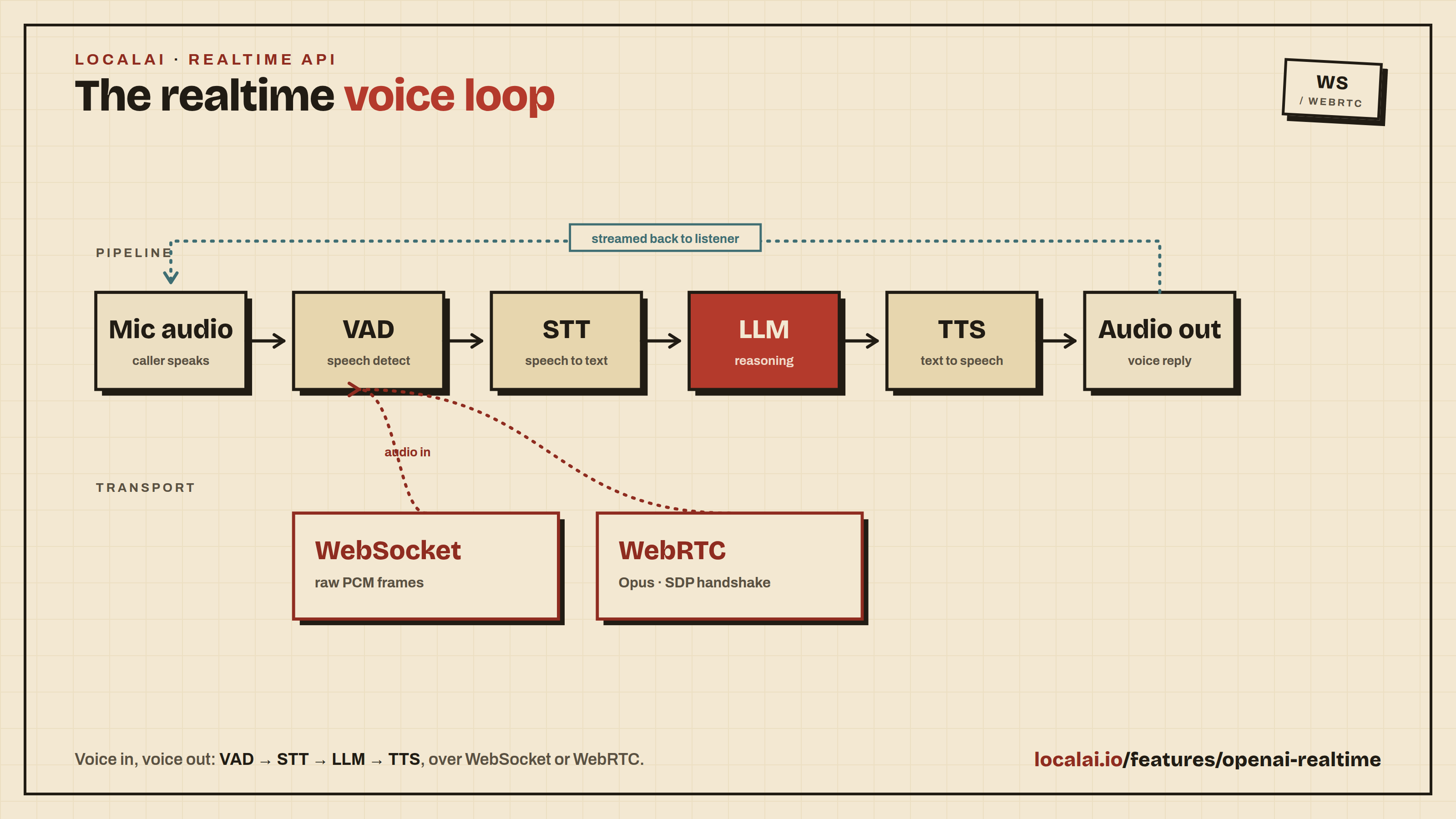
LocalAI supports the OpenAI Realtime API which enables low-latency, multi-modal conversations (voice and text) over WebSocket.
To use the Realtime API, you need to configure a pipeline model that defines the components for Voice Activity Detection (VAD), Transcription (STT), Language Model (LLM), and Text-to-Speech (TTS).
Configuration
Create a model configuration file (e.g., gpt-realtime.yaml) in your models directory. For a complete reference of configuration options, see Model Configuration.
This configuration links the following components:
- vad: The Voice Activity Detection model (e.g.,
silero-vad-ggml) to detect when the user is speaking. - transcription: The Speech-to-Text model (e.g.,
whisper-large-turbo) to transcribe user audio. - llm: The Large Language Model (e.g.,
qwen3-4b) to generate responses. - tts: The Text-to-Speech model (e.g.,
tts-1) to synthesize the audio response.
Make sure all referenced models (silero-vad-ggml, whisper-large-turbo, qwen3-4b, tts-1) are also installed or defined in your LocalAI instance.
Streaming the pipeline
By default each stage runs to completion before the next begins: the whole utterance is transcribed, the full LLM reply is generated, then it is synthesized. Each stage can instead be streamed incrementally, which lowers the time-to-first-audio of a turn:
- streaming.tts: emit a
response.output_audio.deltaper audio chunk the TTS backend produces (requires a backend that supports streaming synthesis), instead of one delta for the whole utterance. Falls back to a single unary delta otherwise. - streaming.transcription: stream
conversation.item.input_audio_transcription.deltaevents as the transcript is produced (requires a transcription backend that supports streaming). - streaming.llm: stream the LLM reply token-by-token as
response.output_audio_transcript.deltaevents. The full reply is buffered and synthesized once it is complete — streamed as audio chunks whenstreaming.ttsis enabled (and the TTS backend supports it), otherwise as a single unary delta. Reasoning/thinking is always stripped from the spoken transcript. Tool calls are supported while streaming when the LLM uses its tokenizer template (use_tokenizer_template: true): the backend’s autoparser then delivers content and tool calls separately, so the spoken transcript never leaks tool-call tokens. Grammar-based function calling keeps the buffered path. - streaming.clause_chunking: instead of buffering the whole reply before TTS, split it into speakable clauses and synthesize each as soon as it completes, lowering the time-to-first-audio. The splitter is script-aware: it uses Unicode sentence segmentation (so it handles CJK
。!?with no whitespace), CJK clause punctuation (,、;:), and Thai/Lao spaces — it does not rely on whitespace sentence boundaries, so it works for languages such as Chinese, Japanese and Thai where the old per-sentence approach degraded to whole-message buffering. Requiresstreaming.llm; scripts that genuinely need a dictionary (e.g. Khmer, Burmese) simply stay buffered until a space or end-of-message. Off by default.
All streaming flags are off by default, so existing pipelines are unaffected.
Model warm-up (cold start)
Without warm-up the pipeline’s models are loaded into memory only on first use within a session: the VAD on the first audio chunk, transcription at the first end-of-speech, the LLM on the first reply, and TTS on the first spoken output. On a cold session this staggers a load delay across those first few interactions — and a model that fails to load (missing weights, wrong backend, out of memory) only fails part-way through the first turn.
To avoid that, LocalAI warms the pipeline by default: it loads the VAD, transcription, LLM and TTS backends into memory before the session is announced, and the session start blocks until they are all ready. The loads run concurrently, so the wait is the slowest single model, not the sum. This means:
- The first turn pays no cold-start cost — every backend is already resident.
- Model-load errors surface at session start. If any stage fails to load, the session is not started and the client receives a
model_load_errorinstead ofsession.created, so a broken pipeline fails fast and visibly rather than mid-call.
Set disable_warmup: true to restore the lazy “load on first use” behavior — session start no longer waits on loading and load errors surface on the first turn instead. Useful if you want idle sessions to avoid holding model memory they may never use:
Pre-loading a pipeline on demand
Warm-up only fires when a realtime session opens. To load a pipeline into memory ahead of time — e.g. to warm it right after boot, or when running with disable_warmup: true — POST the model name to the admin-only /backend/load endpoint. For a pipeline model it loads every configured sub-model (VAD, transcription, LLM, TTS, sound_detection, voice_recognition) concurrently:
The endpoint is not realtime-specific — it pre-loads any model. See Backend Monitor for the full request/response reference (it is the inverse of /backend/shutdown).
Turn detection
Turn detection decides when the user has finished speaking and the pipeline should respond. Two modes are supported, matching the OpenAI session schema:
server_vad(default): silence-based. The VAD model watches the audio and the turn commits aftersilence_duration_ms(default 500 ms) of silence. Simple and model-agnostic, but a fixed silence window must trade interrupting mid-sentence pauses against sluggish responses.semantic_vad: model-driven. The transcription model itself signals end-of-utterance and the silence window becomes dynamic: short right after the model emits its end-of-utterance token, much longer when it does not — so pausing to think no longer gets cut off, while finished sentences get a fast response.
semantic_vad requires a transcription model that emits an end-of-utterance token over a cache-aware streaming decode — currently parakeet-cpp-realtime_eou_120m-v1 (the model is trained to distinguish “paused, expecting a reply” from “paused mid-thought”). The realtime pipeline feeds it the microphone audio live while the user speaks. With any other transcription backend the session degrades gracefully to silence-only detection using the eagerness timeout below (a warning is logged once). The model also emits a distinct end-of-backchannel token (<EOB>) for short acknowledgments like “uh-huh”: those are transcribed but never treated as the user yielding the turn.
Sessions can opt in via session.update (turn_detection: {"type": "semantic_vad", "eagerness": "medium"}), or the pipeline can set a server-side default so clients need no changes:
A client session.update still overrides type and eagerness per session.
Eagerness sets the fallback silence window used when no end-of-utterance token was seen (the model missed it, or the user genuinely trails off): low waits 8 s, medium/auto 4 s, high 2 s — the same max-timeout semantics OpenAI documents. After the token is seen, the turn commits on the next VAD tick (~300 ms).
Live captions: while the user speaks, semantic_vad streams conversation.item.input_audio_transcription.delta events under the item id the commit will later reuse, so clients can render the words as they are recognized. The completed event at commit carries the authoritative transcript and replaces the partial text (with retranscribe: true it may differ from the captions); a turn discarded before commit emits conversation.item.input_audio_transcription.failed so clients can retract its captions.
retranscribe (server-side only, semantic_vad only) cross-checks the streaming decode against a batch decode at commit time:
false(default): the transcript accumulated from the live stream is used as-is — the model runs once per utterance and the LLM starts immediately at commit.true: the committed audio is re-transcribed offline. If the batch decode also ends with the end-of-utterance token the turn proceeds (using the batch transcript); if it does not, the commit is cancelled and the session keeps listening — treating the streaming token as a false positive. Both transcripts are compared and logged, which makes this mode a useful diagnostic for how well the streaming and batch decodes align, at the cost of one extra decode per turn.
Disabling thinking
For reasoning models, you can force the pipeline LLM’s thinking off without editing the LLM model config:
This is applied only to the realtime session’s copy of the LLM config, so it does not affect other users of the same model. Leave it unset to use the LLM model config’s own reasoning settings.
Conversation compaction (long sessions on CPU)
By default a realtime session feeds only the last max_history_items turns to the LLM; older turns are dropped and forgotten. On CPU, long calls also grow expensive as the prompt fills with verbatim history. Enable compaction to instead fold older turns into a rolling summary, so long calls stay cheap without losing earlier context.
Compaction works with two numbers:
max_history_itemsis the live window — the recent turns kept verbatim in the prompt.compaction.trigger_itemsis the high-water mark — let the buffer grow to here, then summarize the overflow (everything abovemax_history_items) into a rolling memory and evict it. It must be greater thanmax_history_items; if it is not, it is clamped up.
The gap between the two controls how often summarization runs: a summary call fires roughly every (trigger_items - max_history_items) turns (here, about every 6 turns).
Tip
On CPU, set summary_model to a small, fast model so compaction never competes with the conversation LLM for compute. Left empty, the pipeline’s own LLM produces the summary.
Clients can also manage history directly via the now-supported conversation.item.delete, conversation.item.truncate, and input_audio_buffer.clear realtime events.
Transports
The Realtime API supports two transports: WebSocket and WebRTC.
WebSocket
Connect to the WebSocket endpoint:
Audio is sent and received as raw PCM in the WebSocket messages, following the OpenAI Realtime API protocol.
WebRTC
The WebRTC transport enables browser-based voice conversations with lower latency. Connect by POSTing an SDP offer to the REST endpoint:
The response contains the SDP answer to complete the WebRTC handshake.
Opus backend requirement
WebRTC uses the Opus audio codec for encoding and decoding audio on RTP tracks. The opus backend must be installed for WebRTC to work. Install it from the model gallery:
Or set the EXTERNAL_GRPC_BACKENDS environment variable if running a local build:
The opus backend is loaded automatically when a WebRTC session starts. It does not require any model configuration file — just the backend binary.
WebRTC behind Docker host networking or NAT
By default pion gathers a host ICE candidate for every local interface. Under
Docker host networking that includes bridge addresses (docker0/veth,
172.x) that a remote browser cannot route to: the call typically connects on a
good candidate and then drops a few seconds later when ICE consent checks fail on
the unreachable ones. Two settings let you advertise only the reachable address:
Tip
For a browser on another LAN machine talking to LocalAI in a host-networked
container, set LOCALAI_WEBRTC_NAT_1TO1_IPS to the host’s LAN IP. This is the
most reliable fix for WebRTC connections that establish and then drop.
Protocol
The API follows the OpenAI Realtime API protocol for handling sessions, audio buffers, and conversation items.
Gating a realtime pipeline with voice recognition
A pipeline realtime model can require speaker verification before it responds. Add a voice_recognition block under pipeline. When present, each committed utterance is verified against authorized speakers; unauthorized utterances are dropped before the LLM runs (no LLM call, no tool execution, no TTS). The session stays open.
The same block also drives two optional, independent behaviors: an authorization gate (enforce) and speaker surfacing/personalization (identity). Set enforce: false to keep recognizing the speaker without ever rejecting a turn.
Identifying speakers without gating
To recognize who is speaking and surface it to the client and the LLM without ever rejecting a turn, set enforce: false and add an identity block. The identity block works with or without the gate; when it is set, the speaker is resolved on every turn even if when: first.
| Field | Meaning |
|---|---|
model | Speaker-recognition backend model name. |
mode | identify matches against speakers registered via /v1/voice/register; verify matches against the references audios. |
threshold | Maximum cosine distance that still counts as a match (default ~0.25). |
enforce | Authorization gate. true (or omitted) rejects unauthorized speakers (the gating behavior above). false resolves and surfaces the speaker without ever dropping a turn. |
when | every verifies each utterance; first verifies once then trusts the session. When an identity block is set, the speaker is still resolved on every turn even with first. |
on_reject | drop_event drops and emits a speaker_not_authorized error event; drop_silent drops quietly. |
anti_spoofing | Verify mode only: runs the backend liveness check (slower). |
allow.names / allow.labels | identify mode: which registry identities are authorized. Empty = any registered speaker. |
references | verify mode: authorized reference speakers; the utterance passes if it matches any. |
identity.announce | Emit the conversation.item.speaker event to the client (see below). |
identity.announce_unknown | Also emit that event when there is no confident match. By default the event is emitted only on a match. |
identity.personalize | Inform the LLM who is speaking. |
identity.inject_name | Set the per-message OpenAI name field on each user turn. |
identity.inject_system_note | Append a The current speaker is <Name>. line to the system message. |
identity.note_unknown | When unidentified, append The current speaker is unknown. (lets the model ask who it is talking to). |
identify mode requires the voice registry (speakers registered through /v1/voice/register). verify mode needs no registry: reference audios are embedded once at model load.
The conversation.item.speaker event
When identity.announce is enabled, the server emits a conversation.item.speaker event after the user conversation item, naming the recognized speaker:
confidence is a 0-100 score, distance is the cosine distance, and matched is true when a confident match was found. labels carries any labels attached to the registered speaker (identify mode); it is omitted when the speaker has none. The name and id fields are omitted when empty. By default the event is emitted only on a match; set identity.announce_unknown: true to also emit it (with matched: false) when no speaker is identified.
This event is a LocalAI extension to the OpenAI Realtime API and is server-emitted only. Standard OpenAI Realtime clients ignore event types they do not recognize, so enabling it is non-breaking.
Examples
- Realtime voice assistant demo (Go): a minimal Go client for the Realtime (WebSocket) API with a full talk-back voice loop and an example tool call. Ships a
docker composesetup that brings up a realtime-capable LocalAI for you. - Realtime voice assistant example (Python): thin-client architecture (Silero VAD on the client, heavy lifting on LocalAI), suited to running the client on a Raspberry Pi.